A manufacturing company runs three on-prem Nutanix clusters — two in a primary data centre, one at a DR site — and the platform team has been building VMs by hand in the Prism Central UI for two years. The result is exactly what you would expect: snowflake VMs with inconsistent specs, network placements that nobody can explain, and a security team that cannot tell which workloads are PCI-scoped because the “tagging” lives in a spreadsheet. The mandate from the new head of infrastructure is blunt: every VM, every category, every subnet attachment goes through Terraform, reviewed in a pull request, with the same identity and audit story the cloud estate already has. This guide is the concrete walk-through for getting there with the official Terraform NX provider (nutanix/nutanix) driving Prism Central — provisioning AHV VMs, modelling workloads with categories, and enforcing network segmentation as code.
The reason this matters beyond tidiness: on AHV, categories are not cosmetic labels. They are the keying mechanism for Flow microsegmentation policy, for protection-policy membership, and for image placement. Get categories wrong and your security policy silently applies to the wrong VMs. So the job is not “Terraform some VMs” — it is to make the category model, the subnet model, and the VM model one coherent, version-controlled source of truth.
Prerequisites
- A Prism Central instance (pc.2024.x or later) managing one or more registered AHV clusters, reachable on TCP 9440.
- An AHV cluster with at least one storage container and the AOS version compatible with your PC.
- A service account in Prism Central with a custom role scoped to VM, subnet, category, and image operations — not
Prism Admin. We will source its credentials from HashiCorp Vault, never from a.tfvarsfile. - Terraform ≥ 1.6 and the
nutanix/nutanixprovider ≥ 1.9 (the version exposing the v3 resources used here). - A Subnet (VLAN-backed or VPC overlay) already trunked to the AHV hosts at the physical-switch level — Terraform attaches NICs to subnets, it does not configure your top-of-rack.
- The nutanix_v3 API enabled (default on modern PC) and an IP block reserved for IPAM-managed subnets if you want Nutanix to hand out guest IPs.
Target topology
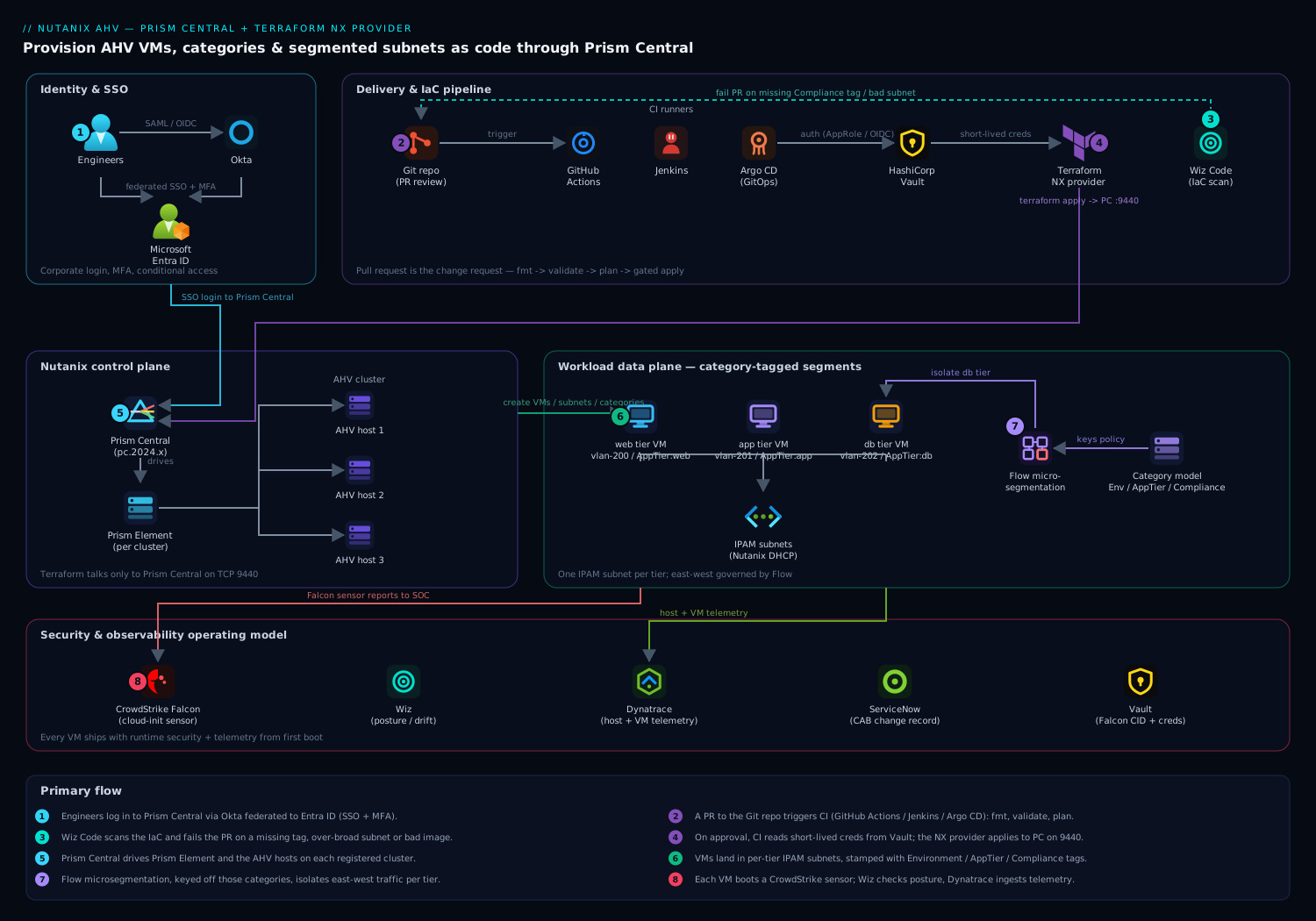
The control plane is Prism Central, which fronts the registered AHV cluster(s). Terraform talks only to Prism Central on 9440; Prism Central in turn drives the Prism Element on each cluster and the AHV hosts. Above Terraform sits the delivery chain — a Git repo, a CI runner (Jenkins, GitHub Actions, or Argo CD for the pull-through model), and HashiCorp Vault issuing the Prism credentials at plan time. Human access to Prism Central federates through Okta to Microsoft Entra ID over SAML/OIDC so engineers log in with corporate SSO and MFA rather than local Prism accounts. On the data path, every provisioned VM lands in a category-tagged segment whose east-west traffic is governed by Flow microsegmentation rules keyed off those same categories, and each guest carries a CrowdStrike Falcon sensor while Wiz scans the estate for posture drift and Dynatrace ingests host and VM telemetry.
1. Create a scoped Prism Central service account and store it in Vault
Do not run Terraform as admin. Create a dedicated identity with only the rights it needs, then put its secret where pipelines — not humans — can read it.
In Prism Central, create a local service account (or, better, an Entra-federated service identity), then define a custom role granting only VM, subnet, image, and category operations. With the role assigned, write the credential into HashiCorp Vault under the KV mount your CI is allowed to read:
# Write the Prism Central service-account creds into Vault KV v2
vault kv put secret/nutanix/prod \
  endpoint="pc.prod.internal" \
  username="svc-terraform@corp.example.com" \
  password='REDACTED_USE_VAULT_GENERATED'

# A short-lived token for the CI run is minted from a bound role, not a static token
vault token create -policy=nutanix-terraform -ttl=30m -format=json
The point of Vault here is concrete: the Prism password never lands in Git, in a terraform.tfvars, or in CI environment history. The pipeline authenticates to Vault (AppRole for Jenkins, OIDC/JWT auth for GitHub Actions), reads secret/nutanix/prod at plan time, and the lease expires 30 minutes later. If a runner is compromised, the blast radius is one expired token.
2. Configure the Terraform NX provider
Pin the provider and feed it the Vault-sourced values via environment variables, so nothing sensitive is written to disk. The provider reads NUTANIX_USERNAME, NUTANIX_PASSWORD, and NUTANIX_ENDPOINT automatically.
# versions.tf
terraform {
  required_version = ">= 1.6"
  required_providers {
    nutanix = {
      source  = "nutanix/nutanix"
      version = ">= 1.9.5"
    }
  }
  # Remote state — on-prem MinIO/S3-compatible bucket with locking via DynamoDB-compatible table,
  # or Terraform Cloud. Never local state for shared infrastructure.
  backend "s3" {
    bucket = "tfstate-nutanix-prod"
    key    = "ahv/clusters.tfstate"
    region = "us-east-1"
  }
}

# provider.tf
provider "nutanix" {
  # endpoint / username / password come from NUTANIX_* env vars exported from Vault
  port                 = 9440
  insecure             = false   # validate the PC certificate; ship the CA to the runner
  wait_timeout         = 60      # minutes the provider waits on long VM tasks
  session_auth         = true    # reuse a session cookie instead of basic-auth per call
}
Export the Vault values in the CI step right before terraform plan:
export NUTANIX_ENDPOINT="$(vault kv get -field=endpoint secret/nutanix/prod)"
export NUTANIX_USERNAME="$(vault kv get -field=username secret/nutanix/prod)"
export NUTANIX_PASSWORD="$(vault kv get -field=password secret/nutanix/prod)"
terraform init -input=false
terraform plan -out=tfplan -input=false
Two flags earn their keep. insecure = false forces TLS validation against Prism Central’s certificate — distribute the internal CA to your runners rather than disabling verification. session_auth = true makes the provider authenticate once and reuse the session cookie, which materially cuts API round-trips when you are creating dozens of VMs in one apply.
3. Look up the cluster, subnets, and images with data sources
Never hard-code UUIDs. Resolve them at plan time with data sources so the same code runs against prod, DR, and a lab cluster by changing one variable.
# data.tf
data "nutanix_clusters" "all" {}

locals {
  # Pick the target cluster by name from the PC inventory
  cluster_uuid = one([
    for c in data.nutanix_clusters.all.entities :
    c.metadata.uuid if c.name == var.cluster_name
  ])
}

# A pre-existing VLAN-backed subnet, trunked to the hosts at the switch
data "nutanix_subnet" "app_tier" {
  subnet_name = "vlan-201-app"
}

# A golden image previously uploaded to the cluster (e.g. via Packer)
data "nutanix_image" "rhel9_base" {
  image_name = "rhel9-base-2026.05"
}
one(...) is deliberate: if the cluster name matches zero or two entries, the plan fails loudly instead of silently picking one. That is exactly the behaviour you want when a typo could otherwise deploy your PCI workload onto the lab cluster.
4. Define the category model — the keystone
This is the step teams skip and regret. Categories are the join key between VMs and every policy that governs them. Model them as code, with explicit keys and the full set of allowed values, so a VM can only ever be tagged with a value that exists.
# categories.tf
resource "nutanix_category_key" "environment" {
  name        = "Environment"
  description = "Deployment environment, drives Flow policy scope"
}

resource "nutanix_category_value" "env_values" {
  for_each   = toset(["prod", "dr", "nonprod"])
  name       = nutanix_category_key.environment.name
  value      = each.value
}

resource "nutanix_category_key" "app_tier" {
  name        = "AppTier"
  description = "Three-tier role: web, app, or db — segmentation boundary"
}

resource "nutanix_category_value" "tier_values" {
  for_each   = toset(["web", "app", "db"])
  name       = nutanix_category_key.app_tier.name
  value      = each.value
}

resource "nutanix_category_key" "compliance" {
  name        = "Compliance"
  description = "Regulatory scope; pci-scoped VMs get a stricter Flow ruleset"
}

resource "nutanix_category_value" "compliance_values" {
  for_each   = toset(["pci", "internal", "public"])
  name       = nutanix_category_key.compliance.name
  value      = each.value
}
With this in place, Compliance: pci is a first-class, governed value — not free text in a spreadsheet. When the security team writes a Flow policy that isolates PCI workloads, it targets this category, and the moment a VM is tagged pci by Terraform it inherits that policy. The audit answer to “which VMs are PCI-scoped?” becomes a single category query in Prism Central instead of a forensic exercise.
5. Provision an AHV VM and tag it with categories
Now the VM itself. This resource attaches the NIC to the looked-up subnet, clones from the golden image into a new disk, sizes CPU/RAM, and — critically — stamps the governance categories from step 4.
# vm-app.tf
resource "nutanix_virtual_machine" "app01" {
  name                 = "app01-prod"
  cluster_uuid         = local.cluster_uuid
  num_vcpus_per_socket = 2
  num_sockets          = 2          # 4 vCPU total
  memory_size_mib      = 8192       # 8 GiB

  # Governance: these tags are what Flow, protection policies, and reporting key off
  categories {
    name  = nutanix_category_key.environment.name
    value = "prod"
  }
  categories {
    name  = nutanix_category_key.app_tier.name
    value = "app"
  }
  categories {
    name  = nutanix_category_key.compliance.name
    value = "internal"
  }

  # NIC on the app-tier subnet; IPAM hands out the guest IP
  nic_list {
    subnet_uuid = data.nutanix_subnet.app_tier.metadata.uuid
  }

  # Boot disk cloned from the golden image
  disk_list {
    data_source_reference = {
      kind = "image"
      uuid = data.nutanix_image.rhel9_base.metadata.uuid
    }
    disk_size_mib = 51200   # resize the cloned disk to 50 GiB
  }

  # Cloud-init for first-boot config (user, packages, CrowdStrike sensor install)
  guest_customization_cloud_init_user_data = base64encode(templatefile("${path.module}/cloud-init/app.yaml.tftpl", {
    falcon_cid = var.falcon_cid
  }))

  lifecycle {
    ignore_changes = [disk_list[0].disk_size_mib]  # avoid churn if AOS reports a rounded size
  }
}
The cloud-init user-data is where runtime security joins on day zero: the template installs the CrowdStrike Falcon sensor and registers it with your CID, so the VM reports to the SOC from first boot rather than waiting for a config-management sweep. Keep the CID itself in Vault and pass it through a variable — never inline it.
For fleets, wrap this in a small module and drive it with a map, so adding a VM is a four-line data change in a pull request:
module "app_fleet" {
  source   = "./modules/ahv-vm"
  for_each = var.app_vms        # map of name -> {vcpu, mem, tier}
  name     = each.key
  vcpu     = each.value.vcpu
  memory   = each.value.mem
  tier     = each.value.tier
  cluster_uuid = local.cluster_uuid
  subnet_uuid  = data.nutanix_subnet.app_tier.metadata.uuid
}
6. Create segmented subnets as code
If your subnets are not pre-created, Terraform can define VLAN-backed subnets with Nutanix IPAM so each tier gets its own L2 segment and managed address pool. This is the network half of segmentation — the categories in step 4 are the policy half.
# subnets.tf — a managed, IPAM-backed app-tier subnet on VLAN 201
resource "nutanix_subnet" "app_tier_managed" {
  name        = "vlan-201-app"
  cluster_uuid = local.cluster_uuid
  vlan_id     = 201
  subnet_type = "VLAN"

  # Nutanix IPAM: it owns DHCP and hands out guest IPs from this range
  subnet_ip          = "10.20.1.0"
  default_gateway_ip = "10.20.1.1"
  prefix_length      = 24

  ip_config_pool_list_ranges = ["10.20.1.50 10.20.1.250"]

  dhcp_options = {
    domain_name_servers = "10.0.0.53,10.0.0.54"
    domain_name         = "prod.internal"
  }
}
Define one subnet per tier — web on 200, app on 201, db on 202 — so the L2 boundaries line up with the AppTier category. The microsegmentation policy then has both a network boundary and a category boundary to work with, which is belt-and-braces isolation for the db tier in particular.
7. Wire the pull request into CI and let the platform tools take over
The whole point is that none of this runs from a laptop. The repo is the source of truth; a pull request is the change request.
- GitHub Actions / Jenkins runs
fmt → validate → planon every PR, authenticates to Vault for the Prism creds, and posts the plan as a comment for review. Apply is gated on approval and runs only from the protected branch. - Argo CD suits teams that prefer GitOps pull-through: a controller reconciles the desired state from Git rather than CI pushing it, which keeps drift visible.
- Wiz Code runs in the PR as IaC scanning: it flags a VM created without the
Compliancecategory, a subnet with an over-broad DHCP range, or an image not on the approved list — before merge, so misconfigurations never reach Prism Central. - A merged change can open a ServiceNow change record automatically (via the pipeline’s API call), giving the CAB the audit trail it needs without an engineer filing tickets by hand.
A representative GitHub Actions plan job:
jobs:
  plan:
    runs-on: self-hosted        # runner on a network that can reach pc.prod.internal:9440
    permissions: { id-token: write, contents: read }
    steps:
      - uses: actions/checkout@v4
      - name: Auth to Vault via OIDC
        run: |
          export VAULT_ADDR=https://vault.internal:8200
          TOKEN=$(vault write -field=token auth/jwt/login role=nutanix-terraform jwt=$ACTIONS_ID_TOKEN)
          echo "VAULT_TOKEN=$TOKEN" >> $GITHUB_ENV
      - name: Export Nutanix creds + plan
        run: |
          export NUTANIX_ENDPOINT="$(vault kv get -field=endpoint secret/nutanix/prod)"
          export NUTANIX_USERNAME="$(vault kv get -field=username secret/nutanix/prod)"
          export NUTANIX_PASSWORD="$(vault kv get -field=password secret/nutanix/prod)"
          terraform init -input=false && terraform plan -out=tfplan
      - name: Wiz IaC scan
        run: wiz-cli iac scan --path . --policy "Nutanix-Baseline"
Validation
After apply, confirm the desired state landed — do not trust the apply log alone.
# 1. Terraform's own view: no drift, expected resource count
terraform plan -detailed-exitcode    # exit 0 = no changes pending; 2 = drift

# 2. Confirm the VM exists and is powered on, via the v3 API
curl -ksu "$NUTANIX_USERNAME:$NUTANIX_PASSWORD" \
  -H 'Content-Type: application/json' -X POST \
  "https://$NUTANIX_ENDPOINT:9440/api/nutanix/v3/vms/list" \
  -d '{"kind":"vm","filter":"vm_name==app01-prod"}' | jq '.entities[].status.resources.power_state'

# 3. Verify the governance categories actually attached
curl -ksu "$NUTANIX_USERNAME:$NUTANIX_PASSWORD" \
  -H 'Content-Type: application/json' -X POST \
  "https://$NUTANIX_ENDPOINT:9440/api/nutanix/v3/vms/list" \
  -d '{"kind":"vm","filter":"vm_name==app01-prod"}' | jq '.entities[].metadata.categories_mapping'
In the Prism Central UI, run a category query for Compliance: internal and confirm app01-prod appears — that single query is what your security and audit teams will use, so prove it works now. Finally, confirm in Dynatrace that the new host and VM are reporting metrics; if the OneAgent or host extension was baked into the golden image, telemetry should appear within minutes, closing the loop that the workload is both built and observed.
Rollback / teardown
Because everything is declarative, rollback is removing the resource from code or destroying a scoped target — never clicking around Prism Central, which would create the drift this whole exercise eliminates.
# Tear down a single VM only, leaving categories and subnets intact
terraform destroy -target=nutanix_virtual_machine.app01 -auto-approve

# Roll back a bad change by reverting the PR and re-applying the previous state
git revert <merge-commit> && terraform apply -input=false

# Full environment teardown (lab only) — destroy order is provider-managed
terraform destroy -input=false
Destroy VMs and subnets before category keys: a category value still referenced by a VM cannot be deleted, and Terraform will (correctly) error rather than orphan policy. If a VM is stuck in a delete task, check Prism Central’s task list — a lingering image clone or a protection-policy membership can hold it, and clearing that lets the next apply converge.
Common pitfalls
- Treating categories as cosmetic. They drive Flow policy, protection policies, and image placement. A VM created without its
Compliancecategory is invisible to the security policy that should isolate it. Make the category a required module input so it cannot be forgotten — and let Wiz Code fail the PR if it is missing. - Hard-coded UUIDs. Cluster, subnet, and image UUIDs differ across PCs and change on rebuild. Always resolve them via data sources, or the same code silently targets the wrong cluster.
- Disabling TLS verification.
insecure = trueis the lazy fix for a self-signed PC cert and a standing audit finding. Ship the internal CA to runners and keepinsecure = false. - Local or unlocked state. Two engineers applying against shared infrastructure without state locking will corrupt it. Use a locking remote backend from day one.
- VLAN not trunked at the switch. Terraform attaches a NIC to a subnet; it does not configure your physical fabric. If the VLAN is not trunked to the AHV hosts, the VM gets a NIC with no connectivity and the failure looks like a guest problem.
- Disk-size drift churn. AOS sometimes reports a rounded disk size, so every plan shows a phantom change.
ignore_changesondisk_size_mib(as in step 5) suppresses it. - Running as Prism Admin. Over-privileged service accounts turn a compromised runner into a cluster-wide incident. Scope the custom role to exactly VM/subnet/image/category operations.
Security notes
Identity is the spine. Engineers reach Prism Central through Okta federated to Microsoft Entra ID, so access is corporate SSO with MFA and conditional access — no shared local Prism logins. Terraform’s own credential is a scoped, short-lived secret issued by HashiCorp Vault at plan time, never persisted. Runtime protection rides into every VM via the CrowdStrike Falcon sensor installed by cloud-init, reporting to the SOC from first boot. Posture is continuously checked by Wiz across the estate — drift to an over-broad subnet, an untagged compliance workload, a VM off the approved image — with Wiz Code shifting the same checks left into the pull request. Network segmentation is enforced in two layers that reinforce each other: L2 subnet boundaries per tier (step 6) and Flow microsegmentation rules keyed off the AppTier and Compliance categories (step 4), so the database tier is isolated by both its network and its policy. The combination means a single missing tag is caught three times — by Wiz Code in the PR, by the category-required module input, and by the audit category query.
Cost notes
On-prem Nutanix cost is dominated by licensed cores and consumed storage, not by an hourly meter, so the levers are different from cloud. First, right-size at provisioning: the module forces explicit vcpu/memory inputs in the pull request, which makes oversizing a visible, reviewable decision rather than a default. Second, drive density — because VMs are now uniform and category-tagged, you can confidently bin-pack and reclaim the snowflake over-provisioning that came from manual builds. Third, retire cleanly: terraform destroy -target releases licensed cores and storage the moment a workload is decommissioned, where a hand-built VM tends to linger and keep consuming its allocation. Finally, feed Dynatrace host and VM utilisation back to capacity planning — sustained low CPU across a category is the signal to consolidate, and because the category model is real, that report is one query rather than a spreadsheet reconciliation. The same uniformity that buys you security buys you density, and density is the whole cost story on owned hardware.