A mid-size fintech has 38 engineering teams and a platform team of six, and the platform team has become a ticket queue. Every new microservice means a Slack thread asking for a repo, a Kubernetes namespace, a database, and a CI pipeline, and every audit means a frantic spreadsheet asking which of 400 services actually have on-call set up, a runbook, and a passing vulnerability scan. Nobody can answer “is this service production-ready?” without a person reading a wiki. The platform lead’s mandate is blunt: give engineers a single front door where they can find any service, scaffold a new one without filing a ticket, and where “production-ready” is a measured, enforced state — not a vibe. That front door is Port, a developer portal you configure as data (blueprints, entities, actions, scorecards) rather than a UI you click together. This guide stands it up end to end: catalog modelled from GitHub, a working self-service action that creates a real service, and scorecards that gate promotion to production.
Prerequisites
- A Port account (the free tier is enough to follow along) and an org admin login.
- GitHub org admin rights — you will install the Port GitHub app and create an Actions workflow with org-level secrets.
- The Port CLI (
pip install port-cli) or justcurl+jq; examples use both. A Port API client ID and secret from Settings → Credentials. - A Microsoft Entra ID (or Okta) tenant where you can register an enterprise app, for SSO and group-to-team mapping.
- HashiCorp Vault reachable from your GitHub Actions runners, holding the cloud and Port credentials the action workflows need.
- Optional but assumed by the scorecards: Wiz (or Wiz Code) for vulnerability findings, Datadog or Dynatrace for service monitors, PagerDuty/ServiceNow for on-call, and Argo CD if you deploy via GitOps.
Target topology
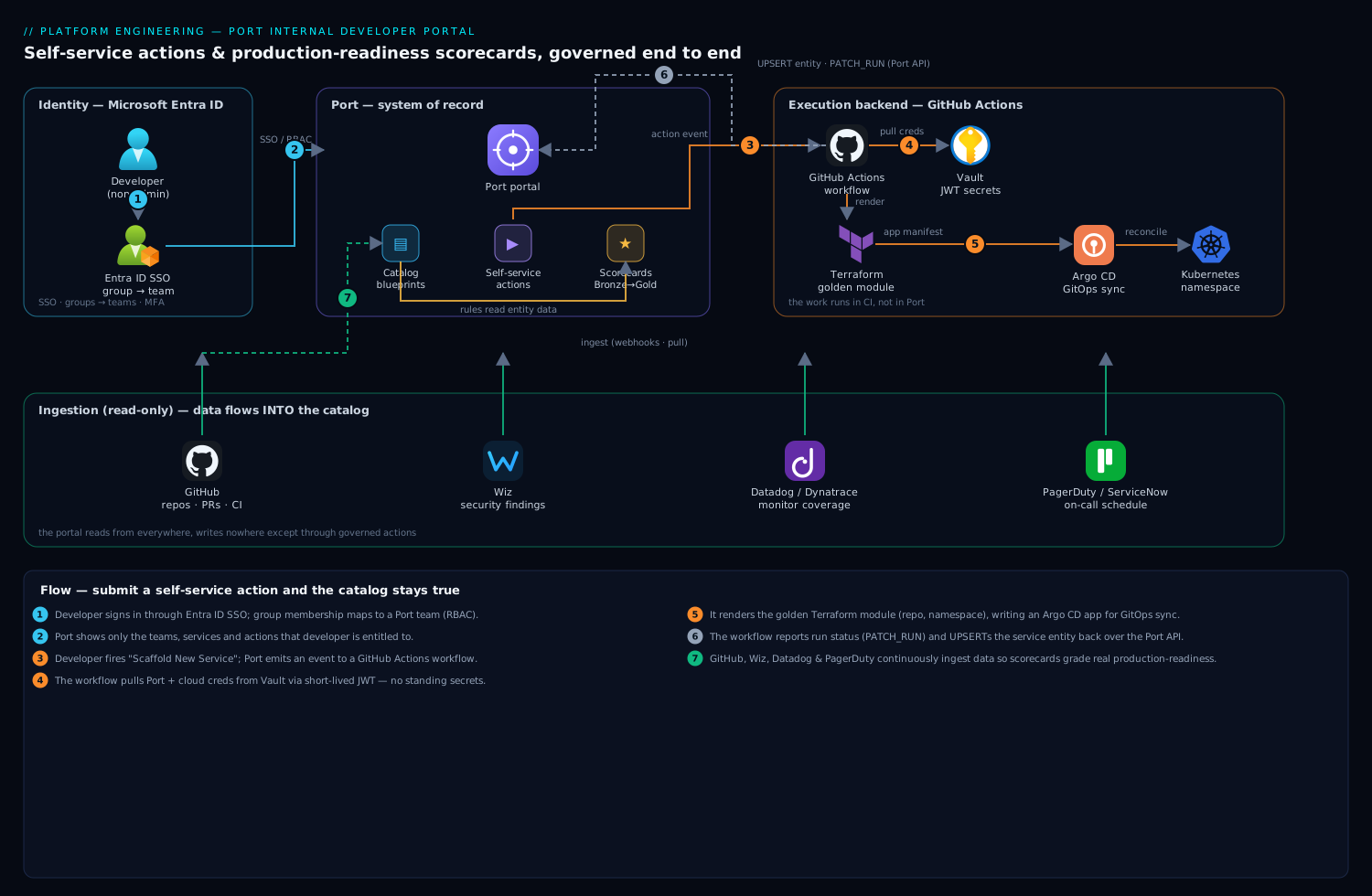
Port is the system of record and the UI; it holds blueprints (the schema of your catalog), entities (the data), self-service actions (forms that fire a backend), and scorecards (rules over entities). It is deliberately not the executor. When a developer submits an action, Port emits an event to a backend — here a GitHub Actions workflow — which does the real work (create a repo, render Terraform, open a PR) and reports the result back to Port over the API. Identity flows from Entra ID so a developer sees only the teams and actions they are entitled to. Data flows into the catalog from GitHub (repos, PRs, workflows), from Wiz (security findings), and from Datadog/Dynatrace (monitors), so a scorecard can ask real questions: does this service have an owner, a passing scan, a deploy in the last 30 days. The portal reads from everywhere and writes nowhere except through governed actions — that separation is the whole design.
1. Get API credentials and a working token
Everything Port-side is an API. Grab a machine token first so every later step is scriptable and idempotent.
In Port: Settings → Credentials → Generate. Then exchange the client credentials for a bearer token (tokens last ~1 hour; the CLI refreshes automatically, but raw curl is shown so you understand the wire):
export PORT_CLIENT_ID="<your-client-id>"
export PORT_CLIENT_SECRET="<your-client-secret>"

PORT_TOKEN=$(curl -s -X POST 'https://api.getport.io/v1/auth/access_token' \
  -H 'Content-Type: application/json' \
  -d "{\"clientId\":\"${PORT_CLIENT_ID}\",\"clientSecret\":\"${PORT_CLIENT_SECRET}\"}" \
  | jq -r '.accessToken')

# sanity check: list existing blueprints
curl -s 'https://api.getport.io/v1/blueprints' \
  -H "Authorization: Bearer ${PORT_TOKEN}" | jq '.blueprints[].identifier'
Store PORT_CLIENT_ID/PORT_CLIENT_SECRET in Vault now (vault kv put secret/port/api client_id=... client_secret=...); the Actions workflows in step 5 read them from there, never from a plaintext secret you might leak.
2. Model the catalog with blueprints
A blueprint is a JSON Schema with relations. Start with the two that matter: a service and the team that owns it. Resist the urge to model everything on day one — a portal nobody trusts because half the fields are empty is worse than a small accurate one.
Create team.json:
{
  "identifier": "team",
  "title": "Team",
  "icon": "Group",
  "schema": {
    "properties": {
      "slackChannel": { "type": "string", "title": "Slack Channel" },
      "onCallTool":   { "type": "string", "title": "On-call Tool",
                        "enum": ["PagerDuty", "ServiceNow", "OpsGenie"] }
    },
    "required": []
  }
}
Create service.json with a relation back to team and the properties your scorecards will read:
{
  "identifier": "service",
  "title": "Service",
  "icon": "Microservice",
  "schema": {
    "properties": {
      "lifecycle":   { "type": "string", "title": "Lifecycle",
                       "enum": ["experimental", "production", "deprecated"],
                       "enumColors": { "production": "green", "deprecated": "red" } },
      "tier":        { "type": "string", "title": "Tier",
                       "enum": ["tier-1", "tier-2", "tier-3"] },
      "repo":        { "type": "string", "title": "Repository", "format": "url" },
      "runbookUrl":  { "type": "string", "title": "Runbook", "format": "url" },
      "hasOnCall":   { "type": "boolean", "title": "On-call configured" }
    },
    "required": ["lifecycle", "tier"]
  },
  "relations": {
    "owningTeam": { "title": "Owning Team", "target": "team",
                    "required": true, "many": false }
  }
}
Apply both. With the CLI:
port blueprint apply -f team.json
port blueprint apply -f service.json
Or straight over the API (the same call the CLI makes — useful in CI):
curl -s -X POST 'https://api.getport.io/v1/blueprints' \
  -H "Authorization: Bearer ${PORT_TOKEN}" \
  -H 'Content-Type: application/json' \
  -d @service.json | jq '.blueprint.identifier'
Manage these blueprint files in their own Git repo. They are infrastructure: review them in PRs, and consider applying them with Terraform using the port-labs/port provider so the catalog schema itself is version-controlled and drift-checked alongside the rest of your IaC.
3. Auto-populate the catalog from GitHub
An empty catalog is the most common reason a portal dies in week two. Wire the Port GitHub app so repos flow in automatically and stay current, instead of asking humans to register services by hand.
Install it from the GitHub integration page in Port (Builder → Data sources → GitHub → Install), grant it the org and the repositories you want catalogued. The app uses a YAML mapping that translates GitHub objects into Port entities. Commit this as .github/port.yml or paste it in the data-source UI:
resources:
  - kind: repository
    selector:
      query: 'true'   # ingest every repo; tighten with a JQ expression if needed
    port:
      entity:
        mappings:
          identifier: ".name"
          title: ".name"
          blueprint: '"service"'
          properties:
            repo: ".html_url"
            lifecycle: '"experimental"'   # default until a human promotes it
            tier: '"tier-3"'
Within a minute the catalog fills with one service entity per repo. Extend the mapping to ingest pull-request, workflow, and workflow-run kinds too — those feed the “has CI” and “deployed recently” scorecard rules in step 6. The app keeps everything live via webhooks, so a new repo appears in the portal without anyone touching Port.
Map ownership the same way, ideally from your CODEOWNERS file or a catalog-info.yaml in each repo, so the owningTeam relation is set automatically rather than guessed.
4. Connect SSO and map teams from Entra ID
Before exposing self-service, get identity right — otherwise every developer sees every team’s actions and your audit story collapses.
In Port: Settings → SSO → SAML/OIDC. Register Port as an enterprise application in Microsoft Entra ID (or an OIDC app in Okta if that is your workforce IdP), and configure SAML with Port’s ACS URL and entity ID from that screen. The crucial part is the groups claim: have Entra emit group memberships, then map Entra groups to Port teams so that a developer’s Entra group membership decides which teams — and therefore which services and actions — they can see and run.
Entra group "eng-payments"  ->  Port team "payments"
Entra group "eng-platform"  ->  Port team "platform"  (admin)
This makes the portal a Zero-Trust front door: a payments engineer cannot fire the “decommission service” action against a service owned by another team, because the action’s RBAC is scoped by team membership that traces all the way back to Entra. Enforce conditional access (device + MFA) on the Port enterprise app in Entra so portal access inherits the same guardrails as everything else.
5. Build a self-service action wired to GitHub
This is the payoff: a developer fills a form, and a new, compliant service is born — no ticket. Port renders the form and emits an event; GitHub Actions is the backend that does the work.
Define the action against the service blueprint. Create scaffold-service.json:
{
  "identifier": "scaffold_service",
  "title": "Scaffold New Service",
  "icon": "Rocket",
  "trigger": {
    "type": "self-service",
    "operation": "CREATE",
    "blueprintIdentifier": "service",
    "userInputs": {
      "properties": {
        "name":  { "type": "string", "title": "Service name",
                   "pattern": "^[a-z][a-z0-9-]{2,40}$" },
        "tier":  { "type": "string", "title": "Tier",
                   "enum": ["tier-1", "tier-2", "tier-3"], "default": "tier-3" },
        "team":  { "type": "string", "title": "Owning team",
                   "blueprint": "team", "format": "entity" }
      },
      "required": ["name", "tier", "team"]
    }
  },
  "invocationMethod": {
    "type": "GITHUB",
    "org": "your-org",
    "repo": "platform-actions",
    "workflow": "scaffold-service.yml",
    "workflowInputs": {
      "name": "{{ .inputs.name }}",
      "tier": "{{ .inputs.tier }}",
      "team": "{{ .inputs.team }}",
      "port_run_id": "{{ .run.id }}"
    },
    "reportWorkflowStatus": true
  }
}
Apply it: port action apply -f scaffold-service.json.
Now the backend. In your platform-actions repo, create .github/workflows/scaffold-service.yml. It pulls credentials from Vault, renders a service from a Terraform module (repo, namespace, Argo CD app), opens a PR, and reports each stage back to Port so the developer watches live progress in the portal:
name: scaffold-service
on:
  workflow_dispatch:
    inputs:
      name:        { required: true }
      tier:        { required: true }
      team:        { required: true }
      port_run_id: { required: true }

jobs:
  scaffold:
    runs-on: ubuntu-latest
    permissions: { contents: write, id-token: write }
    steps:
      - uses: actions/checkout@v4

      # Pull Port + cloud creds from Vault (no long-lived secrets in GitHub)
      - uses: hashicorp/vault-action@v3
        with:
          url: ${{ secrets.VAULT_ADDR }}
          method: jwt
          role: github-platform-actions
          secrets: |
            secret/data/port/api  client_id   | PORT_CLIENT_ID ;
            secret/data/port/api  client_secret | PORT_CLIENT_SECRET ;
            secret/data/aws/platform  role_arn | AWS_ROLE_ARN

      - name: Tell Port we started
        uses: port-labs/port-github-action@v1
        with:
          clientId: ${{ env.PORT_CLIENT_ID }}
          clientSecret: ${{ env.PORT_CLIENT_SECRET }}
          operation: PATCH_RUN
          runId: ${{ github.event.inputs.port_run_id }}
          logMessage: "Rendering Terraform for ${{ github.event.inputs.name }}..."

      - name: Render service from the golden module
        run: |
          terraform -chdir=modules/service init -input=false
          terraform -chdir=modules/service apply -auto-approve \
            -var "name=${{ github.event.inputs.name }}" \
            -var "tier=${{ github.event.inputs.tier }}" \
            -var "team=${{ github.event.inputs.team }}"

      - name: Report success + create the catalog entity in Port
        uses: port-labs/port-github-action@v1
        with:
          clientId: ${{ env.PORT_CLIENT_ID }}
          clientSecret: ${{ env.PORT_CLIENT_SECRET }}
          operation: UPSERT
          identifier: ${{ github.event.inputs.name }}
          blueprint: service
          properties: |
            { "lifecycle": "experimental", "tier": "${{ github.event.inputs.tier }}" }
          relations: |
            { "owningTeam": "${{ github.event.inputs.team }}" }
          runId: ${{ github.event.inputs.port_run_id }}
The same pattern scales to a whole action catalog — “add a Datadog monitor,” “request a database,” “rotate a secret” — each a Port form in front of a governed GitHub workflow. Where you deploy via GitOps, have the Terraform step write an Argo CD Application manifest into the GitOps repo instead of applying directly, so the cluster change still goes through Argo’s reconciliation and audit. Teams using Jenkins instead of Actions can swap invocationMethod.type to WEBHOOK and point it at a Jenkins job; the Port-side contract is identical.
6. Define production-readiness scorecards
Scorecards turn “is this production-ready?” into a measured, visible grade. A scorecard is a set of rules over a blueprint’s entities, bucketed into levels (Bronze/Silver/Gold). Attach this one to service.
Create prod-readiness.json:
{
  "identifier": "production_readiness",
  "title": "Production Readiness",
  "rules": [
    {
      "identifier": "has_owner",
      "title": "Has an owning team",
      "level": "Bronze",
      "query": { "combinator": "and", "conditions": [
        { "property": "$team", "operator": "isNotEmpty" }
      ]}
    },
    {
      "identifier": "has_runbook",
      "title": "Has a runbook",
      "level": "Silver",
      "query": { "combinator": "and", "conditions": [
        { "property": "runbookUrl", "operator": "isNotEmpty" }
      ]}
    },
    {
      "identifier": "on_call_set",
      "title": "On-call configured",
      "level": "Silver",
      "query": { "combinator": "and", "conditions": [
        { "property": "hasOnCall", "operator": "=", "value": true }
      ]}
    },
    {
      "identifier": "no_critical_vulns",
      "title": "No critical Wiz findings",
      "level": "Gold",
      "query": { "combinator": "and", "conditions": [
        { "property": "criticalFindings", "operator": "=", "value": 0 }
      ]}
    }
  ]
}
Apply it: port scorecard apply --blueprint service -f prod-readiness.json.
The rules are only as honest as the data feeding them, which is why steps 3 and 4 mattered. The no_critical_vulns rule reads a criticalFindings property you populate by ingesting Wiz (or Wiz Code) findings into the service blueprint — install the Wiz integration in Port and map issues onto the matching service, so a critical CVE in production immediately drops that service off Gold. An is_monitored rule reads a property fed from Datadog or Dynatrace monitor coverage; on_call_set reflects a real PagerDuty/ServiceNow schedule, ingested rather than self-attested. Now the portal can answer the auditor’s question at a glance, per service and rolled up per team.
Finally, gate on it: in the scaffold_service action’s RBAC, or in a separate “Promote to Production” action, require the service to hold at least Silver before its lifecycle can flip to production. The scorecard stops being a dashboard and becomes a control.
Validation
Prove each layer works before you announce the portal.
# 1. Blueprints exist
curl -s 'https://api.getport.io/v1/blueprints' \
  -H "Authorization: Bearer ${PORT_TOKEN}" \
  | jq '.blueprints[] | select(.identifier=="service" or .identifier=="team") | .identifier'

# 2. Catalog populated from GitHub (expect a non-zero count)
curl -s 'https://api.getport.io/v1/blueprints/service/entities' \
  -H "Authorization: Bearer ${PORT_TOKEN}" | jq '.entities | length'

# 3. The action is registered
curl -s 'https://api.getport.io/v1/actions/scaffold_service' \
  -H "Authorization: Bearer ${PORT_TOKEN}" | jq '.action.identifier'

# 4. Scorecard results computed for a known service
curl -s 'https://api.getport.io/v1/blueprints/service/entities/checkout-api' \
  -H "Authorization: Bearer ${PORT_TOKEN}" \
  | jq '.entity.scorecards.production_readiness.level'
Then run the real end-to-end test: log in as a non-admin developer (to confirm Entra group scoping), fire Scaffold New Service from the UI, and watch the run page stream the GitHub Actions logs. Success means a new repo PR opened, a service entity created with the right owningTeam, and the run marked complete in Port. Re-running the action with the same name should fail cleanly on the GitHub side (repo exists), not corrupt the catalog — the UPSERT is idempotent.
Rollback and teardown
Everything created here is declarative, so teardown is clean. Reverse the order of creation: actions and scorecards first, then entities, then blueprints (a blueprint cannot be deleted while entities reference it).
# Remove the action and scorecard
port action delete scaffold_service
port scorecard delete production_readiness --blueprint service

# Delete entities, then the blueprints (relations must go first)
curl -s -X DELETE 'https://api.getport.io/v1/blueprints/service/all-entities?delete_dependents=true' \
  -H "Authorization: Bearer ${PORT_TOKEN}"
port blueprint delete service
port blueprint delete team
To pause rather than destroy, just disable the GitHub data source in Port (catalog stops updating but stays browsable) and toggle the action to a “disabled” state — far less disruptive than deleting blueprints, and the safer choice if you are only rolling back a bad mapping. Anything the action itself provisioned (the new repo, the Terraform resources) is rolled back through its own pipeline — terraform destroy on the rendered module, or reverting the Argo CD app — not from Port; Port only ever held the catalog record.
Common pitfalls
- Launching with an empty catalog. A portal with no data is abandoned in a week. Wire the GitHub integration (step 3) before you invite anyone, so day one shows every real service.
- Modelling too much, too early. Twelve blueprints with mostly-empty properties read as broken. Ship
service+team, prove value, then grow the model. - Self-attested scorecard fields. A
hasOnCallboolean a human ticks is a lie waiting to happen. Feed rules from ingested truth — Wiz, Datadog/Dynatrace, PagerDuty — so a green grade reflects reality, not optimism. - Putting business logic in Port. Port renders the form and tracks the run; the work belongs in GitHub Actions/Jenkins so it is reviewable, testable, and auditable in your CI, not buried in portal config.
- Skipping the run-status callback. If your backend never calls
PATCH_RUN, the developer sees a spinner forever and stops trusting actions. Always report start, progress, and terminal status. - Loose action RBAC. An action without team-scoped permissions lets anyone decommission anyone’s service. Tie every mutating action to the Entra-mapped team from step 4.
Security notes
The portal is a high-value target: it can create infrastructure and it indexes your whole estate. Lock it down with three habits. First, no standing secrets: the action workflow pulls Port and cloud credentials from Vault via short-lived JWT auth at run time (step 5), so there is nothing long-lived in GitHub to leak — the cardinal rule after any past credential exposure. Second, identity end to end: SSO through Entra ID with conditional access and MFA, group-mapped to teams, and every mutating action scoped by that team membership, so the blast radius of a compromised developer is one team’s services. Third, least privilege on the backend: the GitHub Actions role assumes a narrowly-scoped cloud role (OIDC, not a stored key), and Wiz Code scans the platform-actions repo and the golden Terraform module in CI so a misconfiguration never ships through the very pipeline that scaffolds everyone else’s service.
Cost notes
Port itself is priced per active user, so the lever is keeping active developers aligned to real usage rather than provisioning the whole org — start with the teams that file the most tickets, where the portal pays for itself fastest. The larger saving is indirect and real: every self-service action that scaffolds a service is platform-engineer time not spent on a manual ticket, and scorecards turn a quarterly multi-day audit scramble into a live dashboard. Watch one second-order cost — the GitHub Actions minutes the backends consume; keep scaffold workflows lean (cache Terraform providers, avoid re-running a full plan on every status callback) so a popular action does not quietly run up CI spend. The ingestion integrations (GitHub, Wiz, Datadog) are pull-based and cheap; the value they unlock — knowing, at any instant, which services are production-ready — is the number that justifies the platform to the people who fund it.