A scale-up’s analytics team has been running Snowflake “by clicking” for a year, and the December bill arrived 3.4× the November one. The post-mortem found the usual culprits: an XL warehouse a contractor spun up for a one-off backfill and never suspended, twelve people sharing the ACCOUNTADMIN role because nobody could remember who needed what, and a dbt service account with SYSADMIN that an offboarded engineer’s key still authenticated to. The CFO wants a hard spending cap that cannot be argued around, security wants every role assignment reviewable in a pull request, and the data team wants to stop being paged about credits. This guide rebuilds that account the way it should have been built the first time: the entire access model, every resource monitor, and every warehouse’s cost guardrails defined in Terraform, reviewed in Git, and applied by CI — so the account’s state is a file you can read, not a year of forgotten clicks.
Prerequisites
- A Snowflake account on Enterprise edition or higher (resource monitor notifications and several governance features need it), and the
ACCOUNTADMINrole for the initial bootstrap only. - Terraform >= 1.6 locally, and the
snowflakedb/snowflakeprovider (the official provider, formerly Snowflake-Labs) >= 1.0. - A version-control repo with a CI runner — this guide uses GitHub Actions, with notes for Jenkins and Argo CD where they differ.
- A Snowflake-supported IdP for human SSO — Okta or Microsoft Entra ID — and access to create a SAML/SCIM app there.
- HashiCorp Vault (or your cloud’s secret manager) to hold the Terraform service account’s key-pair private key. Do not put it in
.tfvars. - The SnowSQL CLI (or any Snowflake client) for the one-time bootstrap and for validation queries.
Target topology
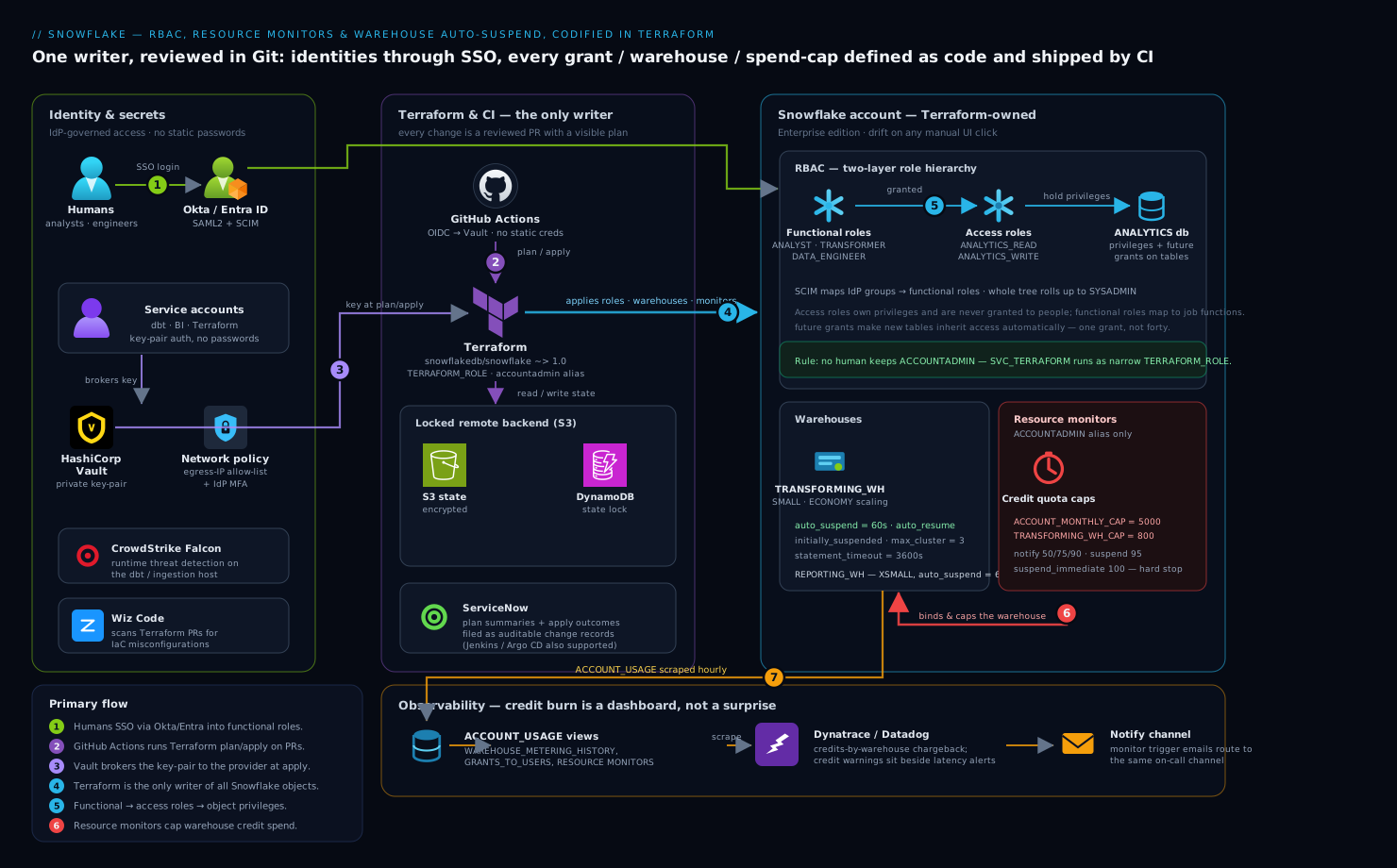
The model has four moving parts and a strict dependency order. Humans authenticate through Okta or Entra ID by SSO and land in functional roles (ANALYST, TRANSFORMER, DATA_ENGINEER) that are granted access roles (<DB>_READ, <DB>_WRITE), which in turn hold the actual object privileges — the two-layer pattern that keeps grants sane. Service accounts (dbt, the Terraform provider itself, the BI tool) authenticate by key-pair, never password, with the private key brokered from HashiCorp Vault. Every warehouse carries AUTO_SUSPEND and a MAX_CONCURRENCY_LEVEL, and is bound to a resource monitor with credit quotas and SUSPEND/SUSPEND_IMMEDIATE triggers — the hard cap the CFO asked for. Terraform is the only writer of all of this; it runs in GitHub Actions, which means every change is a reviewed PR, and Dynatrace/Datadog scrape Snowflake’s ACCOUNT_USAGE views so credit burn is a dashboard, not a surprise.
A non-negotiable rule shapes everything below: Terraform owns the security objects, and Terraform is the only thing that owns them. The moment someone fixes a grant by clicking in the UI, the next terraform apply either reverts it or errors on drift — and that tension is the whole point. State lives in a real remote backend with locking, never on a laptop.
1. Bootstrap a dedicated Terraform role and service user
Never let Terraform run as ACCOUNTADMIN — that is the credential you are trying to retire. Create a purpose-built role with exactly the grants the provider needs, and a key-pair service user for it. Generate the key-pair first.
# Encrypted private key for the Terraform service user; passphrase goes to Vault.
openssl genrsa 2048 | openssl pkcs8 -topk8 -v2 des3 -inform PEM -out tf_snowflake_key.p8
openssl rsa -in tf_snowflake_key.p8 -pubout -out tf_snowflake_key.pub

# Strip header/footer to the single-line form Snowflake's RSA_PUBLIC_KEY wants.
grep -v -e '-----BEGIN' -e '-----END' tf_snowflake_key.pub | tr -d '\n'
Run this once in SnowSQL as ACCOUNTADMIN to create the role and user (this is the only manual click-equivalent in the whole setup):
USE ROLE ACCOUNTADMIN;

CREATE ROLE IF NOT EXISTS TERRAFORM_ROLE;
-- Grants Terraform genuinely needs — not ACCOUNTADMIN.
GRANT CREATE ROLE      ON ACCOUNT TO ROLE TERRAFORM_ROLE;
GRANT CREATE USER      ON ACCOUNT TO ROLE TERRAFORM_ROLE;
GRANT CREATE DATABASE  ON ACCOUNT TO ROLE TERRAFORM_ROLE;
GRANT CREATE WAREHOUSE ON ACCOUNT TO ROLE TERRAFORM_ROLE;
GRANT MANAGE GRANTS    ON ACCOUNT TO ROLE TERRAFORM_ROLE;  -- so it can wire up grants
GRANT MONITOR USAGE    ON ACCOUNT TO ROLE TERRAFORM_ROLE;
-- Resource monitors can only be created/owned by ACCOUNTADMIN, so delegate that path:
GRANT ROLE TERRAFORM_ROLE TO ROLE SYSADMIN;

CREATE USER IF NOT EXISTS SVC_TERRAFORM
  DEFAULT_ROLE      = TERRAFORM_ROLE
  DEFAULT_WAREHOUSE = COMPUTE_WH
  RSA_PUBLIC_KEY    = 'MIIBIjANBgkq...the-stripped-key...AQAB'
  MUST_CHANGE_PASSWORD = FALSE;

GRANT ROLE TERRAFORM_ROLE TO USER SVC_TERRAFORM;
Resource monitors are special: in Snowflake only
ACCOUNTADMINcan create or own them. We handle that in step 4 by running the monitor resources under anaccountadmin-roled provider alias, kept narrow and separate from the main provider.
2. Wire the provider and a locked remote backend
Configure the provider to authenticate as SVC_TERRAFORM by key-pair, pulling the private key from Vault at plan/apply time rather than from disk. Use a remote backend with state locking so two CI runs can never apply at once.
# versions.tf
terraform {
  required_version = ">= 1.6"
  required_providers {
    snowflake = {
      source  = "snowflakedb/snowflake"
      version = "~> 1.0"
    }
    vault = { source = "hashicorp/vault", version = "~> 4.0" }
  }
  backend "s3" {
    bucket         = "acme-tfstate-snowflake"
    key            = "snowflake/prod/terraform.tfstate"
    region         = "ap-south-1"
    dynamodb_table = "tf-locks"        # state locking
    encrypt        = true
  }
}

# providers.tf
data "vault_kv_secret_v2" "tf_key" {
  mount = "secret"
  name  = "snowflake/svc_terraform"   # holds private_key + passphrase
}

provider "snowflake" {
  organization_name = "ACME"
  account_name      = "ANALYTICS_PROD"
  user              = "SVC_TERRAFORM"
  authenticator     = "SNOWFLAKE_JWT"
  private_key       = data.vault_kv_secret_v2.tf_key.data["private_key"]
  role              = "TERRAFORM_ROLE"
}

# A narrow second provider only for resource monitors, which require ACCOUNTADMIN.
provider "snowflake" {
  alias             = "accountadmin"
  organization_name = "ACME"
  account_name      = "ANALYTICS_PROD"
  user              = "SVC_TERRAFORM"
  authenticator     = "SNOWFLAKE_JWT"
  private_key       = data.vault_kv_secret_v2.tf_key.data["private_key"]
  role              = "ACCOUNTADMIN"
}
Initialize and confirm the backend and providers resolve:
terraform init
terraform providers   # expect snowflakedb/snowflake and hashicorp/vault
3. Codify the role hierarchy (access roles + functional roles)
This is the heart of RBAC. The pattern: access roles own privileges on objects and are never granted to people; functional roles map to job functions, are granted the access roles they need, and are what users actually receive. This indirection means adding a new database to “everything analysts can read” is one grant, not forty.
# databases.tf
resource "snowflake_database" "analytics" {
  name                        = "ANALYTICS"
  data_retention_time_in_days = 7
}

# roles.tf — access roles (privilege holders)
resource "snowflake_account_role" "analytics_read" { name = "ANALYTICS_READ" }
resource "snowflake_account_role" "analytics_write" { name = "ANALYTICS_WRITE" }

# functional roles (assigned to humans/services)
resource "snowflake_account_role" "analyst"      { name = "ANALYST" }
resource "snowflake_account_role" "transformer"  { name = "TRANSFORMER" }
resource "snowflake_account_role" "data_engineer"{ name = "DATA_ENGINEER" }

# Compose: functional -> access -> (privileges below)
resource "snowflake_grant_account_role" "analyst_gets_read" {
  role_name        = snowflake_account_role.analytics_read.name
  parent_role_name = snowflake_account_role.analyst.name
}
resource "snowflake_grant_account_role" "transformer_gets_write" {
  role_name        = snowflake_account_role.analytics_write.name
  parent_role_name = snowflake_account_role.transformer.name
}
# Roll the whole tree up to SYSADMIN so it stays manageable.
resource "snowflake_grant_account_role" "analyst_to_sysadmin" {
  role_name        = snowflake_account_role.analyst.name
  parent_role_name = "SYSADMIN"
}
Now attach real privileges to the access roles, using future grants so new schemas/tables inherit access automatically:
# grants.tf — privileges live on access roles only
resource "snowflake_grant_privileges_to_account_role" "read_db_usage" {
  account_role_name = snowflake_account_role.analytics_read.name
  privileges        = ["USAGE"]
  on_account_object {
    object_type = "DATABASE"
    object_name = snowflake_database.analytics.name
  }
}

resource "snowflake_grant_privileges_to_account_role" "read_future_tables" {
  account_role_name = snowflake_account_role.analytics_read.name
  privileges        = ["SELECT"]
  on_schema_object {
    future {
      object_type_plural = "TABLES"
      in_database        = snowflake_database.analytics.name
    }
  }
}

resource "snowflake_grant_privileges_to_account_role" "write_future_tables" {
  account_role_name = snowflake_account_role.analytics_write.name
  privileges        = ["SELECT", "INSERT", "UPDATE", "DELETE"]
  on_schema_object {
    future {
      object_type_plural = "TABLES"
      in_database        = snowflake_database.analytics.name
    }
  }
}
Bind human identities through SSO rather than provisioning passwords. Configure a SAML2 integration to Okta (or Entra ID) so workforce login is centralized and offboarding in the IdP instantly cuts Snowflake access, and use SCIM so the IdP pushes users and group membership into Snowflake roles automatically:
resource "snowflake_saml2_integration" "okta" {
  name                = "OKTA_SSO"
  saml2_issuer        = "http://www.okta.com/exk1abc..."
  saml2_sso_url       = "https://acme.okta.com/app/.../sso/saml"
  saml2_provider      = "OKTA"
  saml2_x509_cert     = var.okta_signing_cert
  saml2_sp_initiated_login_page_label = "Okta"
}
With SCIM enabled in the Okta/Entra app, an Okta group like snowflake-analysts maps straight to the ANALYST functional role — so “who is an analyst” is answered in the IdP, reviewed there, and never drifts into a pile of manual GRANT ROLE statements.
4. Define warehouses with auto-suspend guardrails
Every warehouse gets auto_suspend (seconds of idle before it powers down) and auto_resume, plus a sane size and concurrency. A warehouse that suspends after 60s of idle costs nothing while no query runs — this single setting reverses most of the “forgot to turn it off” bill.
# warehouses.tf
resource "snowflake_warehouse" "transforming" {
  name                                = "TRANSFORMING_WH"
  warehouse_size                      = "SMALL"
  auto_suspend                        = 60      # idle seconds before suspend
  auto_resume                         = true    # wake on the next query
  initially_suspended                 = true    # never bill for an idle birth
  min_cluster_count                   = 1
  max_cluster_count                   = 3        # multi-cluster only when queued
  scaling_policy                      = "ECONOMY"
  statement_timeout_in_seconds        = 3600     # kill a runaway query at 1h
  statement_queued_timeout_in_seconds = 600
  max_concurrency_level               = 8
}

resource "snowflake_warehouse" "reporting" {
  name           = "REPORTING_WH"
  warehouse_size = "XSMALL"
  auto_suspend   = 60
  auto_resume    = true
  initially_suspended = true
}

# Grant USAGE on the warehouse to the functional roles that should run on it.
resource "snowflake_grant_privileges_to_account_role" "transformer_uses_wh" {
  account_role_name = snowflake_account_role.transformer.name
  privileges        = ["USAGE", "OPERATE"]
  on_account_object {
    object_type = "WAREHOUSE"
    object_name = snowflake_warehouse.transforming.name
  }
}
statement_timeout_in_seconds is the per-query backstop the contractor’s runaway backfill needed — no single statement can burn credits for more than an hour. ECONOMY scaling favors cost over raw concurrency, spinning extra clusters only when queries actually queue.
5. Create resource monitors — the hard spending cap
Resource monitors are the CFO’s lever: a credit quota over a rolling interval, with triggers that notify, suspend-on-finish, or suspend-immediately when thresholds are crossed. Because monitors require ACCOUNTADMIN, declare them through the provider alias from step 2.
# monitors.tf — account-level safety net
resource "snowflake_resource_monitor" "account_cap" {
  provider       = snowflake.accountadmin
  name           = "ACCOUNT_MONTHLY_CAP"
  credit_quota   = 5000          # credits per frequency window
  frequency      = "MONTHLY"
  start_timestamp = "IMMEDIATELY"

  notify_triggers           = [50, 75, 90]   # email the admins at these %
  suspend_trigger           = 95             # suspend warehouses after running queries finish
  suspend_immediate_trigger = 100            # hard stop — kill in-flight queries
}

# Per-warehouse monitor so one team can't drain the whole account quota.
resource "snowflake_resource_monitor" "transforming_cap" {
  provider                  = snowflake.accountadmin
  name                      = "TRANSFORMING_WH_CAP"
  credit_quota              = 800
  frequency                 = "MONTHLY"
  start_timestamp           = "IMMEDIATELY"
  notify_triggers           = [80, 90]
  suspend_trigger           = 95
  suspend_immediate_trigger = 100
}

# Attach the warehouse-scoped monitor to its warehouse.
resource "snowflake_resource_monitor" "transforming_cap_attach" {
  # In provider v1.x the binding is set via the warehouse's resource_monitor arg:
  provider     = snowflake.accountadmin
  name         = snowflake_resource_monitor.transforming_cap.name
  notify_users = ["DATA_ONCALL"]
}
Bind the per-warehouse monitor by adding resource_monitor = "TRANSFORMING_WH_CAP" to the snowflake_warehouse.transforming resource. The two-tier structure matters: the account monitor is the absolute ceiling that protects the bill, while per-warehouse monitors localize blame and stop a single noisy pipeline from consuming everyone else’s headroom. notify_triggers route to the email addresses on the notified admin users — wire those into the same channel Dynatrace/Datadog alerts land in so credit warnings sit beside latency alerts.
6. Ship it through CI, not a laptop
Move applies into GitHub Actions so every change is a reviewed PR with a visible plan. The runner authenticates to Vault for the Snowflake key and never stores a long-lived Snowflake password.
# .github/workflows/snowflake.yml
name: snowflake-terraform
on:
  pull_request: { paths: ["snowflake/**"] }
  push:        { branches: [main], paths: ["snowflake/**"] }
permissions: { id-token: write, contents: read }   # OIDC, no static creds
jobs:
  plan-apply:
    runs-on: ubuntu-latest
    steps:
      - uses: actions/checkout@v4
      - uses: hashicorp/setup-terraform@v3
        with: { terraform_version: 1.6.6 }
      - name: Vault login (OIDC)
        uses: hashicorp/vault-action@v3
        with:
          url: https://vault.acme.internal
          method: jwt
          role: snowflake-ci
          secrets: secret/data/snowflake/svc_terraform private_key | TF_VAR_sf_key
      - run: terraform -chdir=snowflake init
      - run: terraform -chdir=snowflake plan -out tf.plan
      - name: Apply on main only
        if: github.ref == 'refs/heads/main'
        run: terraform -chdir=snowflake apply -auto-approve tf.plan
On Jenkins, the same flow is a declarative pipeline with a withVault block and a manual input approval gate before apply. If you run Argo CD, drive Terraform through a controller like the Terraform Operator and let Argo’s RBAC and sync windows govern when monitor/warehouse changes land — useful when the platform team wants the same GitOps console for Kubernetes and Snowflake. Route plan summaries and apply outcomes to ServiceNow as change records so each access or quota change has an auditable ticket, and let Wiz Code scan the Terraform in the PR for IaC misconfigurations — an over-broad grant or a monitor with no suspend_immediate_trigger is exactly the policy violation it flags before merge.
Validation
After the first apply, prove the four guardrails actually hold. Run these as a privileged role in SnowSQL.
-- 1. Role hierarchy: ANALYST should reach ANALYTICS_READ, not ACCOUNTADMIN.
SHOW GRANTS TO ROLE ANALYST;
SHOW GRANTS TO ROLE ANALYTICS_READ;

-- 2. Warehouse guardrails: confirm auto_suspend + size on every warehouse.
SHOW WAREHOUSES;
--   eyeball the "auto_suspend" and "size" columns — none should be NULL/huge.

-- 3. Resource monitors and their triggers exist and are bound.
SHOW RESOURCE MONITORS;

-- 4. No human still holds ACCOUNTADMIN by accident.
SELECT grantee_name, role
FROM   SNOWFLAKE.ACCOUNT_USAGE.GRANTS_TO_USERS
WHERE  role = 'ACCOUNTADMIN' AND deleted_on IS NULL;
A live test of the cap: temporarily set a tiny credit_quota (e.g. 1) on a non-prod monitor, run a deliberately heavy query, and confirm the warehouse suspends and the notification fires. Then revert. Confirm Terraform is the source of truth by running terraform plan again — a clean “No changes” means the applied state matches the code and nothing drifted via the UI. Finally, check that Dynatrace/Datadog is ingesting SNOWFLAKE.ACCOUNT_USAGE.WAREHOUSE_METERING_HISTORY so credit burn shows up on the dashboard within the hour.
Rollback / teardown
Because everything is Terraform, rollback is git revert of the offending commit followed by terraform apply — the access model and monitors snap back to the last reviewed state. For a clean teardown of a non-prod account:
# Detach monitors from warehouses first (a monitor in use won't drop cleanly),
# then destroy in dependency order. -target lets you peel layers safely.
terraform plan -destroy
terraform destroy -target=snowflake_resource_monitor.transforming_cap
terraform destroy   # removes warehouses, roles, grants, databases
Order matters: drop resource monitors and grants before warehouses and roles, and warehouses before the databases their objects depend on. The bootstrap TERRAFORM_ROLE and SVC_TERRAFORM from step 1 are not in Terraform state by design — remove them manually as ACCOUNTADMIN only when you are decommissioning the whole automation. Keep the remote state backend until last; it is your audit trail of what existed.
Common pitfalls
- Running Terraform as
ACCOUNTADMIN. It works, then it owns objects with god-mode and becomes the exact credential you were trying to retire. Use the narrowTERRAFORM_ROLE, with a separateaccountadminalias only for resource monitors. - Granting privileges to functional roles directly. It feels faster and rots within a month. Privileges go on access roles; functional roles get access roles. Skip the indirection and every new database is a fresh sprawl of grants.
- Forgetting
futuregrants. Without them, every new table created tomorrow has no analyst access and you are back to clicking. Future grants make access inherit automatically. - Monitors with notify-only triggers. A monitor that emails at 100% but never suspends is a smoke alarm with no sprinkler. Always set
suspend_triggerandsuspend_immediate_trigger. - No
initially_suspendedand a hugeauto_suspend. A warehouse born running, or one that idles for an hour before suspending, quietly bills the whole time. Setinitially_suspended = trueandauto_suspend = 60. - State on a laptop. No locking means two applies race and corrupt state. Use a remote backend with a lock table from day one.
Security notes
The whole point of this setup is that access is reviewable: every role, grant, and SSO binding is a diff a security reviewer approves in a PR, and Wiz Code scans that PR for over-broad privileges before merge. Human login flows through Okta/Entra ID SSO with SCIM provisioning, so disabling someone in the IdP instantly revokes their Snowflake roles — no orphaned account survives offboarding. Service accounts (Terraform, dbt, BI) use key-pair authentication with private keys held in HashiCorp Vault and rotated on a schedule, never passwords in a config file. On the data-plane host running dbt or ingestion, CrowdStrike Falcon provides runtime threat detection. Enforce a NETWORK POLICY to restrict Snowflake logins to corporate egress IPs, and require MFA in the IdP for any role that can touch ACCOUNTADMIN.
Cost notes
Resource monitors are the hard ceiling and auto_suspend is the everyday saver — together they reverse the “3.4× bill” that started this. Size warehouses to the workload, not the wish: an XSMALL that auto-suspends beats an XL that idles. Use ECONOMY scaling on multi-cluster warehouses so extra clusters spin up only under genuine queue pressure, and set per-warehouse monitors so each team owns its credits. Pipe WAREHOUSE_METERING_HISTORY into Dynatrace or Datadog for a credits-by-warehouse chargeback view the CFO can read, and have a ServiceNow change record accompany any quota increase so a raised cap is a decision, not a drift. The standing rule that funds the platform: if a warehouse has no monitor and no auto_suspend, it should not exist.