If you have ever stood up cloud infrastructure by clicking through a portal, you already know the two problems Terraform exists to solve. The first is that nobody can ever reproduce exactly what you built — six months later the environment is a museum of forgotten toggles, and “make me another one just like staging” is a week of archaeology. The second is that there is no record of why anything is the way it is: no review, no history, no diff. Terraform answers both by letting you describe the infrastructure you want in plain text files, keep those files in Git like any other code, and let a tool make the cloud match them. That is Infrastructure as Code (IaC), and Terraform is the tool that made it mainstream across every cloud at once.
This lesson is the on-ramp for the whole Terraform track. By the end you will understand what IaC is and why Terraform specifically won the category; you will be able to read and write the HCL language (the blocks, arguments, and expressions that make up every .tf file); you will know what providers are and why pinning their versions is non-negotiable; you will understand the core workflow — init, plan, apply, destroy — and what each command actually does to the world; and you will understand state, the single most important and most dangerous concept in Terraform, including why it exists, where it should live, and how locking and sensitive data work. We finish with a complete worked example you can run on a free account. Throughout, I will note where OpenTofu — the open-source fork of Terraform — behaves identically, because much of what you learn here applies to both.
Learning objectives
After working through this lesson you will be able to:
- Explain what Infrastructure as Code is, the difference between declarative and imperative tooling, and why Terraform became the de-facto standard.
- Read and write HCL: blocks, arguments, and expressions;
resource,variable,output,local, anddatablocks; and the common functions and interpolation syntax. - Configure a provider, understand the registry, and pin both provider and Terraform versions correctly so your code is reproducible.
- Run the core workflow —
terraform init,plan,apply, anddestroy— and describe precisely what each does. - Explain state: what it is, why it must exist, the difference between local and remote backends, how locking prevents corruption, and how sensitive values are handled.
- Reason about Terraform’s dependency graph, the difference between implicit and explicit (
depends_on) dependencies, and why ordering is automatic. - Stand up, inspect, and tear down a first piece of real infrastructure end to end.
Prerequisites
You need almost nothing to start. A working knowledge of the command line, a text editor, and a cloud account you are willing to spend a few rupees in (or the entirely free local provider we use first) are enough. No prior Terraform, no programming background, and no DevOps experience are assumed — every term is defined as it appears. If you have read the course’s Infrastructure as Code: Core Concepts lesson you will recognise the ideas of state, drift, and idempotency at a higher level; this lesson grounds them in actual HCL and commands. This is the first stop in the Terraform Zero-to-Hero ladder, and everything that follows — modules, Terragrunt, multi-environment pipelines — builds directly on the mental models below.
What Infrastructure as Code is, and why Terraform won
Infrastructure as Code means treating the definition of your servers, networks, databases, and DNS the same way you treat application source: written in files, version-controlled, reviewed in pull requests, and applied by automation rather than by hand. The payoff is reproducibility (stamp out an identical environment on demand), auditability (every change is a reviewable diff with an author and a timestamp), and recoverability (the files are the disaster-recovery plan).
The first conceptual fork is declarative versus imperative, and everything rests on it.
| Approach | You write… | The tool… | Run it twice and… | Examples |
|---|---|---|---|---|
| Imperative | A sequence of steps (“create a VM, then attach a disk, then open port 443”) | Executes the steps in order | You may get two VMs — the recipe assumes a known starting point | Shell scripts, raw cloud SDK/CLI calls, AWS CDK (partly) |
| Declarative | The desired end state (“there should be one VM of this size with port 443 open”) | Computes the difference between desired and actual, then makes only the needed changes | You get the same single VM — the tool reconciles to the goal | Terraform, OpenTofu, CloudFormation, Bicep, Pulumi |
Terraform is declarative: you never write “create” or “delete”. You describe what should exist, and Terraform computes the delta between that and what does exist. That property — converging to a desired state no matter the starting point — is idempotency, and it is why running terraform apply repeatedly is safe.
So why Terraform rather than the others? A few reasons compounded:
| Reason | What it means in practice |
|---|---|
| Cloud-agnostic | One language and workflow for AWS, Azure, GCP, and ~4,000 other providers (Cloudflare, Datadog, GitHub, Kubernetes). You learn it once. |
| Provider ecosystem | The largest registry of providers by far, most maintained by the vendors themselves. |
| Plan before apply | The plan step shows you exactly what will change before anything happens — the killer feature for production safety. |
| Modules & community | A mature module ecosystem (terraform-aws-modules, Azure Verified Modules) means you rarely start from scratch. |
| Maturity & jobs | A decade of production use, an industry-standard certification, and overwhelming demand in the job market. |
A note on naming and licensing you must know in 2026: in August 2023 HashiCorp relicensed Terraform from the open-source MPL to the Business Source License (BSL). The community forked the last MPL version into OpenTofu (now under the Linux Foundation). OpenTofu is a near-drop-in replacement — the HCL, the commands, and the concepts in this lesson are the same; you would simply type tofu instead of terraform. Terraform itself is at the 1.x series (the language has been stable since 1.0), and OpenTofu tracks it closely with a few additions of its own. Everything below applies to both unless I say otherwise.
HCL: the language of every .tf file
Terraform configuration is written in HCL — HashiCorp Configuration Language. HCL is built from exactly three things: blocks, arguments, and expressions. Learn those and you can read any Terraform code.
A block is a container with a type, zero or more labels, and a body in braces. An argument assigns a value to a name (key = value). An expression produces a value — a literal, a reference to something else, or a function call.
resource "aws_instance" "web" {   # block: type "resource", labels "aws_instance" and "web"
  ami           = "ami-0abc123"   # argument: a string literal
  instance_type = var.size        # argument: an expression referencing a variable
  tags = {                        # argument whose value is a map
    Name = "web-${var.env}"       # expression: string interpolation with ${ }
  }
}
That is the entire grammar. Now the block types you will use constantly:
| Block | Purpose | Minimal example |
|---|---|---|
terraform |
Settings for Terraform itself: required version, required providers, backend. | terraform { required_version = ">= 1.6" } |
provider |
Configures a plugin (region, credentials). | provider "aws" { region = "ap-south-1" } |
resource |
Declares a piece of infrastructure to create and manage. | resource "aws_s3_bucket" "data" { bucket = "kv-data" } |
data |
Reads existing infrastructure (a lookup, never managed by you). | data "aws_ami" "ubuntu" { most_recent = true … } |
variable |
An input to your configuration. | variable "env" { type = string } |
output |
A value to surface after apply (and to other configs). | output "url" { value = aws_s3_bucket.data.bucket_domain_name } |
locals |
Named intermediate values to avoid repetition. | locals { name_prefix = "kv-${var.env}" } |
module |
Calls a reusable group of resources (covered in the next lesson). | module "vpc" { source = "./modules/vpc" } |
Resources and references
A resource is the heart of Terraform. Its two labels are the resource type (aws_instance, defined by the provider) and a local name (web, your choice, unique within the module). You refer to a resource’s attributes elsewhere as type.name.attribute — for example aws_instance.web.id. That reference is also what creates dependencies, as we will see.
Variables, outputs, and locals
Variables parameterise a configuration so the same code serves dev, staging, and prod. A variable can declare a type, a default, a human description, mark itself sensitive, and enforce a validation rule:
variable "instance_count" {
  type        = number
  default     = 1
  description = "How many web instances to run."
  validation {
    condition     = var.instance_count >= 1 && var.instance_count <= 10
    error_message = "instance_count must be between 1 and 10."
  }
}
Values come from (in increasing precedence) defaults, a terraform.tfvars / *.auto.tfvars file, TF_VAR_* environment variables, and -var/-var-file flags on the command line.
Outputs publish values after an apply — an IP address, a URL, a database endpoint — both to your terminal and to other configurations that consume this one. Mark an output sensitive = true to keep it out of CLI output.
Locals are computed values you name once and reuse, keeping your code DRY:
locals {
  common_tags = {
    Project   = "kloudvin"
    ManagedBy = "terraform"
    Env       = var.env
  }
}
Data sources
A data source reads something that already exists — an AMI ID, an existing VNet, your current account ID — without managing it. It is a read-only lookup that runs during plan:
data "aws_ami" "ubuntu" {
  most_recent = true
  owners      = ["099720109477"] # Canonical
  filter {
    name   = "name"
    values = ["ubuntu/images/hvm-ssd/ubuntu-jammy-22.04-amd64-server-*"]
  }
}
# Use it: ami = data.aws_ami.ubuntu.id
Expressions, functions, and meta-arguments
Expressions include literals, references (var.x, local.y, data.z.attr, resource.name.attr), conditionals (condition ? a : b), and a large standard library of functions: string helpers (join, format, replace), collection helpers (merge, lookup, flatten, toset), and more. Four meta-arguments are available on most resources and modules and are worth meeting early:
| Meta-argument | What it does |
|---|---|
count |
Create N copies of a resource (indexed [0], [1]…). |
for_each |
Create one copy per element of a map or set (keyed by name — safer than count for stable sets). |
depends_on |
Force an explicit ordering dependency Terraform can’t infer (last resort). |
lifecycle |
Tune behaviour: create_before_destroy, prevent_destroy, ignore_changes. |
You will go deep on count, for_each, and dynamic blocks in the modules lesson; for now just recognise them.
Providers and version pinning
Terraform’s core knows nothing about AWS, Azure, or GCP. All cloud-specific knowledge lives in providers — plugins that translate your HCL into API calls. There is a provider for nearly every API worth automating, distributed through the Terraform Registry (registry.terraform.io) and, for OpenTofu, a parallel registry. When you run terraform init, Terraform reads which providers you need, downloads them into a hidden .terraform/ directory, and records the exact versions it chose in a lock file, .terraform.lock.hcl.
You declare providers in a required_providers block, and this is where version pinning matters enormously. A provider is third-party software that ships breaking changes; if you let Terraform grab “whatever is latest”, a colleague running init next week may get a different provider that plans differently against the same code — the opposite of reproducibility.
terraform {
  required_version = ">= 1.6.0"

  required_providers {
    aws = {
      source  = "hashicorp/aws"   # namespace/type in the registry
      version = "~> 5.40"         # pessimistic constraint: >= 5.40.0, < 6.0.0
    }
  }
}

provider "aws" {
  region = var.region
}
The version constraint operators you need:
| Operator | Meaning | Example | Allows |
|---|---|---|---|
= |
Exact | = 5.40.0 |
only 5.40.0 |
>=, <=, >, < |
Range bounds | >= 5.40.0 |
5.40.0 and up |
~> |
Pessimistic (“approximately”) | ~> 5.40 |
>= 5.40.0, < 6.0.0 |
~> (with patch) |
Pessimistic at patch level | ~> 5.40.2 |
>= 5.40.2, < 5.41.0 |
The practical rule: pin providers with ~> to allow safe minor/patch upgrades while blocking major-version surprises, and commit .terraform.lock.hcl to Git so every machine and CI run uses byte-for-byte the same provider builds. Upgrade deliberately with terraform init -upgrade. Pin required_version too, so an old or too-new Terraform binary fails fast instead of misbehaving.
You can also configure multiple instances of a provider with alias (e.g. two AWS regions) and pass a specific one to a resource or module with provider = aws.use1 — a pattern you will need for things like CloudFront certificates that must live in us-east-1.
The core workflow: init → plan → apply → destroy
Four commands carry you through the entire life of a configuration. Understanding what each actually does is what separates someone who can copy commands from someone who can debug them.
| Command | What it does | Touches the cloud? | Touches state? |
|---|---|---|---|
terraform init |
Downloads providers and modules, configures the backend, writes the lock file. Run once per project and again whenever providers/modules/backend change. | No | Configures backend only |
terraform plan |
Refreshes state against reality, then computes and shows the diff (create/update/replace/destroy) — a dry run. Optionally -out=tfplan to save it. |
Reads only | Reads (refresh) |
terraform apply |
Executes the plan, making real changes, then records the result. With no saved plan it shows the diff and prompts for yes. |
Yes — writes | Writes |
terraform destroy |
Plans and executes the removal of everything in the configuration. | Yes — deletes | Writes |
A few details that matter:
planis your safety net. It is read-only and shows symbols:+create,-destroy,~update in place, and-/+replace (destroy then recreate — watch for these, they cause downtime). Always read a plan before applying in anything that matters.- Saved plans are how CI stays safe.
terraform plan -out=tfplanthenterraform apply tfplanapplies exactly what was reviewed, with no prompt and no re-computation — the basis of pull-request automation. - Auto-approve with care.
apply -auto-approveskips the confirmation; fine for dev and CI with a reviewed saved plan, dangerous to type by hand against prod. - Two supporting commands you will use constantly:
terraform fmt(auto-formats your HCL to the canonical style) andterraform validate(checks syntax and internal consistency without touching the cloud). Run both before every commit.
State: Terraform’s memory of the world
When Terraform creates a bucket, the cloud returns an ID — say kv-data-7a3f. Terraform must remember that this specific bucket is the one your aws_s3_bucket.data block refers to, or on the next run it will not know whether to leave it, change it, or create a new one. That memory is the state file, terraform.tfstate: a JSON document mapping every resource you declared to its real-world ID and last-known attributes. State is the most important concept in Terraform and the source of most newcomer pain, so internalise these rules.
State is the source of truth for the mapping, not your code. Your code says “I want a bucket.” State says “and that one, kv-data-7a3f, is it.” If state is lost, Terraform forgets it owns that bucket and, on the next apply, tries to create a brand-new one — or worse, fails on a name clash. Losing state is the single worst thing that can happen to a Terraform project; treat it as precious.
State must live in remote, shared, locked storage for any team. If each engineer keeps state on their laptop, each has a different picture of reality and they overwrite one another’s infrastructure. The fix is a remote backend:
| Backend type | Where state lives | Locking mechanism | Notes |
|---|---|---|---|
local (default) |
terraform.tfstate on disk |
OS file lock | Fine for learning and solo throwaways only. |
s3 |
An S3 bucket | S3 native lock file (or legacy DynamoDB table) | The classic AWS choice; enable bucket versioning + encryption. |
azurerm |
A Storage Account blob | Native blob lease | Azure’s standard; supports state locking out of the box. |
gcs |
A Google Cloud Storage bucket | Native object locking | GCP’s standard. |
| Terraform Cloud / HCP / Spacelift | Managed by the platform | Built-in | Adds remote runs, RBAC, and policy on top. |
terraform {
  backend "s3" {
    bucket       = "kv-tf-state"
    key          = "platform/dev/terraform.tfstate"
    region       = "ap-south-1"
    encrypt      = true
    use_lockfile = true        # S3-native state locking (Terraform 1.10+/OpenTofu)
  }
}
Locking prevents corruption. If two people run apply at once, both could read state, both compute a plan from the same starting point, and the second write clobbers the first — corrupting the file. A state lock makes the backend grant exclusive write access: the second run waits (or fails fast) until the first releases. Every production backend supports locking; never disable it. If a process dies mid-apply and leaves a stale lock, terraform force-unlock <LOCK_ID> clears it — but verify nothing is actually running first.
State contains secrets — protect it accordingly. Terraform stores resource attributes verbatim, so a database password or generated key can end up in plaintext in state even if you marked the variable sensitive (that flag only hides it from CLI output, not from the file). Consequences: encrypt the backend at rest, lock down who can read the state bucket, never commit *.tfstate to Git (it belongs in .gitignore), and prefer pulling secrets from a vault at apply time over hard-coding them. OpenTofu adds native client-side state encryption, which Terraform 1.x lacks — a genuine differentiator if state secrecy is a hard requirement.
A handful of state commands round out day-to-day work: terraform state list (enumerate managed resources), terraform state show <addr> (inspect one), terraform state mv (rename/move without destroying), terraform state rm (forget a resource without deleting it), and terraform import / import blocks (adopt an existing resource into state). Reach for these surgically; you will study them in depth in the troubleshooting lesson.
The dependency graph: ordering for free
You never tell Terraform the order to create things. It builds a dependency graph from the references in your code and walks it, creating independent resources in parallel and dependent ones in sequence. There are two ways a dependency forms.
Implicit dependencies — the normal kind — arise whenever one resource references another’s attribute. If a subnet’s argument is vpc_id = aws_vpc.main.id, Terraform knows the VPC must exist first, with no extra annotation:
resource "aws_vpc" "main"   { cidr_block = "10.0.0.0/16" }
resource "aws_subnet" "app" {
  vpc_id     = aws_vpc.main.id   # implicit dependency: subnet waits for the VPC
  cidr_block = "10.0.1.0/24"
}
Explicit dependencies with depends_on are for the rare case where a relationship exists but isn’t visible in any attribute — for example, an application that needs an IAM policy attached before it will start, where the app resource never references the policy directly. Use it sparingly; over-using depends_on serialises work that could run in parallel and is usually a sign you should have referenced an attribute instead.
resource "aws_instance" "app" {
  # …
  depends_on = [aws_iam_role_policy.app_access]   # explicit: no attribute links them
}
On destroy, Terraform walks the graph in reverse, tearing down dependents before their dependencies. You can visualise the whole graph with terraform graph piped to Graphviz.
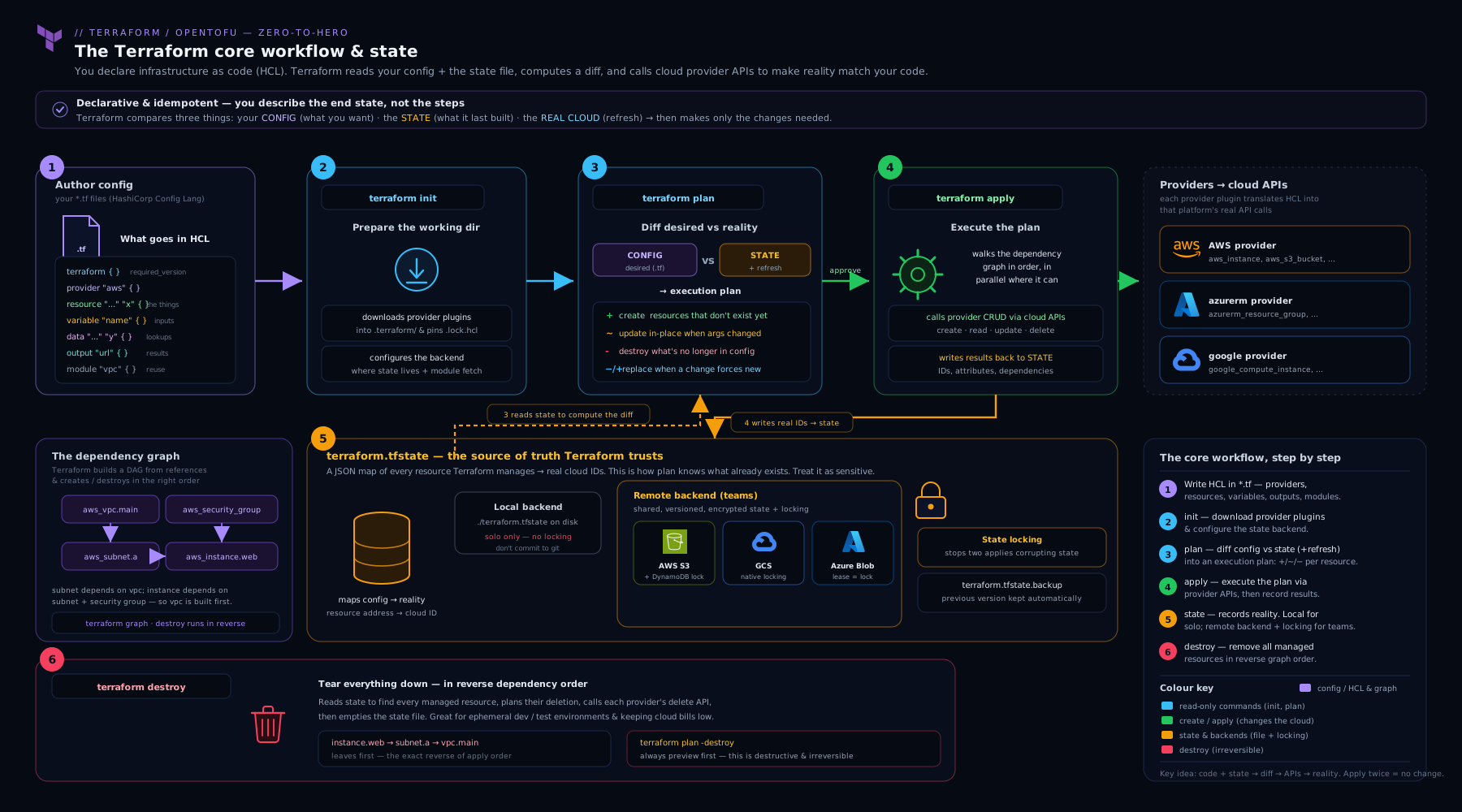
The diagram traces a single change from edited HCL through plan (which reads state and reality to produce a diff) into apply (which writes to both the cloud and the locked remote state), and shows how the same state file feeds the next run — the loop that makes Terraform idempotent.
Hands-on lab
We will do this entirely free and local first using the local and random providers (no cloud account, no cost), then point you at the cloud variant. You only need the Terraform (or OpenTofu) binary installed.
1. Create a working directory and a configuration. Make a folder tf-first and a file main.tf:
terraform {
  required_version = ">= 1.6"
  required_providers {
    random = { source = "hashicorp/random", version = "~> 3.6" }
    local  = { source = "hashicorp/local",  version = "~> 2.5" }
  }
}

variable "env" {
  type        = string
  default     = "dev"
  description = "Environment label."
}

locals {
  common_tags = { project = "kloudvin", env = var.env, managed_by = "terraform" }
}

resource "random_pet" "name" {
  length    = 2
  separator = "-"
}

resource "local_file" "greeting" {
  filename = "${path.module}/hello-${var.env}.txt"
  content  = "Hello from ${random_pet.name.id} in ${var.env}!\n"
}

output "generated_name" {
  value = random_pet.name.id
}

output "file_path" {
  value = local_file.greeting.filename
}
2. Initialise. Run terraform init. Expected output: Terraform downloads the random and local providers, writes .terraform.lock.hcl, and prints Terraform has been successfully initialized!.
3. Format and validate. Run terraform fmt (rewrites the file to canonical style; prints the filename if it changed) and terraform validate (prints Success! The configuration is valid.).
4. Plan. Run terraform plan. You should see a diff with Plan: 2 to add, 0 to change, 0 to destroy. — the random_pet and the local_file. Notice Terraform shows (known after apply) for the pet’s value because it doesn’t exist yet.
5. Apply. Run terraform apply, review the same plan, and type yes. Terraform creates the resources and prints the outputs, e.g. generated_name = "clever-quokka" and the file path. Confirm the file exists: cat hello-dev.txt.
6. Prove idempotency. Run terraform apply again. Expected: No changes. Your infrastructure matches the configuration. — running it twice changed nothing, because the desired state already matched reality.
7. Inspect state. Run terraform state list (shows local_file.greeting and random_pet.name) and terraform state show random_pet.name (shows its attributes). Open terraform.tfstate in your editor to see the JSON mapping — this is Terraform’s memory.
8. Make a change. Change var.env’s default to "staging" (or run terraform apply -var="env=staging"). Plan/apply again: Terraform will create a new file hello-staging.txt and replace the old local_file (-/+), because its filename changed. This is your first look at a replacement.
Validation. You have a generated text file, two state-tracked resources, and outputs printed to the terminal — all reproducible from the single main.tf.
Cleanup. Run terraform destroy and type yes. Expected: Destroy complete! Resources: 2 destroyed. The generated hello-*.txt files are deleted and state is emptied. Delete the tf-first folder if you wish.
Cost note. This lab is entirely local — it provisions no cloud resources and costs nothing. The cloud variant below stays inside free tiers if you destroy promptly.
Cloud variant (optional). To repeat this against a real provider, swap the resources for something tiny and free-tier-eligible — e.g. an aws_s3_bucket with a random_id suffix in ap-south-1, or an azurerm_resource_group. Configure the provider’s region, run the same five steps, and always finish with terraform destroy so nothing lingers on the bill.
Common mistakes & troubleshooting
| Symptom | Cause | Fix |
|---|---|---|
Error: Inconsistent dependency lock file after pulling a colleague’s code |
.terraform.lock.hcl references provider versions you haven’t downloaded |
Run terraform init (or init -upgrade if you intend to bump versions). |
Error acquiring the state lock |
Another run holds the lock, or a previous run died and left a stale lock | Wait for the other run; if truly stale, terraform force-unlock <LOCK_ID> after confirming nothing is running. |
| Plan wants to replace a resource you only meant to tweak | You changed a force-new attribute (one the provider can’t update in place) | Check which attribute triggers the -/+; if the change is intentional, accept it, or use create_before_destroy to avoid downtime. |
| Terraform tries to create a resource that already exists | The resource isn’t in state (fresh state, or state was lost) | Adopt it with an import block or terraform import, don’t apply blindly. |
Secret value visible in terraform.tfstate |
State stores attributes verbatim; sensitive only hides CLI output |
Encrypt the backend, restrict access, never commit state; consider OpenTofu’s state encryption or fetching secrets at apply time. |
terraform apply from CI does something different than your local plan |
No saved plan — apply re-planned against newer reality | Use plan -out=tfplan then apply tfplan so CI applies exactly what was reviewed. |
| Two engineers’ infra keep clobbering each other | State is local, not shared | Migrate to a remote backend with locking (terraform init after adding the backend block). |
Provider produced inconsistent result / random failures |
Provider version mismatch or a bug | Pin with ~>, commit the lock file, and upgrade deliberately with init -upgrade. |
Best practices
- Pin everything and commit the lock file. Constrain
required_versionand every provider with~>, and commit.terraform.lock.hcl. Reproducibility is the whole point of IaC. - Remote state with locking from day one of any team project. Local state is for solo learning only. Encrypt the backend and version the bucket.
- Run
fmtandvalidatebefore every commit, ideally as a pre-commit hook and a CI gate, so formatting noise and trivial errors never reach review. - Read every plan; apply saved plans in automation. Treat
-/+replacements as a signal to slow down. In CI,plan -outthenapplythe saved file. - Keep configurations small and parameterised. Use variables, locals, and (soon) modules; don’t hard-code values that differ between environments.
- Never commit secrets or state.
.gitignore*.tfstate*,.terraform/, and*.tfvarsthat contain secrets; pull sensitive inputs from a vault. - One state per environment. Separate state for dev/staging/prod (separate keys or backends) so a mistake in one can’t damage another.
- Use data sources to reference, not duplicate. Look up shared resources (an AMI, a VNet) rather than copying their IDs around.
Security notes
State is the centre of gravity for Terraform security. Because it stores attributes in plaintext, anyone who can read your state can read your secrets — so the state bucket’s access policy is a security boundary as serious as the resources themselves: lock it down with least-privilege IAM, enable encryption at rest, and turn on access logging. Never commit *.tfstate to version control, where it would be permanent and world-readable to anyone with repo access.
For credentials, do not put long-lived cloud keys in provider blocks or .tfvars. Authenticate the environment instead — a local CLI profile for humans, and OIDC-based keyless auth for CI (GitHub Actions / Azure DevOps assuming a cloud role with no stored secret), a pattern the multi-environment lesson covers. Mark sensitive variables and outputs sensitive = true to keep them out of logs, but remember that is cosmetic, not encryption. Finally, gate plans with policy-as-code (OPA/Sentinel/Checkov) so a risky change — an open security group, an unencrypted bucket — is caught before apply, not after.
Interview & exam questions
1. What is the difference between declarative and imperative IaC, and which is Terraform? Imperative specifies the steps; declarative specifies the desired end state and lets the tool compute the steps. Terraform is declarative, which is what makes it idempotent — applying the same config repeatedly converges to the same result.
2. What is the Terraform state file and why does it exist? A JSON file mapping the resources you declared to their real-world IDs and last-known attributes. It exists so Terraform can correlate code to actual cloud objects, compute diffs, and know what it already owns. Without it, Terraform couldn’t tell “update mine” from “create a new one”.
3. Local vs remote state — when and why? Local state lives on disk and suits solo learning. Remote state lives in a shared, locked, encrypted backend (S3/azurerm/GCS/TFC) and is mandatory for teams so everyone shares one source of truth and concurrent applies can’t corrupt it.
4. How does state locking work and why does it matter?
Before writing, Terraform acquires an exclusive lock from the backend; a second concurrent run waits or fails. This prevents two applies from reading the same starting state and clobbering each other’s writes, which would corrupt the file. A stale lock is cleared with force-unlock.
5. What does terraform init do?
Initialises the working directory: downloads providers and modules, configures the backend, and writes/updates the dependency lock file. It must be re-run when providers, modules, or the backend change.
6. Walk me through the core workflow.
init (set up), plan (read-only dry run showing the diff), apply (make the changes and record them), destroy (remove everything). In CI you save a plan with -out and apply that exact file.
7. How does Terraform decide the order to create resources?
It builds a dependency graph from references between resources and applies independent ones in parallel, dependent ones in order. Dependencies are usually implicit (one resource references another’s attribute); depends_on adds an explicit one when no attribute links them.
8. When would you use depends_on, and why sparingly?
Only when a real ordering requirement exists that isn’t expressed by any attribute reference. Overusing it serialises work that could run in parallel and usually means you should have referenced an attribute instead.
9. Why pin provider versions, and how?
Providers ship breaking changes; unpinned versions break reproducibility. Pin with the pessimistic operator (~> 5.40 → >= 5.40.0, < 6.0.0) and commit .terraform.lock.hcl so every machine uses identical builds. Upgrade with init -upgrade.
10. How are secrets handled in Terraform, and what’s the catch?
Mark variables/outputs sensitive to hide them from CLI output — but they still land in state in plaintext. So encrypt the backend, restrict access, never commit state, and prefer fetching secrets at apply time. OpenTofu additionally offers client-side state encryption.
11. What is OpenTofu and how does it relate to Terraform? OpenTofu is the open-source (Linux Foundation) fork created after HashiCorp moved Terraform to the BSL licence. It is a near-drop-in replacement with the same HCL and workflow, plus some additions like state encryption.
12. What does a -/+ symbol in a plan mean, and why care?
It means replace — destroy the existing resource and create a new one — because a force-new attribute changed. It can cause downtime and data loss, so it’s the symbol to scrutinise most; create_before_destroy can soften it.
Quick check
- Which command shows what will change without changing anything?
- True or false: marking a variable
sensitiveencrypts it in the state file. - What file records the exact provider versions Terraform selected, and should it be committed?
- In
resource "aws_subnet" "app", which word is the resource type and which is the local name? - What kind of dependency does writing
vpc_id = aws_vpc.main.idcreate — implicit or explicit?
Answers
terraform plan(it is read-only and shows the diff).- False.
sensitiveonly hides the value from CLI output; state still stores it in plaintext. Protect state via backend encryption and access control (or OpenTofu state encryption). .terraform.lock.hcl— yes, commit it so every machine and CI run uses identical provider builds.aws_subnetis the type (defined by the provider);appis the local name (your choice, unique in the module).- Implicit — referencing another resource’s attribute automatically creates the dependency; no
depends_onis needed.
Exercise
Extend the lab into something closer to real life. Starting from your tf-first configuration:
- Add a
variable "instance_count"(typenumber, default2) with avalidationblock rejecting values outside 1–5. - Use
count(or, better,for_eachovertoset(["app", "web", "cache"])) on thelocal_fileresource so you generate one file per element, each named after its key, with content that interpolates both the key and therandom_petname. - Add an
outputthat returns the list of all generated file paths using aforexpression or[for f in local_file.greeting : f.filename]. - Run
fmt,validate,plan,apply; confirm the right number of files appear; then change the set (dropcache, addqueue) and observe how the plan adds one and destroys one — note howfor_eachkeys by name so unrelated files are left untouched (compare this mentally to howcountwould have shuffled indices). - Finish with
terraform destroy.
Write two or three sentences on what surprised you about how for_each handled the change versus what count would have done — this is a classic interview discriminator.
Certification mapping
This lesson maps to the HashiCorp Certified: Terraform Associate (003) exam, which is the target credential for the whole Terraform track. Specifically it covers: Understand Infrastructure as Code concepts and Understand Terraform’s purpose vs other IaC (the declarative model, why Terraform); Understand Terraform basics (providers, the registry, version pinning, the lock file); Use the Terraform CLI (init/plan/apply/destroy/fmt/validate); Interact with Terraform modules and Read, generate, and modify configuration (HCL blocks, variables, outputs, locals, data sources, expressions); and Implement and maintain state (local vs remote backends, locking, sensitive data). The exam is roughly 57 questions in one hour; the later Terraform Associate Prep Kit lesson drills practice questions and the cheat sheet.
Glossary
- HCL — HashiCorp Configuration Language; the declarative language (blocks, arguments, expressions) used in
.tffiles. Has a 1:1 JSON form for machine generation. - Provider — A plugin that lets Terraform manage a specific API (AWS, Azure, GitHub…). Downloaded during
initfrom the registry. - Resource — A block declaring infrastructure Terraform creates and manages; addressed as
type.name. - Data source — A read-only lookup of existing infrastructure (
datablock); never managed by Terraform. - State — The file (
terraform.tfstate) mapping declared resources to real IDs and attributes; Terraform’s memory of the world. - Backend — Where state is stored and locked (local, S3, azurerm, GCS, Terraform Cloud).
- State locking — Exclusive write access to state during an operation, preventing concurrent corruption.
- Plan — A computed, read-only preview of the changes an apply would make (
+/-/~/-/+). - Apply — Executing a plan to make real changes and record them in state.
- Dependency graph — The DAG Terraform builds from references to order create/destroy operations.
- Implicit dependency — An ordering inferred from one resource referencing another’s attribute.
- Explicit dependency — An ordering you force with
depends_onwhen no attribute links the resources. - Idempotency — The property that applying the same config repeatedly converges to the same state.
- Lock file —
.terraform.lock.hcl, recording exact selected provider versions; committed to Git. - OpenTofu — The Linux Foundation open-source fork of Terraform; near-drop-in, with extras like state encryption.
Next steps
You can now read and write HCL, configure and pin providers, run the full workflow, and reason about state and dependencies — the foundation everything else stands on. The natural next move is to stop repeating yourself and start packaging infrastructure into reusable building blocks. Continue with Authoring Terraform Modules: Structure, Inputs/Outputs, Versioning & Publishing, which turns the single configuration you just wrote into a parameterised, versioned, shareable module — the unit of reuse that the rest of the Terraform ladder (Terragrunt, multi-environment pipelines, registries) is built on.