In the fundamentals lesson you wrote a single root configuration: a main.tf that declared a few resources, a variables.tf, an outputs.tf, and a backend. That works for one environment. It stops working the moment a second team asks for “the same network we built, but in their account,” because the only way to give it to them is copy-paste — and copy-paste is how three subtly different VPCs end up in production, each with its own undocumented quirk, none of them patched when the security team finds a flaw. A module is Terraform’s answer to that problem: a reusable, versioned, self-contained package of configuration that you write once, test once, and call many times with different inputs. It is the single most important abstraction in Terraform, and the difference between an engineer who uses Terraform and one who engineers with it is almost entirely about how well they author modules.
This lesson is the module blueprint for the whole curriculum. We will go from “what counts as a module” through anatomy, typed and validated inputs, outputs, provider pinning, the meta-arguments (for_each, count, dynamic) that make modules flexible, composition from a root module down into children, and the versioning and publishing patterns that turn a folder into something a hundred engineers can depend on safely. We will build a real, reusable network module end to end, consume it, then survey the three community ecosystems you will actually reach for in production — terraform-aws-modules, Azure Verified Modules (AVM), and terraform-google-modules — and finish with the testing, linting and documentation toolchain that separates a module people trust from one they fork in frustration. Everything here applies identically to OpenTofu, the open-source fork; where a detail differs, it is called out.
Learning objectives
By the end of this lesson you will be able to:
- Lay out a module with the canonical file structure and explain what belongs in each file.
- Write typed inputs with
validationblocks, defaults,nullable, andsensitive, and design a clean variable surface. - Define outputs (including sensitive ones) so a module composes cleanly with others.
- Pin providers correctly — knowing why a module declares
required_providersbut should not declare aproviderblock — and pass providers in. - Use
for_each,count, anddynamicblocks to make a single module produce many resources without copy-paste. - Compose a root module out of child modules, and consume modules from the public Registry, a private registry, and a pinned Git ref.
- Version a module with SemVer tags and consume it safely with version constraints.
- Choose between authoring your own module and adopting one from the AWS / Azure (AVM) / GCP ecosystems.
- Test, lint and document a module with
terraform validate, Terratest, tflint, tfsec/Trivy, and terraform-docs.
Prerequisites
You should have completed Terraform Fundamentals: HCL, Providers, State & the Core Workflow — specifically you need to be comfortable with resources, variables, outputs, locals, data sources, providers and version pinning, and the init → plan → apply → destroy workflow. You need Terraform 1.x (any 1.5+ release is fine; examples use features available in 1.5 through 1.13) or OpenTofu 1.6+ installed, plus a cloud account for the optional applied parts of the lab (the validate/lint/docs parts need no cloud at all). This lesson sits in the Modules stage of the Terraform Zero-to-Hero track, immediately after fundamentals and immediately before Terragrunt.
What a module actually is
Every Terraform configuration is a module. The directory you run terraform apply in is the root module. Any directory of .tf files that root module calls is a child module. There is nothing magic about a child module — it is just a folder of the same .tf files you already write, given inputs through variables and handing back results through outputs. That is the whole idea: a module is a black box with a typed interface. The caller does not need to know how the box builds a network; it needs to know what to pass in and what it gets back.
This black-box framing drives every design decision below. A good module exposes a small, intentional set of inputs, hides incidental implementation detail, returns the handful of outputs callers genuinely need, and changes its behaviour only through that interface — never by the caller reaching inside. The three sources Terraform can load a module from are local paths (./modules/network), the registry (public registry.terraform.io or a private one), and generic Git/HTTP sources (git::https://...?ref=v1.4.0). We will use all three.
Module anatomy: the canonical files
A module is a directory. By convention — and the public Registry enforces parts of this — it contains a predictable set of files. None are individually required (Terraform reads all .tf files in the directory and merges them), but the convention is load-bearing for humans and for tooling like terraform-docs.
| File | Purpose | Required? |
|---|---|---|
main.tf |
The primary resources, locals, and data sources — the module’s actual work |
Convention |
variables.tf |
All input variable declarations (the input half of the interface) | Convention |
outputs.tf |
All output declarations (the output half of the interface) | Convention |
versions.tf |
The terraform { required_version, required_providers } block |
Convention |
README.md |
What the module does, inputs, outputs, an example — required by the public Registry | Convention/Registry |
examples/ |
One or more runnable example root configs that call the module | Strongly recommended |
LICENSE |
An OSI licence — required for Registry publishing | For publishing |
A larger module may also nest sub-modules under modules/ (e.g. a database module with a modules/replica sub-module) and ship per-example fixtures under examples/. The golden rule: a child module should never contain a backend block and should never contain a provider block (more on that under provider pinning). Backends and provider configuration belong to the root module only.
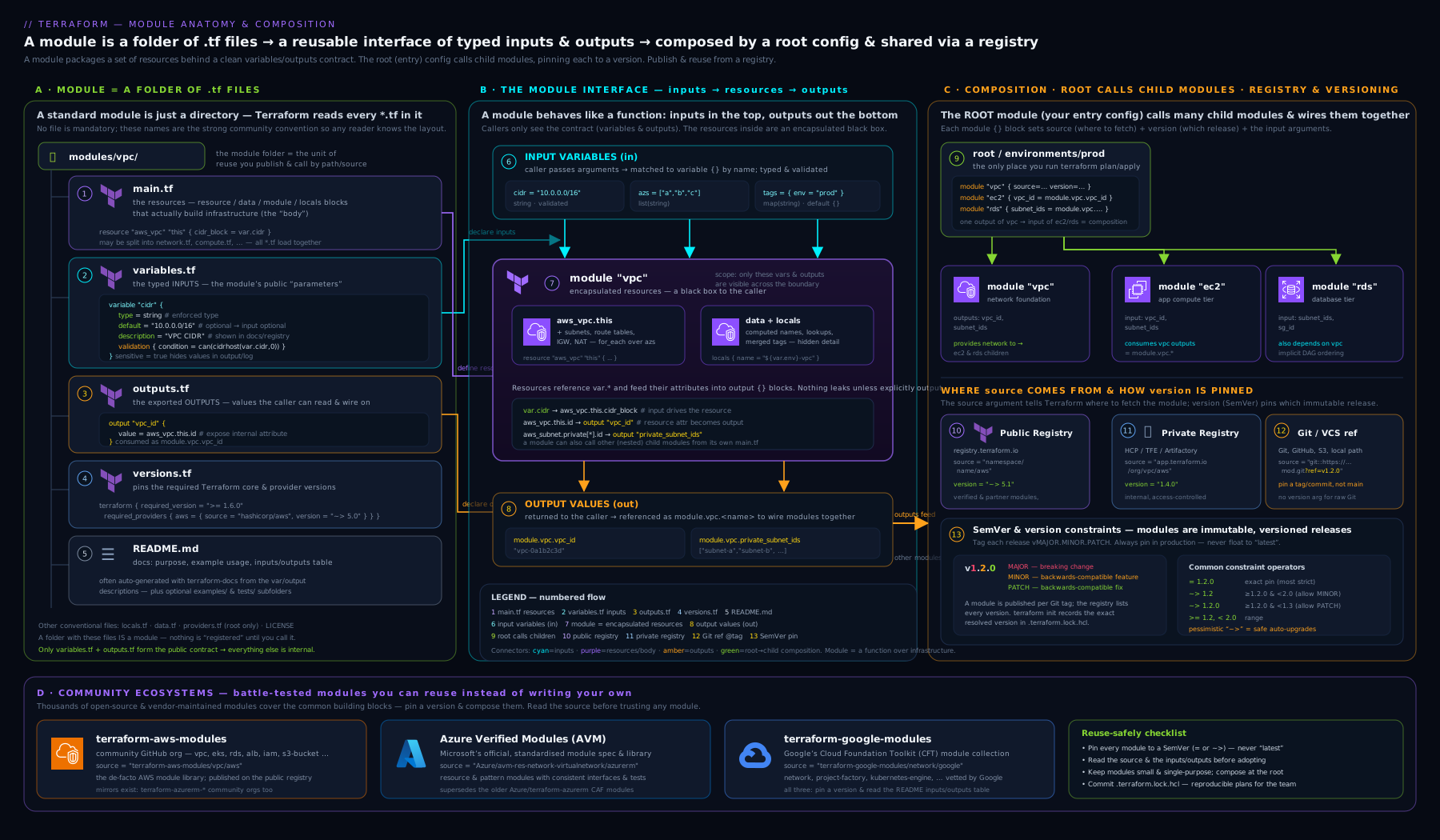
The diagram shows the file anatomy on the left, the typed inputs/outputs interface in the middle, and on the right how a single root module composes several versioned child modules — local, registry and Git-pinned — into one apply.
Inputs: typed, validated, documented variables
Inputs are the contract. The more precisely you type and constrain them, the earlier a caller’s mistake surfaces — at plan time with a clear message, instead of at apply time as a cryptic provider error. Every input is a variable block, and a production-grade variable uses far more than name and default.
| Element | What it does | Why it matters |
|---|---|---|
type |
Constrains the value: primitives (string, number, bool), collections (list, set, map), structural (object, tuple), and any |
Catches type mismatches at plan time; documents intent |
default |
Makes the variable optional; omit it to make the variable required | Required vs optional is decided purely by whether a default exists |
description |
Human docs; surfaced by terraform-docs and the Registry | The README writes itself if descriptions are good |
validation |
One or more custom rules with a condition and an error_message |
Enforces business rules (CIDR shape, allowed regions, name length) |
sensitive = true |
Redacts the value from CLI/plan output | Stops secrets leaking to logs (note: still stored in state) |
nullable = false |
Forbids null being passed for the variable |
Prevents “optional became null” surprises |
Here is a typed, validated, well-documented variable surface for a network module:
variable "name" {
  description = "Name prefix applied to all created resources (3-24 chars, lowercase)."
  type        = string

  validation {
    condition     = can(regex("^[a-z][a-z0-9-]{2,23}$", var.name))
    error_message = "name must be 3-24 chars, start with a letter, and use only lowercase letters, digits and hyphens."
  }
}

variable "cidr_block" {
  description = "The primary IPv4 CIDR block for the VPC, e.g. 10.0.0.0/16."
  type        = string

  validation {
    condition     = can(cidrhost(var.cidr_block, 0))
    error_message = "cidr_block must be a valid IPv4 CIDR (e.g. 10.0.0.0/16)."
  }
}

variable "subnets" {
  description = "Map of subnet name => its CIDR and the AZ it lives in."
  type = map(object({
    cidr = string
    az   = string
  }))
  default = {}
}

variable "enable_nat_gateway" {
  description = "Create a NAT gateway so private subnets reach the internet outbound."
  type        = bool
  default     = false
}

variable "tags" {
  description = "Tags merged onto every resource the module creates."
  type        = map(string)
  default     = {}
  nullable    = false
}
Two design notes a senior reviewer will look for. First, prefer one rich object-typed variable (like subnets) over many flat parallel lists — parallel lists that must stay index-aligned are a classic bug source. Terraform’s optional() modifier inside object types (with a default) lets you make individual attributes optional, e.g. optional(bool, false), which keeps the surface tidy. Second, put validation near the boundary: validating cidr_block here means a caller who passes "10.0.0/16" gets a precise error at plan, not a half-built network at apply.
Outputs: the return values
Outputs are how a module hands results back to its caller — IDs, ARNs, names, connection details — so they can be wired into other modules or printed. An output block has a value, an optional description, and an optional sensitive = true. A module should output exactly what callers need to compose and no more; over-exporting clutters the interface and tempts callers to depend on internals.
output "vpc_id" {
  description = "ID of the created VPC."
  value       = aws_vpc.this.id
}

output "subnet_ids" {
  description = "Map of subnet name => subnet ID."
  value       = { for k, s in aws_subnet.this : k => s.id }
}

output "nat_gateway_public_ip" {
  description = "Public IP of the NAT gateway, if one was created."
  value       = try(aws_eip.nat[0].public_ip, null)
}
Note sensitive outputs: if an output references a sensitive value (a generated password), Terraform forces you to mark the output sensitive = true or it errors — a guardrail against accidentally printing secrets. The downstream caller must in turn keep the value sensitive.
Provider pinning inside modules
This is the single most misunderstood part of module authoring, and it trips up nearly every newcomer. A module must declare which providers it needs and at what version range, but it must not configure them. Concretely:
- A module should contain a
terraform { required_providers { ... } }block (conventionally inversions.tf). This pins compatibility — “I need the AWS provider, v6.x” — and is what the Registry reads to populate the provider requirements. - A module should not contain a configured
provider "aws" { region = ... }block. Provider configuration — region, credentials, assume-role — is the root module’s job. Putting it in a child module makes the module non-reusable (you cannot point it at a different region/account) and triggers deprecation warnings; in current Terraform a configured provider inside a shared module is strongly discouraged.
# versions.tf — inside the module
terraform {
  required_version = ">= 1.5"

  required_providers {
    aws = {
      source  = "hashicorp/aws"
      version = ">= 5.40, < 7.0"
    }
  }
}
When a module needs two configurations of the same provider — say resources in two AWS regions, or an AWS provider plus an aws.replica alias — it declares configuration_aliases in required_providers, and the root passes them explicitly with a providers = { aws = aws.primary, aws.replica = aws.sydney } map in the module block. The module names the slots; the root fills them. Use the widest sane version range in a reusable module (>= 5.40, < 7.0), so callers are not forced into lockstep upgrades, and let the caller’s .terraform.lock.hcl pin the exact build.
Meta-arguments: for_each, count, and dynamic
A module earns its keep when one call produces many resources. Three meta-arguments do this.
| Meta-argument | Use it to | Key behaviour & gotcha |
|---|---|---|
count = <number> |
Create N identical copies indexed 0..N-1 |
Resources keyed by position; removing a middle item re-indexes and churns everything after it. Use only for “0 or 1” toggles or truly identical N. |
for_each = <map or set> |
Create one resource per key | Resources keyed by string key, so adding/removing one item does not disturb the others. The default choice for collections. |
dynamic "<block>" |
Generate repeatable nested blocks (e.g. multiple ingress rules) inside one resource |
Iterates to emit nested blocks; reach for it only when you have a variable number of nested blocks. |
The count vs for_each decision is a guaranteed interview question, so internalise it: for_each for a set/map of distinct things; count for a simple on/off (count = var.enable_nat_gateway ? 1 : 0) or genuinely interchangeable replicas. Here is for_each over the subnets map and a dynamic block for a variable set of security-group rules:
resource "aws_subnet" "this" {
  for_each          = var.subnets
  vpc_id            = aws_vpc.this.id
  cidr_block        = each.value.cidr
  availability_zone = each.value.az
  tags              = merge(var.tags, { Name = "${var.name}-${each.key}" })
}

resource "aws_security_group" "this" {
  name   = "${var.name}-sg"
  vpc_id = aws_vpc.this.id

  dynamic "ingress" {
    for_each = var.ingress_rules
    content {
      from_port   = ingress.value.port
      to_port     = ingress.value.port
      protocol    = "tcp"
      cidr_blocks = ingress.value.cidrs
    }
  }
  tags = var.tags
}
Composition: root modules and child modules
Composition is how real systems are built: a root module calls several child modules and wires the outputs of one into the inputs of the next. A module block has a source, an optional version (registry/Git only), the input arguments, and optionally for_each/count (yes — you can call a module for_each over a map of environments) and providers.
# root main.tf
module "network" {
  source  = "app.terraform.io/kloudvin/network/aws"   # private registry
  version = "~> 1.4"

  name       = "payments-prod"
  cidr_block = "10.20.0.0/16"
  subnets = {
    app-a = { cidr = "10.20.1.0/24", az = "ap-south-1a" }
    app-b = { cidr = "10.20.2.0/24", az = "ap-south-1b" }
  }
  enable_nat_gateway = true
  tags               = { env = "prod", owner = "payments" }
}

module "database" {
  source     = "./modules/postgres"
  name       = "payments-prod-db"
  vpc_id     = module.network.vpc_id        # output -> input wiring
  subnet_ids = values(module.network.subnet_ids)
  tags       = { env = "prod", owner = "payments" }
}
The dependency between database and network is implicit: because database references module.network.vpc_id, Terraform builds the network first. That is the same dependency-graph mechanism from fundamentals, now operating between modules. The healthy pattern is flat composition at the root (root calls many children) rather than deep nesting (children calling grandchildren calling great-grandchildren), because deep trees are hard to reason about, slow to plan, and awkward to pass providers through.
Versioning and the registry pattern
A folder on your laptop is not yet something a hundred engineers can depend on. Turning it into one is about immutable, semantically-versioned references.
SemVer is the contract: a version is MAJOR.MINOR.PATCH. Bump PATCH for backward-compatible fixes, MINOR for backward-compatible new features (a new optional input), and MAJOR for breaking changes (renaming/removing an input, changing a default, anything that forces caller edits or resource replacement). Callers express tolerance with version constraints: = 1.4.2 (exact), >= 1.4.0, < 2.0.0 (a range), or the pessimistic ~> 1.4 (allow 1.x ≥ 1.4 but not 2.0). The pessimistic operator is the production default: you get fixes and features without surprise breaking changes.
There are three publishing/consumption patterns:
| Pattern | source looks like |
Versioning | When to use |
|---|---|---|---|
| Public Terraform Registry | terraform-aws-modules/vpc/aws |
version = "~> 5.0"; tied to GitHub release tags |
Reusing community modules; sharing open-source modules |
| Private registry (Terraform Cloud/Enterprise, Spacelift, others) | app.terraform.io/ORG/network/aws |
version = "~> 1.4" |
An org’s internal modules with controlled access |
| Git ref pinning | git::https://github.com/org/mod.git//modules/network?ref=v1.4.0 |
the ?ref= Git tag (use a tag, never a branch) |
No registry available; private repos; vendoring |
For the public Registry, publishing is convention-driven: a public GitHub repo named terraform-<PROVIDER>-<NAME> (e.g. terraform-aws-vpc), with the standard files, a LICENSE, a README.md, an examples/ directory, and a semantic version tag like v1.4.0. You connect the repo to the Registry once; thereafter every new tag becomes a published version automatically. For Git-ref consumption, the iron rule is pin to a tag (?ref=v1.4.0), never a branch (?ref=main) — a branch is mutable, so main today is not main tomorrow, and your “unchanged” infrastructure silently drifts. The // in a Git source selects a sub-directory within the repo (the module path), and ?ref= selects the immutable revision.
A worked reusable module: an AWS VPC building block
Let us assemble the snippets above into a complete, publishable module — a focused VPC building block. The directory:
modules/network/
├── main.tf
├── variables.tf
├── outputs.tf
├── versions.tf
├── README.md
└── examples/
    └── basic/
        └── main.tf
versions.tf pins compatibility (no provider config); variables.tf and outputs.tf are the typed surface shown above. The main.tf brings it together:
# modules/network/main.tf
resource "aws_vpc" "this" {
  cidr_block           = var.cidr_block
  enable_dns_support   = true
  enable_dns_hostnames = true
  tags                 = merge(var.tags, { Name = var.name })
}

resource "aws_subnet" "this" {
  for_each          = var.subnets
  vpc_id            = aws_vpc.this.id
  cidr_block        = each.value.cidr
  availability_zone = each.value.az
  tags              = merge(var.tags, { Name = "${var.name}-${each.key}" })
}

resource "aws_internet_gateway" "this" {
  vpc_id = aws_vpc.this.id
  tags   = merge(var.tags, { Name = "${var.name}-igw" })
}

# NAT gateway only when asked for (count as an on/off toggle)
resource "aws_eip" "nat" {
  count  = var.enable_nat_gateway ? 1 : 0
  domain = "vpc"
  tags   = merge(var.tags, { Name = "${var.name}-nat-eip" })
}

resource "aws_nat_gateway" "this" {
  count         = var.enable_nat_gateway ? 1 : 0
  allocation_id = aws_eip.nat[0].id
  subnet_id     = values(aws_subnet.this)[0].id
  tags          = merge(var.tags, { Name = "${var.name}-nat" })
  depends_on    = [aws_internet_gateway.this]
}
This single module is for_each-driven (any number of subnets), togglable (enable_nat_gateway), tag-consistent (merge of caller tags), and pinned for compatibility. The examples/basic/main.tf both documents usage and feeds the test harness:
# modules/network/examples/basic/main.tf
provider "aws" {            # provider config lives in the EXAMPLE root, not the module
  region = "ap-south-1"
}

module "network" {
  source     = "../../"
  name       = "demo-net"
  cidr_block = "10.10.0.0/16"
  subnets = {
    a = { cidr = "10.10.1.0/24", az = "ap-south-1a" }
    b = { cidr = "10.10.2.0/24", az = "ap-south-1b" }
  }
  enable_nat_gateway = true
  tags               = { env = "demo" }
}

output "vpc_id"     { value = module.network.vpc_id }
output "subnet_ids" { value = module.network.subnet_ids }
Consuming it from a real root is the module "network" { source = "...", version = "~> 1.4", ... } block from the composition section — once you tag the repo v1.4.0 and either publish it or reference it by Git ref.
The community ecosystems: don’t reinvent the VPC
Before you author a module, ask whether a well-maintained one already exists. Three ecosystems dominate, and a senior engineer knows when to adopt rather than build.
| Ecosystem | Namespace / source | Maintained by | Character |
|---|---|---|---|
| terraform-aws-modules | terraform-aws-modules/<name>/aws (e.g. terraform-aws-modules/vpc/aws) |
Community (Anton Babenko et al.), on the public Registry | Mature, very feature-rich, sometimes large/opinionated “kitchen-sink” modules |
| Azure Verified Modules (AVM) | Azure/avm-res-<service>-<resource>/azurerm (resource modules) and Azure/avm-ptn-<pattern>/azurerm (pattern modules) |
Microsoft, official programme | Standardised interfaces, WAF-aligned, consistent inputs (telemetry, diagnostics, RBAC, locks) across every module |
| terraform-google-modules | terraform-google-modules/<name>/google (e.g. terraform-google-modules/network/google), GitHub org GoogleCloudPlatform |
Google + community (Cloud Foundation Toolkit) | Solid building blocks aligned to GCP best practices and the Cloud Foundation Toolkit |
terraform-aws-modules is the de-facto standard for AWS: terraform-aws-modules/vpc/aws alone will build the VPC, subnets across AZs, route tables, internet and NAT gateways, flow logs and more from one module call. The trade-off is size — these modules expose a huge input surface and can be hard to read end to end, which is exactly why authoring a small focused module (like ours) is still worthwhile when you want something reviewable.
Azure Verified Modules (AVM) is the one to know by name for any Azure role. It is Microsoft’s official initiative to replace the previous fragmented Azure/terraform-azurerm-* modules with a single, consistent standard. Every AVM follows the same specifications: a predictable input interface (consistent tags, lock, role_assignments, diagnostic_settings, telemetry opt-out), Well-Architected-Framework alignment, and two flavours — resource modules (avm-res-*, one Azure resource done well, e.g. Azure/avm-res-network-virtualnetwork/azurerm) and pattern modules (avm-ptn-*, a multi-resource architecture). If you are doing Terraform on Azure in 2026, start at AVM.
terraform-google-modules (the Cloud Foundation Toolkit) plays the same role for GCP — terraform-google-modules/network/google, .../kubernetes-engine/google, project-factory, and so on — codifying Google’s recommended patterns.
The decision rule: adopt a community module when it is well-maintained, covers your need, and you are happy to consume its (broad) interface and its release cadence; author your own when you need a small reviewable surface, an organisation-specific opinion (mandatory tags, naming, security baselines), or a thin wrapper that composes community modules behind your own stable interface. The wrapper pattern — your private module that internally calls terraform-aws-modules/vpc/aws but exposes only the five inputs your org cares about — is a very common and healthy middle ground.
Testing, linting and documentation
A module other people depend on must be tested, linted and documented, the same as application code. The toolchain:
| Tool | What it checks | When it runs |
|---|---|---|
terraform fmt -check |
Canonical formatting | Pre-commit + CI |
terraform validate |
Syntax, type and internal-reference correctness (no cloud calls) | Pre-commit + CI |
| tflint | Provider-aware lint: deprecated syntax, invalid instance types, unused declarations, naming rules | CI |
| tfsec / Trivy | Static security scanning of the HCL (open SGs, unencrypted storage, public buckets) | CI |
| terraform test | Native test framework (.tftest.hcl) — plan-based assertions and real apply-and-assert (Terraform 1.6+) |
CI |
| Terratest | Go-based integration tests: real apply, assert on live resources, destroy |
CI (slower, real cloud) |
| terraform-docs | Auto-generates the inputs/outputs tables in README.md |
Pre-commit + CI |
Two tiers of testing matter. Static (fmt, validate, tflint, tfsec) is fast, needs no cloud, and should gate every commit. Behavioural is either the native terraform test framework — .tftest.hcl files with run blocks that plan (or apply) and assert on outputs/attributes, which is now the first-reach because it ships in the binary — or Terratest, a Go library that does a real terraform.InitAndApply, calls cloud SDKs/HTTP to assert the resources actually behave, then defers a terraform.Destroy. A minimal native test:
# tests/basic.tftest.hcl
run "creates_vpc_and_subnets" {
  command = plan

  variables {
    name       = "test-net"
    cidr_block = "10.99.0.0/16"
    subnets    = { a = { cidr = "10.99.1.0/24", az = "ap-south-1a" } }
  }

  assert {
    condition     = aws_vpc.this.cidr_block == "10.99.0.0/16"
    error_message = "VPC CIDR did not match the input."
  }
}
Run static tooling against the module locally before you ever tag a release: terraform fmt -check -recursive, terraform validate, tflint, tfsec . (or trivy config .), terraform-docs markdown table . > README-generated.md, and terraform test. Green across all of them is the bar for cutting a SemVer tag.
Hands-on lab
This lab needs only local tooling and no cloud account — you will author, validate, lint, document and unit-test a tiny module entirely offline. (If you want the applied extension, point the example at a real account; the steps below stop before any apply.)
1. Scaffold the module.
mkdir -p tf-mod-lab/modules/greeting && cd tf-mod-lab/modules/greeting
2. Write the module files. versions.tf:
terraform {
  required_version = ">= 1.5"
}
variables.tf (typed + validated + sensitive):
variable "name" {
  description = "Name to greet."
  type        = string
  validation {
    condition     = length(var.name) >= 2
    error_message = "name must be at least 2 characters."
  }
}

variable "shout" {
  description = "Upper-case the greeting."
  type        = bool
  default     = false
}

variable "secret_token" {
  description = "A token echoed (redacted) to prove sensitive handling."
  type        = string
  default     = "none"
  sensitive   = true
}
main.tf (a local does the work — no provider needed):
locals {
  base     = "Hello, ${var.name}!"
  greeting = var.shout ? upper(local.base) : local.base
}
outputs.tf:
output "greeting" {
  description = "The composed greeting."
  value       = local.greeting
}

output "token_echo" {
  description = "Sensitive token, redacted in output."
  value       = var.secret_token
  sensitive   = true
}
3. Add an example root that calls the module. cd ../../examples/basic (create it), and main.tf:
module "greeting" {
  source = "../../modules/greeting"
  name   = "KloudVin"
  shout  = true
}

output "greeting" { value = module.greeting.greeting }
4. Initialise, validate and format. From examples/basic:
terraform init      # downloads nothing but wires the local module
terraform validate  # expect: Success! The configuration is valid.
terraform fmt -recursive ../..
Expected: Success! The configuration is valid.
5. See the typed interface and validation work. Plan it (no cloud — outputs are local-only):
terraform plan
Expected: greeting = "HELLO, KLOUDVIN!" in the planned outputs. Now break the contract — edit the example to name = "K" and re-plan; expect the failure name must be at least 2 characters. Restore it to "KloudVin".
6. Lint and security-scan (if installed).
tflint --chdir ../..        # or: tflint --recursive
tfsec ../..                 # or: trivy config ../..
Expect a clean result (this trivial module touches no cloud resources).
7. Generate docs.
terraform-docs markdown table ../../modules/greeting
Expected: a Markdown table of the Inputs (name, shout, secret_token marked sensitive) and Outputs (greeting, token_echo marked sensitive) — proof your typed interface is self-documenting.
8. Add a native unit test. In modules/greeting/, create tests/greeting.tftest.hcl:
run "shouts_when_asked" {
  command   = apply
  variables { name = "vin", shout = true }
  assert {
    condition     = output.greeting == "HELLO, VIN!"
    error_message = "Shout did not upper-case the greeting."
  }
}
Run it from modules/greeting:
terraform init
terraform test     # expect: 1 passed, 0 failed.
Validation: you have a typed, validated, sensitive-aware module; an example that consumes it; a passing native test; generated docs; and clean lint. That is the full authoring loop in miniature.
Cleanup: nothing was created in any cloud, so simply remove the lab directory:
cd ../../.. && rm -rf tf-mod-lab
Cost note: zero. Everything ran locally; no provider made an API call and no resource was created.
Common mistakes & troubleshooting
| Symptom | Cause | Fix |
|---|---|---|
Error: Module is incompatible / provider configuration not present |
A configured provider block was put inside a child module, or aliases not passed |
Remove provider {} from the module; declare configuration_aliases and pass providers = {} from the root |
Removing one item from a count list destroys/recreates many others |
count keys by position, so removal re-indexes everything after it |
Switch the resource to for_each over a map/set so each item has a stable string key |
Error: Invalid for_each argument ... value depends on resource attributes that cannot be determined until apply |
for_each over a collection whose keys are not known at plan time |
Key for_each on static, known values (input keys), not on attributes computed during apply |
| Module upgrade silently changed behaviour | Consumed a Git source pinned to a branch (?ref=main) |
Pin to an immutable tag (?ref=v1.4.0) and use ~> constraints for registry sources |
terraform init doesn’t pick up module changes |
Local module source cached; or registry version constraint unchanged | Re-run terraform init -upgrade after changing a module version constraint |
| Secret appears in plan/output | An output exposed a sensitive value without sensitive = true |
Mark the variable and the output sensitive; remember it is still in state — protect the backend |
Error: Unsupported argument after a module bump |
A MAJOR version renamed/removed an input | Read the module CHANGELOG; update call arguments; pin with ~> to avoid unplanned majors |
| terraform-docs overwrote hand-written README content | Injection markers misplaced | Wrap the generated block in <!-- BEGIN_TF_DOCS --> / <!-- END_TF_DOCS --> and run terraform-docs --output-file README.md --output-mode inject |
Best practices
- One module, one purpose. Small, composable modules beat one mega-module. Compose at the root.
- Type and validate every input. Use
objecttypes withoptional()over parallel lists; validate at the boundary. - Pin compatibility, not exact versions, in modules (
>= x, < y); let the caller’s lock file pin exact provider builds. - Never put
backendor configuredproviderblocks in a child module. Those belong to the root. - Version with SemVer and tag immutably. Consume with
~>; pin Git sources to tags. - Ship a
README.md(terraform-docs-generated tables), aLICENSE, and anexamples/directory. The example is both docs and the test fixture. - Test in two tiers: fast static (
fmt/validate/tflint/tfsec) on every commit; behavioural (terraform testand/or Terratest) before a release. - Adopt before you author. Reach for terraform-aws-modules / AVM / terraform-google-modules; wrap them behind a thin internal module when you need an opinionated, stable interface.
- Keep outputs minimal and intentional. Export what callers compose with, nothing more.
Security notes
The biggest module-specific security pitfall is secrets in state and output. Marking a variable sensitive redacts it from CLI output but it is still stored in plaintext in the state file — so the real control is an encrypted, access-controlled remote backend (from the fundamentals lesson) plus never generating long-lived secrets in Terraform where you can avoid it. Second, scan modules with tfsec/Trivy and lint with tflint in CI so an insecure default (a 0.0.0.0/0 security group, an unencrypted bucket) cannot ship in a reusable module that then propagates that flaw to every consumer. Third, pin third-party modules to immutable tags and review their source before adoption — a module from the public Registry runs with your credentials and can declare any resource; treat it as a supply-chain dependency, vet the maintainer and the release, and consider vendoring critical ones. Finally, give modules a least-privilege provider configuration at the root (scoped role/assume-role), so even a misbehaving module can only touch what that role allows.
Interview & exam questions
1. What is the difference between a root module and a child module? The root module is the directory where you run terraform apply; it holds the backend and configured provider blocks. A child module is any module the root (or another module) calls via a module block; it receives inputs as variables and returns outputs, and must not contain backend or configured-provider blocks.
2. Why should a reusable module declare required_providers but not a configured provider block? required_providers pins which provider and what version range the module is compatible with — necessary metadata. A configured provider (region/credentials) hard-codes environment specifics, which makes the module non-reusable across regions/accounts and is now discouraged; provider configuration belongs to the root, which passes it in (via providers = {} and configuration_aliases when needed).
3. When do you use count vs for_each? Use for_each for a set or map of distinct things — resources are keyed by stable string keys, so adding/removing one doesn’t disturb the rest. Use count for a simple on/off toggle (count = var.enabled ? 1 : 0) or genuinely identical N. count keys by position, so removing a middle element re-indexes and churns everything after it.
4. What does SemVer mean for a module, and what triggers a MAJOR bump? MAJOR.MINOR.PATCH: PATCH for backward-compatible fixes, MINOR for backward-compatible features (a new optional input), MAJOR for any breaking change — renaming/removing an input, changing a default, or anything that forces caller edits or resource replacement.
5. How do you safely consume a module from a Git repository? Use a git:: source with the module sub-path via // and pin ?ref= to an immutable tag (e.g. ?ref=v1.4.0) — never a branch like main, because a branch is mutable and your infrastructure would drift silently. For registry sources, use the pessimistic ~> constraint.
6. What is the purpose of a validation block on a variable, and where should validation live? It enforces a custom rule (condition + error_message) so an invalid input fails at plan time with a clear message rather than at apply as a cryptic provider error. Validate at the module boundary, closest to where the value enters.
7. A module needs to create resources in two AWS regions. How do you wire the providers? Declare configuration_aliases (e.g. aws.primary, aws.replica) in the module’s required_providers, reference them on resources, and have the root pass concrete configured providers via the providers = { aws = aws.mumbai, aws.replica = aws.sydney } map in the module block.
8. What is dynamic used for, and when should you avoid it? A dynamic block generates a variable number of nested blocks (e.g. multiple ingress rules) inside one resource by iterating a collection. Avoid it for a fixed set of nested blocks — write them out literally; over-using dynamic hurts readability.
9. What are the AWS, Azure and GCP community module ecosystems called? terraform-aws-modules (community, terraform-aws-modules/<name>/aws), Azure Verified Modules / AVM (Microsoft’s official standard, Azure/avm-res-* resource modules and avm-ptn-* pattern modules), and terraform-google-modules (Google’s Cloud Foundation Toolkit, terraform-google-modules/<name>/google).
10. How do you test a module without spinning up cloud resources, and how do you test that it really works? Static, no-cloud checks: terraform validate, tflint, tfsec/Trivy, and terraform test with command = plan for plan-time assertions. To prove real behaviour, run an apply-and-assert test — the native terraform test with command = apply, or Terratest (Go) which does a real apply, asserts via cloud SDKs, then destroys.
11. What’s the risk of exposing a generated password through a module output, and how is it handled? Without sensitive = true, Terraform errors (or the secret leaks to logs); marking the output sensitive redacts it from CLI output — but it is still stored in plaintext in state, so the backend must be encrypted and access-controlled, and downstream callers must keep it sensitive too.
12. What’s the difference between the public Registry and a private registry, and why use the latter? The public Registry (registry.terraform.io) hosts open-source modules keyed namespace/name/provider, versioned from GitHub release tags. A private registry (Terraform Cloud/Enterprise, Spacelift, etc.) hosts an organisation’s internal modules with access control and governance, so proprietary modules are shared internally without going public.
Quick check
- You add a 5th subnet to a module that uses
countover a list and Terraform plans to recreate three existing subnets. What change fixes this and why? - Where must a configured
provider "aws" { region = ... }block live — the child module or the root — and why? - You bump a consumed module from
1.6.0to2.0.0andinitis fine butplanshows resources being replaced. What does the MAJOR bump imply you should have read first? - Which constraint lets a caller take
1.4and any later1.xbut never2.0? - True or false: marking a variable
sensitive = truemeans the value is encrypted in the state file.
Answers
- Switch the resource from
counttofor_eachover a map/set.countkeys by position, so inserting an item re-indexes the later ones and churns them;for_eachkeys by stable string keys, leaving the others untouched. - The root module. A configured provider hard-codes region/credentials, which makes a child module non-reusable; the root configures providers and passes them in (with
configuration_aliasesfor multiple instances). - The module’s CHANGELOG / release notes — a MAJOR bump signals a breaking change (renamed/removed input, changed default, or forced resource replacement), so you should review what changed and adjust before applying.
- The pessimistic constraint
~> 1.4. - False.
sensitiveonly redacts the value from CLI/plan output; it is still stored in plaintext in state — protection comes from an encrypted, access-controlled backend.
Exercise
Take the worked network module from this lesson and harden it into a publishable building block. (1) Add an optional()-typed attribute to the subnets object — public = optional(bool, false) — and use it to associate public subnets with a route to the internet gateway via a dynamic or conditional route. (2) Add validation ensuring every subnet CIDR is inside the VPC cidr_block (hint: cidrsubnet/cidrhost + alltrue). (3) Add tags propagation and a name length/charset validation. (4) Write a tests/plan.tftest.hcl with command = plan asserting the VPC CIDR and subnet count, and (if you have an account) an apply test that asserts the NAT gateway exists only when enable_nat_gateway = true. (5) Run terraform fmt, validate, tflint, tfsec and terraform-docs until all are green, then tag the repo v1.0.0. (6) Write a short note: which of your changes would be a MINOR bump and which would force a MAJOR, and why. Capture every command you ran.
Certification mapping
- HashiCorp Terraform Associate (003) — this lesson maps directly to the exam’s module objectives: Interact with Terraform modules (find modules on the public Registry, use module
sourceandversion, pass inputs, consume outputs, the standard module structure) and Use the core Terraform workflow (init pulling modules). Expect questions oncountvsfor_each, module sources (registry vs Git vs local), version constraints (especially~>), and why provider configuration lives in the root. The objectives about variables, outputs, and provider requirements are all exercised here. - AWS / Azure / GCP DevOps professional exams — these test Terraform as an IaC tool in CI/CD; the module authoring, versioning, private-registry and testing/linting patterns here are the reusable-IaC competencies those exams probe in scenario questions.
Glossary
- Module — a reusable, self-contained directory of Terraform configuration with a typed input/output interface.
- Root module — the directory where
terraform applyruns; ownsbackendand configuredproviderblocks. - Child module — a module called by another via a
moduleblock; receives inputs, returns outputs. - Input variable — a
variableblock; the input half of a module’s interface (typed, optionally validated, sensitive, nullable). - Output value — an
outputblock; a module’s return value, optionallysensitive. required_providers— the block declaring which providers a module needs and their version ranges (compatibility, not configuration).configuration_aliases— declares named provider slots a module needs so the root can pass multiple configured providers in.count— meta-argument creating N positionally-indexed copies of a resource/module.for_each— meta-argument creating one instance per key of a map/set; instances keyed by stable string keys.dynamicblock — generates a variable number of nested blocks inside a resource by iterating a collection.- Composition — building a system by having a root module call and wire together several child modules.
- SemVer —
MAJOR.MINOR.PATCHversioning; the contract a module’s releases promise to callers. - Version constraint — a caller’s tolerance for module/provider versions (
=, ranges,~>). - Pessimistic constraint (
~>) — allow newer patch/minor but not the next major (e.g.~> 1.4= ≥1.4, <2.0). - Public Terraform Registry —
registry.terraform.io; hosts open-source modules keyednamespace/name/provider. - Private registry — an org-scoped module registry (Terraform Cloud/Enterprise, Spacelift, etc.) with access control.
- Git-ref pinning — a
git::module source pinned to an immutable tag via?ref=, with//selecting a sub-path. - terraform-aws-modules — the de-facto community AWS module collection on the public Registry.
- Azure Verified Modules (AVM) — Microsoft’s official standardised module programme (
avm-res-*resource andavm-ptn-*pattern modules). - terraform-google-modules — Google’s Cloud Foundation Toolkit module collection for GCP.
- terraform-docs — a tool that generates the inputs/outputs documentation tables for a module’s README.
- Terratest — a Go library for integration-testing modules (real apply, assert via SDKs, destroy).
terraform test— Terraform’s native test framework using.tftest.hclfiles withrunandassertblocks.
Next steps
- Continue the course with Terragrunt Fundamentals: DRY Configurations, Remote State & Dependencies — now that you can author and version modules, Terragrunt is how you call them across many environments without repeating backend and provider boilerplate.
- Go deeper on the flexible-typing meta-arguments with Terraform dynamic blocks, complex types & validation.
- Add the testing tier in depth with Terraform testing: native and Terratest.