Every team eventually arrives at the same wall. You have a tidy set of Terraform modules, you have a dev environment that works, and then someone says the sentence that changes everything: “we need uat, staging, and prod too, and prod can’t be applied by whoever happens to run the pipeline.” That is the moment a single root configuration stops being enough. You now need four near-identical environments that share module code but differ in size, redundancy, and — crucially — in who is allowed to change them. This lesson is the centrepiece of the Terragrunt track: we take a real 3-tier web application (load balancer → compute → database, with object storage and a VPC underneath) and build the full dev→uat→staging→prod promotion pipeline with Terragrunt for DRY configuration and a graduated CI/CD approval-gate model — dev auto-applies, uat and staging need a human to click approve, and prod is gated behind GitHub Environments with required reviewers. We will use OIDC so there are no long-lived cloud keys anywhere, and we will wire drift detection so the pipeline tells you when reality has wandered from code.
This is the layout and the workflow that real platform teams run. By the end you will have a repository structure you can copy, worked terragrunt.hcl snippets for every layer, and an approval model that satisfies an auditor. The examples target AWS for concreteness, but the pattern is cloud-agnostic — the same structure works against Azure or GCP by swapping the backend block and the provider, and everything runs identically on OpenTofu.
Learning objectives
By the end of this lesson you will be able to:
- Design a repository that separates a global module library from a live tree of per-environment instantiations for a 3-tier application.
- Write per-environment
terragrunt.hclfiles that compose only the modules an app needs (vpc, ec2/compute, alb, rds, s3) and wire them withdependencyblocks. - Derive remote-state keys and provider roles from the directory path so dev and prod can never collide or cross-contaminate.
- Implement a graduated approval-gate pipeline: dev auto-apply, uat/staging manual approval, prod via GitHub Environments + required reviewers (with the Azure DevOps and Atlantis/Spacelift equivalents).
- Configure OIDC keyless authentication so CI assumes a per-environment role with no stored secrets.
- Add drift detection so scheduled plans surface out-of-band changes before they bite.
Prerequisites
You should be comfortable with core Terraform (HCL, providers, the init→plan→apply→destroy workflow, and remote state) and with authoring reusable modules — covered in Terraform Fundamentals and Authoring Terraform Modules earlier in this track. You should also know Terragrunt’s basic blocks (terraform, include, remote_state, inputs, dependency, generate) from Terragrunt Fundamentals: DRY Configurations, Remote State & Dependencies. This lesson sits in the Terragrunt module of the Terraform Zero-to-Hero course and is the advanced capstone that ties modules, Terragrunt, and CI/CD together before we move on to troubleshooting and architecture. A free GitHub account and a sandbox cloud account (AWS free tier is fine for the lab) are enough to follow along; production-scale resources are described but you can validate the whole structure with validate/plan and never spend a rupee.
The shape of the problem: one app, four environments
A 3-tier application has three logical tiers — a presentation/load-balancing tier, an application/compute tier, and a data tier — usually with shared foundational pieces (a network and some object storage). Stamped across four environments, that is a lot of resources, and the naive approach (copy the root module four times) produces duplication that drifts apart within weeks. The Terragrunt approach keeps the definition of each tier in one reusable module and instantiates it per environment with only the differences spelled out.
The environments are not equal. They differ deliberately along axes that matter for cost and safety:
| Aspect | dev | uat | staging | prod |
|---|---|---|---|---|
| Purpose | fast iteration | business/UAT sign-off | production rehearsal | live traffic |
| Compute size | small (t3.small) | medium | prod-like | prod (right-sized) |
| Instance count / autoscale | 1 | 2 | 2–4 | 3–20 |
| RDS | single-AZ, small | single-AZ | Multi-AZ | Multi-AZ + read replicas |
| NAT gateways | single (cost saving) | single | one per AZ | one per AZ |
| Deletion protection | off | off | on | on |
| Apply policy | auto on merge | manual approval | manual approval | required reviewers |
| Blast radius | throwaway | low | medium | highest |
The last two rows are the heart of this lesson. The infrastructure differences are inputs; the who-can-apply differences are CI/CD approval gates. Terragrunt handles the first, your CI platform handles the second, and the repository layout is what makes both tractable.
Repository layout: global modules + a per-app live tree
Separate two things that change at different rates and for different reasons. Modules are reusable, versioned building blocks that change rarely and deliberately. The live tree is the per-environment instantiation that changes constantly. Mixing them is the original sin of Terraform repositories.
infra/
  modules/                          # GLOBAL reusable module library (versioned)
    app-vpc/                        # VPC, subnets, NAT, route tables
      main.tf  variables.tf  outputs.tf  versions.tf  README.md
    app-ec2/                        # compute tier (ASG / launch template)
    app-alb/                        # load-balancing tier (ALB + target group)
    app-rds/                        # data tier (RDS instance / cluster)
    app-s3/                         # object storage (assets / state-adjacent)
  apps/
    3tier-app/                      # ONE application, four environments
      root.hcl                      # shared backend + provider generation
      env.hcl                       # (optional) app-wide common inputs
      envs/
        dev/
          env.hcl                   # account_id, environment="dev", region
          vpc/terragrunt.hcl
          s3/terragrunt.hcl
          rds/terragrunt.hcl
          ec2/terragrunt.hcl
          alb/terragrunt.hcl
        uat/
          env.hcl
          vpc/terragrunt.hcl
          ...
        staging/
          env.hcl
          ...
        prod/
          env.hcl
          ...
  .github/workflows/                # CI/CD: plan on PR, gated apply on merge
Two conventions are doing the heavy lifting here:
- The directory path is the identity of a unit.
apps/3tier-app/envs/prod/rdsis unambiguous, and we will derive the state key directly from that path so two units can never overwrite each other’s state. modules/is global;apps/composes from it. The 3-tier app does not redefine a VPC — it consumes theapp-vpcmodule. A second app would reuse the same library. This is the difference between a module library and a pile of copy-pasted resources.
A note on where modules live: in this lesson they sit in the same repo under modules/ for readability, but in production you almost always pin to a versioned source — a Git tag (git::git@github.com:acme/infra-modules.git//app-vpc?ref=v1.4.0) or a private registry. Path-based sources are fine for a monorepo; versioned sources are what make promotion a deliberate, reviewable act (more on that below).
The global module library: compose only what the app needs
The point of a global library is that an app composes only the modules it requires. Our 3-tier app needs five: app-vpc, app-s3, app-rds, app-ec2, app-alb. Each is an ordinary Terraform module with typed inputs and clear outputs; Terragrunt never changes how a module is written, only how it is invoked.
| Module | Tier | Key inputs (per env) | Key outputs (consumed by) |
|---|---|---|---|
app-vpc |
foundation | vpc_cidr, az_count, single_nat_gateway |
vpc_id, private_subnet_ids, public_subnet_ids → ec2, alb, rds |
app-s3 |
foundation | bucket_name, versioning, force_destroy |
bucket_id, bucket_arn → ec2 |
app-rds |
data | instance_class, multi_az, subnet_ids, deletion_protection |
db_endpoint, db_sg_id → ec2 |
app-ec2 |
compute | instance_type, min/max_size, subnet_ids, db_endpoint, bucket_arn |
asg_name, instance_sg_id → alb |
app-alb |
presentation | subnet_ids, target_group_port, instance_sg_id |
alb_dns_name |
The dependency direction is the natural one for a 3-tier app: VPC and S3 have no dependencies; RDS and EC2 need the VPC’s subnets; EC2 also needs the RDS endpoint and the S3 bucket ARN; ALB needs the EC2 security group to allow traffic through. Terragrunt will infer the apply order from these relationships — you never hand-write “vpc first.”
Here is the skeleton of one module so the inputs/outputs contract is concrete (app-rds):
# modules/app-rds/variables.tf
variable "identifier"          { type = string }
variable "instance_class"      { type = string }
variable "allocated_storage"   { type = number, default = 20 }
variable "multi_az"            { type = bool,   default = false }
variable "subnet_ids"          { type = list(string) }
variable "vpc_id"              { type = string }
variable "deletion_protection" { type = bool,   default = true }
variable "tags"                { type = map(string), default = {} }

# modules/app-rds/outputs.tf
output "db_endpoint" { value = aws_db_instance.this.endpoint }
output "db_sg_id"    { value = aws_security_group.db.id }
The module says nothing about which environment it is in — that is entirely the live tree’s job.
DRY foundations: root.hcl generates backend and provider
Define the backend and provider once in apps/3tier-app/root.hcl, and let every unit inherit it via include. This is the core DRY win: a new environment or a new tier never repeats a backend or provider block.
# apps/3tier-app/root.hcl
locals {
  env_vars = read_terragrunt_config(find_in_parent_folders("env.hcl"))
  account_id  = local.env_vars.locals.account_id
  environment = local.env_vars.locals.environment
  aws_region  = local.env_vars.locals.aws_region
}

# 1) Remote state: one definition, path-derived key → per-env isolation
remote_state {
  backend = "s3"
  generate = {
    path      = "backend.tf"
    if_exists = "overwrite_terragrunt"
  }
  config = {
    bucket       = "acme-tfstate-${local.account_id}"
    key          = "${path_relative_to_include()}/terraform.tfstate"
    region       = local.aws_region
    encrypt      = true
    use_lockfile = true     # S3-native lock; no DynamoDB table needed on current versions
  }
}

# 2) Provider: generated per unit, role derived from the env's account_id
generate "provider" {
  path      = "provider.tf"
  if_exists = "overwrite_terragrunt"
  contents  = <<EOF
provider "aws" {
  region = "${local.aws_region}"
  assume_role {
    role_arn = "arn:aws:iam::${local.account_id}:role/terraform-exec"
  }
  default_tags {
    tags = {
      Environment = "${local.environment}"
      Application = "3tier-app"
      ManagedBy   = "terragrunt"
    }
  }
}
EOF
}

# 3) App-wide inputs every unit can rely on
inputs = {
  environment = local.environment
  aws_region  = local.aws_region
}
Two details make this safe by construction:
key = "${path_relative_to_include()}/terraform.tfstate"turns the directory path into the state key. The prod RDS unit lands atenvs/prod/rds/terraform.tfstate; the dev RDS unit atenvs/dev/rds/terraform.tfstate. State isolation is automatic — there is no shared state and no chance of a dev apply touching prod’s objects.- The provider’s
assume_role.role_arnis computed from each environment’saccount_id. If dev and prod live in separate cloud accounts (the recommended blast-radius boundary), a dev apply physically cannot authenticate to prod. The guarantee comes from structure, not from a runbook step someone might skip.
Each environment carries its identity in a tiny env.hcl:
# apps/3tier-app/envs/dev/env.hcl
locals {
  environment = "dev"
  account_id  = "111111111111"
  aws_region  = "ap-south-1"
}

# apps/3tier-app/envs/prod/env.hcl
locals {
  environment = "prod"
  account_id  = "444444444444"   # separate account = hard isolation
  aws_region  = "ap-south-1"
}
Worked terragrunt.hcl: composing and wiring the tiers
Now the per-unit files. Each one is short: include the root (which activates the generated backend and provider), point terraform.source at the module, declare dependency blocks for what it consumes, and set environment-specific inputs.
Foundation — the VPC (no dependencies):
# apps/3tier-app/envs/dev/vpc/terragrunt.hcl
include "root" {
  path = find_in_parent_folders("root.hcl")
}

terraform {
  source = "${dirname(find_in_parent_folders("root.hcl"))}/../../modules/app-vpc"
  # production: source = "git::git@github.com:acme/infra-modules.git//app-vpc?ref=v1.4.0"
}

inputs = {
  vpc_cidr           = "10.10.0.0/16"
  az_count           = 2
  single_nat_gateway = true     # dev: one NAT to save ~₹3,000/mo
}
The prod VPC is the same module, differing only in inputs:
# apps/3tier-app/envs/prod/vpc/terragrunt.hcl
include "root" { path = find_in_parent_folders("root.hcl") }
terraform { source = "git::git@github.com:acme/infra-modules.git//app-vpc?ref=v1.4.0" }

inputs = {
  vpc_cidr           = "10.40.0.0/16"
  az_count           = 3
  single_nat_gateway = false    # prod: one NAT per AZ for resilience
}
Data tier — RDS (depends on the VPC):
# apps/3tier-app/envs/prod/rds/terragrunt.hcl
include "root" { path = find_in_parent_folders("root.hcl") }
terraform { source = "git::git@github.com:acme/infra-modules.git//app-rds?ref=v1.4.0" }

dependency "vpc" {
  config_path = "../vpc"
  mock_outputs = {
    vpc_id             = "vpc-00000000000000000"
    private_subnet_ids = ["subnet-aaaa", "subnet-bbbb", "subnet-cccc"]
  }
  mock_outputs_allowed_terraform_commands = ["validate", "plan", "init"]
}

inputs = {
  identifier          = "3tier-prod"
  instance_class      = "db.r6g.large"
  multi_az            = true
  allocated_storage   = 200
  deletion_protection = true
  vpc_id              = dependency.vpc.outputs.vpc_id
  subnet_ids          = dependency.vpc.outputs.private_subnet_ids
}
The mock_outputs block is the part people get wrong. When you plan the RDS unit before the VPC has ever been applied, the VPC’s real outputs do not exist and the plan would fail trying to read them. Mock values let plan/validate/init proceed with placeholders. The mock_outputs_allowed_terraform_commands allowlist is the safety latch: it ensures apply and destroy are never fed fake subnet IDs — an apply only runs once the real outputs exist.
Compute tier — EC2 (depends on VPC, RDS, and S3 — the composition point):
# apps/3tier-app/envs/prod/ec2/terragrunt.hcl
include "root" { path = find_in_parent_folders("root.hcl") }
terraform { source = "git::git@github.com:acme/infra-modules.git//app-ec2?ref=v1.4.0" }

dependency "vpc" {
  config_path  = "../vpc"
  mock_outputs = { private_subnet_ids = ["subnet-aaaa", "subnet-bbbb"] }
  mock_outputs_allowed_terraform_commands = ["validate", "plan", "init"]
}
dependency "rds" {
  config_path  = "../rds"
  mock_outputs = { db_endpoint = "mock.endpoint:5432", db_sg_id = "sg-rds-mock" }
  mock_outputs_allowed_terraform_commands = ["validate", "plan", "init"]
}
dependency "s3" {
  config_path  = "../s3"
  mock_outputs = { bucket_arn = "arn:aws:s3:::mock-bucket" }
  mock_outputs_allowed_terraform_commands = ["validate", "plan", "init"]
}

inputs = {
  instance_type = "m6i.large"
  min_size      = 3
  max_size      = 20
  subnet_ids    = dependency.vpc.outputs.private_subnet_ids
  db_endpoint   = dependency.rds.outputs.db_endpoint
  db_sg_id      = dependency.rds.outputs.db_sg_id
  bucket_arn    = dependency.s3.outputs.bucket_arn
}
Presentation tier — ALB (depends on VPC and EC2’s security group):
# apps/3tier-app/envs/prod/alb/terragrunt.hcl
include "root" { path = find_in_parent_folders("root.hcl") }
terraform { source = "git::git@github.com:acme/infra-modules.git//app-alb?ref=v1.4.0" }

dependency "vpc" {
  config_path  = "../vpc"
  mock_outputs = { public_subnet_ids = ["subnet-pub1", "subnet-pub2"] }
  mock_outputs_allowed_terraform_commands = ["validate", "plan", "init"]
}
dependency "ec2" {
  config_path  = "../ec2"
  mock_outputs = { instance_sg_id = "sg-app-mock", asg_name = "mock-asg" }
  mock_outputs_allowed_terraform_commands = ["validate", "plan", "init"]
}

inputs = {
  subnet_ids        = dependency.vpc.outputs.public_subnet_ids
  target_group_port = 8080
  instance_sg_id    = dependency.ec2.outputs.instance_sg_id
}
Because each unit declares what it consumes, Terragrunt computes the full DAG: vpc and s3 first (in parallel), then rds, then ec2, then alb. You never encoded that order — it emerged from the dependency graph.
Running a whole environment
run-all walks every terragrunt.hcl under a directory, builds the DAG, and runs your command in topological order, parallelising independent units:
# Stand up the entire dev environment in dependency order
cd infra/apps/3tier-app/envs/dev
terragrunt run-all plan
terragrunt run-all apply
Terragrunt’s current direction. Recent Terragrunt introduces units and stacks (
terragrunt.stack.hcl) as a first-class way to describe a whole environment as one composable artefact, and the CLI is consolidatingrun-allbehaviour under theruncommand (e.g.terragrunt run --all plan). Thefind_in_parent_folders/dependency/generatemodel in this lesson remains fully supported and is what the overwhelming majority of repositories use today; stacks are the direction of travel for describing the envs/ tree more declaratively. Both run identically on OpenTofu by settingterraform_binary = "tofu"(orTG_TF_PATH=tofu).
Promotion: the same code flows dev → uat → staging → prod
Promotion is the payoff of this structure. Module code is identical across environments; only inputs and account wiring differ, and those live in small, reviewable files. A change flows like this:
- Edit the module in
modules/(or the modules repo) and cut a release tag, e.g.v1.5.0. - Bump dev by changing
ref=v1.4.0→ref=v1.5.0inenvs/dev/.../terragrunt.hcl. Open a PR; CI shows theplan; merge auto-applies to dev. - Bake, watch dev, then bump uat to
v1.5.0— same one-line diff, separate PR, requires manual approval to apply. - Bump staging, approve, apply. This is your production rehearsal.
- Bump prod — the prod PR diff is a single
ref=line, which is exactly what you want a reviewer to scrutinise. Apply is gated behind required reviewers.
The reviewer of the prod change sees a one-line diff and a terraform plan, not a wall of resources. Environment-specific behaviour (sizes, Multi-AZ, NAT topology) stays in inputs and never moves between environments. Pin module versions per environment rather than floating all environments off main — the entire point of promotion is that prod runs code that already survived dev, uat, and staging.
The approval-gate model: dev-auto / uat-staging-manual / prod-reviewers
This is where infrastructure-as-code becomes change governance. The same pipeline definition applies a different gate per environment. The model:
| Environment | Trigger | Gate | Who approves | Rationale |
|---|---|---|---|---|
| dev | merge to main |
none — auto-apply | nobody | fast feedback; throwaway blast radius |
| uat | merge to main |
manual approval | any team engineer | business sign-off happens here; cheap insurance |
| staging | merge to main |
manual approval | any team engineer | production rehearsal; protect the dress run |
| prod | merge to main |
required reviewers + (optional) wait timer | a named approver group, not the author | highest blast radius; audited, second-person change |
The graduation is deliberate: friction rises with blast radius. Dev gets none so engineers iterate freely; prod gets a named, audited, second-person approval so no single person can change live infrastructure alone. The “required reviewers ≠ author” rule is the one auditors care about most — it enforces separation of duties.
GitHub Actions: Environments + required reviewers
GitHub’s native mechanism is Environments. You create four environments (dev, uat, staging, prod) in repo settings; on the protected ones you enable required reviewers (and optionally a wait timer and a branch restriction). A job that references environment: prod pauses before running until a listed reviewer approves — in the GitHub UI, via API, or via notification. Crucially, the approval is recorded on the deployment, giving you the audit trail for free.
# .github/workflows/deploy.yml
name: terragrunt-deploy
on:
  push:
    branches: [main]

permissions:
  id-token: write     # OIDC — mint a short-lived token, no stored keys
  contents: read

jobs:
  dev:
    runs-on: ubuntu-latest
    environment: dev                       # no protection rules → auto-applies
    steps:
      - uses: actions/checkout@v4
      - uses: aws-actions/configure-aws-credentials@v4
        with:
          role-to-assume: arn:aws:iam::111111111111:role/gha-terragrunt-dev
          aws-region: ap-south-1
      - uses: gruntwork-io/terragrunt-action@v2
        with:
          tg_command: "run-all apply --terragrunt-non-interactive"
          tg_dir: "infra/apps/3tier-app/envs/dev"

  uat:
    needs: dev
    runs-on: ubuntu-latest
    environment: uat                       # protection: manual approval (one reviewer)
    steps:
      - uses: actions/checkout@v4
      - uses: aws-actions/configure-aws-credentials@v4
        with:
          role-to-assume: arn:aws:iam::222222222222:role/gha-terragrunt-uat
          aws-region: ap-south-1
      - uses: gruntwork-io/terragrunt-action@v2
        with:
          tg_command: "run-all apply --terragrunt-non-interactive"
          tg_dir: "infra/apps/3tier-app/envs/uat"

  staging:
    needs: uat
    runs-on: ubuntu-latest
    environment: staging                   # protection: manual approval
    steps:
      - uses: actions/checkout@v4
      - uses: aws-actions/configure-aws-credentials@v4
        with:
          role-to-assume: arn:aws:iam::333333333333:role/gha-terragrunt-staging
          aws-region: ap-south-1
      - uses: gruntwork-io/terragrunt-action@v2
        with:
          tg_command: "run-all apply --terragrunt-non-interactive"
          tg_dir: "infra/apps/3tier-app/envs/staging"

  prod:
    needs: staging
    runs-on: ubuntu-latest
    environment: prod                      # protection: REQUIRED REVIEWERS (named group) + wait timer
    steps:
      - uses: actions/checkout@v4
      - uses: aws-actions/configure-aws-credentials@v4
        with:
          role-to-assume: arn:aws:iam::444444444444:role/gha-terragrunt-prod
          aws-region: ap-south-1
      - uses: gruntwork-io/terragrunt-action@v2
        with:
          tg_command: "run-all apply --terragrunt-non-interactive"
          tg_dir: "infra/apps/3tier-app/envs/prod"
The gating is entirely declarative: dev has no protection rules and runs immediately; uat/staging carry a single-approver rule; prod carries required reviewers plus an optional wait timer. The needs: chain enforces order so prod can never run before staging has succeeded. A companion on: pull_request workflow should run run-all plan (read-only) so reviewers see the diff before they merge — apply on merge, plan on PR is the canonical split.
The same gate on other platforms
The model is portable; only the gating primitive changes:
| Platform | Auto-apply (dev) | Manual gate (uat/staging) | Reviewer gate (prod) |
|---|---|---|---|
| GitHub Actions | environment with no rules | environment + 1 required reviewer | environment + required reviewers (named team) + wait timer + branch limit |
| Azure DevOps | pipeline stage, no checks | Environment with an Approvals check | Environment with Approvals (group) + Business Hours / exclusive-lock checks |
| GitLab CI | job runs on merge | when: manual job |
protected environment + when: manual + deployment approval rules |
| Atlantis | automerge / auto-apply on dev workspace |
apply_requirements: [approved] |
apply_requirements: [approved, mergeable] + CODEOWNERS on envs/prod/** |
| Spacelift | autodeploy stack | manual confirm + a [policy] approval | login/approval policy requiring a second approver on the prod stack |
Whatever the platform, the principle is identical: dev removes friction, prod adds an audited second pair of eyes, and uat/staging sit in between. A neat reinforcement on GitHub and Atlantis is CODEOWNERS: require the platform/SRE team as code owners on infra/apps/3tier-app/envs/prod/**, so a prod change cannot even merge without their review — defence in depth alongside the deployment gate.
OIDC keyless authentication: no long-lived secrets
Long-lived cloud access keys stored in CI are the single most common way infrastructure pipelines get breached. OIDC (OpenID Connect) removes them entirely. The CI platform acts as an identity provider; your cloud trusts that provider and issues a short-lived credential scoped to a specific role, only for the duration of the job, only for workflows that match a subject claim you control.
The flow, end to end:
- You register the CI platform’s OIDC issuer as an identity provider in the cloud (one-time setup).
- You create a role per environment (
gha-terragrunt-dev, …-prod) whose trust policy says: trust tokens from this issuer, but only when thesubclaim matches my repo and (for prod) a protected ref or environment. - At job start, the CI runner requests a signed OIDC token; the cloud verifies it against the issuer and the trust condition, then returns temporary credentials.
- Terragrunt’s generated provider then
assume_roles into the per-environmentterraform-execrole to actually create resources.
The AWS trust policy that scopes prod to the protected environment looks like this:
{
  "Effect": "Allow",
  "Principal": { "Federated": "arn:aws:iam::444444444444:oidc-provider/token.actions.githubusercontent.com" },
  "Action": "sts:AssumeRoleWithWebIdentity",
  "Condition": {
    "StringEquals": {
      "token.actions.githubusercontent.com:aud": "sts.amazonaws.com",
      "token.actions.githubusercontent.com:sub": "repo:acme/infra:environment:prod"
    }
  }
}
The sub condition is the security boundary: only a job running in the prod GitHub Environment (which itself requires reviewer approval) can assume the prod role. A pull-request job, or a job in the dev environment, simply will not match. The cloud-specific equivalents are Azure Workload Identity Federation (federated credentials on a managed identity / app registration, used with azure/login’s OIDC mode) and GCP Workload Identity Federation (a workload identity pool + provider mapped to a service account). In all three, the result is the same: zero stored secrets, short-lived tokens, per-environment scoping.
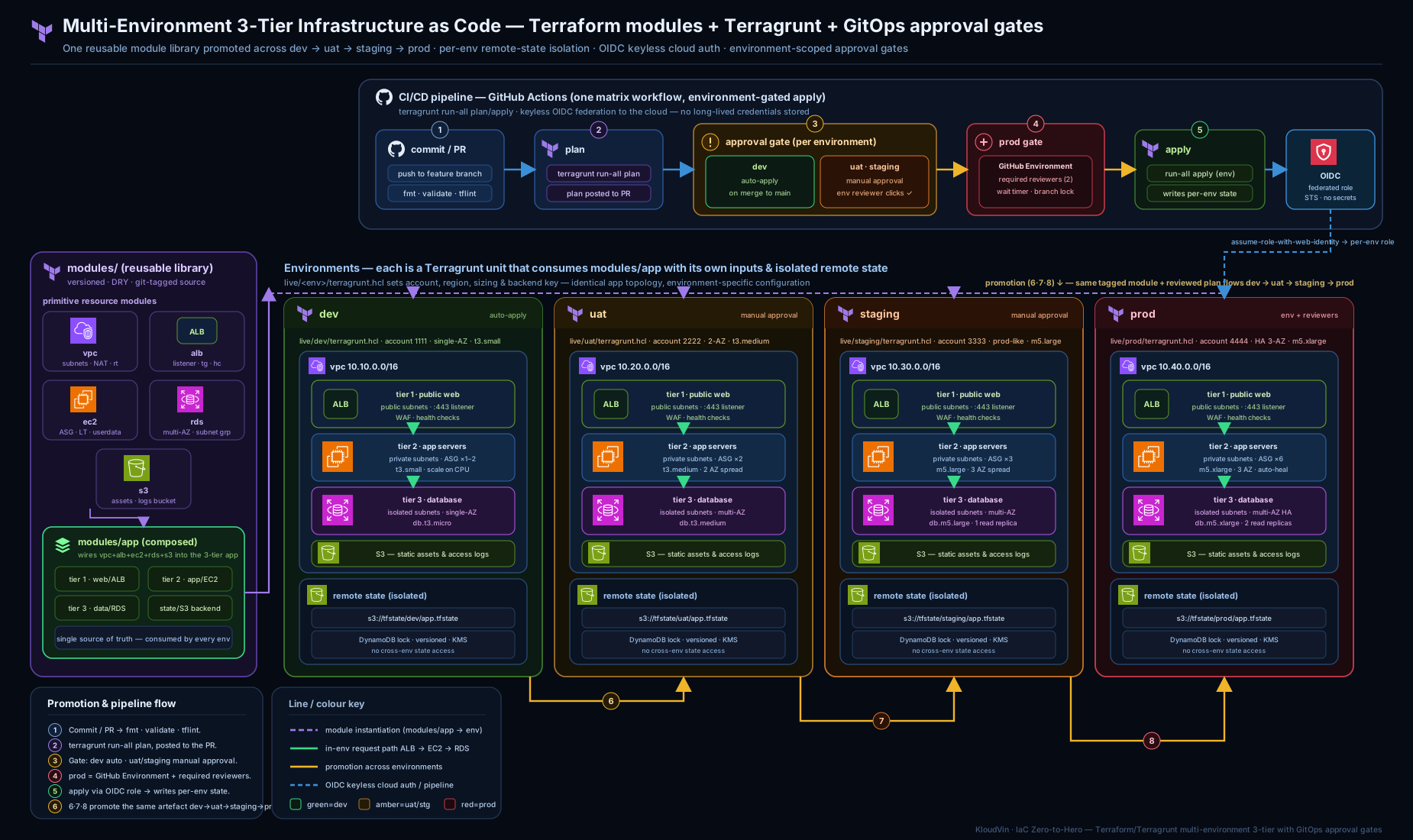
The diagram shows the global module library on the left feeding the four environment columns, each composing the five tiers via terragrunt.hcl, with the CI/CD pipeline along the bottom applying the graduated gates — auto for dev, manual for uat/staging, required reviewers for prod — and OIDC minting per-environment credentials.
Drift detection: catch out-of-band change before it bites
Drift is when reality diverges from code — someone widens a security-group rule in the console during an incident, and now your state and the world disagree. The fix is a scheduled plan: run run-all plan on every environment on a timer, and fail (or alert) if any unit shows a non-empty diff.
# .github/workflows/drift.yml
name: drift-detection
on:
  schedule:
    - cron: "0 6 * * *"     # 06:00 daily
permissions:
  id-token: write
  contents: read
jobs:
  drift:
    strategy:
      matrix:
        env: [dev, uat, staging, prod]
    runs-on: ubuntu-latest
    environment: ${{ matrix.env }}        # read-only role; plan never needs apply rights
    steps:
      - uses: actions/checkout@v4
      - uses: aws-actions/configure-aws-credentials@v4
        with:
          role-to-assume: arn:aws:iam::role/gha-terragrunt-${{ matrix.env }}-readonly
          aws-region: ap-south-1
      - uses: gruntwork-io/terragrunt-action@v2
        with:
          tg_command: "run-all plan -detailed-exitcode"
          tg_dir: "infra/apps/3tier-app/envs/${{ matrix.env }}"
-detailed-exitcode returns 2 when there is a diff, which fails the job and surfaces the drift in your alerts. Use a read-only role for drift detection — a scheduled job should never hold apply rights. Managed platforms (Spacelift, Terraform Cloud/HCP, env0) ship drift detection as a built-in feature; the scheduled-plan pattern above is the free, portable equivalent.
Hands-on lab
This lab builds and validates the structure end to end using only local tooling and the free tier — you can do the whole thing with validate/plan and spend nothing. We will scaffold the layout, prove that state keys and provider roles are path-derived, and confirm the dependency graph.
Tooling (all free): Terraform 1.x or OpenTofu, Terragrunt, and (optionally) the AWS CLI for the OIDC-free local part. Verify:
terraform -version      # or: tofu -version
terragrunt -version
Steps:
-
Create the skeleton:
mkdir -p infra/modules/{app-vpc,app-s3,app-rds,app-ec2,app-alb} mkdir -p infra/apps/3tier-app/envs/{dev,uat,staging,prod} cd infra/apps/3tier-app -
Write
root.hcland adev/env.hcl(copy the snippets above; for the lab you can setbucketto a name you own and drop theassume_roleblock so it runs against your default credentials). -
Add a trivial
app-vpcmodule (a singlenull_resourceis enough to prove wiring without spending), then adev/vpc/terragrunt.hclthat sources it. -
Prove path-derived state keys — initialise and inspect the generated backend:
cd envs/dev/vpc
terragrunt init
cat backend.tf            # exception to the no-cat rule: confirm generation
Expected output: a
backend.tfwhosekeyisenvs/dev/vpc/terraform.tfstate. Repeat underenvs/prod/vpcand confirm the key isenvs/prod/vpc/terraform.tfstate— different, automatically. -
Prove the dependency graph. Add
rdsandec2units withdependencyblocks, then from the env root:cd ../../ # envs/dev terragrunt graph-dependenciesExpected output: Graphviz DOT showing
vpcupstream ofrdsandec2. Pipe todot -Tpng -o graph.pngif you want the picture. -
Validate every unit without touching the cloud:
terragrunt run-all validateExpected output: each unit reports
Success! The configuration is valid. -
Dry-run the whole environment (mock outputs let downstream units plan):
terragrunt run-all planExpected output: plans for all units in dependency order; downstream units show approximate diffs fed by mock outputs.
Validation: you have succeeded when (a) dev and prod generate different state keys from the same root.hcl, (b) graph-dependencies shows vpc before rds/ec2, and © run-all validate passes for every unit.
Cleanup:
# If you applied anything real:
cd infra/apps/3tier-app/envs/dev
terragrunt run-all destroy --terragrunt-non-interactive
# Remove generated files and the scaffold:
find infra -name 'backend.tf' -o -name 'provider.tf' -o -name '.terragrunt-cache' -prune
rm -rf infra
Cost note: if you keep everything at validate/plan, the lab is free. If you actually apply the real 3-tier modules, the meaningful costs are the RDS instance, the NAT gateway(s), and the ALB (each roughly a few hundred to a few thousand rupees per month). Use single_nat_gateway = true, the smallest instance classes, and terragrunt run-all destroy the moment you are done — and never leave a prod-sized RDS or a per-AZ NAT topology running in a sandbox.
Common mistakes & troubleshooting
| Symptom | Likely cause | Fix |
|---|---|---|
Error: Unsupported attribute … dependency.vpc.outputs.vpc_id on plan |
dependency not yet applied and no mock_outputs |
add mock_outputs with the keys the consumer reads, plus the command allowlist |
apply proceeded with obviously fake IDs (e.g. subnet-aaaa) |
mock_outputs_allowed_terraform_commands includes apply |
restrict the allowlist to ["validate","plan","init"] so apply uses real outputs |
| Two environments fighting over the same state | hard-coded key instead of path_relative_to_include() |
derive the key from the path; verify each unit’s backend.tf has a distinct key |
| Prod pipeline applied without approval | job missing environment: or environment has no protection rules |
reference the protected environment: and configure required reviewers on it |
Error: could not assume role … is not authorized to perform sts:AssumeRoleWithWebIdentity |
OIDC trust policy sub claim does not match the workflow/environment |
align the sub condition with repo:org/repo:environment:<env> (or ref) exactly |
run-all apply applies in the wrong order |
a dependency block is missing, so Terragrunt cannot see the edge |
add the dependency for every output a unit consumes; re-check graph-dependencies |
| Drift job never fails despite console changes | plan exit code ignored | use plan -detailed-exitcode; treat exit 2 as drift |
| Module change hit prod unexpectedly | environments float off main instead of pinned tags |
pin ref= per environment; promote by bumping the tag deliberately |
Best practices
- Separate
modules/from the live tree. The library is versioned and stable; the live tree changes constantly. Never define a resource directly inenvs/. - Compose, don’t copy. The 3-tier app consumes
app-vpc/app-ec2/app-alb/app-rds/app-s3; a second app reuses the same library. Duplication is the enemy. - Derive state keys and provider roles from the path. Isolation and account-correctness then come from structure, not discipline.
- Pin module versions per environment. Promote dev→uat→staging→prod by bumping a tag, one reviewable line at a time. Never let prod track
main. - Plan on PR, apply on merge, gate by environment. Reviewers should see the diff before they approve; the gate enforces who may apply.
- One cloud account per environment where you can — it makes the blast-radius boundary a hard wall rather than a tag convention.
- Use OIDC everywhere; ban long-lived keys. Scope each role’s trust to the specific repo and environment.
- Run scheduled drift detection with a read-only role on every environment, and alert on a non-empty plan.
- Put the platform team in CODEOWNERS for
envs/prod/**so prod changes need their review to even merge. - Keep the exit ramp open. Terragrunt only generates standard Terraform files and calls the normal binary; commit the generated
backend.tf/provider.tfand inline inputs as.tfvarsand you are back to vanilla Terraform with state intact.
Security notes
The security posture of this design rests on three pillars. First, no stored secrets: OIDC means there are no long-lived cloud keys in CI to leak; tokens are short-lived and scoped by the sub claim to a specific repository and environment. Second, separation of duties: prod apply requires a named reviewer who is not the author, recorded on the deployment for audit, and reinforced by CODEOWNERS on envs/prod/**. Third, hard isolation: per-environment accounts plus path-derived state and per-account assume_role mean a dev pipeline physically cannot authenticate to prod or touch its state.
A few more deliberate choices: state buckets are encrypted (encrypt = true) and access-controlled because state can contain secrets — an RDS connection detail or an initially-set password lands in state in plaintext, so the backend must be treated as sensitive. Grant CI roles least privilege — the drift role is read-only; the apply roles are scoped to the resources the app actually manages, not account-wide admin. Enable deletion protection on prod RDS and S3 (and consider a prevent_destroy lifecycle on irreplaceable resources) so a bad plan cannot delete the data tier. Finally, run policy-as-code (OPA/Conftest, Checkov, or tfsec) as a gate in the PR pipeline so a plan that opens 0.0.0.0/0 or disables encryption fails review automatically — covered in the policy-gates lessons of this track.
Interview & exam questions
-
Why use Terragrunt for a multi-environment 3-tier app instead of Terraform workspaces? Workspaces share one backend and one provider config and branch on
terraform.workspace, which couples environments and offers no per-account provider isolation. Terragrunt keeps each environment in its own directory with a path-derived state key and a per-accountassume_role, giving hard isolation, DRY backend/provider generation, and inter-module dependencies — the things a four-environment, multi-account setup actually needs. -
How does Terragrunt guarantee dev and prod never share state? The
remote_stateblock deriveskeyfrompath_relative_to_include(), so each unit’s state path equals its directory path (envs/prod/rds/...vsenvs/dev/rds/...). The keys differ by construction; there is no shared state and no manual key to get wrong. -
What do
mock_outputsandmock_outputs_allowed_terraform_commandsdo, and why is the allowlist critical?mock_outputssupply placeholder values so a consumer canplan/validate/initbefore its dependency has been applied. The allowlist restricts those mocks to read-only commands soapplyanddestroyare never fed fake IDs — apply only runs against real outputs. Includingapplyin the allowlist is a serious bug. -
Describe the graduated approval-gate model and the reasoning behind it. Dev auto-applies (no gate) for fast feedback on a throwaway environment; uat and staging require a manual approval as cheap insurance and to protect the production rehearsal; prod requires named reviewers who are not the author, plus optionally a wait timer. Friction scales with blast radius, and prod enforces an audited second-person change.
-
How does OIDC remove the need for stored cloud credentials, and what scopes the access? The CI platform issues a short-lived signed token; the cloud trusts that issuer and returns temporary credentials only when the token’s
subclaim matches a trust condition you set. Scoping torepo:org/repo:environment:prodmeans only a job in the approved prod environment can assume the prod role — no static keys exist. -
A teammate widened a security-group rule in the console during an incident. How does your pipeline catch it, and how do you reconcile? A scheduled drift job runs
run-all plan -detailed-exitcode; the non-empty plan returns exit code2, fails the job, and alerts. You reconcile by either codifying the change (update the module/inputs and apply) or reverting it (re-apply to bring reality back to code) — deliberately, via the normal gated pipeline. -
Why pin module
sourceto a tag per environment rather than floating offmain? Promotion’s whole value is that prod runs code already proven in dev, uat, and staging. If every environment tracksmain, a merge changes all environments at once — you have effectively deployed straight to prod. Per-environment tags make promotion a deliberate, reviewable, one-line act. -
How would you enforce that a prod change cannot be merged without the platform team’s review? Add the platform/SRE team as code owners on
infra/apps/3tier-app/envs/prod/**via CODEOWNERS, with required reviews from code owners enabled on the protected branch. This blocks the merge; the GitHub Environment’s required reviewers additionally block the apply — defence in depth. -
What is the dependency order Terragrunt computes for this app, and how does it know?
vpcands3(no deps) →rds(needs vpc) →ec2(needs vpc, rds, s3) →alb(needs vpc, ec2). Terragrunt infers it from thedependencyblocks;run-allbuilds the DAG and applies in topological order, parallelising independent units. You never write the order explicitly. -
Compare doing the prod gate in GitHub Actions vs Azure DevOps vs Atlantis. GitHub uses Environments with required reviewers (and optional wait timer/branch limit). Azure DevOps uses an Environment with an Approvals check (plus Business Hours / exclusive-lock checks). Atlantis uses
apply_requirements: [approved, mergeable]plus CODEOWNERS on the prod path. The primitive differs; the principle — an audited second approver on prod — is identical. -
Where can secrets end up in this system, and how do you protect them? In state (RDS connection details, initially-set passwords) — so the backend is encrypted and access-controlled, and real secrets are kept out of Terraform (Vault / cloud secret manager). In CI — eliminated by OIDC. In logs — avoid printing sensitive outputs; mark variables
sensitive. -
How do you keep an exit ramp from Terragrunt? Terragrunt only generates standard
backend.tf/provider.tfand calls the normalterraform/tofubinary. To leave, commit the generated files, inline theinputsas.tfvars, and you are back to vanilla Terraform with state untouched. Adopt Terragrunt for the duplication it removes, and keep the generated output boring enough that walking away stays possible.
Quick check
- What Terragrunt function makes each unit’s state key unique without you hand-writing it?
- Which environments in this model auto-apply, which need a manual approval, and which need required reviewers?
- What is the purpose of
mock_outputs_allowed_terraform_commands, and which commands must it exclude? - In OIDC, what part of the token is used to scope a job to the prod environment’s role?
- What flag makes a scheduled
run-all planfail when drift is present?
Answers
path_relative_to_include()— used as thekeyin theremote_stateconfig, it turns the directory path into the state key.- dev auto-applies; uat and staging require a manual approval; prod requires required reviewers (a named group, not the author).
- It restricts mock outputs to read-only commands so
apply/destroyalways use real dependency outputs; it must excludeapplyanddestroy. - The
sub(subject) claim, matched against a condition likerepo:org/repo:environment:prodin the role’s trust policy. -detailed-exitcode— it returns exit code2on a non-empty plan, failing the job.
Exercise
Extend the repository to a second region for prod only, to support an active/passive DR posture, without breaking the dev→uat→staging→prod model:
- Add
envs/prod-dr/env.hclwith the sameaccount_idas prod but a differentaws_region, and stamp thevpc/rds/ec2/albunits there (no S3 if you replicate the bucket cross-region). - Confirm via the generated
backend.tfthatprod-drstate keys are distinct fromprod(they will be, because the path differs). - Add a
prod-drjob to the pipeline that depends onprodand is gated behind the same required-reviewers Environment, so DR changes are governed identically to prod. - Add
prod-drto the drift-detection matrix with a read-only role. - Stretch: make the RDS in
prod-dra cross-region read replica by adding adependency "primary_rds" { config_path = "../../prod/rds" }and passing its identifier as the replica source. Note the new edge ingraph-dependenciesand reason about whatrun-all destroyordering must now be.
Write down: which files you added versus changed (you should add many and change almost none of the existing units), and one sentence on why the approval gate for prod-dr should match prod rather than staging.
Certification mapping
This lesson maps directly to the HashiCorp Terraform Associate (003) objectives on remote state and backends, module sources and versioning, the core workflow, and managing multiple environments — Terragrunt is the orchestration layer, but the underlying Terraform concepts (state isolation, module composition, dependency ordering) are exactly what the exam tests. The CI/CD approval-gate and OIDC material maps to the cloud DevOps professional exams: AWS Certified DevOps Engineer – Professional (DOP-C02) (deployment governance, OIDC/short-lived credentials, multi-account strategy), Microsoft Azure DevOps Engineer Expert (AZ-400) (Environments, approvals and checks, deployment gates, workload identity federation), and Google Cloud Professional DevOps Engineer (progressive delivery and workload identity federation). The drift-detection and policy-gate practices also surface in those DevOps exams’ “secure and govern infrastructure” domains.
Glossary
- Live tree — the per-environment instantiation of infrastructure (
apps/.../envs/dev|uat|staging|prod), as opposed to the reusablemodules/library. - Unit — a single deployable Terragrunt directory (one
terragrunt.hclsourcing one module); the atom thatrun-alloperates on. Recent Terragrunt also uses stacks to group units. dependencyblock — declares that one unit consumes another’s outputs; Terragrunt uses these edges to build the apply-order DAG.mock_outputs— placeholder values that let a consumerplan/validatebefore its dependency is applied; gated by a command allowlist so apply never uses them.path_relative_to_include()— Terragrunt function returning the path from the included (parent) config to the current unit; used to derive a unique state key.- Approval gate — a CI/CD control that pauses a deployment until a condition is met (manual click, named reviewer, wait timer).
- GitHub Environment — a deployment target with optional protection rules (required reviewers, wait timer, branch restriction) and recorded approvals.
- Required reviewers — a protection rule naming people/teams who must approve before a job targeting that environment runs.
- OIDC (OpenID Connect) — a federation standard letting CI obtain short-lived cloud credentials by presenting a signed token, removing stored keys.
subclaim — the subject field of an OIDC token (e.g.repo:org/repo:environment:prod) used to scope which workflows may assume a role.- Drift — divergence between deployed reality and the code/state; detected by a scheduled plan.
- Promotion — flowing the same module version from dev → uat → staging → prod, deliberately, one reviewable tag bump per environment.
- Separation of duties — the control that the person approving a prod change is not the person who authored it.
Next steps
You now have the full multi-environment, gated, keyless pipeline for a 3-tier app. The natural next lesson is Terraform Troubleshooting: State, Providers, Drift, Dependencies & Debugging, which gives you the symptom→cause→fix playbooks for when a run-all goes wrong, state gets stuck or corrupted, or a provider/auth error blocks a gated apply. From there, deepen the governance side with the OPA/Conftest and Checkov/tfsec policy-gate lessons (turn “a reviewer should catch this” into “the pipeline rejects it automatically”), and the GitHub Actions Terraform OIDC lesson for the PR-automation details. When you are ready to see where this pattern sits in the bigger picture, The Terraform Architecting Ladder places Terragrunt DRY multi-account at rung four and shows the path up to a full enterprise IaC platform.