You have learnt to write Terraform and to package it into reusable modules. Then you stood up your second environment, and your third, and somewhere around the fourth you noticed that every environment directory contains a near-identical backend block, a near-identical provider block, and a wall of variable wiring that has already started to drift apart because someone fixed a tag in prod and forgot staging. You are now copy-pasting infrastructure, which is the precise sin Infrastructure as Code was meant to abolish. The day you need to change the state-bucket naming convention, or bump the AWS provider, or add a default tag, you will edit it once per environment and miss one. Terragrunt exists to delete that duplication — to let you define the boilerplate once, generate it per environment, keep each environment’s inputs in a tiny file, and run a change across a whole tree of environments with one command and a correct dependency order.
This lesson is the on-ramp to Terragrunt for someone who already knows Terraform. We will be precise about what Terragrunt is (a thin orchestration wrapper around the terraform/tofu binary — not a separate IaC engine, not a new language to provision clouds), walk every block and function you will actually use, show how backend and provider config get generated rather than copied, explain the dependency graph and run --all, and pass outputs cleanly from one unit to another. We will also be honest about Terragrunt’s current direction — the move towards Stacks and units — so what you learn here is not stale the day after you read it. Throughout, a fictional regional logistics company, Frachtline, provides the running example: a four-engineer platform team running a fleet-tracking and routing platform across dev, staging, and prod, in two AWS accounts, who have just hit the copy-paste wall.
Learning objectives
By the end of this lesson you will be able to:
- Explain what Terragrunt solves and, just as importantly, when not to reach for it.
- Read and write every core Terragrunt block —
terraform,include,remote_state,generate,inputs,dependency/dependencies, andbefore_hook/after_hook/error_hook— and the configuration functions (find_in_parent_folders,path_relative_to_include,get_env,read_terragrunt_config, and theget_*family). - Generate DRY backend and provider configuration once and have it materialise correctly in every unit.
- Wire dependencies between units, pass outputs between them, and survive plan-time and greenfield applies with
mock_outputs. - Drive a whole tree of units with
terragrunt run --alland read the dependency graph it builds. - Lay out a repository that separates reusable modules from the live environment tree.
- Describe Terragrunt’s current Stacks/units direction and run Terragrunt against OpenTofu.
Prerequisites
You should be comfortable with Terraform’s core workflow (init/plan/apply/destroy), with modules (inputs, outputs, calling a child module, pinning a Git or registry source), and with the idea of remote state and state locking — what a backend is and why concurrent writes corrupt state. If those are shaky, read Terraform Fundamentals: HCL, Providers, State & the Core Workflow and Authoring Terraform Modules: Structure, Inputs/Outputs, Versioning & Publishing first; this lesson assumes them. In the KloudVin Terraform & DevOps Zero-to-Hero course this is the Terragrunt module — the bridge between writing modules and the multi-environment 3-tier build that comes next. You need only a free local toolchain: Terraform (or OpenTofu) and the Terragrunt binary; the hands-on lab runs entirely with local-state stand-ins so it costs nothing and touches no cloud.
What Terragrunt is — and is not
Terragrunt is a thin wrapper that calls Terraform (or OpenTofu) under the hood. It is distributed as a single binary, terragrunt, written in Go by Gruntwork. When you run terragrunt apply, Terragrunt reads a terragrunt.hcl configuration file, does some preparation (generates files, downloads remote modules, resolves dependencies), and then shells out to terraform apply in a working directory it controls. Every Terraform concept you know is still in play underneath. Terragrunt adds orchestration on top; it does not replace the engine.
It is worth stating the negatives plainly, because newcomers over-attribute power to it:
| Terragrunt is | Terragrunt is not |
|---|---|
An orchestrator that calls terraform/tofu |
A separate provisioning engine — it has no providers of its own |
| A way to keep backend/provider/input config DRY across many units | A new language for describing cloud resources (that is still HCL in your modules) |
A dependency runner (run --all, dependency blocks) |
A state store — state still lives in your Terraform backend (S3, GCS, Azure Blob, etc.) |
| A tool that generates Terraform files at runtime | A replacement for modules — you still write/consume normal Terraform modules |
| Useful once environment count makes repetition painful | Worth adding to a three-resource, single-environment project |
The mental model to hold: modules are the reusable definition of infrastructure; the live tree is the per-environment instantiation; Terragrunt is the glue that instantiates a module per environment without copy-paste. Reach for it when the number of environments (or accounts, or regions) makes Terraform’s own repetition genuinely painful — Frachtline’s three environments across two accounts is right at the threshold; a single-environment side project is firmly below it and Terragrunt would be over-engineering.
Versions (2026). This lesson targets Terraform 1.x (1.13 at time of writing) and a current Terragrunt release. Two things have changed recently and matter: the orchestration command is now
terragrunt run --all <cmd>(the olderterragrunt run-all <cmd>still works but is deprecated, and the very oldterragrunt apply-allstyle is gone), and Terragrunt is moving towards Stacks (terragrunt.stack.hclwithunit/stackblocks). Both are covered below. Everything here works identically against OpenTofu, the open fork of Terraform — setterraform_binary = "tofu"in theterraformblock (or exportTG_TF_PATH=tofu) and every command is unchanged.
The two problems, concretely
Before the blocks, see the duplication Terragrunt removes. In plain Terraform with a directory-per-environment layout, every leaf repeats this:
# live/prod/vpc/backend.tf  — and again in dev/, staging/, with one key changed
terraform {
  backend "s3" {
    bucket         = "frachtline-tfstate-prod"
    key            = "vpc/terraform.tfstate"
    region         = "ap-south-1"
    dynamodb_table = "frachtline-tflock"
    encrypt        = true
  }
}

# live/prod/vpc/provider.tf  — identical in every environment except the role ARN
provider "aws" {
  region = "ap-south-1"
  assume_role { role_arn = "arn:aws:iam::111111111111:role/terraform" }
  default_tags { tags = { managed_by = "terraform", env = "prod" } }
}
Two failure modes follow. (1) Boilerplate drift: there is no single source of truth for the backend or provider, so changing the bucket-naming scheme, the lock table, the provider version, or a default tag is an N-place edit and you will miss one. (2) Manual orchestration: to apply the whole prod environment in the right order (network before database before app), you cd into each directory and run apply by hand, remembering the order. Terragrunt’s generate/remote_state blocks fix (1); its dependency blocks and run --all fix (2).
Repository layout: live vs modules
Separate the definition of infrastructure (reusable modules) from its instantiation (the live tree). Modules can live in this repo or, better, in a versioned registry/Git ref; the live tree is environment-specific and changes constantly.
infra/
  modules/                         # reusable Terraform modules (or a separate versioned repo)
    vpc/                           #   main.tf / variables.tf / outputs.tf / versions.tf
    rds/
    app/
  live/
    root.hcl                       # the one root config every unit includes
    accounts.hcl                   # account-level locals (account id, role)  [optional]
    dev/
      env.hcl                      # env-level locals (env name, region, sizes)
      vpc/
        terragrunt.hcl             # a "unit": points at modules/vpc, declares inputs
      rds/
        terragrunt.hcl             # depends on vpc
      app/
        terragrunt.hcl             # depends on vpc + rds
    staging/
      env.hcl
      vpc/   …  rds/  …  app/  …
    prod/
      env.hcl
      vpc/   …  rds/  …  app/  …
Each leaf directory (dev/vpc, prod/rds, …) is a unit: one terragrunt.hcl that points at a module, supplies inputs, and includes the shared root. The path itself encodes the identity — live/prod/rds is “the RDS state for prod” — which is what lets a single root config compute the right backend key and the right environment inputs for every unit automatically. (Older versions named the root terragrunt.hcl; current guidance is to name it root.hcl to avoid the parent being mistaken for a unit. Either works; we use root.hcl.)
The blocks, one by one
Everything Terragrunt does is expressed in a small set of top-level blocks inside terragrunt.hcl. Here is the whole vocabulary, with what each is for.
| Block | Purpose | Appears in |
|---|---|---|
terraform { source = … } |
Point this unit at a Terraform module (local path, Git ref, or registry) | Unit (and can be set in root) |
include "<name>" { path = … } |
Inherit configuration from a parent terragrunt.hcl/root.hcl |
Unit |
remote_state { … } |
Declare the backend once; Terragrunt generates the backend block per unit |
Root (inherited) |
generate "<name>" { … } |
Write an arbitrary .tf file into the unit at runtime (commonly the provider) |
Root or unit |
inputs = { … } |
Supply variable values to the module (equivalent to a .tfvars) |
Root and/or unit (merged) |
dependency "<name>" { config_path = … } |
Reference another unit and read its outputs | Unit |
dependencies { paths = [...] } |
Declare ordering-only edges (no output passing) | Unit |
before_hook / after_hook / error_hook |
Run commands around (or on failure of) a Terraform command | Root or unit |
locals { … } |
Local values, often loaded from shared .hcl files |
Any |
terraform — where the module comes from
The terraform block tells the unit which module to run and can wrap that module with hooks and extra arguments.
# live/prod/vpc/terragrunt.hcl
terraform {
  # Local path during development …
  source = "../../../modules//vpc"
  # … or a pinned remote ref in production (note the // separating repo from subdir):
  # source = "git::git@github.com:frachtline/infra-modules.git//vpc?ref=v1.4.0"
  # … or a registry module:
  # source = "tfr:///terraform-aws-modules/vpc/aws?version=5.8.1"
}
The double slash // matters: everything before it is the repository/archive Terragrunt downloads and caches; everything after is the subdirectory within it that is the actual module. Pin remote sources with ?ref= (Git tag/commit) or ?version= (registry) exactly as you would module versions — this is your reproducibility guarantee. The terraform block also accepts extra_arguments (inject -var-file, -lock-timeout, etc. into specific commands) and the hook sub-blocks covered below.
include — inheriting the root
include is how a unit pulls in the shared root configuration so it does not repeat backend, provider, or common inputs.
# live/prod/vpc/terragrunt.hcl
include "root" {
  path = find_in_parent_folders("root.hcl")
}
find_in_parent_folders("root.hcl") walks up the directory tree from the current unit until it finds root.hcl and returns its path — so the same include line works in every unit regardless of depth. The merge_strategy (default no_merge, or shallow/deep) controls how the parent’s inputs/generate/etc. combine with the child’s. You can have multiple named includes (e.g. a root include plus an env include or a region include) — this is how Terragrunt composes layered configuration, and a child can read an exposed parent via expose = true and the include.<name> reference.
remote_state — generate the backend once
This is the block that deletes backend duplication. Declare the backend once in the root; Terragrunt computes the per-unit key from the path and writes a backend block into each unit at init time.
# live/root.hcl
locals {
  account = read_terragrunt_config(find_in_parent_folders("accounts.hcl"))
  env     = read_terragrunt_config(find_in_parent_folders("env.hcl"))
}

remote_state {
  backend = "s3"
  generate = {
    path      = "backend.tf"
    if_exists = "overwrite_terragrunt"
  }
  config = {
    bucket         = "frachtline-tfstate-${local.env.locals.environment}"
    key            = "${path_relative_to_include()}/terraform.tfstate"
    region         = "ap-south-1"
    encrypt        = true
    dynamodb_table = "frachtline-tflock"   # state locking (use_lockfile = true for S3-native locking)
  }
}
The magic is key = "${path_relative_to_include()}/terraform.tfstate". path_relative_to_include() returns the unit’s path relative to the included parent — for live/prod/vpc that is prod/vpc, so the state key becomes prod/vpc/terraform.tfstate automatically. No unit hard-codes its own key; the path is the key. Terragrunt will even create the bucket and lock table on first run if they do not exist (handy for bootstrap; some teams disable this and provision the backend explicitly). The if_exists = "overwrite_terragrunt" setting means Terragrunt manages and overwrites the file it generated but will not clobber a hand-written backend.tf.
remote_state supports every Terraform backend (s3, gcs, azurerm, local, …) and a disable_init/disable_dependency_optimization set of toggles for edge cases. For the modern S3 backend you can drop the DynamoDB table and set use_lockfile = true to use S3-native conditional-write locking.
generate — DRY provider (and anything else)
remote_state is really a specialised generate. The general generate block writes any file into the unit at runtime — most commonly the provider, so it too lives in exactly one place.
# live/root.hcl  (continued)
generate "provider" {
  path      = "provider.tf"
  if_exists = "overwrite_terragrunt"
  contents  = <<-EOF
    provider "aws" {
      region = "${local.env.locals.aws_region}"
      assume_role { role_arn = "${local.account.locals.role_arn}" }
      default_tags {
        tags = {
          managed_by  = "terragrunt"
          environment = "${local.env.locals.environment}"
        }
      }
    }
    terraform {
      required_providers {
        aws = { source = "hashicorp/aws", version = "~> 5.60" }
      }
    }
  EOF
}
Now the provider, its version pin, and the default tags are defined once. Change the AWS provider version here and every unit picks it up on its next init. The if_exists choices are worth knowing: overwrite_terragrunt (manage only files Terragrunt generated — the safe default), overwrite (clobber any file), skip (never touch an existing file), and error (fail if the file exists). disable_signature and comment_prefix tune the header Terragrunt stamps on generated files.
inputs — supplying variables
inputs is a map that Terragrunt turns into TF_VAR_* environment variables for the underlying module — it is the Terragrunt equivalent of a .tfvars file. Inputs from an included root and from the unit merge, with the unit winning, so you put common defaults in the root (or an env.hcl) and per-unit specifics in the unit.
# live/prod/rds/terragrunt.hcl
include "root" { path = find_in_parent_folders("root.hcl") }
include "env"  { path = find_in_parent_folders("env.hcl"); expose = true }

terraform { source = "../../../modules//rds" }

inputs = {
  instance_class    = "db.r6g.large"     # prod-only override
  multi_az          = true
  allocated_storage = 200
}
dependencies and dependency — ordering and outputs
These two are easy to confuse and do different jobs:
dependencies |
dependency "<name>" |
|
|---|---|---|
| Shape | dependencies { paths = ["../vpc"] } |
dependency "vpc" { config_path = "../vpc" } |
| Gives you | Ordering only — run that unit first | Ordering plus the unit’s outputs (dependency.vpc.outputs.*) |
| Use when | A unit must run after another but needs none of its outputs | You need to pass an output (VPC id, subnet ids, security-group id) into this unit |
In practice you reach for dependency almost always, because the reason one unit follows another is usually that it consumes the first’s output:
# live/prod/app/terragrunt.hcl
include "root" { path = find_in_parent_folders("root.hcl") }
terraform { source = "../../../modules//app" }

dependency "vpc" {
  config_path = "../vpc"
}
dependency "rds" {
  config_path = "../rds"
  # Let plan/validate succeed before rds has ever been applied:
  mock_outputs = {
    endpoint = "mock-endpoint:5432"
  }
  mock_outputs_allowed_terraform_commands = ["validate", "plan"]
}

inputs = {
  vpc_id          = dependency.vpc.outputs.vpc_id
  private_subnets = dependency.vpc.outputs.private_subnet_ids
  db_endpoint     = dependency.rds.outputs.endpoint
}
To read a dependency’s outputs, Terragrunt runs terraform output on that unit’s state — which means the dependency must already be applied. That breaks two situations: a fresh greenfield apply (the dependency has no state yet) and a plan-only CI run on a brand-new unit. mock_outputs solves both: it supplies placeholder values that satisfy the configuration during the commands you list in mock_outputs_allowed_terraform_commands (typically validate and plan), while a real apply uses the real outputs. Use mocks for shape, not for values you actually depend on at apply time.
Hooks — before_hook, after_hook, error_hook
Hooks run shell commands around a Terraform command. They live in the terraform block and are perfect for cross-cutting concerns: a tflint pass before plan, a Slack ping after apply, a cleanup on error.
terraform {
  source = "../../../modules//app"

  before_hook "fmt_check" {
    commands = ["plan", "apply"]
    execute  = ["terraform", "fmt", "-check"]
  }
  after_hook "notify" {
    commands     = ["apply"]
    execute      = ["bash", "-c", "echo applied ${path_relative_to_include()}"]
    run_on_error = false
  }
  error_hook "diagnose" {
    commands = ["plan", "apply"]
    execute  = ["bash", "-c", "echo 'failed — capturing logs'"]
    on_errors = [".*"]
  }
}
commands selects which Terraform commands trigger the hook; run_on_error controls whether an after_hook still fires on failure; error_hook runs only on failure and matches on_errors regexes.
The configuration function reference
Terragrunt configuration is dynamic because of its built-in functions (it also supports all of Terraform’s HCL functions). These are the ones you will actually use:
| Function | Returns / does | Typical use |
|---|---|---|
find_in_parent_folders("name") |
Path to the nearest ancestor file of that name | include { path = find_in_parent_folders("root.hcl") } |
path_relative_to_include() |
This unit’s path relative to the included parent | Compute the per-unit state key |
path_relative_from_include() |
The inverse — parent’s path relative to the unit | Build relative source paths |
get_env("VAR", "default") |
An environment variable (with default) | Inject CI-provided values/secrets without hard-coding |
read_terragrunt_config(path) |
Parse another .hcl file into an object |
Load shared accounts.hcl/env.hcl locals |
get_terragrunt_dir() |
Absolute path of the current unit’s dir | Reference files next to the unit |
get_parent_terragrunt_dir() |
Absolute path of the dir holding the included parent | Anchor paths to the live-tree root |
get_aws_account_id() / get_aws_caller_identity_arn() |
The caller’s AWS account / ARN at runtime | Guardrails: assert you are in the right account |
get_terraform_command() / get_terraform_cli_args() |
The command being run / its args | Conditional hooks |
run_cmd("cmd", "args"...) |
Shell out and capture output (cached per args) | Pull a value from an external tool |
sops_decrypt_file(path) |
Decrypt a SOPS-encrypted file | Bring secrets in safely |
Two cautions. First, prefer find_in_parent_folders with an explicit filename argument — recent Terragrunt deprecated the no-argument form that implicitly looked for terragrunt.hcl. Second, get_env and run_cmd make configuration depend on the environment it runs in; that is powerful for CI but means “the same code” can behave differently per machine, so document those dependencies.
Architecture overview
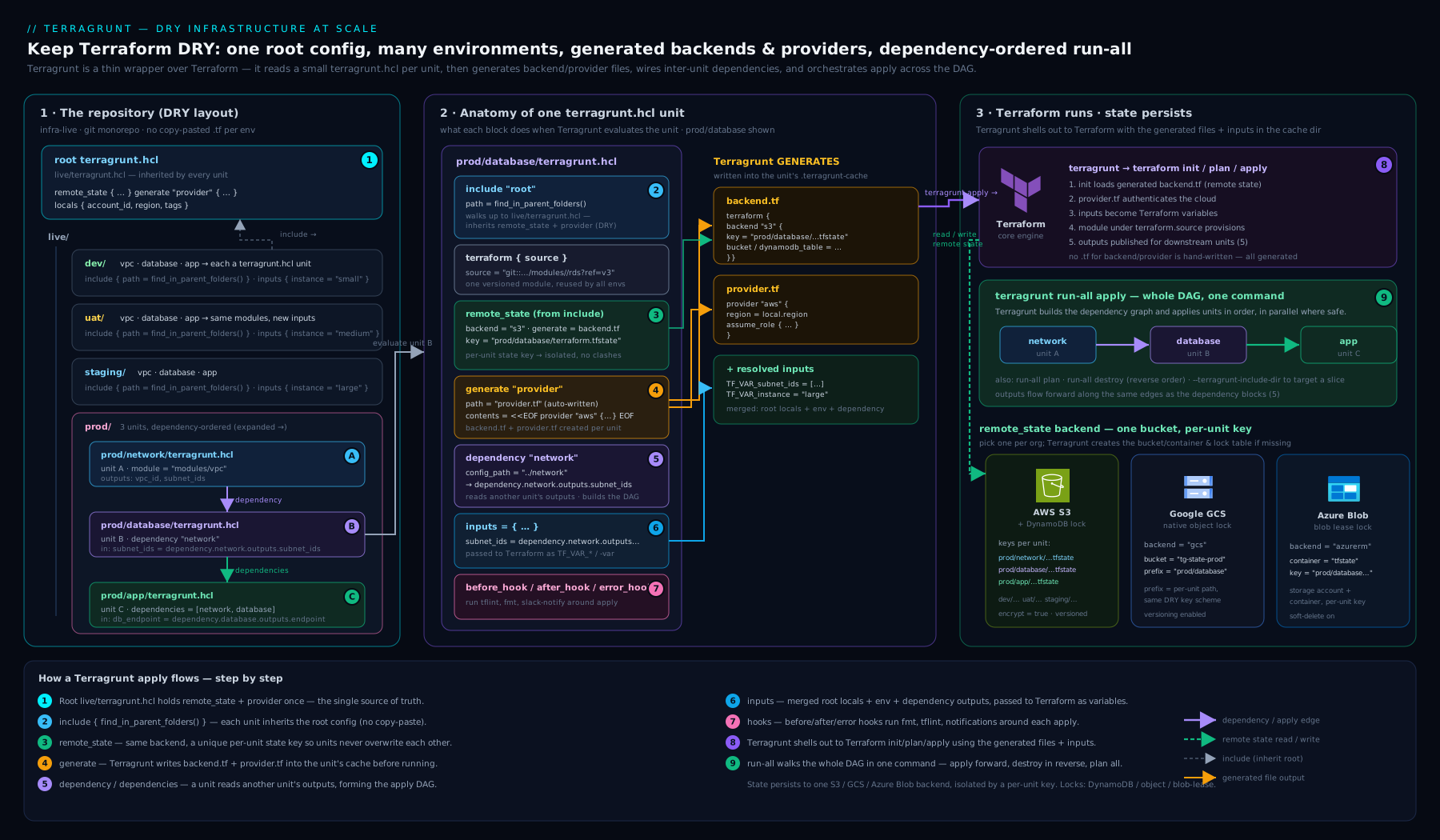
The diagram shows the whole shape at once: a single root.hcl carrying the remote_state and generate blocks, a layered set of *.hcl locals files (accounts.hcl, env.hcl), the per-environment tree of units each include-ing that root, the dependency edges that order vpc → rds → app, and the generated backend.tf/provider.tf that Terragrunt materialises into each unit’s working directory before shelling out to Terraform against the remote state backend.
Passing outputs between units
The payoff of dependency is clean output passing without the brittle alternative — a Terraform remote_state data source hand-wired in every consumer. With Terragrunt the consumer simply reads dependency.<name>.outputs.<output>, and Terragrunt guarantees the producer ran first. A few rules keep this healthy:
- Only expose what consumers need. A dependency’s entire output set is readable, but treat the outputs you actually consume as the unit’s public contract; keep it small and stable.
- Mock for shape, apply for truth.
mock_outputsexists to makevalidate/planpass before the producer has state. Never listapplyinmock_outputs_allowed_terraform_commandsfor a value you genuinely need, or you will apply against fake data. - Watch the optimisation. Terragrunt caches dependency outputs during a
run --allfor speed. If a producer changed in the same run, dependents see the new outputs because Terragrunt applies in graph order; outsiderun --all, a staleapplyof only the consumer reads whatever is currently in the producer’s state. - Cross-environment reads are a smell. A
produnit reading adevunit’s outputs almost always means a layering mistake; keep dependency edges within an environment.
run --all and the dependency graph
terragrunt run --all <command> is the orchestration headline. Point it at a directory and Terragrunt discovers every unit beneath it, builds a directed acyclic graph from the dependency/dependencies edges, and runs the command across the whole tree in dependency order (and in parallel where the graph allows).
# From live/prod — plan/apply the entire environment in the right order
terragrunt run --all plan
terragrunt run --all apply

# Visualise the graph Terragrunt computed (pipe to Graphviz)
terragrunt dag graph | dot -Tsvg > graph.svg
For apply/plan Terragrunt walks the graph leaves-last (producers before consumers: vpc, then rds, then app); for destroy it reverses the order automatically (app, then rds, then vpc) so nothing is torn down while something still depends on it. Useful flags:
| Flag | Effect |
|---|---|
--terragrunt-include-dir / --terragrunt-exclude-dir (or --queue-include-dir/--queue-exclude-dir) |
Restrict the run to (or skip) specific units |
--terragrunt-parallelism N |
Cap how many units run concurrently |
--terragrunt-ignore-dependency-errors |
Keep going past a failed unit (use with care) |
-- <args> (after --) |
Pass raw args through to Terraform (e.g. -- -lock-timeout=5m) |
run --all is the deprecated run-all’s successor; for a single unit you still just cd into it and run terragrunt plan/apply normally. A caution on run --all apply: because it applies many units non-interactively, treat it as a CI primitive with a reviewed plan, not a casual local command — an unreviewed run --all apply across prod is how accidents happen.
Terragrunt’s current direction: Stacks and units
The classic model above — a hand-built tree of terragrunt.hcl units wired by dependency — is stable and widely used, and is what most teams run today. Terragrunt is, however, evolving towards Stacks: a terragrunt.stack.hcl file declares a set of unit (and nested stack) blocks that Terragrunt generates into a .terragrunt-stack directory, so you describe a reusable bundle of units (a “VPC + RDS + app” stack) once and stamp it out per environment from values, rather than maintaining the directory tree by hand. The vocabulary you have learnt — terraform, include, remote_state, generate, dependency, the functions — carries straight over; Stacks add a higher-level packaging layer on top. It is worth knowing the term and the unit/stack/values shape so you recognise it in newer repos, but the unit-and-dependency fundamentals in this lesson remain the foundation and are not going away.
Hands-on lab
This lab uses local state and the null/random providers so it runs offline, costs nothing, and needs no cloud account — yet exercises every Terragrunt mechanism: include, remote_state (local backend), generate, inputs, dependency, mock_outputs, and run --all. You need terragrunt and terraform (or tofu) on your PATH.
1. Scaffold the modules and the live tree.
mkdir -p tg-lab/modules/network tg-lab/modules/app
mkdir -p tg-lab/live/dev/network tg-lab/live/dev/app
cd tg-lab
2. A network module that produces an output. Create modules/network/main.tf:
variable "cidr" { type = string }
resource "random_id" "vpc" { byte_length = 4 }
output "vpc_id" { value = "vpc-${random_id.vpc.hex}" }
output "cidr"   { value = var.cidr }
3. An app module that consumes it. Create modules/app/main.tf:
variable "vpc_id"   { type = string }
variable "replicas" { type = number }
resource "null_resource" "app" {
  triggers = { vpc_id = var.vpc_id, replicas = var.replicas }
}
output "summary" { value = "app in ${var.vpc_id} x${var.replicas}" }
4. The DRY root. Create live/root.hcl — backend and provider generated once:
remote_state {
  backend = "local"
  generate = { path = "backend.tf", if_exists = "overwrite_terragrunt" }
  config  = { path = "${get_terragrunt_dir()}/terraform.tfstate" }
}
generate "provider" {
  path      = "versions.tf"
  if_exists = "overwrite_terragrunt"
  contents  = <<-EOF
    terraform {
      required_providers {
        random = { source = "hashicorp/random" }
        null   = { source = "hashicorp/null" }
      }
    }
  EOF
}
inputs = { environment = "dev" }
5. The two units. Create live/dev/network/terragrunt.hcl:
include "root" { path = find_in_parent_folders("root.hcl") }
terraform { source = "../../../modules//network" }
inputs = { cidr = "10.10.0.0/16" }
Create live/dev/app/terragrunt.hcl — note the dependency and mock_outputs:
include "root" { path = find_in_parent_folders("root.hcl") }
terraform { source = "../../../modules//app" }

dependency "network" {
  config_path  = "../network"
  mock_outputs = { vpc_id = "vpc-mock0000" }
  mock_outputs_allowed_terraform_commands = ["validate", "plan"]
}

inputs = {
  vpc_id   = dependency.network.outputs.vpc_id
  replicas = 3
}
6. Plan the whole environment. From live/dev, watch Terragrunt build the graph and plan network before app, using the mock vpc_id for app because network has no state yet:
cd live/dev
terragrunt run --all plan
Expected: two plans; the app plan shows vpc_id = "vpc-mock0000" (the mock), proving plan-time mocking works before any apply.
7. Apply the whole environment in dependency order.
terragrunt run --all apply --terragrunt-non-interactive
Expected: network applies first; then app applies reading the real vpc-... output (not the mock). Confirm a backend.tf and versions.tf were generated into each unit:
ls dev/network/.terragrunt-cache/*/*/backend.tf dev/network/versions.tf
8. Read the dependency graph (optional, needs Graphviz).
terragrunt dag graph
Expected: an edge from app to network, confirming the order Terragrunt enforced.
9. Cleanup. Destroy in reverse order, then delete the lab:
terragrunt run --all destroy --terragrunt-non-interactive
cd ../..
rm -rf tg-lab
Cost note: zero. The lab uses the local backend and the null/random providers — nothing is created in any cloud, so there is nothing to bill and the only cleanup is deleting the directory.
Common mistakes & troubleshooting
| Symptom | Cause | Fix |
|---|---|---|
Could not find any terragrunt.hcl / root.hcl in parent folders |
include path wrong, or root file misnamed |
Pass the exact filename to find_in_parent_folders("root.hcl"); ensure the root actually sits in an ancestor directory |
dependency ... has not been applied yet on plan |
Reading a dependency’s outputs before it has state | Add mock_outputs + mock_outputs_allowed_terraform_commands = ["validate","plan"] |
Generated backend.tf/provider.tf keeps getting overwritten unexpectedly |
A hand-written file collides with a generate/remote_state block |
Use if_exists = "skip" to protect a hand-written file, or delete it and let Terragrunt own it |
| Two units write to the same state key | key hard-coded instead of derived |
Use key = "${path_relative_to_include()}/terraform.tfstate" so the path drives the key |
Error: Cycle: during run --all |
Circular dependency edges |
Break the cycle; dependencies must form a DAG — re-layer so producers never depend on consumers |
run --all apply applies things in the wrong order |
An edge expressed as a comment/inputs reference Terragrunt can’t see |
Make the edge explicit with a dependency or dependencies block |
| Stale outputs after changing a producer | Dependency-output caching | Re-run via run --all (graph order refreshes), or apply the producer then the consumer |
| Works locally, fails in CI with auth/region differences | Config depends on get_env/local creds |
Document and set the required env vars in CI; assert account with get_aws_account_id() |
Best practices
- Name the root
root.hcl, notterragrunt.hcl. It prevents the parent being discovered as a unit and makesfind_in_parent_folders("root.hcl")unambiguous. - Generate backend and provider once, in the root. That single source of truth is the entire point — never copy a backend or provider into a unit.
- Let the path be the identity. Derive state keys with
path_relative_to_include(); never hard-code akey. - Pin module sources. Use
?ref=<tag>/?version=onsource; treat an unpinned source as a production incident waiting to happen. - Layer locals. Put account-level facts in
accounts.hcl, environment facts inenv.hcl, and read them withread_terragrunt_config; keep units tiny (asource, adependencyor two, and overrides). - Prefer
dependencyover hand-wiredremote_statedata sources for cross-unit values — it gives you ordering for free and one place to mock. - Treat
run --all applyas a CI primitive. Apply per-environment from a pipeline with a reviewed plan; avoid casual whole-tree applies againstprod. - Keep dependency edges within an environment. Cross-environment reads are almost always a layering bug.
- Format and validate.
terragrunt hclfmt(formats.hcl) plusterraform fmt/validatevia hooks keeps the tree clean.
Security notes
- State is sensitive. Terragrunt does not change where state lives — it is still your Terraform backend, and it can contain resource metadata and sometimes secrets. Use an encrypted, access-controlled, locked backend (S3 +
use_lockfile/DynamoDB, GCS, or Azure Blob); never thelocalbackend for anything real (the lab’s local backend is for offline learning only). - Generated files can leak secrets. Anything you interpolate into a
generate "provider"block’scontents(and intoinputs) ends up in a.tf/env on disk in the working directory. Pull secrets from a secrets manager orsops_decrypt_file/get_envat runtime; never commit them, and add.terragrunt-cache/and generated files to.gitignore. run_cmdand hooks execute arbitrary shell. A malicious or carelessterragrunt.hclcan run anything duringinit/plan. Review changes to root/unit config like you review code, and be wary of running untrusted Terragrunt repos.- Assert the blast radius. Use
get_aws_account_id()/get_aws_caller_identity_arn()to fail fast if a unit is being applied against the wrong account — a cheap guardrail against fat-fingeredprodapplies. - Least-privilege per environment. Generate a per-environment
assume_rolein the provider sodevcredentials cannot touchprodstate or resources.
Interview & exam questions
-
Is Terragrunt a replacement for Terraform? No. It is a thin wrapper that orchestrates the
terraform/tofubinary — no providers, no state store of its own. It adds DRY config generation and dependency-aware multi-unit runs on top of Terraform. -
What problem does
remote_statesolve and how does it stay DRY? It declares the backend once (usually in the root) and generates abackend.tfinto each unit atinit, computing the per-unitkeyfrompath_relative_to_include(). One source of truth replaces an N-place edit. -
dependenciesvsdependency— what’s the difference?dependencies { paths = [...] }declares ordering only.dependency "<name>" { config_path = ... }declares ordering and exposes the target unit’s outputs asdependency.<name>.outputs.*. Usedependencywhen you need outputs (almost always). -
Why would a
planfail with “dependency has not been applied yet,” and how do you fix it? Terragrunt reads a dependency’s outputs from its state, which doesn’t exist before the producer is applied. Addmock_outputsplusmock_outputs_allowed_terraform_commands = ["validate","plan"]so plan/validate use placeholders while apply uses real outputs. -
What does
path_relative_to_include()return and why is it load-bearing? The current unit’s path relative to the included parent (e.g.prod/vpc). It lets a single root config derive a unique state key per unit so no unit hard-codes its own key. -
What does
find_in_parent_foldersdo, and what changed recently? It returns the path to the nearest ancestor file of the given name. Recent Terragrunt deprecated the no-argument form — always pass the filename, e.g.find_in_parent_folders("root.hcl"). -
How does
run --alldecide order, and what happens ondestroy? It builds a DAG fromdependency/dependenciesedges and runs producers before consumers; fordestroyit reverses the order so nothing is destroyed while something still depends on it. -
How do you generate a DRY provider, and what does
if_existscontrol? With agenerate "provider"block whosecontentsis the provider HCL, in the root.if_existscontrols collision behaviour:overwrite_terragrunt(manage Terragrunt-generated files — the safe default),overwrite,skip, orerror. -
When is Terragrunt the wrong tool? For a single environment / small project where Terraform’s own repetition isn’t yet painful — Terragrunt adds a layer and a learning curve that buys nothing there. It is justified by environment/account/region multiplicity.
-
Does Terragrunt work with OpenTofu? Yes — set
terraform_binary = "tofu"(orTG_TF_PATH=tofu). Terragrunt orchestrates either engine identically. -
What are Terragrunt Stacks? The newer direction: a
terragrunt.stack.hcldeclaresunit/stackblocks that Terragrunt generates into a.terragrunt-stacktree, letting you stamp out a reusable bundle of units per environment from values, on top of the same block/function fundamentals. -
How do hooks work, and name the three kinds. Hooks run shell commands around Terraform commands inside the
terraformblock:before_hook(before a command),after_hook(after, with optionalrun_on_error), anderror_hook(only on failure, matchingon_errors).
Quick check
- True or false: Terragrunt stores Terraform state in its own database.
- Which function gives a unit its path relative to the included parent, so you can build the state
key? - You need a unit to run after another and read its
vpc_id— which block? - What two things must you set so
terragrunt run --all plansucceeds before a dependency has ever been applied? - What is the current, non-deprecated command to apply a whole tree of units in dependency order?
Answers
- False. State lives in your Terraform backend (S3/GCS/Azure Blob/etc.); Terragrunt only orchestrates and generates the backend config.
path_relative_to_include()— used askey = "${path_relative_to_include()}/terraform.tfstate".dependency "<name>" { config_path = ... }— it gives ordering anddependency.<name>.outputs.vpc_id. (dependencieswould give ordering only.)mock_outputs = { ... }andmock_outputs_allowed_terraform_commands = ["validate","plan"]on thedependencyblock.terragrunt run --all apply(the olderterragrunt run-all applyis deprecated).
Exercise
Take the lab’s dev tree and promote it to a real multi-environment shape:
- Add a
stagingand aprodcopy of thenetwork+appunits, and introduce anenv.hclper environment holdingenvironment,aws_region, and anappreplicasvalue (e.g. dev=1, staging=2, prod=3). Have the root read it withread_terragrunt_configand feedreplicasfrom there so the only per-environment difference lives inenv.hcl. - Switch the
remote_statebackend fromlocaltos3(or your cloud’s backend), deriving thekeyfrompath_relative_to_include()and the bucket name from the env locals — confirm each unit lands at a distinct, path-derived state key. - Add a third unit,
db, betweennetworkandapp; wireappto depend on bothnetworkanddb, givedbamock_outputs.endpoint, and prove withterragrunt dag graphthat the order isnetwork → db → appand thatdestroyreverses it. - Add a
before_hookthat runsterraform fmt -checkonplan/apply, and anafter_hookthat prints the applied unit’s relative path. Confirm both fire duringrun --all apply.
Success looks like: one root.hcl, one env.hcl per environment, tiny units, path-derived state keys, a correct three-node graph, and not a single copied backend/provider block anywhere.
Certification mapping
This lesson supports the HashiCorp Certified: Terraform Associate (003) objectives — though note Terragrunt is a third-party tool and the exam tests Terraform concepts; Terragrunt is the production wrapper that exercises those concepts at scale:
- Objective 4 (Terraform modules) and Objective 8 (read/write configuration): Terragrunt is module consumption and config DRY-ness taken to production —
sourcepinning, inputs, and composition. - Objective 7 (state):
remote_stategeneration, per-unit state keys, locking, and backend choice are the exam’s remote-state/locking topics applied for real. - Objective 5 (core workflow):
run --all plan/apply/destroyis the core workflow orchestrated across many units; understand how it differs from a single-directoryapply. - Cloud DevOps certs (AWS DevOps Engineer DOP-C02, Azure DevOps Engineer AZ-400, Google Cloud DevOps Engineer) test multi-environment IaC and promotion patterns where this Terragrunt layout is directly applicable.
For the exam itself, be crisp on the plain-Terraform equivalents Terragrunt wraps: remote backends and locking, the terraform_remote_state data source (the manual alternative to dependency), workspaces vs directory-per-environment, and module source pinning.
Glossary
- Terragrunt — a thin Go wrapper that orchestrates Terraform/OpenTofu, adding DRY config generation and dependency-aware multi-unit runs.
- Unit — one leaf directory with a
terragrunt.hclthat points at a module, supplies inputs, and includes the root; the smallest thing Terragrunt applies. - Root config (
root.hcl) — the shared parent config (backend, provider, common inputs) that every unitincludes. remote_stateblock — declares the backend once and generates abackend.tfper unit, with a path-derived state key.generateblock — writes an arbitrary.tffile (commonly the provider) into a unit at runtime;remote_stateis a specialised form of it.dependencyblock — references another unit and exposes its outputs asdependency.<name>.outputs.*, with ordering implied.dependenciesblock — declares run-order edges only, no output passing.mock_outputs— placeholder outputs that satisfy a dependency during listed commands (usuallyvalidate/plan) before the producer has state.path_relative_to_include()— a unit’s path relative to its included parent; used to derive a unique state key.find_in_parent_folders("name")— returns the path to the nearest ancestor file of that name.run --all— runs a command across every unit in a tree in dependency-graph order (reverse fordestroy).- DAG — directed acyclic graph; the ordering Terragrunt builds from dependency edges. Cycles are an error.
- Stacks /
unit/stackblocks — Terragrunt’s newer packaging layer (terragrunt.stack.hcl) that generates a reusable bundle of units per environment. - OpenTofu — the open-source fork of Terraform; Terragrunt drives it via
terraform_binary = "tofu".
Next steps
You can now keep a multi-environment Terraform estate DRY: backend and provider generated once, units wired by dependency, and a whole tree applied in order with run --all. Next, put it to work end to end in Multi-Environment 3-Tier Infrastructure with Terragrunt & CI/CD Approval Gates, where you compose app modules from a shared library and promote dev → uat → staging → prod behind approval gates. For the failure modes, see Terraform Troubleshooting: State, Providers, Drift, Dependencies & Debugging, and to place Terragrunt on the broader maturity curve read The Terraform Architecting Ladder: From a Single Module to an Enterprise IaC Platform. If you are deciding whether to adopt it at all, Terraform vs Terragrunt vs Ansible vs Pulumi: Which IaC Tool, When? frames the trade-off.