A mid-sized online education company — call it the team that runs a national Moodle learning platform for a few hundred universities — has a problem that starts every September. Enrollment season triples their traffic in a week: students hammering the LMS for assignment uploads, video lectures, quiz submissions, and grade lookups, all at 9 a.m. when the first lectures begin. Their current setup is a fleet of hand-managed virtual machines running Moodle behind a load balancer, and every August the operations team spends two weeks cloning VMs, patching them by hand, and praying the database holds. Last year the grade-release day took the site down for forty minutes, and the support inbox still has the angry emails to prove it. The platform team has been told: containerize Moodle, run it on Kubernetes, make the autumn spike a non-event — and pick a managed Kubernetes service so we are not also running the control plane by hand.
That last clause is the whole point of this article. Kubernetes is the open-source system that schedules containers across a pool of machines, restarts them when they crash, and scales them up and down. Running it yourself means operating its control plane — the API server, scheduler, controller manager, and the etcd database that holds cluster state — which is exactly the kind of undifferentiated, pager-at-3 a.m. work this team is trying to escape. Managed Kubernetes means the cloud provider runs that control plane for you. The three you will actually choose between are Azure Kubernetes Service (AKS), Amazon Elastic Kubernetes Service (EKS), and Google Kubernetes Engine (GKE). They are far more alike than different — they all run upstream-conformant Kubernetes, so your kubectl commands and YAML manifests are portable — but the differences in how you operate them matter on exactly the days like grade-release morning.
What “managed” actually buys you
Before comparing the three, it helps to be precise about what the managed service takes off your plate, because beginners often assume “managed” means “fully hands-off.” It does not.
The provider runs and patches the control plane — you never SSH into the API server. They give you an SLA on the control plane’s availability. They handle the control-plane upgrades (you trigger them, but you do not run them). What you still own is everything on the worker nodes: the version they run, when they get patched, what size they are, and the workloads on top. Think of it as a split: the provider keeps the brain healthy, you keep the muscle sized and fed.
For the Moodle team, this split is the difference between “we operate Kubernetes” and “we operate our application on Kubernetes.” That second framing is the one that lets a four-person platform team support hundreds of universities.
Architecture overview
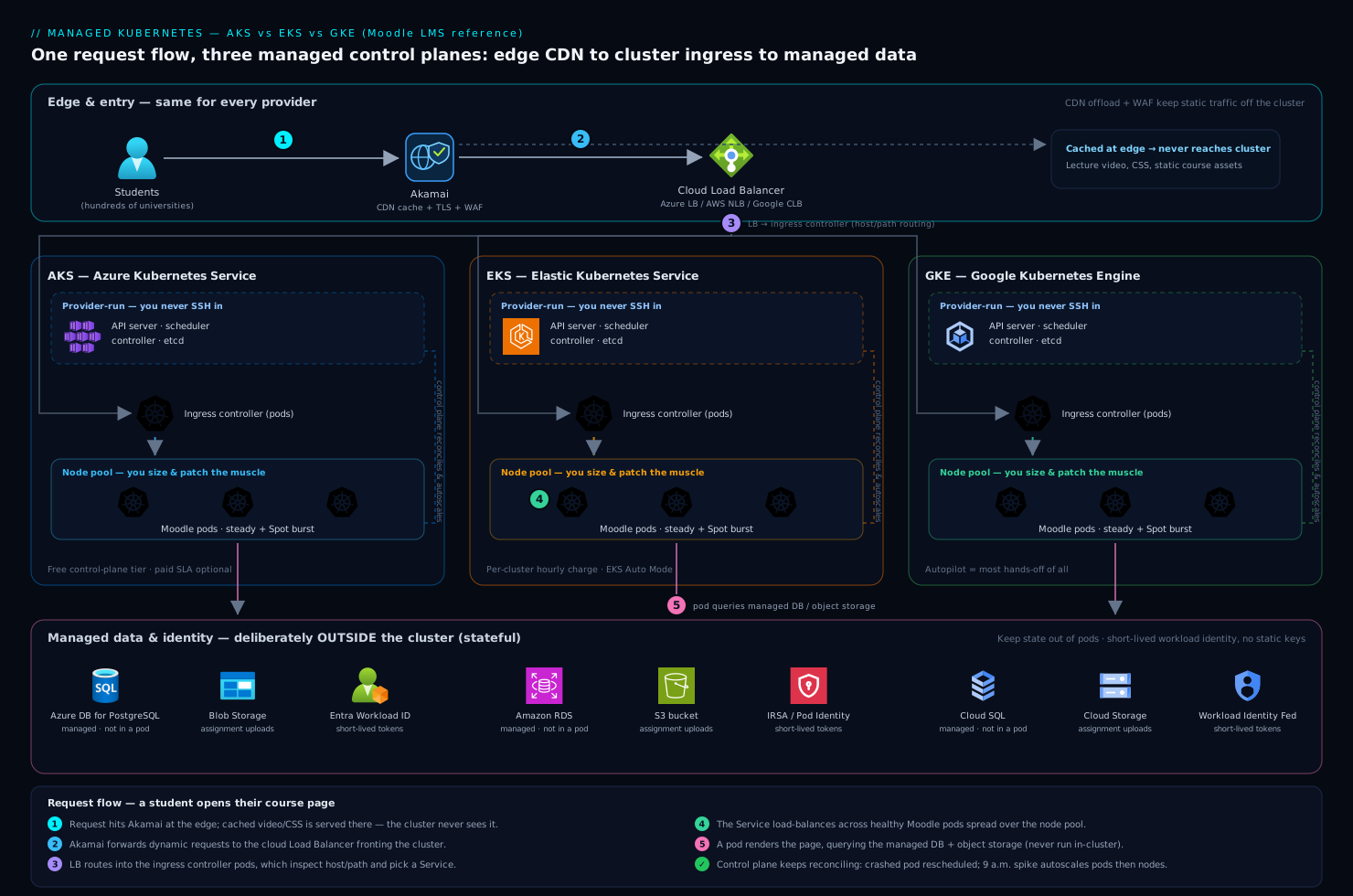
At the shape level, all three providers give you the same picture, and it is worth holding that picture in your head before the differences blur it. There is a managed control plane the provider runs in their own account, invisible to you except through the Kubernetes API endpoint. There is one or more node pool (AKS and GKE call them node pools; EKS calls them managed node groups) — groups of identical worker VMs that actually run your containers. Your Moodle pods, an Nginx ingress, and supporting services run as pods scheduled onto those nodes. Traffic arrives from students at the edge through Akamai, which terminates TLS, serves cached video and static course assets from its CDN so they never touch your cluster, and applies WAF rules to block the credential-stuffing attempts that always spike during enrollment. Akamai forwards the dynamic requests to a cloud load balancer, which routes into the cluster’s ingress, which routes to the Moodle pods.
Following one request — a student opening their course page:
- The request hits Akamai at the edge. If it is a cached lecture video or a CSS file, Akamai serves it directly and the cluster never sees it. A dynamic page request continues on.
- Akamai forwards to the cloud load balancer (an Azure Load Balancer, AWS NLB/ALB, or Google Cloud Load Balancer depending on the provider), which fronts the cluster.
- The load balancer routes to the ingress controller running as pods inside the cluster, which inspects the host and path and forwards to the right Service.
- The Service load-balances across the healthy Moodle pods spread over the node pool. A pod renders the page, querying the managed database (Azure Database for PostgreSQL / Amazon RDS / Cloud SQL — deliberately not run inside the cluster) and a Redis cache for sessions.
- The response streams back out through the same path. Meanwhile the control plane — the part the provider runs — is constantly watching: if a Moodle pod crashes, the scheduler places a new one; if CPU climbs at 9 a.m., the autoscaler adds pods and, if needed, nodes.
The components a beginner most often gets wrong are the ones outside the cluster: the database belongs in a managed database service, not in a pod, and the CDN belongs in front, not bolted on later. Keeping stateful data and heavy static traffic off the cluster is what makes the cluster itself simple enough to scale freely.
Control-plane management: the first real difference
This is where the three diverge first, and it is the difference a beginner feels soonest.
GKE is the most hands-off. In Autopilot mode, you do not manage nodes at all — you submit pods, Google provisions and right-sizes the underlying compute, patches it, and bills you per pod resource request. You think almost entirely in workloads. Even in Standard mode, GKE has the longest operational heritage (Google has run Kubernetes’ ancestor in production the longest) and the most automation around upgrades and repair turned on by default.
AKS sits in the middle and is notable for one thing beginners love: for a long time the control plane was free — you paid only for the worker nodes (a paid uptime-SLA tier exists for production guarantees). It integrates tightly with the rest of Azure, which matters enormously if your identity, networking, and policy already live there.
EKS gives you the most control and asks the most of you in return. The control plane carries a per-cluster hourly charge, and historically EKS expected you to wire up more yourself — the CNI, add-ons, node bootstrapping — though EKS Auto Mode has recently closed much of that gap by managing compute, scaling, and core add-ons automatically. EKS is the natural choice when your organization is already deep in AWS and your team values explicit control over convenience.
| Dimension | AKS (Azure) | EKS (AWS) | GKE (Google) |
|---|---|---|---|
| Control-plane cost | Free tier; paid SLA tier optional | Per-cluster hourly charge | Per-cluster charge (one zonal cluster free) |
| Most hands-off mode | Node auto-provisioning | EKS Auto Mode | Autopilot (most hands-off of all) |
| Default operational posture | Balanced; deep Azure integration | Most control, most assembly | Most automated upgrades/repair |
| Best fit when | You live in Azure / Entra ID | You live in AWS, want control | You want least ops, newest K8s fast |
| Upgrade cadence | Channels; you trigger | You trigger; add-on coordination | Release channels, can auto-upgrade |
There is no “best” row here. The honest rule for a beginner: pick the one that matches the cloud your identity, network, and data already live in. A team whose universities’ SSO, databases, and DNS are already in Azure should not pick GKE to save a few rupees on a control plane — the integration tax will dwarf the saving.
Node pools: how you size the muscle
A node pool (or managed node group) is a set of identical VMs. You almost always want more than one, and understanding why is core to running Moodle cheaply through a spike.
The standard pattern is a system node pool for cluster-critical add-ons (CoreDNS, the metrics server, ingress) and one or more user node pools for your actual application. Keeping system components on their own small, stable pool means a flood of Moodle pods during enrollment cannot starve the DNS server that the whole cluster depends on.
For the spike, the Moodle team uses two user pools:
- A steady pool of on-demand nodes sized for normal term-time load.
- A burst pool of cheaper Spot/preemptible nodes (all three clouds offer them at a steep discount) that the autoscaler grows during enrollment and grade-release. Moodle’s web tier is stateless, so a Spot node getting reclaimed just means a pod reschedules — acceptable for the savings.
# A pool of Spot/preemptible nodes is tainted so only spike-tolerant
# workloads land on it. The Moodle web Deployment tolerates this taint.
tolerations:
  - key: "kloudvin.io/spot"
    operator: "Equal"
    value: "true"
    effect: "NoSchedule"
Two layers of autoscaling do the work. The Horizontal Pod Autoscaler adds Moodle pods when CPU or a custom metric (requests-per-second) climbs. When pods cannot be placed because nodes are full, the Cluster Autoscaler (or GKE Autopilot / EKS Auto Mode doing it for you, or Karpenter on EKS) adds nodes from the burst pool. When the spike passes, both scale back down and the Spot nodes are released. The forty-minute outage from last year becomes a graph that goes up and comes back down on its own.
Networking models: the part that surprises beginners
Networking is where the three providers differ in ways that have real consequences, and it is the topic most likely to trip up someone new. The crux is how a pod gets an IP address.
In the simplest, most cloud-native mode, every pod gets a real IP from your VNet/VPC — this is Azure CNI on AKS, the AWS VPC CNI on EKS (the default), and VPC-native (alias IP) on GKE. The upside is that pods are first-class citizens on your network: a database firewall rule or a peered network sees the pod’s actual IP. The catch that surprises everyone: you can exhaust IP addresses fast, because every pod consumes one from your subnet. The Moodle team learned to size subnets generously — a /22 or larger for the pod range — because during enrollment they might run thousands of pods, and a subnet sized for “normal” load will refuse to schedule new pods at the worst possible moment.
The alternative is an overlay network (AKS’s Azure CNI Overlay or kubenet, GKE’s routes-based mode), where pods get IPs from a private range that does not consume VNet addresses — cheaper on IPs, but pods are not directly routable from outside without NAT. For a beginner the guidance is simple: start with the provider’s default cloud-native CNI, and size your subnets larger than you think you need.
| Networking concern | AKS | EKS | GKE |
|---|---|---|---|
| Default pod networking | Azure CNI (VNet IPs) or Overlay | AWS VPC CNI (VPC IPs) | VPC-native / alias IPs |
| Pod gets a real VPC/VNet IP | Yes (CNI) / No (Overlay) | Yes | Yes |
| Main beginner pitfall | Subnet IP exhaustion | Subnet IP exhaustion, ENI limits per node | IP range planning up front |
| Network policy engine | Azure NPM / Calico / Cilium | Calico / Cilium | Calico / Dataplane V2 (Cilium) |
One rule cuts across all three: turn on network policies early. By default, every pod can talk to every other pod. A network policy that says “only the ingress pods may reach the Moodle pods, and only Moodle may reach the database” is the difference between a compromised plugin staying contained and it pivoting across the whole cluster.
Identity integration: stop putting cloud keys in pods
This is the single most important security topic for a beginner to internalize, because the wrong way is so tempting and so common. Moodle needs to read uploaded assignments from object storage (Azure Blob / S3 / GCS). The naive approach is to bake a storage access key into the pod as an environment variable. Do not. That key is now in your manifests, your CI logs, and every running container — and it does not rotate.
The right way is workload identity: the pod assumes a cloud IAM identity automatically, with no long-lived key anywhere. Each provider has its own name for the same idea:
- AKS — Microsoft Entra Workload ID: a Kubernetes ServiceAccount is federated to an Entra ID managed identity, and the pod gets short-lived Entra tokens. Since the universities’ SSO already runs on Entra ID (federated from Okta as the upstream workforce IdP for staff logins), this keeps one identity story end to end.
- EKS — IRSA (IAM Roles for Service Accounts) and the newer EKS Pod Identity: a ServiceAccount maps to an AWS IAM role; pods get temporary STS credentials scoped to exactly the S3 bucket they need.
- GKE — Workload Identity Federation: a Kubernetes ServiceAccount binds to a Google IAM service account; pods get short-lived Google credentials.
# EKS IRSA: the ServiceAccount is annotated with the IAM role to assume.
# No access key is ever stored — pods receive temporary STS credentials.
apiVersion: v1
kind: ServiceAccount
metadata:
  name: moodle-storage
  annotations:
    eks.amazonaws.com/role-arn: arn:aws:iam::111122223333:role/moodle-assignment-bucket
For the genuinely application-level secrets that are not cloud IAM — the Moodle database password, the SMTP credentials for grade-notification emails, an LTI integration secret for a third-party tool — the team uses HashiCorp Vault. Vault issues short-lived, dynamically-generated database credentials and injects them into pods via its agent sidecar, so no static database password sits in a Kubernetes Secret. The principle across all of this: identities are short-lived and scoped; standing keys are the thing you are trying to eliminate.
Security, observability, and operations across all three
Because all three are conformant Kubernetes, the enterprise tooling around them is largely identical — which is good news, because it means the operational investment is portable if you ever switch clouds.
Posture and supply chain. Wiz scans the cluster and its cloud account agentlessly for misconfigurations, exposed workloads, and risky attack paths — for example, flagging a Moodle pod that can reach object storage it should not, or a node group exposed to the public internet. Shifting left, Wiz Code scans the Terraform and container images in the pull request before they ever deploy, catching a misconfigured node pool or a vulnerable base image at review time rather than in production.
Runtime threat detection. CrowdStrike Falcon runs as a sensor (a DaemonSet pod on every node) watching container runtime behavior — a process spawning a shell inside a Moodle pod, an unexpected outbound connection — and feeds detections to the security team’s SOC. This catches the live attack that a static scan cannot.
Observability. Datadog (or Dynatrace — the team standardized on one) runs an agent DaemonSet collecting metrics, logs, and distributed traces across all clusters and clouds in one pane of glass. During enrollment the on-call watches pod count, node count, p95 page-render latency, and database connection saturation on a single dashboard, with anomaly detection alerting before students start emailing. A unified observability layer is what makes a multi-cluster (or future multi-cloud) estate operable by a small team.
Network appliances. Some universities require traffic to egress through inspection. Cluster egress is routed through virtual appliances — next-gen firewall NVAs in the cloud network — so outbound calls (to license servers, payment gateways) are logged and filtered to meet those institutions’ compliance requirements.
ITSM and change control. Production cluster changes — a Kubernetes version upgrade, a new node pool — flow through a ServiceNow change request, giving an auditable approval gate, and a CrowdStrike or Wiz critical alert auto-raises a ServiceNow incident so security has a ticket, not just an alert in a channel.
CI/CD and infrastructure as code
The cluster itself and everything in it is defined as code — clicking in a console does not survive an audit and cannot be rebuilt after a disaster.
Terraform provisions the cluster, node pools, networking, and IAM identities, so the same definition stands up dev, staging, and production identically (and stands the whole thing back up in a paired region for DR). Ansible handles the bits that are configuration rather than infrastructure — node-level OS hardening baselines and bootstrap steps on any non-managed compute, like the virtual appliances.
Application delivery is GitOps. A push to the Moodle repo triggers GitHub Actions (or Jenkins on the teams that already run it) to build and test the container image, run the Wiz Code scan as a required gate, and push the image to the registry. Then Argo CD — running inside the cluster, watching the Git repo of Kubernetes manifests — notices the new image tag and rolls it out, so the live cluster state always matches Git and a bad deploy is reverted by reverting a commit. This is the pattern that lets the team deploy on a Tuesday in October without fear, because every change is reviewed, scanned, and reversible.
# Terraform: an AKS cluster with workload identity and a system node pool.
# EKS/GKE equivalents differ in attribute names, not in shape.
resource "azurerm_kubernetes_cluster" "moodle" {
  name                = "aks-moodle-prod"
  location            = "centralindia"
  dns_prefix          = "moodle-prod"
  oidc_issuer_enabled       = true   # required for workload identity
  workload_identity_enabled = true

  default_node_pool {
    name       = "system"
    node_count = 3
    vm_size    = "Standard_D4s_v5"
  }
  identity { type = "SystemAssigned" }
  network_profile { network_plugin = "azure" }  # Azure CNI: real VNet IPs
}
Cost: where the money actually goes
A beginner expects the control-plane fee to dominate the bill. It does not. The control plane is a rounding error next to the worker nodes, which run 24/7 and are the real cost driver.
| Cost lever | Mechanism | Effect for the Moodle platform |
|---|---|---|
| Spot / preemptible nodes | Burst pool on reclaimable VMs for the stateless web tier | Up to ~70–90% off compute on the spike |
| Right-sizing requests | Set pod CPU/memory requests to real usage | Stops over-provisioning every node |
| Cluster Autoscaler scale-down | Release burst nodes after enrollment ends | You pay for the spike only while it lasts |
| Reserved/committed-use | Commit to the steady pool’s baseline | Discount on always-on nodes |
| CDN offload | Akamai serves video/static; pods never see it | Smaller cluster, less egress |
The single biggest saving is the combination of the CDN offloading static and video traffic (so the cluster only handles dynamic requests) and Spot nodes for the burst. Together they mean the autumn spike, which used to require permanently over-provisioned VMs running all year, now costs real money for only the few weeks it actually happens.
Failure modes and reliability
Name the failures before they page you on grade-release morning.
- Node pool runs out of IPs (CNI mode). New pods stay
Pendingbecause the subnet is exhausted — exactly during a spike. Mitigation: size pod subnets generously up front (a /22 or bigger), or use an overlay CNI. - Cluster Autoscaler can’t add nodes. The cloud is out of the requested VM size in that zone, or you hit a quota. Mitigation: spread node pools across multiple availability zones, request quota increases ahead of enrollment, and allow the autoscaler a fallback VM size.
- Stateful data in a pod. Someone runs the database in the cluster “to keep it simple,” a node dies, and data is at risk. Mitigation: keep the database in the managed database service; the cluster holds only stateless workloads.
- Single-zone cluster. A zone outage takes the whole platform down. Mitigation: a regional/multi-AZ cluster spreads nodes and (on GKE regional / EKS / AKS availability-zone) the control plane across zones.
- Bad deploy. A broken Moodle image rolls out to everyone. Mitigation: Argo CD with health checks and a one-commit rollback, plus a canary or rolling strategy so not every pod updates at once.
For DR, because everything is Terraform and the data lives in a managed, geo-redundant database, the recovery story is “re-apply the Terraform in the paired region, restore the database, repoint Akamai.” A realistic target for this platform is RTO of 30 minutes and RPO of 5 minutes, achievable precisely because the cluster is disposable and the state is not in it.
Explicit tradeoffs and how to pick
Accept these or reconsider Kubernetes entirely. Managed Kubernetes removes the control-plane burden but not the conceptual burden: your team still has to understand pods, services, ingress, autoscaling, and RBAC, and that is a real learning curve for an operations team coming from plain VMs. For a genuinely simple, single-container app with modest traffic, a platform-as-a-service (Azure App Service, AWS App Runner, Cloud Run) or a container service like ECS may be the better, simpler answer — Kubernetes earns its complexity when you have many services, need fine-grained scaling and scheduling, or want a portable, cloud-agnostic substrate. The Moodle team chose Kubernetes specifically because the autumn spike, the multiple supporting services, and the desire to avoid lock-in justified the learning curve.
Choosing between AKS, EKS, and GKE — the beginner’s decision tree:
- Already standardized on a cloud? Pick that cloud’s Kubernetes. The integration with your existing identity (Entra ID, IAM), networking, and databases outweighs every other factor. This decides it for most teams.
- Want the absolute least operational overhead and fastest access to new Kubernetes versions? Lean GKE, especially Autopilot — Google’s automation and operational maturity are the strongest, and you think almost purely in workloads.
- Want the most control and explicit configuration, and live in AWS? EKS — it asks more of you but gives the most knobs, and EKS Auto Mode now softens the assembly burden.
- Want balanced operations with deep enterprise-Azure and Entra integration (and a free control-plane tier to start)? AKS — the natural fit when SSO, policy, and data already live in Azure, as they do for this education company.
For this specific team — universities on Entra ID (federated from Okta), data in Azure, a budget-conscious operations group — AKS was the right call, not because it is objectively best, but because it matched the gravity of where everything else already lived. That is the lesson worth carrying away from this comparison: at the beginner stage, the three managed Kubernetes services are close enough in capability that the deciding factor is fit with your existing cloud, identity, and team — not a feature checklist. Get the workloads containerized, get the identity short-lived, keep the state out of the cluster, and let the autoscaler turn next September’s spike into a graph that goes up and quietly comes back down.