A mid-sized online-education company — picture a Moodle-based learning platform serving 900,000 students across a dozen countries — gets a rude wake-up three weeks before exam season. Their single login page starts taking 40,000 requests a minute from a botnet trying stolen username/password pairs (a credential-stuffing attack), the course-search box turns out to be vulnerable to a SQL injection that a security researcher demonstrates by dumping a table of email addresses, and a competitor’s scraper is hammering the public course catalog hard enough to slow the site for paying students. The platform team has good engineers, but they are application developers, not perimeter-security specialists, and the application servers — the Moodle PHP fleet and its database — were never designed to absorb this. They need something in front of the app that inspects every HTTP request and throws away the obviously malicious ones before they reach the code. That something is a Web Application Firewall (WAF), and this article is the junior engineer’s working introduction to deploying one at the edge.
The reason a WAF exists is simple once you see it. A traditional network firewall reasons about IP addresses and ports — it can say “allow port 443, deny port 22.” It cannot read the content of an HTTPS request, so it has no idea that '; DROP TABLE users; -- is sitting inside a form field. A WAF operates one layer up, at Layer 7 (the application layer): it terminates or inspects the HTTP/HTTPS conversation, looks at URLs, headers, cookies, query strings, and request bodies, and applies rules that understand what an attack looks like. Put plainly: a network firewall guards the building’s doors; a WAF reads the letters coming through the mail slot.
What a WAF actually defends against
Most managed WAF rule sets are organized around the OWASP Top 10, the security community’s regularly updated list of the most critical web application risks. You do not need to memorize all ten on day one, but you should recognize the handful a WAF is genuinely good at catching:
| OWASP risk | What the attack looks like | How a WAF helps |
|---|---|---|
| Injection (SQLi) | 1 OR 1=1, UNION SELECT, stacked queries in a field |
Signature + heuristic rules match injection syntax in any parameter |
| Cross-site scripting (XSS) | <script> / onerror= payloads in input that gets reflected |
Rules detect script-injection patterns in query and body |
| Broken access control (path traversal) | ../../etc/passwd, encoded %2e%2e%2f |
Rules block directory-traversal sequences and known sensitive paths |
| Security misconfiguration | Requests probing /.git/, /.env, admin panels |
Rules drop scans for exposed config and secret files |
| Identification/auth failures | High-volume login attempts (credential stuffing) | Rate limiting + bot rules throttle and challenge |
A WAF is not a cure-all — it will not fix a genuinely broken authorization check in your code, and it cannot read encrypted business logic flaws. Treat it as one layer of defense in depth, the layer that buys your developers time and blunts the commodity attacks (automated scanners, botnets, opportunistic injection) that make up the overwhelming majority of internet noise. The exotic, targeted attack still needs secure code; the WAF stops the 95% so your team can focus on the 5%.
Architecture overview
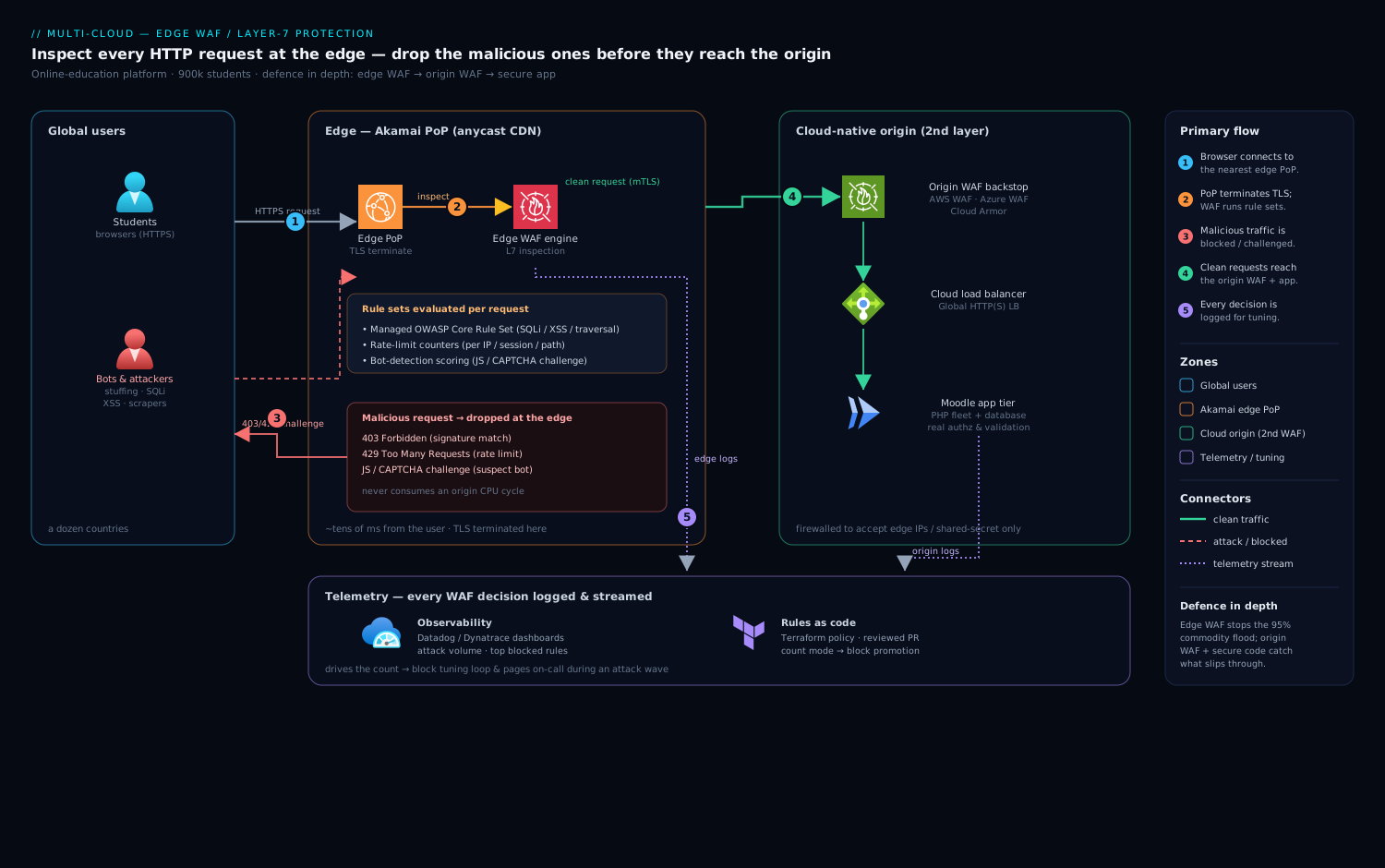
The single most important design decision is where the WAF sits. “At the edge” means as far out toward the user as possible — ideally on a global content delivery and security network, before traffic ever reaches your origin servers. The further out you inspect and drop bad requests, the less load, bandwidth, and risk reaches the application. For the education platform, traffic flows like this:
- A student’s browser resolves the platform’s hostname and connects to the edge — a CDN/WAF point of presence (PoP) geographically near them. For a global audience this is the case for Akamai, whose anycast network has PoPs close to almost every user on earth; we will compare it to the cloud-native options below.
- The edge terminates TLS and now has the cleartext HTTP request. This is the inspection point. The WAF engine runs the request through its rule sets: managed OWASP rules, rate-limit counters, and bot-detection scoring.
- Clean requests are forwarded over a secure connection to the origin — here, the Moodle application tier running behind a cloud load balancer. Malicious requests are blocked at the edge with a
403, served a CAPTCHA/JavaScript challenge, or rate-limited with a429, and they never consume an origin CPU cycle. - The origin still runs its own cloud-native WAF as a second layer (so an attacker who finds the origin IP directly cannot bypass the edge), and the application itself does the real authorization and input validation.
- Every WAF decision — block, allow, challenge, rate-limit — is logged and streamed to observability and security tooling for tuning and incident response.
Two ideas are doing the heavy lifting here. The first is edge inspection: dropping junk far from the origin. The second is defense in depth: the edge WAF, an origin WAF, and secure application code are three independent layers, and a failure in one is caught by the next.
The control flow vs the data flow
Keep two flows separate in your head. The data flow is the student’s request and response — browser to edge to origin and back. The control flow is how the WAF’s rules and configuration get there in the first place: security engineers define rules as code, a CI/CD pipeline validates and deploys them, and the running WAF emits telemetry that feeds the next round of tuning. A junior engineer who only thinks about the data flow will hand-edit rules in a console and cause an outage; the control flow is where the discipline lives.
Managed rule sets on the three big clouds
You will almost never write WAF rules from scratch. Every major provider ships managed rule sets — curated, vendor-maintained rule collections that track the OWASP Top 10 and emerging CVEs so you do not have to. Your job as a junior engineer is to enable the right ones, set them to the right mode, and tune out false positives. Here is how the cloud-native options line up:
| Capability | AWS WAF | Azure WAF | Google Cloud Armor |
|---|---|---|---|
| Attaches to | CloudFront, ALB, API Gateway, AppSync | Application Gateway, Front Door | Global external HTTP(S) Load Balancer |
| Managed OWASP rules | AWS Managed Rules (Core rule set + topic groups) | Azure-managed Core Rule Set (CRS, based on OWASP CRS) | Preconfigured WAF rules (OWASP CRS-based) |
| Rate limiting | Rate-based rules (per IP, per header) | Custom rate-limit rules | Rate-based ban + throttle rules |
| Bot control | AWS Bot Control managed group | Bot Manager rule set | reCAPTCHA Enterprise + bot management |
| Rule definition | Web ACL (JSON / Terraform) | Policy (JSON / Bicep / Terraform) | Security policy (gcloud / Terraform) |
| Pricing model | Per Web ACL + per rule + per million requests | Per policy + per rule + per million requests | Per policy + per rule + per million requests |
The pattern is the same across all three: you create a policy (AWS calls it a Web ACL), attach the vendor’s Core Rule Set, add your own custom rules for rate limiting and bot control, and pick an action per rule — block, count (log only), allow, or challenge. The “count” mode is the single most important feature for a junior engineer to understand, because it is how you deploy safely.
A minimal Cloud Armor policy that turns on the OWASP rules and a rate limit looks like this:
# Create the policy
gcloud compute security-policies create moodle-edge-waf \
  --description "Edge WAF for the learning platform"

# Attach the preconfigured OWASP CRS rule (sensitivity 1 = fewer false positives)
gcloud compute security-policies rules create 1000 \
  --security-policy moodle-edge-waf \
  --expression "evaluatePreconfiguredWaf('sqli-v33-stable', {'sensitivity': 1})" \
  --action deny-403

# Rate-limit any single IP to 100 requests / minute, then throttle
gcloud compute security-policies rules create 2000 \
  --security-policy moodle-edge-waf \
  --src-ip-ranges "*" \
  --action throttle \
  --rate-limit-threshold-count 100 \
  --rate-limit-threshold-interval-sec 60 \
  --conform-action allow \
  --exceed-action deny-429 \
  --enforce-on-key IP
The same intent in Terraform is how you should actually ship it — the rule set becomes reviewable, version-controlled, and identical across environments:
resource "google_compute_security_policy" "edge_waf" {
  name = "moodle-edge-waf"

  rule {
    action   = "deny(403)"
    priority = 1000
    match {
      expr { expression = "evaluatePreconfiguredWaf('sqli-v33-stable', {'sensitivity': 1})" }
    }
    description = "OWASP SQLi managed rule"
  }

  rule {
    action   = "throttle"
    priority = 2000
    match { versioned_expr = "SRC_IPS_V1"
            config { src_ip_ranges = ["*"] } }
    rate_limit_options {
      conform_action = "allow"
      exceed_action  = "deny(429)"
      enforce_on_key = "IP"
      rate_limit_threshold { count = 100  interval_sec = 60 }
    }
    description = "Per-IP rate limit"
  }
}
Rate limiting and bot control
The credential-stuffing attack on the login page is not “malformed” in any way a signature can catch — each request is a perfectly valid login attempt. What gives it away is volume and behavior. This is where two features beyond the OWASP rules earn their keep.
Rate limiting counts requests per key — per IP, per session cookie, or per a header you choose — over a time window, and acts when the count exceeds a threshold. For the login page you might allow 10 attempts per IP per five minutes, then issue a 429. The subtlety juniors miss: a naive per-IP limit punishes shared origins. A university campus or a mobile carrier NAT can put thousands of legitimate students behind one IP, so a flat per-IP threshold either blocks real users or is set so high it lets the attack through. Keying on a fingerprint or an authenticated session is more precise; keying on the path (strict limits on /login, loose on static assets) is the pragmatic starting point.
Bot control goes further by classifying the client. Managed bot rule sets score each request on signals — does it run JavaScript, does it accept cookies, does its TLS fingerprint and header order match a real browser, is it a known-good crawler like Googlebot, or a known-bad scraper? Based on the score the WAF can allow verified good bots, challenge suspicious ones with a JavaScript or CAPTCHA puzzle that a real browser solves invisibly but a cheap bot fails, and block confirmed bad ones. For the catalog-scraping competitor, a challenge is ideal: it imposes a cost on automation without showing a CAPTCHA to a single paying student.
The key tradeoff is false positives versus coverage. Turn every rule to “block” at maximum sensitivity and you will block legitimate traffic — a student whose long, complex forum post happens to contain a string that looks like XSS, or a textbook PDF upload that trips a body-inspection rule. This is exactly why you start in count mode.
Deploying safely: count mode first
The professional rollout for a junior engineer is always the same three phases, and skipping them is how WAFs earn their reputation for breaking sites:
- Detection (count) mode. Deploy every rule in log-only mode. Nothing is blocked. You watch the logs for a week or two and discover which rules fire on real traffic. The forum post that trips an XSS rule shows up here, harmlessly, as a logged “would have blocked.”
- Tune. For each false positive, write a narrow exclusion — exclude the forum-body field from the XSS rule, or whitelist the upload endpoint from body inspection — rather than disabling the whole rule. You keep coverage everywhere except the one place that misfires.
- Prevention (block) mode. Only now do you flip the tuned rules to block. Confidence is high because you have already seen what they would have done to production traffic.
This entire lifecycle is a CI/CD discipline, not a console activity. The education platform manages its WAF policy as code in Terraform (with Ansible handling configuration on the self-managed origin appliances), reviews changes in a pull request, and ships them through GitHub Actions — or Jenkins for the legacy parts of their estate — with Argo CD reconciling the desired policy state into their Kubernetes-fronted environments. A rule change is a reviewed, tested, revertible commit. When a new OWASP CVE rule needs to go from count to block, that promotion is a one-line diff that a second engineer approves, not a 2 a.m. click in a web console that nobody can audit.
Where the named tools fit the operating model
A WAF does not live alone; it plugs into the security and operations stack the company already runs. Naming where each piece fits is the difference between “we bought a WAF” and “we operate edge protection.”
- Identity (Okta / Entra ID). The WAF protects the front door’s lock but is not the lock itself. Authentication and SSO are handled by Okta (or Microsoft Entra ID) — the WAF throttles and challenges the flood of login attempts at the edge, while Okta/Entra enforce MFA and conditional access on the attempts that get through. The two are complementary: rate limiting stops the volume, the IdP stops the credential reuse.
- Secrets (HashiCorp Vault). The TLS certificates and private keys the edge uses to terminate HTTPS, plus the origin-authentication shared secret that proves traffic genuinely came through the edge, are stored in and rotated by HashiCorp Vault — never pasted into a WAF console or checked into the Terraform repo.
- Posture & code scanning (Wiz / Wiz Code). A WAF is only as good as its placement. Wiz continuously checks cloud posture and would alarm if the Moodle origin’s IP became directly reachable from the internet, bypassing the edge entirely — the most common way a WAF gets silently defeated. Wiz Code scans the Terraform itself, flagging a policy committed in count-only mode that someone forgot to promote to block.
- Runtime protection (CrowdStrike Falcon). The WAF stops attacks in transit; CrowdStrike Falcon sensors on the Moodle servers stop what gets through — detecting, for instance, the web shell an attacker would drop if an injection ever did land, giving you a second independent line of detection on the host.
- Observability (Dynatrace / Datadog). Every block, challenge, and rate-limit event streams to Datadog (or Dynatrace) where dashboards show attack volume, top blocked rules, false-positive candidates, and the latency the WAF adds. This is the data that drives the count-to-block tuning loop and the alert that pages the on-call when a credential-stuffing wave starts.
- ITSM (ServiceNow). A confirmed attack or a WAF rule change raises a ServiceNow ticket — an auto-generated incident when a DDoS or stuffing campaign crosses a threshold, and a change request approving the promotion of a rule from count to block, giving security a documented audit trail.
- Self-managed appliances. Not every workload sits behind a cloud-native WAF. The platform’s on-premises components run virtual appliances — software WAFs (an F5 BIG-IP or NGINX App Protect virtual edition, for example) deployed as VMs — configured by Ansible so the on-prem and cloud edges enforce a consistent policy.
How Akamai’s edge WAF compares for a global app
The three cloud-native WAFs are excellent when your users and your application live mostly in one provider’s regions. But the education platform serves 900,000 students across a dozen countries, and that changes the calculus. The relevant comparison is edge reach and scrubbing capacity.
| Dimension | Cloud-native WAF (AWS/Azure/GCP) | Akamai edge WAF |
|---|---|---|
| PoP footprint | Tens of provider regions/edge sites | Thousands of PoPs in nearly every country |
| Best fit | App and users concentrated in one cloud | Global audience, multi-cloud or hybrid origin |
| DDoS absorption | Strong, but capacity tied to provider edge | Very large dedicated scrubbing capacity |
| Latency to user | Good within the provider’s footprint | Inspection happens within ~tens of ms of most users |
| Vendor coupling | Tight to one cloud’s load balancer | Cloud-agnostic; sits in front of any origin |
| Operational model | Native IAM, native Terraform providers | Separate platform and config to learn |
Akamai wins when the audience is genuinely global and latency-sensitive, because inspection and blocking happen at a PoP physically near the student in Manila or São Paulo rather than after a transcontinental hop to a cloud region. Its scrubbing capacity also absorbs volumetric DDoS that would otherwise saturate a single cloud edge. The cost is a second platform to operate and integrate — separate from your cloud’s native IAM and tooling — and it is more expensive at small scale. For a regional app entirely on AWS, AWS WAF on CloudFront is the simpler, cheaper, better-integrated choice. For a worldwide Moodle platform with a hybrid origin, an Akamai edge WAF in front of a cloud-native origin WAF is the layered answer: Akamai stops the global flood far out; the origin WAF is the backstop if anyone reaches the origin directly.
Cost, scaling, and failure modes
Cost. WAF pricing on all three clouds has three components: a fixed charge per policy, a small charge per active rule, and a per-request charge (typically per million requests inspected). The practical implication for a junior engineer: rules are cheap, requests are not. A login page taking 40,000 requests a minute under attack is inspected request-by-request, and you pay for every one — which is an argument for blocking volumetric junk as far out as possible (the edge) and, ahead of the WAF, using cheap network-layer DDoS protection so the most obvious flood never reaches the metered Layer-7 engine at all. Bot-control managed groups usually carry an additional premium; turn them on for the endpoints that need them (login, checkout, catalog) rather than blanket-enabling them site-wide.
Scaling. A correctly placed edge WAF scales horizontally with the CDN — every PoP inspects independently, so there is no central chokepoint, which is precisely why the edge handles attack spikes that would flatten an origin. The thing that does not scale automatically is your rule tuning: more traffic surfaces more edge-case false positives, so budget ongoing tuning time. Rate-limit thresholds also need revisiting as legitimate traffic grows — a threshold set for 100,000 users will wrongly trip at 900,000.
Failure modes. Name them before they page you.
- Origin IP leak (bypass). An attacker discovers the origin’s real IP and connects directly, skipping the edge WAF entirely. Mitigation: lock the origin’s firewall to accept traffic only from the edge’s IP ranges (or a shared-secret header the edge injects), and let Wiz alert on any drift.
- Over-blocking (false positives). A too-aggressive rule blocks real students mid-exam — the worst possible time. Mitigation: count mode first, narrow exclusions, and a fast revert via the Terraform pipeline.
- Under-blocking (false negatives). A novel attack slips past managed rules. Mitigation: defense in depth — the origin WAF, secure code, and CrowdStrike Falcon on the host catch what the edge misses.
- Fail-open vs fail-closed. If the WAF itself has an outage, does traffic flow unprotected (fail-open) or stop entirely (fail-closed)? There is no universally right answer — a banking app may prefer fail-closed; an exam platform mid-session almost certainly prefers fail-open with heightened monitoring. Decide it deliberately rather than discovering your vendor’s default during an incident.
- Latency tax. Inspection adds a few milliseconds per request. Usually negligible, but body inspection on large uploads (think a student submitting a 50 MB video assignment) can be material — exclude or cap inspection size on those endpoints.
Explicit tradeoffs
A WAF is a layer, not a fix. It will not patch a real authorization bug, it cannot see into end-to-end-encrypted business logic, and a determined, targeted attacker can often find a way around managed signatures. What it reliably does is eliminate the overwhelming background radiation of the internet — automated scanners, commodity injection, credential-stuffing botnets, opportunistic scrapers — so your developers spend their security budget on the genuinely hard problems instead of the noise. Treat it as the outermost ring of defense in depth, never the only ring.
Edge versus origin is a real choice. Inspecting at the edge minimizes origin load and latency for a global audience but means trusting and integrating a separate global platform (and locking your origin so it cannot be bypassed). Inspecting only at the origin is simpler and keeps everything in one cloud’s tooling but pays in bandwidth and latency for far-flung users, and offers no DDoS scrubbing in front of your infrastructure. The mature answer for anything global is both, layered.
Managed rules versus custom rules. Managed Core Rule Sets give you broad, maintained coverage with near-zero effort and are where every team should start. But they are generic — they do not know your application’s specific endpoints, and they will both miss app-specific abuse and occasionally misfire on your app’s legitimate quirks. Custom rules close that gap at the cost of ongoing ownership. Start managed, add custom rules where your logs prove you need them.
The shape of the win
For the education platform three weeks before exams, the payoff is concrete and measurable. The credential-stuffing flood is throttled and challenged at the edge, so the login page stays responsive and the attacker’s stolen-password list never gets a meaningful number of tries. The SQL-injection probe is matched by an OWASP managed rule and dropped with a 403 before it reaches a single line of Moodle PHP, while the developers fix the underlying parameterized-query bug on their own schedule instead of in a panic. The competitor’s scraper hits a JavaScript challenge it cannot solve, and the catalog stays fast for the students who are paying. None of this required the application team to become perimeter-security experts overnight — it required them to put a well-tuned WAF at the edge, deploy it in count mode first, promote it to block through a reviewed pipeline, and wire its decisions into the identity, posture, runtime, and observability tooling they already run. That is edge protection done properly, and it is well within reach of a junior engineer who respects the count-mode-first discipline and remembers that the WAF is the first layer, not the last.