Of the Well-Architected pillars, Operational Excellence is the one teams quietly skip. Reliability and Security get architecture reviews; OpEx gets a wiki page nobody reads. That is backwards: it is the pillar that decides whether the other four survive contact with production at 3am. It is not “we have runbooks” – it is the discipline of treating operations as a versioned, tested, continuously-improved system. This is the end-to-end process I use to stand one up: operations as code, a health model with teeth, structured incident response, game days that find the gaps before customers do, and a feedback loop that changes the backlog instead of decorating a retro board.
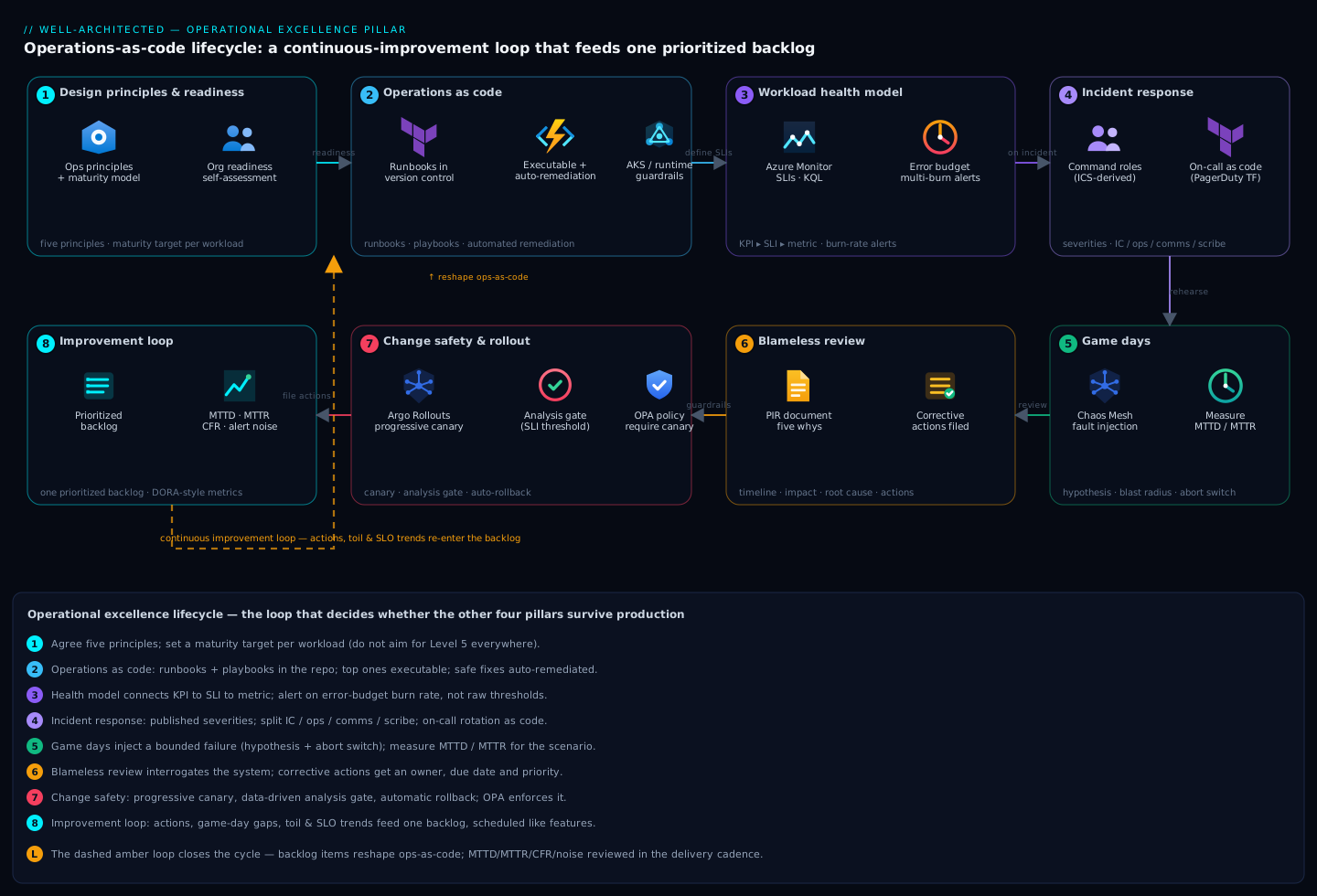
Step 1 – Design principles and organizational readiness
Before any tooling, agree on the principles that make the rest cohere. The five that I hold teams to:
- Perform operations as code. Every operational action – provisioning, remediation, scaling, failover – is a script in version control, reviewed and testable. Click-ops is a defect.
- Make frequent, small, reversible changes. Big-bang releases concentrate risk. Small ones let you isolate failure and roll back cheaply.
- Refine operations procedures frequently. Runbooks rot. If a procedure has not been exercised in 90 days, treat it as untrusted.
- Anticipate failure. Pre-mortems and game days surface the failure modes you would otherwise discover live.
- Learn from all operational events. Every incident, near-miss, and even successful deploy is a data point that should feed improvement.
Readiness is the honest part. Run a short self-assessment per workload before claiming maturity:
| Dimension | Level 1 (ad hoc) | Level 3 (managed) | Level 5 (optimizing) |
|---|---|---|---|
| Runbooks | Tribal knowledge | Versioned, reviewed | Executable, auto-remediated |
| Health model | “Is it up?” | SLIs per journey | SLIs tied to business KPIs |
| Incidents | Hero culture | Severities + on-call | Blameless, tracked actions |
| Change | Manual deploys | CI/CD with gates | Progressive + auto-rollback |
| Learning | Retro that vanishes | Action items filed | Actions in sprint backlog |
Pick the workload’s target level and the gap becomes your roadmap. Do not aim for Level 5 everywhere; a batch reporting job does not need auto-remediation.
Step 2 – Operations as code: runbooks, playbooks, and automated remediation
Distinguish the two artifacts that get conflated:
- A runbook is the procedure for a known, planned operation – rotate a certificate, scale a node pool, fail over a database.
- A playbook is the diagnostic procedure for an unknown situation – “checkout latency is up, here is how to triage.”
Both start as Markdown in the repo next to the service. The maturity step is making runbooks executable. Below, a parameterized runbook as a script with explicit pre-checks, the action, and a verification step – the three parts every runbook must have.
#!/usr/bin/env bash
# runbook: scale AKS user node pool with guardrails
# usage: ./scale-nodepool.sh <cluster-rg> <cluster> <pool> <count>
set -euo pipefail

RG="$1"; CLUSTER="$2"; POOL="$3"; TARGET="$4"

# --- pre-check: target within sane bounds ---
if (( TARGET < 1 || TARGET > 20 )); then
  echo "refusing: target $TARGET outside [1,20]" >&2; exit 1
fi

CURRENT=$(az aks nodepool show -g "$RG" --cluster-name "$CLUSTER" \
  -n "$POOL" --query count -o tsv)
echo "scaling $POOL: $CURRENT -> $TARGET"

# --- action ---
az aks nodepool scale -g "$RG" --cluster-name "$CLUSTER" \
  -n "$POOL" --node-count "$TARGET" --no-wait

# --- verify: poll until provisioned ---
for _ in $(seq 1 30); do
  STATE=$(az aks nodepool show -g "$RG" --cluster-name "$CLUSTER" \
    -n "$POOL" --query provisioningState -o tsv)
  [[ "$STATE" == "Succeeded" ]] && { echo "ok: $POOL at $TARGET"; exit 0; }
  sleep 20
done
echo "timeout waiting for $POOL" >&2; exit 1
For remediation that must run without a human – the genuinely safe, idempotent fixes – promote it from a script someone runs to an alert-triggered automation. In Azure that is an Action Group calling an Automation runbook or a Logic App; the same pattern exists as EventBridge to Lambda, or Alertmanager to a webhook. The non-negotiable: automated remediation must be idempotent, bounded by a circuit breaker so it cannot loop forever, and must announce itself in the incident channel so humans know a robot already acted.
# Alertmanager: route a high-confidence, auto-remediable alert to a webhook,
# while still notifying humans. Note repeat suppression to avoid storms.
route:
  receiver: pager
  group_by: ['alertname', 'service']
  routes:
    - matchers:
        - alertname = "PodCrashLoopBackOff"
        - remediation = "auto"
      receiver: auto-remediation
      continue: true            # also fall through to humans
      group_wait: 30s
      repeat_interval: 1h       # bound how often we re-fire the fix
receivers:
  - name: auto-remediation
    webhook_configs:
      - url: "http://remediator.platform.svc/remediate"
        send_resolved: false
  - name: pager
    pagerduty_configs:
      - routing_key: "${PD_ROUTING_KEY}"
The litmus test for “should this be automated”: would you let a brand-new on-call engineer run it unsupervised at 3am? If yes, a machine can run it. If it requires judgement, it stays a playbook with a human in the loop.
Step 3 – Define workload health with KPIs, SLIs, and business metrics
“Is the server up?” is not a health model. A real one connects three layers:
- Business KPI – orders/minute, sign-up completion rate. What the business actually cares about.
- SLI – the measurable indicator for a user journey: request success rate, p99 latency.
- Operational metric – CPU, queue depth, pod restarts. Useful for diagnosis, useless as the headline.
The mistake is alerting on layer 3. CPU at 90% is not an incident; checkout success dropping below 99% is. Define SLIs as ratios of good events to valid events, then alert on the burn rate of the error budget rather than a static threshold – that is what keeps you from paging on a single blip while still catching fast burns.
// Azure Monitor / Log Analytics: checkout availability SLI over 5m windows.
// "good" = HTTP < 500 and served in under 1s; alert on the ratio, not raw count.
let window = 5m;
AppRequests
| where Name == "POST /api/checkout"
| summarize
    total = count(),
    good  = countif(ResultCode < 500 and DurationMs < 1000)
    by bin(TimeGenerated, window)
| extend sli = todouble(good) / todouble(total)
| project TimeGenerated, sli, total
| order by TimeGenerated desc
Multi-window, multi-burn-rate alerting is the standard worth adopting: a fast-burn alert (e.g. 14.4x budget consumption over 1h) pages immediately; a slow-burn alert (e.g. 1x over 24h) opens a ticket. The pair gives urgency without noise. Tie each SLI to its KPI on one dashboard so that when an SLI dips you see immediately whether the business felt it – a degraded SLI under low traffic may have zero customer impact, and that context changes the response.
Step 4 – Structured incident management: severities, on-call, and command roles
Heroics do not scale. Structure does. Define severities explicitly and publish them, because the worst time to argue about whether something is a Sev1 is during the outage.
| Sev | Definition | Response | Comms |
|---|---|---|---|
| Sev1 | Customer-facing outage or data loss | Page immediately, all-hands | Exec + status page, 30-min updates |
| Sev2 | Major degradation, workaround exists | Page on-call | Stakeholder channel, hourly |
| Sev3 | Minor / single-tenant impact | Business hours | Ticket |
| Sev4 | Cosmetic / no customer impact | Backlog | None |
For anything Sev2 and above, separate the roles. The most common failure in incident response is the person fixing the problem also trying to coordinate and communicate – they do all three badly. The roles, borrowed from ICS and adapted by every mature SRE org:
- Incident Commander (IC). Owns the response, makes decisions, does not touch the keyboard. Their job is coordination, not debugging.
- Operations / Subject lead. The hands-on engineer(s) actually investigating and remediating.
- Communications lead. Owns the status page and stakeholder updates so the IC and ops are not interrupted.
- Scribe. Timestamps the timeline in real time – invaluable for the later review.
On-call should be defined as code so rotations, escalation, and overrides are reviewable and not buried in a UI.
# PagerDuty escalation policy + rotation as Terraform.
resource "pagerduty_schedule" "platform_primary" {
  name      = "platform-primary"
  time_zone = "Europe/London"
  layer {
    name                         = "weekly-rotation"
    start                        = "2026-06-09T09:00:00+01:00"
    rotation_virtual_start       = "2026-06-09T09:00:00+01:00"
    rotation_turn_length_seconds = 604800            # 1 week
    users                        = var.oncall_user_ids
  }
}

resource "pagerduty_escalation_policy" "platform" {
  name      = "platform-escalation"
  num_loops = 2
  rule {
    escalation_delay_in_minutes = 15                 # ack window before next tier
    target { type = "schedule_reference"; id = pagerduty_schedule.platform_primary.id }
  }
  rule {
    escalation_delay_in_minutes = 15
    target { type = "user_reference"; id = var.eng_manager_id }
  }
}
Step 5 – Game days and pre-mortems to validate operational procedures
A runbook you have never executed is a hypothesis. Game days turn hypotheses into evidence.
Start cheaper, with a pre-mortem: before a major launch, gather the team and assume the launch failed spectacularly. Everyone writes down why it failed. You will surface failure modes – “the cert expired and nobody owned renewal,” “the new region had no on-call coverage” – that no design review catches, because pre-mortems give people permission to voice doubts.
Then run game days: scheduled exercises where you inject a real failure into a real (ideally pre-prod, sometimes prod) environment and let the on-call respond using only the runbooks. The goals are to validate that procedures work, that alerts fire, and that people know what to do.
Define the experiment with an explicit hypothesis, blast radius, and abort condition – never inject chaos without a kill switch.
# Chaos Mesh: kill one checkout pod to validate self-healing + alerting.
# Scope is pinned tight; this is an experiment, not an outage.
apiVersion: chaos-mesh.org/v1alpha1
kind: PodChaos
metadata:
  name: gameday-checkout-pod-kill
  namespace: checkout
spec:
  action: pod-kill
  mode: one                      # exactly one pod, bounded blast radius
  selector:
    namespaces: [checkout]
    labelSelectors:
      app: checkout-api
  duration: "60s"
Run the game day as a real incident: declare it, assign IC and roles, and time how long detection, diagnosis, and recovery take (your MTTD and MTTR for that scenario). Capture every place the runbook was wrong or missing. The output of a good game day is a list of corrective actions, not a thumbs-up.
A game day that “went perfectly” usually means the scenario was too easy or nobody was honest about the fumbles. Pick scenarios that scare you a little. The dependency you are most afraid to break is exactly the one to rehearse.
Step 6 – Blameless post-incident reviews and tracking corrective actions
After every Sev1/Sev2 (and good game days), run a blameless review within a few business days while memory is fresh. Blameless does not mean no accountability; it means you assume everyone acted reasonably given what they knew, and you interrogate the system that let a reasonable action cause harm. “Why was it possible to deploy a config that took down prod?” is a system question. “Why did Sam deploy it?” is a witch hunt that guarantees people stop reporting near-misses.
Structure the document so it is reusable:
- Timeline – from the scribe’s notes, with timestamps and who saw what when.
- Impact – customers affected, duration, SLO/error-budget consumed, revenue if known.
- Root cause(s) – use a technique like the Five Whys, but resist stopping at human error.
- What went well / what was luck – name the things that saved you that you cannot rely on next time.
- Corrective actions – each with an owner, a due date, and a priority.
The discipline that separates real OpEx from theater: corrective actions go into the same backlog as features, with the same tracking. An action in a wiki is a wish; an action as a ticket with an owner and a due date is a commitment.
# File corrective actions directly from the review into the backlog,
# labeled so you can report on completion rate later.
gh issue create \
  --title "Add deploy guardrail: block config apply without canary on checkout" \
  --label "incident-action,reliability,sev1-2026-06-07" \
  --assignee "platform-lead" \
  --milestone "Sprint 2026-13" \
  --body "From PIR 2026-06-07. Prevent full-fleet config apply; require canary + 10m soak. Due 2026-06-20."
Track one number ruthlessly: percentage of corrective actions completed by their due date. If that number is low, your incidents will repeat, and no amount of process gloss will save you.
Step 7 – Change management, deployment safety, and progressive rollout guardrails
Most incidents are self-inflicted by changes. Operational excellence means changes are small, observable, and reversible by default. The guardrails:
- Progressive rollout. Never ship to 100% at once. Canary to a small slice, watch the SLIs, then expand.
- Automated analysis gates. The promotion decision should be data-driven, not a human eyeballing a graph. If the canary’s error rate exceeds the baseline, roll back automatically.
- Fast rollback. Rollback must be a single, rehearsed action – ideally automatic. If rolling back takes a meeting, you do not have rollback.
Argo Rollouts encodes this well: a canary with an analysis step that queries your metrics and aborts on breach.
apiVersion: argoproj.io/v1alpha1
kind: Rollout
metadata:
  name: checkout-api
spec:
  strategy:
    canary:
      steps:
        - setWeight: 10
        - pause: { duration: 5m }
        - analysis:                       # data-driven gate, not a human guess
            templates:
              - templateName: success-rate
        - setWeight: 50
        - pause: { duration: 10m }
        - setWeight: 100
---
apiVersion: argoproj.io/v1alpha1
kind: AnalysisTemplate
metadata:
  name: success-rate
spec:
  metrics:
    - name: success-rate
      interval: 1m
      successCondition: result[0] >= 0.99   # abort + auto-rollback if breached
      failureLimit: 2
      provider:
        prometheus:
          address: http://prometheus.monitoring:9090
          query: |
            sum(rate(http_requests_total{service="checkout-api",code!~"5.."}[2m]))
            /
            sum(rate(http_requests_total{service="checkout-api"}[2m]))
Pair this with an error-budget policy: if the budget is healthy, ship freely; if it is exhausted, freeze feature changes and only reliability work ships. That policy is what makes change management a lever instead of a bureaucracy.
Step 8 – The continuous-improvement feedback loop
The pillar’s payoff is the loop, not any single artifact. Operational signals must converge into one prioritized backlog and get scheduled like any other work:
- Corrective actions from reviews (Step 6).
- Gaps found in game days (Step 5).
- Toil and recurring alerts – if on-call does the same manual fix three times, that is a backlog item to automate it (back to Step 2).
- SLO trends – a slowly degrading SLI is a leading indicator that belongs in planning before it becomes an incident.
Make the loop visible with operational metrics reviewed in the same cadence as delivery metrics: MTTD, MTTR, change failure rate, alert noise (alerts per on-call shift), and corrective-action completion rate. When those trend the right way, the other pillars get easier, because you are catching weaknesses as backlog items instead of outages.
Verify
Confirm the system works end to end, not just on paper:
- Run a runbook cold. Hand an executable runbook to an engineer who has never run it and have them execute it in a non-prod environment. If they get stuck, the runbook – not the engineer – failed. Fix it.
- Force an alert. Trigger the SLI breach condition deliberately (load test, fault injection) and confirm the burn-rate alert fires, routes to the right on-call, and – if applicable – the auto-remediation runs and announces itself.
# Confirm an alert rule is actually loaded and firing as expected in Prometheus.
curl -s http://prometheus.monitoring:9090/api/v1/rules \
  | jq '.data.groups[].rules[]
        | select(.name=="CheckoutErrorBudgetFastBurn")
        | {name, state, health, lastError}'
- Declare a game-day incident and measure MTTD/MTTR against your target. Compare to the previous run; the numbers should improve or you have not closed the loop.
- Audit the backlog. Open your tracker and confirm corrective actions from the last incident exist as tickets with owners and due dates – and check the completion-rate metric is moving.
- Test rollback. Deploy a deliberately bad canary and confirm the analysis gate aborts and rolls back automatically within the soak window, with no human intervention.
Enterprise scenario
A payments platform team I worked with ran a respectable CI/CD pipeline and had runbooks in a wiki – and still took 47 minutes to recover from a Friday-evening incident where a routine config change disabled connection pooling on their checkout service. The change passed CI, deployed to 100% at once, and the wiki runbook for “checkout latency” pointed at a dashboard renamed months earlier. The on-call engineer was simultaneously debugging, posting updates to three Slack channels, and fielding a director’s DM. MTTR was bad not because the fix was hard – it was a one-line revert – but because nothing was structured.
The constraint was strict: a regulated environment where every production change needed an auditable approval trail, so they could not simply “move fast.” Their fix was to make safety the default within the audit boundary rather than fighting it. They moved runbooks into the service repo (auditable via PR history), made the top five executable with pre/verify checks, and replaced the all-at-once deploy with an Argo Rollouts canary whose analysis gate is itself the auditable control – query and threshold reviewed in code. They defined IC/ops/comms roles so the engineer who reverts never writes the status updates. Six weeks of weekly game days followed, each producing 3-5 corrective actions filed straight into the sprint.
The deploy guardrail that mattered most was dead simple – block any config apply that skips the canary stage, enforced as policy rather than convention:
# Gatekeeper/OPA: refuse a checkout Rollout that ships straight to 100%
# with no canary analysis. The policy IS the audited control.
apiVersion: constraints.gatekeeper.sh/v1beta1
kind: K8sRequireCanaryAnalysis
metadata:
  name: checkout-must-canary
spec:
  match:
    kinds:
      - apiGroups: ["argoproj.io"]
        kinds: ["Rollout"]
    namespaces: ["checkout"]
  parameters:
    requireAnalysisStep: true
Within two months their median MTTR for change-induced incidents dropped from ~45 minutes to under 8, almost entirely from automatic rollback and clear roles – and because the controls lived in code, their auditors were happier, not angrier. Operational excellence did not slow them down; it gave them the confidence to ship more often.