Performance efficiency is the pillar teams claim to care about and almost never measure. The usual pattern is a latency complaint in a steering meeting, a panicked SKU bump, and a dashboard nobody looks at again until the next complaint. That is not engineering, it is reacting. The performance efficiency pillar is only useful when you treat performance as a budget you set deliberately, instrument continuously, and defend in CI like any other regression. This is the end-to-end process I use: pick services by access pattern, right-size off real utilization, layer caching with an invalidation discipline, level load with queues, and gate every deploy against a performance budget so regressions never reach production unannounced.
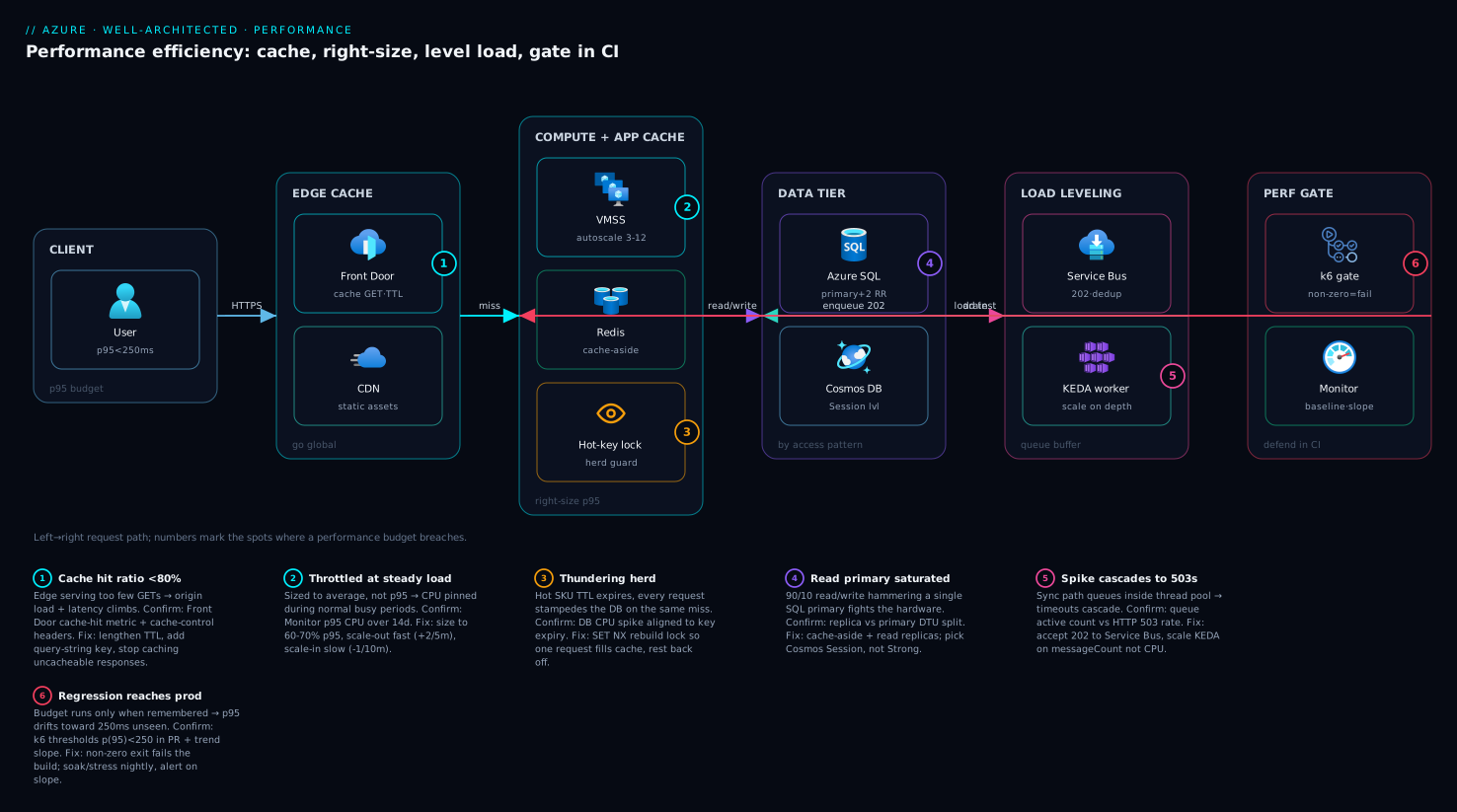
Design principles and the cost-of-latency tradeoff
The pillar rests on a few principles that are easy to recite and hard to live by: democratize advanced technology by consuming managed services, go global to reduce latency, use serverless where it fits, experiment more often because cloud makes experiments cheap, and consider mechanical sympathy (match the technology to how the workload actually behaves). The throughline is that performance is not a fixed property of a system; it is a choice you keep making.
The choice has a price, and the price is not linear. Latency improvements get exponentially more expensive as you approach the physical floor. Shaving p99 from 800ms to 400ms might be a caching layer. Going from 400ms to 200ms might be a region migration. Going from 200ms to 100ms might be a database engine change and a rewrite of your hottest query path. So the first question is never “how fast can we make it” but “how fast does this journey need to be, and what will a user pay us for the next 100ms.” Tie the target to revenue or task-completion, not vanity.
A performance target without a number is a wish. “Fast” is not a budget; “p95 under 250ms at 2,000 RPS sustained” is. Everything below is mechanism for hitting a number you wrote down first.
Step 1 — Select compute, storage, and database by access pattern
Most performance debt is paid at selection time, not tuning time. You cannot tune your way out of the wrong service. Classify the workload before you pick anything.
For compute, the access pattern decides the model:
| Pattern | Pick | Why |
|---|---|---|
| Spiky, event-driven, short-lived | Functions / serverless | Scale to zero, pay per execution, no idle cost |
| Steady, long-running, predictable | VMSS / AKS with reservations | Cheaper at sustained load, full control of headroom |
| Bursty HTTP with autoscale needs | Container Apps / App Service | Managed scale rules, no node management |
For storage, match the I/O profile to the tier instead of defaulting to premium everywhere:
- Random small reads/writes with strict latency (databases, message stores): Premium SSD or Ultra Disk with provisioned IOPS.
- Sequential large objects, read-mostly (media, backups, data lake): Blob with the right access tier (Hot/Cool/Cold/Archive).
- Shared POSIX semantics across pods: Azure Files Premium or NetApp Files, not a hand-rolled NFS box.
For databases, the read/write shape and consistency requirement decide the engine:
- Relational with transactions and joins: Azure SQL or PostgreSQL Flexible Server.
- High-throughput key/document with single-digit-ms reads at global scale: Cosmos DB, and pick the consistency level deliberately (Session is the usual sweet spot; Strong costs you latency and RU/s).
- Read-heavy with a hot working set: front the database with a cache (Step 3), do not just scale the database vertically.
The mechanical-sympathy point matters here: a 90/10 read/write workload behind a single SQL primary is fighting the hardware. Add read replicas and a cache and you are working with it.
Step 2 — Right-size from utilization baselines, not guesses
Right-sizing is a measurement problem. You need a baseline (steady-state utilization) and a load profile (how the baseline moves under traffic) before you touch a SKU. Pull the baseline from real telemetry, not from the deployment template someone copied two years ago.
In Azure, Monitor’s metrics are the source of truth. This KQL against AzureMetrics (or the VM’s Perf table via the Log Analytics agent) gives you the percentiles that actually drive sizing decisions:
Perf
| where TimeGenerated > ago(14d)
| where ObjectName == "Processor" and CounterName == "% Processor Time"
| where InstanceName == "_Total"
| summarize p50 = percentile(CounterValue, 50),
            p95 = percentile(CounterValue, 95),
            p99 = percentile(CounterValue, 99),
            maxv = max(CounterValue)
        by Computer, bin(TimeGenerated, 1h)
| summarize avg_p95 = avg(p95), peak = max(maxv) by Computer
| order by avg_p95 desc
The decision rule I use: size to p95, not peak, not average. Sizing to average leaves you throttled during normal busy periods. Sizing to peak means you pay for headroom you use 1% of the time, which is what autoscale is for. Target roughly 60-70% p95 utilization on the steady tier and let autoscale absorb the rest.
For VM SKU recommendations, let Azure Advisor and the CLI surface the right-size candidates rather than eyeballing them:
# Cost + right-sizing recommendations from Advisor
az advisor recommendation list \
  --category Cost \
  --query "[?contains(shortDescription.solution, 'Right-size') || contains(shortDescription.solution, 'Shutdown')]" \
  --output table
Then define autoscale so the baseline SKU stays small and scale handles the load profile. This adds CPU-based rules to a VM scale set:
az monitor autoscale create \
  --resource-group rg-app-prod \
  --resource vmss-api-prod \
  --resource-type Microsoft.Compute/virtualMachineScaleSets \
  --name autoscale-api \
  --min-count 3 --max-count 12 --count 3

az monitor autoscale rule create \
  --resource-group rg-app-prod \
  --autoscale-name autoscale-api \
  --condition "Percentage CPU > 65 avg 5m" \
  --scale out 2

az monitor autoscale rule create \
  --resource-group rg-app-prod \
  --autoscale-name autoscale-api \
  --condition "Percentage CPU < 35 avg 10m" \
  --scale in 1
Note the asymmetry: scale out fast and aggressively (add 2 on a 5-minute window), scale in slow and conservatively (remove 1 on a 10-minute window). Flapping is more expensive than a few extra minutes of headroom.
Step 3 — Design a multi-tier caching strategy with invalidation discipline
Caching is the single highest-leverage performance move, and the place most teams quietly corrupt their data. The principle: cache at every tier where the cost of a miss exceeds the cost of staleness, and never add a cache without first writing down its invalidation rule.
The tiers, from edge inward:
- CDN / edge (Front Door, CDN): static assets and cacheable GET responses, keyed by URL, with a TTL and explicit cache-control headers.
- Application cache (in-process or distributed Redis): computed results, session state, hot read-through entities.
- Database cache: query result caching and the buffer pool; mostly tuning, not code.
The pattern that survives production is cache-aside (lazy loading) with a TTL and an explicit invalidation on write. Read-through populates on miss; write-through or explicit delete keeps it honest:
public async Task<Product> GetProductAsync(int id)
{
    var key = $"product:{id}";
    var cached = await _cache.StringGetAsync(key);
    if (cached.HasValue)
        return JsonSerializer.Deserialize<Product>(cached!);

    var product = await _db.Products.FindAsync(id);
    if (product is not null)
    {
        await _cache.StringSetAsync(
            key,
            JsonSerializer.Serialize(product),
            expiry: TimeSpan.FromMinutes(10));   // TTL bounds staleness
    }
    return product;
}

// On any mutation, invalidate explicitly. TTL is the backstop, not the strategy.
public async Task UpdateProductAsync(Product product)
{
    await _db.SaveChangesAsync();
    await _cache.KeyDeleteAsync($"product:{product.Id}");
}
The invalidation discipline, stated as rules:
- Every cached entity has a TTL so a missed invalidation self-heals within a bounded window.
- Every write path that mutates a cached entity deletes or updates its key in the same transaction boundary. A write that forgets its key is the bug you will spend a weekend on.
- Prefer delete-on-write over update-on-write unless the recompute is expensive; deletion is idempotent and avoids the lost-update race between two concurrent writers.
- For the thundering herd (many requests miss the same hot key at once), guard the repopulation with a short lock or use Redis to serialize the rebuild so one request fills the cache and the rest wait.
Set edge caching declaratively. This Front Door rule caches GETs and honors origin cache-control, with a query-string cache key so paginated responses do not collide:
resource cacheRule 'Microsoft.Cdn/profiles/ruleSets/rules@2024-02-01' = {
  name: 'cache-get-responses'
  parent: ruleSet
  properties: {
    order: 1
    conditions: [
      {
        name: 'RequestMethod'
        parameters: {
          typeName: 'DeliveryRuleRequestMethodConditionParameters'
          operator: 'Equal'
          matchValues: [ 'GET' ]
        }
      }
    ]
    actions: [
      {
        name: 'RouteConfigurationOverride'
        parameters: {
          typeName: 'DeliveryRuleRouteConfigurationOverrideActionParameters'
          cacheConfiguration: {
            queryStringCachingBehavior: 'UseQueryString'
            cacheBehavior: 'HonorOrigin'
            isCompressionEnabled: 'Enabled'
          }
        }
      }
    ]
  }
}
A cache hit ratio below ~80% on a tier usually means the TTL is too short, the key cardinality is too high, or you are caching the wrong thing. Measure it before you tune it.
Step 4 — Level load with async and queue-based buffering
Synchronous request/response is fine until a spike arrives faster than your slowest dependency can drain it. Then the queue forms inside your request threads, latency climbs, and you cascade into timeouts. The fix is to put the queue somewhere you control: a real broker, not your thread pool. This is the queue-based load leveling pattern, and it converts a traffic spike into a longer queue instead of a outage.
The rule: any operation that does not need a synchronous answer should be accepted fast, enqueued, and processed by a consumer that scales on queue depth. The producer returns 202 immediately; the consumer drains at a rate your downstream can sustain.
// Producer: accept and enqueue, return immediately. The HTTP path stays fast.
[HttpPost("orders")]
public async Task<IActionResult> SubmitOrder(OrderRequest req)
{
    var msg = new ServiceBusMessage(JsonSerializer.SerializeToUtf8Bytes(req))
    {
        MessageId = req.IdempotencyKey   // dedup so retries do not double-process
    };
    await _sender.SendMessageAsync(msg);
    return Accepted(new { status = "queued", id = req.IdempotencyKey });
}
Then scale the consumer on queue length, not CPU, because queue depth is the leading indicator and CPU is the lagging one. On AKS, KEDA reads the broker directly:
apiVersion: keda.sh/v1alpha1
kind: ScaledObject
metadata:
  name: order-processor-scaler
spec:
  scaleTargetRef:
    name: order-processor
  minReplicaCount: 1
  maxReplicaCount: 30
  cooldownPeriod: 120
  triggers:
    - type: azure-servicebus
      metadata:
        queueName: orders
        messageCount: "20"          # target ~20 messages per replica
        namespace: sb-orders-prod
      authenticationRef:
        name: keda-sb-auth
KEDA will scale to zero when the queue is empty and ramp consumers as depth grows, so you pay for throughput, not idle pods. The producer never blocks; a 10x spike becomes a queue that drains over minutes instead of a wall of 503s.
Step 5 — Build a load-testing harness and set performance budgets
You cannot defend a performance budget you have never measured under load. A load-testing harness is not a one-off pre-launch ritual; it is a checked-in artifact you run on demand and in CI. The budget is the contract: a set of pass/fail thresholds the system must meet at a defined load.
I use k6 because the test is code, the thresholds are first-class, and the exit code is non-zero on a breach, which is exactly what a CI gate needs.
// load/checkout.js
import http from 'k6/http';
import { check, sleep } from 'k6';

export const options = {
  stages: [
    { duration: '2m', target: 200 },   // ramp to 200 VUs
    { duration: '5m', target: 200 },   // hold (steady-state)
    { duration: '2m', target: 0 },     // ramp down
  ],
  thresholds: {
    http_req_duration: ['p(95)<250', 'p(99)<800'],  // the performance budget
    http_req_failed: ['rate<0.01'],                  // <1% errors
  },
};

export default function () {
  const res = http.get('https://api.example.com/products?page=1');
  check(res, { 'status is 200': (r) => r.status === 200 });
  sleep(1);
}
Run it locally and against staging:
k6 run --vus 200 --duration 9m load/checkout.js
Two disciplines make this real. First, test against staging that mirrors production scale rules, or your numbers are fiction. A test against a single under-provisioned box tells you nothing about how the autoscale group behaves. Second, separate the load shapes: a steady-state test (constant VUs) validates the budget, a stress test (ramp until breach) finds the ceiling, and a soak test (hold for hours) surfaces memory leaks and connection-pool exhaustion that a 9-minute run hides.
Step 6 — Gate regressions in CI with automated performance budgets
A budget that only runs when someone remembers it will rot. Wire k6 into the pipeline so a performance regression fails the build exactly like a unit test would. Because the thresholds live in the test and k6 exits non-zero on breach, the gate is almost free:
# .github/workflows/perf-gate.yml
name: performance-gate
on:
  pull_request:
    branches: [ main ]

jobs:
  load-test:
    runs-on: ubuntu-latest
    steps:
      - uses: actions/checkout@v4

      - name: Run k6 load test against staging
        uses: grafana/k6-action@v0.3.1
        with:
          filename: load/checkout.js
        env:
          K6_OUT: json=results.json

      - name: Upload results
        if: always()
        uses: actions/upload-artifact@v4
        with:
          name: k6-results
          path: results.json
If any threshold in the test breaches, the k6 step exits non-zero, the job fails, and the PR is blocked. That is the entire mechanism: the budget is enforced by the same red/green signal engineers already respect.
Two refinements keep the gate trustworthy. Run the heavy soak and stress shapes on a nightly schedule rather than per-PR so you do not add ten minutes to every review, but keep the fast steady-state budget on the PR. And track the trend, not just pass/fail. A test that passes at p95=248ms three releases running while the budget is 250ms is a regression in slow motion. Push the JSON results to a time-series store (or Grafana Cloud k6) and alert on the slope, not only the threshold.
Verify
Confirm each layer is doing its job before you call the work done:
# 1. Right-sizing: confirm p95 CPU sits in the 60-70% target band over a week
az monitor metrics list \
  --resource vmss-api-prod \
  --resource-type Microsoft.Compute/virtualMachineScaleSets \
  --metric "Percentage CPU" \
  --interval PT1H --aggregation Average \
  --start-time 2026-06-01T00:00:00Z --end-time 2026-06-08T00:00:00Z \
  --output table

# 2. Cache: check hit ratio and that the working set fits in memory
az redis show --name redis-app-prod --resource-group rg-app-prod \
  --query "{sku:sku.name, capacity:sku.capacity}" -o table
# Then via redis-cli against the instance:  INFO stats   (keyspace_hits vs keyspace_misses)

# 3. Load leveling: confirm the queue drains and consumers scaled
az servicebus queue show \
  --resource-group rg-orders-prod --namespace-name sb-orders-prod \
  --name orders \
  --query "{active:countDetails.activeMessageCount, dead:countDetails.deadLetterMessageCount}" -o table
kubectl get hpa,scaledobject -n orders

# 4. Budget: run the gate locally and confirm a non-zero exit on breach
k6 run load/checkout.js; echo "exit=$?"
Green looks like: p95 CPU in band, Redis hit ratio above ~80% with no evictions, queue active count returning to near zero after a spike with consumers scaled out then back in, and the k6 run exiting 0 with p95 under budget.
Enterprise scenario
A retail platform team I worked with ran a product-catalog API on Azure SQL behind App Service. Black Friday traffic was ~15x baseline, and the previous year they had brute-forced it by pre-scaling SQL to Business Critical with 40 vCores for the week. It held, but the bill for that one week was larger than three normal months, and p95 still drifted to 900ms at peak because the read traffic was hammering a single primary on queries that returned the same few thousand hot products over and over.
The constraint was hard: finance refused to repeat the 40-vCore week, and the SLA was p95 under 300ms through the event. Vertical scaling was off the table on cost grounds, and a database rewrite was too risky to ship the same quarter.
They solved it as a layered read path instead of a bigger box. The catalog read was 95% reads of a small hot set, so they put Redis in front with cache-aside, a 5-minute TTL, and explicit invalidation on the catalog-update path. They added two SQL read replicas for the cache-miss traffic and a thundering-herd guard so a cache expiry on a hot SKU did not stampede the database. Then they wrote the budget into k6 and ran a stress shape against staging until they found the real ceiling.
The result: at peak, Redis served roughly 92% of reads, SQL stayed on a 4-vCore General Purpose primary plus two replicas, and p95 held at 210ms. The week cost a fraction of the prior year. The single highest-leverage change was the thundering-herd guard, because without it the hot-key expiry alone could spike the database hard enough to breach the budget:
// Serialize the rebuild of a hot key so one request fills the cache
// and the rest wait, instead of all of them hitting SQL on the same miss.
var lockKey = $"lock:{key}";
if (await _cache.StringSetAsync(lockKey, "1", TimeSpan.FromSeconds(5),
                                When.NotExists))
{
    try
    {
        var fresh = await _db.Products.FindAsync(id);
        await _cache.StringSetAsync(key, JsonSerializer.Serialize(fresh),
                                    TimeSpan.FromMinutes(5));
        return fresh;
    }
    finally { await _cache.KeyDeleteAsync(lockKey); }
}
// Lost the race: brief backoff, then read the now-populated cache.
await Task.Delay(50);
return JsonSerializer.Deserialize<Product>(await _cache.StringGetAsync(key));
The lesson the team took away was the pillar in one line: they had been buying performance with money when the access pattern was telling them to buy it with a cache.