You cannot escape YAML in modern DevOps. Your CI/CD pipelines are YAML. Your Kubernetes manifests are YAML. Helm charts, Ansible playbooks, Docker Compose files, GitHub Actions workflows, Azure Pipelines, GitLab CI, Argo CD applications, Prometheus rules, cloud-init — all YAML. It is the lingua franca of declarative infrastructure, and yet almost nobody is taught it properly. People learn it by copy-paste, absorb its quirks by osmosis, and then lose an afternoon to a pipeline that fails because a country code got parsed as a boolean.
This lesson fixes that. We will treat YAML as a language worth understanding deeply, because the cost of misunderstanding it is real: a silently mis-typed value, a duplicated 200-line job that drifts out of sync, a production deploy gated on a string that was actually false. By the end you will read and write YAML with confidence, use anchors and merge keys to stay DRY, recognise every famous foot-gun on sight, and know where YAML stops and a templating engine begins.
This is a foundation lesson in the DevOps Zero-to-Hero course. It assumes you have met DevOps culture and the CI/CD lifecycle already; everything that follows in the course — pipeline design, deployment strategies, GitOps — is expressed in the syntax you learn here.
Learning objectives
By the end of this lesson you will be able to:
- Read and write valid YAML fluently — scalars, sequences, mappings, and the two collection styles (block and flow).
- Choose the right multi-line string style (
|,>, and their chomping/indentation modifiers) for config files, scripts, and certificates. - Use anchors (
&), aliases (*), and merge keys (<<) to remove duplication, and know exactly where they do and do not work. - Spot and defuse the classic type-coercion gotchas — the Norway problem, octal numbers, sexagesimals, empty values, and unquoted versions.
- Explain the boundary between YAML and a templating layer, and read Jinja2, Helm/Go templates, and pipeline expression syntax.
- Structure a CI/CD pipeline file (stages → jobs → steps) and validate it locally with yamllint and schema checks before you push.
Prerequisites
You need a terminal, a text editor with a YAML mode (VS Code with the Red Hat YAML extension is ideal — it gives you schema-aware autocomplete and inline errors), Python 3 available for a couple of quick experiments, and pip so we can install yamllint. No cloud account is required; everything in the lab runs locally and for free. Familiarity with the command line and the idea of a CI/CD pipeline is assumed but we will define terms as we go.
What YAML is (and is not)
YAML stands, recursively and with a wink, for “YAML Ain’t Markup Language”. It is a data-serialisation language: a human-friendly way to represent the same data structures every programming language already has — strings, numbers, booleans, lists, and dictionaries. It is, in fact, a strict superset of JSON, which means any valid JSON document is also valid YAML. The current specification is YAML 1.2.2 (released 2021), although — and this matters enormously for the gotchas later — a great many tools in the wild still parse with YAML 1.1 semantics.
The single most important mental model: YAML is data, not logic. It has no loops, no conditionals, no variables, and no functions. When you see a for loop or an if in something that “looks like YAML” — a Helm chart, an Ansible playbook, a GitHub Actions expression — that logic is not YAML. It is a templating or expression layer that runs before or around the YAML parser. Keeping that boundary crisp in your head is the difference between a junior who is confused by Helm and a senior who knows precisely which layer just broke.
| Concept | YAML’s job | Not YAML’s job |
|---|---|---|
| Represent structure | Maps, lists, scalars | — |
| Reuse a block | Anchors, aliases, merge keys | Conditional reuse |
| Loops / conditionals | — | Jinja2, Go templates, expressions |
| Variable substitution | — | Templating engine or the CI runner |
| Validation | — | JSON Schema / a linter |
Core syntax: structure by indentation
YAML’s defining feature is that structure is expressed through indentation, the way Python expresses blocks. There are three hard rules and you must internalise them:
- Indent with spaces, never tabs. A tab character is a syntax error in YAML. Configure your editor to insert spaces. Two spaces per level is the near-universal convention.
- Indentation must be consistent within a block. The number of spaces defines nesting depth; misalign by one and you change the meaning or break the parse.
- A colon-space (
:) separates a key from its value; a dash-space (-) introduces a list item. The space is mandatory.
YAML has exactly three node types, and everything is a composition of them.
Scalars are single values — a string, number, boolean, or null:
name: web-frontend
replicas: 3
enabled: true
owner: ~          # ~ is null; null and an empty value also mean null
Sequences (lists) use a leading - in block style:
ports:
  - 80
  - 443
  - 8080
Mappings (dictionaries) are key: value pairs:
resources:
  cpu: 500m
  memory: 256Mi
These nest arbitrarily. A list of maps — the shape of almost every pipeline’s steps: — looks like this:
steps:
  - name: checkout
    uses: actions/checkout@v4
  - name: build
    run: make build
Note the alignment carefully: the name and uses keys of the first list item are indented under the -, and they line up with each other. This is the single most common place beginners go wrong.
Block style versus flow style
The examples above are block style (newlines and indentation). YAML also offers flow style, which borrows JSON’s brackets and braces for compact inline collections:
ports: [80, 443, 8080]
resources: { cpu: 500m, memory: 256Mi }
Both styles are equivalent and can be mixed. Flow style is handy for short lists; block style is far more readable for anything with depth, and is what you should default to in pipeline and manifest files.
Comments, documents, and keys
A # begins a comment to end of line — YAML has no block-comment syntax. A --- marks the start of a document, and a single file may contain several documents separated by --- (a ... optionally ends one). This multi-document feature is why kubectl apply -f happily takes a file holding a Deployment, a Service, and a ConfigMap stacked together:
---
apiVersion: v1
kind: ConfigMap
# ...
---
apiVersion: apps/v1
kind: Deployment
# ...
Keys are usually simple strings, but they can technically be any scalar — and the values true, false, null, yes, and no used as keys are a classic source of surprise, as we will see.
Scalars and quoting: the three string styles
A scalar string can be written three ways, and the choice has real consequences:
| Style | Example | Escapes? | Interpolation | Use when |
|---|---|---|---|---|
| Plain (unquoted) | name: web |
No | No | Simple, unambiguous values |
| Single-quoted | path: 'C:\temp' |
Only '' → ' |
No | Literal strings, backslashes, leading special chars |
| Double-quoted | msg: "line\tbreak" |
Yes (\n, \t, \uXXXX) |
No | When you need escape sequences |
The crucial rule: quoting forces a value to be a string and switches off type guessing. Plain (unquoted) scalars are subject to YAML’s type-inference rules, which is exactly where the gotchas live. When in doubt — for versions, ports written as strings, country codes, booleans you want as text, anything that “looks like” another type — quote it.
Single quotes are the safest for literal data because the only escape is a doubled ''. Double quotes give you C-style escapes (\n, \t, unicode) but mean a stray backslash needs doubling. Note that neither single nor double quotes do any variable interpolation — YAML never substitutes $VAR. Any ${{ }} or {{ }} you see is the surrounding tool’s templating, not YAML.
Multi-line strings: block scalars
Configuration is full of multi-line values — embedded shell scripts, certificates, SQL, JSON blobs. YAML handles these with block scalars, and getting them right is a genuine skill. There are two indicators and a set of modifiers.
The literal indicator | preserves newlines exactly as written — what you see is what you get:
script: |
  set -euo pipefail
  echo "building"
  make build
The folded indicator > folds single newlines into spaces (paragraphs become one long line), while blank lines become real newlines. Good for prose and long single-line commands wrapped for readability:
description: >
  This is one long line of text that has been
  wrapped across several source lines purely
  for readability in the file.
Each indicator takes an optional chomping modifier that controls the trailing newline:
| Modifier | Name | Effect on trailing newlines |
|---|---|---|
| (none) | clip | Keep a single trailing newline (the default) |
- |
strip | Remove all trailing newlines |
+ |
keep | Keep all trailing newlines |
So |- gives you the text with no trailing newline (perfect for a value that must not end in \n, like some tokens), and |+ keeps every blank line at the end. There is also an optional explicit indentation indicator digit (e.g. |2) for the rare case where your content itself starts with spaces and you must tell the parser where the block’s indentation baseline is.
A quick reference you will reach for constantly:
| Want | Use |
|---|---|
A shell script, newlines preserved, one trailing \n |
` |
| The same but with no trailing newline | ` |
| Wrapped prose folded to spaces | > |
| A PEM certificate (preserve exactly, strip trailing) | ` |
Anchors, aliases & merge keys: DRY YAML
Here is YAML’s one and only native mechanism for reuse, and it is genuinely useful in pipelines where the same block repeats across jobs.
An anchor (&name) labels a node. An alias (*name) references it, inserting a copy of that node wherever it appears:
default-retries: &retries 3

job-a:
  retries: *retries   # → 3
job-b:
  retries: *retries   # → 3
Change default-retries once and both jobs follow. Anchors work on any node — a scalar, a list, or a whole map:
common-env: &common-env
  LOG_LEVEL: info
  REGION: eu-west-1

service-a:
  environment: *common-env
service-b:
  environment: *common-env
The merge key (<<) goes one step further: instead of replacing a value, it merges the keys of one or more mappings into the current map, and lets you override individual keys. This is the pattern you will actually use for “same base job, one field different”:
base-job: &base-job
  image: node:20
  retries: 2
  timeout: 600

test-job:
  <<: *base-job        # pull in image, retries, timeout
  script: npm test     # add a key

deploy-job:
  <<: *base-job
  retries: 0           # override just this one
  script: ./deploy.sh
You can merge several maps at once with a list — <<: [*defaults, *overrides] — with earlier entries taking precedence over later ones, and explicit local keys winning over all merged ones.
Three caveats you must know, because they bite people:
- Merge keys (
<<) are a YAML 1.1 feature and were dropped from the YAML 1.2 core. Most tools still support them, but support is not universal — notably, strict 1.2 parsers and some newer tools do not. Anchors and aliases themselves are in 1.2 and are safe. - GitHub Actions does not support anchors or aliases at all. Its workflow parser rejects them. Use Actions’ own reuse mechanisms instead — reusable workflows and composite actions. (GitLab CI, Azure Pipelines templates, Docker Compose, and Argo all do support anchors.)
- Anchors are resolved at parse time and are file-local. You cannot reference an anchor defined in another file, and the expansion is a copy — there is no live “link” after parsing.
The gotchas: where YAML quietly betrays you
This section is why senior engineers respect YAML. Plain (unquoted) scalars are run through type-inference rules, and under YAML 1.1 — still the effective behaviour of many parsers — those rules are wide and surprising.
The Norway Problem
The single most famous YAML bug. Under YAML 1.1, the unquoted tokens yes, no, true, false, on, and off (in several capitalisations) are all parsed as booleans. So this:
countries:
  - GB
  - NO      # Norway's ISO code → parsed as the boolean false!
  - FR
…gives you a list of ["GB", false, "FR"]. A list of country codes silently corrupts because Norway’s code is NO. The fix is simply to quote: - "NO". The same trap catches a config like mysql: { ssl: on } (becomes true) and a value like version: 1.0 colliding with floats — and famously, a US state abbreviation or a database password that happens to be no.
Octal and number coercion
Leading-zero numbers are interpreted as octal under YAML 1.1, so an unquoted ZIP code or a deliberate identifier loses its leading zero or changes value entirely:
zip: 01234        # 1.1: octal → 668 (decimal). 1.2: 1234 or string, depending on parser
build: 010        # might become 8
YAML 1.2 changed the octal prefix to 0o (like modern languages), which is itself a source of cross-version inconsistency. The defence is the same: quote anything that is an identifier rather than a quantity — ZIP codes, account numbers, phone numbers, version strings.
Sexagesimals (the time-colon trap)
Under YAML 1.1, colon-separated digits are read as base-60 numbers (a relic intended for times and angles):
time: 12:34:56     # 1.1: 45296 (seconds), not the string "12:34:56"
mac: 00:11:22      # surprising integer, not a MAC fragment
Quote times, MAC-address fragments, and ratios.
Empty values, null, and the version trap
An empty value, ~, and the literals null/Null/NULL all mean null:
name:              # this is null, not an empty string ""
retries: ~         # null
If a tool expected an empty string it now gets null, which behaves differently. And the perennial one — a software version that looks like a float:
version: 1.10      # parsed as the float 1.1 — the trailing zero vanishes!
node: "20.04"      # quote it, always, or 20.04 may surprise you
A consolidated cheat-sheet of the danger values:
| You wrote (unquoted) | YAML may give you | Write instead |
|---|---|---|
NO, no, off, yes, on |
boolean | "NO", "no" … |
01234 |
octal / dropped zero | "01234" |
12:34:56 |
base-60 integer | "12:34:56" |
1.10 |
float 1.1 |
"1.10" |
1e3 |
float 1000.0 |
"1e3" |
(empty) / ~ / null |
null | "" if you meant empty |
0xFF |
int 255 |
"0xFF" |
The meta-lesson: when a value is an identifier, code, version, or anything you want preserved verbatim, quote it. Quoting is free insurance, and consistent quoting of “stringy” values is a hallmark of production YAML.
Templating: where YAML stops and logic begins
YAML cannot loop, branch, or substitute variables — so every ecosystem bolts a templating or expression layer on top. Understanding that this is a separate pass is the key insight; the template engine produces text, and only then does a YAML parser read it. The three you will meet most:
Jinja2 (Ansible, Salt, and many config generators). A Python templating language with {{ expression }} for substitution and {% statement %} for logic. Ansible playbooks are YAML files whose values are Jinja2 expressions:
tasks:
  - name: Deploy {{ app_name }} to {{ env }}
    template:
      src: app.conf.j2
      dest: "/etc/{{ app_name }}/app.conf"
    when: env == "prod"          # 'when' takes a Jinja2 expression
The danger zone is the collision of delimiters: {{ }} is meaningful to both Jinja2 and to YAML flow-mapping syntax, so a value that starts with {{ must be quoted — "{{ var }}" — or YAML tries to read it as a flow map and errors.
Helm / Go templates (Kubernetes packaging). Helm renders Go’s text/template syntax — also {{ }} — before the result is parsed as a Kubernetes manifest. It adds pipelines ({{ .Values.image | quote }}), control flow ({{- if .Values.ingress.enabled }}), and whitespace trimming with {{- and -}}. Because Helm operates on raw text with no awareness of YAML structure, indentation is your responsibility — hence the ubiquitous {{ .Values.labels | nindent 4 }} to inject correctly-indented blocks:
metadata:
  name: {{ .Release.Name }}-web
  labels:
    {{- include "app.labels" . | nindent 4 }}
spec:
  replicas: {{ .Values.replicaCount | default 1 }}
Pipeline expressions (GitHub Actions, Azure Pipelines, GitLab). These are not general templating — they are restricted expression languages the CI runner evaluates. GitHub Actions uses ${{ <expression> }} for contexts and functions:
jobs:
  build:
    runs-on: ubuntu-latest
    if: ${{ github.ref == 'refs/heads/main' }}
    steps:
      - run: echo "Deploying ${{ github.sha }}"
Azure Pipelines distinguishes compile-time template expressions ${{ }} (expanded before the run, used for conditional structure and template parameters) from runtime macro $(var) and $[ ] expressions. The practical takeaway across all three: the expression layer runs first and emits YAML/values; if your file breaks, work out which layer failed — a Helm template error and a Kubernetes schema error look different and live in different passes.
| Layer | Delimiter | Has logic? | Runs | Indentation aware? |
|---|---|---|---|---|
| Jinja2 | {{ }} / {% %} |
Yes | Before parse | No |
| Go/Helm | {{ }} / {{- -}} |
Yes | Before parse | No (use nindent) |
| GitHub Actions | ${{ }} |
Expressions only | At runtime | n/a |
| Azure Pipelines | ${{ }}, $( ), $[ ] |
Expressions only | Compile + runtime | n/a |
Pipeline YAML structure: stages, jobs, steps
Almost every CI/CD system shares the same three-level hierarchy, even when the keywords differ. Internalise the shape once and you can read any of them:
- A pipeline / workflow is the whole file.
- It contains stages (logical phases — build, test, deploy) that run in order.
- Each stage contains jobs, which run on an agent/runner and can run in parallel.
- Each job contains steps (or tasks), which run sequentially within that job.
Here is the same trivial build expressed in three dialects so the common skeleton is obvious. GitHub Actions:
name: ci
on:
  push:
    branches: [main]
jobs:
  build:
    runs-on: ubuntu-latest
    steps:
      - uses: actions/checkout@v4
      - run: make build
GitLab CI (.gitlab-ci.yml), which uses top-level stages: and jobs that name their stage — and supports anchors for reuse:
stages: [build, test]

.base: &base          # a hidden job used as an anchor template
  image: node:20

build:
  <<: *base
  stage: build
  script: make build

test:
  <<: *base
  stage: test
  script: npm test
Azure Pipelines (azure-pipelines.yml), with explicit stages → jobs → steps and template reuse:
trigger: [main]
stages:
  - stage: Build
    jobs:
      - job: build
        pool:
          vmImage: ubuntu-latest
        steps:
          - script: make build
The mapping between dialects is direct: GitHub’s jobs.*.steps, GitLab’s job script:, and Azure’s stages.jobs.steps are the same idea wearing different keys. Once you see the stage/job/step spine, a new CI system is just new vocabulary over a structure you already know.
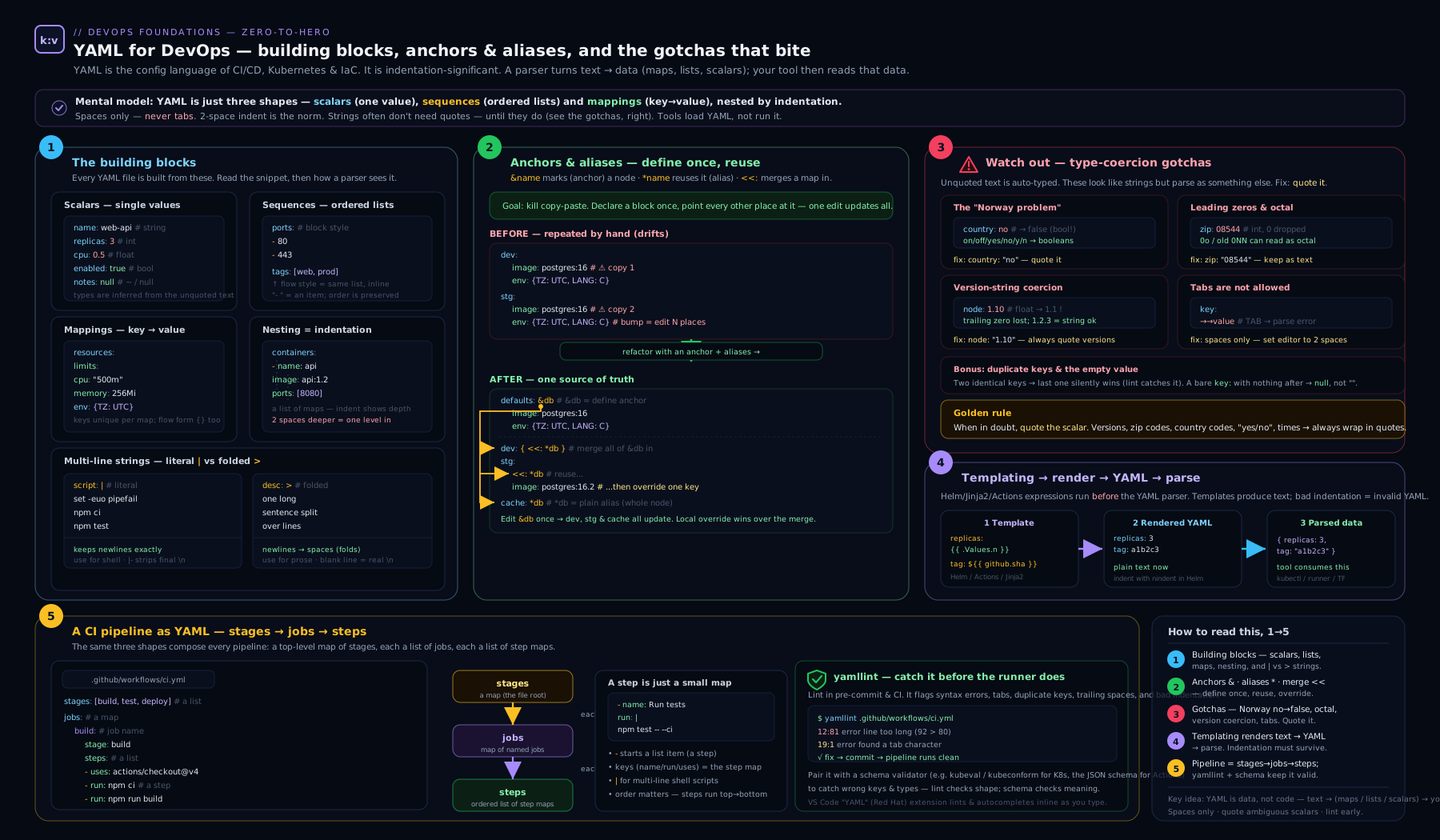
The diagram above maps the whole territory: YAML’s node types and scalar styles on one side, the anchor/alias/merge mechanism in the middle, and the templating-then-parse pipeline that turns Jinja2/Helm/expressions plus a YAML file into the rendered manifest a tool finally consumes.
Hands-on lab
We will install yamllint, write a small pipeline-style file, deliberately trigger the Norway gotcha, and prove the difference with a parser — all locally and free.
Step 1 — install the linter and confirm Python’s parser is present.
python3 -m pip install --user yamllint
yamllint --version          # expect: yamllint 1.x
python3 -c "import yaml; print('PyYAML OK')" 2>/dev/null \
  || python3 -m pip install --user pyyaml
Step 2 — create a file that demonstrates anchors, merge keys, and a gotcha. Save as pipeline.yml:
---
defaults: &defaults
  image: node:20
  retries: 2

build:
  <<: *defaults
  script: make build

test:
  <<: *defaults
  retries: 0
  script: npm test

countries:
  - GB
  - NO            # the trap: unquoted Norway
  - FR
Step 3 — see how a YAML 1.1-style parser reads it. PyYAML uses 1.1 semantics, so this exposes the Norway problem:
python3 -c "import yaml,json; print(json.dumps(yaml.safe_load(open('pipeline.yml')), indent=2))"
Expected output (abridged) — note false where Norway should be, and that the merge key correctly expanded image into both jobs:
{
  "defaults": { "image": "node:20", "retries": 2 },
  "build": { "image": "node:20", "retries": 2, "script": "make build" },
  "test":  { "image": "node:20", "retries": 0, "script": "npm test" },
  "countries": ["GB", false, "FR"]
}
Step 4 — fix the gotcha and re-run. Quote Norway: change - NO to - "NO", re-run the Step 3 command, and confirm countries is now ["GB", "NO", "FR"].
Step 5 — lint it. Run yamllint with a relaxed ruleset:
yamllint -d relaxed pipeline.yml
Now make a config to enforce something useful — forbid yes/no/on/off-style truthy values and require consistent indentation. Create .yamllint:
extends: relaxed
rules:
  truthy:
    allowed-values: ["true", "false"]
  indentation:
    spaces: 2
  document-start: enable
Re-run yamllint pipeline.yml. yamllint will now flag any stray yes/on truthy value and any inconsistent indentation — exactly the class of bug that breaks pipelines.
Step 6 — schema validation (optional, powerful). In VS Code with the Red Hat YAML extension, add a modeline comment to the top of a Kubernetes or Compose file:
# yaml-language-server: $schema=https://raw.githubusercontent.com/compose-spec/compose-spec/master/schema/compose-spec.json
The editor now autocompletes valid keys and red-underlines invalid ones as you type — the cheapest possible feedback loop.
Cleanup. Remove the lab files:
rm -f pipeline.yml .yamllint
Cost note. Zero. Everything here is local CLI and free, open-source tooling — no cloud resources are created.
Common mistakes & troubleshooting
| Symptom | Cause | Fix |
|---|---|---|
| “found character that cannot start any token” | A tab used for indentation | Replace tabs with spaces; set editor to insert spaces |
A value is true/false when you wanted text |
Norway problem — yes/no/on/off/NO unquoted |
Quote the value: "no", "NO" |
| A ZIP/version lost a digit or changed value | Octal (leading zero) or float coercion (1.10→1.1) |
Quote identifiers and versions |
mapping values are not allowed here |
A colon-space inside an unquoted value | Quote the whole value, e.g. "a: b" |
| List items ignored or merged into the wrong key | Inconsistent indentation under - |
Align all keys of a list item under the dash |
| GitHub Actions: “anchors are not supported” | Used &/* in an Actions workflow |
Use reusable workflows / composite actions |
| Helm output has broken indentation | Injected a block without nindent/indent |
Pipe through ` |
Merge key << ignored |
A strict YAML 1.2 parser that dropped merge keys | Avoid << for that tool; duplicate or use the tool’s own templating |
| A multi-line script runs as one mangled line | Used > (folded) where you needed ` |
` (literal) |
Best practices
- Quote stringy values by default. Versions, ports-as-strings, country/region codes, account numbers, anything that looks like another type. Consistency here eliminates an entire class of bugs.
- Two-space indentation, spaces only, enforced by a linter in CI — make malformed YAML fail the build, not production.
- Pin a
.yamllintconfig in the repo and run it as a pre-commit hook and a pipeline step so every contributor gets the same rules. - Prefer block style for anything nested; reserve flow style for short, flat lists.
- Use anchors/merge keys to stay DRY only where the tool supports them — superb in GitLab CI and Compose, unavailable in GitHub Actions (reach for reusable workflows there instead).
- Keep templating obvious. When mixing Jinja2/Helm with YAML, quote any value that begins with
{{, and lean onnindent/indentin Helm so structure stays correct. - Validate against a schema in your editor (the YAML language server) for Kubernetes, Compose, and Actions files — catch errors before commit.
- One concern per document; use
---separators rather than deeply nesting unrelated things.
Security notes
- Never commit secrets in YAML. Pipeline files, Compose files, and manifests live in version control; an inline password or token is leaked the moment it is pushed and remains in history forever. Use the platform’s secret store (GitHub/GitLab CI secrets, Azure Pipelines secret variables, Kubernetes Secrets sourced from a vault) and reference them.
- Be wary of
yaml.loadin code. In Python, plainyaml.load()could historically construct arbitrary objects and enable remote code execution from a malicious document; always useyaml.safe_load(). The same “do not deserialise untrusted YAML with a full loader” caution applies in other languages. - Treat anchors with a billion-laughs eye. Maliciously nested aliases can cause exponential expansion (a YAML “billion laughs” denial-of-service); only parse trusted documents, and use parsers with expansion limits where you accept external input.
- Mask secret outputs. When a CI expression echoes a value, ensure secrets are registered as masked so they are not printed in logs.
- Review template-rendered output for injection — a user-controlled value flowing unquoted into Jinja2/Helm can change the document’s structure, not just a value.
Interview & exam questions
1. What is the difference between | and > in YAML?
| is a literal block scalar — it preserves newlines exactly. > is a folded block scalar — it folds single newlines into spaces, keeping blank lines as real newlines. Use | for scripts and certs, > for wrapped prose.
2. Explain anchors, aliases, and merge keys.
An anchor &name labels a node; an alias *name inserts a copy of it; a merge key <<: *name merges the keys of a referenced mapping into the current one, allowing per-key overrides. They are YAML’s only native reuse mechanism.
3. What is the “Norway problem”?
Under YAML 1.1, unquoted yes/no/on/off/true/false (various cases) parse as booleans. Norway’s ISO code NO therefore becomes false. Fix: quote such values.
4. Why might version: 1.10 be dangerous?
It is parsed as the float 1.1, dropping the trailing zero, so 1.10 and 1.1 collide. Quote versions: "1.10".
5. Why does 01234 not stay 01234?
A leading zero triggers octal interpretation under YAML 1.1 (and 0o under 1.2), corrupting ZIP/account numbers. Quote identifiers.
6. Does GitHub Actions support YAML anchors? No. The Actions workflow parser rejects anchors and aliases. Use reusable workflows and composite actions for reuse instead. (GitLab CI, Azure templates, and Compose do support anchors.)
7. Is YAML a superset of JSON? Yes. Every valid JSON document is valid YAML, because YAML’s flow style mirrors JSON’s brackets and braces.
8. Where does YAML end and templating begin in a Helm chart?
Helm renders Go text/template ({{ }}) over the file’s raw text first; the rendered output is then parsed as YAML/Kubernetes manifests. The template pass is not YAML and is not indentation-aware — hence nindent.
9. Why prefer yaml.safe_load() over yaml.load()?
A full loader can instantiate arbitrary Python objects from a document, enabling code execution from untrusted input. safe_load restricts construction to basic types.
10. How do you represent the same value as a string when YAML would coerce it? Quote it (single or double). Quoting disables type inference, forcing the scalar to be a string.
11. Tabs or spaces for YAML indentation? Spaces only — a tab is a syntax error. The convention is two spaces per level.
12. What does --- do in a YAML file?
It marks the start of a document; multiple ----separated documents can live in one file (the basis of stacking several Kubernetes resources in one manifest).
Quick check
- Which block scalar style strips all trailing newlines?
- True or false: GitHub Actions supports YAML anchors.
- What will unquoted
country: NOevaluate to under a YAML 1.1 parser? - Which Python function should you use to safely parse untrusted YAML?
- In the stage/job/step hierarchy, which level runs on an agent and can run in parallel?
Answers
|-(literal with the strip-chomping modifier).- False — it does not; use reusable workflows or composite actions.
- The boolean
false(the Norway problem). yaml.safe_load().- The job — jobs run on a runner/agent and can run in parallel; steps within a job run sequentially.
Exercise
Take this duplicated, gotcha-ridden GitLab-style file and refactor it. Your goals: (a) eliminate the duplication between staging and production using an anchor and a merge key; (b) fix every type-coercion bug; © write a .yamllint config that would have caught the truthy bug; (d) confirm with python3 -c "import yaml,json; print(json.dumps(yaml.safe_load(open('deploy.yml'))))" that the values are what you intend.
staging:
  image: registry/app:1.20
  replicas: 010
  enabled: yes
  regions: [GB, NO, FR]
  script:
    - ./deploy.sh staging

production:
  image: registry/app:1.20
  replicas: 010
  enabled: yes
  regions: [GB, NO, FR]
  approval: on
  script:
    - ./deploy.sh production
A correct solution quotes "1.20", "010", "NO", replaces yes/on with real booleans true, hoists the shared keys into a &base anchor merged via <<: *base, and overrides only what differs in production. The .yamllint should set truthy.allowed-values: ["true", "false"].
Certification mapping
YAML literacy is assumed — rarely a named objective, always a prerequisite — across the DevOps certification landscape. It directly underpins the DevOps Institute DevOps Foundation “automation and tooling” themes; the pipeline-as-code portions of AWS DevOps Engineer (DOP-C02), Azure DevOps Engineer (AZ-400), and Google Cloud Professional DevOps Engineer; the manifest-authoring expected in CKA/CKAD (where you hand-write Kubernetes YAML under time pressure); the HashiCorp Terraform Associate by way of HCL’s YAML-adjacent structure and YAML-encoded variables; and the GitHub Actions and GitLab certifications, whose entire syntax is the workflow YAML covered here. If you can read and debug YAML fluently, every one of these exams gets easier.
Glossary
- Scalar — a single value: string, number, boolean, or null.
- Sequence — an ordered list (block
-items or flow[ ]). - Mapping — a set of key/value pairs (a dictionary).
- Block style — collections expressed with indentation and newlines.
- Flow style — collections expressed inline with
[ ]/{ }(JSON-like). - Block scalar — a multi-line string introduced by
|(literal) or>(folded). - Chomping — control of trailing newlines in a block scalar: clip (default), strip (
-), keep (+). - Anchor (
&) — a label attached to a node for later reuse. - Alias (
*) — a reference that inserts a copy of an anchored node. - Merge key (
<<) — merges the keys of a referenced mapping into the current one (YAML 1.1). - Document — one YAML structure; multiple are separated by
---in a single file. - Norway problem — unquoted
NO(and similar tokens) parsing as a boolean. - Type coercion — YAML’s inference of a plain scalar’s type, the source of most gotchas.
- Templating layer — a separate pass (Jinja2, Helm/Go templates, CI expressions) that generates YAML text before it is parsed.
- yamllint — a linter that checks YAML for syntax errors and stylistic/semantic issues.
Next steps
With YAML mastered, you are ready to design the pipelines it describes. Continue with CI/CD Pipeline Design: Stages, Quality Gates, Artifacts & Security Scans (cicd-pipeline-design-stages-gates-artifacts) to turn this syntax into a real, gated delivery pipeline. For the reuse mechanisms YAML cannot provide on every platform, see GitHub Actions reusable workflows (github-actions-reusable-workflows-platform). And when a manifest misbehaves in CI, the diagnostic method in DevOps Troubleshooting: Pipelines, Builds, Deployments, Runners & Artifacts (devops-troubleshooting-pipelines-builds-deploys-runners) will get you unstuck fast.