In a nutshell
Level: Advanced · Time: ~30 min
Imagine you look after a building where tenants move in and out every hour. A printed directory in the lobby is wrong within minutes. Dynamic inventory is the opposite of that printed directory: instead of maintaining a hand-written phone book of servers, you ask the cloud a live question — “who exists right now?” — every single time you run a playbook. Ansible sends that question to AWS and Azure through inventory plugins, gets back the current fleet, and shapes the answer into groups you can target.
The mental model has two halves. The first half is discovery: an inventory plugin (amazon.aws.aws_ec2, azure.azcollection.azure_rm) authenticates to the cloud, lists the machines that match your filters, and turns their tags into groups with keyed_groups and compose. The second half is secrets: because the playbook now runs against machines you never named by hand, it must also fetch the passwords and keys those machines need at the moment it runs — from HashiCorp Vault, AWS Secrets Manager, or Azure Key Vault — instead of committing them to a file. Discover the hosts live; fetch the secrets live; bake neither into git.
Why a beginner should care: the very first time an autoscaling group replaces a node, a hand-written inventory.ini points at a dead machine and the deploy fails. Dynamic inventory makes that failure impossible, because there is no stale list to go wrong. Get this right once and the same playbook runs unchanged whether the fleet is three VMs or three thousand.
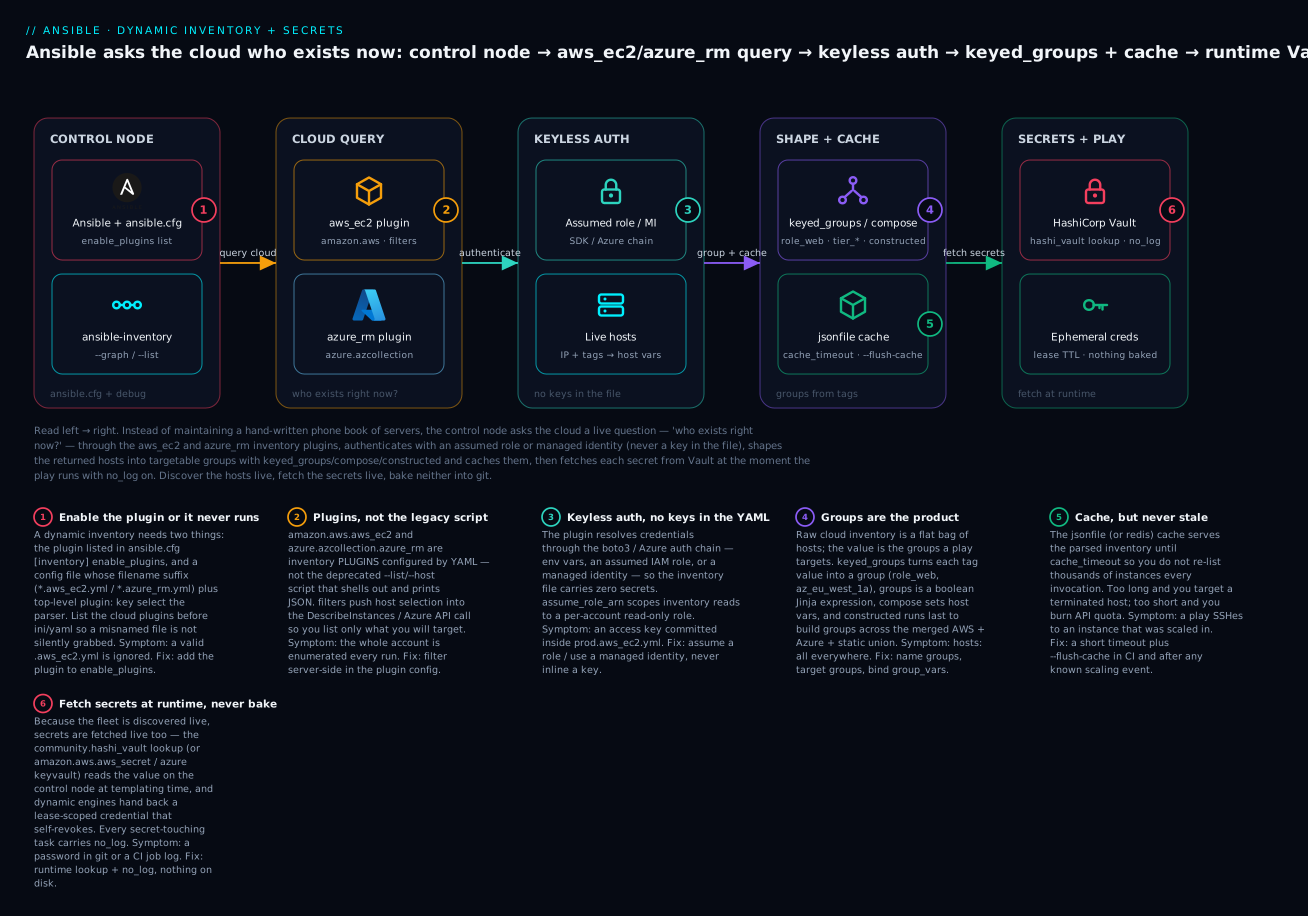
The control node asks aws_ec2 and azure_rm “who exists right now?”, authenticates with an assumed role or managed identity (never a key in the file), shapes the live hosts into groups with keyed_groups/constructed and caches them, then fetches each secret from Vault at runtime with no_log on — so nothing is ever baked into git or a log.
Prerequisites: you can run a basic ansible-playbook against a static INI inventory; you know what a tag is on an EC2 instance or an Azure VM; you have installed a collection from Ansible Galaxy. Helpful but not required: passing familiarity with HashiCorp Vault’s key-value store and with cloud IAM roles / managed identities.
After this lesson you can:
- Configure
amazon.aws.aws_ec2andazure.azcollection.azure_rmto build a live inventory from a cloud account, filtered server-side. - Turn cloud tags into targetable groups with
keyed_groups,groups, andcompose, and merge multiple sources withconstructed. - Enable inventory plugins correctly in
ansible.cfgand debug the result withansible-inventory --graph/--list. - Cache inventory safely and recognise when a stale cache will bite you.
- Decide between Ansible Vault and an external secret manager, and fetch secrets at runtime with the
community.hashi_vault,amazon.aws, andazure.azcollectionlookups. - Close every leak path —
no_log,--diff, verbosity, callback plugins — so no secret ever reaches a log.
A static inventory.ini is a lie the moment an autoscaling group scales out. The host you so carefully tagged web-03 got terminated during a deploy, a fresh instance took its place with a new private IP, and your next playbook run targets a machine that no longer exists. At any real scale, the inventory is not a file you maintain — it is a query you run against the cloud control plane at the start of every play. Ansible has supported this for years, but the plugin-based inventory introduced in 2.4 and matured since is genuinely good now, and most teams still under-use it.
This guide wires Ansible to live AWS and Azure inventory via amazon.aws.aws_ec2 and azure.azcollection.azure_rm, shapes hosts into useful groups with keyed_groups, compose, and the constructed plugin, caches the result, and then handles the part everyone gets wrong: secrets. We will cover when Ansible Vault is the right tool and when it is a liability, retrieve credentials at runtime from HashiCorp Vault with community.hashi_vault, and stop secrets from leaking through no_log, encrypt_string, and callback plugins. Everything assumes ansible-core 2.16+ and the relevant collections installed from Galaxy.
1. Static vs dynamic inventory and the plugin lifecycle
Ansible has two inventory mechanisms. Static inventory is the INI or YAML file you hand-write. Dynamic inventory is produced by an inventory plugin — a Python class that, when invoked, populates the in-memory inventory by talking to some source of truth.
A common misconception is that dynamic inventory means “a script that prints JSON.” That was the old inventory script interface (the --list/--host contract), and it is effectively deprecated. Modern dynamic inventory uses plugins configured by a YAML file whose name must end in a recognized suffix — by convention *.aws_ec2.yml, *.azure_rm.yml, or the generic inventory.yml. The file’s top-level plugin: key names which plugin parses it.
The lifecycle for a single ansible-playbook -i inventory.aws_ec2.yml run is:
- Ansible scans
-isources. For each one it asks every enabled inventory plugin “can you parse this?” The plugin checks the filename suffix and theplugin:key. - The matching plugin runs
parse(): it authenticates to the cloud, lists resources, and adds hosts, groups, and host variables to the inventory object. keyed_groups,groups, andcomposerules execute, creating derived groups and computed variables.- The fully materialized inventory is handed to the play. Plugins do not re-run mid-play; the inventory is a snapshot taken at parse time.
You must explicitly enable non-core plugins. In ansible.cfg:
[defaults]
inventory = ./inventory

[inventory]
enable_plugins = amazon.aws.aws_ec2, azure.azcollection.azure_rm, constructed, ini, yaml
cache = true
cache_plugin = jsonfile
cache_connection = ./.ansible_inventory_cache
cache_timeout = 600
The order in
enable_pluginsis the resolution order. Put the cloud plugins beforeini/yamlso a misnamed file does not get silently grabbed by the wrong parser. List a plugin or it will never run, even if its config file is valid.
Verify the collections are present before going further:
ansible-galaxy collection install amazon.aws azure.azcollection community.hashi_vault
ansible-config dump --only-changed | grep -i inventory
2. Configuring the amazon.aws.aws_ec2 plugin
The AWS EC2 plugin discovers instances via the EC2 API. Authentication follows the standard boto3 chain — environment variables, ~/.aws/credentials, an assumed role, or instance metadata — so do not put keys in the inventory file. Create inventory/prod.aws_ec2.yml:
plugin: amazon.aws.aws_ec2
regions:
  - eu-west-1
  - us-east-1
# Only pull what you'll target. Filtering server-side is cheaper than
# listing the whole account and discarding hosts client-side.
filters:
  tag:Environment: production
  instance-state-name: running
# Optionally assume a read-only inventory role per account.
assume_role_arn: "arn:aws:iam::111122223333:role/ansible-inventory-ro"
# Use the private IP for SSH inside the VPC.
hostnames:
  - private-ip-address
# Expose tags and a few instance facts as host vars.
compose:
  ansible_host: private_ip_address
strict: false
A few decisions worth calling out. hostnames controls the inventory hostname; ordering matters — Ansible uses the first that resolves. filters map directly to EC2 DescribeInstances filters, so push as much selection as you can server-side. Tags arrive as host variables prefixed tags. (for example tags.Role), and instance attributes are available under names like instance_type, placement.availability_zone, and vpc_id.
Confirm what the plugin sees before writing any rules:
ansible-inventory -i inventory/prod.aws_ec2.yml --graph
ansible-inventory -i inventory/prod.aws_ec2.yml --host i-0abc123 --yaml
For Azure, create inventory/prod.azure_rm.yml. The plugin uses the standard Azure auth chain (env vars AZURE_CLIENT_ID/AZURE_SECRET/AZURE_TENANT/AZURE_SUBSCRIPTION_ID, a managed identity, or az login):
plugin: azure.azcollection.azure_rm
include_vm_resource_groups:
  - rg-prod-app
  - rg-prod-data
# Use Scale Set VMs as well as standalone VMs.
include_vmss_resource_groups:
  - rg-prod-web
# Azure tags become host vars; pick which become groups below.
plain_host_names: true
conditional_groups:
  azure_linux: "'Linux' in os_disk.os_type"
plain_host_names: true gives you the VM name as the inventory hostname instead of the long fully qualified default. Without it you get a uniqueness-safe but unreadable name.
3. Building host groups with keyed_groups, compose, and constructed
Raw cloud inventory is a flat bag of hosts. The value is in the groups, because that is what hosts: in a play targets. Three mechanisms build them.
keyed_groups creates one group per distinct value of an expression. This is the workhorse: turn the Role tag into role_web, role_api, role_db groups automatically.
keyed_groups:
  # tag:Role=web -> group "role_web"
  - key: tags.Role
    prefix: role
    separator: "_"
  # one group per AZ, e.g. "az_eu_west_1a"
  - key: placement.availability_zone
    prefix: az
  # default_value handles untagged hosts so they don't vanish silently
  - key: tags.Team
    prefix: team
    default_value: unowned
groups creates a single named group whose membership is a boolean Jinja expression — good for cross-cutting logic that is not a simple key:
groups:
  large_instances: "instance_type.startswith('m5.4xlarge') or instance_type.startswith('c5.9xlarge')"
  needs_patching: "'PatchGroup' in (tags | default({}))"
compose sets host variables from Jinja, evaluated against the host’s other facts. Use it to normalize connection variables across clouds so the same play runs everywhere:
compose:
  ansible_host: private_ip_address
  ansible_user: "'ec2-user'"
  region: placement.region
composeexpressions are raw Jinja with no{{ }}and templates are not trusted by default — string literals must be quoted ("'ec2-user'"), or Ansible treats the bare word as a variable reference and fails. This trips up everyone once.
The constructed plugin is the missing piece for cross-source grouping. The cloud plugins can only group on facts they themselves produce. constructed runs after other inventory sources, sees the merged set of host variables (including ones you set in host_vars/group_vars), and applies keyed_groups/groups/compose across all of them. Put it last so it sees everything:
# inventory/constructed.yml
plugin: constructed
strict: false
keyed_groups:
  # Build groups from a var that may come from AWS, Azure, OR group_vars.
  - key: app_tier
    prefix: tier
groups:
  # Now you can mix an AWS tag with an Azure tag uniformly.
  frontends: "app_tier == 'frontend'"
4. Caching inventory and merging multiple sources
Listing thousands of instances across regions on every ansible invocation is slow and burns API quota. Inventory caching stores the parsed result and serves it until it expires.
Enable it globally (as in the ansible.cfg above) or per-plugin inside the inventory YAML, which is more explicit:
plugin: amazon.aws.aws_ec2
regions: [eu-west-1]
cache: true
cache_plugin: jsonfile
cache_connection: ./.ansible_inventory_cache
cache_timeout: 1800
The cache key is derived from the plugin config, so changing a filter invalidates it correctly. Two operational notes: a stale cache will happily target dead hosts, so keep cache_timeout short enough that a destroyed instance falls out before it causes a failed play; and force a refresh in CI or after a known scaling event with:
ansible-inventory -i inventory/ --graph --flush-cache
Merging multiple sources is where the directory form pays off. Point -i (or inventory =) at a directory, and Ansible parses every recognized file in it, unioning the results. This lets you combine AWS, Azure, a static ini of bare-metal jump hosts, and the constructed overlay into one inventory:
inventory/
  prod.aws_ec2.yml
  prod.azure_rm.yml
  bastions.ini
  constructed.yml          # parsed last; sees the union
Files are parsed in alphanumeric order, which is exactly why constructed.yml (c < p) sorting can bite you — it must run last. Force ordering by prefixing with numbers when needed: 10-prod.aws_ec2.yml, 90-constructed.yml. When the same host appears from two sources, variables merge according to Ansible’s precedence, with later sources winning on conflict.
5. Ansible Vault vs external secret managers
Now the secrets. There are two distinct tools with the same word in their name, and conflating them causes real incidents.
Ansible Vault is a file encryption feature built into ansible-core. It encrypts files (or individual strings) at rest with a symmetric passphrase using AES-256. The ciphertext lives in your git repo; the passphrase lives… somewhere you have to manage. It is excellent for low-churn, version-controlled secrets: a CA private key, a license string, default DB passwords for a lab.
External secret managers — HashiCorp Vault, AWS Secrets Manager, Azure Key Vault — store secrets outside the repo and serve them at runtime over an authenticated API, with rotation, dynamic generation, leasing, and audit logs. They are the correct choice for anything that rotates, anything dynamic (short-lived cloud creds), and anything that must be audited per-access.
| Dimension | Ansible Vault | External manager (e.g. HashiCorp Vault) |
|---|---|---|
| Where the secret lives | Encrypted in git | Outside the repo, served at runtime |
| Rotation | Manual re-encrypt + commit | Native, often automatic |
| Audit per access | None | Full audit log |
| Dynamic/short-lived creds | No | Yes (leases, TTLs) |
| Works fully offline | Yes | No (needs the API) |
| Bootstrap problem | Manage one passphrase | Manage one auth token/identity |
The decision rule I use: if the secret is static, low-value, and benefits from being versioned with the code (lab defaults, a self-signed CA), Ansible Vault is fine. If it rotates, is high-value, or must be audited, fetch it at runtime from an external manager. Never paste a production cloud key into an Ansible Vault file and call it secure — you have only moved the rotation problem, not solved it.
For the Ansible Vault cases that remain, encrypt individual variables, not whole files, so the surrounding YAML stays diff-able. Use encrypt_string:
ansible-vault encrypt_string --vault-id prod@prompt \
  's3cr3t-db-password' --name 'db_password'
This emits an !vault tagged block you paste straight into a group_vars file. The variable name is in cleartext; only the value is encrypted. Drive the passphrase non-interactively in CI with --vault-password-file pointing at a script that fetches the passphrase from your secret manager — so even the Ansible Vault passphrase is never on disk.
6. Runtime secret retrieval with the community.hashi_vault lookup
The cleaner pattern for dynamic environments skips file encryption entirely and pulls secrets at task runtime. The community.hashi_vault collection provides the hashi_vault lookup plugin. The playbook ships zero secrets; at execution time each control node authenticates to Vault and reads exactly the paths it needs.
First, authenticate. Avoid a long-lived root token. In CI, prefer JWT/OIDC or AppRole; locally, a token from vault login works:
export VAULT_ADDR='https://vault.internal:8200'
# AppRole example: role_id is non-secret, secret_id is short-lived.
export ANSIBLE_HASHI_VAULT_AUTH_METHOD=approle
export ANSIBLE_HASHI_VAULT_ROLE_ID="$ROLE_ID"
export ANSIBLE_HASHI_VAULT_SECRET_ID="$SECRET_ID"
Then read a KV v2 secret in a play. Note KV v2 requires data/ in the path:
- name: Configure the application
  hosts: tier_frontend
  vars:
    # Reads field "password" from secret/data/prod/app
    db_password: "{{ lookup('community.hashi_vault.hashi_vault',
                          'secret/data/prod/app:password') }}"
  tasks:
    - name: Render app config
      ansible.builtin.template:
        src: app.conf.j2
        dest: /etc/app/app.conf
        mode: '0640'
      no_log: true
For a fleet of secrets, the vault_kv2_get module is cleaner than repeated lookups because it fetches the whole secret once and registers it:
- name: Fetch app secrets once
  community.hashi_vault.vault_kv2_get:
    path: prod/app
    engine_mount_point: secret
  register: app_secrets
  no_log: true

- name: Use a field
  ansible.builtin.debug:
    msg: "username is {{ app_secrets.secret.username }}"
  # password field deliberately not referenced here
The real win is dynamic secrets. Read from a Vault database or cloud engine and you get a credential that exists only for this run and self-revokes when its lease expires — there is nothing to rotate and nothing to leak long-term:
db_creds: "{{ lookup('community.hashi_vault.hashi_vault',
                     'database/creds/app-ro') }}"
# db_creds.username / db_creds.password are valid for the lease TTL only
7. no_log, encrypt_string, and avoiding leakage in callbacks
Encrypting a secret at rest is pointless if it then prints to stdout, lands in the JSON log of your CI, or gets shipped to a callback plugin. Closing the leak paths is non-negotiable.
no_log: true suppresses a task’s arguments and return values from output and logging. Apply it to every task that touches a secret — the template that renders it, the command that consumes it, the lookup that fetches it. Without it, a failed task helpfully dumps the module arguments, secret and all, into the error.
- name: Create database user
  community.postgresql.postgresql_user:
    name: app
    password: "{{ db_password }}"
  no_log: true
There are sharp edges to know:
no_logon a loop still suppresses per-item output, but awith_itemsover a list of secrets is suppressed wholesale — good.- Setting
ANSIBLE_DEBUG=1or running with high verbosity (-vvv) can overrideno_logfor connection-level debugging. Never run production playbooks at-vvvv. - A task that registers a secret keeps it in a variable; later
debugof that variable bypasses the originalno_log. Guard the debug task too, or do not debug secret-bearing vars at all.
Callback plugins are the sneaky path. The log_plugins family (for example a JSON file callback, or a callback that ships results to Splunk, Datadog, or Ansible Automation Platform) receives full task results. no_log does redact the result before it reaches callbacks, so it remains your primary control — but audit which callbacks you have enabled:
ansible-config dump | grep -i callback
ansible-doc -t callback -l
If a callback writes a job log to shared storage, treat that log as secret-bearing unless you have verified no_log covers every secret task. The failure mode is a “convenient” full-output log archived to an S3 bucket the whole org can read.
Finally, diff mode (--diff) prints file before/after content — which means rendering a config from a Vault secret with --diff on will print the secret to the terminal. Set no_log: true on template/copy tasks, or these tasks honor a diff: false to suppress just the diff while keeping the change.
8. Tying it together in a pipeline with ephemeral credentials
The end state: a CI job that authenticates with its own identity, derives a short-lived Vault token, runs Ansible against live cloud inventory, and leaves no static secret anywhere. Cloud read access for inventory comes from an assumed IAM role / managed identity, not keys.
# GitHub Actions job (sketch). OIDC -> Vault -> Ansible.
jobs:
  configure:
    runs-on: ubuntu-latest
    permissions:
      id-token: write     # mint the OIDC token
      contents: read
    steps:
      - uses: actions/checkout@v4

      # Assume an inventory-read role via OIDC; no stored AWS keys.
      - uses: aws-actions/configure-aws-credentials@v4
        with:
          role-to-assume: arn:aws:iam::111122223333:role/ci-ansible-inventory
          aws-region: eu-west-1

      # Exchange the CI OIDC token for a short-lived Vault token.
      - uses: hashicorp/vault-action@v3
        with:
          url: https://vault.internal:8200
          method: jwt
          role: ci-ansible
          exportToken: true     # sets VAULT_TOKEN for later steps

      - name: Install collections
        run: ansible-galaxy collection install -r requirements.yml

      - name: Run playbook against live inventory
        env:
          ANSIBLE_HASHI_VAULT_AUTH_METHOD: token   # reuse the minted token
        run: |
          ansible-playbook -i inventory/ site.yml --flush-cache
Three properties make this safe. The AWS credentials are assumed per-job and expire in an hour. The Vault token is minted from the pipeline’s OIDC identity, scoped by a Vault role’s policies to only the paths this job needs, and dies with the job. And --flush-cache guarantees the run sees the current fleet, not a snapshot from a previous job. No secret is ever written to the repo, the runner’s disk, or a log — provided every secret-touching task carries no_log.
Going deeper
Sections 1–8 get a working, safe setup. This section is the layer underneath — the internals, the extra option surface, and the edge cases that separate “it worked on my laptop” from “it holds across twenty accounts and a CI fleet.” Everything here is additive to the setup above; reach for it when you are scaling, hardening, or debugging.
Under the hood: how a plugin beats the legacy --list script
The deprecated script interface was an executable that answered two questions: --list dumped every group plus a _meta.hostvars block, and --host <name> returned one host’s vars. If a script omitted _meta, Ansible fell back to calling --host once per host — an N+1 storm against your cloud API. You can still run such a script through the bundled ansible.builtin.script inventory plugin, which is the graceful path for a legacy script you cannot retire yet.
A modern plugin is a Python InventoryModule with two methods that matter: verify_file(path) is a cheap gate that checks the filename suffix and extension before doing any work, and parse(inventory, loader, path) does the real job — authenticate, page through the API, then inventory.add_host(...) and inventory.set_variable(...). Because parse populates everything in one pass, there is no per-host round trip. List what is available and read its options with:
ansible-doc -t inventory -l                 # every inventory plugin, by FQCN
ansible-doc -t inventory amazon.aws.aws_ec2 # full option reference
Every plugin is addressed by its fully qualified collection name (FQCN). aws_ec2 on its own has not been a valid short name since the module moved into the amazon.aws collection — always write amazon.aws.aws_ec2.
enable_plugins, the auto plugin, and how a file gets matched
Two things must line up for a config file to be parsed: the plugin has to be in the allow-list, and the file has to match it. enable_plugins in ansible.cfg [inventory] (or the ANSIBLE_INVENTORY_ENABLED environment variable) is both the allow-list and the resolution order. The bundled auto plugin is a convenience: it reads any *.yml that carries a plugin: key and dispatches to whatever that key names — but in a mixed directory an explicit, ordered enable_plugins is safer, because it removes the ambiguity of “which parser grabbed this file first.”
Two switches earn their place in CI:
[inventory]
enable_plugins = amazon.aws.aws_ec2, azure.azcollection.azure_rm, constructed, ini, yaml
# Let -e extra vars override inventory options where a plugin allows it.
use_extra_vars = true
# Turn a silently-skipped source into a hard failure.
any_unparsed_is_failed = true
With any_unparsed_is_failed on (equivalently ANSIBLE_INVENTORY_ANY_UNPARSED_IS_FAILED=true), a renamed or malformed file fails the run loudly instead of yielding an empty fleet that a later task quietly targets with hosts: all — the classic “why did my play do nothing?” ten minutes before a release.
hostnames, filters, and keeping the API call cheap
hostnames is an ordered try-list; the first expression that yields a value wins. Beyond private-ip-address you can use tag:Name, dns-name, ip-address, or a {prefix, separator, key} dict to build a composite name. The trap: two instances that share a Name tag collide onto one inventory host, and one silently disappears. Fall back to a unique attribute (private-ip-address) or enforce unique Name tags upstream.
Filtering is where you control cost and blast radius. The single filters dict maps to DescribeInstances filters. The newer include_filters/exclude_filters take lists of filter dicts and are OR-combined across entries, which is more expressive — include prod or staging, exclude terminated or stopped, in one pass:
plugin: amazon.aws.aws_ec2
regions:
  - eu-west-1
include_filters:
  - tag:Environment:
      - production
      - staging
exclude_filters:
  - instance-state-name:
      - terminated
      - stopped
hostnames:
  - tag:Name
  - private-ip-address
strict_permissions: false
Every value you push server-side is a host you never pay to list and then discard client-side. Azure’s azure_rm filters on a different axis: scope with include_vm_resource_groups/include_vmss_resource_groups, then post-filter with exclude_host_filters and shape with conditional_groups. Restricting the resource-group list is the cheap lever there.
keyed_groups, groups, compose, and constructed — the full option set
keyed_groups has more knobs than the workhorse example in section 3 shows:
keyed_groups:
  - key: tags.Role
    prefix: role
    separator: "_"
    parent_group: managed      # nest role_web, role_api, ... under "managed"
    default_value: unknown     # untagged hosts still land somewhere
    trailing_separator: false  # drop the dangling "_" when the value is empty
parent_group lets you build a hierarchy: every generated role_* group becomes a child of a stable managed group a play can target wholesale. default_value keeps untagged hosts from vanishing; trailing_separator: false avoids the ugly role_ group when the key is empty. groups is a mapping of name → boolean Jinja, and compose is name → Jinja value (no {{ }}, string literals quoted). Because Ansible uses native Jinja types, compose can yield a real list or dict, not a stringified one.
constructed is worth a second look. It runs last and sees the merged host vars from every prior source — including group_vars/host_vars — when you set use_vars_plugins: true. Flip strict per environment:
plugin: constructed
strict: true                 # in CI: a typo'd expression fails the run
use_vars_plugins: true       # see group_vars/host_vars, not just cloud facts
keyed_groups:
  - key: app_tier
    prefix: tier
    parent_group: application
compose:
  ansible_host: private_ip_address | default(ansible_host)
groups:
  frontends: "app_tier == 'frontend'"
Run with strict: true in CI so a broken expression fails loudly; keep strict: false in production so one malformed host does not abort the whole play.
The killer feature: group_vars bind to dynamic groups by name
Name a keyed group role_web and a group_vars/role_web.yml file automatically applies to every host the cloud tagged Role=web — with no static membership recorded anywhere:
# group_vars/role_web.yml — binds to the keyed group "role_web"
nginx_worker_processes: auto
app_listen_port: 8080
This is why naming discipline in keyed_groups matters: the group name is the contract between a cloud tag and your variable files. Tag an instance Role=web in Terraform, and it inherits the whole role_web variable set the instant the inventory plugin discovers it. Two names to keep straight: inventory_hostname is what Ansible calls the host; ansible_host (set via compose) is where it actually connects. They are frequently different — a readable name over an IP you connect to.
Caching internals and the stale-host hazard
Cache plugins trade freshness for speed. jsonfile writes to a local directory and is the simplest; redis or memcached share the cache across CI runners so a large fleet is listed once per window instead of once per job. The cache key is a hash of the plugin config, so changing a filter or a region invalidates it correctly — but changing the fleet does not, which is the whole hazard.
Mid-play, force a re-read after an action that changes the fleet:
- name: Re-read inventory after a known scale-out
  ansible.builtin.meta: refresh_inventory
From the CLI, --flush-cache clears it. The failure modes are asymmetric: too long a cache_timeout and you SSH into a host that was scaled in an hour ago; too short and you burn API quota re-listing on every run. Bias short, and always --flush-cache in CI and after any deliberate scaling event.
Secrets lookups beyond HashiCorp Vault
The runtime-fetch pattern from section 6 is not Vault-specific. The cloud-native managers have lookups too, and — this is the important safety property — the lookup runs on the control node at templating time, so the target host never sees your manager credentials:
vars:
  # AWS Secrets Manager (canonical name in amazon.aws 9.x;
  # the older amazon.aws.aws_secret alias still resolves).
  db_password: "{{ lookup('amazon.aws.secretsmanager_secret', 'prod/app/db', region='eu-west-1') }}"
  # AWS SSM Parameter Store (older alias: amazon.aws.aws_ssm).
  api_key: "{{ lookup('amazon.aws.ssm_parameter', '/prod/app/api_key', region='eu-west-1') }}"
  # Azure Key Vault — with a managed identity, no client_id/secret needed.
  tls_key: "{{ lookup('azure.azcollection.azure_keyvault_secret', 'tls-key',
                      vault_url='https://kv-prod.vault.azure.net') }}"
Choosing between them: if the workload already carries an IAM role or a managed identity, the matching cloud-native manager is one fewer system to bootstrap — the same identity that lists the inventory can read the secret. Reach for central HashiCorp Vault when you want one audit trail and one dynamic-secrets engine spanning both clouds, or when you need short-lived database/cloud credentials that self-revoke. Either way the rule is identical: the secret is fetched at runtime and never baked into the repo, the inventory YAML, or a group_vars file in cleartext.
Debugging: --graph, --list, --host, --export
ansible-inventory is the microscope for everything above. Learn the four views:
# The group tree; add --vars to see host/group vars inline.
ansible-inventory -i inventory/ --graph --vars
# The entire materialized inventory as YAML.
ansible-inventory -i inventory/ --list --yaml
# One host's fully resolved variables.
ansible-inventory -i inventory/ --host web-03 --yaml
# Vars resolved as they'd apply at play time (respects group_vars).
ansible-inventory -i inventory/ --graph --export --playbook-dir .
--export (and --playbook-dir) is the one people miss: plain --list shows what the plugin produced, but --export resolves group_vars/host_vars as the play would actually see them — the difference between “the plugin made a role_web group” and “a host in role_web will get nginx_worker_processes: auto.” Prove a cold parse with --graph --flush-cache. You can crank verbosity with -vvvv to debug plugin resolution — but never on a play that touches secrets, because high verbosity can defeat no_log.
Verify
Walk these checks before trusting the setup in anger.
# 1. The plugin parses and the expected hosts/groups exist.
ansible-inventory -i inventory/ --graph

# 2. Derived groups from keyed_groups/constructed are present.
ansible-inventory -i inventory/ --graph | grep -E 'role_|tier_|az_'

# 3. A host carries the composed connection vars.
ansible-inventory -i inventory/ --host <one-host> --yaml | grep ansible_host

# 4. Caching works: second run is fast and offline-ish.
time ansible-inventory -i inventory/ --graph        # warm
time ansible-inventory -i inventory/ --graph --flush-cache  # cold

# 5. A Vault lookup resolves (run a throwaway play).
ansible -i localhost, -m debug \
  -a "msg={{ lookup('community.hashi_vault.hashi_vault','secret/data/prod/app:username') }}" \
  all

# 6. Secrets do NOT leak: run the real play at -vv and grep the output.
ansible-playbook -i inventory/ site.yml -vv 2>&1 | grep -i 'password\|secret' || echo "clean"
If step 6 prints anything resembling a credential, a task is missing no_log. Fix it before the pipeline ever runs.
Checklist
Practice challenges
Work these in order — each builds on the last, and together they reproduce the full setup from scratch. All secret values are placeholders; never commit a real one.
Challenge 1 — Enable the plugin and see the fleet (beginner)
You have an AWS account with running instances but ansible-inventory --graph shows nothing. Write the minimal ansible.cfg and a prod.aws_ec2.yml that lists every running instance in eu-west-1, then prove it.
<details> <summary>Solution</summary>
# ansible.cfg
[inventory]
enable_plugins = amazon.aws.aws_ec2, constructed, ini, yaml
# inventory/prod.aws_ec2.yml
plugin: amazon.aws.aws_ec2
regions:
  - eu-west-1
filters:
  instance-state-name: running
ansible-inventory -i inventory/ --graph
Why: a plugin config file does nothing until the plugin is in enable_plugins; the filename suffix *.aws_ec2.yml plus the plugin: key are what let the plugin claim the file.
</details>
Challenge 2 — Turn a tag into groups (beginner)
Every instance carries a Role tag (web, api, db), but some are untagged. Produce role_web/role_api/role_db groups and make sure untagged hosts still land in a group instead of disappearing.
<details> <summary>Solution</summary>
keyed_groups:
  - key: tags.Role
    prefix: role
    default_value: untagged
Why: keyed_groups makes one group per distinct tag value; default_value is the safety net — without it, an untagged host is silently absent from role_* and a hosts: role_web play skips it with no warning.
</details>
Challenge 3 — One play for two clouds (intermediate)
Your AWS instances want ansible_user: ubuntu and connect over their private IP. Normalize the connection variables with compose so the same play works regardless of source. Watch the literal-string trap.
<details> <summary>Solution</summary>
compose:
  ansible_host: private_ip_address
  ansible_user: "'ubuntu'"
Why: compose values are raw Jinja — private_ip_address is a variable reference (correct here), but a bare ubuntu would be read as a variable too and fail. Quoting "'ubuntu'" makes it a string literal.
</details>
Challenge 4 — A cross-cloud group with constructed (intermediate)
Both an AWS tag and an Azure tag set app_tier. Build one frontends group spanning both clouds, and guarantee the overlay parses after the cloud sources.
<details> <summary>Solution</summary>
# inventory/90-constructed.yml
plugin: constructed
strict: false
groups:
  frontends: "app_tier == 'frontend'"
Number-prefix the files so alphanumeric ordering runs the overlay last: 10-prod.aws_ec2.yml, 20-prod.azure_rm.yml, 90-constructed.yml.
Why: constructed can only group on variables that already exist in the merged inventory, so it must parse after every source that produces app_tier. A plain constructed.yml sorts before prod.* (c < p) and sees nothing.
</details>
Challenge 5 — Fetch a secret at runtime, then make it ephemeral (advanced)
Pull a database password from Vault KV v2 into a play with no secret in the repo, guard the task, then upgrade to a self-revoking dynamic credential.
<details> <summary>Solution</summary>
# Static KV v2 secret (note the data/ segment in the path).
vars:
  db_password: "{{ lookup('community.hashi_vault.hashi_vault',
                         'secret/data/prod/app:password') }}"

# Dynamic: valid only for the lease TTL, self-revokes afterward.
  db: "{{ lookup('community.hashi_vault.hashi_vault',
                'database/creds/app-ro') }}"
# db.username / db.password exist only for this run.
Every task consuming these carries no_log: true.
Why: the KV path proves the runtime-fetch pattern; the database/creds/... engine is the real prize — a credential that exists only for the run means there is nothing long-lived to rotate or leak.
</details>
Challenge 6 — Prove nothing leaks (advanced)
A colleague’s play encrypts secrets with Ansible Vault yet a credential still appears in the CI log. Find the two leak paths and close them.
<details> <summary>Solution</summary>
Run the play and grep for the leak:
ansible-playbook -i inventory/ site.yml -vv 2>&1 | grep -i 'password\|secret' || echo "clean"
The two usual culprits: a debug of a registered secret-bearing variable, and a template/copy task run with --diff. Guard both:
- name: Show only the non-secret username
  ansible.builtin.debug:
    var: app_secrets.secret.username
  no_log: true
Set no_log: true (or diff: false) on the template task, and never debug a whole secret-bearing var.
Why: encryption at rest does nothing once the value is decrypted into a variable — output, diffs, and callbacks see the plaintext. no_log is the control that redacts it before it reaches stdout, logs, and callback plugins.
</details>
Common beginner mistakes
| Misconception | Why it’s wrong | The right mental model |
|---|---|---|
| “Dynamic inventory is a script that prints JSON.” | That is the deprecated --list/--host script interface, kept only for legacy compatibility. |
Modern dynamic inventory is a plugin configured by a YAML file with a plugin: key — no script to maintain. |
“My prod.aws_ec2.yml is valid, so it’ll be used.” |
A valid config file is ignored unless its plugin is in enable_plugins. |
The plugin must be listed in ansible.cfg [inventory] enable_plugins; that list is also the resolution order. |
“I’ll name the file aws.yml, it’s just a name.” |
The plugin claims a file by suffix + plugin: key; a wrong suffix means no plugin verifies it. |
Use the recognized suffix (*.aws_ec2.yml, *.azure_rm.yml) or the generic name with a plugin: key. |
| “I’ll put the access key in the inventory file so it can authenticate.” | Keys in the repo are the classic audit finding, and the plugin doesn’t need them. | Let the boto3 / Azure auth chain resolve an assumed role or managed identity — nothing on disk. |
“ansible_user: ec2-user in compose should work.” |
compose is raw Jinja; a bare word is read as a variable reference and fails. |
Quote string literals: ansible_user: "'ec2-user'". |
“constructed.yml is fine wherever it sits.” |
Alphanumeric ordering parses constructed.yml before prod.*, so it sees no cloud vars. |
Number-prefix it (90-constructed.yml) so it parses last over the merged union. |
“A longer cache_timeout is more efficient.” |
A stale cache targets hosts that were scaled in, causing failed or wrong plays. | Bias the timeout short and --flush-cache in CI / after scaling. |
| “Ansible Vault and HashiCorp Vault are the same thing.” | One is file encryption in git; the other is a runtime secret manager with rotation and audit. | Use Ansible Vault for static, low-value, versioned secrets; an external manager for anything dynamic or audited. |
| “The secret is encrypted, so I’m safe.” | Once decrypted into a variable, it leaks through output, --diff, and callbacks. |
Add no_log: true to every secret-touching task, including registered-var debugs. |
Glossary
- Static inventory — a hand-written INI or YAML file listing hosts and groups. Correct only until the fleet changes.
- Dynamic inventory — hosts produced at runtime by querying a source of truth (here, the cloud API) instead of a fixed file.
- Inventory plugin — a Python class (addressed by FQCN, e.g.
amazon.aws.aws_ec2) that authenticates to a source and populates the in-memory inventory in one pass. - Inventory script (legacy) — the deprecated
--list/--hostexecutable contract; superseded by plugins. - FQCN (Fully Qualified Collection Name) — the
namespace.collection.nameaddress of a plugin/module, e.g.azure.azcollection.azure_rm. Short names are no longer valid for collection content. - Collection — a distributable bundle of modules, plugins, and roles installed from Ansible Galaxy (
amazon.aws,azure.azcollection,community.hashi_vault). enable_plugins— theansible.cfg [inventory]allow-list (and resolution order) of inventory plugins. A plugin not listed never runs.plugin:key — the top-level key in an inventory config file naming which plugin should parse it.autoplugin — a bundled plugin that dispatches any*.ymlcarrying aplugin:key to the named plugin.keyed_groups— a rule that creates one group per distinct value of an expression (a tag →role_web,role_api, …).groups— a rule creating a single named group from a boolean Jinja expression.compose— a rule setting host variables from raw Jinja (no{{ }}; string literals must be quoted).hostnames— an ordered list of expressions deciding the inventory hostname; the first that resolves wins.filters/include_filters/exclude_filters— server-side selection passed to the cloud API so you list only the hosts you will target.constructedplugin — the plugin that runs last over the merged inventory to build groups/vars across all sources, includinggroup_vars.parent_group— akeyed_groupsoption that nests every generated group under a stable parent for wholesale targeting.default_value— akeyed_groupsoption ensuring hosts with a missing key still join a group instead of disappearing.- Host / group variables (
host_vars/group_vars) — variable files that bind by name;group_vars/role_web.ymlapplies to the dynamicrole_webgroup automatically. inventory_hostnamevsansible_host— the name Ansible knows a host by, versus the address it actually connects to (often set viacompose).- Inventory caching — storing the parsed inventory (
jsonfile,redis,memcached) and serving it untilcache_timeoutexpires, to avoid re-listing every run. --flush-cache/meta: refresh_inventory— the CLI flag and the in-play task that force a fresh inventory read.- Ansible Vault — ansible-core’s AES-256 file/string encryption for secrets versioned in git; unlock with a passphrase.
encrypt_string— theansible-vaultsubcommand that encrypts a single value into an!vaultblock, keeping the surrounding YAML diff-able.- External secret manager — a system (HashiCorp Vault, AWS Secrets Manager, Azure Key Vault) that stores secrets outside the repo and serves them at runtime with rotation and audit.
- Lookup plugin — a plugin that fetches a value at templating time on the control node, e.g.
community.hashi_vault.hashi_vault,amazon.aws.secretsmanager_secret,azure.azcollection.azure_keyvault_secret. - KV v2 — HashiCorp Vault’s versioned key-value engine; read paths include a
data/segment (secret/data/prod/app). - Dynamic secret / lease / TTL — a credential generated on demand that is valid only for its lease’s time-to-live, then self-revokes.
- AppRole / OIDC / JWT auth — Vault authentication methods that avoid a long-lived root token; CI typically uses OIDC/JWT.
no_log— the task directive that suppresses arguments and results from output, logs, and callbacks. The primary anti-leak control.- Callback plugin — a plugin that receives task results (JSON logs, Splunk/Datadog shippers); redacted by
no_log, but audit which are enabled. - Diff mode (
--diff) — shows file before/after content; prints rendered secrets unless the task carriesno_log/diff: false. - Managed identity / assumed role (STS) — keyless cloud authentication where an identity attached to the runner grants access, so no key is stored on disk.
ansible-inventory— the CLI that materializes and inspects an inventory:--graph,--list,--host,--export.