In a nutshell
A template is a config file with blanks in it, and Jinja2 is the engine that fills the blanks. Picture a fill-in-the-blank form — a rental agreement that reads “This lease is between ______ and ______ for the property at ______.” The form is identical for everyone; you photocopy it and write the specific names and address into the blanks for each tenant. An Ansible template works exactly like that: you write one nginx.conf.j2 with blanks such as worker_processes {{ ansible_facts.processor_vcpus }};, and Ansible stamps out a correct, filled-in copy for every server — each one getting that box’s CPU count, hostname, and IP in the blanks.
The blanks come in three shapes, marked by different brackets: {{ }} prints a value into the gap (the tenant’s name); {% %} runs logic to decide which lines even appear (add the “pets allowed” clause only if the landlord permits pets); and {# #} is a note to yourself that never makes it onto the printed form. Around those sit filters (| upper — shout the value in capitals), tests (is defined — check a blank actually got filled), and lookups (pull a value in from a file or the environment). That is the whole game, and the rest of this lesson is the detail.
Why a beginner should care: templating is how one playbook configures a hundred different machines correctly, instead of shipping one identical file everywhere and hoping. It is also among the most heavily-tested skills on the RHCE exam — “render this service’s config from the host’s facts” is a near-certain task. Get comfortable here and a large slice of real Ansible work becomes routine.
Level: Intermediate · Time: ~35 min
Sooner or later every configuration-management job comes down to the same thing: writing a file onto a server whose contents depend on that server. The Nginx worker_processes should match the box’s CPU count; the database connection string differs per environment; the list of upstream backends is whatever happens to be in the web group today. You could hand-edit each file, but then you are back to the click-ops museum that Ansible exists to abolish. The answer is a template: a text file with holes in it, where Ansible fills the holes from variables and facts at run time and writes the rendered result to the target. The templating engine Ansible uses is Jinja2, the same engine behind Flask and a dozen other Python tools, and it is woven through far more of Ansible than just the template module — every {{ }} in a when:, a vars: value, a loop:, or a set_fact is Jinja2 evaluating against your variables.
This lesson is the deep dive on Jinja2 as Ansible uses it. By the end you will know the ansible.builtin.template module option by option (and exactly when to reach for it over copy); the three Jinja2 delimiters — {{ }} for expressions, {% %} for statements, {# #} for comments — and what each is for; the control structures (if/elif/else, for loops with loop.index and friends, set); the filter catalogue that turns raw data into the shape you need, presented as a reference table you will come back to; the tests that answer yes/no questions (is defined, is match, is in); the lookup plugins that pull data in from files, the environment, and password stores; whitespace control with the - modifier (the thing that makes generated files actually look right); how variable scoping behaves inside templates and loops; and the ansible_managed header that stops a colleague hand-editing a file Ansible owns. Everything targets current Ansible (ansible-core 2.17+ / Ansible 10+, 2026) and uses FQCN — ansible.builtin.template — throughout. We finish with a complete, free, local lab that renders a real config file end to end.
Learning objectives
After working through this lesson you will be able to:
- Use
ansible.builtin.templateto render a Jinja2.j2file to a target, and configure every important option —src,dest,mode,owner/group,backup,validate,trim_blocks,lstrip_blocks,newline_sequence, and the delimiter overrides — and explain whentemplatebeatscopy. - Distinguish Jinja2’s three delimiters — expressions
{{ }}, statements{% %}, and comments{# #}— and use each correctly. - Write control structures in a template:
if/elif/else,forloops (withloop.index,loop.first/last,loop.length, theelseclause), andsetfor in-template variables. - Reach for the right filter from a catalogue covering defaulting (
default,mandatory), serialisation (to_nice_json/to_nice_yaml,from_json/from_yaml), collection work (map,select/reject,selectattr,join,flatten,unique,dict2items,combine), strings (regex_replace,regex_search,upper/lower,b64encode/b64decode), and logic (ternary), and chain them with the|pipe. - Use tests with the
iskeyword (is defined,is match,is in,is sameas,is truthy) to drive conditionals. - Pull external data into a play with lookup plugins —
file,env,template,password,first_found,pipe,vars— and know the difference betweenlookupandquery. - Control whitespace with the
-modifier andtrim_blocks/lstrip_blocksso generated files are clean, and stamp every file with theansible_managedheader.
Prerequisites & where this fits
You should already be comfortable with the building blocks from earlier in the Ansible track: writing a playbook with plays and tasks, defining and referencing variables, gathering and using facts (ansible_facts / the ansible_* magic variables), and capturing task output with register — all of which feed the templates you are about to write. You will also lean on conditionals and loops, since the same when: expressions and loop: constructs appear inside templates as {% if %} and {% for %}. If you have read Ansible Variables & Facts, In Depth and Ansible Conditionals, Loops, Handlers & Tags, you have exactly the foundation this lesson assumes; if not, skim them first. This is the Templating stop in the Intermediate tier of the Ansible Zero-to-Hero ladder, and it is one of the most heavily-weighted skills on the RHCE EX294 exam — templating a service’s config from facts is a near-certain task. All you need installed is ansible-core; the lab runs entirely against localhost and costs nothing.
Core concepts
Three ideas carry the whole lesson, so fix them first.
Jinja2 is a text-templating engine, not a programming language. A Jinja2 template is plain text with embedded placeholders and logic. When rendered, every placeholder is replaced by a value and every block of logic is executed to decide what text appears. It is expression-oriented: {{ ... }} evaluates an expression and substitutes the result; it is not a general-purpose language with file I/O or arbitrary side effects (by design — that keeps templates safe and predictable). Ansible adds its own filters, tests, and lookups on top of stock Jinja2, so some things you will use (ansible.builtin.to_nice_yaml, the combine filter, the file lookup) are Ansible extensions, not core Jinja2.
Templating happens in two places, with the same syntax. Inside a play, every value Ansible reads is “templated” — name: "Deploy {{ app_name }}", when: ansible_facts.os_family == "RedHat", loop: "{{ users }}" all run through Jinja2. Separately, the template module renders a whole .j2 file and writes it to a managed node. The syntax ({{ }}, {% %}, filters, tests) is identical in both; the difference is only where the rendered output goes — into a task argument versus into a file on the target.
Where rendering runs: the control node. This trips people up. The template module reads the .j2 from the control node, renders it on the control node using that host’s facts and variables, then copies the finished file to the managed node. Facts like ansible_facts.processor_vcpus are available because Ansible has already gathered them into the host’s variable namespace; the template never executes on the target. (Contrast ansible.builtin.copy, which just transfers a static file with no rendering.)
A few terms you will meet repeatedly:
| Term | Meaning |
|---|---|
Expression {{ }} |
Evaluates and prints a value (a variable, a literal, a filter chain, a function call). |
Statement {% %} |
Control logic that produces no direct output: if, for, set, include, macro. |
Comment {# #} |
Text removed from the output entirely; never rendered. |
| Filter | A transformation applied with |: value | filter. Input on the left, result on the right. |
| Test | A yes/no question asked with is: var is defined, n is even. |
| Lookup | A plugin that pulls external data in (file contents, env vars, a generated password) at template/parse time, running on the control node. |
ansible_managed |
A special variable holding a “do not edit by hand” banner you put at the top of generated files. |
The ansible.builtin.template module: every option
The template module is copy’s smarter sibling: it takes a Jinja2 source, renders it, and lays the result down on the target with the same file-attribute controls copy has (mode, owner, backup, validate). Because it shares the file-attribute machinery, almost everything you know about copy applies — plus the rendering.
A minimal task:
- name: Render the Nginx site config
  ansible.builtin.template:
    src: nginx-site.conf.j2          # a Jinja2 file in the role's templates/ dir
    dest: /etc/nginx/conf.d/site.conf
    owner: root
    group: root
    mode: "0644"
    backup: true
    validate: "nginx -t -c %s"
  notify: reload nginx
Here is the full option matrix. The most important ones for templating specifically are src, dest, validate, backup, and the whitespace pair trim_blocks/lstrip_blocks.
| Option | What it does | Choices / default | When to use it / gotcha |
|---|---|---|---|
src |
Path to the Jinja2 template on the control node. | Path; required. | In a role, a bare filename resolves against the role’s templates/ directory automatically — src: app.conf.j2 finds roles/x/templates/app.conf.j2. Outside a role it is relative to the playbook. Convention: name templates *.j2. |
dest |
Absolute path of the rendered file on the managed node. | Path; required. | If dest ends in / it is treated as a directory and the source basename (minus .j2? — no, the full basename) is used. Be explicit; give the full target filename. |
mode |
Permissions of the destination file. | Octal string ("0644") or symbolic (u=rw,g=r,o=r); default = umask-derived for new files, preserved for existing. |
Always quote octal ("0644" not 0644) or YAML reads it as a decimal integer and you get wrong permissions. Use this for secrets: render a creds file mode: "0600". |
owner / group |
Ownership of the destination. | Username / group name; default = the connection/become user. |
Requires privilege to chown — usually pair with become: true. |
validate |
Run a command against the rendered temp file before moving it into place; if it fails (non-zero), the task fails and dest is untouched. |
Shell command containing %s (the temp path); default none. |
The single best feature for config safety — validate: "nginx -t -c %s", validate: "visudo -cf %s", validate: "sshd -t -f %s". %s is mandatory and is where the temp file path is substituted. Prevents shipping a broken config. |
backup |
Before overwriting, copy the existing dest to a timestamped backup. |
true / false; default false. |
Turn on for anything hand-editable or risky so you can roll back; the backup path is returned in the result (backup_file). |
trim_blocks |
Remove the first newline after a block tag (%}). |
true / false; default true in Ansible (Jinja2’s own default is false). |
The main reason generated files do not have a blank line after every {% if %}/{% endif %}. Usually leave it on. |
lstrip_blocks |
Strip leading whitespace (spaces/tabs) from the start of a line up to a block tag. | true / false; default false. |
Turn on so you can indent your {% %} logic to match the file’s structure without that indentation leaking into the output. Commonly enabled alongside trim_blocks. |
newline_sequence |
The line ending written to dest. |
\n (default), \r, \r\n. |
Set \r\n when templating a file consumed by Windows tools. |
block_start_string / block_end_string |
Override the statement delimiters ({% / %}). |
Strings; defaults {% / %}. |
Rare — use only when the file’s own syntax clashes with Jinja2 (e.g. templating a file that itself contains {% %}). |
variable_start_string / variable_end_string |
Override the expression delimiters ({{ / }}). |
Strings; defaults {{ / }}. |
The classic case: templating a file full of literal {{ }} (another Jinja2 template, a Vue/Angular file). Set these to [% / %] so your placeholders don’t collide. |
comment_start_string / comment_end_string |
Override the comment delimiters ({# / #}). |
Strings; defaults {# / #}. |
Rare; same idea as above. |
force |
Overwrite dest even if it already differs. |
true / false; default true. |
force: false means “only create if absent” — write a file once and never touch it again. |
output_encoding |
Encoding of the rendered file. | Default utf-8. |
Change only for legacy systems needing a different charset. |
follow |
Follow symlinks at dest when setting attributes. |
true / false; default false. |
If dest is a symlink, decide whether attributes apply to the link or its target. |
unsafe_writes |
Allow a non-atomic write if the atomic rename fails. | true / false; default false. |
Last resort for odd filesystems (some bind mounts/containers) where the safe atomic replace can’t work. Leave off normally. |
attributes |
Set filesystem attributes (the lsattr/chattr set, e.g. i immutable). |
String; default none. | Niche. |
lstrip_blocks, trim_blocks (recap) |
(see above — the whitespace pair) | These are the two you will actually tune; the rest of the delimiter overrides are situational. |
template is idempotent: it renders to a temp file, compares the result with the current dest, and reports changed only if they differ — so re-running a play with unchanged variables is a no-op (ok, not changed). Two related modules round out the family: copy transfers a static file (no rendering — use it when there is nothing to substitute), and ansible.builtin.blockinfile/lineinfile edit part of an existing file rather than owning the whole thing. The rule of thumb: if Ansible owns the entire file, use template; if you must inject a managed stanza into a file something else owns, use blockinfile.
Expressions, statements & comments: the three delimiters
Every Jinja2 construct is one of three things, distinguished by its delimiter.
Expressions — {{ ... }} — print a value. Whatever the expression evaluates to is rendered into the text at that spot. This is by far the most common construct.
server_name {{ inventory_hostname }};
worker_processes {{ ansible_facts.processor_vcpus }};
max_clients = {{ (ansible_facts.processor_vcpus | int) * 256 }};
greeting = "{{ app_name | default('myapp') | upper }}"
An expression can be a variable (inventory_hostname), a literal ("hello", 42, true, a [list] or {dict}), arithmetic, a filter chain, a test result, or a lookup. It must produce something printable.
Statements — {% ... %} — do logic, print nothing themselves. These are the control structures: if, for, set, include, import, macro, filter, with. They wrap or generate text but emit no output of their own (only the text inside them is emitted).
{% if enable_tls %}
listen 443 ssl;
{% endif %}
{% for host in groups['web'] %}
server {{ hostvars[host].ansible_host }}:8080;
{% endfor %}
Comments — {# ... #} — are deleted. Everything between {# and #} is removed from the rendered output. Use them to annotate the template (notes for the next engineer) without those notes appearing in the file the server reads. If you want a comment in the output file, write a literal # (or ;, or whatever that file’s comment character is) outside the delimiters.
{# This block only renders on RedHat-family hosts — see roles/web/defaults #}
# Managed by Ansible — generated {{ ansible_managed }}
One more delimiter behaviour worth knowing: {{ '{{' }} (or backslashes, or a {% raw %}{% endraw %} block) is how you emit a literal {{ into output when you are templating something that itself uses Jinja-like syntax — though more often you would just override variable_start_string on the template task as shown above.
Control structures: if/elif/else, for, set
Conditionals — if / elif / else
The structure mirrors Python and the same boolean logic you use in when:. Conditions can test variables, facts, registered results, comparisons, membership, and tests.
{% if ansible_facts.os_family == "RedHat" %}
include /etc/nginx/conf.d/*.conf;
{% elif ansible_facts.os_family == "Debian" %}
include /etc/nginx/sites-enabled/*;
{% else %}
# unknown OS family: {{ ansible_facts.os_family }}
{% endif %}
You can combine conditions with and, or, not, group with parentheses, test membership with in, and use the is test keyword ({% if backends is defined and backends | length > 0 %}). There is also an inline conditional expression for use inside {{ }} — {{ "ssl" if enable_tls else "plain" }} — which is the Jinja2 equivalent of a ternary and pairs naturally with the ternary filter discussed later.
Loops — for
for iterates lists, dictionaries, ranges, and the output of filters. Inside the loop, the special loop object exposes where you are in the iteration:
upstream backend {
{% for host in groups['web'] %}
    server {{ hostvars[host].ansible_default_ipv4.address }}:8080  {{ "backup" if not loop.first else "" }};  # {{ loop.index }}/{{ loop.length }}
{% endfor %}
}
The loop variables you will use:
loop attribute |
Value |
|---|---|
loop.index |
Current iteration, 1-based (1, 2, 3…). |
loop.index0 |
Current iteration, 0-based (0, 1, 2…). |
loop.revindex / loop.revindex0 |
Iterations remaining (1-based / 0-based). |
loop.first |
true on the first iteration. |
loop.last |
true on the last iteration. |
loop.length |
Total number of items. |
loop.previtem / loop.nextitem |
The previous / next item (undefined at the ends). |
loop.cycle('a','b') |
Returns the arguments in rotation each pass — handy for alternating CSS classes or odd/even. |
Loops take an else clause that runs only when the iterable was empty — perfect for “no backends configured” fallbacks:
{% for b in backends %}
server {{ b }};
{% else %}
# no backends defined
{% endfor %}
To iterate a dictionary, loop its .items() ({% for key, value in mydict.items() %}) or, in the Ansible idiom, run it through the dict2items filter first (covered below). You can also add an inline filter on the loop target ({% for u in users | sort(attribute='name') %}) and an inline if to filter elements ({% for u in users if u.active %}).
set — variables inside a template
{% set %} assigns a variable within the template’s render scope. Use it to compute something once and reuse it, or to build up a value.
{% set pool_size = (ansible_facts.processor_vcpus | int) * 4 %}
{% set listen_addr = bind_address | default('0.0.0.0') %}
pool_size = {{ pool_size }}
listen = {{ listen_addr }}:{{ app_port | default(8080) }}
There is a critical scoping caveat with set and loops, important enough that it gets its own section below.
Whitespace control: the - modifier (and why your files look wrong without it)
This is the single most-asked “why does my generated file have blank lines everywhere?” question. Jinja2, by default, keeps the newlines and indentation around your {% %} tags, so a block like:
{% for s in services %}
{{ s }}
{% endfor %}
can render with stray blank lines between items unless whitespace is managed. There are three levers, and you will use all three.
1. trim_blocks (on by default in Ansible) removes the single newline immediately after a %}. This is why the lines containing {% for %} and {% endfor %} don’t each leave an empty line.
2. lstrip_blocks (off by default) strips the whitespace from the start of a line up to a {%. Turn it on so you can indent your logic for readability without that indentation appearing in the output:
- ansible.builtin.template:
    src: app.conf.j2
    dest: /etc/app.conf
    trim_blocks: true
    lstrip_blocks: true
3. The - modifier is the manual, per-tag control and the one to reach for when the block settings aren’t enough. A - immediately inside a delimiter strips whitespace (including newlines) on that side:
{%- ... %}strips whitespace before the tag.{% ... -%}strips whitespace after the tag.{{- value -}}trims both sides of an expression.
servers:
{% for s in servers -%}
  - {{ s }}
{% endfor -%}
The -%} after each tag pulls the following whitespace up so the list items sit flush. Mastering the - is what separates a clean, diff-able generated file from one littered with phantom blank lines. The practical workflow: enable trim_blocks + lstrip_blocks on the task, then sprinkle - only where you still see unwanted whitespace. Always check the rendered result (run with --diff, or use the ansible.builtin.template lookup / debug in the lab) rather than eyeballing the .j2.
The filter catalogue
Filters are where raw variables become the exact shape a config file needs. Apply one with the pipe — value | filter — and chain them left to right: {{ users | map(attribute='name') | join(', ') }} takes a list of user dicts, plucks each name, and joins them with commas. Filters never mutate the input; they return a new value.
Some filters are stock Jinja2; many are Ansible extensions (in the ansible.builtin namespace, though you almost always call them by their short name). Here is the working catalogue, grouped by job. This is the table to bookmark.
| Filter | What it does | Example | Result |
|---|---|---|---|
default(x) |
Substitute x if the variable is undefined. |
{{ port | default(8080) }} |
8080 if port unset |
default(x, true) |
Substitute x if undefined or empty/false (the boolean=true form). |
{{ name | default('anon', true) }} |
anon even if name == "" |
mandatory |
Fail with an error if the variable is undefined (no silent default). | {{ db_password | mandatory }} |
error if unset |
to_json / to_nice_json |
Serialise to JSON (compact / indented). | {{ data | to_nice_json }} |
pretty JSON |
to_yaml / to_nice_yaml |
Serialise to YAML (compact / human-readable, indent=2). |
{{ data | to_nice_yaml }} |
pretty YAML |
from_json |
Parse a JSON string into data. | {{ result.stdout | from_json }} |
dict/list |
from_yaml / from_yaml_all |
Parse a YAML string (single / multi-document). | {{ blob | from_yaml }} |
dict/list |
join(sep) |
Join a list into a string. | {{ pkgs | join(', ') }} |
nginx, git, curl |
split(sep) |
(Python str method via Jinja) split a string into a list. | {{ "a,b,c".split(',') }} |
['a','b','c'] |
map(attribute=...) |
Pluck an attribute/key from each item. | {{ users | map(attribute='name') | list }} |
list of names |
map('filter') |
Apply a filter to every element. | {{ names | map('upper') | list }} |
uppercased list |
select / reject |
Keep / drop items passing a test. | {{ nums | select('even') | list }} |
even numbers |
selectattr / rejectattr |
Keep / drop items by an attribute test. | {{ users | selectattr('active') | list }} |
active users |
selectattr(k,'eq',v) |
Filter by attribute comparison. | {{ hosts | selectattr('os','eq','RedHat') | list }} |
matching hosts |
unique |
Remove duplicates. | {{ [1,1,2,3] | unique | list }} |
[1,2,3] |
sort / sort(attribute=...) |
Sort a list (optionally by key). | {{ users | sort(attribute='name') }} |
sorted |
flatten |
Flatten nested lists. | {{ [[1,2],[3]] | flatten }} |
[1,2,3] |
dict2items |
Convert a dict to a list of {key, value} for looping. |
{{ caps | dict2items }} |
[{key:.., value:..}, …] |
items2dict |
Inverse: list of {key,value} back to a dict. |
{{ pairs | items2dict }} |
dict |
combine(other) |
Merge two dicts (right wins; recursive=true for deep merge). |
{{ base | combine(override) }} |
merged dict |
zip / zip_longest |
Pair up two lists. | {{ a | zip(b) | list }} |
list of pairs |
length (count) |
Number of items / characters. | {{ groups['web'] | length }} |
3 |
min / max / sum |
Aggregate a numeric list. | {{ [3,1,2] | max }} |
3 |
ternary(a, b) |
Return a if the input is truthy, else b (3-arg form adds a null case). |
{{ (env=='prod') | ternary('warn','debug') }} |
warn/debug |
bool |
Coerce to a real boolean. | {{ "yes" | bool }} |
true |
int / float |
Coerce to number. | {{ "256" | int }} |
256 |
string |
Coerce to string. | {{ 8080 | string }} |
"8080" |
upper / lower / capitalize / title |
Case transforms. | {{ "myApp" | upper }} |
MYAPP |
trim / replace(a,b) |
Strip whitespace / substring replace. | {{ s | replace('-', '_') }} |
replaced |
regex_replace(p, r) |
Regex substitution. | {{ path | regex_replace('^/srv/', '/data/') }} |
rewritten |
regex_search(p) |
Return the first regex match (or empty). | {{ ver | regex_search('[0-9]+\\.[0-9]+') }} |
3.11 |
regex_findall(p) |
All matches as a list. | {{ log | regex_findall('ERROR') }} |
list |
regex_escape |
Escape a string for safe use in a regex. | {{ name | regex_escape }} |
escaped |
b64encode / b64decode |
Base64 encode/decode (e.g. for k8s secrets). | {{ token | b64encode }} |
base64 |
hash('sha256') / checksum |
Hash a string. | {{ pw | hash('sha512') }} |
digest |
password_hash('sha512') |
Produce a crypt hash for /etc/shadow (use with the user module). |
{{ pw | password_hash('sha512') }} |
$6$… |
quote |
Shell-quote a string safely. | echo {{ msg | quote }} |
quoted |
basename / dirname |
Path components. | {{ '/a/b/c.txt' | basename }} |
c.txt |
realpath / expanduser |
Path normalisation. | {{ '~/x' | expanduser }} |
/home/u/x |
ipaddr / ipv4 / ipaddr('network') |
IP/CIDR maths (ansible.utils/ansible.netcommon). |
{{ '10.0.0.5/24' | ansible.utils.ipaddr('network') }} |
10.0.0.0 |
to_datetime / strftime |
Date handling. | {{ '%Y-%m-%d' | strftime }} |
today’s date |
human_readable / human_to_bytes |
Size formatting both ways. | {{ 1048576 | human_readable }} |
1.00 MB |
urlsplit('hostname') |
Pull a component out of a URL. | {{ url | urlsplit('hostname') }} |
host |
comment |
Wrap text in a language’s comment markers + a box. | {{ "owned by ansible" | comment }} |
#\n# owned…\n# |
A few notes that save real debugging time:
defaultonly triggers on undefined, not on empty."" | default("x")returns"", not"x". Add the second argument —"" | default("x", true)— to also catch empty/false values. This is the cause of countless “my default isn’t applying” tickets.map/select/selectattrreturn lazy generators. In Jinja2 templates that is usually fine (they iterate when consumed), but when assigning back to a variable or usinglength, append| listto force materialisation:users | map(attribute='name') | list.- Filters vs Python methods. Some operations are filters (
| upper), some are Python string/list methods called with parentheses (s.split(','),s.startswith('x')). Both work in Jinja2; the filter form chains more cleanly. combinefor layered config is the idiomatic way to merge adefaultsdict with an environment override:app_config | combine(env_config, recursive=true).
Tests: yes/no questions with is
Where filters transform, tests ask a question and return true/false. The keyword is is (negate with is not). Tests are what you put in {% if %} and in when:.
{% if db_password is defined and db_password is not none %}
password = {{ db_password }}
{% endif %}
{% if backends is iterable and backends | length > 0 %} ... {% endif %}
The tests you will actually use:
| Test | True when… | Example |
|---|---|---|
is defined / is undefined |
The variable is / isn’t set. | var is defined |
is none |
The value is null/None. |
x is none |
is truthy / is falsy |
Evaluates truthy / falsy (2.10+). | flag is truthy |
is match(pattern) |
String matches the regex from the start. | host is match('^web') |
is search(pattern) |
Regex matches anywhere in the string. | path is search('logs') |
is in [...] |
Value is a member of the collection. | env is in ['dev','prod'] |
is sameas other |
Same object identity (e.g. is sameas true). |
x is sameas true |
is string / is number / is mapping / is sequence / is iterable |
Type checks. | v is mapping |
is even / is odd / is divisibleby(n) |
Number tests. | i is even |
is version(v, op) |
Version comparison (Ansible). | ansible_facts.distribution_version is version('9', '>=') |
is file / is directory / is exists |
Path tests on the control node (Ansible). | path is exists |
is failed / is succeeded / is changed / is skipped |
On a registered result. | result is failed |
is subset / is superset |
Set relationship between two lists. | a is subset(b) |
The registered-result tests (is failed, is changed, is succeeded, is skipped) are heavily used in when: after a task — when: pkg_install is changed — and read far better than poking at .rc or .failed by hand. is match vs is search is the classic gotcha: match anchors at the beginning, search does not.
Lookups: pulling external data in
A lookup runs on the control node and pulls data into your play from outside — a file’s contents, an environment variable, the output of a command, a generated password. You call one with the lookup('plugin', 'args', ...) function inside {{ }} (or in a task’s vars:).
vars:
  ssh_pubkey: "{{ lookup('ansible.builtin.file', '~/.ssh/id_ed25519.pub') }}"
  home_dir:   "{{ lookup('ansible.builtin.env', 'HOME') }}"
  build_no:   "{{ lookup('ansible.builtin.pipe', 'git rev-parse --short HEAD') }}"
The lookups every Ansible user needs:
| Lookup | Returns | Example |
|---|---|---|
file |
The contents of a file on the control node. | lookup('ansible.builtin.file', '/path/key.pub') |
env |
The value of an environment variable. | lookup('ansible.builtin.env', 'HOME') |
template |
A .j2 rendered to a string (not a file) — embed a sub-template inside a value. |
lookup('ansible.builtin.template', 'snippet.j2') |
pipe |
The stdout of a command run on the control node. | lookup('ansible.builtin.pipe', 'date +%s') |
password |
A password, generating and persisting it to the given file if absent. | lookup('ansible.builtin.password', 'creds/db.txt length=20') |
first_found |
The first path that exists from a list — the basis of OS-specific var/file selection. | lookup('ansible.builtin.first_found', params) |
vars |
The value of a variable named dynamically (a var whose name is itself in a variable). | lookup('ansible.builtin.vars', 'app_' + env) |
csvfile |
A field from a CSV keyed by a column. | lookup('ansible.builtin.csvfile', 'web file=hosts.csv col=1') |
ini |
A value from an INI/properties file. | lookup('ansible.builtin.ini', 'port section=server file=app.ini') |
url |
The body fetched from a URL. | lookup('ansible.builtin.url', 'https://…') |
dict |
Iterate a dict as {key, value} (in loop). |
loop: "{{ lookup('ansible.builtin.dict', mydict) }}" |
fileglob |
A list of files matching a glob on the control node. | lookup('ansible.builtin.fileglob', 'files/*.conf') |
Two essentials:
lookup vs query (and wantlist). lookup() by default returns a single comma-joined string when a plugin yields multiple results — which is wrong for loops. Use query() (alias q()) instead when you want a real list, or pass wantlist=true to lookup. The rule: loop: "{{ query('ansible.builtin.fileglob', 'files/*') }}", not lookup(...).
first_found for OS-specific files is the idiom for “use the Debian template if on Debian, else the RedHat one, else a default”:
- name: Ship the right service file
  ansible.builtin.template:
    src: "{{ lookup('ansible.builtin.first_found', params) }}"
    dest: /etc/myapp/myapp.conf
  vars:
    params:
      files:
        - "myapp.{{ ansible_facts.distribution }}.conf.j2"
        - "myapp.{{ ansible_facts.os_family }}.conf.j2"
        - "myapp.default.conf.j2"
      paths:
        - templates
A timing note: lookups run at templating time on the control node, every time the value is evaluated. They do not run on the managed node. So lookup('file', ...) reads a file on your machine, not the target — to read a file on the target you would use slurp or fetch, not a lookup. Wrap lookups that touch secrets with no_log: true on the task so they don’t print.
Variable scoping inside templates (the loop set trap)
Templates see the host’s full variable namespace — every var, fact, registered result, and magic variable — through ordinary Jinja2 references. {% set %} adds template-local variables on top. The trap is block scoping inside for loops: a variable set inside a loop does not persist to after the loop, because each iteration has its own scope.
{% set found = false %}
{% for h in groups['web'] %}
  {% if hostvars[h].role == 'primary' %}
    {% set found = true %}   {# this assignment is LOST after the loop #}
  {% endif %}
{% endfor %}
{# here, `found` is still false! #}
The Jinja2-native fixes are the namespace object ({% set ns = namespace(found=false) %} then {% set ns.found = true %} inside the loop — attributes on a namespace do survive), or the loop.last accumulation pattern. But in Ansible the cleaner answer is usually to do the computation in the play, not the template: compute the value with set_fact and a filter (set_fact: has_primary={{ groups['web'] | map('extract', hostvars, 'role') | select('eq','primary') | list | length > 0 }}) and reference the resulting fact in the template. Keep templates declarative; push logic up into the play where it is testable and visible in --check/--diff. Magic variables like inventory_hostname, hostvars, groups, group_names, and ansible_play_hosts are always available inside templates and are the main way one host’s template reaches another host’s facts.
The ansible_managed header
A file Ansible owns should say so, loudly, so a colleague doesn’t hand-edit it only to have the next play silently overwrite their change. The convention is to stamp generated files with the ansible_managed variable at the top:
# {{ ansible_managed }}
# {{ ansible_managed }} — generated for {{ inventory_hostname }} on {{ ansible_date_time.iso8601 | default('n/a') }}
By default ansible_managed renders to the string Ansible managed. You can make it far more useful by setting ansible_managed in ansible.cfg to include the source path and a timestamp:
[defaults]
ansible_managed = Ansible managed: {file} on {host} — last changed {uid} {date}
The tokens ({file}, {host}, {uid}, {date}) are expanded by Ansible when the template is rendered, producing a banner like Ansible managed: roles/web/templates/site.conf.j2 on web01 — last changed vinod 2026/06/15. One caution from the docs: because {date} changes every run, putting a timestamp in ansible_managed makes the rendered file differ each time, so the template task reports changed on every run even when nothing meaningful changed. If idempotent change-reporting matters (it usually does, for clean CI output), keep ansible_managed static (drop {date}) — the file itself is your audit trail via --diff and backups.
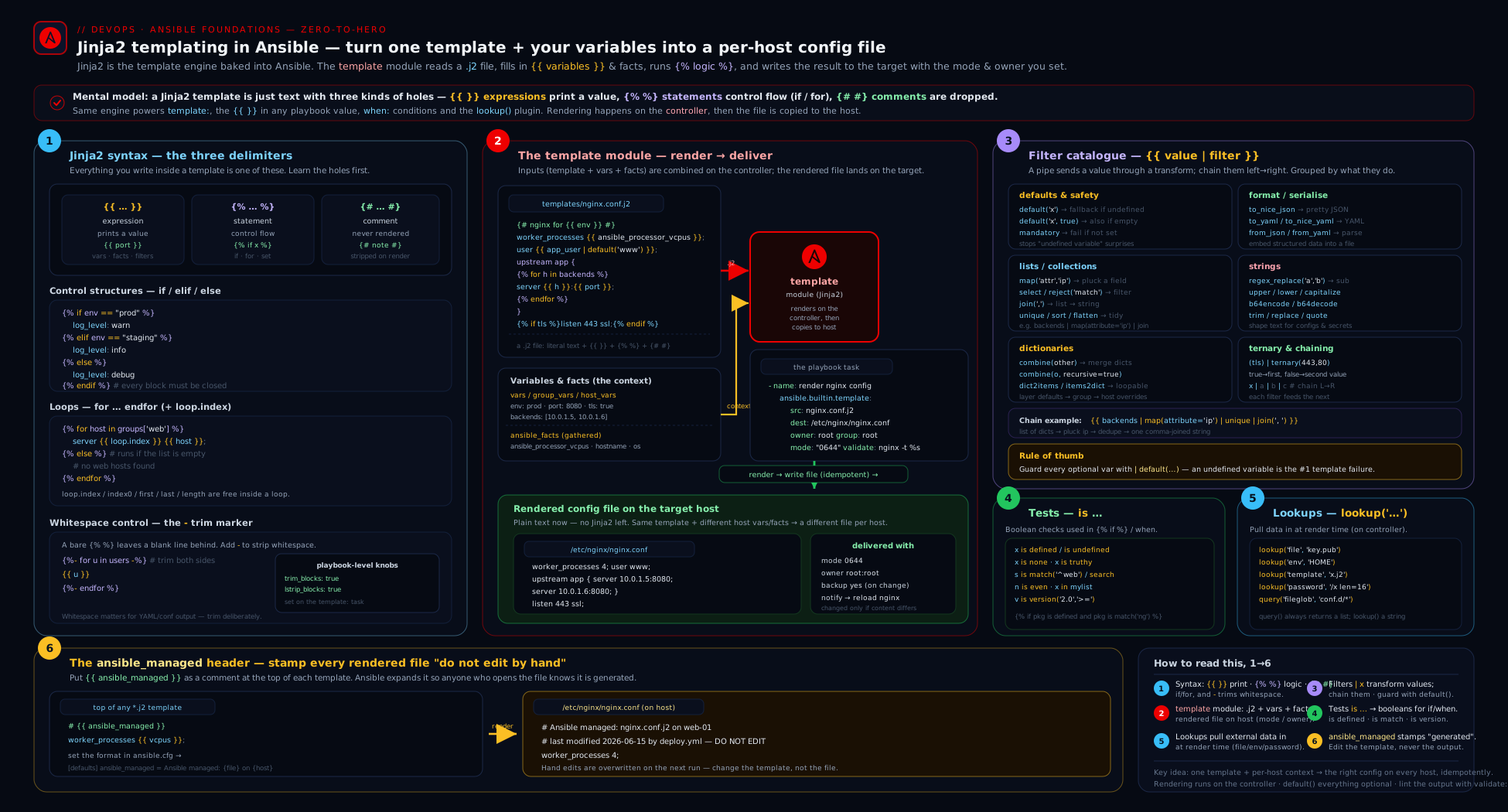
The diagram traces a render: variables, facts, and lookup results on the control node flow into the Jinja2 engine, which processes {{ expressions }}, {% statements %}, filter chains, and tests against the .j2 source, then validate checks the rendered temp file before template lays the finished, mode-set file onto the managed node.
Hands-on lab
We will render a real-looking application config from variables and facts — entirely free and local, targeting localhost with the local connection, so there is no cloud, no remote host, and no cost. You only need ansible-core installed (ansible --version).
1. Set up a working directory. Create jinja-lab/ with three files: a playbook, a template, and an ansible.cfg.
jinja-lab/ansible.cfg:
[defaults]
inventory = localhost,
ansible_managed = Ansible managed: {file} on {host}
retry_files_enabled = false
jinja-lab/templates/app.conf.j2:
# {{ ansible_managed }}
[server]
hostname = {{ inventory_hostname }}
# worker count = vCPUs * 2, falling back to 2 if facts are missing
workers  = {{ (ansible_facts.processor_vcpus | default(1) | int) * 2 }}
listen   = {{ bind_address | default('0.0.0.0') }}:{{ app_port | default(8080) }}
env      = {{ app_env | default('dev') | upper }}

[features]
{% for name, on in features.items() %}
{{ name }} = {{ on | ternary('enabled', 'disabled') }}
{% endfor %}

[allowed_admins]
{% if admins | default([]) | length > 0 %}
admins = {{ admins | join(', ') }}
{% else %}
# no admins configured
{% endif %}

[backends]
{% for b in backends | default([]) -%}
server {{ b }}  # {{ loop.index }}/{{ loop.length }}
{% endfor -%}
jinja-lab/render.yml:
- name: Render an application config from Jinja2
  hosts: localhost
  connection: local
  gather_facts: true            # we need ansible_facts.processor_vcpus
  vars:
    app_env: prod
    app_port: 9090
    admins: ["alice", "bob"]
    features:
      tls: true
      cache: false
      metrics: true
    backends:
      - "10.0.0.11:8080"
      - "10.0.0.12:8080"
  tasks:
    - name: Render the config to /tmp (validate it is non-empty)
      ansible.builtin.template:
        src: app.conf.j2
        dest: /tmp/app.conf
        mode: "0644"
        backup: true
        trim_blocks: true
        lstrip_blocks: true
        validate: "test -s %s"      # %s = the rendered temp file; fail if empty
      register: render_result

    - name: Show whether it changed and where the backup went
      ansible.builtin.debug:
        msg: "changed={{ render_result.changed }} backup={{ render_result.backup_file | default('none') }}"

    - name: Print the rendered file back (proves the result)
      ansible.builtin.debug:
        msg: "{{ lookup('ansible.builtin.file', '/tmp/app.conf') }}"
2. Syntax-check, then run. From inside jinja-lab/:
ansible-playbook --syntax-check render.yml
ansible-playbook render.yml
Expected: the play gathers facts, the template task reports changed on the first run, and the final debug prints the rendered /tmp/app.conf. It should look like a clean INI file — env = PROD, listen = 0.0.0.0:9090, a [features] block with tls = enabled, cache = disabled, metrics = enabled, an admins = alice, bob line, and two server … backend lines numbered 1/2 and 2/2 with no stray blank lines (that’s trim_blocks/lstrip_blocks and the -%} doing their job).
3. Prove idempotency. Run ansible-playbook render.yml again. Because ansible_managed is static (no {date}) and the variables are unchanged, the template task now reports ok (not changed) — the rendered output is byte-identical to what’s on disk.
4. See a diff. Change app_port: 9090 to app_port: 8443 and run with --diff:
ansible-playbook render.yml --diff
Ansible prints a unified diff showing only the listen line changing, the task reports changed, and backup_file now points at a timestamped backup of the previous version (because backup: true).
5. Experiment with whitespace. Remove the - from {% endfor -%} (make it {% endfor %}), re-run, and inspect /tmp/app.conf — you’ll see how the trailing newline behaviour shifts. Put it back. This is the fastest way to build intuition for the - modifier.
Validation. You have a rendered config driven by facts (processor_vcpus), filters (default, int, upper, join, ternary), a for over a dict and a list, an if/else, the ansible_managed banner, validate, backup, and clean whitespace — the whole lesson in one file.
Cleanup.
rm -f /tmp/app.conf /tmp/app.conf.*~ 2>/dev/null
# then delete the jinja-lab/ directory if you wish
Cost note. Everything ran against localhost with the local connection — no cloud resources, no remote hosts, ₹0.
Going deeper
You now have the whole surface of Jinja2-in-Ansible. This section is the machinery underneath it — the things that explain why templates behave as they do, the features that only surface on harder tasks, and the one security corner that can turn a template into remote code execution. Everything here is current ansible-core (2.17+, 2026). Keep the three roles straight as you read: a filter transforms a value (| upper), a test asks a boolean (is defined), and a lookup pulls external data in (lookup('file', …)) — three different jobs that all live inside {{ }}.
The Templar and recursive re-templating
Ansible does not hand your strings straight to stock Jinja2. It wraps Jinja2 in an internal object called the Templar (ansible.template.Templar), and the Templar does one thing plain Jinja2 does not: it re-templates recursively. After a first render, if the result still contains {{ }}, Ansible renders it again, and keeps going until the output stops changing. That single behaviour is why variable indirection works:
vars:
  env: prod
  config_file: "/etc/app/{{ env }}.conf"          # → /etc/app/prod.conf
  banner: "{{ config_file }} on {{ inventory_hostname }}"
banner resolves fully because Ansible templates it, sees the {{ config_file }} result still contains {{ env }}, and templates again. Stock Jinja2 does a single pass and would leave inner braces unresolved. The same recursion is what lets lookups and filter chains compose across layers of variables — and, as you will see below, it is also the reason untrusted input is dangerous.
omit: the parameter that isn’t there
omit is a magic variable with one job: when a module parameter evaluates to omit, Ansible removes that parameter entirely, as if you had never written the line — so the module falls back to its own default. The idiom is | default(omit):
- name: Create users, only setting uid/groups/shell when the item provides them
  ansible.builtin.user:
    name: "{{ item.name }}"
    uid: "{{ item.uid | default(omit) }}"
    groups: "{{ item.groups | default(omit) }}"
    shell: "{{ item.shell | default(omit) }}"
  loop: "{{ user_list }}"
Without omit, you would have to choose some value for uid even when the item doesn’t specify one — and passing an empty string or null is not the same as not passing it at all. default(omit) is the correct way to make a module argument optional. Note the scope: omit is for task arguments, not for text inside a rendered file (there it just renders an internal sentinel string, which you never want on disk).
Filter and operator precedence (why you need parentheses)
A subtle, high-frequency bug: the filter pipe | binds more tightly than arithmetic and comparison operators. So:
{{ vcpus | int * 2 }}parses as{{ (vcpus | int) * 2 }}— usually what you want (which is why the lab can rely on(… | int) * 2), but now you know why.{{ env == 'prod' | ternary('warn', 'debug') }}does not mean “if env is prod”. Because|outranks==, it parses as{{ env == ('prod' | ternary('warn','debug')) }}— comparingenvto a string. Almost never what you meant.
The fix is to parenthesise the comparison so the boolean is the filter’s input:
{{ (env == 'prod') | ternary('warn', 'debug') }}
This is exactly why the filter catalogue writes (env=='prod') | ternary(...) with parentheses. The rule of thumb: whenever you feed the result of a comparison or boolean expression into a filter (ternary, default, bool), wrap it in parentheses. When in doubt, parenthesise — it never hurts and it documents intent.
Per-file overrides: the #jinja2: header
The trim_blocks/lstrip_blocks/delimiter options you set on a template task apply to that task’s file. But sometimes one template needs different behaviour from your project default. Jinja2-in-Ansible lets a template override its own settings with a special first-line comment:
#jinja2: trim_blocks:False, lstrip_blocks:True
worker_processes {{ ansible_facts.processor_vcpus }};
The #jinja2: line takes comma-separated key:value pairs (True/False, or quoted strings for delimiters like variable_start_string:'[%'), applies them to this file only, and is itself consumed — it never appears in the output. It is the per-file escape hatch: keep sane global defaults, and let the one oddball template that needs literal {{ }} or different whitespace declare it inline instead of complicating the task or your whole project.
Native types: when a template should return a list, not a string
By default Jinja2 renders everything to a string. Inside a config file that is exactly right. But when you template a value that must stay a real list, dict, int, or bool — say you build a list with a filter chain and pass it on to another variable or module — string-coercion bites: {{ [1, 2, 3] }} becomes the string "[1, 2, 3]", and {{ 1 + 1 }} becomes "2".
Ansible’s answer is Jinja2 Native Types, an opt-in mode enabled with jinja2_native = True under [defaults] in ansible.cfg (or ANSIBLE_JINJA2_NATIVE=1; config key DEFAULT_JINJA2_NATIVE). In native mode, a template whose entire body is a single expression returns the native Python type — {{ [1, 2, 3] }} yields an actual list, {{ my_flag }} a real boolean, {{ '2' | int }} an int. Two cautions: it is a global switch (it changes rendering for the whole run, so test playbooks under it before flipping it on), and it only applies to pure single-expression templates — a template that mixes literal text and {{ }} still produces a string. It defaults to off for backward compatibility; turn it on deliberately and project-wide, never as a per-task afterthought.
Unsafe templating and untrusted input (a real injection risk)
Recursive re-templating (above) has a sharp edge. Because Ansible keeps evaluating a string as long as it contains {{ }}, any string that reaches the Templar and happens to contain Jinja2 syntax will be executed — including data you did not write. If a value comes from an untrusted source (a fact scraped from a host you don’t fully control, an external API response, an AWX/AAP survey field a user typed, even a filename) and that value contains {{ lookup('ansible.builtin.pipe', 'id') }} or {{ some_secret }}, Ansible may run it on the control node during templating. That is template injection, and the payload runs with your privileges.
Two protections:
!unsafemarks a value so Ansible wraps it in anAnsibleUnsafetype and refuses to template it — the{{ }}is left as literal text:
vars:
  # value supplied by an untrusted survey/user — must NOT be templated
  banner_text: !unsafe "{{ this stays literal, never evaluated }}"
- Ansible already wraps much of the external data it gathers (many facts, and results from untrusted sources) as unsafe automatically, but you are responsible for marking your own untrusted inputs. The file-level counterpart is
{% raw %}…{% endraw %}, which protects a block inside a template from evaluation.
The rule: never feed attacker-influenced strings into a place that gets re-templated (a debug, a set_fact, a template body) without marking them !unsafe. Pair this with the secret-handling advice in Security notes below — no_log: true stops secrets leaking out; !unsafe stops hostile input executing its way in.
Practice challenges
Six graded exercises, beginner to advanced. Try each before opening the solution; assume the jinja-lab/ from the hands-on lab as your starting point.
1. Default a missing variable (beginner). In a template, render listen_port = <value>, where the value is app_port if it is set and 8080 otherwise.
<details> <summary>Solution</summary>
listen_port = {{ app_port | default(8080) }}
Why: default substitutes its argument only when the variable is undefined, so an unset app_port becomes 8080 while a set one passes straight through.
</details>
2. Transform then join (beginner). Given admins: ['alice', 'bob', 'carol'], render exactly admins = ALICE, BOB, CAROL.
<details> <summary>Solution</summary>
admins = {{ admins | map('upper') | join(', ') }}
Why: map('upper') applies the upper filter to every element, then join(', ') stitches the resulting list into one string — a filter chain read left to right.
</details>
3. A conditional section with no phantom blank line (intermediate). Emit a [tls] block containing enabled = true only when enable_tls is true, leaving no blank line behind when it is false. Assume trim_blocks/lstrip_blocks are on.
<details> <summary>Solution</summary>
{% if enable_tls | default(false) %}
[tls]
enabled = true
{% endif %}
Why: with trim_blocks on, the newline after each %} is removed, so a false condition leaves nothing behind; default(false) keeps the test safe when enable_tls is unset.
</details>
4. Make a module parameter optional (intermediate). Write a user task that sets uid only for the items in user_list that specify one, leaving the rest to the system default.
<details> <summary>Solution</summary>
- name: Create users with an optional uid
  ansible.builtin.user:
    name: "{{ item.name }}"
    uid: "{{ item.uid | default(omit) }}"
  loop: "{{ user_list }}"
Why: default(omit) resolves to the omit sentinel when item.uid is absent, and Ansible then drops the uid parameter entirely — which is not the same as passing an empty value.
</details>
5. Fix the precedence bug (advanced). A colleague wrote {{ env == 'prod' | ternary('warn', 'debug') }} and it always returns debug. Explain and fix it.
<details> <summary>Solution</summary>
{{ (env == 'prod') | ternary('warn', 'debug') }}
Why: the filter | binds tighter than ==, so the original parsed as env == ('prod' | ternary(...)) — comparing env to a string, which is falsy. Parenthesising the comparison makes the boolean the filter’s input.
</details>
6. Neutralise untrusted input (advanced). A survey field motd_text may contain literal Jinja2 like {{ lookup('ansible.builtin.pipe', 'id') }}. Store it so it is rendered verbatim into the MOTD file, never executed.
<details> <summary>Solution</summary>
vars:
  # value supplied by an untrusted survey/user — do NOT let it template
  motd_text: !unsafe "{{ lookup('ansible.builtin.pipe', 'id') }}"
Then reference {{ motd_text }} in the template as usual; it renders as the literal string.
Why: !unsafe wraps the value as AnsibleUnsafe, so Ansible’s recursive templating refuses to evaluate the embedded {{ }}, closing the template-injection hole.
</details>
Common mistakes & troubleshooting
| Symptom | Cause | Fix |
|---|---|---|
AnsibleUndefinedVariable: 'foo' is undefined when rendering |
A variable referenced in the template isn’t defined for that host | Guard with {{ foo | default(...) }}, or {% if foo is defined %}; for required values use | mandatory to fail clearly. |
| Generated file is full of blank lines | Default Jinja2 whitespace around {% %} tags |
Enable trim_blocks: true + lstrip_blocks: true on the task and add - modifiers ({%- … -%}) where needed. |
Octal mode produces wrong permissions |
mode: 0644 read by YAML as the decimal 644 |
Quote it: mode: "0644". |
template reports changed every run |
A {date}/timestamp in ansible_managed (or in the template) makes output differ each time |
Drop {date} from ansible_managed; rely on --diff/backups for the audit trail. |
default filter “doesn’t work” on an empty string |
default only fires on undefined, not empty/false |
Use the two-arg form: | default('x', true). |
A loop/map/selectattr prints a <generator object …> or wrong count |
Lazy generator not materialised | Append | list before assigning or counting. |
set inside a for loop “forgets” its value after the loop |
Loop block scoping — assignments don’t escape the iteration | Use a namespace() object, or (better) compute it in the play with set_fact and reference the fact. |
lookup('file', ...) reads the wrong file / fails on the target |
Lookups run on the control node, not the managed node | To read a file on the target use slurp/fetch; lookups are control-node only. |
validate command “passes” a broken file |
%s placeholder missing, so the validator didn’t get the temp path |
Ensure the command contains exactly one %s (validate: "nginx -t -c %s"). |
Templating a file that itself contains {{ }} mangles it |
Jinja2 tries to evaluate the file’s literal braces | Override variable_start_string/variable_end_string on the task, or wrap that section in {% raw %}…{% endraw %}. |
loop: over a multi-result lookup only gets one comma-joined item |
lookup() returns a joined string |
Use query() (q()) or wantlist=true. |
Common beginner mistakes
These are wrong mental models, not just error messages — fix the model and a whole class of bugs disappears at once.
- “The template runs on the server it configures.” It doesn’t.
templaterenders on the control node, using the target host’s already-gathered facts, and only the finished file is copied over. Nothing Jinja2 ever executes on the managed node — which is whyansible_facts.processor_vcpusis available at render time even before anything touches the target. - “
{{ }}and{% %}are two ways of writing the same thing.” They are opposites.{{ }}prints the value it evaluates;{% %}runs logic and prints nothing. Afororifgoes in{% %}; a value you want to appear goes in{{ }}. Put a bare variable in{% %}and it renders as blank; put aforin{{ }}and you get a syntax error. - “
| default('x')covers an empty value.” Only an undefined one.'' | default('x')stays'', andfalse | default('x')staysfalse. When “empty should also count,” you must ask for it:| default('x', true). This one misconception generates a startling number of “my default isn’t applying” tickets. - “I’ll just compute it in the template with
{% set %}inside the loop.” A variablesetinside aforloop is discarded when the iteration ends — it never escapes to after the loop. The right model: templates are for presentation; compute the value in the play withset_fact(testable, visible in--diff) and reference the fact, or use anamespace()object if it truly must live in the template. - “More logic in the template means a more powerful template.” Jinja2 is a text engine, not a programming language. Heavy branching and accumulation in a
.j2is unreadable, untestable, and invisible to--check. The powerful template is the declarative one; push logic up into the play. - “Whatever
lookup()returns, I can loop over.”lookup()collapses multiple results into a single comma-joined string, so aloop:over it sees one item. Usequery()(aliasq()) — orlookup(..., wantlist=true)— to get a real list back.
Best practices
- Use
validateon every config you can syntax-check.nginx -t -c %s,visudo -cf %s,sshd -t -f %s,named-checkconf %s— a broken render then fails the task instead of taking down the service on the next reload. - Always stamp
{{ ansible_managed }}at the top of generated files so humans know not to hand-edit, but keep the banner static (no timestamp) to preserve idempotent change-reporting. - Push logic up, keep templates declarative. Prefer computing complex values with
set_fact+ filters in the play (testable, visible in--diff) over deep{% set %}/loop logic in the.j2. - Enable
trim_blocks+lstrip_blocksby default, then use-surgically. Indent your{% %}logic for readability; letlstrip_blocksstrip it from the output. - Default defensively —
| default(...)(with thetruesecond arg where empty counts) — so a missing var produces a sensible value, not a stack trace. Use| mandatoryonly where there genuinely is no safe default. - Render to
*.j2files intemplates/and let role auto-loading find them by bare name; usefirst_foundfor OS-specific variants rather than a wall ofwhen:. - Quote octal modes (
"0644","0600") every single time. - Review with
--check --diffbefore applying templating changes to anything that matters — it shows the exact before/after of every file. - Materialise generators with
| listwhen assigning or counting, and usequery()for loop sources.
Security notes
Templates are a common place for secrets to leak, so treat them carefully. First, render secret-bearing files with restrictive modes (mode: "0600", correct owner) so the on-disk result isn’t world-readable. Second, --diff prints file contents — including any secret a template renders — to the terminal and to CI logs; set no_log: true on template tasks that render credentials (and on the lookups that fetch them), and remember that ANSIBLE_DEBUG=1 or -vvvv can defeat no_log, so never run secret-rendering plays at maximum verbosity. Third, lookups run on the control node: lookup('file', …) and lookup('env', …) read your machine, so be sure the control node’s filesystem and environment are themselves trusted, and never echo a lookup('password', …) or a Vault lookup into a debug. Fourth, prefer pulling real secrets from Ansible Vault (!vault vars, covered in the Vault lesson) or an external secrets manager and templating them in at run time, rather than committing rendered secrets or plaintext defaults to git. Finally, the password lookup writes the generated password to a file on the control node — keep that path out of version control and protected, or it becomes a plaintext secret store by accident.
Interview & exam questions
1. When would you use template instead of copy?
Use template when the file’s contents depend on variables or facts and must be rendered through Jinja2 ({{ }}, {% %}); use copy for a static file with nothing to substitute. template shares copy’s attribute controls (mode, owner, backup, validate) plus rendering.
2. Where does the template module actually render the file — control node or managed node?
On the control node. Ansible reads the .j2, renders it locally using the target host’s already-gathered variables/facts, then copies the finished file to the managed node. The template never executes on the target.
3. What are the three Jinja2 delimiters and what does each do?
{{ }} is an expression (evaluates and prints a value), {% %} is a statement (control logic — if/for/set — that prints nothing itself), and {# #} is a comment (removed entirely from output).
4. Explain trim_blocks, lstrip_blocks, and the - modifier.
trim_blocks (on by default in Ansible) removes the newline right after a %}. lstrip_blocks strips leading whitespace up to a {%, letting you indent logic without it leaking. The - modifier ({%- … -%}) manually strips whitespace before/after a specific tag. Together they keep generated files free of phantom blank lines.
5. What’s the difference between the default filter with and without its second argument?
var | default('x') substitutes only when var is undefined. var | default('x', true) also substitutes when var is empty or false. The two-arg form is what you want for “use this unless there’s a real value”.
6. default vs mandatory — when each?
default provides a fallback for a missing variable; mandatory does the opposite — it raises an error if the variable is undefined, so a required input fails loudly instead of silently defaulting.
7. What does the combine filter do, and why recursive=true?
combine merges two dictionaries, with the right-hand dict winning on key conflicts. By default it merges only the top level; recursive=true deep-merges nested dicts — the idiomatic way to layer an environment override on top of a defaults dict.
8. Difference between a filter and a test?
A filter (applied with |) transforms a value and returns a new one (x | upper). A test (applied with is) asks a yes/no question and returns a boolean (x is defined, n is even). Tests go in {% if %} and when:; filters shape data.
9. is match vs is search?
is match anchors the regex at the start of the string; is search matches anywhere in it. Picking the wrong one is a classic bug — host is match('web') is false for myweb01, but is search('web') is true.
10. What is a lookup, where does it run, and how does lookup differ from query?
A lookup pulls external data into a play (file contents, env vars, a generated password), running on the control node at templating time. lookup() returns a single comma-joined string for multi-valued results; query() (q()) returns a real list — use query for loop: sources (or pass wantlist=true).
11. Why does a variable set inside a for loop not persist after the loop, and how do you work around it?
Each loop iteration has its own scope, so the assignment is discarded at the end of the iteration. Work around it with a namespace() object (attributes survive) or, better in Ansible, compute the value in the play with set_fact and reference the resulting fact.
12. What is ansible_managed and what’s the catch with putting a timestamp in it?
It’s a variable (default Ansible managed) you stamp at the top of generated files to warn against hand-editing; you can enrich it via ansible.cfg with {file}/{host}/{date}. The catch: a {date} token makes the rendered file change every run, so the template task reports changed every time — defeating idempotent reporting. Keep the banner static if that matters.
13. How do you safely render a file that itself contains literal {{ }} (e.g. another Jinja template)?
Override variable_start_string/variable_end_string on the template task (e.g. to [%/%]) so your placeholders don’t collide, or wrap the literal section in {% raw %}…{% endraw %}.
14. How would you build an Nginx upstream block from the hosts in the web group?
Loop the group inside the template and pull each host’s IP from hostvars: {% for h in groups['web'] %}server {{ hostvars[h].ansible_default_ipv4.address }}:8080;{% endfor %}, using loop.first/loop.last for any special-casing.
Quick check
- Which delimiter prints a value, which runs logic, and which is a comment?
- True or false:
myvar | default("x")substitutes"x"whenmyvaris an empty string"". - You want a real list back from a multi-result lookup to drive a
loop:. Which function do you call? - What’s the difference between
is match('web')andis search('web')against the string"myweb01"? - Why might a
templatetask reportchangedon every single run even when no variables changed?
Answers
{{ }}prints an expression;{% %}runs a statement (control logic, no output);{# #}is a comment (removed from output).- False.
defaultfires only on undefined. For an empty string you need the boolean formdefault("x", true). query()(aliasq()), orlookup(..., wantlist=true). Plainlookup()returns a comma-joined string.is match('web')is false (it anchors at the start; the string begins withmy);is search('web')is true (it matches anywhere).- Because the rendered output differs each run — almost always a timestamp (e.g.
{date}inansible_managed, oransible_date_timein the template). Remove the timestamp to restore idempotent reporting.
Exercise
Extend the lab into something closer to a real service config.
- Add a variable
tls_cert_pathand render an Nginx-stylessl_certificateline only whenenable_tls | default(false)is true, using{% if %}— and add an{% else %}that writes a# TLS disabledcomment. - Add a
backendslist of dictionaries (each withhost,port, andweight) and render anupstreamblock by looping it, emittingserver {{ b.host }}:{{ b.port }} weight={{ b.weight }};. Useloop.first/loop.lastto omit a trailing separator, and sort the list byweightwith| sort(attribute='weight'). - Use
combineto merge adefaultsdict ({ timeout: 30, keepalive: 65 }) with anoverridesdict, and render the merged result withto_nice_yamlinto a[tuning]section. - Add
validateappropriate to your file (if you havenginxinstalled,nginx -t -c %s; otherwise keeptest -s %s), turn onbackup, and run with--check --difffirst, then for real. - Finally, set
ansible_managedinansible.cfgto include{file}and{host}(but not{date}), re-run twice, and confirm the second run reportsok— then add{date}, re-run twice, and watch it reportchangedboth times. Write two sentences explaining why.
This mirrors exactly the kind of “template a service config from variables and facts, with validation” task the RHCE exam sets.
Certification mapping
This lesson maps to the Red Hat Certified Engineer (RHCE) EX294 exam, where templating is one of the most reliably-tested skills. It covers the exam objectives Create and use templates to create customised configuration files (the template module, .j2 files, rendering facts and variables into config) and Use Jinja2 to reference variables, facts, and the magic variables (expressions, filters, conditionals, and loops inside templates), and it reinforces Work with variables and facts and Use conditionals to control play execution from the templating side. On the exam you will almost certainly be asked to deploy a config file built from a template that adapts to each host’s facts (CPU count, hostname, OS family) and group membership — exactly the pattern in the lab. The broader Ansible Automation Platform / EX374 advanced exam pushes the same skills further (custom filters, more lookups). The earlier Variables & Facts and Conditionals, Loops, Handlers & Tags lessons supply the inputs your templates consume.
Glossary
- Jinja2 — The Python text-templating engine Ansible uses for all
{{ }}/{% %}evaluation, in both task values and.j2files. - Template (
.j2) — A text file with embedded Jinja2 placeholders and logic, rendered by thetemplatemodule into a file on the target. ansible.builtin.template— The module that renders a.j2on the control node and copies the result to the managed node, withcopy’s attribute controls plusvalidate.- Expression
{{ }}— Evaluates and prints a value (variable, literal, filter chain, function/lookup). - Statement
{% %}— Control logic (if,for,set,include,macro) that produces no direct output. - Comment
{# #}— Text removed from the rendered output entirely. - Filter — A transformation applied with
|(value | filter); chainable; returns a new value. - Test — A boolean question applied with
is(var is defined,n is even). - Lookup — A plugin that pulls external data into a play (file, env, password, first_found), running on the control node at templating time.
query()/q()— The list-returning form of a lookup, forloop:sources.trim_blocks/lstrip_blocks— Whitespace controls: remove the newline after%}/ strip leading whitespace up to{%.-modifier — Per-tag whitespace stripping ({%- … -%}).set/namespace— In-template variable assignment;namespace()makes a variable survive across loop-iteration scopes.ansible_managed— A variable holding a “managed by Ansible — do not hand-edit” banner stamped at the top of generated files.validate— Atemplate/copyoption that runs a command (with%s= the temp file) to check the rendered file before it is moved into place.- Magic variables — Always-available vars in templates (
inventory_hostname,hostvars,groups,group_names,ansible_play_hosts) used to reach other hosts’ facts. omit— A magic variable that, when a module parameter resolves to it (via| default(omit)), makes Ansible drop that parameter entirely so the module uses its own default.- Templar — Ansible’s internal templating engine wrapping Jinja2; it re-templates recursively until the result stops changing, which is why one variable can reference another that references another.
- Jinja2 native types — An opt-in mode (
jinja2_native = True/ANSIBLE_JINJA2_NATIVE=1) in which a template that is a single{{ }}expression returns a real Python list/dict/int/bool instead of a string. !unsafe/AnsibleUnsafe— A YAML tag (and wrapper type) marking a value as untrusted so Ansible will not template any{{ }}inside it — the guard against template injection from external input.#jinja2:header — A special first-line comment in a.j2file that overrides templating options (trim_blocks,lstrip_blocks, delimiters) for that one file.{% raw %}/{% endraw %}— A template block whose contents are emitted literally, with no Jinja2 evaluation.
Next steps
You can now turn variables and facts into real, validated configuration files: drive the template module option by option, write conditionals and loops, reach for the right filter or test, pull data in with lookups, and keep your output clean with whitespace control and an ansible_managed banner. The natural next move is to make your playbooks resilient when those tasks go wrong. Continue with Ansible Error Handling, In Depth: Blocks, rescue/always, failed_when, changed_when & ignore_errors, which wraps groups of tasks (including the template tasks you just wrote) in block/rescue/always, and gives you precise control over what counts as failed and changed — the difference between a playbook that limps and one that recovers. To revisit the inputs your templates consume, see Ansible Variables & Facts, In Depth, and for the modules that lay files down alongside template, Ansible Core Modules for Real Work.