In a nutshell
Every real project eventually needs to keep a secret — a database password, an API token, a private key — somewhere near the code that uses it. But anything you commit to Git is readable by everyone who ever clones the repo, forever. Ansible Vault is the built-in tool that solves this: it scrambles (encrypts) your secret into unreadable ciphertext so you can safely store it right alongside your playbooks, and Ansible quietly unscrambles it only when it actually runs.
Think of it as a locked box you can ship openly. You can hand the box to anyone, post it, commit it to a public repo — the contents stay secret because they are locked. The one thing that must never travel with the box is the key (the vault password): you keep that separately and hand it only to the people and machines allowed to open the box. Lose control of the key and the whole scheme collapses, which is why almost everything in this lesson is really about protecting, delivering, and rotating that one key.
Practically, you will learn to lock a secret (ansible-vault encrypt/encrypt_string), let Ansible open it at run time by supplying the key three different ways (typing it, a key file, or a script that fetches it from a secret manager), keep separate keys for dev versus prod, and wire all of this into a CI pipeline without the key ever being committed. If you have never encrypted anything before, don’t worry — you never touch the cryptography yourself; you hand Ansible a password and it does the rest.
Level: Intermediate · Time: ~35 min
Sooner or later, every Ansible repository needs to hold a secret. A database password the playbook injects into a config file. An API token a role passes to a uri task. The private half of a TLS certificate. A become password for a fleet of hosts. The naive instinct — and the cause of an alarming share of real breaches — is to drop the value into a group_vars/all.yml, commit it, and move on. Now your most sensitive credential lives in plain text in Git history forever, readable by anyone who clones the repo, surviving every git rm you will ever run. Ansible Vault exists to stop exactly that. It encrypts secrets at rest with strong symmetric cryptography so that the only thing in your repository is ciphertext, while your playbooks consume the decrypted values transparently at run time. It is the feature that lets you keep secrets in the same Git repo as everything else — the GitOps dream — without the secrets actually being readable.
This lesson is the exhaustive treatment. By the end you will know every ansible-vault subcommand, the difference between encrypting a whole file and encrypting a single variable inline with encrypt_string and the !vault tag, the AES256 format that sits inside an encrypted file, how vault IDs let one project hold several secrets each locked with a different password, every way to supply the vault password — interactive prompt, a password file, or an executable script that fetches the password from a secret manager — how vaulted variables flow through group_vars/host_vars and into your plays, and a hardened CI/CD pattern where the pipeline pulls the vault password from a secret store and the password itself is never committed. We finish with the question every senior engineer is asked in interviews: when is Ansible Vault the right tool, and when should you reach for a dedicated secrets manager like HashiCorp Vault or a cloud-native one instead?
One safety note before we start, and it matters. Because this is teaching material, every secret you see below is a deliberately obvious fake — dummy-not-a-real-password, EXAMPLE_TOKEN, changeme-fake. Never copy a realistic-looking value from a tutorial into anything real, and never let a tutorial’s example password become a production password. Treat every example secret here as poison.
Learning objectives
After working through this lesson you will be able to:
- Use every
ansible-vaultsubcommand —create,edit,view,encrypt,decrypt,rekey, andencrypt_string— and know exactly when each applies. - Choose correctly between encrypting a whole vars file and encrypting a single variable inline (
!vaultblocks), and explain the trade-offs of each. - Explain the AES256 vault file format — the
$ANSIBLE_VAULTheader, the version, the cipher, the optional vault-ID label, and why the ciphertext is what lands in Git. - Master vault IDs: encrypt and decrypt with
--vault-id label@source, run a playbook with several vaults at once, and control which password new secrets are encrypted with via--encrypt-vault-id. - Supply the vault password by every supported route —
--ask-vault-pass,--vault-password-file, an executable client script that calls a secret manager, and theansible.cfg/environment settings that make it automatic. - Wire vaulted variables into
group_vars/host_vars, mix encrypted and plaintext variables cleanly, and use the AES256 content from playbooks without writing decryption code. - Integrate Vault into CI/CD safely — pulling the vault password from a secret store at run time, masking it, and ensuring it is never committed — and articulate when Ansible Vault is enough versus when a dedicated secrets manager is the right call.
Prerequisites & where this fits
You need a working Ansible control node with ansible-core 2.17 or newer (ansible --version to check), a terminal, and a text editor. You should already be comfortable with the building blocks this lesson sits on top of: variables and precedence (where a variable defined in group_vars/all.yml ranks against an -e extra-var), inventory (so you understand group_vars/ and host_vars/ directory layout), and playbooks (plays, tasks, and vars_files). If any of those are shaky, read Ansible Variables & Facts (ansible-variables-precedence-facts-register-set-fact) and Ansible Inventory (ansible-inventory-fundamentals-static-groups-host-group-vars) first. This lesson is the Security chapter of the Intermediate tier of the Ansible Zero-to-Hero course; it follows Roles & Collections (ansible-roles-structure-dependencies-galaxy-collections) and leads into Dynamic Inventory (ansible-dynamic-inventory-aws-azure-secrets). It also pairs naturally with the vendor-neutral foundation lesson Secrets & Configuration Management (secrets-configuration-management-fundamentals-12factor-devops), which frames the why — the line between config and secrets, the cardinal sin of committing them, and rotation — that this lesson then implements concretely in Ansible. No prior cryptography knowledge is assumed; every term is defined as it appears.
Core concepts: what Ansible Vault is (and is not)
Ansible Vault is a feature of ansible-core that encrypts data at rest using symmetric encryption so secrets can live safely inside your project — in vars files, in group_vars/host_vars, even as single values inside an otherwise-plaintext file — and be decrypted transparently when Ansible runs. “Symmetric” means the same secret (the vault password) both encrypts and decrypts: there is no public/private key pair, just one passphrase you must protect. The underlying cipher is AES-256 in CTR mode, with the encryption key derived from your password via PBKDF2-HMAC-SHA256 and the whole payload protected by an HMAC-SHA256 so that tampering is detected. You never type any of that — you just give Ansible a password and it does the cryptography.
Fix the vocabulary now, because the rest of the lesson leans on it:
| Term | Meaning |
|---|---|
| Vault password | The passphrase that encrypts/decrypts vault content. The single secret you must protect; if it leaks, all your vaulted data is exposed. |
| Encrypted file | A whole file (typically a vars file) whose entire contents are AES256 ciphertext, wrapped in the $ANSIBLE_VAULT header. |
| Inline / single encrypted variable | One variable’s value encrypted (via encrypt_string) and embedded in a normal, otherwise-readable YAML file using the !vault tag. |
| Vault ID | A label attached to a vault password, letting one project use several passwords (e.g. dev, prod) and Ansible match each ciphertext to the right one. |
| Vault password source | Where the password comes from: prompt, a file path, or an executable script (a “client”) that prints the password. |
| Vault client script | An executable (often ending in -client.py) that Ansible runs to obtain a password — e.g. by calling a cloud secret manager — instead of reading a static file. |
vault-id/--encrypt-vault-id |
CLI options to select which labelled password to use, especially which one to encrypt new content with when several are loaded. |
Three mental models worth internalising up front:
- Vault encrypts data, it does not store or broker secrets. A real secrets manager (HashiCorp Vault, AWS Secrets Manager, Azure Key Vault) runs as a service, issues short-lived credentials, audits every access, and rotates secrets. Ansible Vault does none of that — it is a file encryptor. The secrets still live in your Git repo; they are merely unreadable without the password. This distinction drives the “Vault vs secrets manager” decision later.
- The vault password is the crown jewel. Everything reduces to one passphrase. The entire discipline of using Vault well is the discipline of protecting, distributing, and rotating that — never committing it, getting it onto the control node/CI runner safely, and rekeying when someone leaves.
- Decryption happens in memory on the control node, just-in-time. When a playbook needs a vaulted value, Ansible decrypts it in RAM as it loads variables; nothing is written to disk in plaintext. The managed nodes never see the vault password and never do any decryption — they just receive the already-decrypted values inside the module arguments.
The ansible-vault command and its subcommands
ansible-vault is the dedicated CLI for creating and managing encrypted content. Its general shape is ansible-vault <subcommand> [options] [file...]. Here is the complete subcommand set with what each does:
| Subcommand | Purpose | Typical use |
|---|---|---|
create |
Make a new encrypted file and open it in $EDITOR to type contents. |
Starting a fresh secrets.yml. |
edit |
Decrypt to a temp file, open in $EDITOR, re-encrypt on save. The file stays encrypted on disk throughout. |
Changing an existing vaulted file. |
view |
Decrypt and print to stdout (read-only); never writes plaintext to disk. | Inspecting a vaulted file without editing. |
encrypt |
Encrypt one or more existing plaintext files in place. | Locking down a vars file you wrote in the clear. |
decrypt |
Decrypt encrypted files in place back to plaintext. | Permanently un-vaulting (rare; usually a mistake). |
rekey |
Change the vault password on already-encrypted files (decrypt with old, re-encrypt with new). | Rotating the password after a leak or a leaver. |
encrypt_string |
Encrypt a single string/value and print a !vault YAML block for pasting inline. |
One secret inside a mostly-plaintext file. |
A few global options apply to most subcommands and are worth knowing as a set:
| Option | Applies to | Effect |
|---|---|---|
--ask-vault-pass |
all | Prompt interactively for the vault password. |
--vault-password-file PATH / --vault-pass-file |
all | Read the password from a file (or run it, if executable). |
--vault-id [label@]SOURCE |
all | Supply a labelled password from a source (may be repeated). |
--encrypt-vault-id LABEL |
create, encrypt, encrypt_string, rekey |
When several IDs are loaded, choose which to encrypt with. |
--new-vault-password-file / --new-vault-id |
rekey |
Specify the new password/ID to rekey to. |
--output PATH |
encrypt, decrypt, encrypt_string |
Write result to a different path (- = stdout). |
-v / -vvv |
all | Verbosity, including which vault-id matched. |
create — a new encrypted file
# Prompts for a new vault password, then opens $EDITOR; everything you type is encrypted on save.
ansible-vault create group_vars/prod/vault.yml
You then type ordinary YAML in the editor — for example:
# This content is encrypted on disk; you only ever see it via edit/view.
db_password: "dummy-not-a-real-password"
api_token: "EXAMPLE_TOKEN_do_not_use"
On save, the file on disk is the $ANSIBLE_VAULT;... ciphertext, not the YAML above. Set EDITOR (e.g. export EDITOR=vim or nano) so create/edit open the editor you want.
edit — modify an existing encrypted file
ansible-vault edit group_vars/prod/vault.yml
This decrypts to a temporary file in memory-backed temp space, opens your editor, and re-encrypts on save. Crucially, the file never sits decrypted on disk in your working tree. Always use edit rather than decrypt → edit → encrypt, which leaves a plaintext window where a backup tool or an errant git add can capture the secret.
view — read without editing
ansible-vault view group_vars/prod/vault.yml
Decrypts and prints to stdout; nothing is written. Use it to check a value quickly. (Be mindful that it prints the secret to your terminal — and possibly your shell scrollback — so do not do this on a shared screen.)
encrypt — lock an existing plaintext file
# Encrypt a file you (mistakenly) wrote in plaintext, in place.
ansible-vault encrypt group_vars/prod/vault.yml

# Encrypt several at once:
ansible-vault encrypt host_vars/db01.yml host_vars/db02.yml

# Encrypt to a new file instead of in place:
ansible-vault encrypt --output secrets.enc.yml secrets.yml
encrypt is how you adopt Vault for files that already exist. Important security follow-up: the plaintext was in your working tree (and possibly Git) before you encrypted it — encrypting now does not purge it from history. If it was ever committed, you must treat the secret as leaked and rotate it.
decrypt — un-vault a file
ansible-vault decrypt group_vars/prod/vault.yml          # in place
ansible-vault decrypt --output -  group_vars/prod/vault.yml   # to stdout
This permanently turns the file back into plaintext. You rarely want this in a repo — it is mostly used in scripts that need the plaintext transiently (and then to a path that is not committed, often - for stdout piped into another tool). Decrypting a tracked file and committing it is one of the most common Vault accidents.
rekey — change the vault password
# Re-encrypt files with a NEW password (you will be asked for old, then new).
ansible-vault rekey group_vars/prod/vault.yml host_vars/db01.yml

# Non-interactive rekey using files for both old and new passwords:
ansible-vault rekey \
  --vault-password-file old_pass.txt \
  --new-vault-password-file new_pass.txt \
  group_vars/prod/vault.yml

# Rekey to a labelled vault-id:
ansible-vault rekey --new-vault-id prod@new_prod_pass.txt group_vars/prod/vault.yml
rekey decrypts each file with the current password and re-encrypts with the new one, leaving the files encrypted throughout. This is your rotation primitive: when a team member with the password leaves, or you suspect the password leaked, you rekey every vaulted file and distribute the new password through your out-of-band channel. Note that rekeying changes the password, not the secret values — if a value leaked, you must also change the value at its source (rotate the actual credential).
encrypt_string — encrypt a single value inline
This is the special one and gets its own section below, because it is the basis of inline (single-variable) encryption.
File-level encryption vs inline (single-variable) encryption
There are two ways to put a secret into your project, and choosing between them is a real design decision.
File-level encryption means the entire file is ciphertext — every variable in it is encrypted, and the file is unreadable without the password. You typically put all your secrets for a given scope into one such file (e.g. group_vars/prod/vault.yml) and keep non-secret variables in a separate plaintext file.
Inline encryption means a normal, fully-readable YAML file that contains one or more individual values encrypted as !vault blocks, with the surrounding keys and structure in plaintext. You get this with ansible-vault encrypt_string.
Here is the trade-off in full:
| Dimension | File-level (whole file encrypted) | Inline (encrypt_string / !vault) |
|---|---|---|
| Readability | File is opaque; you cannot see which variables exist without decrypting. | File reads normally; you see the keys and the non-secret values; only the secret value is opaque. |
| Diffs / code review | Any change shows as a wholesale ciphertext change — useless diffs. | Non-secret edits diff cleanly; only the changed secret’s block changes. |
| Editing | ansible-vault edit (decrypts the whole file). |
Re-run encrypt_string for that one value and paste the new block. |
| Granularity | All-or-nothing per file. | Per-value; mix secret and non-secret freely in one file. |
| Risk of accidental plaintext | Low — the file is always encrypted on disk. | Slightly higher — the file is plaintext except the marked values, so a mistyped value can be committed in the clear. |
| Best for | A dedicated secrets file (vault.yml) holding only secrets. |
A few secrets living among lots of plaintext config (e.g. a role’s defaults). |
A widely used best-practice pattern combines both worlds and sidesteps the diff problem: keep two files per group — group_vars/prod/vars.yml (plaintext) and group_vars/prod/vault.yml (fully encrypted) — and in the plaintext file reference the encrypted ones through an indirection:
# group_vars/prod/vars.yml  (plaintext, committed readable)
db_user: "appuser"
db_host: "db.prod.internal"
db_password: "{{ vault_db_password }}"   # points at the encrypted variable
api_token:   "{{ vault_api_token }}"
# group_vars/prod/vault.yml  (whole file encrypted with ansible-vault)
vault_db_password: "dummy-not-a-real-password"
vault_api_token:   "EXAMPLE_TOKEN_do_not_use"
The vault_-prefix convention makes it obvious which variables are sensitive, lets you grep your plaintext file to see the shape of your config, and means your playbooks and templates only ever reference the friendly names (db_password), never the vault_ ones directly. Both files are loaded automatically (they are in group_vars/prod/), and Ansible decrypts vault.yml in memory at run time. This is the layout most mature Ansible codebases settle on.
encrypt_string in depth: inline single-variable secrets
ansible-vault encrypt_string encrypts a single string and prints a ready-to-paste !vault YAML block. Its anatomy:
# Encrypt a value and label the resulting variable name (recommended):
ansible-vault encrypt_string 'changeme-fake-secret' --name 'api_token'
That prints something like (the ciphertext is illustrative and intentionally fake):
api_token: !vault |
          $ANSIBLE_VAULT;1.1;AES256
          66386439653...EXAMPLE...ciphertext...not...real...3138
          39666...EXAMPLE...3835
          6635
You paste that straight into any vars file, and Ansible decrypts it when the variable is used. The pieces:
| Element | Meaning |
|---|---|
api_token: |
The variable name (from --name); without --name you get a bare block to assign yourself. |
!vault |
A YAML tag telling Ansible “this scalar is vault-encrypted; decrypt it before use”. |
| |
YAML literal block scalar (preserves the multi-line ciphertext). |
$ANSIBLE_VAULT;1.1;AES256 |
The vault header — format version 1.1, cipher AES256. |
| The indented hex lines | The actual ciphertext (salt + HMAC + encrypted data, hex-encoded). |
Key options and behaviours:
| Option / usage | Effect |
|---|---|
--name NAME |
Emit `NAME: !vault |
--vault-id label@source |
Encrypt with a specific labelled password (the block then records the label). |
--encrypt-vault-id LABEL |
Choose the encrypting ID when several are loaded. |
| Reading from stdin | ansible-vault encrypt_string --stdin-name 'api_token' then type/pipe the secret and press Ctrl-D. Preferred — keeps the secret out of your shell history. |
| Multiple values | ansible-vault encrypt_string 's1' --name k1 's2' --name k2 encrypts two at once. |
Always prefer the stdin form for real secrets, because a value passed as a command-line argument is visible in your shell history and in the process list (ps) while the command runs:
# Safer: the secret is never an argument, never in history.
ansible-vault encrypt_string --stdin-name 'api_token'
# (paste the secret, then Ctrl-D)
When Ansible loads a file containing a !vault block, it sees the tag, takes the indented $ANSIBLE_VAULT payload, decrypts it with the matching password, and substitutes the plaintext as that variable’s value — all in memory. From the playbook’s point of view, api_token is just a normal string.
The AES256 vault format
Open any vault-encrypted file (or the body of an encrypt_string block) and the first line is always the envelope header:
$ANSIBLE_VAULT;1.1;AES256
It is a semicolon-delimited triple:
| Field | Example | Meaning |
|---|---|---|
| Format marker | $ANSIBLE_VAULT |
Identifies the file as Ansible Vault content. |
| Format version | 1.1 (or 1.2) |
1.1 is the standard AES256 format; 1.2 is used when a vault-id label is recorded in the header (a fourth field carries the label). |
| Cipher | AES256 |
The cipher. AES-256-CTR with PBKDF2-derived key and HMAC-SHA256 integrity. |
A version-1.2 header carrying a label looks like:
$ANSIBLE_VAULT;1.2;AES256;prod
Below the header is the encrypted payload, hex-encoded and wrapped across many lines. Conceptually it contains a random salt (so encrypting the same value twice yields different ciphertext), the HMAC (so tampering is detected and decryption refuses corrupted data), and the AES-256-CTR ciphertext of your data. You never manipulate any of this by hand — but understanding it explains three things engineers ask about:
- Why diffs are useless on whole-file vaults: the random salt means even a one-character change re-encrypts the entire payload to completely different hex. That is the cryptographic reason behind the “use the
vars.yml/vault.ymlsplit” advice. - Why the ciphertext is safe to commit: without the password, AES-256 ciphertext is computationally infeasible to reverse. The whole point is that the repository holds only this.
- Why a wrong password fails cleanly: the HMAC check fails before any plaintext is produced, so Ansible reports a decryption error rather than emitting garbage.
The format is forward-compatible: newer ansible-core reads older versions, and the version field is how it knows whether to expect a label.
Vault IDs: juggling multiple passwords
So far there has been one password for everything. Real projects need more than one — a different secret to protect dev than prod, or a separate password owned by a different team. Vault IDs solve this by attaching a label to a password so Ansible can (a) record which password encrypted each piece of content and (b) try the right one first when decrypting.
The syntax is --vault-id LABEL@SOURCE, where SOURCE is prompt, a file path, or an executable script:
# Encrypt content under the 'prod' label, password read from a file:
ansible-vault encrypt_string --vault-id prod@prod_pass.txt --stdin-name 'db_password'

# Encrypt under 'dev', prompting for the password:
ansible-vault encrypt --vault-id dev@prompt group_vars/dev/vault.yml
When you encrypt with a label, the file’s header becomes the 1.2 form ($ANSIBLE_VAULT;1.2;AES256;prod), recording the label inside the file. This is what lets Ansible later match ciphertext to the correct password efficiently.
Loading several vaults at run time
You pass --vault-id multiple times to load several labelled passwords for a single run. This is the headline feature: a playbook that touches both dev and prod secrets, or a repo where different files use different passwords, can be run with all the relevant passwords loaded at once:
ansible-playbook site.yml \
  --vault-id dev@dev_pass.txt \
  --vault-id prod@prod_pass.txt
When Ansible meets an encrypted blob, it uses the recorded label (if any) to pick the matching password directly; if a blob has no label, or the labelled one fails, it tries each loaded password in turn until one’s HMAC validates. So you can mix labelled and unlabelled content and it still works — labels just make it faster and unambiguous.
Controlling which password encrypts new content
When several IDs are loaded and you create or encrypt new content, Ansible needs to know which password to use. By default it uses the first --vault-id given. To be explicit, use --encrypt-vault-id LABEL:
# Two IDs loaded, but new content must be encrypted with 'prod':
ansible-vault encrypt_string \
  --vault-id dev@dev_pass.txt \
  --vault-id prod@prod_pass.txt \
  --encrypt-vault-id prod \
  --stdin-name 'db_password'
You can also set this globally so you never forget (see ansible.cfg below). A summary of the vault-ID options:
| Option | Role |
|---|---|
--vault-id label@source |
Load a labelled password from a source; repeat to load many. |
--vault-id @source (no label) |
Load an unlabelled password (the legacy default behaviour). |
--encrypt-vault-id label |
When creating/encrypting with several loaded, pick which label encrypts. |
--ask-vault-pass |
Shorthand for an unlabelled @prompt. |
--vault-password-file path |
Shorthand for an unlabelled @path. |
When to use vault IDs
- Per-environment passwords (
dev,staging,prod) so a developer with thedevpassword cannot decrypt production secrets. - Per-team or per-tenant separation, where different groups own different passwords.
- Rotation overlap: during a password change you can temporarily load both the old and new IDs so existing content still decrypts while you rekey.
If your project has exactly one trust boundary, a single unlabelled password is simpler — do not add vault IDs for their own sake.
Supplying the vault password: every source
A password is useless if you cannot get it to Ansible. There are three fundamental sources, and the right one depends on whether a human or a machine is running the play.
1. Interactive prompt — --ask-vault-pass
ansible-playbook site.yml --ask-vault-pass
ansible-vault edit group_vars/prod/vault.yml --ask-vault-pass   # (edit prompts anyway)
Ansible asks for the password on the terminal and never stores it. Best for humans on a workstation, especially for ad-hoc runs. Useless for automation (nothing is there to type it).
2. Password file — --vault-password-file
A plain file whose first line is the password:
# A file containing only the password (no trailing commentary).
ansible-playbook site.yml --vault-password-file ~/.vault_pass.txt
Rules and cautions:
- The file must contain the password as its first line; Ansible reads that line and strips the trailing newline.
- Permissions matter:
chmod 600 ~/.vault_pass.txtso only you can read it. - Never commit it. Add the path to
.gitignore(and to your global gitignore). A committed password file defeats the entire mechanism. - Keep it outside the repository (a home-directory path, or a CI-managed file) so it cannot be accidentally added.
This is the standard non-interactive route on a trusted control node where a static file is acceptable.
3. Executable client script — the secret-manager route
This is the powerful one and the key to CI and secret-manager integration. If the file you point --vault-password-file at is executable, Ansible runs it and reads the password from its stdout instead of reading the file’s contents. That means the “password file” can be a program that fetches the password from anywhere — an environment variable, AWS Secrets Manager, HashiCorp Vault, Azure Key Vault, a hardware token.
A minimal example that reads the password from an environment variable (so the password is never written to disk at all):
#!/usr/bin/env bash
# vault-pass-from-env.sh — must be executable (chmod +x).
# Ansible runs this and uses whatever it prints to stdout as the vault password.
set -euo pipefail
: "${ANSIBLE_VAULT_PASSWORD:?ANSIBLE_VAULT_PASSWORD env var is required}"
printf '%s' "${ANSIBLE_VAULT_PASSWORD}"
chmod +x vault-pass-from-env.sh
ANSIBLE_VAULT_PASSWORD='changeme-fake' \
  ansible-playbook site.yml --vault-password-file ./vault-pass-from-env.sh
A more realistic version pulls from a cloud secret manager (illustrative — adapt to your provider and never log the value):
#!/usr/bin/env bash
# vault-pass-from-asm.sh — fetch the Ansible vault password from AWS Secrets Manager.
set -euo pipefail
aws secretsmanager get-secret-value \
  --secret-id "ansible/vault-password" \
  --query SecretString --output text
Vault client scripts and vault IDs work together. Ansible has a convention: a client script whose name ends in -client.py (or -client in general) is treated as a vault-id–aware client. Ansible runs it with --vault-id <label> so the same script can return different passwords for different labels:
# One client script, queried per label:
ansible-playbook site.yml \
  --vault-id dev@./vault-client.py \
  --vault-id prod@./vault-client.py
Inside vault-client.py you read the requested label from the --vault-id argument (or the ANSIBLE_VAULT_ID hint) and return the matching secret from your store. This is how teams centralise all vault passwords in one secrets manager and let one script serve them by label.
Making it automatic: ansible.cfg and environment variables
Typing --vault-password-file every time is tedious and error-prone. Configure it once. The relevant settings:
Setting (ansible.cfg, [defaults]) |
Environment variable | Effect |
|---|---|---|
vault_password_file = /path/to/source |
ANSIBLE_VAULT_PASSWORD_FILE |
Default password source (file or executable). |
vault_identity_list = dev@dev_pass, prod@prod_pass |
ANSIBLE_VAULT_IDENTITY_LIST |
Default list of vault IDs to load every run. |
vault_encrypt_identity = prod |
ANSIBLE_VAULT_ENCRYPT_IDENTITY |
Default label to encrypt with when several are loaded. |
vault_id_match = True |
ANSIBLE_VAULT_ID_MATCH |
Require the recorded label to match (don’t fall back to trying all). |
Example ansible.cfg:
[defaults]
vault_identity_list = dev@~/.vault/dev_pass.txt, prod@~/.vault/prod-client.py
vault_encrypt_identity = prod
With that, a bare ansible-playbook site.yml loads both vaults automatically and encrypts new content as prod. Environment variables are ideal in CI, where you set ANSIBLE_VAULT_PASSWORD_FILE to point at a runner-local script. Remember the config search order from the install lesson: ANSIBLE_CONFIG env → ./ansible.cfg → ~/.ansible.cfg → /etc/ansible/ansible.cfg.
Using vaulted variables in playbooks, group_vars and host_vars
The beauty of Vault is that once a password is supplied, encrypted content is just variables — there is nothing special to do in the playbook. Ansible decrypts as it loads variables, and your tasks reference the values normally.
Via group_vars/host_vars (the common case). Any file under group_vars/<group>/ or host_vars/<host>/ is loaded for matching hosts, and Ansible transparently decrypts any that are vault-encrypted. So the vars.yml/vault.yml split shown earlier “just works”: you run with the password, and {{ db_password }} resolves through the indirection to the decrypted vault_db_password.
# A play that consumes the secret — no Vault-specific syntax at all.
- name: Configure the application
  hosts: prod
  become: true
  tasks:
    - name: Render the app config with the DB password
      ansible.builtin.template:
        src: app.conf.j2
        dest: /etc/myapp/app.conf
        owner: myapp
        group: myapp
        mode: "0640"          # restrictive: the rendered file contains a secret
      no_log: true             # do NOT print the templated content (it has a secret)
Via vars_files. You can point a play directly at an encrypted file:
- name: Deploy
  hosts: prod
  vars_files:
    - group_vars/prod/vault.yml    # encrypted; decrypted at load time
  tasks:
    - ansible.builtin.debug:
        var: vault_api_token       # works because Ansible decrypted it
Inline !vault values in any vars file behave identically — the tagged scalar is decrypted in place.
Two indispensable habits when using secrets:
no_log: trueon any task that handles a secret. Without it, Ansible’s output (and-vespecially) can print the secret in the task’s arguments or itsregistered result.no_logredacts the whole task’s data. (Note: an error in ano_logtask is also redacted, which can make debugging harder — toggle it off temporarily and locally when diagnosing, never in CI logs.)- Restrictive file modes (
mode: "0600"/"0640") on any file you render that contains a decrypted secret, plus appropriateowner/group. Vault protects the secret in your repo; it does nothing about the file you write on the target — that is on you.
You can also encrypt only the value, leave the key visible, which is exactly the inline pattern, handy inside a role’s defaults/main.yml where most values are public defaults and one is sensitive.
Embed the assigned diagram here:
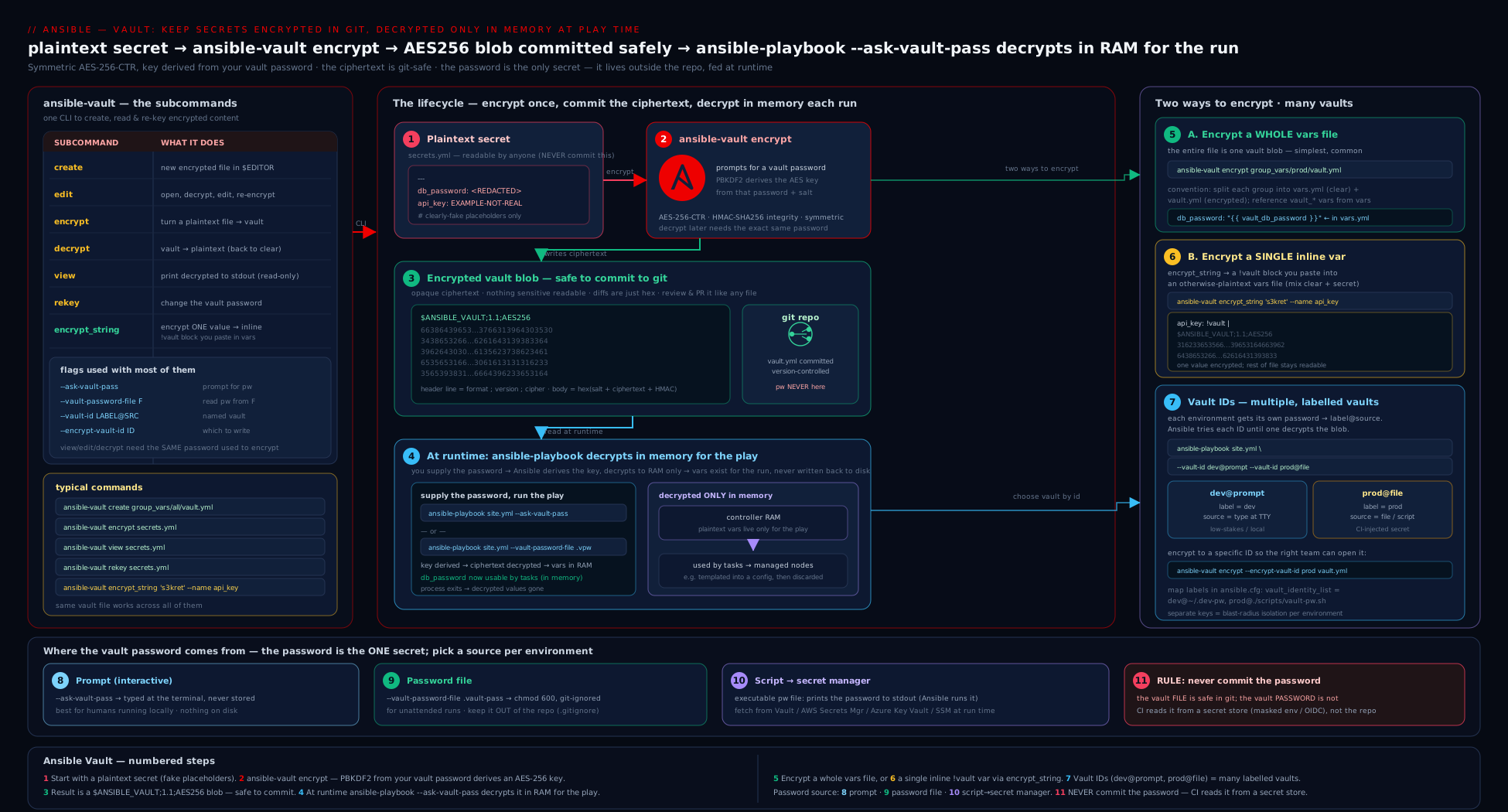
The diagram traces a secret’s whole life: it lives as AES256 ciphertext in the repo (a whole encrypted vault.yml and an inline !vault value), the vault password arrives from one of the three sources, the control node decrypts in memory just-in-time, and only the decrypted value — never the password — reaches the managed node inside the task arguments.
CI/CD integration: vault passwords without committing them
Automation is where Vault discipline is tested, because there is no human to type a password and the temptation to “just put it in a file in the repo” is strongest. The cardinal rule is unchanged and absolute: the vault password is never committed and never printed. The pattern in every CI system is the same three moves:
- Store the vault password in the CI system’s secret store, not in the repo. (GitHub Actions Secrets, GitLab CI/CD masked variables, Azure DevOps secret variables, Jenkins credentials.)
- At run time, expose it to Ansible via an executable client script or a transient file, sourced from that secret — and make sure CI masks it in logs.
- Run the playbook pointing Ansible at that source; clean up the transient file afterwards.
GitHub Actions
name: deploy
on: { push: { branches: [main] } }
jobs:
  ansible:
    runs-on: ubuntu-latest
    steps:
      - uses: actions/checkout@v4
      - name: Install Ansible
        run: pipx install --include-deps ansible
      - name: Run playbook
        env:
          # The secret lives in repo/org Secrets; GitHub masks it in logs automatically.
          ANSIBLE_VAULT_PASSWORD: ${{ secrets.ANSIBLE_VAULT_PASSWORD }}
        run: |
          # A tiny client script that echoes the password from the env var.
          printf '#!/usr/bin/env bash\nprintf "%%s" "$ANSIBLE_VAULT_PASSWORD"\n' > vault-pass.sh
          chmod +x vault-pass.sh
          ansible-playbook site.yml --vault-password-file ./vault-pass.sh
          rm -f vault-pass.sh   # remove the transient script
The password only ever exists as a masked environment variable and is read by the client script at run time — it is never written to a file and never committed. (printf the script rather than echo-ing the password into a file, so the secret itself is never an argument.)
GitLab CI
deploy:
  image: python:3.12
  variables:
    # ANSIBLE_VAULT_PASSWORD is set as a MASKED, PROTECTED CI/CD variable in project settings.
    ANSIBLE_VAULT_PASSWORD_FILE: "./vault-pass.sh"
  script:
    - pip install ansible
    - printf '#!/usr/bin/env sh\nprintf "%s" "$ANSIBLE_VAULT_PASSWORD"\n' > vault-pass.sh
    - chmod +x vault-pass.sh
    - ansible-playbook site.yml
    - rm -f vault-pass.sh
Setting ANSIBLE_VAULT_PASSWORD_FILE means you do not even pass --vault-password-file; Ansible picks it up from the environment. Mark the CI variable Masked (so it is redacted in logs) and Protected (so it is only available on protected branches/tags).
Pulling from a real secret manager in CI
The most robust pattern keeps the vault password itself in a dedicated secrets manager and gives the CI runner only short-lived permission to fetch it:
- name: Run playbook (vault password from a secrets manager)
  run: |
    cat > vault-client.sh <<'EOF'
    #!/usr/bin/env bash
    set -euo pipefail
    # Runner authenticates to the secret store via OIDC / a workload identity,
    # not a long-lived key. Fetch the vault password just-in-time.
    aws secretsmanager get-secret-value \
      --secret-id ansible/vault-password --query SecretString --output text
    EOF
    chmod +x vault-client.sh
    ansible-playbook site.yml --vault-password-file ./vault-client.sh
    rm -f vault-client.sh
This is the cleanest design: the CI secret store holds nothing but a way to reach the secret manager (ideally via OIDC, so there is no static key at all), and the actual vault password is centralised, audited, and rotated in one place.
The CI rules, distilled
| Rule | Why |
|---|---|
| Password in the CI secret store / a secrets manager — never in the repo. | The repo is cloneable; the secret store is access-controlled. |
Feed Ansible via env var → client script (or ANSIBLE_VAULT_PASSWORD_FILE). |
No plaintext password file is ever written to the workspace or committed. |
| Mask the secret in CI variable settings. | Prevents it leaking into build logs. |
| Mark variables protected where supported. | Production secret unavailable on untrusted branches/PRs. |
rm -f the transient client/file after the run. |
Minimise the window it exists on the runner. |
| Prefer OIDC/workload identity over long-lived keys for reaching the secret manager. | Kills the static-credential class of leak entirely. |
Never echo/debug the password; use no_log on secret-handling tasks. |
Logs are retained and often broadly readable. |
When to use Ansible Vault vs a dedicated secrets manager
This is the senior-level judgement call. Ansible Vault and a secrets manager solve overlapping but different problems:
| Aspect | Ansible Vault | Dedicated secrets manager (HashiCorp Vault, AWS/Azure/GCP) |
|---|---|---|
| What it is | A file encryptor; secrets live (encrypted) in your Git repo. | A service that stores, brokers, audits, and rotates secrets. |
| Distribution | One shared vault password must reach every operator/runner. | Fine-grained, per-identity access via tokens/IAM/OIDC. |
| Rotation | Manual: change the value at source, rekey files, redistribute the password. |
Automatic rotation; dynamic, short-lived credentials. |
| Audit | None — you cannot tell who decrypted what. | Full audit log of every read. |
| Revocation | All-or-nothing (rekey everything). | Revoke a single lease/identity instantly. |
| Blast radius if leaked | One password decrypts everything it protects. | Scoped tokens; least privilege per workload. |
| Setup cost | Zero — built into ansible-core. |
A service to run/operate (or a paid cloud service). |
| Best for | Small/medium teams, GitOps-friendly secrets, a handful of credentials, bootstrap secrets. | Large orgs, many consumers, compliance/audit needs, frequent rotation, dynamic creds. |
The practical guidance:
- Use Ansible Vault when the secret set is modest, the team is small enough to share one (or a few labelled) passwords safely, you want secrets versioned alongside code, and you do not need per-access auditing or automatic rotation. It is genuinely the right tool for a great many real projects.
- Reach for a secrets manager when you need dynamic, short-lived credentials, an audit trail of who accessed what, instant per-identity revocation, automated rotation, or you have many independent consumers. Ansible integrates beautifully here via the
community.hashi_vault,amazon.aws,azure.azcollection, andcommunity.generallookup plugins (e.g.{{ lookup('community.hashi_vault.vault_kv2_get', 'secret/db').secret.password }}), fetching secrets at run time so they never touch your repo at all. - A common hybrid: use a secrets manager for application/runtime secrets and dynamic credentials, and use Ansible Vault only for the small bootstrap secret you cannot avoid having locally — for example the token or password the control node needs to authenticate to the secrets manager in the first place. This keeps all but one secret out of the repo, and that one is tightly scoped.
The cleanest answer in an interview: “Vault encrypts secrets at rest in the repo and is perfect for small teams and GitOps; a secrets manager brokers secrets at run time with auditing, rotation, dynamic credentials and per-identity access. Use Vault for a handful of static secrets and the manager for everything that needs scope, audit, or rotation — and often use Vault only for the bootstrap secret that reaches the manager.”
Going deeper
Everything so far — the AES-256 envelope, encrypt_string, multiple --vault-id labels, rekey, no_log, and the CI patterns — is the working core. This section is for the reader who already has that and wants the internals, the sharp edges, and the capabilities most tutorials never reach. Nothing here contradicts the above; it extends it.
Encryption is orthogonal to variable precedence
A common misreading is that vaulting changes where a variable sits in Ansible’s precedence rules. It does not. A vaulted variable has exactly the same precedence as the identical variable written in plaintext in the same place — Ansible decrypts the value as it loads that source, then slots it into the normal precedence ladder. A vault_db_password in group_vars/prod/vault.yml ranks precisely where any group_vars/prod/* variable ranks; encrypting the file changed its readability, not its priority. This is why the vars.yml + vault.yml split works so cleanly: both files are group_vars/prod/*, loaded at the same tier, so the plaintext db_password: "{{ vault_db_password }}" indirection resolves with no precedence surprises. It also means an -e @vault_extra.yml extra-vars file still wins over vaulted group_vars, exactly as a plaintext extra-vars file would — encryption never buys a variable a higher rank.
Beyond vars files: vaulting any file, and on-the-fly decryption
Vault is not limited to YAML variables. Any file can be encrypted, and several modules decrypt a vaulted source transparently as they transfer it. ansible.builtin.copy, ansible.builtin.template, ansible.builtin.unarchive, ansible.builtin.script, and ansible.builtin.assemble all accept a decrypt parameter that defaults to true: point src at a vault-encrypted file and the module ships the decrypted bytes to the target, no extra step required.
- name: Ship a vault-encrypted license file, decrypted, with tight perms
  ansible.builtin.copy:
    src: files/license.dat        # vault-encrypted at rest in the repo
    dest: /etc/myapp/license.dat  # written decrypted on the target
    owner: myapp
    group: myapp
    mode: "0600"
  no_log: true                    # the decrypted content must not hit the log/diff
Set decrypt: false when you deliberately want the ciphertext delivered (e.g. staging an encrypted blob another process will open later). To read a vaulted file’s contents into a variable at run time, use the ansible.builtin.unvault lookup:
- name: Load a decrypted PEM key into a (no_log) variable
  ansible.builtin.set_fact:
    tls_key: "{{ lookup('ansible.builtin.unvault', 'files/tls.key') }}"
  no_log: true
You can even encrypt an entire inventory file and run against it with the password supplied normally — handy when the inventory itself embeds sensitive host data.
vault_id_match: turning labels into a guarantee
By default, when several passwords are loaded Ansible will try each one against unlabelled (or mismatched) content until an HMAC validates. That is convenient but loose: a dev operator who also happens to hold the prod password could decrypt prod content. Set vault_id_match = True (or ANSIBLE_VAULT_ID_MATCH=1) and Ansible instead requires the label recorded in the content to match the supplied vault-id, using only that password and refusing to fall back. It converts vault IDs from a hint into an enforced boundary — but only for content encrypted with a label (the 1.2 header form), so encrypt with --vault-id label@source if you want this to bite.
Performance and scale
Decryption is not free. Each vaulted blob runs a PBKDF2 key-derivation (thousands of HMAC-SHA256 iterations, deliberately slow to blunt brute-force) before the AES step, and it happens at variable-load time on the control node. For a handful of files this is imperceptible; across hundreds of small vaulted files the per-file derivation adds up and lengthens every run’s start-up. Two levers help: consolidate many tiny secrets into fewer, larger vault files (one key derivation instead of many), and enable vault_id_match so Ansible tries one password rather than looping over a long vault_identity_list. Managed nodes never decrypt anything, so this cost is entirely a control-node concern.
no_log — precisely what it does and does not protect
no_log: true tells Ansible to redact a task’s arguments and results from its own console output, callbacks, and --diff, at every verbosity — the essential control whenever a decrypted secret passes through a task. Know its edges:
no_log protects |
no_log does not protect |
|---|---|
The secret in task args / registered results / -vvv output |
The secret once written into a file on the target (set mode/owner) |
The --diff of a templated or copied secret file |
A secret passed as a command/shell argument (visible in the target’s process list) |
| The value in standard callback logging | Third-party or custom callback plugins that log differently |
Two more traps: no_log also redacts the failure message, so a broken secret-handling task gives you nothing to debug — toggle it off locally and briefly, never in CI. And on a looped task no_log redacts every iteration, which is correct but can mask which item failed. Treat no_log as one layer of a defence-in-depth stack (tight file modes, never passing secrets as command arguments, disciplined callbacks), not a complete shield.
Bonus: readable diffs on whole-file vaults
If you prefer whole-file vaults but hate the useless ciphertext diffs, wire a git textconv driver that decrypts on the fly for local git diff (it needs a configured password source, e.g. vault_password_file in ansible.cfg):
# .gitattributes
group_vars/**/vault.yml diff=ansible-vault
git config diff.ansible-vault.textconv "ansible-vault view"
Now git diff shows the decrypted changes locally, while the repo still stores only ciphertext. It is a per-clone convenience (each engineer configures it and must already hold the password), not a substitute for the vars.yml/vault.yml split — but it is the cleanest way to review changes to a file that is encrypted as a whole.
Hands-on lab
You will create encrypted content every way Vault supports, supply the password through each source, run a playbook that consumes a secret, and rekey — entirely free, on localhost, with no cloud resources. Each step shows the command and the expected result. Every secret here is a deliberate fake — never reuse them.
Prerequisites. A control node with ansible-core 2.17+ (ansible --version), a terminal, and an editor (export EDITOR=nano if unsure).
Step 1 — set up a workspace and a password file.
mkdir -p ~/vault-lab/group_vars/all && cd ~/vault-lab
printf 'changeme-fake-lab-password' > .vault_pass.txt   # FAKE password, do not reuse
chmod 600 .vault_pass.txt
printf '.vault_pass.txt\n' > .gitignore                 # never commit the password
Expected: a .vault_pass.txt readable only by you and listed in .gitignore.
Step 2 — create a whole encrypted file.
ansible-vault create --vault-password-file .vault_pass.txt group_vars/all/vault.yml
In the editor, type and save:
vault_db_password: "dummy-not-a-real-password"
vault_api_token: "EXAMPLE_TOKEN_do_not_use"
Verify it is ciphertext on disk, then view it decrypted:
head -1 group_vars/all/vault.yml                        # → $ANSIBLE_VAULT;1.1;AES256
ansible-vault view --vault-password-file .vault_pass.txt group_vars/all/vault.yml
Expected: the file’s first line is the $ANSIBLE_VAULT header; view prints your two fake variables.
Step 3 — add a plaintext indirection file. Create group_vars/all/vars.yml:
db_user: "appuser"
db_password: "{{ vault_db_password }}"
api_token: "{{ vault_api_token }}"
Expected: a readable file referencing the encrypted variables by their vault_ names.
Step 4 — make an inline single-variable secret.
ansible-vault encrypt_string --vault-password-file .vault_pass.txt \
  --stdin-name 'inline_secret'
# type: changeme-fake-inline   then press Ctrl-D
Copy the printed inline_secret: !vault | block into group_vars/all/vars.yml. Expected: a readable file that now also contains one opaque !vault value among the plaintext.
Step 5 — run a playbook that consumes the secrets. Create show.yml:
- name: Prove vaulted vars decrypt at run time
  hosts: localhost
  connection: local
  gather_facts: false
  tasks:
    - name: Confirm the secret is present (length only — never print the value)
      ansible.builtin.debug:
        msg: "db_password is {{ db_password | length }} chars; api_token is {{ api_token | length }} chars; inline is {{ inline_secret | length }} chars"
Run it, supplying the password by file:
ansible-playbook show.yml --vault-password-file .vault_pass.txt
Expected: the play succeeds and prints the lengths of the three secrets (proving they decrypted) without ever revealing the values. Now run it with an interactive prompt instead:
ansible-playbook show.yml --ask-vault-pass # type: changeme-fake-lab-password
Expected: identical result, password typed at the prompt.
Step 6 — supply the password via an executable client script.
cat > vault-client.sh <<'EOF'
#!/usr/bin/env bash
set -euo pipefail
: "${ANSIBLE_VAULT_PASSWORD:?set ANSIBLE_VAULT_PASSWORD}"
printf '%s' "$ANSIBLE_VAULT_PASSWORD"
EOF
chmod +x vault-client.sh
ANSIBLE_VAULT_PASSWORD='changeme-fake-lab-password' \
  ansible-playbook show.yml --vault-password-file ./vault-client.sh
Expected: the play succeeds — Ansible executed the script (because it is executable) and used its stdout as the password. This is the secret-manager pattern in miniature.
Step 7 — rekey to a new password.
printf 'changeme-fake-NEW-password' > .vault_pass_new.txt && chmod 600 .vault_pass_new.txt
ansible-vault rekey \
  --vault-password-file .vault_pass.txt \
  --new-vault-password-file .vault_pass_new.txt \
  group_vars/all/vault.yml
# Confirm the OLD password no longer works and the NEW one does:
ansible-vault view --vault-password-file .vault_pass.txt group_vars/all/vault.yml || echo "OLD password rejected (expected)"
ansible-vault view --vault-password-file .vault_pass_new.txt group_vars/all/vault.yml
Expected: the old password is rejected with a decryption error; the new password reveals the content. You have just performed a password rotation.
Validation checklist.
head -1 group_vars/all/vault.ymlshows$ANSIBLE_VAULT;1.1;AES256— the file is encrypted at rest.show.ymlprints sensible lengths via the password file, the prompt, and the client script — all three sources work.- The inline
!vaultvalue decrypts alongside the whole-file ones. - After rekey, the old password fails and the new one succeeds.
git statuswould show.vault_pass.txtignored (never staged).
Cleanup.
cd ~ && rm -rf ~/vault-lab
Cost note. Zero — everything ran locally on localhost with tools already in ansible-core. No cloud resources, no charges (₹0).
Practice challenges
Six drills that escalate from beginner to advanced. Try each before opening the solution. Every secret is a deliberate fake — never reuse one.
1. (Beginner) Lock an existing plaintext file and prove it is encrypted. You wrote group_vars/all/vault.yml in the clear. Encrypt it in place and confirm the on-disk header.
<details><summary>Solution</summary>
ansible-vault encrypt group_vars/all/vault.yml
head -1 group_vars/all/vault.yml     # → $ANSIBLE_VAULT;1.1;AES256
Why: encrypt locks an existing file in place; the first line becomes the $ANSIBLE_VAULT envelope, so ciphertext is what Git now sees. (If it was ever committed in plaintext, rotate the value too.)
</details>
2. (Beginner) Encrypt one value for inline use without leaking it to shell history. Produce a pasteable !vault block for api_token, keeping the secret off the command line.
<details><summary>Solution</summary>
ansible-vault encrypt_string --stdin-name 'api_token'
# type: EXAMPLE-fake-token   then press Ctrl-D
Why: --stdin-name reads the value from stdin, so it never appears as a CLI argument (which would land in shell history and the ps process list).
</details>
3. (Intermediate) Encrypt so only prod can read it. With dev@dev_pass.txt and prod@prod_pass.txt both loaded, encrypt a new db_password that the dev password cannot decrypt.
<details><summary>Solution</summary>
ansible-vault encrypt_string \
  --vault-id dev@dev_pass.txt \
  --vault-id prod@prod_pass.txt \
  --encrypt-vault-id prod \
  --stdin-name 'db_password'
# type: dummy-not-a-real-password   then Ctrl-D
Why: with several IDs loaded, --encrypt-vault-id prod selects which label encrypts the new content; the block records the prod label so only that password decrypts it.
</details>
4. (Intermediate) Make the password automatic — no CLI flag. Arrange for ansible-playbook site.yml to find the vault password with no --vault-password-file on the command line, using ~/.vault/prod.txt.
<details><summary>Solution</summary>
# ansible.cfg
[defaults]
vault_password_file = ~/.vault/prod.txt
# or, equivalently, via the environment:
export ANSIBLE_VAULT_PASSWORD_FILE=~/.vault/prod.txt
ansible-playbook site.yml
Why: a configured vault_password_file (or its env var) is Ansible’s default password source, so vaulted content decrypts with no per-run flag.
</details>
5. (Advanced) Ship a decrypted file safely. Copy a vault-encrypted files/license.dat onto prod hosts — written decrypted with 0600 perms — and ensure a --diff run cannot reveal it.
<details><summary>Solution</summary>
- name: Install the license, decrypted, without leaking it
  ansible.builtin.copy:
    src: files/license.dat     # decrypted on the fly (decrypt defaults to true)
    dest: /etc/myapp/license.dat
    owner: myapp
    group: myapp
    mode: "0600"
  no_log: true
Why: ansible.builtin.copy auto-decrypts a vaulted src (default decrypt: true); no_log: true suppresses the task output and the --diff, so the plaintext never reaches the log.
</details>
6. (Advanced) A leaver knew the prod password. Rotate the password on every prod vault file non-interactively, then state why that alone may not be enough.
<details><summary>Solution</summary>
ansible-vault rekey \
  --vault-password-file old_prod.txt \
  --new-vault-password-file new_prod.txt \
  group_vars/prod/vault.yml host_vars/db01.yml
Why: rekey re-encrypts the files under a new password (revoking the leaver’s access), but it changes only the password, not the secret values — if any actual credential may have been seen, you must also rotate that credential at its source.
</details>
Common mistakes & troubleshooting
| Symptom | Cause | Fix |
|---|---|---|
ERROR! Decryption failed on a file or !vault block |
Wrong vault password, or the wrong vault-id matched | Supply the correct password/--vault-id; with multiple IDs, confirm the right one is loaded; check the file’s header label. |
Attempting to decrypt but no vault secrets found |
You ran a play with vaulted content but gave no password | Add --ask-vault-pass/--vault-password-file, or set vault_password_file in ansible.cfg/env. |
| Secret value printed in the play output / logs | Missing no_log: true on the task, or -v exposing it |
Add no_log: true to secret-handling tasks; avoid high verbosity around secrets. |
| Useless, all-or-nothing diffs on every secrets change | The whole file is encrypted; the random salt re-encrypts it entirely | Use the vars.yml (plaintext) + vault.yml (encrypted) split, or inline encrypt_string for individual values. |
Committed the plaintext before encrypting (or decrypt-ed and committed) |
Plaintext existed in the working tree/history at some point | Treat the secret as leaked: rotate the actual credential and rekey; purge history if feasible — but rotation is the real fix. |
encrypt_string value visible in shell history / ps |
The secret was passed as a command-line argument | Use --stdin-name and paste the secret on stdin instead. |
Editor opens an empty/garbled file on edit |
$EDITOR unset or set to something non-interactive |
export EDITOR=nano (or vim); ensure it is a real interactive editor. |
CI fails: no vault secrets found, but the secret is set |
The CI variable was not exposed as an env var the script reads, or not on this branch | Map the secret into env:; mark it available (not just protected) for this ref; confirm the client script reads the right variable. |
| Client script “works” but Ansible reads the file contents not its output | The script lacks the executable bit | chmod +x it; Ansible only runs the file if it is executable, otherwise it reads it as a static password. |
| Wrong password used to encrypt new content with multiple IDs loaded | Default encrypting ID is the first one | Pass --encrypt-vault-id LABEL or set vault_encrypt_identity. |
Common beginner mistakes
These are conceptual traps, not error messages — the wrong mental model that leads a beginner astray (the symptom→cause→fix table above handles the error messages).
- “The file is encrypted, so it is safe to
debugor log the value.” Encryption protects the secret at rest in the repo. The instant Ansible decrypts it into a variable, adebug, a-vdump, a rendered config, or a--diffcan splash it across the terminal and CI logs. Right model: at-rest ≠ in-use — reach forno_log, restrictive file modes, and neverdebuga secret. - “One vault password for the whole organisation is fine.” One password means one blast radius: everyone who can run any playbook can decrypt everything, and a single leak exposes every secret at once. Right model: separate trust boundaries with vault IDs (
dev/prod/per-team), share each password with the fewest people, and rekey when someone leaves. - “It is OK to commit the password file — the secrets are encrypted anyway.” The password is the key; committing it beside the ciphertext is taping the key to the locked box. Right model: the password never lives in the repo —
.gitignoreany password file, keep it in a secret store, and feed it in at run time. - “I committed
secrets.ymlin plaintext, then encrypted it, so I am safe now.” Git history keeps the plaintext forever; encrypting only protects the current version. Right model: treat the secret as leaked and rotate the real credential; scrubbing history withgit filter-repo/BFG is secondary to rotation. - “Ansible Vault is our secrets manager.” Vault is a file encryptor — no brokering, no audit trail, no automatic rotation, no dynamic short-lived credentials. Right model: when you need who-read-what auditing, instant revocation, or rotation, use a real secrets manager and keep Vault for at-rest, GitOps-friendly static secrets.
- “
no_logmakes the secret completely safe.”no_logonly governs Ansible’s own output; it does nothing about the secret written to a file on the target, passed as acommandargument (visible in the target’s process list), or emitted by a third-party callback — and it hides error messages too. Right model:no_logis one layer; combine it with tight modes, avoid secrets as command arguments, and disable it only locally while debugging.
Best practices
- Never commit the vault password. Keep it outside the repo (home dir, CI secret store, secret manager) and add any password file to
.gitignore. The password is the one thing that must never live with the ciphertext. - Adopt the
vars.yml+vault.ymlsplit with avault_-prefix convention, so config is reviewable, diffs are clean, and playbooks reference friendly names while only thevault_originals are encrypted. - Encrypt secrets, not config. Do not vault non-sensitive values — it just makes them unreviewable. Vault only what would cause harm if disclosed.
- Use
encrypt_stringwith--stdin-namefor individual secrets so values never enter your shell history or the process list. - Use vault IDs to separate trust boundaries (
dev/prod, per-team) so possessing one password does not unlock everything. - Always
no_log: trueon tasks that handle secrets, and set restrictive modes/owners on any file you render that contains a decrypted secret. - Automate the password source via
ansible.cfg(vault_password_file,vault_identity_list) so humans cannot forget it and scripts stay clean. - Rotate with
rekeyon a schedule and immediately when someone with the password leaves or a leak is suspected — and remember to rotate the underlying credential too if a value was exposed. - For machines, prefer an executable client script that fetches the password from a secret manager (ideally via OIDC/workload identity) over a static file.
- Know the boundary: as the secret count, consumer count, audit, or rotation needs grow, graduate to a real secrets manager and use Vault only for the bootstrap secret.
Security notes
- The vault password is a single point of compromise. Anyone with it can decrypt every file it protects. Protect it like the highest-value credential it is: out-of-band distribution, least sharing, prompt rotation on staff changes.
- Ciphertext in Git is safe; plaintext anywhere is not. Vault’s guarantee is at rest in the repo. The moment a secret is decrypted — in a rendered file on a target, in a log, in
psoutput, inset -xtracing — Vault’s protection has ended and your other controls take over. Useno_log, tight file modes, and disciplined logging. view/debugleak to the terminal and scrollback. Avoid printing secrets; when you must inspect, do it on a private screen and clear scrollback. Neverdebuga secret in CI.- Encrypting a previously-committed plaintext secret does not un-leak it. Git history is forever; rotate the actual credential.
git filter-repo/BFG can scrub history but rotation is the only reliable remedy. - AES-256 is strong, but only as strong as the passphrase. A weak vault password is brute-forceable offline against the committed ciphertext. Use a long, random passphrase, especially because attackers can attack the committed file at leisure.
- Beware command-line and history exposure. Passing secrets or passwords as arguments puts them in shell history and
ps; prefer stdin, files (with0600), or env vars read by a script. - Mask in CI and scope variables. Mark CI secrets masked and protected; never echo them; remove transient password files after the run. Prefer OIDC/workload identity so no long-lived key reaches the runner at all.
no_logredacts errors too. It can hide the cause of a failure in a secret-handling task — toggle it off only locally and temporarily while debugging, never in shared/CI logs.
Interview & exam questions
1. What does Ansible Vault actually do, and what cipher does it use? It encrypts data at rest using symmetric encryption so secrets can live (as ciphertext) inside your repo and be decrypted transparently at run time. The format is AES-256 (CTR mode) with the key derived from your vault password via PBKDF2-HMAC-SHA256 and integrity protected by HMAC-SHA256. It is a file encryptor, not a secrets service.
2. List the ansible-vault subcommands and what each is for.
create (new encrypted file in $EDITOR), edit (modify an existing one, staying encrypted on disk), view (decrypt to stdout, read-only), encrypt/decrypt (lock/unlock existing files in place), rekey (change the password on encrypted files), and encrypt_string (encrypt a single value into a !vault block for inline use).
3. Whole-file encryption vs inline (encrypt_string) — when do you use each?
Whole-file is best for a dedicated secrets file containing only secrets; it is always opaque on disk but produces useless diffs. Inline encrypts individual values inside an otherwise-readable file — ideal for a few secrets among lots of config, with clean diffs and per-value granularity, at a slightly higher risk of accidental plaintext. The common pattern is a plaintext vars.yml referencing an encrypted vault.yml with vault_-prefixed names.
4. What are vault IDs and why do they exist?
A vault ID is a label attached to a vault password (--vault-id prod@source), letting one project use several passwords. The label is recorded in the file header (format 1.2), so Ansible can match each ciphertext to the right password and you can run a playbook with multiple --vault-id options loaded at once — used to separate trust boundaries like dev/prod or per-team.
5. With several vault IDs loaded, how does Ansible decide which password encrypts new content?
By default it uses the first --vault-id provided. To be explicit, pass --encrypt-vault-id LABEL (or set vault_encrypt_identity in ansible.cfg). For decryption it matches by recorded label, then falls back to trying each loaded password until the HMAC validates.
6. What are the three ways to supply the vault password, and when is each appropriate?
(1) Prompt (--ask-vault-pass) — for humans at a workstation. (2) Password file (--vault-password-file path) — a 0600 file, first line is the password, for trusted non-interactive control nodes; never committed. (3) Executable script — if the “password file” is executable, Ansible runs it and uses its stdout; this lets it fetch from a secret manager and is the right choice for CI.
7. How do you integrate Vault into CI/CD without committing the password?
Store the password in the CI secret store (or a secrets manager); expose it at run time as a masked env var read by a small executable client script (or set ANSIBLE_VAULT_PASSWORD_FILE); run the playbook against that source; rm the transient script afterwards. Never print the password, mark CI variables masked/protected, and prefer OIDC/workload identity to reach a secrets manager so no static key exists.
8. A teammate who knew the vault password has left. What do you do?
Rekey every encrypted file to a new password (ansible-vault rekey) and redistribute the new password out-of-band. If you believe any actual secret value was exposed, also rotate the underlying credentials at their source — rekeying changes only the password, not the secret values.
9. You committed a secrets.yml in plaintext, then encrypted it. Are you safe?
No. The plaintext is in Git history and anyone with the repo can read past commits. Encrypting now protects only the current and future versions. You must rotate the leaked credentials; optionally scrub history with git filter-repo/BFG, but rotation is the only reliable fix.
10. When should you use Ansible Vault versus a dedicated secrets manager? Use Vault for a modest set of static secrets, small teams, GitOps-style versioning, and zero infrastructure cost, when you don’t need auditing or rotation. Use a secrets manager (HashiCorp Vault, AWS/Azure/GCP) when you need dynamic short-lived credentials, per-access audit, instant revocation, automatic rotation, or many independent consumers. A common hybrid uses the manager for runtime secrets and Vault only for the bootstrap secret that authenticates to the manager.
11. Why are diffs on a whole-file vault useless, and how do you avoid it?
Each encryption uses a random salt, so any change re-encrypts the entire payload to completely different ciphertext — the diff is meaningless. Avoid it by splitting config into a plaintext vars.yml (which diffs normally) and an encrypted vault.yml, or by using inline encrypt_string so only the changed value’s block changes.
12. What is no_log and why does it matter with Vault?
no_log: true tells Ansible not to print a task’s arguments or results. Vault protects secrets at rest, but once decrypted they can appear in task output (especially with -v); no_log keeps them out of logs. The caveat: it also redacts error details, so disable it only locally and temporarily when debugging — never in CI.
Quick check
- Which subcommand encrypts a single value and prints a
!vaultblock to paste inline? - What is the difference between
--vault-id prod@promptand--ask-vault-pass? - What makes Ansible execute a vault password file instead of reading it as text?
- What is the one rule that must never be broken when using Vault in CI?
- You loaded
devandprodvault IDs and want new content encrypted withprod. Which option?
Answers
ansible-vault encrypt_string(best with--stdin-name 'name'so the secret is not a CLI argument).--vault-id prod@promptprompts for a password and labels itprod(so it matchesprod-tagged content and you can load several);--ask-vault-passprompts for a single unlabelled password.- The file having the executable bit (
chmod +x). Ansible runs an executable password source and uses its stdout; a non-executable file is read as the literal password. - Never commit the vault password (and never print it) — store it in the CI/secret store and feed it in at run time, masked.
--encrypt-vault-id prod(or setvault_encrypt_identity = prodinansible.cfg).
Exercise
Build a small, properly-structured secret-management setup and prove every property:
- Create a project with
group_vars/web/vars.yml(plaintext) andgroup_vars/web/vault.yml(encrypted), using thevault_-prefix indirection soapp_secret: "{{ vault_app_secret }}"resolves through the encrypted file. Use an obviously-fake secret. - Add two vault IDs —
devandprod, each with its own (fake) password — and encryptvault.ymlunderprod. Show that running with only thedevpassword fails and withprodsucceeds. - Add one inline
encrypt_stringsecret tovars.ymland confirm it decrypts alongside the file-level ones in alocalhostplay that prints only the secret’s length (withno_logon any task that would otherwise reveal it). - Write an executable client script that returns the password from an environment variable, and run the playbook three ways — prompt, password file, and the script — all succeeding.
- Rekey
vault.ymlto a newprodpassword and verify the old one is rejected. Then write a one-paragraph note: if a real secret value had leaked, why is rekeying not sufficient, and what else must you do?
Success criteria: the plaintext file is reviewable and diffs cleanly; vault.yml’s first line is the $ANSIBLE_VAULT header; the dev password cannot decrypt prod content; all three password sources work; after rekey the old password fails; and your note correctly identifies that you must rotate the underlying credential at its source because rekeying changes only the password, not the exposed value. Bonus: add a GitHub Actions or GitLab CI job that runs the playbook with the vault password pulled from a masked secret and the transient client script removed afterwards — and confirm the password never appears in the logs.
Certification mapping
- Red Hat RHCE (EX294) — Ansible Vault is an explicit exam objective: “use Ansible Vault to manage encrypted content,” including creating and editing encrypted files, encrypting variables, and supplying the password to
ansible-playbooknon-interactively. This lesson covers every subcommand, file-vs-inline encryption, vault IDs, and password sources the exam can probe; practise the--vault-password-fileandansible.cfgautomation so vaulted playbooks run without prompts under exam time pressure. - Red Hat RHCSA (EX200) — does not test Vault directly, but the file-permission and secret-handling discipline here (restrictive modes on rendered secret files, not leaking values) reinforces the system-administration security mindset the exam expects.
- DevSecOps / general DevOps interviews — the “Vault vs a dedicated secrets manager” judgement, the leak-then-rotate procedure, and safe CI integration are common discussion points; the comparison table and the rotation answers map directly onto those questions.
- General — the patterns transfer to any IaC workflow: the principle of encrypting secrets at rest, separating trust boundaries, and pulling the decrypting key from a secret store at run time applies equally to SOPS,
git-crypt, and sealed-secrets in adjacent ecosystems.
Glossary
- Ansible Vault — a feature of
ansible-corethat encrypts data at rest with AES-256 so secrets can live (encrypted) in your repo and decrypt transparently at run time. - Vault password — the single passphrase that encrypts and decrypts vault content; the crown-jewel secret you must protect and never commit.
- AES-256 (CTR) — the symmetric cipher Vault uses; key derived via PBKDF2-HMAC-SHA256, integrity via HMAC-SHA256.
$ANSIBLE_VAULTheader — the first line of encrypted content ($ANSIBLE_VAULT;version;cipher[;label]) identifying the format, version (1.1/1.2), cipher, and optional vault-id label.encrypt_string— the subcommand that encrypts a single value into a!vaultblock for inline use; use--stdin-nameto avoid CLI exposure.!vaulttag — a YAML tag marking a scalar as vault-encrypted so Ansible decrypts it before use.- Whole-file (file-level) encryption — encrypting an entire file (typically a vars file) so its whole contents are ciphertext.
- Inline encryption — encrypting individual values inside an otherwise-readable file via
encrypt_string/!vault. - Vault ID — a label attached to a vault password (
--vault-id label@source), enabling multiple passwords and matching ciphertext to the right one. --encrypt-vault-id— selects which loaded labelled password encrypts new content when several are loaded.- Vault password source — where the password comes from: a prompt (
--ask-vault-pass), a file (--vault-password-file), or an executable client script. - Vault client script — an executable password source that fetches the password (e.g. from a secret manager); a
-client.py-style name makes it vault-id–aware. rekey— change the vault password on encrypted files (decrypt with old, re-encrypt with new); the rotation primitive.no_log— a task directive that suppresses printing a task’s arguments and results, keeping decrypted secrets out of logs.- Secrets manager — a service (HashiCorp Vault, AWS Secrets Manager, Azure Key Vault, GCP Secret Manager) that stores, brokers, audits, and rotates secrets at run time, in contrast to Vault’s at-rest file encryption.
- Symmetric encryption — one shared key both encrypts and decrypts (no public/private pair); the model Ansible Vault uses.
- PBKDF2 (key derivation) — the function that stretches your vault password into the AES key via thousands of HMAC-SHA256 iterations, making offline brute-force of the committed ciphertext slow.
- HMAC (integrity check) — a keyed hash stored with the ciphertext so tampering or a wrong password is detected before any plaintext is produced.
- Salt — a random value mixed into each encryption so identical plaintext yields different ciphertext; the reason whole-file vault diffs are meaningless.
- Encryption at rest — protecting data where it is stored (here, the Git repo), as distinct from in transit or in use; the exact and only guarantee Vault provides.
decrypt(module parameter) — oncopy,template,unarchive,script, andassemble, controls whether a vault-encryptedsrcis decrypted on the fly (defaulttrue);decrypt: falsetransfers the ciphertext unchanged.unvaultlookup —lookup('ansible.builtin.unvault', path)returns the decrypted contents of a vault-encrypted file at run time.vault_id_match— a setting that requires a content’s recorded vault-id label to match a supplied--vault-id(no try-every-password fallback), turning labels into an enforced boundary.- Blast radius — the scope of what a single leaked password or credential exposes; shrunk by vault IDs, least sharing, and scoped secrets.
- Rotation — replacing a secret or password with a fresh one;
rekeyrotates the password, but a leaked value also requires rotating the underlying credential at its source. - Bootstrap secret — the one unavoidable local secret (often the credential that authenticates the control node to a secrets manager) that you may keep in Vault while everything else lives in the manager.
- OIDC / workload identity — short-lived, keyless authentication a CI runner uses to reach a secrets manager, removing the static credential a long-lived key would leave lying around.
- Dynamic credentials — short-lived, on-demand credentials minted by a secrets manager per request, a capability Ansible Vault does not have.
Next steps
You can now keep every secret in your Ansible projects encrypted at rest, supply the password by any route, and wire it through CI without ever committing it. From here:
- Step up from at-rest encryption to runtime secret brokering and the conceptual foundations — config vs secrets, leak detection, rotation, and OIDC — with Secrets & Configuration Management, In Depth, the vendor-neutral companion to this lesson.
- Continue the Ansible track with Dynamic Inventory for AWS & Azure, where these same secret-handling habits meet cloud inventory plugins and the credentials they need.
- Revisit Ansible Variables & Facts to see exactly where a vaulted
group_varsvalue lands in the precedence order, and Ansible Roles & Collections to apply thevars.yml/vault.ymlsplit cleanly inside a role.