Every other lesson in this course quietly assumes a clean start: an empty cluster, a fresh Git repo, an Application you author from scratch. Real life is never that tidy. You are almost certainly reading this because you already have a delivery pipeline — a Jenkins job, a GitLab CI stage, a GitHub Actions workflow — that holds a cluster credential and runs helm upgrade --install or kubectl apply against a live, revenue-earning production cluster. Nothing is broken enough to justify a rewrite weekend, and the apps it deploys cannot go down. So the question is not “how do I do GitOps?” — you learned that in the principles lesson. The question is: how do I get from the pipeline I have to the pull model, on running production, without a big bang and without recreating a single pod?
That is a genuinely different skill — the one that separates people who have read about GitOps from people who have migrated a fleet to it. The good news is there is a well-worn, low-drama path. You do not flip a switch; you strangle the old pipeline one application at a time, running push and pull side by side during the transition, and you adopt each live app into Argo CD with a diff-first check that proves — before you hand over control — that Argo will change nothing. This lesson is that path end to end: the strategy, the exact adoption procedure, the CI rewrite, the change management, and every trap that has wedged a migration.
Why this matters
The single biggest fear when a team first points Argo CD at a running production app is visceral and reasonable: “will it delete my app and recreate it?” People imagine Argo CD seeing a Deployment it did not create, deciding it is “not managed,” and tearing it down. That is not what happens — Argo CD adopts existing resources in place by default — but proving that to yourself and to a nervous change-approval board is the real work of this lesson, and it has a precise, repeatable answer.
The second reason this matters is that the pipeline you are leaving is not merely “old” — it is a security and reliability liability. A Jenkins job that runs helm upgrade needs standing, god-mode cluster credentials baked into CI, where any compromised plugin or malicious pull request can reach them. It deploys once and never looks again, so a kubectl edit at 2 a.m. becomes the permanent, undocumented reality of production. There is no audit trail beyond build logs, and rollback means “re-run an old build and hope the chart dependencies resolve the same way.” The pull model removes every one of those problems structurally — by architecture, not policy. Migrating is not a lateral move to a trendier tool; it is closing a whole category of risk.
The third reason is human, and it is the one that actually sinks migrations. “I’ll just kubectl scale it real quick” stops being allowed, because selfHeal reverts it within minutes and the engineer concludes the tool is broken. The deploy button moves from Jenkins to a Git pull request. Neglect the humans and you get a team that quietly keeps kubectl-ing around the system — GitOps on paper, drift in practice. A migration plan that does not budget for change management is a plan to fail slowly.
Hold all three threads — the adoption fear, the risk you are retiring, and the human shift — because a good migration addresses all three at once, app by app, until the old pipeline has nothing left to do and you switch it off.
Where you’re starting: the push pipeline you already have
Let us name the starting point precisely, because you cannot strangle what you cannot describe. The classic pre-GitOps delivery pipeline is push-based continuous deployment: a CI server builds an image, then the same pipeline reaches out and mutates the cluster directly. In Jenkins it looks like this — a real, representative Jenkinsfile of the kind that runs in thousands of shops today:
// Jenkinsfile — the "before": build AND deploy in one pipeline (the anti-pattern)
pipeline {
  agent any
  environment {
    IMAGE = "registry.example.com/team/checkout"
    TAG   = "${env.GIT_COMMIT.take(8)}"
  }
  stages {
    stage('Build & Test') {
      steps {
        sh 'make test'
        sh 'docker build -t $IMAGE:$TAG .'
        sh 'docker push $IMAGE:$TAG'
      }
    }
    stage('Deploy to prod') {                 // <-- everything wrong lives here
      steps {
        withCredentials([file(credentialsId: 'prod-kubeconfig', variable: 'KUBECONFIG')]) {
          sh '''
            helm upgrade --install checkout ./charts/checkout \
              --namespace checkout \
              --set image.repository=$IMAGE \
              --set image.tag=$TAG \
              --values ./charts/checkout/values-prod.yaml \
              --wait
          '''
        }
      }
    }
  }
}
Read the Deploy to prod stage carefully, because it is the villain of this lesson. Jenkins pulls a production kubeconfig out of its credential store, sets it as an environment variable, and runs helm upgrade from the CI agent straight into the cluster. The build agent — a machine whose job is to run arbitrary code from every branch and pull request — is holding the keys to production. That is the push model, and here is exactly what it costs you:
| Liability of the push pipeline | What it actually costs you |
|---|---|
| Standing cluster creds in CI | A production kubeconfig / service-principal lives in Jenkins. A compromised plugin, a malicious PR that edits the Jenkinsfile, or a leaked credential = cluster takeover. The blast radius of CI is the blast radius of prod. |
| One-shot deploy, never re-checked | helm upgrade runs once and exits. If the live state drifts afterward (a kubectl edit, a deleted ConfigMap, a manual scale), nothing notices or corrects it. Production silently diverges from intent. |
| No source of truth for “what’s running” | The real desired state is a blend of the chart in Git, the --set flags in the Jenkinsfile, and whatever the last operator typed. To answer “what is deployed in prod?” you read Jenkins build logs and hope. |
| Rollback is re-run-a-build | To undo, you re-run an old Jenkins build — which re-resolves chart dependencies, re-pulls base images, and may not reproduce the old state at all. There is no git revert of production. |
| CI and CD welded together | A flaky test, an npm registry outage, or a full Jenkins queue blocks deployments, because build and deploy are the same pipeline. They should fail independently. |
GitLab CI, GitHub Actions, Azure DevOps, and CircleCI all have the identical shape — a deploy job with KUBE_CONFIG in the environment running kubectl apply or helm upgrade. The tool is irrelevant; the anti-pattern is the direct push from CI to cluster. Every migration in this lesson is, at its core, the removal of that one stage.
So why go through the effort? Because the pull model retires each liability above by construction, not by discipline:
| Pull-model property | The mechanism that delivers it |
|---|---|
| No cluster creds in CI | Argo CD runs inside the cluster and pulls from Git. CI needs a Git write token, never a kubeconfig. The apiserver credential never leaves the cluster. |
| Continuous drift correction | The application-controller reconciles every ~3 minutes (and instantly on a webhook), comparing live state to Git forever — not once at deploy. selfHeal reverts manual edits. |
| Auditable single source of truth | Desired state is a Git commit with an author, timestamp, and SHA. “What’s running?” = read the repo at the deployed revision. Audit = git log. |
Rollback is git revert |
Undo is a one-line Git operation (or argocd app rollback to a previous synced revision). Deterministic, reviewable, fast. |
| CI and CD decoupled | CI’s job ends when the image is pushed and the tag is committed. Deployment is a separate concern owned by Argo CD; a broken build never blocks a running reconcile. |
That is the destination. Now the road to it — without turning production off.
The strangler-fig strategy: migrate app-by-app, never big-bang
The strangler fig grows around a host tree, gradually taking over until the original is gone — and the name became a migration pattern because it captures the only safe way to replace a live system: surround it, take over one piece at a time, and remove the old thing only once the new thing carries the load. You do not rewrite; you incrementally replace, and at every moment the system is running.
Applied here, this means you do not turn off Jenkins on Friday and turn on Argo CD on Monday. You stand Argo CD up next to the existing pipeline, migrate a single low-risk app into it, watch it reconcile happily for a while, and only then disable that one app’s deploy stage in Jenkins. Then the next app. Push and pull run side by side across the fleet during the transition — just never on the same app at the same time. The old pipeline shrinks app by app until it has nothing left to deploy, and you switch it off.
The contrast with the tempting big-bang cutover is stark:
| Dimension | Big-bang cutover | Strangler-fig (app-by-app) |
|---|---|---|
| Blast radius of a mistake | The entire fleet at once | One app, usually non-prod first |
| Rollback | Roll back everything, under pressure | Re-enable one Jenkins job |
| Confidence curve | Zero until the day, then terror | Compounds with each migrated app |
| Team learning | Everyone learns under fire | Early adopters learn on safe apps, teach the rest |
| Production risk | Enormous, concentrated on one date | Small, spread out, reversible |
| When it’s justified | Almost never | The default for any live system |
The strangler approach has a second, subtler payoff: ordering. Because you migrate one app at a time, you get to choose which one, and that choice is a risk-management lever. You start where a mistake is cheap and build the muscle memory (and the change-board trust) that lets you tackle the scary ones later. A sane ordering:
| Migration wave | What to migrate | Why this order |
|---|---|---|
| Wave 0 — a throwaway | A brand-new demo app, or one in a dev namespace |
Learn the adoption procedure where a mistake costs nothing. Prove the tooling. |
| Wave 1 — low-risk stateless | A stateless web/API service in staging: no PVC, no database, trivially recreatable | If adoption did recreate it (it won’t), pods just restart. Builds confidence cheaply. |
| Wave 2 — stateless prod | The same class of app, now in production | Same low risk, but now real. The change board sees a clean staging track record. |
| Wave 3 — stateful & shared | Databases, brokers, StatefulSets, anything with a PVC or a clusterIP others depend on |
Highest recreate-risk (immutable fields!) — do these only once adoption is routine. |
| Wave 4 — the platform itself | ingress, cert-manager, DNS, the secrets operator | Migrate the shared substrate last; a mistake here hits every app. |
By the time you reach Wave 4, the shared platform is best migrated as a unit rather than app-by-app — one root Application that owns ingress, cert-manager, DNS, and the secrets operator together, which is exactly the app-of-apps pattern. Do that last, once adoption is routine, because a mistake in the substrate touches every workload above it.
There is no prize for speed. A team that migrates one app a week for a quarter ends up with a rock-solid platform and a workforce that trusts it; a team that does it all in one weekend ends up with an incident and a rollback. The rest of this lesson equips you to execute each wave.
Redrawing the CI/CD boundary
Here is the mental shift everything hangs on, and engineers consistently get it half-right. In the push world, “CI/CD” is one continuous motion: build, test, and deploy all live in the same pipeline, and the pipeline touches the cluster. In the pull world, a hard line cuts through the middle of that motion. CI’s job shrinks. It builds, it tests, it pushes the image — then it does exactly one new thing: it writes the new image tag into Git. It never touches the cluster again. Everything to the right of that line — turning the Git change into a running deployment — becomes Argo CD’s job.
CI’s responsibilities before and after:
| Task | Before (push) | After (pull) |
|---|---|---|
| Compile / build artifact | CI | CI (unchanged) |
| Run unit / integration tests | CI | CI (unchanged) |
| Build & push container image | CI | CI (unchanged) |
| Hold a cluster credential | CI | nobody — it’s deleted |
| Render the chart / apply to cluster | CI (helm upgrade) |
Argo CD (renders + applies) |
| Decide the desired state | CI --set flags + chart |
Git (a committed values file / manifest) |
| Update the running image tag | CI, by deploying | CI, by committing the tag to Git |
| Reconcile & correct drift | nobody | Argo CD (forever) |
Notice the two rows that move: applying to the cluster moves from CI to Argo CD, and — the one genuinely new CI responsibility — updating the image tag changes from “deploy it” to “commit it.” The pipeline gets shorter and less privileged: it loses the scary stage and gains a tiny, safe one. Stage by stage:
| Pipeline stage | Before | After |
|---|---|---|
| Build & test | make test, docker build |
identical |
| Publish image | docker push registry/app:$TAG |
identical |
| Deploy | helm upgrade --install with a kubeconfig |
deleted |
| Promote | (implicit — the deploy was the promote) | yq/kustomize edit the tag + git commit to the config repo |
| Verify | helm --wait, smoke test from CI |
Argo CD health + notifications; optional post-sync hook |
The image-tag write-back is the crux, so here is the whole flow as one picture before we build each piece. Read it left to right: the old Jenkins push (the red path straight into the cluster) is strangled and replaced by a shrunken CI that only commits a tag to Git; Argo CD pulls from Git and, on the first sync, adopts the already-running app after a diff-first check proves it will change nothing; the reconcile loop then owns the app forever. The number to burn into memory is badge 6 — during the transition, if the old push path and the new pull path both fire at the same app, they fight.
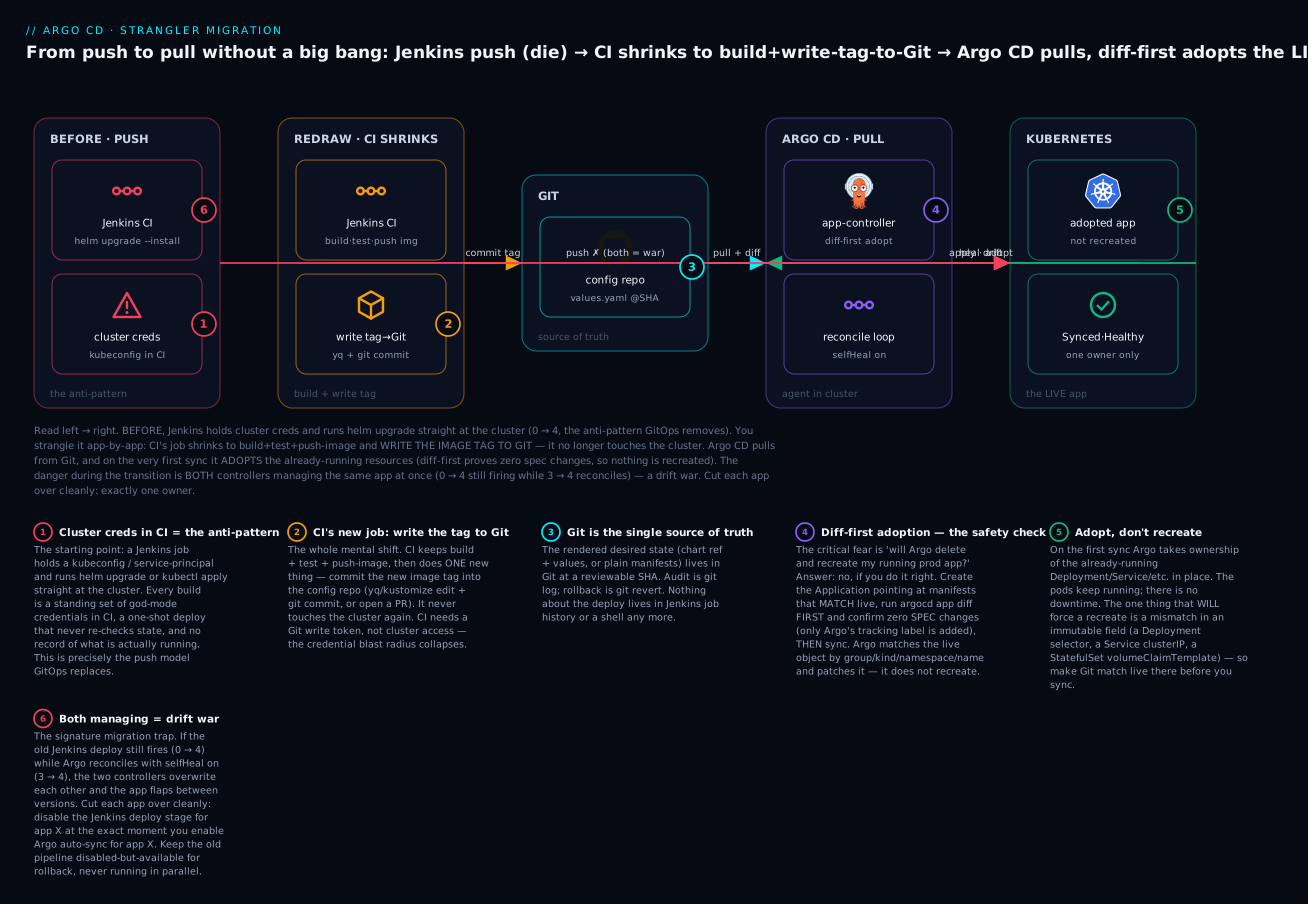
The badges trace the whole migration: standing cluster creds in CI are the anti-pattern you are retiring (1); CI’s new and only cluster-adjacent job is to write the tag to Git (2); Git becomes the auditable source of truth (3); the diff-first adoption is the safety check that answers the recreate fear (4); Argo takes over the running app in place (5); and the ever-present transition trap is letting both controllers manage one app at once (6). We will now build each of those, starting with the one everyone is afraid of.
Adopting live resources without recreating them
This is the section that unblocks the migration politically, because it answers the “will Argo delete my prod app?” fear with a procedure you can demo to a skeptic. The short version: Argo CD adopts existing resources in place. It does not delete and recreate them — as long as your Git manifests match live in the fields that matter. The long version is the mechanism, so you trust it rather than hope.
How Argo CD decides two resources are “the same”
Argo CD does not track resources by who created them. When an Application renders its desired manifests, each rendered object has an identity — its group, kind, namespace, and name — and Argo CD looks in the cluster for a live object with that same identity. If it finds one, that live object is the target: Argo compares the two and, on sync, patches the live object toward the desired spec (a kubectl apply, or a server-side apply). It does not create a second copy and it does not delete the original — the identity already exists live, so Argo just manages it.
| Identity component | Example | If it mismatches between Git and live… |
|---|---|---|
| Group / Version / Kind | apps/v1, Deployment |
Argo treats them as different objects — creates the Git one, may prune the live one |
| Namespace | checkout |
Same — wrong namespace means “not found here,” so it creates anew |
| Name | checkout |
Same — a name mismatch (very common with Helm releaseName!) means no adoption |
| The spec fields | replicas, image, env, resources | These are supposed to converge — a diff here is a real change Argo will apply |
That table hides the single most common adoption failure: for Helm apps, the rendered resource names must match what helm install originally produced. Charts build names from .Release.Name, so if the original release was checkout but the Argo Application is named checkout-prod, Argo renders checkout-prod-..., finds no live object by that name, and creates a brand-new parallel copy while the old one lingers or gets pruned. The fix is one field — spec.source.helm.releaseName set to the original release name. We hammer this in the lab.
The safe-adoption procedure: diff first, then hand over
The procedure that makes adoption boring — and demonstrable to a change board — is to never let Argo sync automatically on the first pass. You create the Application with no automated sync, ask Argo to compute the diff, confirm the only “change” is Argo stamping its ownership metadata (no spec changes), and only then sync manually. Automation goes on afterward, once you have watched it behave.
| Step | Command | What it proves |
|---|---|---|
1. Create the Application, manual sync, pointed at manifests that match live |
kubectl apply -f app.yaml (no syncPolicy.automated) |
Nothing happens yet — Argo only observes. Creating an Application never mutates workloads. |
| 2. Let it compute status | argocd app get checkout → OutOfSync |
OutOfSync here is expected and harmless — it means “Git and live differ,” which at minimum they do by the tracking label. It is not a deploy. |
| 3. Diff — the safety check | argocd app diff checkout |
The whole ballgame. A clean adoption shows only Argo’s tracking metadata being added and zero changes to replicas/image/env/spec. |
| 4. Sync once, manually | argocd app sync checkout |
Argo patches in its tracking label/annotation and takes ownership in place. Pods do not restart (metadata-only change). |
| 5. Verify no recreate | kubectl get deploy checkout -n checkout → AGE unchanged |
The AGE column proves the object was patched, not recreated. |
| 6. Now enable automation | argocd app set checkout --sync-policy automated --self-heal |
Only after you have watched it adopt cleanly do you turn on continuous reconcile. |
The Application you create for step 1 is deliberately conservative — manual sync, no auto-prune, no self-heal, server-side apply for clean field ownership. (If any of these spec fields are unfamiliar, Your First Application walks the whole CRD field by field.)
# app.yaml — a deliberately SAFE Application for first-pass adoption
apiVersion: argoproj.io/v1alpha1
kind: Application
metadata:
  name: checkout
  namespace: argocd
spec:
  project: default
  source:
    repoURL: https://github.com/acme/app-config.git
    targetRevision: main
    path: apps/checkout            # manifests (or a Helm chart) that MATCH live
  destination:
    server: https://kubernetes.default.svc
    namespace: checkout
  syncPolicy:
    syncOptions:
      - ServerSideApply=true       # cleaner field ownership when adopting
      - CreateNamespace=false      # the namespace already exists — do not touch it
    # NOTE: no `automated:` block. Manual sync only, on purpose, for the first pass.
The fields that keep this first pass safe:
| Field / setting | Safe value for adoption | Why |
|---|---|---|
syncPolicy.automated |
omitted | No auto-sync — you sync by hand after the diff. Nothing moves until you say so. |
automated.prune |
off (omitted) | A stray prune during migration is the nightmare (see troubleshooting). Never prune on the first pass. |
automated.selfHeal |
off (omitted) | Self-heal fighting the still-running Jenkins job is the classic drift war. Off until cutover is clean. |
syncOptions: ServerSideApply=true |
on | Server-side apply gives Argo clean field co-ownership instead of stomping the last-applied-configuration annotation — much smoother on adoption. |
syncOptions: CreateNamespace=false |
on | The namespace already exists; you do not want Argo asserting ownership of it during adoption. |
helm.releaseName (Helm apps) |
the original release name | So rendered resource names match live and Argo adopts instead of creating parallel copies. |
The one thing that will force a recreate: immutable fields
Adoption is safe with one honest exception. Some Kubernetes fields are immutable — the apiserver will not let anyone patch them. If your Git manifest differs from the live object in an immutable field, a normal apply fails with field is immutable, and if someone has (dangerously) set Replace=true on the sync, Argo will delete and recreate the object to force the change through. That is the only path by which adoption destroys a running resource, and it is entirely avoidable: make Git match live in these fields before you sync.
| Kind | Immutable field(s) | Symptom if Git ≠ live |
|---|---|---|
Deployment / ReplicaSet |
spec.selector.matchLabels |
field is immutable; with Replace=true, full recreate (downtime) |
Service (ClusterIP) |
spec.clusterIP / spec.clusterIPs |
Apply rejected; a recreate changes the IP and breaks everything pointing at it |
StatefulSet |
spec.serviceName, spec.selector, spec.volumeClaimTemplates |
Recreate detaches/re-provisions volumes — data risk |
Job |
spec.template, spec.selector |
Cannot patch a running Job’s template; recreate re-runs it |
PersistentVolumeClaim |
spec.storageClassName, spec.resources.requests.storage (shrink), spec.accessModes |
Apply rejected; a recreate is data loss |
PersistentVolume |
spec.capacity, spec.accessModes, spec.persistentVolumeReclaimPolicy (some) |
Apply rejected |
The rule follows directly: capture live state accurately enough that these fields match, and the immutable-field trap never fires. Which brings us to how you get live state into Git in the first place.
Getting your live state into Git
Adoption needs Git manifests that match what is running. There are two situations — the app was deployed by Helm, or it was deployed by raw kubectl apply — and they call for different capture techniques.
| Command | What it gives you | Use it for |
|---|---|---|
helm get values <release> -o yaml |
The user-supplied values (the --set/-f overrides only, not chart defaults) |
The authoritative set of overrides to move into Git for a Helm app — this is the gold |
helm get values <release> -a -o yaml |
All computed values including chart defaults | Reference/debugging only — do not freeze these into Git or you pin today’s defaults forever |
helm get manifest <release> |
The fully rendered YAML actually applied by the last helm upgrade |
A point-in-time snapshot to verify against, or a starting manifest if you are abandoning the chart |
helm list -n <ns> |
The release name + chart version currently deployed | Pin the Argo Application’s targetRevision to this exact chart version |
kubectl get <kind> <name> -n <ns> -o yaml |
The live object, warts and all | The starting point for a raw (non-Helm) app — but it needs cleaning (below) |
For a Helm app the migration is clean and low-effort: you are not abandoning the chart, you are moving the inputs into Git. Run helm get values <release> -o yaml to extract exactly the overrides the operator/CI supplied, commit those to a values.yaml, point the Application at the same chart at the same version (from helm list), and set helm.releaseName to the release name. Rendered output is then byte-identical to what Helm produced and the diff is empty. This is why Helm apps are the easiest to migrate, not the hardest — the chart already encodes the desired state; you are relocating a few lines of values.
For a raw kubectl apply app, you must sanitize the live object, because kubectl get -o yaml returns dozens of fields the apiserver populated that must not go into Git (they change every reconcile and would show as permanent diffs, or worse, get re-applied):
Field to strip from kubectl get -o yaml |
Why it must go |
|---|---|
status: (the entire block) |
Runtime state, not desired state; owned by controllers |
metadata.uid |
Assigned by the apiserver at creation; meaningless in Git |
metadata.resourceVersion |
Changes on every write; guarantees a permanent phantom diff |
metadata.generation |
Controller bookkeeping |
metadata.creationTimestamp |
Set by the apiserver; often renders as null and confuses diffs |
metadata.managedFields |
Server-side-apply bookkeeping — huge, noisy, never desired state |
metadata.ownerReferences |
If the object is owned by a controller (e.g. a ReplicaSet by a Deployment), manage the owner, not this |
spec.clusterIP / spec.clusterIPs (Services) |
Keep if you want to match live exactly (recommended for adoption); never invent a new one |
Default-injected fields (spec.template.metadata.creationTimestamp: null, default terminationMessagePath, etc.) |
Noise that produces cosmetic diffs; strip or let server-side apply reconcile them |
Doing this by hand is tedious and error-prone, so use a tool. The community standard is the kubectl-neat plugin, which strips exactly these server-populated fields:
# Clean a live object into a Git-ready manifest (representative)
kubectl get deployment checkout -n checkout -o yaml | kubectl neat > apps/checkout/deployment.yaml
# kubectl-neat removes status, managedFields, uid, resourceVersion, creationTimestamp, etc.
One clarification that trips people up: argocd admin export is not a manifest-extraction tool for your apps. It exports Argo CD’s own state — its Applications, AppProjects, repository and cluster Secrets — useful for backing up or moving the Argo install itself, but it does not read your workloads’ live manifests. Do not reach for it expecting a dump of your Deployments.
Helm’s release model vs Argo CD’s render model — the difference that surprises everyone
One conceptual gotcha with Helm apps causes real confusion mid-migration: Argo CD does not run helm install. It runs helm template. Argo’s repo-server renders the chart to plain YAML and applies it like any other manifest — it never creates a Helm release. (This render-vs-controller split is also the sharpest architectural difference from Flux, laid out in Argo CD vs Flux.) The consequences are concrete:
| Aspect | helm install/upgrade world (before) |
Argo CD render world (after) |
|---|---|---|
| How the chart becomes objects | helm install renders and records a release |
helm template renders; Argo applies the YAML |
| Release tracking | A Secret of type helm.sh/release.v1 per release in the namespace |
None — Argo tracks via the Application, not a Helm release |
helm list -n <ns> after cutover |
Shows the app | Still shows the OLD release (now stale/orphaned) — Argo did not create it |
helm rollback / helm upgrade |
The way you change things | Fights Argo — never use them on a migrated app |
| Who “owns” the resources | Helm (via release + ownership annotations) | Argo CD (via its tracking label/annotation) |
Hooks (helm.sh/hook) |
Helm runs them | Argo CD interprets Helm hooks as Argo hooks (mostly compatible) |
The helm-controller |
n/a (that is Flux’s component) | Never involved — Argo has its own repo-server; there is no Helm operator in the loop |
The practical fallout is a ⚠️ hard rule: after Argo adopts a formerly-Helm-installed app, the old release Secret is orphaned but harmless — but never run helm uninstall, because that deletes the very resources Argo now manages, i.e. your production app. To clean up the stale release metadata without touching workloads:
# OPTIONAL, tidy-up only — deletes just the Helm RELEASE METADATA, not the workloads.
# NEVER `helm uninstall` — that would delete the live resources Argo now manages.
kubectl delete secret -n checkout -l owner=helm,name=checkout   # representative label selector
Rewiring CI: from deploy stage to image-tag write-back
Now we build the one new thing CI does. The Deploy to prod stage is deleted; in its place, after the image is pushed, the pipeline commits the new tag to the config repo. Here is the same Jenkins pipeline, after the redraw:
// Jenkinsfile — the "after": build, push, then WRITE THE TAG TO GIT. No cluster creds.
pipeline {
  agent any
  environment {
    IMAGE = "registry.example.com/team/checkout"
    TAG   = "${env.GIT_COMMIT.take(8)}"
  }
  stages {
    stage('Build & Test') {
      steps {
        sh 'make test'
        sh 'docker build -t $IMAGE:$TAG .'
        sh 'docker push $IMAGE:$TAG'
      }
    }
    stage('Promote: write tag to Git') {         // <-- replaces "Deploy to prod"
      steps {
        withCredentials([usernamePassword(credentialsId: 'config-repo-token',
                          usernameVariable: 'GIT_USER', passwordVariable: 'GIT_TOKEN')]) {
          sh '''
            git clone https://$GIT_USER:$GIT_TOKEN@github.com/acme/app-config.git
            cd app-config
            yq -i '.image.tag = strenv(TAG)' apps/checkout/values-prod.yaml
            git commit -am "checkout: promote image to $TAG [skip ci]"
            git push
          '''
        }
      }
    }
  }
}
Look at what changed in the credential: prod-kubeconfig became config-repo-token. CI now holds a Git write token scoped to one config repo, not a cluster credential. If it leaks, the attacker can open a pull request; they cannot kubectl delete namespace. The blast radius collapsed from “all of production” to “one Git repo, gated by branch protection and Argo’s review” — the security win of the whole migration, made concrete.
There are three legitimate ways to do the write-back; pick per your review requirements:
| Write-back approach | How it works | When to use it |
|---|---|---|
| CI commits directly | Pipeline does yq/kustomize edit + git commit + git push to the tracked branch |
Fast, simple, fine for lower environments where auto-deploy on green is desired |
| CI opens a pull request | Pipeline pushes a branch and opens a PR; a human (or CODEOWNERS) approves the merge | Production and regulated environments — the merge is the deploy approval, fully audited |
| Argo CD Image Updater | A controller watches the registry for new tags and writes the tag back to Git itself — no CI write-back at all | When you want registry-driven promotion and don’t want CI to hold even a Git token; covered in depth in Argo CD Image Updater |
The write-back command differs by templating engine, but both are one line:
| Engine | Write the new tag with |
|---|---|
| Helm (values file) | yq -i '.image.tag = strenv(TAG)' apps/checkout/values-prod.yaml |
| Kustomize (overlay) | cd overlays/prod && kustomize edit set image checkout=$IMAGE:$TAG |
⚠️ Two write-back traps to design out from day one. First, the loop: if the pipeline commits to a branch that also triggers it, the tag-bump commit re-triggers CI, which builds and commits again — infinitely. Guard it with [skip ci] in the commit message (as above), a path filter ignoring apps/**/values*.yaml, or a separate config repo with no build pipeline. Second, running Image Updater and CI write-back on the same app races two writers for the same tag — pick one writer per app.
The cloud edges: creds, registries, and the secrets stuck in Jenkins
The migration strategy is otherwise cloud-neutral — the strangler procedure is identical on any Kubernetes — but three edges touch your cloud, and each of the big three does them differently. This is also where the most-forgotten migration artifact lives: the secrets that were sitting in the Jenkins credential store, injected at deploy time via --set dbPassword=... or env vars. Those cannot follow the app into Git as plaintext; they move to a secrets operator backed by your cloud’s secret store.
| Concern | Azure (AKS) | AWS (EKS) | Google Cloud (GKE) |
|---|---|---|---|
| The cluster credential Jenkins held | A kubeconfig / Entra service principal — delete it; Argo runs in-cluster | An IAM user’s kubeconfig / access key — delete it; Argo runs in-cluster | A service-account key / kubeconfig — delete it; Argo runs in-cluster |
| How pods now pull the private image | Kubelet via Azure Workload Identity / ACR attach — no imagePullSecret | IRSA or EKS Pod Identity to ECR — no long-lived pull secret | Workload Identity to Artifact Registry — no key file |
| The registry itself | Azure Container Registry (ACR) | Amazon ECR (12-hour token — automate refresh) | Google Artifact Registry |
| Where Jenkins-stored app secrets go | External Secrets Operator → Azure Key Vault (via Workload Identity) | External Secrets Operator → AWS Secrets Manager (via IRSA/Pod Identity) | External Secrets Operator → Google Secret Manager (via Workload Identity) |
| The Git-write token for CI | A PAT / deploy token scoped to the config repo — the only credential CI keeps | same | same |
The pattern is identical across clouds even though the service names differ: the cluster credential Jenkins hoarded is deleted (Argo needs none), image-pull auth moves to the cloud’s workload-identity mechanism, and every Jenkins-injected secret moves into the cloud secret store, referenced from Git through a SecretStore/ExternalSecret so the manifest holds a pointer, never a value. Migrating an app is not done until its Jenkins-held secrets have a new home — an app that silently depended on --set apiKey=... comes up broken under Argo if you forget, and it is the single most common “it worked in Jenkins” surprise.
The human side: change management
You can execute every technical step above flawlessly and still have the migration fail, because GitOps changes the daily habits of the people who operate the system, and habits do not change because you deployed a controller. Budget for this explicitly.
The core adjustment is that the cluster is no longer something you edit directly. An engineer under incident pressure used to kubectl scale deploy/checkout --replicas=10 and move on. Under Argo CD with selfHeal on, that change is reverted within minutes and the engineer’s first conclusion is “Argo is broken.” It is not — it is doing its job, dragging live state back to Git. But if nobody explained that before it happened, you have manufactured distrust. Get ahead of it by teaching the new muscle memory:
| Old habit (push world) | New habit (GitOps world) |
|---|---|
kubectl edit / kubectl scale to change prod |
Edit the manifest in Git, open a PR, merge — Argo applies it |
| “Deploy” = click a Jenkins build | “Deploy” = merge a pull request |
| Roll back = re-run an old Jenkins build | Roll back = git revert (or argocd app rollback) |
Hotfix = kubectl apply a patched YAML |
Hotfix = a fast-tracked PR (branch protection can allow an expedited path) |
| “What’s running?” = read Jenkins logs | “What’s running?” = read the repo at the synced SHA |
| Debug = SSH-equivalent poking at live | Debug = read-only kubectl get/describe is fine; mutating goes through Git |
Crucially, read-only kubectl never goes away. Engineers still kubectl get, describe, logs, exec to debug all day long — that is not drift and Argo does not care. It is only mutating live state (edit, scale, apply, patch, delete) that now belongs in Git. Say that clearly, because “we can’t use kubectl anymore” is a myth that breeds resentment; the truth is “kubectl stays your debugging tool, it stops being your deployment tool.”
You also need an honest, pre-agreed break-glass path, or people will invent their own (and it will be worse):
| Situation | The sanctioned move |
|---|---|
| Genuine emergency, Git/CI is down, prod is on fire | Temporarily set the app’s sync to manual or scale down Argo, kubectl the fix, then immediately reconcile Git to match and re-enable — never leave live ahead of Git silently |
| Need a change faster than normal PR review | An expedited-review lane in branch protection (e.g. one senior approver), not a bypass of Git |
| Argo keeps reverting a legitimate controller mutation (HPA replicas, injected sidecar) | That is not break-glass — add it to ignoreDifferences so Argo stops fighting the controller |
Finally, get buy-in by migrating a volunteer team’s low-risk app first (Wave 1) and letting them tell the rest of engineering it was painless. A peer saying “adoption changed nothing, and now rollback is one revert” converts skeptics far better than a platform-team mandate. The strangler ordering and the change-management story are the same story: start small, prove it, let confidence compound.
Rollback during migration: keep the old pipeline available
A migration is reversible only if you keep the escape hatch, so the rule is: disable the old Jenkins deploy stage, do not delete it, until the app has run happily on Argo CD for long enough to trust it (a week of reconciles, a real deploy or two through the new path). Disabling means the deploy stage is commented out or gated behind a flag — reachable in minutes if you need it — while Argo owns the app. What you must not do is leave it enabled, because then both controllers manage the app and you are in the drift war of badge 6.
| Scenario during transition | Old way (still available) | New way (the target) |
|---|---|---|
| Argo adopted the app but is misbehaving | Re-enable the Jenkins deploy stage, disable Argo auto-sync — one owner again | Fix the Application, re-sync |
| Bad image shipped | (Old: re-run prior Jenkins build) | git revert the tag commit, or argocd app rollback checkout |
| Need to abandon the migration for this app entirely | Re-enable Jenkins, kubectl delete application checkout -n argocd without the resources finalizer (orphans, does not prune) |
n/a |
| Confident — ready to finish | Delete the Jenkins deploy stage for this app | Argo is sole owner; enable selfHeal + prune |
That third row hides a critical detail: deleting an Application prunes the live resources if it carries the resources-finalizer.argocd.argoproj.io finalizer. When you might want to back out and hand the app back to Jenkins, delete the Application without cascading — remove the finalizer first — so the running app is orphaned (left alone), not deleted. Getting this backwards is how a migration rollback accidentally deletes production.
Hands-on lab: migrate a live Helm app into Argo CD safely
This lab performs a real, config-level migration on a free local cluster: you deploy an app the old way with helm install, adopt it into Argo CD with the diff-first safety check, prove nothing was recreated, and rewire “CI” to write the image tag to Git. It is self-contained and costs nothing. The adoption steps genuinely run on kind; the CI write-back step is shown representatively (there is no remote to push to in a throwaway lab).
⚠️ Everything here is local (
kind). No cloud resources, no bills. The one thing to internalize is the procedure, which is identical on AKS/EKS/GKE.
Step 1 — Create a cluster and install Argo CD.
kind create cluster --name migrate-lab
kubectl create namespace argocd
kubectl apply -n argocd -f https://raw.githubusercontent.com/argoproj/argo-cd/stable/manifests/install.yaml
kubectl -n argocd rollout status deploy/argocd-server   # wait for Ready
What just happened: Argo CD is now running inside the cluster — the pull-model agent. Note we never gave it a credential to reach the cluster; it already lives there.
Step 2 — Switch on annotation-based resource tracking (do this BEFORE adopting a Helm app).
kubectl -n argocd patch configmap argocd-cm --type merge \
  -p '{"data":{"application.resourceTrackingMethod":"annotation"}}'
kubectl -n argocd rollout restart deploy/argocd-application-controller
What just happened: By default Argo tracks ownership with the app.kubernetes.io/instance label — but many charts (podinfo included) already set that label to the release name, so Argo would fight the chart over it during adoption. Switching to the argocd.argoproj.io/tracking-id annotation lets Argo assert ownership without touching the chart’s labels, removing a whole class of “namespace/label mismatch” adoption noise.
Step 3 — Deploy the app the OLD way, with helm install. This stands in for “the live production app Jenkins already deployed.”
helm repo add podinfo https://stefanprodan.github.io/podinfo
helm install my-podinfo podinfo/podinfo --version 6.7.1 \
  --namespace podinfo --create-namespace \
  --set replicaCount=2
kubectl get deploy,svc -n podinfo
# NAME                       READY   AGE
# deployment.apps/my-podinfo  2/2     40s      <-- remember this object and its AGE
What just happened: You now have a running, Helm-managed app — exactly the situation you are migrating from. Note the release name my-podinfo and the deployment’s AGE; both are about to matter.
Step 4 — Capture the live state into “Git.” For a Helm app, the authoritative desired state is the user-supplied values plus the pinned chart version.
helm list -n podinfo
# NAME         NAMESPACE  REVISION  CHART           APP VERSION
# my-podinfo   podinfo    1         podinfo-6.7.1   6.7.1        <-- pin THIS version
helm get values my-podinfo -n podinfo -o yaml
# USER-SUPPLIED VALUES:
# replicaCount: 2                                                <-- the only override to move
What just happened: You extracted precisely what you need for a byte-identical render: chart podinfo at 6.7.1, with replicaCount: 2. In a real migration you would commit these to a values file in your config repo. Here we will feed them straight into the Application.
Step 5 — Author a SAFE Application (manual sync) that matches live. The two fields that make adoption work: the same chart version, and helm.releaseName: my-podinfo so rendered names match the live objects.
cat <<'EOF' | kubectl apply -f -
apiVersion: argoproj.io/v1alpha1
kind: Application
metadata:
  name: podinfo
  namespace: argocd
spec:
  project: default
  source:
    repoURL: https://stefanprodan.github.io/podinfo   # the Helm repo
    chart: podinfo
    targetRevision: 6.7.1                              # SAME version helm installed
    helm:
      releaseName: my-podinfo                          # MATCH the live release name!
      values: |
        replicaCount: 2
  destination:
    server: https://kubernetes.default.svc
    namespace: podinfo
  syncPolicy:
    syncOptions:
      - ServerSideApply=true
      - CreateNamespace=false
    # no automated: — MANUAL sync, on purpose
EOF
What just happened: Argo now has an Application that observes podinfo but is not allowed to change anything (manual sync). Creating it mutated no workloads.
Step 6 — The safety check: diff BEFORE you sync.
argocd app get podinfo          # (after `argocd login`) → SYNC STATUS: OutOfSync
argocd app diff podinfo
# (representative — the ONLY difference is Argo's tracking annotation; NO spec changes)
#
# ===== apps/Deployment podinfo/my-podinfo ======
# 3c3
# <     annotations: {}
# ---
# >     annotations:
# >       argocd.argoproj.io/tracking-id: podinfo:apps/Deployment:podinfo/my-podinfo
#
# (no changes to replicas, image, resources, env, selector — nothing else)
What just happened: The moment that unblocks the whole migration. OutOfSync looks alarming but the diff tells the truth: the only change Argo wants is adding its own tracking annotation — replicas, image, selector, resources untouched. This is exactly the evidence you show a change board. If the diff showed a spec change, you would stop and reconcile your values with live first.
⚠️ If instead you saw Argo wanting to create
podinfo-...resources (new names) while the live ones aremy-podinfo-..., you forgothelm.releaseName: my-podinfo. Fix it and re-diff — do not sync, or you will get parallel copies.
Step 7 — Adopt: sync once, manually.
argocd app sync podinfo
argocd app get podinfo          # SYNC STATUS: Synced   HEALTH STATUS: Healthy
kubectl get deploy my-podinfo -n podinfo
# NAME         READY   AGE
# my-podinfo   2/2     6m      <-- SAME object, AGE kept climbing — NOT recreated
What just happened: Argo adopted the running Deployment in place. The AGE never reset, proving the object was patched (an annotation added), not deleted and recreated. Your pods never restarted. Argo CD is now the owner.
Step 8 — Confirm the Helm release is now orphaned — and DO NOT uninstall it.
helm list -n podinfo
# NAME         NAMESPACE  REVISION  CHART           STATUS
# my-podinfo   podinfo    1         podinfo-6.7.1   deployed   <-- stale! Argo didn't make this
What just happened: The old Helm release Secret still exists — Argo renders with helm template and never created a release, so Helm still “thinks” it owns podinfo. It is harmless. Never helm uninstall my-podinfo — that would delete the live resources Argo now manages. Optionally delete just the release Secret (kubectl delete secret -n podinfo -l owner=helm,name=my-podinfo) to avoid confusion; leave the workloads alone.
Step 9 — Enable automation, now that you’ve watched it behave.
argocd app set podinfo --sync-policy automated --self-heal
# prove self-heal: drift the live state, watch Argo revert it
kubectl scale deploy/my-podinfo -n podinfo --replicas=5
sleep 15 && kubectl get deploy my-podinfo -n podinfo
# READY back to 2/2 — Argo reverted the manual scale to match Git (replicaCount: 2)
What just happened: The app is fully under GitOps. Your manual kubectl scale was reverted — the exact behavior your engineers must be warned about before they meet it in production.
Step 10 — Rewire “CI”: write the image tag to Git instead of deploying (representative). In a real pipeline this replaces the helm upgrade stage.
# BEFORE (delete this from your Jenkinsfile):
#   helm upgrade --install my-podinfo podinfo/podinfo --set image.tag=$TAG   # needs kubeconfig
#
# AFTER (representative — this is ALL CI does now; needs only a Git token):
git clone https://$GIT_TOKEN@github.com/acme/app-config.git
yq -i '.image.tag = strenv(TAG)' app-config/apps/podinfo/values.yaml
git -C app-config commit -am "podinfo: promote to $TAG [skip ci]"
git -C app-config push
# Argo CD sees the commit and rolls the new tag — CI never touched the cluster.
What just happened: The deploy stage is gone. CI’s only cluster-adjacent act is a one-line tag commit to Git, with a Git token — no kubeconfig anywhere. Argo CD does the deployment by reconciling the commit. That is the redrawn boundary, made real.
Step 11 — Teardown.
kubectl delete application podinfo -n argocd    # deletes the app (add the resources-finalizer if you also want it to prune podinfo)
helm uninstall my-podinfo -n podinfo 2>/dev/null || true   # clean up any lingering release metadata
kind delete cluster --name migrate-lab
What just happened: Everything is gone. You have now performed the exact adoption procedure — capture, match, diff-first, sync, verify-no-recreate, automate, rewire CI — that you repeat for every app in a real fleet.
| Lab checkpoint | The signal that it worked |
|---|---|
| Diff before sync (Step 6) | Only the tracking annotation differs — zero spec changes |
| Release name matched (Step 5) | Diff adopts my-podinfo, does not propose creating podinfo-* |
| Sync adopted in place (Step 7) | Deployment AGE unchanged; pods not restarted |
| Helm release orphaned (Step 8) | helm list still shows it; you did not uninstall |
| Self-heal proven (Step 9) | Manual scale reverted to Git’s replicaCount |
Common mistakes and troubleshooting
The failure modes below are the ones that actually derail live migrations. Keep this table close during a cutover.
| Symptom | Cause | Fix |
|---|---|---|
App flaps between two image versions; status oscillates Synced↔OutOfSync |
Both controllers managing it — the old Jenkins deploy still runs while Argo selfHeal is on; each reverts the other |
Cut over cleanly: disable the Jenkins deploy stage for that app the instant you enable Argo. Exactly one owner per app. |
argocd app diff shows a big diff on a fresh adoption (replicas, resources, env all differ) |
Your Git manifests/values do not match live — you missed some --set overrides or an operator’s manual edits |
Do not sync. Reconcile first: helm get values <rel> for the real overrides, or kubectl neat the live object; make Git match, re-diff until only tracking metadata differs |
| On sync, Argo deletes and recreates a resource (downtime) | Git differs from live in an immutable field (Deployment selector, Service clusterIP, StatefulSet volumeClaimTemplates) and/or Replace=true is set |
Make Git match live in immutable fields; never set Replace=true on a prod adoption; keep the live clusterIP/selector verbatim |
Argo creates parallel app-* resources next to the live release-* ones |
Helm releaseName mismatch — the Application name became the render release name, so rendered names don’t match live |
Set spec.source.helm.releaseName to the original helm install release name; delete the accidental duplicates |
helm list still shows the app after migration; teammate runs helm rollback and prod breaks |
Argo renders with helm template; it never created a release. The stale release metadata invites helm commands that now fight Argo |
Educate the team: the app is Argo-managed; never helm upgrade/rollback/uninstall it. Optionally delete the stale release Secret |
| App comes up broken under Argo (missing DB password, API key) though it worked in Jenkins | The secret was injected from the Jenkins credential store at deploy time (--set dbPassword=...) and never moved |
Move Jenkins-held secrets to a secrets operator (ESO/Sealed Secrets/SOPS) backed by Key Vault / Secrets Manager / Secret Manager; reference from Git — never plaintext |
| A running prod resource got pruned/deleted during migration | automated.prune was on while Git didn’t yet contain every live resource (a partially-captured app), so Argo pruned the “extra” live objects |
Keep prune off until the app is fully captured and adopted; enable it only after a clean diff. Use PruneLast=true when you do turn it on |
A legitimate hotfix (kubectl scale, kubectl set image) vanishes minutes later |
selfHeal reverted the out-of-band change back to Git — working as designed, but surprised the engineer |
Push hotfixes through Git (expedited PR); for controller-owned fields (HPA replicas) add ignoreDifferences so Argo stops reverting them |
| CI infinite-loops: every tag commit triggers another build | The write-back commit lands on a branch that re-triggers the pipeline | Add [skip ci] to the write-back commit, path-filter out values*.yaml, or write to a separate config repo with no build pipeline |
| Migration rollback accidentally deleted the live app | You kubectl delete application and it carried the resources-finalizer, cascading a prune of the workloads |
To back out safely, remove the finalizer first (orphan the resources); only let the cascade run when you intend to delete the app |
ComparisonError / rpc error: code = Unknown ... helm template failed on the adopted app |
Argo can’t render the chart — private chart repo not registered, or missing dependency | Register the Helm repo credentials in Argo; run helm dependency build; pin targetRevision to a real chart version |
Three of these deserve extra words because they cause the most damage.
The drift war (both controllers managing one app). The signature migration incident, insidious because each controller behaves correctly in isolation. Jenkins pushes image v2; Argo CD, whose Git still says v1, heals it back to v1; the next Jenkins run pushes v2 again. Production oscillates and both tools look broken, but the cause is never a bug — you left both pipelines enabled for the same app. The prevention is absolute: the moment you enable Argo auto-sync for app X, disable the Jenkins deploy stage for app X in the same change. Side-by-side across the fleet is fine; side-by-side on one app is the thing you must never allow.
The over-eager prune. prune: true deletes anything in the cluster that is not in Git — exactly what you want after the app is fully in Git, and catastrophic before. If you enable prune while your captured manifests miss even one live resource (a hand-made ConfigMap, a forgotten Service), Argo deletes it from production because Git doesn’t mention it. Capture-completeness is never guaranteed mid-migration, so prune stays off until you have a clean, complete diff; when you do enable it, pair it with PruneLast=true and watch the first pruning sync like a hawk.
Secrets stranded in Jenkins. The most common “it worked before, it’s broken now” surprise. An app that looked like pure YAML quietly depended on a value Jenkins injected from its credential store at deploy time; the manifests migrate perfectly, the app adopts cleanly, then crash-loops because DATABASE_PASSWORD is empty. No diff catches this — the secret was never in the manifests. The defense: audit the old Jenkinsfile for every --set, withCredentials, and injected env var before migrating, and give each one a home in a secrets operator first.
Cheat-sheet
The strangler runbook — the phased migration, top to bottom:
| Phase | Action | Gate before proceeding |
|---|---|---|
| 0. Prep | Install Argo CD in-cluster; set resourceTrackingMethod: annotation; create the config repo |
Argo healthy; team briefed |
| 1. Pick the app | Choose the lowest-risk stateless app (dev/staging first) | It has no immutable-field surprises; secrets inventoried |
| 2. Capture | helm get values (Helm) or kubectl get -o yaml | kubectl neat (raw); pin chart version |
Git manifests believed to match live |
| 3. Author | Application: manual sync, no prune, no self-heal, ServerSideApply=true, correct helm.releaseName |
Applied; app shows OutOfSync (observe only) |
| 4. Diff | argocd app diff <app> |
Only tracking metadata differs — zero spec changes |
| 5. Adopt | argocd app sync <app> (manual, once) |
Synced/Healthy; resource AGE unchanged |
| 6. Cut over | Disable the app’s Jenkins deploy stage now | Jenkins no longer deploys this app |
| 7. Automate | argocd app set <app> --sync-policy automated --self-heal; later add prune |
Self-heal proven; diff clean |
| 8. Rewire CI | Replace deploy stage with tag write-back to Git | CI holds a Git token, no kubeconfig |
| 9. Repeat | Next app, next wave (stateless prod → stateful → platform) | Old pipeline kept disabled-but-available until confident |
The safe-adoption procedure — memorize this order:
| # | Do | Never |
|---|---|---|
| 1 | Create the Application with manual sync |
Enable automated on the first pass |
| 2 | argocd app diff and read it |
Sync before diffing |
| 3 | Confirm only tracking metadata changes | Sync on a big/spec diff |
| 4 | Match helm.releaseName to the live release |
Let the app name become a new release name |
| 5 | Match immutable fields (selector, clusterIP) | Set Replace=true on prod |
| 6 | argocd app sync once, verify AGE unchanged |
Assume it worked without checking |
| 7 | Enable selfHeal, then prune, only after clean |
Turn on prune before capture is complete |
The CI-boundary redraw — before → after:
| CI did (before) | CI does (after) |
|---|---|
helm upgrade --install with a kubeconfig |
yq/kustomize edit the tag + git commit |
| Held a cluster credential | Holds a Git write token |
| Deploy = mutate the cluster | Deploy = commit to Git; Argo applies |
| Rollback = re-run a build | Rollback = git revert |
Command reference:
| Command | What it does |
|---|---|
helm get values <rel> -o yaml |
User-supplied overrides — the authoritative values to move to Git |
helm get manifest <rel> |
Fully rendered live YAML (snapshot / verification) |
helm list -n <ns> |
Release name + chart version to pin targetRevision |
kubectl get <k> <n> -o yaml | kubectl neat |
Clean a raw live object into a Git-ready manifest |
argocd app diff <app> |
The safety check — desired (Git) vs live, before syncing |
argocd app sync <app> |
Apply/adopt once (manual) |
argocd app get <app> |
Sync + health status |
argocd app set <app> --sync-policy automated --self-heal |
Enable continuous reconcile after a clean adoption |
argocd app rollback <app> <id> |
Roll back to a previous synced revision |
argocd admin export |
Back up Argo CD’s own config (apps/projects/repos) — not your workloads |
kubectl -n argocd patch cm argocd-cm --type merge -p '{"data":{"application.resourceTrackingMethod":"annotation"}}' |
Switch to annotation tracking before adopting Helm apps |
Interview and exam questions
Q: Why is a Jenkins pipeline that runs helm upgrade against production considered an anti-pattern, and what specifically does GitOps fix?
A: Because it is push-based CD: CI holds a standing cluster credential and mutates the cluster directly, once, with no ongoing reconciliation. That means god-mode creds sitting in a machine that runs untrusted code, no drift correction after deploy, no single source of truth for what’s running, and rollback-by-rebuild. GitOps fixes each structurally — the agent runs in the cluster and pulls (no creds in CI), reconciles continuously (drift is healed), keeps desired state in Git (auditable, git log), and makes rollback a git revert.
Q: What is the strangler-fig strategy and why use it instead of a big-bang cutover? A: Migrate app-by-app, running push and pull side by side across the fleet (never on the same app), disabling each app’s old deploy only once Argo owns it — until the old pipeline has nothing left to do. It beats big-bang because the blast radius of any mistake is one app, rollback is re-enabling one job, confidence and team learning compound, and production is never off. Big-bang concentrates all risk on one date with a fleet-wide rollback under pressure.
Q: A colleague fears that pointing Argo CD at a live prod app will delete and recreate it. Walk them through why it won’t — and the one case where it could.
A: Argo matches resources by group/kind/namespace/name; if a live object with that identity exists, Argo patches it in place — it adopts, it doesn’t recreate. The safe procedure: create the Application with manual sync, run argocd app diff and confirm the only change is Argo’s tracking metadata (no spec changes), then sync once and verify the resource AGE is unchanged. The one case it could recreate: a mismatch in an immutable field (Deployment selector, Service clusterIP, StatefulSet volumeClaimTemplates) — especially with Replace=true set. So make Git match live in immutable fields first.
Q: How does the CI/CD boundary change when moving to GitOps? Be specific about what CI keeps and what it loses. A: CI keeps build, test, and image-push. It loses the deploy stage and the cluster credential entirely. It gains exactly one small job: writing the new image tag into Git (a commit or a PR to the config repo). Applying to the cluster and correcting drift move to Argo CD. The credential CI holds changes from a kubeconfig to a Git write token — a huge reduction in blast radius.
Q: You’re adopting a Helm-installed app and Argo proposes creating brand-new resources next to the running ones. What went wrong?
A: The Helm releaseName mismatched. Argo renders with helm template using the Application name as the release name unless you set spec.source.helm.releaseName. If the live release was my-podinfo but the Application is podinfo, rendered names (my-podinfo-* vs podinfo-*) don’t match, so Argo finds no object to adopt and creates parallel copies. Fix: set helm.releaseName to the original release name and re-diff before syncing.
Q: Argo CD renders Helm charts — it doesn’t helm install. Name three practical consequences during a migration.
A: (1) helm list still shows the old release after migration because Argo never created one — it’s stale/orphaned. (2) You must never helm uninstall the adopted app, because that deletes the live resources Argo now manages. (3) helm rollback/upgrade now fight Argo; all changes must go through Git. Also: the Flux helm-controller is never involved — Argo’s repo-server does the templating.
Q: How do you get a raw kubectl apply app’s live state into Git cleanly?
A: kubectl get <kind> <name> -o yaml and strip the server-populated fields — status, metadata.uid, resourceVersion, generation, creationTimestamp, managedFields, and default-injected noise — because they change every reconcile and would create permanent phantom diffs. Use kubectl neat to do it automatically. Keep fields you need to match live, like a Service’s clusterIP, so adoption doesn’t hit an immutable-field recreate.
Q: What is the single most dangerous thing that can happen during a Jenkins-to-Argo migration, and how do you prevent it?
A: Both controllers managing the same app at once — the drift war. Jenkins pushes v2, Argo selfHeal reverts to Git’s v1, repeat; production oscillates. Prevent it with a hard rule: enabling Argo auto-sync for app X and disabling Jenkins’ deploy stage for app X happen in the same change. One owner per app, always.
Q: Why must prune stay off during the early phase of adopting an app?
A: prune deletes any live resource not present in Git. Early in a migration your captured manifests may be incomplete (a hand-made ConfigMap, a forgotten Service), so pruning would delete real production resources that Git simply doesn’t mention yet. Enable prune only after a clean, complete diff, and pair it with PruneLast=true.
Q: An app worked under Jenkins but crash-loops under Argo with an empty DATABASE_PASSWORD. What’s the likely cause and the fix?
A: The secret was injected from the Jenkins credential store at deploy time (--set/env), not stored in the manifests, so it didn’t migrate. No diff catches it because it was never in Git. Fix: audit the old Jenkinsfile for every injected secret, move each to a secrets operator (ESO/Sealed Secrets/SOPS) backed by the cloud secret store (Azure Key Vault / AWS Secrets Manager / Google Secret Manager), and reference it from Git — never plaintext.
Q: During migration you need to roll back an app from Argo to Jenkins. How do you delete the Application without deleting the running app?
A: The Application may carry resources-finalizer.argocd.argoproj.io, which cascade-prunes the workloads on delete. To back out safely, remove the finalizer first (or delete non-cascading) so the live resources are orphaned, not deleted — then re-enable Jenkins as the owner. Only let the cascade run when you actually intend to remove the app.
Q: How does read-only kubectl fit into a GitOps workflow — is it banned?
A: No. Read-only kubectl get/describe/logs/exec stays your everyday debugging tool and Argo doesn’t care about it. What moves to Git is mutating the cluster — edit, scale, apply, patch, delete. “We can’t use kubectl anymore” is a myth; “kubectl stops being your deploy tool, stays your debug tool” is the truth.
Key takeaways
- Migrate app-by-app (strangler-fig), never big-bang. Stand Argo CD up beside the existing pipeline, migrate one low-risk app at a time, and disable each app’s old deploy only once Argo owns it. Push and pull run side by side across the fleet — just never on the same app.
- The CI/CD boundary is redrawn, not erased. CI keeps build/test/push and loses the deploy stage and the cluster credential; its one new job is committing the image tag to Git. Applying and reconciling become Argo CD’s job. CI’s credential shrinks from a kubeconfig to a Git token.
- Adoption is safe and provable: diff first. Create the
Applicationwith manual sync, runargocd app diff, confirm only Argo’s tracking metadata changes (zero spec changes), then sync once and verify the resourceAGEis unchanged. Argo patches live objects in place by matching group/kind/namespace/name — it does not recreate them. - The only thing that forces a recreate is an immutable-field mismatch (Deployment selector, Service
clusterIP, StatefulSet volume templates) — so capture live state accurately and never setReplace=trueon prod. For Helm apps, matchhelm.releaseNameto the original release or Argo creates parallel copies. - Argo renders Helm, it doesn’t install it.
helm liststill shows the stale release after migration; neverhelm uninstallan adopted app;helm rollback/upgradenow fight Argo. Move the values into Git withhelm get valuesand let Argohelm templatethem. - The two migration nightmares are the drift war and the over-eager prune. Never let both controllers manage one app (cut over in a single change), and keep
pruneoff until you have a clean, complete diff. - Budget for the humans.
selfHealrevertingkubectledits surprises people; teach that mutating goes through Git while read-onlykubectlstays. Migrate a volunteer’s low-risk app first and let peers sell the result. Keep the old pipeline disabled-but-available for rollback until you trust the new one. - Don’t forget the secrets stuck in Jenkins. Values injected from the CI credential store at deploy time aren’t in your manifests and won’t migrate; audit the old
Jenkinsfileand give each secret a home in a secrets operator backed by Key Vault / Secrets Manager / Secret Manager before you cut over.