In Tier 1 you deployed an application and then typed argocd app sync — or clicked Sync in the UI — to make it real. That manual press is training wheels. It taught you the loop without letting the loop run on its own. Real GitOps is not a human pressing Sync after every merge; it is Argo CD watching Git and applying changes the moment they land, watching the cluster and reverting anyone who drifts it, and deleting resources you delete from Git without you lifting a finger.
That is what a sync policy does. It is the small syncPolicy block on an Application that turns Argo CD from a deploy button into a control loop. Three booleans do most of the work — automated (sync without a human), prune (delete what Git removed), selfHeal (revert live drift) — and a list of syncOptions tunes exactly how the apply happens. Get this block right and your lower environments run themselves. Get it wrong and prune deletes a namespace nobody meant to delete, or self-heal reverts the emergency fix you ran during an incident.
This lesson walks every field around real, schema-correct manifests, explains precisely when automated sync fires (and why “it didn’t trigger” is almost always a webhook problem, not a bug), and gives you a per-environment posture so the same power that runs dev safely does not wreck prod. Then you prove all of it in a lab: manual to automated, push a change and watch it self-apply, edit the live cluster and watch self-heal undo you, delete a manifest and watch prune remove the resource — then protect one resource so prune can’t touch it.
This lesson assumes you can already create and manually sync an Application — the state you reach in Your First Application — and that you can read the Synced/OutOfSync and Healthy/Degraded badges from Sync Status & Health Assessment. Sync policy sits directly on top of both.
Why this matters
Argo CD is a reconciliation engine. It holds a desired state (your Git repo) and an observed state (the live cluster) and works to make them equal. A sync is one pass of that work: render the manifests from Git, diff them against the cluster, and apply the difference. The only question a sync policy answers is who decides to run that pass, and how far it is allowed to go — a human on demand, or Argo CD automatically; apply-only, or apply-and-delete; respect drift, or stamp it out.
With manual sync (the Tier 1 default and still the default on any new Application), Argo CD will happily tell you the app is OutOfSync and then do nothing about it until you act. That is safe and predictable, but it means every merge needs a follow-up action, and it means someone can kubectl edit a live Deployment and Argo CD will notice, shrug, and leave the drift in place. Manual sync detects; it does not correct.
With automated sync, the loop closes. A Git commit becomes a live change with no human in the path; drift becomes a self-correction; a resource deleted from Git becomes a resource deleted from the cluster. This is the GitOps promise made real — Git is not just the record of what should be running, it is the thing that drives what is running. The cost of that power is that Argo CD now does exactly what Git says, quickly and without asking, including the things you did not mean. Prune is irreversible. Self-heal has no idea your live edit was an emergency. The rest of this lesson is about wielding the power and installing the guardrails at the same time.
Say the trade out loud: manual sync detects drift and waits for you; automated sync corrects it for you. Correction is the whole point — and the whole danger. Everything below is about turning correction on where it helps and gating it where it hurts.
Manual vs automated sync: the two operating modes
Every Application is in one of two modes. The difference is entirely in whether spec.syncPolicy.automated is present.
| Manual sync (default) | Automated sync | |
|---|---|---|
| Who runs a sync | A human: argocd app sync or the UI Sync button |
The application-controller, on its own |
| Reaction to a new Git commit | Marks OutOfSync, waits for you |
Applies it automatically (on webhook or poll) |
| Reaction to live drift | Marks OutOfSync, leaves the drift |
With selfHeal, reverts it back to Git |
| Reaction to a resource deleted from Git | Marks OutOfSync, keeps the resource |
With prune, deletes the resource |
| Config surface | No syncPolicy.automated block |
syncPolicy.automated: {} present |
| Good for | First steps, tightly gated prod | Dev/staging, and prod with guardrails |
| Failure mode | Drift and stale deploys pile up unnoticed | A bad commit ships instantly; prune deletes fast |
The mental model that clears up most confusion: automated only changes who triggers a sync and whether prune/self-heal are permitted. It does not change what a sync is. A sync is the same operation either way — render, diff, apply. Automated sync is just the controller pressing the button on your behalf when it sees a reason to.
Here is what each mode does in the four situations you actually hit:
| Situation | Manual | Automated (bare) | Automated + prune + selfHeal |
|---|---|---|---|
| You merge a new image tag to Git | OutOfSync until you sync |
Auto-applies the new tag | Auto-applies the new tag |
Someone runs kubectl scale on the live Deployment |
OutOfSync, drift stays |
OutOfSync, drift stays |
Self-heal reverts to Git’s replica count |
| You delete a manifest file from Git | OutOfSync, resource stays |
OutOfSync, resource stays |
Prune deletes the resource |
| A bad commit renders zero resources | OutOfSync, nothing removed |
Sync blocked by allowEmpty guard |
Sync blocked unless allowEmpty: true |
Notice two things. First, bare automated (no prune, no selfHeal) deletes nothing and fights no drift — it only auto-applies what’s in Git; prune and self-heal are separate opt-ins on top. Second, the zero-resource guard fires in both automated cases — that’s allowEmpty, which exists to stop a broken commit from wiping an app to nothing. We’ll unpack all three booleans next.
You flip modes with one CLI command or one manifest edit:
# Turn on automated sync + prune + self-heal on an existing app
argocd app set guestbook \
  --sync-policy automated \
  --auto-prune \
  --self-heal
# application 'guestbook' updated

# Turn automation back OFF (revert to manual)
argocd app set guestbook --sync-policy none
# application 'guestbook' updated
The syncPolicy.automated field, one boolean at a time
Here is the whole thing in one place — a fully automated Application with every relevant field set explicitly. We’ll take it apart piece by piece.
apiVersion: argoproj.io/v1alpha1
kind: Application
metadata:
  name: guestbook
  namespace: argocd
spec:
  project: default
  source:
    repoURL: https://github.com/your-org/gitops-lab.git
    targetRevision: main
    path: guestbook
  destination:
    server: https://kubernetes.default.svc
    namespace: guestbook
  syncPolicy:
    automated:
      prune: true          # delete resources removed from Git
      selfHeal: true       # revert live drift back to Git
      allowEmpty: false    # refuse to sync down to zero resources
    syncOptions:
      - CreateNamespace=true
      - PruneLast=true
      - ServerSideApply=true
    retry:
      limit: 5
      backoff:
        duration: 5s
        factor: 2
        maxDuration: 3m
Every field there is real and every one is optional. Strip syncPolicy entirely and you have a manual app. Add automated: {} with no children and you have auto-apply with all three booleans defaulting to false. That default matters: prune and self-heal are never on unless you turn them on.
| Field | Type | Default | What it controls |
|---|---|---|---|
automated |
object | absent (manual) | Presence of this block enables auto-sync |
automated.prune |
bool | false |
Delete cluster resources that were removed from Git |
automated.selfHeal |
bool | false |
Revert live drift back to the Git-desired state |
automated.allowEmpty |
bool | false |
Allow an auto-sync that results in zero resources |
syncOptions |
list | [] |
Per-app apply/prune tuning (see the catalogue below) |
retry.limit |
int | 0 (no retry) |
How many times to retry a failed sync operation |
retry.backoff.duration |
duration | 5s |
Base wait before the first retry |
retry.backoff.factor |
int | 2 |
Multiplier applied to the wait each retry |
retry.backoff.maxDuration |
duration | — | Cap on the per-retry wait |
Recent Argo CD versions also accept
automated.enabled: falseto pause automation while keeping yourprune/selfHealsettings in place — handy during an incident. On any version you can achieve the same by removing theautomatedblock or runningargocd app set <app> --sync-policy none.
prune — deleting what Git removed
Prune is the sharpest tool in the box. With prune: true, when a resource disappears from your rendered Git state, Argo CD deletes it from the cluster. That is exactly what you want most of the time — delete a Deployment’s YAML, and the Deployment goes away; Git stays the honest source of truth. It is also exactly how people lose things they did not mean to lose.
Without prune, deletions are silent no-ops. You remove a manifest, Argo CD renders a smaller desired state, notices the live cluster has an extra resource, marks the app OutOfSync, and then leaves that resource running forever. These are orphans: resources that exist in the cluster, are no longer in Git, and that nobody is managing. Orphans are how a “GitOps” cluster slowly fills with mystery workloads that no commit explains.
| Scenario | prune: false (default) |
prune: true |
|---|---|---|
| Manifest deleted from Git | Resource kept; app shows OutOfSync |
Resource deleted from cluster |
| Directory moved/renamed in Git | Old resources orphaned | Old resources pruned, new ones created |
Wrong path / bad targetRevision |
Nothing deleted (safe) | Everything can be pruned (dangerous) |
| Long-term effect | Orphans accumulate | Cluster matches Git exactly |
That third row is the nightmare and the reason prune deserves respect: if a bad commit, a fat-fingered path, or a moved directory makes Argo CD render an empty or wrong desired state, prune faithfully deletes whatever no longer appears. allowEmpty: false catches the fully-empty case, not “wrong but non-empty.” Two protections blunt the edge.
Per-resource prune protection. You can mark an individual resource so prune can never touch it, using the sync-options annotation on that resource’s manifest (not on the Application):
apiVersion: v1
kind: PersistentVolumeClaim
metadata:
  name: postgres-data
  annotations:
    # Prune can never delete this PVC, even under automated prune
    argocd.argoproj.io/sync-options: Prune=false
spec:
  accessModes: ["ReadWriteOnce"]
  resources:
    requests:
      storage: 20Gi
| Annotation on a resource | Effect |
|---|---|
argocd.argoproj.io/sync-options: Prune=false |
Never prune this resource; it shows OutOfSync (a warning) if removed from Git but is never deleted |
argocd.argoproj.io/sync-options: Prune=confirm |
Prune requires an explicit human confirmation before it deletes this resource, even under automated sync |
argocd.argoproj.io/sync-options: Delete=false |
Do not delete on Application deletion (the cascade), a different event from prune |
argocd.argoproj.io/compare-options: IgnoreExtraneous |
Treat the resource as not tracked, so its presence never marks the app OutOfSync |
Prune=false is your seatbelt for irreplaceable resources — PVCs, Namespace objects, PersistentVolumes, a database StatefulSet. Prune=confirm is the middle ground for prod: prune still happens, but a human must acknowledge each deletion first, so an accidental removal can’t silently delete on the next reconcile. Note the distinction between prune (a resource left Git while the Application still exists) and Delete=false / the cascade (what happens to children when you delete the whole Application) — they are governed separately.
selfHeal — reverting live drift
Self-heal closes the loop you opened in Tier 1 with kubectl edit. With selfHeal: true, whenever the live state drifts from Git, Argo CD reverts the live state back to Git automatically. Someone scales a Deployment by hand, patches a ConfigMap, or edits an image tag directly on the cluster — Argo CD detects the divergence and re-applies the Git-desired state over it, usually within seconds.
The trigger is often misunderstood. Self-heal is not a separate watcher; it rides the same reconciliation the controller already does. When the controller diffs and finds the app OutOfSync because the live state changed (not Git), and selfHeal is on, it launches a sync to correct it. To avoid a hot loop when something keeps re-drifting, the controller throttles self-heal: older versions used a fixed --self-heal-timeout-seconds (default 5s); recent versions use an exponential backoff so a flapping resource isn’t re-synced dozens of times a second.
| Live change | selfHeal: false |
selfHeal: true |
|---|---|---|
kubectl scale deploy/web --replicas=10 |
Stays at 10; app OutOfSync |
Reverted to Git’s replica count within seconds |
kubectl edit a container image on the live pod |
Drift persists | Reverted to Git’s image |
kubectl delete a managed resource |
Resource gone; app OutOfSync |
Recreated from Git |
| A controller legitimately mutates a field (HPA sets replicas) | Drift persists | Self-heal fights the controller forever unless you ignoreDifferences |
That last row is the classic self-heal trap and worth internalising: self-heal reverts everything not in Git, including changes made by other Kubernetes controllers that are supposed to own a field. If a HorizontalPodAutoscaler owns spec.replicas, self-heal will keep resetting it to Git’s value while the HPA keeps re-scaling — an infinite war. The fix is to tell Argo CD to stop diffing that field, which is the job of ignoreDifferences and its partner RespectIgnoreDifferences (covered below and in depth in Diffing, Drift & ignoreDifferences). Tune your ignores before you turn on self-heal in any environment that runs autoscalers or mutating webhooks.
allowEmpty — the zero-resource guard
allowEmpty is a small field that prevents a large disaster. By default (allowEmpty: false), Argo CD refuses an automated sync whose rendered desired state contains zero resources. The reasoning: an app that renders to nothing is almost always a mistake — a broken Kustomize build, a deleted directory, a bad path, an empty Helm render — and syncing it would prune every managed resource at once. Blocking it turns a catastrophe into a visible OutOfSync you can investigate.
| State of the rendered desired manifests | allowEmpty: false (default) |
allowEmpty: true |
|---|---|---|
| Renders 1+ resources | Syncs normally | Syncs normally |
| Renders zero resources | Auto-sync blocked, app stays OutOfSync |
Syncs — prunes everything the app manages |
You only set allowEmpty: true when “zero resources” is a legitimate desired state — for example, an app whose whole job is a set of optional add-ons that can all be toggled off. For everything else, leave it false; it is one of the cheapest safety nets Argo CD gives you.
How automated sync actually triggers
The single most common automated-sync support question is “I pushed to Git and nothing happened.” Ninety percent of the time the app is fine and the person’s mental model is wrong. So let’s be precise: automated sync is not a scheduled job. It never syncs on a timer just because time passed. It reacts to exactly two kinds of event.
| Trigger | What Argo CD noticed | Requires | Typical latency |
|---|---|---|---|
| Git change | A new commit at targetRevision |
automated set |
Instant with a webhook; otherwise up to the poll interval |
| Live drift | The cluster diverged from Git | automated + selfHeal |
Detected on the next reconcile, then throttled |
The Git-change path has two mechanisms, and confusing them is the root of the “it didn’t trigger” complaint:
| Mechanism | How it works | Latency | Setup |
|---|---|---|---|
| Webhook | Your Git host POSTs to https://<argocd>/api/webhook the instant you push |
Seconds | Configure a webhook on GitHub/GitLab/Bitbucket → Argo CD |
| Polling | The controller re-checks each repo on a timer | Up to timeout.reconciliation (default 180s) |
Nothing — it’s the built-in fallback |
Out of the box there is no webhook — Argo CD polls every three minutes. So “I pushed and nothing happened” for the first three minutes is not a bug; it is the poll interval doing its job. If you want instant syncs, you add a webhook; the poll then becomes a backstop for when the webhook is missed. You can tune or disable the poll in the argocd-cm ConfigMap:
apiVersion: v1
kind: ConfigMap
metadata:
  name: argocd-cm
  namespace: argocd
data:
  # How often the controller re-polls Git when no webhook fires.
  # Lower = fresher but more load on your Git host. 0s = webhook-only.
  timeout.reconciliation: 180s
Do not chase freshness by setting
timeout.reconciliationto something tiny like10sacross a large fleet — you’ll hammer your Git host and can trip its rate limits (403 secondary rate limiton GitHub). Add a webhook for speed and keep the poll at a sane 180s as a backstop. This is the same lesson multi-cluster platforms learn the hard way.
Retry and backoff on a failing sync
When an automated sync fails — a manifest the API server rejects, a hook that errors, a transient API timeout — the retry block governs whether Argo CD tries again and how it spaces the attempts. Without a retry block, a failed automated sync is not retried on a timer; it waits for the next Git or drift event. With one, Argo CD backs off exponentially.
syncPolicy:
  retry:
    limit: 5              # up to 5 retries after the first failure
    backoff:
      duration: 5s        # first wait: 5s
      factor: 2           # double each time
      maxDuration: 3m     # never wait longer than 3 minutes
With those numbers the wait schedule is deterministic — each wait is duration × factor^(n-1), capped at maxDuration:
| Attempt | Outcome | Backoff wait before the next retry |
|---|---|---|
| initial | fail | 5s |
| retry 1 | fail | 10s |
| retry 2 | fail | 20s |
| retry 3 | fail | 40s |
| retry 4 | fail | 80s |
| retry 5 | fail | — stop; limit: 5 reached |
Each wait doubles until it would exceed maxDuration (3m), which then clamps it — so a longer limit would see later retries pinned at 180s rather than growing to 160s, 320s and beyond. The point of backoff is to survive a transient failure (an API hiccup, a briefly-unavailable webhook target) without hammering the cluster, while still giving up on a permanent one (a manifest that will never validate). Retry storms — the same broken manifest re-applied every few seconds — are exactly what a sensible limit and maxDuration prevent.
syncOptions in depth
syncOptions is a flat list of Key=Value strings on spec.syncPolicy.syncOptions that tune how a sync applies and prunes. They are independent of the three automated booleans — you can set them on a manual app too. Here is the full catalogue you’ll actually use:
| Sync option | Default | What it does | Reach for it when |
|---|---|---|---|
CreateNamespace=true |
off | Create the destination namespace if it doesn’t exist | The app owns a namespace that isn’t managed elsewhere |
PruneLast=true |
off | Run all prunes after other resources apply and are healthy | You want deletes to happen only once the new state is up |
PrunePropagationPolicy=foreground |
foreground |
Kubernetes deletion propagation for pruned resources | You need children deleted before/after parents, or orphaned |
ServerSideApply=true |
off (client-side) | Apply via Kubernetes Server-Side Apply | Big CRDs, metadata.annotations too long, shared field ownership |
Replace=true |
off | Use kubectl replace/create instead of apply |
apply fails on an immutable/oversized field — carefully |
ApplyOutOfSyncOnly=true |
off | Only apply resources that are OutOfSync, skip in-sync ones |
Large apps where re-applying everything is slow |
RespectIgnoreDifferences=true |
off | Don’t push fields you listed in ignoreDifferences during sync |
You ignoreDifferences a field and want sync to leave it alone |
FailOnSharedResource=true |
off | Fail the sync if a resource is already managed by another app | You want hard tenancy isolation between apps |
Validate=false |
validate on | Skip kubectl apply client-side schema validation |
Applying a CR before its CRD is registered |
SkipDryRunOnMissingResource=true |
off | Skip the dry-run for resources whose CRD isn’t installed yet | A CRD and its CR ship in the same sync |
A few of these deserve real explanation because they change behaviour or carry risk.
CreateNamespace — and stamping metadata on it
By default Argo CD does not create the destination namespace; if it’s missing, the sync fails with resources stuck because their namespace doesn’t exist. CreateNamespace=true makes Argo CD create it as part of the sync. This is cloud-neutral — a namespace is a namespace on AKS, EKS and GKE alike — but the labels you put on it often are not, because service meshes and admission policies key off them. Use managedNamespaceMetadata to set them declaratively:
syncPolicy:
  syncOptions:
    - CreateNamespace=true
  managedNamespaceMetadata:
    labels:
      istio-injection: enabled        # mesh sidecar injection
      pod-security.kubernetes.io/enforce: restricted   # PSA level
    annotations:
      team: payments
CreateNamespace=trueonly creates the destination namespace and only manages the labels/annotations undermanagedNamespaceMetadata. If you define a fullNamespacemanifest in Git instead, manage it as a normal resource — don’t do both, or the two fight over ownership.
Prune propagation — and the cloud load balancer that keeps billing
PrunePropagationPolicy controls how Kubernetes deletes a pruned resource, and it is one of the few sync options with a genuine cloud edge. The three values map to Kubernetes’ deletion propagation:
| Policy | Deletion behaviour | Consequence |
|---|---|---|
foreground (default) |
Delete children first, then the parent; the parent stays visible until children are gone | Safest for owner/dependent chains; slower |
background |
Delete the parent immediately; Kubernetes garbage-collects children after | Faster; children briefly outlive the parent |
orphan |
Delete the parent, leave the children | Children become orphans — rarely what you want |
The edge shows up when the pruned resource is a Service of type: LoadBalancer, because deleting that Service is what tells the cloud to tear down the actual load balancer. Kubernetes uses a finalizer to run that cloud cleanup on delete. Prune with orphan (or deleting the Application without a proper cascade) can skip the finalizer path and strand the cloud load balancer — which keeps billing after the Service is “gone”:
| Cloud | A type: LoadBalancer Service provisions |
If the delete/finalizer is skipped, what leaks (and bills) |
|---|---|---|
| AKS | An Azure Load Balancer rule + a public IP, via the Azure cloud-controller-manager | An orphaned LB frontend/rule and a public IP address keep costing money; cleanup normally runs on the service.kubernetes.io/load-balancer-cleanup finalizer |
| EKS | A Classic ELB, or an NLB/ALB via the AWS Load Balancer Controller | The ELB/NLB, its listeners and target groups keep billing; the controller cleans up on its elbv2.k8s.aws/resources finalizer — orphan-pruning skips it |
| GKE | A forwarding rule + target pool (or a backend service with NEGs) on Google Cloud Load Balancing | The forwarding rule and reserved external IP keep billing; GKE releases them via the cloud controller on a real delete |
The rule that keeps your bill clean: prune LoadBalancer Services with foreground or background, never orphan, so the finalizer runs and the cloud releases the load balancer. If you ever tear an app down and later find a mysterious load balancer still in your cloud console, an orphan-style prune (or a force-deleted Application that skipped finalizers) is the usual culprit.
PruneLast — delete after the new state is healthy
PruneLast=true reorders a sync so that all prunes happen after every other resource has been applied and become healthy. Without it, applies and prunes interleave, and an ordering accident can delete a resource that the not-yet-applied new state still references — a brief outage mid-sync. With it, the new state is fully up before anything old is removed. It pairs naturally with sync waves; for the ordering model in full see Sync Waves & Resource Hooks.
Replace=true — the option that recreates resources
By default Argo CD applies with a strategic-merge kubectl apply, which merges your manifest into the live object. Sometimes apply fails — a field is immutable, or the object’s metadata.annotations exceed the 262 KB limit that apply’s last-applied-configuration annotation imposes. Replace=true switches to kubectl replace (falling back to create if the object is missing), which overwrites the entire object rather than merging.
That is exactly why it’s dangerous:
apply (default) |
Replace=true |
|
|---|---|---|
| How it changes the object | Merges your fields into the live object | Overwrites the whole object |
| Fields set by other controllers | Preserved | Wiped unless you re-specify them |
| Immutable field change | Fails cleanly (no change) | Can force a delete + recreate |
| Risk to a Service / PVC / StatefulSet | Low | Recreation can drop a clusterIP, cause downtime, or lose data |
Reach for Replace=true only when apply genuinely fails and you understand what will be overwritten. Never sprinkle it on by default “to be safe” — it is the opposite of safe. For a Deployment it’s usually harmless; for a Service, a PVC, or a StatefulSet, a recreation can mean a changed IP, an outage, or data loss.
ServerSideApply — the modern direction
Server-Side Apply (SSA) moves the merge from your client to the API server, which tracks field ownership via managed-fields. Argo CD applies as the field manager argocd-controller. SSA is the direction Kubernetes itself is heading, and it solves real problems client-side apply cannot:
| Client-side apply (default) | ServerSideApply=true |
|
|---|---|---|
| Where the merge happens | In the controller, via last-applied-configuration annotation |
In the API server, via managed-fields |
| Large CRDs | Can hit the 256 KB annotation limit → apply fails | No annotation, no limit |
| Field ownership | Not tracked | Tracked per field manager |
| Co-owned fields | Silent clobber | Conflicts surfaced explicitly |
The one operational catch: because SSA tracks ownership, you can hit field manager conflicts when another controller already owns a field you’re setting — the sync fails naming the conflicting manager. That’s SSA doing its job (two things want one field), not a bug. Resolve it by aligning ownership: cede the field via ignoreDifferences, or take ownership deliberately. SSA’s diffing behaviour interacts closely with drift detection, covered in Diffing, Drift & ignoreDifferences.
The rest, briefly
ApplyOutOfSyncOnly=true— on a large app, skip re-applying resources already in sync and touch only the drifted ones. Faster syncs, less churn on healthy resources.RespectIgnoreDifferences=true— subtle but important:ignoreDifferencesnormally only affects the diff (what’s shown as OutOfSync). During a sync Argo CD would still push your manifest’s value for that field, overwriting the controller that owns it. This option makes sync actually leave the ignored field alone. Without it, self-heal + ignoreDifferences can still war with an HPA.Validate=falseandSkipDryRunOnMissingResource=true— both smooth over the chicken-and-egg of applying a Custom Resource in the same sync as its CRD: skip client-side schema validation, and skip the dry-run for resources whose CRD isn’t registered yet.FailOnSharedResource=true— by default, if two Applications both manage the same resource, Argo CD applies anyway and warns. This makes the sync fail instead, enforcing that a resource belongs to exactly one app.
The safety posture: a policy per environment
The same three booleans that make dev run itself will, unguarded, make prod dangerous. The answer is a graduated posture that gets stricter as the blast radius grows.
| Environment | automated |
prune |
selfHeal |
Extra guardrails | Rationale |
|---|---|---|---|---|---|
| dev | on | on | on | allowEmpty: false |
Move fast; nothing here is precious; let it self-drive |
| staging | on | on | on | Prune=confirm on stateful resources |
Production-like, but still safe to prune most things |
| prod (lower-risk) | on | on | on | Sync windows, Prune=false on data, PruneLast=true |
Automated, but data protected and changes windowed |
| prod (high-risk / regulated) | off (manual) | via manual --prune only |
off or on with tight ignores | Sync windows + manual gate + change approval | A human presses Sync inside an approved window |
Two patterns make the prod rows work.
Sync windows live on the AppProject, not the Application, and they forward-reference which apps/namespaces/clusters they gate. A window is a cron schedule plus a duration during which syncs are either allowed or denied:
apiVersion: argoproj.io/v1alpha1
kind: AppProject
metadata:
  name: production
  namespace: argocd
spec:
  sourceRepos:
    - https://github.com/your-org/gitops-lab.git
  destinations:
    - server: https://kubernetes.default.svc
      namespace: 'prod-*'
  syncWindows:
    # Allow automated syncs only during business hours, Mon–Fri
    - kind: allow
      schedule: '0 9 * * 1-5'
      duration: 8h
      applications:
        - '*'
      timeZone: 'Asia/Kolkata'
    # Hard freeze during the Friday-evening change freeze
    - kind: deny
      schedule: '0 17 * * 5'
      duration: 63h
      namespaces:
        - 'prod-*'
      manualSync: false     # even humans can't sync during the freeze
| Sync window field | Meaning |
|---|---|
kind |
allow (sync permitted in this window) or deny (sync blocked) |
schedule |
Cron expression for when the window opens |
duration |
How long the window stays open (e.g. 8h) |
applications / namespaces / clusters |
Which targets the window applies to (globs allowed) |
manualSync |
If true, humans may still sync during a deny window; if false, nobody can |
timeZone |
The zone the cron schedule is evaluated in |
A deny window that wins means the app simply won’t auto-sync until it closes — the change waits in OutOfSync, exactly what a change freeze should do. When allow and deny windows overlap, deny wins.
Self-heal versus a legitimate hotfix
Here is the gotcha that bites people during their first real incident. It is 2am, prod is on fire, and you do the fastest thing: kubectl edit deploy/api to bump a memory limit, or scale replicas up by hand to absorb load. You watch it recover. Ninety seconds later Argo CD self-heals your change away — your live edit is drift, Git still says the old value, and self-heal cannot tell an emergency fix from an accidental kubectl scale. It has no concept of intent; it only knows “live ≠ Git” and its job is to make them equal.
| You want to change prod live | What self-heal does | The correct move |
|---|---|---|
| Emergency: bump a limit / scale up | Reverts it within seconds | Commit the change to Git — that is the hotfix path |
| You genuinely must patch live right now | Reverts it | Pause automation first (--sync-policy none or automated.enabled: false), patch, then reconcile Git |
| Let a controller own a field (HPA replicas) | Fights the controller forever | Add the field to ignoreDifferences (+ RespectIgnoreDifferences=true) |
The lesson is not “self-heal is bad.” It is that with self-heal on, Git is the only durable way to change the cluster. If your change isn’t in Git, it isn’t real — it’s drift on borrowed time. During an incident, either commit the fix (the right answer, and it gives you an audit trail) or deliberately pause automation, make the live change, and reconcile Git afterward. Never hand-edit prod and assume it’ll stick; the loop will undo you.
Here is the whole automated-sync loop in one picture — triggers on the left, the policy engine and its gate in the middle, the three reconcile actions (apply, prune, self-heal) where the power and the danger live, and the Synced/Healthy resting state on the right that the loop keeps dragging the cluster back toward.
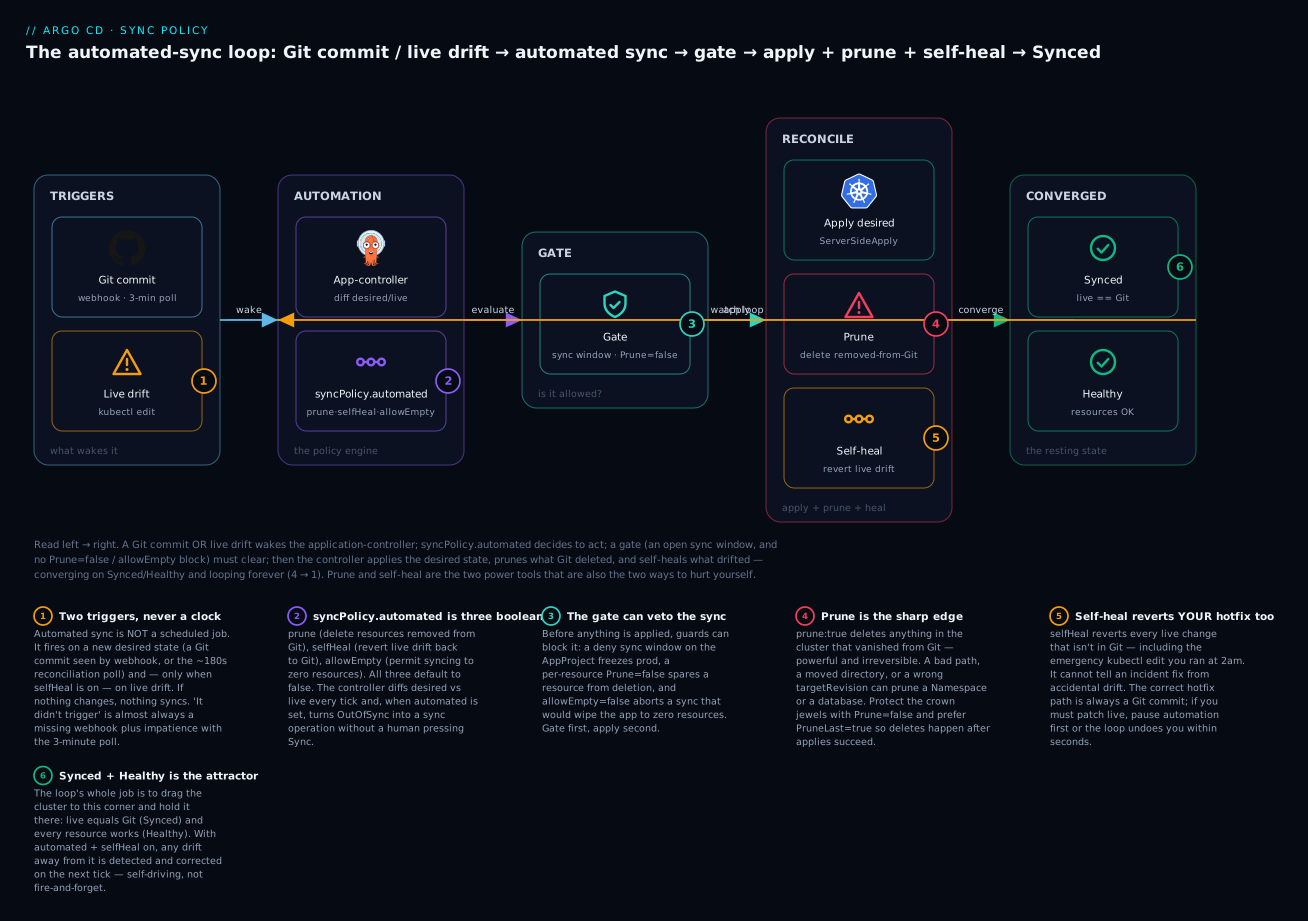
The two badges to burn in: prune (4) is the irreversible delete you protect with Prune=false and PruneLast=true, and self-heal (5) is the revert that will undo your live hotfix — which is why the only durable change is a Git commit. The gate (3) is where a sync window or a protected resource can veto the whole thing before anything is applied.
Hands-on lab
You will take a manually-synced app all the way to fully automated, then watch each behaviour fire: auto-sync on a Git push, self-heal on a live edit, prune on a Git deletion, and finally protect one resource so prune can’t touch it. Everything runs on a free local kind cluster, so nothing bills. The one thing you must supply is a Git repo you can push to (a throwaway GitHub repo is easiest), because the whole point is to change Git and watch Argo CD react.
No cluster on the author’s machine was used to fabricate the output below — every block is the representative shape Argo CD 2.13+/3.x prints for these commands. Your exact strings (timestamps, revisions, IPs) will differ; the structure will match.
Step 0 — Prerequisites. A kind cluster with Argo CD installed and the argocd CLI logged in (the end-state of the install lesson), plus a Git repo you control. Create the cluster and namespace if you don’t have them:
kind create cluster --name argo-lab
kubectl create namespace argocd
kubectl apply -n argocd -f https://raw.githubusercontent.com/argoproj/argo-cd/stable/manifests/install.yaml
kubectl -n argocd rollout status deploy/argocd-server   # wait for Ready
Step 1 — Seed the Git repo. In your repo, create a folder guestbook/ with two manifests — a Deployment and a ConfigMap — then commit and push:
mkdir -p guestbook
cat > guestbook/deployment.yaml <<'EOF'
apiVersion: apps/v1
kind: Deployment
metadata:
  name: guestbook-ui
spec:
  replicas: 1
  selector:
    matchLabels: { app: guestbook-ui }
  template:
    metadata:
      labels: { app: guestbook-ui }
    spec:
      containers:
        - name: guestbook-ui
          image: gcr.io/google-samples/gb-frontend:v5
          ports:
            - containerPort: 80
EOF
cat > guestbook/config.yaml <<'EOF'
apiVersion: v1
kind: ConfigMap
metadata:
  name: guestbook-config
data:
  greeting: "hello"
EOF
git add guestbook && git commit -m "seed guestbook" && git push
What just happened: Git now holds the desired state — one Deployment, one ConfigMap. This is the truth Argo CD will drive toward.
Step 2 — Create a MANUAL app and sync it once by hand. Point an Application at your repo with no sync policy, so it starts manual:
argocd app create guestbook \
  --repo https://github.com/your-org/gitops-lab.git \
  --path guestbook \
  --dest-server https://kubernetes.default.svc \
  --dest-namespace guestbook \
  --sync-option CreateNamespace=true
# application 'guestbook' created

argocd app get guestbook
# Name:      argocd/guestbook
# Sync Status:   OutOfSync from main
# Health Status: Missing
It’s OutOfSync and nothing is deployed — manual apps do not self-apply. Sync it once by hand to get a baseline:
argocd app sync guestbook
# ... Synced to main ...
# Sync Status: Synced
# Health Status: Healthy
What just happened: You reproduced the Tier 1 manual flow — a human pressed Sync. Now hand the wheel to Argo CD.
Step 3 — Go automated (prune + self-heal).
argocd app set guestbook \
  --sync-policy automated \
  --auto-prune \
  --self-heal
# application 'guestbook' updated

argocd app get guestbook -o yaml | grep -A4 syncPolicy
#   syncPolicy:
#     automated:
#       prune: true
#       selfHeal: true
What just happened: The app is now self-driving. No more manual sync. Watch the next three steps happen without you ever typing argocd app sync again.
Step 4 — Push a Git change, watch it auto-apply. Edit the ConfigMap in Git and push:
sed -i '' 's/greeting: "hello"/greeting: "namaste"/' guestbook/config.yaml
git commit -am "change greeting" && git push
Now watch — remember there’s no webhook here, so this fires on the ~3-minute poll:
kubectl -n guestbook get configmap guestbook-config -o jsonpath='{.data.greeting}' -w
# hello          <- old value
# namaste        <- flips within ~3 min as the poll picks up the commit
What just happened: Argo CD polled Git, saw the new commit, and applied it automatically. That lag is the poll interval, not a failure — a webhook would make it near-instant.
Step 5 — Drift the live cluster, watch self-heal revert it. Scale the Deployment by hand, the classic kubectl edit drift:
kubectl -n guestbook scale deploy/guestbook-ui --replicas=5
kubectl -n guestbook get deploy guestbook-ui -o jsonpath='{.spec.replicas}' -w
# 5      <- your manual change
# 1      <- self-heal drags it back to Git's replicas:1 within seconds
What just happened: Your live edit was drift. Git says replicas: 1, self-heal saw live ≠ Git, and reverted you. This is the loop from the diagram closing on drift.
Step 6 — Delete a manifest from Git, watch prune remove the resource. Remove the ConfigMap file and push:
git rm guestbook/config.yaml && git commit -m "remove configmap" && git push
# watch the resource disappear (on the next poll)
kubectl -n guestbook get configmap guestbook-config -w
# NAME               DATA   AGE
# guestbook-config   1      6m
# <deleted>          <- prune removes it once Argo CD sees the commit
What just happened: Prune did exactly its job — the resource left Git, so Argo CD deleted it from the cluster. Powerful, and irreversible. Now let’s protect one.
Step 7 — Protect a resource with Prune=false. Re-add the ConfigMap, but this time annotate it so prune can never delete it:
cat > guestbook/config.yaml <<'EOF'
apiVersion: v1
kind: ConfigMap
metadata:
  name: guestbook-config
  annotations:
    argocd.argoproj.io/sync-options: Prune=false
data:
  greeting: "namaste"
EOF
git add guestbook/config.yaml && git commit -m "re-add configmap, prune-protected" && git push
# ...wait for it to sync back in, confirm it exists, THEN delete from Git again:
git rm guestbook/config.yaml && git commit -m "remove prune-protected configmap" && git push

argocd app get guestbook
# GROUP  KIND       NAMESPACE  NAME              STATUS     HEALTH
#        ConfigMap  guestbook  guestbook-config  OutOfSync  Missing   <- shown as drift...
kubectl -n guestbook get configmap guestbook-config
# NAME               DATA   AGE
# guestbook-config   1      3m    <- ...but NOT deleted. Prune=false saved it.
What just happened: With Prune=false, removing the manifest from Git makes the app report OutOfSync (a visible warning) but Argo CD refuses to delete the resource. This is exactly the seatbelt you put on a PVC or a namespace so an accidental Git deletion can’t take out something irreplaceable.
Teardown. Remove everything so nothing lingers:
argocd app delete guestbook --cascade
# deletes the app AND its managed resources (guestbook-ui, namespace)
kind delete cluster --name argo-lab
# tears down the whole local cluster
What just happened: --cascade (the default) deletes the Application and the resources it manages via the Argo CD finalizer. kind delete removes the throwaway cluster. Nothing bills because nothing ran in a cloud.
Common mistakes and troubleshooting
| Symptom | Likely cause | Fix |
|---|---|---|
| Pushed to Git, app didn’t sync for minutes | No webhook; you’re waiting on the 3-min poll | Configure a Git webhook to /api/webhook; the poll is only a backstop |
| Automated app never auto-syncs at all | syncPolicy.automated not actually set, or automated.enabled: false |
argocd app get <app> -o yaml and check the block; argocd app set <app> --sync-policy automated |
| Prune deleted something important | prune: true with no Prune=false on the resource, or a bad path/targetRevision rendered it out |
Add Prune=false (or Prune=confirm) to critical resources; verify path before enabling prune |
| Self-heal keeps reverting an HPA / webhook change | Self-heal fights a controller that legitimately owns the field | Add the field to ignoreDifferences + RespectIgnoreDifferences=true, then keep self-heal on |
Your emergency kubectl edit gets undone |
Self-heal reverting drift — it can’t tell a hotfix from an accident | Commit the fix to Git, or pause automation (--sync-policy none) before patching live |
Sync blocked: ... would result in 0 resources |
allowEmpty: false caught an empty render (broken Kustomize/Helm, bad path) |
Fix the render; only set allowEmpty: true if zero resources is truly intended |
Replace=true caused an outage / lost data |
Replace recreated a Service/PVC/StatefulSet instead of merging | Remove Replace=true; only use it where apply genuinely fails and you know what’s overwritten |
SSA sync fails: conflict with field manager X |
Another controller owns a field you’re applying under Server-Side Apply | Cede the field via ignoreDifferences, or take ownership deliberately; that’s SSA working, not a bug |
| Mystery cloud load balancer keeps billing after teardown | Pruned a type: LoadBalancer Service with orphan, or force-deleted the app skipping finalizers |
Prune with foreground/background so the cloud LB finalizer runs and releases it |
| Failed sync retries forever, hammering the API | retry with no maxDuration/limit, on a manifest that will never validate |
Set a sane retry.limit and backoff.maxDuration; fix the manifest — retries won’t |
Sync stuck Progressing, never completes |
A PreSync/Sync hook Job is failing and blocking the sync | Inspect the hook Job logs; a failing hook holds the whole sync (see the sync-waves lesson) |
CR applied before its CRD → no matches for kind |
CRD and CR in the same sync, dry-run/validation ran too early | SkipDryRunOnMissingResource=true (+ sync waves so the CRD lands first) |
Three of these cost the most hours and deserve extra words.
1. “Automated sync is broken — I pushed and nothing happened.” Almost always, nothing is broken. Out of the box Argo CD has no webhook and polls every 180 seconds, so a fresh push simply hasn’t been noticed yet. Run argocd app get <app> and check the revision — if it still shows the old SHA, you’re inside the poll window; wait it out once to confirm, then add a webhook for speed. Only if the app never syncs after the poll should you check that automated is set and no deny sync window is active.
2. Prune deleting more than you meant. Prune is scoped to “resources this app manages that are no longer in Git.” The danger is a change that makes the rendered state wrong — a moved directory, a typo in path, a targetRevision on the wrong branch — so resources that should still be there vanish and get pruned. allowEmpty: false catches the all-gone case, not “wrong but non-empty.” Two habits prevent tears: put Prune=false on anything irreplaceable (PVCs, namespaces, PVs, data StatefulSets), and run argocd app diff before enabling prune on an unfamiliar app so you see what would go.
3. Self-heal and legitimate controllers at war. The most common “Argo CD is flapping” report is self-heal reverting a field a HorizontalPodAutoscaler or mutating webhook is supposed to own: Argo CD sets spec.replicas from Git, the HPA sets it from load, Argo CD sets it back, forever. ignoreDifferences on that JSON path stops the diff; RespectIgnoreDifferences=true stops the sync from pushing the field too. Do both, then leave self-heal on. Tuning ignores before enabling self-heal in any autoscaled environment is the order that keeps you sane.
Cheat-sheet
The policy fields, at a glance:
| Field / option | What it does |
|---|---|
syncPolicy.automated |
Presence enables auto-sync (controller presses Sync for you) |
automated.prune: true |
Delete cluster resources removed from Git |
automated.selfHeal: true |
Revert live drift back to Git automatically |
automated.allowEmpty: true |
Permit an auto-sync that renders to zero resources |
automated.enabled: false |
(Recent versions) pause automation, keep settings |
retry.limit / retry.backoff.* |
Retry a failed sync with exponential backoff |
syncOptions: CreateNamespace=true |
Create the destination namespace |
syncOptions: PruneLast=true |
Prune after all applies succeed and are healthy |
syncOptions: PrunePropagationPolicy=foreground |
Deletion propagation (foreground/background/orphan) |
syncOptions: ServerSideApply=true |
Apply via Server-Side Apply (field ownership) |
syncOptions: Replace=true |
Use replace/create instead of apply (dangerous) |
syncOptions: ApplyOutOfSyncOnly=true |
Only apply resources currently OutOfSync |
syncOptions: RespectIgnoreDifferences=true |
Don’t push ignoreDifferences fields during sync |
syncOptions: Validate=false |
Skip client-side schema validation |
syncOptions: SkipDryRunOnMissingResource=true |
Skip dry-run when the CRD isn’t installed yet |
syncOptions: FailOnSharedResource=true |
Fail if a resource is managed by another app |
annotation sync-options: Prune=false |
Never prune this specific resource |
annotation sync-options: Prune=confirm |
Require human confirmation before pruning it |
annotation sync-options: Delete=false |
Don’t delete on Application deletion (cascade) |
The commands you’ll actually type:
| Command | What it does |
|---|---|
argocd app set <app> --sync-policy automated |
Turn on automated sync |
argocd app set <app> --auto-prune --self-heal |
Enable prune and self-heal |
argocd app set <app> --sync-policy none |
Turn automation back off (manual) |
argocd app set <app> --sync-option CreateNamespace=true |
Add a sync option |
argocd app sync <app> --prune |
One-off manual sync that also prunes |
argocd app sync <app> --dry-run |
Preview a sync without applying |
argocd app diff <app> |
Show live-vs-Git diff (what a sync would change) |
argocd app get <app> |
Sync status, health, and per-resource state |
argocd app history <app> |
Past syncs (to roll back with rollback) |
argocd proj windows list <project> |
List sync windows and whether they’re active |
kubectl -n argocd edit configmap argocd-cm |
Change timeout.reconciliation (poll interval) |
Interview and exam questions
Q: What is the difference between manual and automated sync, and what does turning on automated actually change?
A: Manual sync detects drift and a OutOfSync state but waits for a human to run argocd app sync. Automated sync lets the application-controller run the sync itself. Crucially, automated only changes who triggers the sync and permits prune/self-heal — it doesn’t change what a sync is (render, diff, apply). Bare automated with no prune/selfHeal still won’t delete anything or fight drift.
Q: A teammate says “automated sync runs every 3 minutes.” Correct them.
A: Automated sync is not scheduled. It fires on events: a new Git commit (seen instantly via webhook, or up to timeout.reconciliation, default 180s, via polling) and, when selfHeal is on, on live drift. The 180s is the polling fallback for detecting Git changes when there’s no webhook — not a sync timer. If nothing changes, nothing syncs.
Q: What does prune do, and what happens without it?
A: With prune: true, a resource removed from Git is deleted from the cluster. Without it, that deletion is a silent no-op: the resource keeps running as an orphan and the app shows OutOfSync forever. Prune keeps the cluster matching Git exactly; the risk is that a wrong render (bad path/targetRevision) can prune things you didn’t mean to delete.
Q: How do you stop prune from ever deleting a specific PVC?
A: Annotate the PVC manifest with argocd.argoproj.io/sync-options: Prune=false. Argo CD will show OutOfSync if it’s removed from Git but will never delete it. Prune=confirm is the middle ground — prune still happens but requires explicit human confirmation first.
Q: Explain the self-heal-versus-hotfix problem and the correct way to change prod live.
A: Self-heal reverts any live change not in Git, and it can’t distinguish an emergency fix from accidental drift — so your kubectl edit gets undone within seconds. The correct hotfix path is to commit the change to Git (which is also your audit trail). If you must patch live immediately, pause automation first (--sync-policy none or automated.enabled: false), patch, then reconcile Git. With self-heal on, Git is the only durable way to change the cluster.
Q: Why does self-heal sometimes fight a HorizontalPodAutoscaler, and how do you fix it?
A: Git specifies spec.replicas; the HPA also sets it from load. Self-heal reverts to Git, the HPA re-scales, forever. Fix it by adding /spec/replicas to ignoreDifferences and setting RespectIgnoreDifferences=true so sync stops pushing that field. Tune ignores before enabling self-heal in any autoscaled environment.
Q: What is allowEmpty and when would you set it to true?
A: By default (false) automated sync refuses to apply a desired state that renders to zero resources, because that’s almost always a broken render that would prune everything. You set allowEmpty: true only when zero resources is a legitimate desired state — for example an app of purely optional add-ons that can all be off.
Q: When would you use ServerSideApply=true, and what new failure can it introduce?
A: Use SSA for large CRDs that blow past the 256 KB client-side last-applied-configuration annotation limit, and when you want proper per-field ownership. It applies as field manager argocd-controller. The new failure is a field-manager conflict when another controller already owns a field you set — which is SSA correctly surfacing co-ownership, resolved by ceding the field via ignoreDifferences or taking ownership deliberately.
Q: What’s dangerous about Replace=true?
A: It switches from a merging apply to kubectl replace/create, overwriting the whole object. It wipes fields owned by other controllers and, for an immutable-field change, can force a delete-and-recreate — dropping a Service’s clusterIP, causing downtime, or losing StatefulSet/PVC data. Use it only where apply genuinely fails and you understand exactly what gets overwritten.
Q: You tear down an app and a cloud load balancer keeps billing. What happened and how do you prevent it?
A: The type: LoadBalancer Service was pruned with orphan propagation (or the Application was force-deleted, skipping finalizers), so the cloud cleanup finalizer never ran and the Azure LB / AWS ELB / GCP forwarding rule was stranded. Prevent it by pruning with foreground or background so the finalizer runs and the cloud releases the load balancer.
Q: What is a sync window and where is it configured?
A: A sync window is an allow or deny time window (a cron schedule + duration) defined on the AppProject, gating which apps/namespaces/clusters may sync when. It’s how you enforce a change freeze: a deny window with manualSync: false blocks even human syncs. When allow and deny overlap, deny wins.
Q: A sync fails once due to a transient API timeout. How do you make Argo CD retry sensibly instead of giving up or hammering the cluster?
A: Set a retry block: limit (how many retries) plus backoff.duration, factor, and maxDuration. That retries with exponential backoff — surviving transient failures — while limit and maxDuration stop a retry storm on a manifest that will never validate.
Key takeaways
- Automated sync closes the loop manual sync leaves open. Manual detects drift and waits; automated corrects it.
syncPolicy.automatedonly changes who triggers a sync and permits prune/self-heal — a sync is still render, diff, apply. - The three booleans default to false and are independent.
prunedeletes what Git removed,selfHealreverts live drift,allowEmptypermits a zero-resource sync. Bareautomatedauto-applies Git but deletes nothing and fights no drift. - Automated sync is event-driven, never scheduled. It fires on a Git commit (instant via webhook, else the ~180s poll) and, with
selfHeal, on live drift. “It didn’t trigger” is almost always a missing webhook plus impatience with the poll. - Prune is powerful and irreversible. Protect irreplaceable resources with
Prune=false(orPrune=confirm), preferPruneLast=true, and never prune atype: LoadBalancerService withorphanor you’ll strand a billing cloud load balancer on AKS, EKS or GKE. - Self-heal cannot tell a hotfix from an accident. With it on, Git is the only durable way to change the cluster — commit the fix, or pause automation before patching live. Tune
ignoreDifferences(+RespectIgnoreDifferences=true) before enabling self-heal where autoscalers or webhooks own fields. syncOptionstune the apply itself.CreateNamespace,ServerSideApply(the modern direction),PruneLast,ApplyOutOfSyncOnly, and the CRD helpersValidate=false/SkipDryRunOnMissingResource— plusReplace=trueonly when apply truly fails, because it can recreate resources and lose data.- Match the policy to the blast radius. Full automated+prune+selfHeal for dev/staging; prod gates prune, protects data, and uses
AppProjectsync windows — high-risk prod often stays manual behind an approved change window.