In a nutshell
Level: Beginner · Time: ~40 min · Prereqs: basic IT literacy (you know what a server, a network and a file are) — no prior cloud, no programming
Think of AWS the way you think of the electricity grid. You do not build a power station in your garden, hire engineers to run it, and pay for it whether the lights are on or off. You plug into a socket, use exactly the power you need, and a meter tracks it so you pay only for what you consumed. Cloud computing is that same idea applied to computers — servers, storage, databases, networking — and AWS is the largest such “utility” for computing on the planet. You rent capacity by the second, and hand it back when you are done.
This lesson answers the five questions every AWS beginner has to settle before anything else makes sense: what the cloud (and AWS) actually is, where it physically runs, how your account is organised, who is responsible for security, and how you pay. Everything later in the course — networking, compute, storage, security, architecture — is built on these five answers. Get them straight and the two-hundred-plus services in the AWS catalogue stop looking like an intimidating wall and start looking like labelled building blocks.
Two mental models to carry through the whole lesson. First, the map: AWS is a set of Regions (big geographic areas like Mumbai or Ireland), each Region is split into Availability Zones (separate data-centre campuses), and a thin edge layer of hundreds of small sites sits close to your users for speed. Second, the meter: nothing is free by default — compute, storage and especially moving data out of AWS are all metered, so cloud cost control is mostly the discipline of turning things off and choosing the right Region. Keep the map and the meter in your head and the rest of this lesson will click.
If you want to skim, the fastest orientation is the beginner tour below (the six advantages, the service and deployment models); the exam-and-architect depth lives in Going deeper, the do-it-yourself work in Practice challenges, and the traps in Common beginner mistakes.
Every cloud journey starts with the same handful of ideas, and Amazon Web Services — the largest cloud provider on the planet — is no exception. Before you can launch a server, secure a workload, or design a resilient architecture, you need a clear mental model of what AWS actually is, where it physically runs, how your account is organised, who is responsible for what, and how you pay for it. Get these foundations right and everything else in the AWS catalogue — and there are now well over two hundred services — clicks into place. Get them wrong and you will spend months confused about why your application is slow in one part of the world, why you got an unexpected bill, or why a security incident was “your fault” when “it’s the cloud”.
This is the very first lesson of the AWS Zero-to-Hero course, so we assume zero prior knowledge of cloud computing and define every term the first time it appears. We still go deeper than a typical introduction: by the end you will be able to reason about Region selection like an architect, explain the difference between a Savings Plan and a Reserved Instance, and draw the shared-responsibility line on a whiteboard. Everything here maps directly to the AWS Certified Cloud Practitioner (CLF-C02) exam, where global infrastructure, billing and pricing, and the cloud value proposition together account for a large share of the marks.
Learning objectives
By the end of this lesson you can:
- Explain in plain English what cloud computing and AWS are, and distinguish IaaS, PaaS and SaaS with AWS examples of each.
- Describe the AWS global infrastructure — Regions, Availability Zones, Local Zones, Wavelength Zones and edge locations — and apply sensible Region-selection criteria.
- Lay out the account and organisation model: the root user, IAM, AWS accounts as a billing and security boundary, and AWS Organizations with organizational units (OUs).
- Draw the shared-responsibility model and correctly place security duties on either the AWS or the customer side of the line.
- Compare every core pricing model — On-Demand, Reserved Instances, Savings Plans, Spot, and the Free Tier — and name the levers that drive a bill.
- Use the billing and cost-management tools (Billing console, Cost Explorer, AWS Budgets, Cost and Usage Report) and choose an appropriate AWS Support plan.
- Recognise the core services across compute, storage, networking, database and identity so the rest of the course has a scaffold to hang on.
Prerequisites & where this fits
You need only basic IT literacy — comfort with the idea of a server, a network and a file — and an email address and payment card if you want to follow the optional hands-on lab in a real account. No programming and no prior cloud experience is assumed; we build the vocabulary from the ground up. This is the foundation lesson of the Fundamentals module in the AWS Zero-to-Hero course, and every later lesson — identity, networking, compute, storage, architecture and the certification kit — leans on the concepts established here. The natural next step after this lesson is AWS IAM Fundamentals: Users, Groups, Roles, Policies & the Evaluation Logic, because identity is the foundation of everything you secure on AWS.
What is cloud computing, and what is AWS?
Cloud computing is the on-demand delivery of IT resources — compute power, storage, databases, networking, and higher-level services — over the internet, with pay-as-you-go pricing. Instead of buying servers, racking them in a data centre you own, and paying for that capacity whether you use it or not, you rent exactly what you need, when you need it, and hand it back when you are done. The provider owns and operates the physical infrastructure; you consume it as a service.
The economic shift this represents is worth stating precisely, because the exam tests it directly. Running your own data centre is a capital expenditure (CapEx) model: you spend a large sum up front on hardware that then depreciates. The cloud turns this into an operational expenditure (OpEx) model: you pay a variable, ongoing fee for consumption. Alongside that, the cloud gives you elasticity (scale capacity up and down to match demand), agility (provision a server in minutes, not months), economies of scale (AWS buys hardware by the warehouse, so its costs — and therefore your prices — fall over time), and global reach (deploy close to users worldwide without building anything).
Amazon Web Services (AWS) is Amazon’s cloud platform: the market-leading provider, launched in 2006, offering a vast catalogue of services you assemble like building blocks. You interact with AWS through four main surfaces, and you will use all of them across your career:
| Surface | What it is | When you use it |
|---|---|---|
| AWS Management Console | A web UI for clicking through services | Learning, exploring, occasional manual tasks |
| AWS CLI | A command-line tool (aws ...) for scripting |
Automation, repeatable operations, CI/CD |
| SDKs | Language libraries (Python boto3, JS, Java, Go, …) |
Building applications that call AWS |
| Infrastructure as Code | CloudFormation, CDK, or Terraform | Declaring infrastructure so it is versioned and repeatable |
A subtle but important point for beginners: the Console is the friendliest way to learn, but production environments are almost never built by clicking. Professionals define infrastructure as code so it is reviewable, repeatable and auditable. We will use the Console and CLI in early labs and graduate to infrastructure as code later in the course.
The six advantages of cloud computing
The economics above (CapEx→OpEx, elasticity, agility, economies of scale, global reach) are AWS’s own framing, and AWS packages them into a canonical list of six advantages that the CLF-C02 exam quotes almost verbatim. It is worth learning as a list, because “which advantage does this scenario illustrate?” is a stock exam question and a genuinely useful lens when you justify a cloud decision to a manager.
| # | Advantage (AWS’s wording) | What it means in plain English |
|---|---|---|
| 1 | Trade capital expense for variable expense | Stop paying a big lump sum up front for servers you might not use; pay a small ongoing fee only for what you consume (CapEx → OpEx). |
| 2 | Benefit from massive economies of scale | AWS buys hardware for millions of customers at once, so its per-unit cost — and therefore your price — is lower than you could ever achieve alone, and it keeps falling. |
| 3 | Stop guessing capacity | No more buying for a peak that may never come or a launch that might flop. Scale up when demand arrives and down when it leaves. |
| 4 | Increase speed and agility | New resources are minutes away, not the weeks or months a hardware purchase used to take, so teams experiment and ship faster. |
| 5 | Stop spending money running and maintaining data centres | Racking servers, replacing failed disks, and cooling a building are undifferentiated heavy lifting — let AWS do it and spend your effort on your product instead. |
| 6 | Go global in minutes | Deploy the same application into Regions around the world with a few clicks, putting it close to users everywhere without building anything. |
A quick way to remember the point of the list: the first two are about money (cheaper, and cheaper over time), the middle two are about matching supply to demand and moving fast, and the last two are about offloading toil and reaching the world. When an exam scenario says “a startup does not want to pay for hardware before it has customers”, that is advantage 1 and 3; “a bank wants to open in three new countries this quarter” is advantage 6.
IaaS, PaaS and SaaS — the three service models
Cloud services sit on a spectrum of how much the provider manages versus how much you manage. Three labels capture the main points on that spectrum, and the CLF-C02 exam expects you to classify a service correctly.
| Model | What you manage | What AWS manages | AWS example |
|---|---|---|---|
| IaaS (Infrastructure as a Service) | OS, runtime, application, data | Virtualisation, servers, storage, networking, facilities | Amazon EC2 (virtual machines), Amazon VPC, EBS |
| PaaS (Platform as a Service) | Application and data only | OS, runtime, scaling, patching, infrastructure | AWS Elastic Beanstalk, AWS Lambda, Amazon RDS |
| SaaS (Software as a Service) | Just your configuration and data | Everything — the whole application | Amazon WorkMail, Amazon Chime; externally, Salesforce |
The trade-off runs in one direction: as you move from IaaS towards SaaS you gain convenience and lose control. IaaS such as EC2 gives you a bare virtual machine — total flexibility, but you patch the OS and manage scaling yourself. PaaS such as Lambda or RDS hands those operational chores to AWS so you focus on code or data. SaaS is a finished product you simply consume. There is no “best” model; senior architects choose the highest level of abstraction that still meets the requirement, because every layer you hand to AWS is a layer you no longer have to operate.
A fourth term you will hear is serverless, which is not a separate model but a way of consuming PaaS where you never see or manage a server at all and you pay only for actual execution — Lambda, DynamoDB on-demand, S3 and EventBridge are the canonical examples.
Cloud deployment models: cloud, hybrid and on-premises
Service models (IaaS/PaaS/SaaS) describe how much AWS manages. Deployment models describe a different axis: where the workload physically lives and how much of it is in the cloud at all. The exam tests these three, and real organisations sit somewhere on this spectrum for years during a migration.
| Deployment model | What it is | When you see it |
|---|---|---|
| Cloud (all-in) | The workload runs entirely on cloud infrastructure; you own no servers. | Startups born in the cloud; modernised applications; anything new. |
| Hybrid | Some components run in the cloud and some stay on-premises (or in a private data centre), connected over VPN or AWS Direct Connect. | Enterprises mid-migration; workloads pinned on-prem by latency, licensing or regulation while the rest moves to AWS. |
| On-premises / private cloud | You run cloud-style technology (virtualisation, automation, self-service) in your own data centre. | Strict data-residency or ultra-low-latency needs; often the starting point before a migration. |
Two clarifications beginners find useful. First, “private cloud” does not mean AWS — it means cloud-style operation on infrastructure you own; AWS’s answer for people who need AWS services physically on-premises is AWS Outposts (AWS-managed racks in your building), which is technically a hybrid deployment. Second, hybrid is the normal reality, not a failure state: most large enterprises run hybrid for years, using services like Direct Connect (a private network link into AWS), AWS Storage Gateway (bridging on-prem storage to S3), and VPN to knit the two worlds together. The trajectory the industry follows is on-premises → hybrid → cloud, and knowing where a scenario sits on that line tells you which tools it needs.
The AWS global infrastructure
AWS does not run from one giant building; it runs from a deliberately layered, globally distributed physical footprint. Understanding this layering is the single most useful thing a beginner can learn, because it underpins availability, latency, durability, data residency and cost.
Regions
A Region is a separate geographical area — for example eu-west-1 (Ireland), us-east-1 (N. Virginia), or ap-south-1 (Mumbai). Each Region is fully isolated from the others: it has its own infrastructure and its own set of services, and (with rare, explicit exceptions) your data stays in the Region you put it in. This isolation is a feature — a problem in one Region does not spill into another — and it is also the basis of data sovereignty: if regulation says European personal data must remain in Europe, you choose a European Region and the data physically lives there.
Two consequences trip up newcomers constantly:
- Most services are Regional. When you create an S3 bucket or an EC2 instance, you create it in a Region. If you cannot find a resource you “definitely created”, you are almost always looking in the wrong Region in the Console.
- A few services are global. IAM, Amazon Route 53 (DNS), Amazon CloudFront (CDN), and AWS Organizations are global — they are not tied to one Region. Knowing which services are global versus Regional is a recurring exam theme.
Availability Zones
Inside every Region are multiple Availability Zones (AZs) — at least three in most Regions. An AZ is one or more discrete data centres with independent power, cooling and physical security, housed in separate facilities far enough apart to avoid a single local disaster yet close enough (connected by low-latency, high-bandwidth private fibre) to support synchronous replication. AZs within a Region are written with a letter suffix, such as us-east-1a, us-east-1b, us-east-1c.
The reason AZs exist is high availability. By spreading your servers across two or three AZs and putting a load balancer in front, your application survives the loss of an entire data centre with no downtime. This “deploy across multiple AZs” pattern is the most fundamental resilience technique on AWS, and many managed services (such as Amazon RDS in Multi-AZ mode) automate it for you.
Local Zones, Wavelength, edge locations and more
Beyond Regions and AZs, AWS extends its footprint closer to users and devices through several specialised location types. The table summarises the layers from broadest to most edge-ward.
| Layer | What it is | Primary purpose |
|---|---|---|
| Region | Isolated geographic area of multiple AZs | Where you deploy the bulk of workloads; data residency |
| Availability Zone | One+ discrete data centres within a Region | High availability within a Region |
| Local Zone | AWS infrastructure placed in a large metro, near users | Single-digit-millisecond latency for things like media, gaming, EDA |
| Wavelength Zone | AWS compute/storage embedded inside telco 5G networks | Ultra-low-latency mobile/edge apps over 5G |
| Edge location / PoP | Hundreds of points of presence worldwide | Caching and content delivery via CloudFront; DNS via Route 53 |
| Regional Edge Cache | Larger mid-tier caches behind edge PoPs | Improve cache hit ratio for CloudFront |
| AWS Outposts | AWS racks installed in your own data centre | Run AWS services on-premises (hybrid, low-latency, residency) |
You do not need to deploy to the exotic layers on day one — most workloads live happily in Regions and AZs — but you must recognise them. The two that recur in exams are edge locations (the CloudFront content-delivery network that caches content near users to cut latency) and Local Zones / Wavelength (for latency-sensitive and 5G edge use cases). Outposts is the answer whenever a question describes needing AWS services running physically on-premises for latency or data-residency reasons.
Choosing a Region
Region selection is a genuine architectural decision, not a default, and the CLF-C02 exam asks about it. Weigh five criteria:
| Criterion | Question to ask | Why it matters |
|---|---|---|
| Latency / proximity | Where are my users? | Closer Region → lower latency → better experience |
| Compliance / data residency | Does the law require data to stay in a country? | Some data legally cannot leave a jurisdiction |
| Service availability | Is the service (or instance type) I need available here? | Newer services launch in a subset of Regions first |
| Cost | What is the per-unit price here? | Prices differ between Regions — sometimes materially |
| Sustainability | Does this Region run on a high share of renewable energy? | Increasingly part of corporate sustainability goals |
A practical rule of thumb: start from your users (latency) and your legal obligations (residency), then check the service is offered there and compare price. Do not blindly default to us-east-1 just because tutorials do — it is often cheapest and has the newest services, but it may be the wrong choice for compliance or latency.
Region selection in practice: a worked decision
The five criteria above are easy to recite and surprisingly easy to get wrong under pressure, so let us run them on a concrete case the way an architect actually would.
Scenario. You are building a customer-facing payments API for an Indian fintech. Regulation (the RBI’s data-localisation directive) requires that payment data is stored in India. Your users are overwhelmingly in India; you want a disaster-recovery copy in a second Indian location; and you would like to keep the bill sensible.
Walk the criteria in priority order — compliance first, then latency, then service availability, then cost — because a hard legal constraint can eliminate options that latency or price would otherwise favour:
| Criterion | Applied to this scenario | Verdict |
|---|---|---|
| Compliance / residency | Payment data must stay in India. Only Indian Regions qualify: ap-south-1 (Mumbai) and ap-south-2 (Hyderabad). | Eliminates every non-Indian Region outright. |
| Latency / proximity | Users are in India; both Indian Regions give single-to-low-double-digit-ms latency to most of the country. | Mumbai as primary (largest, most services); Hyderabad as DR. |
| Service availability | Confirm every service you need (RDS engine, KMS, the specific instance family) is offered in both Regions — newer/second Regions sometimes lag. | Check before committing DR to ap-south-2. |
| Cost | Indian Regions are a little pricier than us-east-1, but residency is non-negotiable, so price is a tie-breaker, not a decider. | Accept the modest premium. |
Decision: primary in ap-south-1 (Mumbai), disaster recovery in ap-south-2 (Hyderabad) — two physically separate Regions, both inside India, satisfying residency and giving a real cross-Region DR story.
The instructive wrong answer is the tutorial reflex: “just use us-east-1 (N. Virginia), it is cheapest and has every service.” Here that would (a) violate the localisation law by storing payment data in the United States, and (b) add roughly 200+ ms of round-trip latency for Indian users. This is exactly why the exam frames Region choice as a deliberate architectural decision and why “default to us-east-1” is a trap. The lesson generalises: a legal residency requirement is a filter you apply before anything else; latency and cost only choose among the Regions that are still legal.
The AWS account and organisation model
An AWS account is the fundamental container for your resources, and — crucially — it is both a billing boundary and a security/isolation boundary. Everything you create lives inside an account, and everything that account consumes appears on one bill. Understanding the account model prevents two of the most common and expensive beginner mistakes: using the all-powerful root user for daily work, and cramming production and experimentation into a single account.
The root user
When you first create an AWS account you sign up with an email address and password; this creates the root user, which has complete, unrestricted access to everything in the account, including the ability to close the account and change billing details. Because it is so powerful, the root user is dangerous: the universal best practice is to use it only for the handful of tasks that genuinely require it (such as the initial account setup and a few account-level settings), enable multi-factor authentication (MFA) on it immediately, and then never use it for day-to-day work. For everyday tasks you create separate identities — covered next.
IAM identities
AWS Identity and Access Management (IAM) is the (global) service that controls who can do what in your account. You create IAM users for people or IAM roles for workloads and federated/temporary access, attach policies that grant specific permissions, and grant the least privilege necessary. The next lesson covers IAM in depth; for now, the foundational takeaway is simple: the root user is for emergencies; everyone and everything else uses IAM identities with scoped permissions and MFA.
Multiple accounts and AWS Organizations
Serious AWS estates are almost never a single account. Because the account is a hard isolation boundary, organisations create multiple accounts — for example separate accounts for production, staging, development, security tooling and logging — so that a mistake or a breach in one is contained and so that billing and access are cleanly separated. AWS Organizations is the (global) service that lets you centrally create and manage many accounts as one tree. Its building blocks:
| Concept | What it is |
|---|---|
| Management (payer) account | The account at the top that creates the organization and consolidates billing |
| Member account | Any account that belongs to the organization |
| Organizational Unit (OU) | A folder grouping accounts (e.g. Prod, Non-Prod, Security) for shared governance |
| Service Control Policy (SCP) | A guardrail that sets the maximum permissions any account/OU may use (it never grants — it only limits) |
| Consolidated billing | One bill across all accounts, with volume discounts pooled across the organization |
A few benefits to internalise: consolidated billing rolls every account into one invoice and pools usage so you reach volume-discount tiers faster; SCPs let you enforce organisation-wide guardrails (for example, “no account may disable CloudTrail” or “only these Regions are allowed”); and AWS Control Tower is a higher-level service that sets up a well-architected multi-account “landing zone” with sensible defaults on top of Organizations. You will build exactly this in the course capstone — for now, simply know that the mature pattern is many accounts under one organization, not one big account.
The shared-responsibility model
Security in the cloud is a partnership, and the shared-responsibility model is the framework that draws the line between what AWS secures and what you secure. Misplacing this line is the root cause of a large fraction of real-world cloud breaches, so memorise it: AWS is responsible for the security of the cloud; you are responsible for security in the cloud.
- AWS — security of the cloud: the physical data centres, the hardware, the host operating system and virtualisation layer, and the global network — the infrastructure that runs all the services.
- You — security in the cloud: your data, the configuration of the services you use, identity and access management, network and firewall configuration, client- and server-side encryption, and (for IaaS) the guest operating system and its patches.
The exact split shifts with the service model, which is the nuance the exam loves. For IaaS such as EC2 you shoulder more — including patching the guest OS. For managed/PaaS services such as RDS or Lambda, AWS additionally takes on the OS and runtime, so your responsibilities shrink towards data, access and configuration. For SaaS you are mostly responsible only for your data and who can access it. The table makes the constants explicit.
| Responsibility | Who owns it (almost always) |
|---|---|
| Physical security of data centres | AWS |
| Hardware, host OS, virtualisation, global network | AWS |
| Patching the guest OS on an EC2 instance | Customer |
| IAM — users, roles, policies, MFA | Customer |
| Data — classification, encryption choices, backups | Customer |
| Security-group / firewall and network configuration | Customer |
| Patching the managed engine behind RDS/Lambda | AWS |
A useful one-liner for the exam: “AWS secures the infrastructure; you secure your data, your identities, and your configuration.” If a breach happened because an S3 bucket was left public or an IAM key was leaked, that sits squarely on the customer side of the line.
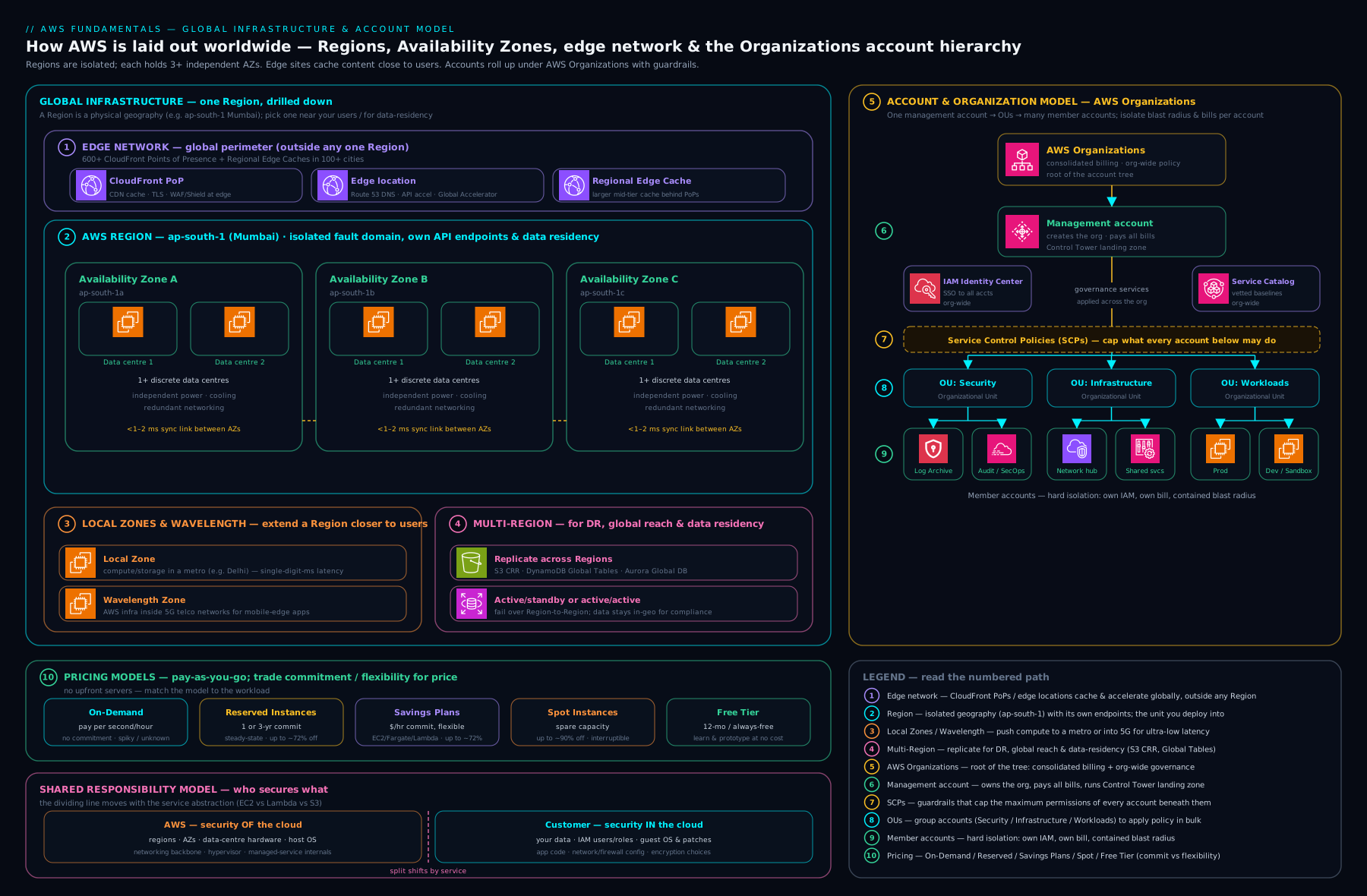
The diagram above ties the picture together: Regions containing multiple Availability Zones, the edge and Local/Wavelength layers reaching closer to users, and — overlaid on that physical footprint — the logical account model of an AWS Organization with OUs and member accounts, all consolidated under one payer and one shared-responsibility line.
AWS pricing models
AWS pricing rests on three principles that the exam states almost verbatim: pay-as-you-go (pay only for what you use, with no long-term commitment required), save when you commit (commit to consistent usage and pay less), and pay less as AWS grows (economies of scale push prices down over time). On top of those principles sit the specific purchasing options for compute, which differ chiefly in the commitment you make and the discount and flexibility you get in return.
| Pricing model | What it is | Discount vs On-Demand | Best for |
|---|---|---|---|
| On-Demand | Pay per second/hour, no commitment | Baseline (none) | Spiky, unpredictable, or short-lived workloads; dev/test |
| Reserved Instances (RIs) | Commit to a specific instance type for 1 or 3 years | Up to ~72% | Steady, predictable workloads on a known instance family |
| Savings Plans | Commit to a $/hour spend for 1 or 3 years | Up to ~72% | Steady spend where you want flexibility across instance types/Regions (and, for Compute Savings Plans, across EC2, Fargate and Lambda) |
| Spot Instances | Bid on AWS’s spare capacity; can be reclaimed | Up to ~90% | Fault-tolerant, interruptible work — batch, CI, big-data, stateless workers |
| Dedicated Hosts | A whole physical server reserved for you | Premium | Licensing tied to physical cores, strict compliance/isolation |
A few distinctions are worth labouring because they are classic exam traps:
- Reserved Instances vs Savings Plans. Both reward a 1- or 3-year commitment with similar discounts. RIs commit you to a fairly specific configuration; Savings Plans instead commit you to a steady dollar-per-hour and automatically apply that discount across whatever you run — Compute Savings Plans are the most flexible, covering EC2, Fargate and Lambda across families and Regions, while EC2 Instance Savings Plans trade some flexibility for a slightly bigger discount within a family in a Region. For most teams today, Savings Plans are the simpler choice.
- Spot. You get up to ~90% off by using AWS’s spare capacity, but AWS can reclaim the instance with a two-minute warning when it needs the capacity back. Spot is brilliant for anything that can tolerate interruption and terrible for a single, stateful database.
- Free Tier. AWS offers a Free Tier so you can learn without a bill, in three flavours: 12-months-free (e.g. 750 hours/month of a
t2.micro/t3.microEC2 instance for the first year), always-free (e.g. 1 million AWS Lambda requests per month, 25 GB of DynamoDB, forever), and trials (short-term free access to specific services). The Free Tier is how you will run the labs in this course — but watch the limits, because exceeding them quietly starts charging you.
What drives a bill
Whatever purchasing option you choose, three fundamental factors determine the cost of nearly everything on AWS — the exam phrases them as the “three drivers of cost”:
- Compute — how much processing you consume (instance hours, Lambda invocations and duration, Fargate vCPU/memory-seconds).
- Storage — how much data you store, and in which storage class (e.g. S3 Standard vs S3 Glacier).
- Data transfer — moving data out of AWS to the internet, and sometimes between Regions/AZs.
Two cost truths that save real money: data transfer into AWS is generally free, while data transfer out to the internet is charged (so “egress” is the line item that surprises people), and you keep paying for provisioned resources you forget about — an idle EC2 instance, an unattached EBS volume, or an unused Elastic IP all cost money whether or not you use them. Cloud cost discipline is mostly the habit of turning things off.
A worked example: what a small web app actually costs
Abstract pricing rules only sink in once you cost a real thing, so let us bill a modest web application end to end. Imagine a single small server, a little storage, and some traffic out to users. All figures below are representative (prices vary by Region and change over time — always confirm in the Pricing Calculator); the aim is to teach the shape of a bill, not to quote a live price.
Assume, in ap-south-1 (Mumbai), running 24×7 for a full month (≈ 730 hours):
| Line item | Assumption | Representative unit price | Monthly cost |
|---|---|---|---|
| EC2 compute | 1 × t3.small On-Demand, 730 hrs |
~$0.0224 / hr | ~$16.35 |
| EBS storage | 20 GB gp3 root volume |
~$0.0924 / GB-month | ~$1.85 |
| S3 storage | 10 GB S3 Standard (assets) | ~$0.025 / GB-month | ~$0.25 |
| Data transfer out | 100 GB to the internet | first 100 GB/month free | ~$0.00 |
| Baseline total | ≈ $18.45 / month |
Now change one assumption and watch the bill move, because this is where beginners get surprised. Suppose the app goes viral and serves 600 GB of data out to the internet instead of 100 GB. Data transfer in is still free; the first 100 GB/month out is still free; the remaining 500 GB is charged at roughly $0.1093/GB:
Egress (600 GB):  first 100 GB free  +  500 GB × $0.1093  ≈  $54.65
New monthly total: ~$18.45 + ~$54.65  ≈  $73.10
The compute barely moved, but egress became the biggest line on the bill — the single most common “why is my bill so high?” story on AWS. Two levers fix it: put a CloudFront CDN in front (its egress is cheaper per GB and its always-free tier includes ~1 TB/month out), and keep chatty traffic inside one Availability Zone where it is free, because traffic between AZs costs about $0.01/GB in each direction — invisible in a diagram, very visible on the invoice.
Finally, apply a commitment. This server runs 24×7, so it is a textbook Savings Plan candidate. A 1-year, no-upfront Compute Savings Plan might cut the EC2 line by roughly 40% (a 3-year, all-upfront commitment approaches the ~72% ceiling):
EC2 On-Demand:            ~$16.35 / month
EC2 with 1-yr Compute SP: ~$16.35 × (1 − 0.40)  ≈  $9.81 / month
Three lessons fall out of this one worked example, and they are the exam’s “three drivers of cost” made concrete: compute is steady and easy to discount with a commitment; storage is cheap and linear; and data transfer out is the sneaky, non-linear driver that dominates at scale unless you architect around it.
Billing and cost-management tools
AWS gives you a suite of (mostly free) tools to see, understand, forecast and control spend. Knowing which tool does what is examinable and operationally essential.
| Tool | What it does |
|---|---|
| AWS Billing console | Your invoices, payment methods, and a high-level spend summary |
| AWS Cost Explorer | Visualise and analyse cost and usage over time; filter and group by service, tag, account; forecast |
| AWS Budgets | Set custom budgets and get alerts (or automated actions) when actual or forecast cost/usage crosses a threshold |
| AWS Cost and Usage Report (CUR) | The most granular, line-item data export (to S3) for deep analysis and BI tools |
| Cost Allocation Tags | Tag resources (e.g. Project, Environment) so costs can be split by team or product |
| AWS Cost Anomaly Detection | Machine-learning-based detection of unusual spend, with alerts |
| AWS Pricing Calculator | Estimate the cost of an architecture before you build it |
| AWS Compute Optimizer | Recommends right-sized or cheaper instance types from real usage data |
The pattern to adopt from day one: set an AWS Budget with an alert the moment you create an account (so a runaway resource cannot silently rack up a bill), tag everything so cost can be attributed, and use Cost Explorer monthly to spot trends. The Pricing Calculator is your friend before you build; Cost Explorer and Budgets are your friends after.
AWS Support plans
When something breaks or you need guidance, AWS Support is your channel — and there are tiers, which the exam expects you to differentiate by who they suit and how fast they respond.
| Plan | Roughly who it’s for | Key inclusions |
|---|---|---|
| Basic | Everyone (free) | Documentation, whitepapers, forums, account/billing support, core Trusted Advisor checks, Health Dashboard |
| Developer | Experimentation / early dev | Business-hours email access to Support associates; general guidance |
| Business | Production workloads | 24×7 phone/email/chat with engineers, full Trusted Advisor, faster response SLAs, third-party software support |
| Enterprise On-Ramp | Production/business-critical | Business plus a pool of Technical Account Manager (TAM) support and faster critical response |
| Enterprise | Mission-critical at scale | A designated TAM, fastest response (~15 min for business-critical), concierge, well-architected and operational reviews |
Two exam anchors: AWS Trusted Advisor (which inspects your account against best practices across cost, performance, security, fault tolerance and service limits) is limited on Basic/Developer and full on Business and above; and the Technical Account Manager (TAM) — a named human who proactively helps optimise your environment — is the signature benefit of Enterprise On-Ramp and Enterprise only.
Core AWS services overview
You will meet these services properly throughout the course, but it helps to have a scaffold now. AWS organises hundreds of services into categories; here are the foundational ones a CLF-C02 candidate is expected to recognise, grouped by the role they play.
| Category | Service | One-line role |
|---|---|---|
| Compute | Amazon EC2 | Resizable virtual machines |
| AWS Lambda | Run code without managing servers (serverless functions) | |
| Amazon ECS / EKS | Run Docker containers (AWS’s own / Kubernetes) | |
| AWS Fargate | Serverless compute engine for containers | |
| Elastic Beanstalk | Deploy and manage web apps without touching the infrastructure | |
| Storage | Amazon S3 | Object storage — highly durable, internet-scale |
| Amazon EBS | Block storage volumes attached to EC2 | |
| Amazon EFS | Shared, elastic file storage for Linux | |
| Amazon S3 Glacier | Low-cost archival storage | |
| Networking | Amazon VPC | Your own isolated virtual network |
| Amazon Route 53 | Scalable DNS and domain registration | |
| Amazon CloudFront | Global content-delivery network (CDN) | |
| Elastic Load Balancing | Distribute traffic across targets | |
| Database | Amazon RDS | Managed relational databases (MySQL, PostgreSQL, etc.) |
| Amazon Aurora | High-performance MySQL/PostgreSQL-compatible managed database | |
| Amazon DynamoDB | Managed serverless NoSQL key-value/document database | |
| Amazon ElastiCache | Managed in-memory cache (Redis/Memcached) | |
| Identity & security | AWS IAM | Who can do what (users, roles, policies) |
| AWS IAM Identity Center | Single sign-on across multiple accounts | |
| AWS KMS | Managed encryption keys | |
| Amazon GuardDuty | Intelligent threat detection | |
| Management | Amazon CloudWatch | Metrics, logs, alarms, dashboards (observability) |
| AWS CloudTrail | Records who did what (API audit log) | |
| AWS CloudFormation | Infrastructure as code |
Do not try to memorise every service today. The goal is recognition: when a later lesson says “put the static assets in S3 and serve them via CloudFront”, you already know those are object storage and a CDN.
Going deeper
This section is for the reader who wants more than the exam minimum — the internals, the edge cases, and the production nuances behind the fundamentals above. None of it is required to pass CLF-C02, but all of it is what separates someone who recites the concepts from someone who reasons with them.
“Everything is metered”: the anatomy of a price
Almost every AWS service is billed on one or more pricing dimensions, and understanding the dimension is the whole game. A dimension is simply the unit AWS counts:
- Per time — EC2 instance-hours (Linux bills per second, with a 60-second minimum), Fargate vCPU- and GB-seconds, NAT Gateway per hour.
- Per request/operation — Lambda invocations, S3
PUT/GETrequests, API Gateway calls, DynamoDB read/write units. - Per volume stored — S3 and EBS charge per GB-month (a GB stored for a month; store 100 GB for half a month ≈ 50 GB-months).
- Per volume transferred — data transfer out, measured per GB.
The practical consequence: a single service usually has several meters running at once. An S3 bucket bills for storage and for requests and for egress, and each is a separate line. When you read a bill or a Pricing Calculator estimate, you are really reading a list of dimensions, and cost optimisation is the act of pushing each dimension down independently (fewer GB-months via lifecycle rules, fewer requests via caching, fewer egress GB via a CDN).
Data transfer — the bill everyone underestimates
Data transfer deserves its own model because it is the line item that most often surprises teams and the one architects earn their keep on. The rules of thumb, most-to-least favourable:
| Path | Typical charge |
|---|---|
| Into AWS from the internet (ingress) | Free |
| Within one AZ, using private IPs | Free |
| Between AZs in the same Region | ~$0.01/GB each direction |
| Between Regions | Charged (varies by Region pair) |
| Out to the internet (egress) | Free for first 100 GB/month, then ~$0.09–0.12/GB |
| Via NAT Gateway | Hourly charge plus ~$0.045/GB processed — on top of any egress |
| Via CloudFront to users | Cheaper per-GB than EC2 egress; ~1 TB/month always-free |
Three architect moves fall straight out of this table. First, use a VPC Gateway Endpoint for S3 and DynamoDB — it routes that traffic privately and free, avoiding both NAT Gateway per-GB processing and internet egress. Second, front high-volume content with CloudFront, which both lowers per-GB cost and improves latency. Third, be deliberate about AZ placement: a database and its application chattering across AZs pays the inter-AZ toll on every byte, so co-locating tightly-coupled, high-traffic components in one AZ (while still keeping a standby in another for HA) is a real trade-off you make consciously, not by accident.
Savings Plans and Reserved Instances, under the hood
Both trade a 1- or 3-year commitment for a discount, and both are billing constructs, not capacity reservations (unless you specifically buy a zonal RI, which does reserve capacity in one AZ). The mechanics worth knowing:
- A Savings Plan is a commitment to spend a fixed $/hour for the term. Each hour, AWS applies the plan’s discounted rate to your usage — greediest first, covering your highest-discount-eligible usage to extract the most value — up to your hourly commitment; usage beyond it is billed On-Demand. The commitment is use-it-or-lose-it per hour: an hour where you run less than you committed still bills the full commitment.
- Compute Savings Plans are the flexible kind — the discount follows your usage across instance families, sizes, Regions, OS, tenancy, and even across EC2, Fargate and Lambda. EC2 Instance Savings Plans lock you to one instance family in one Region for a somewhat larger discount.
- Reserved Instances come in Standard (biggest discount, limited changes) and Convertible (smaller discount, but you can exchange for a different family/OS/tenancy). Payment is All Upfront (best price), Partial, or No Upfront. Unused Standard RIs can be sold on the RI Marketplace.
The modern default advice: for most teams, a Compute Savings Plan captures nearly the same discount as RIs with far less administrative pain, so reach for RIs mainly when you need the capacity-reservation behaviour of a zonal RI or the specific accounting of a Standard RI.
How Spot actually works
Spot is not an auction any more. Since 2017 the Spot price moves smoothly with supply and demand rather than through customer bidding wars, so you simply pay the current Spot price (up to ~90% off On-Demand). The contract you accept in return: AWS can reclaim the instance when it needs the capacity back, giving a two-minute interruption notice (and, earlier, a rebalance recommendation signalling elevated interruption risk). To run Spot well:
- Use the capacity-optimized allocation strategy in an Auto Scaling group or EC2 Fleet, which draws from the deepest, least-likely-to-be-interrupted capacity pools.
- Spread across many instance types and AZs so one pool drying up does not sink the whole fleet.
- Only put interruption-tolerant work on Spot — batch, CI, rendering, big-data, stateless web tiers — and checkpoint long jobs so an interruption costs minutes, not the whole run.
Consolidated billing, blended and unblended
Under AWS Organizations, the management (payer) account receives one invoice for every member account. Two beneficial mechanics: usage is aggregated for volume tiering (all accounts’ S3 or egress counts toward the same discount tiers, so you reach cheaper tiers sooner), and Reserved Instances and Savings Plans are shared — an unused RI/SP benefit in one account automatically applies to matching usage in another (you can turn this sharing off per account). On the bill you will meet unblended rates (what each line actually cost at its real rate) and blended rates (an average AWS computes across the organization for shared commitments) — for cost attribution and FinOps, unblended (and the Cost and Usage Report) is what you analyse.
Regions and AZs — the internals that bite
Two facts every practitioner eventually needs:
us-east-1(N. Virginia) is special. It is the historical home of global-service control planes — IAM, Organizations, Route 53, CloudFront, and the billing APIs are operated there — which is why certain global operations and, for example, ACM certificates used by CloudFront must live inus-east-1. It is also the largest and usually cheapest Region with the newest services. The flip side is blast radius: a us-east-1 event can ripple into global-service operations, which is a reason mission-critical designs avoid hard dependencies on a single Region’s control plane.- AZ names are randomised per account. Your
us-east-1aand myus-east-1aare almost certainly different physical AZs — AWS shuffles the letter-to-datacentre mapping per account to balance load. When you must align AZs across accounts (say, for a shared VPC or a partner integration), use the stable AZ ID (use1-az1,aps1-az2, …), which does point to the same physical AZ for everyone.
Static stability and the control-plane trap
A subtle reliability principle the pros design for: the control plane (the APIs that create/modify resources — RunInstances, CreateBucket) is more complex and more failure-prone than the data plane (the APIs that use already-running resources — sending a request to a running EC2 instance or reading an existing S3 object). Static stability means designing failover so it does not depend on control-plane calls at the moment of failure: pre-provision standby capacity in the other AZ/Region ahead of time so that surviving an AZ loss is a data-plane event (traffic simply shifts to already-running instances), not a control-plane scramble to launch new ones during the outage — exactly when the control plane is most likely to be stressed.
Well-Architected and the Cost Optimization pillar
AWS distils its architectural guidance into the Well-Architected Framework and its six pillars: Operational Excellence, Security, Reliability, Performance Efficiency, Cost Optimization, and Sustainability. The Cost Optimization pillar formalises everything in this lesson into five design principles: (1) adopt a consumption model — pay for what you use; (2) implement cloud financial management — treat FinOps as a capability; (3) measure overall efficiency — cost per unit of business value, not raw spend; (4) stop spending on undifferentiated heavy lifting — let AWS run the data centre; (5) analyse and attribute expenditure — tag and use Cost Explorer/CUR so every dollar has an owner. This connects directly to Total Cost of Ownership (TCO): the honest comparison of cloud versus on-premises must count not just server rental but the power, cooling, floor space, hardware refresh, and staff that on-premises quietly pays for — which is what the AWS Pricing Calculator’s TCO comparisons exist to surface.
Service quotas — the invisible ceilings
Every account has service quotas (formerly “limits”), applied per Region, per account. Most are soft — a fresh account starts conservative (for example a modest running-vCPU limit) and you raise them through the Service Quotas console or AWS Support. A few are hard and cannot be raised. Two implications: a brand-new account will hit walls that a mature account never notices (request increases before a launch, not during), and quotas are one more reason production lives in its own account — you do not want a runaway experiment to exhaust a shared quota your production workload depends on.
Hands-on lab
In this lab you will create a free AWS account safely, lock down the root user, set a budget so you can never be surprised by a bill, and confirm your default Region — the exact first-day hygiene every professional performs. It uses only the AWS Free Tier and incurs no charge if you follow the steps.
Step 1 — Create the account and secure the root user. Go to the AWS sign-up page and create an account (you will need an email address and a payment card for verification; Free-Tier usage will not be charged). Once in, open the account menu (top-right) → Security credentials, and enable MFA on the root user using an authenticator app. Then create an IAM admin user for daily work (IAM console → Users → Create user → attach the AdministratorAccess policy → enable console access) and sign out of root, signing back in as the IAM user. You should now never use the root user again except for the rare account-level tasks that require it.
Step 2 — Confirm your Region. Look at the Region selector in the top-right of the Console. Pick the Region nearest you (for India, ap-south-1 Mumbai). Remember: resources you create live in the selected Region.
Step 3 — Install and configure the AWS CLI (optional but recommended). On your machine, install the AWS CLI, then run:
aws configure
# Paste an access key/secret from your IAM user, set the default Region (e.g. ap-south-1)

# Validate that the CLI is authenticated and see which identity you are:
aws sts get-caller-identity
Expected output is a small JSON object showing your account ID, user ARN and user ID — confirming the CLI is talking to your account as your IAM user (not root):
{
    "UserId": "AIDA...EXAMPLE",
    "Account": "123456789012",
    "Arn": "arn:aws:iam::123456789012:user/admin"
}
Step 4 — Create a zero-dollar budget alert. In the Console, open Billing and Cost Management → Budgets → Create budget → choose the Zero spend budget template (it alerts you the moment your spend exceeds the Free Tier). Enter your email and create it. From now on, any unexpected charge triggers an email.
Step 5 — Explore Cost Explorer. Open Cost Explorer and enable it (data takes up to 24 hours to populate). You now have the panel you will use to watch spend for the rest of the course.
Validation. You have succeeded when: MFA is shown as enabled on the root user; you are signed in as an IAM user (not root); aws sts get-caller-identity returns your IAM user ARN; and your zero-spend Budget appears in the Budgets list.
Cleanup. Nothing in this lab costs money, so there is nothing to delete. If you created the optional CLI access key and will not use it soon, you can deactivate it in IAM → your user → Security credentials. Keep the account, the IAM user, the MFA and the budget — you will use them throughout the course.
Cost note. This lab stays entirely within the Free Tier and costs ₹0 / $0. The single most valuable habit it instils — the zero-spend budget alert — is precisely what stops a forgotten resource from becoming a nasty bill later.
Common mistakes & troubleshooting
| Symptom | Likely cause | Fix |
|---|---|---|
| “I created a resource but can’t find it” | Console is set to a different Region | Switch the Region selector to where you created it; remember most services are Regional |
| Doing everyday work as the root user | Skipped creating an IAM user | Create an IAM admin user, enable MFA on root, and stop using root |
| Unexpected charges on the bill | Free-Tier limit exceeded, or a forgotten resource (idle EC2, unattached EBS, unused Elastic IP) | Check Cost Explorer; delete idle resources; set a Budget alert |
| “Access Denied” as an IAM user | Missing IAM permissions for the action | Attach a policy granting the needed permission (least privilege) — see the next lesson |
| Can’t see Billing as an IAM user | IAM access to billing not enabled by root | Root must enable IAM user/role access to Billing in account settings |
| A new service “isn’t available” | The service hasn’t launched in your Region yet | Check service availability by Region; choose a Region that offers it |
| Data-transfer costs higher than expected | Egress to the internet or cross-Region/AZ transfer | Architect to keep traffic in-Region; use CloudFront to reduce origin egress |
Common beginner mistakes
These are conceptual traps — wrong mental models rather than broken commands (the symptom→cause→fix table above handles those). Each one is a misconception a beginner genuinely holds, why it is wrong, and the model to replace it with.
-
“The cloud is automatically cheaper.” Wrong: an unmanaged cloud estate is frequently more expensive than the servers it replaced, because idle-but-running resources bill 24×7 and it is trivial to over-provision. Right model: the cloud is cheaper only when you actively manage it — right-size, turn things off, commit to steady usage, and watch egress. Cost is an engineering discipline, not a default.
-
“AWS backs up my data and secures my app.” Wrong: AWS secures the infrastructure; it does not take backups of your data, close your open S3 bucket, or fix your over-broad IAM policy. Right model: the shared-responsibility line — AWS secures of the cloud, you secure in the cloud. Your data, your configuration, your identities are yours to protect.
-
“Multi-AZ means my app survives any outage.” Wrong: spreading across Availability Zones protects you from losing a data centre, not from a Region-wide event. Right model: AZ redundancy is the baseline for high availability within a Region; surviving the loss of a whole Region requires a deliberate multi-Region design.
-
“Reserved Instances / Savings Plans reserve a server for me.” Wrong: by default they are billing discounts in exchange for a commitment, not a guarantee that capacity will be free when you ask for it. Right model: a Savings Plan lowers the rate you pay on matching usage; if you specifically need guaranteed capacity, that is a separate feature (a zonal Reserved Instance or an On-Demand Capacity Reservation).
-
“Free Tier means I can’t be charged.” Wrong: Free-Tier allowances have limits (and some services are never free); quietly exceeding a limit starts charging you with no prompt. Right model: the Free Tier is a metered allowance, not a spending cap — always pair it with a zero-spend Budget alert so a surprise cannot grow silently.
-
“Everything on AWS is global, so I’ll find my resource anywhere.” Wrong: most services are Regional, so a bucket or instance you “definitely created” is usually just in a different Region in the Console. Right model: assume a resource is Regional unless you know it is one of the few global services (IAM, Route 53, CloudFront, Organizations) — and always check the Region selector first.
-
“Data transfer is free.” Wrong: data in is generally free, but data out to the internet is charged, and even traffic between AZs in the same Region costs money each way. Right model: treat egress as a first-class line item; keep traffic in-AZ where possible and put a CDN in front of anything high-volume.
Best practices
- Lock down the root user first: enable MFA, create IAM users/roles for everything, and reserve root for the rare tasks that require it.
- Set a budget on day one: a zero-spend or small budget alert is the cheapest insurance against a runaway bill.
- Tag everything with a consistent scheme (
Project,Environment,Owner) so cost and ownership are always attributable. - Choose Regions deliberately by latency, compliance, service availability, cost and sustainability — not by habit.
- Design for multiple AZs from the start; it is the foundational AWS resilience pattern and usually cheap to adopt.
- Plan for multiple accounts as you grow, governed by AWS Organizations and (later) Control Tower, rather than one ever-larger account.
- Prefer the highest level of managed abstraction (PaaS/serverless) that meets the requirement, to minimise what you must operate.
- Estimate before you build with the Pricing Calculator, and review monthly with Cost Explorer.
Security notes
Security on AWS begins with three habits that flow directly from this lesson. First, identity hygiene: protect the root user with MFA, never embed long-lived access keys in code, and grant least privilege through IAM (the entire next lesson). Second, know your side of the shared-responsibility line: AWS secures the infrastructure, but your data, your access controls and your configuration are yours to secure — the overwhelming majority of real cloud incidents (public S3 buckets, leaked keys, over-broad permissions) are customer-side configuration failures, not AWS failures. Third, govern centrally as you scale: AWS Organizations with SCPs lets you set guardrails an individual account cannot override (for example, mandating encryption or restricting Regions), and turning on CloudTrail (the audit log of who did what) and a Budget from the outset means you can both investigate incidents and catch anomalies early. Security is not a later module — it is the posture you adopt the moment the account is created.
Interview & exam questions
1. What is the difference between a Region and an Availability Zone? A Region is an isolated geographic area; an Availability Zone is one or more discrete data centres within a Region, with independent power, cooling and networking. You deploy across multiple AZs in a Region for high availability; you choose a Region for latency, compliance, service availability and cost.
2. Explain the shared-responsibility model in one sentence, then give an example of each side. AWS is responsible for security of the cloud (the physical infrastructure, hardware, host OS and global network); the customer is responsible for security in the cloud (data, IAM, network/firewall configuration, and — for IaaS — the guest OS). Example: AWS secures the data-centre building; you secure your S3 bucket policy.
3. When would you choose Spot Instances, and what is the catch? For fault-tolerant, interruptible workloads (batch jobs, CI, big-data processing, stateless workers), because they offer up to ~90% off On-Demand. The catch is that AWS can reclaim the capacity with a two-minute warning, so Spot is unsuitable for a single stateful instance such as a primary database.
4. Reserved Instances vs Savings Plans — how do they differ? Both give up to ~72% off for a 1- or 3-year commitment. RIs commit you to a fairly specific instance configuration; Savings Plans commit you to a steady dollar-per-hour spend and apply the discount flexibly — Compute Savings Plans even span EC2, Fargate and Lambda across families and Regions. Savings Plans are usually the simpler, more flexible choice.
5. Name three services that are global rather than Regional. IAM, Amazon Route 53, Amazon CloudFront and AWS Organizations are global. Most other services (EC2, S3, RDS, VPC, Lambda) are Regional.
6. What are the three main factors that drive AWS cost? Compute (processing consumed), storage (data stored and its class), and data transfer (especially egress out to the internet). Note that inbound transfer is generally free while outbound is charged.
7. What is the purpose of AWS Organizations and a Service Control Policy? Organizations centrally manages many AWS accounts as one tree with consolidated billing and grouped governance via OUs. A Service Control Policy is a guardrail that sets the maximum permissions accounts may use — it never grants permissions, it only restricts them.
8. A company must keep European customer data inside Europe. Which AWS concept enforces this, and how? Region selection. Because most services and their data are Regional and isolated to the Region you choose, deploying to a European Region keeps the data physically resident there, satisfying data-sovereignty requirements.
9. What does the AWS Free Tier include, and what’s the risk? Three categories: 12-months-free (e.g. 750 hours/month of a micro EC2 instance), always-free (e.g. 1M Lambda requests/month), and short-term trials. The risk is silently exceeding a limit, which starts incurring charges — mitigate with a budget alert.
10. Which AWS Support plan gives you a Technical Account Manager, and what does Trusted Advisor offer at the free tier? A designated TAM comes with Enterprise (and a pooled TAM with Enterprise On-Ramp). On the free Basic plan, Trusted Advisor provides only a limited core set of checks; the full set of cost, performance, security, fault-tolerance and service-limit checks requires Business support or above.
11. What is the difference between an edge location and an Availability Zone? An AZ is a data-centre cluster inside a Region used to run workloads with high availability. An edge location is one of hundreds of points of presence used by CloudFront and Route 53 to cache content and resolve DNS close to end users for low latency — it is not where you run your servers.
12. Why is using the root user for daily tasks discouraged? The root user has unrestricted access to everything, including billing and account closure, so a compromise is catastrophic and its actions cannot be constrained by IAM permissions. Best practice is to secure root with MFA, create scoped IAM identities for all work, and use root only for the few tasks that demand it.
Quick check
- True or false: Data transfer into AWS from the internet is generally charged.
- Which service would you reach for to serve images to a global audience with low latency?
- What is the maximum-permissions guardrail you apply across accounts in an organization called?
- You need a virtual machine where you control and patch the OS. Which service model and which AWS service is that?
- Which billing tool lets you set a threshold and receive an alert when forecast spend will exceed it?
Answers
- False. Inbound data transfer is generally free; it is outbound (egress) to the internet that is charged.
- Amazon CloudFront (a global CDN using edge locations), typically with content stored in Amazon S3.
- A Service Control Policy (SCP) in AWS Organizations.
- IaaS, delivered by Amazon EC2 — you manage and patch the guest OS.
- AWS Budgets (with Cost Explorer for analysis and forecasting).
Practice challenges
Work these in order — they escalate from beginner recall to architect-level reasoning. Try each before opening the solution. No AWS account is required; challenges 1–3 and 5–6 are pen-and-paper, and challenge 4 is arithmetic.
Challenge 1 (beginner) — Classify the service model. Label each as IaaS, PaaS or SaaS: (a) Amazon EC2, (b) AWS Lambda, © Amazon RDS, (d) Amazon WorkMail, (e) AWS Elastic Beanstalk, (f) Amazon S3.
<details> <summary>Solution</summary>
(a) EC2 = IaaS (you get a bare VM and patch the OS). (b) Lambda = PaaS (serverless; you bring only code). © RDS = PaaS (managed database engine; AWS patches it). (d) WorkMail = SaaS (a finished application you just use). (e) Elastic Beanstalk = PaaS (you deploy an app; it manages the platform). (f) S3 = generally treated as PaaS-style managed storage (fully managed; you never see a server).
Why: the test is “what do you still manage?” — the more AWS runs for you, the further toward SaaS you sit. </details>
Challenge 2 (beginner) — Global or Regional? Sort these into global vs Regional: IAM, Amazon S3, Route 53, Amazon EC2, CloudFront, Amazon VPC, AWS Organizations, Amazon DynamoDB.
<details> <summary>Solution</summary>
Global: IAM, Route 53, CloudFront, AWS Organizations. Regional: S3, EC2, VPC, DynamoDB.
Why: a handful of identity/DNS/edge/governance services are global; almost everything you deploy (compute, storage, databases, networks) is Regional — which is why a “missing” resource is usually just in the wrong Region in the Console. </details>
Challenge 3 (intermediate) — Choose a Region. A German healthcare provider must keep patient data in the EU, serves users mainly in Germany, and wants the cheapest option that still meets those constraints. Which Region(s) would you shortlist, and in what order do you apply the selection criteria?
<details> <summary>Solution</summary>
Apply compliance first: patient data must stay in the EU, so only EU Regions qualify — e.g. eu-central-1 (Frankfurt) is the obvious primary (in Germany, lowest latency for German users), with eu-west-1 (Ireland) or eu-central-2 (Zurich, if EU-adequacy fits) as secondary. Then latency favours Frankfurt; then service availability (confirm the needed services exist there); then cost as a tie-breaker.
Why: a legal residency requirement is a filter you apply before latency and cost — those only choose among the Regions that are still legal. </details>
Challenge 4 (intermediate) — Cost the workload. In a Region where EC2 t3.medium On-Demand is ~$0.0448/hr, compute the monthly cost (730 hrs) of: 1 × t3.medium running 24×7, a 50 GB gp3 volume at ~$0.09/GB-month, and 300 GB/month of internet egress (first 100 GB free, remainder ~$0.10/GB). Then estimate the EC2 line under a 1-year Compute Savings Plan at ~40% off.
<details> <summary>Solution</summary>
- EC2: 730 × $0.0448 ≈ $32.70
- EBS: 50 × $0.09 ≈ $4.50
- Egress: (300 − 100) GB × $0.10 ≈ $20.00
- On-Demand total ≈ $57.20/month
- EC2 with 1-yr Compute SP: $32.70 × 0.60 ≈ $19.62, lowering the total to ≈ $44.12/month.
Why: egress and compute dominate; a Savings Plan discounts the steady 24×7 compute but does nothing for egress — which is why you also front traffic with a CDN. (Figures representative.) </details>
Challenge 5 (advanced) — Draw the responsibility line. For a web app on Amazon RDS (Multi-AZ) + EC2, who is responsible — AWS or customer — for each: (a) patching the MySQL engine, (b) patching the EC2 guest OS, © configuring the security group, (d) encrypting the customer data, (e) physical data-centre security, (f) the automatic failover to the standby database?
<details> <summary>Solution</summary>
(a) MySQL engine patching = AWS (RDS is managed). (b) EC2 guest OS = Customer (IaaS). © Security group = Customer (your network config). (d) Data encryption choice/enablement = Customer (you decide to turn on KMS encryption and manage access; AWS provides the mechanism). (e) Physical security = AWS. (f) RDS Multi-AZ failover mechanics = AWS (you get the feature; AWS runs the failover).
Why: the line shifts with the service model — for the managed RDS engine AWS owns the OS/runtime, but for the IaaS EC2 tier you still own the guest OS, and configuration and data are always yours. </details>
Challenge 6 (advanced) — Design the guardrails. An Indian startup wants: production isolated from development, spend alerts, and a hard rule that no workload can be created outside India. Sketch (a) the account/OU structure, (b) which Organizations feature enforces the Region rule, and © a Service Control Policy that denies all Regions except ap-south-1/ap-south-2 while still allowing global services.
<details> <summary>Solution</summary>
(a) An Organization with a management (payer) account plus separate member accounts for Production and Development, grouped under OUs (e.g. Workloads/Prod, Workloads/Non-Prod). (b) A Service Control Policy (SCP) attached to the workload OUs enforces the Region rule (SCPs cap maximum permissions and cannot be overridden by the member account — but note they do not apply to the management account). © A representative region-restriction SCP:
{
  "Version": "2012-10-17",
  "Statement": [
    {
      "Sid": "DenyOutsideIndiaRegions",
      "Effect": "Deny",
      "NotAction": [
        "iam:*", "organizations:*", "route53:*",
        "cloudfront:*", "sts:*", "support:*",
        "budgets:*", "waf:*", "globalaccelerator:*"
      ],
      "Resource": "*",
      "Condition": {
        "StringNotEquals": {
          "aws:RequestedRegion": ["ap-south-1", "ap-south-2"]
        }
      }
    }
  ]
}
Pair it with a zero-spend (or low-threshold) AWS Budget alert per account for the spend requirement.
Why: the NotAction list exempts global services (whose control planes live in us-east-1) so the deny does not accidentally break IAM, Route 53 or CloudFront; everything else is refused unless it targets an Indian Region.
</details>
Exercise
Design — on paper, no building required — the account and Region strategy for a fictional Indian fintech startup with these requirements: customer financial data must remain in India; it has a small production workload and a separate development environment; the founders want to be alerted before any bill exceeds a small monthly figure; and they want to avoid catastrophic blast radius if a developer makes a mistake. Produce: (a) the Region you would choose and why; (b) how many AWS accounts you would create and what each is for; © which Organizations feature contains a developer mistake to one account; (d) two billing-governance controls you would switch on first; and (e) where on the shared-responsibility line the encryption of the customer data sits, and who owns it. Write two or three sentences for each — this is exactly the reasoning a Cloud Practitioner is expected to articulate.
Certification mapping
This lesson maps to the AWS Certified Cloud Practitioner (CLF-C02) exam, covering material across all four domains: Cloud Concepts (the value proposition, IaaS/PaaS/SaaS, the economics of CapEx→OpEx and elasticity), Security and Compliance (the shared-responsibility model, the root user and IAM basics, Organizations and SCPs as guardrails), Cloud Technology and Services (global infrastructure — Regions, AZs, Local Zones, Wavelength and edge locations — plus the core-services scaffold and the ways to access AWS), and Billing, Pricing and Support (On-Demand/Reserved/Savings Plans/Spot/Free Tier, the cost drivers, the billing and cost-management tools, and the Support plans). The global-infrastructure and account-model concepts also underpin the Associate exams — Solutions Architect Associate (SAA-C03), SysOps Administrator Associate (SOA-C02) and Developer Associate (DVA-C02) — which assume this foundation as a given.
Glossary
- AWS Region — An isolated geographic area containing multiple Availability Zones; the primary place you deploy and the unit of data residency.
- Availability Zone (AZ) — One or more discrete data centres within a Region with independent power, cooling and networking; deploy across multiple AZs for high availability.
- Local Zone / Wavelength Zone — AWS infrastructure placed in a metro (Local Zone) or inside a telco 5G network (Wavelength) for very low latency to users or devices.
- Edge location / Point of Presence (PoP) — One of hundreds of sites used by CloudFront and Route 53 to cache content and resolve DNS close to end users.
- IaaS / PaaS / SaaS — The three service models, from most customer-managed (Infrastructure) to fully provider-managed (Software).
- Root user — The all-powerful identity created with an AWS account; secured with MFA and reserved for the few tasks that require it.
- IAM — Identity and Access Management; the global service controlling who can do what, via users, roles and policies.
- AWS Organizations — The service for centrally managing many AWS accounts as one tree, with consolidated billing and OUs.
- Organizational Unit (OU) — A folder grouping accounts within an organization for shared governance.
- Service Control Policy (SCP) — An organisation-level guardrail that caps the maximum permissions an account/OU may use (it never grants).
- Shared-responsibility model — The framework dividing security duties: AWS secures of the cloud, the customer secures in the cloud.
- On-Demand / Reserved Instance / Savings Plan / Spot — The compute purchasing options, differing by commitment, discount and flexibility.
- Free Tier — The set of free allowances (12-months-free, always-free, trials) for learning and light use.
- Cost Explorer / AWS Budgets / Cost and Usage Report — The tools to analyse, alert on, and export cost and usage data.
- Trusted Advisor — A service that checks your account against best practices across cost, performance, security, fault tolerance and service limits.
- Technical Account Manager (TAM) — A designated AWS support contact, included with Enterprise (and pooled with Enterprise On-Ramp) plans.
- CapEx vs OpEx — Capital expenditure (a large up-front purchase, e.g. buying servers) versus operational expenditure (a variable ongoing fee for consumption); the cloud shifts you from the former to the latter.
- Elasticity — The ability to automatically add capacity when demand rises and remove it when demand falls, so you pay for what you actually need moment to moment.
- Agility — The speed advantage of provisioning resources in minutes rather than the weeks or months a hardware purchase takes.
- Serverless — A way of consuming managed services where you never provision or manage a server and pay only for actual execution (e.g. Lambda, DynamoDB on-demand, S3, EventBridge).
- Deployment model — Where a workload runs: all-in cloud, hybrid (cloud plus on-premises, connected), or on-premises/private cloud (cloud-style operation on infrastructure you own).
- Multi-AZ — Deploying across two or more Availability Zones so the workload survives the loss of an entire data centre; the foundational high-availability pattern within a Region.
- Multi-factor authentication (MFA) — A second proof of identity (e.g. an authenticator-app code) on top of a password; mandatory on the root user.
- Data transfer / egress — Moving data across a boundary; data in (ingress) is generally free, data out to the internet (egress) is charged, and even inter-AZ traffic costs money.
- Inter-AZ transfer — Data moving between Availability Zones in the same Region, charged at roughly $0.01/GB in each direction.
- Data residency / data sovereignty — The requirement (often legal) that data physically remain within a specific country or jurisdiction; satisfied by choosing a Region there.
- VPC Gateway Endpoint — A private, free route from your VPC to S3 or DynamoDB that avoids NAT Gateway processing charges and internet egress.
- NAT Gateway — A managed component letting private resources reach the internet outbound; billed per hour plus per GB processed, a common source of surprise cost.
- Reserved Instance vs Savings Plan — Two commitment-based discounts: an RI commits to a fairly specific configuration; a Savings Plan commits to a steady $/hour and applies the discount flexibly (Compute Savings Plans span EC2, Fargate and Lambda).
- Consolidated billing — One invoice across all accounts in an Organization, pooling usage for volume discounts and sharing RI/Savings Plan benefits.
- Blended vs unblended rate — Unblended is what a line actually cost at its real rate; blended is an average across the organization for shared commitments — use unblended for cost attribution.
- AZ ID — A stable identifier for a physical Availability Zone (e.g.
use1-az1) that is the same across all accounts, unlike the per-account-randomised AZ name (us-east-1a). - Service quota — A per-Region, per-account ceiling on a resource; most are soft (raise via Service Quotas), a few are hard.
- Static stability — Designing failover so it does not depend on control-plane calls during an outage — pre-provisioning standby capacity so a failure is handled on the data plane.
- Well-Architected Framework — AWS’s architectural guidance across six pillars: Operational Excellence, Security, Reliability, Performance Efficiency, Cost Optimization and Sustainability.
- Total Cost of Ownership (TCO) — The full cost of a workload including power, cooling, space, hardware refresh and staff — the honest basis for comparing cloud with on-premises.
- AWS Pricing Calculator — A tool to estimate the cost of an architecture (and compare cloud vs on-premises TCO) before you build it.
Next steps
You now have the foundations: what AWS is, where it runs, how accounts and organisations are structured, who secures what, and how you pay. The natural next move is to go deep on the discipline that underpins every secure thing you will ever build on AWS — identity. Continue with AWS IAM Fundamentals: Users, Groups, Roles, Policies & the Evaluation Logic (aws-iam-fundamentals-users-roles-policies-evaluation), which turns the “use IAM, not root” advice from this lesson into a working command of users, roles, policy documents and the all-important evaluation logic. From there the course builds out networking, compute, storage, architecture and a full certification kit — all resting on the mental model you have just established.