“Block all outbound except an allow-list” is one of those controls that auditors love and engineers underestimate. The hard part is not the firewall rule; it is getting every packet from forty spoke VPCs to traverse one inspection point symmetrically, surviving asymmetric routing, NAT, and the stateful-flow assumptions a Suricata engine makes. AWS Network Firewall — the managed, horizontally-scaling, stateful firewall that puts a VPC endpoint in your data path and runs a Suricata-compatible engine behind it — is the right tool for that chokepoint. But the firewall is the easy 20%. The routing that forces traffic through it, the evaluation order that makes a deny-by-default policy actually deny, and the HOME_NET override that decides whether your rules match at all are the 80% that turn a clean architecture diagram into a 02:00 incident.
This guide builds a centralized AWS Network Firewall egress chokepoint behind a Transit Gateway (TGW), then layers domain allow-lists (TLS SNI + HTTP host), custom IPS signatures, managed threat-intelligence feeds, and the operational tuning that keeps it from becoming a pager magnet. Everything is concrete: real Suricata strings, the exact aws CLI and Terraform, the per-endpoint cost mechanics, the STRICT_ORDER vs DEFAULT_ACTION_ORDER trap, and the appliance-mode argument that is the whole ballgame for stateful symmetry. Because this is a reference you will return to mid-incident, the rule actions, the policy settings, the error conditions, the limits and the failure-mode playbook are all laid out as scannable tables — read the prose once, keep the tables open when egress breaks under load.
By the end you will stop guessing. When the data-warehouse load to a partner bucket fails one run in five, you will know whether you face an asymmetric-routing drop (appliance mode off), a HOME_NET that never matched the spoke CIDRs, a pass rule that beat your drop because the policy is in default action order, a capacity-exhausted rule group, or simply a legitimate domain you forgot to allow-list. Knowing which in minutes — not after a war-room — is the difference this article is built to make.
In a nutshell
Imagine a corporate campus with forty buildings and one staffed exit gate. Whoever leaves any building has to walk to that single gate, show the guard where they are headed, and the guard waves them through only if the destination is on the approved list — and writes down everyone who passed, approved or not. AWS Network Firewall used as a centralized egress chokepoint is that gate for your cloud estate. The buildings are your spoke VPCs; the gate is one inspection VPC; the guard is a managed, Suricata-based engine that reads the destination name off the outside of each connection (the TLS SNI or HTTP Host) and compares it to your allow-list.
Two details make the analogy exact. First, the guard has to see you both leave and return to keep track of you — that is what “stateful” means — so the campus is laid out to send your whole round trip through the same gate (that is appliance mode on the Transit Gateway; forget it and long trips get dropped halfway). Second, nobody reaches the gate by magic: a route has to send them there. If a building has its own side door to the street (its own NAT or internet gateway), people skip the gate entirely and nothing is inspected. In the cloud, the “route table pointing at the firewall endpoint” is that layout — the whole control depends on it.
Why a beginner should care: unrestricted outbound traffic is how data leaves in a breach and how compromised machines phone home. Blocking inbound is not enough. This lesson shows you how to build the one gate every packet must pass, allow only approved destinations, log the rest, and — crucially — recognise the three traps (routing bypass, appliance mode off, wrong evaluation order) that make a gate that looks built actually leak.
Level: Expert · Time: ~77 min · You already know: VPC routing, NAT/IGW, Transit Gateway hub-and-spoke, and basic Suricata syntax (if not, build the Transit Gateway and VPC foundations first). After this you can: design the inspection VPC and its route tables, enable and verify appliance mode, ship a deny-by-default STRICT_ORDER policy, filter egress by domain, and diagnose the “one run in five fails” incident in minutes instead of a war room.
What problem this solves
Unrestricted egress is the quiet half of most breaches. An instance can be perfectly firewalled inbound and still exfiltrate data to anywhere on the internet, beacon to a command-and-control (C2) host, or pull a malicious package from a typo-squatted registry. Compliance frameworks (PCI-DSS, SOC 2, HIPAA, FedRAMP) increasingly demand egress control with the same rigor as ingress, and “the security group allows 0.0.0.0/0 on 443” does not pass that bar. What breaks without centralized inspection: every spoke VPC needs its own egress control, the policy drifts across forty accounts, and you have no single place to answer “what did this estate talk to last Tuesday?”
The naive fixes all fail at scale. Per-VPC NAT gateways with security-group rules give you IP-based control only — useless against domains whose IPs churn hourly (every CDN, every SaaS). Self-hosted Squid proxies give you URL filtering but you operate the HA, patching, and scaling, and every app must be proxy-aware. Route 53 Resolver DNS Firewall blocks at resolution time but is trivially bypassed by a hardcoded IP. AWS Network Firewall is the managed, stateful, L7-aware chokepoint that filters on TLS SNI and HTTP Host without you running a single appliance — if you get the routing and evaluation order right.
Who hits this: any regulated, multi-account AWS estate; any platform team asked to “prove egress is controlled”; anyone who has watched a compromised CI runner try to reach a paste site. It bites hardest on teams that build the firewall correctly but forget appliance mode (intermittent drops on long flows), forget the HOME_NET override (rules silently never match), or leave the policy in default action order (the allow-list “works” but everything else leaks). This article is the field guide to all three.
To frame the field before the deep dive, here is every failure class this article covers, what it looks like in production, and the one place to look first:
| Failure class | What you observe | First question to ask | First place to look | Most common single cause |
|---|---|---|---|---|
| Asymmetric-routing drop | Long flows die mid-transfer; short ones pass | Does it correlate with duration, not destination? | aws ec2 describe-transit-gateway-vpc-attachments (appliance mode) |
Appliance mode not enabled on the inspection attachment |
| Rules never match | Allow-list passes nothing or drops everything | Is HOME_NET the spoke supernet or the inspection VPC? |
Rule group rule_variables |
HOME_NET left at the firewall VPC CIDR |
| Allow-list leaks | Denied domains still reach the internet | Is the policy STRICT_ORDER with a real default action? |
Firewall policy stateful_engine_options |
DEFAULT_ACTION_ORDER — pass beats drop |
| Traffic bypasses firewall | Denied curl succeeds |
Did the packet even reach the endpoint? | TGW attachment subnet route table | Default route points at NAT/IGW, not the firewall endpoint |
| Capacity / SID errors | create-rule-group fails |
Did you exceed the fixed capacity or reuse a SID? | CreateRuleGroup error string |
Capacity too small (immutable) or duplicate sid |
Learning objectives
By the end of this article you can:
- Design a centralized inspection VPC with the three subnet tiers (TGW attachment, firewall, NAT) and the exact route tables that force every spoke packet through the firewall endpoint before egress.
- Explain and enable TGW appliance mode, and diagnose the asymmetric-routing drops that happen when it is off — distinguishing them from rule drops.
- Choose
STRICT_ORDERoverDEFAULT_ACTION_ORDERand articulate exactly why Suricata action precedence breaks a deny-by-default allow-list otherwise. - Build domain-based egress filtering two ways — managed domain-list rule groups and hand-written SNI rules — and state precisely what SNI matching does and does not protect against.
- Write custom Suricata IPS signatures, reference AWS Managed Rule Groups for threat intel, and use
aws_domain_category/aws_url_categorykeywords. - Override
HOME_NETto the spoke supernet, size rule-group capacity with headroom, and keep everysidunique across the policy. - Configure ALERT and FLOW logging, run the CloudWatch Logs Insights tuning query, and roll out in alert-only mode before flipping to drop.
- Read the cost model (per-endpoint-hour + per-GB) and choose Network Firewall vs proxy vs NAT+prefix-lists vs DNS Firewall for the actual GB volume.
Prerequisites & where this fits
You should already have a working hub-and-spoke Transit Gateway with a non-overlapping CIDR plan, and understand VPC route tables, NAT gateways, and internet gateways. You should be comfortable with the aws CLI and reading JSON output, and have at least passing familiarity with Suricata rule syntax (action, protocol, direction, options). If the TGW and CIDR plan are not in place, build those first — see AWS Transit Gateway: Multi-Account VPC Architecture and AWS VPC Deep Dive: Subnets, Routing, IGW, NAT & Endpoints.
This sits in the network security track. It is upstream of incident response and downstream of your landing-zone networking. It pairs tightly with Route 53 Resolver DNS Firewall: Endpoints, Rules & Hybrid Resolution (the cheap DNS-layer net that complements this stateful chokepoint), with AWS Gateway Load Balancer: Inline Appliance Inspection (the alternative when you run third-party NGFW appliances instead of the managed service), and with Security Groups & NACLs Deep Dive (the per-subnet controls Network Firewall sits above, not instead of). For validating that traffic actually reaches the endpoint, Network Reachability Analyzer & Access Analyzer is the tool.
A quick map of who owns what during an egress incident, so you call the right person fast:
| Layer | What lives here | Who usually owns it | Failure classes it can cause |
|---|---|---|---|
| Spoke VPC | App, instances, default route to TGW | App / dev team | Missing default route → no egress at all |
| Transit Gateway | Attachments, route tables, appliance mode | Network / platform | Asymmetric drops (appliance mode), routing loops |
| Inspection VPC routing | TGW-attach / firewall / NAT subnet route tables | Network / platform | Traffic bypasses firewall; return-path black holes |
| Firewall policy | Engines, rule order, default actions | Security | Allow-list leaks; everything dropped |
| Rule groups | Domain lists, Suricata, capacity, HOME_NET |
Security | Rules never match; capacity/SID errors |
| Logging | ALERT/FLOW destinations, Insights queries | Security / SRE | Blind tuning; can’t find the broken domain |
Core concepts
Five mental models make every later decision obvious.
The firewall is an endpoint in your route table, not a box on the wire. AWS Network Firewall is a managed service that places a VPC endpoint (vpce-...) in a subnet you designate. Traffic reaches the firewall only because a route table sends it there. There is no “inline” magic — if a route points at the NAT instead of the endpoint, the packet skips inspection entirely and the firewall never sees it. This is why a bypassed firewall (denied curl succeeds) is always a routing bug, never a rule bug.
Stateful means both directions of a flow must hit the same endpoint. The engine is Suricata-based and tracks connection state — it expects to see the SYN, the data, and the return packets of one flow on one endpoint. With multiple endpoints across AZs and a multi-AZ TGW, the default behavior can split a flow across endpoints, and the engine, seeing half a conversation, drops it. Appliance mode on the TGW attachment pins both directions of a flow to one endpoint via a flow hash. Forget it and long-lived flows die intermittently while short ones survive by luck.
The policy chains two engines, stateless then stateful. Every packet hits the stateless engine first (5-tuple, no flow context) and then, if forwarded, the stateful engine (Suricata, application-aware, sees TLS SNI and HTTP host). Egress policy lives almost entirely in the stateful engine; the stateless engine’s job is simply to forward everything onward with aws:forward_to_sfe. Dropping in the stateless engine loses logging fidelity and flow visibility.
Evaluation order is a policy-level choice that changes the meaning of your rules. In DEFAULT_ACTION_ORDER (the legacy default), Suricata action precedence runs all pass rules before any drop — so a drop you place last still loses to any pass, and a clean “allow these, drop the rest” is nearly impossible. In STRICT_ORDER, rule groups evaluate by priority and rules within a group top-to-bottom, and the policy gets a real default action. For deny-by-default egress, STRICT_ORDER is mandatory.
Filtering is on the cleartext SNI/host, not on decrypted payload. For HTTPS the firewall reads the TLS SNI from the unencrypted ClientHello; for cleartext HTTP it reads the Host header. No decryption happens unless you enable TLS inspection. So a well-behaved client connecting to s3.amazonaws.com is matched by SNI, but a determined exfiltrator sending a fake/empty SNI to a denied IP is not blocked by SNI alone. Domain allow-lists are a guardrail against well-behaved clients and accidental data paths, not a hard control against a motivated adversary.
The vocabulary in one table
Before the deep sections, pin down every moving part. The glossary repeats these for lookup; this is the mental model side by side:
| Concept | One-line definition | Where it lives | Why it matters to egress |
|---|---|---|---|
| Inspection VPC | Dedicated VPC owning internet egress for the estate | Hub of the network | The single chokepoint all spokes traverse |
| Firewall endpoint | The vpce-... the firewall places per AZ |
Firewall subnet | Single point of failure per AZ; route target |
| TGW appliance mode | Pins both flow directions to one endpoint | TGW VPC attachment | Off → asymmetric drops on long flows |
| Stateless engine | 5-tuple, no flow context, first to run | Firewall policy | Should just forward_to_sfe |
| Stateful engine | Suricata, flow-aware, sees SNI/host | Firewall policy | Where egress policy lives |
STRICT_ORDER |
Priority-ordered rule evaluation | Policy stateful_engine_options |
Required for deny-by-default |
HOME_NET |
Variable for “internal” source CIDRs | Rule group rule_variables |
Must be spoke supernet, not VPC |
| Domain list rule group | Managed allow/deny by FQDN | Rule group | Compiles Suricata for you |
sid |
Unique signature ID per rule | Inside each Suricata rule | Must be unique across all groups |
| Capacity | Fixed units budget per rule group | Set at creation | Immutable; size with headroom |
| ALERT / FLOW logs | Rule-hit logs / connection records | Logging configuration | The tuning and audit trail |
Error & limit reference
Before the build, the lookup table you scan when an API call fails or a flow behaves oddly: every error condition and operational limit you realistically hit, what it means, how to confirm it, and the fix. The non-obvious ones are the immutable capacity at create time and the rule-order mismatch that rejects a managed group only at attach.
| Error / condition | Where it surfaces | What it means | How to confirm | Fix |
|---|---|---|---|---|
InsufficientCapacity |
create-rule-group |
Compiled rules exceed the fixed capacity | Error names it; count domains × target types | Raise --capacity and recreate (immutable) |
Duplicate sid |
create-rule-group / policy attach |
Two rules share a signature ID | Error names the colliding SID | Make every sid unique across all groups |
| Rule-order mismatch | Policy attach | ActionOrder group on STRICT_ORDER policy (or vice-versa) |
Group suffix vs policy RuleOrder |
Use the matching *StrictOrder/*ActionOrder variant |
InvalidRequestException (HOME_NET) |
Rule-group create/update | HOME_NET references an undefined variable |
Inspect rule_variables |
Define the IP set before referencing $HOME_NET |
Endpoint stuck PENDING |
describe-firewall SyncStates |
Firewall not yet provisioned per AZ | SyncStates per AZ | Wait for READY; check subnet has free IPs |
| Denied flow not dropped | FLOW logs (no drop) | Packet never reached the endpoint | TGW-attach route table target | Repoint 0.0.0.0/0 at the vpce |
| Drop with default-action signature mid-stream | ALERT logs | Stateful flow break, not a rule | event.alert.signature = default action |
Enable appliance mode; deploy in a window |
ResourceOwnerCheckException / RAM |
Cross-account share | Rule group not shared via RAM | Check Resource Access Manager share | Share the group/policy with the spoke accounts |
ThrottlingException |
Any API | Control-plane call rate too high | Error code | Back off / batch IaC applies |
| Logging silently empty | Logs Insights | No logging configuration attached | describe-logging-configuration empty |
Add ALERT→CloudWatch, FLOW→S3 |
The hard limits and budgets worth knowing before you design, because several are immutable or per-account:
| Limit / budget | Scope | Nature | Design implication |
|---|---|---|---|
| Rule-group capacity | Per rule group | Fixed at creation, immutable | Size 2–3× current need; split near the ceiling |
| Max rule-group capacity | Per rule group | Service ceiling | Spread rules across multiple groups |
| Firewall endpoint | Per AZ | One endpoint per firewall subnet | SPOF per AZ; span ≥2 AZ |
| Throughput per endpoint | Per endpoint | Auto-scales (tens of Gbps) | No sizing; per-flow is bounded |
| Per-flow throughput | Per connection | Bounded ceiling | Shard genuinely large transfers |
| Rule groups per policy | Per policy | Account quota | Consolidate or request increase |
| Stateful rule order | Per policy | STRICT_ORDER vs default |
Choose at creation; affects every rule |
sid uniqueness |
Per policy | Across all referenced groups | Namespace your SIDs by group |
The inspection architecture
The pattern is a dedicated inspection VPC that owns internet egress for the whole estate. Spokes have no NAT gateway and no internet route of their own. All outbound traffic is forced to the TGW, which hairpins it into the inspection VPC, through the firewall, out a NAT gateway, and to the internet.
Spoke VPCs (no IGW/NAT)
      |  default route -> TGW
   [ Transit Gateway ]   <- spoke RT: 0.0.0.0/0 -> TGW
      |  (appliance mode ON for the inspection attachment)
[ Inspection VPC ]
   TGW attach subnet -> AWS Network Firewall endpoint (per AZ)
   firewall subnet   -> NAT Gateway (per AZ)
   NAT/public subnet -> Internet Gateway
      |
   Internet
Three subnet tiers per AZ inside the inspection VPC, each with its own route table. The non-obvious move is the TGW attachment subnet route table: its default route points at the firewall VPC endpoint, not the NAT or IGW. That is what guarantees inspection happens before egress. Return traffic from the internet lands on the NAT, whose subnet route table sends the spoke CIDRs back to the TGW after a second pass through the firewall.
| Subnet tier | Route table sends 0.0.0.0/0 to |
Route for spoke CIDRs | Purpose | Get this wrong and… |
|---|---|---|---|---|
| TGW attachment subnet | Firewall endpoint (vpce-...) |
(local) | Forces TGW-delivered traffic into the firewall | Traffic bypasses inspection entirely |
| Firewall subnet | NAT Gateway | Firewall endpoint (vpce-...) |
Post-inspection egress via NAT; return via firewall | Return path skips inspection |
| NAT / public subnet | Internet Gateway | Transit Gateway | NAT reaches the internet; returns to spokes | Return packets black-hole |
The full subnet/route mapping for a three-AZ deployment, so you can build it without guessing what goes where:
| Component | Count (3 AZ) | CIDR sizing (example) | Lives in | Notes |
|---|---|---|---|---|
| Inspection VPC | 1 | 100.64.0.0/16 (CGNAT, non-overlapping) |
Hub account | Keep off 10.0.0.0/8 to avoid spoke overlap |
| TGW attachment subnet | 3 (one per AZ) | /28 each |
Inspection VPC | One ENI per AZ for the attachment |
| Firewall subnet | 3 | /28 each |
Inspection VPC | Holds the firewall endpoint per AZ |
| NAT/public subnet | 3 | /27 each |
Inspection VPC | NAT gateway + route to IGW |
| Firewall endpoint | 3 | n/a | Firewall subnet | vpce-..., READY per AZ |
| NAT Gateway | 3 | n/a | NAT subnet | One per AZ; EIP each |
| Internet Gateway | 1 | n/a | Inspection VPC | Shared |
AWS shipped a native Network Firewall Transit Gateway attachment that lets you attach a firewall directly to a TGW and skip the hand-built inspection VPC, subnets, and route tables. It is the right default for greenfield. I am building the explicit VPC model here because it is what most existing estates run, it makes the packet flow legible, and the rule-group and logging mechanics are identical either way. Treat the native attachment as a simplification of the routing in this section, not of the rules in the rest.
The two deployment models, side by side, so you can pick deliberately:
| Aspect | Hand-built inspection VPC | Native TGW attachment |
|---|---|---|
| Subnets to manage | 9 (3 tiers × 3 AZ) | 0 (AWS-managed) |
| Route tables to wire | 3 + TGW route tables | TGW route tables only |
| Appliance-mode concern | You enable it | Handled by the service |
| Visibility of packet path | Fully explicit | Abstracted |
| Best for | Existing estates, learning, fine control | Greenfield, fewer moving parts |
| Rule groups / logging | Identical | Identical |
Appliance mode and the symmetric-routing problem
Network Firewall is stateful. A flow’s SYN, its data, and its return packets must all hit the same firewall endpoint, or the engine sees half a conversation and drops it. With a multi-AZ TGW and multiple firewall endpoints, the default TGW behavior can send the forward path through AZ-a’s endpoint and the return path through AZ-b’s. That asymmetry breaks stateful inspection.
The fix is TGW appliance mode, enabled on the inspection VPC attachment. Appliance mode makes the TGW pick one endpoint via a flow hash and pin both directions of the connection to it for the flow’s lifetime.
aws ec2 modify-transit-gateway-vpc-attachment \
  --transit-gateway-attachment-id tgw-attach-0abc123def4567890 \
  --options ApplianceModeSupport=enable
In Terraform it is one argument on the attachment:
resource "aws_ec2_transit_gateway_vpc_attachment" "inspection" {
  subnet_ids             = [for s in aws_subnet.tgw_attach : s.id]
  transit_gateway_id     = aws_ec2_transit_gateway.hub.id
  vpc_id                 = aws_vpc.inspection.id
  appliance_mode_support = "enable"   # <-- the whole ballgame for stateful symmetry
}
Forgetting appliance_mode_support is the single most common cause of “the firewall randomly drops long-lived connections.” Symptoms are intermittent: short HTTP requests that complete inside one packet exchange may pass, while large downloads or persistent gRPC streams die mid-flight. If you see that pattern, check appliance mode before you touch a single rule. The tell-tale is that the failure correlates with transfer duration, not destination.
The way to tell a routing-asymmetry drop from a rule drop, because they look identical to the application:
| Signal | Asymmetric-routing drop | Rule drop (policy working) |
|---|---|---|
| Correlates with | Flow duration (long flows die) | Destination (specific domain/IP) |
| Short requests | Often pass (luck of the hash) | Blocked consistently if denied |
| ALERT log entry | Often absent or “stream” exception | Clear event.alert.action = "blocked" with signature |
| Appliance mode | disable (the cause) |
enable (not the cause) |
| Fix | Enable appliance mode | Add the domain to the allow-list |
You also want separate TGW route tables for spokes and inspection so you do not create a routing loop. Spoke associations point 0.0.0.0/0 at the inspection attachment; the inspection attachment’s route table propagates the spoke CIDRs back so return traffic finds its way home.
| TGW route table | Associated with | Routes it carries | Why |
|---|---|---|---|
| Spoke route table | All spoke attachments | 0.0.0.0/0 → inspection attachment |
Force all spoke egress to inspection |
| Inspection route table | Inspection attachment only | Spoke CIDRs (propagated) | Return traffic finds the originating spoke |
| (Anti-pattern) Shared single table | Everything | Mixed | Creates a loop; spokes route to themselves |
Stateless vs stateful rule groups and evaluation order
A firewall policy references two engines. Packets always hit the stateless engine first.
Stateless engine — packet-by-packet, 5-tuple match, no flow context. Use it almost exclusively to forward everything to the stateful engine. The default action you want is aws:forward_to_sfe. Resist the temptation to drop here; you lose logging fidelity and flow visibility.
Stateful engine — Suricata-compatible, flow-aware, sees application-layer fields like TLS SNI and HTTP host. This is where egress policy lives.
The two engines compared, so you know what belongs where:
| Property | Stateless engine | Stateful engine |
|---|---|---|
| Match granularity | 5-tuple (IP/port/proto) | Full flow + L7 (SNI, host, cert) |
| Flow awareness | None | Yes (Suricata flow tracking) |
| Typical use | forward_to_sfe everything |
All egress allow/deny + IPS |
| Actions available | pass, drop, forward_to_sfe | pass, drop, reject, alert |
| Logging fidelity | Low | High (ALERT + FLOW) |
| Order model | Numeric priority | STRICT_ORDER or DEFAULT_ACTION_ORDER |
The decision that will haunt you if you get it wrong is stateful rule evaluation order:
| Mode | Behavior | Default action available? | When to use |
|---|---|---|---|
DEFAULT_ACTION_ORDER |
Pass rules, then drop, then alert — Suricata action precedence, not your file order | No real deny-by-default | Legacy default; surprising for allow-lists |
STRICT_ORDER |
Rule groups by priority, rules within a group top-to-bottom |
Yes (aws:drop_established) |
Deny-by-default egress — what you want |
With default action order, a drop you place last still loses to any pass because Suricata evaluates all pass actions before any drop. That makes a clean “allow these domains, drop everything else” policy nearly impossible to reason about. Use STRICT_ORDER. It also unlocks a real default action, so the policy itself denies traffic that matches nothing.
resource "aws_networkfirewall_firewall_policy" "egress" {
  name = "central-egress"

  firewall_policy {
    stateful_engine_options {
      rule_order              = "STRICT_ORDER"
      stream_exception_policy = "DROP"
    }

    # Stateless engine: do nothing clever, forward to stateful.
    stateless_default_actions          = ["aws:forward_to_sfe"]
    stateless_fragment_default_actions = ["aws:forward_to_sfe"]

    # Deny-by-default at the policy level (STRICT_ORDER only).
    stateful_default_actions = ["aws:drop_established", "aws:alert_established"]

    stateful_rule_group_reference {
      priority     = 100
      resource_arn = aws_networkfirewall_rule_group.domain_allowlist.arn
    }
    stateful_rule_group_reference {
      priority     = 200
      resource_arn = aws_networkfirewall_rule_group.suricata_ips.arn
    }
  }
}
aws:drop_established drops packets on flows that are already established but match no rule, while aws:alert_established logs them so you can see exactly what you broke. Lower priority numbers evaluate first, so your allow-list (100) runs before your threat-intel IPS group (200). The policy-level settings that decide whether your egress is actually default-deny:
| Policy setting | Values | Recommended for egress | What it controls | Gotcha if wrong |
|---|---|---|---|---|
rule_order |
STRICT_ORDER, DEFAULT_ACTION_ORDER |
STRICT_ORDER |
Rule evaluation precedence | Default order → pass beats drop; leaks |
stateful_default_actions |
aws:drop_established, aws:alert_established, aws:pass, aws:drop_strict |
drop_established + alert_established |
What matches-nothing does | Omit → fails open (everything passes) |
stateless_default_actions |
aws:forward_to_sfe, aws:pass, aws:drop |
aws:forward_to_sfe |
What the stateless engine does | aws:pass → stateful engine never sees it |
stream_exception_policy |
DROP, CONTINUE, REJECT |
DROP |
Mid-stream flow break (e.g. after deploy) | CONTINUE → fails open on disruption |
stateless_fragment_default_actions |
same as stateless | aws:forward_to_sfe |
Fragmented-packet default | Fragments bypass inspection if dropped/passed |
The stateful default-action keywords decoded, because the names are easy to confuse:
| Default action keyword | Applies to | Effect | Use it when |
|---|---|---|---|
aws:drop_established |
Established flows matching no rule | Drop the packets | Deny-by-default egress (primary) |
aws:alert_established |
Established flows matching no rule | Log them (pair with drop) | Always, so you see what you broke |
aws:drop_strict |
All packets matching no rule (incl. non-established) | Drop everything unmatched | Stricter posture; can break handshakes |
aws:alert_strict |
All packets matching no rule | Log everything unmatched | Noisy; diagnostics only |
aws:pass |
Matches nothing | Allow it | Allow-by-default (rarely what you want) |
Domain-based egress filtering
You have two ways to express “only these domains.”
Managed domain-list rule groups
The simplest is a domain list rule group. You give it FQDNs and target types; Network Firewall compiles the Suricata rules for you. A leading dot is the wildcard: .amazon.com matches s3.amazon.com and www.amazon.com.
{
  "RulesSource": {
    "RulesSourceList": {
      "Targets": [".amazonaws.com", ".github.com", "registry.npmjs.org"],
      "TargetTypes": ["TLS_SNI", "HTTP_HOST"],
      "GeneratedRulesType": "ALLOWLIST"
    }
  }
}
aws network-firewall create-rule-group \
  --rule-group-name egress-allowlist \
  --type STATEFUL \
  --capacity 1000 \
  --rule-group file://allowlist.json
Under the hood, an ALLOWLIST for TLS_SNI generates exactly this (worth understanding, because it shows the mechanism and its limits):
pass tls $HOME_NET any -> $EXTERNAL_NET any (ssl_state:client_hello; tls.sni; dotprefix; content:".amazonaws.com"; nocase; endswith; msg:"matching TLS allowlisted FQDNs"; priority:1; flow:to_server, established; sid:1; rev:1;)
drop tls $HOME_NET any -> $EXTERNAL_NET any (msg:"not matching any TLS allowlisted FQDNs"; priority:1; ssl_state:client_hello; flow:to_server, established; sid:3; rev:1;)
The filtering is on the TLS SNI for HTTPS and the HTTP Host header for cleartext HTTP. No decryption happens — the firewall reads the SNI from the unencrypted ClientHello. The domain-list options and exactly what each controls:
| Field | Values | Meaning | Gotcha |
|---|---|---|---|
Targets |
List of FQDNs | Domains to match | Leading dot = wildcard subdomain; no dot = exact host |
TargetTypes |
TLS_SNI, HTTP_HOST |
Which L7 field to inspect | Set both, or cleartext HTTP slips an HTTPS-only list |
GeneratedRulesType |
ALLOWLIST, DENYLIST |
Allow only these, or deny only these | Allow-list needs deny-by-default policy too |
| Wildcard syntax | .example.com vs example.com |
Subdomains vs exact | .example.com does not match bare example.com |
| HTTP without TLS | host header | Matched on HTTP_HOST |
Plaintext only; HTTPS uses SNI |
The central caveat, stated as a capability matrix so nobody over-trusts SNI matching:
| Threat / case | Blocked by SNI allow-list? | Why | What actually stops it |
|---|---|---|---|
| Well-behaved client to denied domain | Yes | Real SNI present, not on list | The allow-list itself |
| Accidental telemetry to wrong endpoint | Yes | SNI reveals the host | The allow-list |
| Client sends empty/fake SNI to denied IP | No | No SNI to match | TLS inspection or IP-based control |
| Direct-to-IP TLS (no DNS) | Only with an IP-in-SNI reject rule | SNI is an IP literal | The IP-in-SNI reject rule (below) |
| Encrypted payload exfiltration to allowed domain | No | Domain is allowed; payload unseen | DLP / TLS inspection |
| DNS tunneling | No (not SNI) | It’s DNS, not TLS | DNS Firewall + DNS-only-to-resolvers rule |
That is the central caveat: a client that sends a fake or empty SNI but connects to a denied IP is not blocked by SNI matching alone. Domain allow-lists are a guardrail against well-behaved clients and accidental data paths, not a hard control against a determined exfiltrator. If your threat model includes the latter, you need TLS inspection (decrypt) or IP-based egress control on top.
Hand-written SNI rules with strict order
When you need more than allow/deny — say, “allow checkip.amazonaws.com only if the server certificate issuer is Amazon” — drop to raw Suricata in a STRICT_ORDER group. AWS documents this exact pattern:
alert tls $HOME_NET any -> $EXTERNAL_NET 443 (ssl_state:client_hello; tls.sni; content:"checkip.amazonaws.com"; endswith; nocase; xbits:set, allowed_sni_destination_ips, track ip_dst, expire 3600; noalert; sid:238745;)
pass tcp $HOME_NET any -> $EXTERNAL_NET 443 (xbits:isset, allowed_sni_destination_ips, track ip_dst; flow: stateless; sid:89207006;)
pass tls $EXTERNAL_NET 443 -> $HOME_NET any (tls.cert_issuer; content:"Amazon"; msg:"Pass rules do not alert"; xbits:isset, allowed_sni_destination_ips, track ip_src; sid:29822;)
reject tls $EXTERNAL_NET 443 -> $HOME_NET any (tls.cert_issuer; content:"="; nocase; msg:"Block all other cert issuers not allowed by sid:29822"; sid:897972;)
A few rules that earn their place in any egress policy:
# Block TLS connecting straight to an IP literal in the SNI (skipped DNS — classic exfil/C2).
reject tls $HOME_NET any -> $EXTERNAL_NET any (ssl_state:client_hello; tls.sni; content:"."; pcre:"/^(?:[0-9]{1,3}\.){3}[0-9]{1,3}$/"; msg:"IP in TLS SNI"; flow:to_server; sid:1239848;)

# Block deprecated TLS.
reject tls any any -> any any (msg:"TLS 1.0 or 1.1"; ssl_version:tls1.0,tls1.1; sid:2023070518;)

# Allow DNS only to your resolvers (drop everything else elsewhere in the policy).
pass dns $HOME_NET any -> $EXTERNAL_NET any (dns.query; dotprefix; content:".amazonaws.com"; endswith; nocase; msg:"Pass rules do not alert"; sid:118947;)
The Suricata rule anatomy, field by field, so you can read and write these confidently:
| Rule element | Example | What it means | Notes |
|---|---|---|---|
| Action | pass / drop / reject / alert |
What to do on match | reject sends RST/ICMP; drop is silent |
| Protocol | tls / http / dns / tcp |
App or transport protocol | tls unlocks tls.sni, tls.cert_issuer |
| Direction | $HOME_NET any -> $EXTERNAL_NET any |
Source → destination | -> only; <> is not supported |
tls.sni |
content:"github.com"; endswith; |
Match the ClientHello SNI | endswith/startswith/nocase modifiers |
tls.cert_issuer |
content:"Amazon"; |
Match the server cert issuer | Server→client direction |
xbits |
xbits:set,...,expire 3600 |
Cross-flow state (allow IP for 1h) | Links the SNI flow to the IP flow |
flow |
flow:to_server, established |
Flow state/direction constraint | to_server = outbound |
sid |
sid:1239848; |
Unique signature ID | Must be unique across the whole policy |
msg |
msg:"IP in TLS SNI"; |
Log/alert text | Shows in ALERT logs |
The Suricata actions and exactly how each behaves on the wire:
| Action | On the wire | Logs by default | Use for |
|---|---|---|---|
pass |
Allow the packet/flow | No (pass rules do not alert) | Allow-list entries |
drop |
Silently discard | Yes (if logging on) | Deny-by-default; client hangs then times out |
reject |
Send TCP RST / ICMP unreachable | Yes | Fast-fail (client errors immediately) |
alert |
Allow but log | Yes | Detection / monitoring without blocking |
Note $HOME_NET. By default Network Firewall sets HOME_NET to the firewall’s own VPC CIDR. In a centralized model the source traffic originates in spoke CIDRs, so you must override HOME_NET in the rule group’s variables to include the full supernet (e.g. 10.0.0.0/8), or your $HOME_NET-anchored rules silently never match.
rule_variables {
  ip_sets {
    key = "HOME_NET"
    ip_set { definition = ["10.0.0.0/8"] }   # spoke supernet, not the inspection VPC
  }
}
The rule variables you will set and what happens if you do not:
| Variable | Default | What you set it to | Symptom if left default |
|---|---|---|---|
HOME_NET |
Firewall VPC CIDR | Spoke supernet (e.g. 10.0.0.0/8) |
$HOME_NET rules never match spoke traffic |
EXTERNAL_NET |
!$HOME_NET |
Usually leave as derived | Mis-scoped if HOME_NET is wrong |
Custom IP set (e.g. RESOLVERS) |
none | Your DNS resolver IPs | DNS-allow rules can’t reference them |
Custom port set (e.g. HTTP_PORTS) |
none | [80, 8080] etc. |
Port-anchored rules unmatched |
Custom Suricata IPS signatures and managed threat-intel groups
Egress filtering and intrusion prevention are different jobs sharing one engine. For IPS, lean on AWS Managed Rule Groups — AWS maintains threat-intelligence feeds (botnet C2 domains, known-malware IPs, emerging threats) you reference by ARN and never have to curate yourself.
aws network-firewall list-rule-groups --scope MANAGED \
  --query "RuleGroups[?contains(Name, 'ThreatSignatures')].[Name,Arn]" --output table
Reference a managed group in the policy exactly like a custom one, at a priority that runs after your allow-list so a flow to an allowed domain is still scanned:
stateful_rule_group_reference {
  priority     = 300
  resource_arn = "arn:aws:network-firewall:eu-west-1:aws-managed:stateful-rulegroup/ThreatSignaturesBotnetStrictOrder"
}
The AWS managed threat-intel rule groups you will actually reference, and what each catches:
| Managed rule group (family) | Catches | Priority placement | Notes |
|---|---|---|---|
ThreatSignaturesBotnet* |
Botnet C2 traffic | After allow-list (300+) | Use the StrictOrder variant with STRICT_ORDER |
ThreatSignaturesMalware* |
Known malware delivery/callback | After allow-list | Pairs with category rules |
ThreatSignaturesEmergingEvents |
Newly observed threats | After allow-list | Updated frequently by AWS |
MalwareDomains* |
Known-bad domains | After allow-list | Domain-level, complements category |
AbusedLegitBotNetCommandAndControl* |
C2 on otherwise-legit infra | After allow-list | Hard for allow-lists alone to catch |
*StrictOrder vs *ActionOrder |
(variant suffix) | Match your policy’s order | Mismatch → group rejected at attach |
For estate-specific detections, write your own. A custom signature group can use either raw Suricata strings or, increasingly useful, AWS’s domain/URL category keywords, which classify destinations without you maintaining domain lists:
# Block known malicious and phishing categories regardless of allow-list.
drop http any any -> any any (msg:"Block malware/phishing"; aws_domain_category:Malware,Phishing; sid:55555556; rev:1;)
aws_domain_category evaluates the TLS SNI or HTTP host; aws_url_category evaluates full URLs but requires TLS inspection to see the path. The AWS category keywords and what they need:
| Keyword | Inspects | Needs TLS inspection? | Example categories |
|---|---|---|---|
aws_domain_category |
SNI / HTTP host | No | Malware, Phishing, Botnet, Spyware |
aws_url_category |
Full URL (incl. path) | Yes (to see the path) | Same categories, URL-precise |
| Combined with allow-list | Either | Depends | Scan allowed domains for bad URLs |
Keep these in a separate STRICT_ORDER group so their priority relative to the allow-list is explicit. Two hard constraints worth pinning to a wall: every stateful rule needs a unique sid across all groups in the policy, and each rule group is created with a fixed capacity (a units budget you cannot raise after creation — size it with headroom or you will be recreating groups).
How capacity is consumed, so you size it right the first time:
| Rule type | Approx. capacity cost | Sizing guidance | If you under-size |
|---|---|---|---|
Domain-list entry (TLS_SNI or HTTP_HOST) |
~1 per domain per target type | Domains × target types × headroom | InsufficientCapacity at create |
| Single Suricata rule (5-tuple) | 1 | Count your rules | Same |
| Suricata rule with port/IP ranges | Product of range sizes | Avoid huge ranges; use variables | Capacity blows up fast |
| Rule group capacity | Fixed at creation | Set 2–3× current need | Immutable — recreate the group |
| Max rule-group capacity | Service limit | Split across groups if near it | Hit the ceiling |
High availability, scaling, and endpoint placement
Network Firewall is a managed, horizontally-scaling service, but you own the AZ topology. Place one firewall endpoint per AZ that carries traffic, with a TGW attachment subnet, firewall subnet, and NAT in each. A firewall endpoint is a single point of failure for its AZ; spanning AZs is what gives you resilience.
- Each endpoint scales automatically to tens of Gbps; there is no instance to size. Per-flow throughput is bounded, so a single elephant flow will not saturate, but it also will not exceed the per-flow ceiling — shard genuinely large transfers across connections.
- Appliance mode keeps each flow pinned to its AZ’s endpoint. If an AZ fails, new flows hash to surviving endpoints; in-flight flows in the dead AZ are lost, which is correct behavior.
- Keep firewall, NAT, and TGW attachment subnets in the same AZ so traffic does not cross-AZ inside the inspection VPC. Cross-AZ data transfer is billable and adds latency for no benefit.
A firewall referencing N endpoints across N AZs:
resource "aws_networkfirewall_firewall" "egress" {
  name                = "central-egress"
  firewall_policy_arn = aws_networkfirewall_firewall_policy.egress.arn
  vpc_id              = aws_vpc.inspection.id

  dynamic "subnet_mapping" {
    for_each = aws_subnet.firewall          # one per AZ
    content { subnet_id = subnet_mapping.value.id }
  }

  delete_protection = true   # stop a stray `terraform destroy` opening egress wide
}
The HA and scaling characteristics you actually have to design around:
| Property | Behavior | Your design lever | Failure mode if ignored |
|---|---|---|---|
| Endpoint per AZ | One vpce per firewall subnet |
Spread across ≥2 AZ | Single AZ = single point of failure |
| Throughput per endpoint | Auto-scales to tens of Gbps | None (managed) | None — but per-flow is capped |
| Per-flow ceiling | Bounded per connection | Shard large transfers | One elephant flow throttles itself |
| AZ failure | New flows re-hash to survivors | Appliance mode + multi-AZ | In-flight flows in dead AZ drop (correct) |
| Cross-AZ traffic | Billable + latency | Co-locate subnets per AZ | Surprise data-transfer cost |
| Accidental deletion | Opens egress wide | delete_protection = true |
A stray destroy disables inspection |
Logging, alerting, and tuning false positives
If it is not logged, it did not happen — and with a default-deny egress policy, the logs are how you find the legitimate traffic you just broke. Network Firewall emits stateful log types: ALERT (rules with the alert action or the aws:alert_established default), FLOW (connection records), and TLS (TLS-inspection events, if enabled). Send ALERT to a place you can query fast.
resource "aws_networkfirewall_logging_configuration" "egress" {
  firewall_arn = aws_networkfirewall_firewall.egress.arn

  logging_configuration {
    log_destination_config {
      log_type             = "ALERT"
      log_destination_type = "CloudWatchLogs"
      log_destination      = { logGroup = aws_cloudwatch_log_group.nfw_alert.name }
    }
    log_destination_config {
      log_type             = "FLOW"
      log_destination_type = "S3"
      log_destination      = { bucketName = aws_s3_bucket.nfw_flow.id, prefix = "flow" }
    }
  }
}
Put high-volume FLOW logs in S3 (cheap, queryable with Athena) and noisy-but-actionable ALERT logs in CloudWatch Logs for real-time querying and metric filters. The log types and where each belongs:
| Log type | Contains | Best destination | Query with | Why |
|---|---|---|---|---|
| ALERT | Rule hits (alert/drop actions) | CloudWatch Logs | Logs Insights / metric filters | Real-time tuning + alarms |
| FLOW | Connection records (5-tuple, bytes) | S3 | Athena | High volume; cheap audit/forensics |
| TLS | TLS-inspection handshake events | S3 or CloudWatch | Athena / Insights | Only if TLS inspection enabled |
The destination options and their trade-offs:
| Destination | Cost profile | Latency to query | Best for | Watch-out |
|---|---|---|---|---|
| CloudWatch Logs | Per-GB ingest + storage | Seconds (real-time) | ALERT, alarms, live triage | Pricey at very high volume |
| S3 | Cheapest storage | Minutes (Athena scan) | FLOW, long retention, forensics | Set lifecycle + partitioning |
| Kinesis Data Firehose | Streaming + transform | Near-real-time downstream | SIEM/OpenSearch pipelines | Extra moving part |
A starter query to find what your allow-list is denying, in CloudWatch Logs Insights:
fields @timestamp, event.src_ip, event.tls.sni, event.http.hostname, event.alert.signature
| filter event.alert.action = "blocked"
| stats count(*) as hits by event.tls.sni, event.http.hostname
| sort hits desc
| limit 50
That single query is your tuning loop: run it, find the legitimate domain you forgot (every estate forgets one telemetry or package endpoint), add it to the allow-list, repeat. The key fields in an ALERT record and what each tells you:
| Field | Meaning | Use in tuning |
|---|---|---|
event.alert.action |
blocked or allowed |
Filter to blocked to see denials |
event.alert.signature / signature_id |
Rule msg / sid that fired |
Which rule caught it |
event.tls.sni |
The SNI on a TLS flow | The domain to allow-list |
event.http.hostname |
HTTP Host header | Cleartext domain to allow-list |
event.src_ip |
Source (spoke) IP | Which workload tripped it |
event.dest_ip |
Destination IP | For IP-based correlation |
event.flow_id |
Flow identifier | Stitch ALERT to FLOW records |
Roll out with the default action set to alert, not drop for the first few days — you get the full list of what would be blocked without a single broken deploy. Flip to aws:drop_established once the alert stream is quiet. The phased rollout, as a checklist of states:
| Phase | Policy default action | What you watch | Exit criteria |
|---|---|---|---|
| 1. Observe | aws:alert_established only |
ALERT logs of would-be blocks | You have the full “forgot this domain” list |
| 2. Allow-list complete | still alert-only | Blocked count trends to zero | No legitimate domain in the blocked set |
| 3. Enforce | aws:drop_established + alert |
Blocked spikes (new service / exfil) | Steady state; alarm wired |
| 4. Alarm | drop + metric-filter alarm | Sudden blocked spike |
Pages someone on anomaly |
Wire a CloudWatch alarm on a metric filter for event.alert.action = "blocked" so a sudden spike (a new service, or genuine exfiltration) pages someone.
Going deeper
The body above builds a working egress chokepoint. This section is for the reader who now owns one in production and hits the edges: decrypting traffic, inspecting more than just internet egress, enforcing the pattern across an org, and the two protocol changes quietly eroding SNI-based filtering. None of this is required to pass an audit; all of it decides whether the control holds up against a motivated adversary and a growing estate.
TLS inspection: the config, the certificate, and what it breaks
Everywhere above, the caveat was “SNI is a guardrail, not a hard control.” TLS inspection is how you turn it into a real one — the firewall becomes a controlled man-in-the-middle that decrypts, inspects, then re-encrypts each flow, so the stateful engine finally sees the full URL path (aws_url_category now works), HTTP headers, and payload signatures rather than just the ClientHello.
The mechanics for outbound (egress) inspection: you import a certificate authority (CA) certificate into ACM and reference it from a TLS inspection configuration. When a spoke client opens a TLS connection to an allowed destination, the firewall terminates it, opens its own TLS session to the real server, and presents the client a leaf certificate it mints on the fly and signs with your CA. That only works if every instance in the estate trusts your CA — you distribute the CA into the OS/container trust stores (via your golden AMI, user-data, or config management). Miss a host and its TLS calls fail with certificate errors the moment inspection turns on.
resource "aws_networkfirewall_tls_inspection_configuration" "egress_decrypt" {
  name = "egress-decrypt"

  tls_inspection_configuration {
    server_certificate_configuration {
      certificate_authority_arn = aws_acm_certificate.nfw_ca.arn  # CA the whole fleet trusts

      check_certificate_revocation_status {
        revoked_status_action = "REJECT"   # fail closed on a revoked upstream cert
        unknown_status_action = "PASS"     # don't hard-fail when OCSP/CRL is unreachable
      }

      scope {
        protocols = [6]                    # 6 = TCP (IANA proto number)
        source              { address_definition = "10.0.0.0/8" }     # spoke supernet
        destination         { address_definition = "0.0.0.0/0" }
        destination_ports   { from_port = 443, to_port = 443 }
      }
    }
  }
}
You then reference this ARN on the firewall policy (tls_inspection_configuration_arn). Three production realities decide whether you enable it at all:
| Concern | Detail | Consequence |
|---|---|---|
| Client trust | Fleet must trust your CA cert | Any host missing it fails all inspected TLS |
| Certificate pinning | Pinned apps reject the re-signed leaf | Exclude them from scope (by dest CIDR/port) or they break |
| Privacy / compliance | You are decrypting user and app traffic | Exclude banking/health/HR domains; document and get sign-off |
| Cost & scale | Adds its own per-connection/per-GB charge on top of the endpoint-hour | Scope tightly; inspect only what the threat model needs |
| Revocation | check_certificate_revocation_status gates on upstream cert health |
unknown_status_action = DROP fails closed but breaks when OCSP is flaky |
The right posture for most estates is selective TLS inspection: leave the bulk of egress at SNI matching, and scope decryption to the destinations where seeing the URL path or payload genuinely matters (a partner API you must DLP, an outbound category you must URL-filter). Decrypting everything is expensive, breaks pinned clients, and expands your own blast radius if the firewall logs leak.
One firewall, three inspection directions
Everything above is egress (north-south outbound). The same firewall and inspection VPC inspect two other directions, and the differences are entirely in the routing and in HOME_NET — the rule mechanics are identical.
| Direction | Traffic | How it reaches the firewall | Returns via | HOME_NET is |
NAT? |
|---|---|---|---|---|---|
| Egress (N-S out) | Spoke → internet | Spoke default route → TGW → inspection VPC | Same endpoint (appliance mode) → NAT → IGW | Spoke supernet | Yes |
| Ingress (N-S in) | Internet → public workload | IGW ingress routing (edge/gateway route table) → firewall endpoint | Firewall → workload subnet | The workload/VPC CIDR | No |
| East-west (spoke↔spoke) | Spoke A → Spoke B | Spoke route for B’s CIDR → TGW → inspection VPC | Firewall → TGW → Spoke B | Both spoke supernets | No |
Ingress inspection hangs the firewall endpoint off the internet gateway’s ingress route table (the “edge association” that lets you route traffic arriving from the IGW before it reaches the workload) — a different route-table hook than the TGW-attachment default route you use for egress. East-west needs no NAT and no IGW: after inspection the packet goes straight back to the TGW toward the destination spoke, and appliance mode is just as mandatory because the flow is still stateful. A common mistake is to reuse one policy with HOME_NET = 10.0.0.0/8 for both egress and east-west and then wonder why a $HOME_NET → $EXTERNAL_NET allow-list never matches spoke-to-spoke traffic (both ends are inside HOME_NET, so it is $HOME_NET → $HOME_NET). Separate the policies, or write east-west rules against explicit CIDR variables. If you are weighing this managed pattern against running third-party NGFW appliances for the same inspection, that trade-off is the Gateway Load Balancer lesson.
Enforcing the pattern org-wide with Firewall Manager
RAM-sharing a rule group to spoke accounts (the mechanism the error table references) lets those accounts use a central policy, but it does not enforce that every VPC actually has a firewall. AWS Firewall Manager does. Sitting on AWS Organizations with a delegated admin account and AWS Config enabled, an FMS Network Firewall policy continuously deploys and audits inspection across accounts and remediates drift:
| FMS deployment model | What it creates | Best for |
|---|---|---|
| Distributed | A firewall endpoint in each in-scope VPC | Per-VPC isolation; no central hub |
| Centralized | One firewall in a central inspection VPC, routing enforced | The hub-and-spoke model in this lesson, org-wide |
| Import existing | Adopts firewalls you already built | Bringing an existing estate under governance |
The value is continuous: spin up a new account or a new VPC and FMS creates the missing firewall endpoints and re-asserts the required rule groups, so “every VPC is inspected” becomes an invariant rather than a checklist item a team forgets. It reports non-compliant resources centrally — the org-scale answer to the same question the per-firewall AWS Config rule answers for one account. FMS requires the Organizations management account to enable trusted access and designate the Firewall Manager admin; it cannot manage what Config cannot see.
Managed rule groups: override to alert, and the propagation delay
Two operational facts about the engine that catch people. First, you can soak-test a managed rule group without editing AWS’s rules (you can’t — they’re read-only) by overriding its action at the reference:
stateful_rule_group_reference {
  priority     = 300
  resource_arn = "arn:aws:network-firewall:eu-west-1:aws-managed:stateful-rulegroup/ThreatSignaturesBotnetStrictOrder"
  override { action = "DROP_TO_ALERT" }   # its drops become alerts — measure blast radius first
}
That converts every drop in the group to an alert, so you learn exactly what the managed feed would block against your real traffic before it blocks a byte. Turn the override off once the alert stream is boring. Second, rule and policy changes are not instantaneous at the endpoints — they compile and propagate over seconds to a couple of minutes, surfaced as ConfigurationSyncStateSummary per AZ in describe-firewall. Automation that edits a policy and immediately asserts behavior can race the sync; wait for IN_SYNC before you test, and treat a policy push like a (fast) deploy, not an atomic toggle.
The protocol shifts eroding SNI filtering: ECH and QUIC
SNI-based allow-listing rests on one assumption: the destination hostname is readable in the cleartext ClientHello. Two current shifts break that assumption, and both are “version caveats” worth knowing before someone reports a bypass.
- Encrypted Client Hello (ECH) encrypts the real SNI inside the ClientHello, leaving only a public “outer” SNI visible. Where a client and server both support it (Cloudflare-fronted domains, recent Firefox),
tls.snisees the outer name, not the true destination — a domain allow-list can be silently evaded or over-matched. Mitigation today is partial: allow-list on the visible outer SNI, prefer TLS inspection where the threat model demands certainty, and track ECH adoption on your egress paths. - QUIC / HTTP-3 carries HTTPS over UDP/443, and the SNI lives in an encrypted QUIC initial packet. A stateful rule written
... tls ...matches TCP TLS and will not see a QUIC flow at all, so a browser that negotiates HTTP-3 can walk past a TCP-only allow-list. The blunt, effective control is to block UDP/443 egress so clients fall back to TCP TLS (where SNI is readable) — many estates do exactly this until QUIC SNI inspection is something they can rely on.
The through-line: domain allow-listing is a strong guardrail whose reliability depends on protocol assumptions that are actively changing. Know which assumption each rule rests on, and pair the allow-list with a default-deny, IP-in-SNI rejects, a DNS-only-to-resolvers rule, and (where it matters) TLS inspection — so no single protocol trick opens the whole gate.
Architecture at a glance
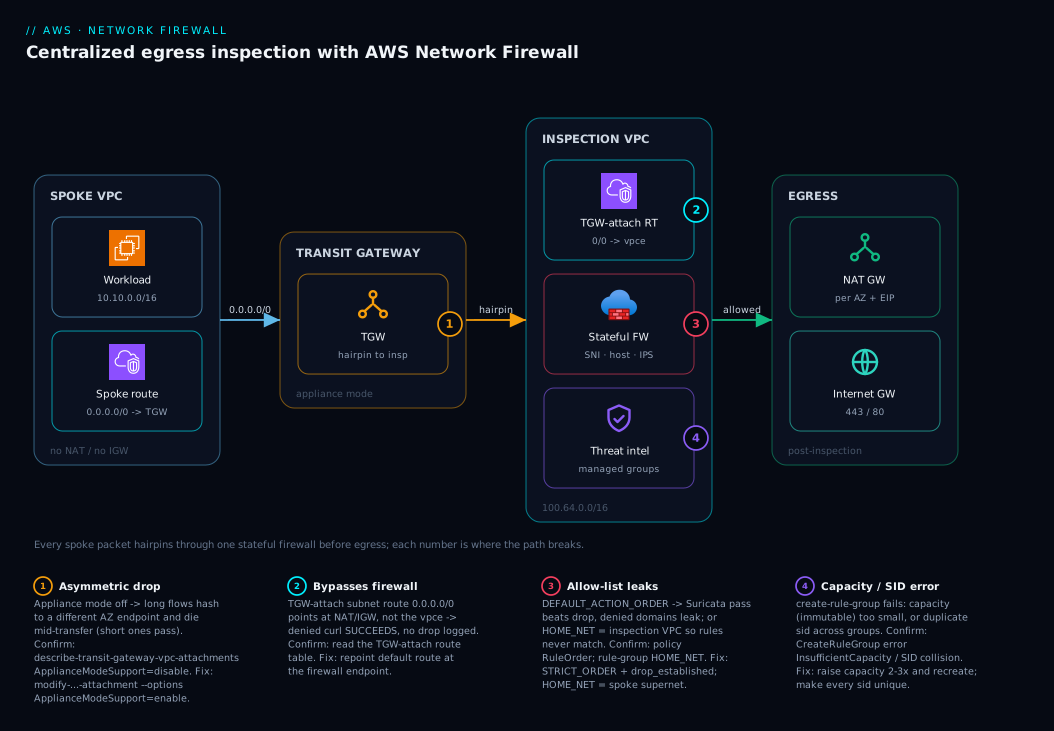
The diagram traces an outbound packet from a spoke instance all the way to the internet and back, and marks the exact hop where each failure class bites. Read it left to right. A spoke instance in a VPC with no NAT or IGW has only one route for 0.0.0.0/0: the Transit Gateway. The TGW — with appliance mode enabled on the inspection attachment — hairpins the packet into the inspection VPC, where the TGW attachment subnet’s route table sends 0.0.0.0/0 not to NAT but to the firewall endpoint (vpce-...). Inside the firewall, the stateless engine forwards everything to the stateful engine, where your STRICT_ORDER policy checks the TLS SNI / HTTP host against the allow-list and the managed IPS groups. Allowed flows continue to the NAT gateway, out the internet gateway, and to the destination; the return path retraces the same endpoint (because appliance mode pinned it) so the stateful engine sees both halves.
The numbered badges mark the four hops where this breaks. Badge 1 sits on the TGW: if appliance mode is off, long flows hash asymmetrically and die mid-transfer. Badge 2 sits on the TGW attachment route table: if its default route points at NAT/IGW instead of the firewall endpoint, traffic bypasses inspection entirely and a denied curl succeeds. Badge 3 sits on the stateful engine: in DEFAULT_ACTION_ORDER a pass beats your drop and the allow-list leaks, and if HOME_NET is the inspection VPC CIDR rather than the spoke supernet your rules never match. Badge 4 sits on the rule group itself: a fixed capacity exceeded or a duplicate sid makes create-rule-group fail. Follow the path, land on the badge that matches your symptom, and the legend tells you how to confirm and fix it.
Real-world scenario
Meridian Pay, a fintech platform team of six, ran the textbook centralized model: forty spoke VPCs across three AWS accounts, one inspection VPC spanning three AZs in eu-west-1, a TLS-SNI allow-list with .amazonaws.com, .github.com, and a dozen partner domains, deny-by-default. Average egress was ~2 Gbps; the firewall bill ran about ₹95,000/month (three endpoint-hours plus per-GB on ~150 TB/month). The control passed their SOC 2 audit cleanly. Then, weeks after go-live, their nightly data-warehouse load to a partner S3 bucket began failing — roughly one run in five, never on the smaller incremental jobs, always on the multi-hundred-GB full loads.
The on-call engineer’s first instinct was the allow-list. But the allow-list had .amazonaws.com, so SNI matching of the partner bucket was not the suspect, and the incremental loads to the same bucket succeeded every time. The CloudWatch Logs Insights tuning query showed aws:drop_established firing on the partner’s flows — but only mid-transfer, never at connection setup, and the event.alert.signature was the policy default action, not any named allow/deny rule. That detail — drops mid-stream, not at the SNI check — was the tell.
The cause was asymmetric routing. The inspection VPC attachment had been created in an early Terraform module without appliance_mode_support = "enable". Short flows completed inside a single AZ’s endpoint by luck of the flow hash; long-lived multi-gigabyte streams lived long enough for the TGW to route return packets through a different AZ’s endpoint, where the stateful engine had no record of the flow and dropped it as a mid-stream break (governed by stream_exception_policy = "DROP"). The reason it was intermittent — not total — is exactly what made it hard to spot: it correlated with transfer duration, not destination, which is why the incremental jobs never tripped it and the full loads tripped it one run in five.
The fix was one argument and a brief maintenance window to re-establish flows:
resource "aws_ec2_transit_gateway_vpc_attachment" "inspection" {
  subnet_ids             = [for s in aws_subnet.tgw_attach : s.id]
  transit_gateway_id     = aws_ec2_transit_gateway.hub.id
  vpc_id                 = aws_vpc.inspection.id
  appliance_mode_support = "enable"   # was absent; this is what fixed the intermittent drops
}
They confirmed it before declaring victory:
aws ec2 describe-transit-gateway-vpc-attachments \
  --transit-gateway-attachment-ids tgw-attach-0abc123def4567890 \
  --query "TransitGatewayVpcAttachments[0].Options.ApplianceModeSupport"   # expect "enable"
They also added a guardrail so it could never regress silently: an AWS Config custom rule plus a CI check asserting ApplianceModeSupport == enable on every inspection attachment, because the failure mode is invisible until a flow happens to live long enough — and by then it is a production incident, not a review comment. The incident as a timeline, because the order of moves is the lesson:
| Time | Symptom | Action taken | Effect | What it should have been |
|---|---|---|---|---|
| Week 0 | Clean go-live, audit passed | — | — | (appliance mode latent bug) |
| Night N | Full load fails 1-in-5 | Re-run the job | Sometimes succeeds | Ask: correlates with size? |
| Night N+2 | Still flaky on big loads | Check the allow-list | .amazonaws.com present — not it |
Read the drop reason, not just the drop |
| Night N+3 | Pattern recognized | Logs Insights: drops mid-stream, default action | Narrowed to flow-break, not SNI | The breakthrough |
| Night N+3 | Root cause | Check appliance mode → disable |
Asymmetric routing confirmed | — |
| Night N+4 | Mitigated | Enable appliance mode + maintenance window | Big loads stop failing | Correct fix |
| +1 week | Guardrailed | AWS Config rule + CI assertion | Can’t regress silently | The durable fix |
The lesson on the wall: “A stateful firewall drop that tracks duration, not destination, is a routing problem, not a rule problem. Check appliance mode before you touch a single SID.”
Advantages and disadvantages
The managed, stateful, centralized model both enables exam-grade egress control and introduces failure modes that are invisible until they bite. Weigh it honestly:
| Advantages (why this model helps you) | Disadvantages (why it bites) |
|---|---|
| Stateful L7 filtering on TLS SNI / HTTP host without running any appliance | No payload decryption without TLS inspection — SNI is a guardrail, not a hard control |
| Managed threat-intel rule groups update themselves; you never curate C2/malware feeds | Per-endpoint hourly charge × AZ count is a fixed floor before a byte moves |
| One centralized chokepoint for forty VPCs across accounts; policy lives in one place | Asymmetric routing silently drops long flows if appliance mode is off |
| Horizontally auto-scales to tens of Gbps; no instance to size or patch | Per-flow throughput is bounded; a single elephant flow can’t exceed the ceiling |
| FLOW + ALERT logs give a full egress audit trail and a tuning loop | If it’s not logged it’s invisible; default-deny without logs breaks deploys blindly |
STRICT_ORDER + default action gives a real deny-by-default posture |
DEFAULT_ACTION_ORDER (the default) makes deny-by-default leak via pass precedence |
| Rule-group capacity and unique SIDs are enforced, preventing silent overlaps | Capacity is immutable — under-size it and you recreate the whole group |
The model is right for regulated, multi-account estates that need stateful L7 egress filtering and IPS centralized without operating appliances — which is most of them. It bites hardest on teams that build the routing correctly but miss appliance mode, leave the policy in default action order, or roll straight to drop without an alert-only soak. The disadvantages are all manageable — but only if you know they exist, which is the point of this article. For very high GB volumes where the per-GB fee dominates and apps can be proxy-aware, a self-hosted proxy may be cheaper; for a short stable list of partner IPs, NAT plus prefix lists is nearly free. Most regulated estates run both DNS Firewall (cheap broad net) and Network Firewall (stateful chokepoint).
Hands-on lab
Build a minimal centralized egress chokepoint and prove it allows one domain and denies the rest. This uses a single-AZ inspection VPC and one spoke to keep cost and complexity low — it is not HA, but it demonstrates every mechanic end to end. Run in CloudShell in a region you can afford a NAT gateway and one firewall endpoint in for an hour (a few hundred rupees; delete at the end).
Step 1 — Variables.
REGION=eu-west-1
INSP_CIDR=100.64.0.0/16
SPOKE_CIDR=10.10.0.0/16
echo "region=$REGION"
Step 2 — Create the inspection VPC, spoke VPC, and a TGW.
INSP_VPC=$(aws ec2 create-vpc --cidr-block $INSP_CIDR \
  --query Vpc.VpcId --output text)
SPOKE_VPC=$(aws ec2 create-vpc --cidr-block $SPOKE_CIDR \
  --query Vpc.VpcId --output text)
TGW=$(aws ec2 create-transit-gateway \
  --query TransitGateway.TransitGatewayId --output text)
echo "insp=$INSP_VPC spoke=$SPOKE_VPC tgw=$TGW"
Expected: three IDs. Wait for the TGW to reach available before attaching.
Step 3 — Create the three inspection subnets (single AZ for the lab).
AZ=${REGION}a
TGW_SUBNET=$(aws ec2 create-subnet --vpc-id $INSP_VPC \
  --cidr-block 100.64.0.0/28 --availability-zone $AZ \
  --query Subnet.SubnetId --output text)
FW_SUBNET=$(aws ec2 create-subnet --vpc-id $INSP_VPC \
  --cidr-block 100.64.0.16/28 --availability-zone $AZ \
  --query Subnet.SubnetId --output text)
NAT_SUBNET=$(aws ec2 create-subnet --vpc-id $INSP_VPC \
  --cidr-block 100.64.0.32/27 --availability-zone $AZ \
  --query Subnet.SubnetId --output text)
echo "tgw=$TGW_SUBNET fw=$FW_SUBNET nat=$NAT_SUBNET"
Step 4 — Create an allow-list rule group (allow only .github.com).
cat > allowlist.json <<'JSON'
{ "RulesSource": { "RulesSourceList": {
    "Targets": [".github.com"],
    "TargetTypes": ["TLS_SNI", "HTTP_HOST"],
    "GeneratedRulesType": "ALLOWLIST" } } }
JSON

ALLOW_ARN=$(aws network-firewall create-rule-group \
  --rule-group-name lab-allowlist --type STATEFUL --capacity 100 \
  --rule-group file://allowlist.json \
  --query RuleGroupResponse.RuleGroupArn --output text)
echo "allow=$ALLOW_ARN"
Expected: a rule-group ARN. (If you see InsufficientCapacity, raise --capacity.)
Step 5 — Create a STRICT_ORDER policy with deny-by-default.
cat > policy.json <<JSON
{ "StatelessDefaultActions": ["aws:forward_to_sfe"],
  "StatelessFragmentDefaultActions": ["aws:forward_to_sfe"],
  "StatefulDefaultActions": ["aws:drop_established","aws:alert_established"],
  "StatefulEngineOptions": { "RuleOrder": "STRICT_ORDER", "StreamExceptionPolicy": "DROP" },
  "StatefulRuleGroupReferences": [ { "ResourceArn": "$ALLOW_ARN", "Priority": 100 } ] }
JSON

POLICY_ARN=$(aws network-firewall create-firewall-policy \
  --firewall-policy-name lab-egress --firewall-policy file://policy.json \
  --query FirewallPolicyResponse.FirewallPolicyArn --output text)
echo "policy=$POLICY_ARN"
Step 6 — Create the firewall in the firewall subnet.
aws network-firewall create-firewall \
  --firewall-name lab-egress --firewall-policy-arn $POLICY_ARN \
  --vpc-id $INSP_VPC --subnet-mappings SubnetId=$FW_SUBNET
# Wait for READY, then read the endpoint id:
aws network-firewall describe-firewall --firewall-name lab-egress \
  --query "FirewallStatus.SyncStates" --output table
Expected: the sync states table shows the endpoint reaching READY with a vpce-... id. Now wire the TGW attachment subnet route table’s 0.0.0.0/0 at that vpce-..., the firewall subnet at the NAT, the NAT subnet at the IGW, attach both VPCs to the TGW, and enable appliance mode on the inspection attachment (the routing steps from “The inspection architecture” — too many create-route calls to inline, but each is one aws ec2 create-route).
Step 7 — Test from a spoke instance with no other internet path.
# Allowed domain should connect; SNI is read from the ClientHello.
curl -sS -o /dev/null -w "%{http_code}\n" https://www.github.com   # expect 200/30x

# Denied domain should hang then fail (dropped established flow).
curl -sS --max-time 8 https://example.org ; echo "exit=$?"          # expect non-zero (timeout)
Expected: GitHub returns a status code; example.org times out with a non-zero exit. That is deny-by-default working.
Step 8 — Confirm the data plane and appliance mode.
aws network-firewall describe-firewall --firewall-name lab-egress \
  --query "FirewallStatus.SyncStates" --output table

aws ec2 describe-transit-gateway-vpc-attachments \
  --query "TransitGatewayVpcAttachments[?VpcId=='$INSP_VPC'].Options.ApplianceModeSupport"
# expect "enable"
Cleanup (stop the per-endpoint and NAT charges):
aws network-firewall delete-firewall --firewall-name lab-egress
aws network-firewall delete-firewall-policy --firewall-policy-name lab-egress
aws network-firewall delete-rule-group --rule-group-name lab-allowlist --type STATEFUL
# then delete NAT gateways, detach + delete the TGW, and delete both VPCs
The lab steps mapped to what each proves:
| Step | What you did | What it proves | Real-world analogue |
|---|---|---|---|
| 3 | Three subnet tiers | The route-table chain is the architecture | The inspection VPC build |
| 4 | Allow-list .github.com |
Domain filtering compiles to Suricata | The estate allow-list |
| 5 | STRICT_ORDER + drop default |
Deny-by-default needs strict order | The policy that passes audit |
| 6 | Firewall + endpoint READY | The vpce is your route target |
Wiring inspection into the path |
| 7 | curl allowed vs denied | The policy actually allows/denies | The verification every change needs |
| 8 | Appliance mode = enable | The bug that hides until long flows | The guardrail you assert in CI |
Cost note. One firewall endpoint plus one NAT gateway for an hour is well under ₹500; deleting the firewall, NAT, and VPCs stops everything. There is no free tier for Network Firewall — the endpoint-hour starts billing the moment the firewall is READY.
Practice challenges
Work these in order — they climb from “read the config” to “close a real bypass.” Each has a worked solution and the one line that explains why it matters. Snippets are illustrative and schema-correct; no live account is assumed.
1. Beginner — stop cleartext HTTP slipping an HTTPS-only list. You inherit a domain-list rule group whose TargetTypes is ["TLS_SNI"] and Targets is [".github.com"]. A curl http://github.com (plain HTTP) sails past it. Fix the JSON.
<details> <summary>Solution</summary>
{ "RulesSource": { "RulesSourceList": {
    "Targets": [".github.com"],
    "TargetTypes": ["TLS_SNI", "HTTP_HOST"],
    "GeneratedRulesType": "ALLOWLIST" } } }
Adding HTTP_HOST makes the group inspect the cleartext HTTP Host header too, not only the TLS ClientHello SNI.
Why: a list that only matches TLS_SNI inspects HTTPS but ignores plain HTTP, so http:// to the same host is unfiltered — always set both target types.
</details>
2. Beginner — confirm appliance mode from the CLI and read the result. Long transfers through the firewall fail intermittently. Write the one command that tells you whether appliance mode is the cause, and state the healthy value.
<details> <summary>Solution</summary>
aws ec2 describe-transit-gateway-vpc-attachments \
  --transit-gateway-attachment-ids tgw-attach-0abc123def4567890 \
  --query "TransitGatewayVpcAttachments[0].Options.ApplianceModeSupport"
# healthy: "enable"   |   the bug: "disable"
If it returns disable, the TGW can split a flow’s two directions across AZ endpoints and the stateful engine drops the half it doesn’t recognise.
Why: duration-correlated drops are a routing-symmetry problem — check this before touching a single rule or SID. </details>
3. Intermediate — make deny-by-default actually deny. Write the JSON policy fragment (engine options + default actions) that turns an allow-list into a real default-deny egress policy. Name the one setting that, if wrong, silently leaks.
<details> <summary>Solution</summary>
{
  "StatelessDefaultActions": ["aws:forward_to_sfe"],
  "StatelessFragmentDefaultActions": ["aws:forward_to_sfe"],
  "StatefulDefaultActions": ["aws:drop_established", "aws:alert_established"],
  "StatefulEngineOptions": { "RuleOrder": "STRICT_ORDER", "StreamExceptionPolicy": "DROP" }
}
The load-bearing setting is RuleOrder: STRICT_ORDER. In DEFAULT_ACTION_ORDER, Suricata runs every pass before any drop, so a broad pass escapes the deny and the allow-list leaks.
Why: without STRICT_ORDER + a real drop default action, “allow these, deny the rest” cannot be enforced — the policy fails open.
</details>
4. Intermediate — point HOME_NET at the right thing. Your hand-written $HOME_NET → $EXTERNAL_NET allow-list matches nothing in a centralized inspection VPC whose CIDR is 100.64.0.0/16, while spokes live in 10.0.0.0/8 and 192.168.0.0/16. Fix the rule variables.
<details> <summary>Solution</summary>
rule_variables {
  ip_sets {
    key = "HOME_NET"
    ip_set { definition = ["10.0.0.0/8", "192.168.0.0/16"] }  # spoke supernets, NOT 100.64.0.0/16
  }
}
EXTERNAL_NET defaults to !$HOME_NET, so once HOME_NET is the spoke supernets it re-scopes automatically — no second edit needed.
Why: Network Firewall defaults HOME_NET to the firewall’s own VPC CIDR; source traffic originates in spoke CIDRs, so $HOME_NET-anchored rules match nothing until you override it.
</details>
5. Advanced — close the two classic allow-list bypasses. A domain allow-list is live, but (a) a client dials a raw IP over TLS with an IP literal as the SNI, and (b) another tunnels data over DNS to an arbitrary server. Write the two Suricata rules that shut both, assuming a RESOLVERS IP set and a drop-everything-else default.
<details> <summary>Solution</summary>
# (a) Reject TLS whose SNI is an IP literal (skipped DNS — classic exfil/C2).
reject tls $HOME_NET any -> $EXTERNAL_NET any (ssl_state:client_hello; tls.sni; content:"."; pcre:"/^(?:[0-9]{1,3}\.){3}[0-9]{1,3}$/"; msg:"IP in TLS SNI"; flow:to_server; sid:1239848;)

# (b) Permit DNS ONLY to your resolvers; the policy default drops all other DNS.
pass dns $HOME_NET any -> $RESOLVERS 53 (dns.query; msg:"DNS only to approved resolvers"; sid:118947;)
The first turns direct-to-IP TLS into a hard fail; the second forces every lookup through resolvers you can log, so DNS tunneling to a rogue server is dropped by the default action.
Why: a plain domain allow-list only sees hostnames — direct-to-IP TLS and DNS tunneling both route around it, and these two rules re-close the gate. </details>
6. Advanced — soak-test a managed threat-intel group before it drops production traffic. Without editing AWS’s read-only rules, make ThreatSignaturesBotnetStrictOrder alert instead of drop while you tune, then write the Logs Insights query that ranks what it would have blocked.
<details> <summary>Solution</summary>
stateful_rule_group_reference {
  priority     = 300
  resource_arn = "arn:aws:network-firewall:eu-west-1:aws-managed:stateful-rulegroup/ThreatSignaturesBotnetStrictOrder"
  override { action = "DROP_TO_ALERT" }   # its drops become alerts for the soak
}
fields @timestamp, event.src_ip, event.tls.sni, event.alert.signature
| filter event.alert.signature_id > 0
| stats count(*) as would_block by event.alert.signature, event.src_ip
| sort would_block desc
| limit 50
Remove the override once the top rows are all genuine threats and no legitimate workload is in the list.
Why: DROP_TO_ALERT lets you measure a managed feed’s real blast radius against your traffic first, so enabling threat intel never silently breaks a legitimate flow.
</details>
Common beginner mistakes
These are not symptom-to-fix entries (those live in the troubleshooting table) — they are the mental models newcomers get wrong, and the correction that makes the rest of the lesson click. Each is a belief that feels reasonable and quietly defeats the control.
-
“Security groups already restrict outbound, so egress is covered.” Security groups and NACLs work at layers 3–4 — IP and port. They cannot allow-list
github.comwhen its IPs churn hourly, and a rule for0.0.0.0/0:443allows the entire internet on HTTPS. Right model: Network Firewall sits above SGs/NACLs and adds L7 domain awareness; you keep tight SGs and add the firewall, not one instead of the other. -
“Deploying the firewall inspects my traffic automatically.” It does not. The firewall is a VPC endpoint, and nothing is inspected until a route table sends packets to that
vpce-.... A firewall can beREADY, fully policied, and inspecting zero traffic because the route still points at NAT. Right model: the route table is the wiring — the endpoint is inert until traffic is routed to it. -
“SNI filtering means the traffic is decrypted and inspected.” No decryption happens. The SNI is cleartext metadata in the ClientHello — the name on the outside of the envelope, not the letter inside. Payload, URL path, and headers are invisible until you enable TLS inspection. Right model: SNI matching controls where a flow goes, never what it carries.
-
“A deny-list of known-bad domains is egress control.” A deny-list blocks what you already know is bad and lets the estate reach everything you haven’t listed yet — which is the whole internet, including the exfil endpoint nobody has named. Right model: egress control is an allow-list plus deny-by-default; the deny-list is a second layer for known threats, not the primary control.
-
“Appliance mode is a throughput / performance knob.” It is a correctness setting for stateful flows, not a speed one. Off, the TGW can route the two halves of a connection through different AZ endpoints and the engine drops the half it never saw — intermittently, correlated with flow duration. Right model: appliance mode pins both directions of a flow to one endpoint so the stateful engine sees the whole conversation.
-
“One big rule group keeps it simple.” Rule-group capacity is fixed at creation and immutable, there is a per-group ceiling, and every
sidmust be unique across the whole policy. A monolith hits the ceiling, and one collision blocks the entire group. Right model: split groups by purpose (allow-list, custom IPS, managed threat intel), namespace your SIDs, and size each group with 2–3× headroom. -
“We’ll flip straight to drop and fix whatever breaks.” With deny-by-default and no soak, the first thing that breaks is a production deploy pulling from a package or telemetry endpoint you forgot — blindly, with no list of what you missed. Right model: run alert-only first, harvest the would-be-blocked domains from the logs, complete the allow-list, then enforce and alarm on new spikes.
| Misconception | The correction in one line |
|---|---|
| SGs already cover egress | SGs are L3/4 IP+port; the firewall adds L7 domain control on top |
| Deploying the firewall inspects traffic | Nothing is inspected until a route sends packets to the vpce |
| SNI filtering decrypts the flow | SNI is cleartext metadata; payload needs TLS inspection |
| A deny-list is egress control | Allow-list + deny-by-default is; the deny-list is a second layer |
| Appliance mode is a performance setting | It is stateful-flow correctness; off = intermittent duration-based drops |
| One big rule group is simplest | Capacity is immutable with a ceiling; split and namespace SIDs |
| Flip straight to drop | Alert-only soak first, or you break deploys blind |
Common mistakes & troubleshooting
This is the playbook — the part you bookmark. First as a scannable table you read when egress breaks, then the high-bite entries with full confirm detail. The golden rule sits at the top: if a denied curl succeeds, chase routing first; if a denied curl is dropped but a legitimate one is too, chase rules.
| # | Symptom | Root cause | Confirm (exact cmd / path) | Fix |
|---|---|---|---|---|
| 1 | Long flows die mid-transfer; short ones pass; correlates with duration | Appliance mode off → asymmetric routing | aws ec2 describe-transit-gateway-vpc-attachments --query "...Options.ApplianceModeSupport" = disable |
modify-transit-gateway-vpc-attachment --options ApplianceModeSupport=enable |
| 2 | Denied domain curl succeeds — firewall never blocks anything |
Traffic bypasses the firewall (route bug) | TGW attachment subnet RT 0.0.0.0/0 points at NAT/IGW, not vpce-... |
Repoint default route at the firewall endpoint |
| 3 | Allow-list “works” but denied domains still leak out | Policy in DEFAULT_ACTION_ORDER; pass beats drop |
describe-firewall-policy --query "...StatefulEngineOptions.RuleOrder" = DEFAULT_ACTION_ORDER |
Set STRICT_ORDER + aws:drop_established default |
| 4 | Allow-list passes nothing / drops everything | HOME_NET is the inspection VPC CIDR, not spoke supernet |
Rule group rule_variables HOME_NET value |
Set HOME_NET to spoke supernet (e.g. 10.0.0.0/8) |
| 5 | create-rule-group fails |
Capacity too small or duplicate sid |
CreateRuleGroup error: InsufficientCapacity / SID collision |
Raise capacity (recreate); make every sid unique |
| 6 | Managed rule group rejected at attach | ActionOrder group attached to STRICT_ORDER policy (or vice-versa) |
Mismatch between group suffix and policy order | Use the *StrictOrder variant matching the policy |
| 7 | HTTPS denied correctly, but plain HTTP to same domain slips | TargetTypes only TLS_SNI, missing HTTP_HOST |
Domain list TargetTypes |
Add HTTP_HOST to the target types |
| 8 | Direct-to-IP TLS reaches the internet despite allow-list | No IP-in-SNI reject rule; SNI is an IP literal | No pcre IP-in-SNI rule in the policy |
Add the reject ... IP in TLS SNI rule |
| 9 | New deploy of the firewall drops all in-flight flows | stream_exception_policy interacts with a config swap |
Drops cluster at the deploy timestamp | Expected with DROP; deploy in a window; clients retry |
| 10 | Whole estate loses egress after a route change | Routing loop or default route removed | Spoke RT / TGW RTs; 0.0.0.0/0 target |
Restore spoke 0.0.0.0/0 → inspection attachment |
| 11 | terraform destroy opened egress wide |
delete_protection not set; firewall deleted |
Firewall gone; traffic flows uninspected | Set delete_protection = true; recreate firewall |
| 12 | Logs empty; can’t tune the allow-list | Logging configuration missing or wrong destination | describe-logging-configuration empty |
Add ALERT→CloudWatch, FLOW→S3 logging config |
The expanded form, with the full reasoning for the entries that bite hardest:
1. Long flows die mid-transfer; short ones pass; correlates with duration.
Root cause: Appliance mode off on the inspection attachment → the TGW routes a long flow’s return packets through a different AZ’s endpoint, which has no flow state and drops them as a mid-stream break.
Confirm: aws ec2 describe-transit-gateway-vpc-attachments --transit-gateway-attachment-ids <id> --query "TransitGatewayVpcAttachments[0].Options.ApplianceModeSupport" returns disable; ALERT logs show drops mid-stream tagged with the policy default action, not a named rule.
Fix: aws ec2 modify-transit-gateway-vpc-attachment --transit-gateway-attachment-id <id> --options ApplianceModeSupport=enable; re-establish flows in a brief window; assert it in CI / AWS Config.
2. Denied domain curl succeeds — the firewall never blocks anything.
Root cause: Traffic bypasses the firewall — the TGW attachment subnet route table sends 0.0.0.0/0 to the NAT or IGW instead of the firewall endpoint, so the packet never reaches the vpce.
Confirm: Read the TGW attachment subnet’s route table; its 0.0.0.0/0 target is a NAT/IGW, not vpce-....
Fix: Repoint that default route at the firewall endpoint. This is a routing bug, not a rule bug — the rules are fine; the packet never arrives.
3. Allow-list “works” but denied domains still leak out.
Root cause: The policy is in DEFAULT_ACTION_ORDER, where Suricata evaluates all pass actions before any drop, so anything matched by a broad pass escapes the deny.
Confirm: aws network-firewall describe-firewall-policy --firewall-policy-name <name> --query "FirewallPolicy.StatefulEngineOptions.RuleOrder" returns DEFAULT_ACTION_ORDER.
Fix: Recreate or update the policy with RuleOrder = STRICT_ORDER and a real StatefulDefaultActions of aws:drop_established + aws:alert_established.
4. Allow-list passes nothing, or drops everything.
Root cause: HOME_NET left at the firewall’s VPC CIDR, so $HOME_NET-anchored rules never match traffic sourced from spoke CIDRs.
Confirm: Inspect the rule group’s rule_variables; HOME_NET is the inspection VPC CIDR (e.g. 100.64.0.0/16), not the spoke supernet.
Fix: Override HOME_NET to the spoke supernet (e.g. 10.0.0.0/8) in the rule group variables; managed domain-list groups use HOME_NET too.
5. create-rule-group fails.
Root cause: Either the requested capacity is smaller than the compiled rules need, or a sid collides with another rule in the same policy.
Confirm: The CreateRuleGroup error names InsufficientCapacity or a duplicate SID.
Fix: For capacity, raise --capacity (capacity is immutable, so size 2–3× current need and recreate); for SIDs, make every sid unique across all groups referenced by the policy.
8. Direct-to-IP TLS reaches the internet despite the allow-list.
Root cause: The client connected straight to an IP literal (skipping DNS), so the SNI is an IP, not a domain on the list — classic exfil/C2 behavior.
Confirm: FLOW logs show a TLS flow to an external IP with no resolvable SNI; no allow-list rule matched and (without an IP-in-SNI rule) nothing rejected it.
Fix: Add the reject tls ... pcre:"/^(?:[0-9]{1,3}\.){3}[0-9]{1,3}$/" ... IP in TLS SNI ... rule so IP-literal SNIs are rejected.
The diagnostic commands you reach for most, mapped to the question each answers in an incident:
| Question | Command | What to look for |
|---|---|---|
| Are the endpoints up, one per AZ? | aws network-firewall describe-firewall --firewall-name <n> --query "FirewallStatus.SyncStates" |
Each AZ READY with a vpce-... |
| Is appliance mode on? | aws ec2 describe-transit-gateway-vpc-attachments --query "...Options.ApplianceModeSupport" |
enable (not disable) |
| What rule order is the policy in? | aws network-firewall describe-firewall-policy --query "FirewallPolicy.StatefulEngineOptions.RuleOrder" |
STRICT_ORDER |
| What is the default action? | aws network-firewall describe-firewall-policy --query "FirewallPolicy.StatefulDefaultActions" |
aws:drop_established present |
What is HOME_NET set to? |
aws network-firewall describe-rule-group --query "RuleGroup.RuleVariables.IPSets" |
Spoke supernet, not VPC CIDR |
| What is being denied right now? | CloudWatch Logs Insights query (Section: Logging) | event.alert.action = "blocked" rows |
| Is logging even configured? | aws network-firewall describe-logging-configuration --firewall-name <n> |
ALERT + FLOW destinations present |
| Which managed groups exist? | aws network-firewall list-rule-groups --scope MANAGED |
The ThreatSignatures* ARNs |
| Did the route actually change? | aws ec2 describe-route-tables --route-table-ids <rt> |
0.0.0.0/0 target = vpce-... |
| Is the firewall protected from deletion? | aws network-firewall describe-firewall --query "Firewall.DeleteProtection" |
true |
Best practices
- Enable appliance mode on every inspection attachment, and assert it in CI / AWS Config. It is the single biggest source of intermittent stateful drops, and the failure is invisible until a flow lives long enough.
- Use
STRICT_ORDERwith a real default action.aws:drop_established+aws:alert_establishedis what makes “allow these, deny the rest” actually deny. Never ship a deny-by-default policy in default action order. - Set the stateless default to
aws:forward_to_sfe. Do nothing clever in the stateless engine; let the stateful engine and its logs see everything. - Override
HOME_NETto the spoke supernet, not the inspection VPC CIDR, in every rule group — managed and custom alike. - Point the TGW attachment subnet’s default route at the firewall endpoint, not NAT/IGW. That one route is what guarantees inspection precedes egress.
- Cover both
TLS_SNIandHTTP_HOSTin domain lists, and add the IP-in-SNI and deprecated-TLS reject rules so the obvious bypasses are closed. - Reference managed threat-intel groups at a priority after the allow-list, so flows to allowed domains are still scanned for C2/malware.
- Keep every
sidunique and size rule-group capacity with 2–3× headroom, because capacity is immutable and a SID collision blocks the whole group. - Roll out alert-only first; flip to drop only after the alert stream is quiet. You get the full “forgot this domain” list without breaking a single deploy.
- Log ALERT to CloudWatch and FLOW to S3, save the tuning query, and alarm on a sudden
blockedspike. If it’s not logged, you’re tuning blind. - Co-locate firewall, NAT, and TGW attachment subnets per AZ and span ≥2 AZ; cross-AZ inside the inspection VPC is billable and pointless, and a single endpoint is a single point of failure.
- Set
delete_protection = trueso a strayterraform destroycan’t silently open egress wide.
The operational guardrails worth wiring before the next incident:
| Guardrail | Mechanism | Catches | Why it’s leading |
|---|---|---|---|
| Appliance-mode assertion | AWS Config custom rule + CI | A TGW attachment with appliance mode off | The failure is otherwise invisible |
| Default-deny posture check | Config/CI on policy JSON | DEFAULT_ACTION_ORDER or no drop default |
Prevents a leaking allow-list shipping |
| Route-to-firewall check | Reachability Analyzer in CI | TGW-attach RT not pointing at the vpce |
Catches bypass before deploy |
blocked spike alarm |
CloudWatch metric filter | New service or genuine exfil | Pages on anomaly, not after a breach |
| Capacity headroom monitor | Tag + review on create | Near-ceiling rule groups | Avoids an emergency group rebuild |
| Delete-protection enforce | Config rule | Firewall without delete_protection |
Stops accidental egress-wide-open |
Security notes
- SNI matching is a guardrail, not a hard control. Decide explicitly whether your threat model needs TLS inspection (decrypt at the firewall) or IP-based egress control on top. Document the residual risk that a fake/empty SNI to a denied IP is not blocked by SNI alone.
- Least-privilege the rule-group and policy management. The IAM permissions to edit a firewall policy or rule group are effectively “open egress for the estate” — restrict
network-firewall:Update*/Delete*to a small change-controlled role. - Encrypt and lock the logs. ALERT/FLOW logs reveal every destination the estate talks to; encrypt the S3 bucket and CloudWatch log group with KMS (see AWS KMS Encryption Deep Dive), enable bucket versioning and Object Lock for forensics, and restrict read access.
- Defense in depth, not instead. Network Firewall sits above security groups and NACLs, not in place of them — keep tight SG/NACL rules per subnet (see Security Groups & NACLs Deep Dive), and layer DNS Firewall in front.
- Close the obvious bypasses in policy. The IP-in-SNI reject, deprecated-TLS reject, and DNS-only-to-resolvers rules are security controls, not nice-to-haves — they stop the laziest exfil paths.
- Protect the egress path itself.
delete_protectionon the firewall, change control on the route tables, and an alarm on the firewall transitioning out ofREADYkeep an attacker (or a careless deploy) from simply removing inspection. - Treat a
blockedspike as a security signal. A sudden jump in denied egress can be a new legitimate service or a compromised host beaconing — page, then triage, don’t auto-allow.
The security controls and what each defends against:
| Control | Mechanism | Defends against | Also prevents |
|---|---|---|---|
| TLS inspection (optional) | Firewall decrypt + re-encrypt | Fake-SNI/encrypted exfil to denied dest | Blind spots in URL filtering |
| IP-in-SNI reject rule | Suricata pcre rule |
Direct-to-IP C2/exfil (no DNS) | DNS-bypass data paths |
| DNS-only-to-resolvers | pass dns + drop default |
DNS tunneling to arbitrary servers | Rogue resolver use |
| KMS-encrypted logs | S3/CloudWatch + KMS | Log tampering / destination leak | Unauthorized forensic access |
| Least-privilege policy IAM | Scoped network-firewall:* |
Unauthorized “open egress” change | Insider mistakes |
delete_protection |
Firewall flag | Accidental/malicious firewall deletion | Egress-wide-open via destroy |
Cost & sizing
Network Firewall bills two ways: an hourly charge per firewall endpoint plus a per-GB charge on traffic processed. With one endpoint per AZ across three AZs, you pay three endpoint-hours every hour before a single byte moves, and that is the line item that surprises people. The NAT gateway and cross-AZ transfer are separate, additive costs.
The cost drivers and what each one buys you:
| Cost driver | What you pay for | Rough scale | What it fixes | Watch-out |
|---|---|---|---|---|
| Firewall endpoint-hours | Per endpoint, per AZ, per hour | Fixed floor × AZ count | The chokepoint existing | 3 AZ = 3× the hourly floor, 24×7 |
| Per-GB processed | Every byte through the firewall | Scales with egress volume | Inspecting traffic | Dominates at very high GB |
| NAT gateway | Hourly + per-GB | Per AZ | Post-inspection egress | Separate from firewall per-GB |
| Cross-AZ transfer | Per-GB between AZs | If subnets not co-located | (nothing — pure waste) | Co-locate subnets per AZ |
| ALERT logs (CloudWatch) | Ingest + storage | Scales with alert volume | Real-time tuning | Pricey if drop is noisy |
| FLOW logs (S3) | Cheap storage | Scales with flows | Audit/forensics | Set lifecycle + partitioning |
Network Firewall versus the alternatives — choose by the actual GB volume and threat model:
| Egress control | Strengths | Watch-outs | Reach for it when |
|---|---|---|---|
| Network Firewall | Stateful, L7 SNI/host, IPS, managed threat intel, centralized | Per-endpoint hourly + per-GB; no decrypt without TLS inspection | Regulated multi-account estate needing stateful L7 egress |
| Squid / explicit proxy | Cheap at high GB, full URL path, auth-aware, caching | You operate HA/patching/scaling; apps must be proxy-aware | Very high volume + proxy-aware apps |
| NAT + route/SG + prefix lists | Nearly free, simple | IP-based only; no domain/L7; brittle as IPs churn | Short, stable list of partner IPs |
| Route 53 Resolver DNS Firewall | Block by domain at resolution, very cheap | DNS-layer only; bypassed by hardcoded IPs | Cheap first layer that complements NFW |
A rough monthly picture: a three-AZ production firewall processing ~150 TB/month lands around ₹90,000–1,10,000 (three endpoint-hours 24×7 plus per-GB), before NAT and logging. Reach for a proxy when you are pushing very large volumes (the per-GB fee dominates) and your apps can speak to a proxy. Reach for NAT plus prefix lists when “egress control” means a short, stable list of partner IPs. Reach for DNS Firewall as a cheap first layer that complements, not replaces, Network Firewall. Choose Network Firewall when you need stateful L7 egress filtering and IPS centralized across many accounts without running appliances yourself — which is most regulated, multi-account estates. A common production answer is both: DNS Firewall as a cheap broad net, Network Firewall as the stateful chokepoint.
To right-size: start with the AZs your spokes actually use (two is the minimum for HA, three for three-AZ workloads), co-locate subnets to kill cross-AZ transfer, and if the per-GB line dominates, evaluate moving the bulk-data egress path to a proxy or Private Endpoints (which bypass SNAT and the firewall for in-AWS PaaS targets).
Interview & exam questions
1. Why must appliance mode be enabled on a centralized inspection VPC’s TGW attachment? Network Firewall is stateful — the SYN, data, and return packets of a flow must hit the same endpoint. With multiple AZ endpoints and a multi-AZ TGW, the default behavior can split a flow across endpoints, and the stateful engine drops the half-conversation. Appliance mode pins both directions to one endpoint via a flow hash. Without it, long-lived flows die intermittently while short ones survive by luck.
2. What is the difference between STRICT_ORDER and DEFAULT_ACTION_ORDER, and which do you use for deny-by-default egress? In DEFAULT_ACTION_ORDER, Suricata action precedence evaluates all pass rules before any drop, so a drop you place last still loses to any pass — deny-by-default leaks. In STRICT_ORDER, rule groups evaluate by priority and rules within a group top-to-bottom, and the policy gets a real default action (aws:drop_established). Use STRICT_ORDER for any allow-list egress policy.
3. A denied domain curl succeeds and the firewall blocks nothing. Where do you look first? Routing, not rules. Read the TGW attachment subnet’s route table: if its 0.0.0.0/0 points at the NAT or IGW instead of the firewall endpoint (vpce-...), the packet bypasses inspection entirely. The rules are fine; the packet never reaches them. Fix by repointing the default route at the firewall endpoint.
4. What exactly does TLS SNI filtering protect against, and what does it not? It matches the cleartext SNI in the ClientHello against your allow/deny list, with no decryption — so it stops well-behaved clients and accidental data paths to denied domains. It does not stop a client that sends a fake or empty SNI to a denied IP, encrypted exfiltration to an allowed domain, or direct-to-IP TLS (unless you add an IP-in-SNI reject rule). For those you need TLS inspection or IP-based control.
5. Why must you override HOME_NET in a centralized model, and to what? By default HOME_NET is the firewall’s own VPC CIDR. In a centralized inspection VPC the source traffic originates in spoke CIDRs, so $HOME_NET-anchored rules never match unless you override HOME_NET to the spoke supernet (e.g. 10.0.0.0/8). Forgetting this makes the allow-list silently match nothing.
6. Where should the stateless engine drop traffic in an egress policy? Almost nowhere — set the stateless default to aws:forward_to_sfe and let the stateful engine make all decisions. Dropping in the stateless engine loses logging fidelity and flow visibility, and the stateless engine can’t see L7 fields like SNI or host anyway.
7. How do you reference AWS threat intelligence without curating feeds yourself? Reference AWS Managed Rule Groups (e.g. ThreatSignaturesBotnetStrictOrder) by ARN at a priority after your allow-list, so flows to allowed domains are still scanned for C2/malware. AWS maintains the feeds; you just attach the group. Match the StrictOrder/ActionOrder variant to your policy’s rule order.
8. Why is rule-group capacity a design decision, not a runtime knob? Capacity is a fixed units budget set at creation and immutable — you cannot raise it later. Each domain-list entry (per target type) and each Suricata rule consumes capacity, and ranges multiply. Size it 2–3× current need; if you exceed it, you recreate the whole group.
9. What does stream_exception_policy = DROP do, and when does it bite? It governs flows that break mid-stream — for example, when a firewall config change or deploy disrupts an in-flight connection. DROP discards them rather than failing open, which is the safe default but means in-flight flows die during a firewall deploy. Deploy in a maintenance window and let clients retry.
10. When is Network Firewall the wrong choice, and what replaces it? When the per-GB fee dominates at very high egress volume and apps can be proxy-aware, a self-hosted proxy (full URL, caching) may be cheaper; when “egress control” means a short, stable list of partner IPs, NAT plus prefix lists is nearly free; for a cheap DNS-layer broad net, DNS Firewall. Most regulated estates run DNS Firewall and Network Firewall together.
11. How do you roll out a deny-by-default egress policy without breaking production? Set the default action to alert-only (aws:alert_established) first, run the CloudWatch Logs Insights query to collect every would-be-blocked domain (every estate forgets one telemetry/package endpoint), complete the allow-list until the blocked stream is quiet, then flip to aws:drop_established and alarm on a sudden blocked spike.
12. A flow is dropped mid-transfer with the policy default action signature, not a named rule. What does that tell you? That it is a stateful flow break, not an allow/deny decision — most likely asymmetric routing (appliance mode off) or a mid-stream disruption governed by stream_exception_policy. It points you at routing/appliance mode, not the SNI rules.
These map to AWS Certified Security – Specialty (SCS-C02) — infrastructure security, network controls, threat detection — and AWS Certified Advanced Networking – Specialty (ANS-C01) — network security and inspection, Transit Gateway, appliance mode. A compact cert-mapping for revision:
| Question theme | Primary cert | Exam objective area |
|---|---|---|
| Appliance mode, TGW routing | ANS-C01 | Hybrid/centralized network architecture |
STRICT_ORDER, default actions |
SCS-C02 | Infrastructure security; network controls |
| TLS SNI scope and limits | SCS-C02 | Data protection; threat modeling |
| Managed threat-intel groups | SCS-C02 | Threat detection & incident response |
| Cost vs proxy/NAT/DNS Firewall | ANS-C01 / SCS-C02 | Cost-effective secure connectivity |
| Logging, alert-only rollout | SCS-C02 | Logging & monitoring |
Quick check
- Long downloads through the firewall fail one run in five but short requests always work. What is the single most likely cause, and the one field you check to confirm it?
- Your allow-list permits
.amazonaws.com, yet a denied domain still reaches the internet and the firewall logs no drop for it. Routing or rules — and why? - True or false: setting the stateless default action to
aws:dropis a good way to enforce egress filtering. - Your hand-written
$HOME_NET-anchored allow-list matches nothing in a centralized inspection VPC. What is wrong and how do you fix it? - You need to ship a deny-by-default egress policy to forty VPCs without breaking deploys. What rollout sequence do you use?
Answers
- Appliance mode is off on the inspection VPC’s TGW attachment, so the TGW routes long flows’ return packets through a different AZ’s endpoint with no flow state, dropping them as a mid-stream break — it correlates with duration, not destination. Confirm with
aws ec2 describe-transit-gateway-vpc-attachments ... --query "...Options.ApplianceModeSupport"; expectdisable. Fix by enabling it. - Routing. A logged drop would mean the packet reached the firewall; no drop log means the packet never arrived — the TGW attachment subnet’s
0.0.0.0/0is pointing at the NAT/IGW instead of the firewall endpoint, so traffic bypasses inspection. Fix the route, not the rules. - False. Drop in the stateless engine loses logging fidelity and flow visibility, and the stateless engine can’t see L7 fields like SNI/host anyway. Set the stateless default to
aws:forward_to_sfeand enforce in the stateful engine. HOME_NETis set to the firewall’s VPC CIDR, but the source traffic originates in spoke CIDRs, so$HOME_NET-anchored rules never match. OverrideHOME_NETin the rule group variables to the spoke supernet (e.g.10.0.0.0/8).- Start in alert-only (
aws:alert_establisheddefault, no drop), run the Logs Insights query to find every would-be-blocked legitimate domain, complete the allow-list until the blocked stream is quiet, then flip toaws:drop_establishedand alarm on a suddenblockedspike.
Glossary
- AWS Network Firewall — a managed, stateful, horizontally-scaling firewall that places a VPC endpoint in your data path and runs a Suricata-compatible engine.
- Inspection VPC — a dedicated VPC that owns internet egress for the whole estate; all spokes route through it.
- Firewall endpoint (
vpce-...) — the per-AZ endpoint the firewall places in a firewall subnet; the target of your route tables and a single point of failure for its AZ. - Transit Gateway (TGW) — the regional hub that connects VPCs and routes inter-VPC and egress traffic.
- Appliance mode — a TGW VPC-attachment option that pins both directions of a flow to one endpoint via a flow hash; required for stateful symmetry.
- Stateless engine — the first engine a packet hits; 5-tuple match, no flow context; should forward everything to the stateful engine.
- Stateful engine — the Suricata-compatible engine that sees application-layer fields (TLS SNI, HTTP host, cert issuer) and holds egress policy.
STRICT_ORDER— the stateful evaluation mode that orders rule groups bypriorityand rules top-to-bottom, with a real default action; required for deny-by-default.DEFAULT_ACTION_ORDER— the legacy mode where Suricata evaluates allpassbefore anydrop, breaking deny-by-default allow-lists.HOME_NET— the rule variable defining “internal” source CIDRs; must be the spoke supernet in a centralized model, not the inspection VPC CIDR.- Domain-list rule group — a managed rule group that compiles allow/deny Suricata rules from FQDNs and target types (
TLS_SNI,HTTP_HOST). - TLS SNI — the Server Name Indication in the cleartext ClientHello; the firewall matches on it without decryption.
sid— the unique signature ID every Suricata rule needs; must be unique across all groups in a policy.- Capacity — the fixed, immutable units budget set when a rule group is created; size it with headroom.
- AWS Managed Rule Groups — AWS-curated threat-intel rule groups (botnet, malware, emerging threats) referenced by ARN.
aws_domain_category/aws_url_category— Suricata keywords that classify destinations by category (Malware, Phishing) on SNI/host or full URL.- ALERT / FLOW logs — rule-hit logs and connection records; the tuning loop and the audit trail.
stream_exception_policy— what happens to flows that break mid-stream (e.g. after a firewall deploy);DROPis the safe default.delete_protection— a firewall flag that prevents accidental deletion (and thus accidental egress-wide-open).- TLS inspection — an optional decrypt-inspect-re-encrypt configuration where the firewall uses a CA certificate from ACM to become a controlled MITM, so the stateful engine sees the URL path and payload; requires the fleet to trust the CA and breaks certificate-pinned apps.
- EXTERNAL_NET — the rule variable for “everything not internal”; defaults to
!$HOME_NET, so it re-scopes automatically onceHOME_NETis set correctly. reject— a Suricata action that actively tears the connection down (TCP RST / ICMP unreachable) so the client fails fast, unlike the silentdrop.xbits— Suricata cross-flow state flags that link one flow’s decision (e.g. an approved SNI) to a follow-on flow (the IP connection it authorises).- Native TGW firewall attachment — attaching a Network Firewall directly to a Transit Gateway so AWS manages the inspection subnets and routing instead of the hand-built inspection VPC.
- AWS Firewall Manager (FMS) — an AWS Organizations service that centrally deploys, audits, and auto-remediates Network Firewall policies across every account and VPC, making “every VPC is inspected” an enforced invariant.
- RAM (Resource Access Manager) — the service that shares a firewall policy or rule group with spoke accounts so a central team can manage one policy for many accounts.
DROP_TO_ALERToverride — a rule-group-reference setting that turns a managed group’s drops into alerts, so you can soak-test its blast radius without editing AWS’s read-only rules.- Encrypted Client Hello (ECH) — an emerging TLS extension that encrypts the real SNI, defeating SNI-based filtering where both endpoints support it; the public “outer” SNI stays visible.
- East-west inspection — routing spoke-to-spoke traffic through the same inspection firewall for internal segmentation, distinct from north-south internet egress; needs no NAT but still requires appliance mode.
Next steps
You can now build a centralized, stateful, deny-by-default egress chokepoint and diagnose the routing and rule-order traps that break it. Build outward:
- Next: Route 53 Resolver DNS Firewall: Endpoints, Rules & Hybrid Resolution — the cheap DNS-layer broad net that complements this stateful chokepoint.
- Related: AWS Transit Gateway: Multi-Account VPC Architecture — the hub-and-spoke and route-table mechanics this design depends on.
- Related: AWS Gateway Load Balancer: Inline Appliance Inspection — the alternative when you run third-party NGFW appliances instead of the managed service.
- Related: Security Groups & NACLs Deep Dive — the per-subnet controls Network Firewall sits above, not instead of.
- Related: Network Reachability Analyzer & Access Analyzer: Connectivity Validation — prove that traffic actually reaches the firewall endpoint before you trust the policy.
- Related: AWS KMS Encryption Deep Dive: Keys, Policies, Envelope Encryption & Rotation — encrypt the ALERT/FLOW logs that reveal every destination your estate talks to.