In a nutshell
Level: Expert · Time: ~77 min
If a single AWS account is a house where IAM decides who holds which keys, an AWS Organization is the whole gated estate — and guardrails are the estate’s bylaws: rules that hold for every house no matter what keys the residents were handed. IAM says “this person may open this door.” A guardrail says “no one here may ever knock this wall down — not the owner, not a locksmith, not a thief with a stolen key.” That is the one idea to carry through the whole lesson: guardrails only ever say no; they never hand out permission.
Three kinds of bylaw sit above your accounts. A Service Control Policy (SCP) caps what the people and roles inside an account can do. A Resource Control Policy (RCP) caps what outsiders can do to your data even through a resource’s own policy. A declarative policy pins a service’s settings (today, EC2) so they stay put as new accounts and new features arrive. None of the three grants anything — each only subtracts from what IAM already allowed — and all three skip the management account on purpose, so you always keep one account from which to undo a mistake.
Why a beginner should care: the day someone asks “prove no account can turn off its own audit log” or “prove our data can’t be shared to a stranger’s account,” IAM alone cannot answer. Guardrails turn those into one-line, org-wide, provable guarantees. And because one wrong comma in a guardrail can lock an entire company out of AWS, the rest of this lesson is deliberately careful — read the prose once, then keep the tables open while you write the real policies.
Prerequisites: you can read IAM JSON, you know an explicit Deny beats any Allow, and you have seen a multi-account setup (a management account plus a few workload accounts). After this you can explain why an SCP can never grant access, write a region lock that doesn’t brick role assumption, fence data to your org with an RCP, delegate a security service to the right account, and roll it all out without locking yourself out. New to the account layout underneath? Start with AWS Control Tower: Multi-Account Landing Zone.
Identity policies tell you what a principal can do. Guardrails tell you what nobody in the org can do, no matter what their IAM policy says. That distinction is the whole reason AWS Organizations exists as a security control plane and not just a billing convenience: it lets you draw a ceiling above every account so that a compromised credential, a careless engineer, or a misconfigured pipeline simply cannot perform the action — the request is denied before it ever reaches the resource. This guide builds that ceiling end to end with Service Control Policies (SCPs), Resource Control Policies (RCPs), and declarative policies — the three families of preventive control that ride above every member account — and shows how to delegate your security tooling (GuardDuty, Security Hub, IAM Access Analyzer) out of the management account without engineering a self-lockout.
The reason this is an expert topic and not a tutorial is that every one of these controls is a deny that cannot grant anything back, attached at a scope that the management account is exempt from, evaluated by an intersection rule most people get backwards. Misplace a single NotAction and you sever role assumption org-wide. Forget one BoolIfExists and a service-linked role’s call gets caught in your deny and breaks a nightly job nobody is watching. Protect a role too hard and it becomes permanently unmanageable. The mechanics are unforgiving, the blast radius is the entire organization, and the only safe path to production runs through staging OUs and the policy simulator. So we treat the failure modes as first-class: every guardrail comes with how it bricks you, how to confirm it from inside a member account (never from the exempt management account), and how to recover with break-glass.
By the end you will be able to design a layered policy tree (root for non-negotiables, OUs for tier-specific rules), write the four foundational deny SCPs every org should ship, condition denies on org membership and tags, build an org-wide data perimeter with RCPs, pin EC2 configuration state with declarative policies, delegate regional and global security services correctly, and roll the whole thing out OU-by-OU without ever locking yourself out. Because this is a reference you will return to mid-rollout, the evaluation rules, the condition keys, the service scopes, the size limits, and the failure playbook are all laid out as scannable tables — read the prose once, then keep the tables open while you write the policies.
What problem this solves
In a single AWS account, IAM is enough: you grant least privilege and audit who has what. The moment you have many accounts — and any serious organization has dozens to hundreds — IAM stops being sufficient, because IAM is account-local and grant-shaped. Nothing in IAM stops a workload-account admin from disabling CloudTrail in their own account, sharing a snapshot to an external account, spinning up resources in an unapproved region, or using the account root credentials for daily work. Each account team can perfectly follow least privilege and the org as a whole can still be wide open, because no single account can see or constrain the others.
What breaks without org-wide guardrails is governance at scale. A region-restriction control that should hold for every account has to be copied into every account’s IAM and kept in sync forever — and the first account that forgets it is your compliance gap. The audit pipeline that proves what happened can be turned off by the very accounts it audits. The data perimeter that should say “only my org’s identities touch my data” has to be re-implemented in thousands of individual bucket and key policies, any one of which can be edited to punch a hole. These are not problems IAM can solve, because they are negative universal statements (“nobody, anywhere, ever”) and IAM only makes positive local grants.
Who hits this: every platform/security team responsible for a multi-account AWS estate — which today means almost every mid-size-and-up AWS customer, since the AWS-recommended pattern is one account per workload-environment. It bites hardest the day a security review asks “prove no member account can disable its own CloudTrail” or “prove data can’t be shared outside the org,” and the honest answer with IAM alone is “we can’t.” SCPs, RCPs, and declarative policies are the layer that turns those into one-line, org-enforced, audit-provable guarantees. To frame the whole field before the deep dive, here is every control family this article covers, what it constrains, and the single most important fact about it:
| Control family | What it constrains | Grants? | Mgmt acct affected? | The one fact people get wrong |
|---|---|---|---|---|
| Service Control Policy (SCP) | The identity side — max permissions of principals in an account | No, deny/filter only | No (exempt) | An “allow” SCP grants nothing; the principal still needs an IAM Allow |
| Resource Control Policy (RCP) | The resource side — caps every resource policy in scope | No, deny only | No (exempt) | Covers only a specific service list (S3, STS, KMS, SQS, Secrets Manager, ECR, OpenSearch Serverless) |
| Declarative policy | Service configuration state (EC2 first) | n/a — it sets state | Yes — it configures the service everywhere | Uses @@assign syntax, not IAM JSON; survives new APIs and new accounts |
| Identity / resource policy (IAM) | The actual grant | Yes | Yes | The only thing that grants; SCP/RCP only subtract from it |
| Delegated administration | Which member account admins a security service | n/a | Moves admin out of mgmt acct | Some services use the Organizations API, some their own regional API |
Learning objectives
By the end of this article you can:
- Explain the SCP/RCP deny-by-intersection evaluation rule precisely, and predict whether any given request will be allowed across IAM, SCPs, and RCPs combined.
- Design a layered policy tree that attaches each rule at the broadest scope where it is universally true — root for non-negotiables, OUs for tier-specific controls — and explain why account-level attachments are an anti-pattern.
- Write the four foundational deny SCPs — region restriction, root-user lockdown, audit-pipeline protection, and security-role protection — with the exact
NotActionandArnNotLikecarve-outs that keep them from locking you out. - Condition a deny on org membership (
aws:PrincipalOrgID), tags (aws:RequestTag), and service exemptions (aws:ViaAWSService/aws:PrincipalIsAWSServicewithBoolIfExists), and explain why each condition key fires when it does. - Build an org-wide data perimeter with RCPs, know exactly which services RCPs cover, and avoid over-broad RCPs that silently break legitimate cross-account or service flows.
- Pin EC2 configuration with declarative policies (VPC Block Public Access, IMDSv2, snapshot/AMI public-access blocks) and delegate security services correctly — Organizations API for most, the service’s own regional API for GuardDuty and Security Hub.
- Roll guardrails out OU-by-OU without self-lockout — stage in Sandbox, simulate, promote least-critical-first, keep a break-glass role exempt — and recover if a deploy goes wrong.
Prerequisites & where this fits
You should already understand single-account IAM: the difference between identity policies and resource policies, how an explicit Deny always wins over any Allow, what a principal ARN looks like, and how condition keys like aws:RequestedRegion work. You should be comfortable in the AWS CLI and reading/writing IAM JSON. Familiarity with the multi-account landing-zone shape — a management (payer) account, a Security OU with Log Archive and Audit accounts, and Workload OUs — is assumed; if that is new, read it first.
This sits at the top of the Governance & multi-account track. It assumes the IAM fundamentals from AWS IAM Fundamentals: Users, Roles, Policies & Evaluation and the least-privilege discipline from IAM Least Privilege with Permission Boundaries. It is the policy layer of the landing zone built in AWS Control Tower: Multi-Account Landing Zone and complements the deeper data-perimeter treatment in Resource Control Policies, Declarative Policies & the Data Perimeter. It pairs with CloudWatch & CloudTrail Observability, because watching CloudTrail for AccessDenied is how you confirm every guardrail actually bites.
A quick map of who owns what during a guardrail rollout, so you route questions correctly:
| Layer | What lives here | Who usually owns it | Failure classes it can cause |
|---|---|---|---|
| Management account | Organizations, root, landing-zone setup | Platform / cloud-foundations team | None directly (exempt) — but a wrong policy here looks fine while bricking members |
| Root attachment | Org-wide non-negotiable SCPs/RCPs | Platform + security | Region-lock lockout, root-user over-deny |
| OU attachment | Tier-specific guardrails (Prod/NonProd/Sandbox) | Security + per-tier owners | Wrong-OU placement → wrong guardrails inherited |
| Security OU | Log Archive + Audit accounts, delegated admins | Security team | Audit tampering, delegation gaps (regional) |
| Member account principals | IAM grants under the ceiling | App / dev teams | AccessDenied they can’t explain (the guardrail bit) |
| Break-glass role | The exempt escape hatch | Security (offline creds) | Lockout recovery; misuse if not audited |
Core concepts
Five mental models make every later decision obvious.
An SCP never grants — it filters. The single most important fact about an SCP, and the one people get wrong: it does not add permissions to anything. It is a filter on the maximum permissions available to principals in an account. The effective permission set for an action is the intersection of every applicable policy:
Effective allow = identity policy (or resource policy)
                INTERSECT  every SCP from root down to the account
                INTERSECT  every RCP   from root down to the account
If an action is not Allowed by an identity policy, an SCP that “allows” it changes nothing — the request is still denied. Flip it around and the SCP becomes powerful: if any SCP in the chain denies the action, no identity policy anywhere can win it back. A request succeeds only when it is allowed by the principal’s own policy and is not blocked by any SCP and is not blocked by any RCP on the target resource.
The management account is exempt — by design, and as a trap. Policies attached at the root do not restrict the management (payer) account. That is a feature (you cannot brick your own org from the top, so there is always one account from which to recover) and a trap (never run workloads there — they are completely unguardrailed). Treat the management account as a billing-and-org control plane only.
Deny model over allow-list. There are two SCP strategies. The default FullAWSAccess policy allows everything, and you attach deny policies on top — this is the maintainable model, because every new AWS service launches usable and you subtract only what you must forbid. The alternative removes FullAWSAccess and explicitly allows services; it is far more brittle because every new service launch is blocked by default and every team files a ticket. Use the deny model. Reserve allow-list SCPs for a tightly-scoped sandbox or a regulated workload OU.
RCPs are SCPs for the resource side. An SCP filters what your principals can do; it says nothing about an external principal hitting your S3 bucket via that bucket’s own policy. RCPs close that gap: deny-only policies that attach to root/OU/account exactly like SCPs but evaluate on the resource side, capping the effective permissions of every resource policy in scope. That is how you build an org-wide data perimeter without editing thousands of bucket and key policies — but only for the services RCPs cover.
Declarative policies set state, they don’t filter calls. Rather than allowing or denying API calls, a declarative policy pins the configuration state of a service across the org, and AWS guarantees the baseline holds even as the service ships new APIs and new accounts join. It uses a different syntax (@@assign) and a different mental model: not “who may call this” but “this is how the service is configured, everywhere, forever.”
The vocabulary in one table
Before the deep sections, pin down every moving part. The glossary at the end repeats these for lookup; this table is the mental model side by side:
| Concept | One-line definition | Where it attaches | Why it matters |
|---|---|---|---|
| Organization | The container of all your accounts, rooted at one management account | n/a — the top object | The unit aws:PrincipalOrgID identifies |
| Root (org root) | The top node of the OU tree | Policies here apply org-wide (except mgmt acct) | Where non-negotiables live |
| Organizational Unit (OU) | A grouping of accounts you attach policy to | Policies inherit downward to child OUs/accounts | The right granularity for tier rules |
FullAWSAccess |
The default allow-everything SCP | Root + every OU/account on creation | Remove it only for allow-list models |
| SCP | Identity-side deny/filter policy | Root / OU / account | Caps principal permissions; ≤ 5 KB |
| RCP | Resource-side deny policy | Root / OU / account | Caps resource-policy grants; service-scoped |
| Declarative policy | Service config baseline | Root / OU / account | Sets state (EC2 first); @@assign syntax |
aws:PrincipalOrgID |
Condition key = the caller’s org id | In SCP/RCP conditions | The core “is this my org?” perimeter check |
aws:ViaAWSService |
True when a service uses your creds | In conditions | Exempt forward-access-session calls |
aws:PrincipalIsAWSService |
True when a service principal calls directly | In conditions | Exempt CloudTrail/log-delivery etc. |
| Delegated administrator | Member account that admins a security service | Set via API | Gets security tooling out of mgmt acct |
| Break-glass role | The exempt escape hatch with offline creds | Exempted in every deny | Your only safe lockout recovery |
How SCPs evaluate: deny-by-intersection, never grant
Everything downstream depends on internalizing the evaluation order, so make it concrete. AWS evaluates a request against several policy types and the result is the intersection: the request must survive every layer. The decisive properties are that an explicit Deny anywhere wins, and that SCPs/RCPs can only ever remove from what IAM granted — never add.
| Policy type | Acts on | Can grant? | Affects management account? | Default if unattached |
|---|---|---|---|---|
| SCP | Principals (the identity side) | No, deny only | No | FullAWSAccess (allow all) |
| RCP | Resources (the resource side) | No, deny only | No | FullAWSAccess (no extra cap) |
| Declarative policy | Service configuration (e.g. EC2) | n/a, sets state | Yes, it configures the service | Service’s own default |
| Identity policy | Grants to a principal | Yes | Yes | Implicit deny (no grant) |
| Resource policy | Grants on a resource | Yes | Yes | Implicit deny (no grant) |
| Permissions boundary | Caps a principal’s own max | No, caps only | Yes | No boundary (no cap) |
The order matters because a single explicit deny short-circuits the whole chain. Walk the decision table for “will this request succeed?”:
| Condition in the chain | Effect on the request | Why |
|---|---|---|
No IAM Allow for the action |
Denied | Nothing grants it; SCP “allow” is irrelevant |
IAM allows, but an SCP Deny matches |
Denied | Explicit SCP deny wins over any allow |
| IAM allows, no SCP deny, but an SCP doesn’t allow it (allow-list model) | Denied | In an allow-list SCP, absence of allow = deny |
Resource policy allows external principal, but an RCP Deny matches |
Denied | RCP caps the resource side |
| IAM allows, no SCP/RCP deny, action permitted by all SCPs | Allowed | Survived every intersection |
| Caller is the management account, root SCP would deny | Allowed | Mgmt account is exempt from SCP/RCP |
| Permissions boundary doesn’t include the action | Denied | Boundary caps the principal’s own max |
Two consequences flow from this and shape everything below:
An SCP that “allows” a service does nothing on its own. People write an
AllowSCP expecting to grant access and are baffled when it does not work. SCPs only subtract. The principal still needs an IAMAllow; the SCP’s job is to be the ceiling, not the floor.
The management account is exempt from SCPs and RCPs. Policies attached at the root do not restrict the management account — a feature (you cannot brick your own org from the top) and a trap (never run workloads there). This single fact is why you must never test guardrails from the management account: it will look perfectly healthy while every member account is broken.
Step 1 — Designing a layered policy strategy
Guardrails attach at three scopes — root, OU, account — and the discipline is putting each rule at the broadest scope where it is universally true. A control that must hold for every account belongs at the root; a control specific to a workload tier belongs on the OU; account-level attachments exist but are an anti-pattern at scale because they do not survive account moves and become impossible to audit.
Root
 ├── SCP: org-wide non-negotiables (region lock, root lockdown, protect security infra)
 │
 ├── OU: Security        -> tightest; protect log archive + audit roles
 ├── OU: Infrastructure  -> network/shared-services guardrails
 ├── OU: Workloads
 │    ├── OU: Prod       -> deny destructive/escape actions
 │    └── OU: NonProd    -> looser, allow experimentation
 └── OU: Sandbox         -> region + spend guardrails, otherwise open
The trade-offs between the three attachment scopes are not subtle, and choosing wrong creates audit debt that compounds for years:
| Attach scope | Use for | Survives account move? | Auditability | Anti-pattern risk |
|---|---|---|---|---|
| Root | Controls true for every account (region lock, root lockdown, protect audit/security infra) | n/a (root is fixed) | High — one place, org-wide | Over-broad denies that also hit accounts you forgot need an exception |
| OU | Tier-specific controls (Prod-only destructive denies, Sandbox spend caps) | Yes — placement does the work | High — policy follows the OU | Deep OU nesting making inheritance hard to reason about |
| Account | Almost never; a one-off exception | No — breaks silently on move | Low — invisible unless you query the account | The classic “works until someone reorganizes accounts” failure |
How a control’s universality should map to its scope:
| If the control must hold for… | Attach at | Example |
|---|---|---|
| Every account, no exceptions | Root | Deny disabling CloudTrail; region lock |
| Every account in a workload tier | The tier OU | Prod: deny iam:CreateUser; deny public S3 |
| Every account except a named platform path | Root, with an ArnNotLike carve-out |
Protect security roles except OrgPlatformAdmin |
| Only throwaway/experiment accounts | Sandbox OU | Region + spend guardrails, otherwise open |
| One specific account, temporarily | Account (last resort, document it) | A migration exception with an expiry ticket |
Before any of this works, enable the policy types on the root (they are off by default):
# Discover the root ID, then enable each policy type
ROOT_ID=$(aws organizations list-roots --query 'Roots[0].Id' --output text)

aws organizations enable-policy-type --root-id "$ROOT_ID" --policy-type SERVICE_CONTROL_POLICY
aws organizations enable-policy-type --root-id "$ROOT_ID" --policy-type RESOURCE_CONTROL_POLICY
aws organizations enable-policy-type --root-id "$ROOT_ID" --policy-type DECLARATIVE_POLICY_EC2
The policy types you can enable, and what each unlocks:
| Policy type (API value) | What it enables | Off-by-default? | Enable prerequisite |
|---|---|---|---|
SERVICE_CONTROL_POLICY |
SCP attachments at root/OU/account | Yes | All-features org (not consolidated-billing-only) |
RESOURCE_CONTROL_POLICY |
RCP attachments | Yes | All-features org |
DECLARATIVE_POLICY_EC2 |
EC2 declarative policy | Yes | All-features org |
TAG_POLICY |
Tag standardization policies | Yes | All-features org |
BACKUP_POLICY |
Org-wide AWS Backup plans | Yes | All-features org |
AISERVICES_OPT_OUT_POLICY |
Opt out of AI-service data use | Yes | All-features org |
Step 2 — Foundational deny SCPs
These are the four guardrails almost every org should ship first. Each is a standalone Deny statement; bundle related ones into a single policy to stay under the 5 KB per-SCP size limit (a real constraint — whitespace counts, so minify in CI). Here is the set, why each exists, and its single most dangerous failure mode:
| # | Guardrail | What it denies | Attach at | The failure mode if you get it wrong |
|---|---|---|---|---|
| 1 | Region restriction | Any action outside approved regions | Root | Omitting iam/sts from NotAction severs role assumption org-wide |
| 2 | Root-user lockdown | Everything done as the account root | Root | None major — but scope to member accounts (mgmt root may be needed) |
| 3 | Protect audit pipeline | Disabling/deleting CloudTrail + Config | Root | Too narrow an action list leaves a way to blind detection |
| 4 | Protect security roles | IAM writes against protected roles | Root | No ArnNotLike exception → role becomes permanently unmanageable |
Guardrail 1 — Region restriction
Confine the org to approved regions, but exempt global and global-endpoint services or you will break IAM, Organizations, CloudFront, Route 53, and support. Use aws:RequestedRegion with a NotAction carve-out:
{
  "Version": "2012-10-17",
  "Statement": [
    {
      "Sid": "DenyOutsideApprovedRegions",
      "Effect": "Deny",
      "NotAction": [
        "iam:*", "organizations:*", "sts:*",
        "cloudfront:*", "route53:*", "waf:*", "wafv2:*",
        "support:*", "trustedadvisor:*",
        "globalaccelerator:*", "budgets:*", "ce:*"
      ],
      "Resource": "*",
      "Condition": {
        "StringNotEquals": {
          "aws:RequestedRegion": ["us-east-1", "eu-west-1"]
        }
      }
    }
  ]
}
The
NotActionlist is load-bearing. Global services have their endpoints inus-east-1; if you omitiamorstsandus-east-1is not in your allowed set, you can sever the org’s ability to assume roles. Keepus-east-1allowed even in a single-region EU org, or keep the carve-out exhaustive. Test this one harder than any other policy.
The global/global-endpoint services that must be carved out of a region lock, and why:
| Service (action prefix) | Why it must be exempt | Symptom if you forget it |
|---|---|---|
iam:* |
IAM is global; endpoint in us-east-1 |
Cannot create/manage IAM if us-east-1 not allowed |
sts:* |
STS global endpoint authenticates in us-east-1 |
Role assumption fails org-wide — the worst lockout |
organizations:* |
Organizations is a global service | Cannot manage the org itself |
route53:* |
Route 53 control plane is global | DNS changes blocked |
cloudfront:* |
CloudFront is a global edge service | Distribution changes blocked |
waf:*, wafv2:* |
WAF (CloudFront scope) is global | Web-ACL changes blocked |
support:*, trustedadvisor:* |
Support/Trusted Advisor are global | Cannot open or manage support cases |
globalaccelerator:* |
Global Accelerator control plane is global | Accelerator changes blocked |
budgets:*, ce:* |
Billing/Cost Explorer are global (us-east-1) |
Budget and cost-management actions blocked |
The condition operators you choose for a region lock subtly change its behavior:
| Operator | Behavior | Use when |
|---|---|---|
StringNotEquals on aws:RequestedRegion |
Deny if region is not in the allow-list | The standard region lock |
StringNotEqualsIfExists |
Same, but absent key → no deny | If some global calls lack the key and you don’t NotAction them |
ArnNotLike on aws:PrincipalArn (add-on) |
Exempt a break-glass/admin principal | Leaving an emergency path through the lock |
Guardrail 2 — Root-user lockdown
Member-account root credentials should never be used for day-to-day actions. Deny everything performed by the account root:
{
  "Sid": "DenyRootUserActions",
  "Effect": "Deny",
  "Action": "*",
  "Resource": "*",
  "Condition": {
    "StringLike": { "aws:PrincipalArn": "arn:aws:iam::*:root" }
  }
}
A few root actions genuinely require the root user and cannot be delegated to IAM; know which so you understand what this lockdown implies (these are performed rarely, deliberately, with break-glass-style access, not in daily ops):
| Action that needs root | Frequency | Implication of the lockdown |
|---|---|---|
| Change account email / root password | Rare | Do it via a controlled break-glass process, not daily |
| Close the AWS account | Rare | Intentional — workload accounts shouldn’t self-close |
| Restore an IAM policy that locked out all access | Emergency | Break-glass scenario; document the path |
| Configure S3 MFA-delete on a bucket | Rare | Plan it as a one-off privileged operation |
| View/modify certain billing settings (legacy) | Rare | Increasingly delegable; centralize in mgmt acct |
Guardrail 3 — Protect CloudTrail and the audit trail
Stop any principal from blinding your detective controls — disabling, deleting, or stopping organization trails and Config:
{
  "Sid": "ProtectAuditPipeline",
  "Effect": "Deny",
  "Action": [
    "cloudtrail:StopLogging",
    "cloudtrail:DeleteTrail",
    "cloudtrail:UpdateTrail",
    "config:DeleteConfigurationRecorder",
    "config:StopConfigurationRecorder",
    "config:DeleteDeliveryChannel"
  ],
  "Resource": "*"
}
The exact actions to deny to keep detection alive, and what each one would otherwise let an attacker do:
| Action | What it would do if allowed | Detection it blinds |
|---|---|---|
cloudtrail:StopLogging |
Pause API logging on a trail | All CloudTrail events stop being recorded |
cloudtrail:DeleteTrail |
Delete the trail entirely | Logging gone; org trail removed |
cloudtrail:UpdateTrail |
Re-point or narrow the trail | Quietly exclude events / change the bucket |
config:DeleteConfigurationRecorder |
Stop recording resource config | Config drift detection dies |
config:StopConfigurationRecorder |
Pause config recording | Same, reversibly — easy to miss |
config:DeleteDeliveryChannel |
Stop config snapshots reaching S3/SNS | Evidence stops landing in the log archive |
Guardrail 4 — Protect security roles and break-glass
A deployment or admin role provisioned by the platform team must not be deletable or modifiable by workload principals. Deny IAM write actions against the protected roles except when the caller is a designated org-admin path, using ArnNotLike on aws:PrincipalArn:
{
  "Sid": "ProtectSecurityRoles",
  "Effect": "Deny",
  "Action": [
    "iam:AttachRolePolicy", "iam:DetachRolePolicy",
    "iam:DeleteRole", "iam:DeleteRolePolicy", "iam:PutRolePolicy",
    "iam:UpdateRole", "iam:UpdateAssumeRolePolicy",
    "iam:PutRolePermissionsBoundary", "iam:DeleteRolePermissionsBoundary"
  ],
  "Resource": [
    "arn:aws:iam::*:role/SecurityAudit",
    "arn:aws:iam::*:role/aws-controltower-*",
    "arn:aws:iam::*:role/OrgBreakGlass"
  ],
  "Condition": {
    "ArnNotLike": {
      "aws:PrincipalArn": "arn:aws:iam::*:role/OrgPlatformAdmin"
    }
  }
}
That exception clause is the difference between a guardrail and a foot-gun. Without it you can lock the role so hard that nobody, including the role’s intended manager, can ever touch it again — and SCPs do not apply to the management account, so your only escape would be moving the account out of the org temporarily. Always leave one authenticated path in. The IAM write actions worth denying on a protected role, and why each is dangerous:
| Action | Attack it prevents | Without the deny |
|---|---|---|
iam:UpdateAssumeRolePolicy |
Re-pointing the trust policy to an attacker principal | Anyone could make the security role assumable by themselves |
iam:AttachRolePolicy / iam:PutRolePolicy |
Privilege escalation by attaching admin to the role | Role silently gains *:* |
iam:DetachRolePolicy / iam:DeleteRolePolicy |
Stripping the role’s guardrail policies | Role loses its intended limits |
iam:DeleteRole |
Destroying the security/break-glass role | Audit/break-glass capability gone |
iam:PutRolePermissionsBoundary / iam:DeleteRolePermissionsBoundary |
Removing/replacing the boundary that caps the role | Boundary defeated |
iam:UpdateRole |
Changing role description/max-session subtly | Lower-impact, but still tampering |
Step 3 — Conditional SCPs with org, tags, and service exceptions
Blanket denies are blunt. The expert move is conditioning a deny so it fires only outside a trusted boundary. The condition keys that do the heavy lifting here, and exactly when each is true:
| Condition key | True when… | Typical use in an SCP |
|---|---|---|
aws:PrincipalOrgID |
The calling principal belongs to your org | Deny actions unless caller is in-org (anti-exfiltration) |
aws:PrincipalOrgPaths |
Caller is under a specific OU path | Restrict to/within a particular OU subtree |
aws:RequestTag/<key> |
A tag with that key is supplied on the request | Enforce tag-on-create |
aws:TagKeys |
The set of tag keys present in the request | Require/forbid specific keys |
aws:ResourceTag/<key> |
The target resource already carries the tag | Restrict actions to tagged resources |
aws:ViaAWSService |
A service is calling using your principal’s creds | Exempt forward-access-session (FAS) calls |
aws:PrincipalIsAWSService |
A service principal is calling directly | Exempt CloudTrail/log-delivery direct calls |
aws:SourceOrgID (resource side) |
The source request originates from your org | RCP perimeters |
Lock data movement to your org with aws:PrincipalOrgID
This SCP denies sharing actions unless the calling principal belongs to your organization, which neutralizes a whole class of confused-deputy and exfiltration paths:
{
  "Sid": "DenyShareOutsideOrg",
  "Effect": "Deny",
  "Action": [
    "ec2:ModifyImageAttribute",
    "ec2:ModifySnapshotAttribute",
    "rds:ModifyDBSnapshotAttribute"
  ],
  "Resource": "*",
  "Condition": {
    "StringNotEquals": { "aws:PrincipalOrgID": "o-abcd1234ef" }
  }
}
The data-sharing actions worth fencing to your org, by service:
| Action | What it shares | Exfiltration risk |
|---|---|---|
ec2:ModifyImageAttribute |
Makes an AMI public or shares to an account | Whole golden image (and baked secrets) leaks |
ec2:ModifySnapshotAttribute |
Shares an EBS snapshot | Full disk contents copied out |
rds:ModifyDBSnapshotAttribute |
Shares an RDS snapshot | Entire database copied to a foreign account |
s3:PutBucketPolicy (pair with RCP) |
Opens a bucket to external principals | Object data exposed (close on resource side too) |
kms:PutKeyPolicy (pair with RCP) |
Grants external decrypt | Ciphertext becomes readable externally |
Enforce tag-on-create
Require a cost or owner tag at creation time using aws:RequestTag and aws:TagKeys. The pattern is “deny the create action when the required tag key is absent”:
{
  "Sid": "RequireProjectTagOnInstances",
  "Effect": "Deny",
  "Action": "ec2:RunInstances",
  "Resource": "arn:aws:ec2:*:*:instance/*",
  "Condition": {
    "Null": { "aws:RequestTag/Project": "true" }
  }
}
The tag-enforcement condition operators and what each expresses:
| Operator + key | Fires the deny when… | Use to |
|---|---|---|
Null aws:RequestTag/Project = true |
The Project tag key is absent from the request |
Require a tag on create |
StringNotEquals aws:RequestTag/Env |
The supplied Env value isn’t in an allowed set |
Constrain a tag’s allowed values |
ForAllValues:StringEquals aws:TagKeys |
A supplied key is outside the approved key set | Forbid arbitrary tag keys |
Null aws:ResourceTag/Owner = false |
The resource already has an Owner tag |
Gate actions to already-tagged resources |
StringNotEquals aws:ResourceTag/CostCenter |
The target resource’s cost center isn’t yours | Restrict ops to your-cost-center resources |
Exempt AWS services from a deny
The subtle one. When you write a strict deny, AWS services acting on a principal’s behalf can get caught in it. Two distinct condition keys cover two distinct cases, and conflating them is the most common SCP bug I see in reviews:
| Key | True when | Use to exempt |
|---|---|---|
aws:PrincipalIsAWSService |
A service principal acts directly on your resource (e.g. cloudtrail.amazonaws.com writing to S3) |
Service principals making direct calls |
aws:ViaAWSService |
A service makes the call using your principal’s credentials (forward access sessions) | A user action that fans out through a service |
So a deny that should not apply when, say, Athena or a service-linked role re-drives a request on the user’s behalf gets a BoolIfExists guard:
{
  "Sid": "DenyKmsDeleteExceptViaService",
  "Effect": "Deny",
  "Action": ["kms:ScheduleKeyDeletion", "kms:DisableKey"],
  "Resource": "*",
  "Condition": {
    "BoolIfExists": { "aws:ViaAWSService": "false" }
  }
}
Use BoolIfExists (not Bool) for these keys: if the key is absent from the request context, a plain Bool comparison evaluates unpredictably, whereas ...IfExists treats absence as “the principal called directly.” The distinction in one table:
| Comparison | If the key is present | If the key is absent | Verdict |
|---|---|---|---|
Bool aws:ViaAWSService = false |
Evaluates normally | No match (condition can’t be satisfied) → deny may not apply as intended | Unpredictable — avoid |
BoolIfExists aws:ViaAWSService = false |
Evaluates normally | Treated as “called directly” → deny applies | Correct — use this |
Bool aws:PrincipalIsAWSService = false |
Evaluates normally | No match → service-direct calls may slip the deny | Avoid |
BoolIfExists aws:PrincipalIsAWSService = false |
Evaluates normally | Treated as “not a service” → deny applies to humans | Correct |
When to reach for which service-exemption key:
| Scenario | Exempt with | Why |
|---|---|---|
| CloudTrail writing logs to your S3 bucket | aws:PrincipalIsAWSService |
A service principal calls directly |
| Log-delivery / config snapshot delivery | aws:PrincipalIsAWSService |
Direct service-principal call |
| Athena query that re-drives S3 reads on the user’s behalf | aws:ViaAWSService |
Forward access session using user creds |
| A service-linked role completing a workflow (e.g. RDS, Auto Scaling) | aws:ViaAWSService (sometimes both) |
The SLR fans out with the user’s context |
| A human running the API directly from the CLI | Neither — the deny should apply | This is exactly who you’re constraining |
Step 4 — Resource Control Policies for the data perimeter
SCPs filter what your principals can do. They say nothing about an external principal hitting your S3 bucket via a bucket policy. RCPs close that gap: they are deny-only policies that attach to root/OU/account like SCPs but evaluate on the resource side, capping the effective permissions of every resource policy in scope. This is how you build an org-wide data perimeter — “only identities from my org, or expected AWS services, may touch my data” — without editing thousands of individual bucket and key policies.
RCPs cover a specific, growing service list. At launch: Amazon S3, AWS STS, AWS KMS, Amazon SQS, and AWS Secrets Manager, with Amazon ECR and OpenSearch Serverless added since. RCPs do not apply to services outside that list, so do not assume one RCP blankets every resource type — confirm the service is in scope before relying on it.
The services RCPs cover and what each protects:
| Service | What an RCP caps | Why it’s in scope first |
|---|---|---|
| Amazon S3 | Bucket policies / object ACL grants | The #1 data-exfiltration surface |
| AWS STS | AssumeRole/trust grants (the identity gateway) |
Stops external principals assuming in |
| AWS KMS | Key policies / grants (the decrypt gateway) | Without decrypt, exfiltrated ciphertext is useless |
| Amazon SQS | Queue policies | Cross-account queue access |
| AWS Secrets Manager | Secret resource policies | Cross-account secret reads |
| Amazon ECR | Repository policies | Pulling private images externally |
| OpenSearch Serverless | Collection data-access policies | Search-data exposure |
A canonical perimeter RCP: deny access to S3, SQS, KMS, and Secrets Manager resources unless the caller is in your org or is an AWS service. Note the explicit allowance for service principals so CloudTrail, log delivery, and similar do not break:
{
  "Version": "2012-10-17",
  "Statement": [
    {
      "Sid": "EnforceOrgIdentityPerimeter",
      "Effect": "Deny",
      "Principal": "*",
      "Action": ["s3:*", "sqs:*", "kms:*", "secretsmanager:*"],
      "Resource": "*",
      "Condition": {
        "StringNotEqualsIfExists": {
          "aws:PrincipalOrgID": "o-abcd1234ef"
        },
        "BoolIfExists": {
          "aws:PrincipalIsAWSService": "false"
        }
      }
    }
  ]
}
Two things make RCPs safe to roll out. First, like SCPs they never grant — adding an RCP can only ever reduce access, so it cannot accidentally open a resource. Second, the management account is again exempt. The risk is the inverse of SCPs: an over-broad RCP can lock legitimate cross-account or service access you forgot about. Stage it (Step 6) and watch CloudTrail for AccessDenied before you widen scope. How RCPs and SCPs differ, side by side:
| Aspect | SCP | RCP |
|---|---|---|
| Evaluates on | The identity (principal) side | The resource side |
| Caps | Principal’s max permissions | Resource policy’s effective grants |
| Stops | Your principals doing X | External principals reaching your resources |
| Grants? | No (deny/filter) | No (deny only) |
| Service coverage | All services | A specific list (S3, STS, KMS, SQS, SM, ECR, OSS) |
| Mgmt account | Exempt | Exempt |
Principal element |
n/a (acts on the caller) | Present ("Principal": "*" etc.) |
| Default unattached | FullAWSAccess |
RCPFullAWSAccess (no extra cap) |
The condition keys that make a perimeter RCP both tight and safe:
| Condition key | Keeps in | Keeps out |
|---|---|---|
aws:PrincipalOrgID (StringNotEqualsIfExists) |
Every identity in your org | Any external account’s principals |
aws:PrincipalIsAWSService (BoolIfExists false) |
AWS service principals (CloudTrail, log delivery) | Human/external non-service callers |
aws:SourceOrgID |
Requests originating from your org | Cross-org confused-deputy paths |
kms:ViaService (KMS carve-out) |
Service-mediated KMS grants (e.g. RDS) | Direct external KMS use |
aws:PrincipalAccount (allow-list specific accounts) |
Named partner accounts you do trust | Everyone else |
Step 5 — Declarative policies and delegated administration
Declarative policies are a different animal from SCPs and RCPs. Rather than filtering API calls, they pin the configuration state of a service across the org, and AWS guarantees the baseline holds even as the service ships new APIs and as new accounts join. The first supported domain is EC2, where you can enforce VPC Block Public Access, IMDSv2, and block-public-access for EBS snapshots and AMIs — org-wide, in one object:
{
  "ec2_attributes": {
    "vpc_block_public_access": {
      "internet_gateway_block": {
        "mode": { "@@assign": "block-bidirectional" },
        "exclusions_allowed": { "@@assign": "disabled" }
      }
    },
    "instance_metadata_defaults": {
      "http_tokens": { "@@assign": "required" }
    },
    "snapshot_block_public_access": {
      "state": { "@@assign": "block-all-sharing" }
    }
  }
}
# Create and attach the declarative policy to an OU
aws organizations create-policy \
  --name ec2-baseline \
  --type DECLARATIVE_POLICY_EC2 \
  --content file://ec2-declarative.json

aws organizations attach-policy \
  --policy-id p-examplepolicyid \
  --target-id ou-root-workloads
The @@assign operator is declarative-policy syntax, not IAM JSON — that is how the policy sets a value rather than allowing or denying an action. The EC2 attributes a declarative policy can pin, and what each one enforces:
| Attribute | What it sets | Secure value | What it prevents |
|---|---|---|---|
vpc_block_public_access.internet_gateway_block.mode |
Whether VPCs can route to/from an IGW | block-bidirectional |
Accidental public exposure of any subnet |
vpc_block_public_access...exclusions_allowed |
Whether accounts may opt out per-VPC | disabled |
Teams carving holes in the IGW block |
instance_metadata_defaults.http_tokens |
IMDS version default for new instances | required (IMDSv2) |
SSRF-driven credential theft via IMDSv1 |
instance_metadata_defaults.http_put_response_hop_limit |
IMDS hop limit | 1–2 |
Metadata reachable from containers/proxies |
snapshot_block_public_access.state |
EBS snapshot public-sharing | block-all-sharing |
Public snapshots leaking disk data |
image_block_public_access.state |
AMI public-sharing | block-new-sharing / block |
Public AMIs leaking golden images |
How the three control families differ in mechanism — the thing that most confuses people:
| Family | Mechanism | Syntax | What “compliance” means | Survives new service APIs? |
|---|---|---|---|---|
| SCP | Filters API calls (deny) | IAM JSON (Effect/Action) |
The call is blocked at request time | Yes (deny by action) but new actions need policy updates |
| RCP | Filters resource access (deny) | IAM JSON with Principal |
External grants are capped | Yes for in-scope services |
| Declarative | Sets configuration state | @@assign document |
The service is configured that way | Yes — AWS holds the baseline across new APIs |
Delegated administration
Delegated administration gets your security services out of the management account, which you should not be logging into daily. You enable trusted access once, then nominate a member account (typically a dedicated Security or Audit account) as the delegated administrator. The exact API differs by service, and this trips people up:
# IAM Access Analyzer and most services: the Organizations API
aws organizations enable-aws-service-access \
  --service-principal access-analyzer.amazonaws.com
aws organizations register-delegated-administrator \
  --account-id 222233334444 \
  --service-principal access-analyzer.amazonaws.com

# GuardDuty: its OWN API, and it is regional
aws guardduty enable-organization-admin-account \
  --admin-account-id 222233334444 --region us-east-1

# Security Hub: also its own API, also regional
aws securityhub enable-organization-admin-account \
  --admin-account-id 222233334444 --region us-east-1
GuardDuty and Security Hub are regional services delegated through their own
enable-organization-admin-accountcalls — you must repeat the call in every region you operate. IAM Access Analyzer and most other services go through the generic Organizationsregister-delegated-administratorand only need it once. Mixing these up leaves half your regions unmanaged and is a silent gap auditors love to find.
The delegation mechanism by service — get this table wrong and you have regional blind spots:
| Service | Delegation API | Regional or global? | Repeat per region? |
|---|---|---|---|
| IAM Access Analyzer | Organizations register-delegated-administrator |
Global registration | No — once |
| AWS Config | Organizations register-delegated-administrator |
Global registration | No — once |
| CloudFormation StackSets | Organizations register-delegated-administrator |
Global | No — once |
| GuardDuty | guardduty enable-organization-admin-account |
Regional | Yes — every region |
| Security Hub | securityhub enable-organization-admin-account |
Regional | Yes — every region |
| Macie | macie2 enable-organization-admin-account |
Regional | Yes — every region |
| Inspector | inspector2 enable-delegated-admin-account |
Regional | Yes — every region |
| Detective | detective enable-organization-admin-account |
Regional | Yes — every region |
| Firewall Manager | fms associate-admin-account |
Global (one admin) | No — once |
| IAM Identity Center | sso-admin / console delegation |
Global (home region) | No — once |
Why delegate at all, and to which account each service belongs:
| Goal of delegation | Typical delegated-admin account | What it avoids |
|---|---|---|
| Stop logging into the management account daily | Security / Audit account | Credential exposure of the payer account |
| Centralize findings org-wide | Audit account (GuardDuty, Security Hub, Inspector) | Per-account, siloed security views |
| Centralize access analysis | Security account (Access Analyzer) | Missing cross-account unused-access findings |
| Centralize network policy | Security/Network account (Firewall Manager) | Inconsistent WAF/firewall posture |
| Centralize identity | Identity account (IAM Identity Center) | Scattered SSO administration |
Step 6 — Safe rollout without self-lockout
The failure mode that keeps platform teams up at night is attaching a deny at the root that locks out the very automation that manages the org. Sequence the rollout to make that impossible. The four-step sequence and what each step buys you:
| Step | Action | What it catches | What it cannot catch |
|---|---|---|---|
| 1 | Stage in a Sandbox OU of throwaway accounts | Real terraform apply/workflow breakage under the policy |
Tier-specific quirks not present in sandbox |
| 2 | Simulate with validate-policy + simulate-custom-policy |
Syntax/grammar errors; obvious action denials | Runtime FAS/service-linked-role nuances |
| 3 | Promote OU by OU, least-critical first | Tier-specific breakage in increasing-stakes order | Nothing — this is the safety ramp |
| 4 | Never test from the management account | The false “looks fine” the exempt account gives | n/a — this is a discipline, not a test |
1. Stage in a Sandbox OU first
Create an OU containing only throwaway accounts, attach the new SCP/RCP there, and exercise the real workflows your teams run. Nothing learned in a Terraform plan substitutes for watching an actual terraform apply succeed or fail under the policy.
2. Simulate before you attach
Validate the policy document, then dry-run it against real principals and actions with the IAM policy simulator, which understands SCP context:
# Lint the document for syntax/grammar before it ever attaches
aws accessanalyzer validate-policy \
  --policy-document file://scp-region-lock.json \
  --policy-type SERVICE_CONTROL_POLICY

# Simulate: would this principal's action survive the guardrails?
aws iam simulate-custom-policy \
  --policy-input-list file://scp-region-lock.json \
  --action-names "ec2:RunInstances" \
  --context-entries \
    "ContextKeyName=aws:RequestedRegion,ContextKeyValues=ap-south-1,ContextKeyType=string"
The pre-attach validation tools and what each one proves:
| Tool / command | Validates | Catches | Limitation |
|---|---|---|---|
accessanalyzer validate-policy |
Grammar + best-practice findings | Syntax errors, bad ARNs, deprecated patterns | Not whether the intent is right |
iam simulate-custom-policy |
A specific action under supplied context | Whether the region-lock/tag condition denies | Doesn’t model full org inheritance |
iam simulate-principal-policy |
An action for an existing principal | Real principal’s effective access | Mgmt-account exemption can mislead |
CloudTrail AccessDenied review (post-stage) |
What actually broke in sandbox | The runtime FAS/SLR cases simulators miss | After the fact — that’s why you stage |
organizations list-policies-for-target |
What policies actually apply to an account | Inheritance/attachment mistakes | Shows attachment, not request outcome |
3. Roll out OU by OU, least-critical first
Promote the same policy outward: Sandbox, then NonProd, then Infrastructure, then Prod, then Security last. The Security OU holds your log archive and audit roles, so it has the least margin for a mistake — it goes when you are most confident, not first.
| Order | OU | Why this position | What breaks here is… |
|---|---|---|---|
| 1 | Sandbox | Throwaway accounts; safe to break | Cheap to fix; expected |
| 2 | NonProd | Real workflows, no customer impact | A dress rehearsal for prod |
| 3 | Infrastructure | Shared services (network, DNS) | Higher blast radius — proceed carefully |
| 4 | Prod | Customer-facing; high stakes | Expensive — only after the above are clean |
| 5 | Security | Log archive + audit; least margin | Catastrophic if wrong — go last, most confident |
4. Never test guardrails from the management account
Because the management account is exempt, a policy can look perfectly fine from there while it has bricked every member account. Always validate from a principal inside a target OU.
The structural insurance against lockout: keep one break-glass role that your SCPs explicitly exempt (the ArnNotLike clause in Step 2), store its credentials offline, and confirm it can still operate after every guardrail change. If a deploy goes wrong, you assume break-glass and fix forward — you never start deleting policies blind.
Architecture at a glance
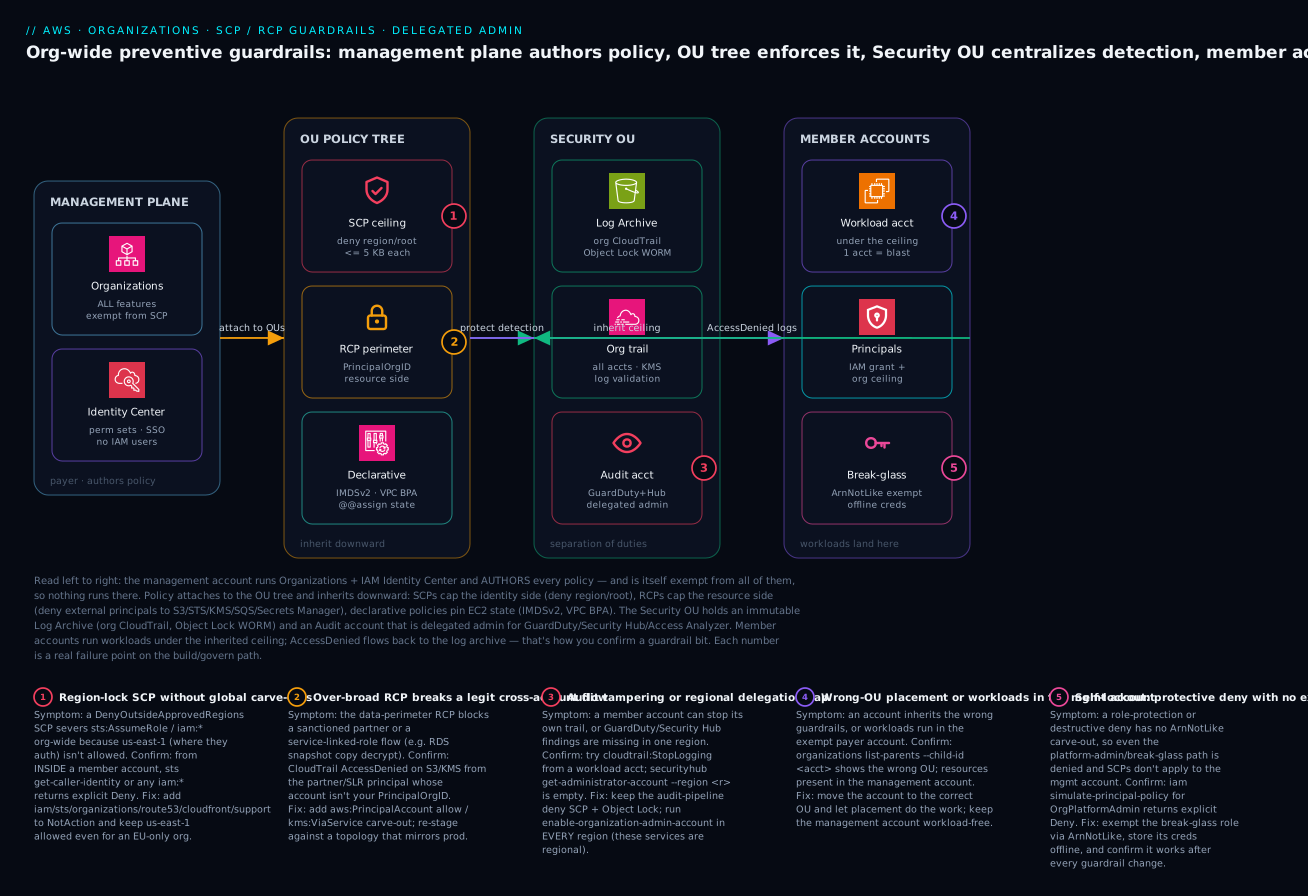
Read the diagram left to right as the governance build-and-enforce path, because that is the order the controls actually take effect. On the far left, the management plane (the payer/management account) runs AWS Organizations with all features enabled and IAM Identity Center for human access — this account authors every policy and is itself exempt from all of them, which is exactly why nothing runs here. Moving right, those policies attach to the OU policy tree: SCPs as the identity-side ceiling (preventive deny — region lock, root lockdown), RCPs as the resource-side perimeter (deny external principals reaching your S3/STS/KMS/SQS/Secrets Manager), and declarative policies that pin EC2 state (IMDSv2, VPC Block Public Access). Inheritance flows downward, so a rule attached at the root reaches every child account, and a tier-specific rule on the Prod OU reaches only Prod.
The next zone is the Security OU, the separation-of-duties heart of the design: a Log Archive account holding the immutable org CloudTrail bucket (Object Lock WORM) and an Audit account that is the delegated administrator for GuardDuty, Security Hub, and IAM Access Analyzer — protected by the audit-pipeline and security-role SCPs so member accounts can neither blind nor tamper with detection. Finally, the member accounts zone is where workloads actually land, each one sitting under an OU and therefore under the inherited ceiling; AccessDenied events from these accounts flow back to the Log Archive, which is how you confirm a guardrail bit. The numbered badges mark the five places this goes wrong in practice — a region lock without global-service carve-outs, a confused-deputy share, an over-broad RCP, a missing regional delegation, and a self-lockout from an exception-free role deny — each narrated in the legend with how to confirm it from inside a member account and how to recover.
Real-world scenario
A fintech platform team — call them Meridian Pay, running ~140 AWS accounts across two regions (us-east-1, eu-west-1) under a Control Tower landing zone — rolled out the data-perimeter RCP from Step 4 across the org and within an hour their nightly RDS snapshot copy to a dedicated DR account started failing with AccessDenied on the destination KMS key. The on-call SRE’s first instinct was that the RCP was too broad — it was not. The copy was a cross-account snapshot share encrypted with a KMS key in the DR account, and the principal performing the final decrypt was the RDS service-linked role, whose calls carry aws:PrincipalOrgID of neither org during part of the workflow. The BoolIfExists guard on aws:PrincipalIsAWSService was meant to let that through, but the KMS grant created by RDS evaluated with the key context absent, so the deny fired.
The fix was not to weaken the perimeter. They scoped the KMS portion of the RCP to also honor the grant-issuing service via kms:ViaService, keeping S3, SQS, and Secrets Manager fully locked:
{
  "Sid": "EnforceOrgPerimeterExceptKmsGrants",
  "Effect": "Deny",
  "Principal": "*",
  "Action": ["kms:Decrypt", "kms:CreateGrant", "kms:GenerateDataKey"],
  "Resource": "*",
  "Condition": {
    "StringNotEqualsIfExists": { "aws:PrincipalOrgID": "o-abcd1234ef" },
    "BoolIfExists": { "aws:PrincipalIsAWSService": "false" },
    "Null": { "kms:GranteePrincipal": "true" }
  }
}
Critically, they caught it only because the RCP was staged in a Sandbox OU that mirrored the DR topology — a throwaway “DR” account in the sandbox exercised the same snapshot-copy flow, so the production rollout never broke. The blast radius of the mistake was one sandbox account for one night, not 140 production accounts.
The incident also exposed a second, quieter gap. While debugging, the team ran aws securityhub get-findings from the Audit account and saw findings for us-east-1 but a suspicious silence from eu-west-1. The reason: when they had delegated Security Hub months earlier, they ran enable-organization-admin-account only in us-east-1, forgetting it is a regional call. Half their estate had no centralized Security Hub administration and nobody had noticed, because the management account’s own console looked fine. They fixed it with one extra call per region and added a check to their CI that asserts every security service is delegated in every operating region.
The two lessons compound: a perimeter RCP that looks airtight in review can break a legitimate service-mediated flow you never see in normal traffic — so stage it against a topology that mirrors production. And regional security services silently leave blind spots if you treat them like global ones — so make “delegated in every region” an automated assertion, not a memory.
Advantages and disadvantages
Preventive org-wide guardrails are powerful precisely because they are absolute and central — and that same absoluteness is what makes them dangerous. Weigh the model honestly:
| Advantages (why guardrails win) | Disadvantages (why they bite) |
|---|---|
| One policy enforces a rule across every account — no per-account drift to chase | The blast radius of a mistake is the entire org; a bad root SCP can brick every member account at once |
| SCPs/RCPs never grant, so they cannot accidentally open access — adding one only ever subtracts | Because they only subtract, they can silently break legitimate access you forgot about (service-linked roles, cross-account flows) |
| Preventive — the action is blocked before it touches the resource, not detected after | Debugging an AccessDenied is harder: the cause may be three OUs up, invisible from the account |
| The management account is exempt, so you can always recover from the top | That same exemption means tests from the management account lie — it looks healthy while members are broken |
| Declarative policies hold the baseline even across new service APIs and new accounts | Declarative policies use unfamiliar @@assign syntax and a different mental model from IAM |
| RCPs build a data perimeter without editing thousands of resource policies | RCPs cover only a specific service list — assume-everything is a trap |
Conditions (PrincipalOrgID, tags, service keys) make denies surgical |
Bool vs BoolIfExists and the two service keys are easy to confuse — the #1 SCP bug |
The model is right for any multi-account estate where universal, audit-provable controls matter — which is to say every regulated or mid-size-and-up AWS customer. It bites hardest the first time, on the team that skips staging, attaches a region lock without the iam/sts carve-out, and severs role assumption org-wide; or the team that protects a role with no exception clause and makes it permanently unmanageable. Every disadvantage here is manageable — but only through the staging discipline of Step 6, which is the entire reason that section exists.
Hands-on lab
Stand up the foundational guardrails in a non-production org (or a sandbox OU), prove a region lock actually blocks a real call, and tear it down. This is free — Organizations, SCPs, and RCPs carry no charge; you pay only if you leave billable resources running, which this lab does not create. Run from a principal in the management account for setup, but test from a member-account principal.
Safety first. Do this in a throwaway org or a Sandbox OU with no real workloads. A region lock without the global-service carve-out can sever role assumption — that is the whole point of testing it in a safe place.
Step 1 — Identify the org and enable policy types.
ROOT_ID=$(aws organizations list-roots --query 'Roots[0].Id' --output text)
ORG_ID=$(aws organizations describe-organization --query 'Organization.Id' --output text)
echo "Root: $ROOT_ID   Org: $ORG_ID"

aws organizations enable-policy-type --root-id "$ROOT_ID" --policy-type SERVICE_CONTROL_POLICY
Expected: the enable call returns the root with SERVICE_CONTROL_POLICY listed as ENABLED under PolicyTypes.
Step 2 — Create a Sandbox OU to stage into.
SANDBOX_OU=$(aws organizations create-organizational-unit \
  --parent-id "$ROOT_ID" --name Sandbox \
  --query 'OrganizationalUnit.Id' --output text)
echo "Sandbox OU: $SANDBOX_OU"
Step 3 — Author a region-lock SCP that carves out global services.
cat > scp-region-lock.json <<'JSON'
{
  "Version": "2012-10-17",
  "Statement": [{
    "Sid": "DenyOutsideApprovedRegions",
    "Effect": "Deny",
    "NotAction": ["iam:*","organizations:*","sts:*","cloudfront:*","route53:*","support:*"],
    "Resource": "*",
    "Condition": { "StringNotEquals": { "aws:RequestedRegion": ["us-east-1","eu-west-1"] } }
  }]
}
JSON

aws accessanalyzer validate-policy \
  --policy-document file://scp-region-lock.json \
  --policy-type SERVICE_CONTROL_POLICY
Expected: validate-policy returns an empty findings list (or only SUGGESTION-level notes) — no ERROR or SECURITY_WARNING.
Step 4 — Simulate the intended deny before attaching.
aws iam simulate-custom-policy \
  --policy-input-list file://scp-region-lock.json \
  --action-names "ec2:RunInstances" \
  --context-entries "ContextKeyName=aws:RequestedRegion,ContextKeyValues=ap-south-1,ContextKeyType=string" \
  --query 'EvaluationResults[0].EvalDecision'
Expected: "explicitDeny" — a RunInstances in ap-south-1 is blocked, exactly as designed.
Step 5 — Create and attach the SCP to the Sandbox OU.
SCP_ID=$(aws organizations create-policy \
  --name region-lock --type SERVICE_CONTROL_POLICY \
  --content file://scp-region-lock.json \
  --query 'Policy.PolicySummary.Id' --output text)

aws organizations attach-policy --policy-id "$SCP_ID" --target-id "$SANDBOX_OU"
Step 6 — Prove enforcement from a member account in the Sandbox OU. Assume a role into a sandbox member account, then attempt a blocked-region call:
# From inside a Sandbox member account (NOT the management account):
aws ec2 describe-availability-zones --region ap-south-1
# Expected: An error occurred (UnauthorizedOperation/AccessDenied) ... explicit deny
Expected: an AccessDenied/UnauthorizedOperation error citing the SCP — the region lock works. The same call in us-east-1 succeeds.
Step 7 — Confirm what actually applies and watch the deny in CloudTrail.
aws organizations list-policies-for-target \
  --target-id "$SANDBOX_OU" --filter SERVICE_CONTROL_POLICY --output table
Map of what each lab step proves:
| Step | What you did | What it proves | Real-world analogue |
|---|---|---|---|
| 1 | Enable SERVICE_CONTROL_POLICY |
Policy types are off by default | First-day org setup |
| 3 | validate-policy the document |
Linting catches errors pre-attach | CI gate on every policy PR |
| 4 | simulate-custom-policy |
The deny fires for the right context | Dry-run before production rollout |
| 6 | AccessDenied from a member account |
The guardrail bites where it matters | Watching a real workflow under the policy |
| 7 | list-policies-for-target |
Confirms inheritance/attachment | The audit question “what applies here?” |
Cleanup (no lingering charges, but tidy the org).
aws organizations detach-policy --policy-id "$SCP_ID" --target-id "$SANDBOX_OU"
aws organizations delete-policy --policy-id "$SCP_ID"
aws organizations delete-organizational-unit --organizational-unit-id "$SANDBOX_OU"
Cost note. Organizations, SCPs, and RCPs are free; this lab creates no billable resources, so the only “cost” is a few minutes. (If you instead spun up an EC2 instance to test, remember to terminate it — but the region lock above should have blocked that in the denied region.)
Common mistakes & troubleshooting
This is the playbook — the part you bookmark. First as a scannable table you read while a rollout is going sideways, then the entries that bite hardest expanded with the full confirm-and-fix detail. Note the discipline running through every row: confirm from inside a member account, never from the exempt management account.
| # | Symptom | Root cause | Confirm (exact cmd / path) | Fix |
|---|---|---|---|---|
| 1 | After a region-lock SCP, role assumption / IAM calls fail org-wide | NotAction omitted iam/sts; us-east-1 not allowed |
From a member account: aws sts get-caller-identity / any iam:* → explicit Deny |
Add iam,sts,organizations to NotAction; keep us-east-1 allowed |
| 2 | You wrote an Allow SCP to grant a service and it still doesn’t work |
SCPs never grant — the principal lacks an IAM Allow |
iam simulate-principal-policy shows implicit deny from IAM, not SCP |
Grant the action in an identity policy; SCP is only the ceiling |
| 3 | A protected security role can’t be modified by anyone, including its owner | Role-protection SCP has no ArnNotLike exception |
iam simulate-principal-policy for the admin path → explicit Deny |
Add ArnNotLike carve-out for OrgPlatformAdmin; reapply |
| 4 | Workloads in one account have the wrong guardrails | Account is in the wrong OU (or attached at account level) | aws organizations list-parents --child-id <acct> |
Move the account to the correct OU; remove account-level attachments |
| 5 | A deny meant to exempt services breaks a nightly job / SLR flow | Used Bool not BoolIfExists; key absent → deny fired |
CloudTrail AccessDenied with a service/SLR principal |
Switch to BoolIfExists; for KMS add kms:ViaService carve-out |
| 6 | An RCP blocks a legitimate cross-account or partner flow | RCP perimeter too broad; forgot a trusted account/service | CloudTrail AccessDenied on S3/KMS/etc from the partner principal |
Add aws:PrincipalAccount allow / kms:ViaService; re-stage |
| 7 | RCP “doesn’t protect” a resource type you expected | That service isn’t in the RCP-supported list | Check the action’s service against the supported list | Use an SCP/resource policy; don’t rely on RCP off-list |
| 8 | GuardDuty/Security Hub findings missing in one region | Delegated admin enabled in only one region | aws securityhub get-administrator-account --region <r> empty |
Re-run enable-organization-admin-account per region |
| 9 | Tag-on-create SCP blocks legitimate creates | Null aws:RequestTag/... true because tag passed differently |
CloudTrail request params show no RequestTag for that key |
Ensure clients pass --tag-specifications; align the key name |
| 10 | New service launches are all blocked for teams | Allow-list SCP model (removed FullAWSAccess) |
list-policies-for-target shows no FullAWSAccess |
Switch to deny model; restore FullAWSAccess, deny only what you must |
| 11 | Policy fails to attach: size error | SCP exceeds the 5 KB limit (whitespace counts) | create-policy returns MalformedPolicyDocument/size error |
Minify; split into multiple policies; consolidate Sids |
| 12 | Everything looks fine from the console but members are broken | You tested from the exempt management account | Re-test the exact call from a member-account principal | Always validate from inside a target OU |
| 13 | Can’t enable a policy type at all | Org is consolidated-billing-only, not all-features | describe-organization --query 'Organization.FeatureSet' |
Enable all features: enable-all-features (requires member consent) |
| 14 | An over-broad deny accidentally hits the org’s own automation | Deny didn’t ArnNotLike the deployment/CI role |
CloudTrail AccessDenied for the pipeline role |
Add the automation role to the ArnNotLike exception |
The expanded form for the entries that cause the most pain:
1. After attaching a region-lock SCP, role assumption or IAM calls fail across the whole org.
Root cause: The NotAction carve-out omitted iam/sts/organizations, and your allowed-region set doesn’t include us-east-1 where those global services authenticate.
Confirm: From a member-account principal, aws sts get-caller-identity or any iam:* call returns an explicit Deny; iam simulate-custom-policy against the SCP with the action reproduces it.
Fix: Add iam:*, sts:*, organizations:* (plus route53, cloudfront, support) to NotAction, and keep us-east-1 in the allowed regions even for an EU-only org. Re-validate, re-simulate, then re-attach. This is the single most important policy to test from inside an account before promoting.
2. You wrote an SCP that “allows” a service to grant access, and it does nothing.
Root cause: SCPs never grant; they only filter. An Allow SCP just declares the action is within the ceiling — the principal still needs an IAM Allow.
Confirm: aws iam simulate-principal-policy for the principal shows the deny coming from the identity policy (implicit deny), not from any SCP.
Fix: Add the permission to an identity (or resource) policy. Use SCPs only to subtract; if you want an allow-list model, remove FullAWSAccess and explicitly allow — but accept the brittleness.
3. A protected security/break-glass role becomes unmanageable by everyone.
Root cause: The role-protection SCP denies IAM writes on the role with no ArnNotLike exception for the intended admin path — so even the platform-admin role is denied.
Confirm: iam simulate-principal-policy for OrgPlatformAdmin against iam:UpdateRole on the protected ARN returns explicit Deny.
Fix: Add "ArnNotLike": { "aws:PrincipalArn": "arn:aws:iam::*:role/OrgPlatformAdmin" } to the condition. Because the management account is exempt, your only escape without this is moving the account out of the org temporarily — so never ship the policy without the carve-out.
5. A service-mediated flow (service-linked role, FAS) breaks under a deny that was supposed to exempt services.
Root cause: You used Bool instead of BoolIfExists on aws:ViaAWSService/aws:PrincipalIsAWSService; when the key is absent from the request context the plain Bool doesn’t behave as intended and the deny fires.
Confirm: CloudTrail shows the AccessDenied with a service or service-linked-role principal; the same human call succeeds/fails as expected, isolating it to the service path.
Fix: Switch to BoolIfExists. For KMS grants created by services (RDS, etc.), add a kms:ViaService carve-out or a Null kms:GranteePrincipal guard, as in the Meridian Pay scenario.
6. An RCP perimeter blocks a legitimate cross-account or partner flow.
Root cause: The perimeter is too broad — it denies everything not in your org, but you have a sanctioned partner account or a service path you forgot.
Confirm: CloudTrail AccessDenied on S3/KMS/SQS/Secrets Manager from the partner principal; the principal’s account isn’t your PrincipalOrgID.
Fix: Add an allow for the specific trusted account (aws:PrincipalAccount) or service (aws:PrincipalIsAWSService, kms:ViaService), keeping everything else locked. Always stage RCPs against a topology that includes these flows.
8. GuardDuty or Security Hub findings are missing in one region.
Root cause: These are regional services; you enabled delegated admin in one region and assumed it was global.
Confirm: aws securityhub get-administrator-account --region <region> (or GuardDuty equivalent) returns empty in the un-delegated region.
Fix: Run enable-organization-admin-account in every operating region, and add a CI assertion that every security service is delegated in every region you use.
Going deeper
The steps above are the working model. This section is for the reader who has shipped a few guardrails and keeps hitting the sharp edges the happy-path tables gloss over — what a policy doesn’t touch, how allow-lists inherit differently, the quotas that force consolidation, org conditions in resource policies, what declarative policies really do to existing resources, running the whole thing as code, and getting read access to the org out of the management account.
What SCPs genuinely do not touch (and why the service-exemption keys are subtler than they look)
The lesson’s BoolIfExists discussion can leave the impression that every AWS-service-driven call needs a hand-written exemption or your deny will break it. That is not quite true, and the distinction matters. SCPs never apply to a service-linked role (SLR). AWS excludes SLRs from SCP evaluation by design, so that core service integrations (Auto Scaling, RDS, Elastic Load Balancing, Organizations itself) cannot be bricked by a member account’s ceiling. They are also, as you know, exempt for the management account’s own principals.
So when you see an AccessDenied that looks like a service-linked role being blocked, it is almost never an SCP denying the SLR directly. It is one of two other things: a forward access session (FAS) — a service re-driving a call using a human principal’s credentials, where aws:ViaAWSService is true and the deny attaches to the human, not the SLR — or an RCP on the resource side, where a service principal’s grant is capped because you did not add the aws:PrincipalIsAWSService carve-out. That is exactly the shape of the Meridian Pay incident: the block was on the resource (KMS) side of an RCP, not an SCP denying the RDS SLR. Over-exempting “in case a service breaks” is the opposite failure — every blanket aws:ViaAWSService exemption widens the hole a human can drive through by laundering a call through a service. Exempt the specific path you actually watched fail in CloudTrail, and nothing more.
Allow-list inheritance is an AND; deny inheritance is an OR
The lesson (rightly) tells you to use the deny model. The reason bites hardest when someone doesn’t. Deny-based SCPs inherit as a union: a Deny at the root, an OU, or the account all apply, and any one of them blocks the call. Allow-list SCPs (where you removed FullAWSAccess) inherit as an intersection: for an action to survive, it must be explicitly allowed at every level from the root down to the account. A child OU that allows s3:* gets nothing if a parent OU’s allow-list omits s3:* — the parent already subtracted it. This is why allow-lists become unmanageable with OU depth: every new service must be added at every level in the path, and one forgotten line silently denies a whole service tier. Keep FullAWSAccess attached and subtract with denies unless you have a hard regulatory reason not to.
The quotas that quietly force you to consolidate
Guardrails are free, but they are not unlimited, and the limits shape your policy design more than cost ever will. The load-bearing numbers:
| Limit | Value | What it forces |
|---|---|---|
| SCPs attached per root / OU / account | 5 | Bundle related Deny statements into one policy — you cannot attach ten single-purpose SCPs to one OU |
| RCPs attached per root / OU / account | 5 | Same discipline on the resource side |
| SCP / RCP document size | 5120 characters (whitespace counts) | Minify in CI; a pretty-printed policy that reviews cleanly can fail to attach |
| OU nesting depth | 5 levels below the root | Keep the tree shallow; deep nesting also makes inheritance hard to reason about |
| Accounts in an org | 10 by default (soft) | Raise via Service Quotas / Support before a vending spree |
The five-per-entity limit plus the 5 KB size limit together are why the lesson keeps saying “bundle related denies into one policy”: you are rationing both attachment slots and bytes. A common pattern is one “org non-negotiables” SCP at the root (region lock + root lockdown + audit protection, minified) rather than three separate ones eating three of your five root slots.
aws:PrincipalOrgID and aws:PrincipalOrgPaths belong in resource policies too
The org condition keys are not only for SCPs and RCPs. Dropped into a resource policy, aws:PrincipalOrgID lets you grant the entire org without enumerating account IDs — the pattern that makes a shared bucket, KMS key, or SNS topic “open to everyone in my org, no one else”:
{
  "Version": "2012-10-17",
  "Statement": [{
    "Sid": "AllowOrgReadOnly",
    "Effect": "Allow",
    "Principal": "*",
    "Action": "s3:GetObject",
    "Resource": "arn:aws:s3:::shared-org-artifacts/*",
    "Condition": {
      "StringEquals": { "aws:PrincipalOrgID": "o-abcd1234ef" }
    }
  }]
}
aws:PrincipalOrgPaths narrows the same idea to an OU subtree. Its value is a path, not an id — o-abcd1234ef/r-ab12/ou-ab12-11111111/ou-ab12-22222222/ — and it supports a trailing wildcard, so "o-abcd1234ef/r-ab12/ou-ab12-11111111/*" matches every account under that OU at any depth. Two cautions: a resource policy Allow like this is a grant, so it is capped by your RCP data perimeter (belt and braces — the grant can never exceed the perimeter), and aws:PrincipalOrgID protects against the classic confused-deputy path where a third party’s role would otherwise reach in — see Cross-Account Roles, External ID & the Confused Deputy.
Declarative policies: non-retroactive, mergeable, inspectable
Three facts about declarative policies that the “sets state forever” summary hides. First, they are not a retroactive fixer. A declarative policy pins the account-level configuration and defaults; some settings — notably instance_metadata_defaults — apply to newly launched instances, not the fleet you already have. VPC Block Public Access does take effect on existing routing, but IMDS defaults do not rewrite running instances. So pair a new declarative baseline with a one-time remediation sweep of what already exists; the policy holds the line going forward, it does not clean up the past.
Second, they merge with operators beyond @@assign. Like tag policies, declarative (management) policies support @@append and @@remove to add or subtract list members as parent and child policies combine, and @@operators_allowed_for_child_policies to control whether a child OU may override or extend a parent’s value. This is how a root baseline and an OU refinement compose predictably instead of blindly overwriting.
Third, you can inspect the merged result. To see exactly what applies to one account after all inheritance, ask Organizations for the effective policy rather than reading the tree by hand:
aws organizations describe-effective-policy \
  --policy-type DECLARATIVE_POLICY_EC2 \
  --target-id 123456789012
Organizations can also generate an account-level report of resources that do not match the baseline, which is how you find the pre-existing instances the sweep above needs to touch. The deeper catalog of declarative and resource-side controls lives in Resource Control Policies, Declarative Policies & the Data Perimeter.
Manage the guardrails as code, not console clicks
The best-practices section says “keep policy definitions in Git, deployed through a reviewed pipeline” — here is what that actually looks like. In Terraform (AWS provider v5), one resource type creates the policy and another attaches it; the same aws_organizations_policy resource handles all three families by its type argument (SERVICE_CONTROL_POLICY, RESOURCE_CONTROL_POLICY, or DECLARATIVE_POLICY_EC2):
resource "aws_organizations_policy" "region_lock" {
  name    = "region-lock"
  type    = "SERVICE_CONTROL_POLICY"
  content = file("${path.module}/policies/scp-region-lock.json")
}

resource "aws_organizations_policy_attachment" "region_lock_workloads" {
  policy_id = aws_organizations_policy.region_lock.id
  target_id = var.workloads_ou_id
}
CloudFormation expresses the same thing as AWS::Organizations::Policy (with Name, Type, Content, and a TargetIds list that attaches it in the same stack). The non-obvious operational point: whichever tool you use must be authenticated against the management account (or a delegated admin for the policy type), because that is the only place Organizations policies can be created and attached. That single fact is why guardrail pipelines run from a tightly-controlled management-account role, and why the validate-policy lint (Step 6) belongs in the same pipeline before the apply — a Terraform apply that attaches a malformed or over-broad SCP to a root has the full org as its blast radius.
Getting read access to the org out of the management account
Delegated administration moves security services out of the management account, but your Audit account often also needs to read the org itself — list accounts, see which policies apply, check effective declarative state — without holding management-account credentials. That is a resource-based delegation policy on the organization, set once with put-resource-policy, granting a named member account a least-privilege, read-only slice of the Organizations API:
{
  "Version": "2012-10-17",
  "Statement": [{
    "Sid": "DelegateOrgReadToAudit",
    "Effect": "Allow",
    "Principal": { "AWS": "arn:aws:iam::222233334444:root" },
    "Action": [
      "organizations:DescribeOrganization",
      "organizations:ListAccounts",
      "organizations:ListPolicies",
      "organizations:ListPoliciesForTarget",
      "organizations:DescribeEffectivePolicy"
    ],
    "Resource": "*"
  }]
}
Keep it read-only — the moment a delegation policy grants AttachPolicy or CreatePolicy, you have handed a member account the ability to rewrite the org’s guardrails, which defeats the point of the management-account exemption. Scope it to the exact describe/list actions the Audit tooling calls, and nothing that mutates.
Best practices
- Use the deny model, keep
FullAWSAccess. Attach deny SCPs on top of the default allow-all; reserve allow-list models for a tightly-scoped sandbox or regulated OU. New AWS services should launch usable, not blocked. - Attach at the broadest scope where the rule is universally true. Org-wide non-negotiables at the root; tier rules on OUs. Treat account-level attachments as an anti-pattern — they don’t survive account moves and can’t be audited at scale.
- Carve out global services in every region lock.
iam,sts,organizations,route53,cloudfront,supportinNotAction, and keepus-east-1allowed. Test this policy harder than any other. - Always leave one authenticated path in a protective deny. Every role-protection or destructive deny gets an
ArnNotLikecarve-out for a platform-admin/break-glass path. A guardrail with no exception is a foot-gun. - Use
BoolIfExistsfor service-exemption keys. Foraws:ViaAWSServiceandaws:PrincipalIsAWSService, plainBoolmis-evaluates when the key is absent. This is the most common SCP bug in reviews. - Build the data perimeter with RCPs, but only for in-scope services. S3, STS, KMS, SQS, Secrets Manager, ECR, OpenSearch Serverless — confirm the service is covered before relying on an RCP.
- Delegate security services out of the management account — regionally where required. Most via the Organizations API once; GuardDuty/Security Hub/Macie/Inspector via their own API per region. Assert it in CI.
- Never run workloads in the management account. It’s exempt from SCPs/RCPs — anything there is unguardrailed. Keep it for org and billing only.
- Always test from inside a target OU, never the management account. The exempt account will look healthy while members are bricked.
- Stage every new policy in a Sandbox OU that mirrors production topology. Simulate, then promote OU-by-OU least-critical-first, with Security last.
- Keep policy definitions in Git, deployed through a reviewed pipeline. Minify SCPs to stay under 5 KB; lint with
validate-policyas a CI gate; require review on every change. - Alert on CloudTrail
AccessDenied. A guardrail you haven’t watched block something is one you don’t yet trust — andAccessDeniedspikes are how you catch an over-broad deny early.
Security notes
- The management account is the crown jewel. It is exempt from every guardrail, so a compromise there is total. Lock it down hardest: hardware-MFA on root, root credentials stored offline, no IAM users, access only via IAM Identity Center, and no workloads at all.
- Protect the detective pipeline as a non-negotiable root SCP. Deny
cloudtrail:StopLogging/DeleteTrail/UpdateTrailand the Config equivalents org-wide so no member account can blind detection. Pair with Object Lock (WORM) on the log-archive bucket so logs can’t be deleted even with bucket access. - Build a data perimeter with RCPs. “Only my org’s identities (or expected AWS services) may touch my S3/STS/KMS/SQS/Secrets Manager” closes the external-principal hole that SCPs cannot. It can only subtract, so it cannot accidentally open a resource.
- Lock root-user usage on member accounts. Deny all actions performed as the account root; reserve the few genuinely root-only operations for a controlled break-glass process.
- Enforce IMDSv2 and VPC Block Public Access via declarative policy. Pin
http_tokens=requiredandinternet_gateway_block=block-bidirectionalorg-wide so SSRF can’t steal credentials and no subnet is accidentally public — and the baseline holds for new accounts automatically. - Keep one exempt break-glass role with offline credentials. Exempt it in every protective deny (
ArnNotLike), store its keys offline, audit every use, and confirm it still works after each guardrail change. It is your only safe recovery from a self-lockout. - Least privilege still applies under the ceiling. SCPs/RCPs cap the maximum; they don’t replace tight identity policies. A principal should have the least IAM grant and sit under the org ceiling — defense in depth.
The security controls and what each one defends, mapped to the mechanism:
| Control | Mechanism | Defends against | Residual risk to watch |
|---|---|---|---|
| Region lock (SCP) | aws:RequestedRegion deny + global carve-out |
Data/resources sprawling to ungoverned regions | The carve-out itself (global services unrestricted) |
| Root-user lockdown (SCP) | aws:PrincipalArn ...:root deny |
Daily use of unscoped root credentials | Genuinely root-only ops need a break-glass path |
| Audit-pipeline protection (SCP) | Deny CloudTrail/Config disable + WORM bucket | Attackers blinding detection | Log-archive account compromise |
| Data perimeter (RCP) | aws:PrincipalOrgID deny on the resource side |
External principals reaching your data | Forgotten trusted partner/service flows |
| Org-membership fence (SCP) | aws:PrincipalOrgID on share actions |
Snapshot/AMI exfiltration to foreign accounts | Service-linked-role flows (needs ViaAWSService) |
| IMDSv2 + VPC BPA (declarative) | @@assign EC2 state |
SSRF credential theft; accidental public subnets | Pre-existing instances/VPCs (enforce on existing too) |
| Break-glass exemption | ArnNotLike + offline creds |
Self-lockout from a bad deny | Misuse if not tightly audited |
Cost & sizing
The good news on cost: the controls themselves are free. AWS Organizations, SCPs, RCPs, and declarative policies carry no charge — you pay for the resources accounts create under them, not for the governance layer. The cost conversation here is about the supporting services the guardrails assume and the operational effort, not per-policy fees.
- Organizations / SCP / RCP / declarative policy: ₹0. There is no per-policy or per-attachment cost. This is pure governance with no line item.
- Centralized CloudTrail (org trail): the management trail is free for the first copy of management events; you pay for S3 storage of the log archive and any data events you enable (data events are billed per event and can be significant on busy S3/Lambda). Use Object Lock + lifecycle to control storage cost.
- AWS Config (for detective rules): billed per configuration item recorded and per rule evaluation. Org-wide Config across 100+ accounts is the line item people underestimate — scope recording to the resource types you actually govern.
- GuardDuty / Security Hub / Inspector (delegated): each billed by its own usage metric (events analyzed, findings, instances scanned). Delegation doesn’t add cost; it centralizes it in the Audit account. Right-size by enabling only the protection plans you need.
- The real “cost” is operational: staging, simulation, and OU-by-OU rollout take engineering time. That time is the cheapest insurance against an org-wide lockout — a single severed-role-assumption incident costs far more in downtime than the rollout discipline that prevents it.
A rough monthly picture for a ~100-account org with centralized logging and detection (the guardrails are free; these are the services they rely on):
| Cost driver | What you pay for | Rough INR / month | Free? | Watch-out |
|---|---|---|---|---|
| Organizations + SCP + RCP + declarative | The governance layer itself | ₹0 | Yes | Nothing — it’s free |
| Org CloudTrail (mgmt events) | First copy of management events | ₹0 | Yes (1st copy) | Data events are extra and can spike |
| CloudTrail S3 storage | Log-archive bucket (WORM + lifecycle) | ~₹4,000–15,000 | No | Grows with retention; tier to Glacier |
| CloudTrail data events (optional) | Per-event logging on S3/Lambda | ~₹0–50,000+ | No | Enable selectively — busy buckets are pricey |
| AWS Config (org-wide) | Config items + rule evaluations | ~₹15,000–60,000 | No | Scope resource types; the silent big one |
| GuardDuty (org) | Events/flow-logs analyzed | ~₹10,000–40,000 | No (30-day trial) | Scales with traffic/account count |
| Security Hub (org) | Finding ingestion + checks | ~₹5,000–25,000 | No | Per-region; per-check costs add up |
Sizing guidance: the only “sizing” knob on the guardrail layer is the 5 KB per-SCP limit — consolidate related Deny statements into one policy, minify in CI, and split across multiple policies when you outgrow it (there’s a limit on policies attached per entity too, so don’t fragment needlessly). For the supporting services, the lever is scope: record in Config only the resource types you govern, log data events only where you need them, and enable detection plans selectively. The governance is free; discipline keeps the services it relies on affordable.
Interview & exam questions
1. Does an SCP grant permissions? Explain the evaluation rule. No — an SCP never grants. It filters the maximum permissions of principals in an account. The effective permission is the intersection of the identity policy, every SCP, and every RCP from root to account; an explicit Deny in any SCP wins, and an Allow SCP does nothing unless an identity policy also allows the action. Maps to SAP-C02 (organizational complexity) and SCS-C02 (governance).
2. Why is the management account exempt from SCPs, and what’s the implication? So you can never brick your own org from the top — there’s always one account from which to recover. The implication is twofold: never run workloads in the management account (they’re unguardrailed), and never test guardrails from it (it looks healthy while members are broken). Always validate from a member-account principal.
3. You attach a region-restriction SCP and role assumption breaks org-wide. What happened and how do you fix it? The NotAction carve-out omitted iam/sts (and likely organizations), and your allowed regions didn’t include us-east-1 where those global services authenticate — so STS calls were denied. Fix by adding iam:*, sts:*, organizations:* to NotAction and keeping us-east-1 allowed even in an EU-only org. Test this policy from inside a member account before promoting.
4. What’s the difference between an SCP and an RCP? An SCP filters the identity side (what your principals can do); an RCP filters the resource side (caps every resource policy’s grants, stopping external principals from reaching your resources). RCPs cover a specific service list (S3, STS, KMS, SQS, Secrets Manager, ECR, OpenSearch Serverless); SCPs apply to all services. Both deny-only, both exempt the management account. RCPs build the data perimeter SCPs can’t.
5. When do you use aws:ViaAWSService vs aws:PrincipalIsAWSService, and why BoolIfExists? aws:PrincipalIsAWSService is true when a service principal calls directly (CloudTrail writing to S3); aws:ViaAWSService is true when a service uses your credentials in a forward access session (Athena re-driving S3 reads). Use BoolIfExists because if the key is absent from the request context, plain Bool mis-evaluates — IfExists treats absence as “called directly,” so the deny applies as intended.
6. How do you build an org-wide data perimeter, and what’s its main risk? Attach an RCP that denies access to in-scope resources unless aws:PrincipalOrgID matches your org or the caller is an AWS service (aws:PrincipalIsAWSService). It can only subtract, so it can’t open a resource — but it can silently break a legitimate cross-account/partner or service-linked-role flow you forgot. Stage it against a topology that mirrors production and watch CloudTrail for AccessDenied.
7. What are declarative policies and how do they differ from SCPs? Declarative policies pin a service’s configuration state (EC2 first: IMDSv2, VPC Block Public Access, snapshot/AMI public-access blocks) rather than filtering API calls, using @@assign syntax. AWS guarantees the baseline holds even as the service ships new APIs and new accounts join — unlike an SCP, which denies by action and needs updating when new actions appear.
8. How do you delegate GuardDuty and Security Hub, and what’s the gotcha? Via each service’s own enable-organization-admin-account API, naming the Audit/Security account — and the gotcha is that they’re regional, so you must repeat the call in every operating region. Most other services (Access Analyzer, Config, StackSets) delegate once via the Organizations register-delegated-administrator. Mixing these up leaves regional blind spots.
9. Why is an account-level SCP attachment an anti-pattern? Because it doesn’t survive an account move — reorganize the OU tree and the account silently loses (or keeps) the wrong guardrails — and it’s invisible to audits that look at OU policy. Attach to OUs and let account placement do the work; reserve account-level attachments for documented, temporary exceptions.
10. How do you roll out a new guardrail without locking yourself out? Stage in a Sandbox OU of throwaway accounts that mirrors production, lint with validate-policy and dry-run with simulate-custom-policy, then promote OU-by-OU least-critical-first (Sandbox → NonProd → Infrastructure → Prod → Security last). Keep one break-glass role exempt via ArnNotLike with offline credentials, and confirm it still works after every change. Never test from the management account.
11. The 5 KB SCP size limit is blocking an attach. What do you do? Minify the JSON (whitespace counts toward the limit), consolidate related Deny statements under shared Sids/Action lists, and split into multiple policies if needed — being mindful of the per-entity attached-policy limit so you don’t over-fragment. Keep the source readable in Git and minify in the CI step that deploys it.
12. A protected role can’t be modified by anyone, including its owner. Why, and what’s the fix? The role-protection SCP denies IAM writes on the role with no exception clause, so even the intended admin is denied — and since the management account is exempt, your only escape is moving the account out of the org. Fix by adding an ArnNotLike carve-out for the platform-admin/break-glass principal. Always leave one authenticated path.
These map primarily to AWS Certified Security – Specialty (SCS-C02) — governance, data perimeters, and detective-control protection — and AWS Certified Solutions Architect – Professional (SAP-C02) — designing for organizational complexity, multi-account governance, and account structure. A compact cert mapping for revision:
| Question theme | Primary cert | Exam objective area |
|---|---|---|
| SCP evaluation / intersection rule | SCS-C02 / SAP-C02 | Governance; multi-account access control |
| Region lock + global carve-out | SAP-C02 | Designing org-wide guardrails |
| RCP data perimeter | SCS-C02 | Data perimeters; resource-side controls |
ViaAWSService vs PrincipalIsAWSService |
SCS-C02 | Advanced policy conditions |
| Declarative policies (IMDSv2, VPC BPA) | SCS-C02 | Preventive configuration baselines |
| Delegated administration (regional gotcha) | SCS-C02 / SAP-C02 | Centralized security operations |
| Safe rollout / break-glass | SAP-C02 | Operational excellence; avoiding lockout |
Quick check
- You write an SCP with an
Allowstatement to give an account access to a new service, but the principals still getAccessDenied. Why does theAllowSCP not work? - A region-restriction SCP is attached at the root and suddenly every account fails
sts:AssumeRole. What did the policy almost certainly get wrong, and what’s the fix? - True or false: an RCP can protect any AWS resource type from external access.
- You need a deny to apply to humans but not to a service-linked role acting on a user’s behalf. Which condition key do you use, and why
BoolIfExistsinstead ofBool? - You delegated Security Hub administration to the Audit account in
us-east-1, buteu-west-1shows no centralized findings. What’s the cause and the fix?
Answers
- Because SCPs never grant — they only filter the maximum permissions. An
AllowSCP merely keeps the action within the ceiling; the principal still needs anAllowin an identity policy. Add the permission to an IAM policy; the SCP is the ceiling, not the floor. - It almost certainly omitted
sts(andiam) from theNotActioncarve-out while not allowingus-east-1, where STS authenticates globally — so role assumption was denied org-wide. Fix by addingiam:*,sts:*,organizations:*toNotActionand keepingus-east-1in the allowed regions even for a non-US org. Test it from inside a member account before promoting. - False. RCPs cover only a specific, growing service list (at launch S3, STS, KMS, SQS, Secrets Manager; later ECR and OpenSearch Serverless). For resource types outside that list, RCPs do nothing — use an SCP or the resource’s own policy.
- Use
aws:ViaAWSService(true when a service makes the call using the user’s credentials) and exempt it ("BoolIfExists": { "aws:ViaAWSService": "false" }). UseBoolIfExistsbecause if the key is absent from the request context, a plainBoolmis-evaluates;IfExiststreats absence as “the principal called directly,” so the deny still applies to humans. - GuardDuty/Security Hub are regional services, and
enable-organization-admin-accountwas run only inus-east-1. Fix by running the delegation call in every operating region (eu-west-1here), and add a CI assertion that every security service is delegated in every region you use.
Common beginner mistakes
These are misconceptions about the mental model, not symptom-to-fix entries (those are in the troubleshooting table above). Each one is a belief that feels right and quietly leads you into a lockout or a blind spot.
“The management account is the safest place for my important workload.” The instinct is that the top of the org must be the most protected. It is the exact opposite: the management account is exempt from every SCP and RCP, so anything running there has no guardrail ceiling at all. The right model — the management account is an org-and-billing control plane, not a home for workloads. Run nothing there, lock its root down with hardware MFA and offline credentials, and give humans access only through IAM Identity Center.
“It worked in my admin session, so the guardrail is fine.” If your session is in the management account, or on a break-glass path you exempted, the request sails through while every member account is bricked — the exemption makes the test lie. The right model — a guardrail is only “verified” when you have run the exact call from a principal inside a target member account and watched it behave. Never sign off from the top.
“SCPs and RCPs only subtract, so attaching one broadly can’t break anything.” True, they can never grant — but subtracting is breaking. A too-broad deny at the root silently severs legitimate access (a service-linked flow, a partner integration, role assumption) across the entire org at once. The right model — “can’t open a hole” is not the same as “can’t cause an outage.” The blast radius of a bad guardrail is the whole org, which is why you stage in a Sandbox OU and simulate before you promote.
“I have to exempt every AWS service or my deny will break them.” Beginners reach for blanket aws:ViaAWSService exemptions everywhere. But true service-linked roles are already exempt from SCPs, and every blanket exemption you add is a hole a human can drive through by laundering the call through a service. The right model — exempt only the specific forward-access-session or service-principal path you actually watched fail in CloudTrail, using BoolIfExists, and leave the deny biting everything else.
“An RCP protects every resource in my account.” RCPs are the data-perimeter tool, so it is tempting to assume one RCP blankets everything you own. It does not — RCPs cover a fixed, growing service list (S3, STS, KMS, SQS, Secrets Manager, ECR, OpenSearch Serverless). The right model — check the target service against the supported list first; for anything off-list, the perimeter has to come from an SCP or the resource’s own policy, not an RCP.
“A declarative policy will fix my existing non-compliant instances.” It reads like a magic “make everything IMDSv2 now” switch. But a declarative policy pins state and defaults going forward — the IMDS default applies to newly launched instances, not the fleet already running. The right model — attach the baseline to hold the line for everything new, then run a one-time remediation sweep (and use the account status report) to bring existing resources into compliance.
Practice challenges
Work these in a throwaway org or Sandbox OU, never in production, and always test enforcement from inside a member account. They escalate from reading the evaluation rule to writing policy-as-code.
1. Predict the outcome (Beginner). An account has the default FullAWSAccess SCP plus one extra SCP that denies s3:DeleteObject. A principal there has an IAM policy allowing s3:*. For that principal, does s3:GetObject succeed? Does s3:DeleteObject? Say why for each.
<details> <summary>Solution</summary>
s3:GetObject succeeds: IAM allows it, FullAWSAccess keeps it within the ceiling, and no SCP denies it. s3:DeleteObject is denied: the explicit SCP Deny wins over the IAM Allow no matter what the identity policy says.
Why: the effective permission is the intersection of IAM and every SCP, and an explicit deny anywhere short-circuits the whole chain. </details>
2. Turn on and attach a perimeter RCP (Beginner → Intermediate). RCPs are off by default. Write the CLI to enable the RCP policy type on the root and attach an existing rcp-perimeter.json to the Workloads OU (ou-root-workloads).
<details> <summary>Solution</summary>
ROOT_ID=$(aws organizations list-roots --query 'Roots[0].Id' --output text)
aws organizations enable-policy-type --root-id "$ROOT_ID" --policy-type RESOURCE_CONTROL_POLICY

RCP_ID=$(aws organizations create-policy \
  --name org-data-perimeter --type RESOURCE_CONTROL_POLICY \
  --content file://rcp-perimeter.json \
  --query 'Policy.PolicySummary.Id' --output text)

aws organizations attach-policy --policy-id "$RCP_ID" --target-id ou-root-workloads
Why: the RCP type must be enabled before any RCP can attach, and attaching at the OU lets account placement, not per-account edits, carry the perimeter. </details>
3. Fence bucket-policy changes to the org, exempting services (Intermediate). Write an SCP that denies s3:PutBucketPolicy and s3:PutBucketAcl unless the caller belongs to org o-abcd1234ef, while letting AWS service principals through so log delivery keeps working.
<details> <summary>Solution</summary>
{
  "Version": "2012-10-17",
  "Statement": [{
    "Sid": "DenyBucketPolicyEditsOutsideOrg",
    "Effect": "Deny",
    "Action": ["s3:PutBucketPolicy", "s3:PutBucketAcl"],
    "Resource": "*",
    "Condition": {
      "StringNotEqualsIfExists": { "aws:PrincipalOrgID": "o-abcd1234ef" },
      "BoolIfExists": { "aws:PrincipalIsAWSService": "false" }
    }
  }]
}
Why: aws:PrincipalOrgID fences the action to in-org identities; BoolIfExists on aws:PrincipalIsAWSService treats an absent key as “a human called directly,” so the deny bites people but not service principals.
</details>
4. Grant the whole org read access to a bucket without listing accounts (Intermediate → Advanced). Write the resource (bucket) policy that allows s3:GetObject on arn:aws:s3:::shared-org-artifacts/* to every principal in org o-abcd1234ef and no one else.
<details> <summary>Solution</summary>
{
  "Version": "2012-10-17",
  "Statement": [{
    "Sid": "AllowOrgRead",
    "Effect": "Allow",
    "Principal": "*",
    "Action": "s3:GetObject",
    "Resource": "arn:aws:s3:::shared-org-artifacts/*",
    "Condition": {
      "StringEquals": { "aws:PrincipalOrgID": "o-abcd1234ef" }
    }
  }]
}
Why: the org condition key scales to every current and future account with zero maintenance, and because it is an Allow on the resource side it is still capped by your RCP perimeter — the grant can never exceed the ceiling.
</details>
5. Diagnose an allow-list gone wrong (Advanced). A team removed FullAWSAccess from the Workloads OU and attached an SCP allowing only ec2:*. Under a child Prod OU they attached an SCP allowing s3:*. A Prod principal with an IAM policy granting s3:* still gets AccessDenied on every S3 call. Explain and fix without abandoning their model.
<details> <summary>Solution</summary>
Allow-list SCPs inherit as an intersection: an action must be allowed at every level from the root down. The Workloads OU allow-list omits s3:*, so it is already subtracted before the child’s s3:* allow is ever considered — the child cannot add back what the parent removed. Fix: add s3:* to the Workloads-OU allow-list (or, far better, revert to keeping FullAWSAccess and expressing constraints as denies).
Why: deny inheritance is an OR (any deny blocks), but allow-list inheritance is an AND across levels — the reason allow-lists get brittle with OU depth. </details>
6. Express the region lock as code (Advanced). Write the Terraform (AWS provider v5) that creates the region-lock SCP from policies/scp-region-lock.json and attaches it to the Workloads OU (var.workloads_ou_id). Note the credential requirement.
<details> <summary>Solution</summary>
resource "aws_organizations_policy" "region_lock" {
  name    = "region-lock"
  type    = "SERVICE_CONTROL_POLICY"
  content = file("${path.module}/policies/scp-region-lock.json")
}

resource "aws_organizations_policy_attachment" "region_lock_workloads" {
  policy_id = aws_organizations_policy.region_lock.id
  target_id = var.workloads_ou_id
}
The provider must be authenticated against the management account (or a delegated admin), the only place Organizations policies can be created and attached. Gate the pipeline with accessanalyzer validate-policy before apply.
Why: policy-as-code makes the 5 KB minify step, the lint gate, and peer review real — and keeps the blast-radius-of-the-org change under the same review as any other infrastructure. </details>
Glossary
- AWS Organizations — the service that groups all your AWS accounts under one management (payer) account and lets you attach org-wide policies; the unit identified by
aws:PrincipalOrgID. - Management (payer) account — the root account of the org; exempt from SCPs and RCPs, used for billing and org control only, never for workloads.
- Organizational Unit (OU) — a grouping of accounts you attach policy to; policies inherit downward to child OUs and accounts.
- Service Control Policy (SCP) — an identity-side, deny-only policy attached at root/OU/account that caps the maximum permissions of principals; never grants; ≤ 5 KB.
- Resource Control Policy (RCP) — a resource-side, deny-only policy that caps the effective grants of every resource policy in scope; covers S3, STS, KMS, SQS, Secrets Manager, ECR, OpenSearch Serverless.
- Declarative policy — a policy that pins a service’s configuration state (EC2 first) across the org using
@@assignsyntax; AWS holds the baseline across new APIs and new accounts. - Deny-by-intersection — the rule that a request’s effective permission is the intersection of identity policy, every SCP, and every RCP; an explicit deny anywhere wins.
FullAWSAccess— the default SCP attached on creation that allows everything; the deny model keeps it and subtracts, the allow-list model removes it.aws:PrincipalOrgID— a condition key equal to the caller’s organization id; the core check for “is this principal in my org?” used to build perimeters.aws:ViaAWSService— a condition key true when an AWS service makes a call using your principal’s credentials (forward access session).aws:PrincipalIsAWSService— a condition key true when an AWS service principal makes a call directly on your resource (e.g. CloudTrail to S3).BoolIfExists— the boolean condition operator that treats an absent key as “false-side satisfied,” used for service-exemption keys so a deny still applies when the key is missing.- Data perimeter — an org-wide guarantee, built with RCPs, that only your org’s identities (or expected AWS services) may access your data.
- Delegated administrator — a member account (usually Security/Audit) nominated to administer a security service org-wide, getting tooling out of the management account.
- Break-glass role — an emergency-access role exempted from every protective deny (
ArnNotLike) with credentials stored offline; the only safe recovery from a self-lockout. - IMDSv2 — the session-token-protected EC2 Instance Metadata Service version; enforced org-wide via a declarative policy to defeat SSRF credential theft.
- VPC Block Public Access — an EC2/VPC setting (pinned via declarative policy) that blocks internet-gateway routing so no subnet is accidentally public.
- Service-linked role (SLR) — a role an AWS service owns and uses to act on your behalf; excluded from SCP evaluation by design, so a member-account ceiling can’t brick core service integrations.
- Forward access session (FAS) — when a service re-drives a downstream call using your principal’s credentials; the case where
aws:ViaAWSServiceis true and a deny attaches to the human, not to a service-linked role. aws:PrincipalOrgPaths— a condition key that matches an OU path (e.g.o-abcd1234ef/r-ab12/ou-ab12-11111111/, wildcard-capable), used to scope a policy to one OU subtree instead of the whole org.- Allow-list SCP model — the strategy of removing
FullAWSAccessand explicitly allowing services; inherits as an intersection (every level must allow) and is far more brittle than the deny model. - Trusted access — enabling an AWS service to operate with Organizations (
enable-aws-service-access) as the prerequisite step before you can register a delegated administrator for it. RCPFullAWSAccess— the default RCP present on every entity; likeFullAWSAccessfor SCPs, it adds no extra cap, so an unattached-RCP entity is unrestricted on the resource side.@@assign(and merge operators) — declarative/management-policy syntax that sets a value;@@appendand@@removeadd or subtract list members, and@@operators_allowed_for_child_policiescontrols whether child OUs may override a parent.describe-effective-policy— the Organizations API that returns the merged, inherited policy actually in effect on a target account (e.g.DECLARATIVE_POLICY_EC2), so you don’t reason about inheritance by hand.- Organizations delegation policy — a resource-based policy on the organization (set via
put-resource-policy) that grants a named member account a least-privilege slice of the Organizations API, typically read-only for an Audit account. - All-features mode — the Organizations feature set (as opposed to consolidated-billing-only) required before any policy type — SCP, RCP, declarative — can be enabled.
Next steps
You can now design, write, and safely roll out org-wide guardrails and delegate security services without locking yourself out. Build outward:
- Next: Resource Control Policies, Declarative Policies & the Data Perimeter — go deeper on the resource-side perimeter and the full declarative-policy catalog.
- Related: AWS Control Tower: Multi-Account Landing Zone — the landing zone these guardrails attach to, with automated account vending.
- Related: AWS IAM Fundamentals: Users, Roles, Policies & Evaluation — the identity-side grants that sit under the org ceiling.
- Related: IAM Least Privilege with Permission Boundaries — boundaries cap a principal’s own max, complementing the org ceiling.
- Related: IAM Identity Center: Permission Sets & ABAC — how humans get scoped access across the multi-account org without IAM users.
- Related: CloudWatch & CloudTrail Observability — wiring the
AccessDeniedalerting that proves every guardrail bites.