In a nutshell
Imagine an airline that flies between forty cities. It could run a direct flight for every pair — but that is 780 routes to schedule, staff, and maintain, and it still cannot get a passenger to a city it does not directly serve. So airlines build hubs: every city flies to the hub, the hub connects onward, and adding the forty-first city means one new route, not forty. AWS Transit Gateway (TGW) is that hub for your cloud network — every VPC and every on-prem link connects to it once, and the TGW routes between them, replacing a tangle of point-to-point connections that grows with the square of the number of VPCs.
The twist that makes this an architecture rather than a wiring diagram is who is allowed to fly where. A real hub does not let every passenger walk onto every connecting flight; there are gates, boarding passes, and secure zones. On a TGW those gates are route tables: you decide that “prod” and “non-prod” workloads can both reach “shared services” but never each other — not by posting a guard who turns them away, but by simply not printing the boarding pass for that connection. On a TGW, isolation is the absence of a route, and that one idea is the heart of the whole design.
This lesson builds the full hub for a many-account AWS estate: a clean address plan so no two VPCs collide, the TGW shared across accounts, route-table “gates” that keep environments apart, a single inspected door to the internet, consistent DNS, and a way to prove — not hope — that a path is open. Everything after this paragraph is depth; if you remember only one sentence, remember that the router is shared but the routes are per-domain, and the routes are where safety lives.
Level: Advanced · Time: ~65 min · You’ll be able to: explain why a hub beats a mesh, read the association-vs-propagation model without getting it backwards, and trace any packet from a spoke to the internet across the whole design.
A two-account network you can mesh by hand. A forty-account estate with prod/non-prod isolation, a single internet egress point, and on-prem connectivity is an architecture problem. Get the hub wrong early and you inherit a peering mess, overlapping CIDRs you can never renumber, and a flat network where any compromised workload can reach every other one. This is how to build the hub correctly the first time — and how to read it at 02:00 when a spoke “can’t reach the database” and you need to know in five minutes whether the problem is a missing route, a wrong association, a default-allow firewall, or an asymmetric flow the stateful engine is silently dropping.
The keystone is the AWS Transit Gateway (TGW) — a regional, horizontally-scaled cloud router that every VPC and every on-prem link attaches to once, replacing the O(N²) tangle of VPC peering. But a TGW is only as good as the discipline around it: a non-overlapping CIDR plan enforced by IPAM, Resource Access Manager (RAM) sharing so spokes attach without an invitation dance, and above all route-table segmentation — the single feature that lets one shared router enforce that prod and non-prod can never reach each other while both reach shared services and a single inspected egress point. Isolation here is the absence of a route, not a firewall rule, and that distinction is the whole game.
By the end you will be able to design the hub, share it across an AWS Organization, segment it into routing domains, force all egress through a central inspected path, resolve DNS consistently, terminate Direct Connect on the hub, and prove the data plane with Reachability Analyzer rather than trusting the console. Because this is a reference you will return to mid-incident, the topology choices, the IPAM hierarchy, the association/propagation matrix, the firewall policy actions, the service quotas, the cost drivers and the failure playbook are all laid out as scannable tables — read the prose once, then keep the tables open.
What problem this solves
Multi-account AWS is the default operating model — separate accounts for prod, non-prod, security, logging, and each business unit — because the account boundary is the strongest blast-radius and billing boundary AWS offers. But accounts are network islands. Two VPCs in two accounts cannot talk until you explicitly connect them, and the naive connectors do not scale: VPC peering is 1:1 and non-transitive, so N VPCs need N(N-1)/2 peerings and spoke A still cannot reach spoke C through B.
What breaks without a deliberate hub: teams peer VPCs ad hoc until the mesh is unmaintainable; someone provisions a VPC as 10.0.0.0/16, a second team does the same in another account, and now the two can never be routed to each other because you cannot renumber a live VPC; every spoke runs its own NAT gateway, so egress is sprawled across forty accounts with no central inspection or logging and a NAT bill multiplied by forty; and the network is flat — once anything is reachable, a compromised non-prod box can reach prod because nobody designed an isolation boundary into the routing.
Who hits this: any platform or cloud-foundations team past a handful of accounts; anyone running a landing zone; anyone with a compliance requirement to inspect and log egress centrally or to isolate environments at the network layer. The TGW with proper segmentation solves all four problems at once — transitive any-to-any-under-policy reachability, a single place to enforce isolation, one inspected egress point, and one hybrid termination point. The rest of this guide builds exactly that.
To frame the whole field before the deep dive, here is every problem this article solves, the failure you get without it, and the section that fixes it:
| Problem | What breaks without the hub | The mechanism that fixes it | Section |
|---|---|---|---|
| Accounts are network islands | Ad-hoc peering mesh, O(N²) | TGW + RAM share | Step 2 |
| CIDR collisions you can’t undo | Two VPCs claim 10.0.0.0/16; unroutable | IPAM hierarchy, disjoint super-blocks | Step 1 |
| Flat network, no isolation | Non-prod box reaches prod | Route-table domains; isolation = no route | Step 3 |
| Egress sprawl & no inspection | NAT × 40; nothing logged or filtered | Central egress VPC + Network Firewall | Step 4 |
| Inconsistent DNS across spokes | PHZ/on-prem names don’t resolve | Route 53 Resolver endpoints + rules | Step 5 |
| On-prem terminated per-VPC | Many VPN/DX tunnels, no control | Terminate DX/VPN on the TGW | Step 6 |
| “Is the path open?” guesswork | Multi-hour incident triage | Reachability Analyzer + flow logs | Verify |
Learning objectives
By the end of this article you can:
- Choose deliberately between Transit Gateway, VPC peering, and PrivateLink for a given connectivity requirement, and explain why peering does not scale and PrivateLink sidesteps CIDR overlap.
- Design a non-overlapping CIDR plan with AWS IPAM: a pooled hierarchy, disjoint per-environment super-blocks, and a reserved on-prem range, so route summarization stays clean and you never have to renumber.
- Provision a TGW in a dedicated network account, disable default association/propagation, and share it org-wide with RAM so spokes attach without the invitation dance.
- Build route-table segmentation using the association-vs-propagation model so prod and non-prod are isolated by the absence of a route, while both reach shared services and one egress point.
- Force centralized egress through a Network Firewall → NAT → IGW path, keep flows AZ-symmetric for the stateful engine, default the policy to drop, and keep east-west traffic off the firewall to control cost.
- Deliver consistent DNS with Route 53 Resolver inbound/outbound endpoints and RAM-shared forwarding rules, and terminate Direct Connect/VPN on the hub with per-environment hybrid route control.
- Prove the data plane with Reachability Analyzer and TGW Flow Logs, and diagnose the common failure modes (blackholes, broken isolation, asymmetric drops, missing return routes) from a symptom→cause→confirm→fix playbook.
Prerequisites & where this fits
You should already understand single-VPC fundamentals — subnets, route tables, an internet gateway, a NAT gateway, security groups vs NACLs — and basic AWS Organizations (a management account, member accounts, OUs). You should be comfortable running aws CLI commands, reading JSON, and applying Terraform. This guide assumes the depth of Deep dive into VPC: subnets, routing, IGW, NAT, and endpoints and VPC networking fundamentals explained as the layer beneath it.
This sits at the network-foundations layer of a landing zone, directly above account vending and just below per-workload networking. It pairs tightly with CIDR & IPAM management: allocation and BYOIP at scale (the address plan it depends on), AWS Network Firewall: centralized egress inspection (the inspection layer), Route 53 Resolver: DNS Firewall, endpoints, rules, hybrid resolution (centralized DNS), and Direct Connect + Transit Gateway: resilient hybrid (hybrid termination). The guardrails come from Organizations SCPs, guardrails & delegated admin.
A quick map of who owns what, so you call the right team fast during an incident:
| Layer | What lives here | Who usually owns it | Failure classes it can cause |
|---|---|---|---|
| IPAM / address plan | Pools, allocations, super-blocks | Network / platform | Overlap → unroutable spoke; summarization breaks |
| AWS Organizations / RAM | Account tree, OUs, resource shares | Cloud foundations | Spoke can’t see the shared TGW |
| Network account (hub) | TGW, route tables, egress VPC, resolver | Network team | Wrong association/propagation → broken isolation |
| Spoke account (VPC) | VPC, subnets, TGW attachment | App / dev team | Missing AZ ENI, wrong subnet, default route absent |
| Egress VPC | Network Firewall, NAT, IGW | Network / security | Default-allow; asymmetric drop; no return route |
| Hybrid (DX/VPN) | DXGW, VIFs, VPN attachment | Network team | Over-advertised prefixes; env reachable it shouldn’t be |
| Observability | TGW/VPC/FW flow logs, Athena | Platform / SRE | Blind triage; no exfil detection |
Core concepts
Six mental models make every later decision obvious.
A Transit Gateway is a regional router, not a global one. The TGW is a horizontally-scaled, managed router that lives in one region. Everything in that region — VPCs, VPN, Direct Connect via a Direct Connect Gateway — attaches to it once and gets transitive reachability, governed by route tables. A global estate needs one TGW per region, joined with inter-region peering attachments. Plan accounts and CIDRs with that regional boundary in mind from day one; a packet from eu-west-1 to us-east-1 crosses a peering attachment, and the CIDR plan must keep regions disjoint.
An attachment is an ENI in your subnets; routing happens in the TGW. When a VPC attaches to a TGW, the platform places an elastic network interface in one subnet per AZ you choose. Traffic only reaches AZs where the attachment has an ENI — attach in every AZ you run workloads in, or that AZ’s traffic blackholes. The VPC’s own route table sends a destination (often 0.0.0.0/0 or a summary) to the TGW attachment; from there, the TGW route table the attachment associates to makes the next-hop decision.
Association decides which table you use; propagation decides which tables learn your routes. This is the crux of segmentation and the line everyone gets backwards at first. Association = “which TGW route table do I consult for my outbound decisions” — every attachment associates to exactly one. Propagation = “into which TGW route tables do my VPC’s CIDRs get advertised.” To let prod reach shared services, you propagate the shared-services attachment into the prod table and propagate prod into the shared table. Because you never propagate prod into the non-prod table (and vice versa), those two domains have no route to each other even though they share one router. Isolation is the absence of a route, not a firewall rule.
Allocation is finite and the CIDR plan is permanent. The TGW route table is a longest-prefix-match router. Two VPCs both advertising 10.0.0.0/16 cannot both be routed, and you cannot renumber a live VPC without downtime. Solve allocation centrally, before anyone provisions a VPC, with AWS IPAM as the single source of truth and disjoint super-blocks per environment so summarization stays clean.
Centralized egress trades NAT sprawl for one inspected, billed path. Instead of a NAT gateway in every spoke, you run one egress VPC in the network account with NAT gateways and an AWS Network Firewall, and point every spoke’s default route at the TGW, which forwards to the egress VPC. The catch: TGW data-processing and Network Firewall both bill per-GB, firewall endpoints are AZ-local (so flows must be AZ-symmetric or the stateful engine drops return traffic), and you must propagate every spoke back into the egress route table or the return path blackholes.
The data plane is the source of truth; the console lies by omission. A route can exist in the console and still not deliver a packet (wrong AZ, NACL, security group, asymmetric firewall). Reachability Analyzer and TGW Flow Logs are the authoritative way to prove a path is — or is not — open, end to end across the whole hub.
The vocabulary in one table
Pin down every moving part before the deep sections. The glossary repeats these for lookup; this is the mental model side by side:
| Concept | One-line definition | Where it lives | Why it matters |
|---|---|---|---|
| Transit Gateway (TGW) | Regional managed router | Network account, per region | The hub everything attaches to |
| Attachment | An ENI-backed link (VPC/VPN/DX/peer) | In your subnets / TGW | No ENI in an AZ → that AZ blackholes |
| TGW route table | A routing domain | On the TGW | The segmentation primitive |
| Association | Which table an attachment uses | Attachment ↔ table | “My outbound decisions” |
| Propagation | Which tables learn an attachment’s CIDRs | Attachment → tables | “Who can route to me” |
| IPAM pool | Hierarchical address allocator | IPAM scope | Source of truth; no overlaps |
| RAM share | Cross-account resource grant | RAM | Spokes attach without invites |
| Egress VPC | Central NAT + inspection VPC | Network account | One inspected internet exit |
| Network Firewall | Stateful/stateless inspection | Egress VPC, AZ-local | Drops/allows egress; per-GB billed |
| Resolver endpoint | Inbound/outbound DNS NIC | Shared/egress VPC | Hybrid + consistent DNS |
| Blackhole route | A route that drops traffic | TGW route table | Intentional isolation or a bug |
| Reachability Analyzer | Path-proving service | VPC | Authoritative data-plane test |
Topology: Transit Gateway vs. peering vs. PrivateLink
These three are not competitors; they solve different problems. Pick deliberately — choosing peering for a forty-account estate, or a TGW to share a single API, are both expensive mistakes.
| Pattern | Connectivity model | Transitive routing | Scales to | Best for | Worst for |
|---|---|---|---|---|---|
| VPC peering | 1:1, full IP reachability | No | A handful of VPCs | Lowest latency, no hub fee, 2–10 VPCs | Many VPCs (N(N-1)/2), any transitive need |
| Transit Gateway | Hub-and-spoke, regional router | Yes (policy-controlled) | Thousands of attachments | Many VPCs/accounts, segmentation, hybrid, central egress | Sharing one app without IP routing |
| PrivateLink | Service endpoint (one ENI) | N/A (no IP routing) | One service, many consumers | Exposing a single service across a trust boundary | Everything-talks-to-everything |
Peering does not scale, and the reason is arithmetic. PrivateLink is the right tool when you want to share one application without granting network-layer reachability — it sidesteps CIDR overlap entirely because there is no routing. For everything-talks-to-everything-under-policy across accounts, the TGW is the answer. Here is the head-to-head on the dimensions that actually decide a design:
| Dimension | VPC peering | Transit Gateway | PrivateLink |
|---|---|---|---|
| Connections for N VPCs | N(N-1)/2 | N (one each) | 1 endpoint per consumer/service |
| Transitive (A→B→C) | No | Yes | N/A |
| Overlapping CIDRs allowed | No | No (LPM router) | Yes (no IP routing) |
| Per-GB data charge | No | Yes (data processing) | Yes (per-GB + endpoint-hour) |
| Cross-region | Yes (inter-region peering) | Yes (TGW peering) | Yes (with extra config) |
| Central inspection point | No | Yes (egress VPC) | N/A |
| Bandwidth ceiling | VPC-to-VPC line rate | ~50 Gbps per VPC attachment (burst) | Per-ENI |
| Typical use | 2–10 VPCs, latency-sensitive | Landing-zone hub | Internal API / SaaS endpoint |
A TGW is a regional resource. A global estate needs one TGW per region, joined with inter-region peering attachments. Plan accounts and CIDRs with that boundary in mind from day one. The rest of this guide builds the regional hub.
Step 1 — A non-overlapping CIDR plan with IPAM
The single most expensive mistake in multi-account networking is CIDR overlap. The TGW route table is a longest-prefix-match router; two VPCs advertising 10.0.0.0/16 cannot both be routed, and you cannot renumber a live VPC. Solve allocation centrally before anyone provisions a VPC.
Use AWS IPAM as the source of truth. Carve a top-level pool, then per-environment and per-region pools beneath it, and force every VPC to draw from IPAM so uniqueness is guaranteed by construction rather than by a spreadsheet someone forgets to update.
resource "aws_vpc_ipam" "main" {
  operating_regions { region_name = "eu-west-1" }
}

resource "aws_vpc_ipam_pool" "top" {
  address_family = "ipv4"
  ipam_scope_id  = aws_vpc_ipam.main.private_default_scope_id
  locale         = "eu-west-1"
}

resource "aws_vpc_ipam_pool_cidr" "top" {
  ipam_pool_id = aws_vpc_ipam_pool.top.id
  cidr         = "10.0.0.0/8"
}

# Environment pool: prod gets a /12 out of the /8
resource "aws_vpc_ipam_pool" "prod" {
  address_family      = "ipv4"
  ipam_scope_id       = aws_vpc_ipam.main.private_default_scope_id
  locale              = "eu-west-1"
  source_ipam_pool_id = aws_vpc_ipam_pool.top.id
}

resource "aws_vpc_ipam_pool_cidr" "prod" {
  ipam_pool_id   = aws_vpc_ipam_pool.prod.id
  netmask_length = 12
}
Spoke VPCs then allocate from the pool instead of hard-coding a block. IPAM hands out a free, non-overlapping range and tracks it:
resource "aws_vpc" "spoke" {
  ipv4_ipam_pool_id    = aws_vpc_ipam_pool.prod.id
  ipv4_netmask_length  = 20            # IPAM hands out a free /20
  enable_dns_support   = true
  enable_dns_hostnames = true
}
Reserve disjoint super-blocks per environment so route-table summarization stays clean later, and reserve a separate block for on-prem so hybrid routes never collide. A worked allocation that leaves room to grow and summarizes to one prefix per domain:
| Domain | Super-block | Mask | VPC size handed out | Approx VPC capacity | Summarized as |
|---|---|---|---|---|---|
| Prod | 10.16.0.0/12 | /12 | /20 | ~16,000 /20s | 10.16.0.0/12 |
| Non-prod | 10.32.0.0/12 | /12 | /20 | ~16,000 /20s | 10.32.0.0/12 |
| Shared services | 10.48.0.0/12 | /12 | /22 | ~64,000 /22s | 10.48.0.0/12 |
| Egress / inspection | 10.64.0.0/16 | /16 | /24 | ~256 /24s | 10.64.0.0/16 |
| On-prem (reserved) | 10.200.0.0/13 | /13 | n/a (BGP) | data-center owned | 10.200.0.0/13 |
| Future / spare | 10.96.0.0/11 | /11 | reserved | growth | — |
The IPAM hierarchy itself, level by level, and what each level is for:
| IPAM level | Scope / mask | Owns | Why it exists |
|---|---|---|---|
| Top pool | private scope, /8 | The whole RFC-1918 space | Single root of truth |
| Locale | region binding | A region’s allocations | Keeps regions disjoint |
| Environment pool | /12–/13 | prod / non-prod / shared | Summarizable domains |
| Account/team pool (optional) | /16 | One BU or account | Delegated self-service |
| VPC allocation | /20–/24 | One VPC | Drawn at provision time |
IPAM allocation settings worth knowing, with their defaults and the gotcha each guards against:
| Setting | What it controls | Default | When to change | Gotcha if wrong |
|---|---|---|---|---|
auto_import |
Pull existing CIDRs into the pool | false | Migrating legacy VPCs | Imports overlaps as findings, not blocks |
allocation_min_netmask_length |
Smallest block IPAM will hand out | pool-defined | Enforce a floor (e.g. /24) | Teams grab huge blocks |
allocation_max_netmask_length |
Largest mask (smallest network) | pool-defined | Cap tiny allocations | Fragmentation |
allocation_default_netmask_length |
Default size on request | none | Standardize VPC size | Inconsistent VPCs |
publicly_advertisable |
BYOIP advertisement | false | BYOIP only | Accidental public advertise |
| Resource discovery (org) | Cross-account CIDR visibility | off | Multi-account (always) | Blind to other accounts’ overlaps |
Renumbering is not an option for a live VPC. Every byte of effort spent on the address plan now saves a quarter of migration pain later. If you inherit overlaps, the only clean fixes are PrivateLink (no routing) for the affected service or a brand-new VPC behind a fresh IPAM allocation with a workload migration — never a TGW route hack.
Step 2 — Provision the TGW and share it with RAM
Create the TGW in a dedicated network account (part of your AWS Organizations structure), then share it to every other account with Resource Access Manager (RAM). Turn off the default automation so route propagation and association become explicit, policy-driven decisions rather than accidents.
resource "aws_ec2_transit_gateway" "hub" {
  description                     = "Org hub TGW"
  default_route_table_association = "disable"
  default_route_table_propagation = "disable"
  dns_support                     = "enable"
  vpn_ecmp_support                = "enable"
  amazon_side_asn                 = 64512   # for any future BGP attachments
  tags = { Name = "tgw-hub" }
}
The TGW-level options you set once, with their effect and the recommended value for a segmented hub:
| Option | Values | Default | Recommended (segmented hub) | Why |
|---|---|---|---|---|
default_route_table_association |
enable / disable | enable | disable | Force explicit association; segmentation depends on it |
default_route_table_propagation |
enable / disable | enable | disable | No accidental any-to-any reachability |
dns_support |
enable / disable | enable | enable | Cross-VPC DNS resolution over the TGW |
vpn_ecmp_support |
enable / disable | enable | enable | Multi-path over redundant VPN tunnels |
amazon_side_asn |
64512–65534, 4200000000–4294967294 | 64512 | A value you control | BGP for DX/VPN; avoid clashing with on-prem ASN |
multicast_support |
enable / disable | disable | disable (unless needed) | Niche; off by default |
auto_accept_shared_attachments |
enable / disable | disable | disable | Approve attachments deliberately |
transit_gateway_cidr_blocks |
CIDR list | none | set for Connect/peering | Required for some attachment types |
Sharing with the whole organization removes the per-account invitation dance. This requires that you have enabled RAM sharing within AWS Organizations once (aws ram enable-sharing-with-aws-organization):
resource "aws_ram_resource_share" "tgw" {
  name                      = "tgw-hub-share"
  allow_external_principals = false
}

resource "aws_ram_resource_association" "tgw" {
  resource_arn       = aws_ec2_transit_gateway.hub.arn
  resource_share_arn = aws_ram_resource_share.tgw.arn
}

# Share to the entire org (or to specific OUs by ARN)
resource "aws_ram_principal_association" "org" {
  principal          = "arn:aws:organizations::111122223333:organization/o-exampleorgid"
  resource_share_arn = aws_ram_resource_share.tgw.arn
}
RAM lets you scope the share precisely; pick the narrowest principal that still avoids per-account toil:
| RAM principal type | Example ARN / value | Scope | When to use |
|---|---|---|---|
| Whole organization | organization/o-xxxx |
Every account, now and future | Landing-zone default |
| Organizational unit | ou-xxxx-yyyy |
Accounts under that OU | Share only to workload OUs |
| Single account ID | 123456789012 |
One account | Pilots, exceptions |
| IAM role/user (external) | role ARN | One principal | Rare; requires allow_external_principals=true |
Once shared, a spoke account creates its attachment locally, referencing the shared TGW ID. This is the clean ownership split: the network account owns the TGW and its route tables; the spoke owns its VPC and attachment.
resource "aws_ec2_transit_gateway_vpc_attachment" "spoke" {
  transit_gateway_id = "tgw-0abc123..."        # the shared TGW
  vpc_id             = aws_vpc.spoke.id
  subnet_ids         = [for s in aws_subnet.tgw : s.id]  # one /28 per AZ
  dns_support        = "enable"
  appliance_mode_support = "disable"           # enable only for inline appliances
  tags = { Name = "att-spoke-prod-app1" }
}
Attachment options and when each matters — appliance_mode is the one people miss and it changes flow symmetry:
| Attachment option | Values | Default | When to change | Effect |
|---|---|---|---|---|
subnet_ids |
one subnet per AZ | required | Always one /28 per AZ | Places the ENI; missing AZ = blackhole |
dns_support |
enable / disable | enable | rarely | DNS resolution over the attachment |
appliance_mode_support |
enable / disable | disable | inline inspection appliance VPC | Pins a flow to one AZ’s appliance (symmetry) |
ipv6_support |
enable / disable | disable | dual-stack | IPv6 routing over the TGW |
transit_gateway_default_route_table_association |
bool (provider) | follows TGW | keep disabled | Explicit association instead |
Give the TGW its own tiny attachment subnets — a
/28per AZ is plenty — separate from workload subnets. Attach in every AZ you run workloads in; an attachment only delivers traffic to AZs where it has an ENI, and intra-AZ traffic avoids cross-AZ data charges.
The attachment types a TGW supports, and the route mechanism each uses:
| Attachment type | Connects | Routes via | Notes |
|---|---|---|---|
| VPC | A VPC in any account | Static + propagation | The common case; one ENI per AZ |
| VPN (Site-to-Site) | On-prem over IPsec | BGP (dynamic) or static | ECMP across tunnels |
| Direct Connect (via DXGW) | On-prem over DX | BGP | Through a Direct Connect Gateway |
| TGW peering | Another TGW (cross-region) | Static only | No transitive peering; per-pair |
| Connect (GRE) | SD-WAN / virtual routers | BGP over GRE | For third-party appliances |
| Multicast domain | Multicast group members | Multicast routing | Niche; off by default |
Service quotas and limits that bite
Design to the documented quotas, not to a guess — and treat the soft ones as raisable via Service Quotas, the hard ones as design constraints. These are the figures that most often force a redesign; confirm the current values and your account’s applied limits before you build to a ceiling:
| Limit | Default / value | Soft or hard | What hitting it looks like |
|---|---|---|---|
| VPC attachments per TGW | ~5,000 | Soft (raisable) | New attachment rejected at scale |
| Routes per TGW route table | ~10,000 | Hard | Propagation/route install fails |
| TGW route tables per TGW | ~20 | Soft | Can’t add another routing domain |
| Attachments per VPC (same TGW) | 5 | Hard | Limits per-AZ/redundant designs |
| TGWs per Region per account | ~5 | Soft | Can’t split into more hubs |
| Subnets per VPC attachment (AZs) | one per AZ | Hard | Missing AZ = blackhole |
| Bandwidth per VPC attachment | ~50 Gbps (burst) | Hard | Throughput ceiling per VPC |
| DXGW allowed prefixes to on-prem | ~20 | Hard | Over-advertised routes dropped |
| DXGW associations (TGWs) | ~6 | Hard | Limits hub count behind one DXGW |
| Peering attachments per TGW | ~50 | Soft | Multi-region fan-out ceiling |
| Resolver endpoints’ ENIs (per endpoint) | ≥2 | Hard | Need 2+ for AZ resilience |
| RAM resource shares per account | ~5,000 | Soft | Many fine-grained shares |
Step 3 — Route-table segmentation
This is where a TGW earns its keep. A TGW route table is a routing domain. By controlling which attachments associate to a domain (which table they consult for outbound decisions) and which propagate into it (whose CIDRs appear there), you build isolation that a flat network cannot. The classic layout:
                 +------------------+
   prod spokes ->| prod RT          |  -> shared svc, egress (no non-prod)
                 +------------------+
                 +------------------+
non-prod spokes->| non-prod RT      |  -> shared svc, egress (no prod)
                 +------------------+
                 +------------------+
 shared svc VPC ->| shared RT        |  -> prod + non-prod (serves both)
                 +------------------+
                 +------------------+
       egress VPC->| egress RT       |  <- default route lives here; learns ALL spokes
                 +------------------+
Goal: prod talks to prod and to shared services; non-prod talks to non-prod and to shared services; prod and non-prod never reach each other; everyone reaches the internet only through the central egress VPC. Here is the full association/propagation matrix — read a row as “this attachment associates to its own table and propagates into the ticked tables”:
| Attachment ↓ / propagates into → | prod RT | non-prod RT | shared RT | egress RT | hybrid RT |
|---|---|---|---|---|---|
| Prod spoke (assoc: prod) | self | — | ✓ | ✓ | ✓ (if cleared) |
| Non-prod spoke (assoc: non-prod) | — | self | ✓ | ✓ | — |
| Shared-svc VPC (assoc: shared) | ✓ | ✓ | self | ✓ | ✓ (if cleared) |
| Egress VPC (assoc: egress) | static 0/0 | static 0/0 | static 0/0 | self | — |
| Hybrid (DX/VPN) (assoc: hybrid) | ✓ (if cleared) | — | ✓ | — | self |
The mental model that keeps this straight, stated as a decision table you can apply to any new requirement:
| If you want… | Then… | Concretely |
|---|---|---|
| A to use a domain’s routes for its decisions | Associate A to that table | Prod spoke associates to prod RT |
| B to be reachable from A’s domain | Propagate B into A’s table | Propagate shared into prod RT |
| A↔B mutual reachability | Propagate each into the other’s table | Prod↔shared both directions |
| A and B fully isolated | Propagate neither into the other’s table | Prod & non-prod: no mutual propagation |
| Everyone to reach the internet | Static 0/0 → egress attachment in each domain | Per-domain default route |
| Egress to return traffic to a spoke | Propagate that spoke into the egress table | All spokes → egress RT |
In Terraform, a prod spoke associates to the prod table and propagates into shared so shared services can reach it:
resource "aws_ec2_transit_gateway_route_table" "prod" {
  transit_gateway_id = aws_ec2_transit_gateway.hub.id
  tags = { Name = "rt-prod" }
}

# A prod spoke associates to the prod table...
resource "aws_ec2_transit_gateway_route_table_association" "prod_app1" {
  transit_gateway_attachment_id  = aws_ec2_transit_gateway_vpc_attachment.spoke.id
  transit_gateway_route_table_id = aws_ec2_transit_gateway_route_table.prod.id
}

# ...and propagates its CIDR INTO the shared-services table (so shared svc can reach it)
resource "aws_ec2_transit_gateway_route_table_propagation" "prod_into_shared" {
  transit_gateway_attachment_id  = aws_ec2_transit_gateway_vpc_attachment.spoke.id
  transit_gateway_route_table_id = aws_ec2_transit_gateway_route_table.shared.id
}
The default route to the egress VPC is a static route in each spoke domain pointing at the egress attachment:
resource "aws_ec2_transit_gateway_route" "prod_default" {
  destination_cidr_block         = "0.0.0.0/0"
  transit_gateway_attachment_id  = aws_ec2_transit_gateway_vpc_attachment.egress.id
  transit_gateway_route_table_id = aws_ec2_transit_gateway_route_table.prod.id
}
Static vs propagated routes behave differently when they collide; know which wins:
| Route property | Static route | Propagated route |
|---|---|---|
| Source | You declare it | Learned from an attachment (BGP/auto) |
| Priority on exact-match tie | Wins over propagated | Loses to a static of same prefix |
| Used for | Default 0/0 → egress; blackholes | Reachability of real VPC CIDRs |
| Survives attachment delete | Yes (manual cleanup) | No (withdrawn) |
| Longest-prefix match | Applies first, across both | Applies first, across both |
| Blackhole option | Yes (explicit drop) | No |
Isolation is the absence of a route. Because you never propagate prod into the non-prod table (and vice versa), those two domains have no route to each other even though they share one TGW. You do not need a firewall rule to keep them apart — you need the route to simply not exist. This is cheaper (no per-GB inspection) and harder to misconfigure than a deny rule.
A common segmentation pattern beyond the four-domain default, with the trade-off each carries:
| Segmentation model | Route tables | Isolation strength | Operational cost |
|---|---|---|---|
| Flat (one table) | 1 | None — any-to-any | Lowest; unsafe past a few VPCs |
| Env split (this guide) | prod / non-prod / shared / egress | Strong env boundary | Moderate; the sweet spot |
| Per-BU domains | One per business unit | BU-level blast radius | Higher; many tables |
| Per-tier (web/app/data) | Tier tables | East-west micro-isolation | High; verbose, use SGs instead |
| Inspection-forced | All east-west via firewall RT | Maximum (everything inspected) | Highest $ (per-GB on all flows) |
Step 4 — Centralized egress through a shared NAT + Network Firewall VPC
Per-VPC NAT gateways are a cost and governance sprawl: every spoke pays for NAT, and you have no single place to inspect or log egress. Consolidate into one egress VPC in the network account that owns the NAT gateways and an AWS Network Firewall for inspection. Spoke default routes already point at this VPC’s TGW attachment (Step 3).
The traffic path matters. Inside the egress VPC, force the flow TGW → firewall endpoint → NAT gateway → internet. That means three subnet tiers per AZ and route tables that hand off between them:
ingress from TGW
   |
   v  (TGW subnet route table: 0.0.0.0/0 -> firewall endpoint)
[firewall subnet: AWS Network Firewall endpoint]
   |
   v  (firewall subnet route table: 0.0.0.0/0 -> NAT gateway)
[public subnet: NAT gateway + IGW]
   |
   v
internet
The exact route tables that build that hand-off — get one wrong and traffic bypasses the firewall or blackholes:
| Subnet tier (per AZ) | Route added | Next hop | Purpose |
|---|---|---|---|
| TGW attachment subnet | 0.0.0.0/0 |
Firewall endpoint (this AZ) | Force inbound-from-TGW through inspection |
| TGW attachment subnet | spoke summaries | (local/TGW) | Return path knowledge |
| Firewall subnet | 0.0.0.0/0 |
NAT gateway (this AZ) | Inspected traffic to NAT |
| Firewall subnet | spoke summaries (e.g. 10.16.0.0/12) | TGW attachment | Return traffic back to spokes |
| Public subnet | 0.0.0.0/0 |
Internet gateway | NAT to the internet |
| Public subnet | spoke summaries | Firewall endpoint (this AZ) | Symmetric return through inspection |
resource "aws_networkfirewall_firewall" "egress" {
  name                = "fw-central-egress"
  firewall_policy_arn = aws_networkfirewall_firewall_policy.egress.arn
  vpc_id              = aws_vpc.egress.id

  dynamic "subnet_mapping" {
    for_each = aws_subnet.firewall
    content { subnet_id = subnet_mapping.value.id }
  }
}
Critically, set the firewall policy to drop unmatched traffic and add explicit allow rules — a default-allow inspection layer inspects nothing useful:
resource "aws_networkfirewall_firewall_policy" "egress" {
  name = "policy-central-egress"
  firewall_policy {
    stateless_default_actions          = ["aws:forward_to_sfe"]
    stateless_fragment_default_actions = ["aws:forward_to_sfe"]
    stateful_engine_options { rule_order = "STRICT_ORDER" }
    stateful_default_actions = ["aws:drop_established", "aws:alert_established"]

    stateful_rule_group_reference {
      resource_arn = aws_networkfirewall_rule_group.allowlist.arn
      priority     = 100
    }
  }
}
The Network Firewall policy actions, what each does, and where to use it — the stateless/stateful split trips people up:
| Action | Engine | Meaning | Use for |
|---|---|---|---|
aws:pass |
stateless/stateful | Allow, stop evaluating | Known-good flows |
aws:drop |
stateless/stateful | Silently discard | Default-deny posture |
aws:forward_to_sfe |
stateless | Hand to the stateful engine | Default stateless action |
aws:alert |
stateful | Log but allow | Triage / detection-only |
aws:drop_established |
stateful default | Drop unless a rule allowed it | The secure default |
aws:alert_established |
stateful default | Log the dropped flow | Visibility on drops |
Rule-order matters; the two modes evaluate very differently:
| Rule order | Evaluation | Default action semantics | When to use |
|---|---|---|---|
DEFAULT_ACTION_ORDER |
Pass rules, then drop, then alert (action groups) | Implicit ordering | Simple allowlists |
STRICT_ORDER |
Strict numeric priority, top-down | You set the default explicitly | Production; predictable, auditable |
The return path is the part people miss: the TGW route table for the egress VPC must carry routes back to every spoke CIDR (propagate all spokes into the egress domain), and the firewall subnet route table needs each spoke summary pointing back at the TGW. Because firewall endpoints are AZ-local, keep traffic symmetric — route an AZ’s flow through that same AZ’s firewall endpoint so the stateful engine sees both directions.
A side-by-side of centralized vs per-spoke egress so the trade-off is explicit:
| Aspect | Per-spoke NAT (no hub) | Centralized egress (this design) |
|---|---|---|
| NAT gateways | One+ per spoke VPC | A few (per AZ in egress VPC) |
| Inspection | None (or N firewalls) | One Network Firewall |
| Logging | Scattered | Central (S3 / CW) |
| Cost shape | NAT × N spokes | NAT × AZ + TGW/FW per-GB |
| Egress IP allow-listing | N sets of EIPs | One small set of EIPs |
| Governance (SCP block IGW) | Hard (each VPC needs IGW) | Easy (only egress VPC has IGW) |
| Failure blast radius | Per-VPC | Shared egress (design for AZ HA) |
Network Firewall is billed per endpoint-hour plus per-GB processed. Centralizing means you pay for the endpoints once instead of per spoke, but the per-GB cost is real — this is why we drop east-west prod/non-prod traffic at the TGW (free, via missing routes) rather than hairpinning it through the firewall, and why bulk AWS-service traffic (S3, DynamoDB) gets gateway endpoints in the spoke (Step 4’s cost note below and the Real-world scenario).
Step 5 — Centralized DNS with Route 53 Resolver
Spokes need to resolve private hosted zones, on-prem names, and AWS service endpoints consistently. Run Route 53 Resolver endpoints in the shared-services (or egress) VPC and point every spoke at them, rather than standing up resolver infrastructure in every account.
- An inbound resolver endpoint lets on-prem DNS forward AWS private names into Route 53.
- An outbound resolver endpoint plus forwarding rules sends queries for on-prem domains (e.g.
corp.internal) to the on-prem resolvers.
resource "aws_route53_resolver_endpoint" "outbound" {
  name      = "rslv-outbound"
  direction = "OUTBOUND"
  security_group_ids = [aws_security_group.resolver.id]
  dynamic "ip_address" {
    for_each = aws_subnet.resolver
    content { subnet_id = ip_address.value.id }
  }
}

resource "aws_route53_resolver_rule" "onprem" {
  name                 = "fwd-corp-internal"
  domain_name          = "corp.internal"
  rule_type            = "FORWARD"
  resolver_endpoint_id = aws_route53_resolver_endpoint.outbound.id
  target_ip { ip = "10.200.0.10" }
  target_ip { ip = "10.200.0.11" }
}
Share the rule across accounts with RAM, then associate it in each spoke VPC so the spoke honors it. The resolver building blocks and what each is for:
| Component | Direction | Resolves | Shared via | Notes |
|---|---|---|---|---|
| Inbound endpoint | On-prem → AWS | PHZ / AWS private names | n/a (in hub VPC) | 2+ ENIs across 2 AZs |
| Outbound endpoint | AWS → on-prem | Forwarded domains | n/a (in hub VPC) | SG must allow TCP+UDP 53 |
| FORWARD rule | AWS → target IPs | e.g. corp.internal |
RAM (share + associate) | Target 2 on-prem IPs in 2 sites |
| SYSTEM rule | — | Override a FORWARD for a subdomain | RAM | Carve out exceptions |
| Private hosted zone | In-VPC | e.g. aws.example.com |
VPC association | Associate to each spoke (or automate) |
.2 resolver |
In-VPC | Everything (default) | implicit | Rules ride underneath it |
The forwarding-rule types, since picking the wrong one silently breaks resolution:
| Rule type | Behaviour | Use when |
|---|---|---|
FORWARD |
Send matching queries to target IPs | On-prem or third-party DNS |
SYSTEM |
Use Route 53 Resolver, ignore a broader FORWARD | Exempt a subdomain (e.g. an AWS PHZ inside corp.internal) |
RECURSIVE (default behaviour) |
Standard Route 53 resolution | No rule needed |
For private hosted zones, associate the zone with each spoke VPC — or, at scale, share it and automate association. Spokes keep using the VPC .2 resolver; the rules ride underneath. The security-group rules the resolver endpoints need (a frequent failure point — UDP works, TCP for large answers does not):
| Endpoint | Direction | Protocol/port | Source/Dest | Why |
|---|---|---|---|---|
| Outbound | Egress | UDP 53 | On-prem resolver IPs | Standard DNS |
| Outbound | Egress | TCP 53 | On-prem resolver IPs | Answers > 512 bytes / DNSSEC |
| Inbound | Ingress | UDP 53 | On-prem CIDR | On-prem queries in |
| Inbound | Ingress | TCP 53 | On-prem CIDR | Large answers / zone-ish queries |
Step 6 — Hybrid connectivity into the hub
Terminate Direct Connect or Site-to-Site VPN on the TGW, not on individual VPCs — that is the whole point of the hub. For Direct Connect, associate a Transit VIF with a Direct Connect Gateway, then attach that DXGW to the TGW. For VPN, create a VPN attachment directly:
resource "aws_ec2_transit_gateway_dx_gateway_attachment" "dx" {
  transit_gateway_id = aws_ec2_transit_gateway.hub.id
  dx_gateway_id      = aws_dx_gateway.main.id
}
Put the hybrid attachment in its own TGW route table. This lets you control exactly which environments on-prem can reach: propagate prod into the hybrid table only if prod is allowed to talk to the data center, and on the hybrid attachment associate a table that propagates only the environments cleared for on-prem. Advertise summarized routes (your reserved super-blocks from Step 1) over BGP rather than hundreds of /20s — the DXGW has an allowed-prefixes limit, and summarization keeps you well under it.
DX vs VPN onto the TGW, on the dimensions that decide which (or both) you use:
| Dimension | Direct Connect (via DXGW) | Site-to-Site VPN |
|---|---|---|
| Transport | Private fiber | IPsec over internet |
| Bandwidth | 1/10/100 Gbps ports | ~1.25 Gbps per tunnel (ECMP to scale) |
| Latency / jitter | Low, consistent | Variable (internet) |
| Provisioning time | Weeks (cross-connect) | Minutes |
| Encryption | Not by default (add MACsec / IPsec) | Built-in IPsec |
| Cost shape | Port-hours + data | Tunnel-hours + data |
| Resilience pattern | 2 DX at 2 locations | 2 tunnels per connection; VPN as DX backup |
| Routing | BGP via DXGW → TGW | BGP or static; ECMP with vpn_ecmp_support |
BGP prefix discipline on the hybrid edge — summarize or you will hit the limit and starve the table:
| Knob | Why it matters | Good practice |
|---|---|---|
| DXGW allowed prefixes | Hard cap on what AWS advertises to on-prem | Advertise summarized /12s, not /20s |
| On-prem advertised routes | Counts against TGW route limits | Summarize the data-center space (one /13) |
| BGP communities / AS-path | Influence path selection, DX-vs-VPN failover | Tag DX-preferred; longer AS-path on VPN backup |
| Blackhole on withdrawal | Avoid stale routes | Let propagation withdraw on link down |
Architecture at a glance
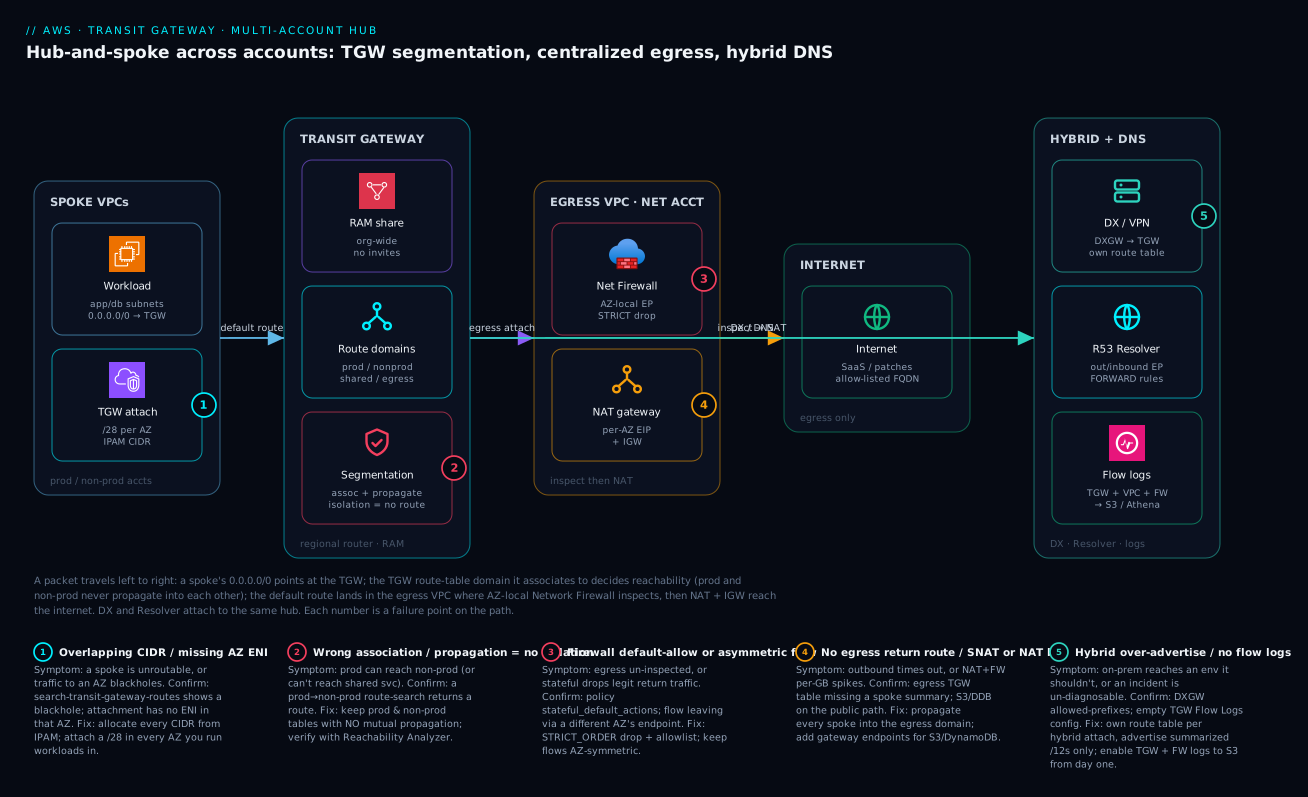
Trace a single packet to internalize the whole design. A workload in a prod spoke VPC wants to reach a SaaS API on the internet. Its subnet route table has 0.0.0.0/0 pointing at the TGW attachment (an ENI sitting in a tiny /28 per-AZ subnet, with a CIDR IPAM handed out from the prod /12). The packet enters the TGW and lands in the prod route-table domain the attachment associates to. That domain has a static 0.0.0.0/0 to the egress VPC attachment — but crucially it has no route to the non-prod /12, because non-prod was never propagated here. That missing route is the isolation: prod simply cannot address non-prod. The default route forwards the packet to the egress VPC in the network account, where the TGW-attachment subnet’s route table sends 0.0.0.0/0 to that AZ’s Network Firewall endpoint. The firewall, running a STRICT-ORDER policy that defaults to drop, checks the flow against the allowlist; if permitted, the firewall subnet’s route table forwards to that same AZ’s NAT gateway, which translates to its Elastic IP and exits via the internet gateway. Return traffic retraces the path through the same AZ’s firewall endpoint — AZ symmetry is mandatory or the stateful engine drops the return.
Off to the side, the same hub carries hybrid and DNS: a Direct Connect Gateway attaches to the TGW in its own route table (so you choose exactly which environments on-prem can reach), and Route 53 Resolver endpoints plus RAM-shared FORWARD rules give every spoke consistent resolution of on-prem and private-zone names. Everything is observed: TGW Flow Logs, VPC Flow Logs, and firewall logs land in S3 for Athena. The numbered badges mark the five places this architecture most often fails — an overlapping CIDR or a missing AZ ENI (1), a wrong association/propagation that breaks isolation (2), a default-allow or asymmetric firewall (3), a missing egress return route or an avoidable NAT/firewall bill (4), and an over-advertised hybrid prefix or absent flow logs (5). The legend narrates each as symptom, confirm, and fix.
Real-world scenario
A retail platform team — call them NorthWind Retail — had the textbook hub from this guide running across ~30 accounts: prod and non-prod isolated by route-table domains, all egress hairpinned through one Network Firewall VPC, Direct Connect terminated on the TGW for store-back-office connectivity, and Route 53 Resolver giving every account consistent DNS. It worked beautifully — until the AWS bill for the network account tripled in a single month and the FinOps lead escalated.
The investigation, driven by TGW Flow Logs queried in Athena, found the culprit fast: every spoke was reaching S3 over the public path — TGW data-processing, plus Network Firewall per-GB, plus NAT data-processing — for what was internal bulk data. A nightly analytics job alone pushed terabytes through the central firewall, and the per-GB charges on both the TGW and the firewall dwarfed the compute. The team had centralized egress for governance and accidentally routed bulk storage traffic through the most expensive path in the account.
The numbers told the story precisely:
| Egress path for S3 traffic | TGW data-proc | Firewall per-GB | NAT data-proc | Net per-GB cost | Inspected? |
|---|---|---|---|---|---|
| Through the hub (before) | Yes | Yes | Yes | Highest | Yes (but pointless for S3) |
| Gateway VPC endpoint (after) | No | No | No | ~Free | No (not needed; IAM-scoped) |
| Interface endpoint (PrivateLink) | No | No | No | Endpoint-hour + per-GB | No |
The fix was to keep S3 and DynamoDB traffic off the hub entirely with gateway VPC endpoints in each spoke. A gateway endpoint is free, adds a prefix-list route in the spoke’s own route table, and never touches the TGW or the firewall:
resource "aws_vpc_endpoint" "s3" {
  vpc_id            = aws_vpc.spoke.id
  service_name      = "com.amazonaws.eu-west-1.s3"
  vpc_endpoint_type = "Gateway"
  route_table_ids   = [aws_route_table.private.id]
}
The gotcha: the gateway-endpoint prefix-list route is longest-prefix-match against the 0.0.0.0/0 that pointed at the TGW, so it wins automatically for S3 — but only inside the VPC that owns the endpoint. They templated it into the spoke module so every account got one by default, then used an SCP Deny on s3:* unless aws:sourceVpce matched an approved endpoint, closing the public path for good. The result: firewall-processed GB dropped by roughly 70%, the network account bill fell back below its prior baseline, and the central inspection layer went back to inspecting traffic that actually leaves the estate. The lesson the team wrote into their design guide: centralize egress for what needs inspecting; never hairpin bulk AWS-service traffic that has a free private path.
Advantages and disadvantages
| Advantages | Disadvantages |
|---|---|
| Transitive any-to-any reachability under policy | Regional resource; multi-region needs peering + planning |
| One router replaces an O(N²) peering mesh | Per-GB data-processing charge on all TGW traffic |
| Strong env isolation via route-table domains | Association/propagation model is easy to get backwards |
| One inspected, logged, allow-listed egress point | Egress VPC is a shared dependency — must design AZ-HA |
| Single hybrid (DX/VPN) termination for all accounts | Firewall per-GB cost if you hairpin bulk traffic |
| RAM org-share removes per-account toil | CIDR overlaps are unfixable without renumbering |
| Clean ownership split (network acct vs spoke) | Cross-AZ traffic incurs data charges if not localized |
| Reachability Analyzer proves the data plane | More moving parts than peering; steeper learning curve |
The advantages dominate past roughly a dozen VPCs or any multi-account compliance requirement; below that, peering is simpler and cheaper. The disadvantages are mostly disciplines rather than blockers: the per-GB charge is controlled by keeping east-west off the firewall and bulk AWS-service traffic on gateway endpoints; the association/propagation confusion is solved by a written matrix and Reachability Analyzer checks in CI; the shared-egress blast radius is solved by per-AZ firewall endpoints and NAT. The one genuinely permanent risk is CIDR overlap — which is exactly why Step 1 comes first.
Going deeper
The steps above build a correct hub. This section is for the reader who already has one running and needs the internals: the throughput ceilings that surface only under load, the packet-size traps, how stateful inspection really stays symmetric, how the hub goes global, and the managed alternative that may replace hand-built TGW meshes for you.
Bandwidth is per-attachment and per-flow
The topology tables quote a per-attachment ceiling, but throughput has two independent limits and engineers usually remember only one. Per attachment, a VPC attachment bursts high — AWS now documents up to 100 Gbps per VPC attachment (the ~50 Gbps figure in the earlier tables was the previously published ceiling; treat both as “very high, confirm the current quota”). Per flow, a single TCP/UDP conversation — one 5-tuple — through a TGW is capped at ~5 Gbps, no matter how much headroom the attachment has. One large scp, one database-replication stream, or one backup job cannot exceed the per-flow limit however fat the attachment is.
| Throughput limit | Approx ceiling | Applies to | How to exceed it |
|---|---|---|---|
| Per VPC attachment (burst) | ~100 Gbps | All flows on that attachment, summed | Nothing to do — it is high |
| Per single flow (5-tuple) | ~5 Gbps | One TCP/UDP conversation | Parallelize into multiple flows |
| Per VPN tunnel | ~1.25 Gbps | One IPsec tunnel | ECMP across tunnels/attachments |
| VPN connection with ECMP | up to ~50 Gbps (aggregate) | Many tunnels, same prefixes | vpn_ecmp_support = enable + multiple tunnels |
| Per TGW Connect (GRE) peer | ~5 Gbps per GRE, aggregate higher | SD-WAN appliance flows | Multiple GRE peers + BGP ECMP |
The design consequence: a workload that needs a single sustained >5 Gbps stream between two VPCs is a case against routing it through the TGW. Put that one heavy pair on a direct VPC peering connection (line-rate, no per-flow TGW cap) and keep everything else on the hub.
MTU and jumbo frames — the silent large-packet blackhole
Not every attachment carries the same packet size, and a mismatch does not error — it silently drops big packets while small ones sail through, which presents as “the app works but large query results or file transfers hang.”
| Attachment type | Max MTU | Jumbo frames? |
|---|---|---|
| VPC attachment | 8500 bytes | Yes |
| Direct Connect | 8500 bytes (if the DX/VIF supports it) | Yes |
| TGW peering (inter-region) | 8500 bytes | Yes |
| TGW Connect (GRE) | 8500 bytes | Yes |
| Site-to-Site VPN | 1500 bytes | No |
A VPC-to-VPC path over the TGW can carry 8500-byte jumbo frames, but the instant a flow traverses a VPN attachment it is capped at 1500. Rely on Path MTU Discovery and make sure ICMP “fragmentation needed” (type 3, code 4) is not blocked by a security group or NACL, or large packets over the VPN leg blackhole. This is the classic “hybrid works until the payload is big” incident.
Appliance mode: how stateful inspection stays symmetric
Step 4 keeps egress AZ-symmetric by hand. When a stateful appliance VPC — a Gateway Load Balancer fleet or a firewall — spans multiple AZs and must inspect east-west traffic between spokes, hand-routing is not enough. By default the TGW keeps traffic in the AZ it arrived on (AZ affinity), so a flow that enters via az-a but whose return enters via az-b lands on a different appliance that never saw the forward direction, and the stateful engine drops it.
Appliance mode, set on the inspection VPC’s attachment, fixes this: the TGW computes a flow hash over the 5-tuple and pins both directions of that flow to the same AZ’s appliance for the life of the flow. Enable it only on the attachment to the appliance/inspection VPC — never on ordinary spokes.
resource "aws_ec2_transit_gateway_vpc_attachment" "inspection" {
  transit_gateway_id     = aws_ec2_transit_gateway.hub.id
  vpc_id                 = aws_vpc.inspection.id
  subnet_ids             = [for s in aws_subnet.appliance : s.id]
  appliance_mode_support = "enable"   # pin each flow to one AZ's appliance
}
For the inspection fleet itself, see the Gateway Load Balancer inline appliance inspection lesson.
Transit Gateway Connect — GRE + BGP for SD-WAN
Terminating a third-party SD-WAN or virtual router on the hub over plain VPN caps you at ~1.25 Gbps per tunnel. Transit Gateway Connect runs GRE tunnels with BGP on top of an existing VPC or Direct Connect attachment (the “transport” attachment), giving higher aggregate bandwidth and dynamic routing to appliances such as Cisco, Aruba, or Fortinet virtual routers. It requires a transit_gateway_cidr_blocks range on the TGW for the GRE peer addressing, and supports multiple BGP peers per Connect peer for ECMP. Prefer it over stacked VPNs whenever an SD-WAN vendor sits between the hub and on-prem.
Going global: inter-region peering, encryption, and Cloud WAN
A TGW is regional. There are two ways to go global.
TGW inter-region peering joins two regional TGWs with a peering attachment. Two facts the base sections only touched: the traffic is automatically encrypted (AES-256-GCM) and stays on the AWS global backbone — it never traverses the public internet, and you configure no keys. But a peering attachment carries static routes only (no propagation across the peer), so you maintain the cross-region routes by hand, and CIDRs must stay disjoint per region for those static summaries to stay clean.
AWS Cloud WAN is the managed alternative to hand-building N regional TGWs plus a peering mesh. Instead of wiring route tables per region, you write one core network policy — a versioned JSON document — that declares segments (the global equivalent of a route-table domain, e.g. prod, non-prod, shared) and which segments may talk. Cloud WAN then provisions and peers the regional infrastructure for you and gives you a single global view. It attaches VPCs, VPNs, and SD-WAN (Connect), and can even peer with existing Transit Gateways, so it is an evolution of — not a wholesale replacement for — everything here.
| Dimension | Self-managed TGW + peering | AWS Cloud WAN |
|---|---|---|
| Scope | Per region; you join them | Global, managed |
| Segmentation | Route tables per TGW | Segments in one policy document |
| Cross-region routing | Static routes you maintain | Policy-driven, managed |
| Change model | Terraform per region | Edit + version one core policy |
| Visibility | Network Manager (opt-in) | Built-in global dashboard |
| Best when | One or few regions, full control | Many regions, policy-as-code, less toil |
If your estate is one or two regions, the hand-built TGW in this guide is simpler and cheaper. Cloud WAN earns its keep when you are joining many regions and want segmentation expressed as one reviewable policy rather than as route tables scattered across regional state files. For east-west service connectivity that ignores CIDRs entirely, VPC Lattice is a complementary layer above the network, not a replacement for the hub.
Seeing the whole network: Network Manager
Once you have more than one TGW — or a Cloud WAN core network — AWS Network Manager gives a single global topology view: it registers your transit gateways into a global network, draws the attachment and route-table topology, surfaces route entries and BGP sessions, emits events (attachment up/down, BGP state changes) to CloudWatch and EventBridge, and overlays telemetry. It is read-mostly visibility, not a control plane, but it turns “which of my six regional hubs has the broken peering” into a glance. Pair it with the TGW Flow Logs the base guide already ships to S3 for the byte-level detail.
Hands-on lab
A minimal, single-account proof you can run to see segmentation work without forty accounts. You build a TGW, two spoke VPCs, two route-table domains, and prove that one spoke can reach a shared VPC while the two spokes cannot reach each other. Free-tier friendly except for TGW attachment-hours and a couple of t3.micro instances; tear down at the end.
- Set variables and create the TGW (default association/propagation disabled):
REGION=eu-west-1
TGW=$(aws ec2 create-transit-gateway --region $REGION \
  --options DefaultRouteTableAssociation=disable,DefaultRouteTablePropagation=disable \
  --query 'TransitGateway.TransitGatewayId' --output text)
echo "TGW=$TGW"
-
Create three VPCs —
spoke-a(10.16.0.0/20),spoke-b(10.32.0.0/20),shared(10.48.0.0/20) — each with one subnet and a/28TGW-attachment subnet. (Use the console or a short Terraform module; the key is disjoint CIDRs.) -
Attach each VPC to the TGW:
ATT_A=$(aws ec2 create-transit-gateway-vpc-attachment --transit-gateway-id $TGW \
  --vpc-id $VPC_A --subnet-ids $TGW_SUBNET_A \
  --query 'TransitGatewayVpcAttachment.TransitGatewayAttachmentId' --output text)
# repeat for ATT_B, ATT_SHARED
- Create two route-table domains and associate the spokes:
RT_SPOKE=$(aws ec2 create-transit-gateway-route-table --transit-gateway-id $TGW \
  --query 'TransitGatewayRouteTable.TransitGatewayRouteTableId' --output text)
RT_SHARED=$(aws ec2 create-transit-gateway-route-table --transit-gateway-id $TGW \
  --query 'TransitGatewayRouteTable.TransitGatewayRouteTableId' --output text)

aws ec2 associate-transit-gateway-route-table --transit-gateway-route-table-id $RT_SPOKE --transit-gateway-attachment-id $ATT_A
aws ec2 associate-transit-gateway-route-table --transit-gateway-route-table-id $RT_SPOKE --transit-gateway-attachment-id $ATT_B
aws ec2 associate-transit-gateway-route-table --transit-gateway-route-table-id $RT_SHARED --transit-gateway-attachment-id $ATT_SHARED
- Propagate so spokes↔shared work but spokes are isolated from each other — propagate shared into the spoke table, and each spoke into the shared table; never propagate spoke-a into spoke-b’s domain (they share one table, so add explicit blackholes if you want hard isolation within a shared table, or use separate tables per spoke):
aws ec2 enable-transit-gateway-route-table-propagation --transit-gateway-route-table-id $RT_SPOKE  --transit-gateway-attachment-id $ATT_SHARED
aws ec2 enable-transit-gateway-route-table-propagation --transit-gateway-route-table-id $RT_SHARED --transit-gateway-attachment-id $ATT_A
aws ec2 enable-transit-gateway-route-table-propagation --transit-gateway-route-table-id $RT_SHARED --transit-gateway-attachment-id $ATT_B
# Blackhole spoke-a -> spoke-b to prove isolation inside the shared spoke table
aws ec2 create-transit-gateway-route --transit-gateway-route-table-id $RT_SPOKE \
  --destination-cidr-block 10.32.0.0/20 --blackhole
-
Add VPC route-table entries in each VPC sending the other CIDRs to the TGW attachment, and launch a
t3.microinspoke-aandshared. -
Prove it. From the
spoke-ainstance,pingthesharedinstance (should work) and thespoke-binstance (should fail — blackholed). Confirm with a route search:
# Should return a blackhole entry for spoke-b from the spoke table
aws ec2 search-transit-gateway-routes --transit-gateway-route-table-id $RT_SPOKE \
  --filters Name=type,Values=static Name=state,Values=blackhole
- Tear down to stop attachment-hour charges:
aws ec2 delete-transit-gateway-vpc-attachment --transit-gateway-attachment-id $ATT_A
# delete ATT_B, ATT_SHARED, the route tables, the TGW, then the VPCs and instances
Expected result: spoke-a → shared succeeds; spoke-a → spoke-b fails because the route is a blackhole — segmentation demonstrated with the absence (or explicit drop) of a route, exactly as production isolation works.
Practice challenges
Work these in order — they escalate from reading the model to designing against it. Each has a worked solution; try it before you open the toggle.
1. (Beginner) Read the isolation. In the association/propagation matrix, a non-prod spoke propagates into the shared RT but not the prod RT. In one sentence, what can and cannot reach a non-prod workload, and why?
<details><summary>Solution</summary>
Shared-services VPCs can reach the non-prod workload (non-prod’s CIDR is propagated into the shared RT and shared is propagated into non-prod’s RT), but prod cannot — non-prod is never propagated into the prod RT and prod is never propagated into non-prod’s, so there is simply no route between them.
Why: isolation on a TGW is the absence of a route, not a deny rule. </details>
2. (Beginner) Spot the blackholed AZ. A spoke VPC runs workloads in eu-west-1a, 1b, and 1c, but its TGW attachment lists subnets only in 1a and 1b. Which traffic breaks, and what is the fix?
<details><summary>Solution</summary>
Traffic from instances in eu-west-1c to anything across the TGW blackholes, because the attachment has no ENI in 1c. Add a /28 attachment subnet in 1c and include it in the attachment’s subnet_ids.
Why: an attachment only delivers traffic to AZs where it has placed an ENI. </details>
3. (Intermediate) Add the default route. Write the Terraform for a static default route that sends all internet-bound traffic from the non-prod domain to the egress VPC’s attachment.
<details><summary>Solution</summary>
resource "aws_ec2_transit_gateway_route" "nonprod_default" {
  destination_cidr_block         = "0.0.0.0/0"
  transit_gateway_attachment_id  = aws_ec2_transit_gateway_vpc_attachment.egress.id
  transit_gateway_route_table_id = aws_ec2_transit_gateway_route_table.nonprod.id
}
Why: the egress path is a deliberate design decision, so it is a static route — which also wins over any propagated 0.0.0.0/0 on an exact-prefix tie.
</details>
4. (Intermediate) Break the bill, then fix it. A nightly job in every spoke copies terabytes to S3 and the network account’s bill has tripled. What is happening, and what is the one change that fixes it without touching the firewall policy?
<details><summary>Solution</summary>
The S3 traffic is hairpinning through TGW data-processing + Network Firewall per-GB + NAT — the most expensive path — for traffic that never needs to leave AWS. Add a gateway VPC endpoint for S3 (and DynamoDB) in each spoke; it is free, installs a prefix-list route that wins by longest-prefix match, and bypasses the TGW, firewall, and NAT entirely.
Why: centralize egress for what needs inspecting; never route bulk AWS-service traffic that has a free private path. </details>
5. (Advanced) Design the single fat flow. A data-science team needs a sustained ~12 Gbps single-stream transfer between exactly two prod VPCs, and routing it through the TGW will not exceed ~5 Gbps. Diagnose and propose an architecture.
<details><summary>Solution</summary>
The TGW imposes a ~5 Gbps per-flow (single 5-tuple) limit, independent of the attachment’s ~100 Gbps burst. Either parallelize the transfer into multiple flows (multiple TCP streams / a multipart tool), or — for this one heavy pair — add a direct VPC peering connection between the two VPCs (line-rate, no per-flow TGW cap) and keep everything else on the hub.
Why: the hub is optimized for many flows, not one enormous one; per-flow ceilings are a routing-topology decision. </details>
6. (Advanced) Prove isolation in CI. Security requires evidence, not a diagram, that prod cannot reach non-prod. Sketch the check you would run in a pipeline and what a “pass” looks like.
<details><summary>Solution</summary>
Run Reachability Analyzer from a prod ENI to a non-prod ENI and assert the path is not found:
PATH_ID=$(aws ec2 create-network-insights-path \
  --source $PROD_ENI --destination $NONPROD_ENI --protocol tcp --destination-port 443 \
  --query 'NetworkInsightsPath.NetworkInsightsPathId' --output text)
aws ec2 start-network-insights-analysis --network-insights-path-id $PATH_ID
aws ec2 describe-network-insights-analyses --network-insights-path-id $PATH_ID \
  --query 'NetworkInsightsAnalyses[0].NetworkPathFound'   # must be false
A pass is NetworkPathFound: false. Also run the positive case (prod → shared services) and assert true, so the test fails if someone accidentally removes wanted reachability too.
Why: a console route table showing “no route” is not proof; the analyzer evaluates routes, NACLs, SGs, and AZ ENIs end-to-end — assert both the deny and the allow. </details>
Common mistakes & troubleshooting
The hub fails in a small number of characteristic ways. This is the playbook — match the symptom, run the confirm command, apply the fix. Keep it open during an incident.
| # | Symptom | Root cause | Confirm (exact command / path) | Fix |
|---|---|---|---|---|
| 1 | A whole spoke is unreachable | Attachment has no ENI in that AZ | aws ec2 describe-transit-gateway-vpc-attachments → check SubnetIds per AZ |
Add a /28 attachment subnet in every workload AZ |
| 2 | Traffic to one AZ blackholes, others fine | Missing attachment subnet in that AZ | VPC route table points at TGW but no ENI there | Attach in the missing AZ |
| 3 | Prod can reach non-prod (security finding) | Prod or non-prod wrongly propagated into the other table | aws ec2 search-transit-gateway-routes --transit-gateway-route-table-id <prod> --filters Name=route-search.subnet-of-match,Values=10.32.0.0/12 returns a route |
Remove the propagation; verify with Reachability Analyzer |
| 4 | Prod can’t reach shared services | Shared not propagated into prod (or prod not into shared) | Route search for the shared CIDR in the prod table returns nothing | Enable propagation both directions |
| 5 | Spoke has no internet | No static 0.0.0.0/0 → egress attachment in the spoke’s domain |
Search the spoke table for a default route | Add static 0.0.0.0/0 → egress attachment |
| 6 | Egress works outbound, replies never return | Spokes not propagated into the egress route table | Egress table route search for the spoke CIDR is empty | Propagate every spoke into the egress domain |
| 7 | Intermittent drops under load through egress | Asymmetric flow — return via a different AZ’s firewall endpoint | Firewall flow logs show one-sided flows; compare AZ of in/out routes | Make per-AZ route tables symmetric; consider appliance mode |
| 8 | Egress traffic not being inspected | Firewall policy defaults to allow, or route bypasses the FW endpoint | Inspect stateful_default_actions; check FW-subnet 0/0 next hop |
Set aws:drop_established; route 0/0 via FW endpoint |
| 9 | New VPC can’t attach to the TGW | RAM share not reaching the account, or not accepted | aws ram get-resource-shares / get-resource-share-associations |
Share to the org/OU; enable enable-sharing-with-aws-organization |
| 10 | Overlapping CIDR, route won’t install | Two attachments advertise the same prefix | search-transit-gateway-routes shows the prefix from another attachment |
Renumber one VPC (new IPAM CIDR + migrate) or use PrivateLink |
| 11 | On-prem reaches an env it shouldn’t | Over-propagation into the hybrid route table | Inspect the hybrid table’s propagated routes | Restrict propagation; own route table per hybrid attach |
| 12 | DX advertises but on-prem missing routes | DXGW allowed-prefixes limit hit, or not summarized | aws directconnect describe-direct-connect-gateways + allowed prefixes |
Advertise summarized /12s, raise/trim allowed prefixes |
| 13 | DNS for on-prem names fails intermittently | Resolver SG missing TCP/53, or on-prem DNS down | describe-security-group-rules on the endpoint SG; dig +tcp |
Allow TCP 53 alongside UDP 53; target 2 on-prem IPs |
| 14 | Network bill spiked | Bulk S3/DDB hairpinning through TGW+FW+NAT | TGW Flow Logs in Athena by bytes/destination |
Add gateway VPC endpoints in spokes; SCP-enforce |
| 15 | “It should work but doesn’t” | Console route present, data plane blocked (NACL/SG/AZ) | Reachability Analyzer path source→dest | Fix the actual blocking hop the analyzer names |
The single most important confirm command, because a green console can still mean a blocked path:
# Authoritative data-plane proof: is this path open across the whole TGW?
PATH_ID=$(aws ec2 create-network-insights-path \
  --source $SRC_ENI --destination $DST_ENI --protocol tcp --destination-port 443 \
  --query 'NetworkInsightsPath.NetworkInsightsPathId' --output text)
aws ec2 start-network-insights-analysis --network-insights-path-id $PATH_ID
aws ec2 describe-network-insights-analyses --network-insights-path-id $PATH_ID \
  --query 'NetworkInsightsAnalyses[0].{reachable:NetworkPathFound, blocker:Explanations[0].ExplanationCode}'
A quick decision table for the “can’t reach X” class of tickets:
| If a route lookup returns… | It’s probably… | Do this |
|---|---|---|
| Nothing for the destination CIDR | Missing propagation | Propagate the target into this table |
A blackhole route |
Intentional isolation or a stale static | Confirm intent; remove if it’s a bug |
| A route, but ping still fails | NACL/SG/AZ-ENI/firewall block | Run Reachability Analyzer; fix the named hop |
| The CIDR from two attachments | Overlap | Renumber one; you cannot route both |
| The default 0/0 but no internet | Egress return path missing | Propagate spokes into the egress table |
A route present but in blackhole state after a delete |
Stale static route | Delete the orphaned static; re-add if needed |
| The right route but DNS fails | Resolver SG/rule issue, not routing | Check resolver SG (TCP/UDP 53) and FORWARD rule |
Best practices
- Allocate every CIDR from IPAM. No manual blocks anywhere; enable org-wide resource discovery so IPAM can see overlaps across accounts. Reserve disjoint super-blocks per environment and a separate block for on-prem.
- Create the TGW with default association and propagation disabled. Segmentation is impossible if everything auto-associates to one table. Make every association and propagation an explicit, reviewed decision.
- Keep prod and non-prod route tables with no mutual propagation. Isolation is the absence of a route. Prove it in CI with a Reachability Analyzer check that asserts prod→non-prod is not reachable.
- Give the TGW its own tiny attachment subnets (a
/28per AZ) separate from workload subnets, and attach in every AZ you run workloads in. A missing AZ ENI blackholes that AZ. - Default the firewall policy to drop with STRICT_ORDER and an explicit allowlist. A default-allow inspection layer inspects nothing useful. Keep flows AZ-symmetric so the stateful engine sees both directions.
- Never hairpin bulk AWS-service traffic through the firewall. Add gateway VPC endpoints for S3 and DynamoDB in every spoke (template it into the spoke module), and SCP-enforce the private path.
- Drop east-west at the TGW, not the firewall. Isolation via missing routes is free; isolation via firewall rules is billed per-GB. Reserve the firewall for traffic that genuinely leaves the estate.
- Terminate DX/VPN on the TGW in a dedicated hybrid route table. Control precisely which environments on-prem can reach, and advertise summarized prefixes (your /12s) over BGP, not hundreds of /20s.
- Enable TGW Flow Logs and Network Firewall logging from day one. Centralize in S3, query with Athena. They turn a multi-hour “can’t reach the database” into a five-minute lookup.
- Guardrail egress with SCPs. Deny creating internet gateways and NAT gateways in spoke accounts so egress cannot bypass the hub. The central hub plus RAM plus SCPs is what makes a forty-team network safe.
- Keep cross-AZ traffic minimal. Attach and route within-AZ; cross-AZ data is charged. Symmetric per-AZ routing serves both cost and firewall correctness.
- Plan for the regional boundary. One TGW per region, joined with inter-region peering; keep CIDRs disjoint per region so peering routes summarize cleanly.
Security notes
The network is a security control surface, and the hub concentrates several of them. Least-privilege applies to routing as much as to IAM: a domain should learn only the routes it needs, and isolation should be the default (no propagation) rather than an exception.
| Control | What to do | Why |
|---|---|---|
| Route-based isolation | No mutual propagation between trust domains | Compromised non-prod cannot address prod |
| Egress inspection | Network Firewall default-drop + FQDN allowlist | Stop data exfil and command-and-control |
| Egress IP allow-listing | One small EIP set from the egress VPC | Partners allow-list a handful of IPs, not forty |
| IGW/NAT guardrail | SCP deny on IGW/NAT in spokes | Egress cannot bypass the inspected path |
| DNS exfil detection | Route 53 Resolver query logging + DNS Firewall | DNS tunneling is invisible without logs |
| Flow visibility | TGW + VPC + FW flow logs to S3 | Forensics and anomaly detection |
| RAM scope | Share to the org/OU, never external principals | Don’t leak the hub outside the org |
| Hybrid prefix control | DXGW allowed-prefixes + own route table | On-prem reaches only cleared environments |
| Encryption in transit | IPsec on VPN; MACsec/IPsec over DX | DX is not encrypted by default |
| Endpoint policies | IAM + aws:sourceVpce conditions on S3/DDB |
Bind data access to approved endpoints |
| TGW attachment ownership | Spoke owns its attachment; network acct owns routing | Least-privilege; no cross-account route edits |
| Resolver query logging scope | Log all VPCs, ship to S3 + alarm on anomalies | Detect DNS tunneling and exfil early |
The identity-and-encryption layer pairs with Organizations SCPs, guardrails & delegated admin for the guardrails and AWS Network Firewall: centralized egress inspection for the inspection rules; the DNS-exfil controls live in Route 53 Resolver: DNS Firewall, endpoints, rules, hybrid resolution.
Cost & sizing
The hub’s bill has three movable drivers: TGW attachment-hours, TGW data-processing per-GB, and Network Firewall (endpoint-hours plus per-GB). NAT and cross-AZ data ride alongside. Figures are indicative (eu-west-1, USD; INR at ~₹84/USD) — confirm against the current price list.
| Cost driver | Rough unit price | Scales with | Lever to reduce |
|---|---|---|---|
| TGW attachment-hour | ~$0.05 / attachment-hour | Number of attachments | Consolidate VPCs; don’t over-attach |
| TGW data processing | ~$0.02 / GB | Traffic crossing the TGW | Keep east-west off; gateway endpoints for S3/DDB |
| Network Firewall endpoint | ~$0.395 / endpoint-hour | Endpoints (per AZ) | Right-size AZ count |
| Network Firewall data | ~$0.065 / GB | Inspected GB | Don’t hairpin bulk traffic |
| NAT gateway | ~$0.045 / hour + ~$0.045 / GB | Egress volume | Gateway endpoints bypass NAT for S3/DDB |
| Cross-AZ data | ~$0.01 / GB each way | Cross-AZ traffic | Attach and route within-AZ |
| Reachability Analyzer | ~$0.10 / analysis | Ad-hoc checks | Negligible; use freely |
A worked monthly estimate for a 30-account hub with three egress AZs, modest egress, and bulk S3 moved off the hub:
| Line item | Quantity | Monthly USD | Monthly INR (~₹84) |
|---|---|---|---|
| TGW attachments (35 × 730h) | 35 attach | ~$1,278 | ~₹1.07 L |
| TGW data processing | ~20 TB | ~$400 | ~₹33.6 K |
| Network Firewall endpoints (3 AZ) | 3 × 730h | ~$865 | ~₹72.7 K |
| Network Firewall data | ~8 TB | ~$520 | ~₹43.7 K |
| NAT gateways (3 AZ) | 3 × 730h + data | ~$200 | ~₹16.8 K |
| Cross-AZ data | minimized | ~$80 | ~₹6.7 K |
| Approx total | — | ~$3,343/mo | ~₹2.81 L/mo |
Sizing rules of thumb, and the free-tier reality:
| Question | Guidance |
|---|---|
| How many AZs for the egress VPC? | Match workload AZs (usually 2–3); each adds a firewall + NAT endpoint cost |
| When is centralized egress worth it? | Past ~10 spokes, or any inspection/compliance requirement |
| What dominates the bill? | Attachment-hours + firewall per-GB; control the latter by routing discipline |
| Free tier? | None for TGW/Network Firewall; the lab incurs attachment-hours — tear down |
| Biggest accidental cost? | Bulk AWS-service traffic on the public path (fix with gateway endpoints) |
Interview & exam questions
Q1. Why does VPC peering not scale to a large multi-account estate? Peering is 1:1 and non-transitive: N VPCs need N(N-1)/2 peerings, and spoke A cannot reach spoke C through B. A Transit Gateway gives transitive, policy-controlled reachability with one attachment per VPC. (SAP-C02, ANS-C01)
Q2. Explain association vs propagation on a TGW route table. Association sets which route table an attachment uses for its own outbound decisions (exactly one). Propagation sets which route tables learn an attachment’s VPC CIDRs. Isolation between two domains is achieved by never propagating one into the other’s table. (ANS-C01)
Q3. How do you isolate prod from non-prod on a shared TGW without a firewall? Put each in its own route-table domain and never propagate one into the other’s table. Isolation is the absence of a route — no deny rule needed, and no per-GB inspection cost. (SAP-C02)
Q4. Why must centralized-egress flows be AZ-symmetric? Network Firewall endpoints are AZ-local and the stateful engine must see both directions of a flow. If the return path uses a different AZ’s endpoint, the engine never saw the forward direction and drops the return. Keep per-AZ route tables symmetric. (ANS-C01)
Q5. A spoke can send traffic out to the internet but replies never come back. What’s wrong? The egress VPC’s TGW route table is missing routes back to the spoke. Propagate every spoke into the egress domain, and ensure the firewall subnet route table sends spoke summaries back to the TGW. (ANS-C01)
Q6. How do you keep S3 traffic from inflating the TGW/firewall bill?
Use a gateway VPC endpoint for S3 (and DynamoDB) in each spoke. It is free, adds a prefix-list route that wins by longest-prefix match, and bypasses the TGW, firewall, and NAT entirely. Enforce with an SCP keyed on aws:sourceVpce. (SAP-C02)
Q7. Why disable default route-table association and propagation when creating the TGW? The defaults auto-associate every attachment to one table and propagate everywhere, producing any-to-any reachability. Disabling them forces explicit, reviewable routing decisions, which segmentation depends on. (ANS-C01)
Q8. How should you advertise routes from AWS to on-prem over Direct Connect? Terminate DX on the TGW via a Direct Connect Gateway, put the attachment in its own route table, and advertise summarized super-blocks (your /12s) rather than hundreds of /20s — the DXGW has an allowed-prefixes limit. (ANS-C01)
Q9. What is the authoritative way to prove a path is open across the TGW?
Reachability Analyzer (create-network-insights-path / start-network-insights-analysis). It evaluates the full data plane — routes, NACLs, security groups, AZ ENIs — not just whether a route exists in the console. (ANS-C01, SAP-C02)
Q10. When would you choose PrivateLink over a TGW? When you need to expose a single service across a trust boundary without granting network-layer reachability — especially with overlapping CIDRs, since PrivateLink does no IP routing. (SAP-C02)
Q11. How do you stop spoke accounts from bypassing the central egress? An SCP that denies creating internet gateways and NAT gateways in spoke accounts, so the only path to the internet is the spoke’s default route to the TGW and the central egress VPC. (SAP-C02)
Q12. What’s the regional scope of a TGW and how do you go global? A TGW is regional. For a global estate, deploy one TGW per region and join them with inter-region TGW peering attachments (static routes only), keeping CIDRs disjoint per region for clean summarization. (ANS-C01)
Quick check
- You associate a spoke attachment to the prod route table and propagate it into the shared table. Which direction of reachability does the propagation enable?
- Prod and non-prod must never reach each other but both must reach shared services. What propagation rule keeps them isolated?
- Egress works but return traffic is dropped under load only. What is the most likely cause?
- A spoke’s CIDR is
10.16.0.0/20and another account provisioned10.16.0.0/16. Can the TGW route both? Why or why not? - Which single tool proves whether a path across the TGW is actually open, beyond what the route table shows?
Answers
- Propagating the spoke into the shared table advertises the spoke’s CIDR into the shared domain, so shared services can reach the spoke. To let the spoke reach shared services, you must also propagate shared into the prod table.
- Keep prod and non-prod in separate route-table domains and never propagate one into the other’s table; propagate shared into both. Isolation is the absence of a route.
- Asymmetric flow — the return path is going through a different AZ’s Network Firewall endpoint than the forward path, so the stateful engine drops it. Make per-AZ route tables symmetric (or enable appliance mode).
- No. The TGW is a longest-prefix-match router and the two prefixes overlap; it cannot route both. One VPC must be renumbered (new IPAM allocation + migration) or exposed via PrivateLink instead.
- Reachability Analyzer (
create-network-insights-path/start-network-insights-analysis) — it evaluates routes, NACLs, security groups, and AZ ENIs end to end, unlike a console route lookup.
Common beginner mistakes
These are conceptual traps, not incident symptoms — the symptom→cause→fix playbook lives in the troubleshooting section above. Each item here is a wrong mental model that quietly produces a broken or expensive design.
“I’ll block prod↔non-prod with a firewall rule or a NACL.” The instinct is to add a deny. On a TGW you get stronger, cheaper isolation by never creating the route in the first place — don’t propagate prod into the non-prod table and there is nothing to deny. Right model: isolation is the absence of a route. A deny rule can be misordered or deleted; a route that was never created cannot leak traffic and costs nothing per GB.
“Association and propagation are two words for the same thing.” They are opposite directions. Association = which table I consult for my outbound decisions (exactly one). Propagation = which tables learn my CIDR so others can route to me. Getting them backwards is the single most common TGW error. Right model: association is “the map I read”; propagation is “who gets told I exist.”
“The route is in the console, so the path works.” A green route table proves the TGW layer only. The packet can still die on a missing AZ ENI, a NACL, a security group, or an asymmetric firewall. Right model: the data plane is the source of truth — prove paths with Reachability Analyzer, not by reading route tables.
“I centralized egress, so all traffic should flow through the firewall.” Hairpinning east-west (prod↔shared) and bulk AWS-service traffic (S3, DynamoDB) through the Network Firewall bills you per GB for inspection you do not need. Right model: inspect what leaves the estate. Keep east-west isolation free at the TGW (missing routes) and put S3/DynamoDB on free gateway endpoints.
“A /28 per AZ for the attachment is too small — I’ll use a /24.” The TGW attachment subnets only hold the platform’s ENIs, a handful of addresses. A /28 per AZ is plenty; a /24 wastes address space from your finite IPAM plan. Right model: attachment subnets are plumbing, not workload subnets — keep them tiny and separate.
“I can renumber the VPC later if the CIDR collides.” You cannot renumber a live VPC without downtime, and two VPCs advertising the same prefix can never both be routed by the longest-prefix-match TGW. Right model: the CIDR plan is permanent. Allocate every block from IPAM before anyone provisions, and if you inherit an overlap the only clean fixes are a migration to a fresh allocation or exposing the service via PrivateLink, which does no IP routing.
“A TGW is global — one is enough.” A TGW is a regional resource. A multi-region estate needs one per region joined by inter-region peering (or AWS Cloud WAN). Right model: design the regional boundary and disjoint per-region CIDRs from day one, or the first cross-region requirement forces a re-plan.
Glossary
- Transit Gateway (TGW): A regional, managed, horizontally-scaled cloud router that VPCs and on-prem links attach to once for transitive, policy-controlled connectivity.
- Attachment: An ENI-backed connection between a TGW and a VPC, VPN, Direct Connect Gateway, or peer TGW; a VPC attachment places one ENI per chosen AZ.
- TGW route table: A routing domain on the TGW; controlling associations and propagations into it is the segmentation mechanism.
- Association: Which TGW route table an attachment consults for its own outbound decisions; each attachment associates to exactly one.
- Propagation: Which TGW route tables learn an attachment’s VPC CIDRs; the lever that grants (or, by omission, denies) reachability.
- AWS IPAM: IP Address Manager — a hierarchical pool service that is the source of truth for CIDR allocation and enforces non-overlap across accounts.
- RAM (Resource Access Manager): Shares AWS resources (like a TGW or a resolver rule) across accounts/OUs/org without per-account invitations.
- Egress VPC: A central VPC in the network account holding NAT gateways and Network Firewall, through which all spoke internet traffic is routed and inspected.
- AWS Network Firewall: A managed stateful/stateless inspection service with AZ-local endpoints, billed per endpoint-hour plus per-GB processed.
- Blackhole route: A TGW route that explicitly drops matching traffic; used for intentional isolation or seen as a symptom of a bug.
- Direct Connect Gateway (DXGW): A global object that associates a Direct Connect Transit VIF with one or more TGWs; has an allowed-prefixes limit.
- Gateway VPC endpoint: A free, route-based endpoint for S3 and DynamoDB that keeps that traffic inside AWS, off the TGW, firewall, and NAT.
- Reachability Analyzer: A service that traces a source→destination path across the data plane (routes, NACLs, SGs, ENIs) to prove whether it is open.
- Appliance mode: An attachment setting that pins a flow to one AZ’s appliance/endpoint so stateful inspection sees both directions symmetrically.
- Inter-region peering: A TGW-to-TGW attachment that joins regional hubs into a global topology (static routes only).
- AWS Cloud WAN: A managed global WAN where you declare connectivity and segmentation once in a versioned core network policy (JSON), and AWS provisions and peers the regional infrastructure — the managed alternative to hand-built multi-region TGW meshes.
- Segment (Cloud WAN): The global equivalent of a TGW route-table domain — a named routing group (e.g.
prod) in the core network policy whose reachability to other segments is policy-controlled. - Transit Gateway Connect: An attachment type that runs GRE tunnels with BGP over an existing VPC or Direct Connect (“transport”) attachment, to integrate SD-WAN / virtual-router appliances at higher bandwidth than plain VPN.
- ECMP (Equal-Cost Multi-Path): Load-sharing across multiple equal-cost paths (e.g. several VPN tunnels advertising the same prefixes) to aggregate bandwidth; enabled with
vpn_ecmp_support. - Per-flow limit: The ceiling on a single 5-tuple conversation through the TGW (~5 Gbps), independent of the much higher per-attachment burst; large single streams must be parallelized or peered directly.
- Jumbo frames / MTU: The maximum packet size on a path — up to 8500 bytes over VPC/DX/peering/Connect attachments, but only 1500 bytes over a Site-to-Site VPN, so oversized packets on a VPN leg can silently blackhole.
- AWS Network Manager: A global, read-mostly console that registers your TGWs (or a Cloud WAN core network) into one global network, visualizes topology and routes, and emits attachment/BGP events to CloudWatch and EventBridge.
- Transit VIF: A Direct Connect virtual interface that carries traffic to a Direct Connect Gateway for association with one or more Transit Gateways.
Next steps
- Lock down the address plan first with CIDR & IPAM management: allocation and BYOIP at scale — the foundation everything else depends on.
- Engineer the inspection layer with AWS Network Firewall: centralized egress inspection and its rule-writing companion Suricata egress inspection rule engineering.
- Make DNS consistent across the hub with Route 53 Resolver: DNS Firewall, endpoints, rules, hybrid resolution.
- Add resilient hybrid connectivity with Direct Connect + Transit Gateway: resilient hybrid.
- Prove and guardrail the design with Network Reachability Analyzer & Access Analyzer connectivity validation and Organizations SCPs, guardrails & delegated admin.