In a nutshell
Level: Advanced · Time: ~65 min read · Prerequisites: comfort with EC2, VPC subnets/routing, and IAM roles
Imagine your servers are shops on a street that sometimes floods. AWS Elastic Disaster Recovery (DRS) is like paying a courier to photocopy every shelf of every shop, continuously, and store the copies cheaply in a warehouse in a dry city. Nothing in that warehouse is open for business — it is just shelves of up-to-date copies. The day your street floods, you tell the warehouse “assemble working shops from the latest copies,” and within minutes you have real, running shops in the dry city serving customers. When your street dries out, the courier runs in reverse to carry the newest copies home, and you move back.
That is the whole idea. DRS installs a small agent on each server that reads the disk block by block and streams changes to a cheap staging area in a second AWS Region. Because it copies blocks (not files), it does not care whether the server runs Linux, Windows, or a locked-down vendor appliance — anything with disks can be replicated. You keep paying only for the cheap copies (tiny instances plus storage), not a second running fleet. On demand, DRS launches full-size EC2 instances from those copies — either as a drill (a rehearsal into an isolated network that never touches production) or a real failover.
Two numbers say why teams adopt it. RPO — how much data you can lose — drops to seconds, because replication is continuous, not a nightly snapshot. RTO — how long recovery takes — drops to minutes, because recovery is a scripted launch, not a rebuild from scratch. And because DRS keeps a short ladder of point-in-time copies, you can recover to just before a ransomware or bad-deploy event rather than faithfully restoring the damage.
If you are brand new, hold three ideas and the rest of this guide clicks into place: (1) DRS is set up in the Region you want to recover to, not the one your servers live in; (2) the staging area is deliberately cheap and idle until you push the button; (3) a real DR plan includes getting home again (failback), not just getting out. One caution up front — DRS is disaster recovery, not backup: it keeps only a short window of recovery points for continuity, so you still run AWS Backup with Vault Lock alongside it for long-term, immutable copies.
A mid-size payments company runs its authorization core — a dozen Linux app servers and two Windows license-bound appliances — on EC2 in us-east-1. The audit finding that started this project was blunt: the documented DR plan was “restore from AMIs,” nobody had timed it, and the last real attempt took eleven hours because the AMIs were three weeks stale. The mandate is now a contractual RTO of 60 minutes and RPO of seconds for the authorization path, proven by a non-disruptive drill every quarter. AWS Elastic Disaster Recovery (DRS) is the right tool: it does continuous, block-level, asynchronous replication of whole servers into a low-cost staging area in a second Region, and it orchestrates booting production-grade instances from that replicated data on demand — then fails you back when the primary Region returns.
This guide walks the full loop end to end: install the agent, watch replication go healthy, run a drill, run a real recovery, and fail back cleanly, with the wiring an enterprise actually needs around it. But it is also a reference. Because you will open this mid-incident at 02:00 with a Region down and a CHG ticket open, every replication state, every launch-configuration flag, every aws drs error, every limit and every cost driver is laid out as a scannable table. Read the prose once to build the mental model; then keep the tables open when it counts. The bar here is exhaustive enumeration — “every option, end to end” — not a long narrative.
By the end you will stop hoping. When the primary Region browns out you will know exactly which servers are CONTINUOUS, which snapshot to recover to (latest for an outage, a chosen point-in-time to land before a ransomware event), what each launch flag will do to the booted instance, how to flip DNS, and — the half most teams forget — how to reverse the whole thing and get home without losing the writes taken during the outage.
What problem this solves
DR plans rot silently. An AMI-and-runbook strategy looks fine in a wiki until the day you need it, and then three things bite at once: the images are stale (so you lose hours of data), nobody has timed the restore (so the RTO is fiction), and license-bound appliances cannot be rebuilt from a script at all (so they are simply absent in the recovery Region). The pain is not “we have no DR” — it is “we have DR on paper that has never been proven, for a workload where the regulator now wants a quarterly, evidenced drill.”
What breaks without DRS: you discover your real RTO during a real outage, with the business bridge full and revenue draining. AMIs captured “nightly” turn out to be 19 hours stale at the worst moment, so RPO is a day, not seconds. The Windows authorization appliances — vendor software, license-bound to a MAC/hostname — have no clean rebuild path, so the “DR Region” silently excludes the exact servers the authorization flow depends on. And because failover was never rehearsed, the first attempt is also the first time anyone has run start-recovery, under maximum pressure.
Who hits this: any team with a contractual or regulatory RTO/RPO on servers they cannot trivially re-provision — payments, healthcare, trading, anything with license-bound appliances or hand-built hosts. DRS targets exactly this gap: continuous block replication keeps RPO in seconds, the staging area is cheap so you can afford it always-on, a drill proves the RTO without touching production, and because DRS treats every server as a block device it replicates the Windows appliances identically to the Linux fleet — which is precisely why it beats an AMI strategy for things you cannot rebuild from code.
To frame the whole field before the deep dive, here is the loop this article covers, the AWS verb that drives each phase, and the single gate that says “this phase passed”:
| Phase | What happens | Driving aws drs call |
Touches production? | Pass/fail gate |
|---|---|---|---|---|
| Initialize | Stand up DRS + service roles in the target | initialize-service |
No | Roles exist in us-west-2 |
| Replicate | Agent streams disk blocks to staging | (agent installer) | Read-only on source | Every server CONTINUOUS, lag < RPO |
| Drill | Boot recovery EC2 in isolation, time it | start-recovery --is-drill |
No (isolated subnet) | RTO ≤ 60 min, synthetic txn passes |
| Recover | Real cutover to the target Region | start-recovery |
Yes (this is the outage) | App healthy + DNS flipped |
| Fail back | Reverse replication, return home | reverse-replication → start-failback-launch |
Yes (planned window) | us-east-1 primary, CONTINUOUS home |
| Teardown | Stop paying for drill artifacts | terminate-recovery-instances |
No | No orphan recovery EC2 / EBS |
Learning objectives
By the end of this article you can:
- Initialize DRS in the correct (target) Region and create the service roles, and explain why initializing in the source Region inverts the whole design.
- Define a replication configuration template option-by-option — staging subnet, replication-server type, EBS encryption, data-plane routing, bandwidth throttling, and the point-in-time (PIT) policy — and pick the right value for each.
- Install the AWS Replication Agent on Linux and Windows sources without ever baking a long-lived key onto a host, using short-TTL credentials from a secrets engine.
- Read
dataReplicationStatefluently —INITIAL_SYNC,RESCAN,CONTINUOUS,STALLED,DISCONNECTED— and map each state anddataReplicationErrorto a confirm-and-fix. - Set a server’s launch configuration (disposition, copy-private-IP, right-sizing, BYOL licensing, copy-tags) and know exactly what each flag does to the booted instance.
- Run a non-disruptive drill, a real recovery (latest or chosen PIT), and a clean failback, with the DNS cutover as an explicit step — and tear the drill down so it stops billing.
- Read the DRS limits, error and decision tables to localise a stuck replication, a failed launch, or a billing surprise to one cause and fix it under pressure.
Prerequisites & where this fits
Two AWS Regions are chosen and fixed for this guide: source us-east-1, recovery/target us-west-2. DRS is initialized per-Region in the target. You need a target VPC in us-west-2 with private subnets, route tables and security groups (we build them with Terraform below), and a staging subnet for the lightweight replication servers. You need AWS CLI v2 ≥ 2.15 with the drs command set, plus jq — confirm with aws drs help. You need IAM rights to create the DRS service roles, plus an operator role allowed to call drs:* for drills and recovery. The network path matters: outbound TCP 1500 from each source server to the staging subnet, and TCP 443 to the DRS and S3 endpoints (or VPC endpoints for a private path). You need root/Administrator on each source to install the agent. And you need a change-management hook in ServiceNow for the recovery runbook, with HashiCorp Vault available to mint short-lived installer credentials — we never bake a long-lived key into a server.
This sits in the resilience / BCDR track. It assumes the compute and networking fundamentals from the AWS EC2 Deep Dive: Instances, AMIs, EBS, User Data, IMDS and the AWS VPC Deep Dive: Subnets, Routing, IGW, NAT, Endpoints, because the staging subnet, route tables and VPC endpoints are where replication lives or dies. It pairs with the broader strategy in Enterprise Architecture on AWS: DR Strategies and Enterprise Architecture on AWS: Multi-Region — DRS is the warm-standby-adjacent, pilot-light-priced point on that spectrum. It complements, not replaces, AWS Backup with Organizations, Vault Lock, Cross-Account & Cross-Region Recovery: DRS gives you seconds-RPO server failover, Backup gives you immutable, governed point-in-time copies — most regulated shops run both.
Where DRS sits among the AWS resilience tools, so you reach for the right one:
| Tool | Granularity | RPO | RTO | Cost at rest | Best for |
|---|---|---|---|---|---|
| Elastic Disaster Recovery (DRS) | Whole server (block) | Seconds | Minutes (boot + DNS) | Low (staging EBS + t3) | Lift-and-shift servers, appliances, hand-built hosts |
| AWS Backup | Resource (vol/DB/FS) | Hours (schedule) | Hours (restore) | Storage only | Governed, immutable, long-retention copies |
| RDS/Aurora cross-Region replica | Database | Seconds–min | Minutes (promote) | A replica’s compute | Managed DB tier specifically |
| S3 Cross-Region Replication | Object | Seconds–min | N/A (already there) | Storage + transfer | Object data, not servers |
| Pilot light / warm standby (custom) | Whole stack | App-defined | Seconds–min | Medium–high | Cloud-native stacks with IaC and golden AMIs |
| Multi-site active/active | Whole stack | ~0 | ~0 | High (2× live) | Workloads that cannot take any downtime |
Core concepts
Six mental models make every later step obvious.
DRS lives in the target Region. Replication, the staging area, snapshots and recovery launches all live where you want to recover to — us-west-2. You initialize-service there. Running it in us-east-1 would set DRS up to replicate out of us-west-2, the exact inverse of the plan. This single fact trips more first-timers than anything else, so it leads the playbook.
The agent turns a server into a block-level source. The AWS Replication Agent installs on each source, inventories every attached disk, does one full initial sync (every used block, once), then streams only changed blocks asynchronously across the Region boundary. Because it reads blocks, not files, it does not care what the OS is or whether the software is license-bound — which is why it handles the Windows appliances identically to the Linux fleet.
The staging area is deliberately cheap. In the target, DRS maintains a small subnet of low-cost replication servers (default t3.small) plus low-cost EBS volumes (GP3) that hold a continuously-updated copy of every source disk. Nothing production-grade runs there until you ask. This is the entire cost story versus a warm standby: you pay for staging storage and tiny replication servers, not a parallel fleet.
Recovery is a launch, not a restore. On drill or recovery, DRS launches full-size recovery instances from the latest — or a chosen point-in-time — snapshot into your real target subnets, behind your security groups, using a per-server launch configuration you control. A drill does this into isolation while replication keeps running; a real recovery does the same minus --is-drill, plus the DNS move.
Point-in-time recovery is what beats ransomware. The PIT policy keeps a ladder of snapshots (e.g. every 10 min for an hour, hourly for a day, daily for several days). That lets you recover to just before a corruption or encryption event, not only “now” — the difference between losing minutes and restoring an already-poisoned disk.
Failback is a first-class, reversible phase. When us-east-1 is healthy again, DRS reverses replication: the running recovery instances become sources and stream their current state back to the original Region, so you return without losing the writes taken during the outage. A DR plan you cannot reverse is not a plan.
The vocabulary side by side — pin these down before the deep sections:
| Term | One-line definition | Lives in | Why it matters |
|---|---|---|---|
| Source server | A registered server being replicated | DRS console (target Region) | The unit you drill/recover/fail back |
| Replication Agent | Block-reader installed on the source | On each source OS | Streams changed blocks; no agent = no DR |
| Staging area | Cheap subnet of replication servers + EBS | Target Region | Holds the live copy; the cost floor |
| Replication server | t3.small that receives blocks |
Staging subnet | Throughput bottleneck if undersized |
| PIT snapshot | A point-in-time EBS snapshot ladder | Target Region | Recover to before an event |
| Launch configuration | Per-server “how to boot” recipe | DRS console | Controls IP, size, licensing, tags |
| Recovery instance | The EC2 launched on drill/recovery | Target subnets | The thing that serves during failover |
| Drill | A non-disruptive recovery into isolation | Target Region | The quarterly audit deliverable |
| Failback | Reverse replication back to the origin | Both Regions | Returning home without data loss |
dataReplicationState |
Health of a server’s replication | describe-source-servers |
CONTINUOUS = ready; anything else isn’t |
The aws drs verbs you will actually run across the whole loop, grouped by phase — keep this as your command index:
aws drs command |
Phase | What it does | You run it… |
|---|---|---|---|
initialize-service |
Setup | Stand up DRS + service roles in the target | Once per target Region |
create-replication-configuration-template |
Setup | Define the default staging footprint | Once, then update as needed |
describe-source-servers |
Replicate | List servers + dataReplicationState/lag |
Constantly — the health gate |
update-launch-configuration |
Replicate | Set how a server’s recovery boots | Per server, version-controlled |
get-launch-configuration |
Replicate | Read a server’s launch recipe | To audit osByol/sizing |
describe-recovery-snapshots |
Recover | List PIT snapshots for a server | Before a PIT recovery |
start-recovery |
Drill / Recover | Launch recovery instances (--is-drill for drills) |
Drill quarterly; recover on outage |
describe-jobs |
Drill / Recover | Track a launch job to COMPLETED |
While a launch runs |
describe-recovery-instances |
Recover / Failback | Show recovery EC2 + failbackState |
Post-launch and during failback |
reverse-replication |
Failback | Make recovery instances replicate home | When the origin is healthy again |
start-failback-launch |
Failback | Finalise failback to the origin | In a maintenance window |
terminate-recovery-instances |
Teardown | Remove launched recovery EC2 | Immediately after a drill |
stop-replication |
Teardown | Stop replicating a source (keeps record) | Decommission / cost cleanup |
delete-source-server |
Teardown | Remove a source + its staging resources | Full removal |
Choosing Regions, networking, and the staging footprint
Before any CLI, lock the topology, because a real disaster must not depend on click-ops memory. The shape is deliberately simple, which is what makes it auditable: production runs in us-east-1; an agent on each server streams blocks to a cheap staging area in us-west-2; on demand DRS launches full-size recovery instances into your real target subnets; authoritative failover DNS steers clients to the recovery Region without a client-side change.
The data path and the ports it needs
Replication is a few flows on a few ports. Get one wrong and agents register but never leave INITIAL_SYNC. Enumerate every path:
| Flow | Source → Destination | Port / protocol | Direction | Why it exists | If it’s blocked |
|---|---|---|---|---|---|
| Block stream | Source server → staging replication servers | TCP 1500 | Outbound from source | Carries replicated disk blocks | Stuck in INITIAL_SYNC; dataReplicationError set |
| Agent ↔ DRS API | Source / staging → DRS service | TCP 443 | Outbound | Registration, control plane | Agent never registers |
| Agent ↔ S3 | Source → regional installer bucket | TCP 443 | Outbound | Pull installer + components | Install fails to download |
| Replication server ↔ EBS/EC2 | Staging subnet → EC2/EBS endpoints | TCP 443 | Outbound | Manage staging volumes | Staging provisioning errors |
| Recovery inbound | DNS origin range → recovery EC2 | TCP 443 (app) | Inbound | Live traffic post-cutover | Cutover “works” but no traffic |
| Failback stream | Recovery EC2 → original Region | TCP 1500 | Outbound | Reverse replication home | Failback stuck |
Decide public vs private for the data plane up front — it changes both security posture and NAT cost:
| Routing option | data-plane-routing value |
Path | Needs | Cost note | When to pick |
|---|---|---|---|---|---|
| Private IP via VPC endpoints | PRIVATE_IP |
Stays on AWS backbone | DRS interface endpoint + private subnets | Avoids NAT data-processing | Regulated / least-exposure (our choice) |
| Public IP | PUBLIC_IP |
Over internet (TLS) | Public subnet / IGW on staging | NAT or IGW egress | Quick PoC only |
The staging footprint settings
The staging area’s size and cost come from a handful of template settings. Tune them deliberately:
| Setting | What it controls | Default | When to change | Trade-off / gotcha |
|---|---|---|---|---|
staging-area-subnet-id |
Where replication servers live | (none — required) | Always set it | Must have a route to sources + endpoints |
replication-server-instance-type |
Size of the receiver | t3.small |
Many/large/high-churn sources | Bigger = faster sync but higher rest cost |
use-dedicated-replication-server |
One server per source vs shared | false |
Strict isolation needs | Dedicated multiplies cost |
default-large-staging-disk-type |
EBS type for big volumes | GP3 |
Rarely | GP2/ST1 change perf and price |
ebs-encryption |
Encrypt staging volumes | DEFAULT |
Use a CMK for control | CUSTOM needs the KMS key + grants |
data-plane-routing |
Private vs public block path | PRIVATE_IP (set it) |
PoC only → public | Public exposes the path |
create-public-ip |
Give replication servers a public IP | false |
Public routing | Leave false for private |
bandwidth-throttling |
Cap replication Mbps (0 = unlimited) | 0 |
Protect a thin source link | Too low → lag climbs past RPO |
associate-default-security-group |
Auto-attach the default SG | true (set false) |
Always set false | Default SG is too permissive |
replication-servers-security-groups-ids |
SG for replication servers | (none) | Always set your own | Must allow 1500 inbound from sources |
pit-policy |
The PIT snapshot ladder | (provided) | Match retention to compliance | Longer retention = more snapshot cost |
Initialize DRS and create the service roles in the target Region
DRS is initialized in the target Region (us-west-2) — that is where replication and recovery live. Initialization creates the default replication settings and the IAM service roles DRS needs.
export SRC_REGION=us-east-1
export DR_REGION=us-west-2

# Initialize Elastic Disaster Recovery in the recovery Region.
aws drs initialize-service --region "$DR_REGION"
That call creates AWSServiceRoleForElasticDisasterRecovery and the recovery/conversion roles. Confirm they exist before going further:
aws iam list-roles --region "$DR_REGION" \
  --query "Roles[?contains(RoleName, 'ElasticDisasterRecovery')].RoleName" \
  --output table
The roles DRS creates, and what each is allowed to do — know these so you can scope and audit them:
| Role | Created by | Purpose | Over-permission risk |
|---|---|---|---|
AWSServiceRoleForElasticDisasterRecovery |
initialize-service |
Service-linked role for DRS internals | AWS-managed; do not edit |
| DRS recovery instance role | Initialization | Lets launched instances talk to DRS | Scope to what recovery needs |
| DRS conversion role | Initialization | Runs the boot-converter on launch | Temporary; deleted after launch |
drs:StartRecovery (operator) |
You attach it | Launch drills/recovery | High — can boot copies of prod |
drs:* (admin) |
You attach it | Full DRS administration | Highest — break-glass only |
Now define the default replication configuration template so every server that registers inherits a sane, least-cost staging footprint. Point it at the staging subnet, force in-transit encryption, keep the cheap default instance type, and attach the PIT policy:
aws drs create-replication-configuration-template \
  --region "$DR_REGION" \
  --staging-area-subnet-id subnet-0dr1staging0west2a \
  --replication-server-instance-type t3.small \
  --use-dedicated-replication-server false \
  --default-large-staging-disk-type GP3 \
  --ebs-encryption DEFAULT \
  --data-plane-routing PRIVATE_IP \
  --create-public-ip false \
  --associate-default-security-group false \
  --replication-servers-security-groups-i-ds sg-0drsstaging0001 \
  --bandwidth-throttling 0 \
  --staging-area-tags Environment=dr,Owner=platform \
  --pit-policy '[{"enabled":true,"interval":10,"retentionDuration":60,"units":"MINUTE","ruleID":1},{"enabled":true,"interval":1,"retentionDuration":24,"units":"HOUR","ruleID":2},{"enabled":true,"interval":1,"retentionDuration":3,"units":"DAY","ruleID":3}]'
data-plane-routing PRIVATE_IP keeps replication traffic on private addressing (pair it with the VPC endpoints in the next section). The PIT policy is what delivers point-in-time recovery — decode the ladder so you can tune retention to your compliance need:
| Rule | Interval | Retention | Units | What it buys you | Cost driver |
|---|---|---|---|---|---|
| 1 | 10 | 60 | MINUTE | Recover to within ~10 min for the last hour | Most snapshots — finest grain |
| 2 | 1 | 24 | HOUR | Hourly points across a day | Moderate snapshot count |
| 3 | 1 | 3 | DAY | Daily points for three days | Few snapshots — cheap, coarse |
The fields that make up each PIT rule, in case you tailor it:
| PIT field | Meaning | Valid values | Note |
|---|---|---|---|
enabled |
Whether this rule is active | true / false |
Disable without deleting |
interval |
Spacing between snapshots | positive integer | Combined with units |
retentionDuration |
How long to keep | positive integer | Combined with units |
units |
Time unit | MINUTE / HOUR / DAY |
Per-rule |
ruleID |
Stable identifier | unique integer | Reference for updates |
Provision the target landing zone with Terraform
Treat the recovery network as infrastructure-as-code. This is Terraform, applied through CI (GitHub Actions with OIDC to AWS — no stored keys). Keep it minimal and explicit: VPC endpoints for a private replication path, a staging security group, and the recovery security group the launched instances will use.
# providers.tf — operate in the recovery Region
provider "aws" {
  region = "us-west-2"
}

# Staging subnet security group: only the replication protocol, inbound from sources.
resource "aws_security_group" "drs_staging" {
  name        = "drs-staging"
  description = "DRS replication servers - inbound replication"
  vpc_id      = var.dr_vpc_id

  ingress {
    description = "AWS Replication Agent stream"
    from_port   = 1500
    to_port     = 1500
    protocol    = "tcp"
    cidr_blocks = [var.source_fleet_cidr] # e.g. 10.10.0.0/16 in us-east-1
  }
  egress {
    from_port   = 0
    to_port     = 0
    protocol    = "-1"
    cidr_blocks = ["0.0.0.0/0"]
  }
  tags = { Name = "drs-staging", Environment = "dr" }
}

# Interface endpoints so replication + API calls never leave the AWS network.
locals {
  drs_endpoints = ["com.amazonaws.us-west-2.drs"]
}

resource "aws_vpc_endpoint" "drs" {
  for_each            = toset(local.drs_endpoints)
  vpc_id              = var.dr_vpc_id
  service_name        = each.value
  vpc_endpoint_type   = "Interface"
  subnet_ids          = var.dr_private_subnet_ids
  security_group_ids  = [aws_security_group.drs_staging.id]
  private_dns_enabled = true
  tags                = { Name = "vpce-drs" }
}

# Recovery instances land here at failover/drill time.
resource "aws_security_group" "recovery" {
  name        = "drs-recovery-app"
  description = "Launched recovery instances - app traffic"
  vpc_id      = var.dr_vpc_id

  ingress {
    description = "Authorization API from failover-DNS origin range"
    from_port   = 443
    to_port     = 443
    protocol    = "tcp"
    cidr_blocks = var.dns_origin_cidrs
  }
  egress {
    from_port   = 0
    to_port     = 0
    protocol    = "-1"
    cidr_blocks = ["0.0.0.0/0"]
  }
  tags = { Name = "drs-recovery-app", Environment = "dr" }
}
S3 (gateway) and EC2/EBS interface endpoints are also worth adding for a fully private control path; they are routine and omitted here for length. Run it the usual way:
terraform init
terraform plan  -var-file=dr.tfvars -out=dr.plan
terraform apply dr.plan
The endpoints worth adding for a fully private DRS path, and what each carries:
| Endpoint | Type | Carries | Skip it and… |
|---|---|---|---|
com.amazonaws.<region>.drs |
Interface | DRS control + data plane | Replication rides public/NAT |
com.amazonaws.<region>.s3 |
Gateway | Installer + component pulls | Installer egress via NAT (data charges) |
com.amazonaws.<region>.ec2 |
Interface | EC2 control for launches | Launch API over the internet |
com.amazonaws.<region>.ebs |
Interface | EBS direct APIs (snapshots) | Snapshot ops over the internet |
com.amazonaws.<region>.kms |
Interface | CMK calls if ebs-encryption CUSTOM |
KMS calls leave the VPC |
The two security groups, side by side — they do very different jobs and conflating them is a common error:
| SG | Attached to | Inbound | Outbound | Mistake to avoid |
|---|---|---|---|---|
drs-staging |
Replication servers + endpoints | TCP 1500 from source CIDR | All (to AWS APIs) | Forgetting 1500 → stuck sync |
drs-recovery-app |
Launched recovery EC2 | TCP 443 from DNS origin range | All | Opening 0.0.0.0/0 inbound → public exposure |
Install the AWS Replication Agent on each source server
The agent is what turns a server into a replicating source. Do not paste a long-lived access key onto a production box. Have HashiCorp Vault’s AWS secrets engine mint a short-TTL credential scoped to exactly the DRS agent-installation actions, install, then let the lease expire:
# On a bastion: pull a 15-minute installer credential from Vault.
eval "$(vault read -format=json aws/creds/drs-agent-install \
  | jq -r '.data | "export AWS_ACCESS_KEY_ID=\(.access_key)\nexport AWS_SECRET_ACCESS_KEY=\(.secret_key)"')"
On each Linux source server (the credential is passed to the installer, not persisted):
wget -O ./aws-replication-installer-init \
  "https://aws-elastic-disaster-recovery-us-west-2.s3.us-west-2.amazonaws.com/latest/linux/aws-replication-installer-init"
chmod +x aws-replication-installer-init

sudo ./aws-replication-installer-init \
  --region us-west-2 \
  --aws-access-key-id "$AWS_ACCESS_KEY_ID" \
  --aws-secret-access-key "$AWS_SECRET_ACCESS_KEY" \
  --no-prompt
On each Windows virtual appliance, fetch aws-replication-installer-init.exe from the same regional bucket and run it from an elevated PowerShell with the same --region us-west-2 --no-prompt flags. The agent inventories every attached disk and begins the initial sync — a full block-level copy — immediately.
The installer flags you actually use, and when:
| Flag | Purpose | Default | When to set |
|---|---|---|---|
--region |
Target (DRS) Region | (none — required) | Always: us-west-2 here |
--aws-access-key-id / --aws-secret-access-key |
Short-TTL install creds | (none) | From Vault, per install |
--no-prompt |
Non-interactive | interactive | Automation / fleet rollout |
--devices |
Replicate only listed disks | all disks | Exclude scratch/ephemeral volumes |
--no-upgrade |
Pin agent version | upgrades | Change-controlled fleets |
--s3-endpoint / --endpoint |
Private endpoints | public | Fully private install path |
For fleets, do not hand-run this. Drive it with Ansible so installation is repeatable and logged:
# drs-agent.yml — install the agent across the source fleet
- hosts: authorization_core
  become: true
  vars:
    drs_region: us-west-2
  tasks:
    - name: Stage the DRS installer
      get_url:
        url: "https://aws-elastic-disaster-recovery-{{ drs_region }}.s3.{{ drs_region }}.amazonaws.com/latest/linux/aws-replication-installer-init"
        dest: /opt/aws-replication-installer-init
        mode: "0755"
    - name: Install and register the agent
      command: >
        /opt/aws-replication-installer-init
        --region {{ drs_region }}
        --aws-access-key-id {{ lookup('env','AWS_ACCESS_KEY_ID') }}
        --aws-secret-access-key {{ lookup('env','AWS_SECRET_ACCESS_KEY') }}
        --no-prompt
      args:
        creates: /var/lib/aws-replication-agent
Source-OS support is broad but not infinite — confirm your hosts are in scope before you promise an RTO on them:
| Source type | DRS support | Note |
|---|---|---|
| Linux (RHEL/CentOS, Ubuntu, Amazon Linux, SUSE, Debian) | Yes | Kernel + version matrix applies; check current docs |
| Windows Server (incl. license-bound appliances) | Yes | Use osByol:true to preserve BYOL |
| Physical / on-prem servers | Yes | Same agent; needs network path to staging |
| Other-cloud VMs | Yes | Treated as a server with disks |
| Containers / serverless | No | DRS replicates servers, not tasks/functions |
| Unsupported kernel/OS build | No | Agent install fails fast — verify first |
Confirm replication reaches a healthy, continuous state
Initial sync moves every used block once; after that the agent ships only changed blocks, which is what keeps RPO in seconds. Watch each source server progress to CONTINUOUS:
aws drs describe-source-servers --region "$DR_REGION" \
  --query "items[].{Host:sourceProperties.identificationHints.hostname, \
           State:dataReplicationInfo.dataReplicationState, \
           Lag:dataReplicationInfo.lagDuration, \
           Backlog:dataReplicationInfo.replicatedStorageBytes}" \
  --output table
You want dataReplicationState = CONTINUOUS and a near-zero lagDuration (an ISO-8601 duration like PT0S). Every state you can see, what it means, and what to do about it:
dataReplicationState |
Meaning | Normal when… | Action if stuck |
|---|---|---|---|
INITIAL_SYNC |
First full block copy in flight | Day one, just after install | If it never finishes → check TCP 1500 / bandwidth |
RESCAN |
Re-reading disks after a large change/restart | After bulk writes or reboot | Wait; persistent rescans → disk churn or agent issue |
CONTINUOUS |
Streaming changed blocks; ready | Steady state — the goal | None; this is the pass state |
STALLED |
Replication stopped progressing | Never | Read dataReplicationError; fix and resume |
DISCONNECTED |
Agent lost contact with DRS | Never | Network/agent down; restart agent, check 443 |
PAUSED |
You paused replication | Intentional maintenance | start-replication to resume |
STOPPED |
Replication stopped (decommission) | Decommissioning | Expected; re-init if you need it back |
When a server is unhealthy, dataReplicationInfo.dataReplicationError names the class. Map each to a confirm-and-fix:
dataReplicationError |
Root cause | Confirm | Fix |
|---|---|---|---|
AGENT_NOT_SEEN |
Agent process down / host unreachable | Is the host up? agent service running? | Restart aws-replication-agent; check 443 egress |
SNAPSHOTS_FAILURE |
Staging EBS snapshot couldn’t be taken | EBS limits / KMS grant on the CMK | Raise snapshot quota; fix KMS key policy |
NOT_CONVERGING |
Lag growing, source out-writes the link | lagDuration climbing |
Raise bandwidth-throttling to 0; bigger replication server |
UNSTABLE_NETWORK |
Packet loss / flaps on the path | VPC Flow Logs; path MTU | Stabilise route; prefer private endpoints |
FAILED_TO_CREATE_STAGING_DISKS |
Can’t provision staging volumes | Service quotas / subnet capacity | Raise EBS quota; check subnet free IPs |
FAILED_TO_AUTHENTICATE_WITH_SERVICE |
Agent creds/role invalid | IAM role for the agent | Re-run install with valid short-TTL creds |
Now define how a recovery instance should boot by setting each server’s launch configuration. The critical flag for a real cutover is copy-private-ip false with a target-subnet IP plan; right-sizing and BYOL licensing matter for the appliances:
SERVER_ID=s-1111aaaa2222bbbb3   # from describe-source-servers

aws drs update-launch-configuration --region "$DR_REGION" \
  --source-server-id "$SERVER_ID" \
  --name "auth-core-01-recovery" \
  --launch-disposition STARTED \
  --copy-private-ip false \
  --copy-tags true \
  --target-instance-type-right-sizing-method BASIC \
  --licensing '{"osByol":true}'
Every launch-configuration flag, what it does to the booted instance, and when to flip it:
| Flag | What it controls | Default | Set it when… | Gotcha |
|---|---|---|---|---|
launch-disposition |
STARTED vs STOPPED on launch |
STARTED |
STOPPED to inspect before powering on |
Drills can use STOPPED to stage quietly |
copy-private-ip |
Reuse the source’s private IP | false |
Keep false for cross-Region cutover | true can collide with prod / wrong CIDR |
copy-tags |
Carry source tags to the instance | false |
Cost allocation, ownership | Without it, recovery EC2 is untagged |
target-instance-type-right-sizing-method |
Auto-pick instance size | BASIC |
NONE to pin a type yourself |
BASIC may under/over-size — drill it |
licensing.osByol |
Bring-your-own Windows license | false |
License-bound Windows appliances | Omit → AWS-provided Windows billing added |
target-instance-type (via NONE) |
Exact instance type | (derived) | Strict perf/SLA per server | You own sizing correctness |
| Launch template (managed) | Subnet, SG, IAM profile of recovery EC2 | DRS-managed | Land in the right subnet/SG | Edit the DRS-managed template, not a copy |
osByol:true preserves bring-your-own-license rather than billing AWS-provided Windows. BASIC right-sizing maps to a comparable family instead of you hard-coding one per server — but verify it meets the performance need in a drill, not during an incident.
Run a non-disruptive failover drill
This is the quarter’s audit deliverable and it must not touch production or replication. A drill launches recovery instances from the latest snapshot into an isolated test subnet while replication keeps running. Open a ServiceNow change ticket first (the runbook references the CHG number in every step), then launch:
# Launch a DRILL for one or many servers from the latest point in time.
aws drs start-recovery --region "$DR_REGION" \
  --is-drill \
  --source-servers sourceServerID="$SERVER_ID"
For the whole authorization core in one orchestrated job, pass every server ID in a single start-recovery call so DRS launches them together. Track the job to completion:
JOB_ID=$(aws drs start-recovery --region "$DR_REGION" --is-drill \
  --source-servers sourceServerID=s-1111aaaa2222bbbb3 \
                   sourceServerID=s-4444cccc5555dddd6 \
  --query "job.jobID" --output text)

aws drs describe-jobs --region "$DR_REGION" \
  --filters jobIDs="$JOB_ID" \
  --query "items[].{Job:jobID,Status:status,Type:type}" --output table
# ...poll until Status = COMPLETED
How a drill and a real recovery differ — same engine, very different blast radius:
| Aspect | Drill (--is-drill) |
Real recovery (no flag) |
|---|---|---|
| Production impact | None | This is the cutover |
| Replication | Keeps running uninterrupted | Keeps running (until failback) |
| Target subnet | Isolated test subnet | Real recovery subnets |
| DNS | Not touched | Flipped to recovery Region |
| Point in time | Usually latest | Latest (outage) or chosen PIT (corruption) |
| Cost | Compute only while drill runs | Real running cost until failback |
| Purpose | Prove RTO, capture evidence | Restore service |
| Teardown | Terminate immediately after | Keep until failback completes |
A start-recovery job moves through states — know them so “is it done yet?” has a precise answer:
| Job status | Meaning | Typical next step |
|---|---|---|
PENDING |
Accepted, not yet running | Wait |
STARTED |
Launch in progress | Poll describe-jobs |
COMPLETED |
Recovery instances launched | Boot app + run synthetic txn |
FAILED |
Launch failed | Read job log; fix launch config / quota |
The start-recovery parameters that change what gets launched — the verb that does the real work, end to end:
| Parameter | What it does | Drill value | Real-recovery value |
|---|---|---|---|
--is-drill |
Marks this a non-disruptive drill | Present | Absent |
--source-servers sourceServerID=… |
Which servers to launch | All in-scope, one job | All affected, one job |
…,recoverySnapshotID=… |
Pin a point-in-time snapshot | Usually omit (latest) | Set for corruption/ransomware |
| (launch config, set earlier) | Disposition, IP, sizing, licensing | From update-launch-configuration |
Same — version-controlled |
--query "job.jobID" |
Capture the job to track | Yes | Yes |
When the job completes, the drill instances are running in us-west-2. Boot the application, run your synthetic authorization transaction against them, and capture timings. Record the measured RTO against the 60-minute SLA in the ServiceNow ticket, then terminate the drill instances to stop paying for them:
aws drs terminate-recovery-instances --region "$DR_REGION" \
  --recovery-instance-ids i-0recovery1111 i-0recovery2222
Replication was never interrupted; you have just proven recovery works without a real outage. The evidence the auditor wants from each drill, and where it comes from:
| Evidence item | Source | Pass criterion |
|---|---|---|
| Measured RTO | Timestamp from start-recovery → synthetic txn pass |
≤ 60 min |
| Measured RPO at cutover | lagDuration just before launch |
< seconds target |
| Data correctness | App-level checks (row counts, known test record) | Matches expected state |
| Monitoring intact | Recovery EC2 visible in your APM/agent | Host green within minutes |
| Clean teardown | describe-recovery-instances empty after |
No orphan instances/EBS |
| Change record | ServiceNow CHG with all of the above | Approved + closed |
Execute a real cross-region recovery (failover)
When us-east-1 is genuinely down (or you are committing to a planned Region cutover), the steps are the same minus --is-drill, plus the DNS move. Recover to the latest point in time for an outage, or to a chosen recovery point to land before a corruption/ransomware event:
# Real failover for the full authorization core, latest point in time.
aws drs start-recovery --region "$DR_REGION" \
  --source-servers sourceServerID=s-1111aaaa2222bbbb3 \
                   sourceServerID=s-4444cccc5555dddd6
To recover to a specific earlier snapshot, list the points and target one:
aws drs describe-recovery-snapshots --region "$DR_REGION" \
  --source-server-id "$SERVER_ID" \
  --query "items[].{Snap:snapshotID,Time:timestamp}" --output table

aws drs start-recovery --region "$DR_REGION" \
  --source-servers sourceServerID="$SERVER_ID",recoverySnapshotID=pit-0abc123def456
Choosing the recovery point is a real decision — pick deliberately:
| Scenario | Recover to… | Why | Risk if you pick wrong |
|---|---|---|---|
| Region outage / hardware loss | Latest snapshot | Minimise data loss; source was healthy | None — latest is correct |
| Ransomware / encryption event | A PIT before the event | Avoid restoring poisoned disks | Latest = recovering the encryption |
| Bad deploy / logical corruption | PIT before the deploy | Roll back to known-good state | Latest = same corruption |
| Compliance “restore to T” test | The specified PIT | Prove PIT works | Latest fails the test intent |
Once the recovery instances are STARTED and the app passes health checks, flip traffic. Update your authoritative failover DNS to mark the us-east-1 origin down and promote the us-west-2 recovery instances as the live origin for the authorization hostname, so clients follow DNS without any client-side change. The DNS layer is where many otherwise-perfect failovers quietly fail; if you run this on Route 53, the mechanics are in Route 53: DNS Records, Routing Policies & Health Checks. Verify the cutover:
aws drs describe-recovery-instances --region "$DR_REGION" \
  --query "items[].{Host:sourceProperties.identificationHints.hostname, \
           EC2:ec2InstanceID,Failback:failbackState}" --output table
The cutover sequence as an ordered checklist — order is the lesson, because skipping DNS is the classic miss:
| # | Step | Command / action | Gate before next step |
|---|---|---|---|
| 1 | Declare the incident | Open CHG; assemble bridge | CHG number issued |
| 2 | Pick recovery point | Latest vs PIT decision | Point agreed |
| 3 | Launch recovery | start-recovery (no --is-drill) |
Job COMPLETED |
| 4 | Boot + health-check app | App readiness probes | App green |
| 5 | Data correctness check | Known record / signed txn | Data verified |
| 6 | Flip failover DNS | Mark origin down, promote recovery | Resolver returns recovery IPs |
| 7 | Confirm live traffic | Synthetic txn through DNS | Real requests served |
| 8 | Record + monitor | Update CHG; watch dashboards | Steady state |
You are now serving authorization out of us-west-2.
Fail back to the primary Region
Failback is the half teams forget — and a DR plan you cannot reverse is not a plan. When us-east-1 is healthy again, DRS reverses the replication: the running recovery instances become sources and stream their current state back to the original Region, so you return without losing the writes taken during the outage.
# Reverse replication: recovery instances -> original source Region.
aws drs reverse-replication --region "$DR_REGION" \
  --recovery-instance-id i-0recovery1111
Watch the failback direction sync, then, on a maintenance window, complete the failback so the original-Region servers become production again and the DR posture flips back to normal (us-east-1 source → us-west-2 staging):
aws drs describe-recovery-instances --region "$DR_REGION" \
  --query "items[].{Host:sourceProperties.identificationHints.hostname,Failback:failbackState}" \
  --output table
# Expect: FAILBACK_READY  -> then finalize in a window:

aws drs start-failback-launch --region "$DR_REGION" \
  --recovery-instance-i-ds i-0recovery1111 i-0recovery2222
The failbackState values you’ll watch, and what each means:
failbackState |
Meaning | What you do |
|---|---|---|
FAILBACK_NOT_STARTED |
Still serving from recovery Region | Begin reverse-replication when origin is healthy |
FAILBACK_IN_PROGRESS |
Streaming current state back to origin | Wait; monitor lag |
FAILBACK_READY_FOR_LAUNCH |
Origin has the current data | Schedule a window |
FAILBACK_COMPLETED |
Origin is primary again | Re-establish forward DR; move DNS home |
FAILBACK_ERROR |
Reverse replication failed | Check origin network/agent; retry |
Move your failover DNS back to the us-east-1 origin, confirm in monitoring, and you have completed the full loop. The forward-vs-reverse data flow side by side, so the direction is never ambiguous:
| Normal / forward | Failback / reverse | |
|---|---|---|
| Source of truth | us-east-1 production |
us-west-2 recovery EC2 |
| Direction of blocks | east → west (staging) | west → east (origin) |
| Triggered by | Steady state | reverse-replication |
| Finalised by | (always on) | start-failback-launch in a window |
| DNS points to | us-east-1 |
us-west-2 until failback completes |
Architecture at a glance
Read the diagram left to right as the data actually flows. In us-east-1 the production fleet runs normally; on each server an AWS Replication Agent reads every disk block and streams changes asynchronously over TCP 1500 across the Region boundary — that hop carries badge 1, the place a blocked port traps a server in INITIAL_SYNC. The stream rides a private path through a DRS VPC interface endpoint so replication never touches the public internet. It lands in the staging area in us-west-2: small t3.small replication servers plus low-cost GP3 EBS holding a continuously-updated copy of every source disk, with a PIT snapshot ladder (10-minute, hourly, daily). Badge 2 sits here — throttling or an undersized replication server is where lag creeps past your RPO. Nothing production-grade runs in staging until you ask.
On drill or recovery, DRS launches full-size recovery instances into your real target subnets. Badge 4 marks the launch itself — BASIC right-sizing or a copy-private-ip mistake bites here — and badge 3 marks the drs:StartRecovery permission, because anyone holding it can boot copies of production, which is why it is scoped tightly and gated behind change control. Finally, authoritative failover DNS health-checks the us-east-1 origin and swaps the authorization hostname to the recovery instances; badge 5 is the failover most teams forget — healthy recovery EC2 that nothing routes to because the DNS flip was skipped. The green arrow back from recovery to staging is the failback path: when the origin returns, the running instances reverse-replicate their current state home. Follow the numbers and you have both the architecture and the diagnostic map in one picture.
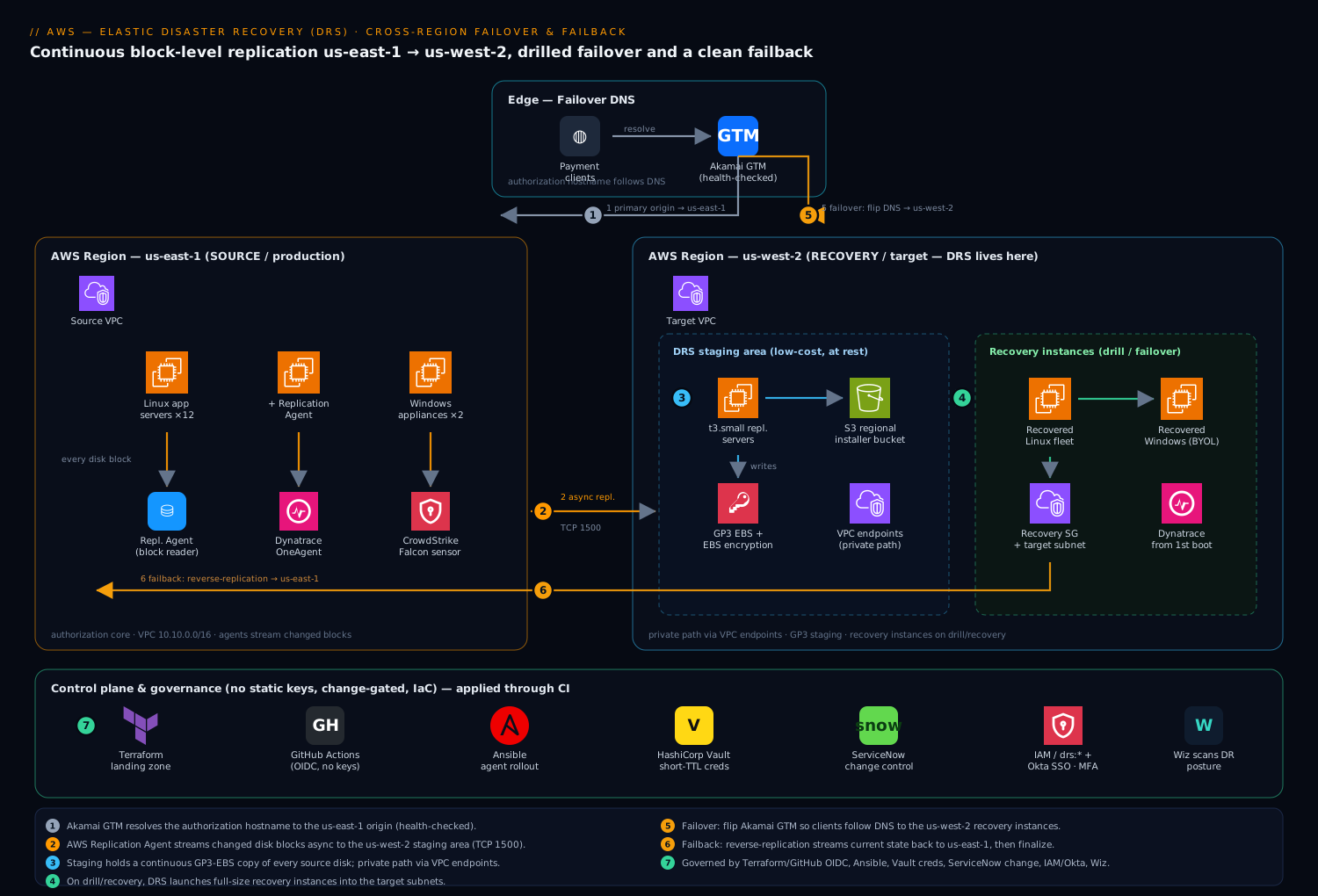
Going deeper
The walkthrough above gets you a working, drilled, reversible DR posture. This section is for the engineer who has to defend it in an architecture review: how the replication actually behaves under the hood, where its consistency guarantees stop, what breaks at scale, and how to automate it across accounts.
What “continuous block replication” really is
The agent is a continuous data protection (CDP) engine, not a scheduler. After the one-time initial sync, a filter in the I/O path captures every disk write on the source and ships it, in order, to the matching staging volume in the target Region — asynchronously. “Asynchronous” is the load-bearing word: the source never waits for the target to acknowledge a write (that would add a cross-Region round-trip to every disk I/O and cripple the application), so the staging copy always trails the source by a small amount. That trailing distance is your RPO, and it is why RPO is “seconds,” never a hard zero. When you read lagDuration = PT0S you are seeing that the target has caught up to within the measurement resolution — not that replication is synchronous.
Two consequences follow directly. First, a fast burst of writes on the source (a bulk load, an fsck, a defrag) temporarily widens the lag until the link drains it — this is the normal cause of a transient RESCAN or a climbing lagDuration, and it is why sizing the replication server and the link to the peak write rate, not the average, is what actually protects RPO. Second, because the capture is at the block layer beneath the filesystem, DRS has no idea what an “application transaction” is — which leads straight to the consistency question most people skip.
Consistency: crash-consistent, and per-server
Every DRS recovery point is crash-consistent, not application-consistent. Crash-consistent means the recovered disk looks exactly as it would if you had yanked the power cord at that instant: the filesystem is intact and journaled databases replay their logs and come up clean, but any write still buffered in application memory (not yet flushed to disk) is gone. For the overwhelming majority of workloads — anything that fsyncs its journal, which is every serious database and most queues — crash-consistent recovery is correct and safe. Where it bites is an application that keeps critical state in memory and flushes lazily; there, you make it application-consistent yourself by quiescing or check-pointing the app before a planned cutover, or by running a post-launch action (below) that repairs state after boot.
The subtler trap is that DRS consistency is per-server, not cross-server. Each source server’s snapshot ladder is independent; there is no coordinated, global “freeze every server at 14:03:00” snapshot across a fleet. When you recover a database server and its app tier together to “latest,” each lands at its own most-recent recovery point, and those points can differ by seconds. For a well-designed tier that reconciles on reconnect this is a non-issue. For a tightly-coupled multi-server system that assumes a single instant of truth, it is a design constraint to know before the incident, not during it.
| Consistency question | DRS answer | What to do about it |
|---|---|---|
| Filesystem intact on recovery? | Yes — always crash-consistent | Nothing; journaled FS/DB replay on boot |
| In-flight app writes preserved? | Only if flushed to disk pre-snapshot | Quiesce before planned cutover, or repair post-launch |
| One coordinated instant across many servers? | No — each server is independent | Design tiers to reconcile; for PIT pick matching timestamps per server |
| Multi-disk consistency within one server? | Yes — a server’s volumes advance together | Nothing; a server’s disks share one recovery point |
What a launch actually does (conversion and hydration)
A recovery launch is not “attach the staging EBS and boot it.” DRS takes a point-in-time snapshot of the staging volumes, creates fresh EBS volumes from it, and runs a short conversion step (the boot-converter, using the conversion role you saw at init) that injects the drivers and bootloader tweaks the instance needs to run as native EC2 — ENA and NVMe drivers, and for non-AWS-origin sources the removal of hypervisor-specific agents. That conversion is most of the few minutes a launch takes, and it is exactly why DRS can recover a hand-built or on-prem server that was never an AMI. The freshly-created volumes are snapshot-backed, so they lazy-hydrate: blocks load from S3 on first touch, and first-access I/O is briefly slower until the volume warms. For a latency-sensitive tier, that warm-up is worth knowing about — pre-read the hot files during a drill, or use a faster-restore path, rather than discovering it under production load.
Scale, quotas, and the limits the objective promised
DRS is billed and bounded per source server, so the numbers that matter at scale are quotas, not raw throughput. These are the defaults you plan around; every one is visible (and most are adjustable) in the Service Quotas console under Elastic Disaster Recovery, so treat the table as a starting point to verify, not gospel:
| Quota (representative default — verify in Service Quotas) | Why it constrains you | If you hit it |
|---|---|---|
| Max source servers per account, per Region (≈300) | Caps fleet size for one DR account/Region | Request an increase, or shard across accounts |
| Source servers in a single recovery/drill job | Very large fleets can’t launch in one call | Batch into multiple start-recovery jobs |
| Concurrently replicating servers | Bandwidth + staging provisioning ceiling | Stagger onboarding; watch lag as you scale |
| Staging-subnet free IPs | Each replication server + launch needs an ENI/IP | Size the subnet for peak replication servers and launches |
| EBS volume / snapshot quotas (account-wide) | Staging volumes + PIT ladders consume them | Raise EBS quotas before a large onboarding |
The two that quietly break a big rollout are the last two: a /28 staging subnet runs out of addresses the moment you scale replication servers or launch a large drill, and the account-wide EBS snapshot quota is shared with everything else you run — a fat PIT ladder across a big fleet can bump into it and surface as SNAPSHOTS_FAILURE.
Cross-account recovery, not just cross-Region
The guide keeps source, staging, and recovery in one account for clarity, but production landing zones usually put DR in a separate, isolated account — so a compromise of the production account (ransomware, a rogue credential) cannot also delete the recovery copies. DRS supports this: the source replicates into a staging account, and recovery instances launch into a target account, wired with cross-account roles. The blast-radius argument is the whole point — the same reasoning behind an isolated backup account applies doubly to DR, because the recovery copies are the thing an attacker most wants to destroy. If you run a multi-account landing zone, put the DR account in its own OU with SCPs that deny anyone but the break-glass role from calling drs:DeleteSourceServer or drs:StopReplication.
Automating DRS — and why it is not Azure Site Recovery
Everything the console does, the DRS API/SDK does, which is what makes DR programmable: you drive update-launch-configuration from a reviewed file in CI, gate start-recovery behind a pipeline, and read job state from describe-jobs. DRS also emits EventBridge events on job and replication-state changes, so “a server left CONTINUOUS” or “a recovery job failed” can page you without polling. And post-launch actions let you attach SSM automation documents that run automatically on each recovery instance after boot — join AD, re-point config, run a smoke test, install an agent — which is how you fold application-consistency and validation into the launch itself.
What DRS deliberately does not give you is a first-class, ordered recovery plan the way Azure Site Recovery (ASR) does — ASR models tiers, manual-approval gates, and inline scripts as a saved plan object you replay. In DRS, that orchestration is yours to compose: to boot the database tier before the app tier, your automation calls start-recovery for tier one, waits on describe-jobs and a health gate, then calls it for tier two, with post-launch actions doing per-instance work. It is more assembly than ASR’s clickable plan, but it is also just API calls — versionable, reviewable, and drill-testable like any other code. (DRS and its migration sibling Application Migration Service (MGN) are both the GA successors to CloudEndure; if you have read CloudEndure DR docs, the concepts map almost one to one.)
Real-world scenario
Cresta Pay runs the authorization core described in the intro: twelve Linux app servers (.NET and Java) and two Windows license-bound HSM-front appliances on EC2 in us-east-1, fronted by an NLB, processing ~3,400 authorizations/second at peak. The platform team is five engineers; the pre-DRS “DR plan” was nightly AMIs and a Confluence runbook nobody had executed. The PCI auditor’s finding was explicit: prove a 60-minute RTO and seconds-RPO with a non-disruptive drill every quarter, or accept a finding.
The first attempt to drill exposed the classic trap. An engineer ran aws drs initialize-service in us-east-1 — the Region they thought of as “where the servers are” — and spent a morning confused that the staging area wanted to replicate out of us-west-2. Re-initializing in the target Region fixed it in minutes, and it became rule one in the runbook. The second snag was network: ten of twelve Linux servers reached CONTINUOUS within two hours, but two sat in INITIAL_SYNC indefinitely. describe-source-servers showed dataReplicationError: AGENT_NOT_SEEN on one and a stalled byte counter on the other; the cause was a source-side security group missing egress TCP 1500 to the staging subnet on those two hosts (they were in a stricter SG). Opening 1500 cleared both, and they added a Reachability check to the pre-drill checklist.
The first real drill was the revelation. They opened a CHG, ran start-recovery --is-drill for all fourteen servers in one job, and watched. The Linux fleet launched and passed synthetic authorization in 38 minutes — comfortably inside SLA. The two Windows appliances, though, came up as AWS-provided Windows because the first launch configuration omitted osByol:true; the drill instances ran fine but would have added Windows licensing to every future recovery, and worse, the vendor license keyed to the original build was at risk. Setting licensing.osByol=true and re-drilling brought them up correctly as BYOL. The drill also caught a right-sizing surprise: BASIC mapped one Java server to a smaller instance family whose memory was tight under load; they pinned that one server’s type explicitly with right-sizing-method NONE.
The near-miss that justified the whole program came three months later — not a Region outage, but a bad deploy that corrupted a config store at 14:20. Because DRS held a 10-minute PIT ladder, they listed snapshots, picked the 14:10 point with recoverySnapshotID, and launched recovery to a state before the corruption. They never had to cut public traffic — they validated against the recovered instances, confirmed the good state, fixed the deploy, and discarded the recovery instances — but it proved PIT worked for real, and it would have been the play if the corruption had been ransomware.
The lasting fix had four parts. One: the runbook now leads with “initialize/verify DRS is in us-west-2” and a describe-source-servers health gate — no server out of CONTINUOUS, no drill. Two: launch configurations are in version control (update-launch-configuration driven from a reviewed file), with osByol:true on the appliances and explicit sizing on the memory-tight server. Three: the DNS cutover is an explicit, tested step with its own health-check, not an afterthought — the first dry run had healthy recovery EC2 that nothing routed to for nine minutes because nobody owned the flip. Four: failback is rehearsed too; they reverse-replicate to a scratch account quarterly so the first real failback is not the first failback ever. The quarterly drill now costs about ₹3,100 of compute (a few instance-hours, torn down immediately) and produces a clean, signed CHG. The auditor’s finding closed, and the line on the wall became: “DR you haven’t timed is a wish. DR you can’t reverse is a trap.”
The incident-to-fix timeline, because the order of moves is the lesson:
| Time | Event | Action | Effect | What it taught |
|---|---|---|---|---|
| Day 1 | DRS set up wrong | initialize-service in us-east-1 |
Staging tried to replicate the wrong way | Rule 1: DRS lives in the target |
| Day 1 | 2 servers stuck INITIAL_SYNC |
Read dataReplicationError |
AGENT_NOT_SEEN + blocked 1500 |
Add a 1500 reachability gate |
| Wk 2 | First drill | start-recovery --is-drill, 14 servers |
Linux in 38 min; Windows as AWS-licensed | Set osByol:true on appliances |
| Wk 2 | Right-size miss | BASIC undersized one Java host |
Memory tight under load | Pin type with right-sizing NONE |
| Mo 3 | Bad deploy 14:20 | Recover to 14:10 PIT | Landed before corruption | PIT proven for real |
| Mo 3 | DNS dry run | Forgot the flip | Healthy EC2, no traffic, 9 min | Make DNS cutover an owned step |
| Ongoing | Quarterly drill | Drill + teardown | ₹3,100, signed CHG | Finding closed |
Advantages and disadvantages
DRS is the cheap-at-rest, fast-to-recover point on the BCDR spectrum, and the trade-offs are specific:
| Advantages | Disadvantages |
|---|---|
| Continuous block replication → RPO in seconds, not the hours an AMI/snapshot schedule gives | Replicates servers, not application semantics — it won’t repair logical/app-level state for you |
Cheap at rest: staging EBS + tiny t3 replication servers, not a duplicate fleet |
You pay for staging storage continuously, and real compute the moment a drill/recovery runs |
| Block-level means it replicates license-bound appliances and hand-built hosts identically | OS/kernel support matrix applies; an unsupported build simply can’t be a source |
| Drills are non-disruptive — prove RTO every quarter without touching prod or replication | Drills cost compute and leave EBS billing if you forget to terminate |
| Point-in-time recovery lets you land before ransomware/corruption, not just “now” | Longer PIT retention = more snapshot storage cost; you must tune it |
| Failback is first-class and reversible — return home without losing outage-window writes | Failback is easy to under-rehearse; the first real one fails if never practised |
Orchestrated, scripted recovery (start-recovery) replaces a hand-run runbook |
drs:StartRecovery effectively lets a holder boot copies of production — must be tightly scoped |
DRS is the right tool for lift-and-shift servers, appliances and hand-built hosts where you want seconds-RPO failover without paying for a hot standby. It is not the tool for the managed tiers — use an RDS/Aurora cross-Region replica for the database (see Aurora High Availability, Global Database & Zero-Downtime), and CRR for S3 — nor for stacks that are fully cloud-native with golden AMIs and IaC, where a pilot-light/warm-standby pattern is cleaner. And it does not absolve you of immutable backups: pair it with AWS Backup with Organizations, Vault Lock & Cross-Region Recovery for governed, ransomware-resistant copies.
Hands-on lab
Stand up DRS for one throwaway Linux EC2 source, watch it reach CONTINUOUS, run a drill, and tear it all down. Keep it small and delete at the end — the only real cost is a few instance-hours of staging plus the brief drill instance. Run in CloudShell (or any host with AWS CLI v2 and credentials).
Step 1 — Set Regions and confirm the CLI has drs.
export SRC_REGION=us-east-1
export DR_REGION=us-west-2
aws drs help >/dev/null && echo "drs commands present"
Step 2 — Initialize DRS in the target Region and verify roles.
aws drs initialize-service --region "$DR_REGION"
aws iam list-roles \
  --query "Roles[?contains(RoleName,'ElasticDisasterRecovery')].RoleName" -o table
Expected: at least AWSServiceRoleForElasticDisasterRecovery listed.
Step 3 — Create a minimal replication template pointed at a staging subnet you control in us-west-2 (replace the subnet/SG IDs):
aws drs create-replication-configuration-template --region "$DR_REGION" \
  --staging-area-subnet-id subnet-EXAMPLEstaging \
  --replication-server-instance-type t3.small \
  --use-dedicated-replication-server false \
  --default-large-staging-disk-type GP3 \
  --ebs-encryption DEFAULT \
  --data-plane-routing PRIVATE_IP \
  --create-public-ip false \
  --associate-default-security-group false \
  --replication-servers-security-groups-i-ds sg-EXAMPLEstaging \
  --bandwidth-throttling 0 \
  --pit-policy '[{"enabled":true,"interval":10,"retentionDuration":60,"units":"MINUTE","ruleID":1}]'
Step 4 — Install the agent on a throwaway Linux EC2 in us-east-1. Use a short-TTL credential (or a tightly scoped lab key you delete after). On the instance:
wget -O ./aws-replication-installer-init \
  "https://aws-elastic-disaster-recovery-us-west-2.s3.us-west-2.amazonaws.com/latest/linux/aws-replication-installer-init"
chmod +x aws-replication-installer-init
sudo ./aws-replication-installer-init --region us-west-2 --no-prompt \
  --aws-access-key-id "$AWS_ACCESS_KEY_ID" --aws-secret-access-key "$AWS_SECRET_ACCESS_KEY"
Step 5 — Watch it reach CONTINUOUS.
watch -n 30 'aws drs describe-source-servers --region us-west-2 \
  --query "items[].{Host:sourceProperties.identificationHints.hostname,\
  State:dataReplicationInfo.dataReplicationState,Lag:dataReplicationInfo.lagDuration}" -o table'
Expected: INITIAL_SYNC → CONTINUOUS with lagDuration near PT0S. If it never leaves INITIAL_SYNC, check egress TCP 1500 from the source to the staging subnet.
Step 6 — Run a drill and time it.
SERVER_ID=$(aws drs describe-source-servers --region us-west-2 \
  --query "items[0].sourceServerID" -o text)
JOB_ID=$(aws drs start-recovery --region us-west-2 --is-drill \
  --source-servers sourceServerID="$SERVER_ID" --query "job.jobID" -o text)
aws drs describe-jobs --region us-west-2 --filters jobIDs="$JOB_ID" \
  --query "items[].{Status:status,Type:type}" -o table   # poll to COMPLETED
Step 7 — Teardown (do this or it bills).
# Terminate any drill instances:
aws drs describe-recovery-instances --region us-west-2 \
  --query "items[].recoveryInstanceID" -o text | xargs -r \
  aws drs terminate-recovery-instances --region us-west-2 --recovery-instance-ids

# Stop and remove the source server (also removes its staging resources):
aws drs stop-replication --region us-west-2 --source-server-id "$SERVER_ID"
aws drs delete-source-server --region us-west-2 --source-server-id "$SERVER_ID"

# Terminate the throwaway EC2 source, and uninstall the agent if reusing it:
#   sudo /var/lib/aws-replication-agent/uninstall.sh
After teardown, verify nothing is left billing — run each check and confirm the expected empty/clean result:
| Check | Command | Expected |
|---|---|---|
| No recovery instances | aws drs describe-recovery-instances --region us-west-2 |
Empty items |
| No replicating source | aws drs describe-source-servers --region us-west-2 |
Empty (after delete) |
| No orphan EBS in staging | EC2 console → Volumes, filter Environment=dr |
None unattached |
| EC2 source terminated | EC2 console → Instances | Lab instance gone |
terminate-recovery-instances does not stop source-side replication — they are independent calls, which is exactly the trap that leaves staging volumes billing after a “cleanup.”
Common mistakes & troubleshooting
The differentiator. Before the playbook, the instruments — what each tool tells you during a DRS incident, so you reach for the right one instead of guessing:
| Tool | What it shows | How to reach it | Best for |
|---|---|---|---|
describe-source-servers |
Per-server state, lag, dataReplicationError |
CLI | “Is replication healthy?” — the first gate |
describe-jobs |
Launch job status (STARTED/COMPLETED/FAILED) |
CLI | “Did my drill/recovery finish?” |
describe-recovery-instances |
Recovery EC2 IDs + failbackState |
CLI | “Did it boot? Where is failback?” |
get-launch-configuration |
Disposition, IP, sizing, licensing |
CLI | “Will it boot the way I expect?” |
| VPC Reachability Analyzer | Whether a path on a port works | Console / CLI | Proving TCP 1500 source→staging |
| VPC Flow Logs | Accepted/rejected flows on the path | CloudWatch / S3 | Confirming a blocked/flapping link |
| CloudTrail | Who called StartRecovery/Terminate… and when |
CloudTrail / Athena | Audit + “who launched this?” |
| CloudWatch alarms | Replication-stalled / lag breach | CloudWatch | Catching STALLED before a drill |
Now the playbook. Each row is a real failure mode with the exact way to confirm it and the fix. Scan it, then read the detail for whichever bites.
| # | Symptom | Root cause | Confirm (exact command / path) | Fix |
|---|---|---|---|---|
| 1 | Staging wants to replicate the wrong direction | DRS initialized in the source Region | aws drs describe-replication-configuration-template in each Region |
Re-run initialize-service in us-west-2; tear down the wrong one |
| 2 | Server stuck in INITIAL_SYNC forever |
TCP 1500 blocked (source egress or staging SG) | describe-source-servers → dataReplicationError; VPC Reachability Analyzer |
Open 1500 source→staging; confirm staging SG ingress |
| 3 | dataReplicationState = STALLED |
Snapshot failure or non-converging lag | dataReplicationInfo.dataReplicationError |
Fix KMS grant / raise throttle to 0 / bigger replication server |
| 4 | Agent shows DISCONNECTED |
Agent process down or 443 egress blocked | Is the service running? check 443 to DRS endpoint | Restart aws-replication-agent; allow 443 |
| 5 | Lag climbs past RPO | Bandwidth throttle too low / link saturated | lagDuration trending up |
Set bandwidth-throttling 0; upsize replication server |
| 6 | Drill collides with production | Forgot --is-drill or copy-private-ip true into prod subnet |
Check the launch config + the job target | Always --is-drill; copy-private-ip false; isolated subnet |
| 7 | Windows appliance billed AWS-Windows | osByol:true omitted on launch config |
aws drs get-launch-configuration → licensing |
Set licensing.osByol=true; re-launch |
| 8 | Recovery instance too small/slow | BASIC right-sizing under-provisioned |
Compare recovery instance type vs source need | Pin type with right-sizing-method NONE |
| 9 | Recovery healthy but no traffic | DNS cutover step skipped | dig the hostname; check origin health-check |
Make the DNS flip an explicit, owned runbook step |
| 10 | Failback never starts / errors | Reverse path blocked or origin agent down | describe-recovery-instances → failbackState |
Fix origin network/agent; retry reverse-replication |
| 11 | Staging EBS still billing after “cleanup” | terminate-recovery-instances doesn’t stop replication |
List source servers still present | Also stop-replication + delete-source-server |
| 12 | Recovered to a poisoned disk | Used latest during a ransomware/corruption event | Compare event time vs snapshot time | Recover to a PIT before the event via recoverySnapshotID |
Initializing DRS in the wrong Region
DRS lives in the target. Running initialize-service in us-east-1 sets up replication out of us-west-2 — the opposite of the plan. Confirm: describe-replication-configuration-template in each Region shows where staging lives. Fix: initialize in us-west-2; remove the inverted setup.
Port 1500 blocked
If the staging security group or a source-side egress rule misses TCP 1500, agents register but never leave INITIAL_SYNC. Confirm: describe-source-servers → dataReplicationInfo.dataReplicationError, and run VPC Reachability Analyzer source→staging on 1500. Fix: open egress 1500 on the source SG and ingress 1500 on the staging SG from the source CIDR.
Drills that touch production
Forgetting --is-drill, or pointing a drill’s launch config at the production subnet/IP, can collide with live systems. Confirm: the start-recovery job’s target subnet and the launch config’s copy-private-ip. Fix: keep a dedicated test subnet, always pass --is-drill, and keep copy-private-ip false.
Windows BYOL billed as AWS-provided
Omitting osByol:true on license-bound appliances silently adds Windows licensing to every recovery instance and can jeopardise the vendor’s host-keyed license. Confirm: get-launch-configuration → licensing. Fix: licensing.osByol=true, then re-launch.
Skipping the failback rehearsal
Teams drill failover and never failback; the first real failback then fails under pressure. Confirm: check whether reverse-replication/start-failback-launch have ever been exercised. Fix: rehearse the reverse loop quarterly (to a scratch account is fine).
Right-sizing surprises
BASIC maps to a comparable family, but verify the recovery instance type actually meets the performance need before an incident. Confirm: compare the booted instance type to the source’s CPU/RAM under load during a drill. Fix: pin critical servers with right-sizing-method NONE and an explicit target-instance-type.
Common beginner mistakes
These are not error messages — they are mental-model mistakes. Each is a belief that feels right and quietly designs a broken DR plan. The troubleshooting table above fixes symptoms; this fixes the misconceptions that cause them.
“DRS is my backup.” It isn’t. DRS keeps a short ladder of recovery points (minutes to a few days, whatever your PIT policy holds) so you can fail over for continuity. It is not long-term, immutable, governed retention — a PIT ladder rolls forward and old points age out, and an attacker or a fat-fingered delete-source-server can wipe the whole DR posture. Right model: DRS answers “my Region/servers are down, get me running elsewhere in minutes”; AWS Backup with Vault Lock answers “prove I can restore last quarter’s data, immutably.” Regulated shops run both, on purpose.
“The staging area is my DR environment, so I’m already protected.” The staging area runs nothing but tiny replication receivers; your application is not running there and cannot serve traffic. Protection is only realised when start-recovery launches full instances. Right model: staging is a warehouse of live copies, not a warm second site — the copies are useless until you assemble machines from them, which is exactly why you drill.
“Replication is continuous, so I can’t lose data.” Continuous is not synchronous. Writes stream asynchronously, so the target always trails by seconds; a source lost mid-burst loses the not-yet-shipped tail. Right model: DRS gives you an RPO of seconds, which is excellent — but “seconds of possible loss,” not zero. If you need true zero, you need synchronous replication at the database tier, which is a different tool.
“I’ll set up DRS where my servers are.” The single most common first-day error. Initializing in the source Region points the whole design backwards. Right model: DRS lives in the Region you want to recover to — you are configuring the destination, not the origin.
“Latest is always the right recovery point.” Latest is right for a Region outage, where the source was healthy until the lights went out. It is exactly wrong for ransomware or a bad deploy, where “latest” faithfully replicates the damage. Right model: match the recovery point to the kind of disaster — latest for infrastructure loss, a PIT before the event for corruption.
“A green drill means I’m done.” A drill proves the launch mechanics and your RTO. It does not prove that DNS actually flips, that the app tier reconciles with a database that recovered a few seconds apart, or that you can get home. Right model: a real DR capability = drilled launch plus an owned, health-checked DNS cutover plus a rehearsed failback. Teams that skip the last two have a demo, not a plan.
“Terminating the recovery instances cleaned everything up.” terminate-recovery-instances only removes the launched EC2; source-side replication and its staging EBS keep billing until you stop-replication and delete-source-server. Right model: launch and replication are independent lifecycles — tearing down one never tears down the other.
Best practices
- Initialize in the target Region, and make it the first runbook line. A
describe-source-servershealth gate (“no server out ofCONTINUOUS, no drill”) prevents the most common silent failure. - Use a private data plane.
data-plane-routing PRIVATE_IPplus a DRS VPC interface endpoint keeps replication off the internet and off NAT data-processing charges. - Keep launch configurations in version control. Drive
update-launch-configurationfrom a reviewed file; treatcopy-private-ip false,osByol:trueand explicit sizing as code, not click-ops. - Drill the whole core in one job, every quarter, with a CHG. Time it, capture the synthetic-transaction pass, and record RTO/RPO as evidence.
- Recover to a point-in-time, not just latest, when the event is logical. Ransomware and bad deploys need a snapshot before the event — list with
describe-recovery-snapshots. - Make the DNS cutover an explicit, owned, health-checked step. Healthy recovery instances that nothing routes to is the most embarrassing way to fail a real cutover.
- Rehearse failback, not just failover. Reverse-replicate to a scratch account quarterly so the first real failback isn’t the first ever.
- Terminate drill instances immediately and verify no orphans. Remember
terminate-recovery-instancesandstop-replicationare independent — clean up both. - Right-size deliberately for critical hosts.
BASICis convenient;NONEwith an explicit type is correct where SLA depends on it. - Pair DRS with immutable backups. DRS is fast recovery; AWS Backup with Vault Lock is governed, ransomware-resistant retention. Run both.
- Tune PIT retention to compliance, not “as long as possible.” Longer ladders cost real snapshot storage; match the regulator’s requirement.
- Bake your monitoring/security agents into the source image. Then every recovery instance is observed and protected from first boot — a failover must not become a blind spot.
Security notes
Keep the DR plane as governed as production. Replication uses EBS encryption (ebs-encryption DEFAULT, or a CMK with CUSTOM) at rest and TLS in transit; with data-plane-routing PRIVATE_IP plus the VPC interface endpoints, replication traffic never touches the public internet. Agent installation pulls short-lived credentials (Vault’s AWS secrets engine) so no static key lands on a server — and any operator who can call drs:StartRecovery is, in effect, able to launch copies of production, so scope that IAM permission tightly and gate it behind a ServiceNow change. If you encrypt staging with a customer-managed key, the KMS grants matter — the mechanics are in AWS KMS Encryption Deep Dive: Keys, Policies, Envelope, Rotation. Roll the DR Region into your normal posture tooling so a misconfigured staging SG, a publicly exposed recovery instance, or an unencrypted volume is caught continuously, and run your endpoint/EDR agent on the source images so the sensor is present on every recovery instance from first boot. For workforce access to the DRS console and the break-glass operator role, federate through SSO with conditional access rather than IAM users, and require MFA on the recovery role.
The DRS-specific permissions and the blast radius of each:
| Permission / action | Who needs it | Blast radius | Guardrail |
|---|---|---|---|
drs:DescribeSourceServers |
On-call, dashboards | Read-only | Broad read is fine |
drs:UpdateLaunchConfiguration |
Platform engineers | Changes how recovery boots | Reviewed-file driven; PR-gated |
drs:StartRecovery |
Break-glass operator | Boots copies of production | Scope tight; MFA; CHG-gated |
drs:TerminateRecoveryInstances |
Operator | Removes recovery EC2 | Scope to DR account/Region |
drs:StopReplication / DeleteSourceServer |
Senior platform | Stops DR for a server | Senior-only; audited |
drs:* (admin) |
Rare | Full control | Break-glass identity only |
The encryption-in-transit/at-rest posture at a glance:
| Layer | Mechanism | Setting | Verify |
|---|---|---|---|
| Block stream in transit | TLS over TCP 1500 | (default) | Private path via endpoint |
| Staging volumes at rest | EBS encryption | ebs-encryption DEFAULT/CUSTOM |
Volumes show encrypted |
| PIT snapshots at rest | EBS snapshot encryption | Inherits volume encryption | Snapshots encrypted |
| CMK control (optional) | KMS customer-managed key | CUSTOM + key + grants |
Key policy allows DRS roles |
| Recovery instance volumes | EBS encryption | From launch template | Encrypted on boot |
Cost & sizing
DRS is deliberately cheap at rest, which is the entire point versus a warm standby: you pay a small per-source-server hourly DRS charge, the low-cost staging EBS volumes (GP3) holding replicated data, and the small t3.small replication servers — not full-size duplicate infrastructure. Real compute cost only appears while drill or recovery instances run, so terminate drill instances the moment validation is captured — the single biggest avoidable line item.
What actually drives the DRS bill, and how to keep each honest:
| Cost driver | Billed as | Rough scale | Control it by |
|---|---|---|---|
| Per-source-server DRS charge | Hourly per replicating server | Small, continuous | Stop replicating decommissioned sources |
| Staging EBS (GP3) | Per GB-month of replicated data | Proportional to total disk | Exclude scratch/ephemeral volumes (--devices) |
| Replication servers | t3.small hours (shared) |
Low, continuous | Don’t use dedicated unless required |
| PIT snapshot storage | Per GB-month of snapshots | Grows with retention ladder | Tune pit-policy to compliance, not “max” |
| Drill / recovery compute | Full instance-hours while running | Spiky | Terminate immediately after the drill |
| Data transfer | Cross-Region + any NAT | Per GB | Private endpoints; avoid NAT data-processing |
A rough monthly sketch (illustrative; verify against the AWS pricing calculator for your Region and disk sizes):
| Item | Assumption | Rough monthly |
|---|---|---|
| 14 source servers (DRS charge) | Small per-server hourly | A few thousand ₹ |
| Staging EBS (GP3) | ~2 TB replicated | Storage-driven |
| Replication servers | Shared t3.small |
Low |
| PIT snapshots | 10m/1h/3d ladder, ~2 TB | Moderate |
| Quarterly drill | 14 instances × ~1 hr, torn down | ≈ ₹3,100 / drill |
| At-rest baseline | No drill running | Dominated by EBS + per-server |
The teardown calls are independent — this is the single most common way DRS keeps billing after a “cleanup,” so know exactly what each call releases and what it leaves behind:
| Call | Releases | Leaves behind | You still pay for… |
|---|---|---|---|
terminate-recovery-instances |
Launched recovery EC2 + its EBS | Source-side replication + staging | Per-server DRS charge + staging EBS |
stop-replication |
Active replication for that source | The source-server record in DRS | Nothing ongoing for that source |
delete-source-server |
The source record + its staging resources | Nothing (full removal) | Nothing |
terraform destroy (landing zone) |
VPC endpoints, SGs you created | DRS objects (separate) | Nothing (network) |
Agent uninstall (on source) |
The agent on the host | DRS-side record (until deleted) | Nothing |
Sizing the replication servers is the one knob that affects both cost and whether you meet RPO: too small and high-churn sources push lagDuration past your target (the NOT_CONVERGING error); too large and you pay for idle receive capacity. Start at t3.small, watch lagDuration under real write load during a drill, and step up only the servers that need it.
| Source profile | Replication server | Why |
|---|---|---|
| Low/steady write rate | t3.small (default, shared) |
Cheapest; sync keeps up easily |
| High-churn DB-like disks | Larger t3/m-family |
Avoids NOT_CONVERGING lag |
| Many sources, mixed | Shared t3.small + selective upsize |
Pay for headroom only where needed |
| Strict isolation requirement | use-dedicated-replication-server true |
One server per source (costlier) |
Practice challenges
Work these against the mental model, then check yourself. They escalate from reading state to composing an automated, multi-tier recovery. Commands assume us-west-2 is your target Region, as in the guide.
1 (Beginner) — Confirm you initialized in the right Region. Without opening the console, write the one check that proves DRS is set up to recover into us-west-2 and not the reverse.
<details><summary>Solution</summary>
aws drs describe-replication-configuration-templates --region us-west-2 \
  --query "items[].{Tmpl:replicationConfigurationTemplateID,Subnet:stagingAreaSubnetId}" \
  --output table
A row here (a staging subnet in us-west-2) proves DRS lives in the target; the same call in us-east-1 should return an empty items. Why: the replication template lives where staging lives, so it is the fastest proof of correct direction.
</details>
2 (Beginner) — Read a server’s licensing before a drill. One appliance must stay BYOL. Show how to confirm osByol is set on its launch configuration before you ever launch.
<details><summary>Solution</summary>
aws drs get-launch-configuration --region us-west-2 \
  --source-server-id s-1111aaaa2222bbbb3 \
  --query "licensing"
Expect {"osByol": true}. If it shows false, the recovery instance boots as AWS-provided Windows. Why: licensing is a launch-config property, so you audit it before launch, not after the bill arrives.
</details>
3 (Intermediate) — Pick a point-in-time before an event. A bad deploy landed at 14:20 UTC. List the recovery snapshots for a server and identify which you would pass to start-recovery.
<details><summary>Solution</summary>
aws drs describe-recovery-snapshots --region us-west-2 \
  --source-server-id s-1111aaaa2222bbbb3 \
  --query "items[].{Snap:snapshotID,Time:timestamp}" --output table
# choose the newest snapshot whose Time is < 14:20, e.g. the 14:10 point:
aws drs start-recovery --region us-west-2 \
  --source-servers sourceServerID=s-1111aaaa2222bbbb3,recoverySnapshotID=pit-0abc123def456
Why: recovering to a point before the event avoids faithfully restoring the corruption — the core value of the PIT ladder. </details>
4 (Intermediate) — Diagnose a climbing lag. describe-source-servers shows dataReplicationState=STALLED, dataReplicationError=NOT_CONVERGING, and a lagDuration that grows on every poll. State the cause in one sentence and the two-lever fix.
<details><summary>Solution</summary>
The source is writing faster than the replication link can drain, so lag never converges. Fix: remove any artificial cap (bandwidth-throttling 0) and/or move that source to a larger replication server so the receiver keeps up.
Why: NOT_CONVERGING is always a throughput mismatch — you either widen the pipe or grow the receiver.
</details>
5 (Advanced) — Launch a multi-server drill and gate on completion. Start a non-disruptive drill for two servers in one job and poll until the job reaches COMPLETED, capturing the job ID.
<details><summary>Solution</summary>
JOB_ID=$(aws drs start-recovery --region us-west-2 --is-drill \
  --source-servers sourceServerID=s-1111aaaa2222bbbb3 \
                   sourceServerID=s-4444cccc5555dddd6 \
  --query "job.jobID" --output text)

until [ "$(aws drs describe-jobs --region us-west-2 --filters jobIDs="$JOB_ID" \
  --query 'items[0].status' --output text)" = "COMPLETED" ]; do sleep 30; done
echo "drill $JOB_ID complete"
Why: a real recovery is the same call minus --is-drill, so scripting the drill’s gate rehearses the exact automation you’ll run in an incident.
</details>
6 (Advanced) — Order a two-tier recovery without a native recovery plan. DRS has no built-in “boot the DB tier first” plan. Sketch how you would guarantee the database servers are healthy before the app tier launches.
<details><summary>Solution</summary>
Compose it in your own automation: run start-recovery for the DB tier, poll describe-jobs to COMPLETED, then pass an application health gate (or a post-launch SSM action attached to the DB servers) before issuing a second start-recovery for the app tier. Optionally trigger the whole sequence from an EventBridge rule on the job-completed event.
Why: unlike ASR’s ordered recovery plan, DRS sequencing is orchestration you build from the API — which makes it versionable and drill-testable like any other code.
</details>
Interview & exam questions
Q1. In which Region do you initialize DRS, and why? In the target/recovery Region (us-west-2). Replication, the staging area, snapshots and recovery launches all live where you recover to; initializing in the source Region inverts the design so staging would replicate out of the recovery Region. (AWS SAP-C02, AWS Certified Security; BCDR design.)
Q2. How does DRS keep RPO in seconds? The Replication Agent does one full initial sync of every used block, then streams only changed blocks continuously and asynchronously to the staging area, so the staging copy trails the source by seconds, not the hours an AMI/snapshot schedule gives. (SAP-C02.)
Q3. What is the difference between a drill and a real recovery in DRS? A drill (start-recovery --is-drill) launches recovery instances into isolation while replication keeps running, to prove RTO without touching production; a real recovery is the same call minus --is-drill, into real subnets, followed by the DNS cutover. (SAP-C02; operational.)
Q4. How do you recover to a point before a ransomware event rather than to the corrupted “now”? Use the PIT policy’s snapshot ladder: describe-recovery-snapshots to list points, then start-recovery with recoverySnapshotID set to a snapshot timestamped before the event. (Security specialty; resilience.)
Q5. A source server is stuck in INITIAL_SYNC. What is the single most likely cause and how do you confirm it? Blocked TCP 1500 from the source to the staging subnet. Confirm with describe-source-servers → dataReplicationInfo.dataReplicationError and VPC Reachability Analyzer on 1500. (Operational; troubleshooting.)
Q6. Why must osByol:true be set for license-bound Windows appliances? Without it, recovery instances launch as AWS-provided Windows, adding licensing charges and risking the vendor’s host-keyed license; osByol:true preserves bring-your-own-license. (Cost + licensing.)
Q7. What does copy-private-ip control, and what is the right value for a cross-Region cutover? Whether the recovery instance reuses the source’s private IP. For cross-Region cutover keep it false — the source CIDR won’t exist in the target VPC and reusing it risks collisions; plan target-subnet addressing instead. (SAP-C02; networking.)
Q8. How does failback work in DRS? reverse-replication makes the running recovery instances sources and streams their current state back to the original Region; once FAILBACK_READY_FOR_LAUNCH, start-failback-launch in a maintenance window makes the origin primary again without losing outage-window writes. (SAP-C02; BCDR.)
Q9. Why does terminating recovery instances not stop your staging bill? terminate-recovery-instances only removes the launched EC2; source-side replication (and its staging EBS) is a separate lifecycle — you must also stop-replication/delete-source-server. (Cost; operational trap.)
Q10. When would you choose DRS over a pilot-light/warm-standby pattern? When you’re recovering servers you can’t trivially rebuild from code — license-bound appliances, hand-built hosts, lift-and-shift VMs — and want seconds-RPO without paying for a hot standby. Cloud-native stacks with golden AMIs and IaC are usually better served by pilot light. (SAP-C02; architecture trade-off.)
Q11. What guardrails belong on drs:StartRecovery? It can boot copies of production, so scope it to the DR account/Region, gate it behind change control (a CHG), require MFA on the operator role, and federate access via SSO rather than IAM users. (Security specialty.)
Q12. How do you keep the DRS replication path off the public internet? Set data-plane-routing PRIVATE_IP, create a DRS VPC interface endpoint (plus S3 gateway / EC2 / EBS endpoints), and use private subnets — this also avoids NAT data-processing charges. (Networking; cost.)
Quick check
- In which Region do you run
aws drs initialize-servicefor aus-east-1→us-west-2setup, and why? - A server shows
dataReplicationState = STALLEDwithdataReplicationError: NOT_CONVERGING. What is happening and what’s the fix? - You need to recover to a state just before a bad deploy at 14:20. Which call lists your options, and which flag selects the earlier point?
- Name two things that are billing you that
terminate-recovery-instancesalone will not stop. - What single launch-configuration flag prevents a cross-Region recovery instance from colliding with production addressing?
Answers
- In the target Region,
us-west-2— that’s where replication, staging and recovery live; running it in the source Region inverts the design. - The source is out-writing the replication link so lag is growing and not converging. Fix: set
bandwidth-throttling 0and/or move that source to a larger replication server. aws drs describe-recovery-snapshotslists the PIT points; passrecoverySnapshotID=<earlier-snap>tostart-recoveryto land before the event.- Source-side replication (its per-server DRS charge) and the staging EBS volumes — stop those with
stop-replication/delete-source-server. copy-private-ip false— so the recovery instance gets a target-subnet IP instead of reusing the source’s private IP.
Glossary
-
AWS Elastic Disaster Recovery (DRS): AWS service that continuously replicates whole servers at block level into a low-cost staging area in another Region and orchestrates recovery on demand.
-
AWS Replication Agent: Software installed on each source server that inventories disks and streams changed blocks to the staging area.
-
Staging area: The cheap subnet of replication servers plus low-cost EBS in the target Region that holds the continuously-updated copy of every source disk.
-
Replication server: A small instance (
t3.smallby default) in the staging subnet that receives replicated blocks. -
Initial sync: The one-time full block copy of every used block on a source, done when the agent first installs.
-
dataReplicationState: A source server’s replication health —INITIAL_SYNC,RESCAN,CONTINUOUS,STALLED,DISCONNECTED,PAUSED,STOPPED. -
Point-in-time (PIT) policy: The configured ladder of EBS snapshots (e.g. 10-min/hourly/daily) that lets you recover to a chosen earlier moment.
-
Launch configuration: The per-server recipe (disposition, copy-private-IP, right-sizing, licensing, tags) that controls how a recovery instance boots.
-
Recovery instance: The full-size EC2 instance DRS launches from replicated data on a drill or recovery.
-
Drill: A non-disruptive recovery into an isolated subnet, run to prove RTO without affecting production or replication.
-
Failover / recovery: Launching recovery instances for real and cutting traffic to the recovery Region.
-
Failback: Reversing replication so recovery instances stream their current state back to the original Region, returning production home.
-
RTO / RPO: Recovery Time Objective (how fast you must be back) and Recovery Point Objective (how much data you can lose) — DRS targets minutes and seconds respectively.
-
BYOL (
osByol): Bring-your-own-license; preserves an existing OS license instead of AWS-provided licensing on recovery instances. -
Continuous Data Protection (CDP): The always-on capture-and-stream model DRS uses — every source write is shipped to the target as it happens, rather than on a snapshot schedule, which is what keeps RPO in seconds.
-
Crash-consistent: A recovery point equivalent to pulling the power at that instant — the filesystem and journaled databases recover cleanly, but writes still buffered in memory are lost. DRS recovery points are always crash-consistent.
-
Application-consistent: A recovery point where the application has flushed and quiesced its state first, so nothing in flight is lost. DRS does not produce this automatically — you achieve it by quiescing before a planned cutover or via a post-launch action.
-
Conversion (boot converter): The short launch-time step that injects EC2 drivers (ENA/NVMe) and bootloader fixes so replicated disks boot as native EC2 — what lets DRS recover hand-built and on-prem servers that were never AMIs.
-
Lazy hydration: Snapshot-backed EBS volumes load blocks from S3 on first access, so a freshly-launched recovery instance has briefly slower first-touch I/O until the volume warms.
-
Post-launch action: An SSM automation document DRS runs automatically on a recovery instance after boot (join AD, re-point config, smoke-test) — where you fold validation and application-consistency into the launch.
-
lagDuration: The ISO-8601 measure of how far the staging copy trails the source (PT0S≈ caught up); it is your live RPO and the first number to watch when protecting it. -
Cross-account recovery: Replicating from a source account into an isolated staging/target account, so a compromise of production cannot also destroy the DR copies.
Next steps
- Enterprise Architecture on AWS: DR Strategies — where DRS sits on the backup / pilot-light / warm-standby / active-active spectrum and how to choose.
- AWS Backup with Organizations, Vault Lock, Cross-Account & Cross-Region Recovery — the immutable, governed backup layer that complements DRS.
- Route 53: DNS Records, Routing Policies & Health Checks — make the failover DNS cutover a reliable, health-checked step.
- Aurora High Availability, Global Database & Zero-Downtime — the right cross-Region story for the managed database tier DRS shouldn’t carry.
- CloudWatch & CloudTrail Observability Deep Dive — alert on replication health and audit every
StartRecovery.