In a nutshell
Amazon always keeps spare servers idle so it can satisfy sudden On-Demand and Reserved requests. EC2 Spot rents you that idle capacity — the same hardware in the same data centres — for 70–90% less, on one condition: when Amazon needs a machine back for a full-price customer, it taps you on the shoulder with a two-minute warning and takes it.
Think of it like renting empty desks in a co-working building at a steep off-peak rate. The desks are identical to the full-price ones; the catch is that if a paying member turns up, you get a short “please pack up” notice for that desk. Two habits make this a non-event instead of a scramble: don’t seat your whole team in one building (spread across many buildings and floors, so one eviction only moves a couple of people), and have a pack-up drill so anyone tapped finishes their sentence and hands off cleanly before they leave.
In EC2 terms, a “building + floor” is a capacity pool — one (instance type, Availability Zone) combination — and Amazon reclaims capacity one pool at a time. So the entire skill is: draw from many pools (many instance types across many AZs), let AWS place you in the deepest, least-likely-to-be-reclaimed ones, keep a small On-Demand floor for the rare day Spot is scarce everywhere, and wire a drain that finishes inside the two-minute notice. Do that and Spot is boring and cheap; skip it and one capacity crunch takes out half your fleet.
This lesson is the production playbook for exactly that. It is written to be read once end-to-end, then kept open as a reference — the tables are built to scan mid-incident.
Level: Advanced · Time: ~69 min read · You’ll need first: EC2 Auto Scaling basics (launch templates, ASGs, lifecycle hooks), comfort with the aws CLI and Terraform, and the load-balancer target-group drain model. After this you can put an interruption-tolerant production tier on Spot, pick the allocation strategy that minimizes reclaims, size a survivable On-Demand floor, and build a drain that turns a reclaim into a non-event.
Spot is the single largest lever on an EC2 bill — routinely 70–90% off On-Demand for the exact same hardware — and most teams either avoid it in production out of reclaim anxiety or run it so naively that one capacity event takes out a meaningful slice of the fleet. Neither is necessary. EC2 Spot sells you spare Amazon capacity at a steep discount with one catch: AWS can take it back with a two-minute notice when it needs that capacity for On-Demand. Whether a reclaim is a non-event or an outage is entirely a function of two things you control — how many distinct capacity pools you draw from, and how you react to the notice. Get those right and Spot stops being scary; get them wrong and you relearn why people fear it.
This is the playbook I use to put interruption-tolerant production workloads on Spot at scale: diversified mixed instances policies, the allocation strategy that actually minimizes interruptions, the On-Demand floor that keeps you safe during a drought, and the drain machinery that turns a reclaim into a non-event. It builds on the Auto Scaling fundamentals — launch templates, lifecycle hooks, instance refresh — covered in the Advanced EC2 Auto Scaling: Warm Pools, Lifecycle Hooks, and Zero-Downtime Instance Refresh article; here the focus narrows to purchase options and resilience: the handful of settings that decide your interruption rate and your blast radius.
By the end you will stop guessing about Spot. You will know why price-capacity-optimized beats lowest-price for almost everything, how to size an On-Demand base to “survive a total Spot drought,” why the ALB deregistration_delay default of 300 seconds silently breaks your drain, and how queue-driven work gets the cheapest possible “drain” for free. Because this doubles as a reference you will return to mid-incident, the allocation strategies, the distribution fields, the interruption signals, the limits, and the failure modes are all laid out as scannable tables — read the prose once, then keep the tables open.
What problem this solves
The pain is concrete and expensive on both sides. On the cost side: a stateless fleet running pure On-Demand is leaving the largest discount AWS offers on the table — for a fleet burning ₹40 lakh/month, that is often ₹25–30 lakh/month of pure waste. On the resilience side: the naive fix — flipping the group to 100% Spot on the two instance types you happen to use — concentrates the whole fleet into two or three capacity pools, so a single regional capacity crunch reclaims 50–70% of your workers in minutes, your queue backs up, and in-flight work is lost because nobody drained.
What breaks without this knowledge: teams run Spot on lowest-price (highest interruption rate), in two AZs (too few pools), with no On-Demand base (no floor when Spot dries up), and with the ALB’s default 300-second deregistration delay (longer than the entire two-minute warning, so drains never finish). Each of those is a single setting away from correct, but the failure only shows up under a real capacity event — which, by definition, is the worst time to be learning this.
Who hits this: anyone running horizontally scalable, interruption-tolerant tiers — stateless web/API fleets behind a load balancer, queue-driven workers (SQS/Kafka consumers), batch and CI fleets, data-processing and transcoding pools, and Kubernetes/ECS data planes. It bites hardest on teams that adopted Spot for the savings headline without designing for the reclaim. The fix is never “hope Spot stays available” — it is diversify across many pools, place by capacity not just price, keep a survivable On-Demand floor, and make the drain idempotent and fast.
To frame the whole field before the deep dive, here is every lever this article covers, what it controls, and the one-line “get it right” rule:
| Lever | What it controls | Naive default that bites | Get-it-right rule |
|---|---|---|---|
| Pool diversity | How many (type, AZ) pools the fleet can use |
2 types × 2 AZs = 4 pools | ≥ 10 pools (4+ types × 3 AZs), or ABIS |
| Allocation strategy | Which pools Spot launches into | lowest-price (cheapest only) |
price-capacity-optimized |
| On-Demand base | The floor that survives a Spot drought | 0 (all Spot) |
One AZ’s worth of capacity units |
| % On-Demand above base | Smoothing the curve above the floor | 0 or 100 chosen blindly |
0% for stateless; 20–30% if reclaim-sensitive |
| Capacity Rebalance | Proactive replacement before the notice | false (race the 120 s clock) |
true + a terminating hook |
| Drain window | Time to deregister + finish in-flight work | ALB deregistration_delay = 300 |
< 120 s, or SQS visibility-timeout redelivery |
| Interruption visibility | Per-pool interruption rate to tune against | nothing instrumented | EventBridge → per-pool metric |
Learning objectives
By the end of this article you can:
- Explain Spot capacity pools, the rebalance recommendation vs the two-minute interruption notice, and read the notice from IMDSv2 on the instance.
- Design a diversified mixed instances policy across families, sizes, and AZs, and reason in capacity units with weighted capacities instead of instance count.
- Choose the right Spot allocation strategy for a workload — and articulate exactly why
price-capacity-optimizedis the default andlowest-priceis almost never correct for production. - Size
on_demand_base_capacityandon_demand_percentage_above_base_capacityto a guaranteed floor plus a Spot-heavy remainder, and configure graceful On-Demand fallback during a drought. - Compose Capacity Rebalance, a lifecycle hook, and a drain handler (NTH) into one idempotent drain path that covers both scale-in and interruption — and set
deregistration_delay < 120s. - Run Spot safely in containerized fleets: ECS capacity providers with a Spot/On-Demand split,
FARGATE_SPOT, and Karpenter disruption budgets and consolidation controls on EKS. - Use attribute-based instance selection (ABIS) to future-proof the type list, and instrument per-pool interruption rate plus realized savings from the Cost and Usage Report.
Prerequisites & where this fits
You should already understand the Auto Scaling fundamentals: a launch template captures the AMI, instance profile, security groups, and user data; an Auto Scaling group (ASG) maintains a desired capacity across subnets/AZs; lifecycle hooks pause an instance in Pending:Wait or Terminating:Wait to run automation; and instance refresh rolls a fleet to a new template. Those mechanics are the subject of the EC2 Auto Scaling, In Depth: Launch Templates, ASGs, Scaling Policies & Lifecycle Hooks and the warm-pools deep dive — this article assumes them and layers purchase options on top. You should also know your way around the EC2 instance families, AMIs, and IMDS, and have aws CLI v2 plus Terraform available.
This sits in the Cost Optimization & Resilience track of the AWS Zero-to-Hero path. It is downstream of the load-balancing fundamentals — your fleet almost always sits behind an Application or Network Load Balancer, and the target group’s drain behaviour is half of safe Spot. It pairs tightly with Resilient Messaging with SQS and SNS (the cheapest drain for queue work is a visibility timeout), with the Graviton arm64 migration guide (arm64 Spot pools are deep and cheap — diversify across architectures too), and with the FinOps Showback and Chargeback Platform on AWS for tracking realized Spot savings. Observability of the interruption signal lives in CloudWatch, CloudTrail & EventBridge.
A quick map of who owns what when you adopt Spot, so the right person tunes the right knob:
| Layer | What lives here | Who usually owns it | What it decides for Spot |
|---|---|---|---|
| Purchase policy | Mixed instances, OD base, %-above-base | Platform / FinOps | Cost split and the survivable floor |
| Allocation strategy | price-capacity-optimized vs others |
Platform | Interruption rate and scale-out speed |
| Type list / ABIS | Families, sizes, vCPU/memory bounds | App + platform | Pool count (the whole game) |
| Load balancer | Target group, deregistration_delay |
Network / platform | Whether the drain finishes in time |
| Drain handler | NTH / lifecycle hook / SQS visibility | App team | Whether in-flight work survives |
| Orchestrator | ECS capacity providers / Karpenter | Platform | Reschedule speed; container-level drain |
| Observability | EventBridge rule, CUR, Cost Explorer | FinOps / SRE | Per-pool tuning and honest savings |
Core concepts
Five mental models make every later decision obvious.
A capacity pool is one (instance type, Availability Zone) in a Region. m6i.large in us-east-1a is a different pool from m6i.large in us-east-1b, and from m6a.large in us-east-1a. Spot prices and availability are set per pool, and EC2 reclaims Spot capacity in that pool when it needs it back. This single fact drives the entire diversification strategy: if your whole fleet sits in one pool, one reclaim hits everything; spread across twenty pools, a reclaim trims a few percent.
You get two warnings, and they are different. A rebalance recommendation is an early, best-effort heads-up that an instance is at elevated risk of interruption — it can arrive minutes before any termination notice and is your cue to launch a replacement and drain proactively; it is advisory, and not every recommendation is followed by an interruption. The Spot interruption notice is the hard two-minute warning: you have ~120 seconds before the instance is stopped or terminated. Both arrive via instance metadata (IMDS) and via EventBridge.
You do not prevent interruptions — you make them rare and boring. Diversification plus capacity-optimized allocation makes reclaims statistically rare (the fleet lives in deep pools and any single reclaim is a small fraction); a fast, idempotent drain plus proactive replacement makes each reclaim operationally boring (the old instance bleeds off traffic, a replacement is already warm). Design for the reclaim and it stops being an incident.
The fleet thinks in capacity units, not instances. When you mix instance sizes, you assign each a weighted capacity so the ASG reasons in, say, vCPU units. desired_capacity = 24 then means 24 units — satisfiable as twelve larges (weight 2) or three 2xlarges (weight 8) or any mix — and on_demand_base_capacity is also expressed in units. This lets the group satisfy demand from whatever pools are cheap and available without skewing per-instance load behind the load balancer (as long as weights are proportional to real capacity).
The drain must fit inside two minutes. Once the interruption notice fires you have ~120 seconds, full stop. Every drain mechanism — ALB connection draining, a lifecycle hook heartbeat, an SQS visibility timeout — must be sized to complete within that window, or you will be reclaimed mid-drain and lose in-flight work. The ALB’s default deregistration_delay of 300 seconds is the classic trap: it is longer than the entire warning.
The vocabulary in one table
Before the deep sections, pin down every moving part. The glossary at the end repeats these for lookup; this table is the mental model side by side:
| Concept | One-line definition | Where it lives | Why it matters |
|---|---|---|---|
| Capacity pool | One (instance type, AZ) in a Region |
EC2 capacity layer | Reclaims happen per pool; diversify across many |
| Spot price | The discounted per-pool price (≤ On-Demand) | Per pool | You pay the market price, capped at On-Demand |
| Rebalance recommendation | Early “elevated risk” advisory | IMDS + EventBridge | Proactive replacement before the hard notice |
| Interruption notice | The hard 2-minute warning | IMDS + EventBridge | Last chance to drain |
| Mixed instances policy | One ASG drawing many types + OD/Spot | ASG config | The container for all Spot tuning |
| Allocation strategy | Which pools Spot launches into | instances_distribution |
The biggest single lever on interruption rate |
| Weighted capacity | A size’s “units” toward desired capacity | override per type |
Lets the group reason in vCPU, not count |
| OD base capacity | Guaranteed On-Demand floor (in units) | instances_distribution |
Survives a total Spot drought |
| Capacity Rebalance | ASG acts on rebalance recommendations | ASG flag | Proactive replacement, not racing the clock |
| Lifecycle hook | Pause in Terminating:Wait to drain |
ASG hook | The drain window for scale-in + interruption |
| NTH | AWS Node Termination Handler | On the instance / EKS | Watches signals, drives the drain |
| ABIS | Attribute-based instance selection | instance_requirements |
Describe needs; EC2 expands to all matching types |
Spot mechanics: pools, the two-minute notice, and rebalance
A capacity pool is one combination of (instance type, Availability Zone) in a Region. Spot prices and availability are set per pool, and EC2 reclaims Spot instances in that pool when it needs the capacity back. This is why diversification is the whole game.
Two signals warn you before an instance dies, both delivered through instance metadata (IMDS) and EventBridge. You read the interruption notice from IMDS on the instance itself. With IMDSv2 (which you should be enforcing), that is a token-authenticated request:
# On the instance. Returns 200 + JSON only when a notice is pending; 404 otherwise.
TOKEN=$(curl -sX PUT "http://169.254.169.254/latest/api/token" \
  -H "X-aws-ec2-metadata-token-ttl-seconds: 30")

curl -s -H "X-aws-ec2-metadata-token: $TOKEN" \
  http://169.254.169.254/latest/meta-data/spot/instance-action
# => {"action":"terminate","time":"2026-06-08T14:22:00Z"}
The rebalance recommendation lives at a sibling path (/latest/meta-data/events/recommendations/rebalance) and surfaces earlier. The two signals differ in timing, reliability, and what you should do with each — confusing them is a common design error:
| Property | Rebalance recommendation | Interruption notice |
|---|---|---|
| Timing | Minutes before (best-effort) | Exactly ~120 s before |
| Reliability | Advisory; may not be followed by an interruption | Guaranteed; instance will go |
| IMDS path | /events/recommendations/rebalance |
/spot/instance-action |
| EventBridge detail-type | EC2 Instance Rebalance Recommendation |
EC2 Spot Instance Interruption Warning |
| ASG behaviour | Acted on iff capacity_rebalance = true |
Always — instance enters termination |
| Right reaction | Launch a replacement; begin draining proactively | Stop pulling work; finish in-flight; deregister |
| Risk if ignored | You race the 120 s clock to find capacity | You lose in-flight work at T+120 s |
The interruption behaviour itself is configurable per Spot request and decides what “reclaim” actually does to the instance. For an ASG you almost always want terminate; stop/hibernate are for single Spot requests with attached state:
| Behaviour | What happens on reclaim | Restart cost | Use when | Constraint |
|---|---|---|---|---|
terminate |
Instance terminated; ASG launches a fresh one | Full boot on replacement | ASG fleets, stateless/queue workers | Default for ASG; only sane choice for diversified fleets |
stop |
Instance stopped; EBS preserved; restarts later | Boot from stopped state | Single Spot request with local state | Needs persistent root EBS; not for ASG |
hibernate |
RAM flushed to EBS; resumes in-memory state | Resume (faster than cold) | Long warm-up apps on single Spot | Limited instance/AMI support; not for ASG |
A few hard limits and facts about Spot itself are worth pinning down before you design against them:
| Fact / limit | Value | Why it matters |
|---|---|---|
| Interruption notice lead time | ~120 seconds | Every drain mechanism must finish inside this |
Spot price cap (empty spot_max_price) |
Capped at the On-Demand price | The correct default; you never pay more than OD |
| Spot vCPU service quota | Separate from On-Demand vCPU quota | Raise the All Standard Spot quota before scaling |
| Rebalance recommendation guarantee | None (best-effort) | Treat as a bonus, not a contract |
| Reclaim granularity | Per (type, AZ) pool |
Diversify across pools to shrink blast radius |
| Free-tier interaction | Spot is already discounted; no extra free tier | Savings come from the discount, not free tier |
| Spot price volatility | Smoothed; changes gradually, not per-bid | You rarely get priced out mid-run with an OD-capped max |
| Block duration (defined-duration Spot) | Deprecated for new customers | Don’t design around fixed Spot blocks |
| Persistent vs one-time request | ASG uses one-time requests it re-creates | The ASG, not a persistent request, maintains capacity |
Mental model: you do not “prevent” Spot interruptions. You make them statistically rare (diversification + capacity-optimized allocation) and operationally boring (rebalance + a fast, idempotent drain). Design for the reclaim and it stops being scary.
Designing a diversified mixed instances policy
The mixed instances policy lets one group pull from many instance types and blend On-Demand with Spot. Diversification is the whole game: more pools means lower interruption rate and faster scale-out, because capacity-optimized allocation has somewhere to go when a pool dries up. Build the type list across three axes — families, sizes, and AZs:
| Axis | What to vary | Why it multiplies pools | Watch-out |
|---|---|---|---|
| Families | m6i (Intel), m6a (AMD), m5, m5n |
AMD and Intel variants are near-identical for most workloads and double pool count for free | Don’t mix m/c/r if the app is memory-bound |
| Sizes | large, xlarge, 2xlarge of equivalent total capacity |
Each size is its own pool; weights let the group blend them | Keep weights proportional to real vCPU |
| AZs | Every AZ your subnets cover (≥ 3) | The subnet list multiplies every type into a new pool per AZ | Some types aren’t in every AZ; ABIS handles this |
| Architecture | x86_64 and arm64 (Graviton) | A whole parallel set of deep, cheap pools | Needs a multi-arch AMI/build |
| Generations | Current + one prior gen (e.g. m6i + m5) |
Older gens add pools that are often deeper | Don’t reach back so far that perf drops |
| Network/IO tiers | m5 and m5n (enhanced network) |
Sibling variants are extra pools | Only if the workload is indifferent to the difference |
Here is a diversified policy in Terraform. Note price-capacity-optimized, the small On-Demand base, and the weighted overrides:
resource "aws_autoscaling_group" "web" {
  name                      = "web"
  min_size                  = 6
  max_size                  = 120
  desired_capacity          = 6
  vpc_zone_identifier       = var.private_subnet_ids   # spread across >= 3 AZs
  health_check_type         = "ELB"
  health_check_grace_period = 90
  capacity_rebalance        = true                     # proactive replacement

  mixed_instances_policy {
    instances_distribution {
      on_demand_base_capacity                  = 2
      on_demand_percentage_above_base_capacity = 20
      spot_allocation_strategy                 = "price-capacity-optimized"
      spot_max_price                           = ""    # empty = cap at On-Demand price (correct default)
    }

    launch_template {
      launch_template_specification {
        launch_template_id = aws_launch_template.web.id
        version            = "$Latest"
      }

      # Weighted so the group thinks in "8 vCPU units", not instance count.
      override { instance_type = "m6i.2xlarge"  weighted_capacity = "8" }
      override { instance_type = "m6a.2xlarge"  weighted_capacity = "8" }
      override { instance_type = "m5.2xlarge"   weighted_capacity = "8" }
      override { instance_type = "m6i.xlarge"   weighted_capacity = "4" }
      override { instance_type = "m6a.xlarge"   weighted_capacity = "4" }
      override { instance_type = "m5n.xlarge"   weighted_capacity = "4" }
      override { instance_type = "m6i.large"    weighted_capacity = "2" }
      override { instance_type = "m6a.large"    weighted_capacity = "2" }
    }
  }
}
With weights, desired_capacity = 6 means six units, not six instances — the group can satisfy it with three larges or one 2xlarge plus a large, whichever pools are cheap and available. Keep weights proportional to real capacity (a 2xlarge is 4× a large) or per-instance load behind the load balancer will skew.
How weighted capacity resolves, worked out so the math is unambiguous:
desired_capacity (units) |
Type chosen | Weight | Instances launched | Notes |
|---|---|---|---|---|
| 8 | m6i.2xlarge |
8 | 1 | One big instance satisfies it |
| 8 | m6i.large |
2 | 4 | Four small instances satisfy it |
| 8 | mix: 2xlarge + 2×large |
8 + 2 + 2 | 3 (= 12 units) | Group may slightly overshoot to fill |
| 24 | m6i.xlarge |
4 | 6 | Even split |
| 24 | mix across pools | various | several | Capacity-aware placement picks deep pools |
Two subtle traps to design around:
| Trap | What goes wrong | Fix |
|---|---|---|
| Too few pools | < 10 pools → capacity-optimized has nothing to optimize; interruption rate stays high |
≥ 10 pools (4+ types × 3 AZs), or ABIS |
| Mixed memory:vCPU ratios | m/c/r aren’t interchangeable for a JVM with a fixed heap; the group grabs a starved type |
Diversify within a resource profile; bound mem:vCPU via ABIS |
| Weights not proportional | A 2xlarge weighted 1 gets the same LB traffic as a large → overload |
Weight by real vCPU (large=2, xlarge=4, 2xlarge=8) |
| Wildly different sizes | A single huge instance carries too much of the fleet | Keep the size spread within ~4× |
Rule of thumb: target at least 10 distinct pools (roughly four types across three AZs) before tuning anything else. Below that, capacity-optimized allocation has nothing to optimize and your interruption rate stays high.
Allocation strategies compared
The Spot allocation strategy decides which pools the group draws from when it launches — the most consequential single setting for interruption rate. There are four, and for production the choice is almost always price-capacity-optimized:
| Strategy | Optimizes for | Interruption rate | Honors priority? | When to use |
|---|---|---|---|---|
lowest-price |
Cheapest pools only | Highest | No | Almost never for production. Short, fully fault-tolerant batch only |
capacity-optimized |
Deepest-capacity pools | Lowest | No | Stateful-ish or long-running Spot where a reclaim is expensive |
capacity-optimized-prioritized |
Deepest capacity, honoring your order | Low | Yes (override order) | Strong type preference (e.g. a Savings Plan) but still capacity-aware |
price-capacity-optimized |
Best balance of low price and deep capacity | Low | No | Default for almost everything. Cheap Spot without parking in soon-to-be-reclaimed pools |
price-capacity-optimized is the right default and what AWS recommends for the general case: strictly better than lowest-price because it weights spare capacity, and better than pure capacity-optimized for most workloads because it doesn’t ignore price to chase the single deepest pool.
Reach for capacity-optimized-prioritized only when priority genuinely matters — say you hold a Compute Savings Plan that makes one family cheaper to you than its public Spot price suggests, and you want the group to prefer it while still respecting real capacity. Your override order then becomes the priority list:
instances_distribution {
  spot_allocation_strategy = "capacity-optimized-prioritized"
}
# override order = priority (first = most preferred), but capacity still gates the choice
override { instance_type = "m6i.xlarge" }  # preferred (covered by a Savings Plan)
override { instance_type = "m6a.xlarge" }
override { instance_type = "m5.xlarge"  }
A decision table to pick the strategy from the workload’s properties:
| If the workload is… | …and a reclaim is… | Choose | Because |
|---|---|---|---|
| Stateless web/API behind an LB | Cheap (LB reroutes in seconds) | price-capacity-optimized |
Cheapest Spot with low churn |
| Queue-driven, idempotent | Cheap (message redelivered) | price-capacity-optimized |
Same; queue absorbs the blip |
| Long-running job, no checkpoint | Expensive (work lost) | capacity-optimized |
Maximize time-to-reclaim |
| Covered by a Savings Plan on one family | Moderate | capacity-optimized-prioritized |
Prefer the discounted family, stay capacity-aware |
| Short, fully fault-tolerant batch | Trivial | lowest-price (or PCO) |
Only case lowest-price is defensible |
One gotcha: lowest-price accepts a spot_instance_pools count (how many of the cheapest pools to spread across); the capacity-aware strategies ignore it because they evaluate all pools by capacity signal. Don’t set it and expect it to do anything under price-capacity-optimized:
| Setting | Applies to | Default | Effect | Gotcha |
|---|---|---|---|---|
spot_allocation_strategy |
All | lowest-price (legacy default) |
Picks the pool-selection algorithm | Set it explicitly; the legacy default is the worst one |
spot_instance_pools |
lowest-price only |
2 | Spread across N cheapest pools | Silently ignored by capacity-aware strategies |
spot_max_price |
All | “” (= On-Demand) | Cap on the per-pool price you’ll pay | Empty is correct; a low cap shrinks your pools |
on_demand_allocation_strategy |
On-Demand portion | lowest-price |
How OD instances are placed | Set prioritized for predictable fallback |
Splitting On-Demand base from Spot
Two fields carve the fleet into a guaranteed floor and a Spot-heavy remainder. Understanding exactly what each does — and that they operate on units when you use weights — is the difference between a safe floor and an accidental all-Spot fleet:
| Field | Type | What it guarantees | Sizing guidance |
|---|---|---|---|
on_demand_base_capacity |
Absolute count (capacity units) | A floor of On-Demand that survives a total Spot drought | The minimum capacity that must always serve — often one AZ’s worth |
on_demand_percentage_above_base_capacity |
Percent (0–100) | Of capacity above the base, the OD/Spot split | 0% for stateless+drain; 20–30% if reclaim-sensitive |
on_demand_allocation_strategy |
lowest-price | prioritized |
How the OD portion is placed | prioritized for predictable fallback during a drought |
Worked example of how the split resolves:
desired = 20 units, on_demand_base_capacity = 4, on_demand_percentage_above_base = 20

  base:        4 units  -> On-Demand (always)
  above base: 16 units  -> 20% OD = ~3 units OD, ~13 units Spot
  -----------------------------------------------------------------
  total:       ~7 units On-Demand, ~13 units Spot
The arithmetic across a range of settings, so you can pick numbers with intent:
desired |
base |
%-above |
OD units (base + above) | Spot units | OD share |
|---|---|---|---|---|---|
| 20 | 0 | 0 | 0 | 20 | 0% (all Spot) |
| 20 | 4 | 0 | 4 | 16 | 20% |
| 20 | 4 | 20 | ~7 | ~13 | ~35% |
| 20 | 4 | 100 | 20 | 0 | 100% (no Spot above floor) |
| 40 | 8 | 25 | ~16 | ~24 | ~40% |
| 100 | 10 | 10 | ~19 | ~81 | ~19% |
Size the base to the minimum capacity that must survive a worst-case Spot event — for a customer-facing tier, often “enough to serve degraded but non-zero traffic,” e.g. one AZ’s worth. The percentage above base is a dial between cost and steadiness:
| Profile | base sizing |
%-above |
Net effect |
|---|---|---|---|
| Stateless web, good drain | One AZ’s worth | 0% | Max savings; floor survives drought; LB reroutes reclaims |
| Reclaim-sensitive tier | One AZ’s worth | 20–30% | Smooths a wave of simultaneous reclaims at modest extra cost |
| Queue workers, idempotent | Tiny (queue tolerates depth) | 0% | Cheapest; queue absorbs reclaim blips |
| Latency-critical, thin margins | Larger floor | 30–50% | More steady-state OD; smaller Spot upside |
A sound pattern for a web fleet: small On-Demand base sized to one AZ, 100% Spot above it, price-capacity-optimized, a wide type list, and capacity_rebalance = true. The base guarantees you never hit zero; Spot does the bulk of the work at a fraction of the cost.
Handling interruptions gracefully
Three mechanisms compose into a clean drain. Use all three. Here is how they relate before the detail:
| Mechanism | Trigger it acts on | What it does | Without it… |
|---|---|---|---|
| Capacity Rebalance | Rebalance recommendation | Launches a replacement before the hard notice | You race the 120 s clock to find capacity |
| Lifecycle hook | Termination (scale-in + interruption) | Pauses in Terminating:Wait for your drain |
The instance vanishes the moment it’s marked for death |
| Drain handler (NTH) | IMDS/EventBridge signals | Deregisters from the LB, waits, releases the hook | Nothing actually drains; in-flight requests drop |
Capacity Rebalance (proactive replacement)
Setting capacity_rebalance = true tells the ASG to act on the rebalance recommendation — it proactively launches a replacement before the two-minute notice, so you are not racing a 120-second clock to find capacity. Pair it with a termination lifecycle hook so the old instance drains rather than vanishing the moment its replacement is healthy.
Lifecycle hook (the drain window)
A EC2_INSTANCE_TERMINATING hook puts the instance into Terminating:Wait and gives your automation a window to deregister and drain before the kill. The mechanics are covered in the warm pools article; the Spot-specific point is that this same hook fires for reclaims, so one drain path covers scale-in and interruption.
aws autoscaling put-lifecycle-hook \
  --lifecycle-hook-name drain-on-terminate \
  --auto-scaling-group-name web \
  --lifecycle-transition autoscaling:EC2_INSTANCE_TERMINATING \
  --heartbeat-timeout 120 \
  --default-result CONTINUE
For Spot, keep heartbeat-timeout at or under 120 s — you do not actually get more than two minutes once the interruption fires, so a longer timeout buys nothing and risks the hook outliving the instance. default-result CONTINUE is correct: if drain logic wedges, let the instance die rather than pinning it. The hook knobs and their Spot-correct values:
| Hook setting | What it controls | ASG default | Spot-correct value | Why |
|---|---|---|---|---|
lifecycle-transition |
When the hook fires | — | EC2_INSTANCE_TERMINATING |
Covers scale-in and interruption |
heartbeat-timeout |
Max wait in Terminating:Wait |
3600 s | ≤ 120 s | You don’t get more than 2 min anyway |
default-result |
What happens on timeout | ABANDON |
CONTINUE |
Let the instance die rather than pin it |
notification-target-arn |
Where the hook event goes (optional) | none | SNS/SQS if you fan out | For centralized drain orchestration |
The drain handler
The most robust pattern for VM fleets is the open-source AWS Node Termination Handler (NTH), which watches IMDS and EventBridge for rebalance recommendations and interruption notices and triggers a drain. On a plain EC2 + ALB fleet the logic is straightforward — deregister from the target group, wait out the deregistration delay, then release the hook:
#!/usr/bin/env bash
# Runs on the instance; triggered by the interruption/rebalance signal.
set -euo pipefail
TG_ARN="arn:aws:elasticloadbalancing:us-east-1:111122223333:targetgroup/web/abc123"

# 1. Stop new traffic. Connection draining honors deregistration_delay.
aws elbv2 deregister-targets --target-group-arn "$TG_ARN" \
  --targets "Id=$INSTANCE_ID"

# 2. Wait (bounded) for in-flight requests to finish.
aws elbv2 wait target-deregistered --target-group-arn "$TG_ARN" \
  --targets "Id=$INSTANCE_ID" || true

# 3. Release the ASG hook so termination proceeds without waiting out the timeout.
aws autoscaling complete-lifecycle-action \
  --lifecycle-hook-name drain-on-terminate \
  --auto-scaling-group-name web \
  --lifecycle-action-result CONTINUE \
  --instance-id "$INSTANCE_ID"
Crucial constraint: the target group’s deregistration_delay.timeout_seconds must fit inside two minutes. The ALB default is 300 s, which is longer than the entire Spot warning. Set it to 90 s for Spot fleets so the drain actually completes before the instance is reclaimed:
resource "aws_lb_target_group" "web" {
  name                 = "web"
  port                 = 8080
  protocol             = "HTTP"
  vpc_id               = var.vpc_id
  deregistration_delay = 90   # MUST be < 120 for Spot
}
NTH runs in two modes; pick by whether you operate VMs or Kubernetes:
| NTH mode | Runs as | Watches | Drains by | Best for |
|---|---|---|---|---|
| IMDS mode | A daemon on each instance | Local IMDS (/spot/instance-action, rebalance) |
Your hook script (deregister, complete-lifecycle) | Plain EC2 + ALB/NLB fleets |
| Queue-processor mode | A central deployment | An SQS queue fed by EventBridge | Cordoning/draining the K8s node | EKS clusters (managed node groups) |
The time budget inside the two-minute notice, so every component fits:
| Step | Typical duration | Runs in | Must finish by |
|---|---|---|---|
| Signal received (IMDS/EventBridge) | < 1 s | NTH | T+0 |
| Stop pulling new work / deregister | 1–3 s | Drain handler | T+5 s |
Connection draining (deregistration_delay) |
30–90 s | ALB | < T+120 s |
| In-flight requests complete | within drain window | App | < T+120 s |
complete-lifecycle-action CONTINUE |
1–2 s | Drain handler | before T+120 s |
Spot in containerized fleets
Containers make Spot dramatically safer: the scheduler reschedules a reclaimed task/pod onto surviving capacity in seconds, and you already have health checks and rolling deploys. The container layer changes who handles the drain:
| Platform | Who handles interruption | OD/Spot split mechanism | Drain primitive |
|---|---|---|---|
| ECS on EC2 | ECS + capacity providers | Two capacity providers with base + weight |
Managed termination protection drains tasks |
| Fargate Spot | AWS-managed | FARGATE_SPOT capacity provider |
2-min SIGTERM then stop; your container drains |
| EKS (Karpenter) | Karpenter | karpenter.sh/capacity-type requirement |
Cordon + drain + provision replacement |
| EKS (managed node groups + NTH) | NTH queue-processor | Separate Spot/OD node groups | NTH cordons/drains the node |
ECS capacity providers
For ECS on EC2, attach a capacity provider backed by a mixed-instances ASG and let ECS managed scaling drive it. Run two providers — Spot and On-Demand — and split via a strategy with a base (always On-Demand) and a weight ratio above it. This mirrors on_demand_base_capacity at the ECS layer:
aws ecs put-cluster-capacity-providers \
  --cluster prod \
  --capacity-providers cp-spot cp-ondemand \
  --default-capacity-provider-strategy \
    capacityProvider=cp-ondemand,base=2,weight=1 \
    capacityProvider=cp-spot,weight=4
Set managedTerminationProtection: ENABLED on the providers so ECS drains tasks off an instance before the ASG terminates it during scale-in. The capacity-provider strategy fields map cleanly onto the ASG distribution concepts:
| Strategy field | Meaning | ASG analogue | Example value |
|---|---|---|---|
base |
Minimum tasks always on this provider | on_demand_base_capacity |
2 (on cp-ondemand) |
weight |
Relative share of tasks above the base | inverse of %-above-base |
1 OD : 4 Spot = 20% OD |
managedScaling |
ECS drives ASG capacity to fit tasks | (ECS-managed) | ENABLED |
managedTerminationProtection |
Drain tasks before scale-in termination | lifecycle hook | ENABLED |
For Fargate, the equivalent is FARGATE_SPOT — same strategy syntax, no instances to manage, ~70% off Fargate On-Demand, and the same two-minute SIGTERM-then-drain contract for your container.
Karpenter consolidation and disruption controls
On EKS, Karpenter handles Spot natively and is best-in-class. You request spot (and optionally on-demand) in the NodePool requirements; Karpenter uses price-capacity-optimized internally and bin-packs aggressively. The controls that matter for stability are the disruption settings — how aggressively it consolidates and replaces nodes, which is where teams accidentally cause churn:
apiVersion: karpenter.sh/v1
kind: NodePool
metadata:
  name: default
spec:
  template:
    spec:
      requirements:
        - key: karpenter.sh/capacity-type
          operator: In
          values: ["spot", "on-demand"]   # spot preferred; on-demand fallback
        - key: kubernetes.io/arch
          operator: In
          values: ["amd64"]
  disruption:
    consolidationPolicy: WhenEmptyOrUnderutilized
    consolidateAfter: 1m
    budgets:
      - nodes: "10%"          # cap voluntary disruption to 10% of nodes at once
Karpenter also subscribes to interruption events via an SQS queue, cordons and drains the doomed node, then provisions a replacement — the same proactive-replacement idea as Capacity Rebalance, at the node level. The disruption controls and what each protects against:
| Control | What it does | Default-ish value | Protects against |
|---|---|---|---|
consolidationPolicy |
When Karpenter consolidates nodes | WhenEmptyOrUnderutilized |
Wasted spend on idle nodes |
consolidateAfter |
Idle period before consolidating | 1m–15m |
Thrashing on brief dips |
disruption.budgets |
Cap on voluntary disruption at once | 10% |
Consolidation stampeding workloads |
karpenter.sh/do-not-disrupt (pod) |
Exempt a pod from voluntary disruption | none | Long jobs killed by consolidation |
| Pod Disruption Budget (PDB) | Minimum available replicas during drains | per workload | Voluntary drains breaching availability |
The budgets block is the seatbelt: it caps how many nodes Karpenter voluntarily disrupts at once so consolidation never stampedes your workloads. Protect anything that cannot tolerate sudden node loss with karpenter.sh/do-not-disrupt: "true" on the pod, and use Pod Disruption Budgets so voluntary drains respect minimum availability.
Attribute-based instance selection (ABIS)
Hand-maintaining a list of fifteen instance types rots: a new generation ships (m7i) and your overrides are stale. Attribute-based instance selection (ABIS) flips it — you describe the requirements (vCPU range, memory range, exclusions) and EC2 expands them into every matching current and future type. New generations are picked up automatically, which future-proofs the policy and maximizes pool count.
mixed_instances_policy {
  instances_distribution {
    on_demand_base_capacity                  = 2
    on_demand_percentage_above_base_capacity = 0   # 100% Spot above base
    spot_allocation_strategy                 = "price-capacity-optimized"
  }
  launch_template {
    launch_template_specification {
      launch_template_id = aws_launch_template.web.id
      version            = "$Latest"
    }
    override {
      instance_requirements {
        vcpu_count   { min = 4  max = 16 }
        memory_mib   { min = 8192 max = 65536 }   # bounds the mem:vCPU ratio
        cpu_manufacturers          = ["intel", "amd"]
        burstable_performance      = "excluded"    # no t-family for steady prod load
        instance_generations       = ["current"]
        # accelerator_types, local_storage, network bandwidth, etc. all expressible
      }
    }
  }
}
Memory bounds do real work here: they stop the selector grabbing a c-family (low memory-per-vCPU) or r-family (high) when your app needs m-family balance — the diversification trap, solved declaratively. The attributes you will reach for most, and what each prevents:
| Attribute | Purpose | Example | Prevents |
|---|---|---|---|
vcpu_count (min/max) |
Bound instance size | 4–16 | Tiny or oversized instances skewing LB load |
memory_mib (min/max) |
Bound the mem:vCPU ratio | 8192–65536 | Grabbing starved c or bloated r types |
cpu_manufacturers |
Limit to Intel/AMD/AWS (Graviton) | ["intel","amd"] |
Accidentally pulling an unsupported arch |
burstable_performance |
Include/exclude t-family |
excluded |
Credit-throttled CPUs under steady load |
instance_generations |
Current vs previous gen | ["current"] |
Old, less efficient hardware |
accelerator_types |
Require/exclude GPUs/inference | excluded | Paying for accelerators you don’t use |
local_storage / local_storage_types |
Require NVMe instance store | excluded |
Mismatched storage assumptions |
allowed_instance_types / excluded_instance_types |
Allow/deny by pattern | ["m*"] |
Whole families you don’t want |
Preview exactly which types a requirement set resolves to before shipping it — this is the single most important ABIS habit:
aws ec2 get-instance-types-from-instance-requirements \
  --architecture-types x86_64 \
  --virtualization-types hvm \
  --instance-requirements '{
    "VCpuCount":{"Min":4,"Max":16},
    "MemoryMiB":{"Min":8192,"Max":65536},
    "BurstablePerformance":"excluded",
    "InstanceGenerations":["current"]
  }' \
  --query 'InstanceTypes[].InstanceType' --output text
ABIS vs a hand-maintained type list, so you choose deliberately:
| Dimension | Hand-maintained override list |
ABIS (instance_requirements) |
|---|---|---|
| New generations | Manual edit when m7i ships |
Picked up automatically |
| Pool count | Whatever you typed (often too few) | Every matching type → many pools |
| Precision | Exact, but rots | Declarative bounds; preview before ship |
| Memory:vCPU safety | You must curate | Enforced by memory_mib bounds |
| Best for | A short, deliberate preference list | Maximizing diversity and future-proofing |
Observability and cost
You cannot manage Spot you cannot see. Three things to instrument — the interruption signal, realized savings, and fallback behaviour:
| Signal | Source | What it tells you | The number you act on |
|---|---|---|---|
| Interruption rate per pool | EventBridge EC2 Spot Instance Interruption Warning |
Which (type, AZ) pools are churning |
Rising rate in 1–2 pools → widen list / drop pools |
| Rebalance frequency | EventBridge EC2 Instance Rebalance Recommendation |
Elevated-risk early warning volume | High volume → diversify more |
| Realized savings | Cost and Usage Report (CUR) | Spot effective price per line item | Realized Spot cost vs OD cost of same usage |
| Purchase-option mix | Cost Explorer (group by Purchase Option) | OD / Spot / Reserved split | Drift from your intended split |
| Fallback to On-Demand | ASG activity / instance purchase type | Spot drought filling as OD | Sustained OD fill → capacity problem |
Interruption signal. There is no clean CloudWatch counter for “this instance was interrupted,” so capture it from EventBridge. The interruption event is your source of truth for interruption rate per pool — the number you tune against:
{
  "source": ["aws.ec2"],
  "detail-type": ["EC2 Spot Instance Interruption Warning"]
}
Fan that rule out to a Lambda or Firehose that records instance-type, availability-zone, and timestamp. A rising interruption rate concentrated in one or two pools is the signal to widen the type list or drop the bad pools.
Savings tracking. Cost Explorer and the Cost and Usage Report (CUR) carry the Spot effective price per line item. The honest savings number is realized Spot cost vs the On-Demand cost of the same usage — query CUR rather than trusting the “up to 90%” headline. In Cost Explorer, group by Purchase Option to see the On-Demand / Spot / Reserved split at a glance.
Fallback-to-On-Demand. A mixed instances policy already degrades gracefully — if Spot is unavailable, the Spot portion launches as On-Demand. To bias that fill during a drought, set on_demand_allocation_strategy = "prioritized" and keep a sane base. The base plus this fallback is what lets you say “Spot saves us 75% and we never drop below floor capacity” and mean it.
Architecture at a glance
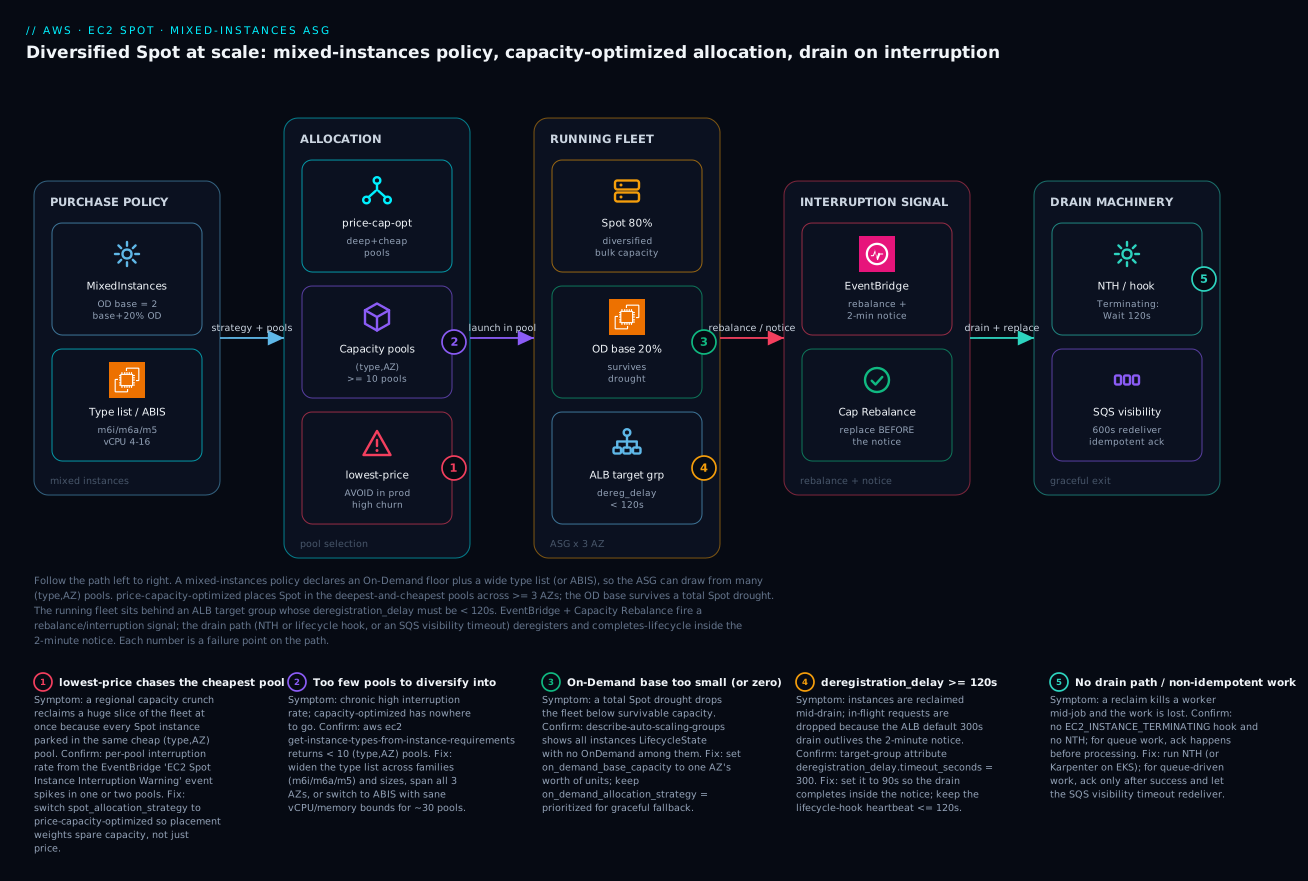
The diagram traces the Spot fleet as it actually behaves, left to right, and maps each failure class onto the exact hop where it bites. Start at PURCHASE POLICY: a mixed instances policy declares an On-Demand base (the floor that survives a drought) plus a wide type list or ABIS requirement set — this is where pool count is born. That feeds ALLOCATION, where price-capacity-optimized chooses which of the available capacity pools ((type, AZ) combinations, ≥ 10 of them) to launch into; the red lowest-price node is the anti-pattern that chases the cheapest pool and concentrates the fleet. The chosen instances land in the RUNNING FLEET — roughly 80% Spot and 20% On-Demand spread across three AZs, sitting behind an ALB target group whose deregistration_delay must be under 120 seconds or the drain never finishes.
When AWS needs the capacity back, the INTERRUPTION SIGNAL zone fires: EventBridge delivers the rebalance recommendation and the two-minute notice, and Capacity Rebalance launches a replacement before the hard notice. That triggers the DRAIN MACHINERY: NTH or a lifecycle hook holds the instance in Terminating:Wait while it deregisters and bleeds off connections, or — for queue work — an SQS visibility timeout simply redelivers the message to another worker after the doomed one dies. The five numbered badges mark the failure points: choosing lowest-price (1), too few pools (2), an undersized On-Demand base (3), a too-long deregistration delay (4), and no idempotent drain path (5). Read the legend as symptom · how to confirm · fix — that is the whole operating model on one canvas.
Real-world scenario
Streamforge Media ran a stateless transcoding fleet — pull a job from SQS, transcode a video segment, write to S3, ack — on a single On-Demand ASG of c6i.4xlarge, burning roughly ₹40 lakh/month (about $48k) at peak across ~120 instances. Pure Spot was the obvious win, and a junior engineer shipped the “obvious” version first: flip the group to 100% Spot on lowest-price across just c6i.4xlarge and c5.4xlarge in two AZs. It looked fine for a week.
Then a regional capacity crunch hit on a Saturday during a customer’s big content drop. Both pools — and there were really only four (type, AZ) combinations — were reclaimed within minutes. About 60% of workers died at once, SQS backed up for an hour, and in-flight segments had to be retried because workers were killed mid-transcode with no drain. The customer’s content was late. The post-mortem was not fun.
The constraint that shaped the fix: jobs took up to 8 minutes, and a worker killed mid-job wasted that work — there was no checkpointing, and adding it was out of scope. They needed Spot economics without ever losing a large fraction of workers at once, and in-flight jobs had to either finish or hand back cleanly.
The fix had three parts. First, real diversification: ABIS bounded to 12–24 vCPU compute-optimized types across all three AZs — roughly 30 pools instead of 4. Second, the right allocation: price-capacity-optimized with capacity_rebalance = true, placing workers in deep pools and proactively replacing any that got a rebalance recommendation. Third — the piece that actually saved the jobs — they moved the acknowledgement to the end of processing and used the SQS visibility timeout as the drain mechanism: on the interruption notice a worker stops pulling new jobs and finishes its current segment; if it dies first, the message reappears after the visibility timeout and another worker picks it up. No lifecycle-hook gymnastics, no checkpointing.
instances_distribution {
  on_demand_base_capacity                  = 2     # tiny floor; queue tolerates depth
  on_demand_percentage_above_base_capacity = 0     # 100% Spot above base
  spot_allocation_strategy                 = "price-capacity-optimized"
}
# + capacity_rebalance = true on the ASG
# + SQS VisibilityTimeout = 600 (> max 8-min job), ack only after the S3 write
The change as a before/after, because the contrast is the lesson:
| Dimension | Before (naive Spot) | After (diversified) |
|---|---|---|
| Allocation strategy | lowest-price |
price-capacity-optimized |
| Type list | 2 types | ABIS, 12–24 vCPU compute-optimized |
| AZs | 2 | 3 |
| Capacity pools | ~4 | ~30 |
| Capacity Rebalance | off | on |
| Drain for in-flight work | none (killed mid-job) | SQS visibility-timeout redelivery |
| Blast radius of one event | ~60% of fleet | a handful of workers |
| Monthly compute | ~₹40 lakh (all OD) | ~₹9 lakh (~78% off) |
Result: ~78% compute cost reduction (about ₹40 lakh down to roughly ₹9 lakh / $11k), and a single capacity event now trims a handful of workers instead of 60% of the fleet — the queue absorbs the blip and reclaimed jobs are redelivered. The lesson on the wall: “For queue-driven work, the cheapest and most reliable ‘drain’ is idempotency plus a visibility timeout, not bespoke lifecycle handling.”
Going deeper
Everything so far is the operating model. This section is for the reader who already runs Spot and wants the internals, the adjacent APIs, and the sharp edges that only surface at scale.
How the capacity-aware strategies actually choose — and Spot Placement Score
price-capacity-optimized and capacity-optimized do not read the historical Spot price graph the way lowest-price effectively does. They consume the same capacity-availability signal AWS surfaces publicly as the Spot Placement Score (SPS) — an aggregated, near-real-time read of how much spare capacity each pool is likely to have. price-capacity-optimized ranks pools by that capacity signal and then leans toward cheaper pools; capacity-optimized ignores price entirely. This is why the strategy, not your price cap, is what moves your interruption rate.
You can query that same signal yourself before you launch — the single most underused Spot API. Ask “can this Region/AZ supply N vCPU of this shape right now?” and get a score of 1–10 (10 = very likely) per Region or AZ:
aws ec2 get-spot-placement-scores \
  --target-capacity 500 \
  --target-capacity-unit-type vcpu \
  --single-availability-zone \
  --region-names ap-south-1 us-east-1 eu-west-1 \
  --instance-requirements-with-metadata '{
    "ArchitectureTypes":["x86_64"],
    "VirtualizationTypes":["hvm"],
    "InstanceRequirements":{
      "VCpuCount":{"Min":4,"Max":16},
      "MemoryMiB":{"Min":8192,"Max":65536},
      "BurstablePerformance":"excluded",
      "InstanceGenerations":["current"]
    }
  }' \
  --query 'SpotPlacementScores[].[Region,AvailabilityZoneId,Score]' --output table
Use it for capacity planning: choosing which Region to expand into, deciding whether a big batch run will actually find 500 vCPU tonight, or confirming an ABIS profile is broad enough to score well. A pool scoring 1–3 is telling you the diversification is too narrow before the interruptions teach you the hard way. (SPS is a likelihood signal, not a reservation — a high score is not a capacity guarantee, and the score is specific to the exact target capacity you asked for.)
Spot Fleet vs EC2 Fleet vs the ASG mixed-instances policy
Three different APIs can request a diversified Spot fleet. They are not interchangeable, and for a scaling application the ASG is the right one — but you will meet the others, so know the map:
| Dimension | ASG + mixed instances policy | EC2 Fleet (create-fleet) |
Spot Fleet (request-spot-fleet) |
|---|---|---|---|
| Best for | Long-running, autoscaling apps | Programmatic / one-shot capacity | (Legacy) the original diversified request |
| Integrations | Target tracking, lifecycle hooks, health-check replacement, ECS/EKS, instance refresh | None of the ASG niceties | Minimal |
| Modes | Maintains desired capacity | instant (sync, one batch), request, maintain |
request or maintain |
| Allocation strategies | All four | All four | All four |
| AWS guidance | Preferred for apps | Preferred for batch / tooling that wants instances now | Not recommended for new work — use EC2 Fleet or ASG |
The practical rule: if the workload scales and lives behind a load balancer or an orchestrator, use the ASG mixed-instances policy — you get lifecycle hooks, health-check replacement, instance refresh, and ECS/EKS integration for free, none of which Spot Fleet gives you. Reach for EC2 Fleet instant when you want a synchronous “give me 200 vCPU across these pools right now” call from a script or scheduler (it returns the instance IDs in one response, with no maintained loop). Treat Spot Fleet as legacy: it still works and still honours price-capacity-optimized, but AWS steers all new designs to EC2 Fleet or the ASG. Karpenter, notably, provisions through the EC2 Fleet instant API under the hood — which is why it feels faster and more surgical than an ASG on EKS.
Spot beyond web fleets: Batch, EMR, and data planes
The same allocation-strategy vocabulary reappears across the managed compute services, which is exactly what makes it worth learning once:
| Service | Where Spot is configured | Allocation control | Behaviour on scarcity |
|---|---|---|---|
| AWS Batch | Compute environment type: SPOT |
SPOT_PRICE_CAPACITY_OPTIMIZED (recommended) or SPOT_CAPACITY_OPTIMIZED; bidPercentage caps price |
Jobs wait in the queue until capacity returns |
| Amazon EMR | Instance fleets, Spot units per fleet | price-capacity-optimized / capacity-optimized; TimeoutDurationMinutes + TimeoutAction |
SWITCH_TO_ON_DEMAND or TERMINATE_CLUSTER |
| ECS / EKS | Capacity providers / Karpenter (covered above) | Provider base+weight / NodePool requirements |
On-Demand provider / on-demand fallback |
For AWS Batch, set the compute environment allocation strategy to SPOT_PRICE_CAPACITY_OPTIMIZED — the Batch analogue of the ASG default — and let Batch place jobs in deep, cheap pools; a mid-job reclaim simply returns the job to the queue for retry, so Batch is a near-ideal Spot workload. For EMR, use instance fleets (not the older instance groups), put core/task nodes on Spot with a capacity-aware allocation strategy, and set a provisioning timeout with TimeoutAction = SWITCH_TO_ON_DEMAND so a cluster that can’t find Spot falls back rather than hanging. Keep the EMR primary node and HDFS-critical core capacity On-Demand — losing a task node is cheap; losing the primary kills the cluster. The pattern is identical everywhere: capacity-aware placement, a graceful On-Demand fallback, and On-Demand for the one thing that must not disappear.
Sharp edges that only bite at scale
| Edge | What actually happens | What to do |
|---|---|---|
| Weighted-capacity overshoot | The ASG can’t launch a fraction of an instance, so it may exceed desired_capacity by up to (largest weight − 1) units to satisfy demand |
Keep the weight spread tight (≤ ~4×); budget for a small overshoot; don’t set max_size right on top of desired_capacity |
| Capacity Rebalance double-billing | On a rebalance rec the ASG launches the replacement before terminating the old instance, so both run briefly | Expected and cheap; just don’t be surprised by the transient count above desired |
| AZ-rebalancing churn | The ASG AZRebalance process may terminate healthy instances to even out AZs, adding avoidable Spot churn |
Spread subnets evenly and rely on capacity-aware placement; suspend AZRebalance only with a clear reason |
| Savings Plans don’t cover Spot | A Compute Savings Plan discounts On-Demand usage — including your OD base — but never Spot (already discounted) | Size the OD base knowing an SP can cover it; don’t double-count “SP + Spot” savings on the same units |
| ODCR vs Spot | On-Demand Capacity Reservations guarantee On-Demand capacity; Spot cannot draw from them | Point the OD base at an ODCR for a hard floor in a specific AZ; leave Spot to the open pools |
| Cluster placement groups | A cluster placement group wants one instance type in one AZ for low latency — the opposite of diversification | Don’t run diversified Spot inside a cluster placement group; if you need one, accept the higher interruption risk or keep it On-Demand |
maximumInstanceLifetime + Spot |
Forces periodic replacement; on Spot this stacks on top of reclaim churn | Fine for compliance recycling, but don’t set it aggressively low on a Spot fleet |
None of these are reasons to avoid Spot — they are the difference between a fleet that behaves predictably at 2,000 instances and one that mysteriously churns. The through-line: capacity-aware placement and a survivable floor solve the big problems; these edges are what you tune once the fleet is large. For the arm64 half of the diversification story — a whole parallel set of deep, cheap pools — pair this with the Graviton arm64 migration lesson, and for the container data-plane specifics see production ECS on Fargate.
Advantages and disadvantages
Spot at scale is a genuine trade-off, not a free lunch — it trades a small, manageable operational burden for a very large discount. Weigh it honestly:
| Advantages (why Spot wins) | Disadvantages (why it bites) |
|---|---|
| 70–90% off On-Demand for identical hardware — the largest single lever on an EC2 bill | AWS can reclaim with a 2-minute notice; you must design for it, not wish it away |
Diversification + price-capacity-optimized make interruptions statistically rare |
Naive config (lowest-price, 2 AZs, no base) concentrates risk and causes mass reclaims |
| One mixed-instances policy blends OD floor + Spot bulk with no extra moving parts | More settings to get right; the failure only shows under a real capacity event |
| Graceful On-Demand fallback means you never drop below floor capacity during a drought | OD fallback costs more during a drought — your bill is variable, not flat |
| Capacity Rebalance + NTH/Karpenter turn a reclaim into a proactive, drained replacement | Requires a working, idempotent drain path; bolted-on later it’s painful |
| Containers/queues make Spot nearly transparent (reschedule/redeliver in seconds) | Long, non-idempotent, un-checkpointed jobs are a poor fit and lose work on reclaim |
| Per-pool interruption signal lets you tune continuously | No clean CloudWatch counter; you must instrument EventBridge yourself |
Spot is the right default for stateless web/API tiers behind a load balancer, queue-driven and batch workers, CI fleets, and Kubernetes/ECS data planes — anywhere a reclaimed unit of work is cheap to redo. It is the wrong default for stateful singletons (a primary database), long un-checkpointed jobs where a reclaim wastes hours, and licence-bound workloads pinned to one instance type (which collapses your pool count). The disadvantages are all manageable — but only if you know they exist, which is the point of this article.
Hands-on lab
Stand up a diversified Spot ASG behind an ALB, confirm the purchase-option mix, force a real interruption with AWS Fault Injection Service (FIS), and watch the drain — then tear it all down. Free-tier-friendly in the sense that you run it for an hour on small instances and delete everything. Run in a region with ≥ 3 AZs (e.g. ap-south-1). Assumes a VPC with private subnets and a launch template already exist (from the Auto Scaling deep-dive lab).
Step 1 — Variables.
export AWS_REGION=ap-south-1
ASG=lab-spot-web
LT_ID=lt-0abc123def456     # your existing launch template
SUBNETS="subnet-aaa,subnet-bbb,subnet-ccc"   # one per AZ
Step 2 — Create the mixed-instances ASG with a diversified policy.
aws autoscaling create-auto-scaling-group \
  --auto-scaling-group-name $ASG \
  --min-size 4 --max-size 20 --desired-capacity 6 \
  --vpc-zone-identifier "$SUBNETS" \
  --capacity-rebalance \
  --mixed-instances-policy '{
    "LaunchTemplate": {
      "LaunchTemplateSpecification": {"LaunchTemplateId":"'$LT_ID'","Version":"$Latest"},
      "Overrides": [
        {"InstanceType":"m6i.large","WeightedCapacity":"2"},
        {"InstanceType":"m6a.large","WeightedCapacity":"2"},
        {"InstanceType":"m5.large","WeightedCapacity":"2"},
        {"InstanceType":"m6i.xlarge","WeightedCapacity":"4"}
      ]
    },
    "InstancesDistribution": {
      "OnDemandBaseCapacity": 2,
      "OnDemandPercentageAboveBaseCapacity": 20,
      "SpotAllocationStrategy": "price-capacity-optimized"
    }
  }'
Expected: no error; the ASG begins launching instances across your AZs.
Step 3 — Add the terminating lifecycle hook (the drain window).
aws autoscaling put-lifecycle-hook \
  --lifecycle-hook-name drain-on-terminate \
  --auto-scaling-group-name $ASG \
  --lifecycle-transition autoscaling:EC2_INSTANCE_TERMINATING \
  --heartbeat-timeout 120 --default-result CONTINUE
Step 4 — Confirm the purchase-option mix. This is the proof the OD base and Spot split landed:
aws autoscaling describe-auto-scaling-groups --auto-scaling-group-names $ASG \
  --query 'AutoScalingGroups[0].Instances[].[InstanceId,InstanceType,LifecycleState,AvailabilityZone]' \
  --output table
# Expect a mix of instance types across AZs; ~2 units On-Demand, the rest Spot.
Confirm Capacity Rebalance is on:
aws autoscaling describe-auto-scaling-groups --auto-scaling-group-names $ASG \
  --query 'AutoScalingGroups[0].CapacityRebalance'   # => true
Step 5 — Wire an EventBridge rule to capture interruptions.
aws events put-rule --name lab-spot-interruptions \
  --event-pattern '{"source":["aws.ec2"],"detail-type":["EC2 Spot Instance Interruption Warning"]}'
# Then put-targets to a Lambda/CloudWatch Logs group to record type + AZ + time.
Step 6 — Force a real interruption with FIS and watch the drain. FIS fires a genuine two-minute notice so you can validate the whole path end-to-end:
# Template uses aws:ec2:send-spot-instance-interruptions to fire a real 2-min notice.
aws fis start-experiment --experiment-template-id EXTxxxxxxxx
# Watch: the targeted instance gets a notice, enters Terminating:Wait,
# deregisters from the target group, then terminates; a replacement launches.
Validation checklist. You created a diversified mixed-instances ASG, confirmed a real OD/Spot split across AZs, attached a drain hook sized to the notice, captured the interruption signal, and triggered a real reclaim to watch the drain run. No production traffic was harmed. The steps mapped to what each proves:
| Step | What you did | What it proves |
|---|---|---|
| 2 | Diversified mixed-instances ASG | Pool diversity + price-capacity-optimized are one API call |
| 3 | Terminating lifecycle hook | One drain path covers scale-in and interruption |
| 4 | Inspect instances | The OD base + Spot split actually landed |
| 5 | EventBridge rule | The interruption signal is captured for per-pool tuning |
| 6 | FIS interruption | The drain completes inside the 2-minute notice |
Teardown (avoid lingering instance charges).
aws autoscaling delete-auto-scaling-group --auto-scaling-group-name $ASG --force-delete
aws events delete-rule --name lab-spot-interruptions
Cost note. Six small Spot instances for an hour is a few rupees; force-deleting the ASG terminates everything immediately. FIS charges per action-minute — negligible for a single experiment.
Common mistakes & troubleshooting
This is the playbook — the part you bookmark. First as a scannable table you can read mid-incident, then the entries that bite hardest expanded with the full confirm-command detail.
| # | Symptom | Root cause | Confirm (exact cmd / console path) | Fix |
|---|---|---|---|---|
| 1 | A capacity event reclaims a huge slice of the fleet at once | lowest-price + too few pools concentrates the fleet |
EventBridge interruption events spike in 1–2 pools; describe-auto-scaling-groups shows few distinct types |
price-capacity-optimized; widen the type list / AZs |
| 2 | Chronic high interruption rate even when diversified | < 10 pools; capacity-optimized has nowhere to go |
aws ec2 get-instance-types-from-instance-requirements --query 'length(InstanceTypes)' < 10 |
Add families/sizes, span 3 AZs, or switch to ABIS |
| 3 | Fleet drops below survivable capacity during a Spot drought | on_demand_base_capacity = 0 (no floor) |
describe-auto-scaling-groups shows no On-Demand among instances |
Set base to one AZ’s worth; on_demand_allocation_strategy = prioritized |
| 4 | Instances reclaimed mid-drain; in-flight requests dropped | deregistration_delay >= 120s (ALB default 300) |
describe-target-group-attributes shows deregistration_delay.timeout_seconds = 300 |
Set it to 90; keep hook heartbeat ≤ 120 |
| 5 | Reclaim kills a worker mid-job; the job is lost | No drain path / non-idempotent ack | No EC2_INSTANCE_TERMINATING hook; queue ack happens before processing |
NTH/hook; for queues ack after success + visibility-timeout redelivery |
| 6 | Per-instance load skewed behind the LB | Weighted capacities not proportional to real vCPU | Compare WeightedCapacity in the policy to instance vCPU |
Weight large=2, xlarge=4, 2xlarge=8 |
| 7 | Scale-out is slow / “InsufficientInstanceCapacity” | Too few pools, or a Spot quota cap | ASG activity history shows capacity failures; check Spot vCPU quota | Diversify; raise the All Standard Spot quota |
| 8 | OOM/throttling after the group grabbed the “wrong” type | Mixed memory:vCPU ratios (c/r pulled in) |
Instance types in the group span families with different ratios | Bound memory_mib in ABIS; diversify within a profile |
| 9 | spot_instance_pools seems to do nothing |
It’s ignored by capacity-aware strategies | Strategy is price-capacity-optimized but spot_instance_pools is set |
Remove it; it only applies to lowest-price |
| 10 | ECS scale-in kills instances with running tasks | Managed termination protection off | Capacity provider managedTerminationProtection ≠ ENABLED |
Enable it so ECS drains tasks first |
| 11 | Karpenter churns nodes / stampedes workloads | No disruption budget or PDBs | NodePool has no disruption.budgets; workloads lack PDBs |
Set budgets: 10%; add PDBs; do-not-disrupt on long jobs |
| 12 | “Spot saves 90%” but the bill barely moved | Trusting the headline, not realized savings | CUR/Cost Explorer by Purchase Option shows little Spot usage | Increase Spot %, fix fallback-to-OD drought, track CUR |
| 13 | New m7i/c7i generation never used |
Hand-maintained override list is stale |
Policy lists only older generations | Switch to ABIS with instance_generations = ["current"] |
| 14 | Spot instances never launch; all fill as On-Demand | Sustained Spot unavailability or a too-low spot_max_price |
ASG instances all OnDemand; spot_max_price set low |
Clear spot_max_price (= OD cap); widen pools; check quota |
| 15 | FIS drill doesn’t drain; instance just disappears | Lifecycle hook missing or NTH not running on the instance | describe-lifecycle-hooks empty; NTH service not active in user data |
Add the EC2_INSTANCE_TERMINATING hook; install/start NTH at boot |
The expanded form for the entries that bite hardest:
1. A capacity event reclaims a huge slice of the fleet at once.
Root cause: lowest-price parks every Spot instance in the same one or two cheapest (type, AZ) pools, so when that pool is reclaimed, most of your fleet goes with it.
Confirm: Your EventBridge interruption rule shows a burst of EC2 Spot Instance Interruption Warning events all carrying the same instance-type + availability-zone; describe-auto-scaling-groups shows few distinct types running.
Fix: Switch spot_allocation_strategy to price-capacity-optimized and widen the type list across families/sizes and all AZs so placement weights spare capacity instead of chasing price.
2. Chronic high interruption rate even when you think you diversified.
Root cause: You have fewer than ~10 pools — four types in one AZ, or two types in three AZs — so capacity-optimized allocation has nothing to optimize.
Confirm: aws ec2 get-instance-types-from-instance-requirements ... --query 'length(InstanceTypes)' returns a small number, or your override list × AZ count is < 10.
Fix: Add AMD/Intel variants and adjacent sizes, span all three AZs, or move to ABIS with sane vCPU/memory bounds (often ~30 pools).
3. Fleet drops below survivable capacity during a Spot drought.
Root cause: on_demand_base_capacity = 0, so when Spot is broadly unavailable there is no guaranteed floor and capacity can fall to zero.
Confirm: describe-auto-scaling-groups --query 'AutoScalingGroups[0].Instances[].InstanceType' during a drought shows no On-Demand instances.
Fix: Set on_demand_base_capacity to one AZ’s worth of capacity units, and on_demand_allocation_strategy = "prioritized" so the floor fills predictably.
4. Instances reclaimed mid-drain; in-flight requests dropped.
Root cause: The target group’s deregistration_delay.timeout_seconds is the ALB default 300 s — longer than the entire two-minute notice — so connection draining never finishes before the instance is gone.
Confirm: aws elbv2 describe-target-group-attributes --target-group-arn <arn> shows deregistration_delay.timeout_seconds = 300.
Fix: Set it to 90 s (< 120), and keep the lifecycle-hook heartbeat-timeout at or under 120 s.
5. A reclaim kills a worker mid-job and the job is lost.
Root cause: There is no drain path (no EC2_INSTANCE_TERMINATING hook, no NTH), or — for queue work — the worker acks the message before processing, so a reclaim loses the in-flight job with no redelivery.
Confirm: aws autoscaling describe-lifecycle-hooks --auto-scaling-group-name <asg> is empty; or a code review shows DeleteMessage before the work completes.
Fix: Run NTH (or Karpenter on EKS) for VM/K8s fleets. For queue-driven work, ack only after success and set the SQS visibility timeout greater than the max job duration so a reclaimed message is redelivered to another worker.
Best practices
- Diversify to ≥ 10 pools before tuning anything else. Four-plus types across three AZs, or ABIS. Pool count is the single biggest determinant of your interruption rate.
- Use
price-capacity-optimizedfor production. It is strictly better thanlowest-priceand better than purecapacity-optimizedfor most workloads. Reservecapacity-optimized-prioritizedfor a genuine Savings-Plan preference. - Keep an On-Demand base sized to “survivable” capacity. One AZ’s worth is a good default for customer-facing tiers; the base is your blast-radius floor during a total Spot drought.
- Make weights proportional to real vCPU. large=2, xlarge=4, 2xlarge=8 — or per-instance load behind the load balancer skews and your smallest instances melt.
- Turn on Capacity Rebalance and pair it with a terminating hook. Proactive replacement plus a drain window beats racing the 120-second clock.
- Set
deregistration_delay < 120son Spot target groups. The default 300 is longer than the entire warning; 90 is a safe value. - Make the drain idempotent and shared between scale-in and interruption. One
EC2_INSTANCE_TERMINATINGhook covers both; for queue work, prefer visibility-timeout redelivery over bespoke lifecycle logic. - Prefer ABIS over a hand-maintained list. It picks up new generations automatically and maximizes pool count; always preview the resolved types before shipping.
- In containers, split via capacity providers / NodePool requirements. ECS: separate Spot/On-Demand providers with a
baseand managed termination protection. EKS: Karpenter withspotpreferred,on-demandfallback. - Set Karpenter disruption budgets and PDBs. Cap voluntary disruption (e.g. 10% of nodes) and protect intolerant pods with
do-not-disrupt. - Instrument the interruption signal from day one. An EventBridge rule feeding a per-pool interruption-rate metric is what you tune against; there is no built-in counter.
- Track realized savings from CUR, not the headline. Group Cost Explorer by Purchase Option and compare realized Spot cost to the On-Demand cost of the same usage.
Security notes
Spot instances are ordinary EC2 instances — the security posture is the same as any fleet, with a few Spot-specific angles around the drain automation’s permissions and the interruption signal:
- Least-privilege the drain automation. The NTH/instance role needs exactly
elasticloadbalancing:DeregisterTargets,elasticloadbalancing:DescribeTargetHealth, andautoscaling:CompleteLifecycleAction— not a broadautoscaling:*orelasticloadbalancing:*. Scope by resource ARN where possible. - Enforce IMDSv2 on the launch template. The interruption notice is read from IMDS; require token-authenticated IMDSv2 (
http-tokens = required, hop limit 1) so a compromised process or SSRF can’t trivially read instance credentials or metadata. - Don’t put secrets in user data. Diversified fleets relaunch instances constantly; pull secrets at boot from Secrets Manager/Parameter Store via the instance role, never bake them into the launch template’s user data.
- Lock down the EventBridge → Lambda/SQS path. The interruption-handling Lambda or queue-processor should run with a minimal role; an attacker who can publish fake interruption events shouldn’t be able to drive mass drains — restrict who can
PutEventsand validate event source. - Use a dedicated instance profile per fleet. Don’t share one over-broad role across Spot and On-Demand fleets; scope each to what that workload actually needs so a reclaimed-and-relaunched instance never carries more privilege than required.
- Encrypt EBS and instance store. Reclaimed instances are wiped, but enable EBS encryption (and instance-store encryption where supported) so data at rest on the volume is never exposed.
The Spot-specific security controls and what each prevents:
| Control | Mechanism | Prevents |
|---|---|---|
| Least-privilege drain role | Scoped IAM (DeregisterTargets, CompleteLifecycleAction) |
A compromised instance pinning/terminating the fleet |
| IMDSv2 required | Launch template http-tokens = required, hop limit 1 |
SSRF/credential theft via the metadata endpoint |
| Secrets at boot, not in user data | Secrets Manager / Parameter Store + instance role | Plaintext secrets in a frequently-relaunched template |
| Restricted EventBridge target role | Minimal Lambda/queue-processor permissions | Forged interruption events driving mass drains |
| Per-fleet instance profile | Distinct scoped roles | Privilege creep across mixed Spot/OD fleets |
| EBS/instance-store encryption | KMS-backed volume encryption | Data-at-rest exposure on a reclaimed volume |
Cost & sizing
Spot is a cost strategy, so “sizing” here means sizing the savings against the risk. The bill drivers:
- The Spot discount itself dominates the upside — 70–90% off On-Demand for the same hardware. Realized savings depend on how much of the fleet runs Spot vs the On-Demand base and the drought-driven fallback.
- The On-Demand base is the cost of safety. A larger base means a steadier fleet during a drought but a smaller discount; a tiny base maximizes savings but leans entirely on Spot availability above the floor. Size it to “survivable,” not “comfortable.”
- Fallback-to-On-Demand makes the bill variable. During a broad Spot drought the Spot portion fills as On-Demand at full price — your bill is not flat, and you should budget for the occasional drought premium rather than the best-case discount.
- Diversification is free and reduces cost variance. More pools means more time in cheap, deep pools and fewer expensive fallbacks — pool count improves both resilience and realized savings.
A rough monthly picture for a ~6-unit steady fleet (numbers illustrative, region-dependent):
| Configuration | OD : Spot mix | Rough monthly (₹) | vs all-On-Demand | Risk profile |
|---|---|---|---|---|
| All On-Demand | 100 : 0 | ~₹40,000 | baseline | No reclaim risk; no savings |
Spot, naive (lowest-price, 2 AZ) |
0 : 100 | ~₹6,000 | ~85% off | Mass reclaim risk — not production |
| Spot, diversified, no base | 0 : 100 | ~₹7,000 | ~82% off | Cheapest safe; floor only via fallback |
| Spot, diversified, 20% OD base | ~20 : 80 | ~₹12,000 | ~70% off | Production default; survivable floor |
| Spot, diversified, 30% OD | ~30 : 70 | ~₹15,000 | ~62% off | Reclaim-sensitive tiers |
What each cost lever buys you:
| Lever | Cost effect | What it buys | Watch-out |
|---|---|---|---|
| Larger OD base | +cost | Survives a longer/total Spot drought | Diminishing savings past “survivable” |
| Higher Spot % above base | −cost | More of the discount | More exposure to reclaim waves |
| More pools (diversify/ABIS) | ~free | Lower variance, more time in cheap pools | Needs memory bounds to stay correct |
price-capacity-optimized |
~free | Cheap Spot at low churn | Slightly pricier than lowest-price by design |
| Graviton (arm64) pools | −cost | Cheaper, deep pools | Needs a multi-arch build |
There is no separate free tier for Spot — the savings are the discount. The honest way to report them is realized Spot cost vs the On-Demand cost of the same usage, queried from the Cost and Usage Report, not the “up to 90%” headline.
Interview & exam questions
1. What is an EC2 Spot capacity pool, and why does it drive diversification? A capacity pool is one (instance type, Availability Zone) combination in a Region; Spot prices and availability are set per pool, and AWS reclaims capacity within a pool. If your whole fleet lives in one pool, a single reclaim takes it all; spread across many pools, a reclaim trims a small fraction. So the core strategy is to draw from as many pools as possible.
2. Compare lowest-price, capacity-optimized, and price-capacity-optimized. Which is the production default? lowest-price picks the cheapest pools and has the highest interruption rate. capacity-optimized picks the deepest-capacity pools (lowest interruptions) but ignores price. price-capacity-optimized balances low price with deep capacity and is the recommended default for almost everything — cheaper than pure capacity-optimized for most workloads, and far more stable than lowest-price.
3. What do on_demand_base_capacity and on_demand_percentage_above_base_capacity do? The base is an absolute count (in capacity units if you use weights) of On-Demand instances the group always maintains — your floor that survives a total Spot drought. The percentage governs, of everything launched above the base, what fraction is On-Demand vs Spot. Together they carve the fleet into a guaranteed floor and a Spot-heavy remainder.
4. Difference between a rebalance recommendation and a Spot interruption notice? The rebalance recommendation is an early, best-effort advisory that an instance is at elevated risk — it can arrive minutes ahead and may not be followed by an interruption. The interruption notice is the hard ~2-minute warning that the instance will be reclaimed. Capacity Rebalance acts on the former to replace proactively; you drain on the latter.
5. Why must deregistration_delay be under 120 seconds for a Spot fleet? Once the interruption notice fires you have ~120 seconds before the instance is gone. The ALB default deregistration delay is 300 seconds — longer than the whole warning — so connection draining never completes and in-flight requests are dropped. Setting it to ~90 seconds lets the drain finish inside the notice.
6. How does Capacity Rebalance change interruption handling? With capacity_rebalance = true, the ASG launches a replacement instance when it receives a rebalance recommendation — before the hard two-minute notice — so you’re not racing the 120-second clock to find capacity. Paired with a terminating lifecycle hook, the old instance drains gracefully while the replacement warms.
7. What is attribute-based instance selection (ABIS) and why use it? Instead of hand-listing instance types, you declare requirements (vCPU range, memory range, exclusions like burstable) and EC2 expands them into every matching current and future type. It future-proofs the policy (new generations like m7i are picked up automatically) and maximizes pool count, while memory bounds keep the selector from grabbing starved or bloated families.
8. How do you run Spot safely on ECS? Attach two capacity providers — one Spot, one On-Demand — to a mixed-instances ASG and split via a default strategy with a base (always On-Demand) and a weight ratio. Enable managedTerminationProtection so ECS drains tasks off an instance before the ASG terminates it. For serverless, FARGATE_SPOT gives the same split with no instances to manage.
9. What’s the cheapest reliable “drain” for queue-driven Spot workers? Idempotency plus the SQS visibility timeout. Acknowledge a message only after the work succeeds, and set the visibility timeout greater than the maximum job duration. On a reclaim, the worker stops pulling new messages and finishes the current one; if it dies first, the message reappears after the timeout and another worker picks it up — no lifecycle-hook gymnastics needed.
10. Why does naive Spot pass in testing but fail catastrophically in production? Under low test load and normal conditions, even a poorly diversified fleet (e.g. lowest-price, two pools) runs fine. The failure only manifests during a real regional capacity crunch, when the one or two pools you concentrated into are reclaimed at once — taking a large fraction of the fleet with no warning-driven drain. The fix is diversification + price-capacity-optimized + a drain path, validated with FIS.
11. How do you measure your real Spot savings? Not from the “up to 90%” headline. Query the Cost and Usage Report (CUR) for the Spot effective price per line item and compare realized Spot cost to the On-Demand cost of the same usage; in Cost Explorer, group by Purchase Option to see the On-Demand / Spot / Reserved split and watch for drift.
12. On EKS with Karpenter, what controls prevent Spot-driven churn? The disruption settings: consolidationPolicy and consolidateAfter govern how aggressively Karpenter consolidates, and disruption.budgets cap how many nodes it voluntarily disrupts at once (e.g. 10%). Add Pod Disruption Budgets and karpenter.sh/do-not-disrupt on intolerant pods so consolidation never breaches availability.
These map to the AWS Certified Solutions Architect – Associate (SAA-C03) — design cost-optimized and resilient architectures — and AWS Certified Solutions Architect – Professional (SAP-C02) and DevOps Engineer – Professional (DOP-C02) for the deeper Auto Scaling, ECS/EKS, and FIS content. A compact cert mapping:
| Question theme | Primary cert | Exam objective area |
|---|---|---|
| Pools, allocation strategies, OD base | SAA-C03 | Design cost-optimized & resilient architectures |
| Capacity Rebalance, lifecycle drain, FIS | DOP-C02 | Resilient cloud solutions; fault injection |
| ECS capacity providers, Karpenter | SAP-C02 / DOP-C02 | Continuous delivery; container platforms |
| ABIS, weighted capacity | SAA-C03 / SAP-C02 | Cost optimization; compute selection |
| CUR / Cost Explorer savings tracking | SAA-C03 | Cost management & FinOps |
Common beginner mistakes
These are misconceptions, not incidents — the wrong mental model that leads a beginner to configure Spot badly in the first place. Each pairs the belief with the model that replaces it. (For symptom→cause→fix once things are running, use the troubleshooting table above; this is about getting the model right before you ship.)
“Spot instances are a cheaper, lower-grade type of machine.” They are the exact same instance types on the exact same hardware as On-Demand — an m6i.large is an m6i.large. The only difference is the billing contract: you rent spare capacity at a discount and accept a two-minute reclaim notice. There is no performance penalty, no separate hardware, no worse network.
“The Spot price bounces around like a stock market and I’ll get outbid.” That was the old model. Spot pricing is now smoothed — it changes gradually based on long-term supply and demand, and there is no bidding war. Leave spot_max_price empty and you are automatically capped at the On-Demand price and pay the (usually far lower) current pool price. You are never “priced out” mid-run — you are reclaimed only when AWS needs the hardware back, which is a capacity event, not a price event.
“More instances means a safer fleet.” Safety comes from pool diversity, not instance count. A hundred instances all of one type in one AZ sit in a single capacity pool and are reclaimed together; twelve instances spread across twelve pools survive any single reclaim with barely a scratch. Always reason in (type × AZ) pools, never in raw instance count.
“Setting a low spot_max_price saves me money.” It does the opposite of what you want. A low cap makes every pool whose price sits above it ineligible, shrinking your pool count and raising your interruption rate — and you never pay the cap anyway, only the current market price. The correct value is empty (cap = On-Demand). A price cap is a foot-gun, not a savings lever.
“lowest-price allocation must be the cheapest — it’s in the name.” lowest-price piles the fleet into the one or two cheapest pools, which are also the shallowest and most-reclaimed. The constant reclaims trigger fallback-to-On-Demand and re-launches that often make it more expensive in practice than price-capacity-optimized, which is both cheaper-in-practice and far more stable. The name describes the pool ranking, not your bill.
“Capacity Rebalance prevents interruptions.” It prevents nothing — AWS still reclaims the instance. What it does is replace proactively: on the early rebalance recommendation the ASG launches a fresh instance so a warm replacement is ready before the hard notice fires. Interruptions still happen; Rebalance just means you are not scrambling for capacity when they do.
Practice challenges
Work these in order — they escalate from reading a signal to designing a drought-proof fleet. Each solution includes the why in one line. No AWS account is required to reason through them; the CLI is real if you want to run it.
1. Read the interruption notice (beginner). On a running instance, write the two commands that check whether a Spot reclaim is scheduled, using IMDSv2. What does a 404 mean versus a 200?
<details> <summary>Solution</summary>
TOKEN=$(curl -sX PUT "http://169.254.169.254/latest/api/token" \
  -H "X-aws-ec2-metadata-token-ttl-seconds: 30")
curl -s -H "X-aws-ec2-metadata-token: $TOKEN" \
  http://169.254.169.254/latest/meta-data/spot/instance-action
A 404 means no interruption is pending (the normal state); a 200 returns {"action":"terminate","time":"…"} and means the ~2-minute clock has started.
Why: your drain automation is built on exactly this poll — if you can’t read the signal, you can’t react to it. </details>
2. Count your pools (beginner). Your policy lists m6i.large, m6a.large, m5.large, and m6i.xlarge, and your subnets cover three AZs. How many capacity pools is that, and does it clear the recommended floor?
<details> <summary>Solution</summary>
4 instance types × 3 AZs = 12 pools, which clears the ≥ 10 rule of thumb — just. Adding one more family (e.g. m5n.large) takes it to 15 and gives capacity-optimized allocation more room to place around a reclaimed pool.
Why: pool count is the single biggest lever on interruption rate; you should be able to compute it from any policy at a glance. </details>
3. Resolve weighted capacity (intermediate). With weights large=2, xlarge=4, 2xlarge=8 and desired_capacity = 24 units, give three different fleets that satisfy it. What’s the most the ASG might overshoot?
<details> <summary>Solution</summary>
Valid fleets include 12 × large (12×2=24), 6 × xlarge (6×4=24), 3 × 2xlarge (3×8=24), or any mix summing to 24 (e.g. 2×2xlarge + 2×xlarge = 24). Because it can’t launch a fraction of an instance, the group may exceed 24 by up to (largest weight − 1) = 7 units when filling from the biggest pool.
Why: the ASG thinks in units, not instances — and that overshoot is exactly why you don’t pin max_size right on top of desired_capacity.
</details>
4. Fix a broken drain (intermediate). A Spot fleet sits behind an ALB target group left at defaults, with a 120 s terminating lifecycle hook. Interruptions keep dropping in-flight requests. Find the bug and give the fix.
<details> <summary>Solution</summary>
The ALB target group’s deregistration_delay defaults to 300 s — longer than the entire two-minute notice — so connection draining never finishes before the instance is reclaimed. Set it under 120:
resource "aws_lb_target_group" "web" {
  deregistration_delay = 90   # MUST be < 120 for Spot
}
Why: every drain mechanism must complete inside the ~120 s window, and the ALB default silently violates that. </details>
5. Check capacity before you deploy (advanced). Before committing a 500-vCPU batch run to ap-south-1, you want to know whether the Region can actually supply it for your ABIS profile. Which API answers this, and roughly how do you call it?
<details> <summary>Solution</summary>
Spot Placement Score — it rates 1–10 (10 = very likely) how much spare capacity a Region/AZ has for a target capacity and shape:
aws ec2 get-spot-placement-scores \
  --target-capacity 500 --target-capacity-unit-type vcpu \
  --region-names ap-south-1 \
  --instance-requirements-with-metadata '{"ArchitectureTypes":["x86_64"],
    "VirtualizationTypes":["hvm"],"InstanceRequirements":{
    "VCpuCount":{"Min":4,"Max":16},"MemoryMiB":{"Min":8192,"Max":65536}}}' \
  --query 'SpotPlacementScores[].[Region,Score]' --output table
A low score means widen the ABIS profile or pick another Region before launching.
Why: checking capacity likelihood up front turns “why won’t my fleet scale out?” into a planning decision instead of a 3 a.m. incident. </details>
6. Drain queue work with no lifecycle hook (advanced). A worker pulls an SQS job, processes for up to 8 minutes, writes to S3, and acks. On reclaim it loses the in-flight job. Checkpointing is out of scope. Make the work survive using only SQS.
<details> <summary>Solution</summary>
Move the DeleteMessage (ack) to after the S3 write, and set the queue’s visibility timeout greater than the max job duration (e.g. 600 s > 480 s). On the interruption notice the worker stops pulling new messages and finishes the current one; if it dies first, the message becomes visible again after the timeout and another worker reprocesses it.
# SQS: visibility_timeout_seconds = 600   (> 8-min max job)
# ASG: capacity_rebalance = true; worker acks ONLY after the S3 write.
Why: idempotency + a visibility timeout is the cheapest, most reliable “drain” there is — no hook, no NTH, no checkpointing. </details>
Quick check
- You flip a production ASG to 100% Spot on
lowest-priceacross two instance types in two AZs. What is the specific risk, and what’s the one allocation-strategy change that most reduces it? - Your ALB target group has the default
deregistration_delay. Why does this silently break your Spot drain, and what value do you set? - True or false: scaling out to more On-Demand instances is the right way to survive a total Spot drought.
- A queue-driven Spot worker loses jobs when it’s reclaimed mid-processing. Without adding checkpointing, how do you make the work survive?
- You hand-maintain a list of eight instance types and a new
m7igeneration ships. What feature avoids your list going stale, and what must you always do before shipping it?
Answers
- With only ~4
(type, AZ)pools andlowest-price, the whole fleet concentrates into the one or two cheapest pools; a regional capacity crunch reclaims a large fraction at once. The highest-leverage change isspot_allocation_strategy = "price-capacity-optimized"(and then widening the type list and AZs to ≥ 10 pools). - The ALB default is 300 seconds, longer than the entire two-minute interruption notice, so connection draining never finishes and in-flight requests drop. Set
deregistration_delayto 90 seconds (< 120). - False. Scaling out adds more Spot capacity that the same drought can’t fill; the floor that survives a drought is the On-Demand base (
on_demand_base_capacity), sized to one AZ’s worth, withon_demand_allocation_strategy = "prioritized". - Move the acknowledgement to after the work succeeds and set the SQS visibility timeout greater than the maximum job duration. On a reclaim the message reappears after the timeout and another worker reprocesses it — idempotency plus visibility timeout is the drain.
- Attribute-based instance selection (ABIS) with
instance_generations = ["current"]picks upm7iautomatically. Always preview the resolved types first withaws ec2 get-instance-types-from-instance-requirementsso you know exactly which pools the requirement set expands to.
Glossary
-
Spot Instance — spare EC2 capacity sold at a steep discount (70–90% off On-Demand) that AWS can reclaim with a ~2-minute notice.
-
Capacity pool — one
(instance type, Availability Zone)combination in a Region; Spot price and availability are set per pool, and reclaims happen per pool. -
Mixed instances policy — an ASG configuration that draws from many instance types and blends On-Demand with Spot in one group.
-
Allocation strategy — the algorithm choosing which pools Spot launches into:
lowest-price,capacity-optimized,capacity-optimized-prioritized, orprice-capacity-optimized. -
price-capacity-optimized— the recommended default strategy; balances low price with deep capacity to minimize interruptions without ignoring cost. -
On-Demand base capacity — an absolute count (in capacity units) of On-Demand instances the group always maintains; the floor that survives a total Spot drought.
-
Weighted capacity — a per-instance-type “units” value so the ASG reasons in vCPU (or similar) rather than instance count.
-
Rebalance recommendation — an early, best-effort advisory that an instance is at elevated interruption risk; acted on when
capacity_rebalance = true. -
Spot interruption notice — the hard ~2-minute warning that an instance will be reclaimed, delivered via IMDS (
/spot/instance-action) and EventBridge. -
Capacity Rebalance — an ASG setting that launches a replacement on a rebalance recommendation, before the hard notice.
-
Lifecycle hook — an ASG mechanism that pauses an instance in
Terminating:Waitto run a drain before termination; one hook covers scale-in and interruption. -
AWS Node Termination Handler (NTH) — open-source software that watches IMDS/EventBridge for Spot signals and drives a graceful drain (IMDS mode for VMs, queue-processor mode for EKS).
-
deregistration_delay— the ALB/NLB target-group connection-draining timeout; must be< 120sfor Spot (the default 300 is too long). -
Attribute-based instance selection (ABIS) — declaring instance requirements (vCPU/memory ranges, exclusions) so EC2 expands them into every matching current and future type.
-
Capacity provider (ECS) — an ECS construct backed by an ASG (or Fargate) that, with a
base+weightstrategy, splits tasks across On-Demand and Spot. -
FARGATE_SPOT— the serverless Spot capacity provider; ~70% off Fargate On-Demand with a 2-minute SIGTERM-then-drain contract. -
Karpenter — an EKS node-provisioning controller that handles Spot natively, bin-packs aggressively, and exposes disruption budgets and consolidation controls.
-
Disruption budget (Karpenter) — a cap on how many nodes Karpenter voluntarily disrupts at once, preventing consolidation stampedes.
-
Cost and Usage Report (CUR) — the granular AWS billing export carrying the Spot effective price per line item; the honest source for realized savings.
-
AWS Fault Injection Service (FIS) — a managed chaos-engineering service that can fire a real Spot interruption (
aws:ec2:send-spot-instance-interruptions) to validate your drain. -
Spot Placement Score (SPS) — an EC2 API (
get-spot-placement-scores) that rates 1–10 how likely a Region or AZ is to supply a given target capacity for an instance shape, so you can check capacity before launching. -
EC2 Fleet — the
create-fleetAPI for requesting a diversified mix of On-Demand and Spot; itsinstantmode returns instances synchronously in one call (Karpenter provisions through it), and it is the recommended low-level API over Spot Fleet. -
Spot Fleet — the original diversified-Spot request API (
request-spot-fleet); still supported but no longer recommended for new designs — use an ASG mixed-instances policy or EC2 Fleet instead. -
On-Demand Capacity Reservation (ODCR) — reserved On-Demand capacity in a specific AZ; the On-Demand base can target one for a hard floor, but Spot cannot draw from it.
-
Compute Savings Plan — a spend commitment that discounts On-Demand usage (including the On-Demand base) but never Spot, which is already discounted.
-
AZ rebalancing — the ASG
AZRebalanceprocess that may terminate and relaunch instances to even capacity across AZs; a source of avoidable Spot churn if subnets are unbalanced.
Next steps
You can now put interruption-tolerant production workloads on Spot, minimize the interruption rate, keep a survivable floor, and drain cleanly. Build outward:
- Next: Advanced EC2 Auto Scaling: Warm Pools, Lifecycle Hooks, and Zero-Downtime Instance Refresh — the lifecycle and refresh mechanics this article’s drain path builds on.
- Related: EC2 Auto Scaling, In Depth: Launch Templates, ASGs, Scaling Policies & Lifecycle Hooks — the foundations under every mixed-instances policy.
- Related: AWS Elastic Load Balancing, In Depth: ALB, NLB, GWLB & Target Groups — target-group draining is half of safe Spot.
- Related: Production Amazon ECS on Fargate: Task Networking, Auto Scaling, and Safe Rolling Deployments — run Spot under ECS with capacity providers and
FARGATE_SPOT. - Related: Migrating to Graviton: arm64 Builds, Multi-Arch Pipelines, and Performance Benchmarking — add deep, cheap arm64 Spot pools to your diversification.
- Related: Resilient Messaging with SQS and SNS: Fan-Out, FIFO Ordering, DLQs, and Poison-Message Handling — the visibility-timeout redelivery that makes queue-driven Spot nearly free to drain.
- Related: FinOps Showback and Chargeback Platform on AWS — track realized Spot savings from the CUR across teams.