In a nutshell
Picture a busy newsroom. A reporter files a story — “an order was placed” — onto a noticeboard and walks away. They do not phone the sports desk, the finance desk, and the front page one by one. Each desk has already pinned a standing note to the board (“send me anything about X”), and the mailroom copies every matching story to every desk that asked. Amazon EventBridge is that noticeboard for software: producers post facts, and independently-managed rules decide who receives each one. Six months later you add a fraud-check desk by pinning one more note — the reporter never changes a line.
That one property — the sender never names the receiver — is what “event-driven” actually buys you. In a plain queue, service A hands a message straight to service B, and the two are welded together: change A’s payload shape and B breaks; add a third consumer and someone has to re-wire A. EventBridge lifts the wiring off both services and onto the bus, where it evolves on its own schedule without shipping either side.
Three words unlock the rest of the lesson. A bus is the noticeboard — you create one per business area (orders, payments, inventory). A rule is a standing note that matches events by their content and forwards them to up to five targets (a Lambda, a queue, a workflow). Everything else here — Pipes, the schema registry, archive/replay, cross-account routing, Scheduler, global endpoints — is a refinement of those three ideas, so keep coming back to them when a section feels dense.
One warning you will meet again and again: EventBridge delivery is fire-and-forget with retries, and if you forget to attach a dead-letter queue (DLQ), a permanently-failing event is dropped silently — you find out from customer tickets, not dashboards. Wire the DLQ from day one; the whole “fails loudly, recovers deterministically” promise this lesson makes depends on it.
Level: Advanced · Time: ~68 min · You’ll be able to: stand up a custom bus for a bounded context, route events by content without touching producers, guarantee no event is lost with a DLQ plus a retry policy, move a stream onto a bus with a Pipe, schedule time-based work with EventBridge Scheduler, survive a Region outage with a global endpoint, and replay history safely through one idempotent consumer. If any term above is new, read the plain-language opener below first, then follow the numbered sections in order.
Most “event-driven” systems I inherit are point-to-point queues wearing a costume. Service A drops a message on an SQS queue that service B owns, B knows A’s payload shape by heart, and the moment a third consumer needs the same event someone forwards it, double-publishes it, or — worst case — has B re-emit it. The coupling didn’t go away; it moved into tribal knowledge. Then a producer changes a field, three teams break, and the post-mortem blames “the integration” instead of the design that never had a contract.
Amazon EventBridge fixes the topology, not just the transport. A producer publishes a fact (“an order was placed”) to a bus and walks away. It does not know, and must not know, who consumes it. Routing lives in rules on the bus, evolvable independently of either side. Add a fraud-scoring consumer six months later by writing one rule — the producer never ships. This is the property that makes a system actually decoupled, and it is the lens for everything below: bus topology, event design, content filtering, targets and failure handling, EventBridge Pipes for point-to-point source→enrich→target plumbing, cross-account routing, the schema registry, and archive/replay.
By the end you will be able to stand up a production EventBridge backbone for a bounded context, design events that survive versioning, route on content without touching producers, configure dead-letter queues and retry windows so events never vanish silently, wire Pipes to drain a DynamoDB stream with built-in filtering and enrichment, fan events across accounts in hub-and-spoke, govern contracts with the schema registry, and replay history through new or recovered consumers. Every section carries the option matrices, limit tables, and a symptom→cause→confirm→fix playbook you keep open while you operate the thing.
What problem this solves
The pain is coupling that masquerades as integration. When B owns A’s payload, every producer change is a coordinated multi-team deploy; adding a consumer means editing the producer or double-publishing; and there is no place to ask “what events exist and what do they look like?” The knowledge lives in people’s heads and in the consumer code that happens to parse the JSON. EventBridge moves routing off both sides and onto the bus, where it can change without shipping anyone.
The second pain is silent loss. Asynchronous delivery retries and then — if you configured no dead-letter queue — drops the event with no backstop. Teams discover this from customer-support tickets, not dashboards. A correctly designed bus fails loudly: exhausted deliveries land in a DLQ, an alarm fires on the first non-zero DeadLetterInvocations, and the archive lets you replay the exact window once the cause is fixed.
The third pain is un-evolvable contracts. Without a schema registry and a versioning convention, the free-form detail body drifts; a producer adds a required field and runtime-parsing consumers throw. EventBridge does not enforce a shape — it will happily route {"x":1} — so the discipline is yours, backed by the registry and a CI gate.
Who hits this: any team past a handful of services that integrate asynchronously; anyone crossing account or team boundaries (Organizations with a central audit/observability account); anyone who needs to reprocess history (stand up a new read-model, recover from a downstream outage); and anyone whose “event bus” is really three SQS queues and a Slack thread of payload shapes.
To frame the whole field before the deep dive, here is every capability this article covers, the problem it removes, and where it sits on the path:
| Capability | The pain it removes | Where it sits | The one knob that bites |
|---|---|---|---|
| Custom bus | Domain events tangled with AWS noise on default |
Per bounded context | Wrong grain → replay/access blast radius |
| Event envelope + versioning | Producer change breaks every consumer | Event design | Version in detail-type forces lockstep updates |
| Rules + content patterns | Consumers branch on payload they shouldn’t see | On the bus | Broad pattern silently double-delivers |
| Input transformers | Reshaping logic leaks into every consumer | Per target | Bad JSON path → empty <var> in template |
| Targets + DLQ + retry | Exhausted delivery dropped silently | Per target | No dead_letter_config → event gone |
| EventBridge Pipes | Glue Lambda just to move stream→bus | Point-to-point | Filter/enrich/batch knobs misread as routing |
| Cross-account routing | Shared IAM principals across accounts | Hub-and-spoke | Two-hop forwarding is blocked (loop guard) |
| Schema registry | No contract; runtime parse failures | Governance plane | Discovery ≠ source of truth |
| Archive / replay | No way to reprocess or recover history | System of record | Replay onto side-effecting rules re-charges cards |
Learning objectives
By the end of this article you can:
- Choose bus topology at the right grain — custom buses aligned to bounded contexts, never the
defaultbus — and explain why replay scope drives the decision. - Design an event envelope (
source,detail-type,detail.metadata/data) that versions cleanly without forcing consumers into lockstep updates. - Write content-based rules using the full operator set (
numeric,prefix,wildcard,anything-but,exists,cidr,equals-ignore-case,$or) and reshape per-target with input transformers. - Configure targets with a dead-letter queue and a deliberate
retry_policy(attempt cap and event-age window) so no event is lost silently. - Build an EventBridge Pipe with a source, filter, enrichment, and target — and know when a Pipe beats a rule or a glue Lambda.
- Wire cross-account, cross-region routing as hub-and-spoke with a receiving-bus resource policy and an assumed role, respecting the one-hop forwarding constraint.
- Govern contracts with the schema registry (custom registry for source-of-truth, discovery for archaeology) and generate typed code bindings.
- Use archive and replay for disaster recovery and for building new consumers against history, scoping replays via
FilterArnsto idempotent, non-side-effecting rules. - Diagnose the failure modes — silent drops, double-delivery, throttling, schema drift, forwarding loops — from the exact CloudWatch metrics and fix each.
Prerequisites & where this fits
You should be comfortable with core AWS messaging and serverless primitives: SQS queues, SNS topics, Lambda async invocation, and IAM roles/resource policies. You should know how to run the aws CLI (or Terraform) and read JSON. Familiarity with the difference between a command (do this) and an event (this happened) will make the event-design section land.
This sits at the integration backbone layer of a serverless or microservices estate. Upstream of it are the messaging fundamentals in Amazon SNS, SQS & EventBridge: Messaging Fundamentals and the producer/consumer mechanics in AWS Lambda Deep Dive: Runtimes, Triggers, Layers & Concurrency. It pairs tightly with SQS & SNS: Fan-out, FIFO Ordering, DLQ & Poison-Message Handling (the buffer/backpressure layer you compose underneath EventBridge) and with Step Functions: Distributed Orchestration & Error-Handling Patterns (a common target). For change-data-capture sources into Pipes, see DynamoDB Streams: Change Data Capture & Event-Driven Pipelines. The larger picture lives in Enterprise Architecture on AWS: Event-Driven Serverless.
A quick map of who owns what during an EventBridge incident, so you call the right person fast:
| Layer | What lives here | Who usually owns it | Failure classes it can cause |
|---|---|---|---|
| Producer service | PutEvents, envelope, schema version |
App / dev team | Bad shape, spoofed source, missing fields |
| Bus + rules | Routing patterns, archive policy | Platform / domain team | Broad pattern double-delivery, missed match |
| Schema registry | Contracts, code bindings, CI gate | Platform / governance | Drift, breaking change shipped |
| Targets | Lambda/SQS/SFN, transformer, DLQ | Consuming team | Silent drop, throttle, transformer bug |
| Pipes | Source poller, filter, enrichment | Consuming team | Stream lag, filter excludes everything |
| Cross-account | Resource policy + assumed role | Central platform | Denied PutEvents, two-hop forward |
| Observability | CloudWatch metrics + alarms | SRE / platform | Undetected DLQ growth, throttling |
Core concepts
Six mental models make every later decision obvious.
A bus is a topic-less router. Unlike a queue (one consumer pulls) or a topic (subscribers attached to this topic), an EventBridge bus has no concept of “who is listening.” Producers PutEvents; the bus matches each event against every rule independently and invokes every match. There is no first-match-wins. Decoupling is structural: the producer cannot name a consumer even if it wanted to.
The envelope is a public API; the body is a contract you must enforce yourself. The envelope fields (source, detail-type, time, id, region, account, resources) are what rules match most efficiently and what you cannot change after the fact. The detail body is free-form JSON — EventBridge validates nothing inside it. The schema registry plus a versioning convention is how you turn “free-form” into “evolvable contract.”
Events are facts, in past tense. OrderPlaced, PaymentCaptured, ShipmentDispatched — things that happened, not commands (PlaceOrder). If you find yourself naming an event with an imperative verb, you are modeling a command and EventBridge is probably the wrong channel (use a queue or a direct call). Facts are the unit a bus broadcasts; commands have exactly one intended handler.
Delivery is asynchronous, retried, and silently lossy without a DLQ. EventBridge retries failed deliveries (target throttled, nonexistent, permission broken) with exponential backoff and jitter, then discards the event when either the attempt cap or the event-age window is hit. With no dead-letter queue, the discarded event is gone. The DLQ captures delivery failures only — an application bug inside a Lambda that returns 200 is “delivered” and never reaches the DLQ.
Pipes are the point-to-point complement to the many-to-many bus. Where a rule fans one event to many targets, a Pipe connects exactly one source (SQS, Kinesis, DynamoDB stream, MQ, Kafka) to exactly one target, with optional filtering (before you pay to process) and enrichment (a Lambda/Step Functions/API call that augments each event in flight). Pipes replace the glue Lambda you used to write to move a stream onto a bus.
Archive is a system of record; replay re-emits history onto the bus. An archive durably retains every event matching a filter that flows through a bus. A replay re-emits a time window of archived events back onto the bus, re-evaluating current rules. Scope replays with FilterArns so you don’t re-trigger side effects. This is the capability that turns “we lost three hours of events” into a ten-minute recovery.
The vocabulary in one table
Pin down every moving part before the deep sections; the glossary repeats these for lookup.
| Concept | One-line definition | Where it lives | Why it matters |
|---|---|---|---|
| Event bus | Topic-less router; matches all rules | Per account/region | Replay & access scope is per-bus |
default bus |
Receives all AWS service events | Every account | Wrong home for your domain events |
| Custom bus | A bus you create for a context | Per bounded context | The right grain for ownership |
| Event | A fact: envelope + detail body |
On the wire | Past-tense, not a command |
source |
Reverse-DNS namespace you own | Envelope | aws. prefix is reserved |
detail-type |
The fact’s name | Envelope | Keep stable; version in body |
| Rule | Pattern + up to 5 targets | On a bus | Broad pattern → double-delivery |
| Event pattern | JSON match expression | In a rule | Absent field = ignored |
| Target | Where a matched event goes | On a rule | Needs DLQ + retry policy |
| Input transformer | Reshapes event for a target | On a target | Keeps producer envelope canonical |
| DLQ | SQS queue for failed deliveries | On a target | No DLQ → silent loss |
| EventBridge Pipe | Source→filter→enrich→target | Standalone resource | Point-to-point, not fan-out |
| Schema registry | Stored event contracts | Account-level | Discovery vs custom registry |
| Archive | Durable retained events | Attached to a bus | System of record for events |
| Replay | Re-emit archived window | Onto a bus | Scope via FilterArns |
| Partner event source | SaaS pushes events to you | Associated to a bus | Inbound from outside your estate |
| API destination | HTTPS endpoint as a target | Connection + dest | Outbound to any HTTP API |
1. Bus topology: default vs custom buses and bounded-context boundaries
Every account gets a default event bus, and it is the wrong place for your application events. The default bus receives every AWS service event in the account — EC2 state changes, S3 notifications (when enabled), CloudTrail-derived API events, Health events. Mixing your domain events into that stream means your rules compete with AWS noise, your access policies cannot distinguish “my events” from “AWS events,” and you cannot cleanly archive or replay just your traffic.
Create custom buses, and align them to bounded contexts, not to teams or to environments. One bus per environment is too coarse — a single replay or a single misconfigured rule blast-radiuses across unrelated domains. One bus per microservice is too fine — you drown in cross-bus plumbing. The right grain is the bounded context: orders, payments, inventory, fulfillment. Each owns its bus, its event contracts, and its archive policy.
aws events create-event-bus --name orders \
  --tags Key=BoundedContext,Value=orders Key=Team,Value=checkout
resource "aws_cloudwatch_event_bus" "orders" {
  name = "orders"
  tags = {
    BoundedContext = "orders"
    Team           = "checkout"
  }
}

# Deny anything but your account's services from putting events,
# narrowed further per producer below.
resource "aws_cloudwatch_event_bus_policy" "orders_baseline" {
  event_bus_name = aws_cloudwatch_event_bus.orders.name
  policy = jsonencode({
    Version = "2012-10-17"
    Statement = [{
      Sid       = "DenyCrossAccountByDefault"
      Effect    = "Deny"
      Principal = "*"
      Action    = "events:PutEvents"
      Resource  = aws_cloudwatch_event_bus.orders.arn
      Condition = {
        StringNotEquals = { "aws:PrincipalAccount" = data.aws_caller_identity.current.account_id }
      }
    }]
  })
}
Choosing the bus grain
The grain question is the most consequential topology decision you make. Replay scope, access control, and archive policy are all per-bus, so the boundary you draw is the boundary of every operational action.
| Grain | Example | Pros | Cons | Verdict |
|---|---|---|---|---|
One default bus |
account-wide | Zero setup | AWS noise; no isolation; can’t scope replay | Never for app events |
| One bus per environment | prod, staging |
Few buses | Replay/rule blast radius across domains | Too coarse |
| One bus per bounded context | orders, payments |
Replay/access/archive isolated | Some cross-bus plumbing | Right grain |
| One bus per microservice | order-api, order-worker |
Maximal isolation | Plumbing explosion; chatty forwarding | Too fine |
| One bus per team | checkout-team |
Org-chart aligned | Couples topology to re-orgs | Avoid |
Rule of thumb: if two streams of events would ever be archived, replayed, or access-controlled separately, they belong on separate buses. Replay scope is per-bus, and that single fact should drive most of your topology decisions.
Bus quotas and the limits that bite
EventBridge limits are mostly soft (raise via a quota request) but a few are hard. Know which is which before you design around a number.
| Quota | Default | Adjustable? | What happens at the ceiling |
|---|---|---|---|
| Event buses per account/region | 100 | Yes | LimitExceededException on create |
| Rules per bus | 300 | Yes | Cannot add rule; consolidate patterns |
| Targets per rule | 5 | No | Hard cap; fan to SNS/another bus instead |
PutEvents requests/sec (region-dependent) |
~10,000 | Yes | ThrottlingException; batch & retry |
Entries per PutEvents call |
10 | No | Split the batch |
| Event size | 256 KB | No | PutEvents rejects; pass a pointer to S3 |
| Invocations/sec per region | Account quota | Yes | ThrottledRules metric climbs |
| Archives per account | 100 (soft) | Yes | Cannot create archive |
| Concurrent replays | Limited | Yes | Queue or stagger replays |
| Schema registries per account | 10 (soft) | Yes | Cannot create registry |
| API destination invocation rate | Per-connection cap | Yes | Throttles to the configured rate |
The 256 KB event-size limit and the 5-targets-per-rule cap are the two hard limits people hit first. For large payloads, publish a small event carrying an S3 object key (the claim-check pattern); for more than five targets on one fact, target an SNS topic (which fans to many) or forward to a second bus.
2. Event design: the envelope, detail-type conventions, and versioning
An EventBridge event has a fixed envelope and a free-form detail body. The envelope fields are what rules match against most efficiently and what you cannot change after the fact. Treat them as a public API.
{
  "source": "com.acme.orders",
  "detail-type": "OrderPlaced",
  "detail": {
    "metadata": {
      "version": "1.0",
      "correlationId": "9b1f...",
      "idempotencyKey": "order-7781-placed"
    },
    "data": {
      "orderId": "7781",
      "customerId": "c-4410",
      "totalCents": 18900,
      "currency": "USD"
    }
  }
}
The envelope fields, one by one
Every envelope field has a fixed meaning, a population rule, and a matching cost. The ones you set are source, detail-type, and detail (plus optional resources); EventBridge stamps the rest.
| Field | Who sets it | Mutable after publish? | Matchable in pattern | Notes / gotcha |
|---|---|---|---|---|
source |
Producer | No | Yes (most common) | Reverse-DNS; aws. reserved |
detail-type |
Producer | No | Yes (most common) | Past-tense fact name; keep stable |
detail |
Producer | No | Yes (content rules) | Free-form; you enforce the shape |
resources |
Producer (optional) | No | Yes | ARNs the event concerns |
time |
EventBridge (or producer) | Stamped | Yes | Used as the replay/archive timestamp |
id |
EventBridge | Stamped | No | Unique per event; not for dedup logic |
region |
EventBridge | Stamped | Yes | Origin region on forwarded events |
account |
EventBridge | Stamped | Yes | Stays the producer’s across accounts |
version (envelope) |
EventBridge | Stamped | No | Schema of the envelope itself, not yours |
A few conventions that pay off at scale:
sourceis a reverse-DNS namespace you own (com.acme.orders). AWS reserves theaws.prefix; never spoof it. Keeping onesourceper bounded context makes IAM and rule patterns trivial.detail-typenames a fact in past tense —OrderPlaced,PaymentCaptured,ShipmentDispatched. If you find yourself naming onePlaceOrder, you are modeling a command and should rethink whether EventBridge is the right channel.- Version inside
detail.metadata, not indetail-type. PuttingOrderPlaced.v2indetail-typeforces every consumer to update its rule the day you bump a version. Keepdetail-typestable; carry a semanticversionin the body. Bump the major only on a breaking change, and during migration publish both versions until consumers drain off the old one. - Split
metadatafromdata. Cross-cutting fields (correlation IDs, idempotency keys, schema version, producer build) live inmetadata; the domain payload lives indata.
Naming and versioning conventions
These conventions are not enforced by EventBridge — they are the discipline that keeps a corpus of events legible across dozens of teams. Adopt them as a written standard.
| Element | Convention | Good | Bad | Why |
|---|---|---|---|---|
source |
reverse-DNS, one per context | com.acme.orders |
orders-service-prod |
Stable IAM/rule prefix |
detail-type |
PascalCase past-tense fact | OrderPlaced |
place_order |
Event, not command |
| Version location | detail.metadata.version |
"version":"2.1" |
OrderPlaced.v2 |
No lockstep consumer updates |
| Major bump | breaking change only | add/remove required field | renaming for taste | Forces dual-publish migration |
| Minor bump | additive, backward-compatible | new optional field | — | Consumers ignore unknown fields |
| Correlation | metadata.correlationId |
trace UUID | inside data |
Cross-cutting, not domain |
| Idempotency | metadata.idempotencyKey |
order-7781-placed |
derive in consumer | Stable replay-safe key |
| Timestamps | ISO-8601 UTC in data |
2026-06-08T02:00:00Z |
epoch local | Unambiguous across regions |
Versioning strategies compared
When a breaking change is unavoidable, you pick a migration strategy. Each has a different blast radius and operational cost.
| Strategy | How it works | Producer effort | Consumer effort | When to use |
|---|---|---|---|---|
In-body version + dual-publish |
Emit v1 and v2 until drain | Medium (publish both) | Opt-in per consumer | The default for breaking changes |
New detail-type (OrderPlacedV2) |
Distinct fact name | Low | Must add a rule | Truly different fact, rare |
| Upcasting at the edge | Transform old→new in a Pipe/Lambda | Low | None | Many legacy consumers |
| Tolerant reader | Consumers ignore unknown, default missing | None | Build defensively | Always, as a baseline |
| Schema registry gate | CI fails on incompatible change | Low | None | Prevent accidental breaks |
EventBridge does not enforce any of this — it will happily route {"x": 1}. The discipline is yours, and the schema registry in section 7 is how you make it stick.
3. Rules and content filtering: matching patterns and input transformers
A rule is a match expression plus up to five targets. The match is an event pattern — a JSON document mirroring the event’s structure, where each field holds an array of allowed values or a matching operator. A field present in the pattern must match; a field absent from the pattern is ignored.
{
  "source": ["com.acme.orders"],
  "detail-type": ["OrderPlaced"],
  "detail": {
    "data": {
      "totalCents": [{ "numeric": [">=", 50000] }],
      "currency": ["USD", "CAD"]
    }
  }
}
This is content-based routing: only high-value USD/CAD orders match. The producer emits every order once; the bus fans out by content.
The pattern operator reference
EventBridge supports a rich operator set inside patterns. Knowing every one — and its quirk — is the difference between a precise rule and an accidental broad match.
| Operator | Example | Matches | Gotcha |
|---|---|---|---|
| Exact (array) | ["USD","CAD"] |
Any listed value | OR semantics within the array |
prefix |
[{"prefix":"ELEC-"}] |
Starts-with | String fields only |
suffix |
[{"suffix":"-REFURB"}] |
Ends-with | Newer operator; string only |
wildcard |
[{"wildcard":"ELEC-*-REFURB"}] |
Glob with * |
No single-char ?; greedy |
anything-but |
[{"anything-but":["TEST"]}] |
Anything except | Can take a list or prefix |
exists |
[{"exists":false}] |
Field present/absent | Routes on absence of a field |
numeric |
[{"numeric":[">=",50000]}] |
Range comparisons | Number must be a JSON number |
cidr |
[{"cidr":"10.0.0.0/24"}] |
IP in range | For IP-string fields |
equals-ignore-case |
[{"equals-ignore-case":"usd"}] |
Case-insensitive | String only |
$or |
{"$or":[{...},{...}]} |
Top-level OR of patterns | Only at the top level |
| Nested objects | {"detail":{"data":{...}}} |
Deep field match | Mirror the event structure exactly |
Two operators I reach for constantly:
{
  "detail": {
    "data": {
      "sku": [{ "wildcard": "ELEC-*-REFURB" }],
      "promoCode": [{ "exists": false }]
    }
  }
}
exists: false is how you route on the absence of a field — orders with no promo code — which is impossible to express in most queue-based systems without a consumer-side branch.
Rule settings and their trade-offs
A rule has more than a pattern — its state, scope, and naming all carry operational consequences.
| Setting | Values | Default | When to change | Trade-off / gotcha |
|---|---|---|---|---|
State |
ENABLED / DISABLED |
ENABLED |
Pause delivery during triage | Disabled rule still archives? No — bus archives, not rule |
| Event pattern | JSON document | required (or schedule) | Always | Broad = double-delivery |
| Schedule expression | rate() / cron() |
none | Periodic invoke (legacy) | Prefer EventBridge Scheduler for new work |
event_bus_name |
bus name | default |
Always set it | Forgetting → rule on the wrong bus |
| Targets | 1–5 | — | Fan within a rule | Hard cap of 5 |
RoleArn (per target) |
IAM role | none | Cross-account / certain targets | Missing role → AccessDenied |
InputTransformer |
paths + template | raw event | Reshape per target | Bad path → empty <var> |
Input transformers
When a target needs a different shape than the raw event, use an input transformer rather than reshaping in the consumer. It declares a map of variables drawn from the event via JSON paths, then a template that produces the target’s input. This keeps the producer’s envelope canonical while letting each target receive exactly what it wants.
{
  "InputPathsMap": {
    "orderId": "$.detail.data.orderId",
    "total":   "$.detail.data.totalCents"
  },
  "InputTemplate": "{ \"message\": \"Order <orderId> totals <total> cents\", \"channel\": \"#big-orders\" }"
}
| Input mode | What the target receives | Use when |
|---|---|---|
| Matched event (default) | The full event JSON | Target understands the envelope |
InputPath |
A single JSON-path slice | Target wants one sub-object |
Constant Input |
A fixed JSON literal | Target needs a static trigger payload |
InputTransformer |
Templated from named paths | Target needs a bespoke shape |
A subtle but important behavior: a single event evaluated against many rules invokes every matching rule independently. There is no “first match wins.” Overlapping patterns are a feature — that is how multiple bounded contexts subscribe to the same fact — but it means a sloppy broad rule can silently double-deliver. Keep patterns specific.
4. Targets, dead-letter queues, and retry/backoff configuration
A target is where a matched event goes. The part teams skip — and then page on at 2 a.m. — is failure handling. EventBridge delivers asynchronously with retries, but if every retry fails and you configured no dead-letter queue, the event is dropped silently. There is no backstop. Configure a DLQ on every target that matters.
The target type reference
EventBridge supports dozens of target types; these are the ones you reach for, with their delivery and failure semantics.
| Target | Best for | Sync/Async | DLQ supported | Note |
|---|---|---|---|---|
| Lambda | Stateless processing | Async | Yes | Most common; watch concurrency |
| SQS | Buffer / backpressure | Async | Yes | Compose for rate control |
| SNS | Further fan-out (>5 targets) | Async | Yes | Escape hatch past 5-target cap |
| Step Functions | Orchestrated workflow | Async (Standard) | Yes | Express for high volume |
| Kinesis Data Streams | High-throughput stream | Async | Yes | Partition-key from event |
| Kinesis Firehose | Land to S3/Redshift | Async | Yes | Buffering on the Firehose side |
| Another event bus | Cross-account/region | Async | Yes (on the rule) | One forwarding hop only |
| API destination | Any HTTPS endpoint | Async | Yes | Rate-limited per connection |
| EC2 / SSM / ECS task | Run-command, run-task | Async | Yes | IAM role required |
| CloudWatch Logs | Cheap audit sink | Async | Yes | Simple durable record |
Retry and DLQ configuration
Two knobs govern retries. maximum_retry_attempts caps the count; maximum_event_age_in_seconds caps the total wall-clock window. EventBridge retries with exponential backoff and jitter, and an event is discarded when either limit is hit — so an event can be dropped well before the attempt cap if it sat past the age window.
resource "aws_cloudwatch_event_rule" "high_value_orders" {
  name           = "high-value-orders"
  event_bus_name = aws_cloudwatch_event_bus.orders.name
  event_pattern = jsonencode({
    source        = ["com.acme.orders"]
    "detail-type" = ["OrderPlaced"]
    detail = { data = { totalCents = [{ numeric = [">=", 50000] }] } }
  })
}

resource "aws_cloudwatch_event_target" "to_fraud_lambda" {
  rule           = aws_cloudwatch_event_rule.high_value_orders.name
  event_bus_name = aws_cloudwatch_event_bus.orders.name
  arn            = aws_lambda_function.fraud_score.arn

  retry_policy {
    maximum_event_age_in_seconds = 3600  # stop retrying after 1 hour
    maximum_retry_attempts       = 10
  }

  dead_letter_config {
    arn = aws_sqs_queue.fraud_dlq.arn   # capture exhausted events
  }
}
| Knob | Range | Default | Set it to… | Trade-off |
|---|---|---|---|---|
maximum_retry_attempts |
0–185 | 185 | Bound a hot-looping failure’s cost | Too low → premature drop |
maximum_event_age_in_seconds |
60–86,400 | 86,400 | Longest downstream may be down | Either limit hit → discard |
dead_letter_config.arn |
SQS queue ARN | none | Always on meaningful targets | None — omit and lose events |
| DLQ permissions | SQS policy allows EventBridge | — | Grant SendMessage to the rule |
Missing → DLQ delivery fails too |
| Backoff | exponential + jitter | n/a | (not configurable) | Spreads retry storms |
The DLQ is an SQS queue that receives events EventBridge could not deliver. Critically, it captures delivery failures (target throttled, target nonexistent, permissions broken) — not application-logic failures inside a Lambda that returned 200. For business-logic retries, that is the consumer’s job (a Lambda on-failure destination or its own SQS source). Alarm on DeadLetterInvocations in CloudWatch and treat any non-zero value as a real incident; a filling DLQ means events are being lost from the live path.
What lands in the DLQ vs what does not
The single most expensive misconception about EventBridge is conflating delivery failure with processing failure. This table draws the line.
| Failure | Caught by DLQ? | Where it actually goes | How to handle |
|---|---|---|---|
| Target Lambda throttled (429) | Yes (after retries) | EventBridge DLQ | Raise concurrency; alarm DLQ |
| Target nonexistent / deleted | Yes | EventBridge DLQ | Fix ARN; redrive |
| IAM permission to invoke broken | Yes | EventBridge DLQ | Fix role; redrive |
| Lambda throws an unhandled error | Yes (async invoke retries then DLQ) | Lambda async DLQ/destination, then EB DLQ | Configure Lambda destinations too |
| Lambda catches and returns 200 | No | Nowhere — “delivered” | Don’t swallow; throw to fail loudly |
| SQS target full / encrypted-key denied | Yes | EventBridge DLQ | Fix queue policy/KMS grant |
Event > 256 KB at PutEvents |
N/A | Rejected at publish | Claim-check via S3 |
| Pattern never matched | N/A | Not delivered (by design) | Verify pattern with a test event |
5. EventBridge Pipes: point-to-point source → filter → enrich → target
A bus is many-to-many; a Pipe is the one-to-one complement. A Pipe reads from a single streaming or queue source (SQS, Kinesis Data Streams, DynamoDB Streams, Amazon MQ, self-managed/MSK Kafka), optionally filters events before you pay to process them, optionally enriches each event (a synchronous Lambda, Step Functions Express, API destination, or API Gateway call), and delivers to a single target (often a bus, a queue, a state machine, or an API). It is the managed replacement for the glue Lambda you used to write to move a DynamoDB stream onto an EventBridge bus.
aws pipes create-pipe \
  --name orders-cdc-to-bus \
  --role-arn arn:aws:iam::444455556666:role/pipe-orders-cdc \
  --source arn:aws:dynamodb:us-east-1:444455556666:table/Orders/stream/2026-06-08T00:00:00.000 \
  --source-parameters '{
    "DynamoDBStreamParameters": {"StartingPosition":"LATEST","BatchSize":100},
    "FilterCriteria": {"Filters":[{"Pattern":"{\"eventName\":[\"INSERT\"]}"}]}
  }' \
  --enrichment arn:aws:lambda:us-east-1:444455556666:function:hydrate-order \
  --target arn:aws:events:us-east-1:444455556666:event-bus/orders \
  --target-parameters '{"EventBridgeEventBusParameters":{"Source":"com.acme.orders","DetailType":"OrderPlaced"}}'
Pipes stages and their knobs
A Pipe has four stages, each with its own configuration surface. Read them as a pipeline, left to right.
| Stage | Purpose | Key knobs | Gotcha |
|---|---|---|---|
| Source | Poll one stream/queue | BatchSize, StartingPosition, MaximumBatchingWindow, parallelization |
Stream lag if batch/concurrency too low |
| Filter | Drop events pre-process | FilterCriteria (EventBridge pattern syntax) |
Over-tight filter excludes everything silently |
| Enrichment | Augment in flight (sync) | Lambda / SFN Express / API dest / API GW | Adds latency + cost per event; must be fast |
| Target | Deliver to one destination | Target params (e.g. bus Source/DetailType) |
One target only; fan-out needs the bus |
Pipes source types
Each Pipe source has its own batching and ordering semantics inherited from the underlying service.
| Source | Ordering | Batching | Typical use |
|---|---|---|---|
| SQS | Best-effort (FIFO if FIFO queue) | Up to 10 (standard) | Drain a queue with filter + enrich |
| Kinesis Data Streams | Per-shard ordered | Up to 10,000 records | High-throughput CDC / telemetry |
| DynamoDB Streams | Per-key ordered | Up to 10,000 records | Table change-data-capture onto a bus |
| Amazon MQ | Broker-dependent | Configurable | Bridge legacy JMS/AMQP to AWS |
| MSK / self-managed Kafka | Per-partition ordered | Configurable | Bridge Kafka topics to EventBridge |
Pipes vs a rule vs a glue Lambda
The decision people get wrong is reaching for a rule (or hand-rolled Lambda) when a Pipe is the cleaner primitive — or vice versa.
| Need | Use |
|---|---|
| One fact → many consumers, content-routed | Rule on a bus |
| One stream/queue → one target, with filter/enrich | EventBridge Pipe |
| DynamoDB/Kinesis stream onto a bus, no custom code | Pipe (replaces glue Lambda) |
| Synchronous augmentation before delivery | Pipe enrichment |
| Custom multi-step logic, branching, state | Lambda / Step Functions as a target |
| Drop noise before paying to process | Pipe filter (or rule pattern) |
| Cross-account fan-in of many sources | Rules forwarding to a central bus |
Pipes shine when the old answer was “write a Lambda that reads a stream, filters it, calls another service, and re-publishes.” That Lambda is now four config blocks with built-in batching, retries, and a DLQ — less code to own and a clearer failure surface.
6. Cross-account and cross-region event routing patterns
The canonical enterprise pattern is bus-to-bus: a producer account emits to its local bus, a rule forwards matching events to a bus in another account, and the consuming account writes its own rules on the receiving bus. Neither side shares IAM principals or knows the other’s internals. Two halves wire this up.
First, the receiving bus must grant the producer account permission to put events:
resource "aws_cloudwatch_event_bus_policy" "central_ingest" {
  event_bus_name = aws_cloudwatch_event_bus.central.name
  policy = jsonencode({
    Version = "2012-10-17"
    Statement = [{
      Sid       = "AllowOrdersProducerAccount"
      Effect    = "Allow"
      Principal = { AWS = "arn:aws:iam::111122223333:root" }
      Action    = "events:PutEvents"
      Resource  = aws_cloudwatch_event_bus.central.arn
    }]
  })
}
Second, in the producer account, a rule targets the remote bus by ARN, using a role EventBridge assumes to perform the cross-account PutEvents:
resource "aws_cloudwatch_event_target" "forward_to_central" {
  rule           = aws_cloudwatch_event_rule.high_value_orders.name
  event_bus_name = aws_cloudwatch_event_bus.orders.name
  arn            = "arn:aws:events:us-east-1:444455556666:event-bus/central"
  role_arn       = aws_iam_role.eb_cross_account.arn  # required for bus-to-bus
}
Cross-account routing patterns
There is more than one way to move events across an account boundary. Pick by who initiates and what trust you can grant.
| Pattern | Direction | Mechanism | When to use |
|---|---|---|---|
| Bus-to-bus forward | Push from producer | Rule targets remote bus + assumed role | Hub-and-spoke within your Org |
| Central ingest bus | Many spokes → hub | Each spoke forwards; hub holds rules | Audit/observability aggregation |
| Partner event source | SaaS → you | AWS-managed partner integration | Stripe, Datadog, etc. pushing in |
| API destination | You → external | HTTPS target + connection auth | Push out to a partner webhook |
| PutEvents from another account | Push | Resource policy allows the principal | Direct cross-account publish |
| EventBridge Pipes target | Stream → remote bus | Pipe target is a cross-account bus | CDC fan-in across accounts |
The constraints worth internalizing
| Constraint | Detail | Design implication |
|---|---|---|
| One forwarding hop | A→B will not forward B→C (loop guard) | Hub-and-spoke, never a chain |
| Envelope preserved, origin stamped | account/region stay the producer’s |
Match on source/detail-type, not account |
| Cross-region = same mechanism | Target a bus ARN in another region | Aggregate into one audit region |
| Assumed role required | Bus-to-bus needs role_arn on the target |
Missing → silent forwarding failure |
| Receiving policy required | Hub must allow the spoke principal | Missing → AccessDenied on PutEvents |
| Org-wide grant | Use aws:PrincipalOrgID condition |
Avoids enumerating every account |
For ingesting events out of your estate (a partner SaaS pushing to you), use a partner event source or an API destination for the reverse direction; for hub-and-spoke fan-in across many accounts in an Organization, this bus-to-bus pattern with a central bus is the standard backbone.
7. Schema registry and discovery: contracts, code bindings, and governance
The free-form detail body is a liability without a contract. EventBridge’s schema registry stores OpenAPI/JSONSchema definitions of your events and generates strongly typed code bindings (Java, Python, TypeScript, Go) so producers and consumers compile against the same shape instead of hand-parsing maps.
Turn on schema discovery for a bus and EventBridge samples live events and infers schemas into the discovered-schemas registry automatically — invaluable for reverse-engineering an existing estate, less so as a governance source of truth.
# Infer schemas from live traffic on a bus
aws schemas create-discoverer \
  --source-arn arn:aws:events:us-east-1:444455556666:event-bus/orders

# Generate typed bindings for a known schema version
aws schemas put-code-binding \
  --registry-name discovered-schemas \
  --schema-name com.acme.orders@OrderPlaced \
  --language TypeScript3

aws schemas get-code-binding-source \
  --registry-name discovered-schemas \
  --schema-name com.acme.orders@OrderPlaced \
  --language TypeScript3 \
  /tmp/OrderPlaced.zip
For governance, do not rely on discovery. Maintain a custom registry with versioned, reviewed schemas checked into source control and published through CI.
aws schemas create-registry --registry-name acme-domain-events

aws schemas create-schema \
  --registry-name acme-domain-events \
  --schema-name com.acme.orders@OrderPlaced \
  --type OpenApi3 \
  --content file://schemas/order-placed-v1.json
Discovery vs custom registry
The governance posture I push: discovery for archaeology, custom registry for contracts. This table is the decision in one place.
| Dimension | Discovery (discovered-schemas) |
Custom registry |
|---|---|---|
| How schemas appear | Auto-inferred from live events | Authored, reviewed, published |
| Source of truth? | No — describes reality, incl. rogue events | Yes — the agreement teams build to |
| Versioning | Inferred per change | Deliberate, semver in CI |
| Review gate | None | PR + contract test |
| Best use | Archaeology of an existing estate | The contract producers honor |
| Cost note | Discovery has an event-volume charge | Storage of schemas (negligible) |
| Code bindings | Yes | Yes |
Schema registry building blocks
| Element | What it is | Example |
|---|---|---|
| Registry | Namespace for schemas | acme-domain-events |
| Schema | One event contract | com.acme.orders@OrderPlaced |
| Schema version | Immutable revision | 1, 2, 3 |
| Type | Format of the schema | OpenApi3, JSONSchemaDraft4 |
| Code binding | Generated typed class | OrderPlaced.ts |
| Discoverer | Samples a bus into discovery | attached to orders bus |
The producer’s contract test asserts its emitted event validates against the registered schema before deploy; a breaking change fails the pipeline. Discovery tells you what is actually flowing (including the rogue events nobody documented); the curated registry is the agreement teams build against and the artifact your schema-evolution review gates on.
8. Archive and replay for disaster recovery and reprocessing
This is EventBridge’s most underused capability and the reason I treat it as a system of record for events, not just a router. An archive durably retains every event matching a filter that flows through a bus. A replay re-emits archived events back onto the bus over a time window — re-evaluating current rules against past events.
resource "aws_cloudwatch_event_archive" "orders" {
  name             = "orders-archive"
  event_source_arn = aws_cloudwatch_event_bus.orders.arn
  retention_days   = 90        # 0 = indefinite
  event_pattern = jsonencode({ source = ["com.acme.orders"] })
}
# Reprocess a window of past events onto the bus
aws events start-replay \
  --replay-name reprocess-orders-2026-06-07 \
  --event-source-arn arn:aws:events:us-east-1:444455556666:archive/orders-archive \
  --event-start-time 2026-06-07T00:00:00Z \
  --event-end-time   2026-06-07T06:00:00Z \
  --destination '{"Arn":"arn:aws:events:us-east-1:444455556666:event-bus/orders","FilterArns":["arn:aws:events:us-east-1:444455556666:rule/orders/rebuild-projection"]}'
Archive settings
| Setting | Values | Default | When to change | Gotcha |
|---|---|---|---|---|
retention_days |
0–indefinite | indefinite (0) |
Cost vs audit need | 0 = keep forever; bill grows |
event_pattern |
JSON filter | all events on bus | Archive only what you’d replay | Too broad = costly archive |
event_source_arn |
a bus ARN | required | Per bus | One archive ↔ one bus |
Replay FilterArns |
rule ARNs | all rules | Always scope it | Omit → re-trigger side effects |
| Replay window | start/end ISO time | required | DR / backfill range | Best-effort ordering only |
Replay mechanics that matter in practice
| Property | Behavior | Consequence |
|---|---|---|
| Targets specific rules | FilterArns selects which rules re-fire |
Scope to the idempotent consumer only |
replay-name in envelope |
Replayed events carry it | Consumers can branch on replay |
| Ordering | Best-effort, not guaranteed | Consumers must be idempotent |
| Timing | Original inter-event timing not preserved | Re-emitted as fast as the service allows |
| Current rules apply | Replays hit today’s rules | A removed rule won’t fire on replay |
| Throughput | Bounded by service limits | Large windows take time; stagger |
The two killer use cases
| Use case | Scenario | How replay solves it |
|---|---|---|
| Disaster recovery | Downstream broke for 3 hours | Replay the window scoped to its rule once healthy |
| New consumer backfill | Stand up a new projection | Replay weeks of history through it — caught up to live |
| Audit / forensics | “What did we emit on date X?” | Archive is a queryable, consumer-independent trail |
| Bug reprocessing | A consumer mis-handled a batch | Patch, then replay the exact affected window |
You almost never want to replay onto every rule — that re-notifies customers, re-charges cards, re-sends emails. Scope the replay to the one idempotent consumer that needs to reprocess, and leave the side-effecting rules out. Consumers must be idempotent; that is the price of admission for replay, and it is a price every well-designed event consumer should already be paying.
9. EventBridge vs SNS vs SQS: choosing the right backbone
These are not competitors so much as different layers, and senior reviews go sideways when someone treats them as interchangeable.
| Dimension | EventBridge | SNS | SQS |
|---|---|---|---|
| Model | Bus + content routing | Pub/sub topic fan-out | Point-to-point queue |
| Routing | Content-based (event patterns) | Topic + message filter policies | None (consumer pulls) |
| Fan-out | Many rules, many targets | Many subscriptions | One consumer group |
| Filtering | Rich (numeric, wildcard, exists, $or) | Attribute/body filter policies | None |
| Throughput / latency | Higher latency, very high scale | Very high throughput, low latency | Very high throughput, buffering |
| Replay / archive | Native archive + replay | No | No (redrive from DLQ only) |
| Schema registry | Yes | No | No |
| Ordering / exactly-once | No | FIFO topics only | FIFO queues only |
| Targets / consumers | 20+ AWS targets, API dest | SQS, Lambda, HTTP, email, SMS | Any poller (Lambda, app) |
| Cost model | Per published custom event | Per request + delivery | Per request |
| Cross-account | Native bus-to-bus | Topic policy | Queue policy |
The decision rule
| If you need… | Use | Why |
|---|---|---|
| Routing that evolves independently of code | EventBridge | Rules live on the bus |
| Archive / replay or schema governance | EventBridge | Native, no other does it |
| Cross account/team integration backbone | EventBridge | Bus-to-bus + content rules |
| Cheap, low-latency, high-volume fan-out | SNS | Simple topic → many subscribers |
| FIFO ordering to a few queues | SNS FIFO → SQS FIFO | Ordered, deduplicated |
| Durable buffer / backpressure | SQS | Consumer drains at its own pace |
| One logical consumer, pull-based | SQS | Built-in backpressure |
| Stream source → one target + enrich | EventBridge Pipes | Point-to-point with filter/enrich |
They compose. A common, correct topology: EventBridge routes a domain event to an SQS queue (the target), Lambda drains the queue with controlled concurrency and a redrive policy. EventBridge gives you content routing and archive; SQS gives you the buffer and backpressure; you get both. Reaching for EventBridge to do high-volume, low-latency, simple fan-out — or for SQS to do content-based multi-consumer routing — is the mistake. Match the tool to the layer.
Going deeper
Everything above is the backbone. This section is for the reader who already ships EventBridge and wants the parts that separate operating it from configuring it: the dedicated scheduling plane, multi-Region ingestion failover, and the delivery internals that decide whether your consumers are correct under retry.
EventBridge Scheduler: the dedicated scheduling plane
The rule-settings table earlier told you to “prefer EventBridge Scheduler for new work.” Here is why. Firing something on a timer with a rule’s schedule_expression (rate()/cron()) is the legacy path, and it carries four real limits: the schedule can only live on the default bus, every one counts against your rules quota, times are UTC only, and there is no one-time schedule and no way to spread a thundering herd of simultaneous invocations. EventBridge Scheduler is a separate service built specifically for time-based invocation, and it removes all four.
| Capability | Rule schedule_expression (legacy) |
EventBridge Scheduler |
|---|---|---|
| Where it lives | default bus only; uses rule quota |
Standalone service; ~1,000,000 schedules/account (soft) |
| Expression types | rate(), cron() |
rate(), cron(), at() (one-time) |
| Time zone | UTC only | Per-schedule IANA zone; DST-aware |
| Spread load | No | Flexible time window (±1–15 min) |
| Targets | EventBridge targets | Universal target: ~270+ services, 6,000+ API actions |
| Retry + DLQ | On the target | Per-schedule RetryPolicy + DeadLetterConfig |
| Auto-cleanup | No | ActionAfterCompletion=DELETE for one-offs |
# Nightly settlement at 02:00 Kolkata time, jittered across a 15-minute
# window, with its own retry policy and DLQ — no event bus involved.
aws scheduler create-schedule \
  --name nightly-settlement \
  --group-name finance \
  --schedule-expression 'cron(0 2 * * ? *)' \
  --schedule-expression-timezone 'Asia/Kolkata' \
  --flexible-time-window '{"Mode":"FLEXIBLE","MaximumWindowInMinutes":15}' \
  --target '{
    "Arn":"arn:aws:lambda:ap-south-1:444455556666:function:run-settlement",
    "RoleArn":"arn:aws:iam::444455556666:role/scheduler-invoke-settlement",
    "RetryPolicy":{"MaximumRetryAttempts":3,"MaximumEventAgeInSeconds":3600},
    "DeadLetterConfig":{"Arn":"arn:aws:sqs:ap-south-1:444455556666:scheduler-dlq"}
  }'
resource "aws_scheduler_schedule" "nightly_settlement" {
  name       = "nightly-settlement"
  group_name = "finance"

  flexible_time_window {
    mode                      = "FLEXIBLE"
    maximum_window_in_minutes = 15
  }

  schedule_expression          = "cron(0 2 * * ? *)"
  schedule_expression_timezone = "Asia/Kolkata"

  target {
    arn      = aws_lambda_function.run_settlement.arn
    role_arn = aws_iam_role.scheduler_invoke.arn

    retry_policy {
      maximum_retry_attempts = 3
    }
    dead_letter_config {
      arn = aws_sqs_queue.scheduler_dlq.arn
    }
  }
}
The mental model: Scheduler is not on the bus. It does not publish an event that rules match — it invokes one target directly on a timer. Reach for it whenever the trigger is time, not a fact: a nightly batch, a rate-limited poller, a one-time “expire this trial at 23:59 on the 31st” (at(2026-12-31T23:59:00) with --action-after-completion DELETE so the schedule deletes itself after it fires). Reach for a rule when the trigger is an event. Putting business scheduling on a cron() rule on the default bus is the single most common legacy pattern worth migrating — you gain time zones, one-time schedules, flexible windows, and a per-schedule DLQ for free.
Global endpoints: multi-Region ingestion failover
A custom bus lives in exactly one Region, so if that Region’s EventBridge ingestion degrades, producers calling PutEvents there simply fail. Global endpoints give you automatic failover for the ingestion path. You pair two buses of the same name in a primary and a secondary Region, front them with a single endpoint, and point producers at that endpoint’s ID rather than a Region. A Route 53 health check watches the primary: while it is healthy, PutEvents lands in the primary Region; when it flips unhealthy, the SDK transparently routes new PutEvents calls to the secondary Region — and fails back automatically once the primary recovers.
aws events create-endpoint \
  --name orders-global \
  --role-arn arn:aws:iam::444455556666:role/eventbridge-replication \
  --routing-config '{"FailoverConfig":{
      "Primary":{"HealthCheck":"arn:aws:route53:::healthcheck/EXAMPLE1234"},
      "Secondary":{"Route":"us-west-2"}}}' \
  --replication-config '{"State":"ENABLED"}' \
  --event-buses '[
      {"EventBusArn":"arn:aws:events:us-east-1:444455556666:event-bus/orders"},
      {"EventBusArn":"arn:aws:events:us-west-2:444455556666:event-bus/orders"}]'
| Piece | What it does | Gotcha |
|---|---|---|
| Same-name buses | Primary + secondary bus share one name | Different names → endpoint invalid |
| Route 53 health check | Decides primary vs secondary | Back it with a CloudWatch alarm (e.g. high ingestion latency), or drive it manually with Route 53 ARC routing controls |
replication-config: ENABLED |
Managed rules copy events to the other Region | Requires the --role-arn; you cannot edit the managed rules |
SDK EndpointId |
Producers target the endpoint, not a Region | If the SDK call omits it, failover never triggers |
| Failback | Automatic when the primary is healthy again | Consumers in both Regions must be idempotent |
Event replication is what keeps failover lossless: with it enabled, every event you put to the primary is also copied to the secondary bus through AWS-managed rules, so a Region flip does not strand in-flight events. The cost is that each event is then billed in both Regions and fires rules in both — which means consumers on both buses must be idempotent, the same discipline replay already demands. Note the scope: a global endpoint protects only the PutEvents ingestion path; it is not a substitute for standing up consumers in the second Region, which you design separately. For the health-check and DNS mechanics, see Route 53: DNS Records, Routing Policies & Health Checks; for the surrounding pattern, Enterprise Architecture on AWS: Multi-Region.
API destinations: calling an external HTTP API as a target
A target does not have to be an AWS service. An API destination turns any public HTTPS endpoint — a partner webhook, a SaaS REST API, your own service behind API Gateway — into a rule target, and it is the mirror image of the partner event source: partner sources push events in, API destinations push events out. Two resources make it work. A connection stores the auth (in Secrets Manager, managed for you) and one of three schemes; the API destination binds a connection to an endpoint, an HTTP method, and a per-second invocation rate that EventBridge throttles you down to.
| Auth type | Stored where | Sent as | Use for |
|---|---|---|---|
API_KEY |
Secrets Manager | A custom header name/value | Simple keyed webhooks |
BASIC |
Secrets Manager | Authorization: Basic … |
Legacy Basic-auth APIs |
OAUTH_CLIENT_CREDENTIALS |
Secrets Manager | Bearer token, auto-refreshed | OAuth2 partner APIs |
# 1) The connection holds the auth; the secret lands in Secrets Manager and
#    EventBridge refreshes the OAuth token for you before it expires.
aws events create-connection \
  --name partner-webhook \
  --authorization-type OAUTH_CLIENT_CREDENTIALS \
  --auth-parameters '{
    "OAuthParameters":{
      "AuthorizationEndpoint":"https://auth.partner.example/oauth2/token",
      "HttpMethod":"POST",
      "ClientParameters":{"ClientID":"acme-events","ClientSecret":"REPLACED_AT_RUNTIME"}
    }}'

# 2) The API destination = a connection + endpoint + method + a per-second cap.
aws events create-api-destination \
  --name partner-webhook-dest \
  --connection-arn arn:aws:events:us-east-1:444455556666:connection/partner-webhook/EXAMPLE \
  --invocation-endpoint "https://api.partner.example/v1/orders" \
  --http-method POST \
  --invocation-rate-limit-per-second 20
You then use the API-destination ARN as a rule target with the same DLQ and retry policy as any other target — deliveries that exceed the rate cap, or that the endpoint rejects, retry with backoff and land in the DLQ when exhausted, so a slow partner never silently drops your events. Reshape the outbound body with an input transformer, and add path/query/header values through the target’s HttpParameters. Two constraints to design around: the endpoint must be public HTTPS (front a private service with API Gateway or an ALB — there is no native VPC path), and the rate cap is a real backpressure valve, so size it to the partner’s documented limit rather than your peak, and let the DLQ and retry window absorb the overflow.
Delivery semantics, dedup, and the transformer’s reserved variables
Three internals decide whether your consumers are actually correct.
Delivery is at-least-once, so design for duplicates — always, not just for replay. EventBridge (and Pipes, and Scheduler) can deliver the same event to a target more than once even with zero replays: a retry after a response was lost in flight, an at-least-once source behind a Pipe, a global-endpoint failover. The envelope id is stable across a given delivery’s automatic retries, but it is not a reliable end-to-end dedup key across replays and producer-side re-publishes — which is exactly why the event-design section put an idempotencyKey in metadata and keyed consumers on that, not on id. A consumer that is not idempotent will eventually double-process in production, replay or no replay.
Ordering is not guaranteed on the bus — but a Pipe preserves its source’s ordering. A bus makes no ordering promise between two independently-published facts. If you need order, either carry a sequence number in data and let consumers reorder, or use a Pipe whose source is inherently ordered (Kinesis per-shard, DynamoDB Streams per-key, Kafka per-partition): the Pipe preserves that per-shard/per-partition order end to end, through the filter and enrichment stages, to the target. Do not expect two PutEvents calls to arrive at a target in the order you made them.
PutEvents fails per-entry, not all-or-nothing. A batch of up to 10 entries can return FailedEntryCount > 0 while the other entries succeed. A 200 OK on the HTTP call does not mean every entry landed — you must inspect the response and retry only the failed entries (usually ThrottlingException under load), or you lose events at the source before any rule ever sees them:
resp = client.put_events(Entries=batch)          # batch of <= 10
if resp["FailedEntryCount"]:
    retry = [batch[i] for i, e in enumerate(resp["Entries"]) if e.get("ErrorCode")]
    # exponential backoff with jitter, then re-put `retry` (don't re-put the whole batch)
Input transformers ship four predefined variables you never declare in InputPathsMap — invaluable on audit and notification targets: aws.events.rule-arn, aws.events.rule-name, aws.events.event.ingestion-time, and aws.events.event.json (the entire original event as JSON, handy for wrapping a raw event inside a new shape). Reference them in the template exactly like your own variables; note that aws.events.event.json goes in without surrounding quotes so it inlines as an object rather than a string:
{
  "InputTemplate": "{ \"firedBy\": \"<aws.events.rule-name>\", \"at\": \"<aws.events.event.ingestion-time>\", \"original\": <aws.events.event.json> }"
}
Architecture at a glance
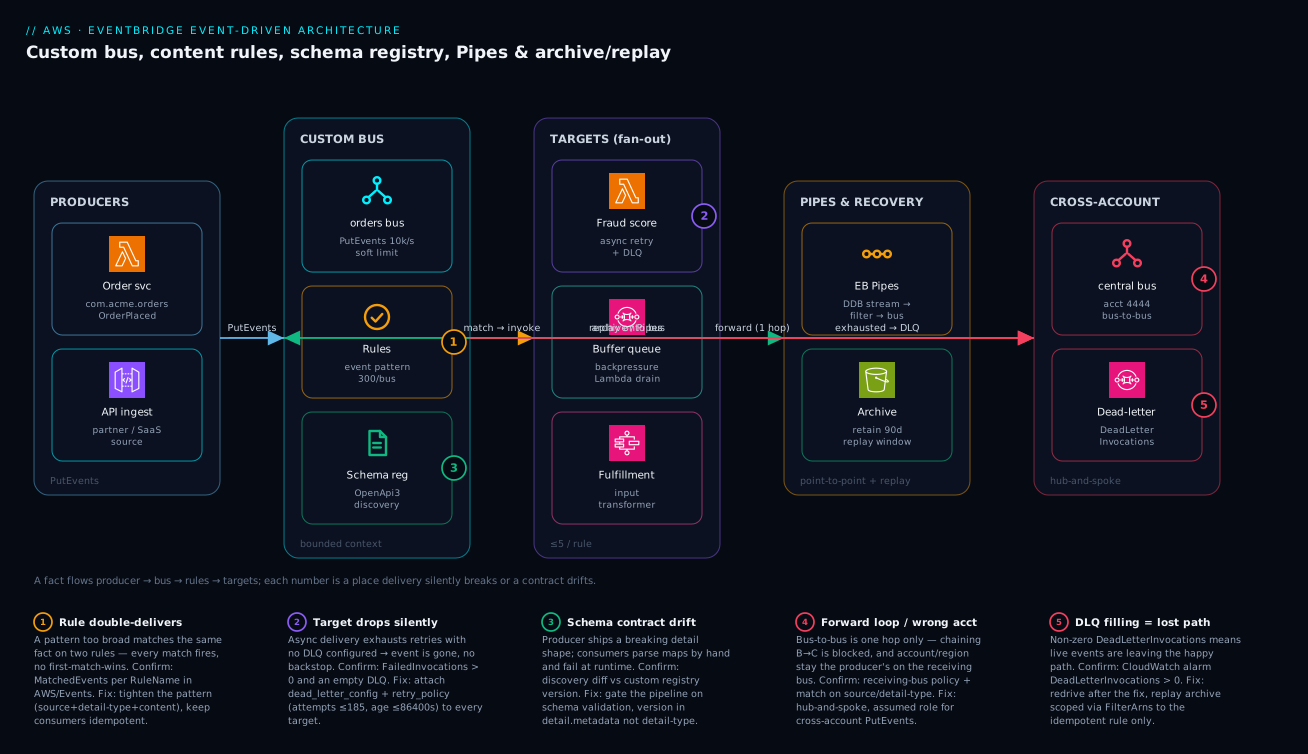
Read the diagram left to right as the life of a single fact. A producer — the order service, or an API ingest for partner/SaaS events — calls PutEvents against the custom orders bus (badge 1 marks where a too-broad pattern can double-deliver, because the bus invokes every matching rule with no first-match-wins). On the bus, rules evaluate content patterns and the schema registry governs the contract those events must honor (badge 3 — drift here is what breaks runtime-parsing consumers). Matching events fan out to targets — a fraud-scoring Lambda (badge 2, the place a missing DLQ drops an event silently), an SQS buffer queue that gives you backpressure into a Lambda drain, and a Step Functions fulfillment workflow fed via an input transformer.
Two paths leave the happy fan-out. EventBridge Pipes drain a DynamoDB stream — filter, enrich, then publish onto the bus — the managed replacement for a glue Lambda; and an archive retains every matching event for 90 days, so a replay can re-emit a window back onto the bus through one idempotent rule. Finally, a forwarding rule pushes selected facts cross-account to a central bus in hub-and-spoke (badge 4 — forwarding is one hop only, and the origin account/region stay the producer’s), while exhausted deliveries from any target land in a dead-letter queue (badge 5 — a non-zero DeadLetterInvocations is your alarm that the live path is losing events). The five numbered legend entries narrate each failure as symptom · confirm · fix.
Real-world scenario
A retail platform team — call it Northwind Commerce — ran order processing as a single SQS queue feeding a monolithic Lambda. When they split fulfillment into its own bounded context, they put a fulfillment bus alongside the existing orders bus and forwarded OrderPlaced events across with a bus-to-bus rule. The split was clean on paper. The failure mode was not.
Three weeks in, a deploy to the fulfillment consumer threw on a malformed address for a batch of international orders. The Lambda caught and logged the exception and returned 200, so EventBridge considered delivery successful — the events were not in any DLQ. The orders were silently never fulfilled. They found out from customer-support tickets, two days and roughly 1,400 unfulfilled international orders later.
The constraint: they could not ask the orders producer to re-emit — those events were long gone from the source system, and replaying from the producer’s side would have re-charged cards on the orders bus’s payment rule. The blast radius of a naive replay was a second incident on top of the first.
The fix had two parts. First, they had (fortunately) configured an archive on the fulfillment bus, so the events still existed. They replayed precisely the affected window, scoped via FilterArns to only the fulfillment-rebuild rule, after the address-parsing bug was patched:
aws events start-replay \
  --replay-name fulfill-intl-backfill-20260607 \
  --event-source-arn arn:aws:events:us-east-1:444455556666:archive/fulfillment-archive \
  --event-start-time 2026-06-07T02:00:00Z \
  --event-end-time   2026-06-07T05:30:00Z \
  --destination '{"Arn":"arn:aws:events:us-east-1:444455556666:event-bus/fulfillment","FilterArns":["arn:aws:events:us-east-1:444455556666:rule/fulfillment/process-shipment"]}'
Because the shipment consumer keyed every action on detail.metadata.idempotencyKey, the replay reprocessed the failed batch without duplicating the orders that had succeeded. The 1,400 orders fulfilled; the ~9,000 that had already shipped were no-ops.
Second — the real lesson — they stopped swallowing exceptions in the Lambda. A malformed event now throws, EventBridge retries with backoff, and after exhaustion lands in the target DLQ, which alarms on DeadLetterInvocations > 0. They also added a dead_letter_config to every meaningful target across both buses, and a CloudWatch alarm on FailedInvocations. The archive saved them once; the DLQ-plus-alarm meant they would never again need it for this class of failure. Two controls, both native, both cheap, and the system went from “silently loses orders” to “fails loudly and recovers deterministically.” Total cost of the two controls: a few rupees a month for the archive and the SQS DLQ traffic.
Advantages and disadvantages
EventBridge is the right backbone for an evolvable, multi-team, multi-account event estate — and the wrong tool for high-volume, low-latency, simple fan-out. The trade-off is explicit:
| Advantages | Disadvantages |
|---|---|
| Producers and consumers fully decoupled; routing lives on the bus | Higher per-event latency than SNS/SQS |
| Content-based routing without touching producers | No native ordering or exactly-once (FIFO is SNS/SQS only) |
| Native archive + replay (system of record) | At very high volume, per-event cost adds up |
| Schema registry + typed code bindings | Free-form detail means you must enforce contracts yourself |
| Cross-account bus-to-bus is first-class | One forwarding hop only; design constraint |
| 20+ AWS targets + API destinations + Pipes | Five targets per rule (hard cap) |
| Pipes replace glue Lambdas for streams | Pipes are one-to-one; fan-out still needs the bus |
| Add a consumer with one rule, zero producer changes | Silent loss if you forget the DLQ |
When each matters: decoupling and evolvability dominate for an integration backbone that many teams build on — that is EventBridge’s home turf. Latency and raw throughput dominate for in-request fan-out (a checkout that must notify three systems in under 50 ms) — reach for SNS, or call services directly. Ordering dominates for a strict sequence (financial ledger entries) — FIFO SQS/SNS, not EventBridge. The mature answer is almost always composition: EventBridge for routing and archive, SQS for buffering, SNS for cheap fan-out, each at the layer it fits.
Hands-on lab
A copy-pasteable, free-tier-friendly walk-through. You will create a custom bus, a content rule, a Lambda target with a DLQ, an archive, publish an event, and replay it — then tear it all down. EventBridge custom events are billed per published event (the first events each month are effectively pennies); this lab costs a fraction of a rupee.
1. Create the custom bus.
aws events create-event-bus --name lab-orders
2. Create an SQS DLQ and grant EventBridge permission to write to it.
DLQ_URL=$(aws sqs create-queue --queue-name lab-orders-dlq --query QueueUrl --output text)
DLQ_ARN=$(aws sqs get-queue-attributes --queue-url "$DLQ_URL" \
  --attribute-names QueueArn --query Attributes.QueueArn --output text)
3. Create a minimal target Lambda (any function works; here a no-op that logs).
# Assume an existing role 'lab-lambda-role' with basic execution + logs.
zip -j fn.zip <(printf 'def handler(e,c):\n    print(e)\n    return {"ok":True}\n')
aws lambda create-function --function-name lab-order-consumer \
  --runtime python3.12 --handler index.handler --zip-file fileb://fn.zip \
  --role arn:aws:iam::$(aws sts get-caller-identity --query Account --output text):role/lab-lambda-role
4. Create the content rule (high-value USD orders only).
aws events put-rule --name lab-high-value --event-bus-name lab-orders \
  --event-pattern '{"source":["com.acme.orders"],"detail-type":["OrderPlaced"],"detail":{"data":{"totalCents":[{"numeric":[">=",50000]}],"currency":["USD"]}}}'
5. Attach the Lambda target with a DLQ and retry policy. (Grant EventBridge lambda:InvokeFunction via add-permission first.)
aws lambda add-permission --function-name lab-order-consumer \
  --statement-id eb-invoke --action lambda:InvokeFunction \
  --principal events.amazonaws.com

aws events put-targets --rule lab-high-value --event-bus-name lab-orders \
  --targets "Id=1,Arn=$(aws lambda get-function --function-name lab-order-consumer --query Configuration.FunctionArn --output text),DeadLetterConfig={Arn=$DLQ_ARN},RetryPolicy={MaximumRetryAttempts=4,MaximumEventAgeInSeconds=3600}"
6. Create an archive on the bus.
aws events create-archive --archive-name lab-orders-archive \
  --event-source-arn $(aws events describe-event-bus --name lab-orders --query Arn --output text) \
  --retention-days 1 \
  --event-pattern '{"source":["com.acme.orders"]}'
7. Publish a matching event.
aws events put-events --entries '[{
  "Source":"com.acme.orders","DetailType":"OrderPlaced","EventBusName":"lab-orders",
  "Detail":"{\"metadata\":{\"version\":\"1.0\",\"idempotencyKey\":\"lab-1\"},\"data\":{\"orderId\":\"lab-1\",\"totalCents\":99000,\"currency\":\"USD\"}}"
}]'
Expected: FailedEntryCount: 0. Within seconds the Lambda’s CloudWatch log group shows the event. Confirm the rule matched:
aws cloudwatch get-metric-statistics --namespace AWS/Events --metric-name MatchedEvents \
  --dimensions Name=RuleName,Value=lab-high-value \
  --start-time $(date -u -v-10M +%Y-%m-%dT%H:%M:%SZ) --end-time $(date -u +%Y-%m-%dT%H:%M:%SZ) \
  --period 300 --statistics Sum
8. Replay the archive (after the archive has had a minute to ingest).
aws events start-replay --replay-name lab-replay-1 \
  --event-source-arn $(aws events describe-archive --archive-name lab-orders-archive --query ArchiveArn --output text) \
  --event-start-time $(date -u -v-10M +%Y-%m-%dT%H:%M:%SZ) --event-end-time $(date -u +%Y-%m-%dT%H:%M:%SZ) \
  --destination "{\"Arn\":\"$(aws events describe-event-bus --name lab-orders --query Arn --output text)\",\"FilterArns\":[\"$(aws events describe-rule --name lab-high-value --event-bus-name lab-orders --query Arn --output text)\"]}"
The Lambda log shows the event again, this time carrying replay-name in the envelope.
9. Teardown.
aws events remove-targets --rule lab-high-value --event-bus-name lab-orders --ids 1
aws events delete-rule --name lab-high-value --event-bus-name lab-orders
aws events delete-archive --archive-name lab-orders-archive
aws events delete-event-bus --name lab-orders
aws lambda delete-function --function-name lab-order-consumer
aws sqs delete-queue --queue-url "$DLQ_URL"
Practice challenges
Work these in order — the first two need only the CLI, the last two lean on the Pipes and Scheduler material above. Each solution is one correct way, not the only one; the one-line why is the part to internalize. Account IDs and ARNs are placeholders, and these reuse the orders/lab-orders style resources from the hands-on lab, so tear everything down afterward as shown there.
1. (Beginner) A bus and a precise rule. Create a custom bus catalog and a rule that matches only ProductPublished facts from com.acme.catalog — nothing else.
<details> <summary>Solution</summary>
aws events create-event-bus --name catalog
aws events put-rule --name product-published --event-bus-name catalog \
  --event-pattern '{"source":["com.acme.catalog"],"detail-type":["ProductPublished"]}'
Why: matching on both source and detail-type is the narrowest safe baseline — a pattern with only source would also catch every other fact that context emits.
</details>
2. (Beginner) Content-based routing. Write the event pattern for “orders of at least 50,000 cents in USD or CAD.” Just the pattern — no targets yet.
<details> <summary>Solution</summary>
{
  "source": ["com.acme.orders"],
  "detail-type": ["OrderPlaced"],
  "detail": { "data": {
    "totalCents": [{ "numeric": [">=", 50000] }],
    "currency": ["USD", "CAD"]
  }}
}
Why: numeric does the range test and the array gives OR semantics on currency; the producer emits every order once and the bus filters, so no consumer branches on value.
</details>
3. (Intermediate) Never lose an event. Attach a Lambda target to that rule with a dead-letter queue and a retry policy that gives up after 1 hour or 20 attempts, whichever comes first.
<details> <summary>Solution</summary>
aws events put-targets --rule high-value-orders --event-bus-name orders \
  --targets 'Id=1,Arn=arn:aws:lambda:us-east-1:444455556666:function:fraud-score,DeadLetterConfig={Arn=arn:aws:sqs:us-east-1:444455556666:fraud-dlq},RetryPolicy={MaximumRetryAttempts=20,MaximumEventAgeInSeconds=3600}'
Why: without DeadLetterConfig an exhausted delivery is dropped silently; MaximumEventAgeInSeconds can end retries before the attempt cap, so both knobs govern when the event lands in the DLQ.
</details>
4. (Intermediate) Route on an absence. Match refurbished-electronics orders — SKU like ELEC-<anything>-REFURB — that carry no promo code.
<details> <summary>Solution</summary>
{
  "detail": { "data": {
    "sku": [{ "wildcard": "ELEC-*-REFURB" }],
    "promoCode": [{ "exists": false }]
  }}
}
Why: exists:false routes on the absence of a field — impossible in a queue without a consumer-side branch — while wildcard globs the SKU with *.
</details>
5. (Advanced) A Pipe instead of glue code. Move only INSERTs from a DynamoDB stream onto the orders bus, dropping modifies/removes and enriching each record through a Lambda — no custom poller.
<details> <summary>Solution</summary>
aws pipes create-pipe --name orders-cdc \
  --role-arn arn:aws:iam::444455556666:role/pipe-orders-cdc \
  --source arn:aws:dynamodb:us-east-1:444455556666:table/Orders/stream/2026-06-08T00:00:00.000 \
  --source-parameters '{"DynamoDBStreamParameters":{"StartingPosition":"LATEST","BatchSize":100},
    "FilterCriteria":{"Filters":[{"Pattern":"{\"eventName\":[\"INSERT\"]}"}]}}' \
  --enrichment arn:aws:lambda:us-east-1:444455556666:function:hydrate-order \
  --target arn:aws:events:us-east-1:444455556666:event-bus/orders \
  --target-parameters '{"EventBridgeEventBusParameters":{"Source":"com.acme.orders","DetailType":"OrderPlaced"}}'
Why: the filter runs before you pay to process, and the Pipe replaces the read-filter-enrich-publish Lambda you used to hand-write, own, and page on — four config blocks with built-in batching, retries, and a DLQ. </details>
6. (Advanced) Schedule, don’t route. Fire a one-time trial-expiry job at 23:59 on 31 Dec 2026 Kolkata time, have the schedule delete itself after it runs, and give it a DLQ.
<details> <summary>Solution</summary>
aws scheduler create-schedule --name expire-trial-7781 --group-name billing \
  --schedule-expression 'at(2026-12-31T23:59:00)' \
  --schedule-expression-timezone 'Asia/Kolkata' \
  --flexible-time-window '{"Mode":"OFF"}' \
  --action-after-completion DELETE \
  --target '{"Arn":"arn:aws:lambda:ap-south-1:444455556666:function:expire-trial","RoleArn":"arn:aws:iam::444455556666:role/scheduler-invoke","DeadLetterConfig":{"Arn":"arn:aws:sqs:ap-south-1:444455556666:scheduler-dlq"}}'
Why: the trigger is time, not a fact, so it belongs to EventBridge Scheduler — which alone offers at() one-time schedules, per-schedule time zones, and ActionAfterCompletion=DELETE self-cleanup, none of which a cron() rule can do.
</details>
Common beginner mistakes
These are conceptual traps — wrong mental models that lead you to build the wrong thing — not operational failures. (The symptom → cause → confirm → fix playbook for things already broken is the troubleshooting table further down.)
“EventBridge guarantees delivery, so I don’t need a DLQ.” It guarantees retries, not delivery. After the attempt cap or the event-age window, a still-failing event is discarded — and with no dead_letter_config it is gone, leaving only a FailedInvocations tick. The right model: retries buy time for a transient problem; the DLQ is the backstop for a persistent one. You need both, on every target that matters.
“My Lambda caught the error and returned 200, so I’m safe.” This is the most expensive misconception in the whole service. A 200 tells EventBridge delivery succeeded, so the event never reaches any DLQ even though your business logic failed. The right model: let unrecoverable errors throw. Failing loudly routes the event to the DLQ where you can see and replay it; swallowing it loses orders silently — exactly the incident in the real-world scenario above.
“A broad rule is simpler — I’ll just filter inside the consumer.” EventBridge invokes every matching rule, with no first-match-wins, so a loose pattern silently double-delivers and pushes routing logic into code you must then keep in sync across consumers. The right model: the pattern is the routing. Make it as specific as the fact you actually want, and let overlap happen only where two contexts genuinely both need the same fact.
“I’ll version the event by renaming detail-type to OrderPlacedV2.” That forces every consumer to edit its rule the day you cut over — the exact lockstep coupling a bus exists to remove. The right model: keep detail-type stable, carry a semantic version in detail.metadata, and dual-publish across a breaking change until consumers drain off the old shape.
“Events and commands are the same thing, so PlaceOrder on the bus is fine.” A command has exactly one intended handler (“do this”); a fact has zero or many interested observers (“this happened”). Broadcasting a command invites two consumers to both place the order. The right model: buses carry past-tense facts (OrderPlaced). If you catch yourself using an imperative verb, reach for a queue or a direct call instead.
“Replay just re-runs everything to catch back up.” Replay re-emits onto today’s rules — including the ones that charge cards and send email — so an unscoped replay is a second incident stacked on the first. The right model: scope every replay with FilterArns to the single idempotent consumer that needs to reprocess, and keep consumers idempotent so order and duplicates never matter.
“EventBridge, SNS, and SQS are three ways to do the same thing.” They are three layers. Reaching for EventBridge to do 50-ms in-request fan-out, or SQS to do content-based multi-consumer routing, fights the tool. The right model: EventBridge routes and archives, SNS does cheap low-latency fan-out, SQS buffers with backpressure — and mature designs compose all three rather than picking one.
Common mistakes & troubleshooting
This is the differentiator. Each failure mode below is symptom → root cause → how to confirm (exact command/metric) → fix. Watch these CloudWatch metrics in AWS/Events: MatchedEvents (rule matching), Invocations, FailedInvocations (target errored, no DLQ caught it — must be zero), DeadLetterInvocations and InvocationsSentToDlq (events failing delivery — must be zero), and ThrottledRules (hitting invocation/PutTargets limits).
| # | Symptom | Root cause | Confirm (exact command / metric) | Fix |
|---|---|---|---|---|
| 1 | Events silently never processed | No DLQ; deliveries exhausted and dropped | FailedInvocations > 0 while DLQ empty |
Add dead_letter_config + retry policy to the target |
| 2 | Lambda “succeeds” but nothing happens | Consumer catches exception, returns 200 | Lambda logs show caught error; DLQ empty | Stop swallowing — throw so EB retries → DLQ |
| 3 | Two consumers each process every event once too often | Overlapping/broad rule patterns | MatchedEvents per rule higher than expected |
Tighten patterns (add source+detail-type+content); make consumers idempotent |
| 4 | Rule never fires | Pattern field mismatch (typo, wrong nesting) | aws events test-event-pattern returns false |
Mirror the exact event structure; arrays of values |
| 5 | ThrottledRules climbing |
Invocation/PutTargets rate exceeded |
ThrottledRules > 0 in AWS/Events |
Request quota increase; batch; buffer via SQS target |
| 6 | Cross-account events rejected | Receiving bus policy missing the principal | AccessDenied on producer-side PutEvents |
Add resource policy granting the spoke account/org |
| 7 | Cross-account forward does nothing | Forwarding target has no role_arn |
Rule target lacks role; no delivery | Attach an assumed role for cross-account PutEvents |
| 8 | Event not forwarded a second hop | Two-hop forwarding is blocked (loop guard) | Event present on B, absent on C | Redesign hub-and-spoke; don’t chain buses |
| 9 | PutEvents returns FailedEntryCount > 0 |
Event > 256 KB, or throttled, or bad bus name | Inspect Entries[].ErrorCode in response |
Claim-check via S3; retry on throttle; fix bus name |
| 10 | Consumer breaks after a producer deploy | Breaking schema change shipped | Diff event vs registered schema | Gate CI on schema validation; version in metadata |
| 11 | Replay re-charged cards / re-sent emails | Replayed onto side-effecting rules | Replay had no/over-broad FilterArns |
Scope replay via FilterArns to the idempotent rule |
| 12 | DLQ filling and growing | Live deliveries failing continuously | DeadLetterInvocations alarm firing |
Treat as incident; fix target; redrive after fix |
| 13 | Pipe processes nothing | Filter excludes everything; wrong starting position | Pipe metrics show 0 forwarded | Loosen FilterCriteria; check StartingPosition |
| 14 | Pipe lags behind the stream | BatchSize/parallelization too low |
Stream iterator age climbing | Raise batch/concurrency; speed up enrichment |
| 15 | Input transformer sends garbage | JSON path doesn’t resolve | Target receives empty <var> |
Fix the InputPathsMap paths to real fields |
| 16 | Spoofed/rejected aws. source |
Producer used reserved aws. prefix |
PutEvents rejects the entry |
Use your reverse-DNS source |
A decision table for the live incident
When the pager goes off, this maps what you observe to the likely class and the first move.
| If you see… | It’s probably… | Do this first |
|---|---|---|
FailedInvocations > 0, DLQ empty |
A target with no DLQ dropping events | Add a DLQ now; it stops the bleed |
DeadLetterInvocations > 0 |
Live deliveries failing | Open the DLQ, read a message, fix the target |
MatchedEvents flat at zero |
Pattern not matching | test-event-pattern against a real event |
ThrottledRules > 0 |
Hitting invocation limits | Buffer via SQS; request a quota bump |
| Duplicate processing | Broad/overlapping patterns | Tighten patterns; verify idempotency keys |
| Nothing wrong in metrics, orders missing | Consumer swallowing errors | Audit the Lambda for caught-and-200 |
Best practices
- Application events go to custom buses aligned to bounded contexts, never the
defaultbus — replay and access scope are per-bus. sourceis a reverse-DNS namespace you own;detail-typeis a past-tense fact, not a command (OrderPlaced, notPlaceOrder).- Version lives in
detail.metadata, not indetail-type, andmetadatais separated fromdata. Bump major only on breaking changes; dual-publish during migration. - Every event pattern is specific — no accidental broad matches causing double-delivery. There is no first-match-wins.
- Every meaningful target has a DLQ and a deliberate
retry_policy(attempt cap and event-age window). Never rely on the defaults silently. - Alarm on
DeadLetterInvocations,FailedInvocations, andThrottledRules— treat any non-zero value as a real incident. - Never swallow exceptions in consumers. Throw so EventBridge retries and exhausted events land in the DLQ; failing loudly beats losing silently.
- Cross-account routing is hub-and-spoke (one forwarding hop), with a receiving-bus resource policy plus an assumed role; use
aws:PrincipalOrgIDto avoid enumerating accounts. - A custom schema registry holds reviewed contracts, validated in CI before producer deploy; use discovery only for archaeology.
- Archives are configured on buses you would ever replay or audit, with deliberate retention; keep the archive pattern as narrow as the replay you’d run.
- Consumers are idempotent (keyed on
metadata.idempotencyKey) so replay is safe; scope replays viaFilterArnsto non-side-effecting rules. - Reach for EventBridge Pipes instead of a glue Lambda when moving a stream/queue to one target with filtering or enrichment.
- The backbone choice (EventBridge vs SNS vs SQS) matches the layer, and they compose — EB for routing/archive, SQS for buffering, SNS for cheap fan-out.
Security notes
EventBridge is an IAM-governed control plane and data plane; lock both down.
| Control | Mechanism | What it prevents |
|---|---|---|
| Least-privilege producers | IAM policy limited to events:PutEvents on the specific bus ARN |
A producer publishing to the wrong bus |
| Bus resource policy | Deny cross-account by default; allow only named principals/org | Unauthorized cross-account PutEvents |
aws:PrincipalOrgID condition |
Scope cross-account grants to your Org | Granting to arbitrary external accounts |
| Source-side encryption | Don’t put secrets in detail; reference Secrets Manager/SSM |
Leaking credentials in archived/replayed events |
| DLQ encryption + access | SQS DLQ with SSE-KMS and a tight queue policy | Exposing failed-event payloads |
| Target role scoping | Per-target role_arn with minimal permissions |
A target role with excess blast radius |
| API destination secrets | EventBridge connection stores auth in Secrets Manager | Hard-coded webhook credentials |
| Schema registry access | IAM on schemas:* actions |
Tampering with the contract source of truth |
| CloudTrail on EventBridge | Log PutRule, PutTargets, StartReplay |
Undetected rule/target tampering |
| Encrypt the bus (CMK) | Customer-managed KMS key on the bus | Meeting data-at-rest compliance |
A few specifics: never place PII or secrets directly in detail — archives retain it and replays re-emit it, multiplying exposure; pass a reference (an S3 key or a Secrets Manager ARN) and resolve it in the consumer with its own scoped permissions. Encrypt DLQs, because they hold the exact payloads of failed events, often the most sensitive ones. And put CloudTrail data events on EventBridge so a rogue PutTargets that quietly forwards your events to an attacker-controlled bus is detectable. For deeper identity mechanics, see IAM Fundamentals: Users, Roles, Policies & Evaluation; for encrypting payload references, see AWS KMS Encryption Deep Dive.
Cost & sizing
EventBridge billing is refreshingly simple, with a few gotchas that surprise teams at scale.
| Cost driver | How it’s billed | Free / note | Right-sizing lever |
|---|---|---|---|
| Custom events published | Per million events (64 KB units) | AWS service events on default bus are free | Don’t publish chatty no-op events |
| Cross-account/region delivery | Counts as published events on the target | Each hop is billable | Forward only what the hub needs |
| Schema discovery | Per million ingested events | First batch monthly is free-ish | Turn discovery off once archaeology is done |
| Archive ingestion + storage | Per GB ingested + per GB-month stored | Grows with retention | Narrow the archive pattern; set finite retention |
| Replay | Re-emitted events billed as published | A big replay = a real spend | Scope the window and FilterArns |
| Pipes | Per request processed (tiered by payload) | Filtering happens before you pay to process | Filter aggressively at the source |
| API destinations | Per invocation + the data transfer | Rate-limited per connection | Set a sane invocation rate |
| Target costs (downstream) | The target’s own pricing (Lambda, SQS…) | Often dwarfs EB’s line item | Right-size the consumers, not just the bus |
Rough figures: publishing 1 million custom events costs on the order of USD ~$1 (₹85–90); the downstream Lambda/SQS/Step Functions invocations those events trigger usually cost more than the EventBridge line item itself, so optimize the consumers. Archive storage is a few cents per GB-month, so a narrow archive with 90-day retention on a moderate-volume bus is typically under ₹100/month. The two cost traps are (1) an archive pattern that captures everything on a high-volume bus with indefinite retention, and (2) leaving schema discovery on permanently — it bills per ingested event. The hands-on lab above costs a fraction of a rupee end to end. For larger estates, attribute EventBridge spend per bus via tags so each bounded-context team owns its line item.
Interview & exam questions
Q1. Why put application events on a custom bus instead of the default bus?
The default bus receives all AWS service events, so your rules compete with platform noise, access policies can’t cleanly separate “your events” from AWS events, and you can’t archive or replay just your traffic. Replay and access scope are per-bus, so a custom bus per bounded context isolates blast radius. (Maps to SAA-C03, DVA-C02.)
Q2. A consumer Lambda returns 200 after catching an exception. Where does the event go, and why is that a problem? Nowhere — EventBridge considers a 200 a successful delivery, so the event never reaches the DLQ. The business logic silently failed while delivery “succeeded.” The fix is to throw, so EventBridge retries with backoff and exhausted events land in the DLQ, which you alarm on. (DVA-C02.)
Q3. What’s the difference between maximum_retry_attempts and maximum_event_age_in_seconds?
They are independent caps and EventBridge discards the event when either is hit. Attempts (0–185) bound the count against a hot-looping failure; age (60–86,400 s) bounds the wall-clock window, so an event can drop well before the attempt cap if it sat past the age limit. (DOP-C02.)
Q4. How do you route on the absence of a field?
Use the exists: false operator in the event pattern — e.g. "promoCode":[{"exists":false}] matches orders with no promo code. This content-based routing is impossible in most queue systems without a consumer-side branch. (SAA-C03.)
Q5. Describe the cross-account bus-to-bus pattern and its main constraint.
The receiving bus grants the producer account events:PutEvents via a resource policy; the producer’s rule targets the remote bus ARN using an assumed role. The key constraint: forwarding is one hop — A→B won’t forward B→C — so you design hub-and-spoke, not a chain. The origin account/region are preserved, so match on source/detail-type. (SAP-C02.)
Q6. When do you reach for EventBridge Pipes over a rule? Pipes are point-to-point: one source (SQS, Kinesis, DynamoDB stream, MQ, Kafka) to one target, with optional filtering and synchronous enrichment. Use a Pipe to move a stream onto a bus or to one target with filter/enrich (replacing a glue Lambda); use a rule for one-fact-to-many content-routed fan-out. (DVA-C02.)
Q7. Why must replay consumers be idempotent, and how do you keep a replay from causing harm?
Replay ordering is best-effort and original timing isn’t preserved, so events can arrive out of order and possibly more than once; idempotency (keyed on an idempotency key) makes that safe. To avoid harm, scope the replay with FilterArns to the one non-side-effecting rule so you don’t re-charge cards or re-send emails. (SAP-C02.)
Q8. Discovery registry vs custom registry — which is your source of truth? The custom registry. Discovery auto-infers schemas from live traffic (great for archaeology and finding rogue events) but is a description of reality, not a contract. The custom registry holds reviewed, versioned schemas your CI validates producers against before deploy. (DVA-C02.)
Q9. You see ThrottledRules climbing. What’s happening and what do you do?
You’re exceeding the invocation/PutTargets rate for the region/account, so EventBridge is throttling rule invocations. Request a quota increase, batch where possible, and buffer through an SQS target so the consumer drains at its own pace instead of being invoked synchronously at the limit. (DOP-C02.)
Q10. EventBridge, SNS, or SQS for an in-request fan-out that must notify three systems in under 50 ms? SNS — it’s low-latency, high-throughput pub/sub fan-out and the routing is simple. EventBridge adds routing/archive/schema value but at higher latency; SQS is point-to-point pull. Match the tool to the layer; here latency dominates. (SAA-C03.)
Q11. How do you safely version an event when you must add a required field?
Bump the major version in detail.metadata.version and dual-publish v1 and v2 until all consumers drain off v1; keep detail-type stable so consumers don’t have to change rules. Gate the change in CI against the schema registry so an incompatible change fails the pipeline. (DVA-C02.)
Q12. What does a DLQ capture, and what does it not? It captures delivery failures — target throttled, nonexistent, or permission-broken — after retries exhaust. It does not capture application-logic failures inside a consumer that returned success; those are the consumer’s responsibility (Lambda on-failure destinations or its own SQS source). (DVA-C02.)
Quick check
- Where should the schema version live, and why not in
detail-type? - A target has no
dead_letter_configand all retries fail. What happens to the event? - True or false: when an event matches three rules, only the first rule’s targets fire.
- What is the single constraint that makes bus-to-bus forwarding hub-and-spoke rather than a chain?
- You need to replay a window of orders to rebuild a read-model without re-charging cards. What one parameter keeps the replay safe?
Answers
- In
detail.metadata.version. Putting it indetail-typeforces every consumer to edit its rule the day you bump a version; keepingdetail-typestable decouples versioning from routing. - It is dropped silently — there is no backstop without a DLQ.
FailedInvocationsincrements but the payload is gone. Always attachdead_letter_configto meaningful targets. - False. EventBridge invokes every matching rule independently — there is no first-match-wins. Overlapping patterns are a feature, but a broad pattern can double-deliver.
- EventBridge blocks two-hop forwarding (A→B will not forward B→C) to prevent loops, so you design a central hub with spokes forwarding into it.
FilterArnson the replaydestination— scope it to the one idempotent, non-side-effecting rule (the read-model rebuilder) and leave the payment rule out.
Glossary
- Event bus — A topic-less router that matches every published event against all rules independently; replay and access scope are per-bus.
- Custom bus — A bus you create for a bounded context (
orders,payments), the correct grain for ownership, archive, and access. - Envelope — The fixed event fields (
source,detail-type,time,id,region,account,resources) that rules match most efficiently and that are immutable after publish. detail— The free-form JSON body of an event; EventBridge validates nothing inside it, so you enforce the contract via the schema registry.- Event pattern — The JSON match expression in a rule; a field present must match, a field absent is ignored.
- Rule — A pattern plus up to five targets; every matching rule fires (no first-match-wins).
- Input transformer — A per-target map of JSON-path variables plus a template that reshapes the event for that target.
- Target — Where a matched event goes (Lambda, SQS, SNS, Step Functions, Kinesis, another bus, API destination); needs a DLQ and retry policy.
- Dead-letter queue (DLQ) — An SQS queue receiving events EventBridge could not deliver after retries; captures delivery, not application, failures.
- EventBridge Pipes — A point-to-point integration: one source → optional filter → optional enrichment → one target; replaces glue Lambdas.
- Schema registry — Stored OpenAPI/JSONSchema event contracts; a custom registry is the source of truth, discovery is for archaeology.
- Code bindings — Strongly typed classes generated from a registered schema so producers/consumers compile against the same shape.
- Archive — Durable retention of every event matching a filter on a bus; a system of record for events.
- Replay — Re-emitting a time window of archived events onto a bus against current rules; scope with
FilterArns, requires idempotent consumers. - Partner event source — An AWS-managed integration by which an external SaaS pushes events onto a bus in your account.
- API destination — An HTTPS endpoint configured as a target, with auth stored in an EventBridge connection (Secrets Manager).
- EventBridge Scheduler — A standalone service for time-based invocation (
rate/cron/one-timeat), with per-schedule time zones, flexible time windows, a universal target, and its own retry policy and DLQ; not part of any event bus. - Universal target — Scheduler’s ability to invoke ~270+ AWS services and 6,000+ API actions directly, without an intermediary rule or Lambda.
- Flexible time window — A Scheduler setting that jitters invocations across a ±1–15-minute window so simultaneous schedules don’t stampede the target.
- Global endpoint — Two same-named buses in a primary and secondary Region behind one endpoint, with Route 53 health-check failover (and optional event replication) protecting the
PutEventsingestion path. - Managed rule — An AWS-created rule (for example, the ones that replicate events for a global endpoint) that you can observe but cannot edit.
- Enrichment — A Pipe’s optional synchronous stage (Lambda, Step Functions Express, API destination, or API Gateway) that augments each event in flight before the target.
- Claim-check pattern — Publishing a small event that carries an S3 object key instead of a payload larger than the 256 KB limit; the consumer fetches the object itself.
- Idempotency key — A stable business key carried in
detail.metadatathat consumers dedup on, making at-least-once delivery and replay safe. - At-least-once delivery — EventBridge may deliver the same event to a target more than once (retries, failover, replay), so every consumer must be idempotent.
Next steps
- Compose the buffer layer beneath your bus with SQS & SNS: Fan-out, FIFO Ordering, DLQ & Poison-Message Handling.
- Wire change-data-capture into Pipes with DynamoDB Streams: Change Data Capture & Event-Driven Pipelines.
- Orchestrate multi-step workflows triggered by events in Step Functions: Distributed Orchestration & Error-Handling Patterns.
- Tune the most common target in AWS Lambda Deep Dive: Runtimes, Triggers, Layers & Concurrency.
- See the whole pattern assembled in Enterprise Architecture on AWS: Event-Driven Serverless and the publishing-reliability angle in Transactional Outbox/Inbox: Exactly-Once Event Publishing.