In a nutshell
If you have ever written one big function that does step A, then step B, then step C, you know the sinking feeling when step C fails: A and B already happened — a card was charged, an email went out — and your code has no memory of how far it got. AWS Step Functions is a flowchart that runs itself and never forgets where it is. You draw the steps once (as JSON), and the service walks each execution through them, durably remembering exactly which step ran, what it returned, and what comes next — so recovery, retries, and undo become things you declare instead of things you hand-code inside a dying function.
The analogy that sticks: think of a careful travel agent booking a trip — flight, then hotel, then rental car, in order. If the hotel falls through after the flight is booked, a good agent does not just shrug; they cancel the flight too, so you are not left half-committed. That “undo what already committed, in reverse” is the saga pattern, and it is the whole reason an orchestrator earns its place over a plain script. Step Functions is also like a GPS for a business process: it always knows your current position, it reroutes when a road is closed (a Retry or a Catch), and it keeps a full trip log you can replay afterward.
As a beginner you really only need to hold two forks in your head, and the rest of this lesson is the detail behind them. First fork — Standard vs Express: Standard is the durable, remembers-everything, exactly-once engine for real business processes (an order, an approval that waits days); Express is the cheap, fast, fire-and-forget engine for huge streams of small idempotent events. Second fork — inline Map vs Distributed Map: inline handles a few dozen items inside one run; Distributed fans out to millions of items, each in its own child run, reading straight from S3. Pick the wrong side of either fork and you get the two classic Step Functions disasters — a surprise bill, or a self-inflicted outage — both of which this lesson teaches you to avoid.
Level: Advanced · Time: ~72 min · You’ll be able to: choose the right workflow type and Map mode on sight, write retries that calm an outage instead of feeding it, design a saga whose every undo is safe to run twice, and read the execution history like a flight recorder.
A Lambda function that calls three other services is not a workflow — it is a distributed monolith with a 15-minute timeout and no audit trail. The moment a business process spans retries, branches, human approval, or thousands of parallel items, you want an orchestrator that owns the state so your code does not have to. AWS Step Functions is that orchestrator: a serverless state machine engine where you describe a workflow in Amazon States Language (ASL) — a JSON DSL of states, transitions, retries and catches — and the service durably executes it, remembering exactly where every run is. It is also a place where teams quietly burn money on the wrong workflow type, melt downstream services with unbounded fan-out, and write Retry blocks that re-amplify the exact outage they were meant to absorb.
This is how I design Step Functions workflows that are durable, that scale cleanly, and that fail in ways an on-call engineer can actually reason about. We will treat the four hard problems as one connected system: choosing the execution model (Standard’s exactly-once durability versus Express’s at-least-once throughput), fanning out at scale (inline Map’s 40-iteration ceiling versus Distributed Map’s 10,000 child executions over an S3 dataset), error handling that absorbs rather than amplifies (Retry with jittered backoff, Catch that routes, TimeoutSeconds that bounds), and compensation (the saga pattern, because there is no distributed transaction to roll back). Every decision is laid out as a scannable matrix you can keep open at 02:00, alongside the ASL and CLI that implement it.
By the end you will stop reaching for Parallel when you mean Map, stop paying Standard prices for a hot 200 ms loop, and stop shipping a compensation path you have never exercised. Assume a recent CLI (aws --version >= 2.x), familiarity with ASL, and IAM roles already scoped per state machine.
What problem this solves
In production, the pain is not “I cannot call three services in a row” — a Lambda does that. The pain is everything that happens when the third call fails after the first two committed real side effects: a card charged, an inventory item reserved, an email sent. Without an orchestrator that owns the state, your recovery logic lives inside the same function that just died, the audit trail is whatever you remembered to log, and a transient 429 from a downstream takes the whole business transaction down because nothing knew to retry just that step.
What breaks without Step Functions: teams build distributed monoliths — one fat Lambda that calls everything, hits the 15-minute wall on a slow downstream, and leaves you with no record of which side effects completed. Or they hand-roll orchestration in SQS + DynamoDB “state” tables and reinvent retries, timeouts, and idempotency badly. Or they fan out with an unbounded for loop over a Lambda and take down a rate-limited internal API the moment volume spikes. The failure modes are always the same three: wrong durability model (double-charges from at-least-once, or a transition bill from running Standard on a firehose), unbounded fan-out (a self-inflicted downstream outage), and retry storms (lockstep backoff that re-hammers a recovering service).
Who hits this: anyone running an order pipeline, a media-processing batch, an ETL fan-out, a human-approval flow, or any multi-service saga. It bites hardest on high-volume idempotent processing (where Express is right but at-least-once double-counts if a Task is not idempotent), large-dataset fan-out (where inline Map silently caps you at 40 concurrent and overflows the 256 KB state payload), and workflows with non-replayable side effects (where the absence of a saga means a partial failure leaves money and inventory in an inconsistent state).
To frame the whole field before the deep dive, here is every problem class this article covers, the symptom it produces, and the lever that fixes it:
| Problem class | What it looks like in production | First question to ask | The lever that fixes it |
|---|---|---|---|
| Wrong workflow type | Double-charges (Express) or a huge transition bill (Standard on a firehose) | Are the side effects replayable, and how hot is the traffic? | Standard for durable orchestration; Express for hot idempotent loops |
| Fan-out melts downstream | A rate-limited API/DB falls over the moment volume spikes | Is MaxConcurrency capped to the downstream’s safe limit? |
Distributed Map with a pinned MaxConcurrency + ItemBatcher |
| State payload overflow | Inline Map wedges on a large object list |
Does the whole array fit in one 256 KB payload? | Distributed Map (each child gets its own 256 KB budget) |
| Retry storm | A recovering service is re-hammered in lockstep | Do all executions back off by the same intervals? | JitterStrategy: FULL + MaxDelaySeconds cap |
| Hung execution | A Task hangs for hours/days on a stuck downstream | Is TimeoutSeconds set on every external Task? |
TimeoutSeconds on every Task; HeartbeatSeconds on callbacks |
| No rollback after partial failure | Card charged, shipment failed, money stuck | How far did the workflow get before it failed? | Saga: Catch into a reverse compensation chain |
| Opaque Express failures | An Express run fails and you cannot tell why | Is CloudWatch logging enabled on the state machine? | loggingConfiguration at ALL/ERROR + X-Ray |
Learning objectives
By the end of this article you can:
- Choose Standard versus Express by durability and cost shape — and explain why the choice is irreversible after creation and why a nested Standard-parent/Express-child pattern is often the right answer.
- Pick the correct state type — Task, Choice, Parallel, Map, Pass/Wait/Succeed/Fail — and explain precisely when
Map(one thing to many items) beatsParallel(many different things at once). - Fan out over tens of thousands of items with Distributed Map:
ItemReaderover S3,MaxConcurrencyas a downstream throttle,ItemBatcherto amortize invocation cost,ToleratedFailurePercentageto quarantine bad items, andResultWriterto beat the 256 KB limit. - Build error handling that absorbs rather than amplifies: ordered retriers split by error class, exponential backoff with
MaxDelaySeconds, andJitterStrategy: FULLto defeat the thundering herd. - Implement the saga pattern —
Catcheach forward Task into a reverse compensation chain whose every undo is idempotent and retryable — because Step Functions has no distributed transaction. - Model anything asynchronous or human-driven with the
waitForTaskTokencallback pattern, withHeartbeatSecondsso a dead worker fails the Task promptly instead of pausing it for a year. - Drive the observability surface — durable execution history, X-Ray, the Map Run view, and the CloudWatch metrics (
ExecutionsFailed,ExecutionsTimedOut,ExecutionThrottled) you actually alarm on.
Prerequisites & where this fits
You should already understand the serverless building blocks Step Functions orchestrates: Lambda (the unit of business logic — see AWS Lambda deep dive: runtimes, triggers, layers, concurrency), S3 (the dataset Distributed Map reads — S3 deep dive), DynamoDB for state and idempotency keys (DynamoDB single-table design), and IAM roles and policy evaluation (IAM fundamentals), because every Task assumes the state machine’s execution role. You should be comfortable reading JSON and running aws from a shell.
This sits in the serverless orchestration track. It is downstream of raw messaging — if your problem is fan-out/buffering rather than stateful orchestration, SQS, SNS & EventBridge messaging fundamentals and SQS/SNS fan-out, FIFO & DLQ handling come first. It is the engine behind the event-driven order-processing saga and a core piece of event-driven serverless architecture. For debugging across services it pairs with X-Ray service map & tracing and CloudWatch & CloudTrail observability.
A quick map of where each moving part lives and who usually owns it during an incident, so you call the right person fast:
| Layer | What lives here | Who usually owns it | Failure classes it can cause |
|---|---|---|---|
| Trigger (EventBridge / API / SDK) | StartExecution, execution name |
App / platform | Duplicate starts, throttling on the start API |
| State machine definition (ASL) | States, retries, catches, timeouts | App / dev team | Retry storms, missing timeouts, bad Map vs Parallel |
| Execution role (IAM) | Permissions for every Task + child exec | Platform / security | AccessDenied on first Distributed Map run, Task failures |
| Task targets (Lambda / SDK integ) | The actual side effect | App / dev team | Throttling, idempotency bugs, downstream outages |
| Distributed Map child executions | Per-batch Express/Standard runs | App / platform | Fan-out saturation, partial-batch failures |
| Observability (CloudWatch / X-Ray) | History, metrics, traces, Map Run | Platform / SRE | Blind Express failures, missed alarms |
Core concepts
Five mental models make every later decision obvious.
The orchestrator owns the state, not your code. A Lambda that calls three services holds the “where am I” in local variables that vanish when it dies. A Step Functions execution holds it durably: the service knows precisely which state ran, what it returned, and what is next. That is why recovery, retries, and compensation are declarative — the workflow already knows how far it got. This single property is the reason to reach for an orchestrator at all.
The workflow type is a durability contract chosen once. Standard gives exactly-once execution semantics, a durable queryable history, and a 1-year ceiling, billed per state transition. Express gives at-least-once semantics, no durable history (logs only), a 5-minute ceiling, billed per request plus duration. You choose at creation and cannot flip a state machine between them — you create a new one. Standard is a durable state machine you query later; Express is a streaming transform you fire and forget.
ASL is small — five state types carry almost every workflow. Task does work and is the only state with side effects. Choice branches on input. Parallel runs a fixed set of different branches concurrently and joins on all. Map runs the same sub-workflow over each element of an array. Pass / Wait / Succeed / Fail shape data, sleep, and terminate. Reaching for Parallel when you mean Map (or vice versa) is the most common structural mistake.
Fan-out has two execution models with very different ceilings. Inline Map runs inside the parent execution: capped at 40 concurrent iterations, sharing the parent’s one 256 KB state payload. Fine for dozens of items. Distributed Map runs each iteration (or batch) as its own child workflow execution with its own history and its own 256 KB budget, scaling to up to 10,000 parallel child executions over datasets of millions of items. The whole list never has to fit in one payload.
Failure is the design surface, not an afterthought. A Task with no Retry fails the whole execution on the first transient blip; a Task with no TimeoutSeconds can hang to the execution limit (a year on Standard). Retries that all back off by identical intervals re-hammer a recovering service in lockstep — the thundering herd. And because Step Functions has no distributed transaction, a partial failure cannot be rolled back; it must be compensated with an inverse action per completed step.
The vocabulary in one table
Before the deep sections, pin down every moving part. The glossary at the end repeats these for lookup; this table is the mental model side by side:
| Concept | One-line definition | Where it lives | Why it matters |
|---|---|---|---|
| State machine | The workflow definition (ASL) | Per region/account | The thing you version and deploy |
| Execution | One run of a state machine | Triggered per event | What you query, retry, and bill on |
| ASL | Amazon States Language (JSON DSL) | The definition | Declares states, retries, catches |
| Standard | Exactly-once, durable, 1-year type | Chosen at creation | Orchestration with non-replayable effects |
| Express | At-least-once, logs-only, 5-min type | Chosen at creation | High-volume idempotent processing |
| Task | The only state with side effects | A state | Invokes Lambda / SDK / nested SM |
| Choice | Branch on input comparison | A state | Routing logic |
| Parallel | Fixed set of different branches | A state | “Do these N different things at once” |
| Map (inline) | Same sub-workflow per array item | A state | ≤40 concurrent, shares 256 KB |
| Distributed Map | Per-item/batch child executions | A state | ≤10k children, own 256 KB each |
| Retry | Backoff-on-error rule on a Task | On a Task/state | Absorbs transient failures |
| Catch | Routes a failure to a handler state | On a Task/state | Implements compensation |
| Saga | Reverse compensation chain | Your workflow shape | “Undo what committed” — no rollback exists |
waitForTaskToken |
Pause until an external callback | An integration pattern | Human approval, async jobs |
Context object ($$) |
Execution/Task/State metadata | At runtime | Idempotency keys, callback tokens |
Standard vs Express: pick by durability, not habit
The first decision is the workflow type, and it is irreversible after creation — you cannot flip a state machine between Standard and Express, you create a new one. They share ASL but differ in their execution guarantees, duration limits, and billing model.
| Property | Standard | Express |
|---|---|---|
| Max duration | 1 year | 5 minutes |
| Execution semantics | Exactly-once | At-least-once |
| Execution history | Durable, queryable for 90 days | Sent to CloudWatch Logs only |
| Pricing model | Per state transition ($0.000025 each, us-east-1) | Per request + GB-second of duration |
| Throughput | Up to thousands of starts/sec | Effectively unbounded, very high rates |
waitForTaskToken / human approval |
Yes | No |
.sync (run a job and wait) |
Yes | No |
Result visible in describe-execution |
Yes (durable) | No (logs/synchronous return only) |
The pricing models invert depending on workload shape. Standard bills $0.000025 per state transition, so a workflow with 10 states costs $0.00025 per execution regardless of how long it waits — a 6-hour wait for an approval costs nothing extra. Express bills $1.00 per million executions plus $0.00001667 per GB-second of duration; a short, hot, high-volume workflow that finishes in 200 ms is dramatically cheaper there, while a long-running or sparse one is cheaper on Standard.
Mental model: Standard is a durable state machine you query later; Express is a streaming transform you fire and forget. Use Standard for orchestration with side effects you cannot replay; use Express for high-volume, idempotent event processing.
The trap is at-least-once on Express. Express can run a state more than once on internal retry, so every Task it invokes must be idempotent. If an Express workflow charges a credit card or increments a counter without an idempotency key, you will eventually double-charge. A nested pattern is common and correct: a Standard parent that orchestrates the durable, exactly-once business steps, invoking Express child workflows (via startExecution.sync) for the hot inner loops.
Choosing by workload shape
Match the workload to the type before you write a line of ASL. The decision is almost always made by two axes: are the side effects replayable, and how hot is the traffic?
| If the workload is… | Side effects | Traffic shape | Choose | Why |
|---|---|---|---|---|
| Order/payment orchestration | Non-replayable (charges, shipments) | Sparse, long-lived | Standard | Exactly-once + durable audit; waits are free |
| Human-approval flow | Non-replayable | Hours–days paused | Standard | Only Standard supports waitForTaskToken at length |
| Per-event enrichment/transform | Idempotent | Very high, short | Express | Cheapest per item; history not needed |
| IoT / clickstream processing | Idempotent | Firehose | Express | Unbounded rate; logs suffice |
| Batch fan-out inner loop | Idempotent | Bursty, short | Express child | Cheap per item under a Standard parent |
| ETL with a long Glue/EMR step | Replayable jobs | Sparse | Standard (.sync) |
Needs .sync to wait on the job |
| Saga with compensation | Non-replayable | Any | Standard | Durable state is what makes the saga reliable |
Synchronous vs asynchronous Express
Express has two start modes, and the difference decides whether you can read the result inline. The trap is assuming a synchronous Express call gives you Standard-grade exactly-once — it does not; the semantics are still at-least-once.
| Mode | How you start it | You get back | Use when |
|---|---|---|---|
| Asynchronous Express | StartExecution |
Just an execution ARN | Fire-and-forget event processing |
| Synchronous Express | StartSyncExecution |
The full result inline | An API-Gateway-fronted request needing the answer now |
.sync from a parent |
states:::states:startExecution.sync |
Parent waits for child terminal state | Nested fan-out where the parent must join |
The cost shape, expanded — what actually drives each bill and the lever to pull:
| Cost driver | Standard | Express | Lever to reduce it |
|---|---|---|---|
| Number of state transitions | $0.000025 each | Not billed per transition | Collapse trivial Pass states; use direct SDK integrations |
| Number of executions | Not billed per exec | $1.00 / million | Batch items so fewer executions run |
| Duration (GB-seconds) | Not billed on duration | $0.00001667 / GB-s | Faster Tasks, smaller memory in the child |
| Long waits | Free (no transition runs) | N/A (5-min cap) | Use Standard for anything that waits |
| CloudWatch Logs ingestion | Optional | Often required | Log at ERROR not ALL in steady state |
State machine design: the core state types
ASL is small. Five state types carry almost every real workflow.
- Task — does work: invokes a Lambda, an SDK action, or another state machine. The only state with side effects.
- Choice — branches on input using comparison rules. Your routing logic.
- Parallel — runs a fixed set of branches concurrently, joins on all. Use when you have N known, distinct sub-workflows.
- Map — runs the same sub-workflow over each element of an array. Use for a variable-length collection of homogeneous items.
- Pass / Wait / Succeed / Fail — shape data, sleep, and terminate.
Here is the full state-type reference — what each does, whether it has side effects, and the field that controls it:
| State type | Purpose | Side effects? | Key fields | Common gotcha |
|---|---|---|---|---|
| Task | Invoke Lambda / SDK / nested SM | Yes | Resource, Parameters, Retry, Catch, TimeoutSeconds |
No timeout → hangs to execution limit |
| Choice | Branch on input | No | Choices, Default |
No Default → States.NoChoiceMatched error |
| Parallel | N fixed different branches, join on all | Via its Tasks | Branches, ResultPath |
One branch failing fails the whole Parallel |
| Map (inline) | Same sub-workflow per item | Via its Tasks | ItemsPath, MaxConcurrency, ItemProcessor |
40-concurrency cap; shares 256 KB |
| Map (distributed) | Per-item child executions | Via its Tasks | ItemReader, ItemBatcher, ResultWriter |
Needs states:StartExecution IAM |
| Pass | Inject/reshape data, no work | No | Result, Parameters, ResultPath |
Counts as a transition (Standard cost) |
| Wait | Sleep for time/until timestamp | No | Seconds, Timestamp, SecondsPath |
On Express, counts against the 5-min cap |
| Succeed | Terminate successfully | No | — | — |
| Fail | Terminate with an error | No | Error, Cause |
Error string is what Catch matches upstream |
A common mistake is reaching for Parallel when you mean Map. Parallel is for “do these three different things at once” (validate, enrich, score). Map is for “do this one thing to each of these items.” The decision in one table:
| You want to… | The items are… | Concurrency you need | Use |
|---|---|---|---|
| Validate, enrich, and score in parallel | A fixed, named set of different tasks | The number of branches (small, fixed) | Parallel |
| Process each line item of an order | A variable array of the same thing | ≤40 | Inline Map |
| Transform every object under an S3 prefix | Tens of thousands of the same thing | Hundreds–thousands | Distributed Map |
| Run one of several routes by input value | N/A (just routing) | N/A | Choice |
| Aggregate results then continue | N/A | N/A | Pass (with ResultPath) |
Below, a Choice routes by order value, and a Map (inline mode) processes line items with bounded concurrency.
{
  "Comment": "Order processing",
  "StartAt": "RouteByValue",
  "States": {
    "RouteByValue": {
      "Type": "Choice",
      "Choices": [
        {
          "Variable": "$.order.totalUsd",
          "NumericGreaterThan": 10000,
          "Next": "ManualReview"
        }
      ],
      "Default": "ProcessLineItems"
    },
    "ManualReview": {
      "Type": "Task",
      "Resource": "arn:aws:states:::lambda:invoke.waitForTaskToken",
      "Parameters": {
        "FunctionName": "request-approval",
        "Payload": {
          "orderId.$": "$.order.id",
          "taskToken.$": "$$.Task.Token"
        }
      },
      "Next": "ProcessLineItems"
    },
    "ProcessLineItems": {
      "Type": "Map",
      "ItemsPath": "$.order.lineItems",
      "MaxConcurrency": 5,
      "ItemProcessor": {
        "ProcessorConfig": { "Mode": "INLINE" },
        "StartAt": "Fulfil",
        "States": {
          "Fulfil": {
            "Type": "Task",
            "Resource": "arn:aws:states:::lambda:invoke",
            "Parameters": { "FunctionName": "fulfil-line-item", "Payload.$": "$" },
            "End": true
          }
        }
      },
      "End": true
    }
  }
}
Note $$ — the context object, distinct from $ (state input). $$.Task.Token is how a Task hands its callback token to an external system. $$.Execution.Name and $$.State.EnteredTime are invaluable for idempotency keys and logging. The fields of the context object you will actually use:
| Context path | What it holds | Typical use |
|---|---|---|
$$.Execution.Name |
The unique execution name | Stable idempotency key for compensations |
$$.Execution.Id |
The execution ARN | Correlation in logs / DynamoDB |
$$.Execution.StartTime |
When the run started | SLA/timeout math in-flow |
$$.State.Name |
Current state name | Structured logging |
$$.State.EnteredTime |
When this state began | Latency attribution |
$$.Task.Token |
The callback token | waitForTaskToken handoff |
$$.Map.Item.Index |
Item index inside a Map | Per-item logging/keys |
$$.Map.Item.Value |
The item itself | Pass the raw item to a Task |
Choice comparators and data flow
Choice is more capable than people expect; knowing the comparators saves a pile of pass-through Lambdas. And the input/output processing fields (InputPath, Parameters, ResultSelector, ResultPath, OutputPath) are where most “why is my state getting the wrong input” bugs live.
| Choice comparator family | Examples | Notes |
|---|---|---|
| Numeric | NumericGreaterThan, NumericEquals, NumericLessThanEquals |
Plus ...Path variants comparing two fields |
| String | StringEquals, StringMatches (wildcards), StringLessThan |
StringMatches supports * globbing |
| Boolean | BooleanEquals |
Common for feature flags |
| Timestamp | TimestampGreaterThan, TimestampEquals |
ISO-8601 comparisons |
| Presence | IsPresent, IsNull, IsString, IsNumeric |
Guard against missing fields before comparing |
| Logical | And, Or, Not |
Nest the above into compound rules |
| Field | When it applies | What it does | Order of evaluation |
|---|---|---|---|
InputPath |
Before processing | Selects a sub-node of the raw input | 1 |
Parameters |
Task/Map | Builds the payload sent to the resource | 2 |
ResultSelector |
After the result | Reshapes the raw result | 3 |
ResultPath |
After the result | Where to put the result in the state | 4 |
OutputPath |
Last | Selects what passes to the next state | 5 |
Distributed Map: fan-out over S3 with real concurrency control
Inline Map runs inside the parent execution and is capped at 40 concurrent iterations, and the whole thing shares one 256 KB state payload. That is fine for dozens of items. For tens of thousands — every object under an S3 prefix, every row of a large CSV — you need Distributed mode, which is a different execution model: each iteration (or batch) becomes its own child workflow execution with its own history and its own 256 KB budget. Distributed Map scales to up to 10,000 parallel child executions and can iterate datasets of millions of items.
The two modes side by side — this table decides which one your workload needs:
| Dimension | Inline Map | Distributed Map |
|---|---|---|
| Where iterations run | Inside the parent execution | Separate child executions |
| Max concurrency | 40 | Up to 10,000 |
| State payload per item | Shares parent’s 256 KB | Own 256 KB per child |
| Dataset size | Dozens–hundreds | Millions |
| Item source | An array in the input (ItemsPath) |
S3 (objects, CSV, JSON, manifest) via ItemReader |
| Batching | No | ItemBatcher |
| Partial-failure tolerance | All-or-nothing | ToleratedFailurePercentage / ToleratedFailureCount |
| Results handling | In the state payload | ResultWriter → S3 |
| Extra IAM | None | states:StartExecution, S3 read/write |
| Console triage | Standard execution view | Map Run aggregate view |
Set Mode to DISTRIBUTED, point ItemReader at an S3 source, and you get three controls that matter at scale: MaxConcurrency (how hard you hit downstream), ItemBatcher (amortize per-invocation overhead), and ToleratedFailurePercentage (do not fail 9,999 good items because 1 was malformed).
{
  "Type": "Map",
  "ItemProcessor": {
    "ProcessorConfig": { "Mode": "DISTRIBUTED", "ExecutionType": "EXPRESS" },
    "StartAt": "Transform",
    "States": {
      "Transform": {
        "Type": "Task",
        "Resource": "arn:aws:states:::lambda:invoke",
        "Parameters": { "FunctionName": "transform-batch", "Payload.$": "$" },
        "End": true
      }
    }
  },
  "ItemReader": {
    "Resource": "arn:aws:states:::s3:listObjectsV2",
    "Parameters": { "Bucket": "raw-events-prod", "Prefix": "2026/06/" }
  },
  "ItemBatcher": {
    "MaxItemsPerBatch": 100,
    "MaxInputBytesPerBatch": 262144
  },
  "MaxConcurrency": 500,
  "ToleratedFailurePercentage": 2,
  "ResultWriter": {
    "Resource": "arn:aws:states:::s3:putObject",
    "Parameters": { "Bucket": "map-results-prod", "Prefix": "runs/" }
  },
  "End": true
}
Several decisions are load-bearing here:
ExecutionType: EXPRESSfor the child workflows is the default and right choice for high-volume, idempotent item processing — it is far cheaper per item than Standard children. Use Standard children only when an individual item needs a long-running or human-in-the-loop step.MaxConcurrency: 500is a throttle on your blast radius. With a Lambda transform you are bounded by Lambda’s account concurrency; with a database or third-party API behind it, this number is the difference between steady throughput and a self-inflicted outage. Start conservative and raise it while watching the downstream’s saturation metrics, not the Step Functions console.ItemBatcherturns 50,000 single-item invocations into 500 batches of 100. That cuts invocation overhead and cost by two orders of magnitude — but your Lambda must now loop over$.Itemsand, critically, report partial batch failure rather than failing the whole batch on one bad record.ResultWriterpersists per-item results to S3. Without it, large outputs blow the 256 KB limit; with it, you get a manifest you can audit and reprocess.
The Distributed Map control surface, option by option
Every field that shapes a Distributed Map run, its default, and when you change it:
| Field | What it controls | Default | When to change | Gotcha |
|---|---|---|---|---|
ProcessorConfig.Mode |
Inline vs distributed | INLINE |
Always set DISTRIBUTED for S3/large datasets |
Distributed needs extra IAM |
ProcessorConfig.ExecutionType |
Child type (Express/Standard) | STANDARD if unset |
Set EXPRESS for cheap idempotent items |
Express children are at-least-once |
MaxConcurrency |
Parallel child executions | 0 = unlimited (up to 10k) | Always cap to the downstream’s safe limit | 0 can melt a rate-limited API |
ItemBatcher.MaxItemsPerBatch |
Items per child invocation | 1 (no batching) | Raise to amortize per-call overhead | Lambda must loop + report partial failure |
ItemBatcher.MaxInputBytesPerBatch |
Byte ceiling per batch | — | Cap so a batch fits the Lambda payload | 256 KB child / 6 MB Lambda sync limit |
ToleratedFailurePercentage |
% of items allowed to fail | 0 (any failure fails the run) | Raise to quarantine a few bad records | Too high hides a systemic break |
ToleratedFailureCount |
Absolute failure count allowed | 0 | Alternative to percentage on small sets | Use one or the other |
Label |
Prefix for child execution names | state name | Disambiguate concurrent Map Runs | Keep it short |
ItemReader.MaxItems |
Cap items read from source | all | Throttle a test run | Useful for dry runs |
ItemReader sources
Distributed Map reads more than a flat object list. Pick the reader that matches your data shape:
ItemReader.Resource |
Reads | Each item is | Use when |
|---|---|---|---|
s3:listObjectsV2 |
Object keys under a prefix | One S3 object reference | “Process every file under prefix/” |
s3:getObject (CSV) |
Rows of a CSV file | One CSV row (object) | A big CSV export to fan over |
s3:getObject (JSON) |
Elements of a JSON array | One array element | A large JSON array of records |
s3:getObject (JSON Lines) |
Lines of a JSONL file | One JSON object per line | Streaming/event exports |
| S3 inventory manifest | Files listed in a manifest | One referenced object | Inventory-driven reprocessing at huge scale |
Distributed Map also needs IAM permission to start its own child executions and to read/write S3 — states:StartExecution, s3:GetObject, s3:ListBucket, and s3:PutObject on the relevant resources. This is the most common reason a freshly built Distributed Map fails on its first run. The exact permission set:
| Permission | Why Distributed Map needs it | Symptom if missing |
|---|---|---|
states:StartExecution |
Launch each child execution | First run fails immediately, no children start |
states:DescribeExecution / states:StopExecution |
Manage child lifecycle | Children orphaned; Map Run cannot stop them |
s3:ListBucket |
listObjectsV2 enumeration |
Reader returns zero items |
s3:GetObject |
Read CSV/JSON item content | Reader fails to parse the dataset |
s3:PutObject |
ResultWriter manifest write |
Run completes but no results manifest |
lambda:InvokeFunction |
The Task inside the child | Every child fails with AccessDenied |
Error handling: Retry, Catch, and backoff with jitter
A Task without a Retry block fails the whole execution on the first transient blip. The fix is not “retry everything forever” — it is to retry the retryable errors with bounded, jittered backoff, and to Catch the rest into a handler.
Retry matches on error names and applies exponential backoff. The fields that matter:
ErrorEquals— which errors this rule catches.States.TaskFailed,Lambda.TooManyRequestsException, or your own thrown error names.States.ALLis a catch-all; never combine it with specific rules in the same retrier.IntervalSeconds/BackoffRate/MaxAttempts— first delay, multiplier, and cap.MaxDelaySeconds— caps how large any single interval can grow. Without it, exponential backoff can balloon to hours.JitterStrategy—FULLrandomizes each interval; the default isNONE. This is not optional at scale.
The full Retry field reference, with defaults and the trade-off of each:
| Field | What it does | Default | Set it to… | Trade-off |
|---|---|---|---|---|
ErrorEquals |
Errors this rule matches | (required) | Specific error names per rule | States.ALL must be alone in its retrier |
IntervalSeconds |
First wait before retry | 1 | 1–2 for rate limits | Too low re-hammers; too high slows recovery |
BackoffRate |
Multiplier per attempt | 2.0 | 2.0 typical | >2 grows fast; pair with MaxDelaySeconds |
MaxAttempts |
Retries before giving up | 3 | 5–6 for transient, 1–2 for timeouts | More = longer to surface a real failure |
MaxDelaySeconds |
Cap on any single interval | none | 20–60 | Without it, backoff balloons to hours |
JitterStrategy |
Spread retries randomly | NONE |
FULL anywhere you fan out |
NONE causes lockstep retry storms |
The thundering-herd problem is concrete: if a downstream API returns 429 to 2,000 concurrent executions and they all back off by exactly 2 s, 4 s, 8 s, they retry in lockstep and re-hammer the recovering service at the same instants. JitterStrategy: FULL spreads each retry randomly across its backoff window, smearing the load.
"CallPaymentApi": {
  "Type": "Task",
  "Resource": "arn:aws:states:::lambda:invoke",
  "Parameters": { "FunctionName": "charge-card", "Payload.$": "$" },
  "Retry": [
    {
      "ErrorEquals": ["Lambda.TooManyRequestsException", "PaymentApi.RateLimited"],
      "IntervalSeconds": 1,
      "BackoffRate": 2.0,
      "MaxAttempts": 6,
      "MaxDelaySeconds": 20,
      "JitterStrategy": "FULL"
    },
    {
      "ErrorEquals": ["States.Timeout"],
      "IntervalSeconds": 2,
      "MaxAttempts": 2
    }
  ],
  "Catch": [
    {
      "ErrorEquals": ["States.ALL"],
      "ResultPath": "$.error",
      "Next": "CompensateCharge"
    }
  ],
  "Next": "ConfirmOrder"
}
Two details people miss. First, retriers are evaluated in order, and each rule has its own counter — so split rate-limit retries (aggressive, many attempts) from timeout retries (cautious, few). Second, Catch uses ResultPath: "$.error" to merge the error into the existing input rather than replacing it, so the handler still has the order context. Set TimeoutSeconds on every Task that calls something external; a Task with no timeout can hang until the execution-level limit, and on Standard that limit is a year.
The error-and-limit reference
The predefined error names you Retry/Catch on, what triggers each, and whether it is worth retrying:
| Error name | Raised when | Retryable? | Typical handling |
|---|---|---|---|
States.ALL |
Catch-all (any error) | n/a | Catch of last resort; alone in its retrier |
States.TaskFailed |
A Task returned a failure | Often | Retry transient; catch permanent |
States.Timeout |
TimeoutSeconds/HeartbeatSeconds hit |
Cautiously | Few retries, then catch |
States.Permissions |
Execution role lacks a permission | No | Fix IAM; do not retry |
States.DataLimitExceeded |
Output exceeded 256 KB | No | Offload to S3 (ResultWriter/payload trimming) |
States.Runtime |
Internal runtime error (e.g. bad JSONPath) | No | Fix the definition |
States.HeartbeatTimeout |
Worker stopped sending heartbeats | Yes | Catch → compensate/alert |
Lambda.TooManyRequestsException |
Lambda throttled (429) | Yes | Aggressive jittered retry |
Lambda.ServiceException |
Transient Lambda service error | Yes | Retry with backoff |
Lambda.Unknown |
Unhandled Lambda fault | Sometimes | Retry once, then catch |
The service quotas that shape design — the numbers you must respect:
| Limit | Standard | Express | Notes |
|---|---|---|---|
| Max execution duration | 1 year | 5 minutes | Express hard-fails at 5 min |
| State payload size | 256 KB | 256 KB | Offload large data to S3 |
Inline Map concurrency |
40 | 40 | Per parent execution |
| Distributed Map child executions | up to 10,000 | up to 10,000 | The fan-out ceiling |
StateTransition / StartExecution rates |
Account/region quotas | Very high | ExecutionThrottled when exceeded |
| Execution history retention | 90 days | none (logs only) | Express needs CloudWatch logs |
| Max state machine definition size | ~1 MB | ~1 MB | Large defs → modularize |
| Open executions per account | Soft quota | Soft quota | Request increase for big fan-out |
Worked backoff math
To make MaxDelaySeconds concrete, here is how the interval grows with IntervalSeconds: 1, BackoffRate: 2.0, capped at 20:
| Attempt | Uncapped interval | With MaxDelaySeconds: 20 |
With JitterStrategy: FULL |
|---|---|---|---|
| 1 | 1 s | 1 s | random in [0, 1] s |
| 2 | 2 s | 2 s | random in [0, 2] s |
| 3 | 4 s | 4 s | random in [0, 4] s |
| 4 | 8 s | 8 s | random in [0, 8] s |
| 5 | 16 s | 16 s | random in [0, 16] s |
| 6 | 32 s | 20 s (capped) | random in [0, 20] s |
| 7 | 64 s | 20 s (capped) | random in [0, 20] s |
Compensation and the saga pattern
Step Functions has no distributed transaction. When step 3 of 5 fails after steps 1 and 2 committed real side effects, you cannot roll back — you must compensate, running an inverse action for each completed step. That is the saga pattern, and Step Functions expresses it naturally because the workflow already knows exactly how far it got.
The structure: each forward Task has a Catch that routes to a compensation chain, and the chain undoes completed work in reverse order. Reserve inventory -> charge card -> create shipment; if shipment creation fails, refund the card, then release the inventory.
"CreateShipment": {
  "Type": "Task",
  "Resource": "arn:aws:states:::lambda:invoke",
  "Parameters": { "FunctionName": "create-shipment", "Payload.$": "$" },
  "Catch": [
    { "ErrorEquals": ["States.ALL"], "ResultPath": "$.error", "Next": "RefundCharge" }
  ],
  "Next": "OrderComplete"
},
"RefundCharge": {
  "Type": "Task",
  "Resource": "arn:aws:states:::lambda:invoke",
  "Parameters": {
    "FunctionName": "refund-charge",
    "Payload": { "chargeId.$": "$.chargeId", "idempotencyKey.$": "$$.Execution.Name" }
  },
  "Next": "ReleaseInventory"
},
"ReleaseInventory": {
  "Type": "Task",
  "Resource": "arn:aws:states:::lambda:invoke",
  "Parameters": { "FunctionName": "release-inventory", "Payload.$": "$.reservation" },
  "Next": "OrderFailed"
},
"OrderFailed": { "Type": "Fail", "Error": "OrderFailed", "Cause": "Compensated after shipment failure" }
Compensation actions must themselves be idempotent and retryable — a refund that runs twice must refund once, hence the idempotencyKey derived from the execution name (which is unique and stable for the run). Compensation that fails is the worst case; give compensation Tasks their own Retry and route a final failure to an alarm and a dead-letter store for human cleanup. A saga is only as reliable as its weakest undo.
The forward-to-compensation map
For each forward step, name the inverse and the idempotency strategy before you write the workflow. This table is the saga design itself:
| Forward step | Side effect | Compensating action | Idempotency key | If compensation fails |
|---|---|---|---|---|
| Reserve inventory | Holds stock | Release reservation | reservationId |
Alarm; manual stock reconcile |
| Charge card | Moves money | Refund charge | $$.Execution.Name |
DLQ; finance review |
| Create shipment | Books a carrier | Cancel shipment | shipmentId |
Alarm; ops cancels manually |
| Send confirmation email | Notifies customer | Send correction email | messageId |
Best-effort; log only |
| Write order record | Persists state | Mark order FAILED |
order PK | Retry; never delete the record |
Saga design rules as a checklist table:
| Rule | Why it matters | What breaks if you ignore it |
|---|---|---|
Every forward Task has a Catch to compensation |
The workflow must route on failure | Partial failure leaves committed side effects |
| Compensations run in reverse order | Undo the last commit first | Releasing inventory before refunding can race |
| Every undo is idempotent | Compensations themselves get retried | Double-refund / double-release |
Every undo is retryable with its own Retry |
A failed undo is the worst case | Money stuck with no recovery path |
| Failed compensation → alarm + DLQ | Humans must clean up the residue | Silent inconsistency in production |
Use a stable idempotency key ($$.Execution.Name) |
Same key across retries of the run | Non-deterministic keys defeat idempotency |
| Exercise the path before production | Untested undo = untested code on your worst day | “Safety net” that does not catch |
Optimized integrations and the callback (waitForTaskToken) pattern
Step Functions has three integration patterns, and the difference is real money and latency.
- Request/Response (default) — call the service, move on immediately. For fire-and-forget actions.
.sync— call the service and wait for the underlying job to finish (an ECS task, a Glue job, a nested execution) without you polling. Step Functions watches for you..waitForTaskToken— pause the execution and resume only when an external system callsSendTaskSuccess/SendTaskFailurewith the token.
The three patterns side by side — this table decides how you wire a Task:
| Pattern | ARN suffix | Behaviour | Bills (Standard) | Use when |
|---|---|---|---|---|
| Request/Response | (none) | Call, get immediate API response, continue | 1 transition | Fire-and-forget; fast SDK calls |
Run a Job (.sync) |
.sync / .sync:2 |
Wait for the underlying job to finish | Transitions only (wait is free) | ECS task, Glue/EMR job, nested SM |
Callback (.waitForTaskToken) |
.waitForTaskToken |
Pause until external SendTaskSuccess |
Transitions only (pause is free) | Human approval, third-party webhook |
Prefer optimized SDK integrations (arn:aws:states:::dynamodb:putItem) over wrapping every call in a Lambda. They run inside the service, so you pay no Lambda invocation, no cold start, and no code to maintain. Use Lambda only for genuine business logic, not for shuttling a value into DynamoDB. A sampler of optimized integrations and what they replace:
| Optimized integration | What it does | Replaces this Lambda |
|---|---|---|
dynamodb:putItem / getItem / updateItem |
Direct DynamoDB write/read | “Lambda that just writes a row” |
sns:publish |
Publish to a topic | “Lambda that just publishes” |
sqs:sendMessage |
Enqueue a message | “Lambda that just enqueues” |
lambda:invoke |
Invoke a function (business logic) | (legitimate use) |
states:startExecution.sync |
Run a nested state machine and wait | Hand-rolled polling loop |
ecs:runTask.sync |
Run an ECS/Fargate task to completion | Poll-for-task-status Lambda |
glue:startJobRun.sync |
Run a Glue job and wait | Poll-for-job Lambda |
bedrock:invokeModel |
Call a foundation model | Lambda wrapper around Bedrock |
The callback pattern is how you model anything asynchronous or human-driven — an approval, a third-party webhook, a long external job. The execution sits paused (free, on Standard, for up to a year) holding a token; the external actor completes it later:
# External system resumes the paused execution
aws stepfunctions send-task-success \
  --task-token "$TASK_TOKEN" \
  --task-output '{"approved": true, "approver": "vinod"}'
Always set HeartbeatSeconds on a waitForTaskToken Task and have the worker call SendTaskHeartbeat. Without a heartbeat, a worker that dies silently leaves the execution paused until the (possibly year-long) timeout. With one, Step Functions fails the Task promptly when heartbeats stop, and your Catch can compensate or alert. The callback timeout/heartbeat knobs:
| Setting | What it does | Default | Set it when |
|---|---|---|---|
TimeoutSeconds |
Max time the Task may run/pause | none (→ execution limit) | Always, to bound a paused callback |
HeartbeatSeconds |
Max gap between worker heartbeats | none | The worker can die silently |
SendTaskSuccess |
Resume the execution with output | — | The work completed |
SendTaskFailure |
Fail the Task with an error name | — | The work failed (so Catch fires) |
SendTaskHeartbeat |
Reset the heartbeat clock | — | Long-running work; prove liveness |
Observability: history, X-Ray, and the metrics that matter
Standard workflows keep a full, durable execution history — every state entry/exit, input, output, and error — queryable for 90 days. This is the single best debugging artifact in serverless; get-execution-history reconstructs exactly what happened, in order.
# Replay what actually happened, newest event detail first
aws stepfunctions get-execution-history \
  --execution-arn "$EXEC_ARN" \
  --reverse-order \
  --query 'events[?contains(type, `Failed`)].[type, taskFailedEventDetails.error, taskFailedEventDetails.cause]' \
  --output table
Enable X-Ray on the state machine (tracingConfiguration.enabled = true) to get an end-to-end trace across the workflow and every downstream it calls — the fastest way to find the one Task adding 4 seconds of tail latency. For Express workflows, which have no durable history, you must enable CloudWatch Logs (loggingConfiguration at ALL or ERROR); without logs an Express failure is nearly opaque.
The observability surface — what each tool gives you and where it shines:
| Tool / signal | What it shows | Standard | Express | Best for |
|---|---|---|---|---|
| Execution history | Every event, input/output, error | Durable 90 days | None | Post-mortem replay |
get-execution-history CLI |
History as queryable JSON | Yes | No | Scripted triage |
| CloudWatch Logs | Per-execution log events | Optional | Required | The only window into Express |
| X-Ray service map | End-to-end trace + latency | Yes | Yes | Tail-latency hunting |
| Map Run view | Child success/failure aggregate | Yes | Yes | Triaging a fan-out |
| CloudWatch metrics | Counts/latency by state machine | Yes | Yes | Alarms |
| Execution event history (console) | Visual graph + per-state detail | Yes | Limited | Eyeballing a single run |
The CloudWatch metrics I alarm on:
| Metric | Why it matters | Alarm on |
|---|---|---|
ExecutionsFailed |
Hard failures | A sustained nonzero rate → page |
ExecutionsTimedOut |
Workflows hitting their timeout | Any nonzero → stuck callback / slow downstream |
ExecutionThrottled |
Exceeding StartExecution/transition quotas |
Any nonzero → back off or raise quota |
ExecutionsAborted |
Manually/forcibly stopped runs | Spikes → operator intervention or bug |
ExecutionTime (p99) |
Latency regressions | Rising p99 → creeping Wait/retry inflation |
ExecutionsStarted vs Succeeded |
Throughput vs completion | Gap → silent failures |
The logging levels and what each captures (cost vs visibility):
loggingConfiguration level |
Logs | Cost | Use when |
|---|---|---|---|
OFF |
Nothing | None | Never in production |
ERROR |
Failed/aborted execution events | Low | Steady-state Express |
FATAL |
Only execution-terminating errors | Lowest non-off | Very high volume Express |
ALL |
Every event | Highest | Debugging / low volume |
includeExecutionData |
Input/output payloads | + payload size | Deep debugging (watch for PII) |
For Distributed Map specifically, the Map Run in the console aggregates child-execution success/failure counts and links straight to failed children — that view is where you triage a fan-out that came back 98% green.
Going deeper
Everything above gets a workflow correct. This section is the part that separates someone who ships Step Functions from someone who merely wrote one: how you deploy a change without betting the whole fleet on it, how you reshape data without a pass-through Lambda, how you resume a 60,000-item run that failed on item 200 without re-running the other 59,800, and when to reach for an orchestrator at all instead of an event bus.
Versions, aliases, and rolling deployments
By default a state machine has one live definition, and update-state-machine swaps it in place — every new execution immediately runs the new ASL, with no canary and no clean rollback except “paste the old JSON back.” That is fine for a lab and reckless for a payment saga. The fix is the same shape as Lambda’s: versions (immutable, numbered snapshots) and aliases (mutable, named pointers that can split traffic).
Publishing a version freezes the current definition as ...:stateMachine:name:3; an alias like live then points at one or two versions with weights, and you call StartExecution against the alias ARN. A rolling (canary) deploy is just shifting those weights while you watch the new version’s ExecutionsFailed — 90/10, then 50/50, then 0/100 — and a rollback is shifting the weight straight back, which takes effect on the next execution.
# Publish the current definition as an immutable version
NEW_VER=$(aws stepfunctions update-state-machine \
  --state-machine-arn "$SM_ARN" --definition file://v2.asl.json \
  --publish --query 'stateMachineVersionArn' --output text)

# Canary: send 10% of new executions to v2, 90% stay on v1
aws stepfunctions update-state-machine-alias \
  --state-machine-alias-arn "$ALIAS_ARN" \
  --routing-configuration "[{\"stateMachineVersionArn\":\"$SM_ARN:1\",\"weight\":90},
                            {\"stateMachineVersionArn\":\"$NEW_VER\",\"weight\":10}]"
| Version | Alias | |
|---|---|---|
| Mutability | Immutable snapshot | Mutable pointer |
| ARN shape | ...:name:3 |
...:name:live |
| What it holds | A frozen definition + config | Weighted routing across ≤2 versions |
You call StartExecution on |
Rarely (pinned runs) | The alias (normal case) |
| Rollback | N/A | Shift weight back to the old version |
| Deploy pattern | The unit you promote | Canary / blue-green / linear shift |
Two facts save you an incident. First, an in-flight execution keeps running the exact definition it started on — versions are immutable per run, so a mid-flight deploy never changes a saga that is already halfway through charging a card; only new starts follow the alias weights. Second, aliases route across at most two versions at once, which is all a canary needs; if you want linear 10%-every-5-minutes shifting, you drive the weight updates from your pipeline (CodePipeline/CodeDeploy or a scheduled job), because Step Functions does not move the weights for you.
Beyond JSONPath: JSONata and Variables
The input/output table earlier (InputPath → Parameters → ResultSelector → ResultPath → OutputPath) is the original JSONPath processing model, and it is still the default. In late 2024 Step Functions added a second, far more powerful query language, JSONata, plus first-class Variables — both worth knowing because together they delete most of the pass-through Pass and reshaping-Lambda states that clutter older workflows.
Set "QueryLanguage": "JSONata" at the top of the state machine (or per state). In JSONata mode the five JSONPath fields collapse into just two — Arguments (what you send into the Task) and Output (what the state emits) — and any field can hold a {% ... %} expression with the full JSONata standard library: date math, string formatting, arithmetic, filtering, and reduction that JSONPath simply cannot express.
"BuildReceipt": {
  "Type": "Pass",
  "QueryLanguage": "JSONata",
  "Output": {
    "orderId": "{% $states.input.id %}",
    "total": "{% $sum($states.input.items.price) %}",
    "when": "{% $now() %}"
  },
  "End": true
}
Variables are the other half. Normally a value a late state needs (say a correlationId computed at the start) has to be threaded through every intermediate state’s output — bloating the 256 KB payload and coupling states that do not care about it. Instead, Assign it once and reference it anywhere downstream with $name:
| Feature | JSONPath (default) | JSONata (opt-in) |
|---|---|---|
| Fields to reshape data | InputPath/Parameters/ResultSelector/ResultPath/OutputPath |
Arguments + Output |
| Expression power | Path selection + limited intrinsics | Full JSONata: math, dates, strings, filters |
| Reference input | $.foo, $$.Execution.Name |
$states.input.foo, $states.context.Execution.Name |
| Store a value for later | Thread it through every state’s payload | Assign it, read $name (works in both) |
| When to choose | Simple pass-through, existing workflows | Non-trivial transforms; kills reshaping Lambdas |
You choose the language per state, so you can migrate one state at a time; you just cannot mix JSONPath fields and JSONata fields inside the same state.
Intrinsic functions: data plumbing without a Lambda
Even in JSONPath mode, ASL ships intrinsic functions that run inside the interpreter, usable directly in Parameters/Arguments. Every one of these is a Pass-with-a-Lambda you get to delete — which means fewer transitions (Standard cost), no cold starts, and no code to own.
| Intrinsic | What it produces | Kills the Lambda that… |
|---|---|---|
States.Format('{} of {}', $.i, $.n) |
Interpolated string | …builds a message string |
States.Array($.a, $.b) |
An array from arguments | …wraps values into a list |
States.ArrayPartition($.items, 20) |
Sub-arrays of size 20 | …chunks items into batches |
States.ArrayLength($.items) |
Element count | …counts a list |
States.JsonToString($.obj) / States.StringToJson($.s) |
Serialize / parse JSON | …does JSON.stringify/parse |
States.UUID() |
A fresh v4 UUID | …mints an idempotency/correlation id |
States.Hash($.data, 'SHA-256') |
A hash string | …fingerprints a payload |
States.MathAdd($.count, 1) |
Integer arithmetic | …increments a counter |
States.JsonMerge($.a, $.b, false) |
Two objects merged | …merges config objects |
States.Base64Encode($.s) |
Base64 text | …encodes a small blob |
States.UUID() and States.ArrayPartition() are the two that earn their keep fastest: the first hands you a stable idempotency key with zero infrastructure, and the second batches items for a Map without a preprocessing step.
Optimized integrations vs the AWS SDK integrations
The optimized-integration table earlier (dynamodb:putItem, sns:publish, ecs:runTask.sync) is only half of the integration story. There are two families, and knowing both means you never wrap a service call in a Lambda again:
| Optimized integration | AWS SDK integration | |
|---|---|---|
| ARN shape | arn:aws:states:::dynamodb:putItem |
arn:aws:states:::aws-sdk:dynamodb:putItem |
| How many | ~50 hand-built, high-value ones | 200+ services, 9,000+ API actions |
| Built by | AWS, per integration | Auto-generated from the SDK |
| Extra patterns | Often support .sync / .waitForTaskToken |
Request/Response only |
| Ergonomics | Tailored parameters, nicer output | Raw SDK request/response shapes |
| Use when | It exists for your call | The long tail: aws-sdk:rekognition:detectLabels, aws-sdk:textract:analyzeDocument, aws-sdk:sfn:startExecution |
Rule of thumb: reach for the optimized form when one exists (better parameters, and it may offer .sync to wait on a job), and drop to aws-sdk: for anything without one — which is now almost every AWS API. Both require the matching IAM action on the execution role (rekognition:DetectLabels, etc.); the SDK integration is not a permissions shortcut.
Redrive: resume a failed run without re-running the good work
Before November 2023 the only way to “retry” a failed Standard execution was to start a brand-new one from the top — re-running every already-succeeded, side-effecting state. Redrive fixes exactly that: it restarts a FAILED, TIMED_OUT, or ABORTED Standard execution from the point of failure, on the same execution ARN, reusing all the state that already succeeded. States that completed do not run again; the run picks up where it broke.
# Fixed the downstream / the IAM policy? Resume from where it failed.
aws stepfunctions redrive-execution --execution-arn "$EXEC_ARN"
# History now carries redriveCount, redriveDate, and RedriveStatus.
Where this becomes spectacular is Distributed Map: redriving the parent reruns only the failed child executions, not the successful ones. Bring the Lumira transcode pipeline back to mind — a 60,000-object night where 340 children failed on a transient transcoder blip. Old world: rerun 60,000 and pray. Redrive world: fix the blip, redrive-execution, and the run reprocesses those 340 and marks the batch complete. Redrive is eligible for a limited window (14 days) after the execution stops, so wire the fix-and-redrive step into your on-call runbook rather than discovering the window closed. It complements the saga rather than replacing it: Catch/compensation handles a logically failed step that must be undone; redrive handles an operationally failed run that just needs to continue once the environment is healthy again.
Orchestration vs choreography
Step Functions is the orchestration answer: a central brain that explicitly directs each step and holds the end-to-end state. The alternative is choreography — services emitting and reacting to events on a bus (EventBridge, SNS, SQS) with no central controller, the overall flow emerging from who listens to what. Neither is “better”; they fail differently and you will run both.
| Orchestration (Step Functions) | Choreography (EventBridge/SNS/SQS) | |
|---|---|---|
| Who owns the flow | A central state machine | No one — it emerges from subscriptions |
| Visibility | Explicit; full execution history | Implicit; trace it across many logs |
| Coupling | Steps coupled to the orchestrator | Services loosely coupled via events |
| Change a step | Edit one definition | Find every subscriber that cares |
| Scaling | The orchestrator is a focal point | Each consumer scales independently |
| Best for | A single business transaction / saga | Cross-team, cross-context event flow |
The durable rule of thumb: orchestrate within one bounded context or business transaction (an order saga, a media pipeline — one team owns the whole flow and needs it auditable and recoverable), and choreograph across bounded contexts (the order context publishes OrderShipped; billing, analytics, and notifications each react on their own schedule, owned by different teams). Real architectures nest the two: a Step Functions saga runs the tightly-coupled transaction and, on success, emits a domain event that the wider system choreographs on. If your problem is pure fan-out or buffering with no stateful steps to coordinate, skip the orchestrator entirely — SQS, SNS & EventBridge messaging fundamentals is the right tool, and Step Functions would only add cost and a coupling point.
Architecture at a glance
The diagram traces a real production saga left to right, then maps the five failure-or-decision points onto the exact hop where each bites. Read it as the path an order takes. A trigger — an EventBridge rule or an API/SDK StartExecution with an idempotent name — starts a Standard parent state machine, the durable, exactly-once orchestrator that owns the saga state for up to a year and bills only per transition. Inside the parent, a Choice routes, Tasks carry Retry/Catch/TimeoutSeconds, and a waitForTaskToken Task can pause for free holding a heartbeat-guarded callback. When the parent needs to process tens of thousands of items, it enters a Distributed Map: ItemReader lists objects under an S3 prefix, each batch spawns an Express child execution (cheap, 5-minute, at-least-once), and ResultWriter persists a manifest to S3 so large outputs never blow the 256 KB payload cap. The per-item side-effect Tasks (reserve → charge → ship) commit real state; when one fails, the parent’s Catch routes into the compensation chain (refund → release) keyed on $$.Execution.Name. Every hop streams into CloudWatch and X-Ray — durable history, the Map Run aggregate, and the ExecutionsFailed/Throttled alarms.
The five badges narrate where this design earns its keep, each as symptom · confirm · fix. (1) choosing the wrong workflow type double-charges (Express on non-replayable effects) or explodes the transition bill (Standard on a firehose); (2) a retrier with JitterStrategy: NONE or no TimeoutSeconds turns a blip into a lockstep storm or a year-long hang; (3) an uncapped Distributed Map MaxConcurrency melts a rate-limited downstream, or missing states:StartExecution/S3 IAM fails the first run; (4) a partial failure mid-saga cannot roll back and must be compensated in reverse with idempotent undos; (5) an Express failure is near-blind without CloudWatch logging, and ExecutionThrottled is the quota smoke alarm. The whole method: localise the symptom to a hop, read the badge, run the named confirm, apply the fix.
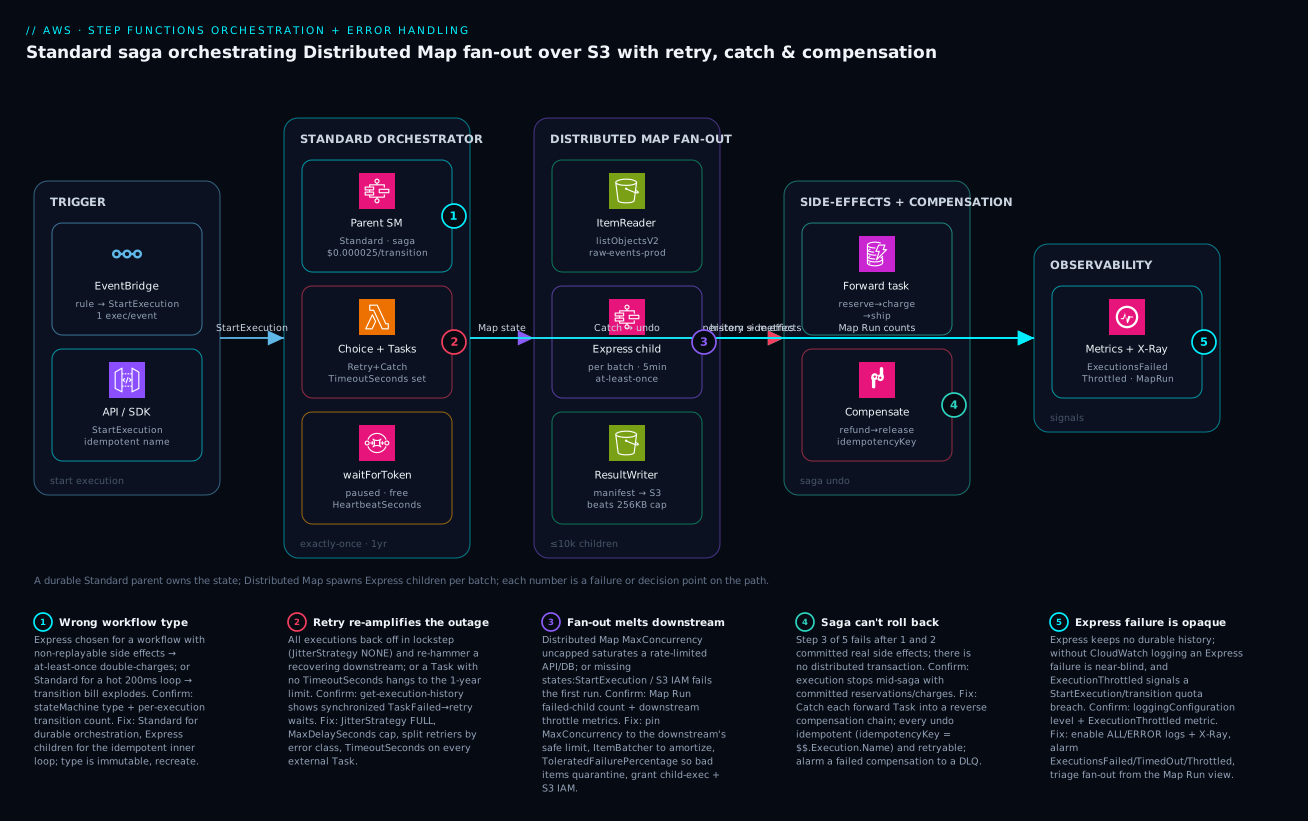
Real-world scenario
Lumira Media runs a nightly pipeline that transcodes every asset uploaded that day — typically 60,000 objects under an S3 prefix — into three renditions each. The platform team is five engineers; the workload is in us-east-1 and the original design was an inline Map that read the object list into the parent execution and fanned out. It worked at a few thousand items and then wedged: the parent execution’s 256 KB state payload overflowed on the object list well before they reached peak volume, and the inline 40-concurrency cap meant the few runs that did start took most of the night.
The constraints were hard. The full batch had to finish inside a 6-hour window before downstream publishing began. A handful of corrupt source files were expected nightly and must not fail the whole run. And the transcoder was a rate-limited internal service that fell over above ~400 concurrent jobs — so “just raise concurrency” was the exact move that would cause an outage. The first attempt to fix the wedge had made it worse: an engineer set inline Map MaxConcurrency to 0 (unlimited), which immediately saturated the transcoder and triggered a cascading failure that took down an unrelated service sharing the same backend pool.
The redesign moved to Distributed Map reading the prefix via s3:listObjectsV2, with ExecutionType: EXPRESS children, MaxConcurrency pinned to 400 to respect the transcoder, an ItemBatcher of 20 to amortize invocation cost, and ToleratedFailurePercentage: 1 so a few bad files were quarantined rather than fatal. ResultWriter wrote a per-item manifest to S3 that the publishing stage consumed directly. Critically, the per-item Task carried a jittered retrier — JitterStrategy: FULL, MaxDelaySeconds: 30 — because the first un-jittered version had produced a secondary thundering herd: when the transcoder briefly 503’d, 400 children retried in lockstep and re-toppled it.
"TranscodeAll": {
  "Type": "Map",
  "ItemReader": {
    "Resource": "arn:aws:states:::s3:listObjectsV2",
    "Parameters": { "Bucket.$": "$.bucket", "Prefix.$": "$.todayPrefix" }
  },
  "ItemProcessor": {
    "ProcessorConfig": { "Mode": "DISTRIBUTED", "ExecutionType": "EXPRESS" },
    "StartAt": "Transcode",
    "States": {
      "Transcode": {
        "Type": "Task",
        "Resource": "arn:aws:states:::lambda:invoke",
        "Parameters": { "FunctionName": "transcode-batch", "Payload.$": "$" },
        "Retry": [
          { "ErrorEquals": ["Transcoder.Throttled"], "IntervalSeconds": 2,
            "BackoffRate": 2.0, "MaxAttempts": 5, "MaxDelaySeconds": 30, "JitterStrategy": "FULL" }
        ],
        "End": true
      }
    }
  },
  "ItemBatcher": { "MaxItemsPerBatch": 20 },
  "MaxConcurrency": 400,
  "ToleratedFailurePercentage": 1,
  "ResultWriter": {
    "Resource": "arn:aws:states:::s3:putObject",
    "Parameters": { "Bucket.$": "$.resultsBucket", "Prefix": "transcode-runs/" }
  },
  "End": true
}
A CloudWatch alarm on the Map Run failed-child count caught the rare night when corruption spiked past the 1% tolerance, and an ExecutionThrottled alarm on the parent would have caught the original unlimited-concurrency mistake before it cascaded. The pipeline now finishes a 60,000-object night in under two hours, the transcoder stays under its concurrency ceiling, and corrupt files land in a results manifest for morning review instead of failing the batch. No new infrastructure — just the right Map mode, an honest concurrency cap, and jittered retries against the one service that could not be rushed.
The incident-and-redesign as a timeline, because the order of moves is the lesson:
| Stage | Symptom | Action | Effect | What it should have been |
|---|---|---|---|---|
| Original | Inline Map wedges ~3k items |
(none) | Payload overflow + 40-cap | Distributed Map from the start |
| Panic fix | “Raise concurrency” | Inline Map MaxConcurrency: 0 |
Transcoder saturated; cascade | Cap to the downstream’s 400 limit |
| Redesign | Need 10k+ scale | Distributed Map + Express children | Scales to 60k | — |
| First run | Transcoder 503s briefly | Un-jittered retry | Lockstep herd re-topples it | JitterStrategy: FULL + cap |
| Stabilized | A few corrupt files | ToleratedFailurePercentage: 1 |
Bad items quarantined | — |
| Steady state | 60k in <2h | Map Run + ExecutionThrottled alarms |
Visible, bounded, safe | The actual fix |
Advantages and disadvantages
Owning orchestration in a managed state machine both solves this class of problem and introduces its own sharp edges. Weigh it honestly:
| Advantages (why this model helps you) | Disadvantages (why it bites) |
|---|---|
| The service owns durable state — recovery, retries, and compensation are declarative, not hand-rolled | The workflow type is immutable; a wrong Standard/Express choice means recreating the state machine |
| Standard’s exactly-once history is the best debugging artifact in serverless | Express has no durable history — a failure is near-blind without CloudWatch logging |
| Distributed Map fans out to 10,000 children over millions of items with no servers | Uncapped MaxConcurrency melts a rate-limited downstream — the fan-out is a loaded gun |
Retry/Catch/TimeoutSeconds are first-class, declarative resilience |
Defaults are unsafe: JitterStrategy: NONE, no TimeoutSeconds, MaxConcurrency: 0 |
| Optimized SDK integrations cut Lambda invocations, cost, and cold starts | The saga has no rollback — you must design every inverse action yourself |
waitForTaskToken models human/async steps with free, year-long pauses (Standard) |
A waitForTaskToken Task with no HeartbeatSeconds can pause for a year on a dead worker |
| Per-transition billing makes long waits effectively free on Standard | Standard on a hot, short, high-volume firehose racks up a large transition bill |
| The Map Run view triages a fan-out at a glance | Distributed Map needs extra IAM (states:StartExecution, S3) that fails silently if missing |
The model is right when you have a multi-step business process with non-replayable side effects, a need for durable audit, fan-out at real scale, or human-in-the-loop steps. It is the wrong tool for a single fast transform (just use a Lambda) or pure buffering/fan-out without state (use SQS/SNS/EventBridge). The disadvantages are all manageable — but only if you know they exist, which is the point of every table above.
Hands-on lab
Build, run, and deliberately break a small Standard workflow with retry and catch — all free-tier-friendly (Step Functions Standard includes 4,000 free state transitions/month). Run in CloudShell or any shell with the AWS CLI configured.
Step 1 — Variables and an execution role.
REGION=us-east-1
ACCT=$(aws sts get-caller-identity --query Account --output text)
ROLE_ARN=$(aws iam create-role --role-name sfn-lab-role \
  --assume-role-policy-document '{"Version":"2012-10-17","Statement":[{"Effect":"Allow","Principal":{"Service":"states.amazonaws.com"},"Action":"sts:AssumeRole"}]}' \
  --query 'Role.Arn' --output text)
aws iam attach-role-policy --role-name sfn-lab-role \
  --policy-arn arn:aws:iam::aws:policy/AWSLambdaRole   # invoke any Lambda for the lab
Expected: a role ARN like arn:aws:iam::<acct>:role/sfn-lab-role.
Step 2 — A definition with a retrier and a catch. Save as lab.asl.json. It calls a (nonexistent) function so you can watch the retry/catch fire.
{
  "Comment": "Retry + Catch lab",
  "StartAt": "DoWork",
  "States": {
    "DoWork": {
      "Type": "Task",
      "Resource": "arn:aws:states:::lambda:invoke",
      "Parameters": { "FunctionName": "does-not-exist", "Payload.$": "$" },
      "TimeoutSeconds": 30,
      "Retry": [
        { "ErrorEquals": ["Lambda.TooManyRequestsException"], "IntervalSeconds": 1,
          "BackoffRate": 2.0, "MaxAttempts": 3, "MaxDelaySeconds": 10, "JitterStrategy": "FULL" }
      ],
      "Catch": [ { "ErrorEquals": ["States.ALL"], "ResultPath": "$.error", "Next": "Handled" } ],
      "Next": "Done"
    },
    "Handled": { "Type": "Pass", "Result": { "handled": true }, "End": true },
    "Done": { "Type": "Succeed" }
  }
}
Step 3 — Statically validate before creating anything (no resources made).
aws stepfunctions validate-state-machine-definition \
  --definition file://lab.asl.json \
  --query '{result:result,diagnostics:diagnostics}'
Expected: "result": "OK" with an empty diagnostics array.
Step 4 — Create the Standard state machine.
SM_ARN=$(aws stepfunctions create-state-machine \
  --name sfn-lab --type STANDARD \
  --definition file://lab.asl.json --role-arn "$ROLE_ARN" \
  --query 'stateMachineArn' --output text)
echo "$SM_ARN"
Step 5 — Start an execution and capture its ARN.
EXEC_ARN=$(aws stepfunctions start-execution --state-machine-arn "$SM_ARN" \
  --input '{"hello":"world"}' --query 'executionArn' --output text)
Step 6 — Poll to terminal status (expect SUCCEEDED via the Catch).
aws stepfunctions describe-execution --execution-arn "$EXEC_ARN" \
  --query '{status:status,output:output}'
Expected: "status": "SUCCEEDED" and an output containing "handled": true — the Task failed (no such function), the Catch routed to Handled, and the run succeeded gracefully.
Step 7 — Confirm the failure/catch actually happened in the history.
aws stepfunctions get-execution-history --execution-arn "$EXEC_ARN" \
  --query 'events[?type==`TaskFailed` || type==`PassStateEntered`].type'
Expected: a TaskFailed followed by a PassStateEntered — proof the catch fired.
Step 8 — Teardown.
aws stepfunctions delete-state-machine --state-machine-arn "$SM_ARN"
aws iam detach-role-policy --role-name sfn-lab-role \
  --policy-arn arn:aws:iam::aws:policy/AWSLambdaRole
aws iam delete-role --role-name sfn-lab-role
Practice challenges
Work these in order — they climb from a one-line fix to a full incident recovery. Try each before opening its solution; the one-line why under each answer is the part worth remembering.
Challenge 1 (beginner) — Stop a Choice from crashing. This Choice routes high-value orders to review but throws States.NoChoiceMatched on everything else. Fix it.
"Route": {
  "Type": "Choice",
  "Choices": [
    { "Variable": "$.order.totalUsd", "NumericGreaterThan": 10000, "Next": "ManualReview" }
  ]
}
<details> <summary>Solution</summary>
Add a Default so unmatched input has somewhere to go:
"Route": {
  "Type": "Choice",
  "Choices": [
    { "Variable": "$.order.totalUsd", "NumericGreaterThan": 10000, "Next": "ManualReview" }
  ],
  "Default": "ProcessOrder"
}
Why: a Choice with no matching rule and no Default fails the execution with States.NoChoiceMatched — every Choice needs a catch-all path.
</details>
Challenge 2 (beginner) — Pick the type. You must process 20 million click events a month; each is a self-contained, idempotent enrichment that finishes in ~150 ms and needs no audit trail. Standard or Express, and what one property is mandatory?
<details> <summary>Solution</summary>
Express — high volume, short, idempotent, no durable history needed makes it dramatically cheaper per item than Standard. Mandatory property: idempotency, because Express is at-least-once and will occasionally run a Task twice; enable CloudWatch logging too, since Express keeps no durable history.
Why: the type is chosen by durability and cost shape, not habit — hot idempotent streams are the textbook Express case, and at-least-once makes idempotency non-negotiable. </details>
Challenge 3 (intermediate) — Escape the inline Map ceiling. An inline Map over 80,000 S3 objects fails with States.DataLimitExceeded, and the downstream API is safe only up to ~300 concurrent calls. Rewrite the state as a Distributed Map that respects that limit and quarantines up to 2% bad files.
<details> <summary>Solution</summary>
"ProcessObjects": {
  "Type": "Map",
  "ItemReader": {
    "Resource": "arn:aws:states:::s3:listObjectsV2",
    "Parameters": { "Bucket": "raw-prod", "Prefix": "incoming/" }
  },
  "ItemProcessor": {
    "ProcessorConfig": { "Mode": "DISTRIBUTED", "ExecutionType": "EXPRESS" },
    "StartAt": "Handle",
    "States": { "Handle": {
      "Type": "Task", "Resource": "arn:aws:states:::lambda:invoke",
      "Parameters": { "FunctionName": "handle-object", "Payload.$": "$" }, "End": true } }
  },
  "ItemBatcher": { "MaxItemsPerBatch": 50 },
  "MaxConcurrency": 300,
  "ToleratedFailurePercentage": 2,
  "ResultWriter": {
    "Resource": "arn:aws:states:::s3:putObject",
    "Parameters": { "Bucket": "results-prod", "Prefix": "runs/" }
  },
  "End": true
}
Grant the role states:StartExecution, s3:ListBucket, s3:GetObject, and s3:PutObject.
Why: Distributed Map gives each child its own 256 KB budget (killing the overflow), and MaxConcurrency is a throttle on the downstream, not a performance knob — pin it to the service’s tested safe limit.
</details>
Challenge 4 (intermediate) — Split the retriers. A payment Task should retry throttling aggressively but timeouts only cautiously, and it must never re-hammer the API in lockstep. Write the Retry array.
<details> <summary>Solution</summary>
"Retry": [
  { "ErrorEquals": ["Lambda.TooManyRequestsException", "PaymentApi.RateLimited"],
    "IntervalSeconds": 1, "BackoffRate": 2.0, "MaxAttempts": 6,
    "MaxDelaySeconds": 20, "JitterStrategy": "FULL" },
  { "ErrorEquals": ["States.Timeout"],
    "IntervalSeconds": 2, "BackoffRate": 2.0, "MaxAttempts": 2 }
]
Why: retriers are evaluated in order and each keeps its own counter, so separate rules let rate limits retry hard while timeouts fail fast — and JitterStrategy: FULL + MaxDelaySeconds defeat the thundering herd that lockstep backoff creates.
</details>
Challenge 5 (advanced) — Design a saga. Reserve inventory → charge card → create shipment. If shipment creation fails, the money and the stock must not be left committed. Sketch the Catch and the compensation chain, and name the idempotency key for the refund.
<details> <summary>Solution</summary>
"CreateShipment": {
  "Type": "Task", "Resource": "arn:aws:states:::lambda:invoke",
  "Parameters": { "FunctionName": "create-shipment", "Payload.$": "$" },
  "Catch": [ { "ErrorEquals": ["States.ALL"], "ResultPath": "$.error", "Next": "RefundCharge" } ],
  "Next": "OrderComplete"
},
"RefundCharge": {
  "Type": "Task", "Resource": "arn:aws:states:::lambda:invoke",
  "Parameters": { "FunctionName": "refund-charge",
    "Payload": { "chargeId.$": "$.chargeId", "idempotencyKey.$": "$$.Execution.Name" } },
  "Retry": [ { "ErrorEquals": ["States.ALL"], "MaxAttempts": 5, "JitterStrategy": "FULL" } ],
  "Next": "ReleaseInventory"
},
"ReleaseInventory": {
  "Type": "Task", "Resource": "arn:aws:states:::lambda:invoke",
  "Parameters": { "FunctionName": "release-inventory", "Payload.$": "$.reservation" },
  "Next": "OrderFailed"
},
"OrderFailed": { "Type": "Fail", "Error": "OrderFailed", "Cause": "Compensated after shipment failure" }
Idempotency key: $$.Execution.Name — unique and stable for the run, so a retried refund refunds exactly once.
Why: there is no distributed transaction to roll back, so you compensate in reverse (refund before releasing stock) with idempotent, independently-retryable undos — a failed compensation is the worst case, so it gets its own Retry.
</details>
Challenge 6 (advanced) — Recover a partial fan-out. A Standard state machine ran a Distributed Map over 60,000 objects; a transient downstream blip failed 340 children while 59,660 succeeded. The downstream is healthy again. Reprocess only the 340 failures without touching the successes — what do you run, and why not just start a new execution?
<details> <summary>Solution</summary>
aws stepfunctions redrive-execution --execution-arn "$EXEC_ARN"
Redrive restarts the same execution from its failure points; for a Distributed Map it reruns only the failed child executions, leaving the 59,660 successes untouched. A fresh start-execution would reprocess all 60,000 — wasteful and, if the Task has side effects, actively harmful.
Why: redrive resumes a FAILED/TIMED_OUT/ABORTED Standard run from where it broke (eligible for 14 days after it stops), which is the operational complement to a saga’s logical compensation — fix the environment, redrive the residue.
</details>
Common beginner mistakes
These are not operational failures with a symptom-and-fix — they are mental-model errors that lead you to design the wrong thing confidently. Each is a belief a beginner holds, why it is wrong, and the model to replace it with. (The symptom → cause → fix table above is the ops companion to this list.)
“Parallel and Map are basically the same — both run things at once.” They share concurrency and nothing else. Parallel runs a fixed, named set of different branches (validate and enrich and score) and you write each branch out by hand. Map runs one sub-workflow over a variable-length array of the same kind of item (process each line of an order). Right model: Parallel = “do these N different jobs”; Map = “do this one job to each of these things.” If you find yourself copy-pasting near-identical Parallel branches, you wanted Map.
“A synchronous Express call gives me exactly-once, since I get the answer back.” StartSyncExecution only changes when you get the result (inline, instead of an ARN) — it does not change the delivery semantics. Express is at-least-once in every mode. Right model: synchronous ≠ exactly-once. If the call has a side effect, it still needs an idempotency key; only Standard gives you exactly-once.
“I added a Retry block, so this Task is resilient now.” The presence of a retrier is not resilience; its configuration is. A retrier with JitterStrategy: NONE and no MaxDelaySeconds turns a brief downstream blip into a synchronized retry storm that re-topples the recovering service, and a Task with no TimeoutSeconds can hang to the execution limit (a year on Standard) no matter how many retries it has. Right model: resilience lives in JitterStrategy: FULL, a MaxDelaySeconds cap, split retriers per error class, and a TimeoutSeconds on every external Task — not in the word Retry.
“$ and $$ are the same thing with a typo.” $ is the state input — the JSON flowing through the workflow. $$ is the context object — runtime metadata about the execution itself: $$.Execution.Name, $$.Task.Token, $$.Map.Item.Index. Right model: $ is your data; $$ is the engine’s metadata. Idempotency keys and callback tokens come from $$, and reaching into $ for them is a common source of non-deterministic keys.
“Distributed Map is just inline Map with the 40 limit removed.” It is a different execution model, not a bigger dial. Each iteration becomes its own child execution with its own 256 KB budget and its own history; it reads from S3 via ItemReader, needs extra IAM (states:StartExecution, S3 read/write), writes results with ResultWriter, and is triaged in the Map Run view rather than a normal execution graph. Right model: inline Map runs inside your execution; Distributed Map launches a fleet of executions — treat it as a new component with its own permissions and observability.
“I’ll start with one type and switch to the other if it’s wrong.” You cannot flip a state machine between Standard and Express — the type is fixed at creation, and changing it means creating a new state machine (new ARN) and migrating callers. Right model: the type is an irreversible decision made up front — answer “are the side effects replayable, and how hot is the traffic?” before you create anything, and use the nested Standard-parent / Express-child pattern when you genuinely need both.
Common mistakes & troubleshooting
The differentiator. Each row is a real failure mode: the symptom you see, the root cause, the exact command/console path to confirm it, and the fix. Scan to your symptom, then read the detail below.
| # | Symptom | Root cause | Confirm (exact command / path) | Fix |
|---|---|---|---|---|
| 1 | Double-charges / duplicate side effects | Express at-least-once + non-idempotent Task | describe-state-machine shows "type":"EXPRESS"; Task has no idempotency key |
Add idempotency key, or move side effect to a Standard parent |
| 2 | Huge Step Functions bill on a hot workflow | Standard on a short high-volume firehose | Cost Explorer → StateTransition; describe-state-machine type=STANDARD |
Recreate as Express (type is immutable) |
| 3 | Inline Map wedges on a big list |
256 KB payload overflow / 40-concurrency cap | get-execution-history → States.DataLimitExceeded |
Switch to Distributed Map (S3 ItemReader) |
| 4 | Distributed Map fails on first run | Missing states:StartExecution / S3 IAM |
get-execution-history → States.Permissions / AccessDenied |
Add child-exec + S3 perms to the role |
| 5 | A rate-limited downstream falls over | MaxConcurrency uncapped (0) |
Map Run shows full concurrency; downstream throttle metrics spike | Pin MaxConcurrency to the downstream’s safe limit |
| 6 | Recovering service re-toppled by retries | JitterStrategy: NONE → lockstep storm |
get-execution-history shows synchronized retry waits |
Set JitterStrategy: FULL + MaxDelaySeconds |
| 7 | Execution hangs for hours/days | No TimeoutSeconds on a Task |
Execution RUNNING far past expected; no progress events |
Add TimeoutSeconds to every external Task |
| 8 | Callback paused forever | waitForTaskToken worker died, no heartbeat |
Execution RUNNING; no SendTaskSuccess ever arrives |
Add HeartbeatSeconds + worker SendTaskHeartbeat |
| 9 | Partial failure left money stuck | No saga / compensation chain | Execution FAILED mid-flow with committed side effects |
Add Catch → reverse compensation chain |
| 10 | Express failure is unexplained | No CloudWatch logging on the state machine | describe-state-machine → loggingConfiguration OFF |
Enable loggingConfiguration ALL/ERROR |
| 11 | Parallel fails when one branch fails |
Parallel semantics: any branch failure fails all |
History shows one branch Failed aborting the rest |
Use Map with tolerance, or Catch per branch |
| 12 | States.NoChoiceMatched error |
Choice with no Default and no match |
History → States.NoChoiceMatched |
Add a Default state to every Choice |
| 13 | Output truncated / States.DataLimitExceeded |
A Task output exceeded 256 KB | History → States.DataLimitExceeded |
Offload to S3; trim with ResultSelector/ResultPath |
| 14 | ExecutionThrottled spikes |
Exceeding StartExecution/transition quota |
CloudWatch ExecutionThrottled metric nonzero |
Back off the trigger; request a quota increase |
Detail on the costly ones
1 — Express double-charges. At-least-once means a state can run more than once on internal retry. Confirm the type with aws stepfunctions describe-state-machine --state-machine-arn $SM_ARN --query 'type'; if it is EXPRESS and the Task moves money or increments a counter without an idempotency key derived from a stable value ($$.Execution.Name, an order ID), you will eventually double-apply. Fix by making the Task idempotent, or by hoisting the non-replayable step into a Standard parent and keeping only the idempotent inner loop on Express.
5 — Fan-out melts the downstream. MaxConcurrency: 0 means “unlimited up to 10,000.” Against a Lambda transform you are bounded by Lambda concurrency, but against a database or third-party API, unlimited is a self-inflicted outage. Confirm by correlating the Map Run’s concurrency with the downstream’s saturation metric (RDS connections, API 429 rate). Fix by pinning MaxConcurrency to the downstream’s tested safe limit and raising it only while watching that metric — never the Step Functions console.
6 — Retry storm. Confirm by pulling history and looking for retries clustered at identical intervals: get-execution-history ... --query 'events[?type==\TaskFailed`].timestamp’across many executions shows the same timestamps.JitterStrategy: FULLsmears each retry randomly across its window;MaxDelaySeconds` stops exponential growth from ballooning to hours.
9 — No saga. Confirm by checking a FAILED execution’s last successful state in the history — if it is past a side-effect Task (charge, reservation), that effect is committed and orphaned. Fix by giving each forward Task a Catch into a reverse compensation chain whose every undo is idempotent and retryable, with a final failure routed to a DLQ + alarm.
Best practices
- Choose the type by durability and cost shape, not habit. Standard for exactly-once orchestration with non-replayable side effects; Express for high-volume idempotent processing. The choice is irreversible — get it right at creation.
- Make every Express-invoked Task idempotent. At-least-once semantics will run a state twice eventually; a stable idempotency key (
$$.Execution.Name) is mandatory for anything with a side effect. - Use the nested pattern when you need both. A Standard parent for the durable saga, invoking Express children (
startExecution.sync) for the hot inner loops, gives you exactly-once orchestration over cheap fan-out. - Pick
MapvsParalleldeliberately.Mapfor many of the same thing;Parallelfor N different things. Keep inlineMapbelow ~40 concurrency / 256 KB; go Distributed beyond that. - Cap Distributed Map
MaxConcurrencyto the downstream’s safe limit, addItemBatcherto amortize invocation cost, and setToleratedFailurePercentageso a few bad items quarantine instead of failing the run. - Grant Distributed Map its IAM up front —
states:StartExecutionand S3 read/write — or the first run fails withStates.Permissions. - Split retriers by error class and jitter everything that fans out. Aggressive retries for rate limits, cautious for timeouts;
MaxDelaySecondsset;JitterStrategy: FULLto defeat the thundering herd. - Set
TimeoutSecondson every external Task andHeartbeatSecondson everywaitForTaskTokenTask — no Task should ever be able to hang to the execution limit. - Design the saga before you code it. Name every inverse action and idempotency key; run undos in reverse; route a failed compensation to a DLQ and an alarm.
- Prefer optimized SDK integrations over pass-through Lambdas — direct
dynamodb:putItem/sns:publishsaves invocations, cost, and cold starts. - Enable X-Ray on every state machine and CloudWatch Logs on every Express one; alarm on
ExecutionsFailed,ExecutionsTimedOut, andExecutionThrottled. - Exercise the
Catch/compensation path against a deliberately broken downstream before production. An untested undo is untested code on your worst day.
Security notes
Step Functions runs as an identity and touches many services; least privilege is the whole game.
- Scope the execution role per state machine. Grant only the exact actions the Tasks need (
lambda:InvokeFunctionon those functions,dynamodb:PutItemon that table), never a wildcard. A state machine with*is a lateral-movement vector. See IAM least-privilege & permission boundaries. - Distributed Map’s child-execution permission is powerful —
states:StartExecutionlets the role launch workflows; scope it to the specific child state machine ARN, and scope S3 read/write to the exact buckets/prefixes. - Treat
includeExecutionDatain logging as a PII decision. Logging input/output payloads atALLcan write secrets and personal data into CloudWatch Logs; log atERRORin steady state and redact sensitive fields before they enter the state. - Callback tokens are bearer credentials. Anyone holding a
$$.Task.Tokencan resume or fail the execution; deliver tokens over authenticated channels and never log them. - Encrypt the data at rest and in transit. Execution history and CloudWatch Logs support KMS; S3 datasets read by Distributed Map should use SSE-KMS, and the role needs
kms:Decrypton that key. - Use resource policies and conditions to constrain who can
StartExecution(e.g. only a specific EventBridge rule or API role), preventing arbitrary callers from triggering business workflows. - Validate and bound inputs. A
Choiceor Task that trusts caller-supplied amounts/IDs without validation is an injection point; validate early in the workflow and fail closed.
Cost & sizing
What drives the bill depends entirely on the type. Standard bills per state transition ($0.000025 each, us-east-1); Express bills $1.00 per million executions plus $0.00001667 per GB-second of duration. The free tier includes 4,000 Standard state transitions per month.
| Workload | Best type | Rough monthly cost (us-east-1) | Why |
|---|---|---|---|
| 100k orders/mo, 12 states each | Standard | ~$30 (1.2M transitions × $0.000025) | Durable, exactly-once; cheap at this volume |
| 50M events/mo, 200 ms each, 128 MB | Express | ~$50 exec + ~$21 duration ≈ $71 | Per-item Express is far cheaper than Standard here |
| Nightly 60k-item fan-out (batched ×20) | Standard parent + Express children | a few dollars/night | Batching cuts executions 20× |
| Human-approval flow, paused 2 days | Standard | ~$0.0003 / execution | Pauses are free; only transitions bill |
| Same 50M events on Standard (anti-pattern) | (don’t) | ~$25,000 (1B+ transitions) | The cautionary cost of the wrong type |
Sizing levers, ranked by impact:
| Lever | Effect on cost | Effort | Trade-off |
|---|---|---|---|
| Right type (Standard vs Express) | Can be 100–1000× | One decision (at creation) | Irreversible; recreate to change |
ItemBatcher (batch items) |
Cuts executions/transitions N× | Low (Lambda loops over $.Items) |
Lambda must report partial failure |
Collapse trivial Pass states |
Fewer transitions (Standard) | Low | Slightly less explicit data shaping |
| Direct SDK integrations vs Lambda | Removes invocation cost | Low | Only for non-business-logic calls |
| Smaller child memory/duration (Express) | Lower GB-seconds | Medium | Profile first; don’t starve the Task |
Log at ERROR not ALL |
Lower CloudWatch ingestion | Trivial | Less detail when debugging |
In INR terms, a typical order-orchestration workload at ~100k executions/month runs on the order of ₹2,000–3,000/month all-in (transitions + Lambda + logs) — Step Functions itself is rarely the dominant line item; the Lambdas and downstream services usually are. The expensive mistake is not the per-transition price, it is running the wrong type: Express-priced volume on a Standard machine, as the anti-pattern row shows.
Interview & exam questions
Q1. When would you choose Standard over Express, and why is the choice important? Standard for workflows needing exactly-once semantics, durable queryable history, long duration (up to a year), or waitForTaskToken/.sync — i.e. orchestration with non-replayable side effects. Express for high-volume, short, idempotent processing. It matters because the type is immutable after creation and because Express’s at-least-once semantics will double-apply non-idempotent side effects. (SAA-C03, DVA-C02)
Q2. Why must every Task in an Express workflow be idempotent? Express guarantees at-least-once, so the engine can run a state more than once on internal retry. A non-idempotent Task (charge a card, increment a counter) will eventually execute twice. You make it idempotent with a stable key — typically derived from $$.Execution.Name. (DVA-C02)
Q3. What is the difference between inline Map and Distributed Map? Inline Map runs iterations inside the parent execution, capped at 40 concurrent and sharing one 256 KB payload — good for dozens of items. Distributed Map runs each item/batch as its own child execution (own 256 KB, own history), scaling to 10,000 concurrent over millions of items read from S3. (SAA-C03, DOP-C02)
Q4. How do you stop a Distributed Map from overwhelming a rate-limited downstream? Pin MaxConcurrency to the downstream’s tested safe limit (not 0/unlimited), use ItemBatcher to reduce invocation count, and raise concurrency only while watching the downstream’s saturation metric. (DOP-C02)
Q5. What does JitterStrategy: FULL solve? The thundering herd: without jitter, many executions back off by identical intervals and retry in lockstep, re-hammering a recovering service. FULL randomizes each retry across its backoff window, smearing the load. Always pair with MaxDelaySeconds so exponential growth does not balloon to hours. (DOP-C02)
Q6. Step Functions has no distributed transaction — how do you handle a partial failure? With the saga pattern: each forward Task has a Catch that routes to a compensation chain undoing completed work in reverse order. Every undo must be idempotent and retryable; a failed compensation routes to a DLQ and an alarm. (SAA-C03, DOP-C02)
Q7. What are the three service-integration patterns and when do you use each? Request/Response (call and continue, fire-and-forget); .sync (run a job — ECS/Glue/nested SM — and wait without polling); .waitForTaskToken (pause until an external SendTaskSuccess, for human approval or async webhooks). (DVA-C02)
Q8. Why set HeartbeatSeconds on a waitForTaskToken Task? Without it, a worker that dies silently leaves the execution paused until the (possibly year-long) TimeoutSeconds/execution limit. With heartbeats, Step Functions fails the Task promptly when they stop, so your Catch can compensate or alert. (DVA-C02)
Q9. How do you debug a failed Express execution? Express keeps no durable history, so you must enable loggingConfiguration (ALL/ERROR) and ideally X-Ray. Without logs, an Express failure is near-opaque. For Standard, get-execution-history replays every event. (DOP-C02)
Q10. Why prefer optimized SDK integrations over Lambda? They run inside the target service (dynamodb:putItem, sns:publish), so you pay no Lambda invocation, no cold start, and maintain no code. Use Lambda only for genuine business logic, not for shuttling a value into another service. (DVA-C02)
Q11. What CloudWatch metrics do you alarm on for a state machine? ExecutionsFailed (hard failures, page on a sustained rate), ExecutionsTimedOut (stuck callback/slow downstream), and ExecutionThrottled (exceeding StartExecution/transition quotas — back off or raise the quota). (DOP-C02)
Q12. How do you triage a Distributed Map run that came back 98% green? Use the Map Run view in the console: it aggregates child-execution success/failure counts and links straight to the failed children, so you can open the specific failures rather than scanning thousands of green ones. (DOP-C02)
Quick check
- You need a workflow that pauses for a two-day human approval and must record an exact audit trail. Standard or Express, and why?
- An inline
Mapover 80,000 S3 objects keeps failing withStates.DataLimitExceeded. What is the fix? - A retrier uses
IntervalSeconds: 1,BackoffRate: 2.0,MaxAttempts: 8and noMaxDelaySeconds. What is the risk? - Your saga charged a card, then shipment creation failed. What pattern recovers consistency, and what property must the refund Task have?
- An Express workflow is failing in production and you “can’t see anything.” What did you forget to enable?
Answers
- Standard — only Standard offers durable history, exactly-once semantics, and the long-duration
waitForTaskTokenneeded for a multi-day human approval; the pause is free (only transitions bill). - Switch from inline
Mapto Distributed Map with an S3ItemReader— each item/batch becomes its own child execution with its own 256 KB budget, so the full object list never has to fit in the parent’s payload. - The interval balloons exponentially (1, 2, 4, 8, 16, 32, 64, 128 s); without
MaxDelaySecondsa single retry can wait minutes-to-hours, and withoutJitterStrategy: FULLthe retries land in lockstep and re-hammer the downstream. - The saga pattern —
Catchinto a reverse compensation chain (refund, then release inventory). The refund Task must be idempotent (keyed on$$.Execution.Name) so a retried compensation refunds exactly once. - CloudWatch logging (
loggingConfigurationatALL/ERROR) — Express keeps no durable execution history, so without logs (and ideally X-Ray) the failure is near-opaque.
Glossary
-
Amazon States Language (ASL) — the JSON DSL that defines a Step Functions workflow: states, transitions, retries, catches.
-
State machine — the workflow definition; the artifact you version and deploy.
-
Execution — one run of a state machine; the unit you start, query, retry, and bill on.
-
Standard workflow — exactly-once, durable 90-day history, 1-year max, billed per state transition.
-
Express workflow — at-least-once, logs-only, 5-minute max, billed per request + GB-second.
-
Task — the only state with side effects; invokes a Lambda, an SDK action, or a nested state machine.
-
Choice — a state that branches on input using comparison rules.
-
Parallel — runs a fixed set of different branches concurrently and joins on all.
-
Map (inline) — runs the same sub-workflow per array item; ≤40 concurrent, shares one 256 KB payload.
-
Distributed Map — runs each item/batch as its own child execution; ≤10,000 concurrent over S3 datasets of millions.
-
Retry — a backoff-on-error rule on a Task; matches error names, applies exponential backoff with optional jitter.
-
Catch — routes a failure to a handler state; the mechanism behind saga compensation.
-
Saga pattern — a chain of inverse (compensating) actions that undoes committed side effects in reverse order, since there is no distributed transaction.
-
waitForTaskToken— an integration pattern that pauses an execution until an external system callsSendTaskSuccess/SendTaskFailurewith the token. -
Context object (
$$) — runtime metadata ($$.Execution.Name,$$.Task.Token,$$.Map.Item.Index) distinct from state input ($). -
ItemBatcher— Distributed Map control that groups multiple items into one child invocation to amortize overhead. -
ToleratedFailurePercentage— Distributed Map control that allows a fraction of items to fail without failing the whole run. -
Map Run — the console view aggregating a Distributed Map’s child-execution success/failure counts.
-
Version — an immutable, numbered snapshot of a state machine’s definition and configuration (
...:name:3); the unit you promote through environments. -
Alias — a mutable named pointer (
...:name:live) that routesStartExecutiontraffic across up to two versions by weight; the mechanism behind canary and blue-green deployments and instant rollback. -
QueryLanguage — the per-state-machine (or per-state) choice of
JSONPath(default) orJSONatafor input/output processing. -
JSONata — the richer query language (opt-in, 2024) that replaces the five JSONPath fields with
Arguments/Outputand adds full expression support (math, dates, strings, filters) via{% ... %}. -
Variables (
Assign) — a field that stores a value under a name so later states read it as$nameinstead of threading it through every payload; works with both query languages. -
Intrinsic function — a built-in ASL function (
States.Format,States.Array,States.ArrayPartition,States.UUID,States.JsonToString, …) that reshapes data inside the interpreter, replacing a pass-through Lambda. -
Optimized integration — a hand-built service integration (
arn:aws:states:::dynamodb:putItem) with tailored parameters that may support.sync/.waitForTaskToken. -
AWS SDK integration — an auto-generated integration (
arn:aws:states:::aws-sdk:service:action) covering 200+ services and 9,000+ API actions; the fallback for any call without an optimized form. -
.sync(Run a Job) — an integration pattern that calls a service and waits for the underlying job (ECS task, Glue/EMR job, nested state machine) to finish without you polling. -
Redrive — restarting a
FAILED/TIMED_OUT/ABORTEDStandard execution from its point of failure on the same ARN (reusing successful state; for Distributed Map, rerunning only the failed children), eligible for 14 days after it stops. -
Orchestration vs choreography — orchestration is a central state machine directing each step (explicit, auditable, coupled); choreography is services reacting to events with no central brain (loosely coupled, emergent flow). Orchestrate within a business transaction; choreograph across bounded contexts.
Next steps
- Master the unit of work Step Functions orchestrates: AWS Lambda deep dive: runtimes, triggers, layers, concurrency and, for the cold-start angle, Lambda performance: provisioned concurrency & SnapStart.
- See the saga in a full business context: Event-driven order processing with the saga pattern on AWS.
- Decide when to orchestrate versus choreograph: SQS, SNS & EventBridge messaging fundamentals and EventBridge event-driven architecture.
- Make failures visible end to end: AWS X-Ray service map & tracing and CloudWatch & CloudTrail observability deep dive.
- Put it all together at architecture scale: Event-driven serverless architecture on AWS.