In a nutshell
Picture your backups as the spare keys to everything you own, kept in a bank’s safe-deposit vault. If a burglar can walk in, grab the spare keys and melt them down, the good locks upstairs no longer matter. Ransomware works exactly like that: before it encrypts your servers it goes after the backups, because a clean restore turns a ransom demand into an afternoon of rebuilding. The whole job of this lesson is to fit that vault with four independent locks so that even a dishonest bank manager – someone holding every normal key – still cannot destroy the spare keys.
The four locks map one-to-one onto the four Azure Backup controls:
- A time-lock that cannot be wound back – immutability, in the
Lockedstate. Once set, no one (not the admin, not Microsoft) can open a box early; you may add boxes and keep them longer, but never shred one before its time. - A two-person rule on the destructive levers – Multi-User Authorization (MUA) via a Resource Guard. The manager alone cannot empty the vault; a second key-holder who works in a different building (a separate tenant) must approve first.
- A catch-tray under the shredder – soft delete. Anything “deleted” is actually held for 14–180 days, so a deletion can be undone.
- A twin vault in another city – cross-region restore (CRR). If the first building burns down, an out-of-region copy still opens.
If you remember one sentence, make it this: turning a control on is not the same as making it tamper-proof. An unlocked time-lock is only a suggestion; a two-person rule where both people report to the same boss is theatre. This lesson is about the sequence that makes the four locks real – and about proving they work with a live restore instead of trusting a green tick.
Level: Advanced · Time: ~65 min · Format: concept-first, then scannable reference tables you keep open when the pager goes off.
You should already be comfortable with what an Azure Backup vault, an RBAC role, and a recovery point are, and roughly what RTO/RPO and LRS/ZRS/GRS mean – the Learning objectives and Prerequisites sections just below go deeper. By the end you will be able to pick the right vault type, set day-zero redundancy, soak-then-lock immutability, stand up cross-tenant MUA, recover a deleted backup, and prove recoverability with a timed cross-region (and cross-subscription) restore.
Every ransomware tabletop I have run ends at the same uncomfortable question: when the attacker has Backup Contributor on your subscription, what actually stops them from stopping backups, dropping retention to one day, and waiting you out? The honest answer for most tenants is “nothing.” Backups are the last line of defence, which makes the backup control plane the highest-value target in the blast radius. Modern attackers know this – they delete recovery points before they encrypt, because a clean restore turns a seven-figure extortion into a Tuesday-afternoon rebuild. Azure Backup – the platform service that schedules, stores and restores recovery points for Azure VMs, SQL/SAP in VMs, Blobs, Disks, PostgreSQL Flexible Server, Azure Files and AKS – ships four independent controls that together make the vault tamper-resistant even against an admin-level compromise: immutability locks the retention floor, multi-user authorization (MUA) puts destructive operations behind a second tenant’s approval, enhanced soft delete keeps deleted backups recoverable, and cross-region restore (CRR) gives you an out-of-region copy when the primary region is gone.
This is the deep dive on wiring all four correctly, in the right order, and proving they work. The emphasis throughout is sequencing and irreversibility: three of these controls have a one-way door (Locked immutability, AlwaysON soft delete, and the day-zero redundancy choice), and getting the order wrong leaves a gap an attacker walks through. We treat each control as a setting with a value matrix, a default, a “when to flip it”, a trade-off, and a gotcha – because “I enabled immutability” is not the same as “I locked it after a retention review”, and the difference is whether the lock is protection or a self-inflicted ten-year bill.
By the end you will stop trusting the configuration blade. You will know which vault type protects which workload, why GeoRedundant is a prerequisite you cannot retrofit after onboarding, exactly which operations a Resource Guard gates, how to undelete a maliciously deleted backup, and how to prove recoverability by booting from a secondary-region recovery point and timing it. Because this is a reference you will return to during an incident, every control, limit, error and recovery path is laid out as scannable tables – read the prose once, then keep the tables open when the pager goes off.
What problem this solves
The pain is concrete and it is always the same: backups are the one resource whose destruction is irreversible and whose owner – the backup admin – has exactly the standing rights an attacker wants. Standard RBAC does not save you here. Backup Contributor legitimately includes “stop protection and delete backup data”, “disable soft delete”, and “modify retention” – those are normal day-job operations. So a compromised CI service principal, a phished admin, or a malicious insider with that role can quietly demolish your recovery path before anyone notices the encryption, and standard role separation does nothing because the role is doing what it is designed to do.
What breaks without these controls: the recovery point that would have saved you is gone before you reach for it. The team discovers during the incident – the worst possible time – that “we have backups” meant “we had backups until the attacker, holding our own admin role, deleted them.” Soft delete was off or fixed at the old 14-day basic tier and was disabled in the same script. Immutability was never enabled, or was enabled-but-never-locked so the attacker disabled it first. The vault was LocallyRedundant so when the region had a real outage there was no second copy to restore from. Each of these is a five-minute configuration that nobody sequenced.
Who hits this: every platform team that centralises backup, every regulated estate (finance, health, public sector) that must demonstrate WORM (write-once-read-many) retention to an auditor, and every organisation that has done – or fears – a ransomware tabletop and asked the uncomfortable question above. It bites hardest where backup rights are inherited broadly (CI principals with Contributor at subscription scope), where the same team owns both the workload and the guard (separation of duties that is theatre), and where “protected” was assumed to mean “recoverable” without a single restore drill.
To frame the whole field before the deep dive, here is each control, the attack it defeats, the one-way-door risk, and where it is configured:
| Control | Attack it blocks | Reversible? | Configured on | Day-zero or anytime |
|---|---|---|---|---|
| Redundancy = GeoRedundant | Region-loss with no second copy | Only while 0 protected items | Vault backup-properties | Day-zero (locks after first item) |
| Cross-region restore (CRR) | “Region is down” becomes an outage | Flag toggles, needs GRS | Vault backup-properties | Day-zero (needs GRS first) |
| Immutability (Unlocked) | Delete-before-retention, retention cut | Yes (admin can disable) | Vault securitySettings | Anytime (soak here) |
| Immutability (Locked) | Same, but attacker-proof | No – irreversible | Vault securitySettings | After soak + retention review |
| Enhanced soft delete (AlwaysON) | Deleting backups to destroy recovery | No – can’t disable | Vault backup-properties | Anytime (extend only) |
| MUA via Resource Guard | Disabling any of the above | Yes (unmap the guard) | Cross-tenant guard mapping | Anytime (put guard cross-tenant) |
Learning objectives
By the end of this article you can:
- Choose the correct vault type – Recovery Services vault vs Backup vault – per workload, and explain what each protects and why they are not interchangeable.
- Set vault redundancy to
GeoRedundantand enable the CRR flag before onboarding any item, and explain why this is a day-zero, can’t-retrofit decision. - Enable vault immutability in the
Unlockedsoak state, soak it through a release cycle, then flip it toLockedafter a retention review – understanding thatLockedis irreversible. - Configure enhanced soft delete to
AlwaysONwith a 14–180 day retention window, and recover a maliciously or accidentally deleted backup withundelete+ resume. - Stand up a Resource Guard in a separate tenant/subscription, map every production vault to it, and gate destructive operations behind PIM-activated, time-bound Backup Operator – so no standing access can self-approve.
- Build a defensible GFS backup policy, right-size instant-restore snapshot retention for cost, and understand why you must do this before locking the vault.
- Perform a cross-region restore from the paired region on demand, wire vault diagnostics to Log Analytics, alert on destructive operations, and prove recoverability with a timed restore drill.
Prerequisites & where this fits
You should already understand Azure Backup basics: a vault is the resource that holds backup policies and recovery points; an App Service plan-style “rent the capacity” model does not apply – you pay for protected-instance count and storage consumed. You should know how to run az in Cloud Shell, read JSON output, and that RBAC roles like Backup Contributor / Backup Operator / Backup Reader scope to a vault or its parent. Familiarity with RTO (recovery time objective) and RPO (recovery point objective), geo-paired regions, and the difference between LRS/ZRS/GRS storage redundancy helps a great deal.
This sits in the Backup, DR & Resilience track and is the security-hardening capstone for it. It assumes the storage-redundancy fundamentals from the Azure Storage Accounts Deep Dive and the data-protection model in Azure Blob Storage: lifecycle, immutability & soft delete. It builds directly on Azure Backup & Site Recovery Deep Dive for the protection mechanics, and the cross-region story pairs with Azure Site Recovery: zone-to-zone & region failover runbooks and the RTO/RPO framing in HA vs DR. The MUA pattern leans on Azure PIM for resources & groups and break-glass emergency access. For the broader pattern across clouds, see Ransomware resilience: immutable backup & isolated recovery environment.
A quick map of who owns and confirms each control during a hardening project, so you assign the work correctly:
| Layer | What lives here | Who usually owns it | What it defends |
|---|---|---|---|
| Vault redundancy / CRR | Storage replication, paired-region copy | Platform / backup squad | Region loss, out-of-region restore |
| Immutability | WORM retention floor | Backup squad + compliance | Delete-before-retention, retention cut |
| Soft delete | Deleted-item recovery window | Backup squad | Accidental/malicious deletion |
| Resource Guard (MUA) | Approval gate for destructive ops | Security team (separate tenant) | Insider / compromised-admin attack |
| PIM on the guard | Just-in-time Backup Operator | Identity / security team | Standing-access elimination |
| Diagnostics & alerts | Job logs, destructive-op alerts | Observability / SOC | Detection of attempted strips |
Core concepts
Five mental models make every later decision obvious.
The backup control plane is the attack surface, not the data plane. Attackers do not brute-force your encrypted recovery points; they use your own RBAC to delete them through the management API. Every control here defends the control plane: it makes a destructive management operation either impossible (immutability, soft-delete AlwaysON) or subject to out-of-band approval (MUA). The data is incidental; the operation is what you gate.
Three of these doors only open once. The day-zero redundancy choice (changeable only at zero protected items), Locked immutability, and AlwaysON soft delete are all one-way. This is deliberate – a control an admin can switch off is a control an attacker-as-admin can switch off. The cost of the one-way door is that you must get the value right before you walk through it: lock a 10-year retention by mistake and you pay for 10 years; that is the trade for tamper-resistance.
Immutability gates the destructive direction only. Vault immutability blocks operations that reduce protection of existing recovery points – deleting data before retention expires, shortening a policy’s retention, disabling soft delete. It never blocks creating new backups or extending retention. So immutability is not “freeze the vault”; it is “you can add and lengthen, you can never shorten or delete early.”
MUA is separation of duties, not a checkbox. A Resource Guard is a separate resource (Microsoft.DataProtection/resourceGuards) that you place where the backup admin has no permissions – ideally a different tenant owned by the security team. After you map a vault to it, the gated destructive operations require a just-in-time Backup Operator role on the guard, granted by the other team via PIM. If you put the guard in the same subscription the backup admin owns, the admin (or the attacker who became them) can self-approve, and you have built a speed bump, not a control.
“Protected” is not “recoverable” until you have restored. A green configuration blade and an untested restore is the oldest trap in DR. Cross-region restore in particular fails for boring reasons – the staging storage account or target resource group does not exist in the secondary region, the redundancy was never GeoRedundant, the CRR flag was never set. You only know you can recover after you have booted a VM from a secondary-region recovery point and recorded the RTO.
The vocabulary in one table
Before the deep sections, pin down every moving part. The glossary repeats these for lookup; this table is the mental model side by side:
| Concept | One-line definition | Where it lives | Why it matters |
|---|---|---|---|
| Recovery Services vault | Vault for VM / SQL-in-VM / SAP HANA / Files | Microsoft.RecoveryServices/vaults |
The classic IaaS protection plane |
| Backup vault | Vault for Blob / Disk / PostgreSQL / AKS | Microsoft.DataProtection/backupVaults |
The newer managed-data-store plane |
| Immutability | Blocks retention-reducing operations | Vault securitySettings |
WORM floor; Locked is irreversible |
| Soft delete | Keeps deleted backups restorable 14–180d | Vault backup-properties | Recover from deletion; AlwaysON = can’t disable |
| Resource Guard | Approval gate for destructive ops | Microsoft.DataProtection/resourceGuards |
MUA / separation of duties |
| MUA | Multi-user authorization | Vault ↔ guard mapping | Second-team approval for strips |
| Cross-region restore (CRR) | On-demand restore in paired region | Vault flag (needs GRS) | Region-loss recovery without failover |
| GeoRedundant (GRS) | 6 copies, paired-region async | Vault redundancy | Prerequisite for CRR |
| Instant restore | Local snapshot tier (1–5 days) | Backup policy | Fast same-region restore, snapshot cost |
| Recovery point (RP) | One restorable backup at a point in time | In the vault | The thing an attacker deletes |
| GFS | Grandfather-father-son retention ladder | Backup policy | Daily/weekly/monthly/yearly retention |
| Backup Contributor | RBAC role with destructive rights | Vault / parent scope | The role the attacker wants |
The hard limits and quotas worth committing to memory – the ones that shape design decisions:
| Limit | Value | Why it matters |
|---|---|---|
| Soft-delete retention | 14–180 days | Floor 14 (can’t go lower), ceiling 180 |
| Instant-restore snapshot retention | 1–5 days | Snapshot cost lever; default 2 |
| VMs protectable per vault | ~2,000 | Shard large estates across vaults |
| Backup items per vault (all types) | ~5,000 | Plan vault topology for big fleets |
| Daily scheduled backups (enhanced) | up to 6/day | 4-hour minimum interval |
| Yearly retention max | 99 years | Effectively permanent once locked |
| Redundancy change | Only at 0 protected items | Day-zero decision, frozen after |
| Resource Guard protected ops | ~7 default | Some excludable, MUA-disable is not |
| Geo-replication (GRS) lag | up to several hours | Secondary RPs are not instant |
1. Recovery Services vault vs Backup vault, and what each protects
Azure has two vault resource types and they are not interchangeable. Picking the wrong one means re-onboarding workloads later, so get this right on day one. The split is historical: the Recovery Services vault is the original IaaS/in-guest protection plane; the Backup vault is the newer plane for managed data stores that arrived with the Data Protection API.
| Capability | Recovery Services vault | Backup vault |
|---|---|---|
| Resource type | Microsoft.RecoveryServices/vaults |
Microsoft.DataProtection/backupVaults |
| Azure VMs | Yes (snapshot + vault) | No |
| SQL in Azure VM | Yes | No |
| SAP HANA in Azure VM | Yes | No |
| Azure Files | Yes (snapshot) | Yes (vaulted) |
| Azure Blobs | No | Yes (operational + vaulted) |
| Azure Managed Disks | No | Yes |
| Azure Database for PostgreSQL Flexible Server | No | Yes |
| AKS (cluster state + PV) | No | Yes |
| Immutability | Yes | Yes |
| MUA via Resource Guard | Yes | Yes |
| Enhanced soft delete | Yes | Yes |
| Cross-region restore | Yes (VM/SQL/HANA) | Yes (selected workloads) |
The rule of thumb: Recovery Services vault for the classic IaaS and in-guest workloads (VMs, SQL-in-VM, SAP HANA-in-VM, snapshot-based Azure Files), Backup vault for the newer managed-data-store estate (Blobs, Disks, PostgreSQL Flexible Server, AKS, vaulted Azure Files). Many platform teams run both, and that is expected – they are governed the same way for immutability and MUA, which is the whole point of this article. Map your estate before you create anything:
| Workload | Vault to use | Backup type | CRR available |
|---|---|---|---|
| Azure VM (Windows/Linux) | Recovery Services | Snapshot + vaulted | Yes |
| SQL Server in Azure VM | Recovery Services | Log + full/diff | Yes |
| SAP HANA in Azure VM | Recovery Services | HANA backint | Yes |
| Azure Files (snapshot) | Recovery Services | Share snapshot | No (snapshot is in-region) |
| Azure Files (vaulted) | Backup vault | Vaulted | Limited |
| Azure Blob (operational) | Backup vault | Operational (no data copy) | No |
| Azure Blob (vaulted) | Backup vault | Vaulted copy | Selected |
| Azure Managed Disk | Backup vault | Incremental snapshot | No |
| PostgreSQL Flexible Server | Backup vault | Vaulted | Selected |
| AKS | Backup vault | Cluster + PV | No |
| On-prem servers (MARS agent) | Recovery Services | File/folder + system state | No |
| On-prem VMs (MABS/DPM) | Recovery Services | Disk-to-disk-to-vault | No |
Now the day-zero properties. Create a Recovery Services vault and immediately set redundancy and CRR – storage redundancy is only changeable while the vault has zero protected items, so this is the first decision, not a later tuning step:
az backup vault create \
  --resource-group rg-backup-prod \
  --name rsv-prod-weu \
  --location westeurope

# GeoRedundant + CrossRegionRestore enabled is the prerequisite for CRR.
# This MUST happen before you onboard the first item.
az backup vault backup-properties set \
  --resource-group rg-backup-prod \
  --name rsv-prod-weu \
  --backup-storage-redundancy GeoRedundant \
  --cross-region-restore-flag true
resource vault 'Microsoft.RecoveryServices/vaults@2024-04-01' = {
  name: 'rsv-prod-weu'
  location: 'westeurope'
  sku: { name: 'RS0', tier: 'Standard' }
  identity: { type: 'SystemAssigned' } // for cross-tenant guard + CMK later
  properties: {}
}

// Redundancy + CRR are set on the backup config sub-resource.
resource vaultConfig 'Microsoft.RecoveryServices/vaults/backupstorageconfig@2023-04-01' = {
  parent: vault
  name: 'vaultstorageconfig'
  properties: {
    storageModelType: 'GeoRedundant'
    crossRegionRestoreFlag: true
  }
}
The redundancy options, what they cost you, and what they protect against:
| Redundancy | Copies | Protects against | CRR support | Relative cost |
|---|---|---|---|---|
| LocallyRedundant (LRS) | 3 (one datacentre) | Disk/rack/node failure | No | Lowest |
| ZoneRedundant (ZRS) | 3 (across AZs) | Single-AZ loss in-region | No (no 2nd region) | Medium |
| GeoRedundant (GRS) | 6 (3 local + 3 paired) | Full region loss | Yes | Highest |
| Geo-Zone-Redundant (GZRS) | 6 (3 AZ-spread + 3 paired) | AZ loss and region loss | Storage-account only (not vault default) | Highest+ |
Cross-region restore requires
GeoRedundantstorage. It does not work withLocallyRedundantorZoneRedundant. If you need both zone resilience and CRR, that is not a single setting – ZRS protects you within the region, GRS+CRR uses the geo-paired region. Decide which failure mode dominates your risk model before you onboard anything, because after the first protected item the redundancy is frozen.
2. Immutable vaults: unlocked vs locked, and the operational trade-off
Vault immutability prevents operations that would reduce the protection of existing recovery points: deleting backup data before its retention expires, shortening retention in a policy, or disabling soft delete. It does not block creating new backups or extending retention – only the destructive direction is gated. This is the single most-misunderstood control: people enable it, feel safe, and never lock it – which means an admin (or attacker) can simply disable it and then delete.
There are two states, and the difference is whether you can ever go back:
| State | Protection active? | Can an admin disable it? | Attacker-proof? | Use it as |
|---|---|---|---|---|
| Disabled | No | n/a | No | Pre-hardening default |
| Unlocked | Yes | Yes | No | The soak / test period |
| Locked | Yes | No – irreversible | Yes | Final production state |
Enable it unlocked first via the vault’s securitySettings. With the CLI you patch the vault property:
# Step 1: enable immutability in the "Unlocked" state for a soak period.
az resource update \
  --resource-group rg-backup-prod \
  --name rsv-prod-weu \
  --resource-type Microsoft.RecoveryServices/vaults \
  --set properties.securitySettings.immutabilitySettings.state=Unlocked
Run unlocked for a release cycle or two. Confirm no automation breaks – the usual offenders are decommissioning pipelines that delete backups early, or policy-as-code that lowers retention. Once you are confident, lock it. In Bicep the locked state is explicit and intentional:
resource vault 'Microsoft.RecoveryServices/vaults@2024-04-01' = {
  name: 'rsv-prod-weu'
  location: 'westeurope'
  sku: { name: 'RS0', tier: 'Standard' }
  properties: {
    securitySettings: {
      immutabilitySettings: {
        // 'Locked' is irreversible. Deploy this only after soaking on 'Unlocked'.
        state: 'Locked'
      }
    }
  }
}
Exactly which operations immutability blocks once active – this is the contract, memorise it:
| Operation | Blocked by immutability? | Why |
|---|---|---|
| Create a new backup / recovery point | No | Adds protection |
| Extend retention in a policy | No | Lengthens protection |
| Stop protection, retain data | No | Data is kept |
| Delete a recovery point before retention expires | Yes | Reduces protection |
| Shorten retention duration in a policy | Yes | Reduces protection |
| Stop protection with delete data | Yes | Destroys protection |
| Disable soft delete | Yes | Removes the safety net |
| Reduce soft-delete retention | Yes | Shrinks the recovery window |
| Modify a policy to lower retention | Yes | Reduces protection of existing RPs |
| Change vault redundancy | n/a | Separately frozen after first item |
The operational trade-off is real: once locked, you cannot shorten retention even for a legitimate cost-cutting exercise. If you set a 10-year policy by mistake and lock the vault, you pay for 10 years. Treat the lock like a production change-freeze decision – review every active policy’s retention before you flip it. The decision of when to move between states:
| If you are… | Immutability state | Because |
|---|---|---|
| Standing up a brand-new vault | Disabled → Unlocked same day | Start soaking immediately |
| Mid-soak, automation still being audited | Unlocked | You may need to disable if a pipeline breaks |
| Soaked clean, retention reviewed, compliance signed off | Locked | Now attacker-proof; one-way door accepted |
| Unsure whether a policy is over-long | Do not lock yet | Trim retention first; locking freezes it |
3. Multi-user authorization with Resource Guard across tenants
Immutability stops you reducing protection on existing data. MUA stops the other class of attack: disabling soft delete, deleting the protection entirely, or removing immutability while it is still unlocked. It does this by requiring that destructive vault operations be authorized through a Resource Guard – a separate Microsoft.DataProtection/resourceGuards resource that you deliberately place where the backup admin has no permissions.
The architecture that actually resists insider compromise puts the Resource Guard in a different tenant (or at minimum a different subscription governed by a different team):
Tenant A (workload)                         Tenant B (security)
+-----------------------+                   +------------------------+
| Recovery Services     |   protected by    | Resource Guard         |
| vault                 |------------------>| (no Backup Operator     |
|                       |                   |  for Tenant A admins)   |
| Backup admin: full    |                   | Security admin: owns    |
| rights EXCEPT the     |                   | the guard, approves     |
| guard-protected ops   |                   | critical operations     |
+-----------------------+                   +------------------------+
Create the guard in the security tenant/subscription:
az dataprotection resource-guard create \
  --resource-group rg-security-guards \
  --name rg-prod-resourceguard \
  --location westeurope
resource guard 'Microsoft.DataProtection/resourceGuards@2024-04-01' = {
  name: 'rg-prod-resourceguard'
  location: 'westeurope'
  properties: {} // protects the default critical-operation set
}
By default the guard protects a set of critical operations. Knowing exactly which ones are gated – and which you can optionally exclude – is the difference between real MUA and a guard that protects nothing useful:
| Gated operation | Default protected? | Excludable? | Attack it stops |
|---|---|---|---|
| Disable MUA (remove the guard) | Yes | No | Attacker turning off the gate itself |
| Disable soft delete | Yes | Yes | Pre-deletion safety-net removal |
| Reduce soft-delete retention | Yes | Yes | Shrinking the recovery window |
| Disable immutability (while Unlocked) | Yes | Yes | Removing the WORM floor |
| Stop protection with delete data | Yes | Yes | Destroying recovery points |
| Modify / delete a backup policy | Yes | Yes | Retention tampering |
| Change passphrase (MARS agent) | Yes | Yes | Encryption-key theft for on-prem |
| Remove the Resource Guard mapping | Yes | No | Detaching the gate from the vault |
| Unregister a protected container | Yes | Yes | Orphaning recovery points |
Inspect and tune which operations are gated:
az dataprotection resource-guard list-protected-operations \
  --resource-group rg-security-guards \
  --name rg-prod-resourceguard \
  --resource-type Microsoft.RecoveryServices/vaults
Now associate the vault with the guard. The backup admin in Tenant A needs Reader on the guard (cross-tenant) to create the association, and after this is in place they can no longer perform the protected operations without a just-in-time approval from Tenant B:
# Run as the backup admin, authenticated to BOTH tenants.
az backup vault resource-guard-mapping update \
  --resource-group rg-backup-prod \
  --vault-name rsv-prod-weu \
  --resource-guard-id "/subscriptions/<security-sub>/resourceGroups/rg-security-guards/providers/Microsoft.DataProtection/resourceGuards/rg-prod-resourceguard"
The operating model after association: when the backup team genuinely needs to perform a protected operation (say, retire a workload), the security team grants the backup operator’s identity a time-bound Backup Operator role on the Resource Guard via Azure AD PIM, the operation is performed within the activation window, and the role expires. An attacker who has only compromised Tenant A cannot self-approve – they lack any standing access to the guard.
The roles involved, where they are assigned, and what each can do – get the scope wrong and you either break MUA or lock yourself out:
| Role | Assigned on | Held by | Purpose |
|---|---|---|---|
| Backup Contributor | Vault (Tenant A) | Backup squad (standing) | Day-job: configure, protect, restore |
| Reader | Resource Guard (Tenant B) | Backup admin (standing) | Create the vault↔guard mapping |
| Backup MUA Operator / Backup Operator | Resource Guard (Tenant B) | Backup admin (JIT via PIM only) | Approve a single destructive op in-window |
| Owner / User Access Admin | Resource Guard (Tenant B) | Security team only | Grant the JIT role; never Tenant A |
That separation of duties is the entire value of MUA. The placement decision is the whole control – if you co-locate the guard, you get nothing:
| Guard placement | Separation strength | An attacker-as-backup-admin can… | Verdict |
|---|---|---|---|
| Same subscription as vault | None | Self-grant Backup Operator on the guard | Theatre – do not do this |
| Different subscription, same tenant, same team | Weak | Escalate via tenant-level role | Better than nothing |
| Different subscription, same tenant, different team | Good | Nothing without the other team | Acceptable minimum |
| Different tenant, security team | Strong | Nothing – no cross-tenant standing access | Target architecture |
4. Enhanced soft delete and recovering from deletion
Soft delete keeps backup data retrievable after someone deletes a backup item or stops protection with “delete data.” Enhanced soft delete (the current model for Recovery Services vaults) makes the feature always-on and configurable: you set a retention between 14 and 180 days, and you can optionally make soft delete itself immutable (non-disablable). Basic soft delete was a fixed 14 days and could be turned off – enhanced is the one you want.
The two soft-delete generations side by side:
| Property | Basic soft delete | Enhanced soft delete |
|---|---|---|
| Retention | Fixed 14 days | Configurable 14–180 days |
| Can be disabled | Yes | Optional – AlwaysON makes it permanent |
| Cost during retention | Free | Free for 14 days, then charged |
| Applies to | Recovery Services vault | Recovery Services + Backup vault |
| Recommended | No | Yes |
The three soft-delete feature states and what each means operationally:
| State | Soft delete active? | Disablable? | When to use |
|---|---|---|---|
Disable |
No | n/a | Never in production |
Enable |
Yes | Yes (an admin can turn it off) | Soak period only |
AlwaysON |
Yes | No – irreversible | Production target |
Configure it:
# Configure enhanced soft delete to 30 days. AlwaysON makes it non-disablable.
az backup vault backup-properties set \
  --resource-group rg-backup-prod \
  --name rsv-prod-weu \
  --soft-delete-feature-state AlwaysON \
  --soft-delete-retention-period-in-days 30
resource vaultProps 'Microsoft.RecoveryServices/vaults/backupconfig@2023-04-01' = {
  parent: vault
  name: 'vaultconfig'
  properties: {
    enhancedSecurityState: 'Enabled'
    softDeleteFeatureState: 'AlwaysON'   // irreversible
    softDeleteRetentionPeriodInDays: 30  // 14-180
  }
}
AlwaysONis irreversible in the same spirit as locked immutability – you can extend the retention but never disable the feature. Combined with immutability and MUA, you now have three controls that an admin-level attacker cannot individually defeat: they cannot delete inside retention (immutability), cannot turn off soft delete (AlwaysON), and cannot disable any of it without the guard (MUA).
When a backup is deleted – maliciously or by a fat-fingered decommission script – the item moves to a soft-deleted state. Recovery is undelete-then-resume:
# List soft-deleted items.
az backup item list \
  --resource-group rg-backup-prod \
  --vault-name rsv-prod-weu \
  --backup-management-type AzureIaasVM \
  --query "[?properties.isScheduledForDeferredDelete].name" -o tsv

# Undelete and re-enable protection for a specific VM.
az backup protection undelete \
  --resource-group rg-backup-prod \
  --vault-name rsv-prod-weu \
  --container-name <container> \
  --item-name <vm-name> \
  --backup-management-type AzureIaasVM \
  --workload-type VM
The deletion-state lifecycle, so you know what is recoverable and for how long:
| Item state | What happened | Recoverable? | Window | Action to recover |
|---|---|---|---|---|
| Protected | Normal, active backups | n/a | n/a | none |
| Stop protection, retain data | Backups paused, RPs kept | Yes | Until retention expires | Resume protection |
| Soft-deleted | Deleted but within soft-delete window | Yes | 14–180 days | undelete + resume |
| Permanently deleted | Soft-delete window expired or skipped | No | gone | Restore from CRR copy if any |
For Backup vaults (Blobs, Disks, PostgreSQL), the equivalent is configured through the vault’s softDeleteSettings with the same 14–180 day window, set via az dataprotection backup-vault update or the portal:
az dataprotection backup-vault update \
  --resource-group rg-backup-prod \
  --vault-name bv-prod-weu \
  --soft-delete-state AlwaysOn \
  --soft-delete-retention-in-days 30
5. Backup policies, retention, and instant-restore snapshots
Policy is where retention lives, and retention is what immutability and MUA enforce. Build the policy deliberately. For Azure VMs, the instant restore tier keeps local snapshots (1–5 days) for fast restores that never touch vault storage, while GRS-replicated recovery points serve long-term and cross-region needs.
A defensible IaaS policy template – daily plus a weekly/monthly/yearly grandfather-father-son ladder:
{
  "schedulePolicy": {
    "schedulePolicyType": "SimpleSchedulePolicy",
    "scheduleRunFrequency": "Daily",
    "scheduleRunTimes": ["2026-06-08T01:00:00Z"]
  },
  "retentionPolicy": {
    "retentionPolicyType": "LongTermRetentionPolicy",
    "dailySchedule":  { "retentionDuration": { "count": 30,  "durationType": "Days"   } },
    "weeklySchedule": { "daysOfTheWeek": ["Sunday"], "retentionDuration": { "count": 12, "durationType": "Weeks" } },
    "monthlySchedule": { "retentionScheduleFormatType": "Weekly", "retentionScheduleWeekly": { "daysOfTheWeek": ["Sunday"], "weeksOfTheMonth": ["First"] }, "retentionDuration": { "count": 36, "durationType": "Months" } },
    "yearlySchedule": { "retentionScheduleFormatType": "Weekly", "monthsOfYear": ["January"], "retentionScheduleWeekly": { "daysOfTheWeek": ["Sunday"], "weeksOfTheMonth": ["First"] }, "retentionDuration": { "count": 7, "durationType": "Years" } }
  },
  "instantRpRetentionRangeInDays": 5,
  "timeZone": "UTC"
}
az backup policy set \
  --resource-group rg-backup-prod \
  --vault-name rsv-prod-weu \
  --name policy-iaas-gfs \
  --policy @iaas-policy.json
The GFS ladder explained – each tier, its purpose, the typical count, and the cost driver:
| Tier | Frequency | Typical retention | Purpose | Cost driver |
|---|---|---|---|---|
| Instant restore | per backup | 1–5 days (snapshot) | Fast same-region restore | Snapshot storage in source sub |
| Daily | daily | 7–30 days | Operational recovery | Vault storage, churn |
| Weekly | 1/week | 4–12 weeks | Rollback past a bad week | Vault storage |
| Monthly | 1/month | 12–36 months | Monthly compliance points | Vault storage |
| Yearly | 1/year | 1–10 years | Long-term / audit WORM | Vault storage (locked = permanent) |
The retention limits and policy knobs that catch people:
| Setting | Range / default | When to change | Trade-off / gotcha |
|---|---|---|---|
instantRpRetentionRangeInDays |
1–5, default 2 | Lower for large chatty VMs (cost) | Snapshot cost in source sub; short = slower same-region restore |
| Daily retention | up to 9999 days | Match operational RPO | Storage grows with churn × retention |
| Weekly/monthly/yearly | up to 99 years (yearly) | Compliance mandate | Locked immutability freezes this |
| Backup frequency | up to several/day (enhanced) | Tighter RPO | More RPs = more storage + snapshot cost |
| Time zone | any | Match maintenance window | Wrong TZ = backup during peak |
| Daily backups per policy (enhanced) | up to 6/day (4-hour min interval) | Tighter RPO on critical DBs | Snapshot + storage cost scales |
| Log backup frequency (SQL) | 15 min–24 h | Sub-15-min RPO for transactions | Storage churn; log chain integrity |
Two retention facts that catch people:
- Instant restore snapshots (
instantRpRetentionRangeInDays, max 5) live in the source subscription and incur snapshot storage cost. Lower it to 1–2 days for chatty, large VMs to control cost; raise it where fast same-region restore matters. - Once the vault is locked-immutable, you cannot shorten any of these durations. Right-size the ladder against your real compliance requirement before locking, or you will overpay for years.
6. Cross-region restore and zone-redundant storage
CRR lets you restore a VM, SQL-in-VM, or SAP HANA backup into the Azure-paired region without waiting for a regional failover or a Microsoft-declared outage – you choose to restore in the secondary on demand. It is the control that turns “the region is down” from an outage into a runbook. The prerequisites, in order:
| # | Prerequisite | Set where | When | If missing |
|---|---|---|---|---|
| 1 | Redundancy = GeoRedundant |
Vault backup-properties | Day-zero, 0 items | No 2nd copy; can’t enable CRR |
| 2 | crossRegionRestore flag = true |
Vault backup-properties | Day-zero (needs GRS) | Secondary RPs not exposed |
| 3 | Workload type supports CRR | n/a (VM/SQL/HANA only) | by design | Other types: no CRR |
| 4 | Staging storage account in secondary | Pre-provisioned | Before incident | Restore fails mid-incident |
| 5 | Target resource group in secondary | Pre-provisioned | Before incident | Nowhere to land disks |
CRR and zone-redundant storage solve different problems and you cannot have both on one vault. The comparison that drives the day-zero choice:
| Dimension | ZoneRedundant (ZRS) | GeoRedundant (GRS) + CRR |
|---|---|---|
| Protects against | Single-AZ loss in primary region | Full primary-region loss |
| Second-region copy | None | Yes (paired region) |
| CRR (on-demand secondary restore) | No | Yes |
| Restore latency | In-region, fast | Cross-region, slower |
| Best when dominant risk is | Zone failure, low-latency in-region HA | Region outage, ransomware, compliance |
For a production vault whose dominant risk is regional or ransomware, choose GeoRedundant + CRR. List the secondary-region recovery points and restore:
# Enumerate recovery points available in the SECONDARY (paired) region.
az backup recoverypoint list \
  --resource-group rg-backup-prod \
  --vault-name rsv-prod-weu \
  --container-name <container> \
  --item-name <vm-name> \
  --backup-management-type AzureIaasVM \
  --workload-type VM \
  --use-secondary-region \
  --query "[].{name:name, time:properties.recoveryPointTime}" -o table

# Restore disks into the secondary region from a secondary recovery point.
az backup restore restore-disks \
  --resource-group rg-backup-prod \
  --vault-name rsv-prod-weu \
  --container-name <container> \
  --item-name <vm-name> \
  --rp-name <recovery-point-id> \
  --use-secondary-region \
  --target-resource-group rg-dr-northeurope \
  --storage-account <staging-sa-in-secondary>
The restore lands disks in the secondary region; you then build the VM from those disks (or use the full-VM restore flow). Note the staging storage account and target resource group must already exist in the secondary region – pre-provision them as part of your DR landing zone, not during the incident. The common geo-pairs you will target:
| Primary region | Azure-paired secondary | Notes |
|---|---|---|
| West Europe | North Europe | Classic EU pair |
| North Europe | West Europe | Symmetric |
| East US | West US | US pair |
| Central India | South India | In-country pair (data residency) |
| Southeast Asia | East Asia | APAC pair |
| UK South | UK West | In-country pair |
Verify – prove each control
Do not trust the configuration blade. Prove each control with a command and, for restore, with an actual recovery:
# 1. Immutability state is Locked.
az resource show \
  --resource-group rg-backup-prod --name rsv-prod-weu \
  --resource-type Microsoft.RecoveryServices/vaults \
  --query "properties.securitySettings.immutabilitySettings.state" -o tsv
# Expect: Locked

# 2. Soft delete is AlwaysON with your retention; redundancy + CRR set.
az backup vault backup-properties show \
  --resource-group rg-backup-prod --name rsv-prod-weu \
  --query "{softDelete:softDeleteFeatureState, days:softDeleteRetentionPeriodInDays, redundancy:storageModelType, crr:crossRegionRestoreFlag}"
# Expect: AlwaysON / 30 / GeoRedundant / true

# 3. Resource Guard mapping exists.
az backup vault resource-guard-mapping show \
  --resource-group rg-backup-prod --vault-name rsv-prod-weu \
  --query "properties.resourceGuardOperationDetails" -o table
// 4. In Log Analytics (vault diagnostics -> CoreAzureBackup), confirm a
// successful secondary-region restore in the last 7 days.
AddonAzureBackupJobs
| where TimeGenerated > ago(7d)
| where BackupItemUniqueId != ""
| where JobOperation == "Restore"
| project TimeGenerated, JobStatus, JobOperation, BackupManagementType, JobUniqueId
| order by TimeGenerated desc
The fourth check is the one that matters. A green config and an untested restore is exactly the trap from the ASR world: “protected” is not “recoverable” until you have booted from a secondary-region recovery point and timed it. The verification matrix you run before signing off:
| Control | Confirm command / path | Expected | If wrong |
|---|---|---|---|
| Redundancy | backup-properties show → storageModelType |
GeoRedundant | Recreate vault (frozen after items) |
| CRR flag | backup-properties show → crossRegionRestoreFlag |
true | Set flag (needs GRS) |
| Immutability | resource show → immutabilitySettings.state |
Locked | Soak then lock |
| Soft delete | backup-properties show → softDeleteFeatureState |
AlwaysON | Set AlwaysON |
| MUA mapping | resource-guard-mapping show |
Guard present | Re-map cross-tenant guard |
| Restore proof | AddonAzureBackupJobs Restore in 7d |
Completed | Run a real drill |
The az command cheat-sheet for this whole posture, in one place to keep open during operations:
| Task | Command (az …) |
|---|---|
| Set redundancy + CRR | backup vault backup-properties set --backup-storage-redundancy GeoRedundant --cross-region-restore-flag true |
| Enable soft delete AlwaysON | backup vault backup-properties set --soft-delete-feature-state AlwaysON --soft-delete-retention-period-in-days 30 |
| Enable immutability (Unlocked) | resource update --set properties.securitySettings.immutabilitySettings.state=Unlocked |
| Lock immutability (irreversible) | resource update --set properties.securitySettings.immutabilitySettings.state=Locked |
| Create Resource Guard | dataprotection resource-guard create -g <rg> -n <guard> -l <loc> |
| Map vault to guard | backup vault resource-guard-mapping update --resource-guard-id <id> |
| List soft-deleted items | backup item list --query "[?properties.isScheduledForDeferredDelete].name" |
| Undelete an item | backup protection undelete --container-name <c> --item-name <i> |
| List secondary-region RPs | backup recoverypoint list --use-secondary-region |
| Cross-region restore disks | backup restore restore-disks --use-secondary-region --target-resource-group <dr-rg> |
| Stream diagnostics | monitor diagnostic-settings create --workspace <law-id> --logs '[{"categoryGroup":"allLogs","enabled":true}]' |
7. Monitoring with Backup center, alerts, and Backup reports
Backup center is the single pane across every vault in the tenant – jobs, alerts, policy compliance, and security posture in one place. Even with MUA gating destructive operations, you want to be told the moment one is attempted, because an attempted strip is a detection signal. Two monitoring layers matter:
- Built-in Azure Monitor alerts for Azure Backup: enable the alert rules for backup failure and destructive operations (stop protection with delete data, disable soft delete, delete backup data). These fire on the operations MUA gates – so even with MUA in place, you get told the moment someone attempts one.
- Backup reports: a Log Analytics-backed workbook for trends – protected instances, storage consumed, policy adherence, jobs over time. Wire vault diagnostics to a workspace to power it:
az monitor diagnostic-settings create \
  --name backup-diag \
  --resource "/subscriptions/<sub>/resourceGroups/rg-backup-prod/providers/Microsoft.RecoveryServices/vaults/rsv-prod-weu" \
  --workspace "/subscriptions/<sub>/resourceGroups/rg-obs/providers/Microsoft.OperationalInsights/workspaces/law-platform" \
  --logs '[{"categoryGroup":"allLogs","enabled":true}]'
Alert on the security-relevant operations specifically:
CoreAzureBackup
| where TimeGenerated > ago(1d)
| where OperationName has_any ("StopProtectionWithRetainData", "StopProtectionWithDeleteData", "DisableSoftDelete")
| project TimeGenerated, OperationName, BackupItemUniqueId, State
The alerts to wire, what they catch, and their severity:
| Alert | Fires on | Severity | Route to |
|---|---|---|---|
| Backup failure | Job status = Failed | Sev 2 | Backup squad |
| Stop protection + delete data | Destructive op attempted | Sev 0 | SOC + backup squad |
| Disable soft delete | Safety-net removal attempt | Sev 0 | SOC |
| Disable / reduce immutability | WORM floor tampering | Sev 0 | SOC |
| Restore started | Any restore job | Sev 3 (informational) | Backup squad |
| Resource Guard unmap attempt | MUA being disabled | Sev 0 | Security team |
| Delete backup data | RP deletion | Sev 1 | SOC + backup squad |
| Reduce retention in policy | Retention tampering | Sev 1 | Compliance + backup squad |
| GRS replication lag high | Secondary copy falling behind | Sev 2 | Backup squad |
The diagnostic log categories worth streaming and what each powers:
| Category | Contains | Powers |
|---|---|---|
CoreAzureBackup |
Vault-level operations + state | Destructive-op alerting |
AddonAzureBackupJobs |
Job success/failure/duration | Restore-drill proof, SLA |
AddonAzureBackupPolicy |
Policy associations | Compliance reporting |
AddonAzureBackupStorage |
Storage consumed | Cost trend in Backup reports |
AddonAzureBackupProtectedInstance |
Protected-instance count | Billing reconciliation |
Going deeper
The seven numbered sections above are the build. This one is for the reader who has already hardened a vault and wants the internals – how the one-way doors are enforced underneath, the restore paths the configuration blade never shows you, and where infrastructure-as-code quietly under-sets what you asked for.
Cross-subscription restore, and pairing it with CRR for an isolated recovery landing zone
Cross-region restore answers “the region is gone.” It does not, on its own, answer “the subscription is compromised” – if an attacker owns the workload subscription, restoring back into it drops your clean data right next to the intruder. Cross Subscription Restore (CSR) closes that gap: you restore a recovery point into a different subscription in the same Microsoft Entra tenant – ideally a locked-down recovery subscription the workload team does not control. Combine the two and a single restore job lands in another region and another subscription at once, which is exactly the “isolated recovery environment” a ransomware runbook wants.
CSR is a vault-level setting with its own three states – and, like the others, a final door that only opens one way:
| CSR state | Restore to another sub? | Reversible? | Use it when |
|---|---|---|---|
Enable (default) |
Yes | Yes | Normal – keep the option available |
Disable |
No | Yes | Policy forbids cross-sub restore for now |
PermanentlyDisable |
No | No – irreversible | Compliance mandates data never leave the sub |
It lives under the vault’s restoreSettings.crossSubscriptionRestoreSettings.crossSubscriptionRestoreState. On the restore itself you simply name a target in the other subscription:
# Restore a secondary-region recovery point into a DIFFERENT, locked-down
# recovery subscription (CRR + CSR together). All IDs are placeholders.
az backup restore restore-disks \
  --resource-group rg-backup-prod --vault-name rsv-prod-weu \
  --container-name <container> --item-name <vm-name> \
  --rp-name <recovery-point-id> \
  --use-secondary-region \
  --target-subscription-id <recovery-sub-id> \
  --target-resource-group rg-clean-recovery-neu \
  --storage-account <staging-sa-in-recovery-sub>
The caveats before you design around it: CSR covers Azure VM, SQL-in-VM and SAP-HANA-in-VM (the same family as CRR), source and target subscriptions must be in the same tenant, it applies to managed-disk VMs, and there are constraints around snapshot-tier restores and some customer-managed-key scenarios – verify against current docs for your workload. It is a restore-side control, so unlike redundancy it is not a day-zero decision (you can flip Enable/Disable any time) – the only irreversible move is PermanentlyDisable.
The immutability state machine is a provider invariant, not an RBAC gate
Why can no role – not Owner, not Microsoft support – reverse a Locked vault? Because the lock is not enforced by permissions; it is enforced by the resource provider as an invariant on the state transition itself. The value at properties.securitySettings.immutabilitySettings.state may move Disabled ↔ Unlocked freely, and Unlocked → Locked one way; Locked → anything is simply rejected by the API, the way you cannot decrement an append-only counter. RBAC decides who may attempt a transition; the provider decides which transitions exist at all, and out of Locked there are none. That is the difference between “an admin turned it off” and “the operation does not exist,” and it is the whole reason Locked is genuinely WORM.
It is also why the controls layer rather than merely sit side by side. With the vault Locked, retention-reducing operations are already provider-blocked; MUA then guards the remaining destructive levers (disabling soft delete while it is still Enable rather than AlwaysON, unmapping the guard, tampering with a policy); and AlwaysON soft delete independently removes the “disable soft delete” lever from existence. Defeating the set would require reversing an invariant (impossible), holding a role in a tenant you do not control (MUA), and beating a feature with no off-switch (AlwaysON) – three different kinds of “no.”
What MUA actually does at approval time – there is no “approve” button
A common misread: people expect a Resource Guard to raise a request that a security engineer clicks “approve” on. It does not. The “approval” is the RBAC grant on the guard. A gated operation checks, at execution time, whether the calling identity holds the required role (Backup MUA Operator, or Backup Operator) on the Resource Guard resource. The security team’s only lever is therefore PIM: they decide whether to activate that role for your identity, for this window, at all. No activation, no role, operation denied at the control plane – there is no queue to social-engineer and no button an attacker-as-admin can reach.
Two internals people trip on:
| Nuance | Recovery Services vault | Backup vault |
|---|---|---|
| Guard resource | Microsoft.DataProtection/resourceGuards |
Same resource type (shared) |
| Role that authorises the op | Backup MUA Operator / Backup Operator on the guard | Backup MUA Operator on the guard |
| Removing the vault↔guard mapping | Itself a guard-protected operation | Itself guard-protected |
| Gated-operation set | VM/SQL/HANA-centric (stop-protection, policy, soft delete, immutability) | Data-store-centric (delete backup instance, policy, soft delete) |
The load-bearing row is the third: detaching the guard is itself one of the protected operations, so an attacker cannot simply unmap the guard and then delete. Removing MUA needs MUA – which is the point.
GRS replication is asynchronous, so the secondary is always a little behind
CRR reads from the geo-paired copy, and that copy is written asynchronously – secondary recovery points lag the primary by up to several hours. Three consequences for a real incident: (1) the newest primary recovery point may not exist yet in the secondary, so your effective cross-region RPO is “last replicated point,” not “last backup”; (2) right after you enable GRS on a fresh vault there is a first-sync delay before any secondary point appears; and (3) an empty --use-secondary-region list mid-incident is usually replication lag or a CRR flag that was never set, not data loss. What CRR exposes is read access to that slightly-stale, read-only replica, which you then stage into the paired region – which is exactly why the staging storage account and target resource group must pre-exist there.
Where infrastructure-as-code quietly under-sets these controls
IaC is the right way to build vaults, but the providers lag the platform, and a plan that “succeeds” can leave you less hardened than you think. Verify against the vault, never against the plan:
| Control | Bicep / ARM | Terraform azurerm caveat |
|---|---|---|
Immutability Unlocked |
securitySettings.immutabilitySettings.state on vaults@2024-04-01 |
immutability = "Unlocked" on recent providers |
Immutability Locked |
Settable – and irreversible, so never let drift set it | Often safest via azapi_update_resource; treat as a manual, reviewed change |
Enhanced soft delete AlwaysON |
backupconfig sub-resource, softDeleteFeatureState |
May trail the API; confirm the applied value |
| MUA guard mapping (RSV) | backupResourceGuardProxies child resource |
Sometimes needs azapi; check current provider version |
CSR / PermanentlyDisable |
restoreSettings on the vault |
Verify the applied state; do not assume the plan set it |
Two rules follow. First, never drive a one-way door from a pipeline that can re-run – a Locked immutability or PermanentlyDisable CSR set by accidental drift is unrecoverable; make those a deliberate, reviewed, out-of-band change. Second, assert the live state with the resource show / backup-properties show checks from section 6 as a post-deploy gate, because “Terraform applied cleanly” and “the vault is actually Locked and AlwaysON” are different claims. Pin provider versions and re-read the resource: the plan is a hope, the vault is the truth. For validating the whole recovery path rather than a single setting, drive it with Azure Chaos Studio and fold the CRR/CSR drill into the broader multi-region DR design.
Architecture at a glance
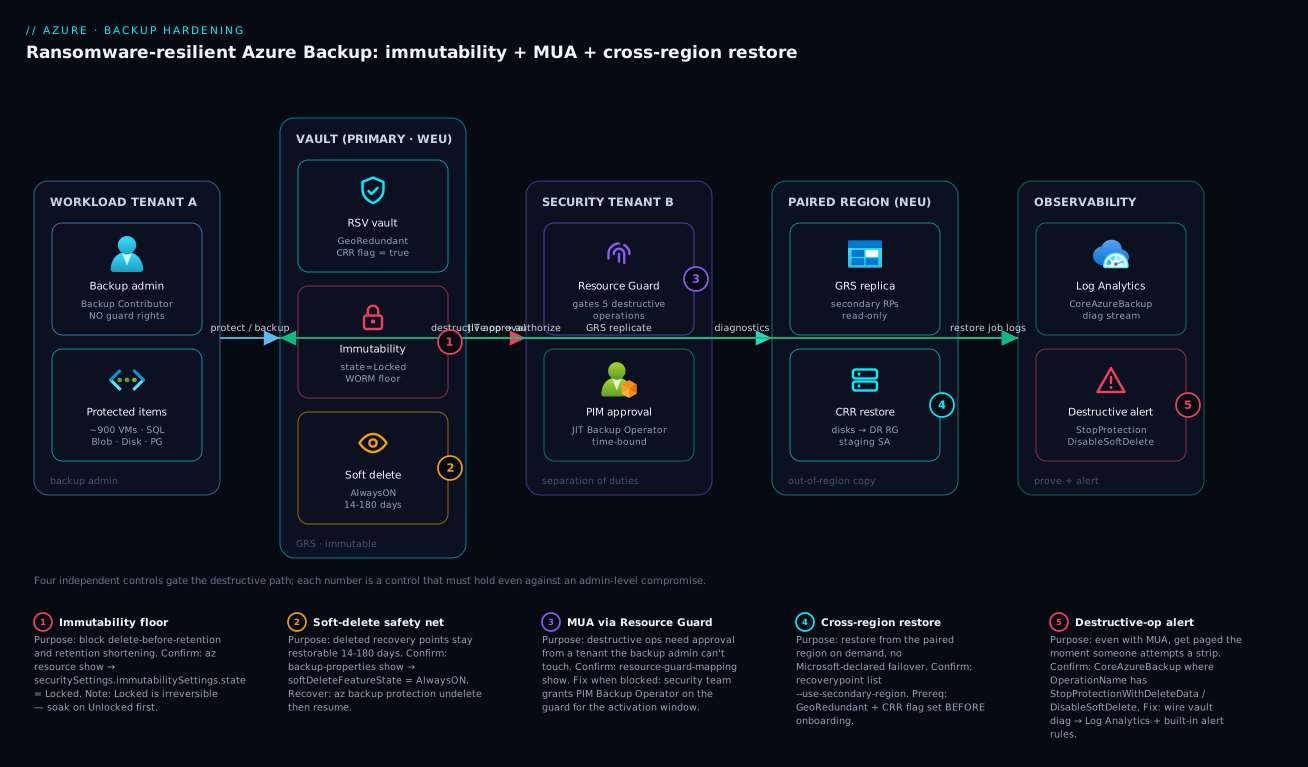
The diagram traces the destructive path through all four controls, left to right, exactly as an attacker would attempt it and exactly as your hardening blocks it. On the left, the workload Tenant A holds the backup admin (standing Backup Contributor) and the ~900 protected items – VMs, SQL, Blob, Disk, PostgreSQL. The admin’s normal flow is the blue “protect / backup” arrow into the primary vault (West Europe), which is GeoRedundant with the CRR flag set. That vault carries three of the four controls stacked: the immutability WORM floor (state=Locked, badge 1), and enhanced soft delete (AlwaysON, 14–180 days, badge 2). When any destructive operation is attempted – the red “destructive op → authorize” arrow – it cannot complete inside Tenant A; it must round-trip to the security Tenant B, where the Resource Guard (badge 3) gates the five destructive operations and a PIM activation grants a just-in-time, time-bound Backup Operator role that flows back as the green “JIT approval” arrow. There is no standing path for an attacker-as-admin to self-approve.
The right half is recovery and proof. The vault asynchronously replicates over the teal “GRS replicate” arrow to the paired region (North Europe), where the read-only secondary recovery points live and CRR (badge 4) restores disks into a pre-provisioned DR resource group and staging storage account. Finally everything – the destructive-operation attempts especially (badge 5) – streams as diagnostics to Log Analytics (CoreAzureBackup), where the Sev-0 destructive-operation alert fires the moment someone tries a strip, even though MUA already blocked it. Read the five legend numbers as the five things that must hold: immutability floor, soft-delete net, MUA approval, cross-region copy, and the detection alert. Defeat any one in isolation and the attacker wins; together and locked, they do not.
Real-world scenario
A European fintech platform team – call them Helvetia Pay – ran ~900 production VMs across two GeoRedundant Recovery Services vaults (West Europe primary, North Europe pair), governed by a central backup squad holding Backup Contributor on the landing-zone subscriptions. Their CI/CD platform used a service principal that, through role inheritance at subscription scope, also held Backup Contributor – a fact nobody had registered as a risk. A scheduled red-team exercise compromised that CI service principal via a leaked pipeline secret.
The red team’s playbook was textbook ransomware: before touching any workload, destroy the recovery path. The first phase report was damning. With only immutability enabled in the Unlocked state, the attacker path was: (1) disable immutability (it was never locked, because the team feared losing the ability to shorten retention), (2) disable soft delete in the same call, then (3) stop-protection-with-delete-data on the 40 crown-jewel VMs. Every one of those operations succeeded in the lab because the compromised principal held the rights and nothing gated them. The simulated blast radius: zero recoverable backups for the payment-processing tier, against a regulatory RPO of 24 hours. Had this been real ransomware, Helvetia Pay would have been choosing between paying and going out of business.
The fix was sequencing and separation, not new technology. Over a two-week hardening sprint they:
| Step | Action | Control hardened | Why this order |
|---|---|---|---|
| 1 | Audited every policy’s retention; trimmed 3 over-long yearly schedules from 10y to 7y | Cost / pre-lock hygiene | Locking freezes retention forever |
| 2 | Set enhanced soft delete to AlwaysON / 30 days on both vaults |
Soft delete | Net must exist before lock |
| 3 | Flipped immutability to Locked on both vaults |
Immutability | Now attacker-proof, retention reviewed |
| 4 | Stood up a Resource Guard in a separate security tenant, mapped both vaults | MUA | Removes self-approval entirely |
| 5 | Replaced CI’s standing Backup Contributor with PIM-activated, scoped roles | Least privilege | Kills the inherited-rights path |
| 6 | Wired vault diag → Log Analytics; enabled Sev-0 destructive-op alerts | Detection | Get paged on attempts |
| 7 | Ran a timed CRR drill into North Europe; recorded RTO = 42 min | Recoverability proof | “Protected” ≠ “recoverable” |
The re-run red team, holding the same compromised Backup Contributor in the workload tenant, was fully blocked. Their first destructive call failed authorization:
# Re-run attacker, holding Backup Contributor in the workload tenant, tries to
# strip protection. With the Resource Guard mapped, this FAILS authorization
# because the identity has no Backup Operator role on the guard in Tenant B.
az backup protection disable \
  --resource-group rg-backup-prod --vault-name rsv-prod-weu \
  --container-name <c> --item-name <vm> \
  --backup-management-type AzureIaasVM --delete-backup-data true
# -> ResourceGuard: operation requires authorization on the Resource Guard.
Better still, the attempt tripped the Sev-0 alert and the SOC saw it within seconds. The lesson the team wrote into their platform standard: these four controls are only worth anything combined and locked. Any single one, left unlocked or co-located with the admin who would be the attacker, is theatre. The total spend was roughly ₹40,000/month in extra soft-deleted and GRS storage across both vaults – trivially less than one hour of the outage they avoided.
Advantages and disadvantages
The hardened posture is not free – the irreversibility that makes it attacker-proof is the same property that bites you if you mis-size before locking. The honest trade-off:
| Advantages | Disadvantages |
|---|---|
| Survives an admin-level / insider compromise | Three controls are one-way doors (Locked, AlwaysON, redundancy) |
| Satisfies WORM / regulatory retention audits | Locked immutability freezes retention – mis-sizing = years of overpay |
| Deleted backups recoverable for up to 180 days | Soft-deleted RPs cost storage after the free 14 days |
| Out-of-region copy and on-demand CRR | GRS costs more than LRS/ZRS; no ZRS+CRR combo |
| MUA removes standing destructive rights | Cross-tenant guard adds operational friction (PIM round-trip) |
| Attempted strips are detected and alerted | Requires a second team / tenant to operate the guard |
| Recoverability is provable via timed drills | Drills take effort and a pre-built DR landing zone |
When each matters: the irreversibility is your friend in any regulated or high-extortion-risk estate – it is exactly what an auditor wants to see and exactly what defeats the attacker. It is your enemy only if you skip the soak and retention review, which is why the sequencing discipline (audit → soft delete → lock → MUA) is non-negotiable. The GRS cost premium matters most for very large, high-churn estates; for them, tune instant-restore retention down and consider operational-only Blob backup where a second copy is not mandated. The cross-tenant friction matters for small teams who do not have a separate security org – for them, a different-subscription-different-team guard is the pragmatic floor.
Hands-on lab
This builds a fully hardened single-VM vault end to end, proves every control, then tears it down. It uses a B1s VM and minimal storage; the soft-deleted/GRS storage cost for an afternoon is negligible. You need an Azure subscription, the az CLI, and (for the MUA step) Owner on a second subscription to host the guard.
1. Resource group and a tiny VM to protect.
az group create -n rg-bkup-lab -l westeurope
az vm create -g rg-bkup-lab -n vm-lab --image Ubuntu2204 \
  --size Standard_B1s --admin-username azureuser --generate-ssh-keys
2. Create the vault and set redundancy + CRR FIRST (day-zero).
az backup vault create -g rg-bkup-lab -n rsv-bkup-lab -l westeurope
az backup vault backup-properties set -g rg-bkup-lab -n rsv-bkup-lab \
  --backup-storage-redundancy GeoRedundant --cross-region-restore-flag true
3. Enable enhanced soft delete (AlwaysON) and immutability Unlocked.
az backup vault backup-properties set -g rg-bkup-lab -n rsv-bkup-lab \
  --soft-delete-feature-state AlwaysON --soft-delete-retention-period-in-days 14

az resource update -g rg-bkup-lab -n rsv-bkup-lab \
  --resource-type Microsoft.RecoveryServices/vaults \
  --set properties.securitySettings.immutabilitySettings.state=Unlocked
4. Protect the VM with the default IaaS policy and run a backup now.
az backup protection enable-for-vm -g rg-bkup-lab --vault-name rsv-bkup-lab \
  --vm vm-lab --policy-name DefaultPolicy

az backup protection backup-now -g rg-bkup-lab --vault-name rsv-bkup-lab \
  --container-name vm-lab --item-name vm-lab \
  --backup-management-type AzureIaasVM \
  --retain-until 30-06-2026
# Expected: a Backup job appears; wait for Completed.
5. Create a Resource Guard (in a second subscription) and map the vault.
az account set --subscription <security-sub-id>
az group create -n rg-guard-lab -l westeurope
az dataprotection resource-guard create -g rg-guard-lab -n guard-lab -l westeurope
GUARD_ID=$(az dataprotection resource-guard show -g rg-guard-lab -n guard-lab --query id -o tsv)

az account set --subscription <workload-sub-id>
az backup vault resource-guard-mapping update -g rg-bkup-lab \
  --vault-name rsv-bkup-lab --resource-guard-id "$GUARD_ID"
6. Prove every control (the verification matrix).
az resource show -g rg-bkup-lab -n rsv-bkup-lab \
  --resource-type Microsoft.RecoveryServices/vaults \
  --query "properties.securitySettings.immutabilitySettings.state" -o tsv  # Unlocked

az backup vault backup-properties show -g rg-bkup-lab -n rsv-bkup-lab \
  --query "{sd:softDeleteFeatureState, crr:crossRegionRestoreFlag, r:storageModelType}"
# Expect: AlwaysON / true / GeoRedundant
7. Test the MUA gate – this should be authorization-blocked.
# With the guard mapped and no PIM Backup Operator on it, this FAILS:
az backup protection disable -g rg-bkup-lab --vault-name rsv-bkup-lab \
  --container-name vm-lab --item-name vm-lab \
  --backup-management-type AzureIaasVM --delete-backup-data true
# -> Expected: ResourceGuard authorization error. The gate works.
8. (Optional) Test soft-delete recovery. Stop protection with retain, delete the item, then list soft-deleted and undelete as shown in section 4.
9. Teardown. Unmap the guard, disable protection (retain or delete in the lab), then delete both resource groups. Note that with Locked immutability you could not delete protected data early – which is why the lab uses Unlocked.
# Remove protection (lab uses Unlocked immutability so this is allowed),
az backup protection disable -g rg-bkup-lab --vault-name rsv-bkup-lab \
  --container-name vm-lab --item-name vm-lab \
  --backup-management-type AzureIaasVM --delete-backup-data true --yes
az group delete -n rg-bkup-lab --yes --no-wait
az group delete -n rg-guard-lab --subscription <security-sub-id> --yes --no-wait
Common mistakes & troubleshooting
The failure modes here are operational and they cluster around the irreversible doors and the cross-tenant plumbing. This is the playbook – symptom, root cause, the exact command or portal path to confirm, and the fix:
| # | Symptom | Root cause | Confirm (exact command / path) | Fix |
|---|---|---|---|---|
| 1 | Can’t enable CRR – flag won’t set | Redundancy is LRS/ZRS, not GRS | backup-properties show → storageModelType |
Set GRS before items; if items exist, new vault |
| 2 | “Redundancy change not allowed” | Vault already has protected items | az backup item list (non-empty) |
Recreate vault empty; redundancy is day-zero |
| 3 | Destructive op succeeds despite “immutability on” | Immutability is Unlocked, attacker disabled it first |
resource show → immutabilitySettings.state = Unlocked |
Lock it after soak + retention review |
| 4 | Can’t shorten an over-long retention | Vault is Locked immutable |
state = Locked | None – right-size before locking |
| 5 | MUA op blocked even for a legit change | No PIM Backup Operator on the guard | resource-guard-mapping show |
Security team grants JIT role for the window |
| 6 | Can’t map vault to guard | Backup admin lacks Reader on the guard (cross-tenant) | RBAC on the guard resource | Grant Reader on the guard in Tenant B |
| 7 | Soft-deleted item gone before expected | Soft delete was Enable (disablable) and got turned off |
backup-properties show → softDeleteFeatureState |
Set AlwaysON; can’t be disabled |
| 8 | CRR restore fails: “storage account not found” | No staging SA in secondary region | check secondary RG/SA exists | Pre-provision staging SA + target RG in pair |
| 9 | Secondary recovery points empty | GRS replication lag (up to hours) or CRR flag off | recoverypoint list --use-secondary-region |
Wait for replication; confirm CRR flag true |
| 10 | Backup reports / KQL empty | Diagnostics not wired to a workspace | az monitor diagnostic-settings list on vault |
Create diagnostic setting → Log Analytics |
| 11 | Destructive-op alert never fired | Built-in alert rules not enabled | Backup center → Alerts config | Enable failure + destructive-op alert rules |
| 12 | Locked the wrong (10y) retention | Skipped pre-lock retention review | yearly schedule count = 10 | None – this is the cautionary tale; audit first |
| 13 | Guard “protects nothing” | Excluded all operations when creating it | list-protected-operations (short list) |
Re-add the critical ops to the guard |
| 14 | MUA bypassed in incident | Guard co-located in same sub admin owns | guard subscription = vault subscription | Move guard cross-tenant/cross-team |
The decision table for “which control failed me” during a real incident:
| If you see… | It’s probably… | Do this |
|---|---|---|
| Backups deleted despite “immutability” | Immutability was Unlocked, not Locked | Lock it everywhere; this is the #1 gap |
| A destructive op went through with no approval | No MUA, or guard co-located | Map a cross-tenant Resource Guard |
| Deleted backup unrecoverable after 5 days | Basic soft delete (14d) or it was disabled | Enhanced soft delete AlwaysON |
| No copy when the region went down | Vault was LRS/ZRS, not GRS | GRS + CRR (rebuild if items exist) |
| Restore worked but took 6 hours | No pre-built DR landing zone | Pre-provision staging SA + target RG |
Common beginner mistakes
These are misconceptions, not symptoms – the wrong mental model that leads people to build a vault that looks hardened and isn’t. (For symptom → cause → fix during an incident, use the troubleshooting table above.)
| Misconception | Why it’s wrong | The right mental model |
|---|---|---|
| “I enabled immutability, so backups can’t be deleted.” | Unlocked immutability is a setting an admin – or an attacker holding the admin’s rights – can simply switch off, then delete. |
Immutability protects only once Locked. Unlocked is a soak state, not protection. |
| “Soft delete means my backups are safe.” | Soft delete is a time-boxed recovery window (14–180 days), and basic soft delete can be turned off entirely. | It is an undo buffer, not permanence. Use enhanced + AlwaysON and treat the window as a deadline. |
“GeoRedundant gives me cross-region restore.” |
GRS makes a paired-region copy exist, but CRR is a separate flag, and both are day-zero. | GRS is necessary, not sufficient – GRS + the CRR flag, before the first item. |
| “A Resource Guard in my own subscription still adds a second check.” | If the backup admin can grant themselves a role on the guard, they can self-approve – and so can the attacker who became them. | MUA only works where the guard sits outside the admin’s control (separate tenant/team). Co-located = theatre. |
| “Backup Contributor is a reasonable role for the CI pipeline.” | It legitimately includes stop-protection, delete-data and disable-soft-delete – the exact rights an attacker wants. | Grant Backup Operator/Reader for the day job; gate destructive rights behind PIM on the guard. |
| “The backup job is green, so we can recover.” | A successful backup proves data was written, not that it can be read back into a working system. | Protected ≠ recoverable. Only a timed test-restore proves recovery. |
| “I’ll turn these controls on later, once we’re live.” | Three are one-way doors and redundancy is frozen after the first item – “later” quietly forecloses your options. | Sequence them on day zero: redundancy → soft delete → soak → lock → MUA. |
| “Recovery Services vault and Backup vault are basically the same.” | They are different resource providers protecting different workloads; you cannot move an item between them. | Choose per workload up front; expect to run both in most estates. |
Two of these are worth stating as a rule you can repeat to a new team member:
- “On” is not “tamper-proof.” Every one of immutability, soft delete and MUA has a weak state (
Unlocked,Enable, a co-located guard) that looks identical on the blade but folds the instant an admin account is compromised. Hardening is choosing the irreversible state deliberately, after a soak. - The sequence is the control. Getting the order wrong – locking before you review retention, mapping the guard before soft delete exists, onboarding before setting redundancy – leaves a gap even when every individual feature reads “enabled.” Audit first, make the net exist, then close the one-way doors.
Best practices
- Decide redundancy on day zero.
GeoRedundant+ CRR flag, set before the first protected item. You cannot change it afterwards without re-creating the vault and re-onboarding. - Match the vault type to the workload. Recovery Services for VM/SQL-in-VM/HANA/snapshot-Files; Backup vault for Blob/Disk/PostgreSQL/AKS/vaulted-Files. Run both if your estate needs both.
- Soak immutability
Unlocked, then lock. Run unlocked for a release cycle or two, confirm no automation breaks, review every policy’s retention, then flip toLocked. The lock is irreversible – treat it like a change freeze. - Right-size retention before locking. Trim over-long yearly schedules first. A 10-year policy locked by mistake is a 10-year bill.
- Use enhanced soft delete at
AlwaysON. 14–180 days sized to your recovery window;AlwaysONso an attacker-as-admin cannot disable it. - Put the Resource Guard in a separate tenant (or at minimum a different subscription owned by a different team). Co-located is theatre.
- No standing destructive rights. Gate destructive operations behind PIM-activated, time-bound Backup Operator on the guard. Day-job rights (Backup Contributor) stay; strip rights do not.
- Tune instant-restore retention for cost. Snapshots live in the source subscription; 1–2 days for large chatty VMs, more where fast same-region restore matters.
- Stream vault diagnostics to Log Analytics and stand up the Backup reports workbook. You cannot prove compliance or trend storage from the blade.
- Enable built-in alerts for backup failure AND destructive operations. Even with MUA, you want to be paged on the attempt – it is a high-fidelity intrusion signal.
- Prove recoverability with a timed CRR drill. Boot a VM from a secondary-region recovery point, record the RTO, and repeat quarterly. A green blade is not a recovery.
- Pre-build the DR landing zone. Staging storage account and target resource group in the paired region exist before the incident, not during it.
Security notes
- Least privilege on the backup plane: the only standing role most identities need is Backup Reader (monitoring) or Backup Operator scoped tightly; Backup Contributor is broad and includes destructive rights – assign it sparingly and never inherit it accidentally at subscription scope (the Helvetia Pay CI-principal trap).
The backup RBAC roles, what each can and cannot do, and who should hold them:
| Role | Can configure | Can trigger backup/restore | Can delete data / stop protection | Typical holder |
|---|---|---|---|---|
| Backup Reader | No | No (read-only) | No | Monitoring, auditors, SOC |
| Backup Operator | No (no policy create) | Yes | No (cannot delete backup data) | Day-job operators |
| Backup Contributor | Yes (policies, protection) | Yes | Yes | Backup squad (sparingly) |
| Owner | Yes (everything) | Yes | Yes | Break-glass only |
| Reader (on guard, Tenant B) | No | No | No | Backup admin (to map guard) |
| Backup MUA Operator (on guard) | n/a | n/a | Approves a gated op in-window | Backup admin via PIM only |
- Separation of duties is the whole point of MUA: the security team owns the guard tenant and the PIM approvals; the backup team owns the vault. Neither can unilaterally destroy recovery points. Audit cross-tenant role assignments on the guard quarterly.
- Encryption: vaults encrypt at rest with platform-managed keys by default; for regulated estates use customer-managed keys (CMK) via the vault’s system-assigned identity and Key Vault – see Azure encryption at rest with CMK & double encryption and manage the keys per Azure Key Vault: secrets, keys & certificates.
- Network isolation: restrict vault and Backup-vault management to private endpoints where the workload demands it, so backup traffic and management stay off the public internet.
- Identity for cross-tenant: the vault’s system-assigned managed identity authenticates to the guard and (with CMK) to Key Vault – never use a shared secret or a service principal with a long-lived credential for the guard mapping.
- Detection-in-depth: route the Sev-0 destructive-operation alerts to your SIEM. Pair with Microsoft Sentinel for correlation – a destructive-op attempt alongside an anomalous sign-in is a far stronger ransomware signal than either alone.
- Break-glass for the guard: ensure a break-glass emergency-access path exists for the security tenant so a locked-out approver does not become a single point of failure during a real recovery.
Cost & sizing
What drives the Azure Backup bill, in rough order of impact – price points are indicative (≈₹/USD, vary by region and commitment):
| Cost driver | What it is | Rough indicative cost | How to right-size |
|---|---|---|---|
| Protected-instance fee | Per protected VM/DB/etc. per month | ~₹400–₹800 / $5–$10 per instance/mo (size-banded) | Decommission stale items; consolidate |
| Vault storage (GRS) | Backup data stored, geo-replicated | ~₹2/GB/mo LRS; GRS ≈ 2× | Right-size retention; LRS where 2nd copy not mandated |
| Instant-restore snapshots | Local snapshots in source sub (1–5d) | Snapshot storage rate × churn | Lower to 1–2 days for large chatty VMs |
| Soft-deleted storage | Deleted RPs kept past free 14 days | Same as vault storage rate | Right-size soft-delete window (14–180) |
| CRR / cross-region egress | Geo-replication + restore data movement | Per-GB egress on restore | Drill cost is one-off; replication is in GRS price |
| Log Analytics ingestion | Diagnostic logs for reports/alerts | ~₹/GB ingested | Filter categories; cap retention |
Sizing guidance: the protected-instance fee dominates for fleets of small VMs; the storage dominates for a few large, high-churn machines with long retention. The single biggest lever you control is retention × churn – a 7-year yearly point on a high-churn VM is expensive, and once the vault is locked you cannot reduce it, so size it before locking. GRS doubles storage versus LRS; pay it where a second-region copy or CRR is a real requirement, and consider LRS/ZRS for non-critical or operational-only protection. There is no free tier for production Azure Backup, but the lab in this article (one B1s VM, one afternoon) costs a few rupees. For the broader cost-conscious DR pattern on small teams, see Disaster recovery on a budget: backup & restore for small teams.
Interview & exam questions
These map to AZ-104 (Azure Administrator), AZ-305 (Solutions Architect), and SC-100 (Cybersecurity Architect) backup/resilience objectives.
-
Why can’t you change vault redundancy after onboarding the first item? Redundancy determines where backup data is physically stored; changing it would require re-replicating all existing recovery points, so Azure freezes it once any item is protected. It is a day-zero decision – set
GeoRedundantbefore onboarding if you want CRR. -
What is the difference between Unlocked and Locked immutability? Both block retention-reducing operations on existing recovery points.
Unlockedcan be disabled by an admin (a soak state);Lockedis irreversible – not even the subscription owner or Microsoft support can disable it, which is what makes it attacker-proof and WORM-compliant. -
What exactly does immutability NOT block? Creating new backups and extending retention. It only gates the destructive direction: delete-before-retention, shortening retention, and disabling soft delete.
-
What is a Resource Guard and why place it in a different tenant? A
Microsoft.DataProtection/resourceGuardsresource that gates destructive vault operations behind a second authorization (MUA). Placing it in a tenant the backup admin does not control means a compromised backup admin cannot self-approve a destructive operation – that is the separation of duties. -
Which operations does a Resource Guard gate by default? Disabling MUA itself, disabling/reducing soft delete, disabling immutability, stop-protection-with-delete-data, and modifying/deleting backup policies (and the MARS passphrase change). Several can be optionally excluded.
-
Basic vs enhanced soft delete? Basic is a fixed 14 days and can be turned off. Enhanced is configurable 14–180 days and can be made
AlwaysON(non-disablable). Enhanced is the current recommended model. -
Prerequisites for cross-region restore? Vault redundancy =
GeoRedundant, thecrossRegionRestoreflag enabled, a workload type that supports CRR (Azure VM, SQL-in-VM, SAP HANA-in-VM), and a pre-provisioned staging storage account + target resource group in the paired region. -
Can a vault have both ZRS and CRR? No.
ZoneRedundantprotects within the primary region against a single-AZ loss but has no second-region copy. CRR reads from theGeoRedundantpaired-region copy. Choose based on whether zone-loss or region-loss dominates your risk. -
How do you recover a maliciously deleted backup? If enhanced soft delete is on, the item is soft-deleted (14–180 day window). List soft-deleted items and run
az backup protection undelete, then resume protection. After the window, only a CRR/secondary copy can help. -
An attacker holds Backup Contributor. Which single control stops them from stopping protection and deleting data? MUA via a cross-tenant Resource Guard – it requires an approval they cannot grant. Immutability (Locked) independently stops early deletion; combined, neither can be defeated. The exam answer for “stop the operation entirely” is the Resource Guard.
-
Why is
instantRpRetentionRangeInDaysa cost lever? Instant-restore snapshots live in the source subscription and incur snapshot storage; lowering the range (1–5 days) reduces that cost at the price of slower same-region restore once snapshots age out. -
How do you prove a vault is recoverable, not just protected? Run an actual cross-region restore drill: enumerate secondary-region recovery points, restore disks into the paired region, boot the VM, and record the RTO. A green configuration blade is not proof.
Quick check
- Your vault is
LocallyRedundantand already protecting 50 VMs. The CISO now wants cross-region restore. What must you do? - Immutability is enabled but a red team still deleted backups. What state was it in, and what is the fix?
- You set a 10-year yearly retention, locked immutability, then realised it should be 3 years. Can you fix it? Why or why not?
- Where must the Resource Guard live for MUA to actually resist a compromised backup admin?
- A backup item was deleted and is unrecoverable after 6 days. What was misconfigured?
Answers
- Recreate the vault as
GeoRedundantand re-onboard. Redundancy is frozen once any item is protected, so you cannot convert in place – create a new GRS vault, enable the CRR flag, and re-protect the VMs. - It was
Unlocked, so an admin (the red team) disabled immutability first and then deleted. The fix is toLockit after a retention review –Lockedis irreversible and cannot be disabled by anyone. - No. Locked immutability blocks shortening retention. You will pay for the 10-year retention for its full duration. This is why you right-size and review retention before locking.
- In a separate tenant (or at minimum a different subscription owned by a different team) where the backup admin has no permissions – so a compromised admin cannot self-approve the destructive operation.
- Soft delete was either basic (fixed 14 days but presumably disabled) or set to
Enableand then turned off – the deletion outlived the recovery window. Enhanced soft delete atAlwaysONwith a 14–180 day window prevents this.
Practice challenges
Work these in order – they escalate from “pick the right resource” to “prove an isolated cross-region, cross-subscription recovery.” Every command is illustrative and every ID is a placeholder; do not run them against a production vault. Try each before opening the solution.
Challenge 1 (Beginner) – Match the workload to the vault. You must protect a fleet of Azure VMs, a set of Azure Managed Disks, and one PostgreSQL Flexible Server. Which vault type(s) do you create, and why can’t one vault cover all three?
<details> <summary>Solution</summary>
The VMs go in a Recovery Services vault (Microsoft.RecoveryServices/vaults); the Managed Disks and PostgreSQL Flexible Server go in a Backup vault (Microsoft.DataProtection/backupVaults). You need both – they are different resource providers protecting different workload families, not two flavours of one thing.
Why: the vault type is dictated by the workload’s data plane; picking wrong means re-onboarding later. </details>
Challenge 2 (Beginner) – Make CRR possible on day zero. You just created rsv-prod-weu and have onboarded nothing yet. Write the one command that puts it in the only state from which cross-region restore can ever be enabled.
<details> <summary>Solution</summary>
az backup vault backup-properties set \
  --resource-group rg-backup-prod --name rsv-prod-weu \
  --backup-storage-redundancy GeoRedundant \
  --cross-region-restore-flag true
Why: redundancy is frozen after the first protected item, so GeoRedundant + the CRR flag is a day-zero decision, not a later tune-up.
</details>
Challenge 3 (Intermediate) – Turn on a net that cannot be removed. Enable enhanced soft delete at 30 days in the one state an attacker-as-admin cannot switch off, then show the setting to confirm.
<details> <summary>Solution</summary>
az backup vault backup-properties set \
  --resource-group rg-backup-prod --name rsv-prod-weu \
  --soft-delete-feature-state AlwaysON \
  --soft-delete-retention-period-in-days 30

az backup vault backup-properties show \
  --resource-group rg-backup-prod --name rsv-prod-weu \
  --query "{sd:softDeleteFeatureState, days:softDeleteRetentionPeriodInDays}"
# Expect: AlwaysON / 30
Why: Enable is disablable (fine for a soak); only AlwaysON removes the off-switch, and it is irreversible – so review before you commit.
</details>
Challenge 4 (Intermediate) – Lock in the right order. Immutability is already Unlocked and soaked. Write the sequence that turns it into a true WORM floor without accidentally freezing an over-long retention.
<details> <summary>Solution</summary>
# 1. Audit every policy's retention FIRST -- locking freezes it forever.
az backup policy list -g rg-backup-prod --vault-name rsv-prod-weu \
  --query "[].{name:name}" -o table
# (review each policy; trim any over-long yearly schedule NOW, pre-lock)

# 2. Only then flip to Locked (irreversible).
az resource update -g rg-backup-prod -n rsv-prod-weu \
  --resource-type Microsoft.RecoveryServices/vaults \
  --set properties.securitySettings.immutabilitySettings.state=Locked
Why: Locked blocks every retention-reducing operation forever, so a 10-year policy locked by mistake is a 10-year bill – right-size before the one-way door.
</details>
Challenge 5 (Advanced) – Prove MUA blocks a rogue admin. Stand up a Resource Guard in a second subscription, map the production vault to it, then demonstrate that a stop-protection-with-delete attempt is refused.
<details> <summary>Solution</summary>
# In the SECURITY subscription: create the guard.
az account set --subscription <security-sub-id>
az dataprotection resource-guard create \
  -g rg-security-guards -n rg-prod-resourceguard -l westeurope
GUARD_ID=$(az dataprotection resource-guard show \
  -g rg-security-guards -n rg-prod-resourceguard --query id -o tsv)

# In the WORKLOAD subscription: map the vault to the guard.
az account set --subscription <workload-sub-id>
az backup vault resource-guard-mapping update \
  -g rg-backup-prod --vault-name rsv-prod-weu --resource-guard-id "$GUARD_ID"

# With no PIM Backup Operator on the guard, a destructive op FAILS:
az backup protection disable -g rg-backup-prod --vault-name rsv-prod-weu \
  --container-name <c> --item-name <vm> \
  --backup-management-type AzureIaasVM --delete-backup-data true
# -> ResourceGuard: operation requires authorization on the Resource Guard.
Why: the guard lives where the backup admin has no standing rights, so the “approval” (a JIT role on the guard, granted by another team via PIM) is something a compromised admin cannot self-grant. </details>
Challenge 6 (Advanced) – Recover into an isolated landing zone. The primary region is unavailable and you must not restore back into the possibly-compromised workload subscription. List the secondary-region recovery points and restore into a clean recovery subscription in the paired region.
<details> <summary>Solution</summary>
# 1. Enumerate recovery points in the paired (secondary) region.
az backup recoverypoint list -g rg-backup-prod --vault-name rsv-prod-weu \
  --container-name <c> --item-name <vm> \
  --backup-management-type AzureIaasVM --workload-type VM \
  --use-secondary-region \
  --query "[].{name:name,time:properties.recoveryPointTime}" -o table

# 2. Restore cross-region AND cross-subscription in one job.
az backup restore restore-disks -g rg-backup-prod --vault-name rsv-prod-weu \
  --container-name <c> --item-name <vm> --rp-name <rp-id> \
  --use-secondary-region \
  --target-subscription-id <clean-recovery-sub-id> \
  --target-resource-group rg-clean-recovery-neu \
  --storage-account <staging-sa-in-recovery-sub>
Why: CRR handles “the region is down” and CSR handles “the subscription is dirty” – together they land clean data in an isolated region + subscription, and a timed run is the only proof that “protected” means “recoverable.” </details>
Glossary
-
Recovery Services vault: The vault resource (
Microsoft.RecoveryServices/vaults) for Azure VMs, SQL/SAP-HANA-in-VM, and snapshot-based Azure Files protection. -
Backup vault: The newer vault resource (
Microsoft.DataProtection/backupVaults) for Blobs, Managed Disks, PostgreSQL Flexible Server, AKS, and vaulted Azure Files. -
Immutability: A vault security setting that blocks operations reducing the protection of existing recovery points;
Unlockedis reversible,Lockedis irreversible (WORM). -
WORM: Write-once-read-many; the compliance property that recovery points cannot be altered or deleted before retention expires – delivered by
Lockedimmutability. -
Soft delete: Keeps deleted backup data restorable for a retention window (enhanced: 14–180 days);
AlwaysONmakes the feature non-disablable. -
Resource Guard: A separate resource (
Microsoft.DataProtection/resourceGuards) that gates destructive vault operations behind a second authorization (MUA). -
Multi-user authorization (MUA): The pattern of requiring destructive operations to be approved through a Resource Guard the backup admin does not control.
-
Cross-region restore (CRR): On-demand restore of a backup into the Azure-paired region without waiting for a Microsoft-declared regional failover; requires GRS.
-
GeoRedundant (GRS): Storage redundancy that keeps six copies – three local plus three in the geo-paired region; the prerequisite for CRR.
-
Instant restore: A backup-policy tier keeping local snapshots (1–5 days) in the source subscription for fast same-region restores.
-
GFS: Grandfather-father-son – the daily/weekly/monthly/yearly retention ladder in a backup policy.
-
Recovery point (RP): A single restorable backup captured at a point in time; the artefact an attacker deletes to destroy your recovery path.
-
PIM (Privileged Identity Management): Entra capability for time-bound, just-in-time role activation – used to grant Backup Operator on the guard only during an approved window.
-
Backup Contributor: The broad RBAC role that includes destructive backup operations; the role an attacker most wants on the backup plane.
-
Enhanced soft delete: The current soft-delete model (Recovery Services + Backup vaults) with a configurable 14–180 day window that can be made non-disablable; supersedes the fixed-14-day, switch-off-able basic soft delete.
-
AlwaysON: The soft-delete feature state that makes soft delete permanent – it can be extended but never disabled, one of the vault’s one-way doors. -
Cross Subscription Restore (CSR): Restoring a recovery point into a different subscription in the same Microsoft Entra tenant (VM/SQL/HANA-in-VM); combine with CRR to land in an isolated region + subscription.
PermanentlyDisableis irreversible. -
Backup Operator: RBAC role that can trigger backups and restores but cannot delete backup data or stop protection – the right day-job role for operators.
-
Backup MUA Operator: The role, granted on the Resource Guard (ideally JIT via PIM), that authorises a single guard-gated destructive operation – the mechanism behind an MUA “approval.”
-
Resource Guard mapping: The association between a vault and a Resource Guard; while it exists the gated operations require authorisation on the guard, and removing the mapping is itself a gated operation.
-
Staging storage account: A pre-provisioned storage account in the secondary/target region into which a cross-region restore lands disks before the VM is built; must exist before the incident.
-
Azure region pair: The fixed geo-paired region (e.g. West Europe ↔ North Europe) that GRS replicates to and that CRR restores from.
-
RTO / RPO: Recovery Time Objective (how long recovery may take) and Recovery Point Objective (how much data loss is tolerable) – the two numbers a restore drill actually measures.
-
LRS / ZRS: LocallyRedundant (three copies in one datacentre) and ZoneRedundant (three copies across availability zones) storage – neither keeps a second-region copy, so neither supports CRR.
Next steps
- Azure Backup & Site Recovery Deep Dive – the protection-mechanics foundation this hardening sits on top of.
- Azure Site Recovery: zone-to-zone & region failover runbooks – replication-based DR for workloads where backup-restore RTO is too slow.
- Azure PIM for resources & groups: JIT elevation – the just-in-time mechanism that powers MUA approvals on the Resource Guard.
- Ransomware resilience: immutable backup & isolated recovery environment – the cross-cloud pattern and the isolated-recovery-environment concept.
- Azure encryption at rest with CMK & double encryption – bring-your-own-key for the vault when platform-managed keys are not enough.