In a nutshell
Imagine your production servers live in one building, and across town you keep a live stand-in for each one – a copy whose disks are updated every few minutes, so it is never more than a handful of minutes behind. Now imagine you also keep a written, rehearsed evacuation plan: which room’s lights come on first, who unlocks which door, and in what order people move – so that if the first building floods, the stand-ins take over in minutes and the business barely notices. Azure Site Recovery (ASR) is that stand-in-plus-plan for Azure virtual machines. It continuously copies each VM’s disks to a second location – another availability zone in the same region, or a whole paired region – and stores an ordered, automatable recovery plan that boots your app back up in the right sequence.
The phrase a beginner must unlearn early: “protected” is not “recoverable.” A green replication dashboard only proves that bytes are arriving at the stand-in. It says nothing about whether your application comes back – whether the database is up before the app that needs it, whether DNS points at the new location, whether anyone has ever actually pressed the button. The whole discipline of this lesson is closing that gap: replicate the disks (the easy part), and rehearse the recovery until the numbers are proven (the real work).
Two numbers frame everything. RPO (Recovery Point Objective) is how much recent data you can afford to lose – ASR’s floor is about five minutes. RTO (Recovery Time Objective) is how long you can be down – decided almost entirely by your boot order and automation, not by replication speed. ASR gives you a safe way to measure both: a test failover that spins your VMs up in an isolated network while production keeps running, untouched.
Level: Advanced (with a beginner on-ramp) · Time: ~76 min
Before you start, it helps to know what a VM, a managed disk, a VNet and a load balancer are, and the difference between an availability zone and a region – all linked in Prerequisites & where this fits just below. After this lesson you will be able to: enable zone-to-zone and cross-region replication for an Azure VM; build a recovery plan that boots tiers in dependency order; wire failover automation that behaves correctly in a drill and a real disaster; and run an isolated test failover that proves your RPO and RTO instead of trusting a dashboard.
Every DR program I have audited had the same gap: replication was healthy, the dashboards were green, and nobody could tell me the last time anyone actually failed over. Azure Site Recovery (ASR) – Microsoft’s business-continuity service that continuously replicates a running VM’s disks to a second fault domain (another availability zone in the same region, or a paired region entirely) and orchestrates an ordered failover – is not hard to enable. The trap is treating “protected” as “recoverable.” A VM with a 5-minute RPO (Recovery Point Objective) is worthless if your application boots in the wrong order, comes up with a stale IP, can’t find DNS, or needs a runbook that lives only in someone’s head.
This is how to wire ASR for IaaS correctly across both an availability-zone failure and a full region loss: build recovery plans that boot a multi-tier app in dependency order, automate the messy parts (DNS cutover, IP reassignment, load-balancer wiring) with Azure Automation runbooks, run isolated test failovers that never touch production, and – the part everyone skips – prove your numbers with a drill you repeat on a schedule. We treat the whole thing as an operational discipline, not a checkbox: replication health is necessary, but a clean, timed, repeatable test failover is the only thing that is sufficient.
By the end you will stop confusing a green replication dashboard with a recoverable application. You will know exactly where the cache storage account lives and why, why multiVmSyncStatus is non-negotiable for a SQL Always On pair, why a fixed Start-Sleep in a boot group is a lie, how a runbook tells a drill apart from a real disaster, and how to measure achieved RPO as a first-class alert rather than a number you discover during the incident. Because this is a reference you return to while planning a drill – or during one – the policy knobs, the failover modes, the runbook context fields, the cost drivers and the failure playbook are all laid out as scannable tables. Read the prose once; keep the tables open when it counts.
What problem this solves
The pain is concrete and almost always discovered at the worst possible time – the first real drill, or the first real outage. Replication being “Normal” tells you bytes are arriving in the target. It tells you nothing about whether the application comes back. The gap between “disks are replicated” and “the service is serving traffic again, inside the RTO the business signed up for” is where DR programs die, and it is invisible on every dashboard until you exercise it.
What breaks without this: an availability zone loses power and the team discovers their “zone-redundant” production was actually pinned to that one zone with no zone-to-zone replication. Or a region degrades, the team triggers failover, and the app tier crash-loops because it booted before SQL finished Always On recovery and exhausted its connection retries. Or the SQL pair fails over to recovery points three minutes apart because nobody enabled multi-VM sync, so the availability group comes up with the secondary ahead of the primary and must be manually reseeded – turning a 15-minute RTO target into a 90-minute incident. Or the failover works, but a runbook nobody tested flips production DNS during a test drill and takes down the live site. Or the team gets to DR and is stranded there for weeks because nobody rehearsed reprotect and failback, accruing cross-region egress and running unscaled DR capacity under real load.
Who hits this: anyone running stateful IaaS that the business cannot lose – regulated payments, ERP, line-of-business apps on VMs, SQL Server on Azure VMs, domain controllers. PaaS-native teams lean on built-in zone redundancy and geo-replication; IaaS teams own the orchestration themselves, and ASR is the tool that turns a pile of replicated disks into a rehearsed, ordered, automated recovery. To frame the whole field before the deep dive, here is every failure class this article addresses, the question it forces, and where you look first:
| Failure class | What’s actually wrong | First question to ask | Where to look first | Most common single cause |
|---|---|---|---|---|
| RPO drift | Achieved RPO climbs above target | Is churn outrunning replication? | Replication health blade; RPO metric | Cache SA throttled / shared with app I/O |
| Cross-tier time skew | Tiers fail over to points minutes apart | Is multi-VM sync on? | Policy multiVmSyncStatus |
Multi-VM sync left disabled |
| Boot-order crash loop | App tier dies before its dependency is up | Did the data/identity tier finish first? | Recovery-plan boot groups | VM unassigned → default parallel group |
| Runbook misfire | A drill mutates production | Does the runbook branch on failover type? | RecoveryPlanContext.FailoverType |
No Test guard in the runbook |
| Stranded in DR | Can fail over, can’t get back | Was reprotect/failback rehearsed? | Replication direction after failover | Reprotect step never practised |
| Drill blast radius | Test failover reaches real prod | Is the test VNet truly isolated? | vnet-asr-test peering/routes |
Peering or VPN left on the test VNet |
Learning objectives
By the end of this article you can:
- Explain the Azure-to-Azure (A2A) replication path end to end – Mobility service, source-region cache storage account, asynchronous replication to target managed disks, and crash- vs app-consistent recovery points – and size the cache account on churn.
- Decide between zone-to-zone and region-to-region replication as a risk model, and run both where the workload warrants it.
- Author a replication policy with the right RPO retention, app-consistent frequency, and multi-VM sync for multi-tier apps, and attach it via a protection-container mapping.
- Build a recovery plan with tiered boot groups (1-7) that boot identity/DNS, then data, then app, then web in dependency order, with every VM explicitly assigned.
- Inject pre/post Azure Automation runbooks for DNS cutover, IP/LB wiring and app startup that key off
RecoveryPlanContext.FailoverTypeand never mutate production during aTestfailover. - Run an isolated test failover into a network with no path back to production, record achieved RTO, and clean up – plus distinguish planned, unplanned and failback modes and execute reprotect.
- Alert on achieved RPO as a metric and prove RPO/RTO with a recurring drill, instead of trusting a “replication healthy” dashboard.
Prerequisites & where this fits
You should already be comfortable with Azure IaaS fundamentals: how a VM, its managed disks (covered in Azure Managed Disks: Performance, Snapshots & Encryption), a VNet and a load balancer fit together, and what a resource group and subscription scope. You should understand availability zones versus regions – the physical-failure boundaries are the entire premise of this article, laid out in Azure Regions & Availability Zones Explained and the deeper Azure Global Infrastructure: Regions, Zones, Fault & Update Domains. Familiarity with az in Cloud Shell, reading JSON output, and basic PowerShell helps, since runbooks are PowerShell.
This sits at the top of the resilience and BCDR track. It assumes the platform-level redundancy story (VM-level HA via zones and scale sets, in Azure VM Availability & Resilience) and complements the data-tier failover stories that ASR does not replace – Azure SQL Managed Instance: Failover Groups & Link for managed SQL, and the application-layer global routing in Azure Front Door & Traffic Manager: Global Failover. It pairs with Azure Backup Vault: Immutability, MUA & Cross-Region Restore (backup is point-in-time recovery; ASR is fast failover – different tools), and with Validate Resilience with Azure Chaos Studio for proving the failover under injected fault.
A quick map of who owns what during a DR event, so you call the right person fast:
| Layer | What lives here | Who usually owns it | Failure class it can cause |
|---|---|---|---|
| Source VMs / Mobility | Write capture, agent health | App + platform team | RPO drift if the agent stalls |
| Cache storage account | Write-burst buffer (source region) | Platform / storage | RPO spikes from throttling |
| Recovery Services vault | Policy, recovery points, jobs | DR / platform team | Wrong policy → bad RPO/retention |
| Recovery plan | Boot order, runbook hooks | DR + app team | Crash loop from wrong boot order |
| Automation runbooks | DNS, IP, LB, app startup | Platform + app team | Drill mutates prod; failed cutover |
| Target VNet / DNS / LB | Where the app lands | Network team | Stale IP, unresolved DNS, no LB |
| Validation / metrics | Test failover, achieved RPO | DR / SRE | False confidence; undiscovered RTO |
Core concepts
Five mental models make every later decision obvious.
Replication is asynchronous and buffered at the source. For A2A there is no appliance and no process server to babysit – the Mobility service extension is pushed onto each protected VM automatically. It continuously captures disk writes and ships them to a cache storage account in the source region first; ASR then asynchronously replicates that data to managed disks in the target zone or region. The cache account decouples your application’s I/O from cross-region replication latency, and it is the single most misconfigured component. RPO is decided here: if the cache is throttled or undersized, no policy setting will save your RPO.
A recovery point is a moment you can boot from, in one of two qualities. Crash-consistent points are like pulling the power cord – the disk is captured as-is; filesystems journal-replay on boot and most apps recover, but in-flight uncommitted writes are lost. ASR takes these every 5 minutes for A2A. App-consistent points trigger VSS (Windows) or a pre/post script freeze (Linux) so the application flushes buffers before the snapshot – what you want for databases, but heavier, so taken less often (hourly is typical). Failing over to an app-consistent point loses more time but recovers cleaner.
The recovery plan is the unit of failover, not the VM. A recovery plan groups VMs, orders their boot into boot groups (1-7) executed sequentially, and lets you inject automation as pre/post actions on any group. Without one, “failover” means clicking each VM individually in the wrong order at 3 a.m. With one, it is a single, ordered, repeatable, automatable operation. Multi-VM consistency – enabled on the policy – makes a group of VMs share one crash-consistent recovery point so tiers don’t drift apart in time.
Failover has direction and three modes, and the return trip is separate. Planned failover (zero data loss, source must be healthy), unplanned failover (source gone; expect data loss equal to achieved RPO), and failback (returning home). Failback is not a button – you must reprotect first, which reverses replication from DR back to the original region, re-seeding only the delta. Forget this and you can get to DR but you are stranded there.
A test failover proves recoverability with zero blast radius – if the network is isolated. Test failover spins up your VMs from a chosen recovery point into a network you specify, while production replication keeps running uninterrupted. The non-negotiable rule: fail over into a network with no peering, no VPN, and no route back to production, or your drill can corrupt production data or duplicate identity objects.
The vocabulary in one table
Before the deep sections, pin down every moving part. The glossary repeats these for lookup; this is the mental model side by side:
| Concept | One-line definition | Where it lives | Why it matters to DR |
|---|---|---|---|
| Mobility service | Agent that captures VM disk writes | On each protected VM | No agent → no replication |
| Cache storage account | Write-burst buffer before replication | Source region | Throttle here → RPO spike |
| Recovery Services vault | Container for policy, RPs, jobs | Target region | The control plane for failover |
| Replication policy | RPO retention + app-consistent freq | Attached via container mapping | Sets recovery quality |
| Recovery point (RP) | A bootable moment in time | In the vault’s history | What you fail over to |
| Crash-consistent RP | Power-cord snapshot, every 5 min | Auto for A2A | RPO floor ≈ 5 min + lag |
| App-consistent RP | VSS/freeze snapshot, hourly | Policy-controlled | Clean DB recovery |
| Multi-VM sync | Shared RP across a VM group | Policy flag | Stops cross-tier time skew |
| Recovery plan | Ordered failover of a VM set | In the vault | Boots tiers in order |
| Boot group (1-7) | Sequential tier in a plan | In the recovery plan | Dependency ordering |
| Runbook | Automation at a group boundary | Azure Automation (target region) | DNS/IP/LB/app startup |
RecoveryPlanContext |
Object passed to the runbook | Runbook parameter | Tells Test from real |
| Achieved RPO | Actual recoverable lag, per VM | Replication health + metric | The number that matters |
| Reprotect | Reverse replication for failback | After failover | Enables the return trip |
| Test failover | Drill into an isolated network | Triggered on a plan | Proves recoverability |
Replication architecture, cache storage, and what’s actually supported
For Azure-to-Azure replication, there is no appliance and no agent server to babysit. The Mobility service extension is pushed onto each protected VM automatically. It continuously captures writes and ships them to a cache storage account in the source region first, then ASR asynchronously replicates that data to managed disks in the target region (or target zone). The cache account is the single most important component people misconfigure.
The flow is:
VM disk write -> Mobility service -> cache storage account (source region)
                                          |
                                          v
                          ASR replication -> target managed disks (target region/zone)
                                          v
                                  recovery points (crash- and app-consistent)
Rules that bite teams in production:
- The cache account lives in the source region, not the target. It absorbs write bursts and decouples app I/O from cross-region replication latency. Size it on churn (write rate), not capacity.
- Use a separate, dedicated cache account for ASR. Sharing it with application workloads causes throttling that shows up as RPO spikes. Use a standard general-purpose v2 account; for high-churn VMs that breach Standard limits, ASR supports a high-churn flow but you must watch for
Replica Storage Throttleevents. - Premium SSD / Ultra-heavy source disks are supported, but Ultra Disk is not supported as an ASR-replicated disk type at the time of writing – confirm disk SKUs against the current support matrix before you promise coverage.
- Zone-to-zone requires the region to support availability zones and is configured within a single region. Region-to-region is the classic cross-region DR. The replication mechanics are identical; only the target differs.
Decide RPO at the cache layer. If the cache account is throttled or undersized, no replication policy setting will save your RPO. Provision the cache account first, separately, and monitor it as a first-class resource.
The components you provision, where each lives, and what owns its sizing:
| Component | Region it lives in | Sized / chosen on | Why it must be there | Gotcha if you get it wrong |
|---|---|---|---|---|
| Recovery Services vault | Target region | n/a (one per DR target) | Control plane survives source loss | Vault in source region → lost with the disaster |
| Cache storage account | Source region | Aggregate write churn | Absorbs write bursts at the source | In target region → adds latency, breaks the model |
| Replica managed disks | Target region/zone | Source disk size + SKU | The bootable copy on failover | Wrong SKU → slow boot or over-spend |
| Mobility extension | On each source VM | Auto-installed | Captures writes | Blocked by a restrictive NSG/policy → no replication |
| Protection container + mapping | Vault (both fabrics) | Per source-target pair | Wires source fabric to target | Missing mapping → enable-replication fails |
| Target VNet / subnet | Target region | App network layout | Where the failed-over VM lands | Mismatched layout → app can’t resolve peers |
The source-disk types ASR can and cannot replicate – confirm against the live support matrix before you promise coverage:
| Source disk type | A2A replicated? | Replica SKU options | Notes / limit |
|---|---|---|---|
Standard HDD (Standard_LRS) |
Yes | Standard HDD/SSD or Premium | Cheapest replica; fine for cold tiers |
Standard SSD (StandardSSD_LRS) |
Yes | Standard SSD or Premium | Common default |
Premium SSD (Premium_LRS) |
Yes | Premium recommended | Match for IOPS-sensitive workloads |
| Premium SSD v2 | Check matrix | Region/limit dependent | Verify support in your region first |
| Ultra Disk | No (at time of writing) | n/a | Not supported as ASR-replicated disk |
| Ephemeral OS disk | No | n/a | Stateless by design; re-image instead |
| Shared disks / cluster disks | Restricted | n/a | Use guest-level clustering / AG instead |
Create the Recovery Services vault and the dedicated cache account up front:
# Vault for region-to-region DR (the vault lives in the TARGET region)
az backup vault create \
  --resource-group rg-dr-westus2 \
  --name rsv-dr-prod \
  --location westus2

# Dedicated cache storage account in the SOURCE region
az storage account create \
  --resource-group rg-dr-eastus2 \
  --name stasrcacheeastus2 \
  --location eastus2 \
  --sku Standard_LRS \
  --kind StorageV2 \
  --min-tls-version TLS1_2 \
  --allow-blob-public-access false
Size the cache account on churn, not capacity. A rough rule of thumb for picking the cache tier and watching for trouble:
| Aggregate write churn (per source) | Cache account choice | What to watch | Action if breached |
|---|---|---|---|
| Low (< ~5 MB/s) | One shared Standard GPv2 (dedicated to ASR) | RPO stays near floor | None |
| Moderate (~5-20 MB/s) | Standard GPv2, dedicated | Replica Storage Throttle events |
Split high-churn VMs to own cache |
| High (> ~20 MB/s steady) | Multiple cache accounts; high-churn flow | Throttle events + achieved RPO climb | Enable high-churn support; add cache SAs |
| Spiky (batch jobs, log floods) | Dedicated cache, headroom | RPO spikes during the spike window | Schedule heavy jobs; oversize the cache |
Enabling zone-to-zone vs region-to-region replication
The decision is a risk model, not a preference. Zone-to-zone protects against a single availability zone failing (power, cooling, network in one datacenter) and keeps you inside the region – lowest latency, no data-residency change, but no protection against a regional outage. Region-to-region is your true DR posture for a region-wide event, at the cost of cross-region replication latency and a second region’s spend. Mature platforms run both: AZ-redundant production for the common case, plus cross-region ASR for the regional event.
| Dimension | Zone-to-zone (Z2Z) | Region-to-region (R2R) |
|---|---|---|
| Protects against | Single-zone outage (power/cooling/network) | Region-wide outage / disaster |
| Target location | Another AZ, same region | A different (usually paired) region |
| Replication latency | Very low (intra-region) | Higher (inter-region distance) |
| Data residency | Unchanged | Changes region – compliance review needed |
| Failover scope | Same region, different zone | New region entirely |
| Typical RPO floor | ~5 min + small lag | ~5 min + inter-region lag |
| Cost of replica | Replica disks + protected-instance fee | Same, plus inter-region egress on replicate |
| Requirement | Region must support zones | A valid target region (often the pair) |
| What it does not cover | A full region loss | (covers region loss; not a substitute for backup) |
| Best for | AZ-resilience for the common failure | True DR for the rare regional event |
The cleanest way to enable replication at scale is the portal’s “Enable replication” wizard for the first pass, then codify it. With the CLI, the modern path uses az site-recovery (install the extension first):
az extension add --name site-recovery

# A2A replication for a single VM, region-to-region (eastus2 -> westus2).
# Run after the vault, fabrics, containers, and protection container
# mapping exist (the portal wizard creates these on first use).
az site-recovery protected-item create \
  --resource-group rg-dr-westus2 \
  --vault-name rsv-dr-prod \
  --fabric-name asr-a2a-default-eastus2 \
  --protection-container-name asr-a2a-default-eastus2-container \
  --replication-protected-item-name vm-app01 \
  --policy-id "/subscriptions/<sub>/resourceGroups/rg-dr-westus2/providers/Microsoft.RecoveryServices/vaults/rsv-dr-prod/replicationPolicies/policy-prod-5min" \
  --provider-specific-details '{
    "a2a": {
      "fabricObjectId": "/subscriptions/<sub>/resourceGroups/rg-app-eastus2/providers/Microsoft.Compute/virtualMachines/vm-app01",
      "recoveryContainerId": "<target-container-id>",
      "recoveryResourceGroupId": "/subscriptions/<sub>/resourceGroups/rg-app-westus2",
      "vmManagedDisks": [{
        "diskId": "<source-disk-id>",
        "recoveryResourceGroupId": "/subscriptions/<sub>/resourceGroups/rg-app-westus2",
        "recoveryReplicaDiskAccountType": "Premium_LRS",
        "recoveryTargetDiskAccountType": "Premium_LRS"
      }]
    }
  }'
For zone-to-zone, the difference is the target: you set recoveryAvailabilityZone to the target zone and keep recoveryResourceGroupId in the same region as the source. Everything else – policy, cache, recovery plans – is identical. The provider-specific fields that change between the two modes:
| Provider field | Zone-to-zone value | Region-to-region value | Purpose |
|---|---|---|---|
recoveryResourceGroupId |
RG in the same region | RG in the target region | Where failed-over resources land |
recoveryAvailabilityZone |
Target zone (e.g. 3) |
omit / not zone-pinned | Pins the replica to a zone |
recoveryContainerId |
Target container (same region) | Target container (other region) | Wires the protection container |
recoveryReplicaDiskAccountType |
Replica disk SKU | Replica disk SKU | Cost lever on the standby copy |
recoveryTargetDiskAccountType |
Post-failover disk SKU | Post-failover disk SKU | Performance once running |
| Cache SA | Source region | Source region | Identical in both modes |
Be honest about cost. Cross-region ASR bills you for replicated storage in the target plus the protected-instance fee per VM. The compute in the target region is not running until you fail over, which is the whole point – but the storage and protected-instance charges are continuous. Right-size the replica disk SKU (
recoveryReplicaDiskAccountType) to control this.
Replication policies: RPO, retention, and app-consistent snapshots
A replication policy controls three knobs and you attach it to a protection container mapping. Get these right and most of your DR posture is set:
| Setting | What it controls | Sensible default |
|---|---|---|
recovery-point-retention-in-hours |
How far back you can recover (the recovery-point history window) | 24 (up to 72 for A2A) |
app-consistent-frequency-in-minutes |
How often an application-consistent snapshot is taken | 60 (0 to disable) |
| Crash-consistent frequency | Taken every 5 minutes automatically for A2A | Fixed at 5 min |
az site-recovery policy create \
  --resource-group rg-dr-westus2 \
  --vault-name rsv-dr-prod \
  --name policy-prod-5min \
  --provider-input '{
    "instanceType": "A2A",
    "recoveryPointHistory": 1440,
    "appConsistentFrequencyInMinutes": 60,
    "crashConsistentFrequencyInMinutes": 5,
    "multiVmSyncStatus": "Enable"
  }'
The full policy surface, with valid ranges and the trade-off of each knob:
| Policy field (REST) | What it controls | Default / typical | Valid range | Trade-off / gotcha |
|---|---|---|---|---|
recoveryPointHistory (sec) |
Retention window for recovery points | 86400 (24h) | up to 259200 (72h) for A2A | More history = more replica storage cost |
crashConsistentFrequencyInMinutes |
Crash-consistent cadence | 5 | Fixed at 5 for A2A | Your RPO floor ≈ this + replication lag |
appConsistentFrequencyInMinutes |
App-consistent cadence | 60 | 0 (disable) to 720 | Heavier; too frequent → VSS/freeze overhead |
multiVmSyncStatus |
Shared RP across a VM group | Disable (must opt in) | Enable / Disable | Enable for any multi-VM app |
instanceType |
Provider type | A2A | A2A (for Azure VMs) | Wrong type → policy won’t attach |
The distinction that matters for recovery quality:
- Crash-consistent recovery points are like pulling the power cord – the disk is captured as-is. Filesystems journal-replay on boot and most apps recover, but in-flight, uncommitted writes are lost. ASR takes these every 5 minutes for A2A, so your effective RPO floor is roughly 5 minutes plus replication lag.
- App-consistent recovery points trigger VSS (Windows) or a pre/post script freeze (Linux) so the application flushes buffers to disk before the snapshot. These are what you want for databases and stateful apps, but they are heavier, so you take them less often (hourly is typical). Failing over to an app-consistent point loses more time but recovers cleaner.
The two recovery-point qualities side by side, so you pick the right one per workload:
| Property | Crash-consistent | App-consistent |
|---|---|---|
| Mechanism | Disk-as-is snapshot | VSS (Windows) / pre-post freeze (Linux) |
| Default cadence (A2A) | Every 5 min | Hourly (policy-controlled) |
| Captures in-flight writes | No (lost) | Yes (flushed first) |
| Overhead on the VM | Minimal | Higher (quiesce + freeze) |
| Best for | Stateless / journaled filesystems | Databases, stateful apps |
| Failover data loss | Lower (more recent point) | Higher (less frequent) |
| Failover recovery quality | App may replay/repair | Cleaner, app-consistent |
| When you choose it | Need the freshest point | Need transactional integrity |
multiVmSyncStatus: Enable is non-negotiable for multi-tier apps that span VMs. It creates shared, crash-consistent recovery points across a group of VMs so your web, app, and DB tiers fail over to the same point in time – otherwise your app tier might be 4 minutes ahead of your DB tier after failover, which is a data-integrity incident waiting to happen.
RPO is a target, not a guarantee. ASR continuously computes an achieved RPO per VM (visible in the replication health blade and queryable via metrics). If your churn outruns replication bandwidth, achieved RPO climbs above target and the VM goes to a warning state. Alert on achieved RPO, not just on “is replication healthy.”
The replication health states you will see and what each one means for a failover decision:
| Replication health | What it means | Safe to fail over? | First action |
|---|---|---|---|
Normal |
Replication on track, RPO under target | Yes | None |
Warning |
Achieved RPO above target, or transient issue | Yes, with data-loss awareness | Investigate churn / cache throttle |
Critical |
Replication broken or far behind | Risky – expect larger data loss | Fix replication; failover loses more |
NotApplicable |
Item just enabled / mid initial sync | No (still seeding) | Wait for initial replication |
ASR surfaces problems as health events and failed jobs rather than HTTP codes; here is the reference you scan when a protected item or a failover job goes red, what it means, and the fix:
| Event / job error | Where it shows | Likely cause | How to confirm | First fix |
|---|---|---|---|---|
Replica Storage Throttle |
Replication health blade | Cache SA throttled (shared / undersized) | Cache account metrics; achieved RPO climbing | Dedicated GPv2 cache; split high-churn VMs |
| RPO exceeds the configured threshold | Health + RPO metric |
Churn > replication bandwidth | RPO metric trend vs target | Reduce churn / raise bandwidth / fix cache |
| Mobility service not reachable / heartbeat lost | Protected-item health | Agent stalled, VM down, egress blocked | Agent status on the VM; NSG/UDR egress | Restart Mobility; allow ASR egress |
Initial replication stuck at NotApplicable |
Protected-item state | Unsupported disk (Ultra) or blocked egress | Disk SKU; outbound rules | Swap disk SKU; open egress |
DisableProtection/re-enable churn |
Jobs blade | Policy/disk change forced re-protect | Activity log; job details | Avoid mid-flight policy churn |
Test failover job Failed |
Jobs blade | Target network missing / boot-group error | Job step that failed; target VNet id | Fix target network; reassign boot group |
Commit/cleanup job Failed |
Jobs blade | Stale test resources / locked items | Job details; leftover test VMs | Re-run cleanup; remove locks |
Reprotect job Failed |
Jobs blade | Source RG/cache not ready for reverse | Reprotect job step | Pre-create reverse cache/RG; retry |
Runbook action Failed in a plan |
Plan job timeline | Cmdlet/RBAC/missing module in runbook | Automation job stream/output | Fix module/RBAC; make idempotent |
| App-consistent RP not generated | RP history | VSS error (Win) / freeze script (Linux) failed | VSS event log; Linux script logs | Repair VSS / app-consistent script |
The real ASR limits and numbers worth knowing before you size a program (confirm against the current docs, since several scale with region and time):
| Limit / number | Value (typical) | Why it matters |
|---|---|---|
| Crash-consistent cadence (A2A) | 5 minutes (fixed) | Sets your RPO floor (≈ 5 min + lag) |
| Recovery-point retention (A2A) | up to 72 hours | How far back you can recover |
| App-consistent frequency | 1 min - 12 hours (0 disables) | Trade clean recovery vs VM overhead |
| Boot groups per recovery plan | 7 | Tiers you can order |
| Protected items per recovery plan | up to 100 | Plan scope ceiling |
| Recovery plans per vault | up to 50 (region-dependent) | DR-program scale |
| Protected items per vault | hundreds-thousands (region-dependent) | Estate scale ceiling |
| DNS TTL for cutover records | 30-60 s (your choice) | Cutover speed during failover |
Building recovery plans with tiered boot groups
A recovery plan is the unit of failover. It groups VMs, orders their boot, and lets you inject automation. Without one, “failover” means clicking each VM individually in the wrong order at 3 a.m. With one, it is a single, repeatable, ordered operation.
The structure is boot groups (1-7) executed sequentially: every VM in Group 1 boots and reaches the configured wait condition before Group 2 starts. Model your dependency graph onto groups – bottom of the dependency stack first:
- Group 1: Domain controllers / DNS / identity. Nothing else can authenticate until these are up.
- Group 2: Data tier – databases, caches, message brokers.
- Group 3: Application / API tier.
- Group 4: Web / frontend / load-balancer-facing VMs.
A canonical four-tier mapping, with the readiness signal that gates each group and the automation it typically carries:
| Boot group | Tier | Example VMs | Gate before next group | Typical runbook hook |
|---|---|---|---|---|
| 1 | Identity / DNS | vm-dc01, vm-dc02 |
DCs answer LDAP; DNS resolves | Post: confirm DNS health |
| 2 | Data | vm-sql01, vm-sql02 (AG), Redis |
AG primary serving on listener | Post: AG readiness gate (poll listener) |
| 3 | App / API | vm-app01, vm-app02 |
App health endpoint 200 | Pre: set app config / connection strings |
| 4 | Web / frontend | vm-web01, vm-web02 |
LB backend healthy | Post: DNS cutover + LB wiring |
| (default) | Unassigned | any VM not placed | None – boots in parallel | None – this is the failure mode to avoid |
A recovery plan can be created in the portal, but for repeatability define it as JSON and create it via REST/ARM. Here is the shape of a tiered plan with three groups and runbook hooks (covered next):
{
  "properties": {
    "primaryFabricId": "<source-fabric-id>",
    "recoveryFabricId": "<target-fabric-id>",
    "failoverDeploymentModel": "ResourceManager",
    "groups": [
      {
        "groupType": "Boot",
        "replicationProtectedItems": [
          { "id": "<vm-dc01-protected-item-id>", "virtualMachineId": "<vm-dc01-id>" }
        ]
      },
      {
        "groupType": "Boot",
        "replicationProtectedItems": [
          { "id": "<vm-sql01-protected-item-id>", "virtualMachineId": "<vm-sql01-id>" }
        ],
        "startGroupActions": [],
        "endGroupActions": []
      },
      {
        "groupType": "Boot",
        "replicationProtectedItems": [
          { "id": "<vm-app01-protected-item-id>", "virtualMachineId": "<vm-app01-id>" },
          { "id": "<vm-web01-protected-item-id>", "virtualMachineId": "<vm-web01-id>" }
        ]
      }
    ]
  }
}
VMs not added to any boot group land in a default group and boot in parallel with no ordering – which is exactly the chaos a recovery plan exists to prevent. Be explicit: every protected VM should have an assigned group. The group/action vocabulary you compose a plan from:
| Plan element | What it is | Where it runs | Use it for |
|---|---|---|---|
groupType: Boot |
A boot group (1-7) | Sequentially | Ordering tiers |
replicationProtectedItems |
The VMs in a group | Within the group | Assigning every VM a tier |
startGroupActions |
Pre-actions for a group | Before the group boots | Set config before VMs start |
endGroupActions |
Post-actions for a group | After the group boots | DNS/LB wiring, readiness gates |
| Manual action | A pause for a human step | At a group boundary | A required manual check |
| Script/runbook action | An Automation runbook | Pre or post | DNS, IP, LB, app startup |
Injecting pre/post automation runbooks for DNS, IPs, and app startup
Booting VMs is the easy 80%. The failure-prone 20% is everything around the boot: repointing DNS to the DR region, assigning the right private/public IPs, attaching the failed-over VMs to the correct load balancer backend pool, and kicking off application-level startup. ASR lets you attach Azure Automation runbooks as pre- or post-actions at the start or end of any boot group.
Two things to get right:
- The runbook must be in an Azure Automation account in the target region with the
AzureRM/Azmodules and use a system-assigned managed identity (or a Run As account on older setups) with RBAC scoped to the DR resource group. - ASR passes a
RecoveryPlanContextobject to the runbook as a parameter. Your runbook keys offFailoverType(Test,Planned,Unplanned) andFailoverDirectionso the same runbook behaves correctly in a drill vs. a real event – e.g. it must not flip production DNS during a test failover.
The RecoveryPlanContext fields your runbook branches on:
| Context field | Type / values | What you do with it |
|---|---|---|
FailoverType |
Test / Planned / Unplanned |
Skip prod mutations on Test |
FailoverDirection |
PrimaryToRecovery / RecoveryToPrimary |
Forward cutover vs failback wiring |
GroupId |
The boot group index | Scope actions to the right tier |
VmMap |
Map of source → failed-over VM | Look up DR VM names/IDs |
RecoveryPlanName |
The plan’s name | Logging / idempotency keys |
FailoverJobId |
The orchestration job id | Correlate logs to the run |
The runbook prerequisites and the failure each one prevents:
| Prerequisite | Why | Failure if missing |
|---|---|---|
| Automation account in target region | Survives source-region loss | Runbook unreachable during a real DR event |
Az modules imported |
Runbook uses Az cmdlets |
Cmdlet-not-found at the worst time |
| Managed identity (system-assigned) | No stored creds to leak/expire | Run As cert expiry breaks the runbook |
| RBAC scoped to DR RG (least privilege) | Runbook can wire DNS/LB only | Either it can’t act, or it’s over-permissioned |
Branch on FailoverType |
Tell drill from disaster | Drill mutates production |
| Idempotent logic | Re-runs and retries are safe | Double-apply / error on retry |
Here is a production-shaped post-group runbook that updates DNS and wires the load balancer, but only on a real failover:
param(
    [Parameter(Mandatory = $true)]
    [object]$RecoveryPlanContext
)

# ASR may pass the context as a JSON string depending on engine version.
if ($RecoveryPlanContext -is [string]) {
    $RecoveryPlanContext = $RecoveryPlanContext | ConvertFrom-Json
}

Connect-AzAccount -Identity | Out-Null

$failoverType = $RecoveryPlanContext.FailoverType   # Test | Planned | Unplanned
Write-Output "Recovery plan failover type: $failoverType"

# NEVER mutate production DNS during a test failover.
if ($failoverType -eq "Test") {
    Write-Output "Test failover detected -- skipping production DNS/LB changes."
    return
}

# Map of source VM name -> failed-over VM name in the DR resource group.
$drRg = "rg-app-westus2"

# Re-point the app A record to the DR load balancer's frontend IP.
$drLbIp = (Get-AzPublicIpAddress -ResourceGroupName $drRg -Name "pip-app-lb-dr").IpAddress
Set-AzDnsRecordSet -ResourceGroupName "rg-dns" -ZoneName "app.contoso.com" `
    -Name "@" -RecordType A -Ttl 60 `
    -DnsRecords (New-AzDnsRecordConfig -IPv4Address $drLbIp) | Out-Null

Write-Output "DNS app.contoso.com repointed to DR LB $drLbIp (TTL 60s)."
Two patterns I insist on:
- Set a short DNS TTL (30-60s) on the records you fail over, permanently. You cannot shrink TTL during an incident – caches already hold the old value. Low TTL on DR-relevant records is a standing cost you pay for fast cutover.
- Make runbooks idempotent. A drill that re-runs, or a partial failover you retry, must not double-apply or error out. Check current state before mutating.
The post-failover wiring tasks, where to automate them, and what bites if you skip them:
| Cutover task | Automate at | Mechanism | What breaks if skipped |
|---|---|---|---|
| DNS repoint to DR | Post (web group) | Set-AzDnsRecordSet (TTL 30-60s) |
Clients still hit dead source IPs |
| Private IP assignment | Replication settings / pre | Target NIC config on the protected item | App config points at wrong/stale IP |
| Public IP attach | Post | Get/Set-AzPublicIpAddress on DR NIC |
No ingress to the DR frontend |
| LB backend pool membership | Post (web group) | Add DR NICs to the DR LB pool | Traffic lands on no healthy backend |
| App / service startup | Post (app group) | Invoke run command / app health gate | App “up” but service not started |
| Data-tier readiness gate | Post (data group) | Poll AG listener before app group | App boots before DB → crash loop |
Test failover into an isolated network – without touching production
This is the feature that makes ASR trustworthy: test failover spins up your VMs from a chosen recovery point into a network you specify, while production replication keeps running uninterrupted. Done right, it proves recoverability with zero blast radius.
The non-negotiable rule: fail over into an isolated VNet that has no peering, no VPN, and no route back to production. If your test VMs can reach the real domain controllers or the real database, your drill can corrupt production data or duplicate identity objects. Build a dedicated vnet-asr-test in the DR region with the same address space layout (so app configs resolve) but isolated.
# Isolated DR-test VNet: same subnet layout, NO peering, NO gateway.
az network vnet create \
  --resource-group rg-dr-westus2 \
  --name vnet-asr-test \
  --location westus2 \
  --address-prefixes 10.99.0.0/16 \
  --subnet-name snet-app --subnet-prefixes 10.99.1.0/24

# Trigger a test failover for a recovery plan into the isolated network.
az site-recovery recovery-plan test-failover \
  --resource-group rg-dr-westus2 \
  --vault-name rsv-dr-prod \
  --recovery-plan-name rp-prod-app \
  --failover-direction PrimaryToRecovery \
  --network-id "/subscriptions/<sub>/resourceGroups/rg-dr-westus2/providers/Microsoft.Network/virtualNetworks/vnet-asr-test" \
  --network-type VmNetworkAsInput
The isolation checklist for the test VNet – every item is a way a “test” can leak into production:
| Isolation control | Required state | How to verify | Leak if wrong |
|---|---|---|---|
| VNet peering | None to prod VNets | az network vnet peering list is empty |
Test VMs reach real DCs/DB |
| VPN / ExpressRoute gateway | None | No gateway subnet wired | Path back to on-prem prod |
| User-defined routes | No route to prod ranges | az network route-table review |
Traffic forwarded to prod |
| DNS | Isolated or test resolver | Check NIC DNS settings | Test VM registers in prod DNS |
| NSG outbound | Deny to prod CIDRs | NSG rules review | Drill calls live services |
| Address layout | Same layout, isolated space | 10.99.0.0/16 mirrors prod subnets |
App config can’t resolve peers |
After validation, you must run cleanup to delete the test VMs and resources – otherwise you keep paying for them and the plan state stays dirty. Record findings (what booted, what broke, time to app-ready) as part of cleanup, because that is your drill evidence.
az site-recovery recovery-plan test-failover-cleanup \
  --resource-group rg-dr-westus2 \
  --vault-name rsv-dr-prod \
  --recovery-plan-name rp-prod-app \
  --comments "Q2 DR drill -- app-ready in 11m, DNS runbook OK, fixed SQL boot-group wait."
A test failover that you never clean up is worse than no drill: it bills continuously and leaves the recovery plan unable to run again. Treat cleanup as part of the drill, not an afterthought, and automate the reminder.
Planned, unplanned, and failback with reprotection
Three failover modes, each for a different situation:
- Planned failover (region-to-region): zero data loss. ASR shuts down the source, flushes the final pending data, then brings up the target. Use this for anticipated events – a scheduled DC maintenance, a planned region migration. Source must be reachable. (Note: planned failover semantics differ for zone-to-zone vs region-to-region; for A2A region pairs it is available where the source is healthy.)
- Unplanned failover: the source is gone or unreachable. ASR fails over to the latest (or a chosen earlier) recovery point. Expect some data loss equal to your achieved RPO at the moment of the outage. This is the real-disaster path.
- Failback: returning to the original region after it recovers. This is not a single button – you must reprotect first.
The four failover modes compared, so you pick the right one under pressure:
| Mode | When to use | Source state | Data loss | Replication kept | Recovery point used |
|---|---|---|---|---|---|
| Test failover | Drill / validation | Healthy (untouched) | None (prod unaffected) | Yes – prod keeps replicating | Any (you choose) |
| Planned failover | Anticipated event / migration | Must be healthy | Zero (final flush) | Stops after cutover | Latest after flush |
| Unplanned failover | Real disaster | Gone / unreachable | ≈ achieved RPO | Was already lagging | Latest or chosen earlier |
| Failback (after reprotect) | Return home | DR is current primary | Zero (planned back) | Reversed during reprotect | Latest delta |
The recovery-point selection options at failover, and when each is right:
| Recovery-point option | What it gives you | When to choose it |
|---|---|---|
| Latest (lowest RPO) | Most recent processed point | Default – minimal data loss |
| Latest processed | Last fully processed RP | Slightly older, fully applied |
| Latest app-consistent | Most recent VSS/freeze point | Databases needing clean state |
| Custom (pick from history) | A specific earlier point | Recover before a corruption/ransomware event |
The decision table for the moment the pager goes off – match what you’re seeing to the failover move:
| If you’re seeing… | It’s probably… | Do this |
|---|---|---|
| Source region degrading, still reachable | An anticipated/early event | Planned failover (zero loss); cut over before it’s gone |
| Source region hard-down / unreachable | A real disaster | Unplanned failover to latest point; accept ≈RPO loss |
| A single zone lost, region healthy | Zone outage | Failover the Z2Z plan to the target zone |
| Suspected ransomware/corruption in data | A poisoned latest point | Unplanned failover to a custom earlier clean point |
| Want to validate before committing | A drill or pre-check | Test failover into the isolated VNet; cleanup after |
| DR running, source recovered | Time to go home | Reprotect, then planned failback, reprotect again |
| Failover done, want to lock it in | Satisfied with DR | Commit (discards other RPs) |
The lifecycle people get wrong is the return trip:
- Fail over to DR (target region is now primary, serving traffic).
- Reprotect – ASR now replicates from the DR region back to the original region. This re-seeds only the delta, not the full disks, so it is fast.
- Commit the failover once you are satisfied (discards other recovery points).
- When the original region is healthy and reprotection is in sync, run a planned failover back (zero data loss) and reprotect again to restore the normal DR direction.
# After an unplanned failover, reprotect to start replicating DR -> source.
az site-recovery protected-item reprotect \
  --resource-group rg-dr-westus2 \
  --vault-name rsv-dr-prod \
  --fabric-name asr-a2a-default-westus2 \
  --protection-container-name asr-a2a-default-westus2-container \
  --replication-protected-item-name vm-app01
The full failover-to-home lifecycle as a state table – where you are, what’s replicating, and the next legal move:
| Stage | Primary (serving) | Replication direction | Next action | Watch-out |
|---|---|---|---|---|
| Steady state | Source region | Source → DR | (normal ops) | Alert on achieved RPO |
| After failover | DR region | None (paused) | Reprotect | Don’t linger – unprotected |
| Reprotecting | DR region | DR → Source (delta) | Wait for sync | Re-seed is delta, but watch RPO |
| Committed | DR region | DR → Source | Plan failback | Other RPs discarded on commit |
| Failback (planned) | Source region | (flips) | Reprotect again | Schedule a window; zero loss |
| Back to steady | Source region | Source → DR | Resume drills | Direction restored |
Failover without a tested reprotect/failback plan means you can get to DR but you are stranded there. The expensive incidents I have seen were not the failover – they were teams running production from a DR region for weeks because nobody had rehearsed the return trip, accruing cross-region egress and running unscaled DR capacity under real load.
Going deeper
The sections above make ASR work. The gaps below are what separate a drill that passes from a real failover that succeeds – they rarely surface until the region you are failing into is under stress, or until an auditor asks a question the happy path never answered.
Replicating disks is not reserving compute
ASR replicates your disks; it does not reserve your compute. A failover allocates the target VM at the moment you press the button – and in a genuine regional disaster, every customer with DR into that paired region presses the button in the same hour. Correlated demand is exactly when a target region can run short of your VM SKU, and an allocation failure at that moment turns “we have DR” into “we have replicated disks we can’t boot.”
Two standing controls close this, and both cost money before you ever fail over – they are the insurance premium:
- On-Demand Capacity Reservation (ODCR) in the target region (and, for zone-to-zone, the target zone) holds the SKU and count you need. You associate the reservation with the replicated item’s compute settings so failover draws from it.
- vCPU quota in the target subscription and region must be high enough to allocate every VM you would fail over at once. DR quota is invisible until the day you need it; request the headroom in advance.
# Reserve compute in the TARGET zone so a zone-to-zone failover can allocate.
# (Illustrative -- confirm parameters against the current CLI.)
az capacity reservation group create \
  --resource-group rg-dr-westus2 \
  --capacity-reservation-group crg-dr-westus2 \
  --location westus2 --zones 3

az capacity reservation create \
  --resource-group rg-dr-westus2 \
  --capacity-reservation-group crg-dr-westus2 \
  --capacity-reservation-name cr-dr-d4sv5 \
  --sku Standard_D4s_v5 --capacity 10 --zone 3
Then, on the replicated item’s Compute and Network settings, set the target capacity reservation group so failover binds to reserved capacity instead of gambling on on-demand availability. Test failovers do not need a reservation (they are small and you choose the timing); a real unplanned failover of the whole estate is where the guarantee earns its cost.
Initial replication, churn, and the recovery-point chain
Enabling protection triggers initial replication – a one-time full copy of every used block on the source disks into the target. Its duration is roughly used data ÷ available replication bandwidth, so a 2 TB data disk over a constrained path can take many hours; schedule the enable window deliberately, and never call a VM “protected” until its item has left the initial-sync (NotApplicable/seeding) state and reached Protected. Seed several large VMs at once and they compete for the same cache and egress, stretching everyone’s first sync – stagger them.
Once seeded, ASR ships only changed blocks – a continuous delta. This is why steady-state pressure on the cache account (and any metered cross-region egress) is driven by churn, the write rate, not by how large the disks are: a 4 TB mostly-static archive replicates cheaply, while a 256 GB busy transaction log can saturate a cache account. Size and monitor on churn, exactly as the cache-sizing table earlier prescribes.
Beneath the retention setting sits a recovery-point chain: crash-consistent points every five minutes plus hourly app-consistent points, pruned as they age past the configured history window. Longer retention buys more points to recover before a corruption or ransomware event – and costs proportionally more target storage, because every retained point pins its blocks. The chain is also what makes failback cheap: after you reprotect, the original region’s disks still hold almost every block, so reprotect re-seeds only what changed while you ran in DR – minutes of delta, not a fresh full copy. Grasp this and two things stop surprising you: why the first enable is slow while failback is fast, and why your target-storage bill tracks retention and churn rather than raw disk size.
Cross-subscription and cross-tenant
A2A does not force source and DR into the same subscription. The target vault, resource group, VNet and disks can live in a different subscription – the norm in a landing-zone design where DR resources sit in a dedicated platform subscription. The hard boundary is the Entra ID tenant: cross-subscription within one tenant is native; cross-tenant DR (source in tenant A, recovery in tenant B) is not a supported A2A flow. Keep DR resources in the same tenant, delegate management with Azure Lighthouse, or move the subscription – do not assume you can replicate straight across a tenant boundary.
| Scope question | Supported in A2A? | What to do |
|---|---|---|
| Target in a different subscription | Yes (same tenant) | Standard in platform / DR landing zones |
| Target in a different Entra tenant | Not native | Keep in-tenant, or use Lighthouse / move the subscription |
| Guaranteed compute at the target | No, unless reserved | ODCR in the target region/zone + enough vCPU quota |
| Target zone pinned (Z2Z) | Yes | Reserve capacity in that specific zone |
What carries over the wire – and what does not
The most common post-failover surprise is networking, because disk data replicates but NIC configuration does not. You decide, per protected item, whether the target NIC keeps the same private IP – only possible when the target subnet’s address space matches and the address is free – or takes a new one. Everything else you own explicitly:
| Network property | Replicated automatically? | What you set at the target |
|---|---|---|
| Private IP | Optional (matching subnet) | Retain vs new, in the protected item’s settings |
| Public IP | No | Attach a fresh public IP post-failover |
| NSG | No | Pre-create on the target subnet/NIC or wire in a runbook |
| UDR / route table | No | Pre-create on the target subnet |
| Accelerated Networking | Not assumed | Enable on the target NIC where the SKU allows |
| VNet DNS servers | Follows the target VNet | Set on the target VNet/subnet |
| Load-balancer membership | No | Add DR NICs to the DR LB pool (post-failover) |
This is precisely why the runbook and the pre-configured target NIC settings in the earlier sections exist: the “retain IP vs new IP” choice, the NSGs and UDRs on the target subnet, and the load-balancer wiring are all your responsibility, not ASR’s.
Global cutover: DNS versus anycast
Repointing DNS (the runbook pattern already covered) is TTL-bound – clients cache the old answer until the record’s TTL expires, which is why DR-relevant records live at a permanent 30-60s TTL. Azure Traffic Manager is DNS-based and inherits that TTL latency; Azure Front Door uses anycast plus health probes, so it steers traffic away from a dead origin faster and closer to the user, at the cost of a different origin-health model. Neither moves compute – ASR does that – they only route users to wherever the compute now lives, so treat the global-routing tier and ASR as two halves of one cutover, not alternatives.
The on-premises path is a different, shrinking surface
Everything here is A2A (Azure VM to Azure VM) – the strategic, fully-supported scenario. ASR’s on-premises scenarios (VMware, physical servers, Hyper-V to Azure) are a separate product surface with their own appliances, and Microsoft has been consolidating on-prem migration and DR tooling under Azure Migrate: the classic VMware/physical experience (a Windows configuration server plus process server) is deprecated in favour of the modernized, appliance-based flow. If your task is on-prem DR or migration, start in Azure Migrate rather than the classic ASR wizard – and confirm the current timeline, because these deprecation dates move. For Azure-native DR, A2A is not going anywhere; it is the direction of travel.
Architecture at a glance
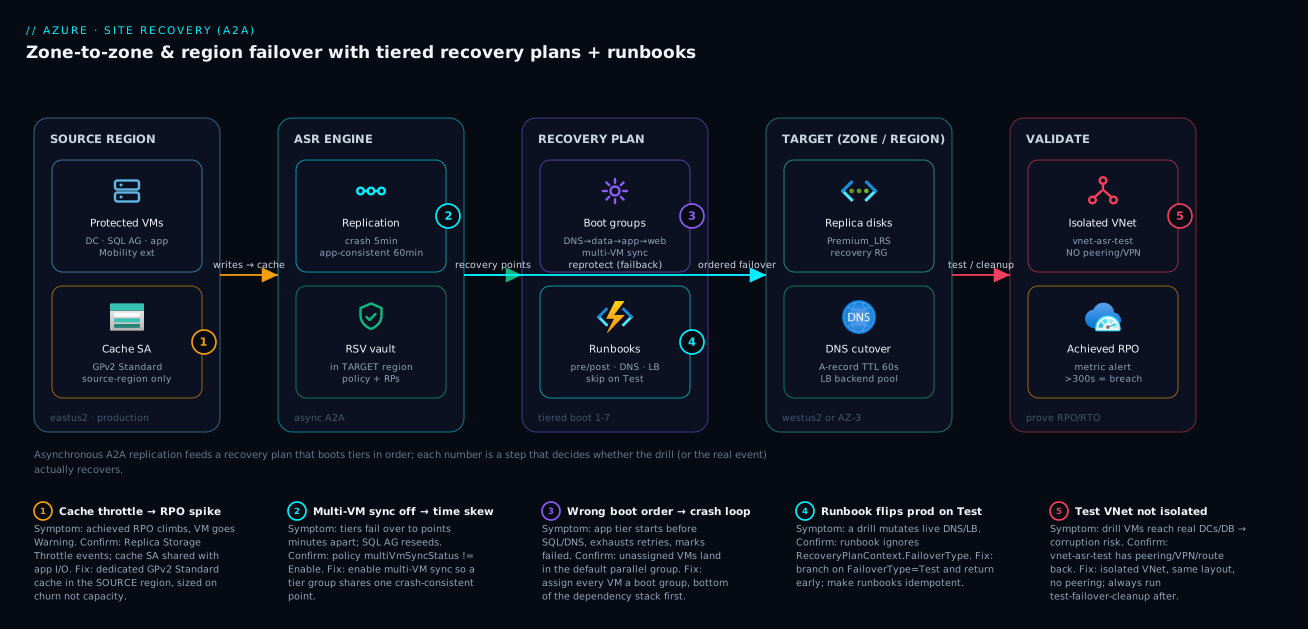
Read the diagram left to right – it is the data path and the control path on one canvas, with each number marking a step that decides whether the failover actually recovers. On the far left, protected VMs in the source region (a DC, a SQL Always On pair, app servers) run the Mobility extension, which streams disk writes into a dedicated cache storage account that lives in the source region (badge 1 – the single most misconfigured component; share it with app I/O and your achieved RPO spikes). From the cache, the ASR engine asynchronously replicates into the Recovery Services vault – which itself lives in the target region so it survives the disaster – producing crash-consistent points every five minutes and hourly app-consistent points. Badge 2 sits on replication: leave multi-VM sync off and your tiers fail over to points minutes apart, reseeding the SQL AG.
The middle-right is the orchestration. The recovery plan boots tiers in dependency order through boot groups (DNS → data → app → web; badge 3 – an unassigned VM lands in the default parallel group and crash-loops the app), and attaches Automation runbooks at group boundaries for DNS cutover, IP and load-balancer wiring (badge 4 – the runbook must branch on FailoverType or a drill mutates live production). The target (a zone in the same region, or a paired region) is where the replica disks come up and DNS cuts over to the DR load balancer with a 60-second TTL. Finally, the validate zone is the discipline that makes all of it real: an isolated test VNet with no path back to production (badge 5), and an achieved-RPO metric alert that fires when recoverable lag crosses your target – not a green dashboard you trust on faith. The dotted reprotect flow from the engine back to the recovery plan is the return trip most teams never rehearse.
Real-world scenario
A platform team running a regulated payments workload (three-tier: IIS web, .NET app, SQL Server on a 2-VM Always On AG, plus a pair of domain controllers) protected everything to a paired region with ASR and a 5-minute RPO. Replication was healthy for months. During their first real drill, the recovery plan booted all VMs but the app tier crash-looped: it came up before SQL had finished AG recovery, exhausted its connection retries, and the service marked itself failed. Worse, because they had not enabled multi-VM sync, the two SQL VMs failed over to recovery points 3 minutes apart, so the AG came up with the secondary ahead of the primary and had to be manually reseeded – blowing their RTO from a target of 15 minutes to over an hour.
The constraint was real: SQL AG recovery time is variable and you cannot put a fixed sleep in a boot group and call it deterministic. They fixed it with two changes. First, they enabled multiVmSyncStatus: Enable on the policy so the SQL pair (and the whole app) shares one crash-consistent recovery point – no more cross-VM time skew. Second, they replaced the fragile fixed wait with a post-group readiness gate: a runbook attached to the end of the SQL boot group that polls the AG listener until the primary is actually serving, before the app group is allowed to start.
# Post-action on the SQL boot group: block until the AG primary answers.
$listener = "sql-ag-listener.payments.internal"
$deadline = (Get-Date).AddMinutes(12)
do {
    try {
        $c = New-Object System.Data.SqlClient.SqlConnection("Server=$listener;Database=master;Integrated Security=True;Connect Timeout=5")
        $c.Open()
        $primaryReady = $true
        $c.Close()
    } catch {
        $primaryReady = $false
        Start-Sleep -Seconds 10
    }
} until ($primaryReady -or (Get-Date) -gt $deadline)

if (-not $primaryReady) { throw "SQL AG primary not ready before deadline -- halting recovery plan." }
Write-Output "SQL AG primary reachable -- releasing app tier boot group."
With shared recovery points plus a readiness gate instead of a guessed sleep, their next drill came up clean and reproducibly inside 14 minutes – and crucially, the plan now fails loudly if the data tier isn’t ready, instead of cascading into a half-booted app. The drill-over-drill progression, because the numbers are the lesson:
| Drill | Multi-VM sync | Data-tier gate | App tier outcome | Achieved RTO | Verdict |
|---|---|---|---|---|---|
| Q1 (first) | Off | Fixed Start-Sleep 300 |
Crash loop; AG reseed | > 60 min | Failed target |
| Q2 (after sync fix) | Enable | Fixed Start-Sleep 300 |
Boots, but sleep sometimes short | ~22 min | Still over target |
| Q3 (after gate) | Enable | Readiness poll (listener) | Clean, ordered | ~14 min | Met 15-min target |
| Q4 (steady) | Enable | Readiness poll | Clean, reproducible | ~13 min | Stable; fails loudly if not ready |
The lesson the team wrote on the wall: “A fixed sleep is a guess; a readiness gate is a contract. Replication health is necessary; a clean, timed test failover is sufficient.”
Advantages and disadvantages
ASR turns a pile of replicated disks into a rehearsed, ordered, automatable recovery – but it is orchestration you own, and the defaults do not protect you. Weigh it honestly:
| Advantages (why ASR earns its place) | Disadvantages (why it bites) |
|---|---|
| Agentless A2A – no appliance/process server to run | You still own boot order, runbooks, DNS, IPs – the hard 80% |
| Crash-consistent points every 5 min → low RPO floor | App-consistent points are hourly and heavier; data loss is real on unplanned |
| Recovery plans encode boot order + automation, repeatably | Defaults are unsafe: multi-VM sync off, VMs default to parallel boot |
| Test failover proves recoverability with zero prod impact | Only true if the test VNet is genuinely isolated – easy to leak |
| Compute in DR isn’t billed until failover | Replica storage + protected-instance fee are continuous |
| Reprotect re-seeds only the delta on failback | Failback is multi-step and frequently un-rehearsed → stranded in DR |
| Achieved RPO is a first-class, alertable metric | “Replication healthy” hides RTO problems entirely |
| One plan can mix VMs, scripts and manual gates | A bad runbook (no Test guard) can take down production during a drill |
ASR is the right tool when you have stateful IaaS the business cannot lose and you need fast, ordered recovery – payments, ERP, SQL-on-VM, domain controllers. It is the wrong tool when the right answer is platform-native: zone-redundant PaaS, SQL failover groups, or Cosmos multi-region writes handle their own failover and ASR would just add machinery. And it is not a backup: ASR gives you a short recovery-point window for fast failover, not 35-day point-in-time restore against accidental deletion or ransomware – pair it with Azure Backup for that. The disadvantages are all manageable – but only if you know they exist and rehearse around them, which is the entire point of a drill.
ASR positioned against the adjacent resilience tools, so you don’t reach for the wrong one:
| Tool | Protects against | Recovery model | Use ASR instead when… |
|---|---|---|---|
| Azure Site Recovery | Zone / region outage (IaaS) | Fast ordered failover, ~5-min RPO | (this is the IaaS DR tool) |
| Azure Backup | Deletion, corruption, ransomware | Point-in-time restore (days) | You need fast failover, not restore |
| Zone-redundant PaaS | Single-zone failure | Built-in, transparent | Workload is IaaS, not PaaS |
| SQL failover groups | SQL region failure | DB-level auto/failover | You’re running SQL on a VM |
| Front Door / Traffic Manager | Endpoint/region routing | Global traffic steering | You need the compute moved, not just routed |
| VMSS across zones | Instance/zone loss (stateless) | Re-create instances | App is stateful and can’t be re-imaged |
Hands-on lab
Protect one VM with A2A, prove replication health, run an isolated test failover, and clean up – all reversible. Run in Cloud Shell (Bash). This incurs replica-storage and protected-instance charges while enabled, so tear down at the end. (The portal “Enable replication” wizard creates the fabrics, containers and mappings on first use; this lab assumes you enable the first VM via the portal, then drive validation from the CLI.)
Step 1 – Variables and resource groups.
SRC_RG=rg-app-eastus2
DR_RG=rg-dr-westus2
SRC_LOC=eastus2
DR_LOC=westus2
VAULT=rsv-dr-lab
VM=vm-lab01
az group create -n $SRC_RG -l $SRC_LOC -o table
az group create -n $DR_RG  -l $DR_LOC  -o table
Step 2 – Create the vault in the TARGET region and a dedicated cache SA in the SOURCE region.
az backup vault create -g $DR_RG -n $VAULT -l $DR_LOC -o table
az storage account create -g $SRC_RG -n stasrlab$RANDOM -l $SRC_LOC \
  --sku Standard_LRS --kind StorageV2 --min-tls-version TLS1_2 \
  --allow-blob-public-access false -o table
Expected: a vault row in westus2; a StorageV2 cache account in eastus2.
Step 3 – Deploy a small source VM to protect (use a cheap SKU).
az vm create -g $SRC_RG -n $VM --image Ubuntu2204 --size Standard_B2s \
  --admin-username azureuser --generate-ssh-keys -o table
Step 4 – Enable replication (portal wizard). In the portal: Recovery Services vault rsv-dr-lab → Site Recovery → Enable replication → Azure virtual machines, source eastus2, target westus2, select vm-lab01, accept the default policy (5-min crash-consistent), and the dedicated cache account. This creates the fabrics/containers/mappings. Wait for initial replication to complete (the protected item moves from NotApplicable/seeding to Protected).
Step 5 – Verify replication health and achieved RPO from the CLI.
az extension add --name site-recovery
az site-recovery protected-item show \
  --resource-group $DR_RG --vault-name $VAULT \
  --fabric-name asr-a2a-default-eastus2 \
  --protection-container-name asr-a2a-default-eastus2-container \
  --replication-protected-item-name $VM \
  --query "{state:properties.protectionStateDescription, health:properties.replicationHealth, rpoSeconds:properties.providerSpecificDetails.lastRpoInSeconds}" \
  -o table
Expected: protectionStateDescription = Protected, replicationHealth = Normal, lastRpoInSeconds well under 300.
Step 6 – Build an isolated test VNet and a single-VM recovery plan.
az network vnet create -g $DR_RG -n vnet-asr-test -l $DR_LOC \
  --address-prefixes 10.99.0.0/16 \
  --subnet-name snet-app --subnet-prefixes 10.99.1.0/24 -o table
# Create rp-lab in the portal (Site Recovery → Recovery Plans → +Recovery plan),
# add vm-lab01 to Group 1. (Single-VM plans are simplest via the portal.)
Step 7 – Run a test failover into the isolated VNet, then CLEAN UP.
az site-recovery recovery-plan test-failover \
  --resource-group $DR_RG --vault-name $VAULT \
  --recovery-plan-name rp-lab \
  --failover-direction PrimaryToRecovery \
  --network-id "$(az network vnet show -g $DR_RG -n vnet-asr-test --query id -o tsv)" \
  --network-type VmNetworkAsInput

# Validate the VM booted in westus2 in the isolated VNet, then:
az site-recovery recovery-plan test-failover-cleanup \
  --resource-group $DR_RG --vault-name $VAULT \
  --recovery-plan-name rp-lab \
  --comments "Lab drill -- VM booted in isolated VNet, cleaned up."
Expected: a test VM appears in rg-dr-westus2 attached to vnet-asr-test with no path to production; cleanup deletes it.
Validation checklist. You enabled A2A, confirmed Protected/Normal with a sub-300s achieved RPO, ran a test failover into a network with no route back to prod, and cleaned up – the full proof loop. What each step proves:
| Step | What you did | What it proves | Real-world analogue |
|---|---|---|---|
| 2 | Vault in target, cache in source | The region placement that makes ASR survivable | The first design decision in any DR build |
| 5 | Checked health + achieved RPO | Replication is real and within target | The daily DR health check |
| 6 | Built an isolated test VNet | Drills must have zero blast radius | The non-negotiable drill setup |
| 7 | Test failover + cleanup | You can prove recovery without touching prod | The quarterly DR drill |
Cleanup (stop all charges).
# Disable replication for the protected item, then delete both resource groups.
az site-recovery protected-item delete \
  --resource-group $DR_RG --vault-name $VAULT \
  --fabric-name asr-a2a-default-eastus2 \
  --protection-container-name asr-a2a-default-eastus2-container \
  --replication-protected-item-name $VM --yes 2>/dev/null || true
az group delete -n $SRC_RG --yes --no-wait
az group delete -n $DR_RG  --yes --no-wait
Cost note. While enabled, you pay the protected-instance fee (~$25/VM/month order of magnitude) plus replica-disk storage; an hour or two of this lab is a few rupees of storage. Disabling replication and deleting the resource groups stops everything.
Practice challenges
Escalating beginner -> advanced. Commands are illustrative and IDs are placeholders – you can reason through every one without a live subscription, but they are shaped to run in Cloud Shell once the fabrics exist. Each ends with a one-line why.
1. (Beginner) Put the cache storage account in the right place. You are protecting VMs in eastus2 and replicating to westus2. Create the dedicated ASR cache storage account with sensible hardening – and, before you type the region, decide which one it belongs in.
<details> <summary>Solution</summary>
az storage account create -g rg-app-eastus2 -n stasrcacheeastus2 \
  -l eastus2 --sku Standard_LRS --kind StorageV2 \
  --min-tls-version TLS1_2 --allow-blob-public-access false
The cache account lives in the source region (eastus2), dedicated to ASR, GPv2 Standard. Why: the cache buffers writes at the source before replication – putting it in the target breaks the model, and sharing it with app I/O throttles it and spikes RPO.
</details>
2. (Beginner) Read a warning correctly. A protected VM shows replicationHealth = Warning with achieved RPO climbing past 300s, yet replication is still running. Name the first component to suspect and the one metric you should already have been alerting on.
<details> <summary>Solution</summary>
Suspect the cache storage account – throttled (usually because it is shared with app I/O) or undersized for the write churn; confirm with Replica Storage Throttle events. Alert on the achieved-RPO metric (> 300s sustained ~15 min), not just the health state. Why: RPO is decided at the cache layer, and health can read “Normal”/“Warning” while you are actually far behind.
</details>
3. (Intermediate) Author a multi-tier policy. Write the replication policy for a three-tier app that needs 72h of recovery-point history, hourly application-consistent snapshots, and tiers that never drift apart in time.
<details> <summary>Solution</summary>
az site-recovery policy create \
  --resource-group rg-dr-westus2 --vault-name rsv-dr-prod \
  --name policy-prod-5min \
  --provider-input '{
    "instanceType": "A2A",
    "recoveryPointHistory": 259200,
    "appConsistentFrequencyInMinutes": 60,
    "crashConsistentFrequencyInMinutes": 5,
    "multiVmSyncStatus": "Enable"
  }'
recoveryPointHistory is in seconds (259200 = 72h). Why: multiVmSyncStatus: Enable is what makes the tiers share one crash-consistent point, so the DB and app tiers cannot fail over minutes apart.
</details>
4. (Intermediate) Order the boot groups. A four-tier app has: two IIS web VMs, two .NET app VMs, a two-node SQL Always On AG, and two domain controllers. Assign boot groups 1-4 and state the gate that must sit between the data and app tiers.
<details> <summary>Solution</summary>
Group 1: domain controllers / DNS. Group 2: the SQL AG pair. Group 3: the app VMs. Group 4: the web VMs. Between Group 2 and Group 3, attach a post-group readiness gate – a runbook that polls the AG listener until the primary is actually serving. Why: a fixed Start-Sleep is a guess; SQL AG recovery time is variable, so poll the real dependency and let the plan fail loudly if it isn’t ready.
</details>
5. (Advanced) Make one runbook safe in a drill and a disaster. Your post-failover runbook repoints production DNS and wires the DR load balancer. Give the single guard that stops it mutating production during a Test failover, plus the identity model it should run under.
<details> <summary>Solution</summary>
if ($RecoveryPlanContext.FailoverType -eq "Test") {
    Write-Output "Test failover -- skipping production DNS/LB changes."
    return
}
Run the runbook under the Automation account’s system-assigned managed identity with least-privilege RBAC (e.g. Network Contributor on the DNS/LB scope), in an Automation account in the target region, and make every mutation idempotent. Why: the guard keeps a drill from touching live production, and a managed identity removes a Run As certificate that can expire mid-disaster. </details>
6. (Advanced) Design a cross-region test failover that cannot leak or fail to boot. Specify the full pre-flight checklist so a cross-region drill proves recoverability without (a) touching production or (b) failing to allocate compute.
<details> <summary>Solution</summary>
- Isolation: an isolated
vnet-asr-testin the target region with the same address layout but no peering, no VPN/ExpressRoute gateway, no UDR back to prod (verifyaz network vnet peering listis empty); isolated or test-only DNS. - Capacity: an On-Demand Capacity Reservation in the target region/zone for the SKUs and counts you would boot, plus enough vCPU quota in the target subscription.
- Run + record: trigger
recovery-plan test-failoverintovnet-asr-test, record the achieved RTO, then always runtest-failover-cleanup.
Why: isolation gives zero blast radius, the reservation removes the allocation gamble a real regional event would expose, and cleanup keeps the plan runnable and stops the meter. </details>
Common mistakes & troubleshooting
This is the playbook – the part you bookmark. First as a scannable table, then the entries that bite hardest with full confirm-detail underneath.
| # | Symptom | Root cause | Confirm (exact cmd / portal path) | Fix |
|---|---|---|---|---|
| 1 | Achieved RPO climbs above target, VM goes Warning |
Cache SA throttled (shared with app I/O) or undersized | Replication health blade; Replica Storage Throttle events; RPO metric |
Dedicated GPv2 Standard cache in source; split high-churn VMs |
| 2 | Tiers fail over to recovery points minutes apart | Multi-VM sync not enabled on the policy | Policy multiVmSyncStatus != Enable |
Enable multi-VM sync; re-associate the group |
| 3 | App tier crash-loops on failover, exhausts retries | App boots before data/identity (no ordering / no gate) | Recovery-plan boot groups; unassigned VMs in default group | Assign boot groups in dependency order; add a readiness gate runbook |
| 4 | A test drill changed production DNS/LB | Runbook doesn’t branch on FailoverType |
Runbook ignores RecoveryPlanContext.FailoverType |
Branch on Test and return; make runbook idempotent |
| 5 | Failed over fine, but can’t get back to source | Reprotect/failback never set up or rehearsed | Replication direction is None after failover |
Reprotect (DR→source), then planned failback |
| 6 | Test VMs can reach real DCs / database | Test VNet has peering/VPN/route to prod | az network vnet peering list on vnet-asr-test |
Remove peering/gateway/UDR; isolated VNet only |
| 7 | Test failover left VMs running, plan won’t re-run | Cleanup never ran after the drill | Test VMs still present in DR RG; plan state dirty | Run test-failover-cleanup; automate the reminder |
| 8 | Enable-replication fails with mapping error | Protection container mapping / fabrics missing | az site-recovery ... errors on container |
Create via portal wizard first, then codify |
| 9 | Failed-over VM comes up with stale/wrong IP | Target NIC/IP not configured in replication settings | Protected item’s target network settings blank | Set target subnet/IP; automate public IP/LB post-failover |
| 10 | Initial replication never completes | Mobility blocked (NSG/policy) or unsupported disk | Protected item stuck seeding; Ultra disk present | Allow Mobility egress; swap unsupported disk type |
| 11 | App-consistent points missing on Linux | No/failed pre-post freeze script; VSS-equiv absent | App-consistent RP count zero in history | Install/repair the app-consistent script; check perms |
| 12 | SQL AG comes up split-brain / reseeds | Multi-VM sync off and no AG readiness gate | AG secondary ahead of primary post-failover | Multi-VM sync + post-group listener poll before app group |
| 13 | DR drill “passes” but RTO is unknown | Achieved RTO never recorded | No timing captured in cleanup comments | Record boot-order + app-ready time every drill |
| 14 | “Replication healthy” but failover still loses data | Confused replication health with achieved RPO | RPO metric > target while health shows Normal |
Alert on the RPO metric, not just health state |
The expanded form for the entries that cost the most:
1. Achieved RPO climbs above target and the VM flips to Warning.
Root cause: The cache storage account is throttled – usually because it is shared with application workloads – or it is undersized for the VM’s write churn.
Confirm: Replication health blade shows achieved RPO above target; look for Replica Storage Throttle events; query the RPO metric over time.
Fix: Use a dedicated GPv2 Standard cache account in the source region, sized on churn not capacity; split very high-churn VMs onto their own cache; enable the high-churn flow if Standard limits are breached.
2. Tiers of one application fail over to recovery points minutes apart.
Root cause: Multi-VM sync is not enabled on the policy, so each VM picks its own recovery point.
Confirm: multiVmSyncStatus on the policy is not Enable; post-failover, the data tier’s point lags the app tier’s.
Fix: Enable multi-VM sync on the policy so the VM group shares one crash-consistent recovery point; re-associate the protected items with the synced policy.
3. The app tier crash-loops on failover and marks itself failed.
Root cause: The app boots before its dependency (SQL/DNS) is ready – either VMs are unassigned (default parallel boot) or the data-tier gate is a fixed sleep that finished too early.
Confirm: Recovery-plan boot groups show unassigned VMs in the default group, or the app group has no readiness gate.
Fix: Assign every VM a boot group in dependency order, and gate the app group on a post-group readiness poll of the data tier (e.g. the AG listener), not a guessed sleep.
4. A test drill mutated production DNS / load balancer.
Root cause: The runbook does not branch on RecoveryPlanContext.FailoverType, so it ran its production cutover during a Test failover.
Confirm: The runbook code ignores FailoverType; the test run shows live DNS/LB changes.
Fix: Branch on FailoverType -eq "Test" and return early; make every cutover runbook idempotent so re-runs and retries are safe.
5. You failed over to DR successfully but cannot get back to the source.
Root cause: Reprotect/failback was never set up or rehearsed, so after failover replication direction is None and the DR VMs are unprotected.
Confirm: The protected item’s replication direction is None after failover; no reprotect job exists.
Fix: Run reprotect to replicate DR→source (delta re-seed), let it sync, then run a planned failover back and reprotect again to restore the normal direction.
6. Test VMs can reach the real domain controllers or production database.
Root cause: The test VNet has peering, a VPN/ExpressRoute gateway, or a UDR that provides a path back to production.
Confirm: az network vnet peering list on vnet-asr-test is non-empty, or a gateway/route exists.
Fix: Use a genuinely isolated VNet – same address layout, but no peering, no gateway, no route to prod – and verify before every drill.
Best practices
- Vault in the target region, cache account in the source region. This placement is what makes ASR survive the disaster it protects against – get it wrong and you lose your control plane with the region.
- Dedicate the cache storage account to ASR and monitor it. Sharing it with app I/O is the number-one cause of RPO spikes. Size on churn, watch
Replica Storage Throttle. - Enable
multiVmSyncStatusfor every multi-VM application. It is off by default and is the difference between a clean failover and a SQL AG reseed. - Assign every protected VM to a boot group, bottom of the dependency stack first. Unassigned VMs boot in parallel – exactly the chaos a recovery plan exists to prevent.
- Gate tiers with readiness runbooks, never fixed
sleeps. Poll the actual dependency (AG listener, health endpoint) so the plan fails loudly if it isn’t ready. - Branch every runbook on
FailoverTypeand make it idempotent. A drill must never mutate production; a retry must never double-apply. - Keep DR-relevant DNS records at a 30-60s TTL permanently. You cannot shrink TTL mid-incident; pay the standing cost for fast cutover.
- Run an isolated test failover on a schedule (quarterly minimum) and clean up. Replication health is necessary; a clean, timed drill is the only sufficient proof.
- Alert on achieved RPO as a metric, not on “replication healthy.” Health state hides RTO and RPO-drift problems entirely.
- Rehearse reprotect and failback end to end. Getting to DR is half the job; teams stranded in DR for weeks are the expensive incidents.
- Right-size the replica disk SKU. It is a continuous cost; match it to recovery performance needs, not reflexively to Premium for cold tiers.
- Capture drill evidence every time – boot order, app-ready time, runbook outcomes, achieved RTO – for audit and to prove improvement drill over drill.
The standing alerts worth wiring before the next drill – leading indicators, not “site down”:
| Alert on | Signal | Threshold (starting point) | Why it’s leading |
|---|---|---|---|
| Achieved RPO breach | RPO metric (per VM) |
> 300 s sustained 15 min | Catches replication falling behind before failover |
| Replication health | Health state | Critical for 5 min |
Replication broken → bad failover |
| Cache throttling | Replica Storage Throttle events |
any sustained | Root cause of RPO drift, before RPO climbs |
| Test-failover staleness | Days since last clean drill | > 95 days | Untested DR is unproven DR |
| Unprotected after failover | Replication direction = None |
any | You’re in DR with no protection |
| Runbook failure | Automation job status | any Failed in a plan |
Cutover step silently broke |
Security notes
- Managed identity over stored credentials for runbooks. Use the Automation account’s system-assigned managed identity with RBAC scoped to the DR resource group – no Run As certificate to expire or leak. Grant least privilege (e.g. Network Contributor on the DNS/LB scope), not Owner.
- Encrypt replica disks. Replica managed disks support server-side encryption with platform- or customer-managed keys; for CMK, pre-stage a disk encryption set in the target region and reference it on the replica. See Azure Encryption at Rest with Customer-Managed Keys.
- Keep the test network truly isolated. An isolated
vnet-asr-testis a security control, not just a correctness one – it prevents a drill from touching real identity (duplicate AD objects) or real data (corruption). No peering, no VPN, no route back. - Lock down the vault and Automation account with RBAC. Site Recovery Contributor / Operator on the vault, not broad subscription roles; the runbook identity is a high-value target because it can rewire DNS and networking.
- Mind data residency on region-to-region. Failing over to a paired region moves regulated data across a boundary – get compliance sign-off on the target region before you promise cross-region DR.
- Protect the DNS zone you cut over. The runbook that repoints
app.contoso.comhas write access to your public zone; scope its identity tightly and log every change. - Pair ASR with immutable backup for the ransomware case. ASR’s short recovery window can replicate corruption too; a custom recovery point lets you boot before the event, but immutable Azure Backup is your guarantee against an admin-level compromise.
The security controls and the failure each one also prevents:
| Control | Mechanism | Secures against | Also prevents |
|---|---|---|---|
| Managed identity for runbooks | System-assigned MI + scoped RBAC | Leaked/expired Run As creds | Runbook breaking on cert expiry |
| Least-privilege runbook scope | Network Contributor on DNS/LB only | Over-broad blast radius | Accidental changes outside DR scope |
| Replica disk encryption (CMK) | Disk encryption set (target region) | Data-at-rest exposure | Compliance gaps on the replica |
| Isolated test VNet | No peering/VPN/route | Drill touching real identity/data | Production corruption during a drill |
| Vault/Automation RBAC | SR Contributor/Operator roles | Unauthorized failover/config | Fat-finger failover by non-DR staff |
| Custom recovery point | Pick a point before an event | Replicating ransomware/corruption | Failing over into a compromised state |
Cost & sizing
The bill is continuous even though the DR compute is off – that surprises teams. The drivers:
- Protected-instance fee per VM is the headline ASR charge (order of ~$25/VM/month). It is per protected VM regardless of size, so protecting 200 VMs is ~$5,000/month before storage.
- Replica disk storage in the target runs continuously – you pay for standby disks sized like the source. Right-size the replica SKU (
recoveryReplicaDiskAccountType): Standard HDD/SSD for cold tiers, Premium only where post-failover IOPS demand it. - Cross-region egress on replication applies to region-to-region (not zone-to-zone, which stays intra-region). High-churn VMs replicate more bytes; this is a real line item for chatty workloads.
- Cache storage account is a small but real cost; dedicate it anyway – sharing it to “save money” costs you RPO.
- DR compute is billed only during a failover or an un-cleaned test failover – which is exactly why forgetting cleanup is expensive, and why being stranded in DR (running un-scaled compute under real load) blows budgets.
A rough monthly picture for a mid-size estate, and what each lever buys:
| Cost driver | What you pay for | Rough figure | Lever to control it | Watch-out |
|---|---|---|---|---|
| Protected-instance fee | Per protected VM | ~$25/VM/mo | Protect only what needs fast failover | 200 VMs ≈ $5,000/mo baseline |
| Replica disk storage | Standby disks in target | Source-disk-sized, continuous | Right-size replica SKU | Premium everywhere over-spends |
| Cross-region egress | Replication bytes (R2R) | Per-GB, churn-driven | Zone-to-zone where it suffices | High-churn VMs add up |
| Cache storage account | Source-region buffer | Small | Dedicated GPv2 Standard | Sharing it → RPO spikes |
| Test-failover compute | DR VMs during a drill | Hourly, while running | Always run cleanup | Forgetting cleanup bills forever |
| Failover compute | DR VMs serving traffic | Hourly, during DR | Scale appropriately; fail back | Stranded-in-DR is the budget killer |
The decision rule as a table – match the workload to the cheapest posture that meets its risk:
| If the workload… | Risk it faces | DR posture | Why |
|---|---|---|---|
| Must survive a zone outage, low latency | Single-zone failure | Zone-to-zone A2A | Intra-region, no egress, no residency change |
| Must survive a region loss | Regional disaster | Region-to-region A2A | True DR; accept egress + second region |
| Is critical and budget allows | Both | Both (Z2Z + R2R) | AZ-resilience for common case + DR for rare |
| Is stateless and re-imageable | Instance/zone loss | VMSS across zones (not ASR) | Cheaper to re-create than replicate |
| Is PaaS / managed SQL | Service-level failure | Native zone redundancy / failover groups | ASR adds no value over built-in |
| Just needs deletion/ransomware cover | Data loss, not outage | Azure Backup (immutable) | Point-in-time restore, not failover |
Interview & exam questions
1. Where does the cache storage account live, and why does that placement matter? In the source region. It buffers disk-write bursts from the Mobility service and decouples app I/O from cross-region replication latency, and ASR replicates from it to the target. Placing it in the target would add latency and break the model; sharing it with app workloads throttles it and spikes RPO. Dedicate it and size on churn.
2. Difference between crash-consistent and app-consistent recovery points? Crash-consistent is a disk-as-is snapshot (every 5 min for A2A) – filesystems journal-replay but in-flight writes are lost. App-consistent uses VSS (Windows) or a pre/post freeze (Linux) to flush application buffers first (hourly, heavier). Databases want app-consistent for clean recovery; failing over to one loses more time but recovers cleaner.
3. Why is multiVmSyncStatus: Enable non-negotiable for a multi-tier app? It makes a group of VMs share one crash-consistent recovery point, so the web, app and DB tiers fail over to the same moment in time. Without it, tiers can land minutes apart – e.g. a SQL AG secondary ahead of its primary, forcing a manual reseed and a data-integrity incident.
4. What is a recovery plan and what does a boot group do? A recovery plan is the unit of failover – it groups VMs, orders their boot into boot groups (1-7) executed sequentially (every VM in a group reaches its wait condition before the next group starts), and attaches pre/post automation. Model your dependency graph onto groups: identity/DNS first, then data, then app, then web. Unassigned VMs boot in parallel in a default group.
5. How does one runbook behave correctly in both a drill and a real disaster? ASR passes a RecoveryPlanContext with FailoverType (Test/Planned/Unplanned) and FailoverDirection. The runbook branches on these – crucially it must skip production DNS/LB changes when FailoverType is Test – and should be idempotent so retries and re-runs are safe.
6. Why prefer a readiness gate over a fixed Start-Sleep between boot groups? Dependency recovery time is variable (SQL AG recovery especially), so a fixed sleep is a guess – too short and the app boots into a dead dependency and crash-loops; too long and you waste RTO. A post-group readiness gate polls the actual dependency (e.g. the AG listener) and releases the next group only when it is truly serving, and fails loudly if it isn’t.
7. What’s the non-negotiable rule for a test failover network, and why? Fail over into a network with no peering, no VPN, and no route back to production. If the test VMs can reach the real DCs or database, the drill can corrupt production data or duplicate AD identity objects. The isolated vnet-asr-test uses the same address layout (so app config resolves) but is sealed off.
8. What is reprotect and why does failback depend on it? After a failover, the DR region is primary and replication is paused – you are unprotected. Reprotect reverses replication (DR→source), re-seeding only the delta, so the original region becomes a valid target again. Only then can you run a planned failover back (zero data loss). Skipping reprotect leaves you stranded in DR.
9. Planned vs unplanned failover – data-loss expectation for each? Planned failover requires a healthy source, flushes the final pending data, and is zero data loss – for anticipated events. Unplanned failover is the real-disaster path when the source is gone; it fails over to the latest available point and you expect data loss ≈ your achieved RPO at the moment of the outage.
10. “Replication is healthy” – why isn’t that enough to trust your DR? Health state says bytes are arriving; it says nothing about achieved RPO (you could be far behind and still “Normal”/“Warning”) or RTO (boot order, runbooks, app readiness). The only sufficient proof is a clean, timed, isolated test failover with achieved RTO recorded – plus alerting on the achieved-RPO metric, not just health.
11. Zone-to-zone vs region-to-region – when each, and what’s identical? Zone-to-zone protects a single-zone failure, stays in-region (low latency, no residency change) but does not cover a regional outage. Region-to-region covers a region loss at the cost of egress and a second region. The replication mechanics, policy, cache, and recovery plans are identical; only the target (zone vs region) differs.
12. Why must you run test-failover cleanup, and what happens if you don’t? Cleanup deletes the test VMs and resets the plan state. If you skip it you pay continuously for the running test VMs and the recovery plan stays dirty and cannot run again – so a forgotten cleanup both costs money and breaks your next drill.
These map to AZ-104 (Administrator) – implement and manage Azure Site Recovery, backup and disaster recovery – and AZ-305 (Solutions Architect Expert) – design business continuity, RPO/RTO, and DR for IaaS. The networking-cutover angle touches AZ-700. A compact cert mapping for revision:
| Question theme | Primary cert | Exam objective area |
|---|---|---|
| ASR architecture, cache, RPs | AZ-104 | Implement & manage backup and DR |
| Recovery plans, boot groups, runbooks | AZ-104 / AZ-305 | Orchestrate failover; design BCDR |
| Zone-to-zone vs region-to-region | AZ-305 | Design for HA and DR |
| RPO/RTO targets and proof | AZ-305 | Business continuity requirements |
| DNS/IP/LB cutover automation | AZ-700 | Design & implement network connectivity |
| Encryption / RBAC / isolation | AZ-500 / AZ-104 | Secure DR; manage identities & access |
Quick check
- Your achieved RPO is climbing and a VM flips to
Warning, but replication is still running. What single component do you suspect first, and where does it live? - A multi-tier app’s SQL AG comes up split-brain after failover and has to be reseeded. What policy setting was almost certainly missing?
- A
Testfailover drill changed production DNS. What is the single line of runbook logic that would have prevented it? - You failed over to DR successfully but now can’t return to the source region. What step did you skip, and what does it do?
- True or false: a green “replication healthy” dashboard is sufficient evidence that your DR meets its RTO.
Answers
- The cache storage account – it lives in the source region. Suspect it is throttled (often because it is shared with application I/O) or undersized for the write churn; look for
Replica Storage Throttleevents and move to a dedicated GPv2 Standard cache sized on churn. multiVmSyncStatus: Enableon the replication policy. Without it the SQL VMs fail over to recovery points minutes apart, so the AG secondary can come up ahead of the primary, forcing a manual reseed. Multi-VM sync makes the group share one crash-consistent point.- Branch on the failover type and return early:
if ($RecoveryPlanContext.FailoverType -eq "Test") { return }before any production DNS/LB mutation. (And make the runbook idempotent.) - You skipped reprotect. After a failover the DR region is primary and replication is paused; reprotect reverses replication (DR→source), re-seeding only the delta, so the original region becomes a valid target again and you can run a planned failover back.
- False. Replication health only confirms bytes are arriving. It hides achieved RPO (you can be far behind and still “Normal”/“Warning”) and says nothing about RTO – boot order, runbooks, app readiness. Only a clean, timed, isolated test failover proves RTO.
Common beginner mistakes
These are misconceptions about how ASR works – fix the mental model and whole classes of the symptom-driven problems in the troubleshooting playbook below stop happening in the first place.
“Replication is healthy, so we’re covered.” A green dashboard only proves bytes are arriving at the target. It cannot see boot order, DNS, IP reassignment, or whether the app tier waits for its database – and those decide your RTO. Right model: replication health is necessary but never sufficient; the only proof of recovery is a clean, timed, isolated test failover with the achieved RTO written down.
“ASR is our backup.” ASR keeps a short recovery-point window (up to 72h) for fast failover; it is not a 35-day, point-in-time archive against accidental deletion, and it will happily replicate corruption to the target. Right model: ASR is business continuity (get running again fast), Azure Backup is data recovery (restore a known-clean point). Regulated workloads need both, not one standing in for the other.
“The cache storage account goes in the DR region.” It is tempting to assume the buffer sits next to the replica. It does not. Right model: the cache account lives in the source region – it absorbs write bursts before they cross to the target. Put it in the target and you add latency and break the whole replication path.
“Zone-redundant means I’m safe from a region outage.” Zone-to-zone (and zone-redundant services) survive a single zone failing. A regional outage takes every zone at once. Right model: Z2Z handles the common, local failure; only region-to-region replication survives losing the whole region – mature designs run both, not one or the other.
“Failover is a button, so failback is the same button in reverse.” After failover, the DR region is primary and replication is paused – you are unprotected, and there is no reverse button. Right model: the return trip is reprotect (reverse replication, delta re-seed) -> let it sync -> planned failback -> reprotect again. Rehearse it, or you get to DR and are stranded there.
“A fixed sleep between boot groups is good enough ordering.” Start-Sleep 300 assumes the dependency is always ready in five minutes. SQL AG recovery time is variable – too short and the app boots into a dead database and crash-loops; too long and you burn RTO for nothing. Right model: a readiness gate that polls the actual dependency (the AG listener, a health endpoint) and releases the next tier only when it is truly serving.
“The recovery-plan runbook is safe to run in a test drill.” Without a FailoverType guard, the same runbook that repoints production DNS runs that repoint during a Test failover and takes down the live site. Right model: every cutover runbook branches on RecoveryPlanContext.FailoverType, skips production mutations on Test, and is idempotent so retries never double-apply.
Glossary
- Azure Site Recovery (ASR) – Microsoft’s BCDR service that replicates running VM disks to another zone or region and orchestrates ordered failover.
- A2A (Azure-to-Azure) – the replication scenario for Azure VMs (as opposed to VMware/physical), agentless apart from the Mobility extension.
- Mobility service extension – the agent auto-installed on each protected VM that captures disk writes and ships them to the cache account.
- Cache storage account – a dedicated storage account in the source region that buffers write bursts before asynchronous replication to the target; sized on churn.
- Recovery Services vault – the control-plane resource (in the target region) holding the replication policy, recovery points and failover jobs.
- Replication policy – defines recovery-point retention, app-consistent frequency, and whether multi-VM sync is on; attached via a protection-container mapping.
- Recovery point (RP) – a bootable moment in time; crash-consistent (every 5 min, disk-as-is) or app-consistent (hourly, VSS/freeze-flushed).
- Multi-VM consistency (
multiVmSyncStatus) – makes a group of VMs share one crash-consistent recovery point so tiers don’t drift apart in time. - Recovery plan – the unit of failover: groups VMs, orders boot into boot groups (1-7), and injects pre/post automation.
- Boot group – a sequential tier (1-7) in a recovery plan; every VM in a group reaches its wait condition before the next group starts.
- Azure Automation runbook – a PowerShell script run as a pre/post action at a boot-group boundary, for DNS cutover, IP/LB wiring, and app startup.
RecoveryPlanContext– the object ASR passes to a runbook carryingFailoverType,FailoverDirection, the VM map and the group id.- Achieved RPO – the actual recoverable lag per VM (queryable as a metric); the number to alert on, not just “replication healthy.”
- Test failover – a drill that boots VMs from a chosen point into an isolated network while production replication continues uninterrupted.
- Planned failover – zero-data-loss failover for an anticipated event; source must be healthy and is flushed first.
- Unplanned failover – the real-disaster path when the source is gone; expect data loss equal to achieved RPO.
- Reprotect – reverses replication (DR→source) after a failover, re-seeding only the delta, to enable failback.
- Failback – the return trip to the original region; requires reprotect first, then a planned failover back.
- Protection container mapping – the wiring that links a source protection container to a target one; without it, enable-replication fails.
- Fabric (ASR) – the logical representation of a location (a source or target region) inside the vault that protection containers and items attach to.
- On-Demand Capacity Reservation (ODCR) – pre-purchased compute held in a target region (or zone) so a failover can actually allocate your VM SKU; a standing cost that removes the allocation gamble.
- Capacity reservation group – the container ODCR reservations live in; associate it with the replicated item so failover draws from reserved compute.
- Achieved RTO – the measured time from failover start to the application serving again in a drill; the number you record every drill (distinct from achieved RPO, the data-loss lag).
- Disk encryption set – a target-region resource holding the customer-managed key used to encrypt replica managed disks.
- VSS (Volume Shadow Copy Service) – the Windows mechanism ASR triggers to flush application buffers to disk for an application-consistent recovery point (a pre/post freeze script does the equivalent on Linux).
- Commit (failover) – the step that finalises a failover and discards the other recovery points, taken once you are satisfied with the chosen point.
- Traffic Manager / Front Door cutover – DNS-based (TTL-bound) versus anycast, health-probe-based global routing used to steer users to the DR region after ASR brings the compute up.
Next steps
You can now protect IaaS with ASR, build ordered recovery plans, automate cutover, and – the part that matters – prove RPO/RTO with isolated drills. Build outward:
- Next: Azure VM Availability & Resilience: Zones, Scale Sets & Fault Domains – the VM-level HA that handles the common failure before you ever need a region failover.
- Related: Azure Backup Vault: Immutability, MUA & Cross-Region Restore – the point-in-time, ransomware-resilient half of BCDR that ASR does not replace.
- Related: Azure Front Door & Traffic Manager: Global Failover – steer user traffic to the DR region the moment ASR brings it up.
- Related: Azure SQL Managed Instance: Failover Groups & Link – managed-SQL failover for when you move off SQL-on-a-VM.
- Related: Validate Resilience with Azure Chaos Studio – inject the zone/region fault and prove your recovery plan under real failure.
- Related: Azure Regions & Availability Zones Explained – the physical-failure boundaries that decide zone-to-zone vs region-to-region.