In a nutshell
Pub/Sub is how one part of your system tells other parts that something happened without waiting for them, knowing who they are, or caring how fast they run. Think of it like a magazine subscription service. A publisher prints an issue and sends it to a title — say, Orders Weekly. Anyone who wants that title sets up a standing subscription, and the service drops a personal copy into their own mailbox every time a new issue comes out. The printer never keeps a list of readers, never phones them, and never slows down for a reader who is behind on their reading. Add a new reader and they just start getting copies; cancel one and nobody else notices. That is publish/subscribe: senders publish to a named channel, and every subscriber independently gets their own copy.
In Pub/Sub the title is a topic, each reader’s mailbox is a subscription, and the issue is a message. The one idea to burn in now, because everything else follows from it: the topic does not keep your mail — each subscription does. A topic is just the sorting counter that fans a fresh copy of every message into the mailbox of every subscription attached to it. Two subscriptions on one topic means two independent readers, each getting the whole stream. Reader A signing “got it” (an acknowledgement, or ack) never touches reader B’s copy.
How a subscriber actually collects its mail is the subscription type, and there are four: you walk to the counter and ask for whatever is waiting (pull), the service pushes each issue through your letterbox as an HTTP call (push), or the service files every issue straight into a database table (BigQuery) or a box of files (Cloud Storage) with no code from you at all. And because delivery is at-least-once by default, once in a while you get the same issue twice — that is the deal, not a defect, and the cure is to build readers that shrug at a duplicate.
Why a beginner should care: almost every non-trivial GCP design has a Pub/Sub topic somewhere in the middle of it — decoupling a web front end from its workers, fanning one event out to five teams, or piping millions of clicks a second into BigQuery. Learn these primitives once and you can read the architecture of most event-driven systems on the platform.
Level: Intermediate · Time: ~40 min
Pub/Sub is the messaging backbone of Google Cloud. Whenever one part of a system needs to tell another part that something happened, and you do not want the sender to wait around for, or even know about, the receiver, Pub/Sub is the service that carries the message. It is a fully managed, globally available, horizontally scalable publish/subscribe system: publishers send messages to a topic, and Pub/Sub durably stores each message and delivers a copy to every subscription attached to that topic. The publisher and the subscriber never talk to each other directly, never need to be online at the same time, and never need to agree on how fast each can go. That decoupling — in space (who), in time (when), and in rate (how fast) — is the whole point.
People reach for Pub/Sub in three broad situations. The first is event-driven architecture: a service emits “order placed”, “file uploaded”, “user signed up” events and any number of downstream services react. The second is stream ingestion: millions of IoT, clickstream, or log events per second flowing into BigQuery, Dataflow, or Cloud Storage. The third is work distribution / task queues: a producer enqueues units of work and a fleet of workers pulls them off and processes them, scaling the fleet up or down with the backlog. Pub/Sub handles all three with the same primitives, which is why it shows up in almost every non-trivial GCP design.
This lesson is the exhaustive version. By the end you will know every subscription type, every delivery guarantee and the exact knobs that control it (acknowledgement deadlines, ordering keys, retry policies, dead-letter topics, flow control), how retention, seek, and snapshots let you replay history, how schemas enforce message structure, how filtering trims what a subscription receives, and when to choose Pub/Sub versus its cheaper cousin Pub/Sub Lite. It is written for someone who can deploy a Cloud Run service but has never operated a message bus, and it goes deep enough to carry you through an Associate Cloud Engineer or Professional Data Engineer exam and into production.
Learning objectives
After working through this lesson you will be able to:
- Explain the Pub/Sub data model — projects, topics, subscriptions, messages, and the publisher/subscriber decoupling — and reason about where a message physically lives at each stage.
- Choose correctly between the four subscription delivery types (pull, push, BigQuery, Cloud Storage) and configure each with every relevant setting.
- Configure and reason about delivery guarantees: at-least-once versus exactly-once, ordering keys, acknowledgement deadlines and extension, nacks, dead-letter topics, retry policies, and subscriber flow control.
- Use message retention,
seek, and snapshots to replay or discard messages, and explain the difference between the two replay mechanisms. - Attach and evolve schemas (Avro / Protocol Buffers), apply subscription filters, and decide between Pub/Sub and Pub/Sub Lite on cost and operational grounds.
- Operate Pub/Sub day-to-day with the
gcloud pubsubCLI: build a working pipeline, validate it, monitor backlog, and tear it down cleanly.
Prerequisites & where this fits
You need a Google Cloud project with billing enabled (the Free Tier and the $300 new-customer credit comfortably cover this lesson — Pub/Sub also has a standing 10 GiB/month free throughput allowance), the Pub/Sub API enabled, the gcloud CLI installed and initialised, and an IAM role that lets you administer Pub/Sub (Owner, Editor, or the granular roles/pubsub.editor). A working mental model of IAM (service accounts and roles) helps, because push delivery and BigQuery/Cloud Storage subscriptions all hinge on granting the right service account the right permission.
In the Google Cloud Zero-to-Hero course this is the Integration module. It follows the BigQuery deep dive (Pub/Sub frequently feeds BigQuery, directly or via Dataflow) and precedes the Cloud KMS & Secret Manager lesson. The companion advanced lesson, Pub/Sub Delivery Guarantees: Exactly-Once, Ordering Keys, Dead-Letter, and Flow Control, drills into the reliability mechanics with production-grade subscriber code; this lesson is the broad, every-option foundation underneath it.
Core concepts
Five terms carry the whole service. Get these straight and everything else is configuration.
A topic is a named resource you publish to. It is purely a routing point — a topic on its own does not store messages for delivery; it fans them out to subscriptions. Its full name is projects/PROJECT_ID/topics/TOPIC_ID. A topic can have a schema attached (to validate message bodies) and a list of message storage policies (to restrict which regions messages may be persisted in, for data-residency compliance).
A message is the unit of data: a binary payload (the data field, up to 10 MB) plus optional attributes (a string-to-string map of metadata, e.g. eventType=order.created), an ordering key (optional), and Pub/Sub-assigned fields — a unique message ID and a publish timestamp. Attributes are how you filter and route without parsing the payload.
A subscription is the resource a consumer reads from, and it is where messages are actually stored and tracked. This is the single most important thing to internalise: each subscription is an independent queue. When a message is published to a topic, Pub/Sub writes a separate copy into the backlog of every subscription attached at that moment. Subscription A acknowledging a message has no effect on subscription B’s copy. Two subscriptions on the same topic let two independent consumers each get the full stream — that is the “fan-out” pattern. A subscription has exactly one topic; a topic can have many subscriptions (up to 10,000).
A publisher is any client (your app, another GCP service via Eventarc, a Cloud Scheduler job) that sends messages to a topic using the publish API. The client library batches and compresses messages for efficiency and retries on transient failures.
A subscriber is any client or service that receives messages from a subscription. How it receives them — by asking (pull) or by being called (push) or by Pub/Sub writing directly to a sink (BigQuery / Cloud Storage) — is the subscription type, and it is chosen per subscription, not per topic.
The lifecycle of a single message, end to end: a publisher sends it to a topic → Pub/Sub durably stores a copy in every attached subscription’s backlog (synchronously replicated across zones in the region before the publish is acknowledged) → a subscriber receives a copy → the subscriber acknowledges (acks) it, telling Pub/Sub “I have it, do not send it again” → Pub/Sub removes it from that subscription’s backlog. If the subscriber does not ack within the acknowledgement deadline, Pub/Sub redelivers. If a message is acked by nobody and reaches the message retention duration, it is dropped. That cycle — publish, store-per-subscription, deliver, ack, expire — is the entire engine.
| Term | What it is | Scope | Stores messages? |
|---|---|---|---|
| Topic | Named publish target / fan-out point | Project (global resource) | No (routes to subscriptions) |
| Subscription | An independent queue tied to one topic | Project (global resource) | Yes (the backlog lives here) |
| Message | Payload + attributes + optional ordering key | Per subscription copy | n/a |
| Publisher | Client that sends to a topic | Client-side | n/a |
| Subscriber | Client/service that reads a subscription | Client-side or managed | n/a |
Creating a topic: every setting
You can create a topic in the Console (Pub/Sub → Topics → Create topic) or with the CLI. Here is every field the create flow offers, with the what / choices / default / when / trade-off / gotcha treatment.
gcloud pubsub topics create orders \
  --message-retention-duration=7d \
  --message-storage-policy-allowed-regions=us-central1,us-east1 \
  --schema=order-schema --message-encoding=JSON \
  --kms-key-name=projects/$PROJECT/locations/us-central1/keyRings/pubsub/cryptoKeys/topic-key
| Setting | What it controls | Choices / range | Default | When to set it / gotcha |
|---|---|---|---|---|
| Topic ID | The topic’s name | 3–255 chars, letters/digits/-_.~+%, must not start with goog |
— (required) | Immutable. Pick a domain name like orders or clickstream, not topic1. |
| Add a default subscription | Console convenience that also creates a pull subscription named <topic>-sub |
on / off | off (CLI) | Handy for demos; in IaC you create subscriptions explicitly. |
| Schema | Attaches a schema to validate message bodies at publish time | none / an existing schema | none | Set once; covered in the Schemas section. Rejected publishes count as errors. |
| Message encoding | How payloads are encoded for the schema | JSON / BINARY | — (with schema) | Only meaningful with a schema; BINARY is more compact, JSON is human-readable. |
| Message retention duration | How long the topic retains published messages so that new subscriptions can replay them | 10 min – 31 days, or off | off | Topic-level retention powers seek --time for subscriptions created later. Costs storage. Distinct from subscription retention (below). |
| Message storage policy | Restricts the regions where message data may be persisted | any subset of regions / unrestricted | unrestricted (nearest regions) | Use for data residency (e.g. EU-only). Restricting away from publishers adds latency; an empty allowed-list blocks publishing. |
| Encryption (CMEK) | Encrypts message data with your Cloud KMS key instead of Google-managed keys | Google-managed / customer-managed (CMEK) | Google-managed | For compliance. The Pub/Sub service agent needs roles/cloudkms.cryptoKeyEncrypterDecrypter; losing the key makes messages unreadable. |
| Labels | Key/value metadata for billing and organisation | up to 64 labels | none | Use for cost attribution (team=payments). |
After creation you can change retention duration, schema settings, message storage policy, CMEK key, and labels (gcloud pubsub topics update). You cannot rename a topic or change its ID.
Creating a subscription: the settings common to every type
Subscriptions are where most configuration lives. A handful of settings apply to all subscription types; the delivery-specific ones come in the next sections. Create one with:
gcloud pubsub subscriptions create orders-worker \
  --topic=orders \
  --ack-deadline=30 \
  --message-retention-duration=7d \
  --retain-acked-messages \
  --expiration-period=31d \
  --min-retry-delay=10s --max-retry-delay=600s \
  --dead-letter-topic=orders-dlq --max-delivery-attempts=5 \
  --enable-message-ordering \
  --enable-exactly-once-delivery
| Setting | What it controls | Choices / range | Default | When to set it / gotcha |
|---|---|---|---|---|
| Subscription ID | Name of the subscription | same rules as topic ID | — (required) | Immutable. |
| Topic | The topic this subscription drains | an existing topic | — (required) | Immutable. To switch topics, recreate. (You can detach a subscription, which stops delivery — useful for emergencies.) |
| Acknowledgement deadline | How long a subscriber has to ack a received message before redelivery | 10–600 s | 10 s | The single most common source of duplicates: set it longer than your realistic processing time, or extend it dynamically (the client library does this — maxAckExtensionPeriod). |
| Message retention duration | How long unacknowledged messages stay in this subscription’s backlog | 10 min – 31 days | 7 days | Longer = bigger safety net and bigger storage bill. This is the ceiling for seek. |
| Retain acknowledged messages | Keep acked messages in the backlog (for replay) up to the retention duration | on / off | off | Turn on if you want to seek back to before messages were acked. Increases storage cost. |
| Subscription expiration | Auto-delete the subscription after this much inactivity (no active connections and no API calls) | 1 day – 31 days, or never | 31 days | Set to never for production subscriptions; the default has silently deleted idle subscriptions for many people. |
| Message ordering | Deliver messages with the same ordering key in publish order | on / off | off | Immutable after creation. Reduces throughput per key; see Ordering section. |
| Exactly-once delivery | Stronger delivery guarantee within the subscription | on / off | off (at-least-once) | Pull-type only. Changes ack semantics (acks become confirmed). See Delivery section. |
| Dead-letter topic + max delivery attempts | Forward repeatedly-failing messages to another topic | a topic + 5–100 attempts | none | Needs IAM grants (see DLQ section). |
| Retry policy | Backoff between redeliveries of nacked/expired messages | immediate, or exponential (min 0–600 s, max up to 600 s) | immediate redelivery | Exponential backoff prevents hammering a struggling downstream. |
| Filter | Server-side filter on attributes; only matching messages are delivered | a filter expression | none (all messages) | Immutable after creation. See Filtering section. |
| Labels | Metadata | up to 64 | none | Cost attribution. |
Most of these are mutable later via gcloud pubsub subscriptions update — the notable immutable ones are the ID, the topic, the ordering setting, and the filter. Now the four delivery types.
Subscription type 1 — Pull
A pull subscription is the default and the most flexible. Your subscriber code opens a connection and asks Pub/Sub for messages. There are two flavours:
- Unary / synchronous pull (
subscriptions pull, or thePullRPC): you request up to N messages, get whatever is available right now, process, and ack. Simple, but you poll. Good for low-volume or batch-style draining; the CLI uses this. - StreamingPull (what the high-level client libraries use): a long-lived bidirectional gRPC stream. Pub/Sub pushes messages down the open stream as they arrive, your handler runs, and acks flow back up. This is the high-throughput path and what you use in production — you write a message handler callback and the library manages the stream, concurrency, ack-deadline extension, and flow control for you.
Pull’s superpower is flow control — the subscriber dictates the rate. The client library lets you cap how many messages and how many bytes are outstanding (received but not yet acked) at once:
from google.cloud import pubsub_v1
flow = pubsub_v1.types.FlowControl(max_messages=1000, max_bytes=100 * 1024 * 1024)
sub = pubsub_v1.SubscriberClient()
path = sub.subscription_path(PROJECT, "orders-worker")
def handle(msg):
    process(msg.data)        # your work
    msg.ack()                # or msg.nack() to request immediate redelivery
future = sub.subscribe(path, callback=handle, flow_control=flow)
future.result()
When the outstanding count hits the cap, the library stops accepting new messages until your handler acks some, which naturally throttles a fleet of workers to exactly what they can handle. Each ack() removes the message; each nack() asks Pub/Sub to redeliver immediately (subject to the retry policy). The library also automatically extends the ack deadline while your handler is still running, up to maxAckExtensionPeriod, so long-running work does not trigger a spurious redelivery.
| Pull setting | What it does | Notes |
|---|---|---|
| Max outstanding messages / bytes | Flow-control caps (client-side) | The throttle; tune to worker capacity |
| Ack deadline + auto-extension | Time to process before redelivery | Library extends automatically up to the max extension period |
| Synchronous vs StreamingPull | Polling vs long-lived stream | Use StreamingPull (the high-level libraries) for throughput |
| Exactly-once delivery | Stronger ack semantics | Pull-only; acks become confirmed operations |
When to choose pull: high or bursty throughput, a worker fleet you scale yourself, work that takes a while per message, or any case where the consumer must control its own pace. It is the default for a reason.
Subscription type 2 — Push
A push subscription inverts control: Pub/Sub sends each message to an HTTPS endpoint you provide, as an HTTP POST, and your endpoint replies 2xx to ack or non-2xx (or times out) to nack. There is no client library to run and no connection to maintain — your endpoint just has to exist and respond. The endpoint is typically a Cloud Run service, a Cloud Functions function, an App Engine handler, or any HTTPS server.
Push’s defining mechanism is flow control via the success rate: Pub/Sub uses a slow-start algorithm, ramping the push rate up while your endpoint returns 2xx quickly and backing off when it sees errors or slow responses. You do not set a numeric rate; you influence it by how fast and how reliably you ack.
| Push setting | What it controls | Choices / default | Gotcha |
|---|---|---|---|
| Push endpoint URL | Where messages are POSTed | any HTTPS URL | Must be HTTPS with a valid certificate; HTTP is rejected. |
| Authentication | OIDC token Pub/Sub attaches as a Bearer token | a service account + audience | Strongly recommended. The push SA needs roles/iam.serviceAccountTokenCreator; your endpoint must verify the token. Without it, anyone who learns the URL can POST fake messages. |
| Payload format | Wrapped vs unwrapped | wrapped (default) / unwrapped | Wrapped delivers the standard JSON envelope (message.data base64-encoded, attributes, messageId). Unwrapped delivers just the raw payload with attributes in HTTP headers — useful for webhooks expecting a plain body. |
| VPC / private endpoints | Whether the endpoint is internal | public HTTPS | Push targets must be reachable; reaching a private endpoint needs the right networking. |
The ack deadline still applies: if your endpoint does not respond 2xx within the deadline (default 10 s, raise it for slow handlers), Pub/Sub treats it as a nack and redelivers per the retry policy. Push does not support exactly-once delivery — it is strictly at-least-once, so your endpoint must be idempotent.
When to choose push: serverless, event-driven targets that should scale to zero and wake on demand (Cloud Run / Cloud Functions), webhook-style integrations, and cases where you would rather not run a long-lived subscriber process. Avoid push for very high sustained throughput (pull scales better), long per-message processing (you would push the ack deadline high and risk duplicates), or strict ordering plus exactly-once (push supports neither as well as pull). Eventarc, incidentally, is built on push subscriptions under the hood — it provisions a push subscription that calls your Cloud Run/Functions target when an event source fires.
Subscription type 3 — BigQuery
A BigQuery subscription writes messages directly into a BigQuery table — no subscriber code, no Dataflow job, no glue. Pub/Sub becomes the streaming-ingest pipe straight into your warehouse. This is the simplest possible “events to analytics” path and it is free of the message-delivery (subscriber) pricing; you pay BigQuery storage and the BigQuery Storage Write API.
gcloud pubsub subscriptions create orders-to-bq \
  --topic=orders \
  --bigquery-table=PROJECT:dataset.orders_raw \
  --use-topic-schema \
  --write-metadata \
  --drop-unknown-fields
| BigQuery sub setting | What it controls | Choices / default | Gotcha |
|---|---|---|---|
| Table | Destination table | project:dataset.table |
The table must exist (or use a table with the right shape). |
| Use topic schema / use table schema | Map message fields to table columns by name | use-topic-schema / use-table-schema / neither | Without a schema mapping, the whole payload lands in a single data column. |
| Write metadata | Add Pub/Sub metadata columns (message_id, publish_time, attributes, ordering_key, subscription_name) | on / off | Turn on if you want lineage/dedup keys in the warehouse. Requires those columns to exist. |
| Drop unknown fields | Silently drop message fields with no matching column | on / off | Off = a mismatched field fails the write (message goes to backlog/DLQ). On = lossy but resilient. |
| Dead-letter topic | Where un-writable messages go | a topic | Strongly recommended — a schema drift otherwise stalls the subscription. |
Permissions are the classic trip-up: the Pub/Sub service agent (service-PROJECT_NUMBER@gcp-sa-pubsub.iam.gserviceaccount.com) needs roles/bigquery.dataEditor on the dataset and roles/bigquery.metadataViewer. BigQuery subscriptions are at-least-once (duplicates possible — dedupe on message_id in queries) and do not support ordering. When to choose: raw event capture into BigQuery for analytics where you do not need transformation in flight (if you do, send to a topic that Dataflow reads).
Subscription type 4 — Cloud Storage
A Cloud Storage subscription batches messages and writes them as files (objects) into a GCS bucket — again with no subscriber code. It is the managed way to archive a stream to cheap object storage, or to land data for batch processing.
gcloud pubsub subscriptions create orders-to-gcs \
  --topic=orders \
  --cloud-storage-bucket=my-events-archive \
  --cloud-storage-file-prefix=orders/ \
  --cloud-storage-file-suffix=.json \
  --cloud-storage-max-bytes=10MB \
  --cloud-storage-max-duration=5m \
  --cloud-storage-output-format=text
| Cloud Storage sub setting | What it controls | Choices / default | Gotcha |
|---|---|---|---|
| Bucket | Destination bucket | an existing bucket | Service agent needs roles/storage.objectAdmin (it creates and overwrites objects). |
| File prefix / suffix | Object name prefix and extension | strings | Use a prefix to organise; the suffix sets the apparent format. |
| Output format | How messages are serialised in the file | text (newline-delimited payloads) / Avro | Avro can include message metadata and is self-describing for downstream tools. |
| Max bytes | Roll to a new file after this much data | 1 KB – 10 GiB (default 1 GiB) | Smaller = more, smaller files. |
| Max duration | Roll to a new file after this much time | 1 min – 10 min (default 5 min) | Whichever limit (bytes or duration) hits first triggers the write. Controls file granularity. |
| Write metadata (Avro) | Include Pub/Sub metadata in Avro records | on / off | Only in Avro format. |
Cloud Storage subscriptions are at-least-once and unordered. When to choose: long-term archival of a stream, building a data lake landing zone, or feeding batch jobs that read files. It is the cheapest way to durably keep every message you ever published.
Here is how the four types compare at a glance — this table is the one to memorise:
| Type | You run code? | Delivery control | Exactly-once? | Ordering? | Typical use |
|---|---|---|---|---|---|
| Pull | Yes (subscriber) | Client flow control | Yes (opt-in) | Yes (opt-in) | Worker fleets, high/bursty throughput, long processing |
| Push | Just an HTTPS endpoint | Slow-start by success rate | No | Limited | Serverless/event-driven (Cloud Run, Functions), webhooks, Eventarc |
| BigQuery | No | Managed | No | No | Stream straight into the warehouse for analytics |
| Cloud Storage | No | Managed | No | No | Archive/data-lake landing to GCS |
Google groups the two no-code sink types — BigQuery and Cloud Storage — under the umbrella term export subscriptions, because they export the stream directly to another Google Cloud service instead of handing it to your code. Whenever the docs or the Console say “export subscription,” they mean one of these two, and the shared rules are the same: the Pub/Sub service agent (not you) does the writing, so it needs the write role on the sink; both are at-least-once and unordered; and both benefit from a dead-letter topic so one un-writable message cannot stall the pipe.
Delivery guarantees: at-least-once vs exactly-once
By default every Pub/Sub subscription is at-least-once: Pub/Sub guarantees it will deliver each message at least one time, but under retries, deadline expiries, or rare internal events it may deliver the same message more than once. The practical consequence is non-negotiable: at-least-once subscribers must be idempotent — processing the same message twice must produce the same result as processing it once (e.g. upsert by a business key, or dedupe on the message ID). This is not a bug to work around; it is the contract, and it is what lets the system be so available and scalable.
Exactly-once delivery is an opt-in mode (--enable-exactly-once-delivery) available on pull subscriptions only. It does not magically make duplicates impossible across your entire system; what it guarantees is, within the subscription: (1) an acknowledged message is not redelivered, and (2) acks become confirmed operations — ack() returns success only once Pub/Sub has durably recorded it, so you know whether the ack “took”. It also introduces the concept of ack IDs that can expire: if your processing runs long and the ack deadline lapses, the original ack ID becomes invalid, and acking it returns a failure rather than silently doing nothing — telling you the message will be redelivered so you must not commit its side effects. Exactly-once typically has slightly higher latency and lower per-subscription throughput than at-least-once, and it works hand-in-hand with ordering. The deep mechanics — idempotent ack handling, the AckResponse futures, and combining it with ordering and dead-lettering — are covered in the exactly-once / ordering / dead-letter lesson.
| Guarantee | Scope | Subscription types | Duplicates? | Use when |
|---|---|---|---|---|
| At-least-once (default) | All | Pull, Push, BigQuery, Cloud Storage | Possible — be idempotent | The common case; highest throughput & availability |
| Exactly-once | Within the subscription | Pull only | No redelivery of acked messages; confirmed acks | Financial/transactional work where redelivery is costly and idempotency is hard |
Acknowledgement deadlines, nacks, and deadline extension
The acknowledgement deadline is the contract clock. When Pub/Sub delivers a message, it starts a timer (the ack deadline, 10–600 s, default 10 s). If you ack before it expires, the message is done. If the timer expires first, Pub/Sub assumes delivery failed and redelivers (counting against delivery attempts). A nack is an explicit “I could not process this, send it again now” — equivalent to letting the deadline expire, but immediate.
The tension is obvious: set the deadline too short and slow work gets redelivered (duplicates, wasted effort); set it too long and a genuinely dead subscriber holds messages hostage for minutes. The resolution is dynamic ack-deadline extension: the high-level client libraries watch how long your handler actually takes and silently extend the deadline (via ModifyAckDeadline) in the background, up to a configurable maximum (maxAckExtensionPeriod, default 60 minutes). So in practice you set a modest base deadline (say 30 s), let the library extend it for the occasional long message, and only a truly stuck handler ever hits the ceiling. If you write a raw pull loop yourself, you are responsible for calling ModifyAckDeadline — forgetting this is a top cause of “why am I getting duplicates” tickets.
Ordering keys
By default Pub/Sub does not guarantee order — it optimises for throughput and availability, and messages can arrive out of the order they were published. When order matters (a sequence of edits to the same document, state transitions for one order, events for one user), you use ordering keys.
An ordering key is a string you set on each published message. The guarantee is scoped per key: messages with the same ordering key, published to the same region, are delivered in publish order — provided the subscription has ordering enabled (--enable-message-ordering, set at creation, immutable). Messages with different keys have no ordering relationship and still flow in parallel, so you keep most of the throughput. There is no global ordering; order is always per-key.
from google.cloud import pubsub_v1
opts = pubsub_v1.types.PublisherOptions(enable_message_ordering=True)
pub = pubsub_v1.PublisherClient(publisher_options=opts)
topic = pub.topic_path(PROJECT, "orders")
pub.publish(topic, b'{"state":"placed"}', ordering_key="order-123")
pub.publish(topic, b'{"state":"shipped"}', ordering_key="order-123")  # delivered after "placed"
Two important consequences. First, ordering and throughput trade off: all messages for one key are processed serially, so a single hot key is a serial bottleneck — design your keys to spread load (use the order ID, the user ID, the device ID; not a constant). Second, ordering interacts with failure: if a message for a key cannot be delivered/acked, Pub/Sub pauses delivery for that key until it is resolved (it will not skip ahead and break order). With ordering plus a dead-letter topic, a poison message is dead-lettered and the key resumes. If you enabled ordering on the publisher and a publish fails, you must resume_publish(ordering_key) before publishing more for that key.
Dead-letter topics and retry policies
What happens to a message that simply cannot be processed — malformed payload, a bug, a permanently-missing dependency? Without intervention it redelivers forever (until retention expires), wasting resources and possibly blocking an ordered key. The fix is a dead-letter topic (DLQ).
Configure a subscription with --dead-letter-topic and --max-delivery-attempts (5–100). After Pub/Sub has delivered a message that many times without an ack, it stops retrying on the main subscription and forwards the message to the dead-letter topic instead, stamping attributes with the original subscription and delivery-attempt count. You attach a subscription to the DLQ to inspect, alert on, fix, and optionally re-publish the poison messages once the bug is fixed. The DLQ turns “infinite retries of a bad message” into “a small, observable pile of failures you handle on your own schedule”.
DLQ has two IAM requirements that bite everyone the first time. The Pub/Sub service agent needs:
roles/pubsub.publisheron the dead-letter topic (so Pub/Sub can write failures into it), androles/pubsub.subscriberon the source subscription (so Pub/Sub can ack the message off the source once it has been dead-lettered).
SA="service-$(gcloud projects describe $PROJECT --format='value(projectNumber)')@gcp-sa-pubsub.iam.gserviceaccount.com"
gcloud pubsub topics add-iam-policy-binding orders-dlq \
  --member="serviceAccount:$SA" --role=roles/pubsub.publisher
gcloud pubsub subscriptions add-iam-policy-binding orders-worker \
  --member="serviceAccount:$SA" --role=roles/pubsub.subscriber
The retry policy is the orthogonal control governing the gap between redeliveries. The default is immediate redelivery, which can hammer a struggling downstream. Switch to exponential backoff with --min-retry-delay and --max-retry-delay (each 0–600 s): Pub/Sub waits min, then doubles up to max between attempts, giving a flaky dependency room to recover. Retry policy and dead-lettering compose: back off between attempts, and after max-delivery-attempts give up to the DLQ.
| Reliability control | Knob | Effect |
|---|---|---|
| Ack deadline | --ack-deadline (+ library extension) |
Time before a delivery is considered failed |
| Nack | msg.nack() |
Request immediate redelivery |
| Retry policy | --min-retry-delay / --max-retry-delay |
Backoff between redeliveries |
| Dead-letter topic | --dead-letter-topic + --max-delivery-attempts |
Park poison messages after N attempts |
| Exactly-once | --enable-exactly-once-delivery |
No redelivery of acked messages (pull) |
Flow control
Flow control is how a subscriber protects itself from being overwhelmed by a backlog — it bounds the work in flight. For pull it is explicit and client-side: set max_messages and max_bytes (outstanding, i.e. received-but-not-yet-acked) in the client library; when the cap is reached the library stops fetching until acks free up capacity, so a fleet of workers self-throttles to exactly its capacity and memory stays bounded. For push it is implicit and server-side: Pub/Sub’s slow-start ramps the rate up while your endpoint stays fast and healthy and backs off on errors/latency — you tune it indirectly through how quickly and reliably you ack. Either way, the backlog itself is durable in Pub/Sub, so throttling never loses data; it just paces delivery. (Flow control mechanics and tuning are expanded in the exactly-once / ordering / dead-letter / flow-control lesson.)
Retention, seek, and snapshots
Three features let you control the past — keep messages around and rewind or fast-forward a subscription.
Retention comes in two layers. Subscription retention (10 min – 31 days, default 7 days) is how long unacknowledged messages persist in a subscription’s backlog; with --retain-acked-messages it also keeps acked messages for the same window so you can replay them. Topic retention (10 min – 31 days, off by default) keeps published messages at the topic so that a brand-new subscription created later can seek back and read history from before it existed — without it, a new subscription only sees messages published after its creation.
Seek moves a subscription’s acknowledgement state to a point in time or to a snapshot, in a single operation:
seek --time=TIMESTAMPrewinds (mark everything after the timestamp as unacked, i.e. replay from then — bounded by what is retained) or fast-forwards (mark everything before the timestamp as acked, i.e. purge/skip the backlog up to then). To purge a backlog entirely, seek to now.seek --snapshot=SNAPSHOTjumps to a previously captured snapshot.
# Replay everything from the last hour
gcloud pubsub subscriptions seek orders-worker \
  --time=$(date -u -v-1H +%Y-%m-%dT%H:%M:%SZ)
# Purge: skip the whole current backlog
gcloud pubsub subscriptions seek orders-worker --time=$(date -u +%Y-%m-%dT%H:%M:%SZ)
Snapshots capture the acknowledgement state of a subscription at a moment in time so you can return to it later. The classic use is a safe deploy: before rolling out a risky new subscriber version, snapshot the subscription; if the new version mishandles messages, seek back to the snapshot and replay everything from that point with the fixed code — nothing is lost. A snapshot retains the backlog it references for up to 7 days (it holds messages alive even if normal retention would have dropped them).
gcloud pubsub snapshots create pre-deploy-snap --subscription=orders-worker
# ... deploy v2, something's wrong ...
gcloud pubsub subscriptions seek orders-worker --snapshot=pre-deploy-snap
| Feature | What it does | Granularity | Use |
|---|---|---|---|
| Subscription retention | Keeps unacked (and optionally acked) messages | per subscription, 10 min–31 d | The replay window |
| Topic retention | Keeps messages at the topic for future subscriptions | per topic, 10 min–31 d | Let new subscriptions read history |
| Seek (time) | Rewind or fast-forward ack state to a timestamp | per subscription | Replay or purge |
| Snapshot + seek | Capture ack state, return to it | per subscription, ≤7 d | Safe deploys, point-in-time replay |
Seek vs snapshot, the exam distinction: seek-to-time replays based on the retention window and needs no prior action; a snapshot must be taken in advance but captures the exact ack state at that instant and is the right tool when you want to mark a known-good point before a risky change.
Schemas
By default a Pub/Sub payload is an opaque blob — publishers and subscribers must agree on its shape out of band, and nothing stops a publisher sending garbage. A schema makes that contract explicit and enforced. You define a schema as Avro or Protocol Buffers, attach it to a topic (with a message encoding of JSON or BINARY), and from then on Pub/Sub validates every published message against it and rejects non-conforming ones at publish time — bad data never enters the pipeline.
gcloud pubsub schemas create order-schema \
  --type=AVRO \
  --definition='{"type":"record","name":"Order","fields":[
    {"name":"orderId","type":"string"},
    {"name":"amount","type":"double"}]}'
gcloud pubsub topics create orders --schema=order-schema --message-encoding=JSON
Schemas support revisions for safe evolution: you add a new revision and Pub/Sub can accept a range of revisions on the topic, so producers and consumers can migrate independently as long as changes are compatible (adding optional fields is safe; removing required ones is not). Schemas pair naturally with BigQuery subscriptions (--use-topic-schema maps fields to columns) and with strongly-typed consumers. When to use: any pipeline with more than one team or service touching the messages — the schema is the documented, enforced contract.
| Schema aspect | Options |
|---|---|
| Type | Avro, Protocol Buffers |
| Encoding (on topic) | JSON (readable), BINARY (compact) |
| Validation | At publish time; non-conforming messages rejected |
| Evolution | Schema revisions + an accepted revision range on the topic |
Filtering
A filter lets a subscription receive only the messages it cares about, evaluated server-side on message attributes — so unmatched messages are never delivered, never stored against that subscription, and (importantly) not billed as delivered throughput. You set the filter when creating the subscription, and it is immutable thereafter (to change it, recreate the subscription).
gcloud pubsub subscriptions create high-value-orders \
  --topic=orders \
  --message-filter='attributes.eventType = "order.created" AND attributes.tier = "gold"'
The filter language works on the attributes map: equality (attributes.key = "v"), inequality (!=), existence (attributes:key), prefix (hasPrefix(attributes.key, "ord")), and boolean combinations (AND, OR, NOT). It operates only on attributes, not on the payload body — so publish the fields you want to route on as attributes. The pattern is powerful: one topic carries a mixed stream, and several filtered subscriptions each peel off their slice (orders to fulfilment, refunds to finance) without any consumer-side discarding. Gotcha: because the filter is fixed at creation and applied before delivery, a message that matches no subscription filter is simply dropped for that subscription — make sure your filters collectively cover everything you must not lose, or keep an unfiltered “catch-all” subscription.
Pub/Sub vs Pub/Sub Lite
Google offers a second, cheaper messaging product, Pub/Sub Lite, and the exam loves to test the distinction. They solve the same problem with very different trade-offs.
Pub/Sub (the service this lesson covers) is fully managed and serverless: it auto-scales capacity, is global (publish in one region, subscribe in another), and you pay per data volume with no capacity to provision. You never think about throughput limits in normal operation.
Pub/Sub Lite is a cost-optimised, zonal/regional service where you provision capacity in advance (publish and subscribe throughput, and storage, as explicit units) — and because you pre-provision rather than pay for elastic on-demand capacity, it can be dramatically cheaper (often ~80–90%) for predictable, high-volume workloads. The cost is operational: you must capacity-plan, it is not global, and it lacks several Pub/Sub conveniences (no push subscriptions, no exactly-once, no filtering, no BigQuery/Cloud Storage subscriptions, weaker built-in dead-lettering).
Note (2026): Google has announced the deprecation of Pub/Sub Lite, steering predictable-throughput workloads toward Pub/Sub or Managed Service for Apache Kafka. Treat Pub/Sub as the default for new designs; understand Lite mainly for the conceptual contrast (provisioned vs serverless capacity) the exam still references.
| Dimension | Pub/Sub | Pub/Sub Lite |
|---|---|---|
| Capacity | Serverless, auto-scales | Pre-provisioned units (you plan) |
| Geography | Global | Zonal / regional |
| Cost model | Pay per data volume | Pay for provisioned capacity (cheaper if predictable) |
| Delivery extras | Push, exactly-once, filtering, BigQuery/GCS subs, DLQ | Pull-style only; far fewer features |
| Best for | General messaging, variable load, simplicity | Very high, predictable volume where cost dominates |
| Status (2026) | Recommended default | Being deprecated |
Eventarc integration
You will frequently meet Pub/Sub indirectly through Eventarc, GCP’s standardised eventing layer. Eventarc routes events from sources (Cloud Storage object events, Audit Log events from ~140 services, custom sources) to targets (Cloud Run, GKE, Workflows) using Pub/Sub as the transport underneath — for many event types it provisions a Pub/Sub topic and a push subscription automatically. You can also publish your own events to a Pub/Sub topic and have Eventarc deliver them. The takeaway: understanding Pub/Sub subscriptions (especially push and OIDC auth) directly explains how Eventarc behaves, and you can drop to raw Pub/Sub whenever Eventarc’s abstraction is too coarse. The Cloud Functions 2nd-gen & Eventarc lesson walks that event-driven path end to end and shows the auto-provisioned push subscription in action.
Going deeper
Everything above is the surface — the resources and their settings. This section is for the reader who has to run Pub/Sub in production: the quotas that will actually stop you, what StreamingPull is really doing, how it scales, what it costs, the metrics that reveal health, and the whole thing as Terraform.
Quotas and the limits that actually bite
Some Pub/Sub numbers are hard limits (you cannot exceed them, ever) and some are quotas (a default ceiling you can raise with a quota-increase request in the Console). Knowing which is which tells you whether a wall can be moved or must be designed around.
| Limit / quota | Value | Hard limit or raisable? |
|---|---|---|
| Message data (payload) size | 10 MB | Hard limit — for bigger blobs, store in GCS and publish the object path |
| Attributes per message | up to 100; key ≤ 256 bytes, value ≤ 1024 bytes | Hard limit |
| Ordering key length | ≤ 1 KB | Hard limit |
| Acknowledgement deadline | 10–600 s | Hard limit (range) |
| Subscription retention | 10 min – 31 days | Hard limit (range) |
| Subscriptions per topic | up to 10,000 | Hard limit |
| Per-ordering-key throughput | on the order of 1 MB/s | Practical ceiling — a single hot key is a serial lane |
| Publisher / subscriber throughput per region | high defaults, measured in MB/s | Raisable quota |
| StreamingPull throughput per open stream | on the order of 10 MB/s | Per-stream cap — the client libraries open several streams in parallel to exceed it |
Two design consequences fall straight out of this table. First, the 10 MB payload cap is why large-object pipelines use the claim-check pattern: write the big blob to Cloud Storage, publish only its gs:// path (plus metadata as attributes), and let the subscriber fetch it. Second, the ~1 MB/s per ordering key ceiling is why a constant or low-cardinality ordering key is a scaling trap — all traffic for that key serialises through one lane. Check the live numbers in IAM & Admin → Quotas before you design for a specific rate; several are region-scoped and raisable, and Google adjusts defaults over time.
What StreamingPull is really doing under the hood
The high-level client libraries hide a surprising amount of machinery behind subscriber.subscribe(...). It is worth knowing what runs so you can reason about duplicates and latency:
- A long-lived bidirectional gRPC stream (often several, opened in parallel) carries messages down and acks/modacks up. There is no polling; the server pushes as messages arrive.
- Lease management. Each delivered message is “leased” to your client for the ack deadline. While your handler is still running, the library periodically sends
ModifyAckDeadline(a modack) to extend the lease — up tomaxAckExtensionPeriod(default 60 min). This is why a raw, hand-written pull loop leaks duplicates: nothing extends the lease, so a slow message is redelivered while you are still processing the first copy. - Client-side flow control accounting. The library tracks outstanding messages and bytes against your
FlowControlcaps. When you hit a cap it stops reading from the stream (applies backpressure) until your handler acks enough to free capacity — bounded memory, no matter how deep the backlog. - Ack/modack batching. Acks and deadline extensions are batched and sent efficiently; under exactly-once they become confirmable operations whose success your code must await before recording “done”.
The mental model: the backlog is the server’s problem (durable, effectively unbounded); outstanding messages are your client’s problem (bounded by flow control). The two ack-related knobs — the deadline and the flow-control caps — are the two dials that keep them in balance.
Throughput, hot keys, and how Pub/Sub scales
Unlike Kafka or Pub/Sub Lite, standard Pub/Sub has no partitions or shards you provision or rebalance — capacity is elastic and managed. That removes an entire class of operational work, but it also means the levers you do have are different:
- Publish-side batching. The publisher client batches messages by count, byte size, and a time window (
max_messages,max_bytes,max_latency) before sending one RPC. Bigger batches amortise per-request overhead and raise throughput, at the cost of a little more latency — the classic throughput/latency trade-off, and the first thing to tune on a high-volume publisher. - Ordering serialises per key. With ordering on, all messages for a key are processed in sequence, so a hot key caps at roughly 1 MB/s and one slow handler stalls its whole lane. High-cardinality keys (per order, per user, per device) keep the parallelism up.
- Regional storage, global routing. A subscription’s backlog and ack state are replicated across zones within a region; the global endpoint routes subscribers to a regional frontend. Off-GCP or residency-sensitive subscribers should use a locational endpoint (
REGION-pubsub.googleapis.com) so requests stay in one region — this also gives exactly-once a clean regional boundary. - Durable backlog = safe backpressure. Because throttling only paces delivery and never drops the backlog, you can slow a consumer to a crawl (or stop it) without losing data; it simply accumulates and drains later.
What Pub/Sub actually costs
Pub/Sub billing has a few sharp edges worth internalising before a surprise invoice:
- Throughput is the main line item, billed per volume of message data moved (publish + delivery), currently $40 per TiB, with the first 10 GiB/month free. A firehose of tiny messages is dominated by the next point.
- Minimum billable message size is 1000 bytes. A 50-byte message is billed as if it were 1 KB. If you publish billions of tiny events, batch them (the publisher library already does within a window) so you pay for real bytes, not rounding.
- Storage costs apply to retained messages — long
--message-retention-duration,--retain-acked-messages, topic retention — and to snapshots, which hold referenced messages alive (up to 7 days) even past normal retention. These are the charges the lab’s cleanup targets. - Network egress applies when message data crosses regions or leaves Google’s network (a subscriber in another region or on-prem). Keep subscribers near the storage region to minimise it.
- Export subscriptions carry the sink’s costs, not delivery costs. A BigQuery subscription skips subscriber-delivery pricing but you pay the BigQuery Storage Write API and BigQuery storage; a Cloud Storage subscription pays GCS storage and operations. Filtering helps here too — messages a subscription filters out do not incur its delivery throughput.
The metrics that tell you it’s healthy
Pub/Sub exports rich Cloud Monitoring metrics; a handful are the ones you actually alert on:
| Metric | What it tells you | Alert when |
|---|---|---|
subscription/num_undelivered_messages |
Backlog size (unacked messages waiting) | It grows without bound — consumers can’t keep up |
subscription/oldest_unacked_message_age |
Age of the oldest unacked message | It exceeds your latency SLO — the truest “are we falling behind” signal |
subscription/expired_ack_deadlines_count |
Deadlines that lapsed before an ack | It climbs — ack deadline too short, or the client over-pulled |
subscription/dead_letter_message_count |
Messages forwarded to the DLQ | Any sustained non-zero — a poison-message or downstream problem |
subscription/push_request_count + latency |
Push endpoint success/latency | 5xx rate rises or latency climbs — the endpoint is the bottleneck |
The single best “falling behind?” alert is oldest_unacked_message_age crossing your SLO, because it captures both a growing backlog and a stuck consumer in one number.
The whole pipeline as Infrastructure-as-Code
Everything in this lesson is a few Terraform resources plus the two service-agent IAM bindings that dead-lettering needs. Encoding it in IaC is how you stop the recurring “someone forgot the DLQ grant” and “someone left expiration at the 31-day default” incidents:
resource "google_pubsub_topic" "orders"     { name = "orders" }
resource "google_pubsub_topic" "orders_dlq" { name = "orders-dlq" }

resource "google_pubsub_subscription" "worker" {
  name  = "orders-worker"
  topic = google_pubsub_topic.orders.id

  ack_deadline_seconds       = 30
  message_retention_duration = "604800s" # 7 days
  retain_acked_messages      = true

  expiration_policy { ttl = "" } # empty ttl = never auto-delete

  retry_policy {
    minimum_backoff = "10s"
    maximum_backoff = "600s"
  }

  dead_letter_policy {
    dead_letter_topic     = google_pubsub_topic.orders_dlq.id
    max_delivery_attempts = 5
  }
}

# The Pub/Sub service agent must publish to the DLQ and ack on the source subscription
data "google_project" "current" {}
locals {
  pubsub_sa = "serviceAccount:service-${data.google_project.current.number}@gcp-sa-pubsub.iam.gserviceaccount.com"
}

resource "google_pubsub_topic_iam_member" "dlq_publisher" {
  topic  = google_pubsub_topic.orders_dlq.id
  role   = "roles/pubsub.publisher"
  member = local.pubsub_sa
}

resource "google_pubsub_subscription_iam_member" "source_subscriber" {
  subscription = google_pubsub_subscription.worker.id
  role         = "roles/pubsub.subscriber"
  member       = local.pubsub_sa
}
expiration_policy { ttl = "" } is the Terraform way to say “never expire” — the equivalent of --expiration-period=never. Codifying the DLQ grants next to the subscription means the reliable shape is the default every environment gets, not a manual step someone repeats (and eventually forgets).
Diagram: the Pub/Sub data flow
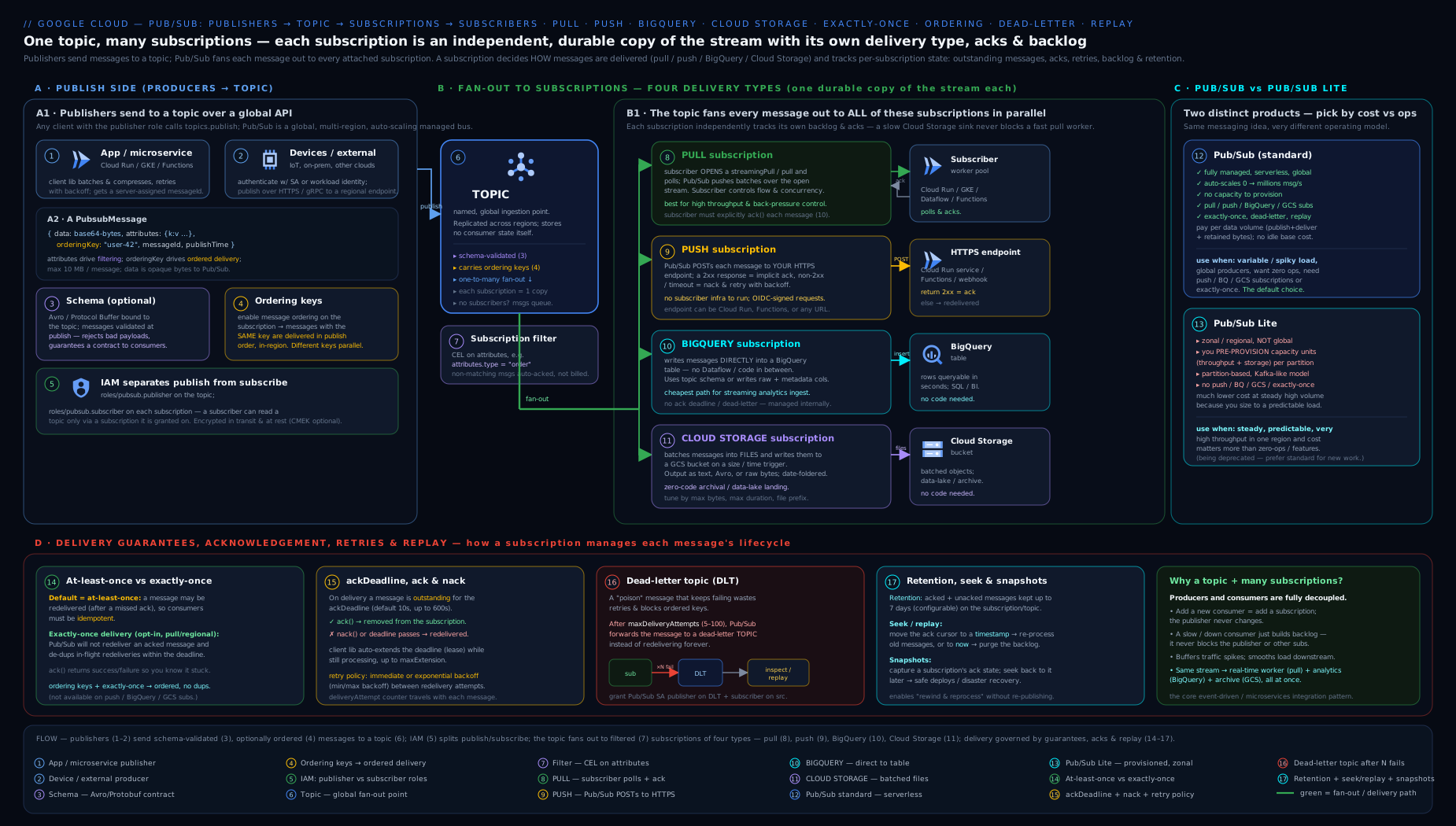
The diagram traces a message from publishers into a topic — which keeps no backlog of its own — as it fans an independent copy out to the four subscription types: pull (your worker fleet with client-side flow control), push (an HTTPS endpoint such as Cloud Run), BigQuery (straight into a table), and Cloud Storage (batched into objects). Off to the side it shows the reliability path every delivery runs through — ack deadline → retry policy (with backoff) → dead-letter topic after N attempts — with retention, seek, and snapshots governing replay of the past.
Hands-on lab
This lab builds a complete pull pipeline, exercises delivery and dead-lettering, then a snapshot/seek replay, entirely within the Free Tier. Set your project first.
export PROJECT=$(gcloud config get-value project)
export NUM=$(gcloud projects describe $PROJECT --format='value(projectNumber)')
gcloud services enable pubsub.googleapis.com
1. Create a topic, a working subscription, and a dead-letter topic + DLQ subscription.
gcloud pubsub topics create lab-orders
gcloud pubsub topics create lab-orders-dlq
gcloud pubsub subscriptions create lab-dlq-sub --topic=lab-orders-dlq

gcloud pubsub subscriptions create lab-worker \
  --topic=lab-orders \
  --ack-deadline=20 \
  --message-retention-duration=1d \
  --retain-acked-messages \
  --dead-letter-topic=lab-orders-dlq \
  --max-delivery-attempts=5 \
  --min-retry-delay=10s --max-retry-delay=60s
2. Grant the Pub/Sub service agent the DLQ permissions (without these, dead-lettering silently fails).
SA="service-${NUM}@gcp-sa-pubsub.iam.gserviceaccount.com"
gcloud pubsub topics add-iam-policy-binding lab-orders-dlq \
  --member="serviceAccount:$SA" --role=roles/pubsub.publisher
gcloud pubsub subscriptions add-iam-policy-binding lab-worker \
  --member="serviceAccount:$SA" --role=roles/pubsub.subscriber
3. Publish messages, including attributes for filtering practice.
gcloud pubsub topics publish lab-orders --message='{"orderId":"A1","amount":50}' \
  --attribute=eventType=order.created,tier=gold
gcloud pubsub topics publish lab-orders --message='{"orderId":"A2","amount":10}' \
  --attribute=eventType=order.created,tier=silver
4. Pull and acknowledge. Pull without --auto-ack first to see the message and its ackId, then pull with auto-ack to drain.
gcloud pubsub subscriptions pull lab-worker --limit=5 --format=json
gcloud pubsub subscriptions pull lab-worker --limit=5 --auto-ack
Expected output: JSON entries with base64-encoded data, your attributes, a messageId, and (first command) an ackId. After the auto-ack pull, the backlog drains.
5. Validate state. Inspect the subscription and check the backlog metric.
gcloud pubsub subscriptions describe lab-worker
gcloud pubsub topics list-subscriptions lab-orders
You should see deadLetterPolicy, retryPolicy, ackDeadlineSeconds: 20, and retainAckedMessages: true.
6. Exercise dead-lettering (conceptual within the CLI): publish a “poison” message and pull it repeatedly without acking (omit --auto-ack) more than five times — Pub/Sub will route it to lab-orders-dlq. Confirm by pulling the DLQ subscription:
gcloud pubsub topics publish lab-orders --message='{"poison":true}'
# pull a few times WITHOUT --auto-ack to burn delivery attempts, then:
gcloud pubsub subscriptions pull lab-dlq-sub --limit=5 --auto-ack
7. Snapshot and seek (replay). Because we set --retain-acked-messages, we can rewind.
gcloud pubsub snapshots create lab-snap --subscription=lab-worker
# Replay everything from the last 10 minutes:
gcloud pubsub subscriptions seek lab-worker \
  --time=$(date -u -v-10M +%Y-%m-%dT%H:%M:%SZ)
gcloud pubsub subscriptions pull lab-worker --limit=5 --auto-ack   # acked messages re-appear
Cleanup (do this — idle subscriptions and retained messages can accrue tiny charges):
gcloud pubsub snapshots delete lab-snap
gcloud pubsub subscriptions delete lab-worker lab-dlq-sub
gcloud pubsub topics delete lab-orders lab-orders-dlq
Cost note: Pub/Sub’s first 10 GiB/month of throughput is free, and this lab moves a handful of tiny messages, so it costs effectively nothing. The only things that could accrue charges are retained messages (storage) and snapshots (they hold messages alive) — which is exactly why the cleanup deletes them. The Free Tier / $300 credit absorbs all of it regardless.
Practice challenges
Work these in a scratch project; they escalate from a single flag to a full design. Replace PROJECT_ID / PROJECT_NUMBER with your own. None of them need code running on this machine — they are all gcloud you can reason about and run in Cloud Shell.
1. (Beginner) Create a topic and a production-safe pull subscription. Make a topic payments and a pull subscription payments-worker with a 30-second ack deadline that will never be auto-deleted for inactivity.
<details> <summary>Solution</summary>
gcloud pubsub topics create payments
gcloud pubsub subscriptions create payments-worker \
  --topic=payments \
  --ack-deadline=30 \
  --expiration-period=never
Why: 30 s absorbs normal processing without pinning a dead handler’s message for long, and --expiration-period=never disables the default 31-day inactivity auto-delete that silently removes idle production subscriptions.
</details>
2. (Beginner → Intermediate) Add a filtered subscription — and prove the filter is immutable. Create payments-gold that only receives messages whose tier attribute is gold, then “broaden” it to also accept platinum.
<details> <summary>Solution</summary>
gcloud pubsub subscriptions create payments-gold \
  --topic=payments \
  --message-filter='attributes.tier = "gold"'

# You cannot edit a filter in place — you must delete and recreate:
gcloud pubsub subscriptions delete payments-gold
gcloud pubsub subscriptions create payments-gold \
  --topic=payments \
  --message-filter='attributes.tier = "gold" OR attributes.tier = "platinum"'
Why: filters are evaluated server-side on attributes before delivery and are fixed at creation — to change one you recreate the subscription; messages that don’t match are never delivered to (or stored for) it. </details>
3. (Intermediate) Wire a BigQuery export subscription with the right IAM. Stream payments straight into an existing table analytics.payments_raw, mapping fields by the topic schema, and grant the writer the role it needs.
<details> <summary>Solution</summary>
gcloud pubsub subscriptions create payments-to-bq \
  --topic=payments \
  --bigquery-table=PROJECT_ID:analytics.payments_raw \
  --use-topic-schema --write-metadata

PUBSUB_SA="service-PROJECT_NUMBER@gcp-sa-pubsub.iam.gserviceaccount.com"
# Least privilege is a dataset-level grant; project-level shown for brevity:
gcloud projects add-iam-policy-binding PROJECT_ID \
  --member="serviceAccount:${PUBSUB_SA}" \
  --role="roles/bigquery.dataEditor"
Why: an export subscription is written by the Pub/Sub service agent, not your code, so the agent — not you — needs bigquery.dataEditor on the destination; without it the subscription stalls and the backlog grows. Scope the grant to the dataset in production rather than the whole project.
</details>
4. (Intermediate) Enforce a schema, watch a bad publish get rejected, then evolve it. Attach an Avro schema to payments, publish a good and a bad message, then add a backward-compatible field via a revision.
<details> <summary>Solution</summary>
gcloud pubsub schemas create payment-schema \
  --type=AVRO \
  --definition='{"type":"record","name":"Payment","fields":[
    {"name":"paymentId","type":"string"},
    {"name":"amount","type":"double"}]}'

gcloud pubsub topics update payments \
  --schema=payment-schema --message-encoding=JSON

gcloud pubsub topics publish payments --message='{"paymentId":"p1","amount":9.99}'   # accepted
gcloud pubsub topics publish payments --message='{"paymentId":"p2"}'                 # REJECTED (no amount)

# Evolve safely: commit a new revision that adds a NULLABLE field with a default
gcloud pubsub schemas commit payment-schema \
  --type=AVRO \
  --definition='{"type":"record","name":"Payment","fields":[
    {"name":"paymentId","type":"string"},
    {"name":"amount","type":"double"},
    {"name":"currency","type":["null","string"],"default":null}]}'
Why: the schema is enforced at publish time, so malformed data is rejected before any subscriber sees it; a nullable field with a default is a backward-compatible revision, letting existing producers and consumers keep working while new ones adopt the field. </details>
5. (Advanced) Build the full reliability shape: DLQ + backoff + the two grants. Give payments-worker a dead-letter topic after 5 attempts, exponential backoff from 10 s to 600 s, and both service-agent grants — then verify.
<details> <summary>Solution</summary>
gcloud pubsub topics create payments-dlq
gcloud pubsub subscriptions create payments-dlq-sub --topic=payments-dlq

gcloud pubsub subscriptions update payments-worker \
  --dead-letter-topic=payments-dlq \
  --max-delivery-attempts=5 \
  --min-retry-delay=10s --max-retry-delay=600s

PUBSUB_SA="service-PROJECT_NUMBER@gcp-sa-pubsub.iam.gserviceaccount.com"
gcloud pubsub topics add-iam-policy-binding payments-dlq \
  --member="serviceAccount:${PUBSUB_SA}" --role="roles/pubsub.publisher"
gcloud pubsub subscriptions add-iam-policy-binding payments-worker \
  --member="serviceAccount:${PUBSUB_SA}" --role="roles/pubsub.subscriber"

gcloud pubsub subscriptions describe payments-worker \
  --format="yaml(deadLetterPolicy, retryPolicy)"
Why: after 5 unacked deliveries Pub/Sub forwards the message to the DLQ instead of retrying forever — but only if the service agent can publish to the DLQ and ack on the source; miss either grant and dead-lettering silently no-ops while messages keep retrying. </details>
6. (Advanced) Mark a safe point, replay, then purge a poisoned backlog. Before a risky deploy, snapshot payments-worker; after a bad rollout, replay from the snapshot; alternatively, drain a corrupted backlog by fast-forwarding.
<details> <summary>Solution</summary>
# Replay past the ack point requires retaining acked messages:
gcloud pubsub subscriptions update payments-worker --retain-acked-messages

# Mark a known-good point:
gcloud pubsub snapshots create pre-deploy --subscription=payments-worker

# ...deploy v2, it mishandles messages... rewind and reprocess with the fix:
gcloud pubsub subscriptions seek payments-worker --snapshot=pre-deploy

# OR purge a bad backlog entirely by seeking to now:
gcloud pubsub subscriptions seek payments-worker \
  --time=$(date -u +%Y-%m-%dT%H:%M:%SZ)
Why: a snapshot captures the exact ack state so you can return to a known-good point; seeking to it (or back in time) replays, while seeking to now fast-forwards past everything unacked to drain a poisoned backlog — replay only reaches already-acked messages if --retain-acked-messages was on and the target is inside the retention window.
</details>
Common mistakes & troubleshooting
| Symptom | Likely cause | Fix |
|---|---|---|
| Subscriber gets the same message repeatedly | Ack deadline shorter than processing time; raw pull loop not extending the deadline; not acking | Raise --ack-deadline, use the high-level client library (auto-extends), ensure every code path acks; be idempotent regardless |
| Duplicates even though you ack quickly | At-least-once is the default — duplicates are expected | Make processing idempotent (dedupe on messageId / business key), or enable exactly-once on a pull subscription |
| Dead-letter topic stays empty despite failures | Missing IAM: service agent lacks publisher on DLQ topic and/or subscriber on source subscription | Grant roles/pubsub.publisher on the DLQ topic and roles/pubsub.subscriber on the source subscription to service-NUM@gcp-sa-pubsub |
| Subscription vanished on its own | Default 31-day expiration after inactivity | Set --expiration-period=never on production subscriptions |
| New subscription sees no old messages | Topic retention is off; subscriptions only get messages published after they exist | Enable topic message retention before you need historical replay |
| Push endpoint never receives / gets 401s | Endpoint not HTTPS, OIDC token not verified, or push SA lacks serviceAccountTokenCreator |
Use HTTPS, verify the OIDC token, grant the token-creator role |
| BigQuery / Cloud Storage subscription stalled | Service agent lacks dataset/bucket write role, or schema/columns mismatch | Grant bigquery.dataEditor / storage.objectAdmin; align schema or set --drop-unknown-fields; add a DLQ |
| Ordered messages stop flowing for one key | A message for that key can’t be delivered/acked, so Pub/Sub pauses the key | Add a dead-letter topic so the poison message is parked and the key resumes; on the publisher, resume_publish() after a failed ordered publish |
seek --time doesn’t replay acked messages |
--retain-acked-messages was off, so acked messages were dropped |
Enable retain-acked-messages (and ensure the target time is within the retention window) |
Common beginner mistakes
The table above is symptoms; these are the misconceptions underneath them — the wrong mental models that produce the symptoms in the first place. Each is a belief beginners hold, why it is wrong, and the model to replace it with.
- “The topic stores my messages.” No — the topic only routes; the backlog lives in each subscription. Publish to a topic with no subscription attached and the message is dropped instantly, because nobody is holding a copy. Right model: create the subscription first, then publish.
- “One subscription is enough; my consumers can share it.” Sharing one subscription across consumers gives you a competing-consumers work queue — each message goes to exactly one of them. That is great for a worker pool, but it is not fan-out. If every consumer must see every message, give each its own subscription. Right model: subscription-per-consumer for fan-out; many workers on one subscription for a shared queue.
- “Pull vs push is a property of the topic.” No — the delivery type is chosen per subscription. The very same topic can simultaneously feed a pull worker fleet, a push endpoint, a BigQuery table, and a GCS bucket.
- “Acking is optional, I’ll get to it later.” An unacked message is redelivered after the ack deadline, again and again until retention expires — never acking becomes an infinite redelivery loop that looks like “Pub/Sub is spamming me”. Right model: ack on every code path (or nack deliberately to redeliver).
- “A new subscription can read messages published before it existed.” By default it only sees messages published after its own creation. To read history, the topic must have had message retention enabled beforehand, and then you
seek. Right model: turn on topic retention up front if you might add consumers later. - “Filtering looks at the message body.” No — filters evaluate only
attributes, never the payload. Publish the fields you route on as attributes, and remember the filter is immutable after creation. - “A schema will clean up my existing bad messages.” A schema validates future publishes only; it rejects new non-conforming messages but does nothing to what is already sitting in a backlog. Right model: add the schema before you have a data-quality problem, not after.
- “Pub/Sub keeps messages in order unless I turn ordering off.” Backwards — the default is no order; you opt in with ordering keys plus a subscription created with ordering enabled. Assuming an order you never configured is a classic production surprise.
- “Ordering, exactly-once and filters are just checkboxes I can flip later.” The ordering setting and the filter are immutable after creation, and exactly-once is pull-only — you cannot bolt them onto the wrong subscription later, you recreate it. Decide them at design time.
- “Push is simpler, so it must scale better.” For very high sustained throughput, pull (StreamingPull) scales better and gives you real flow control; push shines for serverless/webhook targets that scale to zero, not for a firehose.
Best practices
- Always make subscribers idempotent. At-least-once is the default and exactly-once only narrows the window; design every consumer to tolerate a repeat.
- Set ack deadlines to reality and use the high-level client libraries so the deadline is auto-extended for long messages — do not hand-roll pull loops unless you must.
- Attach a dead-letter topic (with a retry policy) to every important subscription, and alert on DLQ depth — it converts silent infinite retries into a visible, handleable failure.
- Set subscription
expiration-periodto never for anything in production to avoid the default auto-deletion. - Use one topic per event type and filter at the subscription, rather than one topic per consumer; it keeps publishers simple and lets new consumers subscribe without touching producers.
- Attach schemas to topics that more than one team touches; reject bad data at the edge rather than debugging it downstream.
- Use ordering keys only where you truly need order, and choose high-cardinality keys to avoid serial hot-spots.
- Prefer the managed sink subscriptions (BigQuery / Cloud Storage) over writing and operating glue code when you just need events landed for analytics or archival.
- Snapshot before risky deploys so you can replay from a known-good point.
Security notes
- IAM is the access boundary. Grant
roles/pubsub.publisherto publishers androles/pubsub.subscriberto subscribers — and nothing broader. Avoidroles/pubsub.editor/adminon workload identities; reserve those for operators/IaC. - Use per-service service accounts for publishers and subscribers so you can attribute and revoke access precisely; never embed long-lived keys — use Workload Identity (GKE) or attached service accounts (Cloud Run/Functions/GCE).
- Secure push subscriptions with OIDC authentication and verify the token (issuer, audience, signature) in your endpoint; an unauthenticated push endpoint is an open door for spoofed messages.
- Encrypt with CMEK where compliance requires customer-managed keys; remember the Pub/Sub service agent needs encrypt/decrypt on the key, and key loss makes messages unrecoverable.
- Use message storage policies to keep message data within required regions for data residency.
- Audit Logs (Admin Activity is always on; enable Data Access logs for publish/subscribe visibility) record who did what — wire them into your central log sink.
- Mind the DLQ service-agent grants: they are deliberately scoped to one topic and one subscription; do not widen them.
Interview & exam questions
1. A topic has three subscriptions. A message is published and one subscription’s subscriber acks it. What happens to the other two subscriptions’ copies? Nothing — each subscription is an independent queue with its own copy and its own ack state. The other two still hold (and must independently ack) the message. This fan-out independence is fundamental.
2. What is the default delivery guarantee, and what does it require of your code? At-least-once: every message is delivered one or more times, so subscribers must be idempotent (dedupe on message ID or a business key; use upserts).
3. What does enabling exactly-once delivery actually guarantee, and which subscription types support it? On pull subscriptions only: an acknowledged message is not redelivered, and acks are confirmed (you know whether the ack succeeded, and a lapsed ack ID fails rather than silently no-ops). It does not eliminate duplicates across unrelated systems — within the subscription it removes redelivery of acked messages.
4. Explain ordering keys. Is there global ordering? An ordering key scopes order: messages with the same key (published to the same region) are delivered in publish order if the subscription has ordering enabled. Different keys are unordered/parallel. There is no global ordering; design keys for high cardinality to avoid a serial bottleneck.
5. How do you stop a malformed message from being retried forever, and what IAM does that require?
Configure a dead-letter topic with --max-delivery-attempts; after N failed deliveries the message is forwarded there. The Pub/Sub service agent needs roles/pubsub.publisher on the DLQ topic and roles/pubsub.subscriber on the source subscription.
6. Difference between the acknowledgement deadline and the retry policy? The ack deadline is how long a subscriber has to ack one delivery before it is considered failed and redelivered. The retry policy controls the delay between redeliveries (immediate vs exponential backoff). Orthogonal knobs.
7. Push vs pull — when each, and what flow-control model does each use? Pull: you run a subscriber, control the rate with client-side flow control (max outstanding messages/bytes); best for high/bursty throughput, long processing, exactly-once, ordering. Push: Pub/Sub POSTs to your HTTPS endpoint, rate governed by a server-side slow-start on your success rate; best for serverless/event-driven targets and webhooks. Push is at-least-once only.
8. You need every event landed in BigQuery for analytics with no transformation. What is the simplest design?
A BigQuery subscription writing straight to a table (--use-topic-schema, --write-metadata) — no subscriber code or Dataflow. Grant the service agent bigquery.dataEditor; dedupe on message_id since it is at-least-once.
9. Seek vs snapshot — what is the difference and when do you use each? Seek to a timestamp rewinds/fast-forwards a subscription’s ack state within the retention window, no prior action needed. A snapshot must be taken in advance but captures the exact ack state at that instant; you seek to it later. Use a snapshot to mark a known-good point before a risky deploy; use seek-to-time for ad-hoc replay or to purge a backlog (seek to now).
10. Pub/Sub vs Pub/Sub Lite? Pub/Sub is serverless, global, pay-per-volume, feature-rich (push, exactly-once, filtering, sink subscriptions). Pub/Sub Lite was zonal/regional with pre-provisioned capacity, much cheaper for predictable high volume but far fewer features — and is now being deprecated, so prefer Pub/Sub (or Managed Kafka) for new work.
11. How do you ensure a publisher can only send well-formed messages? Attach a schema (Avro/Protobuf) to the topic with a JSON or BINARY encoding; Pub/Sub validates and rejects non-conforming publishes. Use schema revisions for safe evolution.
12. A subscription disappeared after a quiet weekend. Why, and how do you prevent it?
The default subscription expiration period (31 days of inactivity) deleted it. Set --expiration-period=never for production subscriptions.
Quick check
- Where do messages physically sit waiting for delivery — on the topic or on the subscription?
- Which two subscription types require no subscriber code at all?
- Which subscription type(s) support exactly-once delivery?
- What two IAM grants does dead-lettering need, and on which resources?
- What must you set on a subscription so that
seek --timecan replay messages you have already acked?
Answers
- On the subscription — each subscription holds its own copy of the backlog; the topic only routes/fans out.
- BigQuery and Cloud Storage subscriptions (Pub/Sub writes to the sink for you).
- Pull subscriptions only (opt-in with
--enable-exactly-once-delivery). roles/pubsub.publisheron the dead-letter topic androles/pubsub.subscriberon the source subscription, both for the Pub/Sub service agent.--retain-acked-messages(and the target time must fall within the retention duration).
Exercise
Design and build a small “order processing” pipeline that demonstrates fan-out and reliability. Create a topic shop-orders with an attached Avro schema (orderId: string, amount: double, region: string). Attach three subscriptions: (a) a filtered pull subscription eu-orders that only receives messages where attributes.region = "eu"; (b) a BigQuery subscription orders-warehouse writing to a table you create, with metadata; and © a Cloud Storage subscription orders-archive writing newline-delimited JSON, rolling files every 2 minutes. Add a dead-letter topic to the pull subscription with 5 max attempts and the required IAM grants, plus an exponential retry policy. Publish ten messages (mix of eu/us regions, one deliberately malformed for the schema), and verify: the filtered subscription only sees EU messages, the malformed publish is rejected at publish time, valid messages appear in BigQuery and as objects in the bucket, and (by repeatedly failing to ack) a poison message lands in the DLQ. Finally, snapshot the pull subscription, seek back 5 minutes, and confirm replay. Tear everything down. Write down which settings were immutable and would have forced a recreate.
Certification mapping
- Associate Cloud Engineer (ACE): expect to set up topics and subscriptions, pick pull vs push, and reason about basic delivery and IAM for Pub/Sub. Know that subscriptions store messages, the default at-least-once guarantee, and how to grant publisher/subscriber roles.
- Professional Data Engineer (PDE): the heavier exam here. Expect scenario questions on streaming ingestion (Pub/Sub → Dataflow → BigQuery, or BigQuery subscriptions directly), exactly-once vs at-least-once and idempotency, ordering keys, dead-letter handling, replay with seek/snapshots, schemas, and Pub/Sub vs Pub/Sub Lite trade-offs. Filtering and the four subscription types are common distractor-rich questions.
- Professional Cloud Architect (PCA): Pub/Sub as the decoupling/fan-out backbone in event-driven architectures, choosing it versus Cloud Tasks (targeted HTTP task dispatch with per-task scheduling) and versus a self-managed Kafka, and data-residency via message storage policies / CMEK.
Glossary
- Topic — a named publish target that fans messages out to all attached subscriptions; does not itself store messages for delivery.
- Subscription — an independent queue bound to one topic; holds the message backlog and ack state for one consumer.
- Message — payload (data, ≤10 MB) + attributes (string map) + optional ordering key + Pub/Sub-assigned ID and publish time.
- Pull / StreamingPull — subscription type where the subscriber fetches messages (synchronously, or over a long-lived gRPC stream).
- Push — subscription type where Pub/Sub POSTs each message to your HTTPS endpoint; ack via
2xx. - BigQuery / Cloud Storage subscription — managed subscription types that write messages directly into a BigQuery table or GCS objects, no subscriber code.
- Export subscription — the collective name for the BigQuery and Cloud Storage subscription types, which write the stream straight to another Google Cloud service instead of to your code.
- Acknowledgement (ack) / nack — telling Pub/Sub a message is processed (don’t redeliver) / failed (redeliver).
- Acknowledgement deadline — time a subscriber has to ack before Pub/Sub redelivers; auto-extended by the client libraries.
- ModifyAckDeadline (modack) — the RPC that extends a message’s ack deadline while a subscriber is still working; the high-level libraries call it automatically, a hand-rolled pull loop must call it itself.
- At-least-once / exactly-once — default guarantee (possible duplicates, be idempotent) / opt-in pull-only guarantee (no redelivery of acked messages, confirmed acks).
- Idempotent consumer — a subscriber whose result is identical whether it processes a message once or several times; the required defence against at-least-once duplicates.
- Ordering key — a string that makes same-key messages deliver in publish order (per region, ordering enabled).
- Dead-letter topic (DLQ) — where messages go after exceeding max delivery attempts, instead of retrying forever.
- Retry policy — backoff (immediate or exponential) between redeliveries.
- Flow control — bounding outstanding (unacked) messages/bytes so a subscriber isn’t overwhelmed.
- Backlog — the messages stored in a subscription that have not yet been acked (plus retained acked messages if enabled); its size (
num_undelivered_messages) and age (oldest_unacked_message_age) are the key health metrics. - Retention — how long messages are kept (subscription-level for backlog/replay; topic-level for future subscriptions).
- Seek — move a subscription’s ack state to a timestamp or snapshot (replay or purge).
- Snapshot — a captured ack state you can seek back to later (safe deploys, point-in-time replay).
- Schema — an Avro/Protobuf contract attached to a topic that validates published messages.
- Filter — a server-side, attribute-based expression that delivers only matching messages to a subscription (immutable, set at creation).
- Competing consumers — multiple subscribers reading the same subscription and sharing the load (a work queue, each message to one of them), as opposed to fan-out across multiple subscriptions.
- Service agent — the Google-managed
service-NUM@gcp-sa-pubsubaccount Pub/Sub uses to write to DLQ topics, BigQuery, GCS, and KMS. - Locational endpoint — a region-pinned Pub/Sub endpoint (
REGION-pubsub.googleapis.com) used when requests must stay in one region for residency or a clean exactly-once boundary, instead of the global endpoint. - Quota vs limit — a quota is a raisable ceiling (throughput per region); a limit is a hard maximum (10 MB message size). Knowing which is which tells you whether a wall can be moved.
- Pub/Sub Lite — a cheaper, capacity-provisioned, zonal/regional messaging service (being deprecated in 2026).
Next steps
- Go deep on the reliability mechanics with Pub/Sub Delivery Guarantees: Exactly-Once, Ordering Keys, Dead-Letter, and Flow Control — production subscriber code, idempotent ack handling, and tuning.
- Continue the course with Google Cloud KMS & Secret Manager, In Depth to secure the keys and secrets your publishers and subscribers depend on, including the CMEK keys referenced above.
- Pair this with the BigQuery deep dive to build the full Pub/Sub → BigQuery streaming-analytics path end to end.