In a nutshell
Imagine two ways to build a car. In the first, one brilliant mechanic hand-assembles the whole thing in a garage. It runs — once. Nobody can build a second identical car, and if that mechanic leaves, the knowledge walks out with them. In the second, a factory assembly line: every station does one job, stamps a serial number on the part it makes, and passes it to the next station. Any car can be rebuilt from the blueprint, and if a defect shows up on the road, the serial numbers tell you exactly which parts and which blueprint version produced it.
A training script on a data scientist’s laptop is the garage. Vertex AI Pipelines is the assembly line. Each step (a “component”) runs in its own container, does one job, writes its output as a tracked file (an “artifact”) with a recorded lineage, and hands it to the next step. The whole line runs from a compiled blueprint (the “pipeline spec”) on a button-press, a code commit, or a schedule — and Vertex records the serial numbers so that months later you can answer “which data and which code produced the model serving this prediction?” without guessing.
That traceability is the entire point of MLOps, and it is why “just schedule my notebook” is not the same thing.
Level: Intermediate → Expert · Time: ~24 min
| Laptop notebook | Vertex AI Pipeline | |
|---|---|---|
| Where it runs | One Python process on your machine | Isolated containers Vertex provisions and manages |
| Reproducible? | “Works on my machine” | Re-runs from a compiled spec + explicit parameters |
| How data passes between steps | In-memory variables | Typed artifacts written to Cloud Storage |
| Lineage | In your head (or lost) | Recorded automatically in ML Metadata |
| Re-run / schedule | Manual, by hand | CI trigger or the native pipeline scheduler |
| Who can run it | Only you | Anyone with the service account + the spec |
Before this lesson, it helps to know: service accounts and least-privilege IAM (IAM fundamentals: roles, service accounts & policy), where training data usually lives (BigQuery deep dive), and the idea of a CI trigger on commit (Cloud Build & Cloud Deploy deep dive). For the bigger platform picture around this lesson, see Enterprise architecture: the GCP ML platform.
After this lesson you will be able to: author a typed KFP v2 pipeline and compile it to a spec; wire versioned datasets and Feature Store into training so runs are reproducible; gate model promotion behind an evaluation step and register immutable versions; canary a new model onto an endpoint with a traffic split and roll back in seconds; configure skew and drift monitoring; and trigger the whole thing from CI/CD and a schedule under a least-privilege service account.
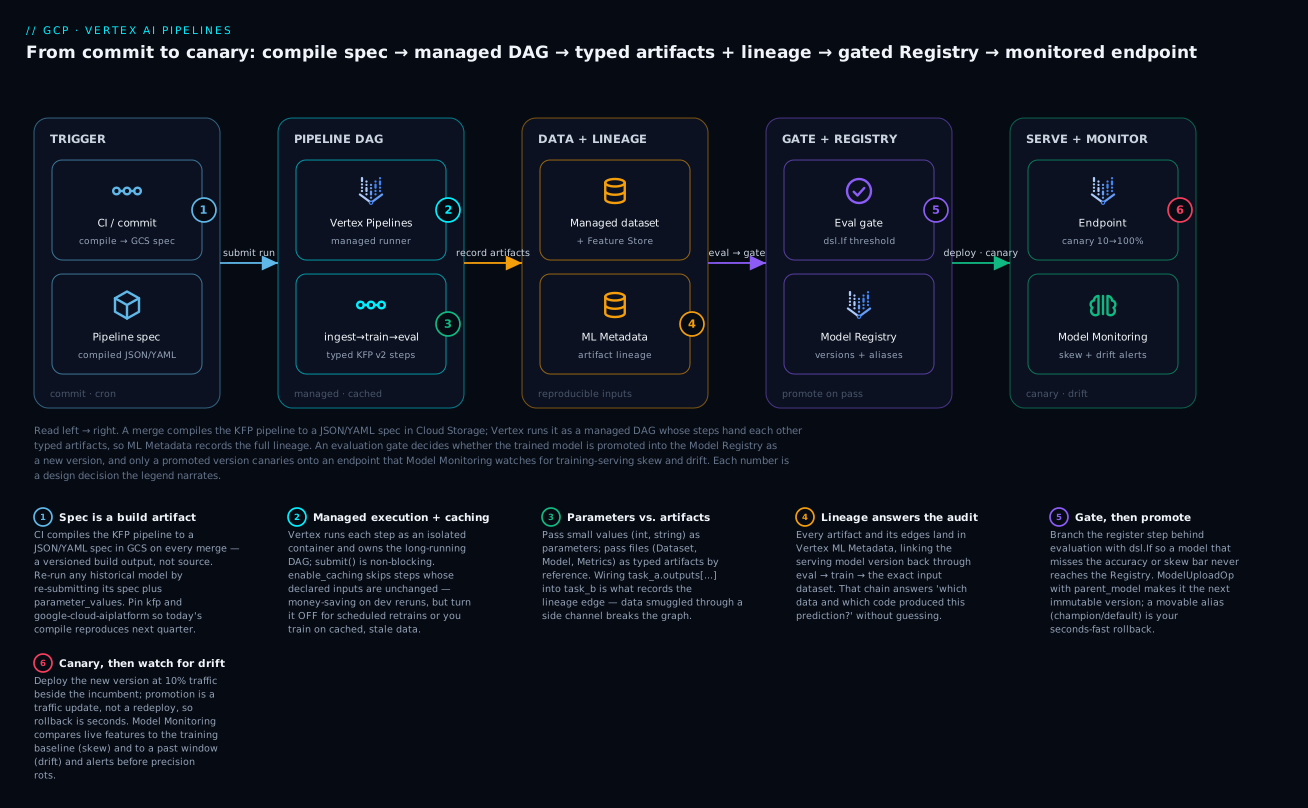
Read the diagram left → right: a commit compiles the pipeline to a spec in Cloud Storage, Vertex runs it as a managed DAG whose steps exchange typed artifacts (so ML Metadata captures full lineage), an evaluation gate decides whether the trained model is promoted into the Registry as a new version, and only a promoted version canaries onto an endpoint that Model Monitoring watches for skew and drift.
A training script that runs once on a data scientist’s laptop is not a model lifecycle. Production MLOps is the discipline of making every run reproducible, lineage-tracked, governed, and re-runnable from a commit hash — so that six months from now you can answer “which data and which code produced the model serving this prediction?” without guessing. This guide builds that on Vertex AI end to end: a typed Kubeflow pipeline, Feature Store and managed datasets wired into training, promotion through the Model Registry, canary deployment to an endpoint, drift monitoring, and the CI/CD plus IAM scaffolding that ties it together.
1. The architecture: KFP components, artifacts, and metadata lineage
Vertex AI Pipelines is a managed runner for pipelines authored with the Kubeflow Pipelines (KFP) v2 SDK. You compile a Python pipeline to a JSON spec; Vertex executes each step as an isolated container, captures inputs and outputs as typed artifacts, and records the whole graph in Vertex ML Metadata. That metadata store is the point of the whole exercise — it is what gives you lineage.
   commit / schedule
        |
        v
[KFP pipeline spec (compiled JSON in GCS)]
        |
        v
[Vertex AI Pipelines runner]  --records-->  [Vertex ML Metadata]
   |        |          |                          ^
   v        v          v                          |
[ingest]->[train]->[evaluate]->[register]---------+
   |        |          |            |
 Dataset  Model    Metrics    Model Registry version
(artifact)(artifact)(artifact)      |
                                    v
                          [Endpoint: canary -> 100%]
Two distinctions matter before you write code:
- Components are the unit of execution. A lightweight Python component is a decorated function packaged into a container at compile time; a container component points at a prebuilt image. Both declare typed inputs and outputs.
- Parameters vs. artifacts. Parameters are small values (a string, an int) passed by value. Artifacts (
Dataset,Model,Metrics) are files in Cloud Storage plus metadata, passed by reference. Getting this right is what makes lineage work — Vertex tracks artifact-to-artifact edges, not parameter values.
This distinction is the one beginners get wrong most often, so make it concrete:
| Parameter | Artifact | |
|---|---|---|
| Examples | max_depth=8, region="us-central1" |
Dataset, Model, Metrics |
| Passed | By value (copied into the run) | By reference (a Cloud Storage URI + metadata) |
| Typical size | Small scalars and strings | Files, sometimes large |
| Effect on lineage | Recorded as a run input value | Creates artifact-to-artifact edges in the graph |
| Declared as | max_depth: int = 8 |
Output[Dataset] / Input[Model] |
Pin your SDK. KFP v2 and the
google-cloud-aiplatformSDK move quickly and the compiled spec format is versioned. Pin exact versions (for examplekfp==2.*and a known-goodgoogle-cloud-aiplatform) in the build image and in CI so a compile today produces the same spec next quarter.
2. Author a typed pipeline with custom and prebuilt components
Start with one custom component. The @component decorator turns a function into a containerized step; base_image and packages_to_install define its environment. Inputs and outputs are declared with type annotations — Output[Dataset] hands you a path to write to, and Vertex registers the result as an artifact.
from kfp import dsl
from kfp.dsl import component, Input, Output, Dataset, Model, Metrics

@component(
    base_image="python:3.11-slim",
    packages_to_install=["pandas==2.2.2", "scikit-learn==1.5.1", "joblib==1.4.2"],
)
def train(
    training_data: Input[Dataset],
    model: Output[Model],
    metrics: Output[Metrics],
    max_depth: int = 8,
):
    import pandas as pd, joblib
    from sklearn.ensemble import RandomForestClassifier
    from sklearn.model_selection import cross_val_score

    df = pd.read_csv(training_data.path)
    X, y = df.drop(columns=["label"]), df["label"]

    clf = RandomForestClassifier(max_depth=max_depth, random_state=42)
    score = cross_val_score(clf, X, y, cv=5).mean()
    clf.fit(X, y)

    # Write to the artifact path Vertex provisioned, then log lineage metadata.
    joblib.dump(clf, model.path)
    model.metadata["framework"] = "sklearn"
    metrics.log_metric("cv_accuracy", float(score))
Compose components into a pipeline with @dsl.pipeline. Passing task_a.outputs["x"] into task_b is what creates the dependency edge and the lineage link — never shuttle data through side channels.
@dsl.pipeline(
    name="fraud-training",
    pipeline_root="gs://acme-mlops-artifacts/pipeline-root",
)
def training_pipeline(project: str, region: str, max_depth: int = 8):
    ingest_task = ingest(project=project, region=region)
    train_task = train(
        training_data=ingest_task.outputs["training_data"],
        max_depth=max_depth,
    )
    evaluate(
        model=train_task.outputs["model"],
        metrics=train_task.outputs["metrics"],
    )
Compile to a spec. The compiled JSON is the deployable artifact — treat it like a build output, not source.
python -c "from kfp import compiler; import pipeline; \
compiler.Compiler().compile(pipeline.training_pipeline, 'fraud_training.json')"
For heavy lifting, lean on Google Cloud Pipeline Components (GCPC) rather than rolling your own — pip install google-cloud-pipeline-components. It ships first-party, supported ops such as CustomTrainingJobOp (runs a training container as a Vertex Custom Job, which is how you get GPUs and distributed training), ModelUploadOp, EndpointCreateOp, and ModelDeployOp. Prefer these for any step that touches a Vertex resource; they are maintained against API changes and emit the correct metadata.
The two component styles cover different needs — reach for the simpler one until you can’t:
| Lightweight Python component | Container component | |
|---|---|---|
| Defined by | @dsl.component on a plain function |
A prebuilt image + entrypoint command |
| Environment | base_image + packages_to_install |
Whatever the image already ships |
| Best for | Glue logic, evaluation, small dependencies | Heavy/custom runtimes, existing training images |
| Build step | Packaged for you at compile time | You build and push the image yourself |
| Example | the train function above |
a CUDA image, or a GCPC op like ModelUploadOp |
3. Wire Feature Store and managed datasets into training
Reproducibility dies the moment training reads from a mutable source. Two Vertex primitives fix this.
Managed datasets give a stable, versioned handle to training data. Reference one in the pipeline and Vertex records the dataset resource as lineage. Create it from BigQuery or GCS:
gcloud ai datasets create \
  --display-name="fraud-training-v3" \
  --metadata-schema-uri="gs://google-cloud-aiplatform/schema/dataset/metadata/tabular_1.0.0.yaml" \
  --region=us-central1
Feature Store solves the harder problem: training-serving skew caused by computing features differently in batch and online paths. The current generation, Vertex AI Feature Store, serves features directly from a BigQuery source registered as a feature view. You define the source once; offline training reads point-in-time-correct values and online serving reads the same definitions, so a feature means the same thing in both places.
# Online store that backs low-latency serving
gcloud ai feature-online-stores create fraud_online_store \
  --region=us-central1 \
  --bigtable-min-node-count=1 \
  --bigtable-max-node-count=3 \
  --bigtable-cpu-utilization-target=70

# A feature view mapping a BigQuery source into that store
gcloud ai feature-views create txn_features \
  --feature-online-store=fraud_online_store \
  --region=us-central1 \
  --big-query-source-uri="bq://acme.features.txn_features" \
  --entity-id-columns=account_id \
  --sync-config-cron="0 * * * *"
In the pipeline, an ingest component fetches the offline feature values for the training entities, writing them as an Output[Dataset] so the exact slice is captured. The principle: training data flows in as a tracked artifact, never a raw query embedded in code.
4. Promote artifacts through the Model Registry with versioning
A trained model that lives only as a file in a bucket has no governance story. Upload it to the Vertex AI Model Registry, which gives a stable resource name, immutable version IDs, and aliases (such as default or champion) that you can repoint without changing serving config.
The clean pattern is a register step in the pipeline using ModelUploadOp. Crucially, set parent_model so a new upload becomes the next version of an existing model rather than a brand-new model — this is what builds a version history you can audit and roll back across.
from google_cloud_pipeline_components.v1.model import ModelUploadOp

ModelUploadOp(
    project=project,
    location=region,
    display_name="fraud-detector",
    parent_model="projects/acme/locations/us-central1/models/1234567890",
    unmanaged_container_model=train_task.outputs["model"],
    serving_container_image_uri=(
        "us-docker.pkg.dev/vertex-ai/prediction/sklearn-cpu.1-5:latest"
    ),
)
Gate the upload behind your evaluate step. In KFP, return a boolean from evaluation and branch with dsl.If so a model that fails the accuracy or skew bar never reaches the registry. The registry is a promotion boundary, not a dumping ground.
| Concept | What it is | Use it for |
|---|---|---|
| Model | Stable parent resource | The logical model (“fraud-detector”) |
| Version | Immutable child of a Model | Each promoted training run |
| Alias | Movable pointer to a version | champion, default, fast rollback |
Inspect history from the CLI before any deploy:
gcloud ai models list --region=us-central1
gcloud ai models describe MODEL_ID --region=us-central1
5. Deploy to endpoints: traffic splitting, canaries, and autoscaling
A Vertex Endpoint is the serving surface; you deploy one or more model versions behind it and split traffic by percentage. This is the mechanism for canaries: deploy the new version at 10 percent, watch monitoring, then shift to 100.
Create the endpoint, then deploy the candidate alongside the incumbent with a traffic split:
gcloud ai endpoints create \
  --display-name="fraud-detector-ep" \
  --region=us-central1

# Deploy candidate at 10%, leave 90% on the existing deployed model.
gcloud ai endpoints deploy-model ENDPOINT_ID \
  --region=us-central1 \
  --model=MODEL_ID \
  --display-name="fraud-v3-canary" \
  --machine-type=n1-standard-4 \
  --min-replica-count=2 \
  --max-replica-count=10 \
  --traffic-split=0=90,NEW_DEPLOYED_MODEL=10
Key points that bite people:
min-replica-countgoverns cost and cold starts. Set it to at least 2 in production for availability; setting it to 1 saves money but gives you no headroom and a single point of failure.- Autoscaling ranges between min and max replicas based on load. There is no scale-to-zero for standard online endpoints — if you need that economic profile, you are looking at a different serving pattern, not this one.
- Promotion is a traffic update, not a redeploy. Once the canary looks healthy, shift traffic without touching the deployed models:
gcloud ai endpoints update ENDPOINT_ID \
  --region=us-central1 \
  --traffic-split=NEW_DEPLOYED_MODEL=100
Rollback is the same command pointed back at the old deployed model ID. Because both versions stay deployed during the canary window, rollback is seconds, not a rebuild.
Online endpoints are not the only way to serve. When you need to score a whole table on a schedule rather than answer live requests, use batch prediction — and the economics are completely different:
| Online prediction | Batch prediction | |
|---|---|---|
| Shape | Endpoint + deployed model, always-on replicas | A one-off BatchPredictionJob |
| Latency | Milliseconds, synchronous request | Minutes to hours, asynchronous |
| Scaling | Between min/max replicas; no scale-to-zero | Spins up, runs, tears down |
| Cost profile | Pays 24/7 for the min replicas | Pays only for the job’s duration |
| Input / output | JSON instances in the request | BigQuery ↔ BigQuery, or GCS files |
| Reach for it when | Low-latency, per-request serving | Scoring a full table nightly/weekly |
6. Model Monitoring for training-serving skew and feature drift
A model that was accurate at deploy time silently rots as production data shifts. Vertex AI Model Monitoring samples prediction requests, compares feature distributions against a baseline, and alerts when they diverge.
Two signals to configure:
- Training-serving skew compares live serving feature distributions to the training dataset. Use this to catch a feature that is computed or scaled differently in serving than it was in training — the classic silent failure that Feature Store reduces but does not eliminate.
- Prediction drift compares recent serving distributions to an earlier serving window. Use this to catch the world changing under a model that was deployed correctly.
You attach a monitoring job to the endpoint, point it at the training data as baseline, set per-feature thresholds (a distance score above which an alert fires), and set a sampling rate so you monitor a representative fraction without paying to log every request. Wire alerts to a notification channel and triage on a threshold breach — a fired skew alert is a strong prior that retraining is due.
Pick thresholds empirically. Start with the platform defaults, watch the distance scores for a week, then tighten. Thresholds set too tight produce alert fatigue; too loose and drift is real before anyone notices.
7. Trigger pipelines from CI/CD and Cloud Scheduler with parameterization
A pipeline you launch by hand from a notebook is not production. Two triggers cover the real cases.
CI/CD on commit. A merge to main should compile the pipeline, push the spec to GCS, and submit a run. The submit step is a few lines with the SDK; parameter_values is where reproducibility lives — every knob is an explicit input, never a default buried in code.
from google.cloud import aiplatform

aiplatform.init(project="acme", location="us-central1")

job = aiplatform.PipelineJob(
    display_name="fraud-training",
    template_path="gs://acme-mlops-artifacts/specs/fraud_training.json",
    pipeline_root="gs://acme-mlops-artifacts/pipeline-root",
    parameter_values={"project": "acme", "region": "us-central1", "max_depth": 8},
    enable_caching=True,
)
job.submit(service_account="vertex-pipelines@acme.iam.gserviceaccount.com")
In Cloud Build, run that submit inside a step. Note submit() is non-blocking, which is what you want in CI — fire the run and let Vertex own the long-running execution rather than holding a build minute open for an hour.
steps:
  - name: "python:3.11"
    entrypoint: bash
    args:
      - -c
      - |
        pip install -q kfp==2.* google-cloud-aiplatform
        python compile_pipeline.py
        gsutil cp fraud_training.json gs://acme-mlops-artifacts/specs/
        python submit_pipeline.py
options:
  logging: CLOUD_LOGGING_ONLY
Scheduled retraining. For periodic retraining, use the native pipeline scheduler rather than a hand-rolled cron job — it manages the recurring run and reuses the same parameterized template.
schedule = job.create_schedule(
    cron="0 3 * * 1",            # 03:00 every Monday
    display_name="weekly-fraud-retrain",
    max_concurrent_run_count=1,
    service_account="vertex-pipelines@acme.iam.gserviceaccount.com",
)
enable_caching=Trueskips steps whose inputs are unchanged, which saves real money on reruns. Turn it off for the scheduled retrain — fresh data is the entire point, and a cache hit on ingest would defeat it.
8. Governance: IAM on runs, cost controls, and reproducibility guarantees
Three controls turn a working pipeline into a governed one.
IAM, least privilege. Pipeline steps execute as a dedicated service account, not the default Compute Engine SA. Create one and grant only what the pipeline touches:
gcloud iam service-accounts create vertex-pipelines \
  --display-name="Vertex Pipelines runtime"

gcloud projects add-iam-policy-binding acme \
  --member="serviceAccount:vertex-pipelines@acme.iam.gserviceaccount.com" \
  --role="roles/aiplatform.user"
The runtime SA also needs object access on the pipeline-root bucket and read access on data sources (BigQuery, Feature Store). Grant those scoped to the specific bucket and dataset, not project-wide. Humans submitting runs need roles/aiplatform.user; reserve admin roles for the platform team.
Cost controls. The recurring spend is endpoint replicas (running 24/7) and training compute. Right-size min-replica-count, label every Vertex resource for cost attribution, and set a billing budget with alerts so a runaway autoscale or a forgotten endpoint surfaces before the invoice does.
Reproducibility guarantees. This is the payoff. With the pieces above, every production model satisfies: the code is a compiled spec from a commit; the data is a versioned managed dataset and point-in-time Feature Store reads; the parameters are explicit parameter_values; the environment is pinned base images; and the lineage is recorded in ML Metadata linking the serving model version back through training to the exact input artifacts. That chain is what lets you answer the audit question instead of shrugging at it.
Going deeper
Everything above is the working shape. This section is the machinery underneath it — the parts that decide whether the pipeline scales, stays secure, and behaves the way you expect on the edge cases.
How the execution cache actually keys
Caching is not “did this run before?” — it is a content hash. For each task, Vertex computes a cache key from the component specification (the container image, command, and packaged code), the input artifact URIs, and the parameter values. If a task with the same key already ran successfully under the same pipeline_root in the same project, Vertex reuses that prior output artifact instead of executing. This is why an ingest step with byte-identical parameters returns weeks-old data: the key never changed, even though the underlying table did. You can override per task rather than globally:
train_task = train(training_data=ingest_task.outputs["training_data"], max_depth=8)
train_task.set_caching_options(False)   # force this step to always execute
The mental correction beginners need: the cache keys off declared inputs, not data freshness. A component that reads a mutable source must encode time (a snapshot date, a table decorator) as an explicit input, or the cache will happily serve the past.
The compiled spec is versioned IR
KFP v2 compiles your pipeline to an intermediate representation (IR) — YAML by default (.yaml), though JSON is equivalent and accepted. The IR carries a schemaVersion and the sdkVersion that produced it, and the Vertex runner validates it against the range it supports. That is the concrete reason to pin kfp: an IR compiled by a much newer or older SDK can be rejected or behave differently. TFX pipelines reach the same runner through the KFP DAG runner, so “Vertex AI Pipelines” is really “run this IR,” whichever SDK authored it.
Artifacts, URIs, and the Metadata graph you can query
An artifact is two things bound together: a file under pipeline_root in Cloud Storage (its uri) and a typed node in Vertex ML Metadata. Inside a component, model.path is a local mount of model.uri; you write to the path, Vertex persists the URI. The Metadata store is a real graph — Artifact, Execution, and Context nodes joined by events — and it is queryable, not just a picture in the console:
from google.cloud import aiplatform
aiplatform.init(project="acme", location="us-central1")

# Every Model artifact this project has produced, newest first.
for a in aiplatform.Artifact.list(filter='schema_title="system.Model"'):
    print(a.display_name, a.uri, a.metadata)
Traversing those edges programmatically is how you build “what fed this model?” tooling instead of clicking through the lineage tab.
Real training runs in a Custom Job, not the pipeline node
A @component executes on a single, modest pipeline node — fine for glue and evaluation, wrong for serious training. Production training goes through a Custom Job: CustomTrainingJobOp, or wrap your component with create_custom_training_job_from_component, which launches a separate Vertex training job with its own worker pool — GPUs or TPUs, multiple workers, an optional reduction server for all-reduce gradient aggregation. The pipeline step just submits and waits.
from google_cloud_pipeline_components.v1.custom_job import (
    create_custom_training_job_from_component,
)

gpu_train = create_custom_training_job_from_component(
    train,                       # your @component
    machine_type="n1-standard-8",
    accelerator_type="NVIDIA_TESLA_T4",
    accelerator_count=1,
    replica_count=1,
)
# use gpu_train(...) in the pipeline exactly where you used train(...)
Parallelism and fan-out
The DAG runs independent tasks in parallel automatically. To fan out over a list — one model per region, a hyperparameter sweep — use dsl.ParallelFor with an optional parallelism cap so you don’t blow through accelerator quota, and dsl.Collected to gather the outputs back:
with dsl.ParallelFor(items=regions, parallelism=3) as region:
    t = train_region(region=region)
Monitoring v2, decoupled from the endpoint
The endpoint-attached monitoring job in section 6 is the original (v1) shape. The current approach is a standalone model monitor resource (Model Monitoring v2): configured once against a model, it covers both online endpoints and batch prediction, runs on its own schedule, and computes skew and drift without being welded to a single endpoint. New work should prefer the model-monitor resource; the endpoint-attached job remains for existing setups. The two signals — skew against the training baseline, drift against a past serving window — mean the same thing in both.
Security and isolation for regulated workloads
Three controls matter when the data is sensitive. Private Service Connect makes an endpoint reachable only inside your VPC, never the public internet. VPC Service Controls wrap Vertex, Cloud Storage, and BigQuery in a perimeter, so a compromised component cannot exfiltrate artifacts to an outside project. CMEK (customer-managed encryption keys) on datasets, models, and endpoints puts you in control of the encryption keys and their rotation. Combined with the least-privilege runtime SA from section 8, a pipeline step can touch exactly its inputs and outputs and nothing else.
Cost and quota shape at scale
The pipeline orchestration itself is cheap — a small per-run fee plus the compute each step actually consumes. The real money is elsewhere: Custom Job accelerators while training and endpoint replicas billing 24/7 for the min-replica-count you set. The limits that bite at scale are regional: accelerator quota for custom training and the replica quota for endpoints. Fan-out with ParallelFor can exhaust accelerator quota instantly, which is exactly what the parallelism cap is for. Tie every run to Vertex AI Experiments (aiplatform.start_run(...), autologging) so you can compare metrics and cost across runs rather than eyeballing logs.
Enterprise scenario
A fraud team’s weekly retrain started shipping models that passed every offline gate but degraded live precision within hours. The lineage graph looked clean — versioned dataset, point-in-time Feature Store reads, the works. The actual cause: their scheduled run had inherited enable_caching=True from the CI submit script. Cloud Scheduler fired every Monday, but the ingest component’s inputs (project, region, the BigQuery view URI) were byte-identical week over week, so Vertex served a cached ingest artifact from weeks earlier. Training ran on stale data while the feature view kept syncing fresh rows for serving — a self-inflicted training-serving skew that monitoring eventually flagged, but only after the bad version took traffic.
The fix was twofold. First, caching off on the schedule, non-negotiable:
job = aiplatform.PipelineJob(
    display_name="weekly-fraud-retrain",
    template_path="gs://acme-mlops-artifacts/specs/fraud_training.json",
    pipeline_root="gs://acme-mlops-artifacts/pipeline-root",
    parameter_values={"project": "acme", "region": "us-central1", "max_depth": 8},
    enable_caching=False,   # fresh data is the entire point of a retrain
)
job.create_schedule(
    cron="0 3 * * 1",
    max_concurrent_run_count=1,
    service_account="vertex-pipelines@acme.iam.gserviceaccount.com",
)
Second, they made the ingest input change on purpose: the component now takes a data_snapshot_date parameter bound to the run date, so identical-input cache hits are impossible by construction even if someone re-enables caching. The lesson the platform team wrote into their runbook: caching keys off declared inputs, not data freshness — a pipeline that reads a mutable source must encode time as an explicit parameter or it will silently train on the past.
Practice challenges
Work these in order; each builds on the last. Solutions are collapsed — try first, then check.
1. (Beginner) Compile a one-component pipeline and inspect the spec.
Author a trivial pipeline (a single @dsl.component that logs a metric), compile it, and confirm what the compiled file actually is.
<details> <summary>Solution</summary>
from kfp import compiler
compiler.Compiler().compile(my_pipeline, "pipeline.yaml")
Open pipeline.yaml and find schemaVersion and sdkVersion near the top. Why: the spec is a versioned build artifact, not source — it is what you deploy and re-run, and its version is why you pin kfp.
</details>
2. (Beginner) Submit a run with explicit parameters and a service account.
Submit the compiled spec as a PipelineJob, passing every knob through parameter_values and running under a named SA, not the default.
<details> <summary>Solution</summary>
job = aiplatform.PipelineJob(
    display_name="demo",
    template_path="gs://.../pipeline.yaml",
    pipeline_root="gs://.../root",
    parameter_values={"project": "acme", "region": "us-central1", "max_depth": 8},
)
job.submit(service_account="vertex-pipelines@acme.iam.gserviceaccount.com")
Why: parameters carry reproducibility (nothing hidden as a code default) and the explicit SA carries least privilege. </details>
3. (Intermediate) Gate registration behind an evaluation step. Make the pipeline register the model only when a validation metric clears a threshold.
<details> <summary>Solution</summary>
Return a boolean from the evaluate component (e.g. Output named deploy), then branch:
eval_task = evaluate(model=train_task.outputs["model"], threshold=0.90)
with dsl.If(eval_task.outputs["deploy"] == True, name="promote"):
    ModelUploadOp(..., unmanaged_container_model=train_task.outputs["model"])
Why: the Model Registry is a promotion boundary — a model that fails the bar must never reach it. </details>
4. (Intermediate) Version a model and move the champion alias.
Upload a new version under an existing model, then point champion at it without redeploying anything.
<details> <summary>Solution</summary>
Register with parent_model set to the existing model’s resource name (that makes it the next version), then move the alias with the SDK’s registry:
from google.cloud import aiplatform
registry = aiplatform.models.ModelRegistry(model="projects/acme/locations/us-central1/models/1234567890")
registry.add_version_aliases(new_aliases=["champion"], version="2")
registry.remove_version_aliases(target_aliases=["champion"], version="1")
Why: aliases decouple “which version is champion” from serving config — repointing is instant and reversible, and it is your rollback lever. </details>
5. (Advanced) Turn a training component into a GPU Custom Job.
Your train @component outgrew a single pipeline node. Run it as a Custom Job with a T4 without rewriting the function.
<details> <summary>Solution</summary>
from google_cloud_pipeline_components.v1.custom_job import (
    create_custom_training_job_from_component,
)
gpu_train = create_custom_training_job_from_component(
    train, machine_type="n1-standard-8",
    accelerator_type="NVIDIA_TESLA_T4", accelerator_count=1,
)
# call gpu_train(...) in the pipeline where train(...) used to be
Why: a @component is single-node; a Custom Job gives you accelerators, multiple workers, and distribution while the pipeline step just orchestrates.
</details>
6. (Advanced) Schedule a weekly retrain that cannot hit a stale cache. Set up a Monday-morning retrain where a cache hit on ingest is impossible by construction — even if someone re-enables caching later.
<details> <summary>Solution</summary>
Disable caching and bind a run-dated parameter into the mutable-source component:
import datetime as dt
job = aiplatform.PipelineJob(
    display_name="weekly-retrain",
    template_path="gs://.../pipeline.yaml",
    pipeline_root="gs://.../root",
    parameter_values={"project": "acme", "region": "us-central1",
                      "data_snapshot_date": dt.date.today().isoformat()},
    enable_caching=False,
)
job.create_schedule(cron="0 3 * * 1", max_concurrent_run_count=1,
                    service_account="vertex-pipelines@acme.iam.gserviceaccount.com")
Why: the cache keys off declared inputs — a changing data_snapshot_date makes identical-input hits impossible, so freshness is guaranteed by the spec, not by remembering to flip a flag.
</details>
Common beginner mistakes
These are conceptual traps — the wrong mental model, not just a wrong flag. Fix the model and the flags follow.
- “A pipeline is just my notebook, scheduled.” A notebook is one process sharing memory; a pipeline is a set of isolated containers that share nothing except declared inputs and outputs. Right model: every step starts fresh — global variables, loaded objects, and
/tmpfiles from one step do not exist in the next. The typed artifact is the only thing that crosses the boundary. - “I’ll just pass the DataFrame from step A to step B.” You cannot hand a live Python object across containers. Right model: step A writes it to an
Output[Dataset]path, step B readsInput[Dataset].path. The file is the contract, and writing it is also what records the lineage edge. - “Caching just makes reruns faster.” Caching changes correctness on mutable data. Right model: it is memoization on declared inputs — identical-looking inputs return an old output. Freshness has to be an input (a snapshot date), or turn caching off for that step.
- “The Model Registry is where I store my model file.” It is not a bucket you overwrite. Right model: it is a governed reference with immutable versions and a serving container, plus movable aliases — a promotion boundary, not storage.
- “Deploying a new model means redeploying the endpoint.” No downtime and no rebuild are involved. Right model: the endpoint is a stable surface; you add a deployed model and shift a traffic percentage. Canary and rollback are both just traffic-split updates.
- “Lineage is automatic, so I’m covered.” Only if data actually crosses as typed artifacts. Right model: a raw
bq queryburied inside a component reads data Vertex never saw as an input — the lineage edge is missing and the audit answer is a guess. If it isn’t an artifact, it isn’t in the graph.
Verify
Confirm each layer is actually wired, not just declared.
# Pipeline run reached completion
gcloud ai pipeline-jobs describe PIPELINE_JOB_ID --region=us-central1 \
  --format="value(state)"
# expect: PIPELINE_STATE_SUCCEEDED

# A new model version was registered
gcloud ai models list --region=us-central1 --filter="displayName=fraud-detector"

# Endpoint shows the expected traffic split
gcloud ai endpoints describe ENDPOINT_ID --region=us-central1 \
  --format="yaml(trafficSplit, deployedModels[].id)"

# Online prediction returns
gcloud ai endpoints predict ENDPOINT_ID --region=us-central1 \
  --json-request=instances.json
In the console, open the pipeline run and confirm the lineage graph links the dataset artifact, the model artifact, and the registered version — if the edges are missing, you passed data through a side channel instead of as a typed output.
Production checklist
Pitfalls
- Caching surprises.
enable_cachingis on by default. A “successful” rerun that finished in 30 seconds probably hit the cache and trained nothing new. Disable it for scheduled retrains. - The default service account trap. Pipelines fall back to the Compute Engine default SA, which is wildly over-privileged. Always pass an explicit
service_account. - Forgotten endpoints. A deployed model with
min-replica-count >= 1bills continuously whether or not it serves traffic. Undeploy stale canaries; budget alerts are your backstop. - Parameters smuggled as defaults. Every value a run depends on must be an explicit
parameter_value. A threshold or path hidden as a function default breaks the reproducibility chain the moment someone edits the code. - Skew baselines that drift with you. A monitoring baseline pinned to training data catches serving bugs; one pinned to a recent serving window will slowly accept the drift as normal. Run both signals and know which question each answers.
Glossary
- Vertex AI Pipelines — Google’s managed runner that executes an ML pipeline as a DAG of containerized steps and records lineage. You bring a compiled spec; Vertex owns the execution.
- Kubeflow Pipelines (KFP) v2 — the SDK you author pipelines with (
from kfp import dsl). Vertex runs the spec it compiles. - Component — the unit of execution, one containerized step. Lightweight Python: a
@dsl.component-decorated function packaged at compile time. Container: a prebuilt image. - Pipeline / DAG — a
@dsl.pipelinefunction wiring components into a directed acyclic graph; edges come from passing one task’s outputs into another. - Pipeline spec (IR) — the compiled intermediate representation (YAML or JSON) that Vertex runs. A versioned build artifact, not source.
pipeline_root— the Cloud Storage prefix where a run writes its artifacts and where the cache is scoped.- Parameter — a small value (int, string) passed by value into a run; the home of reproducible configuration via
parameter_values. - Artifact — a file in Cloud Storage plus a typed Metadata entry (
Dataset,Model,Metrics), passed by reference. Passing artifacts is what records lineage. - Vertex ML Metadata — the queryable graph of
Artifact,Execution, andContextnodes that stores lineage across runs. - Lineage — the recorded chain linking a serving model version back through evaluation and training to the exact input data.
- GCPC (Google Cloud Pipeline Components) — first-party, supported pipeline ops (
ModelUploadOp,EndpointCreateOp,CustomTrainingJobOp,ModelDeployOp) maintained against API changes. - Custom Job — a standalone Vertex training job with its own worker pool (GPUs/TPUs, multiple workers); how real training runs, versus the modest single pipeline node.
- Managed dataset — a versioned, stable handle to training data that Vertex records as lineage.
- Vertex AI Feature Store — serves features from a registered BigQuery source; a feature online store backs low-latency serving and a feature view maps the source in, keeping offline and online definitions identical.
- Training-serving skew — features computed differently in training vs. serving, so the model sees a different world at inference than it learned on.
- Model Registry — the governed home for models: a stable Model parent, immutable Version children, and movable Alias pointers (
champion,default). - Endpoint — the online serving surface; one or more deployed models sit behind it and receive a share of traffic via the traffic split.
- Canary — deploying a new version at a small traffic percentage beside the incumbent, then shifting to 100% once healthy.
min-replica-count/ autoscaling — the floor and ceiling of endpoint replicas; the floor governs cost and availability, and there is no scale-to-zero for standard online endpoints.- Batch prediction — an asynchronous
BatchPredictionJobthat scores a whole dataset (BigQuery/GCS) and tears down, versus an always-on online endpoint. - Model Monitoring — samples predictions and alerts on skew (vs. the training baseline) and drift (vs. a past serving window); the current shape is a standalone model-monitor resource (v2).
enable_caching— reuses a step’s prior output when its component spec, input artifacts, and parameters are unchanged; a correctness hazard on mutable data.PipelineJob/create_schedule— the SDK objects that submit a run (non-blocking) and register a recurring, cron-driven run of the same parameterized template.- Service account — the identity a run executes as; use a dedicated least-privilege SA, never the Compute Engine default.
- Cloud Scheduler — GCP’s managed cron; for pipelines, prefer the native
create_scheduleover a hand-rolled Scheduler job. - Vertex AI Experiments — ties runs together for metric and cost comparison via
aiplatform.start_run(...)and autologging.