In a nutshell
Picture a retailer with a data centre in one city, a rented rack in another, and a laptop-sized server humming in the back of 300 stores. Each runs Kubernetes, and each is its own little kingdom: its own login, its own rules about what containers may run, its own place where logs pile up, and its own locked front door that IT must physically visit to get inside. Azure Arc-enabled Kubernetes is the equivalent of enrolling every one of those buildings into head office’s badge system, CCTV, and rulebook — without ever handing head office a key to the front door. The buildings keep operating on their own even if the link to head office drops; head office just gains one place to set the rules, watch the cameras, and let an on-call engineer badge in when they need to.
Concretely, Arc projects any standards-compliant cluster — EKS, GKE, on-prem k3s, anything conformant — into Azure as an ordinary Azure resource called a connected cluster. Once it is a resource, everything Azure already knows how to do to resources reaches it: Azure Policy sets admission rules, Azure RBAC grants kubectl access, GitOps keeps its config in sync, and Azure Monitor collects its logs. Nothing about how your cluster runs changes — Arc only adds a small set of agents that dial outbound to Azure and reconcile intent. Pull the cable to Azure and your apps keep serving; only the management layer pauses.
Keep two words straight and the rest of this lesson falls into place. The management plane is Azure — policies, role assignments, config intent — and it is slightly delayed (Policy syncs roughly every 15 minutes). The data plane is your cluster’s real API server — instant, and always the source of truth for what is actually running. Arc joins the two; it never sits in the path of your traffic.
Level: Advanced · Time: ~65 min to read · the optional kind lab in the middle adds ~30 min.
You’ll need first: comfort with core Kubernetes (Deployments, namespaces, RBAC, admission webhooks), kubectl contexts, and Helm basics, plus Azure Resource Manager, management groups, and Azure Policy. The full prerequisite map — and the earlier lessons to read if any of that is shaky — is in Prerequisites & where this fits just below, so this opener does not repeat it.
Where we’re going, in plain terms: you will enrol a non-Azure cluster, then hand it one Git repo it obeys, one rulebook it cannot break, one door your team can badge through with no inbound port, and one place all its logs land — and then repeat that for forty clusters without touching any of them by hand. The genuinely deep end (Azure Kubernetes Fleet Manager, Arc-provisioned clusters on the edge, and OIDC federation for secretless identity) waits for you in Going deeper.
A platform team running EKS in one account, GKE in another, and three on-prem clusters in a colo does not have a Kubernetes problem. It has a governance problem: there is no single place to assert “every cluster runs this GitOps config, denies privileged pods, ships logs to one workspace, and is reachable for debugging without poking inbound holes in five firewalls.” Every cluster is a snowflake with its own RBAC, its own admission controller (or none), its own log destination, and its own bastion. Azure Arc-enabled Kubernetes projects any conformant cluster into Azure Resource Manager as a Microsoft.Kubernetes/connectedClusters resource, so the same management-group hierarchy, Azure Policy assignments, and RBAC you already use for native Azure resources now reach the cluster — wherever it physically runs.
This walkthrough onboards a non-Azure cluster, then layers the four controls that actually matter at fleet scale: Flux v2 GitOps for desired-state config, Azure Policy (Gatekeeper) for admission guardrails, cluster connect for kubectl without inbound firewall changes, and Container Insights plus workload identity for observability and secretless Key Vault access. Throughout I assume you have cluster-admin on the target cluster and Owner (or sufficient RBAC) on the Azure side. The goal is not a demo of one cluster — it is the machinery that turns forty snowflakes into “one policy, one Git repo, one identity boundary.”
Arc projects the cluster; it does not run it. The control plane, scheduler, and your nodes stay exactly where they are. Arc adds a set of agents that maintain an outbound connection to Azure and reconcile ARM intent into the cluster. If Azure is unreachable, the cluster keeps serving traffic — only the management plane pauses.
What problem this solves
The pain is operational drift across a heterogeneous fleet. Without a projection layer, every governance question becomes N separate answers. “Are privileged pods blocked everywhere?” means SSHing into N clusters or trusting N different OPA setups. “Who can debug the loyalty cluster at 02:00?” means N bastions, N VPNs, and N firewall change tickets. “Where are the logs?” means N workspaces and no fleet-wide query. When an auditor asks “prove no cluster runs hostPath mounts,” you have no single control plane to answer from.
What breaks without it: configuration entropy (each cluster diverges from the golden baseline because changes are applied by hand), inconsistent security posture (one cluster forgot the admission webhook and now runs root containers), blind operations (an outage on an edge cluster is invisible until a human notices), and access sprawl (every team cuts inbound firewall holes for kubectl, each one a new attack surface). Who hits this: platform/SRE teams running multi-cloud or hybrid Kubernetes, regulated shops that must prove uniform controls, and edge fleets (retail, manufacturing, telco) where clusters sit behind carrier-grade NAT with no public ingress.
| Pain without Arc | What it costs you | How Arc fixes it |
|---|---|---|
| Config drift across N clusters | Snowflakes; “works on cluster A, broken on B” | Flux reconciles one Git repo to every cluster, prune=true |
| No uniform admission policy | One cluster runs root pods, fails audit | Azure Policy → Gatekeeper assigned at management-group scope |
| Inbound firewall holes for kubectl | N attack surfaces, N change tickets | Cluster connect — outbound-only, no inbound port |
| Logs scattered in N places | No fleet-wide incident view | Container Insights → one Log Analytics workspace |
| Static secrets in manifests | Credential sprawl, no per-app audit | Workload identity + Key Vault CSI, secretless |
| Onboarding a cluster is manual | Days per cluster, human error | MG inheritance — new cluster self-bootstraps baseline |
Learning objectives
By the end of this article you can:
- Explain the Arc agent architecture and the outbound-only connectivity model, and enumerate every required FQDN — including the
*.servicebus.windows.netwebsocket dependency that breaks cluster connect when proxied. - Onboard an on-prem or EKS/GKE cluster with
az connectedk8s connect, including the proxy flags (--proxy-https,--proxy-skip-range,--proxy-cert) that locked-down networks actually need. - Configure Flux v2 GitOps via the
microsoft.fluxextension with correctly scoped Kustomizations,prune=true, anddependsOnordering, identically across Arc and AKS. - Assign Azure Policy (Gatekeeper) initiatives at management-group scope, roll out safely in
auditbeforedeny, and exclude system namespaces so you do not block Arc’s own agents. - Grant cluster connect access with Azure RBAC and use
az connectedk8s proxyforkubectlwith zero inbound firewall changes. - Enable Container Insights with managed-identity auth (no workspace key in the cluster) and scope ingestion to control cost.
- Federate a user-assigned managed identity to a Kubernetes service account so pods read Key Vault secrets with no credential in the cluster.
- Operate the controls at fleet scale using management groups, tags, Azure Resource Graph inventory, and Bicep-as-intent so new clusters inherit the baseline automatically.
Prerequisites & where this fits
You should be comfortable with core Kubernetes (Deployments, namespaces, RBAC, admission webhooks), kubectl and kubeconfig contexts, and Helm at a basic level. On the Azure side you need an understanding of Azure Resource Manager, management groups, Azure RBAC role assignments, and Azure Policy assignments. Familiarity with GitOps as a concept (desired state in Git, a controller reconciles) makes section 3 land faster — if you want a refresher, the Flux CD GitOps: Monorepo, Kustomize, and Multi-Tenancy and Argo CD App-of-Apps Multi-Cluster GitOps deep-dives cover the upstream engines Arc wraps.
Where this fits in the bigger picture: Arc-enabled Kubernetes is the hybrid arm of a wider Azure governance story. Management groups and Policy initiatives are the same primitives you would use in an Azure landing zone management group and Azure Policy at scale. Arc for servers is the sibling for VMs — see Azure Arc-Enabled Servers: Machine Configuration & Extended Security Updates. If your target is actually a managed Azure cluster, much of this carries over to AKS day-two operations covered in AKS Day-Two: Upgrades & Fleet Operations.
| You should already know… | Why it matters here | If shaky, read |
|---|---|---|
| Kubernetes RBAC + admission webhooks | Policy = Gatekeeper webhook; access = impersonation | (K8s docs) |
kubeconfig contexts |
connect uses the current context to deploy agents |
(kubectl basics) |
| Azure management groups | Policy + RBAC inherit down the MG tree | azure-landing-zone-management |
| Azure Policy assignments | Initiatives become in-cluster constraints | azure-policy-governance-scale |
| GitOps reconcile model | Flux is the desired-state engine | flux-cd-gitops-monorepo-kustomize-multi-tenancy |
| Managed identity + federation | Workload identity = secretless Key Vault | entra-managed-identities-deep-dive-user-assigned-fic-rbac |
Core concepts
Arc-enabled Kubernetes is a thin projection: a Helm release of agents inside the cluster, a resource in ARM, and a set of cluster extensions that deliver capabilities (Flux, Policy, Monitor, Key Vault). Internalize this vocabulary before the deep sections — every later table assumes it.
| Concept | One-line definition | Where it lives | Why it matters |
|---|---|---|---|
| Connected cluster | The ARM resource projecting your cluster | Microsoft.Kubernetes/connectedClusters |
The handle Policy/RBAC/extensions attach to |
| Arc agents | Helm release in azure-arc namespace |
In-cluster | Maintain the outbound channel + reconcile intent |
| Cluster extension | A managed add-on lifecycled by Arc | Microsoft.KubernetesConfiguration/extensions |
How Flux/Policy/Monitor/KV get installed + upgraded |
microsoft.flux |
The Flux v2 GitOps extension | Cluster extension | Delivers source/kustomize/helm controllers |
fluxConfigurations |
ARM resource describing a Git source + Kustomizations | ARM + in-cluster | Desired-state intent, applied by config-agent |
| Azure Policy add-on | Gatekeeper v3 (OPA) admission webhook | Microsoft.PolicyInsights extension |
Turns ARM initiatives into in-cluster Constraints |
| Cluster connect | Outbound channel for kubectl from anywhere |
clusterconnect-agent |
kubectl with no inbound port / VPN |
kube-aad-proxy |
Entra authN + user impersonation shim | In-cluster | Maps an Azure token to a K8s identity |
| Container Insights | Logs/metrics/inventory extension | Microsoft.AzureMonitor.Containers |
Fleet telemetry into one workspace |
| Workload identity | Federated UAMI → K8s service account | Entra + cluster | Secretless Key Vault / Azure API access |
| Key Vault CSI | Secrets Store CSI driver + Azure provider | Microsoft.AzureKeyVaultSecretsProvider |
Mounts vault secrets on tmpfs, no creds in-cluster |
| Management group | A scope above subscriptions | ARM hierarchy | Policy + RBAC inheritance to all child clusters |
The two control planes
Arc gives you two distinct planes, and confusing them is the root of most early mistakes. The management plane is ARM: management groups, Policy assignments, role assignments, extension lifecycle. It is eventually consistent — Policy syncs roughly every 15 minutes, Flux on its own interval. The data plane is your cluster’s kube-apiserver, untouched and authoritative for what actually runs. Arc never inserts itself in the request path of your workloads; it only reconciles intent and brokers kubectl.
| Plane | Owns | Latency | Authoritative for | If Azure is down |
|---|---|---|---|---|
| Management (ARM) | Policy, RBAC, extensions, GitOps intent | Eventual (~15 min Policy) | Desired state | Reconcile pauses |
| Data (apiserver) | Pods, services, actual admission | Real-time | Actual state | Cluster keeps serving |
1. Agent architecture, connectivity, and outbound requirements
az connectedk8s connect installs a Helm release into the azure-arc namespace. The agents are all-outbound by design — there is no inbound listener Azure dials into. Each agent has a single, separable job; knowing which one owns what turns a vague “Arc is broken” into a targeted fix.
| Agent | Role | Owns this failure when it breaks |
|---|---|---|
clusterconnect-agent |
Reverse proxy brokering the cluster-connect channel | kubectl-over-Arc hangs / times out |
kube-aad-proxy |
Entra authN on incoming connect requests, then impersonates the user | kubectl returns forbidden / authN errors |
config-agent |
Watches ARM for fluxConfigurations and applies them |
Flux config never reconciles |
extension-manager |
Installs and lifecycles cluster extensions | Extension stuck Creating/Failed |
clusteridentityoperator |
Maintains the cluster’s MSI certificate used to auth to Azure | Cluster goes Disconnected, cert renewal fails |
resource-sync-agent |
Syncs cluster inventory back to the ARM resource | connectivityStatus/inventory stale |
cluster-metadata-operator |
Publishes cluster metadata (version, distribution) to ARM | Resource Graph shows blank distribution/version |
flux controllers (with extension) |
source-controller, kustomize-controller, helm-controller |
Source pull / apply failures |
Every agent talks outbound over https://:443 and websockets. The non-obvious requirement is *.servicebus.windows.net with websockets enabled on your proxy/firewall — cluster connect rides Azure Relay over that endpoint, and a Layer-7 proxy that blocks websocket upgrades will let onboarding succeed but break kubectl-over-Arc later. This single trap accounts for the majority of “onboarded fine but proxy hangs” tickets.
Required outbound endpoints
| FQDN | Port | Purpose | Breaks if blocked |
|---|---|---|---|
management.azure.com |
443 | ARM API (resource, extensions) | Onboarding, all management |
login.microsoftonline.com |
443 | Entra ID token issuance | All auth |
mcr.microsoft.com |
443 | Agent + extension container images | Agents can’t pull |
*.data.mcr.microsoft.com |
443 | MCR image data edges | Image pull (CDN) |
*.dp.kubernetesconfiguration.azure.com |
443 | Flux/config data plane | GitOps + extensions |
guestnotificationservice.azure.com |
443 | Notifications + the allowlist API | Connect signalling |
*.servicebus.windows.net |
443 | Azure Relay for cluster connect (websockets) | kubectl-over-Arc |
*.his.arc.azure.com |
443 | Hybrid identity service (MSI cert) | Identity/cert renewal |
gbl.his.arc.azure.com |
443 | Global hybrid identity endpoint | First MSI provisioning |
*.obo.arc.azure.com |
443 | On-behalf-of token exchange | Cluster connect authZ |
*.oms.opinsights.azure.com |
443 | Container Insights ingestion | Log shipping |
*.monitoring.azure.com |
443 | Metrics ingestion | Prometheus/metrics |
*.vault.azure.net |
443 | Key Vault data plane (CSI) | Secret retrieval |
The wildcard Service Bus endpoints resolve per-region; never hard-block them on a deny-by-default proxy without first expanding them for your regions. Expand with:
# Region-specific allowlist to replace the *.servicebus.windows.net wildcard
curl -s "https://guestnotificationservice.azure.com/urls/allowlist?api-version=2020-01-01&location=eastus"
There is no “Azure-initiated inbound” connectivity mode for Arc Kubernetes — it is outbound-only, which is precisely why it fits locked-down on-prem and multi-cloud egress postures. Choose your egress posture deliberately:
| Egress posture | What you configure | Pros | Cons |
|---|---|---|---|
Direct outbound :443 |
Nothing extra | Simplest; least to break | Requires open egress to listed FQDNs |
| Explicit proxy | --proxy-http/https/skip-range |
Centralized inspection/logging | Proxy must allow websockets to Relay |
| Proxy + custom root CA | add --proxy-cert |
TLS-inspecting proxies work | Cert rotation must be maintained |
| Private endpoint (Arc PL) | Private endpoints for Arc data plane | Traffic stays on backbone | More setup; per-region endpoints |
Connectivity status meanings
connectivityStatus |
Meaning | Likely cause | Confirm | Fix |
|---|---|---|---|---|
Connected |
Agents heartbeating normally | — | az connectedk8s show ... -o tsv |
(healthy) |
Offline |
No heartbeat for >15 min | Egress blocked / agents down | kubectl get pods -n azure-arc |
Restore egress; restart agents |
Connecting |
Onboarding/handshake in progress | Just connected; provisioning | Wait; check agent logs | Usually transient |
Expired |
MSI certificate expired | clusteridentityoperator stuck / egress to *.his.arc.azure.com blocked |
Check that agent’s logs | Allow HIS endpoints; restart agent |
2. Onboard an on-prem or EKS/GKE cluster
Point your kubeconfig at the target cluster (kubectl config use-context my-eks), then prep the Azure side. Register the resource providers once per subscription — registration is asynchronous and can take ~10 minutes, so gate on it.
az extension add --name connectedk8s

az provider register --namespace Microsoft.Kubernetes
az provider register --namespace Microsoft.KubernetesConfiguration
az provider register --namespace Microsoft.ExtendedLocation

# Registration can take ~10 min; gate on it before connecting
az provider show -n Microsoft.Kubernetes --query registrationState -o tsv   # -> Registered
| Resource provider | Why you register it | Needed for |
|---|---|---|
Microsoft.Kubernetes |
Creates the connected-cluster resource | Onboarding (always) |
Microsoft.KubernetesConfiguration |
Flux configs + cluster extensions | GitOps, all extensions |
Microsoft.ExtendedLocation |
Custom locations on the cluster | Arc-enabled services (App Svc, data) |
Microsoft.PolicyInsights |
Azure Policy for Kubernetes | Gatekeeper guardrails |
Microsoft.OperationalInsights |
Log Analytics workspaces | Container Insights destination |
Create a resource group to hold the connected-cluster resources, then connect. connect uses the current kubeconfig context to deploy the Arc agents:
export RESOURCE_GROUP=rg-arc-fleet
export LOCATION=eastus
export CLUSTER_NAME=eks-prod-use1

az group create --name $RESOURCE_GROUP --location $LOCATION -o table

# Uses the CURRENT kubeconfig context to deploy the Arc agents
az connectedk8s connect \
  --name $CLUSTER_NAME \
  --resource-group $RESOURCE_GROUP \
  --location $LOCATION
connect installs its own Helm v3 binary under ~/.azure (it never touches a Helm you already have) and deploys the agents. The flags you will reach for most:
| Flag | What it does | When to use | Gotcha |
|---|---|---|---|
--name |
Connected-cluster resource name | Always | Must be unique in the RG |
--resource-group |
Target RG | Always | RG location ≠ cluster location is fine |
--location |
ARM region for the resource | Always | Pick a region near you for control latency |
--proxy-https |
HTTPS proxy for in-cluster agents | Behind a proxy | Agents inherit it, not just your shell |
--proxy-http |
HTTP proxy | Behind a proxy | Pair with --proxy-https |
--proxy-skip-range |
CIDRs/suffixes to bypass the proxy | Behind a proxy | Must include service CIDR + .svc |
--proxy-cert |
Trusted root the proxy presents | TLS-inspecting proxy | Only for injecting a CA, not to “use a proxy” |
--distribution |
Override detected distro | Detection wrong | Improves support/telemetry accuracy |
--kube-config / --kube-context |
Target a specific kubeconfig/context | Multiple clusters in one config | Avoids onboarding the wrong cluster |
--disable-auto-upgrade |
Pin agent version | Change-controlled fleets | You own upgrades thereafter |
--container-log-path |
Custom container log path | Non-standard distros | For Insights log discovery |
If the cluster egresses through a proxy, do not rely on HTTP_PROXY alone — pass it so the in-cluster agents inherit it. Always include the cluster’s service CIDR in --proxy-skip-range, or in-cluster service-to-service calls will be wrongly routed at the proxy:
az connectedk8s connect \
  --name $CLUSTER_NAME \
  --resource-group $RESOURCE_GROUP \
  --proxy-https https://proxy.corp.local:8080 \
  --proxy-http  http://proxy.corp.local:8080 \
  --proxy-skip-range 10.0.0.0/16,kubernetes.default.svc,.svc.cluster.local,.svc \
  --proxy-cert /etc/ssl/certs/corp-root.crt
--proxy-certis only for injecting a trusted root the proxy presents; it is not required just to use a proxy. The three flags most environments actually need are--proxy-http,--proxy-https, and--proxy-skip-range.
Distribution support and what changes
Arc onboards any CNCF-conformant cluster. The distribution mostly affects telemetry and which extensions are validated, not whether onboarding works.
| Distribution | Onboards | Notes |
|---|---|---|
| AWS EKS | Yes | Common multi-cloud target; works as connectedClusters |
| Google GKE | Yes | Detected as gke; full extension support |
| k3s / k0s | Yes | Edge favourite; ensure adequate node resources |
| RKE / RKE2 | Yes | Rancher-managed; conformant |
| OpenShift (OKD/OCP) | Yes | SCCs may interact with policy; validate |
| kind / minikube | Yes (dev) | Fine for labs; not for production fleets |
| AKS (managed) | Use managedClusters |
Already in Azure — Arc K8s is for non-AKS |
| AKS on Azure Stack HCI / Edge Essentials | Provisioned-cluster path | Slightly different onboarding |
Onboarding errors you will actually hit
| Symptom / error | Likely cause | Confirm | Fix |
|---|---|---|---|
MSI certificate is not ready |
Egress to *.his.arc.azure.com blocked |
clusteridentityoperator logs |
Allow HIS FQDNs; retry |
Agents stuck Pending / ImagePullBackOff |
mcr.microsoft.com blocked |
kubectl describe pod -n azure-arc |
Allow MCR + data edges |
connectivityStatus = Connecting forever |
Websocket/egress partial | Agent logs; firewall logs | Open *.servicebus, retry |
Helm release failed on connect |
Stale prior install in azure-arc |
helm list -n azure-arc |
az connectedk8s delete then re-connect |
Insufficient permissions |
Caller lacks RBAC on RG/sub | az role assignment list |
Grant Contributor + K8s onboarding role |
Provider not registered |
RP registration incomplete | az provider show |
Re-run register; wait for Registered |
| In-cluster calls fail post-connect | Service CIDR not in skip-range | DNS/connectivity tests | Add CIDR + .svc to --proxy-skip-range |
Onboard OK, proxy hangs |
L7 proxy strips websockets | az connectedk8s proxy -d (debug) |
Allow Relay FQDNs with websockets |
3. Configure Flux v2 GitOps via the Arc extension
Arc’s GitOps is Flux v2 delivered as the microsoft.flux cluster extension (it installs fluxconfig-agent and fluxconfig-controller alongside the upstream source/kustomize/helm controllers). You rarely install the extension by hand — creating your first fluxConfigurations pulls it in automatically. Register the configuration with az k8s-configuration flux create, scoped at the cluster level, with one or more Kustomizations:
# Needs the k8s-configuration CLI extension
az extension add --name k8s-configuration

az k8s-configuration flux create \
  --name fleet-baseline \
  --cluster-name $CLUSTER_NAME \
  --resource-group $RESOURCE_GROUP \
  --cluster-type connectedClusters \
  --namespace cluster-config \
  --scope cluster \
  --url https://github.com/acme-platform/fleet-gitops \
  --branch main \
  --kustomization name=infra path=./infrastructure prune=true \
  --kustomization name=apps  path=./apps/prod prune=true dependsOn=["infra"]
flux create options that change behaviour
| Option | Values | Default | When to change | Trade-off / gotcha |
|---|---|---|---|---|
--scope |
cluster | namespace |
cluster |
Tenant-confined config | namespace can’t create CRDs/ClusterRoles |
--namespace |
any | (required) | Where Flux objects live | Created if absent |
--kind |
git | bucket | azblob |
git |
Non-Git sources | Auth differs per kind |
--url |
repo URL | (required) | — | https:// or ssh:// |
--branch / --tag / --semver / --commit |
a ref | branch=main-ish |
Pin to a release | Tag/commit = immutable rollout |
--interval |
duration | 10m |
Faster/slower polls | Lower = more API + Git load |
--kustomization prune= |
true | false |
false |
Always true for real GitOps |
Without it, Git ≠ truth |
--kustomization dependsOn= |
list | none | Order infra before apps | Cycles = stuck reconcile |
--kustomization sync_interval= |
duration | 10m |
Per-Kustomization cadence | Independent of source interval |
--kustomization retry_interval= |
duration | source interval | Faster retry on failure | Lower = more churn on broken state |
--kustomization timeout= |
duration | 10m |
Long applies (CRDs, big charts) | Too low = false failures |
--kustomization force= |
true | false |
false |
Recreate immutable fields | Can cause disruptive replace |
--https-user / --https-key |
string | none | Private HTTPS repo (PAT) | Stored as a secret |
--ssh-private-key / --ssh-private-key-file |
key | none | Private SSH repo | Add known-hosts too |
--known-hosts / --known-hosts-file |
string | none | SSH host verification | Omit → host-key errors |
--local-auth-ref |
secret name | none | Reference a pre-made secret | Bring-your-own auth |
--suspend |
flag | off | Freeze reconcile | Drift not corrected while set |
The mechanics worth internalising:
--scope clusterlets the Kustomizations create cluster-scoped objects (CRDs, namespaces, ClusterRoles). Use--scope namespacefor tenant-confined configs that may only touch their own namespace.prune=trueis non-negotiable for real GitOps: delete a manifest from Git and Flux garbage-collects the object from the cluster. Without it, Git stops being the source of truth.dependsOnorders reconciliation —appswaits forinfrato go Ready, so your ingress controller and CRDs land before the workloads that need them.- The same command works against AKS by passing
--cluster-type managedClusters. That symmetry is the whole point: one Git repo, one CLI, identical config across Arc and AKS.
Source kinds and how each authenticates
--kind |
Source | Auth options | Use when |
|---|---|---|---|
git |
GitHub/GitLab/Azure Repos/Bitbucket | public, PAT (--https-*), SSH (--ssh-*) |
The default — Git is source of truth |
bucket |
S3-compatible object store | access key/secret | Manifests in an S3/MinIO bucket |
azblob |
Azure Blob Storage | account key, SAS, managed identity | Azure-native artifact store + WI |
For a connected (non-AKS) cluster you do not need a managed identity to read a public Git repo — the source controller pulls directly. For private repos, pass --https-user/--https-key (PAT) or SSH key material; for Azure Blob sources with workload identity, the azblob kind federates to a UAMI (see section 7).
Flux config status and reconciliation states
complianceState / condition |
Meaning | Likely cause | Confirm | Fix |
|---|---|---|---|---|
Compliant |
Source + all Kustomizations applied | — | az k8s-configuration flux show |
(healthy) |
Non-Compliant |
Apply failed / drift uncorrected | Manifest error, RBAC, --scope too narrow |
kubectl -n flux-system logs deploy/kustomize-controller |
Fix manifest/scope; re-reconcile |
Pending |
First reconcile in progress | Just created | Watch source-controller logs | Usually transient |
Source not ready |
Can’t pull the repo | Bad URL/branch, auth, host key | source-controller events | Fix URL/auth/known-hosts |
Kustomization dependency not ready |
Waiting on dependsOn |
Upstream Kustomization not Ready | flux show per Kustomization |
Fix the dependency first |
health check failed |
Applied but objects unhealthy | App crashing / not Ready | kubectl get the objects |
Fix the workload |
Force a reconcile without waiting for the interval by annotating the source/Kustomization (
flux reconcile ...if the Flux CLI is installed), or simply bump a commit. On Arc, theconfig-agentwill also re-pull on the next ARM sync.
4. Apply Azure Policy (Gatekeeper) at fleet scope
Azure Policy for Kubernetes extends Gatekeeper v3 (the OPA admission webhook) so you can author guardrails once in ARM and enforce them as in-cluster admission decisions across the fleet. Install the extension per cluster, then assign initiatives at a scope that covers many clusters. Register the provider and install the extension (Microsoft.PolicyInsights):
az provider register --namespace Microsoft.PolicyInsights

az k8s-extension create \
  --cluster-type connectedClusters \
  --cluster-name $CLUSTER_NAME \
  --resource-group $RESOURCE_GROUP \
  --extension-type Microsoft.PolicyInsights \
  --name azurepolicy
Now assign a built-in initiative. The Pod Security baseline standards for Linux workloads initiative (a8640138-9b0a-4a28-b8cb-1666c838647d) bundles the deny rules most teams want — no privileged containers, no host namespaces, no hostPath, drop dangerous capabilities. Assign it at a management group so it lands on every connected cluster underneath, and exclude the system namespaces (otherwise you will block Arc’s own agents):
az policy assignment create \
  --name "psp-baseline-fleet" \
  --display-name "Pod Security baseline - Arc fleet" \
  --policy-set-definition "a8640138-9b0a-4a28-b8cb-1666c838647d" \
  --scope "/providers/Microsoft.Management/managementGroups/mg-arc-prod" \
  --params '{
    "effect": { "value": "deny" },
    "excludedNamespaces": { "value": ["kube-system","gatekeeper-system","azure-arc"] }
  }'
Policy effects and what each does in-cluster
| Effect | In-cluster behaviour | When to use | Risk |
|---|---|---|---|
audit |
Logs non-compliant; admits the object | Brownfield rollout, discovery | None to workloads; just visibility |
deny |
Gatekeeper rejects the admission | Steady-state enforcement | Blocks bad deploys (and false positives) |
disabled |
Policy inert | Temporarily pause a rule | Drift uncorrected |
audit (mutation n/a here) |
— | — | — |
The Kubernetes add-on supports
audit,deny, anddisabledeffects. There is nodeployIfNotExistsinside the cluster — remediation of K8s objects is via GitOps, not Policy mutation.
Built-in initiatives worth knowing
| Initiative | Definition ID (set) | What it enforces |
|---|---|---|
| Pod Security Baseline (Linux) | a8640138-9b0a-4a28-b8cb-1666c838647d |
No privileged, no host ns, no hostPath, drop caps |
| Pod Security Restricted (Linux) | (restricted set) | Baseline + runAsNonRoot, seccomp, no privilege-escalation |
| Deployment safeguards (general) | (built-in set) | Resource limits, no :latest, approved registries |
Common single-rule built-ins (assemble custom initiatives)
| Rule (policy definition) | Effect surface | Catches |
|---|---|---|
| No privileged containers | deny/audit | securityContext.privileged: true |
| No host network/PID/IPC | deny/audit | hostNetwork/hostPID/hostIPC |
No hostPath volumes |
deny/audit | Node filesystem mounts |
| Allowed capabilities / drop NET_RAW | deny/audit | Dangerous Linux caps |
runAsNonRoot required |
deny/audit | Root containers |
| CPU/memory limits required | deny/audit | Unbounded pods |
| Allowed container registries | deny/audit | Pulls from untrusted registries |
No :latest image tag |
deny/audit | Unpinned images |
| Allowed external IPs / no NodePort | deny/audit | Unexpected exposure |
| Read-only root filesystem | deny/audit | Writable container roots |
Two operational realities to respect:
- Roll out in
auditbeforedeny. Seteffecttoaudit, watch the compliance results in Azure Policy for a week, fix the violators, then flip todeny. Flipping straight todenyon a brownfield cluster will reject existing Deployments on their next rollout and page you at 02:00. - Constraints are pulled, not instant. The add-on syncs assignments roughly every 15 minutes and writes Gatekeeper
Constraintobjects whose names start withazurepolicy-. Inspect them in-cluster withkubectl get constrainttemplatesandkubectl get constraints.
Policy troubleshooting playbook
| # | Symptom | Root cause | Confirm (exact cmd / path) | Fix |
|---|---|---|---|---|
| 1 | Deploys suddenly rejected | Initiative flipped to deny, real violation |
kubectl get events; Policy compliance blade |
Remediate manifest; or revert to audit |
| 2 | Arc/system pods blocked | System namespaces not excluded | kubectl get constraints -o yaml (excludedNamespaces) |
Add kube-system,gatekeeper-system,azure-arc |
| 3 | No constraints in cluster | Assignment not synced yet | kubectl get constraints (empty) |
Wait ~15 min; check add-on provisioningState |
| 4 | Compliance shows “no data” | Add-on not installed / unhealthy | az k8s-extension show --name azurepolicy |
(Re)install; check gatekeeper-system pods |
| 5 | Legit pod flagged non-compliant | Rule stricter than intended | Compliance reason on the resource | Tune params / switch initiative tier |
| 6 | deny blocks a needed exception |
No per-namespace carve-out | Identify the namespace | Exclude namespace or scope assignment narrower |
| 7 | Custom rule never fires | ConstraintTemplate/Rego error | kubectl describe constrainttemplate ... |
Fix Rego; re-publish definition |
| 8 | Webhook latency/timeouts | Gatekeeper under-resourced | gatekeeper-system pod CPU/mem |
Raise limits; reduce constraint count |
| 9 | Negative test still admits | Constraints not synced / wrong scope | kubectl run pwn --privileged admits |
Verify MG scope; wait for sync |
| 10 | Compliance lags reality | 15-min add-on + 24h full scan cadence | Compare event time vs compliance time | Allow for eventual consistency |
For org-specific rules beyond the built-ins (e.g. “all images must come from acme.azurecr.io”), author a custom constraint template + Rego and ship it as a custom policy definition — same assignment model, same fleet scope. If you treat policy definitions as source-controlled artifacts, the Azure Policy as Code pipeline pattern applies unchanged here.
5. Cluster connect: kubectl without inbound firewall changes
This is the feature that wins over on-prem teams. The clusterconnect-agent holds an outbound channel open; az connectedk8s proxy uses your Azure token to open a local proxy and writes a kubeconfig that targets it. No inbound port, no VPN, no bastion. First grant access. With Azure RBAC, assign the user/group a built-in role at the cluster scope — no kubectl ClusterRoleBinding required:
ARM_ID=$(az connectedk8s show -n $CLUSTER_NAME -g $RESOURCE_GROUP --query id -o tsv)
AAD_ID=$(az ad signed-in-user show --query id -o tsv)

# "Cluster User Role" grants the cluster-connect channel; "Viewer/Writer" grants in-cluster RBAC
az role assignment create --role "Azure Arc Enabled Kubernetes Cluster User Role" --assignee $AAD_ID --scope $ARM_ID
az role assignment create --role "Azure Arc Kubernetes Viewer" --assignee $AAD_ID --scope $ARM_ID
Arc Kubernetes built-in roles
| Role | Grants | Use for |
|---|---|---|
| Azure Arc Enabled Kubernetes Cluster User Role | The cluster-connect channel (ability to open proxy) |
Anyone who needs kubectl access at all |
| Azure Arc Kubernetes Viewer | Read-only in-cluster RBAC (no Secrets) | Read access across the fleet |
| Azure Arc Kubernetes Writer | Read/write most namespaced objects | Operators deploying via kubectl |
| Azure Arc Kubernetes Admin | Admin within namespaces (not cluster-scoped escalation) | Namespace owners |
| Azure Arc Kubernetes Cluster Admin | Full cluster-admin equivalent | Break-glass / platform owners |
The Cluster User Role only opens the channel; it grants no in-cluster permissions. You must also assign a Viewer/Writer/Admin role for the request to do anything once impersonated. Granting one without the other is the classic “I can connect but everything is
forbidden” mistake.
Then open the proxy (it blocks the shell) and run kubectl from a second shell:
# Shell 1 - opens the proxy, blocks
az connectedk8s proxy -n $CLUSTER_NAME -g $RESOURCE_GROUP

# Shell 2 - normal kubectl, routed over the Arc channel
kubectl get pods -A
If you prefer native Kubernetes RBAC over Azure RBAC, bind a service account token instead and pass --token $TOKEN to the proxy command. Either way, the request path is: your token → Azure Relay → clusterconnect-agent → kube-aad-proxy (Entra auth + user impersonation) → kube-apiserver. The impersonation step is why a fleet-wide Azure Arc Kubernetes Viewer role gives read-only kubectl on every cluster at once.
Azure RBAC vs native Kubernetes RBAC for connect
| Aspect | Azure RBAC | Native K8s RBAC |
|---|---|---|
| Where you grant | ARM role assignment (cluster/MG scope) | RoleBinding/ClusterRoleBinding in-cluster |
| Fleet-wide grant | One assignment at MG scope covers all | Per-cluster bindings |
| Identity | Entra users/groups/SPs | Service account token |
| Audit | Entra sign-in + Activity log | apiserver audit log |
| Proxy flag | (default) | --token $TOKEN |
| Best for | Centralized human access at scale | App/CI tokens, fine-grained in-cluster |
Cluster connect failure modes
| Symptom | Root cause | Confirm | Fix |
|---|---|---|---|
proxy hangs / never binds |
L7 proxy strips websockets to Relay | az connectedk8s proxy -d |
Allow regional *.servicebus with websockets |
Connect OK, all forbidden |
Only Cluster User Role assigned | az role assignment list --scope $ARM_ID |
Add Viewer/Writer/Admin role |
Long running operation failed |
clusterconnect-agent down |
kubectl get pods -n azure-arc |
Restart agent; check egress |
| Token/auth error | Stale Azure CLI login | az account show |
az login again |
| Works for you, not teammates | Their identity unassigned | Check their role assignments | Assign at group/MG scope |
| Intermittent drops | Relay/egress flapping | Firewall + agent logs | Stabilize egress; check proxy timeouts |
6. Enable Azure Monitor Container Insights
Ship stdout/stderr logs, inventory, and container metrics from every Arc cluster into one Log Analytics workspace via the Microsoft.AzureMonitor.Containers extension. Use managed identity auth (amalogs.useAADAuth=true) so there is no workspace key sitting in the cluster:
WORKSPACE_ID="/subscriptions/<sub>/resourceGroups/rg-observability/providers/Microsoft.OperationalInsights/workspaces/law-fleet"

az k8s-extension create \
  --name azuremonitor-containers \
  --cluster-name $CLUSTER_NAME \
  --resource-group $RESOURCE_GROUP \
  --cluster-type connectedClusters \
  --extension-type Microsoft.AzureMonitor.Containers \
  --configuration-settings \
      logAnalyticsWorkspaceResourceID=$WORKSPACE_ID \
      amalogs.useAADAuth=true
The extension deploys the ama-logs DaemonSet (every node) and ama-logs-rs ReplicaSet (cluster-level) into kube-system. To control ingestion cost on chatty clusters, scope collection to specific namespaces with dataCollectionSettings at install time:
az k8s-extension create \
  --name azuremonitor-containers \
  --cluster-name $CLUSTER_NAME \
  --resource-group $RESOURCE_GROUP \
  --cluster-type connectedClusters \
  --extension-type Microsoft.AzureMonitor.Containers \
  --configuration-settings amalogs.useAADAuth=true \
      dataCollectionSettings='{"interval":"1m","namespaceFilteringMode":"Include","namespaces":["prod","ingress"],"enableContainerLogV2":true}'
Container Insights configuration settings
| Setting | Values | Default | Effect | Cost lever |
|---|---|---|---|---|
amalogs.useAADAuth |
true/false |
false |
Managed-identity auth (no workspace key) | — (security) |
logAnalyticsWorkspaceResourceID |
ARM ID | (auto) | Destination workspace | Consolidate to one |
dataCollectionSettings.interval |
1m–30m |
1m |
Metric scrape cadence | Higher = cheaper |
namespaceFilteringMode |
Include/Exclude/Off |
Off |
Which namespaces collect logs | Big lever |
namespaces |
list | — | Namespace allow/deny list | Trim noisy ns |
enableContainerLogV2 |
true/false |
varies | Richer schema, multi-line | Slightly more data |
streams |
list | all | Which tables to ingest | Drop unused streams |
Key Container Insights tables (KQL)
| Table | Holds | Typical query use |
|---|---|---|
ContainerLogV2 |
stdout/stderr lines | Error mining across fleet |
KubePodInventory |
pod state, restarts | Crash/restart hunting |
KubeNodeInventory |
node status, conditions | NotReady nodes |
KubeEvents |
cluster events | OOMKilled, FailedScheduling |
InsightsMetrics |
container/node metrics | CPU/mem saturation |
ContainerInventory |
image, repo, ports | Image/registry audit |
Once data lands, query the whole fleet from one workspace. Container logs carry the cluster identity, so a single KQL query slices across every onboarded cluster:
ContainerLogV2
| where TimeGenerated > ago(1h)
| where LogLevel in ("error","critical")
| summarize Errors = count() by Computer, ContainerName, _ResourceId
| sort by Errors desc
Note the migration: the legacy Helm-chart onboarding for the Container Insights agent is retired. On Arc, install via the
Microsoft.AzureMonitor.Containersextension — that is the supported path and the one that participates in extension lifecycle/upgrades.
If you want metrics in Prometheus/Grafana rather than (or alongside) Log Analytics, the managed Prometheus/Grafana pattern in Azure Monitor: Managed Prometheus & Managed Grafana for AKS applies to Arc clusters via the metrics extension. For shaping ingestion with data collection rules, see Azure Monitor: Data Collection Rules, Workbooks & Alerting.
7. Workload identity and Key Vault secret access
Static secrets in manifests are the failure mode Arc lets you finally kill. The Azure Key Vault Secrets Provider extension (Microsoft.AzureKeyVaultSecretsProvider) installs the Secrets Store CSI Driver plus the Azure provider, so pods mount Key Vault secrets as files on tmpfs with no credential in the cluster:
az k8s-extension create \
  --cluster-name $CLUSTER_NAME \
  --resource-group $RESOURCE_GROUP \
  --cluster-type connectedClusters \
  --extension-type Microsoft.AzureKeyVaultSecretsProvider \
  --name akvsecretsprovider \
  --configuration-settings \
      secrets-store-csi-driver.enableSecretRotation=true \
      secrets-store-csi-driver.rotationPollInterval=2m \
      secrets-store-csi-driver.syncSecret.enabled=true
Key Vault CSI extension settings
| Setting | Values | Default | When to change | Trade-off |
|---|---|---|---|---|
enableSecretRotation |
true/false |
false |
You rotate secrets | Polls vault; small overhead |
rotationPollInterval |
duration (e.g. 2m) |
2m |
Faster/slower rotation pickup | Lower = more vault calls |
syncSecret.enabled |
true/false |
false |
Need a native K8s Secret for env vars |
Env vars still need pod restart |
For the auth itself, federate a user-assigned managed identity to a Kubernetes service account (workload identity) so the CSI provider exchanges the pod’s projected token for an Entra token — no client secret anywhere. A SecretProviderClass ties the service account to the vault:
apiVersion: secrets-store.csi.x-k8s.io/v1
kind: SecretProviderClass
metadata:
  name: app-kv
  namespace: prod
spec:
  provider: azure
  parameters:
    clientID: "<USER_ASSIGNED_CLIENT_ID>"   # the federated UAMI
    keyvaultName: "kv-acme-prod"
    tenantId: "<TENANT_ID>"
    objects: |
      array:
        - |
          objectName: db-connection-string
          objectType: secret
  # Optional: project mounted secrets into a native K8s Secret for env vars
  secretObjects:
    - secretName: app-db
      type: Opaque
      data:
        - objectName: db-connection-string
          key: DB_CONN
Grant the UAMI Key Vault Secrets User on the vault via Azure RBAC, federate it to the service account’s OIDC subject, then any pod using that service account and mounting this SecretProviderClass reads the secret. Because the access is scoped per-service-account, you get least privilege and clean per-app audit instead of one node-wide credential.
Secret access patterns compared
| Pattern | Credential in cluster? | Rotation | Audit granularity | Verdict |
|---|---|---|---|---|
| Hard-coded secret in manifest | Yes (in Git!) | Manual | None | Never |
K8s Secret (base64) |
Yes (etcd) | Manual | Per-Secret | Weak |
| Sealed/SOPS-encrypted in Git | Encrypted at rest | Re-encrypt | Per-Secret | OK for some |
| Workspace-key CSI | Workspace key in-cluster | Vault-side | Per-app (if scoped) | Avoid the key |
| Workload-identity CSI | No | Vault + poll | Per-service-account | Best |
Workload identity federation mapping
| Element | Value source | Notes |
|---|---|---|
UAMI clientID |
The federated user-assigned identity | Goes in SecretProviderClass |
| OIDC issuer | Cluster’s projected-token issuer URL | Must be reachable by Entra |
| Subject | system:serviceaccount:<ns>:<sa> |
The federated credential subject |
| Vault RBAC | Key Vault Secrets User on the vault |
Least-privilege data-plane role |
| Audience | api://AzureADTokenExchange |
Standard WI audience |
Rotation caveat:
enableSecretRotation=truerefreshes the mounted file on the poll interval. Apps that read the file each request pick up new values automatically; apps that load secrets once at boot, or consume the syncedSecretas env vars, still need a restart to see a rotated value. Env vars are snapshotted at pod start — the kernel cannot rewrite a running process’s environment.
The same federation model underpins Azure Key Vault Workload Identity for Secrets and the AKS-flavoured Secrets Store CSI with Key Vault sync & rotation; the deep mechanics of federated credentials are in Entra Managed Identities: User-Assigned, FIC & RBAC. For rotation strategy across the vault itself, see Azure Key Vault Secret Rotation with Managed Identity.
8. Scale governance across many clusters
Onboarding one cluster is a demo. Governing forty is the job. Three primitives make Arc fleet-ready.
Management groups carry policy and RBAC. Place subscriptions (and therefore their connected clusters) under a management-group hierarchy and assign Policy initiatives + Arc Kubernetes roles at the MG level. A new cluster onboarded into any child subscription inherits the baseline the moment it appears — you do not touch it cluster-by-cluster.
| Fleet primitive | What it gives you | Mechanism |
|---|---|---|
| Management-group inheritance | Policy + RBAC apply to all child clusters | Assign at MG, not per-cluster |
| Tags | Targeting, chargeback, inventory slicing | --tags on connect; ARG queries |
| GitOps-as-intent | New clusters self-bootstrap baseline | Bicep fluxConfigurations |
| Extension defaults | Consistent add-on versions | Pin via IaC; --auto-upgrade policy |
| Azure Resource Graph | Single-pane fleet inventory | resources queries |
Tags drive targeting and chargeback. Tag connected clusters with environment, owner, and data-classification, then write policy assignments that key off tags or build Azure Resource Graph queries for fleet inventory:
// Every Arc cluster, its agent version, and connectivity health
resources
| where type == "microsoft.kubernetes/connectedclusters"
| project name, location,
          distribution = properties.distribution,
          k8sVersion   = properties.kubernetesVersion,
          connectivity = properties.connectivityStatus,
          agentVersion = properties.agentVersion,
          env = tags.environment
| order by connectivity asc
Fleet inventory queries worth saving
| Question | ARG where / project focus |
|---|---|
| Which clusters are Offline? | connectivityStatus == "Offline" |
| Agent version spread | summarize count() by agentVersion |
| Distribution mix | summarize count() by distribution |
| Untagged clusters | isnull(tags.owner) |
| Stale Kubernetes versions | project kubernetesVersion then sort |
| Clusters per management group | join to subscription/MG |
GitOps is the fleet rollout mechanism. Because the same az k8s-configuration flux create works across every connected cluster, codify it. The Bicep below registers the Flux config as ARM intent, so onboarding a cluster and deploying a Policy assignment that requires this config means new clusters self-bootstrap their baseline:
resource fluxBaseline 'Microsoft.KubernetesConfiguration/fluxConfigurations@2023-05-01' = {
  name: 'fleet-baseline'
  scope: connectedCluster      // the Microsoft.Kubernetes/connectedClusters resource
  properties: {
    scope: 'cluster'
    namespace: 'cluster-config'
    sourceKind: 'GitRepository'
    gitRepository: {
      url: 'https://github.com/acme-platform/fleet-gitops'
      repositoryRef: { branch: 'main' }
    }
    kustomizations: {
      infra: { path: './infrastructure', prune: true }
      apps:  { path: './apps/prod', prune: true, dependsOn: ['infra'] }
    }
  }
}
The end state: a cluster joins the fleet, ARM applies the inherited Policy initiative (admission guardrails), the Flux config (desired state), the Monitor extension (telemetry), and the role assignments (kubectl access) — all without a human SSHing into the cluster.
Architecture at a glance
Read the diagram left to right as the path that intent travels and telemetry returns. On the far left, the platform SRE and the Git repository are the sources of truth — humans issue az commands and assign Policy, while desired configuration lives as YAML on branch: main. That intent lands in the Azure control plane zone: a management group that carries Policy and RBAC down to every child cluster, the Azure Policy engine that compiles initiatives into Gatekeeper constraints, and the Log Analytics workspace that all clusters report into. Critically, nothing in this zone reaches into your network — it publishes intent to ARM and waits.
The Arc agents zone is the bridge, living in the azure-arc namespace inside your cluster and dialling outbound only. The clusterconnect agent (badge 1) holds the Azure Relay channel open over *.servicebus.windows.net:443 so kubectl works with no inbound port; the config + extension manager (badge 3) pulls Flux/Policy/Monitor intent and reconciles it; and kube-aad-proxy (badge 4) authenticates each kubectl caller with Entra and impersonates them against the apiserver. Finally, the hybrid cluster zone — EKS, GKE, or k3s — keeps its kube-apiserver exactly where it was, runs your workloads with prune=true GitOps, and mounts Key Vault secrets via the CSI driver (badge 5). The two return flows (badge 2 marks the Policy admission decision; the amber arrow carries inventory and logs back) close the loop: intent flows right, evidence flows left, and not one inbound firewall rule was opened.
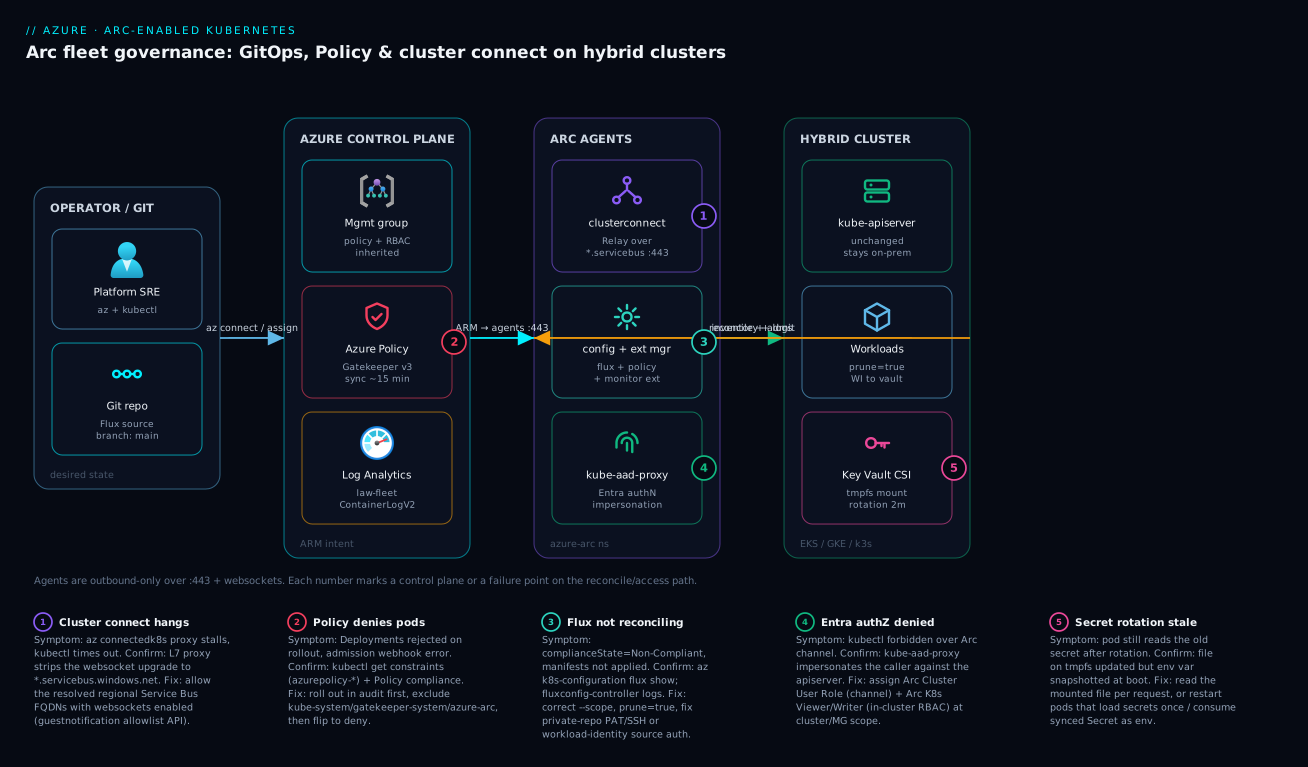
Real-world scenario
A retail platform team ran 28 store-edge clusters (k3s on ruggedised hardware, one per regional distribution center) plus a GKE cluster for their loyalty service. Security mandated two things the existing setup could not deliver: a centrally enforced ban on privileged containers, and break-glass kubectl access for the on-call SRE without opening inbound ports on store networks — the stores sat behind carrier-grade NAT with no public ingress and a websocket-stripping Layer-7 proxy.
The constraint that bit them first was the proxy. Onboarding succeeded, Flux reconciled, Policy enforced — but az connectedk8s proxy hung, because cluster connect rides Azure Relay over *.servicebus.windows.net and the proxy silently dropped the websocket upgrade. The fix was an allow-rule for the resolved, regional Service Bus endpoints with websockets explicitly permitted, expanded from the wildcard via the guest-notification allowlist API:
# Run per store region; feed results into the proxy allowlist with websockets enabled
for region in eastus westus2 centralus; do
  curl -s "https://guestnotificationservice.azure.com/urls/allowlist?api-version=2020-01-01&location=$region"
done
With egress fixed, they assigned the Pod Security baseline initiative at the mg-retail-edge management group — in audit first. The audit results surfaced exactly the violators they expected: a legacy label-printer DaemonSet that ran privileged to access /dev. They refactored it to a specific device plugin, then flipped the initiative to deny. New store clusters now onboard via a pipeline that runs az connectedk8s connect, and inherit the deny policy and the Flux baseline automatically from the management group — zero per-store configuration.
| Decision | What they chose | Why |
|---|---|---|
| Onboarding | Pipeline-driven connect |
28 stores, no manual touch |
| Policy rollout | audit → fix → deny |
Avoid breaking brownfield workloads |
| Access | Arc Cluster User Role at MG scope | Any store, no inbound port |
| Egress fix | Regional Relay FQDNs + websockets | Cluster connect over CGNAT |
| Secrets | Workload identity + KV CSI | No keys on store hardware |
| Telemetry | Container Insights → one workspace | Fleet-wide error queries |
On-call SREs hold Azure Arc Enabled Kubernetes Cluster User Role at the MG scope, giving them az connectedk8s proxy into any store on earth without a single inbound firewall rule. The whole 28-cluster fleet went from “28 snowflakes” to “one policy, one Git repo, one identity boundary” in under a sprint. The lasting win was not any single control — it was that adding store #29 became a pipeline run, not a project.
Advantages and disadvantages
| Advantages | Disadvantages |
|---|---|
| One control plane for hybrid/multi-cloud K8s | Management plane is eventually consistent (~15 min Policy) |
| Outbound-only — no inbound firewall holes | Hard dependency on egress to Azure FQDNs |
| Policy + RBAC inherit via management groups | Mis-scoped assignment can hit many clusters at once |
| GitOps identical across Arc and AKS | Flux/Gatekeeper add their own in-cluster footprint |
| Secretless Key Vault via workload identity | Federation setup is fiddly the first time |
| Fleet telemetry in one Log Analytics workspace | Ingestion cost grows with cluster/namespace count |
| New clusters self-bootstrap from MG inheritance | If Azure is unreachable, management pauses (data plane keeps running) |
| Works behind CGNAT / locked-down on-prem | Websocket-stripping proxies break cluster connect |
When each matters: the outbound-only model is decisive for edge and regulated on-prem where inbound is simply not allowed. Management-group inheritance is the multiplier once you pass ~5 clusters — below that, the per-cluster effort is small and Arc’s value is mostly uniformity, not labour saved. The eventual-consistency caveat matters most for security expectations: do not assume a freshly assigned deny is enforced the instant you click save; budget ~15 minutes and verify with a negative test. The egress dependency is the thing that bites in practice — almost every painful Arc incident traces back to a firewall or proxy, not to Arc itself.
Hands-on lab
This lab onboards a local kind cluster (free, no cloud cost beyond minimal ARM/Log Analytics) and layers Policy + cluster connect. You need Azure CLI, kubectl, Docker, and an Azure subscription.
# 0) Prereqs
az login
az extension add --name connectedk8s
az extension add --name k8s-configuration
az extension add --name k8s-extension

# 1) A throwaway local cluster
kind create cluster --name arc-lab
kubectl config use-context kind-arc-lab

# 2) Register providers (idempotent; wait for Registered)
for ns in Microsoft.Kubernetes Microsoft.KubernetesConfiguration Microsoft.ExtendedLocation Microsoft.PolicyInsights; do
  az provider register --namespace $ns
done
az provider show -n Microsoft.Kubernetes --query registrationState -o tsv   # -> Registered

# 3) Onboard
export RESOURCE_GROUP=rg-arc-lab LOCATION=eastus CLUSTER_NAME=kind-arc-lab
az group create -n $RESOURCE_GROUP -l $LOCATION -o table
az connectedk8s connect -n $CLUSTER_NAME -g $RESOURCE_GROUP -l $LOCATION

# Expected: connectivityStatus -> Connected; azure-arc pods Running
az connectedk8s show -n $CLUSTER_NAME -g $RESOURCE_GROUP --query connectivityStatus -o tsv
kubectl get pods -n azure-arc

# 4) GitOps against a public repo
az k8s-configuration flux create \
  --name lab-baseline -g $RESOURCE_GROUP \
  --cluster-name $CLUSTER_NAME --cluster-type connectedClusters \
  --namespace cluster-config --scope cluster \
  --url https://github.com/Azure/gitops-flux2-kustomize-helm-mt \
  --branch main \
  --kustomization name=infra path=./infrastructure prune=true

# 5) Policy add-on + a deny baseline at the SUBSCRIPTION scope for the lab
az k8s-extension create --cluster-type connectedClusters \
  --cluster-name $CLUSTER_NAME -g $RESOURCE_GROUP \
  --extension-type Microsoft.PolicyInsights --name azurepolicy

SUB=$(az account show --query id -o tsv)
az policy assignment create \
  --name psp-baseline-lab \
  --policy-set-definition a8640138-9b0a-4a28-b8cb-1666c838647d \
  --scope "/subscriptions/$SUB" \
  --params '{"effect":{"value":"audit"},"excludedNamespaces":{"value":["kube-system","gatekeeper-system","azure-arc"]}}'

# 6) Cluster connect — grant yourself, then proxy
ARM_ID=$(az connectedk8s show -n $CLUSTER_NAME -g $RESOURCE_GROUP --query id -o tsv)
ME=$(az ad signed-in-user show --query id -o tsv)
az role assignment create --role "Azure Arc Enabled Kubernetes Cluster User Role" --assignee $ME --scope $ARM_ID
az role assignment create --role "Azure Arc Kubernetes Cluster Admin" --assignee $ME --scope $ARM_ID
# Shell 1: az connectedk8s proxy -n $CLUSTER_NAME -g $RESOURCE_GROUP
# Shell 2: kubectl get nodes      # routed over the Arc channel

# 7) TEARDOWN (avoid lingering cost)
az policy assignment delete --name psp-baseline-lab --scope "/subscriptions/$SUB"
az connectedk8s delete -n $CLUSTER_NAME -g $RESOURCE_GROUP --yes
az group delete -n $RESOURCE_GROUP --yes --no-wait
kind delete cluster --name arc-lab
| Step | You should see | If you don’t |
|---|---|---|
| 3 onboard | Connected; azure-arc pods Running |
Check egress to MCR + ARM |
| 4 GitOps | complianceState: Compliant after a minute |
flux show; check the repo URL |
| 5 Policy | azurepolicy-* constraints after ~15 min |
kubectl get constraints empty → wait |
| 6 connect | kubectl get nodes via proxy |
Proxy hung → websocket egress |
| 7 teardown | Resources gone | Re-run delete; --no-wait is async |
Common mistakes & troubleshooting
These are the failure modes that actually generate tickets, in rough order of frequency. The first is responsible for more lost hours than the rest combined.
| # | Symptom | Root cause | Confirm (exact cmd / portal path) | Fix |
|---|---|---|---|---|
| 1 | Onboards fine, az connectedk8s proxy hangs |
L7 proxy strips websocket upgrade to *.servicebus.windows.net |
az connectedk8s proxy -d (debug); firewall logs |
Allow resolved regional Service Bus FQDNs with websockets enabled |
| 2 | New deny policy pages you at 02:00 |
Flipped straight to deny on brownfield |
Policy compliance → violating resources | Always audit → fix → deny |
| 3 | Arc agents themselves blocked by policy | System namespaces not excluded | kubectl get constraints -o yaml |
Exclude kube-system,gatekeeper-system,azure-arc |
| 4 | “I can connect but everything is forbidden” | Only Cluster User Role assigned | az role assignment list --scope $ARM_ID |
Add Viewer/Writer/Admin role too |
| 5 | Flux never reconciles | Private repo, missing/invalid auth | az k8s-configuration flux show; source-controller logs |
Pass PAT/SSH; add --known-hosts |
| 6 | prune deletes more than expected |
Wrong path/--scope, shared namespace |
Inspect the Kustomization path | Narrow path; separate namespaces |
| 7 | Cluster shows Offline |
Egress lost / MSI cert expired | az connectedk8s show; clusteridentityoperator logs |
Restore egress to HIS endpoints; restart agent |
| 8 | Extension stuck Creating/Failed |
extension-manager can’t pull / RBAC |
az k8s-extension show ... provisioningState; pod logs |
Fix egress/RBAC; delete + recreate |
| 9 | In-cluster service calls fail after connect | Service CIDR not in --proxy-skip-range |
DNS/connectivity test in a pod | Re-connect with CIDR + .svc in skip-range |
| 10 | Secret rotated but app still old value | Env-var snapshot at pod start | Compare mounted file vs env var | Read file per request, or restart pods |
| 11 | Log Analytics bill spikes | Collecting all namespaces, V2 on everything | Usage by _ResourceId |
Scope dataCollectionSettings namespaces |
| 12 | Negative policy test still admits privileged pod | Constraints not synced / wrong scope | kubectl run pwn --image=nginx --privileged=true -n prod admits |
Verify MG scope; wait ~15 min |
| 13 | connect fails: Helm release exists |
Stale prior onboarding | helm list -n azure-arc |
az connectedk8s delete then re-connect |
| 14 | Resource Graph shows blank distribution/version | cluster-metadata-operator unhealthy |
That agent’s logs | Restart agent; check egress |
A fast negative test for Policy: kubectl run pwn --image=nginx --privileged=true -n prod should be denied by the Gatekeeper webhook once the baseline initiative is in deny mode. If it succeeds, your assignment scope or namespace exclusions are wrong, or the constraints have not synced yet.
# Verify each layer landed before you call a cluster "governed"
az connectedk8s show -n $CLUSTER_NAME -g $RESOURCE_GROUP --query connectivityStatus -o tsv   # -> Connected
kubectl get pods -n azure-arc          # all Running
az k8s-configuration flux show --name fleet-baseline -g $RESOURCE_GROUP \
  --cluster-name $CLUSTER_NAME --cluster-type connectedClusters \
  --query "statuses[].complianceState" -o tsv
kubectl get constraints                 # azurepolicy-* present
kubectl get ds ama-logs -n kube-system  # Monitor agent shipping
Best practices
- Treat egress as the dependency that decides everything. Pre-stage the FQDN allowlist (especially
*.servicebus.windows.netwith websockets) before onboarding, per region. Most Arc incidents are firewall incidents. - Always roll policy
audit→ remediate →deny. Never flip a brownfield fleet straight todeny. Watch compliance for a week first. - Exclude
kube-system,gatekeeper-system, andazure-arcfrom every policy assignment. Forgetting this blocks Arc’s own agents. - Assign Policy and RBAC at the management-group scope, not per cluster. Inheritance is the whole point; per-cluster assignments do not scale and drift.
- Set
prune=trueon every Kustomization. Without it, Git is not the source of truth and deletes silently leak. - Use
dependsOnto land CRDs/ingress before workloads that need them, or reconciliation order will bite you on a fresh cluster. - Grant both the Cluster User Role and an in-cluster role (Viewer/Writer/Admin). One without the other is useless.
- Use managed-identity auth everywhere —
amalogs.useAADAuth=truefor Monitor, workload identity for Key Vault. No keys in the cluster, ever. - Scope Container Insights ingestion with
dataCollectionSettingson chatty clusters; default “collect everything” is a cost trap at fleet scale. - Codify the baseline as Bicep
fluxConfigurationsso new clusters self-bootstrap. Onboarding should be a pipeline run, not a runbook. - Tag every connected cluster (env, owner, data-classification) and keep saved Resource Graph queries for inventory and drift.
- Pin agent/extension versions in change-controlled fleets (
--disable-auto-upgrade) and roll upgrades through a ring, the same way you would for AKS day-two upgrades.
Security notes
Arc’s security model is “outbound-only management plane + least-privilege identity,” and you should keep it that way deliberately.
| Concern | Default / mechanism | Hardening action |
|---|---|---|
| Inbound exposure | None — agents dial out only | Do not add inbound rules “to make it work”; fix egress instead |
| Cluster→Azure identity | MSI cert (clusteridentityoperator) |
Allow only HIS FQDNs; monitor cert renewal |
Human kubectl access |
Azure RBAC via Entra | Least-privilege roles; PIM for admin; group, not user, assignments |
| Admission guardrails | Gatekeeper via Policy | Enforce baseline/restricted at MG; deny privileged/hostPath |
| Secrets | Workload identity + KV CSI | No static secrets; per-service-account scope; rotation on |
| Workspace key in cluster | Avoided with useAADAuth=true |
Never store the Log Analytics key in-cluster |
| Private Git creds | PAT/SSH stored as secret | Prefer SSH deploy keys or WI (azblob); rotate PATs |
| Egress trust | TLS to Azure | TLS-inspecting proxy → supply --proxy-cert; pin allowlist |
| Network segmentation | Per-region private endpoints (optional) | Use Arc Private Link to keep data-plane off public internet |
| Audit | Entra sign-in + Activity log + apiserver audit | Centralize all three; alert on role-assignment changes |
The identity boundary is the crown jewel: because human access is Entra-mediated and impersonated per request, you get one place (Entra + Activity log) to answer “who touched which cluster, when.” Protect the Arc Cluster Admin role with PIM and just-in-time elevation; a standing Cluster Admin at MG scope is a standing cluster-admin on every cluster in the fleet.
Cost & sizing
Arc-enabled Kubernetes has no per-cluster Arc fee for the core control plane (onboarding, cluster connect, GitOps, Policy). What you pay for is the value-added services that ride on top — chiefly log/metric ingestion and any Arc-enabled data/app services. Sizing is therefore mostly an observability-cost exercise plus a small in-cluster resource footprint for the agents and add-ons.
| Cost driver | What it bills on | Rough figure | How to control |
|---|---|---|---|
| Arc K8s control plane | Onboarding/connect/GitOps/Policy | No core charge | — |
| Container Insights ingestion | GB ingested to Log Analytics | ~₹230–290 / USD 2.76 per GB (pay-as-you-go) | Scope namespaces; interval; commitment tiers |
| Log Analytics retention | GB-month beyond free 31 days | Per-GB-month | Shorten retention; archive tier |
| Managed Prometheus metrics | Metric samples ingested | Per-sample pricing | Scrape interval; drop unused series |
| Arc-enabled SQL/data services | vCore/usage of the data service | Service-specific | Right-size the data workload |
| In-cluster agent footprint | Node CPU/mem for agents + add-ons | ~0.5–1 vCPU + ~1–2 GB cluster-wide | Don’t run add-ons you don’t use |
| Egress/proxy infra | Your firewall/proxy capacity | Your existing infra | Allowlist precisely; no new ingress |
Right-sizing the in-cluster footprint
| Component | Approx. resource ask | Notes |
|---|---|---|
Arc agents (azure-arc) |
Modest; a handful of small pods | Always present |
| Flux controllers | CPU on reconcile spikes | Scales with repo size + interval |
| Gatekeeper | Scales with constraint count | Trim constraints; set limits |
ama-logs DaemonSet |
Per-node; scales with log volume | Biggest variable; scope namespaces |
Practical guidance: on a 28-cluster edge fleet, the dominant line item is almost always Container Insights ingestion, not anything Arc-specific. Turn on namespaceFilteringMode: Include for just prod/ingress, raise the metric interval to 5m where 1-minute resolution is not needed, and move long-tail logs to a cheaper retention/archive tier. Free-tier-wise, Log Analytics gives a small daily ingestion allowance and 31 days retention at no charge — enough to validate the pipeline in the lab above without a meaningful bill. (INR figures approximate at ~₹84/USD and vary by region and commitment tier; treat them as order-of-magnitude.)
Going deeper
Everything above governs a fleet the ARM way — management groups, Policy, RBAC, and GitOps reaching connected clusters wherever they run. That is one meaning of “fleet,” and for mixed EKS/GKE/on-prem estates it is the meaning that matters. But Azure ships a second, differently-shaped fleet tool, and conflating the two is the single most common architecture mistake once teams scale past a handful of clusters. This section draws the line precisely, then goes under the hood of the pieces the earlier walkthrough used but did not fully open up: Arc-provisioned clusters, the cluster-extension lifecycle, and the OIDC issuer that makes workload identity actually work on a non-AKS cluster.
Two things called “fleet” — and which solves what
| “Fleet” sense | What it is | Scope object | Which clusters | What it buys you |
|---|---|---|---|---|
| Fleet governance (this lesson) | MG hierarchy + Policy + RBAC + GitOps, projected via Arc | Management groups / subscriptions | Any Arc connected cluster (EKS, GKE, k3s, on-prem) and AKS | Uniform admission rules, access, desired-state config, and inventory across a heterogeneous estate |
| Azure Kubernetes Fleet Manager | A first-class multi-cluster orchestrator | Microsoft.ContainerService/fleets |
AKS only (members are AKS clusters) | Staged Kubernetes/node-image update runs, Kubernetes-object propagation, multi-cluster L4 load balancing |
The mental split: governance is about what may run and who may touch it; Fleet Manager is about coordinating the lifecycle of many AKS clusters. They are complementary, not alternatives. A real estate of 30 AKS clusters plus 12 Arc-connected non-AKS clusters uses both — Fleet Manager to roll a Kubernetes-version upgrade across the 30 AKS clusters in canary-then-rings order, and management-group Policy + GitOps to enforce the same guardrails and config on all 42. Neither can do the other’s job: Fleet Manager’s membership is AKS-only, so it cannot orchestrate your EKS or on-prem clusters; management-group Policy governs across everything but does not sequence a staged AKS version rollout.
Azure Kubernetes Fleet Manager, under the hood
A Fleet is an ARM resource that AKS clusters join as member clusters (across regions and even subscriptions within one tenant). It comes in two shapes:
- Hubless — the fleet exists purely to orchestrate updates. Lightest footprint; no extra cluster to run.
- With a hub cluster — the fleet provisions a managed AKS hub cluster that stores fleet-wide Kubernetes objects and propagates them to members, and that also powers multi-cluster L4 load balancing. You choose hub-vs-hubless at fleet-create time.
The headline capability is update orchestration. You define an update strategy made of ordered stages, each containing groups of member clusters; an update run then walks the stages, upgrading the Kubernetes control-plane version and/or node images group-by-group, with optional soak time between stages. That is how you express “canary in one region, wait an hour, then the rest, region by region” as a repeatable object instead of a runbook:
# Illustrative — command names are current; all IDs are placeholders, nothing runs live here
az extension add --name fleet

az fleet create -g rg-fleet -n prod-fleet -l eastus         # add a hub with --enable-hub on create if you need propagation/L4 LB
az fleet member create -g rg-fleet -f prod-fleet -n aks-eastus  --member-cluster-id "<AKS_EASTUS_RESOURCE_ID>"
az fleet member create -g rg-fleet -f prod-fleet -n aks-westus2 --member-cluster-id "<AKS_WESTUS2_RESOURCE_ID>"

# A run that upgrades the control plane AND node images across members, staged by the named strategy
az fleet updaterun create -g rg-fleet -f prod-fleet -n k8s-1-30 \
  --upgrade-type Full --kubernetes-version 1.30.4 \
  --update-strategy-name ring-by-region
az fleet updaterun start  -g rg-fleet -f prod-fleet -n k8s-1-30
--upgrade-type takes Full (control plane + node images), ControlPlaneOnly, or NodeImageOnly; only the first two take --kubernetes-version. The object-propagation side uses the upstream Fleet/KubeFleet ClusterResourcePlacement (CRP) API on the hub — you select objects and a placement policy, and the hub pushes them to matching members:
apiVersion: placement.kubernetes-fleet.io/v1beta1
kind: ClusterResourcePlacement
metadata:
  name: prod-guardrails
spec:
  resourceSelectors:
    - group: ""
      version: v1
      kind: Namespace
      name: prod-config
  policy:
    placementType: PickAll   # PickAll | PickN | PickFixed
Update runs and staged strategies are GA; automatic (trigger-driven) multi-cluster upgrades and some placement/LB surfaces have moved through preview — check the current status of any flag before you make it load-bearing. And the correctness point worth tattooing on the design doc: Fleet Manager does not consume Arc connected clusters. If your “fleet” is heterogeneous, Fleet Manager handles the AKS subset and Arc governance handles the whole.
Connected vs provisioned: Arc as the cluster’s creator, not just its registrar
Section 2 onboarded an existing cluster — the connected cluster model, where Arc projects something you already run. There is a second Arc-for-Kubernetes model that the earlier distribution table only nodded at: the provisioned cluster, where Arc does not merely register a cluster but creates and lifecycles it on your own hardware.
| Model | You bring | Arc’s job | Runs on | Representative resource |
|---|---|---|---|---|
| Connected cluster | An existing conformant cluster | Project + govern (agents reconcile intent) | EKS, GKE, on-prem, any conformant K8s | Microsoft.Kubernetes/connectedClusters |
| Provisioned cluster | Nothing — Arc builds it | Provision + full lifecycle: create, scale, upgrade, delete | Azure Local (formerly Azure Stack HCI), AKS Edge Essentials | Microsoft.HybridContainerService/* projected as a connected cluster |
This is AKS enabled by Azure Arc: a genuine AKS control plane running on-premises on Azure Local or at the edge on AKS Edge Essentials, but created and upgraded through Azure as if it were a cloud resource. The onboarding UX differs (you provision through the Arc/HybridContainerService path rather than az connectedk8s connect), but once the cluster exists it surfaces as a connected cluster too — so the Policy, GitOps, cluster-connect, and Monitor mechanics from this lesson all apply unchanged. If you have seen “Azure Stack HCI” in older docs, note the rename: the platform is now Azure Local.
The cluster-extension lifecycle you have been leaning on
Flux, Policy, Monitor, and Key Vault all arrived as cluster extensions, reconciled by the in-cluster extension-manager. It is worth knowing the levers, because “extension stuck Creating” and “an add-on silently jumped a minor version” are both governed here:
az k8s-extension create knob |
Controls | Default | Why it bites |
|---|---|---|---|
--auto-upgrade-minor-version |
Extension tracks new minor versions automatically | true |
Great for security, surprising for change-controlled fleets — pin to freeze |
--version |
Pin an exact extension version | latest in the train | Setting it disables auto-upgrade; you now own upgrades |
--release-train |
Which channel to pull from (Stable / Preview) |
Stable |
Preview ships early features that are not production-supported |
--scope |
cluster or namespace install |
cluster |
A namespace-scoped extension cannot create CRDs/ClusterRoles |
--configuration-protected-settings |
Secret config (keys, tokens) | — | Write-only; never rendered back, unlike --configuration-settings |
Two behaviours that trip people: creating your first fluxConfigurations auto-installs the microsoft.flux extension, so you rarely run k8s-extension create for Flux by hand; and because auto-upgrade-minor-version defaults to true, a “we changed nothing” cluster can still pick up a new Gatekeeper or ama-logs minor overnight. On a change-controlled fleet, pin versions and roll them through a ring the same way you would node images.
Making workload identity actually work on a connected cluster
Section 7 federated a managed identity to a service account — but it assumed the cluster already had a working OIDC issuer. On AKS that issuer is managed for you behind --enable-oidc-issuer. On a connected (non-AKS) cluster it is not automatic: you must turn the issuer on and make sure Entra can reach it, or every federated-token exchange fails with an issuer/authority error that looks nothing like “OIDC is off.”
# On a connected cluster you enable the issuer yourself (self-hosted issuer is also supported)
az connectedk8s connect -n $CLUSTER_NAME -g $RESOURCE_GROUP -l $LOCATION \
  --enable-oidc-issuer --enable-workload-identity

# Read back the issuer URL Entra will federate against
az connectedk8s show -n $CLUSTER_NAME -g $RESOURCE_GROUP \
  --query "oidcIssuerProfile.issuerUrl" -o tsv
The federated identity credential still maps the same three things — issuer (that URL) + subject (system:serviceaccount:<ns>:<sa>) + audience (api://AzureADTokenExchange) — onto the user-assigned identity. The connected-cluster-specific nuance is reachability: Entra performs the OIDC discovery over the public internet, so the issuer document (self-hosted or managed) must be resolvable from Azure’s side. A workload-identity setup that “works on AKS but not on my Arc cluster” is almost always an issuer that Entra cannot reach, not a broken federation. Once the exchange succeeds, the security win is identical to AKS: no client secret anywhere, scoped per service account.
Eventual consistency, stated as a guarantee
One last internal to hold onto, because it shapes every security expectation on the management plane: desired state is eventually consistent, actual state is immediate. Policy assignments sync to the add-on roughly every 15 minutes before Gatekeeper writes the azurepolicy-* constraints; Flux reconciles on its own interval; Resource Graph inventory trails agent heartbeats. So a freshly saved deny is not enforced the instant you click save, and a cluster that just went dark still shows Connected for up to ~15 minutes. Design for it: roll policy audit → deny, verify enforcement with an explicit negative test rather than assuming, and treat connectivityStatus as a lagging indicator you confirm with an in-cluster kubectl get pods -n azure-arc.
Interview & exam questions
1. What does Arc-enabled Kubernetes actually add to a cluster, and what does it not touch?
It installs a Helm release of outbound-only agents in the azure-arc namespace and creates a connectedClusters ARM resource; it adds Policy/GitOps/Monitor/Key Vault via cluster extensions. It does not change your control plane, scheduler, nodes, or the data path of your workloads — Arc reconciles intent and brokers kubectl, nothing more.
2. Why is *.servicebus.windows.net special in the egress allowlist?
Cluster connect rides Azure Relay over that endpoint using websockets. A Layer-7 proxy that blocks websocket upgrades will let onboarding succeed but break kubectl-over-Arc, which is a notoriously confusing failure. You must allow the resolved regional FQDNs with websockets enabled.
3. Why roll Azure Policy out in audit before deny?
deny causes Gatekeeper to reject non-compliant admissions, so flipping straight to deny on a brownfield cluster rejects existing Deployments on their next rollout. audit surfaces violators without blocking, letting you remediate first, then promote to deny safely.
4. Which namespaces must you exclude from policy assignments, and why?
kube-system, gatekeeper-system, and azure-arc. They run system and Arc agent workloads that may legitimately need elevated settings; failing to exclude them can block Arc’s own agents and brick management.
5. Explain the cluster-connect request path.
Your Azure token → Azure Relay → clusterconnect-agent → kube-aad-proxy (Entra authN + user impersonation) → kube-apiserver. Impersonation is why a fleet-wide Viewer role grants read-only kubectl on every cluster at once.
6. Cluster User Role is assigned but everything returns forbidden. Why?
The Cluster User Role only opens the connect channel; it grants no in-cluster permissions. You must also assign an in-cluster role (Viewer/Writer/Admin) for the impersonated request to do anything.
7. What does prune=true change, and why is it non-negotiable?
With prune=true, deleting a manifest from Git causes Flux to garbage-collect the corresponding object from the cluster. Without it, deletions never propagate, so Git stops being the authoritative source of truth.
8. How do you give every new cluster the baseline automatically?
Assign Policy initiatives and Arc Kubernetes roles at a management group, and register the Flux config as Bicep fluxConfigurations. A cluster onboarded into any child subscription inherits the policy, GitOps config, and access without per-cluster work.
9. How do you read a Key Vault secret with no credential in the cluster?
Install the Key Vault Secrets Provider extension, federate a user-assigned managed identity to a Kubernetes service account (workload identity), and bind a SecretProviderClass. The CSI provider exchanges the pod’s projected token for an Entra token — no client secret anywhere.
10. A secret was rotated but the app still uses the old value. Why, and what fixes it?
Rotation refreshes the mounted file on tmpfs, but environment variables are snapshotted at pod start and the synced Secret-as-env path is static. Apps that read the file per request pick up changes; apps that load at boot or use env vars need a pod restart.
11. How does Arc Kubernetes differ from AKS for these controls?
The controls are nearly identical — same az k8s-configuration flux, same Policy initiatives, same extensions — but Arc uses --cluster-type connectedClusters and runs on non-Azure clusters with an outbound-only agent set, while AKS uses managedClusters and is already in Azure. The symmetry is intentional.
12. Which certs map to which exam? This material maps to AZ-305 (designing governance/hybrid) and AZ-104 (Arc, Policy, RBAC), with Kubernetes depth overlapping CKA/CKS for the in-cluster admission and RBAC mechanics.
Quick check
- What single egress FQDN, if proxied without websockets, lets onboarding succeed but breaks
kubectl-over-Arc? - You assigned the Arc Cluster User Role but every
kubectlcommand isforbidden. What did you forget? - Name the three namespaces you must exclude from a fleet policy assignment.
- What does
prune=truedo when you delete a manifest from Git? - Why does a freshly assigned
denypolicy sometimes still admit a privileged pod for a few minutes?
Answers
*.servicebus.windows.net— cluster connect rides Azure Relay over websockets there. Allow the resolved regional FQDNs with websockets enabled.- An in-cluster role. The Cluster User Role only opens the connect channel; you must also assign Viewer/Writer/Admin for the impersonated request to have permissions.
kube-system,gatekeeper-system, andazure-arc— excluding them keeps the policy from blocking system and Arc agent workloads.- Flux garbage-collects the corresponding object from the cluster, keeping Git as the source of truth.
- The Policy add-on syncs assignments roughly every 15 minutes and writes the
azurepolicy-*Gatekeeper constraints on that cadence; until they land (or if the scope is wrong), admission is not yet enforced.
Practice challenges
Six exercises that escalate from your first onboarding to a fleet-architecture decision. Every command is illustrative — all IDs, subscriptions, and resource names are placeholders, and nothing here runs against a live subscription for you. Try each before opening its solution.
1. (Beginner) Prep the subscription so onboarding does not fail. You point at a store’s k3s cluster and az connectedk8s connect returns Provider 'Microsoft.KubernetesConfiguration' not registered. Register the providers Arc needs and prove they are ready before you retry.
<details><summary>Solution</summary>
for ns in Microsoft.Kubernetes Microsoft.KubernetesConfiguration Microsoft.ExtendedLocation Microsoft.PolicyInsights; do
  az provider register --namespace $ns
done
# Gate on it — registration is asynchronous (~10 min)
az provider show -n Microsoft.KubernetesConfiguration --query registrationState -o tsv   # -> Registered
Why: provider registration is per-subscription and async; connect fails until state reads Registered, so gate on it instead of guessing.
</details>
2. (Beginner → Intermediate) Onboard through a TLS-inspecting proxy. The cluster egresses only through proxy.corp.local:8080, which also intercepts TLS with a corporate root CA. Onboard it. Which flags do you actually need, and what must --proxy-skip-range contain?
<details><summary>Solution</summary>
az connectedk8s connect \
  --name $CLUSTER_NAME --resource-group $RESOURCE_GROUP --location $LOCATION \
  --proxy-https https://proxy.corp.local:8080 \
  --proxy-http  http://proxy.corp.local:8080 \
  --proxy-skip-range 10.0.0.0/16,kubernetes.default.svc,.svc.cluster.local,.svc \
  --proxy-cert /etc/ssl/certs/corp-root.crt
Why: the in-cluster agents inherit the proxy, so the service CIDR and .svc suffixes must bypass it or service-to-service calls get misrouted; --proxy-cert is only for injecting the inspecting proxy’s root, not for “using a proxy.”
</details>
3. (Intermediate) GitOps with correct ordering and real pruning. Land your ingress CRDs before the workloads that need them, and make a manifest you delete from Git actually disappear from the cluster.
<details><summary>Solution</summary>
az k8s-configuration flux create \
  --name fleet-baseline --resource-group $RESOURCE_GROUP \
  --cluster-name $CLUSTER_NAME --cluster-type connectedClusters \
  --namespace cluster-config --scope cluster \
  --url https://github.com/acme-platform/fleet-gitops --branch main \
  --kustomization name=infra path=./infrastructure prune=true \
  --kustomization name=apps  path=./apps/prod prune=true dependsOn=["infra"]
Why: dependsOn=["infra"] makes apps wait until infra is Ready (CRDs/ingress first), and prune=true is what makes Git authoritative — without it, deletes never propagate.
</details>
4. (Intermediate → Advanced) Roll a Pod Security baseline to a management group without paging yourself, then prove it. Ban privileged containers across mg-retail-edge, but do not reject brownfield workloads on the way in.
<details><summary>Solution</summary>
# 1) Assign in AUDIT first, excluding system + Arc namespaces
az policy assignment create --name psp-baseline-fleet \
  --policy-set-definition a8640138-9b0a-4a28-b8cb-1666c838647d \
  --scope "/providers/Microsoft.Management/managementGroups/mg-retail-edge" \
  --params '{"effect":{"value":"audit"},"excludedNamespaces":{"value":["kube-system","gatekeeper-system","azure-arc"]}}'

# 2) Watch compliance for a week, fix violators, THEN re-run the same assignment with deny
az policy assignment create --name psp-baseline-fleet \
  --policy-set-definition a8640138-9b0a-4a28-b8cb-1666c838647d \
  --scope "/providers/Microsoft.Management/managementGroups/mg-retail-edge" \
  --params '{"effect":{"value":"deny"},"excludedNamespaces":{"value":["kube-system","gatekeeper-system","azure-arc"]}}'

# 3) Negative test (after ~15 min sync) — should be DENIED by the Gatekeeper webhook
kubectl run pwn --image=nginx --privileged=true -n prod
Why: audit → deny surfaces violators without blocking existing deploys; excluding the three system namespaces keeps the policy from blocking Arc’s own agents; the negative test confirms the azurepolicy-* constraints actually synced.
</details>
5. (Advanced) Break-glass access with least privilege and JIT. Give the on-call SRE kubectl into any of 28 store clusters with no inbound port, read/write by default but not standing cluster-admin, with admin available only just-in-time.
<details><summary>Solution</summary>
MG="/providers/Microsoft.Management/managementGroups/mg-retail-edge"
ONCALL_GROUP="<ENTRA_GROUP_OBJECT_ID>"    # assign to the GROUP, not a user

# Channel role + in-cluster role, both at MG scope so one grant covers all 28
az role assignment create --role "Azure Arc Enabled Kubernetes Cluster User Role" --assignee $ONCALL_GROUP --scope $MG
az role assignment create --role "Azure Arc Kubernetes Writer"                     --assignee $ONCALL_GROUP --scope $MG
# Make "Azure Arc Kubernetes Cluster Admin" PIM-ELIGIBLE (JIT), not a standing assignment — configure via PIM.

# Then, from anywhere:
az connectedk8s proxy -n store-042 -g rg-arc-fleet   # shell 1 (blocks)
kubectl get pods -A                                   # shell 2, over the Arc channel
Why: the Cluster User Role only opens the connect channel — you also need an in-cluster role (Writer here); assigning to a group at MG scope covers the whole fleet in two grants; keeping Cluster Admin PIM-eligible means no standing cluster-admin on 28 clusters.
</details>
6. (Advanced, capstone) Pick the right “fleet” tool — and know why one cannot do both. Your estate is 30 AKS clusters across three regions plus 12 non-AKS Arc clusters (EKS + on-prem). You must (a) roll Kubernetes 1.30 across the 30 AKS clusters region-by-region with a canary, and (b) enforce the same no-privileged / approved-registries policy on all 42. Which product does each job, and why can’t a single one cover the whole estate?
<details><summary>Solution</summary>
- (a) Azure Kubernetes Fleet Manager. Join the 30 AKS clusters as members, define an update strategy (stage 1 = one canary group, then regional rings), and run an update run with
--upgrade-type Full --kubernetes-version 1.30.x. This orchestrates AKS control-plane + node-image upgrades in order. - (b) Management-group Azure Policy (Gatekeeper) + GitOps. Assign the baseline initiative and your approved-registries rule at the MG covering all 42; Arc projects the 12 non-AKS clusters so Policy and Flux configs reach them too.
Why: Fleet Manager membership is AKS-only, so it cannot upgrade or govern the EKS/on-prem clusters — while management-group Policy governs across the whole estate but does not sequence a staged AKS version rollout. The two “fleets” solve different problems and are used together. </details>
Common beginner mistakes
These are conceptual wrong turns — the mental models that send newcomers down the wrong path — as opposed to the symptom→cause→fix ticket table in Common mistakes & troubleshooting above. Fix the model here and half the tickets there never happen.
| Misconception | Why it’s wrong | The right mental model |
|---|---|---|
| “Arc runs or hosts my cluster.” | Arc installs no control plane and schedules nothing; it adds outbound agents and an ARM resource. | Arc projects and governs. Your API server, scheduler, and nodes are untouched and keep serving even if Azure is unreachable. |
| “Azure needs an inbound port or VPN into my cluster.” | Every Arc agent dials outbound; there is no listener for Azure to connect back to. | Fix egress to the FQDN allowlist (especially *.servicebus.windows.net with websockets). Opening inbound to “make it work” adds attack surface and is never required. |
| “‘Fleet management’ here means Azure Kubernetes Fleet Manager.” | This lesson governs a fleet with management groups + Policy + GitOps; Fleet Manager is a separate, AKS-only product. | Use MG/Policy/GitOps to govern a mixed Arc estate; reach for Fleet Manager only to orchestrate AKS upgrades, propagation, and L4 load balancing. |
| “GitOps here is Argo, or I install Flux myself, or Flux v1 still works.” | Arc’s managed GitOps is Flux v2 via the microsoft.flux extension; the Flux v1 sourceControlConfigurations path is retired. |
Let fluxConfigurations auto-install microsoft.flux; don’t hand-install controllers; migrate any legacy v1 config to az k8s-configuration flux. |
“A deny policy is enforced the instant I click save.” |
The add-on syncs assignments roughly every 15 minutes and only then writes the azurepolicy-* Gatekeeper constraints. |
Budget ~15 min, roll audit → deny, and confirm with a negative test (kubectl run --privileged) rather than assuming enforcement. |
“The Cluster User Role gives me kubectl.” |
It only opens the connect channel and grants zero in-cluster permissions. | Channel and RBAC are two separate grants — also assign an in-cluster role (Viewer/Writer/Admin) or every command is forbidden. |
| “Workload identity just works on my connected cluster like on AKS.” | On a non-AKS cluster the OIDC issuer is not managed for you, and Entra must be able to reach it. | Enable --enable-oidc-issuer/--enable-workload-identity, publish an issuer Entra can resolve, then federate the UAMI to system:serviceaccount:<ns>:<sa>. |
Glossary
| Term | Definition |
|---|---|
| Connected cluster | The Microsoft.Kubernetes/connectedClusters ARM resource projecting a non-Azure cluster into Azure. |
| Arc agents | The outbound-only Helm release in the azure-arc namespace that maintains the channel and reconciles intent. |
| Cluster extension | A managed add-on (Flux, Policy, Monitor, Key Vault) installed and lifecycled via Microsoft.KubernetesConfiguration. |
microsoft.flux |
The Flux v2 GitOps cluster extension delivering source/kustomize/helm controllers. |
fluxConfigurations |
The ARM resource describing a Git source + Kustomizations that config-agent applies. |
| Kustomization | A Flux unit that applies a path from a source, with prune, dependsOn, and intervals. |
| Gatekeeper | The OPA admission webhook (v3) that Azure Policy uses to enforce in-cluster constraints. |
| Constraint | The in-cluster object (azurepolicy-*) Gatekeeper enforces, generated from a Policy assignment. |
| Cluster connect | The outbound channel that lets az connectedk8s proxy provide kubectl with no inbound port. |
kube-aad-proxy |
The in-cluster shim that performs Entra authN and impersonates the user against the apiserver. |
| Container Insights | The Microsoft.AzureMonitor.Containers extension shipping logs/metrics/inventory to Log Analytics. |
| Workload identity | A federated user-assigned managed identity bound to a Kubernetes service account for secretless Azure access. |
SecretProviderClass |
The CSI object tying a service account + vault + secret list together for tmpfs mounting. |
| Management group | An ARM scope above subscriptions through which Policy and RBAC inherit to child clusters. |
| Azure Relay | The Azure service (over *.servicebus.windows.net) that brokers the cluster-connect websocket channel. |
| Azure Kubernetes Fleet Manager | A first-class Azure product (Microsoft.ContainerService/fleets) that orchestrates a group of AKS clusters — staged update runs, Kubernetes-object propagation, and multi-cluster L4 load balancing. Distinct from Arc’s management-group governance. |
| Hub cluster | The managed AKS cluster inside a Fleet that stores fleet-wide Kubernetes objects and propagates them to members, and that powers multi-cluster L4 load balancing. Optional — a fleet can be hubless (update orchestration only). |
| Member cluster | An AKS cluster joined to a Fleet Manager fleet; members can span regions and subscriptions within one tenant. |
| Update run / update strategy | Fleet Manager’s staged, multi-cluster upgrade: a strategy defines ordered stages and groups; a run rolls a Kubernetes version and/or node image across members in that order. |
ClusterResourcePlacement (CRP) |
The Fleet API (placement.kubernetes-fleet.io) that selects Kubernetes objects on the hub and places them onto chosen member clusters (PickAll / PickN / PickFixed). |
| Connected vs provisioned cluster | Connected = Arc projects an existing cluster you already run. Provisioned = Arc creates and lifecycles the cluster itself (create / scale / upgrade / delete). |
| AKS enabled by Azure Arc | An AKS control plane running on Azure Local (formerly Azure Stack HCI) or AKS Edge Essentials, provisioned and managed through Arc as a provisioned cluster. |
| Azure Local | Microsoft’s renamed Azure Stack HCI — the on-premises/edge platform that hosts Arc-provisioned AKS. |
| OIDC issuer | The cluster’s token-issuer URL that Entra federates against for workload identity; managed on AKS, but enabled and exposed by you on a connected cluster. |
| Federated identity credential (FIC) | The Entra trust mapping an OIDC issuer + subject (system:serviceaccount:<ns>:<sa>) + audience (api://AzureADTokenExchange) onto a user-assigned managed identity — no secret involved. |
releaseTrain |
A cluster extension’s release channel (Stable / Preview) that decides which versions auto-upgrade-minor-version will pull. |
| Custom location | An ExtendedLocation projected onto a connected cluster, used as a deployment target for Arc-enabled services (App Service, data services) that run on your own hardware. |
Next steps
- Azure Policy at Scale: Governance with Management Groups & Initiatives — go deeper on the policy engine you assigned here, fleet-wide.
- Flux CD GitOps: Monorepo, Kustomize & Multi-Tenancy — structure the Git repo your Arc clusters reconcile from.
- Azure Key Vault Workload Identity for Secrets — the federation model behind secretless secret access.
- Azure Arc-Enabled Servers: Machine Configuration & Extended Security Updates — the VM sibling that completes your hybrid Arc estate.
- AKS Day-Two: Upgrades & Fleet Operations — apply the same fleet discipline to managed Azure clusters.