A payments platform team has run Istio in sidecar mode for two years and is paying for it: every pod carries an Envoy sidecar that adds ~120 MB of memory and 30–50 ms of cold-start latency, and a mesh-wide upgrade means restarting 3,000 pods across forty teams in a coordinated, weekend-long change window that the on-call rotation has come to dread. Their actual security requirement is narrower than the cost they pay for it — they need mTLS everywhere plus L7 authorization on exactly the dozen services that handle card data (only the accounts service may call POST /ledger/v1/debit, and only with a valid Entra-issued JWT carrying the right scope). Istio ambient mode is built for precisely this asymmetry: it gives every workload mTLS and L4 policy through a per-node ztunnel with zero sidecars, and lets you bolt on a waypoint proxy — a standalone Envoy — only for the namespaces or services that genuinely need L7 rules. This guide deploys ambient on an existing cluster, stands up waypoints for the sensitive namespace, and enforces real L7 AuthorizationPolicy resources, end to end.
In a nutshell
Istio ambient mesh is built in two layers, and this lesson is about the upper one.
The lower layer, ztunnel, switches on the moment you enroll a namespace. It runs one lightweight proxy per node and gives every pod two things for free: encrypted, identity-verified connections (mTLS) and coarse “who is allowed to connect to whom, on which port” rules (L4). What it deliberately does not do is look inside the HTTP request — it moves bytes securely but never reads the method, the URL path, or a token.
A waypoint proxy is the opt-in upper layer that does read HTTP. It’s a standalone proxy (a normal Envoy Deployment) you stand up for just the namespaces or services that need to reason about the request itself: allow POST /ledger/v1/debit but not DELETE, require a valid JWT carrying a specific scope, route /report to a slower backend, and emit per-route request metrics and traces. You attach it with a single label; the services you don’t opt in stay waypoint-free and keep only the cheap L4 layer.
Analogy: ztunnel is the building’s badge readers and locked doors — it encrypts the hallways and proves everyone inside is a known employee, but it doesn’t care which rooms you enter. A waypoint is the receptionist stationed on the sensitive floor who checks “you may enter room POST /debit, and your badge is stamped finance.” You only pay for a receptionist on the floors that need one; the rest of the building runs on badge readers alone. Crucially, that receptionist is one shared desk per floor — not a bodyguard clipped to every employee, which is what sidecar mode was.
Level: Advanced · Time: ~31 min · Format: conceptual walkthrough + copy-paste manifests (output is representative — no live cluster is required to follow along).
After this lesson you can:
- Install Istio in ambient mode (base, CNI, istiod, ztunnel) and enroll a namespace with a single label.
- Explain exactly what ztunnel enforces (L4) vs what a waypoint enforces (L7) and decide which layer a given requirement needs.
- Provision a waypoint through the Gateway API — per namespace or per service — and route traffic through it.
- Write L7
AuthorizationPolicyrules scoped to method, path, workload identity, and JWT claim, backed byRequestAuthentication. - Add an
HTTPRoutefor L7 traffic shaping at the waypoint, and scale/harden the waypoint for production.
New to ambient’s L4 layer? Start with Istio ambient mesh: mTLS and traffic management for the ztunnel foundation this lesson builds on. Waypoints are provisioned through the Gateway API — Kubernetes Gateway API: HTTPRoute and traffic splitting covers that resource model. For the sidecar model ambient replaces, see the Istio sidecar service-mesh addon.
Prerequisites
- A Kubernetes cluster on v1.28+ (AKS, EKS, or GKE) with at least three nodes, and
kubectlcontext pointed at it. Ambient needs the Istio CNI, so a managed cluster where you can run a privileged DaemonSet. - Helm 3.15+ and istioctl 1.24+ on your workstation (
istioctl version --remote=falseto confirm). Ambient went GA for L7/waypoints in the 1.24 line; do not attempt this on 1.22 or earlier. - Cluster-admin RBAC for the install (CRDs + a CNI DaemonSet), and the Kubernetes Gateway API CRDs (
v1.2.0) installed — waypoints are provisioned through the Gateway API, not Istio’s legacyGateway. - An OIDC issuer you already trust for service and user identity. Here that is Microsoft Entra ID (workforce SSO is brokered from Okta to Entra, so the JWTs your services validate are first-class Entra tokens). Have the issuer URL and JWKS URI handy.
- HashiCorp Vault reachable from the cluster for any application secrets the waypoint’d services need — it is not in the mTLS path (Istio’s own CA handles workload certs), but it holds the third-party API tokens those services use.
- A demo namespace
paymentswith at least two deployments (accounts,ledger) and acurl-capable client pod, so the policies have something real to gate.
Target topology
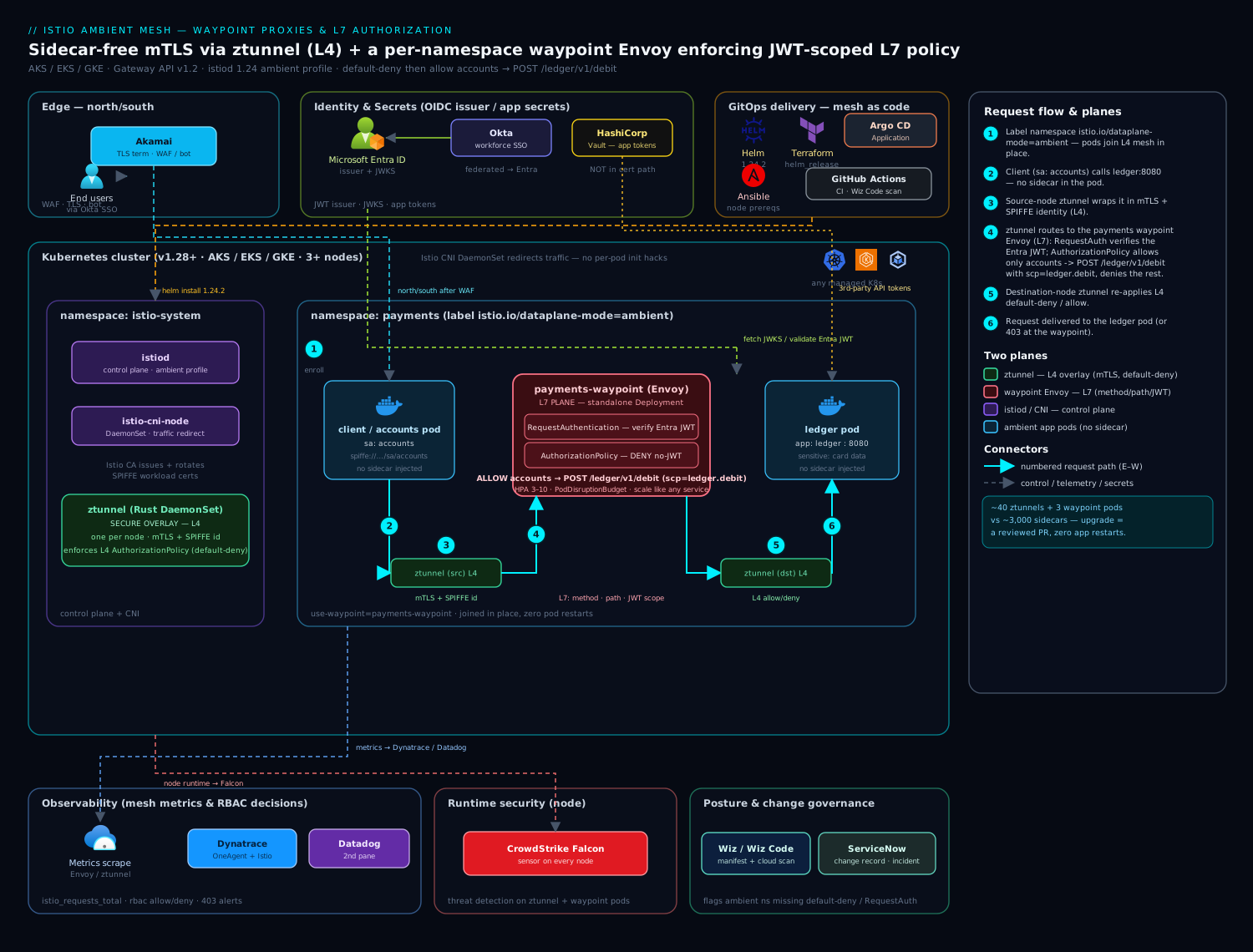
The mesh splits into two planes that ambient deliberately keeps separate. The secure overlay (L4) is delivered by ztunnel, a Rust DaemonSet running one instance per node; it transparently captures pod traffic and gives every workload in an ambient namespace mTLS and identity (SPIFFE) without anything injected into the pod. Above it sits the L7 plane: a waypoint proxy — a normal Envoy deployment you scale and place yourself — that ztunnel routes through only for namespaces or services you have opted in. L4 authorization (who may connect to whom, on which port) lives in ztunnel; L7 authorization (which HTTP method, path, and JWT claim) lives in the waypoint. Traffic from a client pod flows: client → its node’s ztunnel → (if the destination is waypoint-enabled) the payments waypoint Envoy, where the AuthorizationPolicy and RequestAuthentication rules run → destination’s node ztunnel → destination pod. Everything is observed by Dynatrace (OneAgent + the Istio/Envoy integration scraping waypoint and ztunnel metrics) and Datadog as the second pane for the mesh dashboards; CrowdStrike Falcon sensors run on every node for runtime threat detection on the ztunnel and waypoint pods themselves.
Before touching a command, anchor the whole lesson on this one table — everything below is an elaboration of it:
| Plane | Runs as | Sees | Enforces | Always on? |
|---|---|---|---|---|
| ztunnel (L4) | one pod per node (DaemonSet), Rust | TCP connections — source identity, destination, port | mTLS, SPIFFE identity, allow/deny by identity + port, TCP telemetry | Yes — the instant a namespace is enrolled |
| Waypoint (L7) | a standalone Envoy Deployment you scale |
the HTTP inside the connection — method, path, headers, JWT claims | HTTP authz, routing/timeouts, JWT rules, per-route metrics + tracing | No — only for the services/namespaces you opt in |
1. Install the Gateway API and Istio in ambient mode
Waypoints are Gateway API objects, so those CRDs must exist before Istio. Install them, then install Istio with the ambient profile via Helm (the profile that wires up ztunnel and the CNI; the legacy istioctl install works too, but Helm is what your GitHub Actions / Argo CD pipeline will template).
# 1a. Gateway API CRDs (pinned, not 'latest')
kubectl apply -f \
  "https://github.com/kubernetes-sigs/gateway-api/releases/download/v1.2.0/standard-install.yaml"

# 1b. Istio Helm repo
helm repo add istio https://istio-release.storage.googleapis.com/charts
helm repo update

# 1c. Base CRDs into istio-system
kubectl create namespace istio-system
helm install istio-base istio/base -n istio-system --version 1.24.2 --wait

# 1d. The CNI in ambient mode (handles traffic redirection, replaces init-container hacks)
helm install istio-cni istio/cni -n istio-system --version 1.24.2 \
  --set profile=ambient --wait

# 1e. The istiod control plane, ambient profile
helm install istiod istio/istiod -n istio-system --version 1.24.2 \
  --set profile=ambient --wait

# 1f. ztunnel — the per-node L4 secure overlay DaemonSet
helm install ztunnel istio/ztunnel -n istio-system --version 1.24.2 --wait
Verify the data plane came up. You want istiod, the istio-cni-node DaemonSet, and the ztunnel DaemonSet all ready, one ztunnel pod per node:
kubectl get pods -n istio-system
kubectl get daemonset -n istio-system   # istio-cni-node and ztunnel: DESIRED == READY
istioctl version                        # control plane + data plane on 1.24.2
What each chart installs — and note that nothing lands inside your application pods:
istio-base— the CRDs (AuthorizationPolicy,RequestAuthentication,Telemetry, …) and the cluster roles Istio needs.istio-cni(ambient profile) — a DaemonSet that programs each node so enrolled pods’ traffic is redirected into ztunnel. This replaces the old per-pod init-container redirect; your pods are never mutated.istiod— the control plane. It watches your policies,Gateway, andHTTPRouteobjects and pushes compiled xDS config to ztunnel and to every waypoint.ztunnel— the per-node L4 data plane: the secure overlay itself.
If you manage clusters as code (you should), this same release is expressed as a Helm release in Terraform (helm_release resources) or an Argo CD Application so the mesh version is GitOps-pinned and an upgrade is a reviewed pull request — not the hand-run, 3,000-pod restart that sidecar mode forced. Ansible handles any node-level prerequisites (kernel modules, the privileged-container policy) on self-managed nodes before the chart lands.
2. Enroll a namespace into the ambient data plane
Adding a workload to ambient is a single label on its namespace — no pod restart, no sidecar injection, no redeploy. This is the headline operational win: existing pods join the secure overlay in place.
# Opt the payments namespace into ambient (L4 mTLS via ztunnel)
kubectl label namespace payments istio.io/dataplane-mode=ambient

# Confirm — running pods are now in the mesh WITHOUT having restarted
kubectl get pods -n payments -o wide
istioctl ztunnel-config workloads --namespace payments
That last command lists every workload ztunnel now sees, each with a SPIFFE identity like spiffe://cluster.local/ns/payments/sa/accounts. At this point you already have mTLS between every pod in payments and L4 identity — but no L7 rules yet, and no waypoint. Sidecar mode could not give you this without injecting into and restarting all of them.
A quick proof that mTLS is live before any policy: exec into a client and call ledger; the connection is now encrypted and identity-bearing at L4 even though nothing changed in the pod spec.
kubectl exec -n payments deploy/accounts -- \
  curl -s -o /dev/null -w "%{http_code}\n" http://ledger:8080/healthz
Two opt-ins — don’t conflate them. istio.io/dataplane-mode=ambient (this step) joins the mesh and gives you L4 only: mTLS and identity via ztunnel. It does not give you HTTP rules. Getting L7 is a second, separate label (istio.io/use-waypoint, step 4) that routes traffic through a waypoint. The single most common beginner surprise — “I applied an L7 policy and nothing happened” — is doing exactly one of these two opt-ins and expecting both.
3. Lock down L4 with a default-deny ztunnel policy
Before adding L7, establish a zero-trust L4 baseline: deny all traffic into payments, then explicitly allow only the identities that should connect. These AuthorizationPolicy resources with no to/HTTP rules are enforced by ztunnel (L4) — cheap, sidecar-free, and they apply mesh-wide regardless of waypoints.
# default-deny everything entering the payments namespace (L4)
apiVersion: security.istio.io/v1
kind: AuthorizationPolicy
metadata:
  name: payments-default-deny
  namespace: payments
spec:
  {}                      # empty spec == deny-all for the namespace
---
# allow only the 'accounts' service identity to reach 'ledger' on 8080
apiVersion: security.istio.io/v1
kind: AuthorizationPolicy
metadata:
  name: ledger-allow-accounts-l4
  namespace: payments
spec:
  selector:
    matchLabels:
      app: ledger
  action: ALLOW
  rules:
    - from:
        - source:
            principals: ["cluster.local/ns/payments/sa/accounts"]
      to:
        - operation:
            ports: ["8080"]
kubectl apply -f l4-policies.yaml
# A pod with a different service account is now refused at L4 by ztunnel:
kubectl run probe -n payments --rm -it --image=curlimages/curl --restart=Never -- \
  curl -s -o /dev/null -w "%{http_code}\n" http://ledger:8080/healthz   # expect connection reset / 000
L4 policy is necessary but blunt — it cannot say “only POST /ledger/v1/debit.” For that you need L7, and for L7 you need a waypoint.
4. Deploy a waypoint proxy for the namespace
istioctl waypoint generates a Gateway API Gateway resource of class istio-waypoint; istiod sees it and provisions a dedicated Envoy deployment. Bind it to the whole payments namespace so all services in it can carry L7 policy. Crucially, a waypoint is just a Deployment — you size and scale it like any service, the antithesis of one sidecar per pod.
# Generate and apply a namespace-scoped waypoint named 'payments-waypoint'
istioctl waypoint apply -n payments \
  --name payments-waypoint \
  --for service \
  --enroll-namespace          # label the namespace to route its services via this waypoint

# Inspect what was created (a Gateway + an Envoy Deployment/Service)
kubectl get gateway -n payments
kubectl get pods -n payments -l gateway.networking.k8s.io/gateway-name=payments-waypoint
istioctl waypoint list -n payments
--enroll-namespace stamps the namespace with istio.io/use-waypoint: payments-waypoint, so ztunnel now routes traffic destined for services in payments through this Envoy before delivery. To scope a waypoint to a single workload instead of the namespace, you would label just that service:
# Alternative: route ONLY the 'ledger' service through the waypoint
kubectl label service ledger -n payments istio.io/use-waypoint=payments-waypoint
Scale and pin the waypoint for production — it is in the request path for the sensitive services, so give it an HPA and a PodDisruptionBudget:
kubectl -n payments scale deploy/payments-waypoint --replicas=3
kubectl -n payments autoscale deploy/payments-waypoint --min=3 --max=10 --cpu-percent=70
What istioctl waypoint apply actually created. The command is a convenience wrapper. Underneath, it wrote a Gateway API Gateway of class istio-waypoint, and istiod responded by provisioning the Envoy Deployment + Service you just scaled — you can inspect the generated Gateway with kubectl get gateway payments-waypoint -n payments -o yaml, or write it by hand (see Going deeper), which is what your GitOps repo stores. Because the result is a plain Deployment, per-namespace vs per-service is purely a labelling choice: --enroll-namespace stamps the whole namespace (one waypoint fronts every service in it), while labelling a single Service with istio.io/use-waypoint=payments-waypoint scopes the L7 hop to just that service and keeps it off everything else. For the payments case — a dozen sensitive services in a larger namespace — a per-service waypoint keeps the L7 cost exactly where the risk is.
5. Validate JWTs at the waypoint with RequestAuthentication
L7 authorization on a token requires Istio to first authenticate the JWT. RequestAuthentication tells the waypoint which issuer and JWKS to trust — here Microsoft Entra ID, the IdP that workforce logins from Okta are federated into, so a token minted for a user or a service principal validates natively. This resource only parses and verifies the token; it does not deny anything on its own.
apiVersion: security.istio.io/v1
kind: RequestAuthentication
metadata:
  name: payments-entra-jwt
  namespace: payments
spec:
  targetRefs:
    - kind: Service
      group: ""
      name: ledger
  jwtRules:
    - issuer: "https://login.microsoftonline.com/<TENANT_ID>/v2.0"
      jwksUri: "https://login.microsoftonline.com/<TENANT_ID>/discovery/v2.0/keys"
      audiences:
        - "api://payments-ledger"
      forwardOriginalToken: true     # pass the JWT on to the app for its own audit log
kubectl apply -f request-auth.yaml
A subtle but critical point: RequestAuthentication alone makes invalid tokens rejected but missing tokens allowed (the request is simply treated as unauthenticated). The deny happens in the next step.
One production note before you move on: the waypoint fetches and caches the JWKS from jwksUri, so Entra’s periodic key rotation is handled transparently — but only if the waypoint pod can actually reach login.microsoftonline.com. If your cluster restricts egress, allow the waypoint that destination, or JWT validation fails closed with a confusing 401.
6. Enforce the L7 AuthorizationPolicy
Now the payoff — an AuthorizationPolicy enforced by the waypoint (because it has HTTP to rules and JWT when conditions) that says: only the accounts workload identity, presenting a valid Entra JWT carrying scope ledger.debit, may call POST /ledger/v1/debit. Everything else is denied.
# 6a. Require a valid principal AND a valid request-principal (JWT) for any L7 access
apiVersion: security.istio.io/v1
kind: AuthorizationPolicy
metadata:
  name: ledger-require-jwt
  namespace: payments
spec:
  targetRefs:
    - kind: Service
      group: ""
      name: ledger
  action: DENY
  rules:
    - from:
        - source:
            notRequestPrincipals: ["*"]   # deny anything WITHOUT a valid JWT
---
# 6b. Allow ONLY accounts -> POST /ledger/v1/debit with the right scope
apiVersion: security.istio.io/v1
kind: AuthorizationPolicy
metadata:
  name: ledger-debit-allow
  namespace: payments
spec:
  targetRefs:
    - kind: Service
      group: ""
      name: ledger
  action: ALLOW
  rules:
    - from:
        - source:
            principals: ["cluster.local/ns/payments/sa/accounts"]
      to:
        - operation:
            methods: ["POST"]
            paths: ["/ledger/v1/debit"]
      when:
        - key: request.auth.claims[scp]
          values: ["ledger.debit"]
kubectl apply -f l7-authz.yaml
istioctl waypoint status -n payments     # policies programmed into the waypoint
Why two policies, and why this closes everything else. Istio evaluates DENY before ALLOW, and the instant any ALLOW policy selects a workload, that workload becomes default-deny for anything an ALLOW does not match. So 6a refuses anonymous callers outright (no valid JWT → denied), and 6b’s single narrow ALLOW implicitly denies every other method, path, source identity, and scope on ledger — you never have to enumerate the denials. This is the mental model to carry: one precise ALLOW is a whitelist, not an addition to an open door.
You now have method-, path-, identity-, and claim-scoped authorization running in a standalone Envoy that touches only the services you opted in — and not one sidecar anywhere in the cluster.
Validation
Prove each rule does what you claimed. Mint two test tokens from Entra (the right-scope one and a wrong-scope one) — in a pipeline this is a client-credentials grant; locally use a saved token in $GOOD / $BAD.
# From the accounts pod (correct identity), WITH a valid scoped JWT -> 200
kubectl exec -n payments deploy/accounts -- sh -c \
  'curl -s -o /dev/null -w "%{http_code}\n" -X POST \
   -H "Authorization: Bearer '"$GOOD"'" http://ledger:8080/ledger/v1/debit'   # 200

# Same identity, NO token -> 403 (DENY from 6a)
kubectl exec -n payments deploy/accounts -- \
  curl -s -o /dev/null -w "%{http_code}\n" -X POST http://ledger:8080/ledger/v1/debit  # 403

# Valid token but WRONG scope -> 403 (fails the 'when' claim check)
kubectl exec -n payments deploy/accounts -- sh -c \
  'curl -s -o /dev/null -w "%{http_code}\n" -X POST \
   -H "Authorization: Bearer '"$BAD"'" http://ledger:8080/ledger/v1/debit'   # 403

# Correct identity + token but a method/path NOT allowed -> 403
kubectl exec -n payments deploy/accounts -- sh -c \
  'curl -s -o /dev/null -w "%{http_code}\n" -X DELETE \
   -H "Authorization: Bearer '"$GOOD"'" http://ledger:8080/ledger/v1/debit'  # 403
Watch the decisions live in the waypoint’s Envoy logs, and confirm the metrics are flowing to your observability stack:
# RBAC allow/deny decisions in the waypoint
kubectl logs -n payments deploy/payments-waypoint -f | grep -i "rbac"

# Envoy/waypoint metrics that Dynatrace and Datadog scrape
kubectl exec -n payments deploy/payments-waypoint -- \
  pilot-agent request GET stats/prometheus | grep -E "istio_requests_total|rbac"
In Dynatrace you should see the payments-waypoint service with per-route request counts and a denied-request rate; Datadog’s Istio integration shows the same istio_requests_total{response_code="403"} series, which you alert on. Wiz (and Wiz Code scanning the manifests in the repo before merge) flags any namespace labelled dataplane-mode=ambient that has no default-deny AuthorizationPolicy, or a waypoint exposed without a RequestAuthentication — posture gaps the YAML review should never let through.
Shape L7 traffic with an HTTPRoute (optional)
Authorization is one job the waypoint does; routing is the other. Because the waypoint is a full Envoy sitting in the L7 path, you can attach a Gateway API HTTPRoute to a Service and get header/path routing, timeouts, and traffic splitting for east-west calls — the same HTTPRoute resource you would use at an ingress Gateway, but with a Service as the parentRef (the “Gateway API for Mesh” / GAMMA pattern). Without a waypoint there is no L7 routing at all: ztunnel forwards whole connections and cannot split on a path.
apiVersion: gateway.networking.k8s.io/v1
kind: HTTPRoute
metadata:
  name: ledger-routes
  namespace: payments
spec:
  parentRefs:
    - group: ""
      kind: Service
      name: ledger
      port: 8080
  rules:
    - matches:
        - path:
            type: PathPrefix
            value: /ledger/v1/report
      timeouts:
        request: 5s
      backendRefs:
        - name: ledger-reports
          port: 8080
    - backendRefs:                 # default: everything else stays on ledger
        - name: ledger
          port: 8080
kubectl apply -f ledger-routes.yaml
istioctl waypoint status -n payments   # HTTPRoute attached to the ledger Service
Now GET /ledger/v1/report is routed to a ledger-reports backend with a 5-second request timeout, while everything else on ledger falls through to the default rule. That is L7 behaviour — a path-based split and a per-route timeout — that is simply inexpressible at L4. The same waypoint enforces both the routing and the AuthorizationPolicy from step 6, in one Envoy.
Going deeper
A waypoint is just an Envoy Deployment
istioctl waypoint apply is a convenience wrapper. What it actually writes is a Gateway API Gateway whose gatewayClassName is istio-waypoint:
apiVersion: gateway.networking.k8s.io/v1
kind: Gateway
metadata:
  name: payments-waypoint
  namespace: payments
  labels:
    istio.io/waypoint-for: service     # what traffic this waypoint captures
spec:
  gatewayClassName: istio-waypoint
  listeners:
    - name: mesh
      port: 15008
      protocol: HBONE
istiod watches for that class and provisions a matching Envoy Deployment + Service in the namespace. That is the whole trick: the “waypoint” is an ordinary Kubernetes Deployment you can kubectl scale, give an HPA, drain, and roll — the antithesis of a sidecar welded to each pod. The istio.io/waypoint-for label on the Gateway sets what kind of traffic it captures (see the table below); service (the default) is right for almost everything, because policy and routing usually attach to Services.
The ztunnel → waypoint → destination path
Once a destination Service (or namespace) carries istio.io/use-waypoint: <name>, the data path for a request becomes:
client pod → source-node ztunnel (captures the packet, opens an mTLS/HBONE tunnel) → waypoint Envoy (terminates HBONE, then runs RequestAuthentication, AuthorizationPolicy, and any HTTPRoute — this is the only place HTTP is parsed) → destination-node ztunnel → destination pod.
Two consequences fall out of that path. First, the waypoint is destination-side: it is chosen by where traffic is going, not where it came from, so one shared waypoint governs every caller of a service. Second, all of it rides HBONE (HTTP-Based Overlay Network Environment) on port 15008 — a single mutually-authenticated tunnel that multiplexes connections, which is why ztunnel needs no per-pod certificates and no per-pod proxies.
When do you actually need a waypoint?
Reach for a waypoint only when a requirement is genuinely L7. Everything else stays cheaper on ztunnel alone.
| Requirement | Enforced by | Waypoint needed? |
|---|---|---|
| mTLS / encryption between pods | ztunnel | No |
| Workload identity (SPIFFE) | ztunnel | No |
| L4 authz — allow/deny by identity + port | ztunnel | No |
| TCP-level telemetry (bytes, connections) | ztunnel | No |
| Authz by HTTP method / path / header | waypoint | Yes |
Authz by JWT claim (request.auth.*) |
waypoint | Yes |
| HTTP routing, timeouts, retries, traffic split | waypoint | Yes |
| Per-route request metrics + tracing spans | waypoint | Yes |
Rule of thumb: if the rule mentions anything above the TCP connection — a verb, a URL, a header, a token claim — it lives in a waypoint. If it only mentions who and which port, ztunnel already has it.
--for capture modes
The --for flag (it becomes the istio.io/waypoint-for label) decides which traffic the waypoint intercepts:
--for value |
Captures | Use when |
|---|---|---|
service (default) |
Traffic addressed to a Service (ClusterIP / DNS) | The normal case — policy and routing attach to Services |
workload |
Traffic addressed directly to pod IPs | Headless services, some StatefulSets, pod-IP addressing |
all |
Both service- and pod-addressed traffic | Mixed addressing behind one waypoint |
none |
Nothing (the Gateway exists but captures no traffic) | Placeholder / staged rollout |
Per-namespace vs per-service vs per-workload
istio.io/use-waypoint composes by scope, most specific wins:
- On a namespace → every Service in it routes through that waypoint (broad; one proxy to run and scale).
- On a Service → only that service (finer blast radius, but more proxies to run if many services need L7).
- On a pod / workload → that workload only.
- Value
noneon a Service opts it out of an inherited namespace waypoint — handy for a chatty internal service that needs no L7 and should not pay the extra hop.
Choose per-namespace when a whole domain needs L7 and you want one thing to scale; choose per-service when only one or two services are sensitive (the payments case) and you want to keep the L7 hop off everything else.
Scaling, HA, and the fact that it is in the request path
Because the waypoint terminates real requests, an unhealthy or overloaded waypoint is a data-path outage for the services behind it — while services without a waypoint are entirely unaffected, since they never touch it. Treat it like any critical Deployment:
- HPA on CPU/RPS (step 4) — size to peak requests-per-second, not average.
- PodDisruptionBudget so node drains and upgrades never take all replicas at once.
- topologySpreadConstraints across zones for the sensitive-path waypoints.
- Keep at least 2–3 replicas even at low RPS so a single pod loss is not a user-visible blip.
Contrast the failure mode with sidecars: a bad sidecar took down one pod, but you had thousands of them; a bad waypoint affects everything routed through it, but you run a handful and can scale, roll, and canary them independently of the application.
Telemetry and tracing
The two layers emit different signals, and that difference explains a lot of dashboards:
- ztunnel → L4 metrics (
istio_tcp_connections_opened_total, bytes sent/received, mTLS status). No HTTP labels — it never saw the HTTP. - waypoint → full Envoy L7 metrics (
istio_requests_totalwithresponse_code,request_operation, source/destination workload) and, if you enable it, distributed-tracing spans. This is why the denied-request alert (istio_requests_total{response_code="403"}) exists only for waypoint’d services — the metric is born in the waypoint.
Policy evaluation semantics (the subtle part)
The AuthorizationPolicy CRD is identical at L4 and L7; where it runs depends on whether it has HTTP/JWT rules and whether a waypoint exists. Two Istio semantics trip people up:
- DENY is evaluated before ALLOW. A matching DENY wins even if an ALLOW also matches.
- The moment any ALLOW policy selects a workload, that workload becomes default-deny for anything an ALLOW does not match. That is why step 6b’s single ALLOW effectively closes every other method and path on
ledger— you never enumerate the denies.
And the one to burn in: an L7-shaped policy (methods / paths / JWT) applied to a Service that has no waypoint is silently a no-op — istiod has nowhere to enforce it. Always confirm the waypoint is attached (istioctl waypoint status -n payments).
Migrating from sidecars
You do not flip a cluster in one shot. Ambient and sidecar meshes interoperate, so you migrate namespace by namespace: pick a namespace, remove its sidecar-injection label, add istio.io/dataplane-mode=ambient, and its pods move to ztunnel (immediately for L4; the sidecar container drops off on the next roll). A namespace cannot be both at once, but sidecar’d and ambient namespaces still talk to each other over mTLS during the transition. Recreate any rule that was implicitly L7 in the sidecar (every sidecar was a full Envoy) as a waypoint policy where you still need it — and you will discover that many namespaces needed no L7 at all, which is exactly where the cost savings come from.
Version and API caveats
- Ambient L7 / waypoints went GA in the Istio 1.24 line; do not attempt waypoints on 1.22 or earlier.
- Pin the Gateway API CRDs (
v1.2.0here) — waypoints,HTTPRoute, and theistio-waypointGatewayClass all depend on them. - Prefer
targetRefs(Gateway API style) over the olderselectorwhen attaching policies to waypoint’d Services; it is the direction Istio is standardising on and it is unambiguous about scope. HTTPRoutetimeouts are in the Gateway API standard channel, but request retries onHTTPRouteare still experimental — install the experimental CRDs if you need them.
Rollback / teardown
Ambient is reversible at every layer, in order of blast radius — peel off L7 first, then the namespace, then the mesh. Removing a waypoint instantly drops L7 enforcement but leaves L4 mTLS intact (ztunnel is untouched), which is exactly the graceful-degradation path you want during an incident.
# 1. Remove L7 policy + waypoint (L4 mTLS via ztunnel stays on)
kubectl delete authorizationpolicy ledger-debit-allow ledger-require-jwt -n payments
kubectl delete requestauthentication payments-entra-jwt -n payments
kubectl label namespace payments istio.io/use-waypoint-                # stop routing via waypoint
istioctl waypoint delete payments-waypoint -n payments

# 2. Remove the namespace from ambient entirely (back to plain pods, no restart)
kubectl delete authorizationpolicy --all -n payments
kubectl label namespace payments istio.io/dataplane-mode-

# 3. Full mesh uninstall (only if abandoning Istio)
helm uninstall ztunnel istiod istio-cni istio-base -n istio-system
kubectl delete namespace istio-system
Roll these back through the same Argo CD / GitHub Actions path you rolled them out with, so a teardown is an auditable revert and ServiceNow carries the change record — the mesh team raises a normal change ticket, and a guardrail trip (a spike in waypoint 403s, or Wiz finding an ambient namespace with no deny policy) auto-opens a ServiceNow incident rather than living only in a log line.
Common pitfalls
- Forgetting the Gateway API CRDs.
istioctl waypoint applyfails or theGatewaystaysUnprogrammedifv1.2.0of the Gateway API CRDs is not installed first. This is the single most common ambient mistake. - Expecting L7 policy without a waypoint. An
AuthorizationPolicywith HTTPmethods/pathsis silently a no-op against a destination that has no waypoint — ztunnel only enforces L4. If a path-scoped rule “isn’t working,” check that the service is actually routed through a waypoint (istioctl waypoint status -n payments). - The missing-vs-invalid JWT gap.
RequestAuthenticationrejects bad tokens but lets no-token requests through as unauthenticated. You must add the explicitnotRequestPrincipals: ["*"]DENY (step 6a) or anonymous callers sail past. - Waypoint as an unscaled singleton. It defaults to one replica and sits in the request path; under load it becomes a bottleneck or a SPOF. Give it an HPA and a PodDisruptionBudget (step 4).
- Wrong
targetRefgranularity. Binding a policy to the namespace when you meant a service (or vice versa) changes what it covers. Match thetargetRefskind/name to the scope you enrolled the waypoint for. audiencesmismatch. If the Entra app registration’s exposed API URI does not equal theaudiencesvalue, every token is rejected with a confusing 401 at the waypoint. Pin them to the same string (api://payments-ledger).
Common beginner mistakes
These are the conceptual traps — the wrong mental model, not just a wrong flag. Each is a misconception, why it is wrong, and the model to replace it with.
-
“I wrote an L7
AuthorizationPolicybut nothing is enforced.” The misconception is that enrolling a namespace into ambient gives you L7. It does not — ambient enrollment gives you only ztunnel/L4, which cannot read HTTP. Right model: there are two independent opt-ins.istio.io/dataplane-mode=ambientjoins the mesh (L4);istio.io/use-waypoint=<name>adds the L7 proxy. A path or method rule does nothing until the second label points at a real, programmed waypoint. -
“I labelled the service but traffic still bypasses the waypoint.” Usually the
istio.io/use-waypointvalue does not match the Gateway’s name, or the label is on the wrong object (namespace vs service), or the Gateway isUnprogrammed. Right model: the label’s value is the name of a realGatewayin scope — verify withkubectl get gateway -n payments(statusProgrammed) andistioctl waypoint status. -
“One waypoint replica is fine — it will scale itself.” A fresh waypoint is a single-replica Deployment with no autoscaler. Sitting in the request path, that is a bottleneck and a single point of failure. Right model: it is a normal Deployment; you give it an HPA, a PDB, and ≥2 replicas.
-
“It should behave like my old sidecar.” Beginners expect per-pod, source-side, outbound-shaping behaviour and reach for a per-pod
EnvoyFilter. A waypoint is shared and destination-side: it is selected by where traffic is going, governs all callers of a service, and there is no Envoy inside your pod to attach to. Right model: think “one shared L7 gateway in front of the destination,” not “a proxy in every pod.” -
“
RequestAuthenticationwill block callers without a token.” It validates tokens that are present and rejects bad ones, but it treats a missing token as anonymous-and-allowed. Right model: authentication ≠ authorization. Pair it with an explicitDENY notRequestPrincipals: ["*"](step 6a) to refuse anonymous callers.
Security notes
Ambient is zero-trust by construction: mTLS and SPIFFE identity for every enrolled workload via ztunnel, default-deny L4, and JWT-gated L7 only where it matters — all without sidecars to exploit or restart. Keep the trust boundary honest: validate tokens against Entra ID (federated from Okta for human callers) at the waypoint, never trust an unauthenticated request, and stamp policies to the narrowest identity + method + path + claim that works. Istio’s own CA issues and rotates the workload certificates, so HashiCorp Vault stays out of the mesh-cert path and is used only for the application secrets (third-party API tokens) the gated services consume. Run CrowdStrike Falcon sensors on every node so the ztunnel and waypoint pods themselves are under runtime threat detection, and let Wiz / Wiz Code continuously verify that no ambient namespace is missing its default-deny policy and no waypoint is missing a RequestAuthentication — the posture backstop behind the in-cluster controls. For any north-south traffic, Akamai terminates TLS and applies WAF/bot protection at the edge before requests reach the cluster’s ingress, with the waypoints enforcing east-west L7 authorization once inside.
Cost notes
The economic case is the whole point. Sidecar mode costs one Envoy per pod — at 3,000 pods, ~360 GB of memory and 3,000 proxy restarts per upgrade. Ambient costs one ztunnel per node (a few dozen, lightweight Rust) plus one waypoint Deployment per opted-in scope (here, three replicas for payments). On a forty-node cluster that is roughly 40 ztunnels + 3 waypoint pods versus 3,000 sidecars — a double-digit reduction in proxy memory and CPU, and upgrades that no longer restart application pods at all. You pay for L7 Envoys only where you enforce L7, so a cluster where ten of forty namespaces need HTTP policy runs ten small waypoint Deployments instead of meshing everything. Right-size each waypoint to its real RPS with the HPA above rather than over-provisioning, keep ztunnel on every node (it is the cheap, mandatory L4 layer), and treat any namespace that doesn’t need L7 as waypoint-free — the single biggest lever ambient gives you over the old sidecar bill.
Practice challenges
Work these against a scratch cluster (kind/minikube with the Istio CNI, or any dev cluster). Each builds on the payments / accounts / ledger setup above. Attempt each before revealing the solution.
1. (Beginner) Enroll a second namespace and prove mTLS without a waypoint.
Create namespace web, enroll it into ambient, and confirm its pods have L4 identity — no waypoint, no policy.
<details> <summary>Show solution</summary>
kubectl create namespace web
kubectl label namespace web istio.io/dataplane-mode=ambient
istioctl ztunnel-config workloads --namespace web   # each workload shows a SPIFFE identity
Why: ambient enrollment alone gives ztunnel L4 mTLS + identity; L7 is a separate opt-in you deliberately did not add. </details>
2. (Beginner → Intermediate) Waypoint one service, not the whole namespace.
Route only ledger through a waypoint, leaving the rest of payments on L4 only.
<details> <summary>Show solution</summary>
istioctl waypoint apply -n payments --name ledger-wp --for service
kubectl label service ledger -n payments istio.io/use-waypoint=ledger-wp
istioctl waypoint status -n payments
Why: use-waypoint on the Service (not the namespace) scopes the L7 hop to just ledger; every other service in payments still bypasses the waypoint.
</details>
3. (Intermediate) Split read vs write authorization.
Allow GET /ledger/v1/balance for any authenticated principal, while the write rule from step 6b keeps POST /ledger/v1/debit restricted to accounts. Add just the read rule.
<details> <summary>Show solution</summary>
apiVersion: security.istio.io/v1
kind: AuthorizationPolicy
metadata:
  name: ledger-read-any-authed
  namespace: payments
spec:
  targetRefs:
    - kind: Service
      group: ""
      name: ledger
  action: ALLOW
  rules:
    - from:
        - source:
            requestPrincipals: ["*"]   # any valid JWT
      to:
        - operation:
            methods: ["GET"]
            paths: ["/ledger/v1/balance"]
Why: a second ALLOW widens reads to any valid-JWT caller; because the write rule is a separate ALLOW, the default-deny-on-first-ALLOW semantics still block writes from anyone but accounts.
</details>
4. (Intermediate) Add L7 routing with a timeout.
Route GET /ledger/v1/report to a ledger-reports backend with a 5s request timeout; everything else stays on ledger.
<details> <summary>Show solution</summary>
Apply the HTTPRoute from the Shape L7 traffic section:
kubectl apply -f ledger-routes.yaml
istioctl waypoint status -n payments
Why: the waypoint is a full Envoy, so a GAMMA HTTPRoute (with the Service as parentRef) gives path routing plus a per-route timeout that L4 cannot express.
</details>
5. (Advanced) Debug a policy that “isn’t working.”
A teammate’s path-scoped AuthorizationPolicy on ledger has no effect. List the checks, in order.
<details> <summary>Show solution</summary>
- Is a waypoint attached to
ledger?istioctl waypoint status -n paymentsandkubectl get gateway -n payments(must beProgrammed). - Does the Service carry
istio.io/use-waypoint=<name>matching that Gateway?kubectl get svc ledger -n payments --show-labels. - Does the policy
targetRefsthe Service (not the namespace or a pod)? - Are the Gateway API CRDs (
v1.2.0) installed? A missing CRD leaves the GatewayUnprogrammed. - Is a DENY policy overriding it? DENY is evaluated before ALLOW.
Why: an L7 rule with no reachable waypoint is a silent no-op; each check confirms one link in the ztunnel → waypoint → policy chain. </details>
6. (Advanced) Harden the sensitive-path waypoint. For a waypoint fronting ~4,000 RPS, set autoscaling, a disruption budget, and make sure a node drain never removes all replicas.
<details> <summary>Show solution</summary>
kubectl -n payments autoscale deploy/payments-waypoint --min=3 --max=12 --cpu-percent=65
apiVersion: policy/v1
kind: PodDisruptionBudget
metadata:
  name: payments-waypoint-pdb
  namespace: payments
spec:
  minAvailable: 2
  selector:
    matchLabels:
      gateway.networking.k8s.io/gateway-name: payments-waypoint
Then add topologySpreadConstraints (by zone) to the waypoint’s pod template so replicas spread across AZs.
Why: the waypoint is in the request path — the HPA sizes to peak RPS, the PDB (minAvailable: 2) keeps quorum during node drains, and zone spread survives an AZ event.
</details>
Glossary
- Ambient mode — Istio’s sidecar-free data plane: a per-node ztunnel for L4, plus optional waypoints for L7.
- ztunnel (“zero-trust tunnel”) — the per-node Rust DaemonSet that gives every enrolled pod mTLS, SPIFFE identity, and L4 authorization. Always on once a namespace is enrolled.
- Waypoint proxy — a standalone Envoy
Deploymentthat performs L7 work (HTTP authz, routing, telemetry) for the namespaces/services that opt in. - HBONE — HTTP-Based Overlay Network Environment; the mTLS tunnel (port 15008) that carries ambient traffic between ztunnels and waypoints.
- Sidecar — the older model: one Envoy injected into every pod. Ambient replaces it with ztunnel + waypoints.
- Envoy — the CNCF L7 proxy that both sidecars and waypoints are built on.
- L4 / L7 — OSI layers: L4 is the TCP connection (who, where, which port); L7 is the HTTP inside it (method, path, headers, JWT).
- mTLS — mutual TLS; both ends present certificates, so identity and encryption are verified in both directions.
- SPIFFE identity — the workload identity ztunnel assigns, e.g.
spiffe://cluster.local/ns/payments/sa/accounts. - Gateway API — the Kubernetes-standard CRDs (
Gateway,GatewayClass,HTTPRoute) used to provision waypoints and express L7 routes. - GatewayClass
istio-waypoint— the class istiod watches to provision a waypoint (vsistiofor ingress gateways). istio.io/dataplane-mode=ambient— namespace/pod label that enrolls workloads into ambient (L4).istio.io/use-waypoint=<name>— label that routes a namespace/service/pod’s traffic through a named waypoint (L7). Valuenoneopts out.istio.io/waypoint-for— the Gateway label (set by--for) choosing what the waypoint captures:service/workload/all/none.AuthorizationPolicy— the CRD for allow/deny rules; enforced by ztunnel (L4-only rules) or by the waypoint (rules with HTTP/JWT).RequestAuthentication— the CRD that tells the waypoint which JWT issuer/JWKS to trust; it verifies tokens but never denies on its own.- JWT / JWKS — the signed token a caller presents / the public keys used to verify it.
- Request principal — the identity derived from a valid JWT (
request.auth.principal), distinct from the SPIFFE source principal (the mTLS workload identity). scpclaim — the OAuth scope claim inside the JWT (e.g.ledger.debit) checked in a policywhencondition.- GAMMA — “Gateway API for Mesh Management and Administration”; the pattern of attaching an
HTTPRouteto a Service for east-west routing. - HPA / PDB — HorizontalPodAutoscaler / PodDisruptionBudget; how you scale and protect the waypoint Deployment.
- istiod — the Istio control plane; it compiles your CRDs into xDS config for ztunnel and every waypoint.
- CNI (ambient) — the Istio CNI DaemonSet that redirects enrolled pods’ traffic into ztunnel without per-pod init containers.