Level: Intermediate · Time: ~35 min · You’ll want first: a working feel for Kubernetes Services and the LoadBalancer type — see Services, networking types, endpoints & DNS.
In a nutshell
Picture your cluster as an office building full of departments — each department is one of your apps. When an app asks Kubernetes for a Service of type: LoadBalancer, it is really asking for two things: a public street address (an external IP) and a sign in the lobby that points visitors to the right department. In the cloud, the landlord — AWS, Azure, GCP — runs that lobby desk for you, so the address appears within seconds. On your own bare-metal building there is no landlord desk: the request just sits there with a “please wait” sticky note, which Kubernetes prints as EXTERNAL-IP: <pending>, forever.
MetalLB is the lobby desk you install yourself. It owns a drawer of street addresses (an IP pool) and, when a department asks, hands one out and then tells the neighbourhood which door to knock on — either by shouting down the corridor (“visitors for 192.168.40.200, this way!” — that is Layer-2 / ARP mode) or by filing the address with the building’s routing office so every entrance already knows the way (BGP mode).
kube-vip solves a second, separate problem. The building manager’s office — the Kubernetes API server — normally answers on just one manager’s direct line, i.e. one control-plane node’s IP. If that manager steps out (a reboot), every caller gets a dead line: kubectl, CI runners, Argo CD all break at once. kube-vip gives the office one permanent phone number (a virtual IP, or VIP) that always rings whichever manager is currently on duty. Reboot a node and the number simply rings the next one.
Two projects, two layers, one goal: give a datacenter cluster the load-balancing that the cloud hands out for free. Both are open-source and cost nothing to run. By the end of this lesson you will be able to:
- explain why a bare-metal
LoadBalancerService hangs at<pending>and what has to exist to fix it; - stand up a floating control-plane VIP with kube-vip so a node reboot never orphans
kubectl; - hand out real external IPs with MetalLB in the simple L2/ARP flavour;
- graduate the same IP pool to production BGP with ECMP across every node — without renumbering a single Service;
- reason about the trade-offs (failover vs load-spreading, health-checking, pool exhaustion) well enough to pick the right mode and debug it.
A manufacturing company runs three Kubernetes clusters in its own datacenter — there is no cloud, by policy, because the workloads talk to PLCs on the factory floor and the latency and data-residency rules forbid leaving the building. The platform team stood up the clusters with kubeadm and immediately hit the wall every bare-metal operator hits: kubectl get svc shows their ingress controller stuck <pending> forever, because nothing on prem implements the LoadBalancer Service type the way a cloud controller-manager does. Worse, the API server is reachable only on one control-plane node’s IP, so a single reboot orphans every kubectl, every CI runner, and every Argo CD sync. This guide fixes both problems with two small, complementary projects: kube-vip for a highly-available control-plane VIP, and MetalLB to hand out real external IPs to Services — first the simple L2 way, then the production BGP way.
Prerequisites
- A working Kubernetes cluster (v1.27+) bootstrapped on bare metal or VMs — examples assume
kubeadm, three control-plane nodes and three workers. - A CNI installed and
Readynodes (Calico or Cilium; this matters for BGP, covered below). kubectlv1.27+ andhelmv3.12+ on your workstation, withKUBECONFIGpointing at the cluster.- A reserved, unused IP range on the node L2 network for Services — this guide uses
192.168.40.200-192.168.40.250. - One reserved IP for the control-plane VIP — this guide uses
192.168.40.10, resolvable ask8s-api.corp.local. - For BGP mode: access to your top-of-rack switch/router config and an ASN pair (cluster
64512, router64501in the examples). - Provisioning is GitOps-driven: cluster bootstrap by Ansible, switch and DNS infra by Terraform, manifests reconciled by Argo CD. Nothing here is applied by hand in production.
Target topology
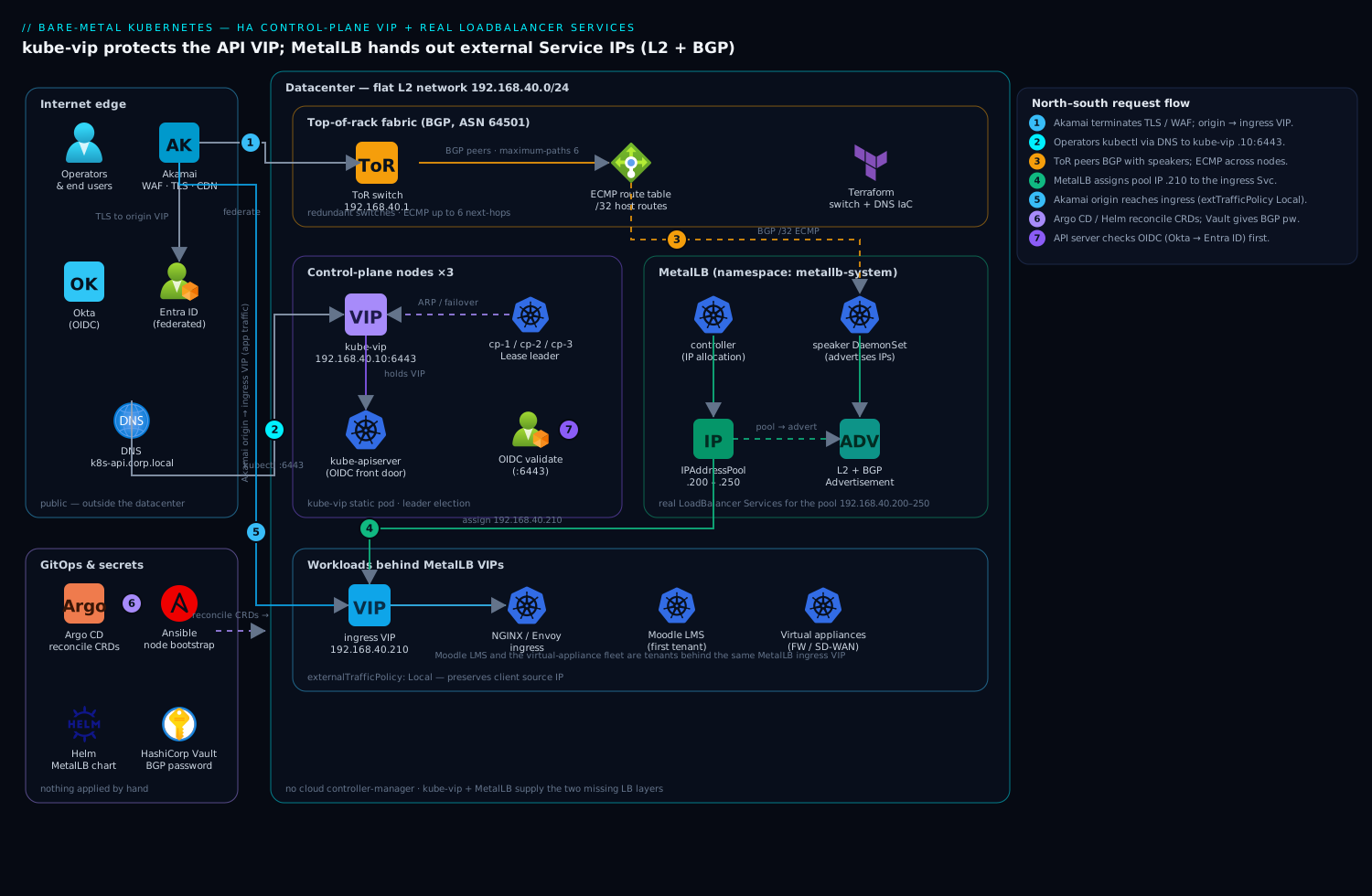
The two layers solve two different problems and must not be confused. kube-vip owns a single floating IP for the Kubernetes API server (192.168.40.10:6443); it runs as a static pod on every control-plane node, holds the VIP on whichever node currently leads a leader election, and moves it on failure. MetalLB owns the pool of external Service IPs (192.168.40.200-250); when you create a Service of type: LoadBalancer, MetalLB’s controller allocates an address from the pool and its speakers advertise it to the network — by gratuitous ARP in L2 mode, or by peering with your routers in BGP mode. Ingress (your NGINX or Envoy ingress controller) sits behind one of those MetalLB IPs; Akamai fronts the published apps at the internet edge for TLS, WAF and global caching, with its origin pointed at the MetalLB-assigned ingress VIP. North-south identity for cluster operators flows from Okta (federated to Entra ID) into the API server via OIDC, so the VIP that kube-vip protects is the single audited front door for every kubectl and every pipeline.
The two layers, four CRDs — the mental model
Before the hands-on, hold two pictures in your head, because mixing them up is the #1 source of confusion on bare metal.
Layer 1 — the control-plane VIP (kube-vip). This is one IP, for one endpoint: the API server on :6443. It exists so kubectl, joining kubelets, and controllers always have a single address to reach the API, no matter which control-plane node happens to be alive. kube-vip runs as a static pod on every control-plane node; the instances run a leader election, and exactly one holds the VIP at a time. This is failover, not load-spreading — the API server is not throughput-bound, so one active holder is plenty. (If you built your control plane with the companion lesson, kubeadm HA control plane & etcd, this VIP is the address you pointed --control-plane-endpoint at.)
Layer 2 — the Service IP pool (MetalLB). This is a range of IPs, handed out one per type: LoadBalancer Service. MetalLB has two workloads with a clean split of duties: the controller Deployment does the allocation (which IP goes to which Service), and the speaker DaemonSet does the announcing (telling the network how to reach that IP). Everything MetalLB does is configured through four CRDs, and the easiest way to remember them is what / how / who:
| CRD | Question it answers | Example |
|---|---|---|
IPAddressPool |
What addresses may I hand out? | 192.168.40.200-250 |
L2Advertisement |
How — announce via ARP/NDP? | tie a pool to L2 |
BGPAdvertisement |
How — announce via BGP routes? | tie a pool to BGP, /32 |
BGPPeer |
Who — which router do I peer with? | 192.168.40.1, ASN 64501 |
The split matters. The pool (what) is stable, audited state; the advertisement (how) is a policy you can switch from L2 to BGP without renumbering a single Service. That is exactly why step 2 defines the pool once and steps 3–4 only swap the announcement on top of it.
How each mode actually puts a packet on the wire
L2 / ARP mode works entirely inside one broadcast domain. When a client asks “who has 192.168.40.200?”, MetalLB has elected exactly one speaker node to answer, and that node replies with its own MAC address. Every packet for that Service IP therefore arrives at that one node, which then uses normal kube-proxy/CNI routing to reach a backend pod — possibly on a different node. There is no new protocol for your network team to configure; the price is that a single node is the front door for each IP.
BGP mode makes MetalLB a routing peer. Each speaker opens a BGP session to your router and advertises the Service IP as a host route (/32 for IPv4, /128 for IPv6). Because every speaker advertises the same route, the router sees multiple equal-cost next-hops and uses ECMP to hash flows across all of them. Now the front door is the whole cluster, not one node — but you need a router that speaks BGP and a network team willing to peer with it.
| L2 (ARP/NDP) | BGP | |
|---|---|---|
| Network-team involvement | none | router BGP config required |
| Traffic per Service IP | one node at a time | spread across all speakers (ECMP) |
| Throughput ceiling | one node’s NIC | sum of the cluster’s NICs |
| Failover | re-elect + gratuitous ARP (seconds) | BGP reconverge (sub-second with BFD) |
| Scope | single L2 subnet | routed, multi-subnet |
| Best for | quick start, ingress VIP, labs | production north-south at scale |
kube-vip can technically do MetalLB’s job too (Service LoadBalancer IPs, via the kube-vip-cloud-provider), and MetalLB cannot do the control-plane VIP — so the common, clean split is kube-vip for the API VIP, MetalLB for Service IPs, which is exactly what this guide builds. We compare the overlap in Going deeper.
1. Provide a control-plane VIP with kube-vip
Generate the kube-vip static-pod manifest on the first control-plane node. kube-vip ships its own generator inside the container image, so you render the manifest with docker/crictl and drop it into the static-pod directory. Pick ARP mode for a flat L2 control-plane network (the common case); BGP for the API VIP is possible but most teams keep the API on ARP and reserve BGP for Services.
# On control-plane node #1, as root
export VIP=192.168.40.10
export INTERFACE=eth0           # the NIC on the node/API network
export KVVERSION=v0.8.7

# Render the static pod manifest using the kube-vip image itself
ctr image pull ghcr.io/kube-vip/kube-vip:$KVVERSION
ctr run --rm --net-host ghcr.io/kube-vip/kube-vip:$KVVERSION vip \
  /kube-vip manifest pod \
    --interface $INTERFACE \
    --address $VIP \
    --controlplane \
    --arp \
    --leaderElection \
  | tee /etc/kubernetes/manifests/kube-vip.yaml
The kubelet watches /etc/kubernetes/manifests/ and starts the static pod within seconds. Because this is a static pod, kube-vip comes up before the rest of the control plane is healthy, which is exactly what you want — the VIP must exist for kubeadm join --control-plane to work. Give kube-vip RBAC for the leader-election lease:
kubectl apply -f https://kube-vip.io/manifests/rbac.yaml
Crucial bootstrap detail: when you first ran kubeadm init, the --control-plane-endpoint must already point at the VIP (or its DNS name), not a node IP:
kubeadm init \
  --control-plane-endpoint "k8s-api.corp.local:6443" \
  --upload-certs \
  --pod-network-cidr=10.244.0.0/16
Repeat the static-pod manifest drop on control-plane nodes #2 and #3 (same command, same $VIP). The three kube-vip instances run a leader election over a Lease; only the leader answers ARP for 192.168.40.10. Reboot the leader and the VIP migrates in a couple of seconds — kubectl reconnects without you changing a thing.
2. Install MetalLB
Install MetalLB with Helm so upgrades are a chart bump in your GitOps repo rather than a hand-edited manifest. MetalLB has two workloads: a single controller Deployment (does IP allocation) and a speaker DaemonSet (advertises the IPs from every node).
helm repo add metallb https://metallb.github.io/metallb
helm repo update

helm install metallb metallb/metallb \
  --namespace metallb-system --create-namespace \
  --version 0.14.9 \
  --set speaker.frr.enabled=true        # enable the FRR backend now; needed for BGP later
Wait for the pods, then confirm the CRDs are present — all configuration in modern MetalLB is via CRDs (the old ConfigMap is removed):
kubectl -n metallb-system rollout status deploy/controller
kubectl -n metallb-system rollout status ds/speaker

kubectl get crds | grep metallb.io
# ipaddresspools.metallb.io
# l2advertisements.metallb.io
# bgpadvertisements.metallb.io
# bgppeers.metallb.io
Define the address pool now — it is shared by both L2 and BGP modes. This is the only place your reserved Service range lives; treat it as managed state in Terraform/Git, not tribal knowledge.
# metallb-pool.yaml
apiVersion: metallb.io/v1beta1
kind: IPAddressPool
metadata:
  name: prod-pool
  namespace: metallb-system
spec:
  addresses:
    - 192.168.40.200-192.168.40.250
  autoAssign: true
  avoidBuggyIPs: true        # skip .0 and .255 in any /24 it touches
kubectl apply -f metallb-pool.yaml
3. Mode A — Layer 2 (ARP) advertisement
L2 mode is the fastest path to a working LoadBalancer and needs zero network-team involvement: MetalLB simply answers ARP for the Service IP from one elected node. Apply an L2Advertisement that ties the pool to L2:
# metallb-l2.yaml
apiVersion: metallb.io/v1beta1
kind: L2Advertisement
metadata:
  name: l2-prod
  namespace: metallb-system
spec:
  ipAddressPools:
    - prod-pool
  interfaces:
    - eth0          # restrict ARP to the data network NIC
kubectl apply -f metallb-l2.yaml
Now create a test Service and watch it get a real IP instead of <pending>:
kubectl create deploy web --image=nginx --port=80
kubectl expose deploy web --type=LoadBalancer --port=80 --target-port=80

kubectl get svc web -w
# NAME   TYPE           EXTERNAL-IP      PORT(S)
# web    LoadBalancer   192.168.40.200   80:31234/TCP
From any host on the L2 network, curl http://192.168.40.200 now hits NGINX. Understand the tradeoff before you ship it: in L2 mode one node holds a given Service IP at a time, so it is a failover mechanism, not load-balancing — all traffic for that IP ingresses through the elected node, and bandwidth is capped at that node’s NIC. It is perfect for an ingress controller VIP (where the ingress itself spreads load internally) and fine for moderate throughput. When you outgrow it, move to BGP without touching your apps.
4. Mode B — BGP advertisement (production)
BGP mode is what you run at scale: MetalLB peers with your routers, advertises each Service IP as a /32 route, and the routers use ECMP to spread traffic across all speaker nodes simultaneously — true horizontal load-balancing with no single chokepoint. First define the peer (your top-of-rack switch) and a BGP-specific advertisement:
# metallb-bgp.yaml
apiVersion: metallb.io/v1beta1
kind: BGPPeer
metadata:
  name: tor-switch
  namespace: metallb-system
spec:
  myASN: 64512            # the cluster's ASN
  peerASN: 64501          # the router's ASN
  peerAddress: 192.168.40.1
  peerPort: 179
  holdTime: 90s
  keepaliveTime: 30s
  password: ""            # set from a Vault-injected secret in real deployments
---
apiVersion: metallb.io/v1beta1
kind: BGPAdvertisement
metadata:
  name: bgp-prod
  namespace: metallb-system
spec:
  ipAddressPools:
    - prod-pool
  aggregationLength: 32        # advertise each Service IP as a host route
  localPref: 100
kubectl apply -f metallb-bgp.yaml
# Remove the L2Advertisement so the pool is advertised one way only
kubectl delete l2advertisement l2-prod -n metallb-system
The matching side on a FRR/Cisco-style top-of-rack switch — managed by Terraform against the switch provider, never typed live:
router bgp 64501
  bgp router-id 192.168.40.1
  neighbor 192.168.40.0/24 peer-group K8S
  neighbor K8S remote-as 64512
  neighbor K8S passive            ! let the speakers initiate
  neighbor K8S timers 30 90
  address-family ipv4 unicast
    maximum-paths 6              ! ECMP across up to 6 speaker nodes
Confirm the sessions come up from MetalLB’s side:
kubectl get bgppeers -n metallb-system -o wide
# Check the FRR speaker for an Established session:
kubectl -n metallb-system exec ds/speaker -c frr -- vtysh -c "show bgp summary"
# Neighbor       V   AS   State/PfxRcd
# 192.168.40.1   4 64501   Established
Recreate the same Service from step 3 — apps are mode-agnostic, only the network plumbing changed. Now every speaker node advertises 192.168.40.200/32, the router installs ECMP next-hops, and traffic spreads across the cluster. One caveat with your CNI: if you also run BGP in Calico, give it and MetalLB different ASNs or scope them so they do not fight over the same sessions — a frequent and confusing outage.
5. Wire ingress, edge, and the operating model
Point your ingress controller’s Service at a stable MetalLB IP so DNS and the edge never chase a moving target. Pin it explicitly rather than letting MetalLB auto-assign:
# nginx-ingress-svc patch
apiVersion: v1
kind: Service
metadata:
  name: ingress-nginx-controller
  namespace: ingress-nginx
  annotations:
    metallb.io/loadBalancerIPs: 192.168.40.210     # stable, documented VIP
spec:
  type: LoadBalancer
  externalTrafficPolicy: Local    # preserve client source IP; only schedule to nodes with a pod
externalTrafficPolicy: Local matters: it preserves the real client IP (your WAF and audit logs need it) and, in BGP mode, makes the router advertise the IP only from nodes actually running an ingress pod — tighter, healthier routing. Now slot this into the wider operating model the platform team already runs:
- Edge & TLS — Akamai terminates TLS and runs WAF/bot rules at the internet edge, with its origin set to
192.168.40.210; the cluster never serves the public directly. - Operator identity — the API server (behind kube-vip’s VIP) is configured for OIDC against Okta, which is federated to Entra ID, so every
kubectlis an audited, MFA-backed human, not a shared kubeconfig. - Secrets — the BGP peer password and any ingress TLS keys come from HashiCorp Vault via the Vault Agent injector, never committed to the GitOps repo.
- GitOps — these CRDs live in Git; Argo CD reconciles them, and a Jenkins/ GitHub Actions pipeline runs the Ansible node bootstrap and Terraform switch/DNS changes that this all depends on.
- Posture & runtime — Wiz (with Wiz Code scanning the IaC in the repo) flags an over-broad
IPAddressPoolor a Service accidentally exposed on the public range before it merges; CrowdStrike Falcon sensors on every node catch runtime threats against the speaker pods that now carry north-south traffic. - Observability — Dynatrace (or Datadog) scrapes MetalLB’s and kube-vip’s Prometheus metrics, alerting on VIP failovers, BGP session drops, and pool exhaustion.
- ITSM — a VIP failover or a pool running low auto-raises a ServiceNow incident, so on-call gets a ticket, not just a dashboard blip.
Two workloads worth calling out as natural early tenants of this LB: a fleet of virtual appliances (firewalls, SD-WAN concentrators) that the team is migrating into the cluster as pods need stable external IPs MetalLB now provides; and Moodle, the company’s internal training LMS, which gets a dedicated MetalLB VIP behind Akamai as the first user-facing service proving the path end to end.
Going deeper
You now have both layers working. This section is for the reader who has to run them at 3 a.m. — the internals, the scale knobs, and the failure modes the happy path hides.
L2 mode: leader election, failover, and the single-node ceiling
In L2 mode the speakers form a lightweight membership group and elect one node to own each Service IP. Only that node answers ARP (IPv4) or NDP (IPv6) for the address, so from the network’s point of view the IP has a single MAC at any instant. When the owner dies, a surviving speaker wins the re-election and immediately blasts a gratuitous ARP (unsolicited NDP for v6) to tell every switch and client “that IP lives at my MAC now.” Reconvergence is usually a few seconds, but it is bounded by the slowest device’s ARP cache and by switches that rate-limit gratuitous ARP — which is why L2 failover is honestly “seconds,” not “sub-second.”
Two consequences follow directly:
- It is failover, not load-balancing. All traffic for one IP funnels through one node’s NIC. You scale by handing different Services different IPs (which may land on different nodes), not by widening a single IP. This is exactly why an ingress controller is the ideal L2 tenant: one VIP is plenty, because the ingress itself fans traffic out to pods across the cluster.
externalTrafficPolicy: Localchanges who can win. WithCluster(the default) any node can own the IP and will hop to a pod elsewhere, hiding the client IP behind SNAT. WithLocal, MetalLB only elects a node that actually runs a Service endpoint, so traffic reaches a local pod with the real client source IP intact — but if that node has no pod, the IP goes dark. PairLocalwith a spread (topology-spread constraints, or a DaemonSet-style ingress) so every candidate node has an endpoint.
BGP mode: ECMP, route reflectors, and the FRR / frr-k8s backends
BGP is where bare metal finally matches a cloud LB for spread. Each speaker advertises the Service /32; the router installs N equal-cost next-hops and hashes flows across them with ECMP (maximum-paths on the router caps N — set it to at least your speaker count). Three production realities the quick example glosses over:
- Per-flow, not per-packet. ECMP hashes on the connection 5-tuple, so a single long-lived connection pins to one node; rebalancing only happens across many flows. A node draining mid-connection resets the flows it was carrying — graceful only at the flow boundary, which matters for long downloads and websockets.
- Route reflectors at scale. A full mesh of every speaker peering with every router is O(N×M) sessions. Past a rack or two, peer the speakers with a pair of route reflectors (often the ToR switches acting as RRs) instead of a full mesh, so each speaker holds two sessions, not twenty.
- Native vs FRR vs frr-k8s. MetalLB has three BGP backends, and they are not equal:
| Backend | How it runs | BFD? | IPv6 BGP / advanced | Status |
|---|---|---|---|---|
| Native | built into the speaker | no | no | fine for one simple peer |
FRR (speaker.frr.enabled=true) |
FRR sidecar in each speaker pod | yes | yes | deprecated — plan to migrate |
| frr-k8s | standalone frr-k8s DaemonSet, driven by FRRConfiguration CRs |
yes | yes, plus can receive routes and share FRR with other agents | current / recommended |
This guide enabled the FRR sidecar (speaker.frr.enabled=true) because it is the one-flag path and still ships in 0.14. For new builds, MetalLB is steering everyone toward frr-k8s, where FRR runs as its own DaemonSet and you express BGP — neighbours, route maps, even BGP-unnumbered peers over IPv6 link-local — as FRRConfiguration custom resources. The FRR and frr-k8s backends are also the only way to get BFD (Bidirectional Forwarding Detection) for sub-second failure detection; you add a BFDProfile and reference it from the peer. Note the apiVersion bump — current MetalLB serves BGPPeer under metallb.io/v1beta2; the v1beta1 used in step 4 still works but is deprecated:
# bfd-peer.yaml  (FRR / frr-k8s backends only)
apiVersion: metallb.io/v1beta1
kind: BFDProfile
metadata:
  name: tor-bfd
  namespace: metallb-system
spec:
  receiveInterval: 300         # milliseconds
  transmitInterval: 300
  detectMultiplier: 3          # declare the peer down after 3 missed intervals
---
apiVersion: metallb.io/v1beta2   # v1beta2 is the current BGPPeer version
kind: BGPPeer
metadata:
  name: tor-switch-bfd
  namespace: metallb-system
spec:
  myASN: 64512
  peerASN: 64501
  peerAddress: 192.168.40.1
  bfdProfile: tor-bfd          # only honoured on FRR / frr-k8s
  enableGracefulRestart: true  # keep forwarding across a speaker restart
v1beta2 also adds vrf, dynamic/dual-stack ASN options, and enableGracefulRestart. If your CNI already runs a BGP daemon (Calico, or Cilium’s BGP control plane — see CNI & the pod networking model), frr-k8s is doubly attractive: everyone shares one FRR per node instead of two BGP speakers fighting over sessions.
Address pools: auto-assign, pinning, sharing, and exhaustion
- Multiple pools, a class per pool. Define several
IPAddressPools — say aprod-poolthat auto-assigns and apinned-poolwithautoAssign: falsethat only ever hands out an IP when a Service names it. That keeps “important, documented” IPs from being grabbed by a randomkubectl expose:
apiVersion: metallb.io/v1beta1
kind: IPAddressPool
metadata:
  name: pinned-pool
  namespace: metallb-system
spec:
  addresses:
    - 10.10.0.100-10.10.0.120
  autoAssign: false            # never auto-hand-out; a Service must ask by name
- Pinning an IP. Prefer the annotation
metallb.io/loadBalancerIPs: 192.168.40.210(as step 5 does) over the Service fieldspec.loadBalancerIP— the latter is deprecated upstream in Kubernetes and MetalLB honours the annotation more predictably. Draw from a specific pool withmetallb.io/address-pool: pinned-pool. - Sharing one IP across Services. Two Services can share a single external IP if you give both the same
metallb.io/allow-shared-ipkey and their ports do not collide (e.g.:80on one,:443on the other). Handy when your pool is small or you want one DNS record fronting two Services. - Exhaustion is a hard stop. When the pool is empty, the next
LoadBalancerService goes straight back to<pending>— the exact bare-metal symptom you came here to fix, now self-inflicted. Alert on MetalLB’smetallb_allocator_addresses_in_use_totalagainst the pool size well before 100%.
kube-vip up close: ARP vs BGP for the VIP, and the overlap with MetalLB
For the control-plane VIP, kube-vip in ARP mode (what we used) elects a leader via the kube-system/plndr-cp-lock Lease and answers ARP for the VIP — the same L2 trade-offs as MetalLB L2, which is fine because the API server is not throughput-bound. kube-vip can also run the VIP in BGP mode, advertising it as a route, which some teams prefer so the control-plane IP is reachable across subnets without stretching an L2 domain up to the control plane.
kube-vip can also hand out Service LoadBalancer IPs (via the kube-vip-cloud-provider, which pulls ranges from a ConfigMap and announces by ARP or BGP), overlapping with MetalLB. So why split the jobs?
| kube-vip | MetalLB | |
|---|---|---|
| Control-plane VIP | yes (its core job) | no |
Service LoadBalancer IPs |
yes (cloud-provider) | yes (its core job) |
| BGP feature depth | good | mature: FRR/frr-k8s, BFD, route reflectors |
| Typical role here | the API VIP | the Service pool |
Most teams keep kube-vip laser-focused on the API VIP and let MetalLB — with its richer pool and BGP tooling — own the Service pool. Running both, cleanly separated (as here), is a very common, well-trodden bare-metal pattern. As of mid-2026 kube-vip has reached its v1.x series (v1.2.x); the manifest pod flags shown in step 1 are stable across the v0.8→v1.x jump, but check the release notes before you pin a new tag in Git.
MetalLB/kube-vip vs a cloud LB vs a hardware LB — what you don’t get
A cloud type: LoadBalancer (an AWS NLB, an Azure Load Balancer) and a physical appliance (F5 BIG-IP, Citrix ADC) do more than move packets to a node — and MetalLB deliberately does not:
| Capability | MetalLB / kube-vip | Cloud LB | Hardware LB (F5 etc.) |
|---|---|---|---|
| Hand out an external IP | yes | yes | yes |
| Spread traffic | BGP ECMP (L4, per-flow) | L4/L7, health-checked | L4/L7, health-checked |
| Active health-checking of backends | no — relies on kube-proxy/endpoints | yes | yes |
| TLS termination / WAF / L7 rules | no (that’s your ingress + Akamai) | partial | yes |
| Cost | free | per-hour + per-GB | appliance + licence |
The load-bearing gap is health checking. MetalLB does not probe your pods and pull a bad node out of rotation the way an ELB does; it announces the IP and trusts Kubernetes endpoints plus externalTrafficPolicy to route around dead pods. That is why an ingress controller — which does health-check its upstreams — usually sits behind the MetalLB IP, and why the edge (Akamai) does the L7 and TLS work MetalLB never will. Treat MetalLB as an IP-and-announcement layer, not a full application delivery controller.
Failure modes to rehearse
- Split brain / dueling announcers. Two things advertising the same IP (e.g. a leftover
L2Advertisementand aBGPAdvertisementfor the same pool) makes traffic flap. Advertise each pool exactly one way — the guide deletes theL2Advertisementbefore going BGP for precisely this reason. - CNI BGP vs MetalLB BGP. If Calico or Cilium also runs BGP, two speakers on the node fight over sessions/ASNs. Give them distinct ASNs or scope, or let the CNI own BGP and share one FRR via frr-k8s.
- VIP flaps under control-plane load. If kube-vip’s leader cannot renew its
plndr-cp-lockLease because the API server (behind that very VIP) is overloaded, you get a failover storm. Tunevip_leaseduration/vip_renewdeadlineand keep etcd and the API healthy. - Silent pool exhaustion and
Localwith no local endpoint — the two most common “it worked yesterday” pages, both covered above.
Validation
Run these after any change to prove both layers are healthy:
# 1. Control-plane VIP is live and owned by a leader
ping -c2 192.168.40.10
kubectl get lease -n kube-system plndr-cp-lock -o wide    # default control-plane lease; shows who holds the VIP (name is customizable via vip_leasename)

# 2. MetalLB allocated an IP (no <pending>)
kubectl get svc -A | grep LoadBalancer

# 3. The IP is actually reachable
curl -sS -o /dev/null -w "%{http_code}\n" http://192.168.40.200

# 4. BGP sessions are Established and routes advertised
kubectl -n metallb-system exec ds/speaker -c frr -- vtysh -c "show bgp ipv4 unicast"

# 5. Failover test: drain the node holding a Service IP, confirm curl still answers
NODE=$(kubectl get svc web -o jsonpath='{.status.loadBalancer.ingress[0].ip}')
kubectl drain <speaker-node> --ignore-daemonsets --delete-emptydir-data
curl -sS http://$NODE      # should still return 200 via another node
kubectl uncordon <speaker-node>
A green run is: VIP pings and a Lease holder is shown, no Service is <pending>, the external IP returns 200, BGP shows Established, and the drain test keeps serving.
Rollback / teardown
Reverse cleanly — MetalLB first (it advertises live traffic), then kube-vip.
# Stop advertising and remove MetalLB config, then the chart
kubectl delete l2advertisement,bgpadvertisement,bgppeer,ipaddresspool -n metallb-system --all
helm uninstall metallb -n metallb-system
kubectl delete ns metallb-system

# Remove kube-vip from EACH control-plane node (kubelet stops the static pod on file removal)
rm -f /etc/kubernetes/manifests/kube-vip.yaml      # run on every control-plane node
kubectl delete -f https://kube-vip.io/manifests/rbac.yaml
Important ordering note: if the API server’s --control-plane-endpoint is the kube-vip VIP, do not tear down kube-vip while the cluster is in use — you would cut off the API. Migrate the endpoint to a real load balancer or a single node IP first, then remove kube-vip. Any Service of type: LoadBalancer reverts to <pending> once MetalLB is gone; switch those you still need to NodePort as an interim.
Practice challenges
Work these top to bottom — they escalate from “read the symptom” to “design the failover.” Try each before opening the solution.
1. Beginner — diagnose the <pending>. You applied a type: LoadBalancer Service and its EXTERNAL-IP sits at <pending>. Name two distinct causes and the single command you’d run first to tell them apart.
<details> <summary>Solution</summary>
Two common causes: (a) MetalLB isn’t installed / has no IPAddressPool, so nothing fulfills the request; or (b) the pool exists but is exhausted. First command: kubectl describe svc <name> — MetalLB writes events like AllocationFailed (pool empty) or nothing at all (no controller listening). Follow up with kubectl get ipaddresspools -n metallb-system and kubectl -n metallb-system logs deploy/controller. Why: the Service events are where MetalLB reports allocation, so they distinguish “no allocator” from “allocator out of IPs” immediately.
</details>
2. Beginner — a pool that never auto-assigns. Write an IPAddressPool for 10.10.0.100-10.10.0.120 that MetalLB will only hand out when a Service explicitly asks for it, plus the annotation a Service uses to draw a specific IP from it.
<details> <summary>Solution</summary>
apiVersion: metallb.io/v1beta1
kind: IPAddressPool
metadata:
  name: pinned-pool
  namespace: metallb-system
spec:
  addresses:
    - 10.10.0.100-10.10.0.120
  autoAssign: false
On the Service: metallb.io/address-pool: pinned-pool (choose the pool) and optionally metallb.io/loadBalancerIPs: 10.10.0.105 (choose the exact IP). Why: autoAssign: false keeps these documented IPs out of the default allocation path so a stray kubectl expose can’t grab one.
</details>
3. Intermediate — migrate L2 → BGP with zero double-announcement. Your prod-pool is live in L2. Give the exact ordered steps to move it to BGP without ever advertising the pool two ways at once.
<details> <summary>Solution</summary>
- Apply the
BGPPeerand let the session reachEstablished(vtysh -c "show bgp summary") — this alone changes no traffic. - Apply the
BGPAdvertisementforprod-pool. - Immediately
kubectl delete l2advertisement l2-prod -n metallb-system.
Why: between steps 2 and 3 the pool is briefly announced by both L2 and BGP — do it as one change window. The safe invariant is “one pool, one advertisement kind at steady state.” (Apps and IPs never change; only the announcement does.) </details>
4. Intermediate — preserve client IP, announce only where a pod runs. The ingress Service must show real client source IPs in its logs and, in BGP mode, only be advertised from nodes actually running an ingress pod. What one Service field does this, and what does it require of your ingress deployment?
<details> <summary>Solution</summary>
Set externalTrafficPolicy: Local. It stops the SNAT that would rewrite the client IP, and MetalLB will only announce the Service IP from nodes with a local endpoint. The requirement: schedule an ingress pod on every candidate node — run the ingress controller as a DaemonSet, or use topology-spread constraints — otherwise a node with no pod would blackhole the IP. Why: Local trades guaranteed-everywhere reachability for real client IPs and tighter routing.
</details>
5. Advanced — two Services, one IP. A legacy app serves HTTP on :80 and HTTPS on :443 as two separate Services, but you have one DNS record and want both on 192.168.40.220. Write the annotations. Then: the BGP session for a different peer is stuck in Connect — list three checks.
<details> <summary>Solution</summary>
Both Services get the same shared-IP key and the same pinned IP; ports must not overlap (they don’t — 80 vs 443):
metadata:
  annotations:
    metallb.io/allow-shared-ip: "web-vip"
    metallb.io/loadBalancerIPs: 192.168.40.220
BGP stuck in Connect/Active — three checks: (1) ASN match — myASN/peerASN vs the router’s remote-as; (2) TCP/179 reachability — a firewall or ACL dropping the session, and whether both sides are passive (nobody initiates); (3) peer address / router-id — the peerAddress actually answers BGP. Why: Connect/Active means the TCP session or the OPEN negotiation never completed — almost always ASN, port 179, or reachability.
</details>
6. Advanced — sub-second failover. Your BGP failover currently takes ~seconds (hold-timer driven). Add sub-second detection. Which backend must be enabled, which two CRDs do you write, and what apiVersion is the peer?
<details> <summary>Solution</summary>
Enable the FRR (or frr-k8s) backend — the native BGP backend has no BFD. Write a BFDProfile (metallb.io/v1beta1) and a BGPPeer (metallb.io/v1beta2) that references it via bfdProfile. See the bfd-peer.yaml example in Going deeper: receiveInterval/transmitInterval around 300 ms with detectMultiplier: 3 declares the peer down in ~900 ms instead of the 90 s hold timer. Why: BFD is a lightweight liveness protocol independent of BGP’s own (slow) hold timer, and only the FRR-based backends implement it.
</details>
Common beginner mistakes
These are misconceptions — the wrong mental model, not just a wrong command. Fix the model and the commands follow.
- “MetalLB load-balances my Service across nodes in L2 mode.” It does not. L2 is single-node failover: one elected node answers ARP for the IP and every packet lands there. Right model: one IP ≈ one node’s NIC; you scale by adding IPs (they may spread to different nodes) or by moving to BGP for true ECMP spread.
- “I’ll just flip on BGP mode.” Applying a
BGPPeer/BGPAdvertisementdoes nothing on its own — BGP is a two-sided handshake and your router must be configured to peer back (matching ASN,neighbor,maximum-paths). Without the ToR config the session sits inConnectforever. Right model: the CRD is half the conversation; the network device is the other half. - “MetalLB and my CNI can both speak BGP, no problem.” Calico’s or Cilium’s BGP and MetalLB’s BGP will collide over sessions and ASNs on the same node. Right model: one BGP speaker per node per session/ASN — give them distinct ASNs, scope them, or consolidate on frr-k8s so they share one FRR. (Background: CNI & the pod networking model.)
- “The kube-proxy mode doesn’t matter here.” It does — MetalLB gets the packet to a node, then kube-proxy/CNI carries it to a pod, and
externalTrafficPolicydecides whether that hop keeps or hides the client IP. A confusing “traffic arrives but the wrong source IP” is usually aCluster-vs-Localmisunderstanding, not a MetalLB bug. - “The IP pool is basically infinite.” It’s a finite range; the moment it’s empty, new
LoadBalancerServices return to<pending>— the very problem you installed MetalLB to solve. Right model: capacity-plan the pool and alert on utilisation, like any finite resource. - “MetalLB health-checks my pods like a cloud ELB.” It performs no active health checks. It announces the IP and trusts Kubernetes endpoints plus
externalTrafficPolicyto avoid dead pods. Right model: put a health-checking ingress controller behind the MetalLB IP; MetalLB is plumbing, not an ADC. - “kube-vip and MetalLB overlap, so I’ll pick one.” They live on different layers: kube-vip = the control-plane API VIP (one IP, failover); MetalLB = the Service pool (many IPs, allocation + announcement). Right model: run both, cleanly separated — kube-vip is the manager’s phone number, MetalLB is the departments’ street addresses.
Common pitfalls
- IP range overlaps DHCP. If the MetalLB pool overlaps the network’s DHCP scope, two devices claim the same IP and traffic flaps. Reserve the range out of DHCP in your IPAM/Terraform first.
- L2 mode “isn’t load-balancing.” It is failover by design — one node per IP. If you need real spread, that is the cue to move to BGP, not to file a bug.
- BGP session stuck
Active/Connect. Almost always an ASN mismatch, a firewall blocking TCP/179, or the router not configuredpassivewhile the speaker also waits. Checkshow bgp summaryon both ends. - CNI and MetalLB both speaking BGP. Calico’s own BGP and MetalLB’s BGP collide if they share ASNs/sessions. Use distinct ASNs or disable Calico BGP for the Service range.
externalTrafficPolicy: Clusterhides client IPs. Fine for internal apps, wrong when a WAF or audit trail needs the real source — useLocalfor edge-facing Services.- kube-vip VIP not up before join. If
kubeadm join --control-planefails to reach the API, the static pod manifest is missing or the interface name is wrong — verify$INTERFACEmatches the node’s real NIC.
Security notes
The control-plane VIP is the cluster’s single most sensitive endpoint: lock the API server behind OIDC from Okta/ Entra ID so every operator is authenticated and MFA-gated, restrict :6443 to management networks, and put a password on the BGPPeer sourced from HashiCorp Vault so no rogue host can inject routes. MetalLB speakers run with elevated network capabilities (they manipulate ARP/BGP), so keep CrowdStrike Falcon runtime protection on those nodes and let Wiz Code gate the IaC against an IPAddressPool that accidentally spans a public or management subnet. Treat the Service pool as a security boundary, not just an allocation list.
Cost notes
This is the cheap part of bare metal: both MetalLB and kube-vip are free, open-source, and replace per-hour cloud load balancers entirely — there is no NLB/ALB bill and no per-rule charge. The only real costs are the reserved IP space (free, just planning) and the operational time to run BGP correctly. Budget for redundant top-of-rack switches if you go BGP — ECMP across speakers is only as available as the routers underneath — and fold the Akamai edge and Dynatrace/ Datadog monitoring into existing contracts rather than standing up new tooling. Compared to renting cloud load balancers for three clusters, this pays for the engineering time within the first month and then keeps paying every month after.
Glossary
type: LoadBalancerService — a Kubernetes Service that asks the platform for an external IP and traffic forwarding. On a cloud, the cloud controller fulfils it; on bare metal, something (MetalLB) must, or it stays<pending>.<pending>— theEXTERNAL-IPvalue Kubernetes shows when no controller has fulfilled aLoadBalancerService. The canonical bare-metal symptom.- VIP (Virtual IP) — a floating IP not permanently tied to one machine; here, the single address for the API server that kube-vip moves between control-plane nodes.
- kube-vip — a project that provides the control-plane VIP (and, optionally, Service IPs) with no external hardware; runs as a static pod and uses leader election.
- MetalLB — a bare-metal load-balancer implementation for
LoadBalancerServices; acontroller(allocation) plus aspeakerDaemonSet (announcement). IPAddressPool— the MetalLB CRD listing which IPs may be handed out (the what).L2Advertisement/BGPAdvertisement— MetalLB CRDs choosing how a pool is announced (ARP/NDP vs BGP routes).BGPPeer— the MetalLB CRD naming who to peer with (router address, ASNs, timers, optional BFD/password).- ARP / gratuitous ARP — the L2 protocol mapping an IP to a MAC; a gratuitous ARP is an unsolicited broadcast MetalLB sends on failover to repoint an IP to a new node’s MAC. NDP is the IPv6 equivalent.
- BGP (Border Gateway Protocol) — the routing protocol MetalLB uses to advertise Service IPs to your routers so traffic is routed (not just L2-switched) to the cluster.
- ASN (Autonomous System Number) — the numeric identity each side of a BGP session uses;
myASN(cluster) andpeerASN(router) must match the router’s config. /32host route — a route to exactly one IP; MetalLB advertises each Service IP this way so routers can ECMP across nodes.- ECMP (Equal-Cost Multi-Path) — a router feature that hashes flows across multiple equal next-hops; how BGP mode spreads traffic over all speaker nodes.
- BFD (Bidirectional Forwarding Detection) — a lightweight liveness protocol for sub-second peer-down detection; available only on MetalLB’s FRR/frr-k8s backends.
- Route reflector (RR) — a BGP node that redistributes routes so you avoid a full mesh of sessions at scale.
- FRR / frr-k8s — FRRouting, the routing stack MetalLB uses for advanced BGP;
frr-k8sis the current DaemonSet-based backend driven byFRRConfigurationCRs (the older FRR sidecar is deprecated). - Static pod — a pod the kubelet runs directly from a manifest file in
/etc/kubernetes/manifests/, independent of the API server; how kube-vip starts before the control plane is healthy. - Leader election /
Lease— the mechanism (aLeaseobject such asplndr-cp-lock) by which one instance is chosen to hold a VIP or own a Service IP at a time. externalTrafficPolicy— a Service field:Cluster(any node, SNATs the client IP) orLocal(only nodes with a local pod, preserves the client IP).- kube-proxy / CNI — the in-cluster components that carry a packet from the node that received it to the backend pod, after MetalLB/kube-vip get it to the node.
- ToR (Top-of-Rack) switch — the switch/router each rack connects to; in BGP mode it’s the device MetalLB peers with (and often the route reflector).