In a nutshell
GitOps means one simple thing: Git is the source of truth for what runs in your cluster, and a controller continuously makes the cluster match Git. Think of a thermostat. You set a target temperature (that is your desired state, written down in Git); the thermostat reads the room and runs the heater or the AC until the room matches the number. You never hold a lighter under the sensor to “fix” the temperature — you change the setpoint. GitOps is the same discipline for infrastructure: you never kubectl apply from your laptop to fix production; you change Git, and Argo CD — the thermostat — closes the gap.
App-of-apps is how you turn on a whole platform with a single switch. Instead of applying fifty things by hand, you apply one root Application that points at a folder full of child Applications. Argo CD reads the folder and brings every child up for you — like a master power switch on a rack that boots every server in order. One kubectl apply bootstraps the entire cluster.
Progressive delivery is a dimmer switch instead of an on/off toggle. A normal deploy flips 100% of traffic to the new version at once and hopes for the best. Progressive delivery — canary and blue-green rollouts, driven by Argo Rollouts — turns the dial up slowly (10%, then 50%, then 100%), watches your error rate and latency at each step, and snaps back to the old version the instant something looks wrong. Automatic, in seconds, before most users ever notice.
Put those three ideas together and you get a delivery system where every change is written down, reviewable, reversible, and rebuildable from Git. This lesson takes you from that mental model all the way to running it across many teams and several clusters.
Level: Intermediate → Advanced · Time: ~30 min · Builds on the Kubernetes fundamentals (Deployments, Services, namespaces) and basic Git/PR workflow.
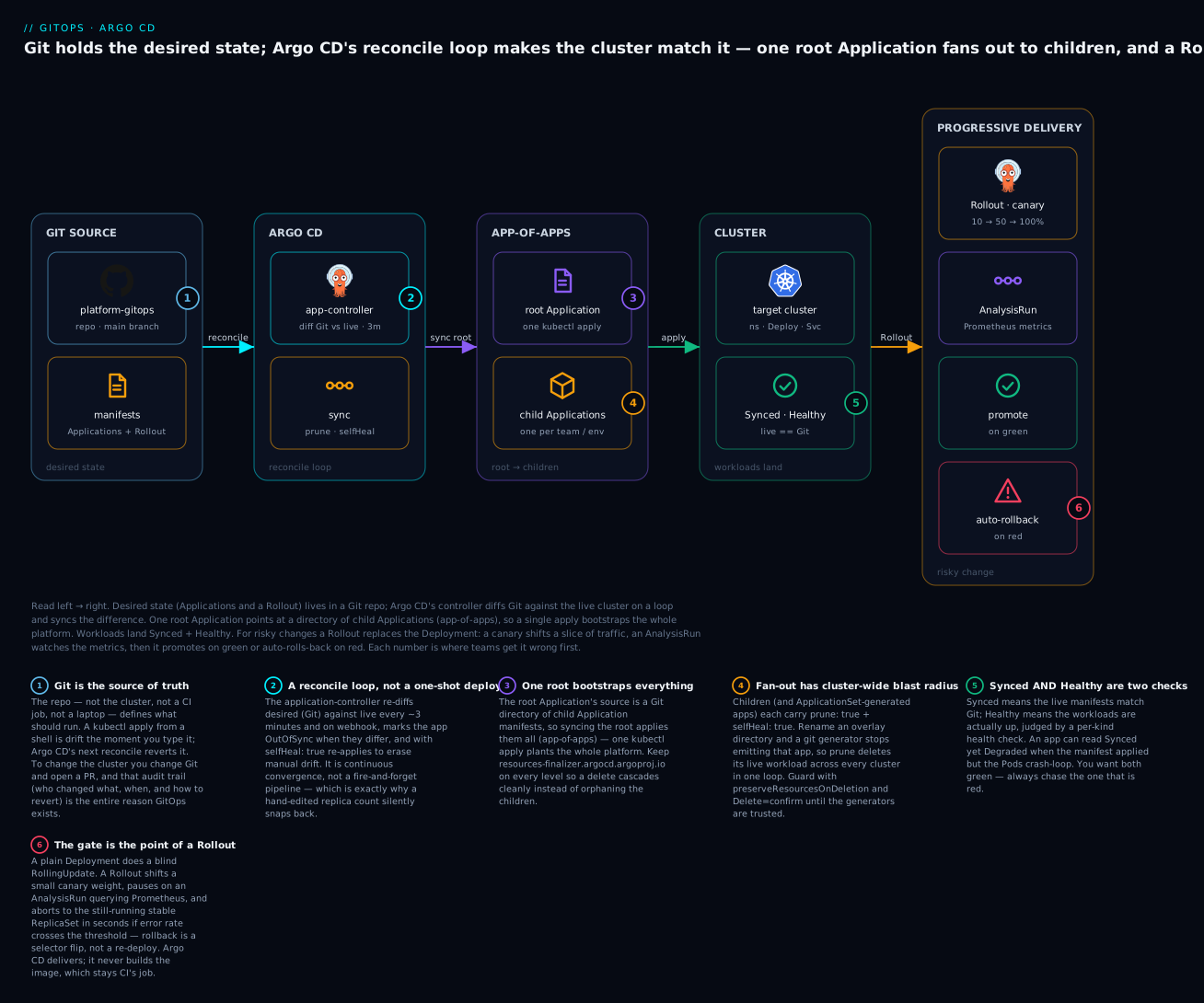
The diagram is the whole lesson in one picture. The desired state lives in Git (left): plain Application manifests plus a Rollout. Argo CD’s reconcile loop diffs Git against the live cluster and syncs the difference. One root Application fans out into child Applications (app-of-apps), which land as Synced and Healthy workloads in the cluster. For the changes you do not fully trust, a Rollout shifts a small canary slice, lets an AnalysisRun judge the metrics, and either promotes on green or auto-rolls-back on red. Each numbered badge marks a place teams trip the first time; the legend gives the symptom and the fix.
Argo CD turns a Git repository into the single source of truth for what runs in your clusters. That promise is easy to demo with one app and one cluster, and surprisingly hard to keep once you have dozens of teams, several environments, and a handful of regional clusters. This article walks through the patterns that survive that growth: a repository layout that scales, the app-of-apps bootstrap, ApplicationSets for fan-out, ordered syncs, secret handling, and progressive delivery with Argo Rollouts.
The Application object, field by field
Everything in Argo CD is built from one custom resource: the Application. Argo CD installs it as a CRD, and every Application object lives in the argocd namespace. Before the patterns, it pays to understand the one object they are all made of, because a beginner who can read an Application can read the whole system.
An Application answers four questions:
- Where is the desired state? — the
sourceblock (a Git repo, a revision, and a path — or a Helm chart). - Where should it run? — the
destinationblock (which cluster, which namespace). - How should Argo CD keep them equal? — the
syncPolicyblock (manual or automated, withpruneandselfHeal). - Who is allowed to do this? — the
project(anAppProjectthat whitelists which repos and clusters this app may touch).
Here is a single, annotated Application — one app, not the whole platform — so each block has a face:
apiVersion: argoproj.io/v1alpha1
kind: Application
metadata:
  name: checkout
  namespace: argocd                 # Application OBJECTS always live here
spec:
  project: tenants                  # WHO: an AppProject that whitelists repos + destinations
  source:                           # WHERE the desired state is
    repoURL: https://github.com/acme/apps-gitops.git
    targetRevision: main            # a branch, a tag, or a pinned commit SHA
    path: checkout/overlays/prod-eastus   # a Kustomize / Helm / plain-manifest directory
  destination:                      # WHERE it should run
    name: prod-eastus               # a registered cluster by name (or server: <api-url>)
    namespace: checkout             # the app's OWN namespace (not argocd)
  syncPolicy:                       # HOW Argo CD keeps live == Git
    automated:
      prune: true                   # delete resources that were removed from Git
      selfHeal: true                # revert any manual change back to Git
    syncOptions:
      - CreateNamespace=true        # make the target namespace if it is missing
Note the two namespaces that trip everyone up: the Application object lives in argocd (metadata.namespace), but the workload it deploys goes wherever spec.destination.namespace says. They are almost never the same.
| Field | What it answers | Typical value |
|---|---|---|
spec.source.repoURL |
Which repo holds the manifests | A Git HTTPS/SSH URL |
spec.source.targetRevision |
Which version of it | main, a tag, or a commit SHA |
spec.source.path |
Which directory in the repo | checkout/overlays/prod |
spec.source.chart |
(Helm alt) which chart | argo-cd from a chart repo |
spec.destination.server / .name |
Which cluster | API URL, or a registered name |
spec.destination.namespace |
Which namespace | The app’s own namespace |
spec.syncPolicy.automated |
Auto-sync on/off + prune/selfHeal |
Present = automated |
spec.project |
Which AppProject bounds it | default or a scoped project |
The other detail that matters early is that Argo CD reports two independent statuses for every app, and beginners routinely confuse them. Sync status answers “does the live cluster match Git?”; health status answers “are the workloads actually working?” An app can be Synced (the manifest applied cleanly) and Degraded at the same time (the Pods it created are crash-looping). Learn to read both:
Sync status — does live match Git?
| Value | Meaning |
|---|---|
Synced |
The live cluster matches the desired manifests in Git |
OutOfSync |
Git and live differ — a sync is pending (manual) or in progress |
Unknown |
Argo CD cannot compute the diff (repo unreachable, bad path) |
Health status — are the workloads working?
| Value | Meaning |
|---|---|
Healthy |
Resources are up and passing their per-kind health check |
Progressing |
Rolling out — a Deployment mid-update waiting for Ready pods |
Degraded |
Failed its health check — crash-loop, failed rollout, unschedulable |
Suspended |
Paused on purpose — a Rollout at a canary pause, a suspended CronJob |
Missing |
Declared in Git but not present in the cluster yet |
Unknown |
Health could not be determined |
When something is wrong, the first question is always: which of the two is red? A red sync status is a Git/apply problem (bad path, RBAC, a project that forbids the repo). A red health status is a workload problem (image pull, crash-loop, failing probe) — Git is fine, the app itself is broken.
1. GitOps principles and a repository layout that scales
GitOps rests on a few non-negotiable rules. The desired state lives in Git. A controller continuously reconciles actual state toward that desired state. Changes happen through pull requests, not kubectl apply from a laptop. Drift is detected and either reported or corrected automatically.
The hardest design decision is repository structure. Two anti-patterns dominate: one giant repo where every team blocks on every other team’s reviews, and per-environment branches where promotion becomes a merge nightmare and main no longer reflects production. Use directories, not branches, for environments. Promotion is then a small, reviewable diff that copies a tested image tag from one path to another.
A layout that has held up well across many teams:
platform-gitops/                 # cluster-scoped, owned by platform team
  bootstrap/
    root-app.yaml                # the one app you apply by hand
  addons/                        # ingress, cert-manager, monitoring, ESO
    cert-manager/
    ingress-nginx/
  appsets/                       # ApplicationSets that fan apps out
    tenants.yaml
  clusters/
    prod-eastus/values.yaml      # per-cluster config (region, sizing)
    prod-westeu/values.yaml
    staging/values.yaml

apps-gitops/                     # namespace-scoped, owned by app teams
  checkout/
    base/                        # Kustomize base or Helm chart
    overlays/
      staging/
      prod-eastus/
      prod-westeu/
Keep platform concerns and application concerns in separate repositories with separate
CODEOWNERS. The platform team should not gate every app deploy, and app teams should not be able to edit cluster-wide RBAC.
2. Bootstrap with the app-of-apps pattern
The app-of-apps pattern means you apply exactly one Application by hand. That root Application points at a directory of child Applications, and Argo CD reconciles them recursively. After bootstrap, everything (including Argo CD’s own configuration) is managed by Git.
Install Argo CD first, then apply the root app:
kubectl create namespace argocd
kubectl apply -n argocd \
  -f https://raw.githubusercontent.com/argoproj/argo-cd/stable/manifests/install.yaml

# Wait for the core controllers to be ready
kubectl rollout status deploy/argocd-server -n argocd
kubectl rollout status statefulset/argocd-application-controller -n argocd
The root Application is the only manifest you kubectl apply directly. It watches the bootstrap/ directory and creates everything else:
apiVersion: argoproj.io/v1alpha1
kind: Application
metadata:
  name: root
  namespace: argocd
  finalizers:
    - resources-finalizer.argocd.argoproj.io
spec:
  project: default
  source:
    repoURL: https://github.com/acme/platform-gitops.git
    targetRevision: main
    path: bootstrap
  destination:
    server: https://kubernetes.default.svc
    namespace: argocd
  syncPolicy:
    automated:
      prune: true
      selfHeal: true
    syncOptions:
      - CreateNamespace=true
The resources-finalizer.argocd.argoproj.io finalizer matters: without it, deleting the root Application orphans its children instead of cascading the cleanup. With it, argocd app delete root tears the whole tree down in dependency order.
Mentally, the tree looks like this: the root Application’s source.path (bootstrap/) is a folder of more Application manifests — addons, appsets, monitoring. Syncing root applies those child Application objects into the argocd namespace; each child then reconciles its own source into its own destination. It is Applications all the way down, and one hand-applied root is the only imperative step in the entire platform.
3. Fan apps out with ApplicationSets
App-of-apps gets clumsy when you need the same app on ten clusters or one app per team. The ApplicationSet controller (bundled with Argo CD) generates Applications from a template plus a generator. The most useful generators are git (directories or files in a repo), cluster (registered Argo CD clusters by label), and matrix (the cross-product of two generators).
This ApplicationSet deploys every app overlay onto every production cluster, combining a git directory generator with a cluster generator:
apiVersion: argoproj.io/v1alpha1
kind: ApplicationSet
metadata:
  name: tenant-apps
  namespace: argocd
spec:
  goTemplate: true
  goTemplateOptions: ["missingkey=error"]
  generators:
    - matrix:
        generators:
          - git:
              repoURL: https://github.com/acme/apps-gitops.git
              revision: main
              directories:
                - path: "*/overlays/prod-*"
          - clusters:
              selector:
                matchLabels:
                  env: prod
  template:
    metadata:
      name: "{{.path.basename}}-{{.name}}"
    spec:
      project: tenants
      source:
        repoURL: https://github.com/acme/apps-gitops.git
        targetRevision: main
        path: "{{.path.path}}"
      destination:
        server: "{{.server}}"
        namespace: "{{.path[1]}}"
      syncPolicy:
        automated:
          prune: true
          selfHeal: true
        syncOptions:
          - CreateNamespace=true
Register clusters so the clusters generator can find them, and label them so your selector works:
# Add a remote cluster from a kubeconfig context
argocd cluster add prod-eastus-context --name prod-eastus

# Label the generated cluster secret so ApplicationSets can target it
kubectl label secret -n argocd \
  -l argocd.argoproj.io/secret-type=cluster \
  env=prod region=eastus --overwrite
Set the ApplicationSet’s
syncPolicy.applicationsSyncdeliberately. By default, deleting a generator’s source element deletes the generated Application. In production, use a preserve policy until you trust the generators, so a bad selector edit cannot wipe live workloads. Roll out generator changes behind a PR review like any other change.
4. Order dependent resources with sync waves and hooks
Argo CD applies resources in waves. A CRD must exist before the custom resource that uses it; a database migration must finish before the new app version starts. Annotate resources with argocd.argoproj.io/sync-wave (an integer, default 0); lower waves apply first, and Argo CD waits for each wave to become healthy before starting the next.
# CRDs and namespaces go early
metadata:
  annotations:
    argocd.argoproj.io/sync-wave: "-5"
---
# The app that depends on them goes later
metadata:
  annotations:
    argocd.argoproj.io/sync-wave: "0"
Resource hooks run logic at points in the sync. A PreSync Job is the right place for schema migrations:
apiVersion: batch/v1
kind: Job
metadata:
  name: db-migrate
  annotations:
    argocd.argoproj.io/hook: PreSync
    argocd.argoproj.io/hook-delete-policy: HookSucceeded
spec:
  backoffLimit: 2
  template:
    spec:
      restartPolicy: Never
      containers:
        - name: migrate
          image: ghcr.io/acme/checkout:1.8.0
          command: ["/app/migrate", "up"]
PreSync runs before the main sync, PostSync after all resources are healthy, and SyncFail only when a sync fails. The hook-delete-policy of HookSucceeded cleans up the Job once it passes so it does not accumulate. If a PreSync migration fails, the sync stops and the new version never rolls out, which is exactly what you want.
5. Manage secrets in GitOps
Plaintext secrets cannot live in Git. Two mature approaches solve this without breaking the “Git is the source of truth” model.
Sealed Secrets encrypts a Secret with a controller-held key. The encrypted SealedSecret is safe to commit; only the in-cluster controller can decrypt it.
# Encrypt locally, commit the output
kubectl create secret generic api-creds \
  --from-literal=token=s3cr3t --dry-run=client -o yaml \
  | kubeseal --controller-namespace kube-system --format yaml \
  > sealed-api-creds.yaml
External Secrets Operator (ESO) keeps secret values in a real secret manager (Azure Key Vault, AWS Secrets Manager, GCP Secret Manager, Vault) and syncs them into Kubernetes Secrets. Only a reference lives in Git:
apiVersion: external-secrets.io/v1beta1
kind: ExternalSecret
metadata:
  name: api-creds
spec:
  refreshInterval: 1h
  secretStoreRef:
    name: azure-kv
    kind: SecretStore
  target:
    name: api-creds
  data:
    - secretKey: token
      remoteRef:
        key: checkout-api-token
| Concern | Sealed Secrets | External Secrets Operator |
|---|---|---|
| Where values live | Encrypted, in Git | External secret manager |
| Rotation | Re-seal and commit | Change in the manager; auto-syncs |
| Audit trail | Git history | Manager’s audit log |
| Extra dependency | One controller | Operator plus a cloud secret store |
For multi-cluster platforms, ESO usually wins: rotating a credential is a change in one secret store, not a commit fanned across every cluster overlay. Reserve Sealed Secrets for bootstrap-time secrets that must exist before ESO itself is running.
6. Progressive delivery with Argo Rollouts
A plain Kubernetes Deployment only does rolling updates. Argo Rollouts replaces the Deployment with a Rollout resource that understands canary and blue-green strategies, and gates promotion on metric AnalysisRuns. It integrates with Argo CD: the Rollout shows up as just another resource Argo CD reconciles.
A canary that shifts traffic in steps and runs analysis between them:
apiVersion: argoproj.io/v1alpha1
kind: Rollout
metadata:
  name: checkout
spec:
  replicas: 6
  selector:
    matchLabels:
      app: checkout
  template:
    metadata:
      labels:
        app: checkout
    spec:
      containers:
        - name: checkout
          image: ghcr.io/acme/checkout:1.8.0
  strategy:
    canary:
      steps:
        - setWeight: 10
        - pause: { duration: 5m }
        - analysis:
            templates:
              - templateName: success-rate
        - setWeight: 50
        - pause: { duration: 10m }
        - setWeight: 100
The AnalysisTemplate queries Prometheus and fails the rollout if the success rate drops below threshold, which triggers an automatic rollback to the stable ReplicaSet:
apiVersion: argoproj.io/v1alpha1
kind: AnalysisTemplate
metadata:
  name: success-rate
spec:
  metrics:
    - name: success-rate
      interval: 1m
      count: 5
      successCondition: result[0] >= 0.99
      failureLimit: 1
      provider:
        prometheus:
          address: http://prometheus.monitoring:9090
          query: |
            sum(rate(http_requests_total{app="checkout",code!~"5.."}[2m]))
            /
            sum(rate(http_requests_total{app="checkout"}[2m]))
Blue-green is the other strategy: a blueGreen block with activeService and previewService brings the new version up in full alongside the old one, lets you test it on the preview service, then flips the active service on promotion. Drive promotions with the plugin rather than editing live objects:
kubectl argo rollouts get rollout checkout --watch
kubectl argo rollouts promote checkout          # advance to the next step
kubectl argo rollouts abort checkout            # roll back to stable
Canary vs blue-green — which to reach for. They solve the same problem (ship a new version without a big-bang cutover) with opposite trade-offs:
| Dimension | Canary | Blue-green |
|---|---|---|
| Traffic shift | Gradual (10% → 50% → 100%) | Instant flip of the active Service |
| Extra capacity | Only the canary slice of pods | 2× — the full new stack runs alongside old |
| Real users during test | A small, growing slice | None until the flip (preview Service only) |
| Rollback | Shift weight back / abort |
Re-point the active Service selector |
| Best for | Stateless APIs with good metrics | Changes you must validate whole before any real traffic |
One gotcha worth internalising early: with no trafficRouting configured, setWeight: 10 does not send exactly 10% of requests to the canary. The controller simply scales the canary ReplicaSet to roughly 10% of the pods and lets the Service load-balance across all of them — pod ratio is a proxy for weight, not a real percentage. True per-request weighting needs a traffic router (Istio, NGINX, ALB, or the Gateway API), which the deeper Rollouts lessons cover.
7. Drift detection, self-healing, and safe pruning
With selfHeal: true, Argo CD reverts any manual change that diverges from Git within its reconcile interval. That is the behavior you want in production: a kubectl edit hotfix gets undone, forcing the fix through a PR. With prune: true, resources removed from Git are deleted from the cluster.
Pruning is the dangerous half. Guard it with two mechanisms. Mark resources you never want auto-deleted (a PersistentVolumeClaim, a namespace) with the prune protection annotation. And require confirmation for large deletions so a bad refactor cannot quietly remove a hundred objects:
# Never let Argo CD prune this resource
metadata:
  annotations:
    argocd.argoproj.io/sync-options: Prune=false
# Require manual confirmation for destructive prunes (per-app)
spec:
  syncPolicy:
    syncOptions:
      - PruneLast=true          # prune after other resources sync
Treat
selfHealandpruneas production discipline, not just features. The combination guarantees that the cluster matches Git and that the only way to change the cluster is to change Git. That is the entire point of GitOps; turning them off quietly reintroduces snowflake drift.
8. Disaster recovery: rebuild a cluster from Git
If GitOps is real, a destroyed cluster is recoverable by pointing Argo CD at the same repo. The recovery runbook is short because the heavy lifting is declarative.
# 1. Provision a fresh cluster (Terraform/Bicep), get a kubeconfig.
# 2. Install Argo CD.
kubectl create namespace argocd
kubectl apply -n argocd \
  -f https://raw.githubusercontent.com/argoproj/argo-cd/stable/manifests/install.yaml

# 3. Re-add cluster credentials and labels (step 3 above).
# 4. Apply the single root Application; everything else follows.
kubectl apply -f bootstrap/root-app.yaml
The one thing Git cannot rebuild is decryption material. Back up the Sealed Secrets controller key and any ESO authentication out of band, because without them the committed SealedSecrets are inert and ESO cannot reach the secret store:
# Back up the Sealed Secrets private key (store in a vault, NOT Git)
kubectl get secret -n kube-system \
  -l sealedsecrets.bitnami.com/sealed-secrets-key \
  -o yaml > sealed-secrets-key-backup.yaml
Enterprise scenario
A payments platform ran ~40 services across four prod clusters via one ApplicationSet using a git directory generator on */overlays/prod-*. A team renamed an overlay directory in a routine PR. The git generator stopped emitting the old element, the ApplicationSet controller deleted the corresponding Application, and because every app had prune: true plus selfHeal: true, Argo CD cascaded deletes across all four clusters within one reconcile loop. A live payment service went down before anyone connected the directory rename to the outage.
Two root causes: the ApplicationSet defaulted to deleting Applications when a generator element disappears, and nothing distinguished “intentional removal” from “rename.” The fix was to stop treating generator output as authoritative for deletion. They set the preserve policy so a vanished element orphans rather than deletes the Application, requiring an explicit, reviewed delete:
spec:
  syncPolicy:
    preserveResourcesOnDeletion: true   # vanished generator element != delete
  # plus a guard on the apps the set generates
  template:
    metadata:
      annotations:
        argocd.argoproj.io/sync-options: Delete=confirm
They also added a CI check that diffs the rendered Application list (argocd appset generate against the PR branch) and fails the build if the count drops, so any deletion shows up in review as an explicit number. The deeper lesson: in a fan-out model, a one-line path edit has cluster-wide blast radius. Generators are convenient, but their output must never be the only thing standing between a typo and a production deletion.
Going deeper
You now have the core patterns. This section is for the reader who has to operate them at scale, and it maps directly onto the numbered badges in the diagram.
ApplicationSet generators, in full
The git and cluster generators are the two you meet first, but there are more, and each unlocks a different fan-out pattern:
| Generator | Emits one Application per… | Use it for |
|---|---|---|
list |
Hard-coded element in a literal list | A small, explicit fixed set |
cluster |
Registered cluster matching a label selector | The same app on every prod cluster |
git (directories) |
Directory matched by a glob in a repo | One app per overlay folder |
git (files) |
Config file matched by a glob | Per-tenant config files |
matrix |
Cross-product of two child generators | “Every app × every cluster” |
merge |
Merged element across generators (override by key) | Base list + per-cluster overrides |
scmProvider |
Repository in a GitHub/GitLab org | Onboard every repo automatically |
pullRequest |
Open PR against a repo | Ephemeral preview environments |
For large fleets, add a progressive sync strategy (strategy: type: RollingSync) so the set rolls its generated Applications out cluster-group by cluster-group — canary at the fleet level — instead of updating all of them at once. That turns “one PR touches forty clusters” from a cliff into a staged wave.
Sync waves vs resource hooks
They look similar but do different jobs. A sync wave orders resources within one sync: Argo CD applies the lowest wave first and waits for it to report Healthy before the next. A resource hook injects a step around the sync at a named phase — PreSync, Sync, PostSync, or SyncFail. Reach for a wave to say “CRDs before the custom resources that use them”; reach for a hook to say “run a migration Job, and if it fails, abort the whole sync.” Hooks honour their own hook-delete-policy (HookSucceeded, HookFailed, BeforeHookCreation) so they clean up instead of piling up.
The reconcile loop and drift detection
Badge 2 in the diagram is the heart of Argo CD. The application-controller runs a loop: fetch the desired manifests from Git, render them (Helm/Kustomize), diff them against the live objects, and compute a per-app sync status. The diff is not a naive text compare — it normalises defaults and ignores fields Argo CD is told to ignore, so it does not thrash on server-populated values. The loop re-runs on a timer (timeout.reconciliation, default 180s) and immediately on a Git webhook. When automated sync is on and the app is OutOfSync, it syncs; when selfHeal is on, live drift (a hand-edit) is treated the same way and reverted on the next pass. At scale you shard the controller across replicas so each owns a subset of clusters — the knob that keeps reconcile latency flat as you add clusters.
Multi-cluster, hub-and-spoke
The common topology is one Argo CD hub managing many spoke clusters. Each spoke is registered as a Secret of type cluster in the argocd namespace, carrying its API URL and credentials; the cluster generator selects them by label. The hub needs network reach and credentials to every spoke, and you bound each team with an AppProject that whitelists the repos, clusters, and namespaces they may target — so a tenant cannot deploy into another team’s cluster even by editing their own manifest. A production build of exactly this hub-spoke pattern is covered in App-of-Apps multi-cluster GitOps.
Rollouts traffic management and metric-driven auto-rollback
Real canaries route real traffic. Argo Rollouts integrates with a traffic provider — Istio, NGINX, AWS ALB, SMI, or the Gateway API plugin — to weight requests precisely instead of by pod ratio. The gate itself is an AnalysisRun, and its provider is pluggable:
| Analysis provider | Reads from |
|---|---|
prometheus |
PromQL query result |
datadog |
A Datadog metric query |
cloudWatch |
A CloudWatch metric |
newRelic / wavefront |
Their respective query APIs |
web |
Any HTTP endpoint returning JSON |
job |
A Kubernetes Job’s exit code (0 = pass) |
Analysis can run inline (a step in the canary list, blocking promotion) or in the background (started at a step and evaluated continuously for the rest of the rollout). Either way, when failureLimit is exceeded the rollout aborts automatically to the still-running stable ReplicaSet — no human in the loop, rollback measured in seconds. The metric-driven canary and blue-green analysis gates are explored in depth in Progressive delivery with Argo Rollouts and canary metrics and Blue-green with preview and analysis gates.
Secrets: a third option, and the hard constraint
Beyond Sealed Secrets and ESO, teams also use SOPS + age (encrypt the file, decrypt at sync time via the argocd-vault-plugin or a KSOPS plugin). All three keep ciphertext or references — never plaintext — in Git. The hard constraint underneath every approach: the decryption key or the manager credential can never live in Git, because Git is exactly what an attacker who compromises the repo already holds. Back that material up out of band (badge relates to the DR runbook above).
The CI → CD boundary: Argo CD is CD, not CI
The single most common conceptual error is expecting Argo CD to build your code. It does not. CI (GitHub Actions, GitLab CI, Jenkins) compiles, tests, scans, builds the image, and pushes it to a registry — then writes the new image tag into the GitOps repo (by committing, or via Argo CD Image Updater writing the tag back). CD (Argo CD) only reconciles what is in Git. The handoff is a Git commit: CI produces artifacts and a tag; CD consumes the tag. Keep that line bright and your pipeline stays debuggable — a broken build is a CI problem, a stuck deploy is a CD problem, and you always know which console to open.
Common beginner mistakes
- Fighting
selfHealwith imperativekubectl. Youkubectl scaleorkubectl editto hotfix production, it works for three minutes, then Argo CD silently reverts it and you conclude Argo is “broken.” It is doing its job: live drifted from Git, so it healed. The right model is to change Git (a PR), or, for a genuine emergency, disable auto-sync first (argocd app set <app> --sync-policy none), fix, then reconcile the fix back into Git. Never argue with the reconcile loop by hand. - Enabling
pruneon a namespace that holds state. A refactor removes a manifest, and becauseprune: trueis on, Argo CD deletes thePersistentVolumeClaim— and the data with it. Protect stateful resources withargocd.argoproj.io/sync-options: Prune=false, addPruneLast=true, and gate destructive deletes withDelete=confirm. Aggressive prune belongs on stateless resources. - Confusing app-of-apps with ApplicationSet. App-of-apps is a hand-curated tree you bootstrap once — great for “these specific platform add-ons.” ApplicationSet is templated fan-out from a generator — great for “this app on every cluster” or “one app per tenant.” Copy-pasting twenty near-identical child Applications is a sign you wanted an ApplicationSet; hand-writing a generator for three fixed, unlike apps is over-engineering that wanted app-of-apps.
- Committing plaintext Secrets to Git. A Kubernetes
Secretis base64, not encryption — anyone who clones the repo reads it instantly. “It is a private repo” is not a control. Use Sealed Secrets, ESO, or SOPS; the rawSecretnever belongs in Git, full stop. - Expecting Argo CD to build images. You push a code change and wait for the cluster to update, then wonder why nothing happens. Argo CD never saw your code — it watches Git manifests, not your source branch. CI has to build the image and write the new tag into the GitOps repo before Argo CD has anything to reconcile.
Practice challenges
Work these top to bottom; each builds on the last. Try before opening the solution.
1 — Beginner: read the two statuses. argocd app get checkout shows Sync Status: Synced and Health Status: Degraded. Is the problem in Git or in the workload, and where do you look next?
<details> <summary>Solution</summary>
The workload. Synced means the live manifests match Git, so the apply was fine — Git is not the issue. Degraded means the resources failed their health check, so look at the Pods: kubectl get pods -n checkout, then kubectl describe/logs on the failing one. Typical causes are an image that will not pull, a crash-loop, or a failing readiness probe. Why: sync status and health status are independent — a red health with a green sync always points at the app, not the manifest.
</details>
2 — Beginner: a single Application. Write an Application named guestbook that deploys the path guestbook/overlays/staging from https://github.com/acme/apps-gitops.git (branch main) into namespace guestbook on the in-cluster server, with automated sync, self-heal, and auto-created namespace.
<details> <summary>Solution</summary>
apiVersion: argoproj.io/v1alpha1
kind: Application
metadata:
  name: guestbook
  namespace: argocd
spec:
  project: default
  source:
    repoURL: https://github.com/acme/apps-gitops.git
    targetRevision: main
    path: guestbook/overlays/staging
  destination:
    server: https://kubernetes.default.svc
    namespace: guestbook
  syncPolicy:
    automated:
      prune: true
      selfHeal: true
    syncOptions:
      - CreateNamespace=true
Why: source says where the desired state is, destination says where it runs, syncPolicy.automated turns on continuous reconcile with prune and self-heal, and CreateNamespace=true saves you a manual kubectl create namespace.
</details>
3 — Intermediate: a root app-of-apps. Author a root Application whose source.path is bootstrap/, holding child Applications, so that a single kubectl apply brings up the whole platform. Make deletion cascade cleanly. What does applying it actually do?
<details> <summary>Solution</summary>
apiVersion: argoproj.io/v1alpha1
kind: Application
metadata:
  name: root
  namespace: argocd
  finalizers:
    - resources-finalizer.argocd.argoproj.io
spec:
  project: default
  source:
    repoURL: https://github.com/acme/platform-gitops.git
    targetRevision: main
    path: bootstrap
  destination:
    server: https://kubernetes.default.svc
    namespace: argocd
  syncPolicy:
    automated:
      prune: true
      selfHeal: true
    syncOptions:
      - CreateNamespace=true
kubectl apply -f root-app.yaml creates one Application. Argo CD syncs it, which applies every child Application manifest under bootstrap/ into the argocd namespace; each child then reconciles its own source into its own destination. Why the finalizer: resources-finalizer.argocd.argoproj.io makes argocd app delete root cascade to the children instead of orphaning them.
</details>
4 — Intermediate: make prune safe on stateful data. A namespace runs Postgres backed by a PersistentVolumeClaim. Auto-sync with prune: true is on platform-wide. Stop a manifest removal from ever deleting the PVC, and require confirmation for large deletes.
<details> <summary>Solution</summary>
# On the PVC: never auto-prune it
apiVersion: v1
kind: PersistentVolumeClaim
metadata:
  name: postgres-data
  annotations:
    argocd.argoproj.io/sync-options: Prune=false
---
# On the Application: gate destructive deletes behind confirmation
spec:
  syncPolicy:
    syncOptions:
      - PruneLast=true
      - RespectIgnoreDifferences=true
Why: Prune=false exempts the PVC from deletion even if it vanishes from Git, so the data survives a bad refactor. PruneLast=true prunes only after everything else syncs, shrinking the window where a half-applied change deletes something it should not. In the UI you can also require Delete=confirm for a manual sign-off on destructive prunes.
</details>
5 — Advanced: a metric-gated canary Rollout. Convert checkout (6 replicas) to a Rollout that goes 20% → pause → analysis → 50% → 100%, where the analysis fails the rollout if the Prometheus success rate drops below 99%. What happens automatically when the metric fails?
<details> <summary>Solution</summary>
apiVersion: argoproj.io/v1alpha1
kind: Rollout
metadata:
  name: checkout
spec:
  replicas: 6
  selector:
    matchLabels:
      app: checkout
  template:
    metadata:
      labels:
        app: checkout
    spec:
      containers:
        - name: checkout
          image: ghcr.io/acme/checkout:1.9.0
  strategy:
    canary:
      steps:
        - setWeight: 20
        - pause: { duration: 5m }
        - analysis:
            templates:
              - templateName: success-rate
        - setWeight: 50
        - pause: { duration: 5m }
        - setWeight: 100
It reuses the success-rate AnalysisTemplate from section 6. What happens on failure: when the success rate stays under 0.99 past failureLimit, the AnalysisRun fails, the Rollout aborts automatically, and traffic snaps back to the stable ReplicaSet — which never stopped running — in seconds. No human, no re-deploy of the old image.
</details>
6 — Advanced: from copy-paste to a generator. An app-of-apps hand-copies one frontend Application onto three prod clusters (prod-eastus, prod-westeu, prod-apac). Replace the three copies with one ApplicationSet using a cluster generator — and make it safe against the rename-outage from the enterprise scenario.
<details> <summary>Solution</summary>
apiVersion: argoproj.io/v1alpha1
kind: ApplicationSet
metadata:
  name: frontend
  namespace: argocd
spec:
  goTemplate: true
  syncPolicy:
    preserveResourcesOnDeletion: true   # a vanished cluster != delete the app
  generators:
    - clusters:
        selector:
          matchLabels:
            env: prod
  template:
    metadata:
      name: "frontend-{{.name}}"
    spec:
      project: tenants
      source:
        repoURL: https://github.com/acme/apps-gitops.git
        targetRevision: main
        path: frontend/overlays/prod
      destination:
        server: "{{.server}}"
        namespace: frontend
      syncPolicy:
        automated:
          prune: true
          selfHeal: true
        syncOptions:
          - CreateNamespace=true
Why: the cluster generator emits one Application per labeled prod cluster, so adding a fourth cluster is a label, not a copy-paste. preserveResourcesOnDeletion: true means if a cluster drops out of the selector (or someone fat-fingers a label), the generated Application is orphaned for review instead of deleted — the exact guard the payments team added after their outage.
</details>
Verify
After bootstrap or a recovery, confirm the platform actually converged.
# Every Application should report Synced + Healthy
argocd app list -o wide

# Inspect the root app's resource tree and drift
argocd app get root --refresh

# ApplicationSets generated the expected Applications
kubectl get applicationsets -n argocd
kubectl get applications -n argocd

# A canary is progressing as designed
kubectl argo rollouts status checkout

# Secrets actually materialized from references
kubectl get externalsecrets -A
kubectl get sealedsecrets -A
A converged platform shows every Application Synced/Healthy, no OutOfSync resources after a --refresh, Rollouts in a Healthy or Paused (mid-canary) phase, and target Secrets present where ExternalSecrets expect them.
Checklist
Glossary
- GitOps — an operating model where Git holds the desired state and a controller continuously reconciles the cluster to match it; all changes go through Git.
- Argo CD — the GitOps controller for Kubernetes: it reads manifests from Git and makes the cluster match them.
- Application (CRD) — Argo CD’s core object; binds a
source(where the manifests are), adestination(which cluster/namespace), and asyncPolicy(how to keep them equal). - source / destination / syncPolicy — the three blocks of an Application: where the desired state is, where it runs, and how Argo CD reconciles it.
- AppProject — a boundary object that whitelists which repos, clusters, and namespaces an Application may target; how you sandbox teams.
- app-of-apps — a pattern where one hand-applied root Application points at a directory of child Applications, bootstrapping a whole platform from a single apply.
- ApplicationSet — a controller that generates Applications from a template plus a generator, for fan-out across clusters or tenants.
- generator — the input side of an ApplicationSet (
list,cluster,git,matrix,merge,scmProvider,pullRequest) that decides how many Applications to emit and with what values. - sync status — whether the live cluster matches Git:
Synced,OutOfSync, orUnknown. - health status — whether the workloads actually work:
Healthy,Progressing,Degraded,Suspended,Missing, orUnknown. - reconcile loop — Argo CD’s continuous cycle of diffing desired (Git) against live and syncing the difference; the default interval is 180s, plus webhook triggers.
- drift — any divergence of the live cluster from Git (a hand-edit, a manual scale);
selfHealreverts it. - selfHeal — auto-revert manual changes back to what Git says.
- prune — delete cluster resources that were removed from Git; the destructive half of auto-sync, guarded by prune protection and confirmation.
- sync wave — an integer annotation ordering resources within one sync (lower first); Argo CD waits for each wave to be Healthy before the next.
- resource hook — logic (usually a Job) run at a named sync phase:
PreSync,Sync,PostSync, orSyncFail. - finalizer —
resources-finalizer.argocd.argoproj.io; makes deleting an Application cascade to the resources it created instead of orphaning them. - Argo Rollouts — a controller that replaces
Deploymentwith aRolloutsupporting canary and blue-green strategies with analysis gates. - canary — progressive delivery that shifts a small, growing slice of traffic to the new version, gating on metrics.
- blue-green — progressive delivery that runs the new version in full behind a preview Service, then flips the active Service in one instant.
- setWeight / trafficRouting — the canary weight step; without a
trafficRoutingprovider it scales pod ratios (a proxy), with one it routes real request percentages. - AnalysisTemplate / AnalysisRun — the reusable metric query (
AnalysisTemplate) and its running instance (AnalysisRun) that gate a Rollout and trigger auto-rollback on failure. - Sealed Secrets — encrypt a Secret with a controller-held key so the ciphertext is safe to commit to Git.
- External Secrets Operator (ESO) — sync secret values from an external manager (Key Vault, Secrets Manager, Vault) into Kubernetes Secrets; only a reference lives in Git.
- Argo CD Image Updater — a component that writes new image tags back into the GitOps repo so image bumps become reviewable commits.
- CI vs CD — CI builds, tests, and pushes the image and writes its tag to Git; CD (Argo CD) reconciles what is in Git. Argo CD never builds images.
- hub-and-spoke — one Argo CD control plane (hub) managing many workload clusters (spokes) registered as labeled cluster Secrets.
Pitfalls and next steps
The failures that bite teams are rarely Argo CD bugs. They are process gaps: an aggressive ApplicationSet selector that deletes live apps, prune enabled on a namespace holding a database, or a DR plan that assumes Git holds the secrets it cannot decrypt. Rehearse the destroy-and-rebuild path on a disposable cluster before you need it, and scope ApplicationSet preserve policies until the generators are proven.
From here, harden the platform with Argo CD Projects to restrict which repos, clusters, and namespaces each team can target; add notifications on sync failures and degraded health; and wire image updates through a controller or CI commit so promotions become reviewable diffs rather than manual tag edits. Pair that with Rollouts analysis backed by real SLO queries, and you have a multi-cluster delivery system where every change is auditable, reversible, and reconstructable from Git. To go deeper on the delivery half, continue with progressive delivery and canary metrics; to go deeper on the fleet half, see app-of-apps multi-cluster GitOps.