In a nutshell
Think of Azure Kubernetes Service (AKS) as renting a fully-managed apartment building where the landlord runs the boiler, the wiring, and the lifts for free, and you just furnish the flats. The “boiler and wiring” is Kubernetes’ control plane — the API server, scheduler, and etcd database that decide what runs where. Azure runs, patches, and backs that up for you at no charge in the Free tier; there is no master node you can SSH into because Azure hides it entirely. What you do pay for and manage are the node pools: groups of identical virtual machines where your containers actually run.
Those node pools come in two flavours, and the whole lesson turns on the difference. A system pool is the plumbing — it runs Kubernetes’ own housekeeping pods (DNS, metrics, the storage drivers), and every cluster must have exactly one. User pools are where your applications run, and you can have as many as you like, each a different VM size, each scaling on its own. You keep them separate so a runaway app can never starve the plumbing, and so you can grow app capacity without touching the platform.
Terraform’s job here is to describe that whole building — the control plane’s identity, the two kinds of node pool, the network the pods live on, who is allowed in, and which registry the nodes may pull images from — in code you can plan, apply, and destroy on demand. Do it once and a second identical cluster is one terraform apply away, not an afternoon of clicking.
Level: Advanced · Time: ~60 min
Prerequisites — be comfortable with the Terraform plan → apply → destroy workflow and remote state (Terraform Fundamentals), Azure provider auth plus a remote backend (Getting Started on Azure), the VNet/subnet basics (Azure Virtual Network), and count/for_each/lifecycle (Meta-Arguments). Knowing Kubernetes pods, nodes, and kubectl helps, but the lesson explains the AKS-specific parts.
After this lesson you will be able to provision a production-shaped AKS cluster with a tainted system pool and an autoscaling user pool across availability zones; choose between SystemAssigned and UserAssigned control-plane identities; size an Azure CNI subnet so pods never run out of IPs; lock the cluster down with Entra RBAC and disabled local accounts without locking yourself out; attach an ACR via a managed-identity AcrPull grant; and deploy workloads with a correctly-split second apply.
The Azure portal will happily stand up an AKS cluster in eight clicks. Then someone asks for a second cluster — staging — that is identical except smaller, and a third for a different team, and a fourth in a second region, and an auditor wants to know exactly which RBAC mode and which CNI each one runs. The portal has no answer to “identical except.” Terraform does. A single azurerm_kubernetes_cluster resource, parameterised, is the difference between a cluster you can rebuild from code in twenty minutes and a snowflake nobody dares touch. This lesson builds that resource end to end — not a toy, but the shape a platform team actually ships: managed identity so there are no service-principal secrets to rotate, an autoscaling user node pool separated from a tainted system pool, Azure CNI with a deliberately sized subnet, Entra ID RBAC with the local admin account switched off, the Monitor and Key Vault CSI add-ons, workload identity for keyless pod auth, and an attached Azure Container Registry the kubelet can pull from.
AKS is unusual among Azure resources because provisioning it is only half the job. The other half is getting a credential to talk to the cluster and deploying something onto it — and that second half is where Terraform users get burned. The kube_config outputs are sensitive. The kubernetes and helm providers have to be configured from the cluster you are creating in the same code, which sounds convenient and is in fact the single most common way to produce a config that plans fine and applies broken. We will treat the credential handoff and the “don’t build the cluster and its apps in one apply” rule as first-class topics, not footnotes, because getting them wrong is what turns a clean demo into a two-hour debugging session.
By the end you will have a complete, copy-pasteable configuration you run yourself: terraform init → plan → apply, then az aks get-credentials and kubectl get nodes to see real nodes spread across three availability zones, then a second apply that lands a Helm release through provider chaining, then terraform destroy so you are not paying for an idle cluster overnight. Every argument is laid out in reference tables you will come back to — the cluster arguments, the three node-pool personalities (system, user, spot), kubenet versus Azure CNI, the add-on matrix, and a troubleshooting table for the five failures that actually happen: auth to the cluster, CNI IP exhaustion, node-pool upgrades, sensitive kubeconfig leaks, and provider ordering.
What you’ll build
The scenario is the one every team reaches on week three of “we should run this on Kubernetes”: a small but correctly shaped AKS cluster that a real workload could move onto without re-architecting. Concretely, one terraform apply produces a resource group, a virtual network with a single AKS subnet, a Log Analytics workspace, an Azure Container Registry, and the cluster itself — with a system node pool that runs only the platform add-ons and a separate user node pool that autoscales from one to four nodes as pods demand. The control plane authenticates to Azure with a SystemAssigned managed identity (no secrets), pods reach the pod network over Azure CNI, humans authenticate with Entra ID and are authorised by Azure RBAC (the built-in local admin account is disabled), and the cluster’s kubelet identity is granted AcrPull so it can pull private images from the registry without an imagePullSecret.
Why Terraform rather than the portal, az aks create, or an ARM/Bicep template? Because AKS is a resource you will provision more than once and change over time, and those two facts are exactly what declarative IaC is built for. The comparison is worth pinning down:
| Approach | Repeatable? | Drift visible? | Handles day-2 change | Best for |
|---|---|---|---|---|
| Portal | No — click path is not code | No | Manual, error-prone | A one-off you will delete |
az aks create |
Scriptable, but imperative | No — script does not track state | You write the diff by hand | Quick experiments, glue scripts |
| ARM / Bicep | Yes, declarative | Only via what-if | Good on Azure, Azure-only | All-Azure shops standardised on Bicep |
Terraform (azurerm) |
Yes, declarative | plan shows drift |
plan/apply compute the diff |
Multi-cloud, module reuse, one workflow across every provider |
Terraform’s edge here is not that it is “better than Bicep at Azure” — Bicep is excellent at Azure. It is that the same plan → apply → destroy workflow, the same module and state discipline, and the same CI pipeline cover AKS, the VNet it sits in, the DNS zone in front of it, and the AWS or GCP resources next door. You learn one workflow and apply it everywhere. This lesson assumes you already have that workflow from the course’s foundation tier — Terraform Fundamentals: HCL, Providers, State & Workflow — and that your provider auth and remote backend are set up per the companion lesson Getting Started on Azure: Provider Authentication & Remote Backend. The VNet the cluster lives in is built the way the Azure Virtual Network, Subnets, NSGs & Peering lesson lays out.
Here is the whole build as a table of resources, so you can see the moving parts before the code:
| Resource | Terraform type | Role in the cluster |
|---|---|---|
| Resource group | azurerm_resource_group |
Container for everything below |
| Virtual network | azurerm_virtual_network |
The address space the cluster lives in |
| AKS subnet | azurerm_subnet |
Where nodes and (under Azure CNI) pods get IPs |
| Log Analytics workspace | azurerm_log_analytics_workspace |
Sink for Container Insights / Monitor |
| Container registry | azurerm_container_registry |
Private image store the kubelet pulls from |
| The cluster | azurerm_kubernetes_cluster |
Control plane + default (system) node pool |
| User node pool | azurerm_kubernetes_cluster_node_pool |
Autoscaling pool for your workloads |
| ACR pull grant | azurerm_role_assignment |
AcrPull on the registry → kubelet identity |
| Cluster-admin grant | azurerm_role_assignment |
AKS RBAC Cluster Admin → you, at cluster scope |
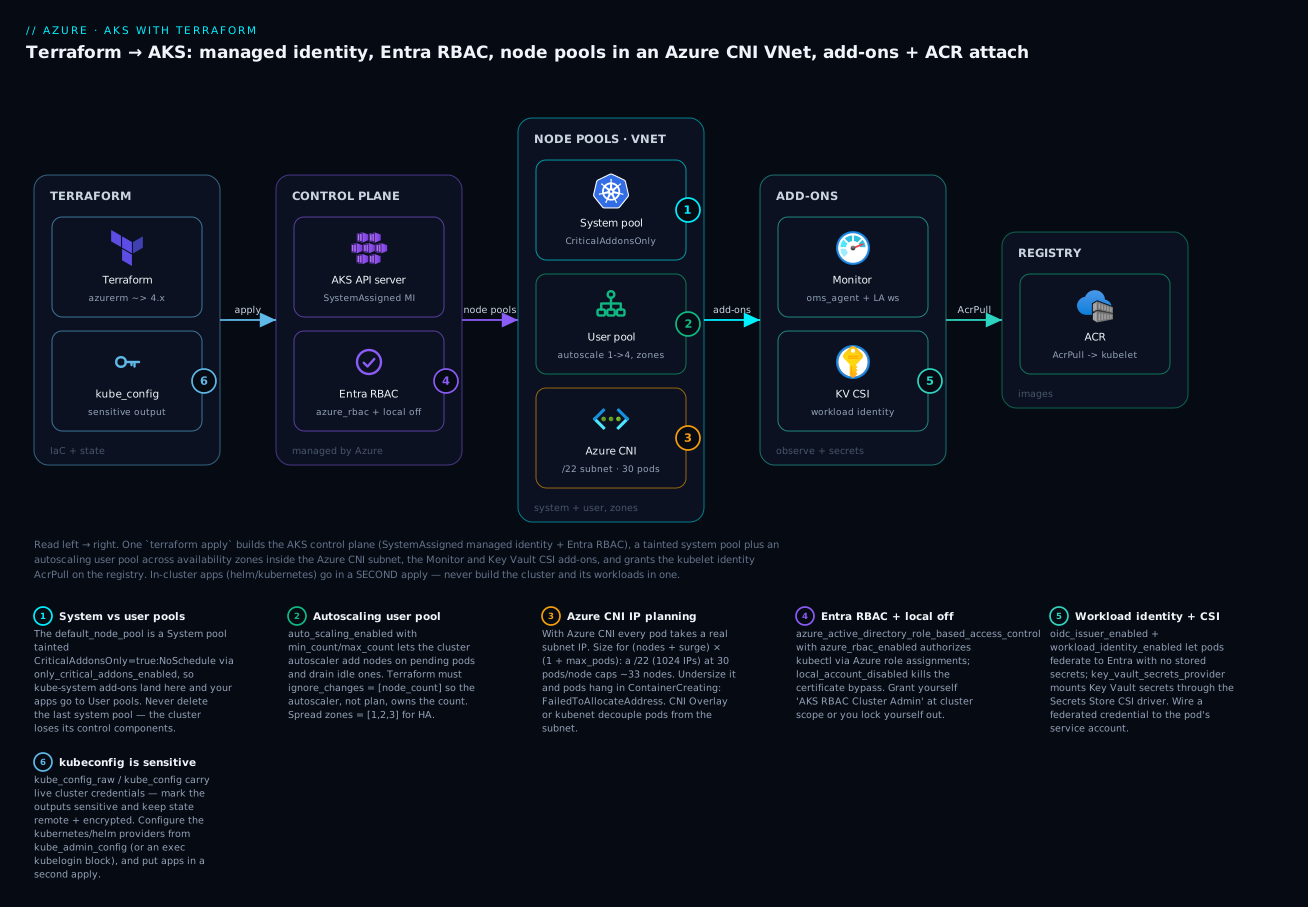
Read the diagram left to right: Terraform (badge 6 — the kube_config outputs are sensitive) applies the control plane (badge 4 — Entra RBAC with local accounts off), which owns a tainted system pool (badge 1) and an autoscaling user pool (badge 2) inside an Azure CNI subnet you must size for pod IPs (badge 3); the Monitor and Key Vault CSI add-ons (badge 5 — workload identity/OIDC) attach, and the kubelet identity is granted AcrPull on the registry. The six legend entries are the six decisions you will make in code below.
The AKS resource model in Terraform
azurerm_kubernetes_cluster is a large resource because AKS is a large service, but it decomposes cleanly. At the top level you set the control-plane properties — Kubernetes version, SKU tier, DNS prefix, the security switches. Then a handful of nested blocks configure the pieces: exactly one default_node_pool (the system pool, created inline), one identity block (how the control plane authenticates to Azure), one network_profile (the CNI and CIDRs), and optional blocks for Entra RBAC and each add-on. Everything else — extra node pools, role assignments — is a separate resource that references the cluster.
The mental model that keeps this straight: the cluster resource is the control plane plus its first node pool; everything you add later is its own resource pointed at the cluster. That is why the default node pool is inline (a cluster cannot exist without one) but the user pool is azurerm_kubernetes_cluster_node_pool (you can have zero or many).
Here are the top-level cluster arguments you will actually set, what each does, and the gotcha attached to it:
| Argument | Type | What it controls | Note |
|---|---|---|---|
name |
string | Cluster resource name | Not the DNS name |
location / resource_group_name |
string | Where it lives | Region must support AZs if you use zones |
dns_prefix |
string | FQDN prefix of the API server | Immutable — changing it recreates the cluster |
kubernetes_version |
string | Control-plane version | Omit patch to auto-pick latest patch; check az aks get-versions |
sku_tier |
string | Free / Standard / Premium |
Standard adds the 99.95% Uptime SLA (~$0.10/hr); Free for labs |
identity (block) |
— | Control-plane identity | SystemAssigned or UserAssigned |
default_node_pool (block) |
— | The inline system pool | Required; see next section |
network_profile (block) |
— | CNI, policy, CIDRs | Immutable after create — plan it once |
azure_active_directory_role_based_access_control (block) |
— | Entra integration | v4 dropped the legacy fields |
local_account_disabled |
bool | Kill the built-in cert admin | true in prod; needs an Azure RBAC grant to you |
oidc_issuer_enabled |
bool | Publish an OIDC issuer URL | Prerequisite for workload identity |
workload_identity_enabled |
bool | Entra Workload Identity webhook | Keyless pod → Azure auth |
azure_policy_enabled |
bool | Gatekeeper/Azure Policy add-on | Governance guardrails |
oms_agent (block) |
— | Container Insights / Monitor | Points at a Log Analytics workspace |
key_vault_secrets_provider (block) |
— | Secrets Store CSI driver | Mount Key Vault secrets as volumes |
automatic_upgrade_channel |
string | Auto-upgrade cadence | patch/stable/rapid/node-image; renamed in v4 |
role_based_access_control_enabled |
bool | K8s RBAC on/off | Defaults true; leave it on |
tags |
map | Azure tags | Your cost/ownership metadata |
Two version notes that will save you a confusing afternoon. First, the azurerm 4.x provider made subscription_id mandatory — either set it on the provider "azurerm" block or export ARM_SUBSCRIPTION_ID. Configurations that worked on 3.x error immediately on 4.x with subscription_id is a required provider property. Second, azurerm 4.0 renamed a batch of AKS arguments; if you are copying older HCL from a blog, translate it:
| azurerm 3.x (old) | azurerm 4.x (current) | Where |
|---|---|---|
enable_auto_scaling |
auto_scaling_enabled |
node pools |
enable_host_encryption |
host_encryption_enabled |
node pools |
enable_node_public_ip |
node_public_ip_enabled |
node pools |
availability_zones |
zones |
node pools |
automatic_channel_upgrade |
automatic_upgrade_channel |
cluster |
node_os_channel_upgrade |
node_os_upgrade_channel |
cluster |
azure_active_directory_role_based_access_control { managed = true, client_app_id, server_app_id, ... } |
block simplified — managed AAD only | cluster |
network_profile { docker_bridge_cidr = ... } |
removed | cluster |
The Entra block change is the one that bites hardest: in v4 the legacy (non-managed) Entra integration is gone, so managed, client_app_id, server_app_id, and server_app_secret are no longer valid arguments. Managed AAD is the only mode, and the block reduces to tenant_id, admin_group_object_ids, and azure_rbac_enabled.
The default (system) node pool and additional node pools
A node pool is a set of identical VMs — a Virtual Machine Scale Set under the hood — that Kubernetes schedules pods onto. AKS distinguishes two modes: a System pool runs the critical kube-system components (CoreDNS, metrics-server, the CSI drivers) and a cluster must always have at least one; User pools run your workloads. The default_node_pool you declare inline is always a System pool. You then add User pools as separate resources. The reason you separate them is blast radius and scheduling: you do not want a runaway workload starving CoreDNS, and you want to scale, taint, and upgrade application capacity independently of the platform’s.
The default_node_pool block carries the system pool’s shape:
| Argument | Example | Meaning |
|---|---|---|
name |
"system" |
1–12 lowercase alphanumerics (Linux) |
vm_size |
"Standard_D2s_v5" |
The VM SKU; 2 vCPU/8 GB is a sane floor |
node_count |
1 |
Fixed size when autoscaling is off |
auto_scaling_enabled |
true |
Turn on the cluster autoscaler for this pool |
min_count / max_count |
1 / 3 |
Bounds when autoscaling is on |
zones |
["1","2","3"] |
Spread nodes across availability zones |
vnet_subnet_id |
azurerm_subnet.aks.id |
Which subnet nodes (and CNI pods) draw IPs from |
orchestrator_version |
"1.30" |
Node Kubernetes version (can trail the control plane) |
os_disk_size_gb |
64 |
OS disk size |
os_disk_type |
"Managed" |
Managed (durable) or Ephemeral (faster, node-local) |
os_sku |
"AzureLinux" |
Ubuntu, AzureLinux (formerly Mariner), or Windows SKUs |
max_pods |
30 |
Pods per node — drives Azure CNI subnet sizing |
only_critical_addons_enabled |
true |
Taints the pool CriticalAddonsOnly=true:NoSchedule |
temporary_name_for_rotation |
"systmp" |
Lets certain in-place changes cycle nodes safely |
upgrade_settings (block) |
max_surge = "33%" |
Surge capacity during upgrades |
node_count versus autoscaling is the decision people get wrong most often. They are mutually exclusive in intent: if auto_scaling_enabled = true, the cluster autoscaler owns the node count and will change it out from under Terraform, so you must stop Terraform fighting it. The two rules:
| Setting | With autoscaling OFF | With autoscaling ON |
|---|---|---|
node_count |
You set it; Terraform enforces it | Initial size only; autoscaler then owns it |
min_count / max_count |
Must be null | Required; the scaling bounds |
| Drift risk | None | plan wants to “correct” node_count every run |
| Fix | — | lifecycle { ignore_changes = [node_count] } |
That ignore_changes on node_count is not optional — without it, every terraform plan after the autoscaler has moved will show a spurious change and every apply will scale you back to the initial count. This is the canonical example from the Meta-Arguments: count, for_each & lifecycle lesson, and AKS is where it earns its keep.
The default node pool has one more restriction worth memorising: it does not accept arbitrary node_taints. The only taint you can put on it is via only_critical_addons_enabled = true, which applies CriticalAddonsOnly=true:NoSchedule and thereby reserves the system pool for platform pods. If you need custom taints on system-adjacent capacity, make a second System-mode pool as an azurerm_kubernetes_cluster_node_pool.
Additional pools are their own resource. The three personalities you will build are user, spot, and occasionally a second system pool:
| Property | System pool | User pool | Spot pool |
|---|---|---|---|
mode |
"System" |
"User" |
"User" |
| Runs | kube-system + optionally apps |
Your workloads | Interruptible batch/stateless |
priority |
"Regular" (default) |
"Regular" |
"Spot" |
eviction_policy |
n/a | n/a | "Delete" or "Deallocate" |
spot_max_price |
n/a | n/a | -1 = pay up to on-demand |
| Can scale to zero | No (min 1) | Yes (min_count = 0) |
Yes (min_count = 0) |
| Typical taint | CriticalAddonsOnly |
none | kubernetes.azure.com/scalesetpriority=spot:NoSchedule |
| Deleting the last one | Forbidden | Fine | Fine |
| Discount | none | none | up to ~90% (evictable) |
A spot pool is the cheapest capacity Azure sells, at the cost of being reclaimable with 30 seconds’ notice. Azure automatically applies the label kubernetes.azure.com/scalesetpriority=spot and the taint kubernetes.azure.com/scalesetpriority=spot:NoSchedule so that only pods that explicitly tolerate spot land there. Declaring that taint in Terraform too keeps the provider from seeing drift on every plan. Here is a spot pool in full, showing the taint/label pattern:
resource "azurerm_kubernetes_cluster_node_pool" "spot" {
  name                  = "spot"
  kubernetes_cluster_id = azurerm_kubernetes_cluster.this.id
  vm_size               = "Standard_D4s_v5"
  mode                  = "User"

  priority        = "Spot"
  eviction_policy = "Delete"
  spot_max_price  = -1 # -1 means "up to the current on-demand price"

  auto_scaling_enabled = true
  min_count            = 0 # spot can scale to zero when idle
  max_count            = 5
  zones                = ["1", "2", "3"]

  # Azure adds these automatically; declaring them stops Terraform drift.
  node_labels = {
    "kubernetes.azure.com/scalesetpriority" = "spot"
  }
  node_taints = [
    "kubernetes.azure.com/scalesetpriority=spot:NoSchedule",
  ]

  lifecycle {
    ignore_changes = [node_count] # the autoscaler owns the count
  }

  tags = { environment = "dev" }
}
Labels versus taints is a distinction people blur. A label is metadata a pod’s nodeSelector/nodeAffinity can target (“put me on the GPU pool”). A taint is a repellent — a node says “nothing schedules here unless it tolerates me.” You use labels to attract specific pods and taints to reserve nodes for specific pods. A GPU pool typically has both: a label workload=gpu so GPU jobs can select it, and a taint sku=gpu:NoSchedule so ordinary pods stay off the expensive hardware.
AKS also sets a batch of well-known labels and taints you will see and select against — know which are Azure’s and which are yours:
| Label / taint | Set by | Meaning / use |
|---|---|---|
kubernetes.azure.com/mode=system|user |
AKS | Pool mode; select add-ons vs apps |
agentpool=<name> |
AKS | Target a specific pool by name |
topology.kubernetes.io/zone |
AKS | The node’s availability zone |
kubernetes.azure.com/scalesetpriority=spot |
AKS (spot pools) | Marks a spot node (a label) |
kubernetes.azure.com/scalesetpriority=spot:NoSchedule |
AKS (spot pools) | Repels non-tolerating pods (a taint) |
CriticalAddonsOnly=true:NoSchedule |
only_critical_addons_enabled |
Reserves the system pool |
node_labels { ... } |
You | Custom selectors on a pool |
node_taints [ ... ] |
You | Custom reservations on a pool |
Cluster identity, kubelet identity & attaching ACR
AKS needs two distinct identities, and conflating them is a frequent source of “why can’t my cluster pull images” tickets. The control-plane identity is what the cluster uses to talk to Azure Resource Manager — to create the load balancer, attach disks, update the route table. The kubelet identity is what the node agents use to pull container images from a registry. They are separate principals with separate permissions.
Your first decision is SystemAssigned versus UserAssigned for the control plane:
| Aspect | SystemAssigned |
UserAssigned |
|---|---|---|
| Lifecycle | Tied to the cluster; deleted with it | Independent azurerm_user_assigned_identity |
| Secrets to manage | None | None |
| Reuse across clusters | No | Yes — one identity, many clusters |
| Role assignments survive rebuild | No (new principal each time) | Yes — grants persist |
| Extra requirement | none | Control-plane MI needs Managed Identity Operator on the kubelet identity |
| Best for | Single clusters, labs, simplicity | Fleets, pre-provisioned RBAC, GitOps |
For this build we use SystemAssigned — it is simpler and there are no secrets either way (this is the whole point of managed identity: no service principal, no client secret to rotate, nothing to leak). The one wrinkle: because a SystemAssigned principal is recreated every time the cluster is recreated, any role assignments you make to it (the AcrPull grant below) must be managed by Terraform so they are re-created too. If you were running a large fleet you would switch to a UserAssigned control-plane identity plus a UserAssigned kubelet identity so the RBAC survives cluster rebuilds — the block becomes identity { type = "UserAssigned"; identity_ids = [azurerm_user_assigned_identity.cp.id] }.
The kubelet identity is the interesting one for registry access. With a SystemAssigned control plane, AKS auto-creates a separate user-assigned identity for the kubelet and exposes its object ID as a computed attribute: azurerm_kubernetes_cluster.this.kubelet_identity[0].object_id. That object ID is the principal you grant AcrPull to. “Attaching ACR” is nothing more magical than an AcrPull role assignment on the registry scoped to the kubelet identity:
resource "azurerm_role_assignment" "aks_acr_pull" {
  scope                            = azurerm_container_registry.this.id
  role_definition_name             = "AcrPull"
  principal_id                     = azurerm_kubernetes_cluster.this.kubelet_identity[0].object_id
  skip_service_principal_aad_check = true
}
That skip_service_principal_aad_check = true matters: the kubelet identity is brand new when this runs, and Entra replication can lag by a few seconds, so without the skip you sometimes get PrincipalNotFound. The flag tells Azure “trust me, this principal exists” and avoids the race. This one role assignment replaces the old, awful pattern of baking registry credentials into an imagePullSecret — the kubelet now authenticates to ACR with its managed identity and no secret exists anywhere.
| Identity | Terraform reference | Grant it |
|---|---|---|
| Control-plane MI | azurerm_kubernetes_cluster.this.identity[0].principal_id |
Network Contributor on a pre-existing VNet (if using one) |
| Kubelet MI | azurerm_kubernetes_cluster.this.kubelet_identity[0].object_id |
AcrPull on the registry |
| Your user/group | data.azurerm_client_config.current.object_id |
AKS RBAC Cluster Admin on the cluster |
Networking: kubenet vs Azure CNI, network policy & CIDRs
The network_profile block is the most consequential decision in the whole configuration, because it is immutable — you cannot switch a cluster from kubenet to Azure CNI, or change its service CIDR, after it is created. Get it right on paper first.
The core choice is the network plugin. Under kubenet, nodes get IPs from your subnet but pods get IPs from a separate, cluster-internal pod_cidr, reached via route-table hops; pods are effectively NAT’d behind their node. Under Azure CNI, every pod gets a real IP from the subnet, so pods are first-class citizens on your VNet — directly routable, directly addressable by peered networks and private endpoints. That routability is why most production clusters choose CNI, and it comes with a cost you must plan for: pods consume subnet IPs fast.
| Dimension | kubenet | Azure CNI (node subnet) | Azure CNI Overlay |
|---|---|---|---|
| Pod IP source | Internal pod_cidr (NAT’d) |
The VNet subnet (real IP) | Internal overlay CIDR |
| Subnet IPs consumed | Nodes only | Nodes + every pod | Nodes only |
| Pods directly routable | No | Yes | No (SNAT out) |
| Max nodes vs subnet | Large (pods off-subnet) | Bounded by subnet size | Large |
| Network policy support | Calico only | Azure / Calico / Cilium | Azure / Cilium |
| Windows nodes | No | Yes | Yes |
| Best for | Small clusters, IP-scarce VNets | Pods needing VNet routability | Large clusters wanting CNI features without IP burn |
For this lesson we use Azure CNI (node subnet) because it is the mode whose IP math you must understand, and because it is what most enterprise clusters run. The network_profile arguments:
| Argument | Value here | Rule |
|---|---|---|
network_plugin |
"azure" |
azure = CNI, kubenet, or none (bring-your-own-CNI) |
network_plugin_mode |
omit | set to "overlay" for CNI Overlay |
network_policy |
"azure" |
azure, calico, or cilium |
service_cidr |
"10.100.0.0/16" |
Cluster-internal Service IPs; must not overlap the VNet |
dns_service_ip |
"10.100.0.10" |
CoreDNS IP; must be inside service_cidr |
pod_cidr |
omit (CNI node subnet) | Only for kubenet or CNI Overlay |
load_balancer_sku |
"standard" |
standard (zonal, required for AZs) or basic |
outbound_type |
"loadBalancer" |
or userDefinedRouting / managedNATGateway |
Network policy is the pod firewall — without it, every pod can talk to every other pod. Three engines are available, and they are not interchangeable:
| Policy engine | Enforces | Notes |
|---|---|---|
azure |
Kubernetes NetworkPolicy |
Azure’s native NPM; simplest, Linux only |
calico |
NetworkPolicy + Calico global policies |
Works with kubenet or CNI; richer, community |
cilium |
NetworkPolicy + eBPF, L7-aware |
Requires network_data_plane = "cilium"; highest performance |
The number that sinks clusters is the Azure CNI subnet size. Because every pod takes a subnet IP, the addresses a pool can consume is (max nodes after surge) × (1 + max_pods) — the 1 is the node’s own IP. Plan the subnet against your maximum scale, not today’s:
| Subnet | Usable IPs | max_pods = 30 caps ~ | max_pods = 50 caps ~ |
|---|---|---|---|
/26 |
~59 | 1 node | 1 node |
/24 |
~251 | ~8 nodes | ~4 nodes |
/22 |
~1019 | ~32 nodes | ~19 nodes |
/21 |
~2043 | ~65 nodes | ~40 nodes |
/20 |
~4091 | ~131 nodes | ~80 nodes |
We use a /22 here (1024 addresses) inside a /16 VNet, leaving headroom for other subnets. Azure reserves 5 IPs per subnet, and you must budget for surge nodes during upgrades (a max_surge = "33%" on a 30-node pool briefly needs ~10 extra nodes’ worth of IPs). Undersize the subnet and the symptom is unmistakable: new pods hang in ContainerCreating with FailedToAllocateAddress, and no amount of node capacity fixes it because the constraint is IPs, not CPU. If you want CNI’s routability without the IP burn, CNI Overlay (network_plugin_mode = "overlay") puts pods on an internal CIDR and only nodes consume subnet IPs — the modern default for large clusters.
Entra ID RBAC & disabling local accounts
Out of the box, an AKS cluster ships with a local admin account — a client certificate baked into kube_admin_config that grants full cluster-admin and bypasses Entra entirely. It is convenient and it is a liability: anyone who can read that certificate (from state, from az aks get-credentials --admin, from a leaked kubeconfig) owns the cluster, with no MFA, no conditional access, no audit trail tied to a human. Production clusters disable it and route all human access through Entra ID.
The azure_active_directory_role_based_access_control block turns on managed Entra integration:
azure_active_directory_role_based_access_control {
  azure_rbac_enabled     = true
  admin_group_object_ids = var.admin_group_object_ids # Entra group → cluster-admin
  tenant_id              = data.azurerm_client_config.current.tenant_id
}
local_account_disabled = true
There are two layers of authorization here, and understanding the split prevents the classic self-lockout:
| Control | What it does | Who authorizes |
|---|---|---|
| Entra authentication | Proves who you are (token from Entra) | Entra ID |
admin_group_object_ids |
Members get cluster-admin via a K8s ClusterRoleBinding |
AKS-managed binding |
azure_rbac_enabled = true |
Authorize with Azure role assignments, not K8s RBAC | Azure RBAC |
local_account_disabled = true |
Removes the certificate bypass | — |
With azure_rbac_enabled = true, you stop managing RoleBinding/ClusterRoleBinding objects inside the cluster and instead grant Azure built-in roles scoped to the cluster: Azure Kubernetes Service RBAC Reader, Writer, Admin, and Cluster Admin. This is the elegant part — cluster access becomes ordinary Azure RBAC, visible in the same place as every other permission, revocable the same way.
The trap: if you set local_account_disabled = true and forget to grant yourself an Azure RBAC role on the cluster, you have locked everyone out — there is no certificate to fall back on. So the configuration must grant the running identity cluster-admin at cluster scope:
resource "azurerm_role_assignment" "me_cluster_admin" {
  scope                = azurerm_kubernetes_cluster.this.id
  role_definition_name = "Azure Kubernetes Service RBAC Cluster Admin"
  principal_id         = data.azurerm_client_config.current.object_id
}
Now az aks get-credentials (no --admin) followed by kubectl authenticates you through Entra and authorises you through that Azure role. The built-in roles map as follows:
| Azure built-in role | Cluster capability |
|---|---|
| AKS RBAC Reader | Read most objects (no Secrets) in namespaces you are scoped to |
| AKS RBAC Writer | Read/write most objects (no cluster-admin resources) |
| AKS RBAC Admin | Admin within a namespace scope |
| AKS RBAC Cluster Admin | Full cluster-admin across the cluster |
| AKS Cluster Admin Role (control-plane) | Can pull the local admin kubeconfig (--admin) — deny in prod |
| AKS Cluster User Role (control-plane) | Can run az aks get-credentials (non-admin) |
Add-ons: Monitor, Azure Policy, Key Vault CSI & Workload Identity
Add-ons are Azure-managed components AKS installs and lifecycles for you — you enable them with an argument or a block instead of running Helm charts yourself. The four you almost always want:
| Add-on | Terraform | What it gives you | Cost driver |
|---|---|---|---|
| Monitor / Container Insights | oms_agent { log_analytics_workspace_id } |
Node/pod metrics + logs in Azure Monitor | Log Analytics ingestion (GB) |
| Azure Policy | azure_policy_enabled = true |
Gatekeeper policies (deny privileged pods, etc.) | Free (compute only) |
| Key Vault Secrets Provider | key_vault_secrets_provider { ... } |
Secrets Store CSI driver — mount KV secrets as files | Free (compute only) |
| Workload Identity | oidc_issuer_enabled + workload_identity_enabled |
Keyless pod → Entra federation | Free |
| Defender for Containers | microsoft_defender { log_analytics_workspace_id } |
Runtime threat detection | Defender plan per vCPU |
The Monitor add-on wires the cluster to a Log Analytics workspace. Prefer the managed-identity auth path (msi_auth_for_monitoring_enabled = true) over the legacy workspace-key method:
oms_agent {
  log_analytics_workspace_id      = azurerm_log_analytics_workspace.this.id
  msi_auth_for_monitoring_enabled = true
}
The Key Vault Secrets Provider installs the Secrets Store CSI driver so a pod can mount a Key Vault secret as a file (and optionally sync it to a Kubernetes Secret). secret_rotation_enabled makes the driver poll for new versions:
key_vault_secrets_provider {
  secret_rotation_enabled  = true
  secret_rotation_interval = "2m"
}
Workload Identity is the modern, keyless way for a pod to authenticate to Azure services (Key Vault, Storage, SQL) with no secret at all. Two switches enable the plumbing:
oidc_issuer_enabled       = true
workload_identity_enabled = true
oidc_issuer_enabled publishes an OIDC issuer URL (exposed as the output oidc_issuer_url) that Entra trusts. workload_identity_enabled installs the mutating webhook that projects a federated token into pods. The full loop — which you would build in a follow-up — federates a Kubernetes ServiceAccount to an Entra identity:
| Piece | Resource | Role |
|---|---|---|
| OIDC issuer | cluster oidc_issuer_url output |
The trust anchor Entra federates against |
| User-assigned identity | azurerm_user_assigned_identity |
The Azure identity the pod becomes |
| Federated credential | azurerm_federated_identity_credential |
Binds system:serviceaccount:<ns>:<sa> to the identity |
| Pod annotation | azure.workload.identity/client-id on the SA |
Tells the webhook which identity to project |
The result: a pod annotated with the right ServiceAccount gets an Entra token automatically, and the KV CSI driver uses that token to pull secrets — no stored credential anywhere in the chain. This is the pattern that replaces the old AAD Pod Identity and the even older practice of mounting a service-principal secret into every pod.
kubeconfig, provider chaining & the split-apply rule
You have a cluster. Now you need to talk to it — and this is where Terraform-provisioned AKS diverges sharply from, say, a VM you SSH into. The credential lives in the cluster’s outputs, and it is radioactive.
azurerm_kubernetes_cluster exposes several credential attributes. Know which is which:
| Attribute | Contents | When populated | Sensitive |
|---|---|---|---|
kube_config_raw |
Full kubeconfig YAML (user/Entra) | Always | Yes |
kube_config[0].host |
API server URL | Always | Yes |
kube_config[0].client_certificate / client_key |
User certs | Empty when Entra RBAC is on | Yes |
kube_config[0].cluster_ca_certificate |
Cluster CA | Always | Yes |
kube_admin_config_raw |
Full admin kubeconfig YAML | Only when local_account_disabled = false |
Yes |
kube_admin_config[0].* |
Admin certs/host/CA | Only when local account enabled | Yes |
oidc_issuer_url |
OIDC issuer | When oidc_issuer_enabled |
No |
Every credential attribute is sensitive, and Terraform enforces it: if you output kube_config_raw without sensitive = true, the plan errors. Mark them and understand what “sensitive” does and does not buy you:
output "kube_config_raw" {
  value     = azurerm_kubernetes_cluster.this.kube_config_raw
  sensitive = true
}
sensitive = true only redacts the value from CLI output. The credential is still stored in plaintext in your state file. That is the real reason the remote backend is non-negotiable for AKS: the state must live in an encrypted, access-controlled, leased blob — never on a laptop, never in git. Anyone with read access to state can read the cluster credential.
Provider chaining
To deploy onto the cluster from Terraform you configure the kubernetes and helm providers from the cluster’s outputs — “provider chaining.” Which attribute you feed them depends on your auth mode:
| Cluster auth | Provider config source | How |
|---|---|---|
| No Entra (local account) | kube_config[0].* |
Static client certs |
| Entra RBAC, local account enabled | kube_admin_config[0].* |
Admin certs (bypass) |
| Entra RBAC, local account disabled | kube_config[0].host + CA + exec |
kubelogin token via exec plugin |
For an Entra cluster with the local account still enabled, chain from kube_admin_config:
provider "kubernetes" {
  host                   = azurerm_kubernetes_cluster.this.kube_admin_config[0].host
  client_certificate     = base64decode(azurerm_kubernetes_cluster.this.kube_admin_config[0].client_certificate)
  client_key             = base64decode(azurerm_kubernetes_cluster.this.kube_admin_config[0].client_key)
  cluster_ca_certificate = base64decode(azurerm_kubernetes_cluster.this.kube_admin_config[0].cluster_ca_certificate)
}
When you disable the local account (the production posture), kube_admin_config is empty and you must authenticate the provider with an exec block that shells out to kubelogin:
provider "kubernetes" {
  host                   = azurerm_kubernetes_cluster.this.kube_config[0].host
  cluster_ca_certificate = base64decode(azurerm_kubernetes_cluster.this.kube_config[0].cluster_ca_certificate)
  exec {
    api_version = "client.authentication.k8s.io/v1beta1"
    command     = "kubelogin"
    args = [
      "get-token", "--login", "azurecli",
      "--server-id", "6dae42f8-4368-4678-94ff-3960e28e3630", # the AKS Entra server app ID (constant)
    ]
  }
}
The split-apply rule (the gotcha that matters most)
Here is the rule you must internalise: do not create the cluster and its in-cluster resources in the same terraform apply. It is seductive — one config, one apply, cluster and app together — and it produces configurations that are fragile at best and un-destroy-able at worst. The reasons:
| Problem | Why it happens | Symptom |
|---|---|---|
| Provider config uses unknown values | The kubernetes provider is configured from cluster attributes not known until apply |
Provider configuration ... depends on resource attributes that cannot be determined until apply |
kubernetes_manifest needs a live API at plan |
It does a server-side dry-run against the cluster | dial tcp ...: connect: connection refused during plan |
| Destroy ordering inverts | Terraform may plan to destroy the cluster before the workloads that need it | Hung or errored destroy |
| One blast radius | An app typo forces re-plan of the whole cluster | Slow, scary applies |
The fix is architectural: two root configurations (two states). The first builds the cluster and platform (this lesson). The second reads the cluster — via a remote-state data source or data "azurerm_kubernetes_cluster" — configures the kubernetes/helm providers from that, and deploys workloads. The cluster’s lifecycle and the apps’ lifecycle are now independent, plan-time API access is available because the cluster already exists, and destroy is clean in each layer. We build both layers below.
Hands-on: build it with Terraform
Time to run it. This is a complete, self-contained configuration; paste each file into a directory (say aks-cluster/) and follow the numbered steps. ⚠️ This provisions real, billable resources — node VMs, a load balancer, a registry, log ingestion. Do the destroy at the end.
Step 1 — versions.tf (providers + backend)
terraform {
  required_version = ">= 1.6"

  required_providers {
    azurerm = {
      source  = "hashicorp/azurerm"
      version = "~> 4.0"
    }
    random = {
      source  = "hashicorp/random"
      version = "~> 3.6"
    }
  }

  # Remote state — an Azure Storage blob with lease-based locking.
  # Create this backend once per the "Getting Started on Azure" lesson.
  backend "azurerm" {
    resource_group_name  = "rg-tfstate"
    storage_account_name = "sttfstateaksdemo01" # must be globally unique
    container_name       = "tfstate"
    key                  = "aks/dev.tfstate"
  }
}

provider "azurerm" {
  features {}
  subscription_id = var.subscription_id # required by azurerm 4.x
}

data "azurerm_client_config" "current" {}
Step 2 — variables.tf
variable "subscription_id" {
  description = "Target Azure subscription ID"
  type        = string
}

variable "prefix" {
  description = "Name prefix for all resources"
  type        = string
  default     = "kv-aks-dev"
}

variable "location" {
  description = "Azure region (must support availability zones)"
  type        = string
  default     = "centralindia"
}

variable "kubernetes_version" {
  description = "Control-plane version; check `az aks get-versions -l <region> -o table`"
  type        = string
  default     = "1.30"
}

variable "zones" {
  description = "Availability zones to spread nodes across"
  type        = list(string)
  default     = ["1", "2", "3"]
}

variable "system_vm_size" {
  type    = string
  default = "Standard_D2s_v5" # 2 vCPU / 8 GB
}

variable "user_vm_size" {
  type    = string
  default = "Standard_D2s_v5"
}

variable "user_min_count" {
  type    = number
  default = 1
}

variable "user_max_count" {
  type    = number
  default = 4
}

variable "vnet_cidr" {
  type    = string
  default = "10.20.0.0/16"
}

variable "aks_subnet_cidr" {
  type    = string
  default = "10.20.0.0/22" # 1024 IPs — Azure CNI needs one per pod
}

variable "service_cidr" {
  type    = string
  default = "10.100.0.0/16" # must NOT overlap the VNet
}

variable "dns_service_ip" {
  type    = string
  default = "10.100.0.10" # must be inside service_cidr
}

variable "admin_group_object_ids" {
  description = "Entra group object IDs granted cluster-admin"
  type        = list(string)
  default     = []
}

variable "local_account_disabled" {
  description = "Disable the built-in local admin (true in prod)"
  type        = bool
  default     = false # kept false for the lab so `--admin` works; flip to true for prod
}

variable "tags" {
  type = map(string)
  default = {
    environment = "dev"
    managed_by  = "terraform"
    course      = "terraform-zero-to-hero"
  }
}
Step 3 — main.tf (the resources)
resource "random_string" "suffix" {
  length  = 6
  special = false
  upper   = false
}

resource "azurerm_resource_group" "this" {
  name     = "rg-${var.prefix}"
  location = var.location
  tags     = var.tags
}

# ---- Network ---------------------------------------------------------------
resource "azurerm_virtual_network" "this" {
  name                = "${var.prefix}-vnet"
  location            = azurerm_resource_group.this.location
  resource_group_name = azurerm_resource_group.this.name
  address_space       = [var.vnet_cidr]
  tags                = var.tags
}

resource "azurerm_subnet" "aks" {
  name                 = "snet-aks"
  resource_group_name  = azurerm_resource_group.this.name
  virtual_network_name = azurerm_virtual_network.this.name
  address_prefixes     = [var.aks_subnet_cidr]
}

# ---- Observability + registry ---------------------------------------------
resource "azurerm_log_analytics_workspace" "this" {
  name                = "${var.prefix}-law"
  location            = azurerm_resource_group.this.location
  resource_group_name = azurerm_resource_group.this.name
  sku                 = "PerGB2018"
  retention_in_days   = 30
  tags                = var.tags
}

resource "azurerm_container_registry" "this" {
  name                = "${replace(var.prefix, "-", "")}acr${random_string.suffix.result}"
  resource_group_name = azurerm_resource_group.this.name
  location            = azurerm_resource_group.this.location
  sku                 = "Standard"
  admin_enabled       = false # never use the admin user — the kubelet MI pulls
  tags                = var.tags
}

# ---- The cluster -----------------------------------------------------------
resource "azurerm_kubernetes_cluster" "this" {
  name                = "${var.prefix}-aks"
  location            = azurerm_resource_group.this.location
  resource_group_name = azurerm_resource_group.this.name
  dns_prefix          = "${var.prefix}-aks"
  kubernetes_version  = var.kubernetes_version
  sku_tier            = "Free" # "Standard" adds the Uptime SLA in prod

  local_account_disabled    = var.local_account_disabled
  oidc_issuer_enabled       = true
  workload_identity_enabled = true
  azure_policy_enabled      = true

  default_node_pool {
    name                         = "system"
    vm_size                      = var.system_vm_size
    node_count                   = 1
    zones                        = var.zones
    vnet_subnet_id               = azurerm_subnet.aks.id
    orchestrator_version         = var.kubernetes_version
    os_sku                       = "AzureLinux"
    os_disk_size_gb              = 64
    max_pods                     = 30
    only_critical_addons_enabled = true # taint CriticalAddonsOnly — apps go to the user pool

    upgrade_settings {
      max_surge = "33%"
    }
  }

  identity {
    type = "SystemAssigned"
  }

  network_profile {
    network_plugin    = "azure" # Azure CNI
    network_policy    = "azure"
    service_cidr      = var.service_cidr
    dns_service_ip    = var.dns_service_ip
    load_balancer_sku = "standard"
  }

  azure_active_directory_role_based_access_control {
    azure_rbac_enabled     = true
    admin_group_object_ids = var.admin_group_object_ids
    tenant_id              = data.azurerm_client_config.current.tenant_id
  }

  oms_agent {
    log_analytics_workspace_id      = azurerm_log_analytics_workspace.this.id
    msi_auth_for_monitoring_enabled = true
  }

  key_vault_secrets_provider {
    secret_rotation_enabled  = true
    secret_rotation_interval = "2m"
  }

  tags = var.tags
}

# ---- Autoscaling user node pool -------------------------------------------
resource "azurerm_kubernetes_cluster_node_pool" "user" {
  name                  = "user"
  kubernetes_cluster_id = azurerm_kubernetes_cluster.this.id
  vm_size               = var.user_vm_size
  mode                  = "User"

  auto_scaling_enabled = true
  min_count            = var.user_min_count
  max_count            = var.user_max_count
  zones                = var.zones
  vnet_subnet_id       = azurerm_subnet.aks.id
  orchestrator_version = var.kubernetes_version
  os_sku               = "AzureLinux"
  max_pods             = 30

  node_labels = {
    "workload" = "general"
  }

  lifecycle {
    ignore_changes = [node_count] # the cluster autoscaler owns the count
  }

  tags = var.tags
}

# ---- Role assignments ------------------------------------------------------
# Kubelet identity may pull from the registry (no imagePullSecret needed).
resource "azurerm_role_assignment" "aks_acr_pull" {
  scope                            = azurerm_container_registry.this.id
  role_definition_name             = "AcrPull"
  principal_id                     = azurerm_kubernetes_cluster.this.kubelet_identity[0].object_id
  skip_service_principal_aad_check = true
}

# You get cluster-admin via Azure RBAC (essential when local_account_disabled = true).
resource "azurerm_role_assignment" "me_cluster_admin" {
  scope                = azurerm_kubernetes_cluster.this.id
  role_definition_name = "Azure Kubernetes Service RBAC Cluster Admin"
  principal_id         = data.azurerm_client_config.current.object_id
}
Step 4 — outputs.tf
output "cluster_name" {
  value = azurerm_kubernetes_cluster.this.name
}

output "resource_group" {
  value = azurerm_resource_group.this.name
}

output "acr_login_server" {
  value = azurerm_container_registry.this.login_server
}

output "oidc_issuer_url" {
  value = azurerm_kubernetes_cluster.this.oidc_issuer_url
}

output "kubelet_identity_object_id" {
  value = azurerm_kubernetes_cluster.this.kubelet_identity[0].object_id
}

# ⚠️ Sensitive — the full kubeconfig. Terraform requires sensitive = true.
output "kube_config_raw" {
  value     = azurerm_kubernetes_cluster.this.kube_config_raw
  sensitive = true
}
Step 5 — init, plan, apply
Set the subscription and initialise:
export ARM_SUBSCRIPTION_ID="$(az account show --query id -o tsv)"
terraform init
Initializing the backend...
Successfully configured the backend "azurerm"!
Initializing provider plugins...
- Installing hashicorp/azurerm v4.x.x...
- Installing hashicorp/random v3.6.x...
Terraform has been successfully initialized!
Plan it (pass the subscription via a var or the env var above):
terraform plan -out=aks.plan
Terraform will perform the following actions:

  # azurerm_kubernetes_cluster.this will be created
  + resource "azurerm_kubernetes_cluster" "this" {
      + dns_prefix                = "kv-aks-dev-aks"
      + kubernetes_version        = "1.30"
      + local_account_disabled    = false
      + oidc_issuer_enabled       = true
      + workload_identity_enabled = true
      + kube_config_raw           = (sensitive value)
      + default_node_pool { name = "system"; vm_size = "Standard_D2s_v5"; ... }
      + identity { type = "SystemAssigned" }
      + network_profile { network_plugin = "azure"; service_cidr = "10.100.0.0/16"; ... }
    }
  # azurerm_kubernetes_cluster_node_pool.user will be created
  # azurerm_role_assignment.aks_acr_pull will be created
  # ... (resource group, vnet, subnet, workspace, registry, role assignment)

Plan: 9 to add, 0 to change, 0 to destroy.
Apply (the cluster typically takes 4–8 minutes):
terraform apply aks.plan
azurerm_kubernetes_cluster.this: Still creating... [4m30s elapsed]
azurerm_kubernetes_cluster.this: Creation complete after 5m12s
azurerm_kubernetes_cluster_node_pool.user: Creation complete after 1m40s
azurerm_role_assignment.aks_acr_pull: Creation complete after 8s

Apply complete! Resources: 9 added, 0 changed, 0 destroyed.

Outputs:
acr_login_server = "kvaksdevacrb3f9k2.azurecr.io"
oidc_issuer_url  = "https://centralindia.oic.prod-aks.azure.com/<tenant>/<guid>/"
Step 6 — get a kubeconfig and verify
Pull credentials and prove the cluster. Because local_account_disabled = false in the lab, the quickest verification uses the local admin credential:
az aks get-credentials \
  --resource-group "$(terraform output -raw resource_group)" \
  --name "$(terraform output -raw cluster_name)" \
  --admin --overwrite-existing

kubectl get nodes -o wide
NAME                             STATUS   ROLES   AGE     VERSION   ZONE
aks-system-2043...-vmss000000    Ready    <none>  6m      v1.30.x   centralindia-1
aks-user-7781...-vmss000000      Ready    <none>  4m      v1.30.x   centralindia-2
Two nodes: the single system node and one user node (the autoscaler’s minimum). Note the different zones — HA is working. The production-correct path (no --admin) uses the Azure RBAC grant you created; it authenticates through Entra via kubelogin:
az aks get-credentials -g "$(terraform output -raw resource_group)" \
  -n "$(terraform output -raw cluster_name)" --overwrite-existing
kubectl get nodes   # opens an Entra login the first time
Confirm the add-ons landed and the system pool is tainted:
kubectl get pods -n kube-system | grep -E "ama-logs|azure-policy|secrets-store"
kubectl describe node -l kubernetes.azure.com/mode=system | grep Taints
# Taints: CriticalAddonsOnly=true:NoSchedule
Run through the full smoke-test checklist so you know every piece of the build actually landed:
| Check | Command | Expect |
|---|---|---|
| Nodes ready across zones | kubectl get nodes -o wide |
2 nodes, different ZONE |
| Add-on pods running | kubectl get pods -n kube-system |
ama-logs, azure-policy, secrets-store-csi-driver |
| System pool is tainted | kubectl describe node -l kubernetes.azure.com/mode=system |
CriticalAddonsOnly=true:NoSchedule |
| OIDC issuer published | terraform output oidc_issuer_url |
an https://...oic... URL |
| Autoscaler bounds set | az aks nodepool show -g RG --cluster-name NAME -n user --query '{min:minCount,max:maxCount}' |
1 / 4 |
| ACR pull authorised | kubectl run t --image=<acr>.azurecr.io/<img> --restart=Never |
Running (no ImagePullBackOff) |
Step 7 — deploy an app via provider chaining (the SECOND apply)
Per the split-apply rule, workloads live in a separate configuration. Create aks-apps/ with its own state. It reads the cluster as a data source and chains the kubernetes/helm providers from it:
# aks-apps/versions.tf
terraform {
  required_providers {
    azurerm    = { source = "hashicorp/azurerm", version = "~> 4.0" }
    helm       = { source = "hashicorp/helm", version = "~> 2.17" }
    kubernetes = { source = "hashicorp/kubernetes", version = "~> 2.35" }
  }
  backend "azurerm" { # separate state key!
    resource_group_name  = "rg-tfstate"
    storage_account_name = "sttfstateaksdemo01"
    container_name       = "tfstate"
    key                  = "aks/apps.tfstate"
  }
}

provider "azurerm" {
  features {}
  subscription_id = var.subscription_id
}

data "azurerm_kubernetes_cluster" "this" {
  name                = "kv-aks-dev-aks"
  resource_group_name = "rg-kv-aks-dev"
}

provider "kubernetes" {
  host                   = data.azurerm_kubernetes_cluster.this.kube_admin_config[0].host
  client_certificate     = base64decode(data.azurerm_kubernetes_cluster.this.kube_admin_config[0].client_certificate)
  client_key             = base64decode(data.azurerm_kubernetes_cluster.this.kube_admin_config[0].client_key)
  cluster_ca_certificate = base64decode(data.azurerm_kubernetes_cluster.this.kube_admin_config[0].cluster_ca_certificate)
}

provider "helm" {
  kubernetes {
    host                   = data.azurerm_kubernetes_cluster.this.kube_admin_config[0].host
    client_certificate     = base64decode(data.azurerm_kubernetes_cluster.this.kube_admin_config[0].client_certificate)
    client_key             = base64decode(data.azurerm_kubernetes_cluster.this.kube_admin_config[0].client_key)
    cluster_ca_certificate = base64decode(data.azurerm_kubernetes_cluster.this.kube_admin_config[0].cluster_ca_certificate)
  }
}
# aks-apps/main.tf — a Helm release + a raw manifest, as a taste
resource "helm_release" "podinfo" {
  name             = "podinfo"
  repository       = "https://stefanprodan.github.io/podinfo"
  chart            = "podinfo"
  version          = "6.7.1"
  namespace        = "demo"
  create_namespace = true

  set {
    name  = "replicaCount"
    value = "2"
  }
}

# kubernetes_manifest needs a LIVE cluster at plan time — only works because
# the cluster already exists (built by the other config). Never colocate this
# with the cluster resource.
resource "kubernetes_manifest" "demo_quota" {
  manifest = {
    apiVersion = "v1"
    kind       = "ResourceQuota"
    metadata   = { name = "demo-quota", namespace = "demo" }
    spec       = { hard = { "requests.cpu" = "2", "requests.memory" = "2Gi" } }
  }
  depends_on = [helm_release.podinfo]
}
cd ../aks-apps && terraform init && terraform apply
# helm_release.podinfo: Creation complete after 25s
kubectl get pods -n demo
⚠️ helm provider version note: the nested
kubernetes { ... }block shown is thehelm2.x syntax. Thehelm3.x provider (2025) flattens this configuration — if you pin~> 3.0, move the connection settings to the provider’s top level. Both run identically on OpenTofu.
Step 8 — destroy & clean up
⚠️ Tear down apps first (they depend on the cluster), then the cluster:
cd aks-apps  && terraform destroy -auto-approve
cd ../aks-cluster && terraform destroy -auto-approve
kubectl config delete-context "$(terraform output -raw cluster_name)-admin" 2>/dev/null || true
Destroy complete! Resources: 9 destroyed.
This is exactly why the two configs matter: destroying aks-apps first cleanly removes the workloads while the cluster is still up, then the cluster config tears down everything else. Colocated, Terraform would have wrestled the ordering.
Variables, outputs & making it reusable
The demo already parameterises the important knobs, but a real platform team wraps this in a module and drives the number and shape of user pools from data, not copy-paste. The pattern is for_each over a map of pool definitions — the same technique the Meta-Arguments lesson teaches, applied to node pools:
variable "user_node_pools" {
  description = "Map of user node pools to create"
  type = map(object({
    vm_size   = string
    min_count = number
    max_count = number
    spot      = optional(bool, false)
    labels    = optional(map(string), {})
    taints    = optional(list(string), [])
  }))
  default = {
    general = { vm_size = "Standard_D2s_v5", min_count = 1, max_count = 4 }
    batch   = { vm_size = "Standard_D4s_v5", min_count = 0, max_count = 6, spot = true }
  }
}

resource "azurerm_kubernetes_cluster_node_pool" "pools" {
  for_each = var.user_node_pools

  name                  = each.key
  kubernetes_cluster_id = azurerm_kubernetes_cluster.this.id
  vm_size               = each.value.vm_size
  mode                  = "User"
  auto_scaling_enabled  = true
  min_count             = each.value.min_count
  max_count             = each.value.max_count
  zones                 = var.zones
  vnet_subnet_id        = azurerm_subnet.aks.id

  priority        = each.value.spot ? "Spot" : "Regular"
  eviction_policy = each.value.spot ? "Delete" : null
  spot_max_price  = each.value.spot ? -1 : null

  node_labels = each.value.labels
  node_taints = each.value.taints

  lifecycle {
    ignore_changes = [node_count]
  }
}
Now adding a GPU pool or a Windows pool is a two-line map entry, not a new resource block. Wrap the cluster, network, and this for_each into a module with clear inputs, and you have a reusable AKS building block — the discipline from Authoring Terraform Modules.
Should you roll your own or use the registry module? The community Azure/aks/azurerm module is comprehensive and battle-tested, and for many teams it is the right answer. The trade-off:
| Consideration | Roll your own | Azure/aks/azurerm (registry) |
|---|---|---|
| Control / transparency | Total — you own every line | Abstracted behind inputs |
| Surface area | Only what you need | Large; many optional features |
| Upgrades | You track provider changes | Module version bumps (with churn) |
| Learning value | High | Low — it hides the mechanics |
| Best for | Opinionated platforms, learning | Fast standardisation, big fleets |
The honest recommendation: build it yourself once (this lesson) so you understand every argument, then decide whether the registry module’s convenience outweighs the abstraction for your team. You cannot sensibly consume the module until you know what it is hiding. See Module Sources & Composition for pinning and consuming registry modules safely.
Common mistakes and troubleshooting
The failures below are the ones that actually page people. Scan the table, then read the prose on the five nastiest.
| Symptom | Likely cause | Fix |
|---|---|---|
kubectl → error: You must be logged in to the server (Unauthorized) |
Entra RBAC on but no Azure role granted to you | Assign AKS RBAC Cluster Admin at cluster scope; re-run get-credentials |
az aks get-credentials --admin → Forbidden |
local_account_disabled = true |
Use the non-admin path with kubelogin; you cannot get admin certs |
Pods stuck ContainerCreating, FailedToAllocateAddress |
Azure CNI subnet out of IPs | Subnet too small — resize/rebuild with a bigger prefix (immutable) |
Plan shows node_count change every run |
Autoscaler moved the count | Add lifecycle { ignore_changes = [node_count] } |
Error: subscription_id is a required provider property |
azurerm 4.x | Set subscription_id or export ARM_SUBSCRIPTION_ID |
Changing vm_size forces full pool replace |
Node pool fields are immutable | Set temporary_name_for_rotation to cycle in place |
kubernetes_manifest → connection refused at plan |
Cluster/app in one apply, no live API | Split into two configs; the cluster must pre-exist |
ACR pull 401 Unauthorized / ImagePullBackOff |
AcrPull not granted to kubelet MI |
Add the role assignment on kubelet_identity[0].object_id |
network_profile change wants to recreate cluster |
CNI/CIDRs are immutable | Plan networking once; rebuild to change it |
PrincipalNotFound on the role assignment |
Entra replication lag on a new MI | skip_service_principal_aad_check = true |
Cluster create fails: dns_service_ip not in service_cidr |
Misconfigured CIDRs | dns_service_ip must sit inside service_cidr |
Cannot delete the last system node pool |
Tried to remove/convert the only system pool | Keep ≥1 System-mode pool at all times |
Auth to the cluster is the number-one first-day failure, and it is almost always the self-lockout: you enabled azure_rbac_enabled and/or local_account_disabled but never granted yourself an Azure RBAC role, so Entra authenticates you and then Azure RBAC denies you. The fix is the me_cluster_admin role assignment in the demo. If you are already locked out and local accounts are still enabled, --admin is your escape hatch; if they are disabled, you need someone with Owner/User Access Administrator on the cluster to grant you the role.
CNI IP exhaustion is insidious because it looks like a capacity problem when it is an addressing problem. Nodes are Ready, CPU is fine, yet pods will not start — kubectl describe pod shows FailedToAllocateAddress. You ran out of subnet IPs, and because the subnet prefix is effectively immutable for a live cluster, the real fix is to have sized it correctly up front, or to migrate to CNI Overlay so pods stop consuming subnet IPs. Always compute (max nodes + surge) × (1 + max_pods) before you apply.
Node-pool upgrades trip people when they change an immutable field. Editing vm_size, os_disk_size_gb, zones, or the subnet on an existing pool forces a replace, and by default Terraform destroys the pool before creating the new one — a hard outage for that capacity. Setting temporary_name_for_rotation on the default node pool lets AKS spin up a temporary pool, drain onto it, and cycle the original in place. For version upgrades specifically, bump orchestrator_version (and kubernetes_version for the control plane) — that is an in-place, surge-based rolling upgrade, not a replacement.
Sensitive kubeconfig is a footgun that is easy to fire. kube_config_raw and every kube_*_config attribute are cluster credentials. They are stored in plaintext in state, so: keep state remote and encrypted, never output them without sensitive = true, never echo terraform output kube_config_raw into a log or a CI artifact, and prefer az aks get-credentials (which fetches a fresh, scoped credential) over passing the Terraform output around. If a kubeconfig leaks, rotate the cluster certificates (az aks rotate-certs).
Provider ordering — the split-apply rule — deserves repeating because the failure is confusing. If you colocate the cluster and a kubernetes/helm resource, on a clean apply Terraform must configure the kubernetes provider from cluster attributes that do not exist yet, and either errors or (worse) succeeds fragilely and then breaks on the next change or destroy. kubernetes_manifest is the strictest: it contacts the API server at plan time, so it simply cannot exist in the same run that creates the cluster. Two states, always.
Cost, cleanup & production notes
AKS’s own control plane is free in the Free SKU tier — you pay for the nodes and the surrounding resources, not the managed masters. Rough Central India pay-as-you-go figures for this demo, to make the “destroy it” case concrete:
| Component | Rate (approx) | Left running ~24h |
|---|---|---|
AKS control plane (Free tier) |
₹0 | ₹0 |
2 × Standard_D2s_v5 nodes |
~₹8/hr each | ~₹380 |
| Standard Load Balancer + public IP | ~₹2/hr | ~₹48 |
ACR (Standard) |
~₹55/day | ~₹55 |
| Log Analytics (Container Insights) | per-GB ingest | ~₹40–150 |
| Managed OS disks (2 × 64 GB) | small | ~₹20 |
| Rough total | — | ~₹550–650/day |
Switching sku_tier to Standard adds the Uptime SLA at roughly ₹8/hr (~₹6,000/month) — worth it for production, wasteful for a lab. The single biggest lever is simply not leaving it running: terraform destroy both configs when you finish. For the cheapest possible lab, drop ACR to Basic, use one Standard_B2ms node, and set Log Analytics retention to the 30-day minimum (as here).
Five production-hardening notes beyond the demo:
- State is the crown jewels. The kubeconfig lives in it. Use the remote azurerm backend with RBAC on the storage account, soft-delete/versioning on the container, and network restrictions. Never local state for a cluster.
- Disable local accounts and lean on Entra + Azure RBAC. Flip
local_account_disabled = true, drive access through Entra groups and Azure role assignments, and require MFA/conditional access. The certificate bypass is a standing risk. - Right-size and future-proof the CNI subnet, or adopt CNI Overlay. IP exhaustion is a rebuild-to-fix problem; a
/22–/21with Overlay under consideration is cheap insurance. - Turn on managed upgrades and maintenance windows.
automatic_upgrade_channel = "patch"plus amaintenance_windowkeeps you patched without surprise reboots, andStandardtier gives you the SLA to back it. - Tag everything and watch drift. Consistent
tags, plus scheduledterraform planin CI (drift detection), catch out-of-band portal changes before they compound — the discipline from the drift-detection lesson.
The AWS equivalent of this whole build is EKS — a cluster plus VPC plus managed node groups, with IRSA playing the role Azure Workload Identity plays here; that lives in the AWS track of this course (an eks cluster provisioned with aws_eks_cluster + aws_eks_node_group, granting pods AWS permissions via OIDC-federated IAM roles instead of Entra federated credentials). The shape rhymes: a control plane, node pools/groups, an OIDC issuer, and keyless pod identity.
Going deeper
The hands-on build is deliberately the simple correct shape. Six facets sit one layer below it — the ones that separate “it applied” from “it survives day 2.”
The temporary_name_for_rotation trap — which changes replace a whole pool
A node pool is a Scale Set, and several of its fields are immutable: change vm_size, os_disk_size_gb, os_disk_type, os_sku, zones, max_pods, or the subnet and Terraform’s only option is to replace the pool — destroy, then create. For the inline default_node_pool that means a moment with no system pool, which AKS forbids, so a naive vm_size bump on the system pool fails outright. temporary_name_for_rotation is the escape hatch: give it a spare name (≤12 chars, e.g. "systmp") and AKS provisions a temporary pool of the new shape, cordons and drains the old nodes onto it, deletes the original, then renames the temp pool back. The change becomes an in-place rolling rotation instead of a destructive replace. Set it before you need it — adding temporary_name_for_rotation in the same plan that changes vm_size works; discovering you need it after the plan already says “forces replacement” means an outage. What is not immutable and rotates cheaply in place: node_count, min_count/max_count, and orchestrator_version (a surge upgrade).
Tuning the cluster autoscaler with auto_scaler_profile
The per-pool min_count/max_count set the bounds; the cluster-wide auto_scaler_profile block tunes the autoscaler’s behaviour — and its defaults are conservative. The knobs that matter most:
| Field | Default | What it changes |
|---|---|---|
expander |
random |
Which pool to grow: least-waste bin-packs, priority honours your ranking |
scale_down_unneeded |
10m |
How long a node sits idle before removal |
scale_down_utilization_threshold |
0.5 |
Below this utilisation a node is “unneeded” |
skip_nodes_with_system_pods |
true |
Don’t scale down nodes running kube-system pods |
skip_nodes_with_local_storage |
true |
Don’t scale down nodes with local emptyDir/hostPath |
scan_interval |
10s |
How often the autoscaler re-evaluates |
auto_scaler_profile {
  expander                         = "least-waste"
  scale_down_unneeded              = "5m"
  scale_down_utilization_threshold = "0.5"
  skip_nodes_with_system_pods      = true
}
least-waste is the single highest-value change for cost: it grows the pool whose new node will be most fully used by the pending pods, instead of a random one.
Node Auto-Provisioning — Karpenter for AKS
The cluster autoscaler can only resize pools you pre-defined. Node Auto-Provisioning (NAP) — AKS’s implementation of the Karpenter project, GA since 2025 — inverts that: it watches pending pods and provisions right-sized VMs on the fly, choosing the SKU, zone, and spot/on-demand mix itself. It is the AKS analogue of the same Karpenter you meet in the EKS track. In the provider it is a block, not a flag:
node_provisioning_profile {
  mode = "Auto" # "Manual" (default) = classic cluster autoscaler
}
NAP has hard prerequisites: it needs Azure CNI Overlay with the Cilium data plane (network_plugin_mode = "overlay", network_data_plane = "cilium") and still requires one system pool to bootstrap. Because it is newer than some provider releases, older azurerm versions lack the block — the fallback is the azapi provider setting nodeProvisioningProfile on the cluster. With NAP on you stop hand-sizing user pools; you describe constraints (via Karpenter NodePool/AKSNodeClass custom resources) and let it choose the nodes.
Azure CNI, one layer down: dynamic pod-subnet allocation & Cilium
The lesson uses “node-subnet” Azure CNI, where nodes and pods share one subnet — simple, but every pod burns a subnet IP. Two evolutions relax that. Dynamic IP allocation gives a node pool its own pod_subnet_id, separate from the node subnet, so pod IPs and node IPs scale independently and you can grow pods without resizing the node subnet:
default_node_pool {
  # ...
  vnet_subnet_id = azurerm_subnet.nodes.id # nodes draw IPs here
  pod_subnet_id  = azurerm_subnet.pods.id  # pods draw IPs here — a separate, larger subnet
}
CNI Overlay goes further — pods live on an internal overlay CIDR and consume no VNet IPs at all, at the cost of pods not being directly routable from outside without SNAT. Layered on top is the data plane choice: network_data_plane = "cilium" swaps Azure’s iptables-based networking for eBPF, giving faster service routing and L3/L4 (plus some L7) network policy enforced in the kernel. “Azure CNI Overlay Powered by Cilium” (overlay + cilium) is the current recommendation for new large clusters, and — as above — the prerequisite for NAP.
Workload Identity end to end: the federated-credential handshake
The lesson enables the plumbing (oidc_issuer_enabled + workload_identity_enabled); here is why it produces keyless auth. When oidc_issuer_enabled = true, AKS publishes a standard OIDC discovery document at the oidc_issuer_url — a public, signed set of keys anyone can use to verify tokens the cluster mints for ServiceAccounts. You then create an azurerm_federated_identity_credential that tells an Entra user-assigned identity to trust tokens from that issuer whose subject equals system:serviceaccount:<namespace>:<sa-name>. At runtime the mutating webhook projects a short-lived, signed ServiceAccount token into the pod; the Azure SDK exchanges it at Entra for a real Azure access token; Entra validates the signature against the published OIDC keys and, seeing the trusted subject, issues the token. No secret is stored, mounted, or rotated anywhere. This is exactly the mechanism EKS calls IRSA — the same OIDC federation, with an IAM role and sts:AssumeRoleWithWebIdentity in place of the Entra identity and federated credential.
Automatic upgrades & maintenance windows in HCL
Kubernetes ships a new minor version roughly quarterly and AKS supports each for about a year, so a cluster you forget is a cluster that falls out of support. Two channels automate the two layers, and the window blocks fence when the churn is allowed:
| Argument / block | Controls | Values |
|---|---|---|
automatic_upgrade_channel |
Control-plane + node Kubernetes version | patch, stable, rapid, node-image (omit = none) |
node_os_upgrade_channel |
Node OS image patching | NodeImage (default), SecurityPatch, Unmanaged, None |
maintenance_window_auto_upgrade |
When K8s auto-upgrades may run | frequency/day_of_week/start_time/duration |
maintenance_window_node_os |
When node-OS patches may run | same shape as above |
automatic_upgrade_channel = "patch" # newest patch of your current minor
node_os_upgrade_channel   = "NodeImage"

maintenance_window_auto_upgrade {
  frequency   = "Weekly"
  interval    = 1
  duration    = 4 # hours; minimum 4
  day_of_week = "Sunday"
  start_time  = "02:00"
  utc_offset  = "+05:30"
}
patch keeps you on the newest patch of your current minor (e.g. 1.30.x) without jumping minors; stable follows one-behind-latest minors automatically. Pair either with a window so upgrades land at 2 a.m. Sunday, not mid-Monday-morning.
Common beginner mistakes
These are misconceptions rather than error messages — the wrong mental model that produces the errors in the troubleshooting table.
-
“Turning on autoscaling means I just set a bigger
node_count.” No —node_countand autoscaling are two different owners of the same number. Withauto_scaling_enabled = true,node_countis only the initial size; the cluster autoscaler then owns it and moves it based on pending pods. Setmin_count/max_countfor the bounds and addlifecycle { ignore_changes = [node_count] }, or every futureplanwill fight the autoscaler and try to reset the pool to its starting size. -
“AKS is expensive because I’m paying for the Kubernetes masters.” In the
FreeSKU tier the control plane — API server, scheduler, etcd — costs ₹0; Azure runs and patches it invisibly. You pay for node VMs, the load balancer, disks, and log ingestion, nothing for “Kubernetes” itself.Standardtier adds a paid Uptime SLA, but that is buying a guarantee, not the masters. -
“I’ll provision the cluster and deploy my app in the same
terraform apply.” This is the single most common way to build an un-destroy-able config. Thekubernetes/helmproviders are configured from cluster outputs that don’t exist until apply, andkubernetes_manifestcontacts the API server at plan time. Build the cluster in one state, deploy workloads from a second — always. -
“SystemAssigned vs UserAssigned identity is a detail I can ignore in a lab.” It changes what survives a rebuild. A SystemAssigned principal is recreated every time the cluster is, so every role assignment to it (your
AcrPullgrant) must be Terraform-managed or it silently vanishes the next time the cluster is replaced. For fleets, a UserAssigned identity keeps grants stable across rebuilds — worth understanding before you scale. -
“Marking the kubeconfig output
sensitive = truekeeps the credential safe.” It only hides the value from CLI output. The credential is still written in plaintext to your state file.sensitiveis a display setting, not encryption; the real protection is remote, encrypted, access-controlled state, and never echoing the output into a CI log or artifact. -
“I’ll harden the cluster now and grant myself access later.” Setting
local_account_disabled = trueandazure_rbac_enabled = truewithout granting your identity an Azure RBAC role on the cluster locks everyone out — there is no certificate fallback once local accounts are off. GrantAzure Kubernetes Service RBAC Cluster Adminto yourself in the same configuration that disables the local account. -
“
kubernetes_versionpins my nodes too.” The cluster’skubernetes_versionis the control-plane version; each node pool has its ownorchestrator_version, which may trail it. Upgrading the control plane does not automatically roll your nodes — you bump the pool version (or useautomatic_upgrade_channel) separately, deliberately, so you control the blast radius of a node roll.
Practice challenges
Six exercises, easy to hard. Try each before opening the solution; the one-line why is the point, not just the answer.
1 (Beginner) — Buy the Uptime SLA. Change the demo cluster from the free tier to the paid availability SLA, and predict what the plan shows.
<details><summary>Solution</summary>
Set sku_tier = "Standard" on azurerm_kubernetes_cluster. The plan is a single in-place update (~ sku_tier = "Free" -> "Standard"), with no node churn. Why: the tier is a control-plane property, so it changes the SLA and the bill without touching your node pools.
</details>
2 (Beginner) — Size the subnet. Under node-subnet Azure CNI you need a user pool that can reach 40 nodes at max_pods = 30, plus a 33% upgrade surge. What subnet prefix do you need?
<details><summary>Solution</summary>
(40 + ~14 surge) × (1 + 30) ≈ 1674 IPs, plus Azure’s 5 reserved. A /21 (~2043 usable) fits; a /22 (~1019) does not. Why: under node-subnet CNI every pod consumes a subnet IP, so you size against max nodes after surge × (1 + max_pods), not today’s node count.
</details>
3 (Intermediate) — A scale-to-zero spot pool. Add a user node pool of interruptible spot VMs that scales to zero and accepts only pods that tolerate spot.
<details><summary>Solution</summary>
resource "azurerm_kubernetes_cluster_node_pool" "spot" {
  name                  = "spot"
  kubernetes_cluster_id = azurerm_kubernetes_cluster.this.id
  vm_size               = "Standard_D4s_v5"
  mode                  = "User"
  priority              = "Spot"
  eviction_policy       = "Delete"
  spot_max_price        = -1
  auto_scaling_enabled  = true
  min_count             = 0
  max_count             = 5
  node_labels = { "kubernetes.azure.com/scalesetpriority" = "spot" }
  node_taints = ["kubernetes.azure.com/scalesetpriority=spot:NoSchedule"]
  lifecycle { ignore_changes = [node_count] }
}
Why: Azure auto-applies the spot label and taint; declaring them yourself stops Terraform seeing drift on every plan, and min_count = 0 lets idle spot capacity cost nothing.
</details>
4 (Intermediate) — Resize without an outage. A plan after you bumped the system pool’s vm_size says “forces replacement.” Since the cluster must always have a system pool, how do you apply it safely?
<details><summary>Solution</summary>
Add temporary_name_for_rotation = "systmp" to the default_node_pool in the same plan. Why: it tells AKS to stand up a temporary pool of the new size, drain onto it, and cycle the original in place — an in-place rotation instead of destroy-before-create, which would briefly leave zero system pools and fail.
</details>
5 (Advanced) — Switch to Node Auto-Provisioning. You want Karpenter-style right-sizing instead of the fixed user pool. Name the three changes required.
<details><summary>Solution</summary>
(a) node_provisioning_profile { mode = "Auto" } on the cluster; (b) the network must be Azure CNI Overlay + Cilium (network_plugin_mode = "overlay", network_data_plane = "cilium"); © drop the fixed min_count/max_count user pool — NAP now provisions nodes from pending pods (keep one system pool). Why: NAP owns node shape and count from pod demand, and is only supported on the overlay/Cilium data plane.
</details>
6 (Advanced) — Keyless Key Vault access. Write the Kubernetes ServiceAccount a pod uses to read Key Vault via workload identity, and name the two Azure resources that complete the trust.
<details><summary>Solution</summary>
apiVersion: v1
kind: ServiceAccount
metadata:
  name: kv-reader
  namespace: demo
  annotations:
    azure.workload.identity/client-id: "<uami-client-id>"
  labels:
    azure.workload.identity/use: "true"
Plus an azurerm_user_assigned_identity (the Azure identity the pod becomes) and an azurerm_federated_identity_credential whose subject = "system:serviceaccount:demo:kv-reader" points at the cluster’s oidc_issuer_url. Why: the federated credential binds the ServiceAccount’s OIDC subject to the Entra identity, so the projected token is exchanged for an Azure token with no stored secret.
</details>
Cheat-sheet
| Task | HCL / command |
|---|---|
| Cluster resource | resource "azurerm_kubernetes_cluster" "this" { ... } |
| Inline system pool | default_node_pool { name vm_size node_count zones vnet_subnet_id } |
| Extra pool | resource "azurerm_kubernetes_cluster_node_pool" "user" { kubernetes_cluster_id = ... } |
| Autoscale | auto_scaling_enabled = true + min_count/max_count + ignore_changes=[node_count] |
| Spot pool | priority="Spot" eviction_policy="Delete" spot_max_price=-1 |
| System-only taint | only_critical_addons_enabled = true |
| Control-plane identity | identity { type = "SystemAssigned" } |
| Kubelet identity ref | azurerm_kubernetes_cluster.this.kubelet_identity[0].object_id |
| Azure CNI | network_profile { network_plugin="azure" service_cidr dns_service_ip } |
| Entra RBAC | azure_active_directory_role_based_access_control { azure_rbac_enabled=true } |
| Disable local admin | local_account_disabled = true |
| Monitor add-on | oms_agent { log_analytics_workspace_id msi_auth_for_monitoring_enabled=true } |
| Key Vault CSI | key_vault_secrets_provider { secret_rotation_enabled=true } |
| Workload identity | oidc_issuer_enabled=true + workload_identity_enabled=true |
| Attach ACR | azurerm_role_assignment AcrPull on registry → kubelet MI |
| Get admin kubeconfig | az aks get-credentials -g RG -n NAME --admin |
| Get Entra kubeconfig | az aks get-credentials -g RG -n NAME (uses kubelogin) |
| List K8s versions | az aks get-versions -l <region> -o table |
| Sensitive output | output "kc" { value = ...kube_config_raw sensitive = true } |
| Chain provider | provider "kubernetes" { host = ...kube_admin_config[0].host ... } |
Interview and exam questions
1. Why must you set lifecycle { ignore_changes = [node_count] } on an autoscaling node pool? Because the cluster autoscaler changes node_count at runtime; without the ignore, every plan sees drift and every apply resets the pool to its initial count, fighting the autoscaler.
2. What is the difference between the control-plane identity and the kubelet identity? The control-plane (managed) identity authenticates the cluster to Azure Resource Manager (create LBs, disks, update routes); the kubelet identity authenticates node agents to pull images from registries. You grant AcrPull to the kubelet identity, not the control plane.
3. Under Azure CNI, how do you size the AKS subnet? (max nodes after upgrade surge) × (1 + max_pods), because every pod takes a subnet IP. A /22 at 30 pods/node caps roughly 33 nodes. Undersizing causes FailedToAllocateAddress.
4. What changed for azure_active_directory_role_based_access_control in azurerm 4.x? The legacy (non-managed) fields — managed, client_app_id, server_app_id, server_app_secret — were removed. Managed Entra is the only mode; the block reduces to tenant_id, admin_group_object_ids, azure_rbac_enabled.
5. Why should you not build the cluster and its Helm/kubernetes resources in one apply? The kubernetes/helm providers are configured from cluster outputs unknown until apply; kubernetes_manifest needs a live API at plan time; and destroy ordering inverts. Split into two configurations/states — cluster, then apps.
6. What does local_account_disabled = true do, and what is the risk? It removes the built-in certificate admin bypass, forcing all access through Entra. The risk is self-lockout: if you have not granted yourself an Azure RBAC role on the cluster, no one can get in — there is no certificate fallback.
7. When would you choose kubenet over Azure CNI? When the VNet is IP-constrained and pods do not need to be directly routable on the VNet — kubenet keeps pods on an internal pod_cidr behind the node, consuming far fewer subnet IPs. CNI Overlay is the modern middle ground.
8. How does a pod authenticate to Azure Key Vault with no stored secret? Workload Identity: oidc_issuer_enabled + workload_identity_enabled on the cluster, a user-assigned identity, and a federated credential binding system:serviceaccount:<ns>:<sa> to that identity. The pod’s projected token is exchanged for an Entra token — no secret anywhere.
9. (Terraform Associate) Why are kube_config_raw outputs marked sensitive = true, and what does that actually protect? It redacts the value from CLI/plan output; it does not encrypt it in state. The value is still plaintext in the state file, which is why remote encrypted state with access control is mandatory.
10. (Terraform Associate) You changed vm_size on a node pool and plan shows the pool will be destroyed and recreated. How do you avoid an outage? vm_size is immutable, forcing replacement; set temporary_name_for_rotation so AKS provisions a temporary pool, drains onto it, and cycles the original in place instead of destroy-before-create.
11. What is skip_service_principal_aad_check = true on the AcrPull role assignment for? The kubelet identity is newly created and Entra replication can lag; the flag skips the existence check so the assignment does not fail with PrincipalNotFound.
12. How do you deploy onto a cluster whose local account is disabled, from the Terraform kubernetes provider? kube_admin_config is empty, so configure the provider with the API host + CA and an exec block that calls kubelogin get-token --login azurecli, obtaining an Entra token at runtime.
Glossary
- Control plane — the managed Kubernetes brain (API server, scheduler, etcd) that Azure runs for you; free in the
FreeSKU tier, invisible and not yours to patch. - Node pool — a group of identical VMs (a Virtual Machine Scale Set) that Kubernetes schedules pods onto.
- System pool — the mandatory pool that runs
kube-systemcomponents; declared inline asdefault_node_pool. Every cluster needs exactly one. - User pool — an additional pool (
azurerm_kubernetes_cluster_node_pool,mode = "User") that runs your workloads; zero or many. - Managed identity — an Azure identity with no password or secret to rotate. SystemAssigned is tied to the cluster’s lifecycle; UserAssigned is a standalone resource reusable across clusters.
- Kubelet identity — the separate managed identity node agents use to pull container images; the principal you grant
AcrPull. - Entra ID — Microsoft’s identity provider (formerly Azure AD); proves who you are when you access the cluster.
- Azure RBAC for AKS — authorising Kubernetes actions with Azure role assignments (
AKS RBAC Reader/Writer/Admin/Cluster Admin) instead of in-clusterRoleBindingobjects. - Local account — the built-in certificate admin that bypasses Entra; switched off in production with
local_account_disabled = true. - kubeconfig — the credential file
kubectluses; exposed as the sensitivekube_config_rawoutput and stored in plaintext in state. - Azure CNI — the network plugin (
network_plugin = "azure") that gives every pod a real VNet IP, making pods routable but consuming subnet IPs fast. - kubenet — the older plugin where pods sit on an internal
pod_cidrbehind their node; spares subnet IPs but pods are not directly routable. - CNI Overlay — Azure CNI with pods on an internal overlay CIDR (
network_plugin_mode = "overlay"); nodes consume subnet IPs, pods don’t. - Data plane — how packets are actually moved:
network_data_plane = "azure"(iptables) or"cilium"(eBPF, faster, policy-aware). - Network policy — the pod-to-pod firewall (
azure,calico, orcilium); without it, every pod can reach every other pod. - service_cidr / dns_service_ip — the internal IP range for Kubernetes Services and the CoreDNS address inside it; must not overlap the VNet.
- max_pods — pods allowed per node; under Azure CNI it directly drives subnet sizing.
- Cluster autoscaler — adds/removes nodes within a pool’s
min_count/max_countfrom pending-pod pressure; tuned cluster-wide byauto_scaler_profile. - Node Auto-Provisioning (NAP) — AKS’s Karpenter: provisions right-sized nodes from pod demand instead of pre-defined pools; needs overlay + Cilium.
- Taint / toleration — a taint repels pods from a node unless the pod carries a matching toleration; used to reserve pools (spot, GPU, system).
- Label / nodeSelector — metadata on a node that a pod’s
nodeSelector/affinity targets to attract itself onto specific pools. - Spot pool — interruptible VMs at up to ~90% discount (
priority = "Spot"), reclaimable on ~30 seconds’ notice. - Add-on — an Azure-managed cluster component you enable by argument/block (Monitor, Azure Policy, Key Vault CSI) instead of running Helm charts yourself.
- Workload Identity — keyless pod-to-Azure auth via OIDC federation (
oidc_issuer_enabled+workload_identity_enabled); the AKS analogue of EKS IRSA. - Federated identity credential — the resource binding a Kubernetes ServiceAccount’s OIDC subject to an Entra identity, completing workload identity’s trust.
- ACR / AcrPull — Azure Container Registry, and the built-in role that lets the kubelet identity pull private images without an imagePullSecret.
- Provider chaining — configuring the
kubernetes/helmproviders from an AKS cluster’s outputs so Terraform can deploy onto it. - Split-apply — the rule to build the cluster in one state and its workloads in another, because in-cluster resources need a live API at plan time.
- temporary_name_for_rotation — a spare pool name that turns an otherwise-destructive node-pool change (e.g.
vm_size) into an in-place rolling rotation. - kubelogin — the exec plugin that fetches an Entra token for
kubectl(and the kubernetes provider) when local accounts are disabled.
Key takeaways
- The cluster resource is the control plane plus its inline system pool; everything else — user pools, spot pools, role assignments — is a separate resource pointed at it. Keep at least one System-mode pool always.
- Managed identity means no secrets: a SystemAssigned control-plane identity plus an auto-created kubelet identity you grant
AcrPull. There is nothing to rotate or leak. - Azure CNI gives pods real VNet IPs — so plan the subnet against your max scale with
(nodes + surge) × (1 + max_pods), or use CNI Overlay to stop pods consuming subnet IPs. Thenetwork_profileis immutable; get it right once. - Secure the cluster with Entra RBAC and
local_account_disabled = true, but grant yourself an Azure RBAC role in the same config or you lock everyone out. - Enable workload identity (
oidc_issuer_enabled+workload_identity_enabled) and the Key Vault CSI add-on so pods reach Azure services with zero stored credentials. - kubeconfig outputs are sensitive and live in plaintext state — remote, encrypted, access-controlled state is non-negotiable for AKS.
- Never build the cluster and its workloads in one apply. Two configurations, two states: cluster/platform first, then apps chained from the cluster’s outputs.