In a nutshell
Terraform keeps a ledger — a private record of every resource it has built and the ID the cloud handed back. The backend is simply where that ledger is kept and how you write in it. Picture two options. The default is a drawer in your own desk: the ledger sits on your laptop as a file called terraform.tfstate, only you can see it, and the only thing stopping two hands writing at once is that both hands are yours. The alternative is a shared, locked vault: the ledger lives in a bucket or a database that the whole team reaches over the network, encrypted, versioned, and fitted with a lock so that while one person is writing, everyone else is politely held at the door. Choosing a backend is choosing the drawer or the vault — nothing more mysterious than that.
That single picture carries the whole lesson. The drawer (the local backend) is fine while you are the only person on the only machine; it fails the instant a teammate, a second laptop, or a CI runner needs the same ledger, because a drawer in your desk is invisible to them and its lock stops nothing across the room. The vault (a remote backend — s3, azurerm, gcs and the rest) is what every shared or automated setup uses. Everything else here is detail hung on that one frame: the odd rule that the backend block cannot use variables, the -backend-config mechanism that exists precisely because of it, the per-backend locking and encryption stories, and the careful dance of migrating the ledger out of the drawer and into the vault without dropping a page.
You need no cloud account and no spend to learn any of it. The hands-on lab builds a real, locked, shared vault on your own laptop using Postgres in Docker, migrates existing state into it, and proves that not one resource was lost.
Level: Intermediate · Time: ~40 min · You need first: the core init / plan / apply / destroy loop and a working idea of what the state file is (the State Deep Dive lesson). You will leave able to: tell local from remote and standard from enhanced; write a backend block and explain why it rejects variables; drive one root module across environments with partial configuration; pick any backend from the catalogue by its auth, locking and encryption story; and migrate state between backends with init -migrate-state, proving it with a clean plan.
Every Terraform run reads and writes one precious file: the state, Terraform’s private record of what it has already built. The backend is the answer to two questions about that file — where does it live? and how do operations run against it? Change the backend and you change whether your state sits on your laptop or in an encrypted, locked, versioned bucket the whole team shares; whether terraform apply runs on your machine or on a remote runner; whether two colleagues can corrupt each other’s state or are kept safely apart by a lock. Most engineers meet exactly one backend — the default local one — discover its limits the first time a teammate clobbers their state, copy an s3 block off a blog, and never look again. That is enough to be dangerous. This lesson is the complete map: the local-versus-remote distinction from first principles, the backend block and its genuinely surprising rule that it cannot use variables (and the partial-configuration mechanism that exists precisely because of that), a catalogue of every backend type — each with its authentication, locking and encryption story in tables — and then the operation everyone eventually needs and fears: migrating state from one backend to another without losing a single resource.
It is the configuration and mechanics companion to two neighbours that own adjacent ground, so it does not repeat them. Terraform State Deep Dive owns the state file’s anatomy, the terraform state command family, the concurrency theory of locking and the plaintext-secrets problem. Terraform Remote State at Scale owns splitting a monolith into many states, cross-stack sharing with terraform_remote_state, and large-estate patterns; this lesson stops where one backend holds many keys and points there for what comes next. Every term is defined on first use, and where the open-source fork OpenTofu behaves identically — nearly everywhere — it is noted, so you type tofu instead of terraform and everything applies unchanged.
Learning objectives
After working through this lesson you will be able to:
- Explain what a backend is and the difference between local and remote backends — both where state lives and how operations run.
- Write the
backendblock insideterraform {}correctly, and explain the surprising rule that it cannot reference variables, locals or data sources. - Use partial configuration to supply backend settings at
inittime — via a-backend-config=<file>and via-backend-config="key=value"— and know when each is appropriate. - Choose the right backend type from the full catalogue (
s3,azurerm,gcs,http,consul,kubernetes,pg,oss, and thecloudblock) and state its authentication, locking and encryption model. - Migrate state between backends safely with
terraform init -migrate-state, and reset cached backend settings with-reconfigure. - Apply state-isolation strategies — one backend with many keys or prefixes per environment — and know where the at-scale splitting story continues.
- Distinguish standard from enhanced backends and explain what the
cloud {}block does.
Prerequisites
You should be comfortable with the core Terraform workflow — init, plan, apply, destroy — and have a working idea of what the state file is and why it matters. If you have read Terraform State Deep Dive: the File, Commands, Locking & Sensitive Data you already know state’s three jobs (mapping config to real objects, tracking metadata, and caching attributes) and the theory of why concurrent writes corrupt it; this lesson builds straight on that, turning the theory into backend configuration. You need a terminal and, for the lab, a free local tool (we use the local and pg backends so there is nothing to pay for). This is an Intermediate, State-track lesson in the Terraform Zero-to-Hero ladder: it sits between learning what state is and the at-scale lessons that assume you can configure, lock and migrate a backend in your sleep.
Core concepts: what a backend actually is
Fix four mental models before the configuration. They explain why backends behave as they do and head off the most common confusion.
A backend answers two questions, not one. First, storage: where the state data physically lives — a file on disk, an object in a bucket, a blob in Azure Storage, a row in Postgres, a key in Consul. Second, operations: where Terraform’s plan/apply work runs. For most backends the second answer is “right here, on your machine” — these are standard backends, which store state remotely but run Terraform locally. A small number — the legacy remote backend and the modern cloud block for HCP Terraform — also run the operation itself on a remote server; these are enhanced backends. Keeping the two questions separate is the key to the whole topic: “remote state” and “remote execution” are different things, and most “remote” backends give you only the first.
The default is the local backend, and it is a real backend. Write no backend block and Terraform uses local implicitly: state is a terraform.tfstate file in your working directory, locked with an operating-system file lock, everything running on your machine. This is not “no backend” — it is a perfectly good one for a single person on a single machine. It only fails the moment a second person, machine, or CI runner needs the same state, because a file on your laptop is invisible to them and the OS lock protects nothing across machines.
The backend is configured before everything else, which is why it cannot use variables. Terraform must know where state lives before it can read state, and it reads state before evaluating your configuration’s variables, locals, providers or data sources. The backend is therefore initialised in a bootstrap phase that runs earlier than the rest of the language — which is the entire reason the backend block cannot reference var.*, local.*, or a data source: at the moment it is read, none of those exist yet. This one fact explains both a confusing error message and the existence of partial configuration, below.
Changing the backend is an init-time event. You never reconfigure a backend mid-run. Backend settings live in code and in init flags; when they change, terraform init detects the difference and either migrates your state, reconfigures the cached settings, or refuses until you say which you meant. Day-to-day plan/apply simply use whatever backend init last recorded in the hidden .terraform/ directory.
Key terms used throughout: state (Terraform’s record of reality), backend (where state lives and how operations run), standard backend (remote storage, local execution), enhanced backend (remote storage and remote execution), locking (an exclusive claim on state so two runs cannot write at once), partial configuration (supplying some backend settings at init time rather than in code), and init -migrate-state (the safe copy of state from an old backend to a new one).
Local versus remote backends
The first real decision is local versus remote, and it is not subtle: local is for one person learning or prototyping; remote is for anything a team or a pipeline touches. Here is the contrast laid out fully.
| Dimension | local backend |
A remote backend (e.g. s3, azurerm, gcs) |
|---|---|---|
| Where state lives | A terraform.tfstate file in the working directory |
An object/blob/row in a shared, networked store |
| Who can see it | Only whoever has the file on disk | Everyone with credentials to the store |
| Locking | OS advisory file lock — single machine only | Backend-native lock (lockfile, lease, DynamoDB item, row lock) that works across machines |
| Concurrency safety for teams | None — a second machine cannot even see the lock | Yes — a held lock blocks a second writer everywhere |
| Encryption at rest | Whatever your disk does (often nothing) | The store’s server-side encryption, optionally with your own key (CMK) |
| Versioning / recovery | None unless you commit it (do not — it has secrets) | Often built in (S3/GCS object versioning, blob snapshots) |
| Use in CI | Useless — the runner has no copy and no shared lock | The standard way to run Terraform in a pipeline |
| Setup cost | Zero | A bucket/account/table to provision once |
| When to use | Solo learning, throwaway demos, the bootstrap that creates the remote backend | Every shared, production, or automated workflow |
The one place everybody touches local even in a serious setup is bootstrapping: the first apply that creates the bucket (or Storage Account) which will become the remote backend has nowhere remote to put its own state yet, so it runs against local and is then migrated — exactly the migration we do later in this lesson.
The cardinal sin: committing local state to Git. A
terraform.tfstatefile contains every attribute Terraform manages, including secrets in plaintext — database passwords, generated keys, certificate private keys. Committing it leaks those to everyone with repo access and to your Git history forever. The state lesson covers the plaintext-secrets problem in depth; the backend-level fix is simply: do not use the committed-local-file pattern for anything real — move to a remote backend, where access is controlled and the file never enters version control.
The backend block, and why it cannot use variables
You declare a backend with a single nested block inside the top-level terraform {} block. Its label is the backend type; its body is that backend’s settings.
terraform {
  backend "s3" {
    bucket       = "acme-tfstate-prod"
    key          = "network/terraform.tfstate"
    region       = "ap-south-1"
    encrypt      = true
    use_lockfile = true            # native S3 locking, TF 1.10+/OpenTofu
  }
}
Three rules govern this block, and each one trips people up:
1. Exactly one backend, and it is static. A configuration has at most one backend block. You cannot have two, and you cannot pick one with a conditional. The backend is part of the bootstrap, not the configuration graph.
2. No variables, locals, or data sources — at all. This is the rule that surprises everyone. The following is invalid and Terraform rejects it:
terraform {
  backend "s3" {
    bucket = var.state_bucket        # ERROR: variables not allowed here
    key    = "${var.env}/state.tfstate"
    region = local.region            # ERROR: locals not allowed here
  }
}
The error reads roughly “Variables may not be used here.” The reason is the ordering from the core concepts: the backend is initialised before Terraform has parsed variables, locals or providers, so at the moment it reads this block, var.* and local.* genuinely do not exist. There is no way around this by design — and you do not need one, because the answer is partial configuration, where the values you wanted to compute are passed in at init time instead.
3. Omitting the block means local. No backend block at all is identical to backend "local" {} with default settings. You can also write the local backend explicitly to set a custom path or to point at another state file’s outputs.
terraform {
  backend "local" {
    path = "state/dev.tfstate"   # default is ./terraform.tfstate
  }
}
A small but important sibling of the backend block is the cloud block, which targets HCP Terraform (formerly Terraform Cloud) and is not spelled backend "remote" — it has its own syntax. We cover it in its own section near the end.
Partial configuration: supplying backend settings at init
Because the backend block cannot use variables, Terraform lets you leave some — or all — of its settings out of the code and provide them when you run terraform init. This is partial configuration, and it is the idiomatic way to keep environment-specific values (bucket names, keys, regions) out of a shared root module. You leave the backend block with only its type, or with only the settings common to every environment:
# In code: just the type, everything else supplied at init
terraform {
  backend "s3" {}
}
You then supply the missing settings at init time by one (or a mix) of three routes:
| Method | Syntax | What it is | When to use it |
|---|---|---|---|
| A config file | terraform init -backend-config=prod.s3.tfbackend |
A file of key = value lines (HCL-ish) holding the backend settings |
The clean default — one file per environment, checked into the repo (it holds locations, not secrets) |
| Individual key=value | terraform init -backend-config="bucket=acme-tfstate-prod" -backend-config="key=net/state" |
One flag per setting, repeated | Scripting/CI where values come from variables or a wrapper; quick overrides |
| Interactive prompt | terraform init (with required settings missing) |
Terraform asks you for each missing setting at the prompt | Rare; mostly a fallback. Disable in automation with -input=false |
A backend-config file (conventionally suffixed .tfbackend, though any name works) looks like this:
# prod.s3.tfbackend
bucket       = "acme-tfstate-prod"
key          = "network/terraform.tfstate"
region       = "ap-south-1"
encrypt      = true
use_lockfile = true
And you select it per environment:
terraform init -backend-config=prod.s3.tfbackend
# or, for another environment, the same root module with a different file:
terraform init -backend-config=staging.s3.tfbackend
Three things to internalise about partial configuration:
- You can mix sources. Common settings (region,
encrypt,use_lockfile) can live in thebackend "s3" {}block in code, while the per-environmentbucketandkeycome from the.tfbackendfile or-backend-configflags. Values supplied atinittime merge with (and override) anything in the block. - The
keyis how you isolate environments on one backend. Pointingstagingandprodat the same bucket but differentkeypaths gives each its own state file — this is the isolation strategy we expand on below. - It is
init-time only. Partial configuration is read once, atinit, and cached in.terraform/. It does not re-read on everyplan. Change a value and you re-runinit(with-reconfigureor-migrate-state, covered later).
Partial config is not for secrets, but it is for locations. Bucket names, regions and keys are not credentials — they are safe to keep in
.tfbackendfiles in the repo. Actual credentials (access keys, service-account JSON) should come from the environment or your cloud’s ambient auth (instance roles, OIDC,az login,gcloudADC), never from a backend-config file. Each backend’s auth section below says exactly which environment variables it honours.
Every backend type: the complete catalogue
Terraform ships a fixed set of built-in backends — you cannot add a custom one as a plugin the way you add providers. Here is the full catalogue, what each stores state in, and its native locking story. This is the table to come back to when you are choosing a backend.
| Backend | State stored in | Native locking | Enhanced? | Typical use |
|---|---|---|---|---|
local |
A file on local disk (terraform.tfstate) |
OS file lock (single machine) | No | Solo, prototypes, bootstrap |
s3 |
An object in an AWS S3 bucket | Native S3 lockfile (use_lockfile, TF 1.10+/OpenTofu) or a DynamoDB table (legacy) |
No | The AWS standard; also any S3-compatible store (MinIO, Cloudflare R2) |
azurerm |
A blob in an Azure Storage Account container | Blob lease (automatic, built in) | No | The Azure standard |
gcs |
An object in a Google Cloud Storage bucket | Native lockfile (automatic) | No | The GCP standard |
http |
Posted to a REST endpoint you provide | Optional, if the endpoint implements LOCK/UNLOCK |
No | GitLab-managed state; custom state servers |
consul |
A key in HashiCorp Consul’s KV store | Consul sessions/locks | No | Consul-centric / on-prem HashiCorp stacks |
kubernetes |
A Kubernetes Secret in a namespace | A Kubernetes Lease object | No | Small state living inside a cluster you already run |
pg |
A row in a PostgreSQL table | Postgres advisory locks | No | Teams that already run Postgres and want no cloud bucket |
oss |
An object in Alibaba Cloud OSS | A table in Alibaba TableStore (OTS) | No | Alibaba Cloud estates |
cloud block |
HCP Terraform / Terraform Enterprise | Managed by the platform | Yes (remote execution) | Managed remote state and remote runs |
remote (legacy) |
HCP Terraform / Terraform Enterprise | Managed | Yes | Older configs; prefer the cloud block on new work |
A few catalogue-level notes before we go backend-by-backend:
- Deprecations to know. Several cloud-specific backends that used to ship —
etcdv3,manta(Triton),cos(Tencent),swift(OpenStack),artifactory— have been removed or deprecated in modern Terraform; if you meet one in an old config, plan to migrate it. OpenTofu’s set tracks Terraform’s closely but is governed independently — checktofu’s docs for any divergence. - S3-compatible stores reuse the
s3backend. MinIO, Cloudflare R2, Wasabi and Ceph RGW all speak the S3 API, so you point thes3backend at them by overriding the endpoint (endpoints { s3 = "..." }) and disabling the AWS-specific validations (skip_credentials_validation,skip_region_validation,skip_metadata_api_check). Locking is the nativeuse_lockfile(it needs only S3 put/get semantics), not DynamoDB. - Only
cloud/remoteare enhanced. Every other backend stores state remotely but runs Terraform on your machine. Remote execution — runs on a server, with a UI, policy checks and shared variables — is HCP Terraform via thecloudblock, its own lesson.
s3 — the AWS standard
State is an object in an S3 bucket. This is the most-deployed backend in the world, so know it cold.
terraform {
  backend "s3" {
    bucket       = "acme-tfstate-prod"
    key          = "network/terraform.tfstate"  # path within the bucket = your isolation lever
    region       = "ap-south-1"
    encrypt      = true                          # SSE on the state object
    use_lockfile = true                          # native S3 locking (TF 1.10+/OpenTofu) — preferred
    # kms_key_id = "arn:aws:kms:...:key/..."     # optional: SSE-KMS with your own CMK
    # dynamodb_table = "tf-locks"                # legacy locking — only if not using use_lockfile
  }
}
- Authentication. The same AWS credential chain as the provider: env vars (
AWS_ACCESS_KEY_ID/AWS_SECRET_ACCESS_KEY/AWS_SESSION_TOKEN), a shared profile (AWS_PROFILE), EC2 instance roles, ECS task roles,assume_role/role_arnfor cross-account state, and — the modern CI best practice — OIDC web-identity federation so no static keys exist. - Locking. Two mechanisms. Modern: native S3 locking via
use_lockfile = true(Terraform 1.10+/OpenTofu) writes a sibling<key>.tflockobject with a conditional put — no extra AWS resource. Legacy: a DynamoDB table indynamodb_tablewhose primary key must be exactlyLockID(String). Preferuse_lockfileon new setups; the lock mechanics live in the state lesson. - Encryption.
encrypt = trueenables server-side encryption of the state object;kms_key_idswitches to SSE-KMS with a customer-managed key (CMK) for key control and audit. Pair with S3 bucket versioning so an accidental overwrite is recoverable.
azurerm — the Azure standard
State is a blob in a container inside an Azure Storage Account. Locking is the nicest of any backend: it is built into the blob as a lease, so there is no second resource to provision.
terraform {
  backend "azurerm" {
    resource_group_name  = "rg-tfstate"
    storage_account_name = "acmetfstateprod"   # globally unique, 3–24 lowercase alnum
    container_name       = "tfstate"
    key                  = "network.terraform.tfstate"
    use_azuread_auth     = true                 # auth via Azure AD/Entra rather than a storage key
  }
}
- Authentication. Several modes: a storage account access key (
ARM_ACCESS_KEY) or SAS token (ARM_SAS_TOKEN); a service principal (ARM_CLIENT_ID/ARM_CLIENT_SECRET/ARM_TENANT_ID, secret or certificate); managed identity on an Azure runner; and Azure CLI (az login) locally. Best practice isuse_azuread_auth = truewith Entra RBAC (no long-lived storage keys), and OIDC workload-identity federation for CI. - Locking. Automatic blob lease on the state blob — no extra resource, and the lease auto-expires, bounding how long a crashed run holds a stuck lock.
- Encryption. Encrypted at rest by default; use a customer-managed key in Key Vault for control. Enable blob versioning and soft-delete on the account for recovery.
gcs — the Google Cloud standard
State is an object in a Google Cloud Storage bucket. Locking is automatic via a native lockfile.
terraform {
  backend "gcs" {
    bucket = "acme-tfstate-prod"
    prefix = "network"                  # folder-like prefix; each prefix = a separate state
    # kms_key_name = "projects/.../cryptoKeys/..."  # optional CMEK
  }
}
- Authentication. Application Default Credentials (ADC):
gcloud auth application-default loginlocally, a key file viaGOOGLE_APPLICATION_CREDENTIALS, the attached service account on a GCE/Cloud Run runner, or Workload Identity Federation (OIDC) for keyless CI;impersonate_service_accountfor impersonation. - Locking. Automatic — GCS writes a lockfile alongside the state object; no config, no extra resource.
- Encryption. Encrypted at rest by default;
kms_key_namefor customer-managed encryption keys (CMEK). Enable object versioning for recovery. Notegcsusesprefix(notkey) as its isolation lever.
http — the bring-your-own-endpoint backend
State is read and written over plain HTTP(S) to a REST endpoint you provide. This is how GitLab’s managed Terraform state works, and how you integrate a bespoke state service.
terraform {
  backend "http" {
    address        = "https://gitlab.example.com/api/v4/projects/42/terraform/state/prod"
    lock_address   = "https://gitlab.example.com/api/v4/projects/42/terraform/state/prod/lock"
    unlock_address = "https://gitlab.example.com/api/v4/projects/42/terraform/state/prod/lock"
    lock_method    = "POST"
    unlock_method  = "DELETE"
    username       = "gitlab-ci-token"
    # password supplied via TF_HTTP_PASSWORD in CI
  }
}
- Authentication. HTTP basic auth (
username/password, the latter usually fromTF_HTTP_PASSWORD), or whatever the endpoint expects in headers. - Locking. Optional and endpoint-dependent: if you set
lock_address/unlock_address(and their methods), Terraform issues lock/unlock calls; if the endpoint implements them, you get locking. GitLab does. A bare endpoint without lock URLs has no locking. - Encryption. Whatever the endpoint provides over TLS and at rest — it is out of Terraform’s hands.
consul — KV store for HashiCorp-centric stacks
State is a value under a key in Consul’s key/value store; locking uses Consul sessions.
terraform {
  backend "consul" {
    address = "consul.example.com:8500"
    scheme  = "https"
    path    = "terraform/prod/network"   # the KV path; also your isolation lever
    lock    = true
  }
}
- Authentication. A Consul ACL token (
CONSUL_HTTP_TOKEN) and TLS materials for the agent. - Locking. Built on Consul sessions; on by default (
lock = true). Robust within a healthy Consul cluster. - Encryption. TLS in transit; at rest depends on your Consul deployment. Most teams reach for
consulonly when Consul is already central to their platform.
kubernetes — state inside the cluster
State is stored as a Kubernetes Secret; locking uses a Lease object. Handy when the thing Terraform manages lives in (or beside) a cluster you already operate and you do not want a separate bucket.
terraform {
  backend "kubernetes" {
    secret_suffix    = "network-prod"   # Secret name = tfstate-<workspace>-<suffix>
    namespace        = "terraform"
    in_cluster_config = true            # use the pod's service account when running in-cluster
    # config_path    = "~/.kube/config" # or a kubeconfig when running outside
  }
}
- Authentication. In-cluster service-account token (
in_cluster_config = true) when Terraform runs as a pod, or a kubeconfig (config_path/config_context) when it runs outside. - Locking. A Kubernetes Lease resource — native coordination, no extra infrastructure.
- Encryption. As good as your cluster’s Secret encryption: enable encryption at rest for etcd (KMS provider) or the Secret is only base64-encoded, not encrypted. Size limit: a Secret caps at ~1 MiB, so very large state can outgrow this backend.
pg — Postgres rows, no cloud bucket needed
State lives in a PostgreSQL table; locking uses Postgres advisory locks. Excellent for teams that already run Postgres and want zero cloud-object-store setup — which is why we use it in this lesson’s free, local lab.
terraform {
  backend "pg" {
    conn_str    = "postgres://tf:tf@localhost/terraform_backend?sslmode=disable"
    schema_name = "terraform_remote_state"   # default; one schema can hold many workspaces
  }
}
- Authentication. A Postgres connection string in
conn_str(orPG_CONN_STR) — username/password, plussslmodefor transport security. - Locking. Postgres advisory locks within the connection — correct and automatic.
- Encryption. Whatever the database provides at rest, plus
sslmode=require/verify-fullin transit. Each CLI workspace becomes a separate row, sopgsupports multiple workspaces in one schema.
oss — Alibaba Cloud
State is an object in Alibaba Cloud OSS; locking uses a TableStore (OTS) table — structurally the OSS analogue of “S3 object + DynamoDB lock”.
terraform {
  backend "oss" {
    bucket              = "acme-tfstate"
    prefix              = "network"
    key                 = "terraform.tfstate"
    region              = "cn-hangzhou"
    tablestore_endpoint = "https://tf-locks.cn-hangzhou.ots.aliyuncs.com"
    tablestore_table    = "tf_locks"
  }
}
- Authentication. Alibaba access key/secret (
ALICLOUD_ACCESS_KEY/ALICLOUD_SECRET_KEY), STS tokens, or RAM roles. - Locking. A TableStore table (set
tablestore_endpoint+tablestore_table); omit it and you get no locking. - Encryption. OSS server-side encryption, optionally with KMS; TLS in transit.
Per-backend authentication and isolation, side by side
The catalogue above goes deep; this compact table is the one to glance at when configuring a new backend — what to authenticate with, and which field isolates one state from another on the same backend.
| Backend | Auth (preferred) | Auth env vars (common) | Isolation lever |
|---|---|---|---|
s3 |
IAM role / OIDC | AWS_PROFILE, AWS_ACCESS_KEY_ID… |
key (object path) |
azurerm |
Entra ID + RBAC / OIDC | ARM_CLIENT_ID, ARM_ACCESS_KEY… |
key (blob name) |
gcs |
ADC / Workload Identity | GOOGLE_APPLICATION_CREDENTIALS |
prefix |
http |
Basic auth / headers | TF_HTTP_USERNAME, TF_HTTP_PASSWORD |
the address URL |
consul |
ACL token | CONSUL_HTTP_TOKEN |
path |
kubernetes |
Service account / kubeconfig | KUBE_CONFIG_PATH |
secret_suffix (+ workspace) |
pg |
Connection string | PG_CONN_STR |
schema_name (+ workspace) |
oss |
Access key / RAM role | ALICLOUD_ACCESS_KEY… |
prefix/key |
cloud |
HCP token | TF_TOKEN_app_terraform_io |
workspace (name/tags) |
State isolation on one backend: many keys, one bucket
A single remote backend can hold many independent states — you do not need a bucket per environment. The lever is the per-backend key/prefix/path (see the table above): point each environment at the same store but a different key, and each gets its own isolated state file with its own lock.
# Same root module, same bucket — different key per environment via partial config.
terraform {
  backend "s3" {
    bucket  = "acme-tfstate-prod"
    region  = "ap-south-1"
    encrypt = true
    # key supplied at init time
  }
}
terraform init -backend-config="key=dev/network.tfstate"      # dev state
# elsewhere / another pipeline stage:
terraform init -backend-config="key=prod/network.tfstate"     # prod state, fully separate
This “one backend, many keys” pattern is the simplest, most common isolation strategy and it is plenty for small-to-medium estates. There are two other ways to isolate, each with a sharp edge:
- CLI workspaces automatically namespace the key. With a remote backend, selecting a workspace stores state under a workspace-specific path (e.g. S3
env:/<workspace>/<key>); the same backend block then serves many environments without re-init. This is convenient but blast-radius-risky for prod and is its own deep topic — covered in the dedicated workspaces lesson. - Separate root-module directories, each with its own backend block/key, give the strongest isolation (different state, often different credentials and blast radius) at the cost of some duplication — which is exactly the problem Terragrunt and the at-scale patterns solve.
The decision of which isolation strategy to use, and the deeper work of splitting one big state into several with cross-stack references, belongs to Terraform Remote State at Scale. This lesson’s job is to make sure you can configure any of them; that lesson decides when to reach for each and how to wire states together.
Standard versus enhanced backends, and the cloud {} block
Recall the two questions a backend answers. Standard backends answer only the first — they store state remotely but run Terraform locally; everything in the catalogue except cloud/remote is standard. Enhanced backends answer both — they store state and can run the operation on a remote server. There are exactly two enhanced options, both pointing at HCP Terraform / Terraform Enterprise.
The modern, recommended one is the cloud block — note it is not backend "cloud"; it has its own block name and lives inside terraform {}:
terraform {
  cloud {
    organization = "acme"
    workspaces {
      name = "network-prod"        # or: tags = ["network"] to map many workspaces
    }
  }
}
What the cloud block buys you over a plain remote bucket: HCP-hosted state with versioning and managed locking out of the box, the choice of remote execution (plans and applies run on HashiCorp’s runners, with a web UI, run history, and a speculative plan on pull requests) or local execution, shared variables and variable sets, policy checks (Sentinel/OPA) in the run pipeline, and a private module/provider registry. Authentication is a token (terraform login, or TF_TOKEN_app_terraform_io in CI).
The older remote backend (backend "remote") does the same job with clunkier syntax and predates the cloud block. On any new configuration, use cloud {}; on an existing backend "remote", migrating to cloud {} is a supported, simple change. Everything about HCP Terraform — organisations, projects, workspace workflows, runs, the registry — is the subject of the next lesson, HCP Terraform Fundamentals; this section is the teaser that tells you where the cloud block fits among backends.
Migrating between backends
Sooner or later you change backends — bootstrap local to s3, s3 to azurerm after a cloud move, consul to HCP. The state already exists and must move with all its resources intact. Two init flags govern this, and choosing the wrong one is how people lose state, so be precise.
| Flag | What it does | Use it when |
|---|---|---|
terraform init -migrate-state |
Copies the existing state from the old backend into the new one, then switches to the new backend | You changed the backend type or its location and want to keep your state — the normal migration |
terraform init -reconfigure |
Discards the cached backend settings and re-initialises from scratch — does not copy state | You changed backend settings but do not want a copy (e.g. pointing at a backend that already has the right state, or starting fresh) |
The mechanics of a migration:
- Change the backend block (and/or
-backend-config) to describe the new backend. Leave the configuration otherwise untouched. - Run
terraform init -migrate-state. Terraform detects the backend changed and asks: “Do you want to copy existing state to the new backend?” Answer yes. It reads the full state from the old backend and writes it to the new one. Your resource-to-real-world mappings are preserved exactly — nothing in the cloud is touched; only where the record lives changes. - Verify. Run
terraform plan. A correct migration shows no changes — the new backend holds the same state, so Terraform sees the world as already matching. (If you instead see Terraform wanting to create everything, stop: it is reading an empty new backend and has not got your state — do not apply.) - Remove the old state. Once verified, delete the now-orphaned old state (the local
terraform.tfstate, or the old object) so no one mistakes it for live.
# Migrate local -> s3 (the classic bootstrap finish):
# 1. add the backend "s3" block, then:
terraform init -migrate-state
#    "Do you want to copy existing state to the new backend?"  -> yes
# 2. confirm it landed:
terraform plan          # expect: No changes.
A few migration realities:
-migrate-stateis non-destructive to your infrastructure — it moves the record, not the resources; cloud objects are never recreated by a migration.-reconfiguredoes not copy — and that is sometimes what you want. If the new backend already holds the correct state (you copied it manually, or two configs should share it),-reconfigureadopts the settings without a copy. Run it by mistake on a fresh, empty backend and your nextapplytries to recreate everything — the most common state-loss accident. When in doubt, use-migrate-state.- Migrating to/from the
cloudblock works the same way: switch tocloud {}, runinit, and Terraform offers to migrate local or remote state up to HCP. - Lock during migration. Ensure no one is mid-
applywhile you migrate — it reads and rewrites the whole state, and a concurrent writer corrupts the copy. (Stuck-lock recovery is in the locking lesson ifinitreports a held lock.)
Always keep a backup before a migration. Although
-migrate-stateis safe by design, take a copy of the source state first (terraform state pull > backup.tfstate, or just copy the object). The cost is seconds; the alternative — if something goes wrong mid-copy — is reconstructing state by hand. Theterraform state pull/pushmechanics live in the state lesson.
Architecture at a glance
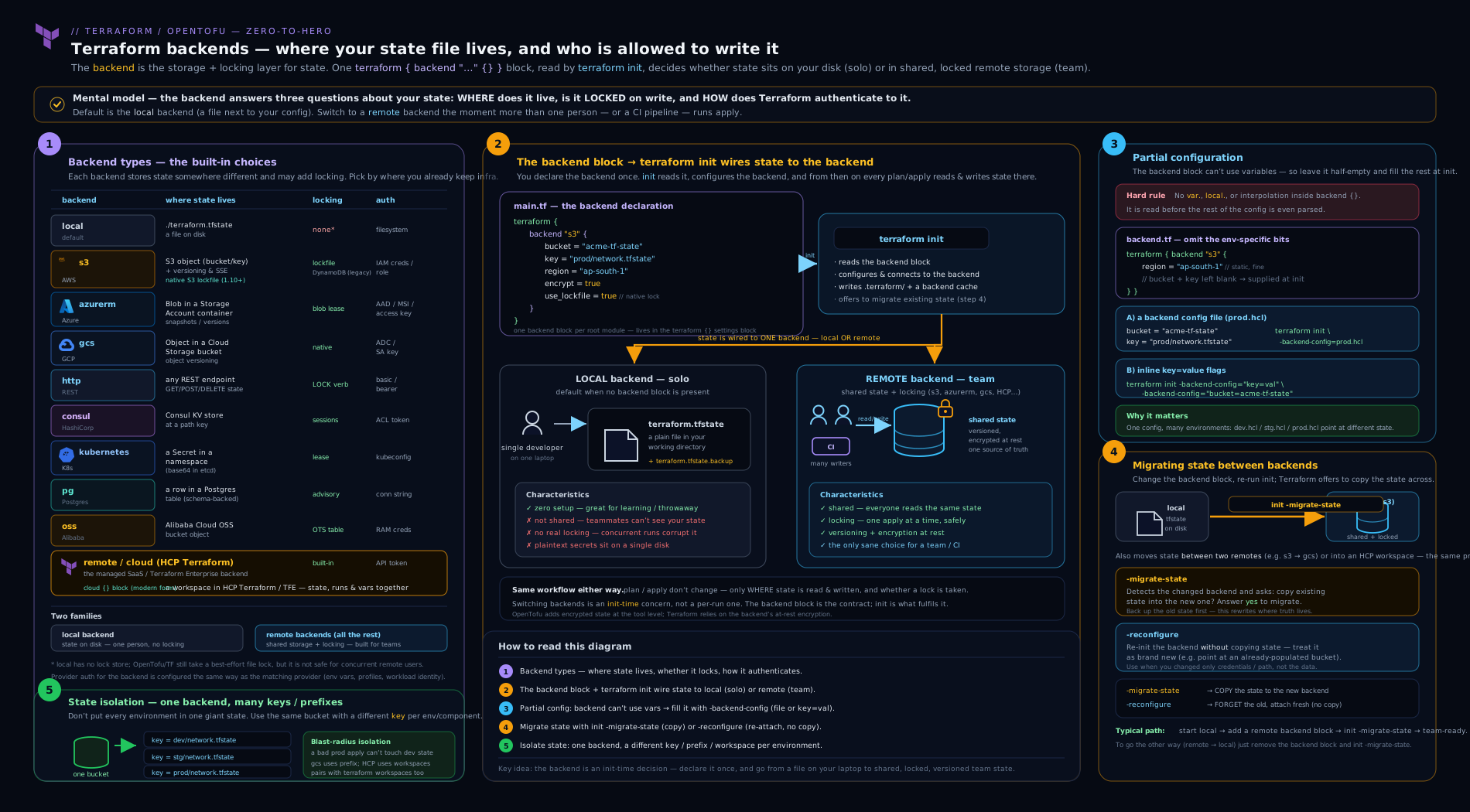
The diagram traces a backend’s two jobs end to end: the backend block (or the values handed in by partial configuration at init) tells Terraform where state lives; init records that choice in .terraform/; then every plan/apply pulls state from the store under a lock, refreshes against the real cloud APIs, computes the diff and writes new state back — and a one-off init -migrate-state is what safely copies that state from an old backend to a new one.
Hands-on lab
You will configure a real remote backend with zero cloud spend by running PostgreSQL locally in Docker and using the pg backend, then migrate an existing local state into it and confirm not a single resource is lost. This exercises the exact muscle you need for a real local→s3/azurerm migration; only the backend type differs.
Prerequisites: Terraform 1.9+ (or OpenTofu — substitute tofu) and Docker. No cloud account required.
Step 1 — start a local Postgres
docker run -d --name tf-backend \
  -e POSTGRES_USER=tf -e POSTGRES_PASSWORD=tf -e POSTGRES_DB=terraform_backend \
  -p 5432:5432 postgres:16
Step 2 — a tiny config on the default (local) backend
Create main.tf with a provider that needs no cloud — the random provider — and no backend block, so it starts on local:
terraform {
  required_providers {
    random = { source = "hashicorp/random", version = "~> 3.6" }
  }
}

resource "random_pet" "server" {
  length = 2
}

output "name" {
  value = random_pet.server.id
}
Initialise and apply on the local backend:
terraform init
terraform apply -auto-approve
Expected: an Apply complete! line and a name = "..." output. You now have a terraform.tfstate file on disk — local state.
ls terraform.tfstate # confirm the local state file exists
Step 3 — add the pg backend and migrate
Add a backend block to main.tf:
terraform {
  backend "pg" {
    conn_str = "postgres://tf:tf@localhost/terraform_backend?sslmode=disable"
  }
  required_providers {
    random = { source = "hashicorp/random", version = "~> 3.6" }
  }
}
Back up the current state, then migrate:
terraform state pull > backup.tfstate          # safety net
terraform init -migrate-state
Terraform reports the backend changed and asks “Do you want to copy existing state to the new backend?” — answer yes. It copies your one resource into Postgres.
Step 4 — validate the migration
terraform plan # EXPECTED: "No changes. Your infrastructure matches the configuration."
That “No changes” is the whole proof: the random_pet was not recreated — its identity moved with the state into Postgres. Confirm the state really is in the database, not on disk:
# The local state file is now stale/empty of the resource; state lives in Postgres:
docker exec -it tf-backend psql -U tf -d terraform_backend \
  -c "SELECT name FROM terraform_remote_state.states;"
# -> shows a 'default' workspace row holding your state
Step 5 — note the locking guarantee
Every plan/apply against the pg backend now takes a Postgres advisory lock for the duration of the operation, so two concurrent writers are serialised by the database — the same guarantee s3 + use_lockfile or azurerm blob leases give a cloud team. You have turned an unlocked local file into a properly locked, shared backend.
Cleanup
terraform destroy -auto-approve
docker rm -f tf-backend
rm -f terraform.tfstate terraform.tfstate.backup backup.tfstate
rm -rf .terraform .terraform.lock.hcl
Cost note
Zero. Everything ran locally: Postgres in a throwaway Docker container and the random provider, which calls no cloud API. The only resource Terraform “created” was a random string in state. When you repeat this against a real s3 or azurerm backend, the cost is a few paise/cents a month for an almost-empty bucket plus, if you use the legacy DynamoDB lock table, its on-demand request charges — negligible, and avoidable on S3 by using use_lockfile instead.
Going deeper
The body covered the configuration and the everyday mechanics. Five facets sit one level below that surface: the encryption nuance most teams get subtly wrong, an init flag for when you deliberately do not want a backend, how init even knows the backend changed, why “enhanced backend” is now nearly a historical term, and exactly how partial-config values merge.
State encryption has two layers — and only one of them hides secrets from the store. Every “encryption at rest” option in the catalogue — encrypt = true on s3, Azure Storage’s default SSE, GCS default encryption, and their customer-managed-key variants — encrypts the state object on the provider’s disks. That defends against a stolen disk or a raw-storage leak, but the store itself, and anyone you have granted object-read, still sees fully decrypted state, secrets and all. It is server-side encryption: the provider holds the key and decrypts on read. Client-side encryption is a different guarantee — the bytes are ciphertext before they ever leave your machine, so the bucket only ever holds gibberish.
| Layer | How you turn it on | Who can still read plaintext | Terraform / OpenTofu |
|---|---|---|---|
| Server-side, provider key | encrypt = true (SSE-S3); Azure/GCS default-on |
Anyone with object-read; the cloud provider itself | Both |
| Server-side, your key (CMK/CMEK) | kms_key_id (SSE-KMS), Key Vault CMK, kms_key_name (CMEK); DSSE-KMS for dual-layer |
Anyone with object-read and decrypt on the key | Both |
| Client-side, end-to-end | OpenTofu’s encryption {} block |
Nobody without the encryption key — the store holds only ciphertext | OpenTofu 1.7+ only |
That third row is the sharpest Terraform/OpenTofu divergence in this whole topic: Terraform cannot do it. OpenTofu (1.7+) encrypts both state and plan files client-side, so a leaked bucket object or a plan artefact left in CI is useless without the key:
# OpenTofu 1.7+ ONLY — Terraform has no equivalent block.
terraform {
  encryption {
    key_provider "pbkdf2" "this" {
      passphrase = "supply-this-from-outside-source-control"   # demo only
    }
    method "aes_gcm" "this" {
      keys = key_provider.pbkdf2.this
    }
    state {
      method   = method.aes_gcm.this
      enforced = true                        # refuse to read or write unencrypted state
    }
    plan { method = method.aes_gcm.this }    # plan files carry secrets too
  }
}
For production, swap the pbkdf2 passphrase provider for a KMS key provider (aws_kms, gcp_kms, or openbao/Vault) so no key material lives in code, and add a fallback { … } inside state so OpenTofu can decrypt with the old key while re-encrypting with the new one during a rotation. Note the block still sits inside terraform {} (OpenTofu keeps that block name) and, exactly like the backend block, is bootstrap-evaluated — so it too cannot lean on ordinary variables.
terraform init -backend=false initialises everything except the backend. Sometimes you want providers and modules installed but do not want Terraform to touch — or even authenticate to — any state. The common case is terraform validate or terraform fmt in a CI job that holds no state credentials and has no business reading state:
terraform init -backend=false -input=false   # install plugins/modules, ignore the backend
terraform validate                           # syntax and type checking with no state access
Because no backend gets configured, a subsequent plan or apply in that directory has nowhere to read or write state and will not do useful work. -backend=false is a validation and inspection mode, not a way to run Terraform without state.
How init knows the backend changed. When you run init, Terraform records the resolved backend configuration in a small file, .terraform/terraform.tfstate. The name is confusing: this is not your infrastructure state (that lives in the backend) but a local pointer describing which backend init last wired up. On the next init, Terraform compares the backend block plus any -backend-config you pass against that cached record; if they differ it stops and makes you declare intent — copy the state across (-migrate-state) or adopt the new settings without copying (-reconfigure). That comparison is the machinery behind the “Backend configuration changed” prompt in the migration section, and it is why deleting .terraform/ forces a clean re-init.
“Enhanced backend” is now nearly a historical term. The remote backend came first (2018, for Terraform Enterprise/Cloud) as the original enhanced backend — the one that could run the operation, not merely store the state, on a server. The cloud {} block (Terraform 1.1, late 2021) superseded it with cleaner syntax, and HashiCorp’s own documentation has since retired the “enhanced backend” framing in favour of talking about the HCP Terraform integration directly. The practical takeaway is unchanged and worth over-learning for the exam: for state storage you pick a standard backend from the catalogue; remote execution is HCP Terraform via cloud {}, not a backend type you would reach for casually.
Partial-config precedence, precisely. You may pass -backend-config many times in a single init, freely mixing files and key=value flags:
terraform init \
  -backend-config=common.tfbackend \
  -backend-config=prod.tfbackend \
  -backend-config="key=network/prod.tfstate"
Sources merge in the order given, a later source overrides an earlier one, and all of them override values hard-coded in the backend block. That precedence is what lets a shared common.tfbackend fix region, encrypt and use_lockfile for everyone while a per-environment file — or one flag in a CI job — supplies just the key.
Common beginner mistakes
These are misconceptions rather than error messages: the wrong mental model that produces the error later. Fix the model and a whole class of mistakes disappears with it.
- “No
backendblock means Terraform has no backend.” It means thelocalbackend with default settings — a real backend, with a file on disk, an OS lock and local execution. “No backend” is not a state Terraform can be in; the only question is which backend, and silence selectslocal. - “I’ll put the bucket name in a variable to keep it flexible.” The backend block is read in a bootstrap phase before variables, locals and data sources exist, so it physically cannot see
var.*— hence “Variables may not be used here.” The right model: anything you want to vary belongs in partial configuration (-backend-config), never in a variable. - “A remote backend means my
applyruns in the cloud.” Almost never. Every backend exceptcloud/remoteis standard: it stores state remotely but runs Terraform on your machine. Remote storage and remote execution are separate ideas, and “remote backend” normally buys you only the first. - “
encrypt = truemeans my secrets are safe in that bucket.” It means the object is encrypted at rest on the provider’s disks; the provider and anyone with object-read still see plaintext state. Server-side encryption is not end-to-end — only OpenTofu’s client-side encryption stops the store from ever seeing your secrets. - “After changing the backend I’ll just re-run
init.” A bareinitrefuses or prompts once settings differ, and guessing-reconfigureagainst a still-empty new backend abandons your state — the nextplanthen offers to rebuild the world. When you mean move my state, the flag is-migrate-state, verified by aplanreporting No changes. - “Workspaces and separate keys are basically the same isolation.” Both yield separate state, but a workspace silently namespaces the same backend block, so it is easy to sit in
prodbelieving you are indev. A distinctkey/prefixper environment is explicit in theinitcommand itself. Where blast radius matters, explicit beats implicit.
Common mistakes & troubleshooting
| Symptom | Likely cause | Fix |
|---|---|---|
Error: Variables may not be used here in the backend block |
You referenced var.*/local.*/a data source in backend {} — impossible by design |
Move those values to partial configuration: leave them out of the block and pass -backend-config=<file> or -backend-config="key=val" at init |
After changing the backend, plan wants to create everything |
init read an empty new backend (you ran -reconfigure instead of -migrate-state, or pointed at the wrong key) |
Do not apply. Re-point at the correct backend/key and run terraform init -migrate-state; verify plan shows No changes before proceeding |
Backend configuration changed / init refuses to run |
Backend settings differ from what is cached in .terraform/ |
Choose intent explicitly: -migrate-state to copy state, or -reconfigure to adopt new settings without copying |
Error acquiring the state lock |
A previous run died holding the lock, or a teammate is mid-apply | Confirm no live apply, then terraform force-unlock <ID> (see the state/locking lesson). Never auto-unlock in a pipeline retry |
s3 backend errors about the lock table |
Using the legacy DynamoDB path with a missing table or wrong key schema | Create the table with primary key LockID (String), or switch to use_lockfile = true and drop DynamoDB |
kubernetes backend fails on large state |
Kubernetes Secret ~1 MiB cap exceeded | Split the state (see remote-state-at-scale) or move to an object-store backend |
| Credentials work for the provider but the backend can’t authenticate | The backend reads auth at init before provider config; a profile/role assumed in provider config is not yet in effect |
Supply backend auth via the environment (env vars / ambient cloud auth), not via provider-block settings |
| State migrated but the old state file is still there | Migration copies; it does not delete the source | After verifying plan shows no changes, delete the old terraform.tfstate/object so it isn’t mistaken for live |
Best practices
- Use a remote backend for anything shared. The moment a second person, machine, or CI runner is involved,
localis wrong. Pick your cloud’s native backend (s3/azurerm/gcs) and turn on locking, encryption and object versioning. - Prefer native locking over an extra resource. On S3,
use_lockfile = trueremoves the DynamoDB table;azurermandgcslock natively with nothing to provision. Fewer moving parts, fewer failure modes. - Keep locations in
.tfbackendfiles, credentials in the environment. Bucket/key/region are safe to commit in partial-config files; access keys and service-account JSON are not — use OIDC/instance roles/az login/ADC. - One backend, many keys for simple isolation. Point each environment at the same store with a different
key/prefix/pathbefore reaching for workspaces or separate directories. - Always back up state before migrating.
terraform state pull > backup.tfstatecosts seconds and saves afternoons. - Verify every migration with
planshowing No changes before you trust the new backend and delete the old state. - Pin the backend’s behaviour with your Terraform version. Native S3 locking needs 1.10+/OpenTofu; record
required_versionso a teammate’s older binary doesn’t silently fall back.
Security notes
- State is sensitive wherever it lives. Even with a remote backend, the state object holds secrets in plaintext — lock down bucket/container/table access with least-privilege IAM/RBAC, enable encryption at rest (ideally a CMK/CMEK you control), and turn on access logging. The plaintext-secrets problem itself is covered in the state lesson; the backend’s job is to put that file somewhere access-controlled and encrypted.
- Never commit
terraform.tfstateor.tfstate.backup. Add them to.gitignorefrom day one. Backend-config.tfbackendfiles are fine to commit (locations, not secrets); credential files never are. - Prefer keyless authentication. OIDC/workload-identity federation for CI, instance/managed identities for runners, and short-lived assumed roles beat long-lived access keys for backend auth — there is no static secret to leak.
- Separate state by blast radius and by credential. Production state in its own bucket/account, reachable only by the prod pipeline’s role, limits what a compromised lower-environment credential can read or overwrite. The at-scale lesson develops the splitting; the backend choice (separate store + scoped IAM) enforces it.
force-unlockis a loaded gun. Breaking a lock that a live apply still holds reintroduces the corruption locking prevents. Treat it as a deliberate, logged action, never a pipeline auto-retry — full guidance is in the locking lesson.
Interview & exam questions
1. What is a Terraform backend, and what two things does it determine?
Where state is stored and how operations run. Most backends store state remotely but run Terraform locally (standard); a couple also run the operation remotely (enhanced — the cloud/remote options for HCP Terraform).
2. Why can’t the backend block use variables, locals, or data sources?
Because the backend is initialised in a bootstrap phase before Terraform parses variables, locals, providers or data sources — at that moment they do not exist. The intended workaround is partial configuration (-backend-config).
3. What is partial configuration and how do you supply it?
Leaving some/all backend settings out of code and passing them at init: via -backend-config=<file> (a .tfbackend file of key = value lines) and/or -backend-config="key=value" flags, with an interactive prompt as the fallback. Sources merge, with init-time values overriding the block.
4. Name the locking mechanism for s3, azurerm, gcs and pg.
s3: native S3 lockfile (use_lockfile, TF 1.10+) or a legacy DynamoDB table keyed on LockID. azurerm: a blob lease (automatic). gcs: a native lockfile (automatic). pg: Postgres advisory locks.
5. What is the difference between init -migrate-state and init -reconfigure?
-migrate-state copies existing state from the old backend to the new one (the normal migration). -reconfigure discards cached settings and re-initialises without copying — useful when the target already has the right state, dangerous on an empty target (next apply recreates everything).
6. You changed the backend and plan now wants to create every resource. What happened and what do you do?
init is reading an empty new backend — you likely ran -reconfigure or pointed at the wrong key/prefix, so your state didn’t come along. Do not apply. Re-point correctly and run init -migrate-state; only proceed once plan reports No changes.
7. How do you keep dev and prod state separate without two buckets?
Use the same backend with a different key/prefix/path per environment (e.g. s3 key=dev/… vs key=prod/…), supplied via partial config. CLI workspaces and separate directories are the other two isolation strategies.
8. What is the difference between a standard and an enhanced backend?
Standard = remote storage, local execution (everything except cloud/remote). Enhanced = remote storage and remote execution (HCP Terraform via the cloud block, or the legacy remote backend).
9. What does the cloud {} block do, and why isn’t it backend "remote"?
It targets HCP Terraform / Terraform Enterprise for managed, versioned, locked state plus optional remote runs, shared variables, policy checks and a private registry. It is a distinct block (not a backend type) and is the modern replacement for the older backend "remote".
10. Why must you never commit terraform.tfstate to Git?
It stores managed attributes — including secrets in plaintext — so committing leaks them to everyone with repo access and into history permanently. Use a remote, access-controlled, encrypted backend and .gitignore the file.
11. Which backend would you choose if your team runs Postgres but no cloud object store, and why?
The pg backend — state in a Postgres table, locking via advisory locks, no bucket to provision and multiple CLI workspaces supported via rows. (Used in this lesson’s lab precisely because it needs no cloud.)
12. What precaution should always precede a backend migration?
Take a backup of the source state (terraform state pull > backup.tfstate or copy the object) and ensure no concurrent apply is running, since migration reads and rewrites the whole state.
Quick check
- True or false: writing no
backendblock means Terraform has no backend. - Which
initflag copies existing state to a new backend? - Which two locking options does the
s3backend support? - Name the field that isolates one state from another on a
gcsbackend. - Is the
kubernetesbackend a standard or an enhanced backend?
Answers
- False. No block means the
localbackend with defaults — a real backend (file on disk, OS lock), just not a remote one. terraform init -migrate-state. (-reconfigurere-initialises without copying.)- Native S3 locking via
use_lockfile = true(TF 1.10+/OpenTofu) or a DynamoDB table keyed onLockID(legacy). prefix(gcs usesprefix, notkey, as its per-state lever).- Standard — it stores state remotely (as a Secret) but Terraform still executes locally. Only
cloud/remoteare enhanced.
Exercise
Take a small existing configuration of your own that currently uses the default local backend (or build a two-resource one with the random/null providers). Do the following and write down what you observe at each step:
- Convert it to a remote backend using partial configuration — keep the common settings in the
backendblock and put the environment-specifickey/prefixin a.tfbackendfile. Use either thepgbackend (local Docker, free) or, if you have a free-tier cloud,s3/azurerm/gcs. - Migrate the existing local state into it with
init -migrate-state, after taking astate pullbackup. Confirmplanshows No changes. - Create a second
.tfbackendfile pointing at a differentkey/prefix, runinit -migrate-stateagain (or-reconfigurefor a fresh one), and observe that you now have two independent states on one backend. - Deliberately run
init -reconfigureagainst an empty key and confirm thatplannow wants to recreate everything — then do not apply; re-point correctly with-migrate-state. This burns the most dangerous mistake into muscle memory safely.
Stretch: convert the same config to a cloud {} block against a free HCP Terraform organisation and migrate state up to it, then compare the experience (remote runs, UI, locking) with the bucket backend.
Practice challenges
Work these in order; each builds on the last. Try before opening the solution. The first four need only the free local lab (Docker plus the local and pg backends); the last two are reason-it-through.
-
Spot the illegal backend block (beginner). Given a
backend "s3"block whosebucketis set tovar.state_bucketand whosekeyis"${var.env}/state.tfstate", say what Terraform does atinitand rewrite it so the same values arrive legally. <details><summary>Solution</summary>initfails with “Variables may not be used here.” Empty those fields from the block — keepbackend "s3" {}, or leave only static settings such asregionandencrypt— and supply the rest as partial config:terraform init -backend-config="bucket=acme-tfstate-prod" -backend-config="key=dev/state.tfstate", or put both lines in adev.s3.tfbackendfile.Why: the backend is bootstrap-evaluated before variables exist, so
var.*can never appear there; partial configuration is the sanctioned substitute. </details> -
Two environments, one root module (beginner → intermediate). Without duplicating any configuration, make the same code manage a
devand aprodstate that can never collide. <details><summary>Solution</summary>Leave a type-only (or common-settings-only)
backend "s3" {}block and write two files:dev.s3.tfbackendwithkey = "dev/network.tfstate"andprod.s3.tfbackendwithkey = "prod/network.tfstate", both naming the samebucket. Select one per run withterraform init -reconfigure -backend-config=dev.s3.tfbackend.Why: one backend with a distinct
keyper environment is the simplest isolation lever, and distinct keys mean two environments can never write the same object. </details> -
Migrate local →
pgand prove it (intermediate). Take the lab’s local-state configuration, move it onto thepgbackend, and prove that no resource was recreated. <details><summary>Solution</summary>Run
terraform state pull > backup.tfstate; add thebackend "pg" { conn_str = "…" }block; runterraform init -migrate-stateand answer yes at the copy prompt; then runterraform plan, which must report No changes. If it instead wants to create everything, you are reading an empty backend — stop and re-checkconn_str.Why: migration moves the record, not the resources, so a clean
planis the only acceptable proof that the resource identities travelled with it. </details> -
Trigger — then recover from — the classic state-loss mistake (intermediate → advanced). Deliberately run the dangerous flag against an empty backend, watch
planthreaten to rebuild everything, and recover without touching any infrastructure. <details><summary>Solution</summary>After the migration above, point at a fresh, empty key or database and run
terraform init -reconfigure(no copy).terraform plannow proposes creating every resource, because the new backend is empty. Do not apply. Recover by re-pointing at the correct backend and runningterraform init -migrate-state— or by restoring withterraform state push backup.tfstate— then confirmplanshows No changes.Why:
-reconfigureadopts settings without copying state, so against an empty target it abandons your state; burning this in safely is cheap insurance against doing it for real. </details> -
Point the
s3backend at MinIO or R2 (advanced). You have an S3-compatible store that is not AWS. Write the backend block and say how locking works. <details><summary>Solution</summary>Use
backend "s3"withendpoints { s3 = "https://minio.example.com" }, setuse_lockfile = true, and disable the AWS-only validations:skip_credentials_validation,skip_region_validationandskip_metadata_api_check(often withuse_path_style = true). Locking is the native.tflockobject — there is no DynamoDB here and never was.Why: the
s3backend simply speaks the S3 API, so any compatible store works once the endpoint is overridden and the AWS-specific checks are skipped;use_lockfileneeds only object put/get semantics, which makes it the right lock for non-AWS stores. </details> -
Make a leaked state object useless (advanced). Compliance requires that even someone who exfiltrates the state object cannot read its secrets. Server-side encryption is already switched on. What actually satisfies the requirement? <details><summary>Solution</summary>
Server-side encryption (
encrypt, or a CMK) does not satisfy it: the store still serves plaintext to anyone with object-read. You need client-side encryption, which today means OpenTofu 1.7+ with anencryption {}block — a KMS key provider,enforced = true, andplan {}encryption as well. Terraform has no equivalent; the fallback there is to scope object-read tightly and lean on the KMS key’s own access policy, but the store still holds decryptable bytes.Why: only client-side encryption makes the stored bytes ciphertext; every server-side option leaves the provider, and any over-broad reader, holding plaintext. </details>
Certification mapping
This lesson maps to the HashiCorp Certified: Terraform Associate (003) objectives:
- Objective 7 — Implement and maintain state: describe default
localbackend; outline state-locking; handle backend and cloud integration configuration; describe remote state storage and backend block; differentiate standard and enhanced backends; manage resource drift via state (adjacent). - Objective 5 — Interact with Terraform modules / Objective 6 — workflow: the
initstep and its backend-related flags (-backend-config,-migrate-state,-reconfigure). - The exam reliably asks why the backend block can’t take variables, what partial configuration is, the difference between
-migrate-stateand-reconfigure, and standard vs enhanced backends — all covered above. For the broader state objective (the file,terraform statecommands, sensitive data) pair this with the state deep-dive lesson.
Glossary
- Backend — the configuration of where Terraform state is stored and how operations run.
localbackend — the default: state in a file on disk, OS file lock, local execution.- Remote backend — any backend storing state in a shared networked store (
s3,azurerm,gcs, …). - Standard backend — remote storage, local execution (everything except
cloud/remote). - Enhanced backend — remote storage and remote execution (HCP Terraform via
cloud, or legacyremote). backendblock — thebackend "<type>" {}block insideterraform {}declaring the backend; cannot use variables.- Partial configuration — supplying backend settings at
inittime via-backend-config=<file>or-backend-config="key=value"instead of in code. .tfbackendfile — a conventional file ofkey = valuebackend settings passed with-backend-config.- Locking — an exclusive claim on state so two runs cannot write at once; mechanism varies by backend (lockfile, blob lease, DynamoDB item, advisory lock).
use_lockfile— thes3backend option (TF 1.10+/OpenTofu) enabling native S3 locking without DynamoDB.- Isolation lever — the per-backend field (
key/prefix/path/schema_name) that separates one state from another on the same backend. init -migrate-state— copies existing state from the old backend to the new one duringinit.init -reconfigure— re-initialises the backend from scratch without copying state.cloudblock — thecloud {}block insideterraform {}targeting HCP Terraform for managed state and optional remote runs.- Bootstrapping — the first
applythat creates the store a remote backend will live in (bucket, Storage Account, database); it necessarily runs onlocaland is then migrated into the backend it just built. - Server-side encryption (SSE / CMK / CMEK) — the store encrypts the state object at rest on its own disks; the provider and anyone with object-read still see plaintext. Not end-to-end.
- Client-side state encryption — encrypting state (and plan) before it leaves your machine, so the backend only ever holds ciphertext; available in OpenTofu 1.7+ via the
encryption {}block, and not in Terraform. - Key provider (OpenTofu) — the source of the key in an
encryption {}block:pbkdf2(passphrase-derived),aws_kms,gcp_kms, oropenbao/Vault. -backend=false— aninitflag that installs providers and modules but skips backend initialisation; used forvalidate/fmtin CI where no state access is wanted..terraform/terraform.tfstate— the local cache recording which backendinitlast configured (a pointer, not your infrastructure state); how Terraform detects that the backend changed.remotebackend — the original (2018) enhanced backend for Terraform Enterprise/Cloud, superseded on new work by thecloud {}block.
Next steps
- HCP Terraform (Terraform Cloud) Fundamentals: Workspaces, VCS-Driven Runs, Remote State & the Private Registry — the managed platform behind the
cloud {}block, in full. - Terraform Remote State at Scale — splitting one state into many, cross-stack data sharing with
terraform_remote_state, and large-estate patterns (the “what to do once you have a remote backend” lesson). - Terraform State Deep Dive: the File, Commands, Locking & Sensitive Data — the state file’s anatomy, the
terraform statecommand family, the concurrency theory of locking, and the plaintext-secrets problem this lesson’s encryption advice protects.