In a nutshell
Standing up EKS is like building a house on rented land, in three unskippable stages. First the foundation and plumbing — the VPC: the address space, the public and private subnets across availability zones, and the small brass plates on each subnet (the kubernetes.io tags) that tell the utility crews which lot is which. Then the control room you rent rather than build — the managed control plane: AWS runs the Kubernetes API server, etcd and the scheduler for you across three AZs; you never see the building, you just get a locked front door (the API endpoint) and a key ring (IAM access entries). Then the workers who actually live and work there — the node group: EC2 instances that join the cluster and run your pods, plus the fixtures every house needs (the vpc-cni, coredns and kube-proxy add-ons) that make the plumbing and the lights work.
The order is not a preference — it is a dependency chain. You cannot rent the control room without a lot to put it on (no cluster without subnets), the workers have nothing to report to until the control room exists (no nodes without a control plane to join), and the lights stay off until the fixtures are in (no running pods without a CNI to hand them IPs). Terraform’s job is to build these in exactly that order and remember every plate, key and fixture, so the next house — staging, prod, another region — is one terraform apply away.
That is the whole lesson: a tagged VPC, a managed control plane with modern access entries and KMS-encrypted secrets, a managed node group with the right IAM role, and the core add-ons — built twice, first as raw resources so you understand every plate and key, then as the terraform-aws-modules/eks module the industry actually ships.
Level: Advanced · Time: ~63 min
Prerequisites — this is an Expert-track lesson that assumes:
- Core Terraform — HCL, state, variables,
for_eachand module authoring from the course foundation. - AWS provider auth + a remote backend — your
hashicorp/awscredentials and an S3/DynamoDB (or native S3-lock) backend, from the AWS getting-started lesson. - The tagged-VPC pattern from AWS VPC: Subnets, IGW, NAT & Routing and IAM roles from AWS IAM: Roles, Policies & S3 Buckets.
- Basic Kubernetes literacy — what pods, Services, nodes and DaemonSets are (you deploy onto the cluster in later lessons).
After this lesson you will be able to:
- Lay out an EKS-ready VPC with public, private and intra subnets carrying the exact
kubernetes.io/role/elb,internal-elbandcluster/<name>tags that load balancers auto-discover. - Provision an
aws_eks_clusterwith access entries (notaws-auth), KMS-encrypted Secrets, restricted endpoint access and CloudWatch control-plane logging. - Attach a managed node group with the correct three-policy node IAM role and an autoscale-safe
ignore_changeslifecycle. - Manage
vpc-cni,corednsandkube-proxyas pinnedaws_eks_addonresources with correct ordering (before_compute, CoreDNS after nodes). - Decide raw resources vs the
terraform-aws-modules/eksmodule on purpose, and expose the OIDC provider that IRSA and Pod Identity build on. - Reach the cluster with
aws eks update-kubeconfigand verify nodes, add-ons and access entries — then destroy it cleanly.
eksctl create cluster will hand you a working Kubernetes cluster in twenty minutes and one command. It will also hand you a VPC you did not design, subnets you cannot find in code, an aws-auth ConfigMap you will eventually corrupt, and a CloudFormation stack that fights your Terraform for the rest of the cluster’s life. EKS is the single most rewarding — and most punishing — thing you will build with Terraform on AWS, because it is not one resource. It is a VPC with a precise set of tags, an IAM role for the control plane, a second IAM role for the nodes, a KMS key, a set of access entries that decide who can talk to the API, a managed node group that is really an Auto Scaling Group in disguise, and a handful of add-ons that are really Kubernetes DaemonSets AWS lifecycles for you. Get any one of them wrong and the failure shows up three layers away: a load balancer that never provisions, a node that joins and then sits NotReady, a kubectl that returns Unauthorized to the person who just created the cluster.
This lesson builds that whole stack the way a platform team actually ships it. We do it twice. First we build every piece from raw resources — aws_eks_cluster, aws_eks_node_group, aws_eks_addon, the two IAM roles, the access entries, the KMS key — so that when something breaks at 2 a.m. you know exactly which resource owns the failure. Then we throw most of that code away and build the same cluster with terraform-aws-modules/eks/aws, the community module that is the de facto industry default, because once you understand the primitives, maintaining 900 lines of them by hand is a choice, not a virtue. You will finish with a running cluster you provisioned yourself, verified with kubectl get nodes, and tore down cleanly — plus the reference tables to come back to every time you stand up another one.
This is the foundation of the entire EKS track. Everything downstream — IRSA and pod identity, the AWS Load Balancer Controller, Karpenter, GitOps — assumes the cluster, the tagged VPC, and the node group you build here. We assume you already have core Terraform (HCL, state, modules, for_each) from the course foundation and that your AWS provider auth and S3/DynamoDB remote backend are set up per the AWS getting-started lesson. The VPC we tag here is built the way the AWS VPC: Subnets, IGW, NAT & Routing lesson lays out, and the IAM roles follow AWS IAM: Roles, Policies & S3 Buckets.
What you’ll build
The scenario is the one every team hits when “we should run this on Kubernetes” becomes a ticket: a small but correctly shaped EKS cluster that a real workload could move onto without re-architecting. One terraform apply produces a VPC spanning two (we will use three) availability zones with public subnets for load balancers and private subnets for nodes — each tagged with the kubernetes.io keys EKS uses to auto-discover them — an EKS control plane with its secrets encrypted by a customer-managed KMS key and its audit logs flowing to CloudWatch, a managed node group of t3.large workers that autoscales from two to five, and the three core add-ons (vpc-cni, coredns, kube-proxy) managed as pinned, version-controlled resources. Human and CI access is granted through EKS access entries — the modern replacement for the hand-edited aws-auth ConfigMap — and the node group’s IAM role carries exactly the three managed policies that let a node join, wire pod networking, and pull images from ECR.
Why Terraform rather than the console, eksctl, or CloudFormation? Because an EKS cluster is a thing you will provision more than once (dev, staging, prod, per-region, per-team) and change over time (version upgrades, node-group resizes, new add-ons), and those two facts are exactly what declarative IaC exists for. The comparison is worth pinning down before we write a line of HCL:
| Approach | Repeatable? | Drift visible? | VPC + IAM + add-ons in one workflow? | Best for |
|---|---|---|---|---|
| Console | No — click path is not code | No | No — you wire each by hand | A throwaway you will delete |
eksctl |
Scriptable via YAML | No — it is CloudFormation underneath | Partly, but opinionated and CFN-owned | Fast demos, learning Kubernetes itself |
| CloudFormation / CDK | Yes, declarative | Drift detection (clunky) | Yes, AWS-only | All-AWS shops standardised on CFN |
Terraform (aws) |
Yes, declarative | plan shows drift |
Yes — VPC, IAM, EKS, add-ons, DNS, one graph | Multi-cloud, module reuse, one pipeline everywhere |
Terraform’s edge is not that it beats CloudFormation at EKS — CFN is competent at EKS. It is that the same plan → apply → destroy workflow, the same module and state discipline, and the same CI pipeline cover the cluster, the VPC it sits in, the Route 53 zone in front of it, the RDS database beside it, and the Azure or GCP resources next door. You learn one workflow and apply it everywhere. Here is the whole build as a table of resources, so you can see the moving parts before the code:
| Resource | Terraform type | Role in the cluster |
|---|---|---|
| VPC + subnets + NAT | module "vpc" / aws_vpc + aws_subnet |
Address space; tagged public/private subnets across AZs |
| Cluster IAM role | aws_iam_role + attachment |
Lets the EKS service manage AWS resources on your behalf |
| KMS key | aws_kms_key |
Envelope-encrypts Kubernetes Secrets at rest |
| CloudWatch log group | aws_cloudwatch_log_group |
Sink for control-plane logs (/aws/eks/<name>/cluster) |
| The cluster | aws_eks_cluster |
The managed control plane (API server, etcd, scheduler) |
| Access entries | aws_eks_access_entry + policy association |
Map IAM principals to Kubernetes RBAC (replaces aws-auth) |
| Node IAM role | aws_iam_role + 3 attachments |
Identity the worker EC2 instances assume |
| Managed node group | aws_eks_node_group |
Autoscaling EC2 workers registered to the cluster |
| Core add-ons | aws_eks_addon ×3 |
vpc-cni, coredns, kube-proxy, version-pinned |
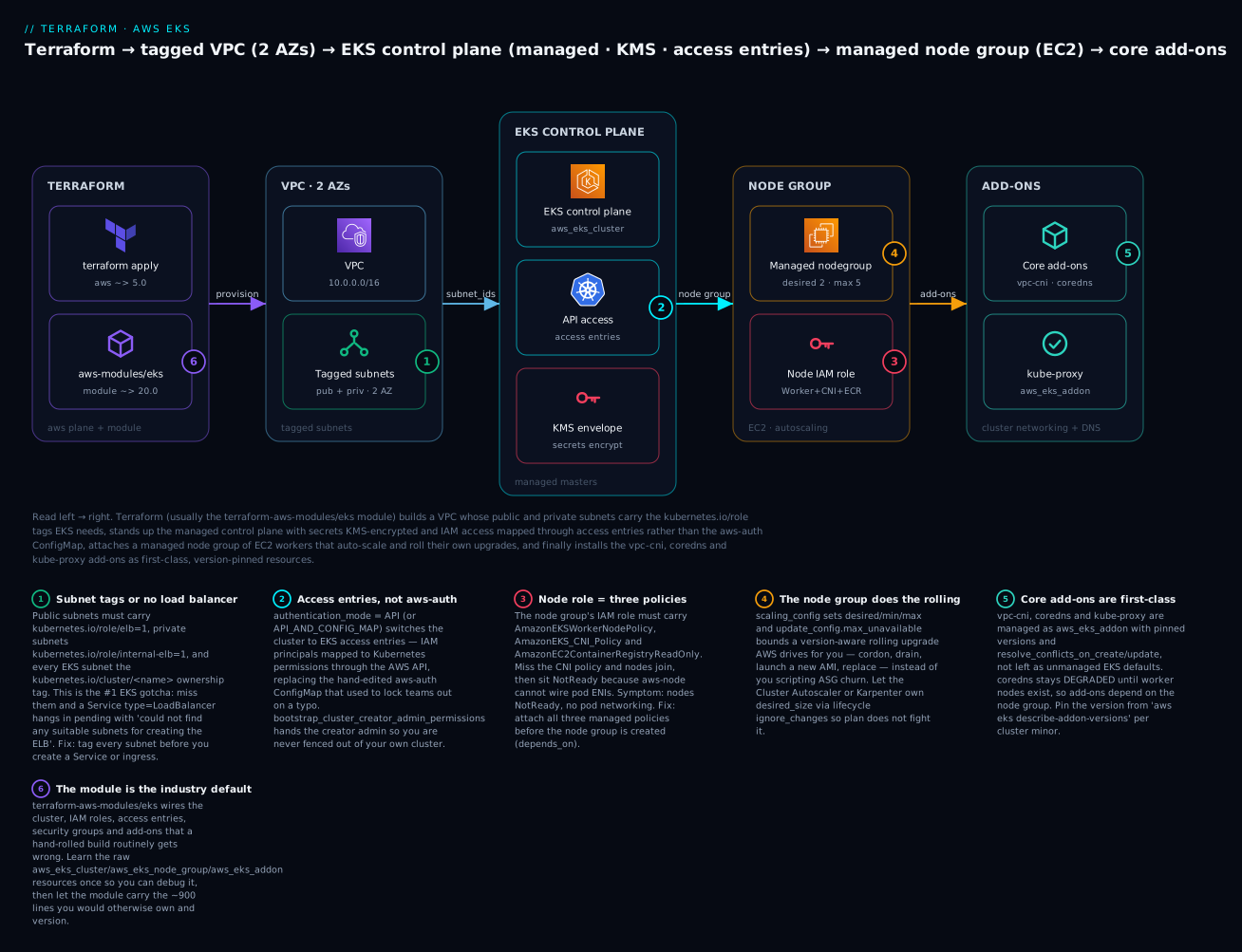
Read the diagram left to right: Terraform (badge 6 — usually the terraform-aws-modules/eks module) provisions a VPC whose subnets carry the required tags (badge 1 — the #1 gotcha), then the managed control plane with access entries instead of aws-auth (badge 2) and KMS-encrypted secrets, then a managed node group whose IAM role has the three node policies (badge 3) and whose scaling and rolling upgrades AWS drives (badge 4), and finally the core add-ons managed as first-class resources (badge 5). The six legend entries are the six decisions you will make in code below.
The EKS resource model: the control plane you rent, the data plane you own
The mental model that keeps EKS straight is a single sentence: AWS runs the control plane; you run the data plane; a set of tags, roles and add-ons stitch the two together. When you create an aws_eks_cluster, AWS provisions and operates the Kubernetes API server, etcd, the scheduler and the controller-manager across three AZs, patches them, backs up etcd, and gives you an HTTPS endpoint and a CA certificate. You never SSH into a master; there is no master to SSH into. What you own is everything that runs your pods — the worker nodes (the node group), the CNI that gives pods IPs, CoreDNS, and the workloads themselves.
| Layer | Who owns it | What lives there | Your Terraform |
|---|---|---|---|
| Control plane | AWS (managed) | API server, etcd, scheduler, controller-manager | aws_eks_cluster |
| Cluster networking | Shared | VPC, subnets, security groups, CNI | VPC module + aws_eks_addon "vpc-cni" |
| Data plane | You | Worker nodes / capacity | aws_eks_node_group (or Fargate / self-managed) |
| Cluster services | Shared | CoreDNS, kube-proxy, CSI drivers | aws_eks_addon |
| Workloads | You | Deployments, Services, Ingress | Kubernetes/Helm providers (a separate apply) |
That last row carries the single most important operational rule, the same one the Azure AKS lesson hammers: do not build the cluster and its in-cluster workloads in the same terraform apply. The kubernetes and helm providers must be configured from the cluster’s endpoint and CA, which are unknown until the cluster exists; colocating them produces configs that plan against a cluster that is not there yet and destroy in the wrong order. Build the cluster and platform in one root (this lesson); read it from a second root that deploys workloads. We will show the credential handoff at the end.
EKS is billed in two parts, and understanding the split makes the “destroy it” case concrete. The control plane is a flat hourly fee per cluster regardless of size; the data plane is ordinary EC2 (or Fargate) you pay for on top. As of 2026 the standard control-plane rate is about $0.10 per hour (~₹8.3/hr, ~₹6,000/month) per cluster, and EKS added an extended support surcharge for clusters left on an old Kubernetes minor past its standard-support window:
| Kubernetes version state | What it means | Control-plane rate (approx) |
|---|---|---|
| Standard support | ~14 months from release; current minus a few | ~$0.10/hr (~₹8.3/hr) |
| Extended support | Past standard window; AWS keeps patching | ~$0.60/hr (~₹50/hr) — 6× |
| End of extended support | Auto-upgraded by AWS on your behalf | — |
The lesson in that table: plan to upgrade. A cluster you stand up on 1.31 today is on borrowed time; leaving it on an unsupported minor eventually costs 6× and then gets force-upgraded under you. EKS supports upgrading one minor version at a time (1.31 → 1.32 → 1.33, never 1.31 → 1.33), and the control plane must never be older than the nodes. Here are the aws_eks_cluster top-level arguments you will actually set:
| Argument | Type | What it controls | Note |
|---|---|---|---|
name |
string | Cluster name (immutable) | Also seeds the auto-created cluster SG and log group |
version |
string | Kubernetes minor, e.g. "1.31" |
Omit patch; upgrade one minor at a time |
role_arn |
string | The cluster IAM role | Must have AmazonEKSClusterPolicy |
vpc_config (block) |
— | Subnets, endpoint access, SGs | Subnets span ≥2 AZs; see below |
access_config (block) |
— | authentication_mode, bootstrap admin |
The access-entries switch |
encryption_config (block) |
— | KMS envelope encryption for Secrets | Effectively one-way once set |
enabled_cluster_log_types |
list | Control-plane logs to CloudWatch | api audit authenticator controllerManager scheduler |
kubernetes_network_config (block) |
— | service_ipv4_cidr, ip_family |
Immutable; plan the Service CIDR once |
bootstrap_self_managed_addons |
bool | Auto-install default add-ons | Set false if you manage add-ons yourself |
tags |
map | AWS tags | Cost/ownership metadata |
One modern note before we build: AWS now offers EKS Auto Mode (compute_config, storage_config blocks), where AWS also manages the nodes, scaling and core add-ons for you — closer to Fargate-for-the-whole-cluster. It is excellent for teams that want zero node ops, but it hides exactly the mechanics this lesson exists to teach, so we build the classic control-plane-plus-node-group shape here and note Auto Mode as the “graduate” option.
The VPC for EKS: subnets, AZs & the tags that make or break it
This is the section that saves you a day. EKS does not just need “a VPC” — it needs subnets tagged so that Kubernetes controllers can auto-discover where to put load balancers, and it needs enough of them, across enough AZs, with enough IPs. The tags are the number-one EKS gotcha because everything provisions green without them and then a Service type=LoadBalancer silently hangs in pending forever with an event you have to go digging for.
Start with the layout. A production-shaped EKS VPC has (at least) two tiers across two or three AZs: public subnets that hold internet-facing load balancers and NAT gateways, and private subnets that hold the worker nodes (which reach the internet outbound-only through NAT). Nodes go in private subnets; public subnets exist for the load balancers that front them.
| Subnet | Tier | AZs | Holds | Route to internet |
|---|---|---|---|---|
10.0.101.0/24, 10.0.102.0/24, 10.0.103.0/24 |
Public | 1a / 1b / 1c | Internet-facing ELBs, NAT GW | 0.0.0.0/0 → IGW |
10.0.1.0/24, 10.0.2.0/24, 10.0.3.0/24 |
Private | 1a / 1b / 1c | Worker nodes, internal ELBs | 0.0.0.0/0 → NAT GW |
Now the tags. There are three, and each does a specific job. Memorise this table — it is the one you will come back to every time a load balancer refuses to provision:
| Tag key | Value | On which subnets | What it enables |
|---|---|---|---|
kubernetes.io/role/elb |
1 |
Public subnets | Auto-discovery of public subnets for internet-facing Service type=LoadBalancer / ingress ALBs |
kubernetes.io/role/internal-elb |
1 |
Private subnets | Auto-discovery of private subnets for internal load balancers |
kubernetes.io/cluster/<cluster-name> |
owned or shared |
All EKS subnets | Marks subnet ownership; owned = this cluster only, shared = multiple clusters share it |
The way these get used: when you deploy an internet-facing Service type=LoadBalancer, the AWS in-tree cloud controller (or the AWS Load Balancer Controller for ALBs) scans your VPC for subnets tagged kubernetes.io/role/elb=1 and provisions the ELB across them, one per AZ. If those subnets are not tagged, the controller finds no eligible subnets and the Service sits in pending. The internal-elb tag does the same job for private/internal load balancers. The kubernetes.io/cluster/<name> tag is applied by EKS to the subnets and ENIs it uses and signals ownership; set it shared when one subnet backs more than one cluster so a terraform destroy of cluster A does not try to reclaim resources cluster B still needs.
Here is precisely what breaks when each tag is missing — the symptoms you will actually see:
| Missing tag | Symptom | The error you will find |
|---|---|---|
kubernetes.io/role/elb on public |
Internet LB never provisions | Failed to ensure load balancer: could not find any suitable subnets for creating the ELB |
kubernetes.io/role/internal-elb on private |
Internal LB never provisions | Same event, internal scheme |
kubernetes.io/cluster/<name> |
Ambiguous discovery / destroy conflicts | LB controller cannot disambiguate subnets; or orphaned ENIs on destroy |
| Two subnets per AZ, both untagged | Non-deterministic subnet pick | multiple untagged subnets found for availability zone |
In raw Terraform the tags live on the aws_subnet resources. This is the public subnet, tagged for external load balancers and cluster ownership:
resource "aws_subnet" "public" {
  for_each                = { for i, az in local.azs : az => i }
  vpc_id                  = aws_vpc.this.id
  availability_zone       = each.key
  cidr_block              = cidrsubnet(var.vpc_cidr, 8, each.value + 100)
  map_public_ip_on_launch = true

  tags = {
    Name                                        = "${var.cluster_name}-public-${each.key}"
    "kubernetes.io/role/elb"                    = "1"
    "kubernetes.io/cluster/${var.cluster_name}" = "shared"
  }
}

resource "aws_subnet" "private" {
  for_each          = { for i, az in local.azs : az => i }
  vpc_id            = aws_vpc.this.id
  availability_zone = each.key
  cidr_block        = cidrsubnet(var.vpc_cidr, 8, each.value)

  tags = {
    Name                                        = "${var.cluster_name}-private-${each.key}"
    "kubernetes.io/role/internal-elb"           = "1"
    "kubernetes.io/cluster/${var.cluster_name}" = "shared"
  }
}
You do not have to hand-roll this. The community terraform-aws-modules/vpc/aws module takes public_subnet_tags and private_subnet_tags maps and applies them for you, which is what the hands-on demo uses. But you must understand what it is tagging and why, because when a load balancer hangs, the fix is always “check the subnet tags” — and if you outsourced the tags to a module without knowing they exist, that debugging session is a mystery instead of a two-minute check.
One more sizing note that echoes the AKS lesson: the AWS VPC CNI gives every pod a real VPC IP from the node’s subnet, so private subnets burn IPs fast — roughly nodes × (pods-per-node + a few ENI-reserved). A /24 per AZ (251 usable) is fine for a lab; production clusters use /20 or larger private subnets, or enable prefix delegation on the VPC CNI to pack more pods per ENI. Undersize the private subnets and pods hang in ContainerCreating with failed to assign an IP address to container — a problem no amount of CPU fixes, because the constraint is addresses.
The cluster: aws_eks_cluster, its IAM role, access entries, logging & KMS
With a tagged VPC in hand, the cluster itself is four decisions: which IAM role it assumes, which subnets and endpoint exposure it gets, how humans authenticate to it, and how its secrets and logs are protected.
The cluster IAM role
Before the control plane can create load balancers, manage ENIs or write logs, it needs an IAM role it can assume — a role whose trust policy names the EKS service and which carries the AWS-managed AmazonEKSClusterPolicy. This is the control-plane identity, distinct from the node role we build later.
data "aws_iam_policy_document" "cluster_assume" {
  statement {
    actions = ["sts:AssumeRole"]
    principals {
      type        = "Service"
      identifiers = ["eks.amazonaws.com"]
    }
  }
}

resource "aws_iam_role" "cluster" {
  name               = "${var.cluster_name}-cluster-role"
  assume_role_policy = data.aws_iam_policy_document.cluster_assume.json
}

resource "aws_iam_role_policy_attachment" "cluster_policy" {
  role       = aws_iam_role.cluster.name
  policy_arn = "arn:aws:iam::aws:policy/AmazonEKSClusterPolicy"
}
| Managed policy | ARN suffix | Why the cluster role needs it |
|---|---|---|
AmazonEKSClusterPolicy |
arn:aws:iam::aws:policy/AmazonEKSClusterPolicy |
Lets EKS manage ENIs, load balancers, and other resources for the cluster |
AmazonEKSServicePolicy |
— | No longer required on modern EKS — do not add it |
If you copy an old blog that attaches both AmazonEKSClusterPolicy and AmazonEKSServicePolicy, drop the second — it is legacy and unnecessary on any cluster you create today.
vpc_config: subnets, endpoint access & security groups
The vpc_config block tells EKS where to place the control-plane cross-account ENIs (so it can reach your nodes) and how the API server endpoint is exposed:
| Argument | Purpose | Rule |
|---|---|---|
subnet_ids |
Where EKS places control-plane ENIs | ≥2 subnets in ≥2 AZs; use private (or dedicated intra) subnets |
endpoint_private_access |
Reach the API from inside the VPC | true for prod (nodes use the private path) |
endpoint_public_access |
Reach the API from the internet | true + public_access_cidrs to restrict, or false |
public_access_cidrs |
Which CIDRs may reach the public endpoint | Default ["0.0.0.0/0"] — lock this down |
security_group_ids |
Extra SGs on the control-plane ENIs | Optional; EKS also creates a cluster SG automatically |
The endpoint exposure is a real security decision with three postures:
| Endpoint mode | API reachable from | kubectl needs |
Use when |
|---|---|---|---|
| Public (default) | Internet (restrict via public_access_cidrs) |
Nothing special | Labs; teams without a VPN |
| Public + Private | Internet and inside the VPC | Nothing; nodes use private path | Most production clusters |
| Private only | Inside the VPC / peered networks only | VPN, bastion, or CI in-VPC | High-security; no public API surface |
For the lab we use public + private with public_access_cidrs narrowed to your office IP; for production, private-only with CI running inside the VPC is the gold standard.
Access entries: the modern replacement for aws-auth
Here is the change that has quietly reshaped EKS provisioning. Historically, mapping an IAM principal (a user, a role, the node role) to Kubernetes permissions meant editing the aws-auth ConfigMap in the kube-system namespace — a YAML blob you patched by hand or with a fragile Terraform kubernetes_config_map resource. It had no validation, no rollback, and a single bad indent locked everyone out of the cluster with no undo. It was the most feared object in EKS.
EKS access entries replace it. Access entries are a first-class AWS API — aws_eks_access_entry maps an IAM principal to the cluster, and aws_eks_access_policy_association grants it a scoped access policy — so IAM-to-Kubernetes mapping becomes ordinary Terraform resources with plan/apply/destroy, not ConfigMap surgery. You switch a cluster into this world with access_config.authentication_mode:
authentication_mode |
What authorizes access | Migration |
|---|---|---|
CONFIG_MAP |
Only the legacy aws-auth ConfigMap |
The old default; avoid on new clusters |
API_AND_CONFIG_MAP |
Access entries and aws-auth (both honored) | The safe migration middle ground |
API |
Only access entries (aws-auth ignored) | The modern target — pure API |
You can move a cluster forward (CONFIG_MAP → API_AND_CONFIG_MAP → API) but not backward, so new clusters should start at API (or API_AND_CONFIG_MAP if you still have tooling that writes aws-auth). Crucially, set bootstrap_cluster_creator_admin_permissions = true so the IAM identity that creates the cluster is automatically granted admin — this is your guarantee against locking yourself out of your own cluster, the EKS equivalent of the AKS “grant yourself cluster-admin” rule.
resource "aws_eks_cluster" "this" {
  name     = var.cluster_name
  version  = var.kubernetes_version
  role_arn = aws_iam_role.cluster.arn

  vpc_config {
    subnet_ids              = concat(values(aws_subnet.private)[*].id, values(aws_subnet.public)[*].id)
    endpoint_private_access = true
    endpoint_public_access  = true
    public_access_cidrs     = var.public_access_cidrs # e.g. ["203.0.113.10/32"]
  }

  access_config {
    authentication_mode                         = "API"
    bootstrap_cluster_creator_admin_permissions = true
  }

  encryption_config {
    provider { key_arn = aws_kms_key.eks.arn }
    resources = ["secrets"]
  }

  enabled_cluster_log_types = ["api", "audit", "authenticator", "controllerManager", "scheduler"]

  depends_on = [
    aws_iam_role_policy_attachment.cluster_policy,
    aws_cloudwatch_log_group.eks,
  ]
}
To grant a second principal — say a CI role or a colleague — admin, add an access entry plus a policy association. The access policies are AWS-managed and map to familiar Kubernetes RBAC personas:
resource "aws_eks_access_entry" "ci" {
  cluster_name  = aws_eks_cluster.this.name
  principal_arn = var.ci_role_arn
  type          = "STANDARD"
}

resource "aws_eks_access_policy_association" "ci_admin" {
  cluster_name  = aws_eks_cluster.this.name
  principal_arn = var.ci_role_arn
  policy_arn    = "arn:aws:eks::aws:cluster-access-policy/AmazonEKSClusterAdminPolicy"
  access_scope { type = "cluster" }
}
| Access policy | Kubernetes-equivalent | Scope options |
|---|---|---|
AmazonEKSClusterAdminPolicy |
cluster-admin |
cluster |
AmazonEKSAdminPolicy |
Admin within namespaces | cluster or namespace |
AmazonEKSEditPolicy |
Read/write most objects | cluster or namespace |
AmazonEKSViewPolicy |
Read-only | cluster or namespace |
AmazonEKSAdminViewPolicy |
Read-only incl. Secrets metadata | cluster or namespace |
There are also entry types beyond STANDARD: managed node groups get an EC2_LINUX/EC2 entry created automatically by EKS (which is why, with managed node groups, you no longer hand-map the node role at all — a huge simplification over aws-auth), and Fargate uses FARGATE_LINUX. You only create STANDARD entries for the humans and CI roles that run kubectl.
KMS envelope encryption & control-plane logging
Two hardening switches round out the cluster. encryption_config turns on envelope encryption of Kubernetes Secrets with a customer-managed KMS key — so a Secret in etcd is encrypted with a data key that is itself encrypted by your KMS CMK, and reading etcd without the CMK yields ciphertext. It is effectively one-way: once enabled you cannot cleanly disable it (you would recreate the cluster), so decide up front — for anything beyond a lab, enable it.
resource "aws_kms_key" "eks" {
  description             = "EKS ${var.cluster_name} secrets envelope key"
  enable_key_rotation     = true
  deletion_window_in_days = 7
}
enabled_cluster_log_types ships the control-plane logs to CloudWatch Logs under /aws/eks/<cluster>/cluster. The five streams each answer a different question:
| Log type | Answers | Turn on when |
|---|---|---|
api |
What API calls hit the server | Always (baseline) |
audit |
Who did what, when (the security log) | Always — this is your audit trail |
authenticator |
IAM → Kubernetes auth decisions | Debugging Unauthorized |
controllerManager |
Built-in controller behaviour | Deep debugging |
scheduler |
Pod scheduling decisions | Debugging Pending pods |
A subtle gotcha: EKS auto-creates the /aws/eks/<cluster>/cluster log group with no retention (logs forever, billed forever). To control retention and encryption you create the aws_cloudwatch_log_group yourself with the exact name and depends_on it from the cluster — otherwise Terraform and EKS both try to own it and you get a ResourceAlreadyExistsException:
resource "aws_cloudwatch_log_group" "eks" {
  name              = "/aws/eks/${var.cluster_name}/cluster"
  retention_in_days = 30
}
Managed node groups: aws_eks_node_group
The control plane is up but empty — it has nowhere to run pods. That is the data plane, and for most clusters the right choice is a managed node group: EKS provisions an Auto Scaling Group of EC2 instances from an AWS-published EKS-optimised AMI, registers them to the cluster, and — critically — drives version-aware rolling upgrades for you (cordon, drain, launch new AMI, replace) when you bump the version or AMI. You get EC2’s flexibility with a lot of the node-lifecycle toil removed.
There are three ways to run capacity, and the choice matters:
| Dimension | Managed node group | Self-managed nodes | Fargate |
|---|---|---|---|
| Terraform | aws_eks_node_group |
aws_autoscaling_group + launch template |
aws_eks_fargate_profile |
| Who owns the AMI | AWS-published; you trigger the roll | You bake and roll it | None — serverless microVM |
| OS choices | AL2023, Bottlerocket, Windows, GPU | Any custom AMI | Amazon-managed |
| Node access mapping | Auto (EKS creates the access entry) | You map the role (access entry EC2_LINUX) |
N/A |
| DaemonSets | Yes | Yes | No (no node to run them) |
| GPU / privileged pods | Yes | Yes | No |
| Custom kubelet / bootstrap | Limited | Full control | None |
| Scaling | Cluster Autoscaler / Karpenter | Same | Per-pod, automatic |
| Cost model | EC2 per-hour + EBS | EC2 per-hour + EBS | Per-pod vCPU/GB (pricier per unit) |
| Right for | Most workloads (the default) | Special AMIs, GPU tuning, custom CNI | Spiky/isolated pods, zero node ops |
Start with managed node groups; reach for self-managed only when you need a custom AMI or bootstrap the managed groups will not give you, and use Fargate for isolated or bursty workloads where you never want to think about nodes (remembering it cannot run DaemonSets, which rules out a lot of agents).
The node IAM role — the three policies that make a node work
A worker node is an EC2 instance, and it assumes an instance-profile IAM role. That role must carry exactly three AWS-managed policies, and missing any one produces a distinct, confusing failure:
| Managed policy | Lets the node… | Miss it and… |
|---|---|---|
AmazonEKSWorkerNodePolicy |
Register with the cluster, describe resources | Node never joins the cluster |
AmazonEKS_CNI_Policy |
Attach ENIs and assign pod IPs (VPC CNI) | Node joins but sits NotReady; pods get no IP |
AmazonEC2ContainerRegistryReadOnly |
Pull images from ECR | Pods stuck ImagePullBackOff on ECR images |
AmazonSSMManagedInstanceCore (optional) |
SSM Session Manager onto the node | Cannot aws ssm start-session (no SSH key needed) |
Note the exact name AmazonEKS_CNI_Policy — the underscores trip people who assume it is AmazonEKSCNIPolicy. (Least-privilege footnote: attaching the CNI policy to the node role means every pod on the node inherits ENI permissions; the hardened pattern moves the CNI policy onto an IRSA role for the aws-node service account, which the EKS OIDC & IRSA lesson covers. For the base build, on the node role is correct and standard.)
data "aws_iam_policy_document" "node_assume" {
  statement {
    actions = ["sts:AssumeRole"]
    principals {
      type        = "Service"
      identifiers = ["ec2.amazonaws.com"]
    }
  }
}

resource "aws_iam_role" "node" {
  name               = "${var.cluster_name}-node-role"
  assume_role_policy = data.aws_iam_policy_document.node_assume.json
}

resource "aws_iam_role_policy_attachment" "node" {
  for_each = toset([
    "arn:aws:iam::aws:policy/AmazonEKSWorkerNodePolicy",
    "arn:aws:iam::aws:policy/AmazonEKS_CNI_Policy",
    "arn:aws:iam::aws:policy/AmazonEC2ContainerRegistryReadOnly",
  ])
  role       = aws_iam_role.node.name
  policy_arn = each.value
}
The node group resource
Now the group itself. Its arguments define capacity, instance shape, the AMI family, and how upgrades roll:
| Argument | Example | Meaning |
|---|---|---|
cluster_name |
aws_eks_cluster.this.name |
Which cluster to join |
node_role_arn |
aws_iam_role.node.arn |
The three-policy node role above |
subnet_ids |
values(aws_subnet.private)[*].id |
Private subnets — nodes have no public IP |
scaling_config |
{ desired=2, min=2, max=5 } |
ASG bounds |
instance_types |
["t3.large"] |
One or more types (multiple = flexible for Spot) |
capacity_type |
"ON_DEMAND" / "SPOT" |
Pricing/interruption model |
ami_type |
"AL2023_x86_64_STANDARD" |
AMI family (see table) |
disk_size |
30 |
Node root EBS (GiB) |
labels |
{ role = "general" } |
Kubernetes node labels |
taint {} |
block | Kubernetes taints (repel pods) |
update_config |
{ max_unavailable = 1 } |
Rolling-upgrade blast radius |
version |
"1.31" |
Node K8s version (defaults to cluster) |
The ami_type picks the operating system and architecture:
ami_type |
OS | Notes |
|---|---|---|
AL2023_x86_64_STANDARD |
Amazon Linux 2023 | The current default; replaces the retired AL2 |
AL2023_ARM_64_STANDARD |
AL2023 on Graviton | Cheaper/greener ARM instances (t4g, m7g) |
BOTTLEROCKET_x86_64 |
Bottlerocket | Minimal, immutable, container-optimised OS |
BOTTLEROCKET_ARM_64 |
Bottlerocket on Graviton | Minimal + ARM |
AL2023_x86_64_NVIDIA |
AL2023 + NVIDIA | GPU workloads |
WINDOWS_CORE_2022_x86_64 |
Windows Server 2022 | Windows containers |
capacity_type trades price for interruption risk:
capacity_type |
Price | Interruption | Use for |
|---|---|---|---|
ON_DEMAND |
Full rate | Never | System pods, stateful, baseline capacity |
SPOT |
Up to ~70–90% off | 2-minute reclaim notice | Stateless, batch, fault-tolerant workloads |
For Spot, pass several instance_types so the ASG can draw from multiple pools and survive one pool drying up. scaling_config and update_config govern size and upgrades:
| Field | Controls | Gotcha |
|---|---|---|
scaling_config.desired_size |
Current node count | The autoscaler changes it at runtime — ignore_changes it |
scaling_config.min_size / max_size |
Hard bounds | Autoscaler/Karpenter operates within these |
update_config.max_unavailable |
Nodes replaced at once during a roll | Higher = faster upgrade, bigger disruption |
update_config.max_unavailable_percentage |
Same, as a % | Use instead of the absolute for large groups |
resource "aws_eks_node_group" "default" {
  cluster_name    = aws_eks_cluster.this.name
  node_group_name = "default"
  node_role_arn   = aws_iam_role.node.arn
  subnet_ids      = values(aws_subnet.private)[*].id

  scaling_config {
    desired_size = 2
    min_size     = 2
    max_size     = 5
  }

  instance_types = ["t3.large"]
  capacity_type  = "ON_DEMAND"
  ami_type       = "AL2023_x86_64_STANDARD"
  disk_size      = 30

  labels = { role = "general" }

  update_config {
    max_unavailable = 1
  }

  # The Cluster Autoscaler / Karpenter owns desired_size at runtime.
  lifecycle {
    ignore_changes = [scaling_config[0].desired_size]
  }

  # Node role policies must exist before the group, or nodes fail to join.
  depends_on = [aws_iam_role_policy_attachment.node]
}
That ignore_changes = [scaling_config[0].desired_size] is the EKS twin of the AKS ignore_changes = [node_count]: without it, every plan after the autoscaler moves the count shows spurious drift and every apply yanks you back to desired_size = 2, fighting the autoscaler. The depends_on is not decorative — if the group is created before the CNI policy attaches, nodes come up and stall NotReady.
Cluster add-ons: aws_eks_addon
A bare cluster with nodes still lacks three things every cluster needs: a CNI to give pods IPs, DNS so pods can resolve each other, and kube-proxy for Service routing. EKS ships these as managed add-ons — Kubernetes components AWS packages, versions and lifecycles for you — declared with aws_eks_addon. Managing them explicitly (rather than leaving the EKS-installed defaults untracked) means you pin versions, control upgrade behaviour, and see them in plan.
| Add-on | addon_name |
Job | Needs IRSA/pod-identity role? |
|---|---|---|---|
| VPC CNI | vpc-cni |
Gives every pod a real VPC IP | Recommended (else uses node role) |
| CoreDNS | coredns |
In-cluster DNS | No — but needs nodes to schedule on |
| kube-proxy | kube-proxy |
Service/iptables routing | No |
| EBS CSI driver | aws-ebs-csi-driver |
Dynamic EBS PersistentVolumes | Yes — needs an IRSA role |
| Pod Identity Agent | eks-pod-identity-agent |
The newer pod-identity mechanism | No |
The three core add-ons (vpc-cni, coredns, kube-proxy) are the ones this lesson installs. aws_eks_addon arguments:
| Argument | Purpose | Note |
|---|---|---|
cluster_name |
Target cluster | — |
addon_name |
The add-on | e.g. vpc-cni |
addon_version |
Pinned version | From aws eks describe-addon-versions |
resolve_conflicts_on_create |
Conflict policy at create | OVERWRITE to take ownership of the default |
resolve_conflicts_on_update |
Conflict policy at update | PRESERVE to keep your custom config |
service_account_role_arn |
IRSA role for the add-on | Required for EBS CSI, recommended for CNI |
configuration_values |
JSON tuning (e.g. CNI prefix delegation) | Advanced |
Two gotchas live here. First, the resolve_conflicts (singular) argument is deprecated — split it into resolve_conflicts_on_create and resolve_conflicts_on_update, or newer providers warn/error. Second, CoreDNS needs somewhere to run: it will not become healthy until at least one worker node exists, so its add-on must depends_on the node group, or CoreDNS sits DEGRADED and DNS-dependent pods fail. Pin the version by querying compatibility per cluster minor:
aws eks describe-addon-versions \
  --addon-name vpc-cni --kubernetes-version 1.31 \
  --query 'addons[0].addonVersions[0].addonVersion' --output text
# v1.19.0-eksbuild.1
resource "aws_eks_addon" "vpc_cni" {
  cluster_name                = aws_eks_cluster.this.name
  addon_name                  = "vpc-cni"
  addon_version               = var.vpc_cni_version # e.g. "v1.19.0-eksbuild.1"
  resolve_conflicts_on_create = "OVERWRITE"
  resolve_conflicts_on_update = "PRESERVE"
}

resource "aws_eks_addon" "coredns" {
  cluster_name                = aws_eks_cluster.this.name
  addon_name                  = "coredns"
  addon_version               = var.coredns_version
  resolve_conflicts_on_create = "OVERWRITE"
  resolve_conflicts_on_update = "PRESERVE"
  depends_on                  = [aws_eks_node_group.default] # coredns needs nodes
}

resource "aws_eks_addon" "kube_proxy" {
  cluster_name                = aws_eks_cluster.this.name
  addon_name                  = "kube-proxy"
  addon_version               = var.kube_proxy_version
  resolve_conflicts_on_create = "OVERWRITE"
  resolve_conflicts_on_update = "PRESERVE"
}
A best-practice ordering nuance: the VPC CNI should ideally be ready before nodes come up so the first pods get IPs cleanly. The EKS module exposes before_compute = true on the vpc-cni add-on to enforce exactly this; with raw resources you accept that EKS bootstraps a default CNI and your aws_eks_addon then takes ownership with OVERWRITE.
kubeconfig & talking to the cluster
The cluster exists; now you need to reach it. Unlike AKS, where you pull a kubeconfig full of certs, EKS uses a token exec model: your kubeconfig calls aws eks get-token on every request, exchanging your IAM identity for a short-lived Kubernetes token. The one command that writes that kubeconfig:
aws eks update-kubeconfig --region ap-south-1 --name kv-eks-dev
This appends a context to ~/.kube/config whose user runs aws --region ap-south-1 eks get-token --cluster-name kv-eks-dev — so authentication is always your current IAM identity, and access is decided by the access entries you created. To deploy onto the cluster from a second Terraform root (the split-apply pattern), configure the kubernetes/helm providers with the cluster endpoint, CA, and a token from the aws_eks_cluster_auth data source:
| Attribute / source | Contents | Use |
|---|---|---|
aws_eks_cluster.this.endpoint |
API server URL | host for the provider |
aws_eks_cluster.this.certificate_authority[0].data |
Base64 CA cert | cluster_ca_certificate (base64decode it) |
data.aws_eks_cluster_auth.this.token |
Short-lived (15 min) token | token for the provider |
aws eks get-token (exec plugin) |
Fresh token per call | Preferred for long-running/CI |
data "aws_eks_cluster_auth" "this" {
  name = aws_eks_cluster.this.name
}

provider "kubernetes" {
  host                   = aws_eks_cluster.this.endpoint
  cluster_ca_certificate = base64decode(aws_eks_cluster.this.certificate_authority[0].data)
  # For a short apply, the data-source token is fine:
  token = data.aws_eks_cluster_auth.this.token
  # For long-running/CI, prefer the exec plugin instead of `token`:
  # exec {
  #   api_version = "client.authentication.k8s.io/v1beta1"
  #   command     = "aws"
  #   args        = ["eks", "get-token", "--cluster-name", aws_eks_cluster.this.name]
  # }
}
The aws_eks_cluster_auth token expires in ~15 minutes, which is fine for a single apply but will fail a long-running one; the exec plugin fetches a fresh token per call and is the production choice.
Build-vs-module: rolling your own vs terraform-aws-modules/eks
You have now seen every raw resource. Add them up — VPC, IGW, NAT, route tables, subnet tags, two IAM roles with five policy attachments, the KMS key and its policy, the log group, the cluster, access entries, the node group, three add-ons — and you are maintaining several hundred lines of interdependent HCL whose ordering and IAM details are easy to get subtly wrong. This is exactly why the community terraform-aws-modules/eks/aws module exists and why it is the industry default: it encapsulates that whole graph behind typed inputs, gets the ordering and IAM right, and defaults to the modern posture (access entries, authentication_mode = "API_AND_CONFIG_MAP", managed add-ons).
The honest trade-off — the same one the AKS lesson draws:
| Consideration | Roll your own | terraform-aws-modules/eks |
|---|---|---|
| Control / transparency | Total — you own every line | Abstracted behind inputs |
| Correctness of IAM/ordering | Your responsibility | Battle-tested defaults |
| Surface area | Only what you need | Large; many optional features |
| Upgrades | You track every provider change | Module version bumps (with churn) |
| Learning value | High — you see the mechanics | Low — it hides them |
| Lines to maintain | Hundreds | ~40 |
| Best for | Learning, opinionated platforms | Fast standardisation, real fleets |
The recommendation: build it raw once (the sections above) so you can debug any layer, then let the module carry it in anger. Here is the same cluster as a real module call — this is the code that actually ships to production:
module "eks" {
  source  = "terraform-aws-modules/eks/aws"
  version = "~> 20.31"

  cluster_name    = var.cluster_name
  cluster_version = var.kubernetes_version

  cluster_endpoint_public_access           = true
  cluster_endpoint_public_access_cidrs     = var.public_access_cidrs
  enable_cluster_creator_admin_permissions = true # you get admin via an access entry

  # Manage the core add-ons; vpc-cni before nodes so pods get IPs cleanly.
  cluster_addons = {
    coredns    = {}
    kube-proxy = {}
    vpc-cni    = { before_compute = true }
  }

  vpc_id                   = module.vpc.vpc_id
  subnet_ids               = module.vpc.private_subnets # nodes here
  control_plane_subnet_ids = module.vpc.intra_subnets   # control-plane ENIs

  eks_managed_node_group_defaults = {
    ami_type       = "AL2023_x86_64_STANDARD"
    instance_types = ["t3.large"]
  }

  eks_managed_node_groups = {
    default = {
      min_size     = 2
      max_size     = 5
      desired_size = 2
      capacity_type = "ON_DEMAND"
    }
  }

  tags = var.tags
}
Note what the module does for you that you wrote by hand above: it creates both IAM roles with the right policies, wires the KMS key, creates the access entry that grants you admin (enable_cluster_creator_admin_permissions), tags nothing you did not ask for, and sequences the add-ons after compute. Forty lines, and it is more correct than the hand-rolled version because thousands of clusters have shaken its bugs out.
Hands-on: build it with Terraform
Time to run it end to end. We use the module for the demo (it is what you would actually ship) plus the community VPC module for the tagged network. Paste each file into a directory (eks-cluster/) and follow the numbered steps. ⚠️ This provisions real, billable resources — the control plane bills ~$0.10/hr, plus two t3.large nodes, a NAT gateway, and EBS. Do the destroy at the end.
Step 1 — versions.tf (providers + backend)
terraform {
  required_version = ">= 1.6"

  required_providers {
    aws = {
      source  = "hashicorp/aws"
      version = "~> 5.0"
    }
  }

  # Remote state — S3 with a DynamoDB (or native S3) lock.
  # Create this backend once per the "Getting Started on AWS" lesson.
  backend "s3" {
    bucket         = "kv-tfstate-eksdemo"
    key            = "eks/dev/terraform.tfstate"
    region         = "ap-south-1"
    dynamodb_table = "kv-tf-locks"
    encrypt        = true
  }
}

provider "aws" {
  region = var.region

  default_tags {
    tags = var.tags
  }
}

data "aws_caller_identity" "current" {}
data "aws_availability_zones" "available" {
  state = "available"
}
Step 2 — variables.tf
variable "region" {
  type    = string
  default = "ap-south-1" # Mumbai
}

variable "cluster_name" {
  type    = string
  default = "kv-eks-dev"
}

variable "kubernetes_version" {
  type    = string
  default = "1.31"
}

variable "vpc_cidr" {
  type    = string
  default = "10.0.0.0/16"
}

variable "az_count" {
  type    = number
  default = 3
}

variable "public_access_cidrs" {
  description = "CIDRs allowed to reach the public API endpoint"
  type        = list(string)
  default     = ["0.0.0.0/0"] # ⚠️ narrow to your office IP in real use
}

variable "node_instance_type" {
  type    = string
  default = "t3.large"
}

variable "tags" {
  type = map(string)
  default = {
    environment = "dev"
    managed_by  = "terraform"
    course      = "terraform-zero-to-hero"
  }
}
Step 3 — main.tf (VPC + EKS via the modules)
locals {
  azs = slice(data.aws_availability_zones.available.names, 0, var.az_count)
}

module "vpc" {
  source  = "terraform-aws-modules/vpc/aws"
  version = "~> 5.13"

  name = "${var.cluster_name}-vpc"
  cidr = var.vpc_cidr
  azs  = local.azs

  # Nodes in private, load balancers in public, control-plane ENIs in intra.
  private_subnets = [for i, az in local.azs : cidrsubnet(var.vpc_cidr, 4, i)]
  public_subnets  = [for i, az in local.azs : cidrsubnet(var.vpc_cidr, 8, i + 48)]
  intra_subnets   = [for i, az in local.azs : cidrsubnet(var.vpc_cidr, 8, i + 52)]

  enable_nat_gateway   = true
  single_nat_gateway   = true # one NAT for the whole VPC — cheaper for a lab
  enable_dns_hostnames = true

  # THE TAGS. Without these, load balancers never provision.
  public_subnet_tags = {
    "kubernetes.io/role/elb" = "1"
  }
  private_subnet_tags = {
    "kubernetes.io/role/internal-elb" = "1"
  }

  tags = var.tags
}

module "eks" {
  source  = "terraform-aws-modules/eks/aws"
  version = "~> 20.31"

  cluster_name    = var.cluster_name
  cluster_version = var.kubernetes_version

  cluster_endpoint_public_access           = true
  cluster_endpoint_public_access_cidrs     = var.public_access_cidrs
  enable_cluster_creator_admin_permissions = true

  # KMS encryption of Secrets is on by default in the module (good).
  cluster_addons = {
    coredns    = {}
    kube-proxy = {}
    vpc-cni    = { before_compute = true }
  }

  vpc_id                   = module.vpc.vpc_id
  subnet_ids               = module.vpc.private_subnets
  control_plane_subnet_ids = module.vpc.intra_subnets

  eks_managed_node_group_defaults = {
    ami_type       = "AL2023_x86_64_STANDARD"
    instance_types = [var.node_instance_type]
  }

  eks_managed_node_groups = {
    default = {
      min_size      = 2
      max_size      = 5
      desired_size  = 2
      capacity_type = "ON_DEMAND"
      labels        = { role = "general" }
    }
  }

  tags = var.tags
}
Step 4 — outputs.tf
output "cluster_name" {
  value = module.eks.cluster_name
}

output "cluster_endpoint" {
  value = module.eks.cluster_endpoint
}

output "cluster_security_group_id" {
  value = module.eks.cluster_security_group_id
}

output "region" {
  value = var.region
}

# Handy one-liner to configure kubectl after apply.
output "configure_kubectl" {
  value = "aws eks update-kubeconfig --region ${var.region} --name ${module.eks.cluster_name}"
}
Step 5 — init, plan, apply
terraform init
Initializing modules...
Downloading registry.terraform.io/terraform-aws-modules/vpc/aws 5.13.0...
Downloading registry.terraform.io/terraform-aws-modules/eks/aws 20.31.0...
Initializing the backend...
Initializing provider plugins...
- Installing hashicorp/aws v5.x.x...
Terraform has been successfully initialized!
terraform plan -out=eks.plan
Terraform will perform the following actions:

  # module.eks.aws_eks_cluster.this[0] will be created
  + resource "aws_eks_cluster" "this" {
      + name     = "kv-eks-dev"
      + version  = "1.31"
      + role_arn = (known after apply)
      + vpc_config { endpoint_private_access = true; endpoint_public_access = true }
      + access_config { authentication_mode = "API_AND_CONFIG_MAP" }
    }
  # module.eks.module.eks_managed_node_group["default"].aws_eks_node_group.this[0] will be created
  # module.eks.aws_eks_access_entry.this["cluster_creator"] will be created
  # module.vpc.aws_subnet.public[0..2] will be created (tagged kubernetes.io/role/elb=1)
  # ... (VPC, NAT, IAM roles, KMS key, add-ons)

Plan: 62 to add, 0 to change, 0 to destroy.
That “62 to add” is the module doing the work you would otherwise hand-write. Apply — the control plane takes ~10 minutes, nodes another ~2-3:
terraform apply eks.plan
module.eks.aws_eks_cluster.this[0]: Still creating... [9m40s elapsed]
module.eks.aws_eks_cluster.this[0]: Creation complete after 10m11s
module.eks...aws_eks_node_group.this[0]: Creation complete after 2m30s
module.eks.aws_eks_addon.this["coredns"]: Creation complete after 40s

Apply complete! Resources: 62 added, 0 changed, 0 destroyed.

Outputs:
configure_kubectl = "aws eks update-kubeconfig --region ap-south-1 --name kv-eks-dev"
cluster_endpoint  = "https://XXXX.gr7.ap-south-1.eks.amazonaws.com"
Step 6 — get a kubeconfig and verify
Run the command the output handed you, then prove the cluster:
aws eks update-kubeconfig --region ap-south-1 --name kv-eks-dev
kubectl get nodes -o wide
NAME                                          STATUS   ROLES    AGE   VERSION
ip-10-0-1-42.ap-south-1.compute.internal      Ready    <none>   3m    v1.31.x-eks-xxxx
ip-10-0-2-91.ap-south-1.compute.internal      Ready    <none>   3m    v1.31.x-eks-xxxx
Two nodes, both Ready, in different AZ subnets (10.0.1.x and 10.0.2.x) — HA is working. Now walk the full smoke test so you know every piece landed:
| Check | Command | Expect |
|---|---|---|
| Nodes ready across AZs | kubectl get nodes -o wide |
2 nodes Ready, different subnets |
| Core add-ons healthy | kubectl get pods -n kube-system |
aws-node, coredns, kube-proxy all Running |
| Add-ons managed by EKS | aws eks list-addons --cluster-name kv-eks-dev |
coredns, kube-proxy, vpc-cni |
| Access entry for you | aws eks list-access-entries --cluster-name kv-eks-dev |
your IAM ARN present |
| DNS works in-cluster | kubectl run t --image=busybox --rm -it --restart=Never -- nslookup kubernetes |
resolves 10.100.0.1 |
| Subnet tags applied | aws ec2 describe-subnets --filters Name=tag:kubernetes.io/role/elb,Values=1 |
your public subnets |
| Secrets KMS-encrypted | aws eks describe-cluster --name kv-eks-dev --query cluster.encryptionConfig |
your KMS key ARN |
If kubectl get nodes returns No resources found, the node group has not registered yet (give it two minutes) or the node role is missing a policy — see troubleshooting. If it returns error: You must be logged in to the server (Unauthorized), your IAM identity has no access entry — but since you set enable_cluster_creator_admin_permissions = true, the creator has admin, so this usually means you are running as a different IAM identity than the one that applied.
Step 7 — destroy & clean up
⚠️ Tear it down so you are not paying for an idle control plane and NAT gateway overnight.
# If you created any `Service type=LoadBalancer` in the cluster, delete them FIRST —
# the ELBs they created live outside Terraform and will block VPC/subnet deletion.
kubectl delete svc --all --all-namespaces --field-selector spec.type=LoadBalancer 2>/dev/null || true

terraform destroy -auto-approve
module.eks...aws_eks_node_group.this[0]: Destruction complete after 3m
module.eks.aws_eks_cluster.this[0]: Destruction complete after 4m
module.vpc...: Destruction complete

Destroy complete! Resources: 62 destroyed.
The kubectl delete svc step is not optional if you deployed any load balancers: a Service type=LoadBalancer provisions an ELB and its own security group outside Terraform’s state, and those orphaned resources hold ENIs in your subnets, so terraform destroy fails with DependencyViolation: subnet has dependencies and cannot be deleted. Delete the Services (which deletes their ELBs) before destroying the infrastructure.
Variables, outputs & making it reusable
The demo already parameterises the important knobs, but a real platform team drives the number and shape of node groups from data, not copy-paste — and the EKS module makes this trivial because eks_managed_node_groups is itself a map. Adding a Spot batch pool and a GPU pool is two map entries:
variable "node_groups" {
  type = map(object({
    instance_types = list(string)
    min_size       = number
    max_size       = number
    desired_size   = number
    capacity_type  = optional(string, "ON_DEMAND")
    ami_type       = optional(string, "AL2023_x86_64_STANDARD")
    labels         = optional(map(string), {})
    taints         = optional(map(object({ key = string, value = string, effect = string })), {})
  }))
  default = {
    general = {
      instance_types = ["t3.large"]
      min_size = 2, max_size = 5, desired_size = 2
    }
    batch = {
      instance_types = ["t3.large", "t3a.large", "m5.large"] # multi-pool for Spot
      min_size = 0, max_size = 10, desired_size = 0
      capacity_type = "SPOT"
      labels = { workload = "batch" }
      taints = { spot = { key = "spot", value = "true", effect = "NO_SCHEDULE" } }
    }
  }
}

module "eks" {
  source  = "terraform-aws-modules/eks/aws"
  version = "~> 20.31"
  # ... cluster config as before ...
  eks_managed_node_groups = var.node_groups
}
Now a new pool — GPU, Graviton, Windows — is a map entry, not a new resource block. If you rolled your own with aws_eks_node_group, the same pattern applies with for_each = var.node_groups over the raw resource. Wrap the whole thing (VPC + EKS + your org defaults) into a thin internal module with opinionated inputs, and you have a reusable EKS building block your teams consume with five lines — the discipline the modules-authoring lesson teaches. The EKS OIDC & IRSA lesson is the natural next step: it wires the OIDC provider this cluster exposes so pods get fine-grained AWS permissions without node-role sprawl.
Common mistakes and troubleshooting
These are the failures that actually page people. Scan the table, then read the prose on the nastiest five.
| Symptom | Likely cause | Fix |
|---|---|---|
Service type=LoadBalancer stuck pending |
Subnets missing kubernetes.io/role/elb (public) / internal-elb (private) |
Tag the subnets; the LB controller auto-discovers by tag |
Node joins but stays NotReady |
Node role missing AmazonEKS_CNI_Policy, or vpc-cni failing |
Attach all three node policies; check aws-node DaemonSet logs |
kubectl get nodes → No resources found |
Node group not registered, or wrong node role | Check node group status; ensure depends_on node policies |
kubectl → Unauthorized |
No access entry for your IAM identity | Add aws_eks_access_entry + policy association, or you are a different principal |
Pods stuck ContainerCreating, failed to assign an IP |
VPC CNI out of subnet IPs | Bigger private subnets, or enable CNI prefix delegation |
Pods ImagePullBackOff on ECR images |
Node role missing AmazonEC2ContainerRegistryReadOnly |
Attach the ECR read-only policy |
CoreDNS Degraded / DNS fails |
CoreDNS scheduled before nodes existed | depends_on the node group; ensure ≥1 node |
terraform destroy → DependencyViolation on subnet |
Orphaned ELB/ENI from a type=LoadBalancer Service |
kubectl delete svc (LoadBalancer type) before destroy |
ResourceAlreadyExistsException on log group |
EKS auto-created /aws/eks/<name>/cluster |
Create the aws_cloudwatch_log_group yourself and depends_on it |
| Cluster create fails on role | Cluster role missing AmazonEKSClusterPolicy |
Attach it; depends_on the attachment from the cluster |
Node group replace on every ami_type/disk_size change |
Those fields force replacement | Expected; managed groups roll — set update_config |
plan shows desired_size change every run |
Autoscaler moved the count | lifecycle { ignore_changes = [scaling_config[0].desired_size] } |
Upgrade fails: version skew |
Nodes newer than control plane, or skipped a minor | Upgrade control plane first, one minor at a time |
Nodes NotReady is the number-one first-day failure and it is almost always the node IAM role or the CNI. A node registers with the cluster using AmazonEKSWorkerNodePolicy, but it cannot become Ready until the VPC CNI (aws-node DaemonSet) starts and wires pod networking — and the CNI needs AmazonEKS_CNI_Policy on the node role to attach ENIs and hand out IPs. So a node that shows up in kubectl get nodes but sits NotReady almost always means the CNI policy is missing or the vpc-cni add-on is unhealthy. Check kubectl -n kube-system logs -l k8s-app=aws-node for UnauthorizedOperation on AssignPrivateIpAddresses — that is the missing-policy fingerprint.
Subnet tags deserve repeating because the failure is so silent. Everything applies green; nodes are healthy; then the first time someone deploys an internet-facing Service, it hangs in pending and the only clue is a Kubernetes event, could not find any suitable subnets for creating the ELB. The controller is telling you it scanned the VPC and found no subnet tagged kubernetes.io/role/elb=1. Tag the public subnets (and internal-elb on private) and the pending Service provisions within seconds. This is why the demo tags them in the VPC module and why the diagram makes it badge 1.
Endpoint access bites teams that lock down too hard, too early. Set endpoint_public_access = false with no endpoint_private_access = true and nobody can reach the API — not your kubectl, not the node bootstrap in some configurations. Set public access with a wide-open public_access_cidrs = ["0.0.0.0/0"] and your API server is on the internet. The right lab posture is public + private with public_access_cidrs narrowed to your IP; the right production posture is private-only with CI and operators inside the VPC or on a VPN.
Access entries vs aws-auth is the modern/legacy trap. On a fresh cluster with authentication_mode = "API", editing the aws-auth ConfigMap does nothing — it is ignored — so following an old blog that says “add your role to aws-auth” leaves you locked out and confused. Conversely, on a CONFIG_MAP-only cluster, creating aws_eks_access_entry resources does nothing. Know your cluster’s mode: new clusters use access entries (API or API_AND_CONFIG_MAP); grant access with aws_eks_access_entry + aws_eks_access_policy_association, not ConfigMap edits. And always set bootstrap_cluster_creator_admin_permissions/enable_cluster_creator_admin_permissions so you are never fenced out of your own cluster.
Version skew and destroy order are the two upgrade/teardown traps. Kubernetes allows the kubelet to trail the API server by up to three minor versions but never to lead it, and EKS enforces one-minor-at-a-time control-plane upgrades — so the order is always control plane first, then node groups, one minor per step (1.31 → 1.32 → 1.33). Try to jump two minors, or upgrade nodes ahead of the control plane, and the upgrade errors. On teardown, the trap is orphaned load balancers: any Service type=LoadBalancer you created spawned an ELB and security group outside Terraform’s state, and those hold ENIs in your subnets, so terraform destroy fails with DependencyViolation. Delete in-cluster LoadBalancer Services first, then destroy the infrastructure — and in general, tear apps down (their own state/root) before the cluster, exactly as the split-apply rule requires.
Cost, cleanup & production notes
EKS’s control plane is a flat hourly fee; the rest is EC2, NAT and storage you can control. Rough Mumbai (ap-south-1) pay-as-you-go figures for this demo, to make the “destroy it” case concrete:
| Component | Rate (approx) | Left running ~24h |
|---|---|---|
| EKS control plane | ~$0.10/hr (~₹8.3/hr) | ~₹200 |
2 × t3.large on-demand |
~₹7/hr each | ~₹340 |
| NAT gateway (single) | ~₹3/hr + data | ~₹75 + data |
| EBS (2 × 30 GiB gp3) | small | ~₹15 |
| CloudWatch logs (5 log types) | per-GB ingest | ~₹20–80 |
| KMS key | ~₹90/month prorated | ~₹3 |
| Rough total | — | ~₹650–750/day |
The single biggest lever is not leaving it running — terraform destroy when you finish a lab. The next levers: single_nat_gateway = true (one NAT instead of one per AZ saves ~₹5,600/month for a lab), Graviton (t4g) or Spot node groups for non-prod, and trimming enabled_cluster_log_types to ["audit"] in dev. In production you flip these the other way — one NAT per AZ for HA, on-demand baseline plus Spot for burst, all five log types with a retention policy.
Five production-hardening notes beyond the demo:
- State is sensitive; the cluster auth flows through it. Use the S3 backend with encryption, versioning, a DynamoDB (or native S3) lock, and least-privilege on the state bucket. Never local state for a cluster.
- Lock the API endpoint. Prefer private-only endpoint access, or public with
public_access_cidrsnarrowed to known offices/VPN, never0.0.0.0/0. Turn onauditlogs and ship them somewhere queryable. - Least-privilege the data plane with IRSA / Pod Identity. Move AWS permissions off the node role and onto per-service-account roles via the cluster’s OIDC provider, so a compromised pod cannot use the node’s broad permissions — the next lesson.
- Right-size and future-proof pod networking. Size private subnets for max scale, or enable VPC CNI prefix delegation, so you never hit
failed to assign an IP. Pin add-on versions per cluster minor and upgrade deliberately. - Plan upgrades before extended support bites. A cluster on an unsupported minor costs 6× and is eventually force-upgraded. Bump one minor at a time on a cadence — control plane, then node groups, then add-ons — and run scheduled
terraform planin CI for drift.
The Azure equivalent of this whole build is AKS — a cluster plus VNet plus node pools, with Workload Identity playing the role IRSA plays here; that lives in the Azure AKS lesson. The shape rhymes: a managed control plane, node pools/groups, an OIDC issuer, and keyless pod identity — one workflow, both clouds.
Going deeper
The core build gives you a working cluster; this is the layer underneath — the discovery contracts, the keyless-identity plumbing, the node-customisation escape hatch, and the upgrade choreography that separate a lab cluster from a fleet.
Subnet discovery: role tags, the legacy cluster tag & precedence
The lesson drilled the three subnet tags; the nuance is how a controller picks a subnet, because it changed with the CNI/LB era. The modern AWS Load Balancer Controller discovers subnets purely by the role tags — kubernetes.io/role/elb=1 (internet-facing) and kubernetes.io/role/internal-elb=1 (internal). The older in-tree cloud provider also leaned on kubernetes.io/cluster/<name>=owned|shared for discovery. That history is why all three are still recommended: the role tags do the work today, while the cluster tag is the belt-and-braces ownership signal EKS stamps on the ENIs and subnets it manages. Precedence: an explicit role tag wins; with none in the VPC the controller falls back to the cluster tag; two qualifying subnets in one AZ with no role tag give a non-deterministic multiple untagged subnets. Takeaway: always set the role tags explicitly.
Endpoint access, cross-account ENIs & the cluster security group
endpoint_private_access/endpoint_public_access are not just firewall toggles — they change the path API traffic takes. On create, EKS injects cross-account elastic network interfaces into your subnet_ids; these are how the managed control plane reaches back into your VPC to talk to the kubelet and serve kubectl exec/logs and admission webhooks. With endpoint_private_access = true, nodes and in-VPC kubectl resolve the API DNS name to a private address over those ENIs; public-only hairpins that traffic out to the internet endpoint and back. EKS also auto-creates a cluster security group (vpc_config[0].cluster_security_group_id) it places on the control-plane ENIs and expects on the nodes — the module and managed node groups attach it for you; fully self-managed nodes will not reach the API until you add it yourself. Production posture: endpoint_private_access = true with endpoint_public_access = false, or public narrowed to a CI/VPN CIDR.
Node groups deeper: launch templates, Fargate & self-managed
Managed-node-group defaults cover most needs, but the moment you want encrypted EBS, IMDSv2-only, a bigger root disk, or custom instance tags, you attach a launch template — the managed group builds its ASG from your template while EKS still drives the rolling upgrades:
resource "aws_launch_template" "ng" {
  name_prefix = "${var.cluster_name}-ng-"

  block_device_mappings {
    device_name = "/dev/xvda"
    ebs {
      volume_size = 50
      volume_type = "gp3"
      encrypted   = true
    }
  }

  metadata_options {
    http_tokens                 = "required" # IMDSv2 only — blocks token-less SSRF metadata reads
    http_put_response_hop_limit = 2
  }

  tag_specifications {
    resource_type = "instance"
    tags          = { Name = "${var.cluster_name}-node" }
  }
}

resource "aws_eks_node_group" "custom" {
  cluster_name    = aws_eks_cluster.this.name
  node_group_name = "custom"
  node_role_arn   = aws_iam_role.node.arn
  subnet_ids      = values(aws_subnet.private)[*].id
  instance_types  = ["t3.large"]

  scaling_config {
    desired_size = 2
    min_size     = 1
    max_size     = 5
  }

  launch_template {
    id      = aws_launch_template.ng.id
    version = aws_launch_template.ng.latest_version
  }

  depends_on = [aws_iam_role_policy_attachment.node]
}
Two rules bite: with a launch_template you must not also set disk_size or remote_access on the node group (they live in the template now), and if you set a custom image_id you take over bootstrap — you must supply the user_data that joins the node, which the EKS-optimised AMI otherwise injects for free. Fargate is a profile, not instances — aws_eks_fargate_profile with a selector { namespace = "..." } routes matching pods onto serverless microVMs (no DaemonSets, GPUs or privileged pods). Self-managed nodes drop to aws_autoscaling_group + launch template and require you to map the node role with an EC2_LINUX access entry yourself — the toil managed groups remove.
Add-ons deeper: before_compute, configuration_values & Pod Identity
Two add-on details earn their keep. Ordering: the VPC CNI should be healthy before the first node registers so pods get IPs on the first try. The module’s before_compute = true sequences vpc-cni ahead of the node group; raw resources cannot express that ordering (the add-on references the cluster, not the compute), so EKS bootstraps a default CNI and your aws_eks_addon takes ownership with resolve_conflicts_on_create = "OVERWRITE". configuration_values is a JSON string that tunes an add-on without a Helm release — canonically enabling VPC CNI prefix delegation, where each ENI carries a /28 of IPs instead of single addresses, packing far more pods per node so you never hit failed to assign an IP:
resource "aws_eks_addon" "vpc_cni" {
  cluster_name  = aws_eks_cluster.this.name
  addon_name    = "vpc-cni"
  addon_version = var.vpc_cni_version
  configuration_values = jsonencode({
    env = {
      ENABLE_PREFIX_DELEGATION = "true"
      WARM_PREFIX_TARGET       = "1"
    }
  })
  resolve_conflicts_on_create = "OVERWRITE"
  resolve_conflicts_on_update = "PRESERVE"
}
The newer eks-pod-identity-agent add-on is worth installing on any new cluster: it enables EKS Pod Identity (below), the successor to IRSA that needs no OIDC federation.
IRSA & Pod Identity: the two keyless-pod mechanisms this cluster exposes
The base build put AWS permissions on the node role, which every pod inherits — fine for the cluster’s own components, wrong for workloads. The fix is per-service-account identity, and EKS offers two mechanisms the cluster you just built can expose. IRSA (IAM Roles for Service Accounts) federates an OIDC provider off the cluster’s issuer so a ServiceAccount can assume a scoped IAM role:
data "tls_certificate" "oidc" {
  url = aws_eks_cluster.this.identity[0].oidc[0].issuer
}

resource "aws_iam_openid_connect_provider" "this" {
  url             = aws_eks_cluster.this.identity[0].oidc[0].issuer
  client_id_list  = ["sts.amazonaws.com"]
  thumbprint_list = [data.tls_certificate.oidc.certificates[0].sha1_fingerprint]
}
The pod then names its role through a ServiceAccount annotation, and the mutating webhook injects the token:
apiVersion: v1
kind: ServiceAccount
metadata:
  name: s3-reader
  namespace: apps
  annotations:
    eks.amazonaws.com/role-arn: arn:aws:iam::<ACCOUNT_ID>:role/s3-reader
EKS Pod Identity is the newer, simpler path — no OIDC provider, no per-cluster trust wiring; you install the agent add-on and create an aws_eks_pod_identity_association mapping a namespace + ServiceAccount to a role. Both are covered in depth in the EKS OIDC & IRSA lesson; the point here is that the cluster already exposes the OIDC issuer (identity[0].oidc[0].issuer) they hang off — and the terraform-aws-modules/eks module creates the provider for you when enable_irsa = true (its default).
Access entries deeper: namespace scope & the invisible node entry
The lesson granted cluster-wide admin; real teams scope tighter. aws_eks_access_policy_association takes an access_scope that can be namespace-bound — access_scope { type = "namespace" namespaces = ["team-a"] } with AmazonEKSEditPolicy gives a team edit rights only inside their own namespaces (you build exactly this in the practice challenges). And remember the entry you never write: a managed node group’s role gets an EC2_LINUX access entry created by EKS automatically, which is why you no longer hand-map the node role — the single biggest simplification access entries brought over aws-auth.
The upgrade choreography: control plane → add-ons → nodes
EKS upgrades move one minor version at a time, in a fixed order. AWS’s best-practice sequence for an in-place upgrade is (1) the control plane, then (2) the managed add-ons to versions compatible with the new minor, then (3) the node groups — never the reverse, never skipping a minor (1.31 → 1.32 → 1.33). The Kubernetes version-skew policy makes this safe: a kubelet may trail the API server by up to three minors but never lead it, so old nodes keep serving against a freshly-upgraded control plane while you roll them. In Terraform the choreography is ordered value changes: bump cluster_version and apply; bump each addon_version and apply; bump the node group version (or its ami_type/AMI) and apply — each step controlled, each roll governed by update_config.max_unavailable. Skip the cadence and a cluster drifts onto an unsupported minor, costs 6× under extended support, and is eventually force-upgraded under you.
Practice challenges
Work these in order — each builds on the last. Write the HCL yourself before opening the solution; the muscle memory of typing the subnet tags and the node role is the point. None of these require a running cluster to reason about, but they are all real, apply-ready code.
1 — Tag a VPC for EKS (beginner). Given the community VPC module, add the tags that let both internet-facing and internal load balancers auto-discover subnets for a cluster named kv-eks-dev.
<details> <summary>Solution</summary>
public_subnet_tags  = { "kubernetes.io/role/elb" = "1" }
private_subnet_tags = { "kubernetes.io/role/internal-elb" = "1" }
tags                = { "kubernetes.io/cluster/kv-eks-dev" = "shared" }
Why: the role tags drive load-balancer subnet discovery; the cluster/<name> tag marks ownership so a destroy of one cluster never reclaims a subnet another still shares.
</details>
2 — Build the node IAM role (beginner → intermediate). Write the worker node role and attach exactly the policies that let a node join, network pods, and pull from ECR — using one for_each, not three separate attachment blocks.
<details> <summary>Solution</summary>
resource "aws_iam_role" "node" {
  name               = "kv-eks-dev-node-role"
  assume_role_policy = data.aws_iam_policy_document.node_assume.json
}

resource "aws_iam_role_policy_attachment" "node" {
  for_each = toset([
    "arn:aws:iam::aws:policy/AmazonEKSWorkerNodePolicy",
    "arn:aws:iam::aws:policy/AmazonEKS_CNI_Policy",
    "arn:aws:iam::aws:policy/AmazonEC2ContainerRegistryReadOnly",
  ])
  role       = aws_iam_role.node.name
  policy_arn = each.value
}
Why: miss AmazonEKS_CNI_Policy (note the underscores) and the node joins but sits NotReady; miss the ECR policy and pods ImagePullBackOff on ECR images.
</details>
3 — Scope an access entry to one namespace (intermediate). Grant a CI role read/write, but only in the team-a namespace — not cluster-wide.
<details> <summary>Solution</summary>
resource "aws_eks_access_entry" "team_a" {
  cluster_name  = aws_eks_cluster.this.name
  principal_arn = var.team_a_role_arn
  type          = "STANDARD"
}

resource "aws_eks_access_policy_association" "team_a" {
  cluster_name  = aws_eks_cluster.this.name
  principal_arn = var.team_a_role_arn
  policy_arn    = "arn:aws:eks::aws:cluster-access-policy/AmazonEKSEditPolicy"
  access_scope {
    type       = "namespace"
    namespaces = ["team-a"]
  }
}
Why: access_scope.type = "namespace" is least-privilege in action — the same AmazonEKSEditPolicy at type = "cluster" would over-grant across every namespace.
</details>
4 — Add a Spot batch pool with a taint (intermediate). Extend eks_managed_node_groups with a scale-to-zero Spot pool that only taint-tolerant batch pods land on, drawing from several instance pools for interruption resilience.
<details> <summary>Solution</summary>
batch = {
  instance_types = ["t3.large", "t3a.large", "m5.large"]
  capacity_type  = "SPOT"
  min_size       = 0
  max_size       = 10
  desired_size   = 0
  labels         = { workload = "batch" }
  taints = {
    spot = { key = "spot", value = "true", effect = "NO_SCHEDULE" }
  }
}
Why: multiple instance types let the ASG draw from several Spot pools and survive one drying up; the taint keeps general workloads off the interruptible nodes unless they explicitly tolerate it. </details>
5 — Order the add-ons correctly (advanced). Configure the three core add-ons so the CNI is ready before nodes and CoreDNS only comes up after nodes exist. Show both the module and the raw-resource form.
<details> <summary>Solution</summary>
# Module form — before_compute sequences the CNI ahead of the node group:
cluster_addons = {
  vpc-cni    = { before_compute = true }
  kube-proxy = {}
  coredns    = {} # the module already orders coredns after node groups
}

# Raw form — CoreDNS must wait for nodes or it sits Degraded:
resource "aws_eks_addon" "coredns" {
  cluster_name = aws_eks_cluster.this.name
  addon_name   = "coredns"
  depends_on   = [aws_eks_node_group.default]
}
Why: CoreDNS runs as pods and cannot become healthy with nowhere to schedule; the CNI must be up first so those pods — and every pod — get an IP. </details>
6 — Expose the OIDC provider for IRSA (advanced). From the raw aws_eks_cluster, create the IAM OIDC provider that IRSA roles will trust.
<details> <summary>Solution</summary>
data "tls_certificate" "oidc" {
  url = aws_eks_cluster.this.identity[0].oidc[0].issuer
}

resource "aws_iam_openid_connect_provider" "this" {
  url             = aws_eks_cluster.this.identity[0].oidc[0].issuer
  client_id_list  = ["sts.amazonaws.com"]
  thumbprint_list = [data.tls_certificate.oidc.certificates[0].sha1_fingerprint]
}
Why: the provider federates the cluster’s OIDC issuer into IAM so a ServiceAccount can assume a role — the foundation the whole IRSA lesson builds on. (terraform-aws-modules/eks does exactly this when enable_irsa = true.)
</details>
Common beginner mistakes
These are misconceptions, not symptoms — the wrong mental model that produces the failures the troubleshooting table lists. Fix the model and the failure never happens.
-
“I’ll build the cluster and deploy my app in the same
terraform apply.” Thekubernetes/helmproviders need the cluster’s endpoint and CA, which do not exist until the cluster is created — so Terraform plans them against nothing and destroys in the wrong order. Right model: the cluster and platform are one root; workloads are a second root that reads the cluster. One apply builds the house; a different apply moves in the furniture. -
“EKS gives me a Kubernetes cluster, so I don’t need to think about the network.” EKS gives you a control plane; you own the VPC, and its subnet tags and IP capacity are yours to get right. Right model: you are building a tagged VPC first and a control plane second — the subnet tags are load-bearing, not decoration, and the private-subnet CIDR sizes how many pods you can ever run.
-
“The tutorial says add my IAM user to the
aws-authConfigMap.” On a modernauthentication_mode = "API"cluster,aws-authis ignored — edit it all day and nothing changes. Right model: IAM-to-Kubernetes mapping is now first-class AWS resources (aws_eks_access_entry+ a policy association). Know your cluster’s mode before you reach for either mechanism, and never hand-edit a ConfigMap that no longer authorises anything. -
“
desired_size = 2means I’ll always have two nodes.” The Cluster Autoscaler or Karpenter owns that number at runtime; hard-coding it means everyplanshows drift and everyapplyyanks the count back to two, fighting the autoscaler. Right model: you set the bounds (min/max) and handdesired_sizeto the autoscaler withlifecycle { ignore_changes = [scaling_config[0].desired_size] }. -
“My pods are stuck
ContainerCreating, so I need bigger instances.” When the event readsfailed to assign an IP address to container, CPU and memory are irrelevant — you are out of VPC IPs, because the AWS CNI gives every pod a real subnet address. Right model: the constraint is addresses; fix it with larger private subnets or CNI prefix delegation, never a bigger instance type. -
“
terraform destroyfinished, so everything is gone.” AService type=LoadBalanceryou deployed created an ELB and security group outside Terraform’s state; those orphaned resources hold ENIs and block subnet deletion withDependencyViolation. Right model: in-cluster objects can spawn AWS resources Terraform never sees — delete LoadBalancer Services (and EBS-backed PVCs) before you destroy the infrastructure.
Cheat-sheet
| Task | HCL / command |
|---|---|
| Cluster resource | resource "aws_eks_cluster" "this" { name version role_arn vpc_config {...} } |
| Cluster IAM role policy | AmazonEKSClusterPolicy on a role trusting eks.amazonaws.com |
| Endpoint access | vpc_config { endpoint_private_access endpoint_public_access public_access_cidrs } |
| Access entries on | access_config { authentication_mode = "API" bootstrap_cluster_creator_admin_permissions = true } |
| Grant a principal admin | aws_eks_access_entry + aws_eks_access_policy_association (AmazonEKSClusterAdminPolicy) |
| KMS secrets encryption | encryption_config { provider { key_arn } resources = ["secrets"] } |
| Control-plane logs | enabled_cluster_log_types = ["api","audit","authenticator","controllerManager","scheduler"] |
| Own the log group | aws_cloudwatch_log_group "/aws/eks/<name>/cluster" + depends_on |
| Node group | resource "aws_eks_node_group" "x" { cluster_name node_role_arn subnet_ids scaling_config {...} } |
| Node role policies | AmazonEKSWorkerNodePolicy + AmazonEKS_CNI_Policy + AmazonEC2ContainerRegistryReadOnly |
| Autoscale-safe | lifecycle { ignore_changes = [scaling_config[0].desired_size] } |
| Spot pool | capacity_type = "SPOT" + several instance_types |
| AMI family | ami_type = "AL2023_x86_64_STANDARD" / BOTTLEROCKET_x86_64 |
| Add-on | resource "aws_eks_addon" { addon_name addon_version resolve_conflicts_on_create/update } |
| CoreDNS ordering | depends_on = [aws_eks_node_group.x] |
| Pin add-on version | aws eks describe-addon-versions --addon-name vpc-cni --kubernetes-version 1.31 |
| Public subnet tag | "kubernetes.io/role/elb" = "1" |
| Private subnet tag | "kubernetes.io/role/internal-elb" = "1" |
| Ownership tag | "kubernetes.io/cluster/<name>" = "shared" |
| Configure kubectl | aws eks update-kubeconfig --region <r> --name <cluster> |
| Provider chaining | data "aws_eks_cluster_auth" → provider "kubernetes" { host token cluster_ca_certificate } |
| EKS module | module "eks" { source = "terraform-aws-modules/eks/aws" version = "~> 20.31" } |
| VPC module tags | public_subnet_tags / private_subnet_tags |
Interview and exam questions
1. What are the three kubernetes.io subnet tags EKS needs, and what breaks without them? kubernetes.io/role/elb=1 on public subnets (internet-facing load balancer discovery), kubernetes.io/role/internal-elb=1 on private subnets (internal LB discovery), and kubernetes.io/cluster/<name>=owned|shared for ownership. Without the role tags, a Service type=LoadBalancer hangs in pending with “could not find any suitable subnets for creating the ELB”.
2. What is the difference between the cluster IAM role and the node IAM role? The cluster role (trusts eks.amazonaws.com, carries AmazonEKSClusterPolicy) lets the EKS control plane manage AWS resources on your behalf. The node role (trusts ec2.amazonaws.com, carries AmazonEKSWorkerNodePolicy + AmazonEKS_CNI_Policy + AmazonEC2ContainerRegistryReadOnly) is the identity the worker EC2 instances assume to join, network pods, and pull images.
3. What are EKS access entries, and what did they replace? A first-class AWS API (aws_eks_access_entry + aws_eks_access_policy_association) that maps IAM principals to Kubernetes permissions, replacing the hand-edited aws-auth ConfigMap. You enable them with access_config.authentication_mode = "API" (or API_AND_CONFIG_MAP). They are safer — ordinary Terraform resources with plan/apply, not error-prone ConfigMap surgery.
4. A node appears in kubectl get nodes but is NotReady. Most likely cause? The node IAM role is missing AmazonEKS_CNI_Policy, so the VPC CNI (aws-node) cannot attach ENIs / assign pod IPs and the node never becomes Ready. Attach the CNI policy (and confirm the vpc-cni add-on is healthy).
5. Why must you set lifecycle { ignore_changes = [scaling_config[0].desired_size] } on a node group? The Cluster Autoscaler (or Karpenter) changes desired_size at runtime; without the ignore, every plan sees drift and every apply resets the count, fighting the autoscaler.
6. Managed node group vs self-managed vs Fargate — when each? Managed node group for most workloads (AWS-published AMIs, EKS-driven rolling upgrades, auto access-entry mapping). Self-managed when you need a custom AMI or bootstrap the managed groups will not give you. Fargate for isolated/bursty pods with zero node ops — but it cannot run DaemonSets, GPUs, or privileged pods.
7. How do you talk to an EKS cluster after apply? aws eks update-kubeconfig --region <r> --name <cluster> writes a kubeconfig whose exec plugin calls aws eks get-token, exchanging your IAM identity for a short-lived Kubernetes token. Access is then decided by the cluster’s access entries.
8. What does encryption_config do and what is the catch? It turns on envelope encryption of Kubernetes Secrets with a customer-managed KMS key (a data key encrypts the Secret; the CMK encrypts the data key). The catch: it is effectively one-way — you cannot cleanly disable it without recreating the cluster — so decide up front.
9. Why does CoreDNS need depends_on the node group? CoreDNS runs as pods and cannot become healthy with nowhere to schedule; if its add-on is created before any worker node exists, it sits Degraded. Ordering the add-on after the node group ensures nodes are present.
10. Your terraform destroy fails with DependencyViolation on a subnet. Why? A Service type=LoadBalancer you deployed created an ELB and security group outside Terraform’s state, and those hold ENIs in the subnet. Delete the LoadBalancer Services (kubectl delete svc ...) first so their ELBs are removed, then destroy.
11. (Terraform Associate) You manage vpc-cni with aws_eks_addon, but plan warns about resolve_conflicts. What changed? The singular resolve_conflicts argument is deprecated; split it into resolve_conflicts_on_create (e.g. OVERWRITE to take ownership of the EKS default) and resolve_conflicts_on_update (e.g. PRESERVE to keep custom config).
12. (Terraform Associate) Why build EKS with terraform-aws-modules/eks rather than raw resources? The module encapsulates hundreds of lines of interdependent resources — two IAM roles with five policies, KMS, log group, access entries, node group, add-ons — with correct ordering and battle-tested defaults (access entries, managed add-ons), reducing a ~600-line hand-rolled build to ~40 lines that is more correct. You still learn the raw resources so you can debug it.
Key takeaways
- EKS is not one resource — it is a tagged VPC, two IAM roles, a KMS key, access entries, a node group, and add-ons. AWS runs the control plane; you own the data plane; tags, roles and add-ons stitch them together.
- The subnet tags are the #1 gotcha.
kubernetes.io/role/elb=1on public,kubernetes.io/role/internal-elb=1on private, andkubernetes.io/cluster/<name>ownership — miss them and load balancers silently never provision. - Use access entries, not aws-auth. Set
authentication_mode = "API"andbootstrap_cluster_creator_admin_permissions = true; grant others withaws_eks_access_entry+ a policy association. Never hand-edit the ConfigMap on a modern cluster. - The node role needs exactly three policies —
AmazonEKSWorkerNodePolicy,AmazonEKS_CNI_Policy,AmazonEC2ContainerRegistryReadOnly— or nodes join and sitNotReady. Attach them (anddepends_on) before the node group. - Managed node groups do the rolling upgrades for you:
scaling_configfor size,update_config.max_unavailablefor blast radius, andignore_changesondesired_sizeso the autoscaler owns it. - Manage the core add-ons (
vpc-cni,coredns,kube-proxy) asaws_eks_addonwith pinned versions and splitresolve_conflicts, and order CoreDNS after the node group. - Build it raw once to learn it, then ship the
terraform-aws-modules/eksmodule — it is the industry default and gets the IAM and ordering right in ~40 lines. - Encrypt Secrets with KMS, lock the endpoint, keep state remote and encrypted, delete LoadBalancer Services before destroy, and plan version upgrades one minor at a time before extended-support pricing bites.
Glossary
- Control plane — the Kubernetes API server,
etcd, scheduler and controller-manager. On EKS, AWS runs and patches these across three AZs; you never SSH into them. Provisioned byaws_eks_cluster. - Data plane — the worker capacity that runs your pods: a managed node group, self-managed nodes, or Fargate. You own it.
- Managed node group — an EKS-managed Auto Scaling Group of EC2 workers built from an AWS-published EKS-optimised AMI, with EKS driving version-aware rolling upgrades. Terraform type
aws_eks_node_group. - Self-managed node — worker EC2 you provision yourself (
aws_autoscaling_group+ launch template) and register to the cluster: maximum control, maximum toil. - Fargate profile — serverless per-pod capacity (
aws_eks_fargate_profile); no nodes to manage, but no DaemonSets, GPUs or privileged pods. aws-authConfigMap — the legacykube-systemConfigMap that mapped IAM principals to Kubernetes RBAC; unvalidated, easy to corrupt, and being replaced by access entries.- Access entry — a first-class AWS resource (
aws_eks_access_entry) mapping an IAM principal to a cluster, paired with an access policy association (aws_eks_access_policy_association) that grants a scoped access policy. authentication_mode— the cluster switch (CONFIG_MAP→API_AND_CONFIG_MAP→API) selecting whetheraws-auth, access entries, or both authorise access. Forward-only.- Cluster IAM role — the role EKS assumes to manage AWS resources for the control plane; trusts
eks.amazonaws.com, carriesAmazonEKSClusterPolicy. - Node IAM role — the role worker instances assume; needs
AmazonEKSWorkerNodePolicy+AmazonEKS_CNI_Policy+AmazonEC2ContainerRegistryReadOnly. - VPC CNI — the
aws-nodeDaemonSet (add-onvpc-cni) that gives every pod a real VPC IP from the node’s subnet. - Prefix delegation — a VPC CNI mode where each ENI carries a
/28block of IPs, packing far more pods per node and dodging IP exhaustion. - Add-on — a Kubernetes component AWS packages, versions and lifecycles (
aws_eks_addon):vpc-cni,coredns,kube-proxy, the EBS CSI driver, the Pod Identity Agent. before_compute— an EKS-module flag that sequences thevpc-cniadd-on ahead of node creation so the first pods get IPs cleanly.resolve_conflicts_on_create/_on_update— the split successors to the deprecatedresolve_conflicts;OVERWRITEtakes ownership of the EKS default,PRESERVEkeeps your custom config on updates.- KMS envelope encryption — encrypting Kubernetes Secrets in
etcdwith a data key that is itself encrypted by your customer-managed KMS key; effectively one-way once enabled. - Endpoint access — whether the API server is reachable publicly (
endpoint_public_access, narrowed bypublic_access_cidrs), privately (endpoint_private_access), or both. - IRSA (IAM Roles for Service Accounts) — per-ServiceAccount AWS permissions via an OIDC provider federated off the cluster’s issuer; keeps AWS credentials off the broad node role.
- EKS Pod Identity — the newer keyless mechanism (agent add-on +
aws_eks_pod_identity_association) mapping a namespace/ServiceAccount to a role without an OIDC provider. - OIDC provider — the
aws_iam_openid_connect_providerfederating the cluster’sidentity[0].oidc[0].issuerinto IAM; the trust anchor IRSA roles reference. - Extended support — the ~6× control-plane surcharge for clusters left on a Kubernetes minor past its standard-support window; plan upgrades to avoid it.
- EKS Auto Mode — the “graduate” mode where AWS also manages nodes, scaling and core add-ons (
compute_config/storage_config), hiding the mechanics this lesson exists to teach.