In a nutshell
Imagine you buy a house someone else built and lived in for years. Before you knock down a single wall you walk every room, trace where the wiring and pipes run, and draw an accurate floor plan — because demolishing something you do not understand is how you hit a load-bearing beam. Adopting brownfield infrastructure into Terraform is exactly that: you take cloud resources somebody already built by clicking around a console, and before you dare change anything you write down — in code — precisely what is already there.
Terraform’s import is the survey step. It does not build a new house and it does not knock anything down; it simply tells Terraform “this room already exists, and here is where to find it,” recording that fact in Terraform’s ledger (its state). Your real work comes next: make your written floor plan (your .tf configuration) match the actual house so faithfully that when Terraform is asked “what would you change?” it answers “nothing.” That “nothing” — a no-change plan — is the entire objective, and everything below is in service of reaching it safely.
Level: Advanced · Time: ~35 min
Assumes you know: the init → plan → apply loop, resource addresses like aws_s3_bucket.logs, and roughly what the state file is. By the end you can: adopt an existing resource with both the terraform import CLI and an import {} block, draft its HCL with -generate-config-out, import a whole fleet with for_each, find any provider’s ID format, and prove the adoption is faithful by driving terraform plan to zero changes.
Almost no one starts with Terraform. They start with a console, a free afternoon, and a deadline — and three years later there is a production estate of VPCs, databases, IAM roles, DNS records and load balancers that nobody can reproduce, nobody dares touch, and nobody has in code. This is brownfield infrastructure: real, running, business-critical, and entirely unmanaged. The day you decide to bring it under Terraform is the day you meet import — the mechanism that takes a resource that already exists in the cloud and writes it into Terraform’s state so that, from then on, Terraform manages it instead of fighting it.
Import is deceptively dangerous precisely because it feels harmless. It does not create anything; it does not (by itself) destroy anything. But get it slightly wrong — import an object against the wrong address, leave the configuration out of sync with reality, forget that a secret never came across — and the next terraform apply will happily “fix” the drift by rewriting or replacing a resource that was perfectly fine. The whole skill of brownfield adoption is making terraform plan show zero changes after the import, because a no-op plan is the only proof that your code now faithfully describes what is actually running.
This lesson is the complete tour of getting existing infrastructure into Terraform. It covers the original imperative terraform import CLI and every flag it takes; the modern declarative import {} block introduced in Terraform 1.5 — with its to/id arguments, its plan-time semantics, and the -generate-config-out flag that writes first-draft HCL for you (and the caveats HashiCorp attaches to that draft); the disciplined brownfield workflow of discover → write/generate config → import → plan-until-no-op → refactor; importing at scale with for_each import blocks and the bulk reverse-engineering tools (Terraformer, aztfexport, former2); the per-provider resource ID formats you will need; and the pitfalls — computed defaults, secrets that do not import, and dependency ordering — that turn a clean import into a destructive plan. OpenTofu behaves identically here (substitute tofu for terraform throughout); where there is any nuance I call it out.
This lesson is the import and adoption specialist. Its sibling — Refactoring Terraform Safely with moved, import, and removed Blocks — owns the refactoring side: moved for renames and module re-homing, removed for decommissioning, and the CI delete-gate. I will reference those where they interlock but will not re-derive them.
Learning objectives
After working through this lesson you will be able to:
- Explain what import does and does not do, and why the goal of every import is a zero-change plan.
- Use the imperative
terraform import ADDRESS IDcommand, including every flag (-var,-var-file,-state,-input,-lock,-provider,-config,-ignore-remote-version,-allow-missing-config). - Use the declarative
import {}block (to,id,for_each, provider override), understand its plan-time and plannable semantics, and know when to delete it. - Generate first-draft configuration with
terraform plan -generate-config-out=FILEand clean it up against its documented limitations. - Run the full brownfield adoption workflow and prove correctness with
plan,state list, andstate show. - Import fleets of resources with
for_eachimport blocks, and evaluate the bulk tools Terraformer, aztfexport and former2 for whole-estate reverse-engineering. - Look up the resource ID format for any resource and avoid the classic import pitfalls (computed drift, secrets, dependencies, provider aliases).
Prerequisites & where this fits
You should be comfortable with the Terraform workflow (init / plan / apply), with resource addresses (aws_s3_bucket.logs, module.net.aws_subnet.private["a"]), and with how state binds a config address to a real cloud object — see Terraform State, In Depth for the state-file anatomy and the terraform state command surface that import writes into. This is an Advanced, State-track lesson in the Terraform Zero-to-Hero course; it follows the workspaces deep-dive and precedes the Terragrunt Stacks lesson. It maps to the HashiCorp Certified: Terraform Associate objectives on the import workflow and state management. Requires Terraform 1.5+ for import {} blocks and 1.5+ for -generate-config-out; OpenTofu 1.6+ supports both identically.
Core concepts: what import actually is
Terraform’s model has three layers: your configuration (the resource blocks describing desired state), the state file (Terraform’s record of which real objects it manages and what their last-known attributes were), and the real infrastructure (the actual objects in the cloud). A normal apply keeps all three in sync by creating real objects to match config and recording them in state.
Import bridges the gap when a real object already exists but state does not know about it. It does exactly one thing: it reads the live object via the provider’s API and writes a corresponding entry into state, bound to a resource address you choose. That is the whole operation. Critically:
- Import does not create infrastructure. The object already exists; import only records it.
- Import (by itself) does not write configuration. The classic CLI writes state only — you must already have, or separately write, the matching
resourceblock. (The newerimport {}block can optionally generate config via-generate-config-out; see below.) - Import does not modify the real object. It is a read on the cloud side and a write on the state side.
- Import does not, by itself, reconcile config with reality. After import, state and the real object agree; whether your config agrees is up to you, and the
planimmediately after import is where you find out.
The mental model to hold onto: after a correct import, terraform plan shows no changes. If the plan wants to change something, your configuration does not yet match what is really deployed, and you must edit the config until the diff disappears. If the plan wants to destroy and recreate (a -/+ “replacement”), you imported correctly but a force-new attribute in your config disagrees with reality — usually a missing name, a wrong availability_zone, or an attribute that cannot be changed in place. Either way, the plan is the oracle.
There are two ways to perform an import, and knowing when to reach for each is half the battle.
terraform import CLI (imperative) |
import {} block (declarative) |
|
|---|---|---|
| Introduced | Terraform 0.7 (legacy) | Terraform 1.5 (2023) |
| Form | A command you run | A block committed to config |
| Writes config? | No — state only | No by itself, but supports -generate-config-out |
| Plannable? | No — mutates state immediately | Yes — appears in terraform plan, applied by apply |
| Reviewable in a PR? | No (it is a side-effecting command) | Yes — it is code |
| Repeatable across workspaces? | No (run per workspace by hand) | Yes — same block, applied in each |
Supports for_each/count? |
One resource per invocation | Yes (but disables config generation) |
| Undo before commit | Mutated state already; revert via state rm |
Just delete the block — nothing happened until apply |
| Status today | Still supported; fine for one-offs/scripts | Preferred for adoption you want reviewed |
The modern default is the import {} block, because it makes import a plannable, reviewable, replayable change instead of a side effect typed at a terminal. The CLI command remains entirely valid and is often the quickest tool for a single ad-hoc import or inside a throwaway script. Both ultimately do the same thing to state.
The imperative terraform import CLI, every flag
The original command takes a resource address and a resource ID and writes the binding into state:
terraform import [options] ADDRESS ID
# Bind the existing EC2 instance i-0abc... to the address aws_instance.web
terraform import aws_instance.web i-0abcd1234ef567890
You must already have resource "aws_instance" "web" {} in your configuration for this to succeed (unless you pass -allow-missing-config, below). The command runs the provider’s import logic, reads the live attributes, and stores them in state under that address. It then prints a short summary and, importantly, does not print a plan — you run terraform plan next, yourself, to see whether config matches.
Every option terraform import accepts:
| Flag | What it does |
|---|---|
-config=PATH |
Directory of Terraform config to load (defaults to the working directory). Use when the config lives elsewhere. |
-input=true|false |
Whether to prompt for input (e.g. missing variables/provider config). Set -input=false in automation so it fails loudly instead of hanging. |
-var 'name=value' |
Set an input variable — needed when your provider configuration depends on a variable (region, credentials) that has no default. Repeatable. |
-var-file=FILE |
Load variables from a .tfvars/.tfvars.json file. terraform.tfvars and *.auto.tfvars are auto-loaded; others need this flag. |
-provider=PROVIDER |
Deprecated. Override the provider configuration for the imported resource. Modern guidance: add a provider argument to the resource block instead (for aliased providers). |
-state=PATH / -state-out=PATH |
Legacy local-state paths to read from / write to. Ignored when a remote backend is configured; do not use with remote backends. |
-lock=true|false |
Whether to hold the state lock during the operation (default true). Leave on — import writes state and must not race a concurrent run. |
-lock-timeout=DURATION |
How long to wait for the lock, e.g. -lock-timeout=60s, before giving up. |
-no-color |
Disable colourised output (useful in CI logs). |
-ignore-remote-version |
(HCP Terraform / cloud backend) Skip the check that your local Terraform version matches the remote workspace’s. Use with care. |
-allow-missing-config |
Import even when no matching resource block exists in config. The object lands in state with no configuration — your very next plan will propose to destroy it (no config = should not exist). Almost always a mistake; it exists for edge tooling. |
Two flags deserve emphasis. -var / -var-file matter because the provider must authenticate to read the object. If your provider "aws" block reads region = var.region with no default, a bare terraform import fails with a provider-configuration error until you supply the variable. -allow-missing-config is a trap for beginners: it lets the import succeed without a resource block, but a state entry with no config is an orphan, and the next plan deletes it. The correct order is always write the resource block first, then import.
The imperative command’s real limitations are inherent, not bugs:
- It writes state only — you hand-write the HCL.
- It is not plannable — you cannot preview it; it mutates state the moment it runs.
- It handles one address per invocation — bulk import means a shell loop, and a half-finished loop leaves state partially mutated.
- It is not reviewable — there is no artefact in a PR, just a command someone ran on their laptop.
These limitations are exactly what the import {} block was created to fix.
The declarative import {} block
Since Terraform 1.5 you can express an import as a block in configuration rather than a command. It has two required arguments and is processed during plan:
import {
  to = aws_instance.web
  id = "i-0abcd1234ef567890"
}

resource "aws_instance" "web" {
  ami           = "ami-0abc123"
  instance_type = "t3.micro"
  # ... attributes that match the live instance ...
}
| Argument | Required | Meaning |
|---|---|---|
to |
Yes | The resource address the object should be bound to. May include an instance key for for_each/count resources, e.g. aws_instance.web["api"]. |
id |
Yes | The import ID of the existing object, in the provider’s expected format (see the ID table later). Can be any expression that resolves to a string, including a reference to a local or var. |
for_each |
No | A map or set to import a fleet in one block (see the scale section). When present, to/id reference each.key/each.value. |
provider |
No | Override the provider configuration (e.g. an aliased provider = aws.eu) for this import, matching the provider on the target resource. |
How the block behaves — the part that makes it superior:
- It appears in the plan.
terraform planshows# aws_instance.web will be importedand a summary line such asPlan: 1 to import, 0 to add, 0 to change, 0 to destroy. You see the import before it happens. - It is applied by
terraform apply, alongside everything else, atomically with the rest of the plan and under the state lock. Nothing is mutated at plan time. - It is idempotent and removable. Once applied (in a given workspace), the object is in state; a stale
importblock is a no-op — Terraform notices the object is already managed and ignores it. Best practice is to delete the block after it has been applied in every workspace, in a follow-up commit, to keep config clean. - It is replayable. Because it is committed code, the same block is applied to
dev,stagingandprodon their normal cadence, producing the identical import in each — no “I forgot to run the command in prod” divergence.
The ideal plan after writing both the import block and a matching resource block reads:
Plan: 1 to import, 0 to add, 0 to change, 0 to destroy.
1 to import— Terraform will adopt the existing object. Good.0 to add— it is not planning to create a new one. This proves yourtoaddress matched an existing object rather than a new resource being stood up beside it.0 to change/0 to destroy— your config matches reality. This is the win condition.
If you instead see 1 to import, 0 to add, 3 to change, the import is correct but three attributes in your config disagree with the live object — edit the config until those changes vanish. If you see 1 to add and 1 to import for what should be the same resource, your to key does not line up with what you think; fix it before applying.
A subtle but important rule: the import block must reference a resource that exists in configuration (the to address must correspond to a real resource block — unless you are generating config in the same run, below). You cannot import into thin air with the declarative block the way -allow-missing-config allows with the CLI.
Generating configuration with -generate-config-out
Hand-writing the resource block for a complex imported object — every argument, every nested block, matching the live state exactly so the plan is a no-op — is tedious and error-prone. Terraform 1.5 added automatic config generation: pair an import block with the -generate-config-out flag on plan, and Terraform reads the live object and writes first-draft HCL for you.
Write only the import block (no resource block yet):
import {
  to = aws_iam_role.ci_deployer
  id = "ci-deployer"
}
Then generate config to a file that does not yet exist — Terraform refuses to overwrite an existing file, to protect you from clobbering hand-written code:
terraform plan -generate-config-out=generated.tf
Terraform reads the live ci-deployer role, writes a matching resource "aws_iam_role" "ci_deployer" { ... } into generated.tf, and shows a plan that imports rather than creates:
  # aws_iam_role.ci_deployer will be imported
  resource "aws_iam_role" "ci_deployer" {
      name = "ci-deployer"
      ...
  }

Plan: 1 to import, 0 to add, 0 to change, 0 to destroy.
This is enormously useful, but the generated HCL is a starting point, not a finished artefact — HashiCorp documents this explicitly and the format can change between minor versions. Treat it as a first draft and clean it up:
| Generated-config limitation | What you must do |
|---|---|
| Conflicting arguments can be emitted | The generator may write mutually exclusive attributes (the canonical AWS example is ipv6_address_count and ipv6_addresses on aws_instance). The plan errors until you delete one. |
| Literals instead of references | Every value is inlined. Replace hard-coded IDs/ARNs/CIDRs with var.*, local.*, module.* and data.* references so the config is DRY and portable. |
| Sensitive values are not populated | Secrets and other sensitive attributes are omitted (or left blank). You must fill them in by hand — Terraform will not read a password out of the cloud for you. |
No modules / no for_each |
Generation produces flat top-level resources. It does not place resources into modules, and it does not work with for_each/count (see below). Refactor into modules afterwards. |
| Provider-default noise | Some attributes are emitted at their provider default even though you would normally omit them; trim for readability once the plan is a no-op. |
null / unsupported attributes |
Occasionally an attribute is emitted that the provider rejects on plan; remove or correct it. |
The hard constraint to memorise for exams and for real work: -generate-config-out does not work with for_each or count — neither on the import block nor on the target resource. Attempting it fails with “the given import block is not compatible with config generation.” The practical pattern is therefore: generate config for one representative resource without for_each, then refactor that HCL into a for_each resource and switch to a for_each import block (which you write by hand).
OpenTofu parity: OpenTofu supports import {} blocks and -generate-config-out from 1.6 with the same semantics. The one OpenTofu-specific caveat: if you use OpenTofu’s state/plan encryption, config generation interacts with the encrypted plan the same way any plan output does — generation itself is unaffected, but treat the generated file (which may inline non-sensitive but identifying values) with the same review discipline.
After generation: move the cleaned-up resource out of generated.tf into its proper file, replace literals with references, fill in any sensitive values, run terraform plan again and drive it to zero changes, then terraform apply to perform the import. Finally, delete the import block once applied everywhere.
The brownfield adoption workflow, step by step
Adopting an estate is a repeatable loop. Run it per logical group of resources (one service, one module’s worth) rather than trying to swallow the whole account at once.
1. Discover. Inventory what exists and capture the import ID of each object. Use the cloud’s own tools — aws resourcegroupstaggingapi get-resources, az resource list, gcloud asset search-all-resources — or read IDs straight from the console. For anything non-trivial, lean on a bulk tool (next section) to enumerate and even pre-generate.
2. Scaffold the configuration. Create a fresh working directory with terraform { required_providers { ... } } and the provider block(s) configured with the right region/account/credentials. Run terraform init. Get authentication working before you try to import — import reads the live object through the provider, so the provider must be able to talk to the cloud.
3. Write or generate config. Either hand-write the resource block(s), or write import blocks and run terraform plan -generate-config-out=generated.tf to draft them. For fleets, generate one and refactor to for_each.
4. Import. Add the import { to id } block(s) (or, for one-offs, run terraform import ADDR ID). Run terraform plan and confirm the summary reads N to import, 0 to add, … — the 0 to add is your proof that you matched existing objects. Then terraform apply.
5. Plan until no-op. Run terraform plan again. It must report No changes. Your infrastructure matches the configuration. This is the entire objective. If it shows changes, edit the config to match reality and re-plan. If it shows a replacement (-/+), a force-new attribute disagrees — fix it before any apply, because applying would destroy the live resource.
6. Refactor into shape. Now that the resource is faithfully captured and the plan is clean, restructure: pull resources into modules, parameterise with variables, add for_each, replace literals with references. This is refactoring, and you do it with moved blocks so renames and module re-homing never trigger destroy/create — see the refactoring lesson for that side of the work. Each refactor step should still plan to zero changes.
7. Garbage-collect. Once applied in every workspace, delete the now-satisfied import blocks in a follow-up commit. Confirm that commit also plans to zero changes.
The cardinal rule throughout: never apply an import workflow whose plan you have not driven to no-op (or to a deliberate, reviewed change). A surprise change or replace in an import plan is the failure mode that takes down production.
Importing at scale: for_each blocks and bulk tools
One resource at a time is fine for a handful of objects. A real brownfield estate has hundreds. There are two complementary approaches: native for_each import blocks for known, structured fleets, and bulk reverse-engineering tools for whole-estate discovery.
Native scale: for_each import blocks
An import block accepts for_each, so a map of “key → import ID” imports an entire fleet in a single apply, bound to a single for_each resource:
locals {
  legacy_log_groups = {
    api       = "/acme/api"
    worker    = "/acme/worker"
    scheduler = "/acme/scheduler"
  }
}

resource "aws_cloudwatch_log_group" "this" {
  for_each          = local.legacy_log_groups
  name              = each.value
  retention_in_days = 30
}

import {
  for_each = local.legacy_log_groups
  to       = aws_cloudwatch_log_group.this[each.key]
  id       = each.value
}
The to uses the instance key so each map entry maps to exactly one resource instance, and id is that object’s import identifier. As covered above, config generation is unavailable with for_each — write the resource HCL by hand (or generate one representative resource, then refactor). Review the plan line by line: it must read 3 to import, 0 to add, 0 to destroy. A typo in an id produces a loud import failure (safe); a typo in a to key can leave a real object unmanaged while a new one is planned (quiet and dangerous). The deeper mechanics of for_each import blocks — and the interplay with moved/removed — are also discussed in the refactoring lesson; here the point is that this is the native path for fleets you already understand and want to express cleanly.
Bulk reverse-engineering tools
For a whole account you do not yet understand, third-party tools enumerate live resources and emit Terraform config and state (or import blocks) automatically. They are the fastest way to bootstrap, but their output is machine-generated and needs the same clean-up discipline as -generate-config-out.
| Tool | Scope | Output | Notes |
|---|---|---|---|
| Terraformer (GoogleCloudPlatform/terraformer) | Multi-cloud (AWS, GCP, Azure, and many more providers) | Generates both .tf config and terraform.tfstate (it imports as it goes) |
The broadest tool. terraformer import aws --resources=vpc,subnet --regions=eu-west-1. Pin provider versions; output uses older HCL idioms you will modernise. |
| aztfexport (Azure/aztfexport, formerly aztfy) | Azure only (Microsoft-maintained) | Generates config and imports into state; can target a resource, a resource group, or an ARG (Azure Resource Graph) query | The supported Azure path. Modes: single resource, resource-group, and query. Renamed from aztfy to aztfexport; older docs may say aztfy. |
| former2 (community, by Ian Mckay) | AWS only | Generates Terraform and CloudFormation/CDK/etc.; scans via the browser using your credentials | Runs as a web app (or CLI) that reads your AWS account and emits IaC. Generates config; you wire up state via the produced import statements. |
How to use them sanely:
- Scope tightly. Import one service or resource group at a time (
--resources=, a single RG, a filtered query). A whole-account dump is unmaintainable and will include resources you do not want Terraform to own. - Treat output as a first draft. Expect deprecated arguments, inlined literals, missing references, no modules, and provider-version drift. Refactor exactly as you would clean up
-generate-config-out. - Reconcile to a no-op plan. After the tool runs,
terraform initagainst your pinned provider versions andterraform plan. The tool’s job is to get you to a close starting point; your job is to drive the plan to zero changes. - Re-key into your conventions. Tools name resources by their cloud ID (
aws_vpc.tfer--vpc-0abc). Rename to meaningful addresses withmovedblocks during refactor. - Secrets still do not come across. Like every import mechanism, these tools cannot read passwords/keys; fill sensitive values yourself.
The decision rule: use for_each import blocks when you know the fleet and want clean, reviewed code; use Terraformer / aztfexport / former2 when you face a large, unfamiliar estate and need a starting inventory fast — then converge both onto a hand-refined, no-op configuration.
Resource ID formats: what to put in id
The single most common import failure is an ID in the wrong format. The id is not always the obvious name — it is whatever the provider’s import logic expects, which varies per resource and is documented under the “Import” section at the bottom of each resource’s provider-registry page. Always check that page. Common patterns:
| Resource | Import ID format | Example |
|---|---|---|
aws_instance |
Instance ID | i-0abcd1234ef567890 |
aws_s3_bucket |
Bucket name | acme-prod-logs |
aws_iam_role |
Role name | ci-deployer |
aws_iam_role_policy |
role_name:policy_name (composite) |
ci-deployer:s3-access |
aws_route53_record |
zoneID_name_type[_set-id] (underscore-joined) |
Z123_www.example.com_A |
aws_security_group_rule |
sgID_type_protocol_from_to_source |
sg-0abc_ingress_tcp_443_443_0.0.0.0/0 |
aws_subnet / aws_vpc |
Resource ID | subnet-0abc… / vpc-0abc… |
aws_db_instance |
DB identifier | acme-prod-db |
azurerm_* (most) |
Full resource ID path | /subscriptions/<sub>/resourceGroups/<rg>/providers/Microsoft.Network/virtualNetworks/<name> |
google_compute_instance |
project/zone/name (or full self-link) |
my-proj/us-central1-a/web-1 |
google_storage_bucket |
Bucket name (or project/name) |
acme-prod-assets |
kubernetes_* |
namespace/name (namespaced) or name (cluster-scoped) |
default/my-config |
local_file |
The file path | ./content.txt |
Three rules that save hours:
- Composite IDs use a provider-specific separator (often
:,/, or_). Route 53 records and security-group rules are notorious; copy the exact format from the docs. - Azure IDs are the full ARM path, not the short name —
aztfexportexists partly because hand-assembling these is painful. - GCP IDs frequently need the project and location prefix; the bare name often is not enough.
When in doubt, the provider docs’ Import block is authoritative — it even gives a copy-paste import {} snippet for newer providers.
Architecture at a glance
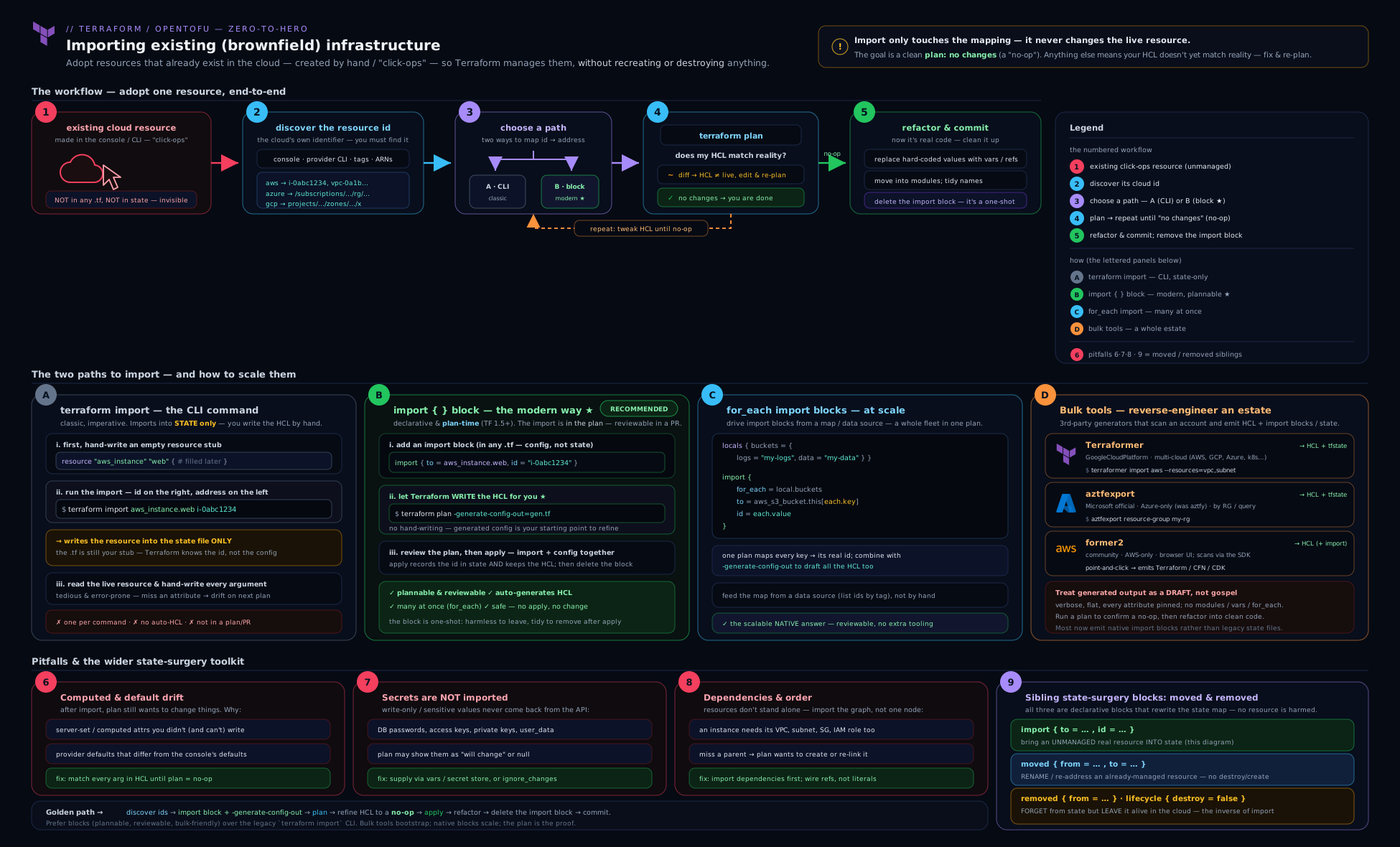
The diagram traces a single object from “exists in the cloud, unknown to Terraform” through discovery, the import {} + resource pairing (hand-written or generated), the import plan, apply writing it into state, the all-important no-op confirmation plan, and finally refactoring and block clean-up — the loop you repeat for every resource in the estate.
Hands-on lab
This lab teaches the entire import workflow with zero cloud spend and no account by importing a real on-disk file via the local provider’s local_file resource. The file exists outside Terraform first (created with a normal shell command), exactly modelling a brownfield object Terraform does not yet know about. (If you prefer a cloud-shaped target, the same steps work with a local Docker container via the kreuzwerker/docker provider — see the variant at the end.)
1. Set up a fresh working directory and create the “brownfield” object.
mkdir tf-import-lab && cd tf-import-lab
printf 'hello from a file Terraform did not create\n' > content.txt
2. Scaffold the provider and init. Create providers.tf:
terraform {
  required_version = ">= 1.5.0"
  required_providers {
    local = {
      source  = "hashicorp/local"
      version = "~> 2.5"
    }
  }
}

provider "local" {}
terraform init
Expected: Terraform has been successfully initialized!
3. Write only an import block and generate config. Create import.tf:
import {
  to = local_file.content
  id = "content.txt"
}
terraform plan -generate-config-out=generated.tf
Expected: Terraform writes generated.tf containing a resource "local_file" "content" and prints a plan ending with Plan: 1 to import, 0 to add, 0 to change, 0 to destroy. Open generated.tf — it will contain the file’s content and filename. (Note: local_file stores content; for a real cloud resource, sensitive values would be omitted here.)
4. Tidy the generated config and apply the import. The generator may emit attributes you would normally omit (e.g. permission attributes at their default). Leave them for now to keep the plan a no-op. Then:
terraform apply
Type yes. Expected: Apply complete! Resources: 1 imported, 0 added, 0 changed, 0 destroyed.
5. Validation — prove the no-op and inspect state.
terraform plan
terraform state list
terraform state show local_file.content
Expected: terraform plan reports No changes. Your infrastructure matches the configuration. — the win condition. state list shows local_file.content, and state show displays the imported attributes including the file path. The object Terraform never created is now under Terraform management.
6. (Optional) Refactor and garbage-collect. Move the resource from generated.tf into a sensibly named file, then delete the import block in import.tf (its job is done). Re-run terraform plan — it must still report No changes, proving the import block was safely removable.
Cleanup.
terraform destroy   # removes the now-managed file; type yes
cd .. && rm -rf tf-import-lab
destroy will delete content.txt because Terraform now manages it — which is the point: it is a fully managed resource. (If you wanted to keep the file but stop managing it, you would use a removed { lifecycle { destroy = false } } block — see the refactoring lesson.)
Cost note. Zero. The local provider creates nothing in any cloud — no account, no spend, nothing to leak. This is the safest possible way to practise the full import → generate → plan-to-no-op → refactor loop before you ever point it at production.
Docker variant (still free, more cloud-like). Add the kreuzwerker/docker provider, docker run -d --name nginx-legacy nginx to create a container outside Terraform, then import { to = docker_container.web; id = "<container-id>" } and follow the identical steps. It exercises a stateful, API-backed resource with computed attributes — a closer rehearsal for real cloud imports — at no cost if Docker is already installed.
Going deeper
The core workflow above adopts flat, top-level resources one estate-slice at a time. Real adoption soon runs into five deeper questions: where the to address may actually point, when Terraform is allowed to know your id, the newer alternatives to fiddly ID strings, what happens to secrets that never touch state, and how to recover when an import goes wrong.
Importing into modules and indexed instances. The to argument is a full resource address, so it can reach inside modules and into count/for_each instances — not just top-level resources:
# a resource that lives inside a module
import {
  to = module.network.aws_subnet.private["az-a"]
  id = "subnet-0abcd1234ef567890"
}

# a count-indexed instance
import {
  to = aws_instance.web[0]
  id = "i-0abcd1234ef567890"
}

# nested modules addressed with a dotted module path
import {
  to = module.platform.module.network.aws_vpc.this
  id = "vpc-0abcd1234ef567890"
}
The target block must already exist, and the instance key in to must match the key on the target resource exactly. Note the interaction with generation: because -generate-config-out only ever writes flat, root-level resources (no modules, no for_each), the practical pattern for a module-bound resource is to generate the draft at the root, then relocate it into the module with a moved block during refactor — generation and modules never meet in one step.
When Terraform is allowed to know your id. import blocks are resolved during terraform plan, which means id, any instance key in to, and a block’s for_each must all be known at plan time. You may compute them from var.*, local.*, or a data source, but you may not reference an attribute of a resource Terraform is creating in the same run — that value is still unknown, and Terraform rejects the plan. In practice: source import IDs from locals, variables, or data lookups, never from a managed resource being stood up alongside the import.
Import by identity (Terraform 1.12+). Composite ID strings — Route 53’s zoneID_name_type, Azure’s full ARM path — are error-prone to hand-assemble. Providers that support resource identity expose a structured identity object, and an import block may specify identity = { … } in place of id:
import {
  to = aws_instance.web
  identity = {
    # the object's shape is provider-defined; check the resource's Import docs
    id = "i-0abcd1234ef567890"
  }
}
The identity object’s schema is defined by the provider (for many AWS resources it also carries account_id and region), so consult the resource’s Import section. This is version-gated to Terraform 1.12+ and only works where the provider has published an identity schema — most imports today still use the string id, but identity is where the ecosystem is heading.
Write-only arguments and secrets that never drift (Terraform 1.11+). The core lesson noted that secrets do not import and that you must supply them (or reach for ignore_changes). The modern, cleaner answer is a write-only argument — a provider argument such as password_wo (paired with a password_wo_version) whose value is sent to the provider but never persisted to state or plan. Because it is never stored, it is never read back, so it never produces post-import drift the way a normal sensitive attribute can — yet you still must set it after adoption. Where the provider offers a write-only variant, prefer it over ignore_changes for imported secrets. This is version-gated (1.11+) and provider-dependent.
State-surgery interplay and recovery. Import and the terraform state commands are two ends of the same lever. The imperative terraform import mutates state immediately, so a mistake — wrong ID, wrong address — is already written; the fix is terraform state rm ADDRESS, which removes the bad binding without touching the real object, letting you retry cleanly. (A declarative import {} block that has not been applied yet needs no such surgery — you just delete the block.) Always snapshot first with terraform state pull > backup-$(date +%s).tfstate. After a correct import you may still want to re-home the address; prefer a moved block over terraform state mv so the change is declarative and reviewed. And the exact inverse of import is the removed {} block (Terraform 1.7+), which drops a resource from state — optionally without destroying the real object via lifecycle { destroy = false } — the decommissioning side owned by the refactoring lesson.
Common mistakes & troubleshooting
| Symptom | Cause | Fix |
|---|---|---|
Error: resource address ... does not exist in the configuration (CLI import) |
No matching resource block before running terraform import |
Write the resource block first, then import. Do not reach for -allow-missing-config. |
Plan after import shows 1 to add for the same resource |
The to address/key does not match what you intended — Terraform sees a new resource beside the imported one |
Fix the to address (especially for_each keys) so plan shows 0 to add. |
Plan after import shows a -/+ replacement |
A force-new attribute in config disagrees with reality (wrong name, availability_zone, immutable field) |
Edit config to match the live value; never apply a replacement on an imported production resource. |
Error: ... import is not compatible with config generation |
Used -generate-config-out together with for_each/count |
Generate config for one non-for_each resource, then refactor to for_each and write the import block by hand. |
Error: ... file already exists from -generate-config-out |
Target file already present (Terraform never overwrites) | Point at a new filename, or delete/rename the existing file first. |
Import fails: Cannot import non-existent remote object / ... not found |
Wrong ID format for that resource (composite separators, missing project/zone, ARM path) | Copy the exact format from the resource’s provider-docs Import section. |
Provider auth error during import (no valid credential, region unset) |
The provider cannot reach the cloud to read the object | Configure credentials/region; pass -var/-var-file if provider config depends on variables. |
| After import, a password/secret attribute keeps showing a diff | Secrets are not imported; config has a placeholder or empty value | Set the sensitive attribute explicitly (from a vault/variable), or mark it ignore_changes if the provider cannot read it back. |
| Bulk-tool output won’t plan to no-op | Deprecated arguments / provider-version drift / inlined literals | init against your pinned versions, fix deprecated args, replace literals with references, re-plan. |
Best practices
- Prefer
import {}blocks over the CLI command for anything you want reviewed and replayed across environments. Reserveterraform importfor genuine one-offs and scripts. - Always write (or generate) the
resourceblock before importing. State without config is an orphan that the next plan deletes. - Drive every import to a no-op plan before applying beyond the import itself.
No changesis the only acceptable end state for a faithful adoption. - Use
-generate-config-outto bootstrap, never to ship. De-conflict attributes, replace literals with references, fill secrets, modularise. - Import in small, logical batches (one service / one module’s worth), not the whole account in one go.
- Back up state before any import (
terraform state pull > backup-$(date +%s).tfstate) and use a versioned, locking backend so a botched import is recoverable. - Delete satisfied
importblocks after they have applied everywhere, in a follow-up PR that also plans to zero changes. - Do the refactor (rename/modularise) with
movedblocks, not by editing addresses freehand — see the refactoring lesson. - Pin provider versions before importing or running bulk tools, so generated config targets the schema you actually run.
Security notes
- Import never writes secrets into config — but it does write live attributes into state. State after an import contains the object’s attributes in plaintext, including any sensitive ones the provider can read. Treat post-import state as sensitive: encrypted backend, restricted access, no committing
.tfstateto git. See Terraform State, In Depth for state-secret handling. - Sensitive attributes are not populated by
-generate-config-outor by bulk tools — which is good (no secrets in generated files) but means you must supply them yourself from a secrets manager, not paste them into HCL. - Bulk tools authenticate with your real credentials and read your whole account. Run them with least-privilege, read-mostly credentials, review what they emit before committing, and never run an untrusted tool against production with admin keys.
-allow-missing-configand imperative imports bypass review. Prefer the plannable, PR-reviewedimport {}block so adoption is auditable.- Hold the state lock during import (
-lock=true, the default) so a concurrent run cannot corrupt state mid-import.
Common beginner mistakes
These are the misconceptions that cause the trouble — distinct from the symptom-driven fixes in the troubleshooting table above. Each is the wrong mental model, then the right one.
- “Import writes my configuration for me.” It does not. The classic CLI writes state only, and even
-generate-config-outproduces a rough draft you must de-conflict and reference-ise. Right model: import populates state; the matching config is always your responsibility. - “The import succeeded, so I’m finished.” A successful import only means state now has an entry. The finish line is a no-op plan —
No changes.Right model: import is one step of the loop;terraform planis the oracle that says whether you are actually done. - “I’ll skip writing the resource block and use
-allow-missing-config.” That leaves the object in state with no configuration, and the very next plan proposes to destroy it. Right model: write (or generate) theresourceblock first, then import — never the reverse. - “The
idis just the resource’s name.” Sometimes, but often not: many IDs are composite (ci-deployer:s3-access), full ARM paths, orproject/zone/name. Right model: theidis whatever the provider’s Import docs specify — always check, never guess. - “Importing a resource pulls in everything it depends on.” No — import is strictly per object. A VPC’s subnets, route tables, gateways and security groups are each a separate import. Right model: you model the dependency graph yourself; import adopts exactly one object per
to. - “A
-/+replacement in the import plan is fine, I’ll just apply.” Applying a replacement destroys the live resource and builds a new one — catastrophic on a production database. Right model: a replacement means a force-new attribute in your config disagrees with reality; fix the config to match, and re-plan to a no-op before any apply.
Practice challenges
Six graded exercises, beginner to advanced. Try each before opening the solution. IDs are placeholders — substitute your own.
1. (Beginner) Minimal adoption. An existing on-disk file notes.txt is not yet managed. Write the smallest import {} block that adopts it as local_file.notes.
<details><summary>Solution</summary>
import {
  to = local_file.notes
  id = "notes.txt"
}
Why: to and id are the only required arguments; for local_file the import ID is the file path. You still need a matching resource "local_file" "notes" block (or -generate-config-out) before the plan is a no-op.
</details>
2. (Beginner) Undo a bad CLI import. You ran terraform import aws_s3_bucket.logs acme-logs before writing any config, and now terraform plan wants to destroy the bucket. Give the one command that undoes the import without touching the real bucket.
<details><summary>Solution</summary>
terraform state rm aws_s3_bucket.logs
Why: state rm deletes the state binding only — the live bucket is untouched — so you can write the resource block and import again cleanly.
</details>
3. (Intermediate) Draft config from a live role. You want Terraform to write the first-draft HCL for an existing aws_iam_role named ci-deployer into a file called generated.tf. Give the block and the exact command.
<details><summary>Solution</summary>
import {
  to = aws_iam_role.ci_deployer
  id = "ci-deployer"
}
terraform plan -generate-config-out=generated.tf
Why: generation needs a bare import block (no resource yet) and a target file that does not already exist; Terraform refuses to overwrite one.
</details>
4. (Intermediate) Import a fleet. Three CloudWatch log groups — /acme/api, /acme/worker, /acme/scheduler — must be adopted into a single for_each resource aws_cloudwatch_log_group.this driven by a local map local.legacy_log_groups (key → name). Write the for_each import block.
<details><summary>Solution</summary>
import {
  for_each = local.legacy_log_groups
  to       = aws_cloudwatch_log_group.this[each.key]
  id       = each.value
}
Why: one block imports the whole fleet, keyed to each resource instance; remember -generate-config-out is unavailable with for_each, so the resource HCL is hand-written (or generated from one representative resource first).
</details>
5. (Advanced) Diagnose a generated-config failure. After -generate-config-out, an aws_instance config refuses to plan with an error naming both ipv6_address_count and ipv6_addresses. What happened, and what do you do?
<details><summary>Solution</summary>
The generator emitted two mutually exclusive attributes — a documented limitation of -generate-config-out. Delete whichever one does not apply to the live instance, then re-plan.
Why: generated HCL is a starting point, not a finished artefact; conflicting arguments, inlined literals and omitted secrets are all expected clean-up. </details>
6. (Advanced) Import into a module. A subnet with ID subnet-0abcd1234ef567890 lives conceptually inside module.network, as the "az-a" instance of a for_each resource aws_subnet.private. Write the import block, and explain why you cannot use -generate-config-out for it.
<details><summary>Solution</summary>
import {
  to = module.network.aws_subnet.private["az-a"]
  id = "subnet-0abcd1234ef567890"
}
Why: to is a full address, so it can target a for_each instance inside a module. Config generation cannot help here because it only emits flat, root-level resources and does not support for_each or modules — you generate at the root, then relocate into the module with a moved block.
</details>
Interview & exam questions
-
What exactly does
terraform importdo, and what does it not do? It reads an existing real object and writes a corresponding entry into state, bound to a resource address. It does not create infrastructure, does not (by itself) write configuration, and does not modify the real object. After import you must reconcile config untilplanis a no-op. -
Imperative
terraform importvs the declarativeimport {}block — give three differences. The block is plannable (appears inplan), reviewable (it is committed code), and replayable across workspaces; it also supportsfor_each. The CLI mutates state immediately, is per-invocation, and is not reviewable. (Both write state only by default.) -
What does
-generate-config-outdo and what are its limitations? Paired with animportblock onterraform plan, it writes first-draft HCL for the imported resource to a new file. Limitations: it can emit conflicting attributes, inlines literals instead of references, omits sensitive values, produces no modules, and does not work withfor_each/count. The output is a starting point to clean up, and the format may change between versions. -
You add an
importblock and a matchingresourceblock, and the plan says1 to import, 1 to add. What is wrong? Thetoaddress does not match the object you think — Terraform sees a new resource (the1 to add) alongside the import. Fix thetoaddress/key so the plan shows0 to add. -
After importing,
terraform planproposes a-/+replacement of a production database. Do you apply? No. A replacement means a force-new attribute in config disagrees with the live object. Applying would destroy the real database. Edit the config to match reality and re-plan to a no-op first. -
Why does importing into a config with no matching resource block (
-allow-missing-config) almost always end badly? The object lands in state with no configuration; the next plan reads “managed object not in config” and proposes to destroy it. Always write theresourceblock first. -
How do you import a fleet of fifty similar resources, and what can you not do while doing it? Use a
for_eachimport block driven by a map of key→ID, bound to afor_eachresource. You cannot use-generate-config-outwithfor_each— generate one representative resource, then refactor tofor_eachand write the import block by hand. -
Name the major bulk reverse-engineering tools and their scope. Terraformer (multi-cloud; generates config and state), aztfexport (Azure-only, Microsoft-maintained, formerly
aztfy; config + state), and former2 (AWS-only, community; scans the account and emits Terraform/other IaC). -
Where do you find the correct
idformat for a resource, and why does it matter? In the Import section at the bottom of the resource’s provider-registry docs. It matters because formats vary — composite IDs (Route 53zoneID_name_type, IAMrole:policy), full ARM paths for Azure, andproject/zone/namefor many GCP resources — and a wrong format fails the import. -
What is the goal state after an import, and how do you prove it? A no-op plan:
terraform planreportsNo changes. Your infrastructure matches the configuration.Prove it by runningplan(zero changes),terraform state list(new address present), andterraform state show ADDR(live attributes captured). -
How does import relate to
movedandremoved? Import adopts an object into state;movedre-addresses an object already in state (renames/module moves) without destroy/create;removedforgets or destroys a managed object. You import to bring brownfield in, thenmovedto refactor it, andremovedto decommission — see the refactoring lesson for the latter two. -
Why prefer
import {}blocks for production adoption over runningterraform importon a laptop? The block is committed, reviewed in a PR, applied identically in every workspace, and plannable before it runs — eliminating the “ran it in dev, forgot prod” divergence and the un-auditable side effect of an imperative command.
Quick check
- Does
terraform importcreate infrastructure? - Which flag generates first-draft HCL during an import, and what is its single biggest restriction?
- In an import plan, what does
0 to addprove? - Which Azure-specific bulk tool replaced
aztfy? - After a correct brownfield import, what must
terraform planreport?
Answers
- No. It only writes an entry into state for an object that already exists; it never creates the object.
-generate-config-out=FILE(onterraform plan). Its biggest restriction is that it does not work withfor_each/count(also: it inlines literals, omits secrets, can emit conflicting attributes).- That Terraform matched an existing object rather than planning to stand up a new one beside it — i.e. the
toaddress is correct. aztfexport(Azure/aztfexport), the Microsoft-maintained successor toaztfy.No changes. Your infrastructure matches the configuration.— a no-op plan is the proof the import and config are faithful.
Exercise
Take a resource you created by hand in any free-tier or local environment (a local_file, a Docker container, an AWS S3 bucket on a sandbox account, or an Azure resource group). Then:
- Scaffold a fresh Terraform directory with the right provider,
init, and confirm auth. - Write only an
import {}block targeting the object, and runterraform plan -generate-config-out=generated.tf. Inspect the generated HCL. - Clean the generated config: remove any conflicting attribute, replace at least one literal with a
var.*orlocal.*reference, and (if relevant) note which sensitive attribute was omitted. applythe import, then driveterraform plantoNo changes.- Refactor the resource’s address using a
movedblock (rename it to something meaningful) and confirm the plan stays at zero changes. - Delete the satisfied
importblock and confirm a final no-op plan. Write two sentences on what you would do differently importing this resource at scale (fleet of 50).
Certification mapping
- HashiCorp Certified: Terraform Associate — Read, generate, and modify configuration and Manage Terraform state: the import workflow,
import {}blocks,-generate-config-out, resource addressing, and the no-op-plan acceptance criterion are directly examinable. Expect at least one question distinguishing imperativeterraform importfrom declarative import blocks and one on what import does/does not do. - The bulk-tool landscape (Terraformer/aztfexport/former2) and per-provider ID formats are practitioner knowledge rather than exam objectives, but they appear constantly in real adoption interviews.
Glossary
- Brownfield — existing, running infrastructure created outside Terraform (often via console/click-ops) that you wish to bring under management.
- Import — the operation of writing an existing real object into Terraform state so Terraform manages it; does not create the object or (by itself) the config.
- Import ID — the provider-specific identifier of the live object (instance ID, bucket name, ARM path, composite string) supplied to
idor as the CLI argument. import {}block — declarative, plannable import expressed in configuration (to,id, optionalfor_each/provider), introduced in Terraform 1.5.-generate-config-out— aterraform planflag that writes first-draft HCL for an imported resource to a new file; output is a starting point, not finished code.- No-op plan —
terraform planreportingNo changes; the acceptance criterion that proves config faithfully describes the imported reality. - Force-new attribute — a resource argument that, when changed, forces destroy-and-recreate; a mismatch on one shows as a
-/+replacement in an import plan. - Terraformer / aztfexport / former2 — bulk reverse-engineering tools that enumerate live resources and emit Terraform config (and, for some, state).
- Module address — a resource address carrying a
module.<name>.prefix (possibly nested, e.g.module.platform.module.network.aws_vpc.this); a validimportblocktotarget when the resource lives inside a module. - Plan-time evaluation —
importblocks resolve duringterraform plan, so theirid,for_each, and anytoinstance key must be known at plan time (fromvar/local/data, never from a resource being created in the same run). - Resource identity — a provider-published, structured set of attributes that uniquely identify a remote object; an
importblock may useidentity = { … }instead of a stringid(Terraform 1.12+, provider-dependent). - Write-only argument — a provider argument (e.g.
password_wo, paired withpassword_wo_version) whose value reaches the provider but is never stored in state or plan (Terraform 1.11+); such secrets never read back and so never cause post-import drift, but must still be set. terraform state rm— removes a resource’s binding from state without touching the real object; the way to undo a mistaken imperative import and retry.removed {}block — the inverse of import: drops a managed object from state, optionally without destroying it vialifecycle { destroy = false }(Terraform 1.7+); the decommissioning tool owned by the refactoring lesson.
Next steps
- Terragrunt Stacks, In Depth: Units, Stacks, values & Generating Infrastructure from a Blueprint — the next lesson: generating many units from a blueprint, the modern evolution beyond
run-all. - Refactoring Terraform Safely with moved, import, and removed Blocks — the companion:
movedfor renames/module moves,removedfor decommissioning, and the CI delete-gate (the refactor step that follows every import). - Terraform State, In Depth: the State File, the state Commands, Locking & Sensitive Data — what import writes into, the
terraform statecommand surface, locking, and why state holds secrets.