In a nutshell
Level: Intermediate (with a beginner on-ramp) · Time: ~36 min
Think of a module’s source as where you shop for a part. You can buy from a big public marketplace (the public Registry — huge selection, anyone can list, so check the seller), from your company’s own internal catalogue (a private registry — vetted, access-controlled, staff-only), straight from the workshop that makes the part (Git — you name the exact tag or commit off the shelf), or from the drawer on your own workbench (a local ./ path — no shipping, no version label, whatever’s in the drawer right now). Same part, four very different stories about trust and versioning.
This lesson is the shopper’s manual. You’ll learn to read every kind of address Terraform understands, pin exactly which version arrives (and why version only works when you shop at a Registry), wire one module’s outputs into another’s inputs, and upgrade a part later without knocking over production. If you can already author a module, this is the other half of the job — and it’s the half you do a hundred times more often. The Learning objectives and Prerequisites below spell out exactly what you’ll walk away able to do; everything runs locally, no cloud account required.
The previous lesson taught you to author a module — to build a reusable, typed, versioned black box. This one teaches the other half: how to consume modules well. Consuming is where most engineers spend their Terraform lives — you write a hundred module blocks for every module you author, pull modules from the public Registry and from a private one, pin them to versions and Git tags, wire one module’s outputs into another’s inputs, and eventually upgrade them without breaking production. Done carelessly, module consumption is how a “small change” recreates a database, how a git pull silently rewrites your infrastructure, and how one terraform init drags in a module from a branch someone force-pushed last night. Done well, it is the cleanest, most reviewable code in your repository.
This lesson is the consumer’s manual to the module block. We dissect the block argument by argument — source, version, the inputs, reading outputs with module.<name>.<output>, and the four meta-arguments a module call allows (count, for_each, depends_on, providers). We then build the centrepiece reference: a complete table of every module source type — local paths, the public and private Registry, Git in all its forms, GitHub/Bitbucket shorthand, generic HTTP archives, S3 and GCS, Mercurial, and the //subdirectory selector that cuts across them. We cover the public Registry (and what the verified badge really means), the private registry, then the composition patterns — thin root, wrapper module, passing providers, and why deep nesting is a smell — and finish with versioning and upgrades done safely. Everything applies identically to OpenTofu: the module block, the source syntax, and init/get are the same; where the public registry host differs it is called out.
Learning objectives
By the end of this lesson you will be able to:
- Write a
moduleblock fluently — set itssourceandversion, pass typed inputs, and read its outputs withmodule.<name>.<output>. - Use the four module-level meta-arguments —
count,for_each,depends_on, andproviders— and know the rules and gotchas of each. - Choose the correct module source type for any situation from a complete reference table, and write each form’s exact syntax (local, Registry, Git, GitHub/Bitbucket shorthand, HTTP, S3, GCS, Mercurial).
- Use the
//subdirectoryselector and the Git?ref=/?depth=query arguments correctly. - Consume modules from the public Terraform Registry and a private registry, and explain what the verified badge does and does not guarantee.
- Apply the core composition patterns — thin root, wrapper module, fan-out with
for_each— and pass providers (including aliases) into modules. - Recognise and avoid deep module nesting, and explain why flat composition at the root is healthier.
- Upgrade a consumed module safely using version constraints,
init -upgrade, the lock file, andplanreview.
Prerequisites
You should have completed Authoring Terraform Modules: Structure, Inputs/Outputs, Versioning & Publishing — this lesson is its mirror image, and it assumes you already know what a module is, what required_providers and configuration_aliases are, and what SemVer and ~> mean (we use them here from the consumer’s seat rather than re-deriving them). You also need the fundamentals: resources, variables, outputs, the dependency graph, and the init → plan → apply workflow. You need Terraform 1.9+ or OpenTofu 1.6+ installed; the lab runs entirely locally with no cloud account. This lesson sits in the Modules stage of the Terraform Zero-to-Hero track, immediately after module authoring and immediately before remote state at scale.
The module block: the consumer’s interface
A module is consumed through exactly one construct — the module block — and everything you do with a module from the outside, you do here. The block has a label (the local instance name — module.network in references), a required source, an optional version, the input arguments (one per input variable the module exposes), and up to four meta-arguments (count, for_each, depends_on, providers). Nothing else: a module call cannot set a provider configuration, a lifecycle block, or a backend — those are not part of the consumer interface.
module "network" {
  source  = "terraform-aws-modules/vpc/aws"   # where the module comes from
  version = "~> 5.0"                            # which version (registry/Git only)

  # --- input arguments: one per the module's input variables ---
  name = "payments-prod"
  cidr = "10.20.0.0/16"
  azs  = ["ap-south-1a", "ap-south-1b"]
  # ...

  # --- meta-arguments (optional) ---
  # count / for_each / depends_on / providers
}
Here is the full anatomy of the block, argument by argument.
| Part of the block | What it is | Notes & rules |
|---|---|---|
Label (module "network") |
The instance’s local name | Used in references as module.network.<output>; must be unique in the calling module |
source (required) |
Where Terraform fetches the module from | A string; its syntax selects the source type (table below). Read at init. Cannot be a computed/interpolated value — must be a literal |
version (optional) |
A version constraint | Only valid for Registry sources (public or private). For Git/HTTP/S3 you pin in the source itself (?ref=), not here |
| Input arguments | One argument per the module’s variable blocks |
Required variables (no default) must be set; optional ones may be omitted. Type errors surface at plan |
count |
Create N instances of the module | module.network[0], [1], … Mutually exclusive with for_each |
for_each |
Create one instance per map/set key | module.network["app"], ["db"], … The default fan-out choice |
depends_on |
Force ordering against other objects | Use sparingly; implicit deps (output→input wiring) are preferred |
providers |
Map the caller’s providers into the module’s slots | Needed for aliases or when names differ; otherwise inherited automatically |
Two rules in that table trip up newcomers and are worth stating loudly. First, version is only for the Registry. A registry source is a short three-part address (namespace/name/provider) that carries no version, so the version argument supplies it. Every other source type encodes its revision inside the source string (a Git ?ref=, an S3 object key, an HTTP URL), so adding a version argument to a Git source is an error. Second, source must be a literal string — you cannot build it from a variable (source = var.module_source is invalid), because Terraform must resolve and download all modules during init, before any variables or expressions are evaluated. This is the single most common “why won’t this work” question from people coming from general-purpose languages.
Reading module outputs
A module hands results back through its output blocks; you read them with the address module.<label>.<output_name>. This is how composition works — you wire one module’s output into another module’s (or a resource’s) input, and Terraform infers the dependency automatically.
module "network" {
  source = "./modules/network"
  name   = "payments-prod"
  cidr   = "10.20.0.0/16"
}

module "database" {
  source     = "./modules/postgres"
  name       = "payments-prod-db"
  vpc_id     = module.network.vpc_id              # output -> input wiring
  subnet_ids = values(module.network.subnet_ids)  # an output, transformed
}

resource "aws_instance" "bastion" {
  subnet_id = values(module.network.subnet_ids)[0]  # module output -> resource
}

output "vpc_id" {
  value = module.network.vpc_id                    # re-export to *this* module's caller
}
Three things to internalise. First, you can only read outputs the module declares — there is no way to reach a resource inside a module (module.network.aws_vpc.this.id does not exist; the module must expose vpc_id as an output). That encapsulation is the whole point of a module. Second, referencing module.network.vpc_id from module.database creates an implicit dependency, so Terraform builds the network first — the same dependency-graph mechanism from fundamentals, now between modules; this is why you almost never need depends_on between modules. Third, when a module uses count or for_each, its outputs become indexed/keyed (module.network[0].vpc_id, module.network["app"].vpc_id), and a bare module.network.vpc_id is then an error — address the specific instance (or use a splat / for expression).
The four meta-arguments on a module call
A module block accepts four meta-arguments. They are deliberately a subset of what resources accept — there is no lifecycle and no provider (singular) on a module; instead there is providers (plural, a mapping). Here is each in full.
| Meta-argument | What it does | Key rules & gotchas |
|---|---|---|
count = <n> |
Instantiates the module N times, indexed 0..N-1 |
Address as module.x[0]. Keyed by position — removing a middle item re-indexes the rest. Use for an on/off toggle (count = var.enabled ? 1 : 0) or truly identical N. Mutually exclusive with for_each |
for_each = <map|set> |
Instantiates the module once per key | Address as module.x["key"]; each.key/each.value available inside the arguments. Keyed by stable string keys — add/remove one without disturbing others. The default fan-out (e.g. one stack per environment) |
depends_on = [...] |
Adds explicit ordering against listed objects | Use only when a dependency is not expressible through output→input wiring (e.g. a side-effecting resource the module relies on but doesn’t reference). Forces the whole module to wait. Overuse serialises your graph |
providers = { ... } |
Maps the calling module’s providers onto the child’s provider slots | Needed when the child declares configuration_aliases, or when you want to hand it a non-default/aliased provider. If omitted, the child inherits the default provider configurations automatically |
The two fan-out meta-arguments — count and for_each — work on a module exactly as they do on a resource, which is a genuinely powerful idea: one module block can stamp out an entire stack per environment, per region, or per tenant. The same rule applies as for resources: prefer for_each over count for any collection of distinct things, because position-keyed count re-indexes (and therefore plans to destroy/recreate) everything after a removed element, while key-keyed for_each leaves siblings untouched.
# Fan out one network stack per environment, keyed stably.
module "network" {
  source   = "./modules/network"
  for_each = {
    dev  = { cidr = "10.10.0.0/16" }
    prod = { cidr = "10.20.0.0/16" }
  }
  name = "app-${each.key}"
  cidr = each.value.cidr
}

# Reference a specific instance's output:
output "prod_vpc_id" {
  value = module.network["prod"].vpc_id
}

# Or collect across all instances:
output "all_vpc_ids" {
  value = { for k, m in module.network : k => m.vpc_id }
}
depends_on on a module is the escape hatch for the rare case where a module depends on something it doesn’t reference — for example, the module manages IAM policies that must exist before an unrelated bootstrap resource, and there is no output to wire. Use it sparingly: it forces the entire module to wait for the listed objects, which can over-serialise an otherwise parallel graph. providers is covered in depth in the composition section below.
Module source types: the complete reference
The source string is the heart of consumption, and Terraform’s module installer understands a surprisingly wide set of source types. The syntax of the string is what selects the type — there is no type = field — so getting the syntax exactly right matters. This table is the one to bookmark: it covers every source type Terraform 1.9+/OpenTofu support, with the exact form and when to reach for it.
| Source type | source syntax (example) |
version arg? |
Notes / when to use |
|---|---|---|---|
| Local path | "./modules/network" or "../shared/vpc" |
No | Must start with ./ or ../. For modules within the same configuration/repo. Not downloaded, not cached, not versioned — edits are picked up immediately |
| Public Registry | "terraform-aws-modules/vpc/aws" |
Yes (~> 5.0) |
The three-part NAMESPACE/NAME/PROVIDER address on registry.terraform.io (Terraform) or the OpenTofu registry. The canonical way to consume community modules |
| Private registry | "app.terraform.io/ORG/network/aws" |
Yes (~> 1.4) |
A four-part HOST/NAMESPACE/NAME/PROVIDER address. Terraform Cloud/Enterprise, Spacelift, Artifactory, etc. Access-controlled org-internal modules |
| Generic Git (HTTPS) | "git::https://example.com/vpc.git" |
No (use ?ref=) |
The git:: forces Git. Append ?ref=v1.4.0 to pin a tag/branch/commit. Works with any Git host |
| Generic Git (SSH) | "git::ssh://git@github.com/org/vpc.git" |
No (use ?ref=) |
SSH form for private repos using key auth. Note the ssh:// and git@ |
| GitHub shorthand | "github.com/org/repo" |
No (use ?ref=) |
Detected automatically; expands to an HTTPS Git clone. github.com/org/repo//modules/x?ref=v1.0.0 for sub-paths/tags |
| Bitbucket shorthand | "bitbucket.org/org/repo" |
No (use ?ref=) |
Detected automatically (Bitbucket Cloud); expands to the underlying Git (or Mercurial) clone |
| Generic Mercurial | "hg::https://example.com/vpc" |
No (use ?rev=) |
The hg:: forces Mercurial. Rare today, but supported. Pin with ?rev= |
| Generic HTTP(S) archive | "https://example.com/vpc.zip" |
No | An HTTP URL to a .zip/.tar.gz/.tbz2 archive (or one served with an X-Terraform-Get header / ?archive= hint). Pulls and unpacks. Supports username:password@ or a netrc |
| S3 bucket | "s3::https://s3.ap-south-1.amazonaws.com/bucket/vpc.zip" |
No | An archive in S3, fetched with your AWS credentials. The s3:: prefix; pin by using a versioned object key |
| GCS bucket | "gcs::https://www.googleapis.com/storage/v1/bucket/vpc.zip" |
No | An archive in Google Cloud Storage, fetched with your GCP credentials. The gcs:: prefix |
A few cross-cutting details make this table usable in anger:
- The
//subdirectory selector works across the download source types (Git, GitHub/Bitbucket, HTTP, S3, GCS — anything that fetches a whole repo or archive). A double slash says “download this whole repo/archive, then use the module in this sub-path”:git::https://github.com/org/infra.git//modules/network?ref=v2.1.0. Without//, Terraform uses the repo/archive root as the module. Local paths and Registry addresses do not use//(the Registry resolves the module directly). - Query arguments are appended after
?. The big one is?ref=for Git, which accepts a tag (?ref=v1.4.0— the production default), a branch (?ref=main— mutable, avoid), or a full commit SHA (?ref=51d0...— fully immutable). Mercurial uses?rev=. Git also supports?depth=1for a shallow clone (fasteriniton large repos; combine withrefto a tag). Multiple args join with&. - Forced source types via the
TYPE::prefix.git::,hg::,s3::,gcs::force the installer to treat the URL as that type when it can’t be inferred. GitHub/Bitbucket and.zip-style HTTP URLs are auto-detected and usually need no prefix, but the explicitgit::https://...form is the most portable and unambiguous. - Local paths are special. A
sourcebeginning with./or../is a local module — it is not downloaded, not cached under.terraform/modules, not versioned, and there is noversionargument. Terraform reads it straight from disk every run, so edits take effect immediately. Crucially, a path not starting with./or../(e.g."modules/network") is not treated as local — it is parsed as a Registry address and will fail confusingly, so always write the leading./.
The decision rule across the whole table: prefer the Registry (public or private) when one exists, because it gives you the clean version constraint mechanism and a browsable catalogue; fall back to Git ?ref= to a tag when there is no registry (private repos, vendoring, air-gapped); use local paths only for modules that genuinely live inside the same configuration and version together with it; and reach for HTTP/S3/GCS archives for tightly-controlled internal distribution where you publish immutable artefacts to a bucket.
How init installs modules
Whatever the source, Terraform installs modules during terraform init (the terraform get command does just the module download, without the rest of init). The installer downloads each non-local module into .terraform/modules/ and records the resolved address and version in .terraform/modules/modules.json (the module manifest). On later runs Terraform reuses what’s there; to force it to re-resolve version constraints and re-download, run terraform init -upgrade. Local modules are never copied here — they are read in place. This is why changing a registry version constraint requires init -upgrade to take effect, while editing a local module needs nothing.
The public Terraform Registry
The public Terraform Registry at registry.terraform.io is a searchable catalogue of community and vendor modules (OpenTofu users have an equivalent registry; the address format is identical). You consume a module from it with the three-part address and a version constraint:
module "vpc" {
  source  = "terraform-aws-modules/vpc/aws"
  version = "~> 5.0"

  name = "demo"
  cidr = "10.0.0.0/16"
  azs  = ["ap-south-1a", "ap-south-1b"]
}
The address decodes as NAMESPACE / NAME / PROVIDER: terraform-aws-modules (the publishing namespace), vpc (the module name), aws (the target provider — modules are namespaced by the cloud they manage, so the same name can exist for aws, azurerm, google). The Registry maps that address to a backing GitHub repository and exposes each Git release tag as a published version, which is why the version constraint works against it.
The verified badge is widely misread, so understand it precisely. A verified publisher is one HashiCorp has confirmed is the genuine vendor/maintainer (AWS, Microsoft, Datadog, etc.) — a provenance/identity signal: “this really is published by who it claims to be.” It is not a security audit, a quality score, or a bug-free guarantee. Treat every third-party module — verified or not — as a supply-chain dependency: it runs with your credentials during apply and can declare any resource, so pin it, read its inputs/outputs (ideally its source), watch its release notes, and vendor critical ones. Useful signals beyond the badge: version cadence, open-issue volume, documented examples, and download count.
A practical note on large community modules: the popular ones (e.g. terraform-aws-modules/vpc/aws) are deliberately feature-rich with a huge input surface — a feature (one block builds an entire VPC) and a cost (hard to read end to end). The wrapper pattern below tames that.
The private registry
A private registry hosts an organisation’s internal modules with access control and governance, so proprietary modules are shared inside the company without being published publicly. The consumption syntax is the same three-part address with the registry host prepended, making it four parts — HOST/NAMESPACE/NAME/PROVIDER — and you still use the version constraint:
module "network" {
  source  = "app.terraform.io/kloudvin/network/aws"   # HCP Terraform private registry
  version = "~> 1.4"

  name = "payments-prod"
  cidr = "10.20.0.0/16"
}
app.terraform.io is HCP Terraform’s (formerly Terraform Cloud’s) registry host; Terraform Enterprise uses your own hostname; Spacelift, JFrog Artifactory, GitLab and others offer compatible registries with their own hosts. Authentication is via terraform login <host> (which stores a token) or a credentials block, so init can fetch the module. The payoff over raw Git sources: a browsable internal catalogue, access control, clean SemVer version constraints (instead of memorising Git tags and // sub-paths), and a place to govern modules. Past a handful of modules, a private registry is the standard — and it is what the authoring lesson’s publishing patterns feed into.
Composition patterns
Composition is the art of assembling modules into a working system, and a few patterns recur in every well-run codebase. They are all about where the complexity lives and how stable the interfaces are.
The thin root module
The healthiest top-level shape is a thin root: the root module (where you run apply) holds the backend, the configured provider blocks, and a handful of module calls wired together — and almost no resources of its own. All the real work lives in child modules; the root just composes them and injects environment specifics (region, account, names, tags). A thin root is easy to read (it is a table of contents for the stack), easy to review (the diff is “we added a cache module”), and easy to promote across environments (the only differences between dev and prod roots are inputs).
# root main.tf — thin: backend + providers + composed modules, ~no raw resources
terraform {
  backend "s3" { /* ... */ }
  required_providers { aws = { source = "hashicorp/aws", version = "~> 5.0" } }
}

provider "aws" {
  region = "ap-south-1"
}

module "network" {
  source = "./modules/network"
  name   = "payments-prod"
  cidr   = "10.20.0.0/16"
}

module "database" {
  source     = "app.terraform.io/kloudvin/postgres/aws"
  version    = "~> 2.1"
  name       = "payments-prod-db"
  vpc_id     = module.network.vpc_id
  subnet_ids = values(module.network.subnet_ids)
}
The wrapper module
A wrapper module is your own thin module that internally calls a third-party module (often a big community one) but exposes only the small, opinionated interface your organisation cares about. It is the standard way to consume large Registry modules sanely and to enforce organisational policy (mandatory tags, naming conventions, security baselines) in one place.
# modules/org-vpc/main.tf — our opinionated wrapper around the community VPC
module "vpc" {
  source  = "terraform-aws-modules/vpc/aws"
  version = "~> 5.0"

  name = var.name
  cidr = var.cidr
  azs  = var.azs

  # Our org defaults, applied once, here:
  enable_nat_gateway   = true
  single_nat_gateway   = false
  enable_dns_hostnames = true
  tags                 = merge(var.tags, { managed_by = "platform-team", cost_centre = var.cost_centre })
}

# Re-export only the handful of outputs our teams actually consume:
output "vpc_id"     { value = module.vpc.vpc_id }
output "subnet_ids" { value = module.vpc.private_subnets }
Now the company consumes org-vpc with five inputs instead of the upstream module’s eighty, every VPC gets the mandated tags and NAT topology, and a baseline change happens once in the wrapper. The wrapper also insulates consumers from upstream: you bump the community module, adapt the wrapper, and ship a new wrapper version without any team touching their roots. It is the single most valuable composition pattern in a platform team’s toolbox.
Passing providers into modules
By default a child module inherits the default provider configurations from its caller automatically — if the root configures provider "aws", every child that needs aws gets it without you doing anything. You only need the providers argument in two situations: (1) the child declares configuration_aliases (it needs more than one configuration of the same provider — e.g. two regions), or (2) you want to hand the child a non-default/aliased provider instead of the default.
# Root configures two AWS regions:
provider "aws" {
  region = "ap-south-1"
}
provider "aws" {
  alias  = "dr"
  region = "ap-southeast-1"
}

# A module that replicates across regions declares slots (configuration_aliases)
# and the root fills them explicitly:
module "replicated" {
  source = "./modules/cross-region-bucket"

  providers = {
    aws         = aws        # the default -> the module's default aws
    aws.replica = aws.dr     # our 'dr' alias -> the module's 'aws.replica' slot
  }

  name = "payments-backups"
}
The mental model: the module names the slots (via configuration_aliases) and the root fills them (via the providers map). The left-hand side of each entry is the child’s provider reference; the right-hand side is the caller’s configured provider — backwards gives a confusing “provider configuration not present” error. (The authoring lesson covers the module-side declaration; here you are on the filling-in side.)
Fan-out, and avoiding deep nesting
The fan-out pattern — for_each over a module to stamp one stack per environment/region/tenant — was shown earlier and is the right tool for breadth. The anti-pattern is excessive depth: child modules calling grandchild modules calling great-grandchildren. A module can call other modules (nesting is legal and sometimes right — a wrapper is one level of it), but deep trees are a smell:
- They are hard to reason about — to understand what a root does you must read down through many layers.
- They make provider passing painful — providers must be threaded explicitly through every intermediate level when aliases are involved.
- They slow
planand bloat the graph. - They make outputs awkward — a value from a deep leaf must be re-exported up through every layer to reach the root.
The healthy shape is broad and shallow: a thin root composing several child modules, each of which is mostly resources (with at most a wrapper-style single level of nesting where it earns its keep). When you feel the urge to nest three deep, ask whether the root should call those modules directly instead. This “flat composition at the root” rule is the composition counterpart to “one module, one purpose” from the authoring side.
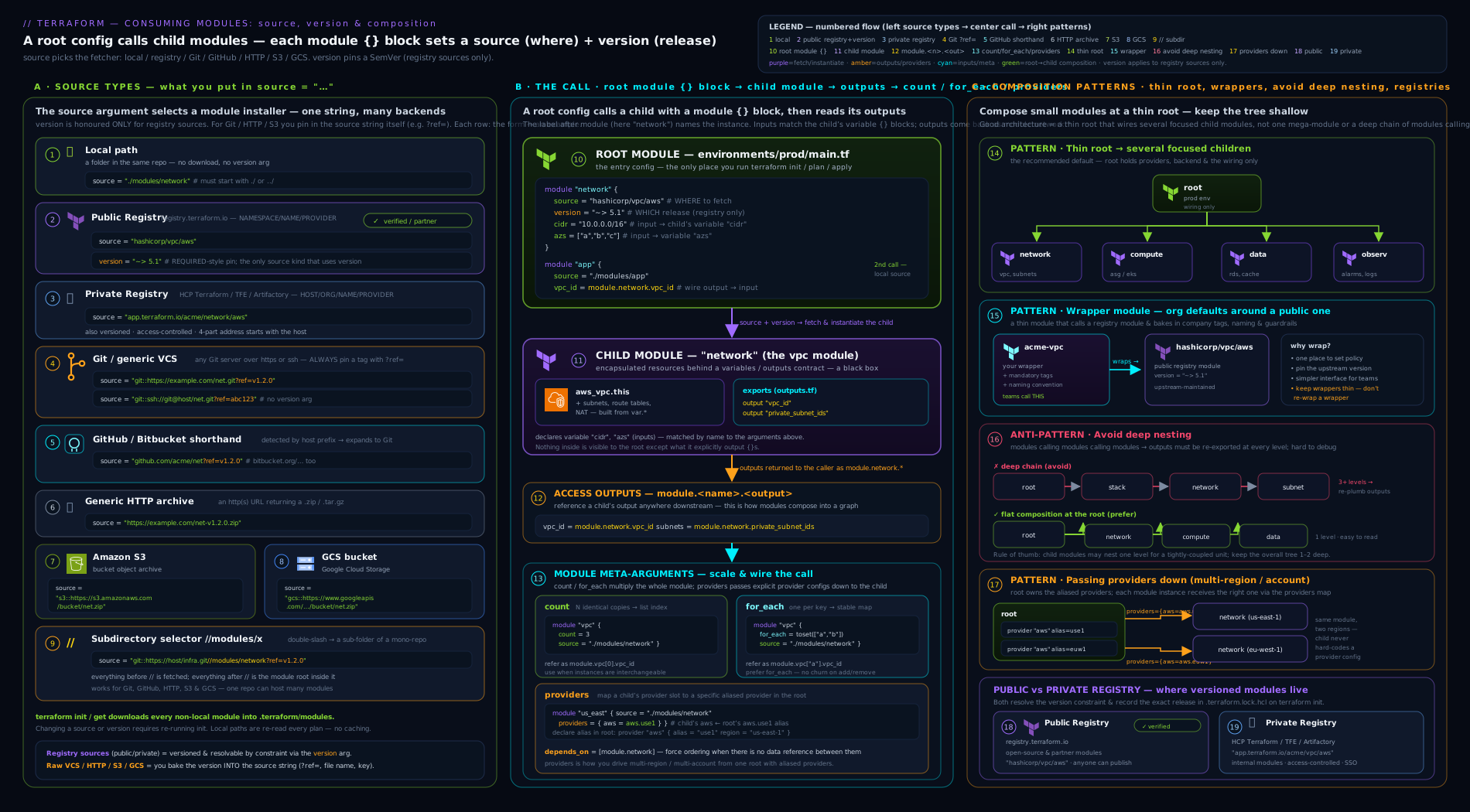
The diagram shows, left to right: the module block and its arguments at the centre; the fan of source types feeding into it (local, public/private Registry, Git/GitHub, HTTP/S3/GCS) with their syntax; and on the right the composition shapes — a thin root composing children, a wrapper module around a community one, and the contrast between healthy flat composition and unhealthy deep nesting.
Versioning and upgrades, from the consumer’s seat
You pin a consumed module so that your infrastructure does not change unless you change it. The mechanism depends on the source type, and this is the crux of safe consumption.
| Source type | How you pin | Production default |
|---|---|---|
| Registry (public/private) | The version argument |
version = "~> 5.0" (pessimistic: ≥5.0, <6.0) |
| Git / GitHub / Bitbucket | The ?ref= in the source |
?ref=v1.4.0 (an immutable tag; or a commit SHA) |
| HTTP / S3 / GCS | A versioned/immutable artefact URL or object key | A path that never mutates (versioned key) |
| Local | (none — versions with the repo) | n/a |
For Registry sources, the pessimistic constraint ~> 5.0 is the default: you receive backward-compatible patch and minor releases (5.1, 5.2.3) but never the next major (6.0), where breaking changes live by SemVer convention. For Git sources, the iron rule applies from the consumer side too: pin ?ref= to a tag, never a branch. ?ref=main is mutable — main today is not main after the next merge or force-push — so a branch-pinned module silently drifts on the next init -upgrade; a tag (or commit SHA) is immutable and reproducible.
The lock file caveat. The .terraform.lock.hcl you commit locks provider versions, not module versions. Module versions are recorded only in .terraform/modules/modules.json, which is not committed (it lives under .terraform/). So your reproducibility for modules comes entirely from how tightly you pin in the source/version — a loose constraint like >= 5.0 (no upper bound) genuinely lets a future major slip in on the next upgrade. Pin deliberately.
The upgrade flow. Upgrading a consumed module is a four-step, reviewable operation:
- Change the constraint. Bump
version = "~> 6.0"(Registry) or?ref=v2.0.0(Git) in themoduleblock. - Re-resolve. Run
terraform init -upgradeso Terraform re-evaluates the constraint and downloads the new version into.terraform/modules/(a plaininitwill not pick up a changed version — it reuses what’s cached). - Read the plan. Run
terraform planand read it carefully — a major bump can rename inputs (anUnsupported argumenterror you fix in the call), change defaults, or force resource replacement (watch for-/+and# forces replacement). For breaking majors, read the module’s CHANGELOG before applying. - Apply deliberately. Once the plan matches your intent, apply. In a team, this whole flow happens in a pull request so the plan is reviewed before merge.
The discipline that keeps this safe is: upgrade one module at a time, on its own branch/PR, and treat the plan as the source of truth. Bumping five modules at once and getting a hundred-line plan is how surprises reach production.
Going deeper
The reference above is the what; this section is how the installer actually works and how consumption behaves at scale — the parts you feel once a repo has fifty modules and a CI pipeline that runs init a thousand times a day.
What the installer actually does (go-getter and the registry protocol)
Terraform’s module installer is built on HashiCorp’s go-getter library — the same detector-and-forcing-prefix machinery behind the source table. When it sees a source it runs detectors (which turn github.com/org/repo into a full Git URL) and honours forcing prefixes (git::, s3::, gcs::, hg::) that say which getter to use when the string is ambiguous. That is the whole reason the syntax, not a type = field, selects the source type.
Registry sources take an extra hop, because a three- or four-part address is not a URL. Terraform first does remote service discovery: it fetches https://<host>/.well-known/terraform.json to find the host’s modules API endpoint, queries that endpoint (/v1/modules/<namespace>/<name>/<provider>/versions) to resolve your version constraint to a concrete release, then asks for that release’s download location. The registry answers with an X-Terraform-Get header pointing at the real source — almost always a Git URL with a ?ref= tag. In other words, a Registry source is a friendly, versioned front door onto a Git tag, and the version constraint works because the registry (not you) does the tag lookup. Generic HTTP sources can use the same X-Terraform-Get header to redirect the installer to the true archive.
Monorepo vs polyrepo modules
Two repository layouts dominate, and your source strings look different in each:
| Layout | One module = | Typical source |
Versioning |
|---|---|---|---|
| Polyrepo | one Git repo | git::https://…/terraform-aws-network.git?ref=v1.4.0 (or a Registry address) |
Each repo tags its own vX.Y.Z; maps cleanly onto a registry (one repo → one module) |
| Monorepo | one sub-directory | git::https://…/infra.git//modules/network?ref=network/v1.4.0 |
One repo, many modules → prefix the tag per module so a bump to one module doesn’t move the others |
Polyrepo gives each module an independent release cadence and the cleanest registry story, at the cost of many small repos to govern. Monorepo keeps everything in one place and makes cross-module changes atomic, but you lean on the //subdir selector and a per-module tag convention — a single global v1.4.0 tag can’t mean five different things. Raw Git ?ref= will happily take any tag string, so ?ref=network/v1.4.0 is perfectly legal and immutable; the discipline is entirely yours. Private registries built on a monorepo let you configure which tag prefix maps to which module, restoring clean SemVer version constraints on top of the monorepo layout.
Authenticating to private sources (at CI scale)
terraform login <host> is fine on a laptop, but pipelines need non-interactive auth. The mechanisms, by source type:
- Private registry: set a
TF_TOKEN_<host>environment variable (dots in the host become underscores —TF_TOKEN_app_terraform_ioforapp.terraform.io), or write acredentials "<host>" { token = … }block. Terraform reads either atinit. - Git over HTTPS: a
~/.netrcentry, or a git rewrite that injects a token —git config --global url."https://x-access-token:${TOKEN}@github.com/".insteadOf "https://github.com/". - Git over SSH: the
git::ssh://git@…form plus a loaded deploy key or SSH agent.insteadOfcan also rewrite HTTPS sources to SSH, so CI picks the auth without the code changing.
The insteadOf trick is the one to remember: every source in your code can use one canonical form while each environment (laptop, CI, air-gapped mirror) rewrites it to whatever credentials it holds.
init performance and caching at scale
One asymmetry surprises people: providers have a shared plugin cache (TF_PLUGIN_CACHE_DIR); modules do not. Every working directory downloads its own copy of every non-local module into its own .terraform/modules/, every time it is initialised fresh. On a big monorepo or a busy CI fleet that means the same Git modules are cloned again and again. The levers that help:
?depth=1on Git sources for a shallow clone — much faster on large-history repos (combine it with a?ref=to a tag or branch, not an arbitrary deep SHA a shallow clone might not fetch).- Cache
.terraform/modules/(with itsmodules.json) between CI runs, keyed on a hash of your config — the closest thing to a module cache Terraform offers. Restore it andinitskips the re-download. - Prefer a private registry, or a
//subdirmonorepo, over dozens of tiny Git sources: fewer clones, resolved centrally.
Vendoring for durability, not just speed
Pinning by tag makes a module reproducible only as long as the upstream repo exists and the tag isn’t re-pointed. For anything on your production critical path, go one step further: pin by full commit SHA (?ref=<40-char-sha> — immutable even against a force-push) and vendor a copy into your own repo or an internal mirror. Vendoring trades a little duplication for two guarantees a remote source can’t give: the code that passed review is byte-identical to the code that applies, and a deleted or compromised upstream can’t reach production. This is the supply-chain endgame the Security notes gesture at, made concrete.
OpenTofu divergences worth knowing
Everything above is identical on OpenTofu, with two divergences. Its public registry is registry.opentofu.org (same three-part address format), and recent OpenTofu releases (1.10+) add an oci:// module source backed by OCI (container) registries — a distribution channel Terraform has no equivalent for. If you are standardising on OCI artefacts across your supply chain, check the OpenTofu docs for the exact oci:// source syntax and minimum version before relying on it.
Hands-on lab
This lab needs only local tooling and no cloud account. You will consume the same local module from several source forms, fan it out with for_each, build a wrapper, and watch the module installer at work — all with a trivial module that touches no cloud.
1. Scaffold a tiny module and a root that consumes it.
mkdir -p tf-consume-lab/modules/greeting && cd tf-consume-lab
modules/greeting/main.tf (a local does the work — no provider, no cloud):
variable "name"  { type = string }
variable "shout" {
  type = bool
  default = false
}

locals {
  base     = "Hello, ${var.name}!"
  greeting = var.shout ? upper(local.base) : local.base
}

output "greeting" { value = local.greeting }
2. Consume it from the root via a LOCAL source. Create main.tf in tf-consume-lab/:
module "hi" {
  source = "./modules/greeting"   # local path: leading ./ is required
  name   = "KloudVin"
  shout  = true
}

output "from_local" { value = module.hi.greeting }
Initialise and apply (no cloud — outputs are local-only):
terraform init
terraform apply -auto-approve
Expected: from_local = "HELLO, KLOUDVIN!".
3. Inspect the module manifest. See what the installer recorded:
terraform providers   # note: zero providers — this module needs none
cat .terraform/modules/modules.json
Expected: modules.json lists your hi module with a "Source": "./modules/greeting" and a local "Dir". (Local modules are read in place — observe there is no copy under .terraform/modules/hi/.)
4. Fan the module out with for_each. Replace the module "hi" block and output with:
module "hi" {
  source   = "./modules/greeting"
  for_each = { vinod = true, team = false }
  name     = each.key
  shout    = each.value
}

output "all_greetings" {
  value = { for k, m in module.hi : k => m.greeting }
}
Re-apply and read the keyed outputs:
terraform apply -auto-approve
Expected: all_greetings = { "team" = "Hello, team!", "vinod" = "HELLO, VINOD!" }. Note you now address instances as module.hi["vinod"] — a bare module.hi.greeting would error.
5. Build a WRAPPER module. Create modules/loud-greeting/main.tf that wraps greeting with an opinionated default (always shout) and a narrowed interface:
variable "name" { type = string }

module "inner" {
  source = "../greeting"     # relative local source, from one module to another
  name   = var.name
  shout  = true              # the wrapper's opinion, applied once
}

output "greeting" { value = module.inner.greeting }
Add a consumer of the wrapper to the root main.tf:
module "loud" {
  source = "./modules/loud-greeting"
  name   = "platform"
}

output "from_wrapper" { value = module.loud.greeting }
Re-init (a new module was added, so the installer must wire it) and apply:
terraform init       # picks up the newly-referenced wrapper module
terraform apply -auto-approve
Expected: from_wrapper = "HELLO, PLATFORM!" — proof the wrapper applied its opinion (shout = true) without the consumer asking. Note this is one level of nesting (root → loud-greeting → greeting), which is the healthy, wrapper-justified kind.
6. See source-must-be-literal fail (instructive). Temporarily add to the root and observe the error, then remove it:
variable "mod_src" { default = "./modules/greeting" }
module "broken" {
  source = var.mod_src    # INVALID: source cannot be a variable
  name   = "x"
}
terraform init
Expected: an error that the module source must be a literal string (variables are not allowed) — the concrete proof that sources resolve at init, before expressions. Delete the broken block and mod_src variable.
Validation: you have consumed a module by local path, inspected the module manifest, fanned a module out with for_each and read keyed outputs, built and consumed a wrapper (one healthy level of nesting), and seen first-hand why source must be literal.
Cleanup: nothing was created in any cloud, so simply remove the lab directory:
cd .. && rm -rf tf-consume-lab
Cost note: zero. Everything ran locally; no provider made an API call and no resource was created.
Practice challenges
Six escalating challenges. Try each before opening the solution — the one-line why is the point.
1. (Beginner) Consume a public Registry module, pinned to a major. Write the module "sg" block that pulls terraform-aws-modules/security-group/aws and accepts patch/minor updates within the 5.x line but never 6.0.
<details><summary>Solution</summary>
module "sg" {
  source  = "terraform-aws-modules/security-group/aws"
  version = "~> 5.0"
  # ...inputs...
}
Why: Registry sources carry no version in the address, so the version argument supplies it; ~> 5.0 is the pessimistic constraint (≥5.0, <6.0).
</details>
2. (Beginner) Turn an unsafe Git pin into a safe one. A colleague wrote source = "git::https://example.com/vpc.git?ref=main". Rewrite it for production and say what breaks if you don’t.
<details><summary>Solution</summary>
source = "git::https://example.com/vpc.git?ref=v1.4.0" # a tag, not a branch
Why: main is mutable — the next merge or force-push silently rewrites your infrastructure on the next init -upgrade; a tag (or commit SHA) is immutable and reproducible.
</details>
3. (Intermediate) Consume one module out of a monorepo, at a prefixed tag. A repo infra.git holds many modules under modules/. Write the source that uses only modules/network at that module’s release tag network/v2.1.0.
<details><summary>Solution</summary>
source = "git::https://example.com/infra.git//modules/network?ref=network/v2.1.0"
Why: the // selector picks a sub-directory of the downloaded repo, and a per-module prefixed tag keeps each module in the monorepo independently versioned.
</details>
4. (Intermediate) Read outputs from a fanned-out module. module "stack" uses for_each over { dev = …, uat = …, prod = … }. Write (a) an output collecting { env => vpc_id } across all instances and (b) a single reference to just prod’s vpc_id.
<details><summary>Solution</summary>
output "vpc_ids" {
  value = { for k, m in module.stack : k => m.vpc_id }
}

# a single instance:
module.stack["prod"].vpc_id
Why: with for_each the instances are keyed, so a bare module.stack.vpc_id is invalid — you iterate with a for expression or address one key.
</details>
5. (Advanced) Fill a module’s provider slot. A child module declares configuration_aliases = [aws.replica]. Your root has a default aws and an aliased aws.dr (a second region). Write the providers map that hands the child your DR region as its replica.
<details><summary>Solution</summary>
module "replicated" {
  source = "./modules/cross-region-bucket"
  providers = {
    aws         = aws       # child default  <- caller default
    aws.replica = aws.dr    # child slot     <- caller alias
  }
}
Why: the map reads child-slot on the left, caller-provider on the right; reverse it and you get “provider configuration not present.” </details>
6. (Advanced) Make a consumed module tamper-proof and outage-proof. You must guarantee a community module in prod can’t change even if its tag is re-pointed, and keep working if the upstream repo disappears. Give the two-part strategy.
<details><summary>Solution</summary>
Pin by full commit SHA (?ref=<40-char-sha>) and vendor the module — copy it into your own repo or an internal mirror/registry and consume that.
Why: the SHA guarantees the code is immutable (a re-pointed tag can’t move it); vendoring guarantees availability (a deleted or compromised upstream can’t reach production). Immutability and availability are different problems, and each needs its own control. </details>
Common mistakes & troubleshooting
| Symptom | Cause | Fix |
|---|---|---|
Error: Invalid module source ... can only be a string literal |
source set from a variable/expression (source = var.x) |
Make source a literal. Modules resolve at init, before expressions; choose the module statically (e.g. with separate blocks + count) |
Module is treated as a Registry address unexpectedly (e.g. "modules/x" 404s) |
A local path written without a leading ./ or ../ |
Always write local sources as ./modules/x or ../shared/x |
Error: Module version constraints are not allowed for this source |
A version argument on a Git/HTTP/S3 source |
Remove version; pin the revision inside the source instead (?ref=v1.4.0) |
Changed the version/ref but plan shows no change |
init reused the cached module under .terraform/modules |
Run terraform init -upgrade to re-resolve and re-download |
Module silently changed after a routine init -upgrade |
A Git source pinned to a branch (?ref=main), not a tag |
Pin ?ref= to an immutable tag or commit SHA; use ~> for Registry sources |
Error: Reference to undeclared output value for module.x.foo |
Reading an output the module doesn’t output (or reaching a resource inside it) |
You can only read declared outputs; ask the module author to expose it (or use a different output) |
module.x.foo errors with “module has count/for_each” |
The module uses count/for_each, so a bare reference is invalid |
Address the instance: module.x[0].foo or module.x["key"].foo, or use a for/splat across instances |
Error: provider configuration not present when calling a module |
The module declares configuration_aliases but the call didn’t pass providers, or the map is backwards |
Add providers = { aws = aws, aws.replica = aws.dr }; child slot on the left, caller provider on the right |
terraform init fails to fetch a private Git/registry module |
Missing auth (no SSH key / no terraform login token) |
For Git: use the ssh://git@... form with a loaded key (or a ~/.netrc/insteadOf); for a private registry: terraform login <host> |
Common beginner mistakes
These are misconceptions, not just error messages — each is a wrong mental model that the troubleshooting table above only treats as a symptom.
- “
versionworks on any source, it’s just where you put it.” It doesn’t —versionis Registry-only. Every other source encodes its revision inside the string (?ref=for Git, an object key for S3/HTTP). Right model: a Registry address is version-less on purpose, soversionfills the gap; everything else is already a specific revision. - “I’ll parameterise
sourcewith a variable to switch modules per environment.” Invalid —sourcemust be a literal. Modules are fetched atinit, before any variable is evaluated. Right model: choose modules statically with separate blocks and acount/for_eachtoggle, never a computed source. - “
source = "modules/network"points at my local folder.” No — without a leading./or../it is parsed as a Registry address (namespace/name/provider) and fails. Right model: local means literally “starts with dot-slash”; anything else is a remote lookup. - “I pinned it — I’m on
?ref=main.” A branch is not a pin; it’s a moving pointer. Right model: a pin must be immutable — a tag or a commit SHA. If it can move without you editing code, it isn’t pinned. - “My
.terraform.lock.hcllocks the module versions too.” It locks providers only. Module resolution lives in the uncommitted.terraform/modules/modules.json. Right model: module reproducibility comes entirely from how tightly you pin insource/version, not from the lock file. - “I bumped the
version, soplanwill use the new module.” Not until you runterraform init -upgrade— a plaininit/planreuses the cached copy under.terraform/modules. Right model: changing a constraint is a request;-upgradeis what fulfils it. - “The verified badge means it’s safe to run.” It confirms the publisher’s identity — nothing about security or quality. Right model: every third-party module runs with your credentials; verified or not, pin it, read it, treat it as a supply-chain dependency.
- “Nesting modules deeply is just good decomposition.” Deep trees hurt — painful provider threading, slower
plan, outputs re-exported through every layer. Right model: compose broad and shallow at the root; one wrapper level earns its keep, three-deep is a smell.
Best practices
- Pin every non-local module. Registry:
~> X.Y. Git:?ref=v1.2.3(a tag or commit SHA), never a branch. Loose>=with no upper bound invites a surprise major. - Prefer the Registry over raw Git when one exists — you get clean
versionconstraints and a browsable catalogue; fall back to Git?ref=only when there’s no registry. - Write local sources with a leading
./or../— anything else is parsed as a Registry address. - Keep the root thin. Backend + providers + composed
modulecalls; push real resources into child modules. - Wrap large or third-party modules behind a thin internal module that exposes only the inputs your org needs and applies your defaults/policy once.
- Prefer
for_eachovercounton modules for any collection of distinct things — stable keys avoid churn; reservecountfor on/off toggles. - Let providers inherit by default; use the
providersmap only for aliases/configuration_aliasesor non-default providers — and remember child-slot-left, caller-provider-right. - Avoid deep nesting. Compose broad and shallow at the root; one wrapper level is fine, three deep is a smell.
- Upgrade one module at a time in a PR: bump the constraint →
init -upgrade→ read theplan(and the CHANGELOG for majors) → apply. - Treat third-party modules as supply-chain dependencies — vet the source, watch releases, vendor critical ones; the verified badge proves identity, not safety.
Security notes
The defining consumer-side security truth is that a module runs with your credentials. During apply, a third-party module executes inside your Terraform with your provider configuration, and it can declare any resource the provider supports — so a malicious or compromised module is a genuine supply-chain risk. Three controls follow. First, pin to immutable references (Registry version / Git tag or SHA) so the code you reviewed is the code that runs; a branch-pinned module can change under you. Second, vet and, for anything critical, vendor — review the source before adoption, watch its release notes, scan it with tfsec/Trivy in CI just as you would your own modules (an insecure default like a 0.0.0.0/0 security group in a consumed module propagates to you), and consider copying critical modules into your own repo so an upstream change can’t reach production unreviewed. Third, understand the verified badge precisely: it confirms the publisher’s identity, not the module’s security or quality — so do the same diligence on verified and unverified modules alike. Finally, configure providers at the root with least privilege (a scoped role/assume-role) so that even a misbehaving module can only touch what that role permits; the blast radius of a bad module is exactly the permissions you handed the provider it runs under.
Interview & exam questions
1. What arguments can a module block take, and which meta-arguments does it support? A required source, an optional version (Registry sources only), one input argument per the module’s variables, and four meta-arguments: count, for_each, depends_on, and providers. It cannot take a configured provider (singular), lifecycle, or backend.
2. Why can the version argument only be used with Registry sources? A Registry source is a version-less address (namespace/name/provider), so the version constraint supplies the version separately. Every other source type encodes its revision inside the source string (Git ?ref=, an S3 key, an HTTP URL), so a separate version argument is redundant and is an error.
3. Why must a module source be a literal string and not a variable? Because Terraform resolves and downloads all modules during init, before any variables or expressions are evaluated. A computed source can’t be known at that point, so source = var.x is invalid; to choose between modules dynamically you use separate blocks with count/for_each toggles.
4. What does the // in a module source do, and which sources support it? It selects a sub-directory within a downloaded repo or archive: git::https://.../infra.git//modules/network?ref=v2.0.0 downloads the whole repo, then uses modules/network as the module. It works for the download sources (Git, GitHub/Bitbucket, HTTP, S3, GCS); it is not used by local paths or Registry addresses.
5. How do you pin a module from Git versus from the Registry, and what’s the rule about branches? Registry: the version argument (~> 5.0). Git: the ?ref= in the source. The rule: pin ?ref= to an immutable tag (?ref=v1.4.0) or a commit SHA — never a branch like main, because a branch is mutable and your infrastructure would drift silently on the next init -upgrade.
6. How do you read a module’s output, and what can you not reach from outside a module? With module.<label>.<output_name>. You can only read outputs the module explicitly declares — you cannot reach a resource inside the module (module.x.aws_vpc.this.id doesn’t exist); encapsulation means the module must expose what it wants callers to use as an output.
7. When do you need the providers meta-argument on a module call? Only when (a) the child declares configuration_aliases (it needs multiple configurations of the same provider, e.g. two regions), or (b) you want to pass a non-default/aliased provider. Otherwise the child inherits the default provider configurations automatically. The map is child_slot = caller_provider.
8. What is a wrapper module and why use one? Your own thin module that internally calls a third-party (often large community) module but exposes only the small, opinionated interface your org needs and applies your defaults/policy (tags, naming, security baselines) once. It tames a big input surface, centralises policy, and insulates consumers from upstream changes — you bump the upstream and adapt the wrapper without every team editing their roots.
9. Why is deep module nesting discouraged, and what’s the healthier shape? Deep trees (modules calling modules calling modules) are hard to reason about, make provider passing painful, slow plan, and force outputs to be re-exported up through every layer. The healthy shape is broad and shallow: a thin root composing several child modules directly, with at most one wrapper-justified level of nesting.
10. Does .terraform.lock.hcl lock module versions? No — it locks provider versions only. Module versions are recorded in .terraform/modules/modules.json (not committed), so your module reproducibility comes entirely from how tightly you pin in the source/version. A loose >= with no upper bound can let a new major slip in.
11. Walk through upgrading a consumed module safely. Bump the constraint (version = "~> 6.0" or ?ref=v2.0.0) → run terraform init -upgrade so the new version is re-resolved and downloaded (a plain init reuses the cache) → run terraform plan and read it for renamed inputs, changed defaults, and forced replacement (read the CHANGELOG for majors) → apply deliberately, ideally via a reviewed PR, one module at a time.
12. What does the Registry’s verified badge guarantee? Only the publisher’s identity — that the module genuinely comes from the claimed vendor/maintainer (AWS, Microsoft, etc.). It is not a security audit or quality guarantee. Treat verified and unverified third-party modules with the same diligence: pin them, review them, watch releases, and remember they run with your credentials.
Quick check
- You write
source = "modules/network"(no leading./) andinittries to fetch it from the Registry and fails. What’s wrong? - You add a
version = "~> 1.0"to amoduleblock whosesourceis agit::https://...URL andiniterrors. Why, and how do you pin instead? - A module is declared with
for_each. Why doesmodule.x.vpc_idnow error, and how do you reference one instance’s output? - You changed a registry module’s
versionfrom~> 5.0to~> 6.0butterraform planshows no change. What command did you forget? - True or false: committing
.terraform.lock.hclguarantees everyone gets the same module versions.
Answers
- A local source must start with
./or../. Without it, Terraform parses the string as a Registry address (namespace/name/provider) and fails. Write./modules/network. - The
versionargument is only valid for Registry sources. A Git source encodes its revision in the source string, so pin with?ref=v1.0.0(a tag or commit SHA) and remove theversionargument. - With
for_each, the module’s outputs become keyed, so a baremodule.x.vpc_idis ambiguous and invalid. Address a specific instance:module.x["key"].vpc_id(or use aforexpression acrossmodule.x). terraform init -upgrade— a plaininit/planreuses the module cached under.terraform/modules;-upgradere-resolves the constraint and downloads the new version.- False. The lock file locks provider versions only. Module reproducibility comes from how tightly you pin in
source/version; module resolution is recorded in the uncommitted.terraform/modules/modules.json.
Exercise
Take a root configuration that consumes the public terraform-aws-modules/vpc/aws module directly (or model it locally if you have no account). (1) Wrap it: create an internal modules/org-vpc wrapper that exposes only name, cidr, azs, tags, and cost_centre, applies mandatory org tags via merge, hard-codes enable_nat_gateway = true, and re-exports just vpc_id and subnet_ids. (2) Fan it out: in the root, call your wrapper with for_each over a map of three environments (dev/uat/prod) with distinct CIDRs, and add an output that collects { env => vpc_id } across all instances. (3) Pin everything: put a ~> constraint on the upstream module inside the wrapper, and write a second consumer that pulls a module by Git ?ref= to a tag with a // sub-path — note in a comment why the tag (not a branch) matters. (4) Pass a provider: give the wrapper a second AWS region via an aliased provider and a providers map, and write a one-paragraph note on which side of each providers entry is the child slot and which is the caller. (5) Upgrade drill: bump the upstream constraint to the next major, run init -upgrade, capture the plan, and write down which changes were renamed inputs vs forced replacements. Capture every command and the final code.
Certification mapping
- HashiCorp Terraform Associate (003) — this lesson maps directly to the Interact with Terraform modules objective: using module
sourceandversion, the module source types (local, public Registry, private registry, Git/GitHub, generic), passing inputs, consuming outputs viamodule.<name>.<output>, the standard module structure, and finding modules on the public Registry. Expect questions on the source-type syntax (especially//sub-paths and?ref=), whyversionis Registry-only,countvsfor_eachon modules, thatsourcemust be a literal, and what the verified badge means. The composition and provider-passing material reinforces the Use the core Terraform workflow and provider objectives. - AWS / Azure / GCP DevOps professional exams — these test Terraform as an IaC tool in delivery pipelines; the module-consumption, pinning, private-registry and wrapper patterns here are exactly the reusable-IaC competencies those exams probe in scenario questions (e.g. “how do you ensure a shared module can’t change production unexpectedly?”).
Glossary
moduleblock — the construct that consumes a module: a label, asource, optionalversion, input arguments, and meta-arguments.source— required string selecting where the module comes from; its syntax picks the source type; must be a literal, resolved atinit.version— version-constraint argument, valid only for Registry sources; other sources pin inside thesourcestring.- Local path source — a
./or../path; read in place, never downloaded/cached/versioned. - Registry source —
namespace/name/provider(public) orhost/namespace/name/provider(private); versioned via theversionargument. - Git source —
git::https://…orgit::ssh://…; pinned with?ref=(tag/branch/SHA),?depth=for shallow clone. - GitHub/Bitbucket shorthand — auto-detected
github.com/org/repo/bitbucket.org/org/repo; expand to a Git clone. - Generic HTTP source — a URL to a
.zip/.tar.gzarchive (or one signalled viaX-Terraform-Get); fetched and unpacked. - S3 / GCS source —
s3::/gcs::-prefixed URLs to archives in object storage, fetched with cloud credentials. //(subdirectory selector) — selects a sub-path within a downloaded repo/archive; used by download sources, not local/Registry.?ref=— Git query argument selecting the revision (tag, branch, or commit SHA); pin to a tag/SHA, never a branch.- Module manifest (
modules.json) —.terraform/modules/modules.json; records resolved module sources/versions; not committed. count(on a module) — instantiate N positionally-indexed copies;module.x[0].for_each(on a module) — instantiate one per map/set key;module.x["key"]; the default fan-out.depends_on(on a module) — explicit ordering escape hatch when a dependency isn’t expressible via output→input wiring.providers(on a module) — maps caller providers onto the child’s slots (child_slot = caller_provider); needed for aliases/configuration_aliases.- Thin root — a root module that is just backend + providers + composed
modulecalls, with almost no raw resources. - Wrapper module — your thin module that internally calls a third-party module and exposes a small, opinionated interface.
- Verified publisher (Registry badge) — a HashiCorp-confirmed publisher identity; a provenance signal, not a security/quality guarantee.
- Public Terraform Registry —
registry.terraform.io(OpenTofu has an equivalent); the community module catalogue. - Private registry — an org-scoped, access-controlled module registry (HCP Terraform/Enterprise, Spacelift, Artifactory, etc.).
- Pessimistic constraint (
~>) — allow newer patch/minor but not the next major (~> 5.0= ≥5.0, <6.0). - go-getter — the HashiCorp library Terraform’s installer uses to fetch modules; its detectors and forcing prefixes (
git::,s3::, …) are why thesourcesyntax selects the type. - Remote service discovery — how Terraform finds a registry’s API: it fetches
https://<host>/.well-known/terraform.jsonbefore resolving a Registryversion. X-Terraform-Get— the HTTP header a registry (or generic HTTP source) returns to redirect the installer to the real download URL (usually a Git tag).- Polyrepo modules — one Git repo per module; independent tags and the cleanest registry mapping, at the cost of many repos to govern.
- Monorepo modules — many modules as sub-directories of one repo; consumed with
//subdirand per-module prefixed tags (network/v1.4.0). TF_TOKEN_<host>— an environment variable (dots→underscores) that authenticatesinitto a private registry non-interactively, e.g. in CI.insteadOf(git) — agit configrewrite that swaps one URL prefix for another (inject a token, or HTTPS→SSH), letting onesourcestring work under different auth.- Vendoring — copying a third-party module into your own repo/mirror so an upstream change or outage can’t reach production; the durability half of supply-chain pinning.
?depth=1— a Git query argument for a shallow clone; speedsiniton large-history repos when paired with a?ref=tag/branch.terraform get— the sub-command that installs/updates modules only (-updatere-resolves), without the rest ofinit.- OCI module source (OpenTofu) — an
oci://source backed by an OCI/container registry; an OpenTofu-only distribution channel with no Terraform equivalent.
Next steps
- Continue the course with Terraform Remote State at Scale: Backends, Locking, Splitting, and State Surgery — once you compose modules across many roots, remote state is how those roots store, lock and share their state safely.
- Revisit the producer side any time with Authoring Terraform Modules: Structure, Inputs/Outputs, Versioning & Publishing — this lesson is its consumer-side mirror.
- Go deeper on flexible inputs and generated blocks with Mastering Terraform Dynamic Blocks, Complex Types, and Variable Validation.