Every Terraform codebase eventually reaches the moment where the declarative model runs out and someone wants to do a thing: run a script after a VM boots, copy a config file onto a host, register a freshly created node with an external system, fire a webhook when a resource is destroyed. Terraform’s answer to “but I need to run an imperative step” is the provisioner — a block you attach to a resource that executes a command locally or on the remote machine as part of the create or destroy. Provisioners are the most tempting feature in the language and the one HashiCorp most loudly tells you to avoid. The official documentation opens the provisioners page with the words “Provisioners are a Last Resort,” and they mean it. They are an escape hatch out of the very properties — planning, idempotency, a graph of known resources — that make Terraform worth using.
This lesson covers provisioners exhaustively, because you will read code that uses them and you will occasionally, legitimately, need them. We will go through every provisioner Terraform ships (local-exec, remote-exec, and the file provisioner), every argument each one accepts, the full connection block that remote-exec and file depend on (SSH and WinRM, bastion hosts, host-key checking), the difference between creation-time and destroy-time (when = destroy) provisioners, and the on_failure setting that decides what happens when a provisioner errors. Then we cover the two resources that exist mainly to host provisioners and triggers: the legacy null_resource and its modern, provider-less replacement terraform_data (Terraform 1.4+). Throughout — and this is the point — we keep coming back to why each of these breaks the model, and what you should reach for instead: cloud-init / user_data, Packer baked images, configuration management (Ansible/Chef/Puppet/Salt), and, most often, a native provider resource that already does the thing you were about to shell out for.
Everything here applies equally to OpenTofu, the open-source fork: the provisioner syntax, the connection block, null_resource, and terraform_data are identical. I will assume Terraform 1.4 or later (so terraform_data is available) and note where 1.4 matters.
In a nutshell
Level: Intermediate · Time: ~34 min
Terraform is at its best when it behaves like flat-pack furniture that assembles itself: you declare the finished bookshelf, and the system works out every step to get there, in the right order, and tells you in advance exactly what it will do. A provisioner is the moment that model runs out and the instructions read “some assembly required” — a manual step you bolt onto a resource to run a script, copy a file, or poke an external system, because the declarative parts could not express it. HashiCorp’s own documentation opens with the warning that provisioners are a last resort, and this lesson is really about earning the judgement to tell when you have genuinely reached that last resort from when you have merely grabbed the screwdriver out of habit.
Why is the manual step a last resort? For concrete, not dogmatic, reasons: a provisioner is invisible to terraform plan (Terraform cannot look inside your script to tell you what it will do), it runs once and is not idempotent (re-running apply will not re-run it, so it can never “converge” the way the rest of Terraform does), and if it fails at create time it can taint — and therefore destroy and recreate — a perfectly healthy resource. So the real skill is less “how do I write a provisioner” (the syntax is the easy part) and more “which of the better tools — cloud-init/user_data, a golden image built with Packer, a configuration-management run, or simply the native provider resource that already exists — should have done this job instead.”
All that said, provisioners are real, you will read code that uses them, and a small local-exec on a terraform_data is occasionally the honest answer. So this lesson teaches them properly and completely — every provisioner (local-exec, remote-exec, file), the entire connection block, creation-time versus when = destroy, on_failure, and the legacy null_resource against its modern built-in replacement terraform_data — while keeping the “should I even be here?” question in front of you the whole way. You need a text editor and the terraform (or tofu) CLI and nothing else: the hands-on lab provisions nothing and costs ₹0. By the end you will be able to read any provisioner in any codebase, say precisely why it will or will not re-run, and replace most of them with something better. The formal prerequisites and objectives are in the two short sections that follow.
Learning objectives
After working through this lesson you will be able to:
- Explain why provisioners are a last resort — exactly how they break Terraform’s plan, idempotency, and dependency model — and articulate the better alternative for each common use case.
- Use every provisioner:
local-exec(withcommand,working_dir,environment,interpreter,when,on_failure),remote-exec(inline,script,scripts), and thefileprovisioner (source/content→destination). - Configure the
connectionblock in full for both SSH and WinRM, including bastion/jump-host fields, host-key verification, agents, and timeouts. - Distinguish creation-time from destroy-time provisioners (
when = destroy), understand the strict rules and gotchas of destroy-time provisioners, and control error handling withon_failure = continue | fail. - Use
null_resourcewithtriggersto run provisioners on a schedule of your choosing, and replace it withterraform_data(input,output,triggers_replace) where appropriate. - Choose the right tool — cloud-init/
user_data, Packer, configuration management, or a native resource — so that you almost never need a provisioner at all.
Prerequisites
You should be comfortable with the Terraform basics — the resource block, the init → plan → apply → destroy workflow, and what state is — at the level of the course’s Terraform Fundamentals lesson. You should understand resource meta-arguments (count, for_each, depends_on, lifecycle), because null_resource/terraform_data and the replace_triggered_by pattern build directly on them; the Resources & Meta-Arguments lesson covers those in depth and is the natural companion to this one. A little familiarity with SSH (key pairs, known-hosts) helps for the remote-exec/file/connection sections, and you will want a free cloud account or a local Docker/VM for the lab. This lesson sits in the HCL module of the Terraform Zero-to-Hero ladder, right after the functions and dynamic-blocks lessons and before the deep dive into state.
Why provisioners are a last resort (read this first)
It is genuinely important to understand the objection before you learn the syntax, because the syntax is the easy part and the judgement is the whole job. Provisioners break Terraform in four specific, concrete ways.
| Problem | What actually happens | Why it hurts |
|---|---|---|
Invisible to plan |
A provisioner’s commands are opaque strings. terraform plan cannot look inside command = "..." or inline = [...] and tell you what they will do. The plan shows that the resource (or null_resource) will be created — never the effect of the script. |
You lose Terraform’s single best safety feature: knowing the consequences of apply before you run it. |
| Not idempotent | A provisioner runs once, at create time (or once at destroy time). Terraform records “this provisioner ran” — not “the system is now in state X.” If the script half-fails, or the world drifts, re-running apply will not re-run the provisioner. |
The whole premise of Terraform (converge to a desired state, safe to re-run) is gone for whatever the provisioner touched. |
| Tainting on failure | If a creation-time provisioner fails (and on_failure is the default fail), Terraform marks the resource tainted — it is left created in the real world but flagged for destroy-and-recreate on the next apply. |
A flaky post-create script can force the destruction of a perfectly good (possibly stateful) resource. |
| Hidden, out-of-graph side effects | Provisioners reach outside the dependency graph — they SSH to hosts, call external APIs, write local files. Terraform doesn’t know what they touched, so it can’t order, refresh, or clean up those effects. | Drift Terraform can never see; ordering bugs; destroy-time logic that silently doesn’t run (see below). |
HashiCorp’s own guidance is blunt: use provisioners only when there is no other option, and for most needs there is another option. The decision table below is the one to internalise — it maps every common “I’ll just use a provisioner” instinct to what you should do instead. We expand on each alternative in the final sections.
| You want to… | Don’t reach for a provisioner — use… |
|---|---|
| Run a setup script when a VM first boots (install packages, write config, start a service) | cloud-init / user_data (aws_instance.user_data, azurerm_linux_virtual_machine.custom_data, GCP metadata.startup-script) |
| Have software/config already present in the image (golden image) | Packer (or the cloud’s image builder) — bake it once, boot it many times |
| Configure many hosts consistently and re-converge over time | Configuration management — Ansible, Chef, Puppet, Salt — run after Terraform creates the hosts |
| Create/modify a resource in a service Terraform supports | The native provider resource (there’s almost certainly one) |
| Pass data out of Terraform to a script or other tool | output values, or write a file with local_file and read it elsewhere |
| Run a one-off API call there’s no resource for | A provider’s *_api/http resource, the http data source (read-only), or a small custom provider — and only then local-exec |
| Wait for something to become ready | A provider’s native wait/health attributes, time_sleep, or a data source that polls — rarely a provisioner loop |
Keep that table in mind as we go. Now the mechanics.
The two kinds of provisioner and where they attach
Provisioners come in two broad families:
local-exec— runs a command on the machine running Terraform (your laptop, the CI runner). It never touches the remote resource directly; it just runs a local process (which might itself call out, e.g.aws,kubectl,curl).- Remote provisioners —
remote-execandfile— act on the resource being created, over a network connection you describe in aconnectionblock.remote-execruns commands on the remote host;filecopies files to it.
A provisioner block is nested inside a resource block. It can attach to any resource, but two resources exist specifically to carry provisioners when you have nothing else to hang them on: null_resource and terraform_data (covered later). Every provisioner — regardless of type — accepts the two meta-arguments when (creation-time vs destroy-time) and on_failure (fail vs continue), which we treat in their own sections.
resource "aws_instance" "web" {
  ami           = "ami-0abcd1234"
  instance_type = "t3.micro"

  # A provisioner attached to this resource:
  provisioner "local-exec" {
    command = "echo 'instance ${self.id} created at ${self.public_ip}'"
  }
}
Note self — inside a provisioner, self refers to the resource the provisioner is attached to. This is the only place self is valid, and it exists precisely because destroy-time provisioners can’t reference other resources (more on that later). Use self.attribute to read the parent resource’s attributes.
local-exec: run a command on the Terraform machine
local-exec invokes a local executable after the resource is created (or destroyed). It is the least objectionable provisioner because it doesn’t need network access to the resource, but it is still imperative, still invisible to plan, and still non-idempotent. Here is the complete argument surface.
| Argument | Type | Required? | What it does / default |
|---|---|---|---|
command |
string | Yes (unless interpreter-only) |
The command line to execute. This is the script source — Terraform passes it to the interpreter. Multi-line via heredoc is allowed. |
working_dir |
string | No | Directory to run the command in. Default: the module directory. Relative paths resolve from there. |
environment |
map(string) | No | Extra environment variables for the child process, merged onto the inherited environment. Values are strings; non-string must be tostring()-ed. |
interpreter |
list(string) | No | The interpreter + leading args used to run command. Default is platform-dependent: ["/bin/sh", "-c"] on Unix, ["cmd", "/C"] on Windows. Set it to use python, pwsh, bash -eu -o pipefail, etc. |
when |
destroy |
No | If destroy, the command runs on destroy instead of create. (Meta-argument; see below.) |
on_failure |
continue/fail |
No | What to do if the command exits non-zero. Default fail. (Meta-argument; see below.) |
quiet |
bool | No | (local-exec only) If true, suppresses echoing the command text to the log/UI (the output still streams). Default false. Use it to avoid leaking sensitive command lines. |
A fully featured example:
resource "terraform_data" "seed_db" {
  triggers_replace = [var.schema_version]   # re-run when the schema version changes

  provisioner "local-exec" {
    command     = "./scripts/seed.sh"
    working_dir = "${path.module}/db"
    interpreter = ["/bin/bash", "-eu", "-o", "pipefail"]   # fail fast on errors/unset vars

    environment = {
      DB_HOST     = var.db_endpoint
      DB_PASSWORD = var.db_password   # sensitive — see security notes
      PGSSLMODE   = "require"
    }

    quiet      = true        # don't echo the command (it may contain secrets in argv)
    on_failure = fail        # default; abort the apply if seeding fails
  }
}
Key points and gotchas for local-exec:
interpretermatters more than people think. The default/bin/sh -cis not bash; arrays,pipefail, and[[ ]]won’t work. For anything non-trivial, setinterpreter = ["/bin/bash", "-eu", "-o", "pipefail"]so a failing command in the middle of a pipeline actually fails the provisioner.commandruns through a shell, so quoting and interpolation are a security and correctness minefield. Interpolating untrusted or attacker-influenced values intocommandis a shell-injection risk. Prefer passing data viaenvironment(which is not re-parsed by the shell) over splicing it into the command string.- Working directory defaults to the module dir, not your CWD. Use
path.module,path.root, orpath.cwddeliberately. Relative script paths are a common source of “works on my laptop, fails in CI.” local-execis platform-coupled. Acommandofrm -rforcmd /C delties your config to an OS. CI runners and laptops differ; this is a portability tax provisioners quietly add.- The output is not a value.
local-execcannot return data into Terraform. If you need the script’s output as a Terraform value, you want theexternaldata source or to write a file and read it — not a provisioner. (And if you’re doing that, reconsider whether Terraform should own this at all.)
remote-exec: run commands on the remote host
remote-exec connects to the resource (via the connection block) and runs commands on it. It is used to bootstrap a freshly created server. It requires a working connection, which means the host must be reachable and accept your credentials at apply time from wherever Terraform runs — already a fragile coupling. It accepts exactly one of three mutually exclusive arguments describing what to run:
| Argument | Type | What it does |
|---|---|---|
inline |
list(string) | A list of command strings executed in order on the remote host. Simplest for a few commands. |
script |
string | A local path to a single script file. Terraform copies it to the remote host and executes it. |
scripts |
list(string) | A list of local script paths, copied and executed in order. |
You may set only one of inline, script, or scripts. Like all provisioners, remote-exec also takes when and on_failure. It does not take local-exec’s command/interpreter/environment/working_dir — to set environment variables remotely you export them inside inline/the script; to choose an interpreter you use a shebang in the script.
resource "aws_instance" "web" {
  ami           = var.ami_id
  instance_type = "t3.micro"
  key_name      = aws_key_pair.deploy.key_name
  # ... vpc, subnet, security group allowing inbound SSH from the Terraform runner ...

  connection {
    type        = "ssh"
    host        = self.public_ip
    user        = "ubuntu"
    private_key = file("~/.ssh/deploy_key")
  }

  provisioner "remote-exec" {
    inline = [
      "set -euo pipefail",
      "sudo apt-get update -y",
      "sudo apt-get install -y nginx",
      "echo 'hello from ${self.id}' | sudo tee /var/www/html/index.html",
      "sudo systemctl enable --now nginx",
    ]
    on_failure = fail
  }
}
Critical things to know about remote-exec:
- It needs the host to be reachable from the Terraform runner. That means a public IP or a bastion, a security group/NSG/firewall that allows the connection from the runner’s source IP, and the SSH/WinRM service already running. In CI, the runner’s egress IP may be dynamic — a real operational headache that
user_datasimply does not have. inlinecommands do not share a shell session unless you make them. Each entry is run in sequence, but you should still start withset -euo pipefail(or chain with&&) so a failure aborts rather than silently continuing.script/scriptscopy files first, so they implicitly use thefileprovisioner mechanism under the hood and need the same working connection and a writable temp dir on the host.- There is no
environmentargument. Export variables inside the commands ("export FOO=bar") — but remember the nextinlineentry is a fresh invocation, so set them in the same entry or in the script. - It still isn’t idempotent. Run the apply, the box gets nginx. Re-run apply — nothing happens (the resource already exists). Change the
inlineblock — still nothing happens, because editing a provisioner does not force the resource to re-provision. To re-run, you must taint/replace the resource (terraform apply -replace=...) or move the logic onto anull_resource/terraform_datawithtriggers. This is the single most common provisioner surprise.
The file provisioner: copy files to the remote host
The file provisioner copies a file or directory from the Terraform machine (or inline content) to the remote resource, again over the connection. Its arguments:
| Argument | Type | What it does |
|---|---|---|
source |
string | Local path to a file or directory to upload. Mutually exclusive with content. A trailing slash on a directory source controls whether the dir itself or its contents are copied (rsync-style). |
content |
string | Literal content to write to destination (use instead of source for small, generated files — e.g. from templatefile()). Creates a file; cannot create directories. |
destination |
string | Required. The absolute path on the remote host to write to. The remote user must have permission; intermediate dirs are not created for content. |
provisioner "file" {
  content     = templatefile("${path.module}/app.conf.tftpl", { port = var.port })
  destination = "/etc/app/app.conf"
  connection { /* ... same connection block ... */ }
}
Gotchas: the destination directory must already exist (for content, and typically for single-file source); permissions are the remote user’s, so you often pair file (copy as the login user to /tmp) with remote-exec (sudo mv into place); and over WinRM the path uses backslashes. As with the others — invisible to plan, runs once, no idempotency. If you find yourself copying config files this way, that’s exactly what cloud-init write_files or a golden image is for.
The connection block: SSH, WinRM, bastions, and host keys
Both remote-exec and the file provisioner need to reach the host, and they do it through a connection block. You can put connection inside a single provisioner (scoped to it) or directly in the resource block (shared by all provisioners on that resource). The block’s first decision is type: ssh (default, Linux/Unix) or winrm (Windows).
Common and SSH fields
| Field | Applies to | Default | What it does |
|---|---|---|---|
type |
both | ssh |
Connection type: ssh or winrm. |
host |
both | — (required) | Address to connect to. Usually self.public_ip, self.private_ip, or a DNS name. |
port |
both | 22 (ssh) / 5985 or 5986 (winrm) |
TCP port. |
user |
both | root (ssh) / Administrator (winrm) |
Login user. |
password |
both | — | Login password (prefer keys for SSH). |
timeout |
both | 5m |
How long to wait for the connection to become available (e.g. while the box boots). Format like "10m". |
script_path |
both | platform temp path | Remote path where copied scripts are staged before execution. Override if the default temp dir is noexec or read-only. |
private_key |
ssh | — | PEM-encoded private key contents (use file(...), not a path). Preferred over password. |
certificate |
ssh | — | A signed certificate (PEM) to use with private_key, for SSH CA setups. |
agent |
ssh | true if SSH_AUTH_SOCK set |
Use the local SSH agent for auth. |
agent_identity |
ssh | — | Preferred identity (public key) when the agent holds several. |
host_key |
ssh | — | The expected host public key for verification. If unset, Terraform does not verify the host key (TOFU/none) — a real MITM exposure (see security notes). |
target_platform |
ssh | unix |
unix or windows (SSH onto Windows). Affects path handling. |
WinRM-specific fields
| Field | Default | What it does |
|---|---|---|
https |
false |
Use HTTPS (port 5986) instead of HTTP (5985). Strongly recommended. |
insecure |
false |
Skip TLS certificate verification (don’t, in production). |
use_ntlm |
false |
Use NTLM authentication. |
cacert |
— | CA certificate (PEM) to validate the WinRM server’s TLS cert. |
Bastion / jump-host fields (SSH)
When the target has no public IP, Terraform can hop through a bastion. These fields describe the jump host; they default to their non-bastion_ counterparts where sensible.
| Field | Default | What it does |
|---|---|---|
bastion_host |
— | Address of the bastion/jump host. Setting this enables bastion mode. |
bastion_host_key |
— | Expected host key of the bastion (verify it!). |
bastion_port |
value of port |
Bastion SSH port. |
bastion_user |
value of user |
Bastion login user. |
bastion_password |
value of password |
Bastion password. |
bastion_private_key |
value of private_key |
Bastion private key (PEM contents). |
bastion_certificate |
value of certificate |
Signed cert for the bastion. |
A connection through a bastion to a private instance:
connection {
  type                = "ssh"
  user                = "ubuntu"
  host                = self.private_ip          # target has no public IP
  private_key         = file("~/.ssh/app_key")
  host_key            = var.target_host_key      # verify the target

  bastion_host        = aws_instance.bastion.public_ip
  bastion_user        = "ec2-user"
  bastion_private_key = file("~/.ssh/bastion_key")
  bastion_host_key    = var.bastion_host_key     # verify the bastion
  timeout             = "10m"                      # allow time for boot
}
The connection block is where most remote-exec/file pain lives: timeouts because the box isn’t ready, auth failures because the key/user is wrong, and silent insecurity because host_key/bastion_host_key were left unset. All of which, again, you avoid entirely by not opening an inbound connection at all and using user_data instead.
Creation-time vs destroy-time provisioners (when)
By default a provisioner is a creation-time provisioner: it runs after the resource is created, during apply. Setting when = destroy makes it a destroy-time provisioner that runs before the resource is destroyed.
provisioner "local-exec" {
  when    = destroy
  command = "curl -X DELETE https://registry.example.com/nodes/${self.id}"
}
Destroy-time provisioners are useful for deregistration — pulling a node out of a load balancer or external inventory before the VM disappears — but they come with strict, easily-violated rules:
- The provisioner config must still exist at destroy time. If you delete the resource block (or the whole module) from your code, the destroy-time provisioner goes with it and never runs. To retire a resource that has a destroy-time provisioner, you typically must
terraform destroy(or-targetdestroy) it while the block is still present, then remove the code. - Destroy-time provisioners cannot reference anything but
self,count.index, andeach.key/each.value. Since Terraform 0.12.x this is enforced: you cannot usevar.*, other resources, orlocal.*inside a destroy-time provisioner, because those may not exist (or may differ) at destroy. This is whyselfexists. If you need an external value at destroy time, the trick is to stash it intriggerson anull_resource/terraform_data(which is captured in state) and read it viaself.triggers["key"]. - A resource can have both creation-time and destroy-time provisioners; they’re distinguished solely by
when. create_before_destroyinteracts with ordering. Withlifecycle { create_before_destroy = true }, the new resource is created (and its create-time provisioners run) before the old one’s destroy-time provisioners. Reason about ordering carefully when both are in play.
The classic safe pattern for destroy-time deregistration captures the needed identifiers in triggers so self can see them:
resource "terraform_data" "lb_registration" {
  input = {
    node_id = aws_instance.app.id
    lb_name = var.lb_name           # captured into state so destroy-time self can read it
  }
  triggers_replace = [aws_instance.app.id]

  provisioner "local-exec" {                       # register on create
    command = "lb register --node ${self.input.node_id} --lb ${self.input.lb_name}"
  }
  provisioner "local-exec" {                       # deregister on destroy
    when    = destroy
    command = "lb deregister --node ${self.input.node_id} --lb ${self.input.lb_name}"
  }
}
A historical note you’ll see in old code: there used to be
when = createwritten explicitly.createis the default and writing it is unnecessary; onlydestroychanges behaviour.
on_failure: what happens when a provisioner errors
Each provisioner takes on_failure, which controls Terraform’s reaction to a non-zero exit / error from that provisioner:
| Value | Behaviour | Effect on the resource |
|---|---|---|
fail (default) |
Abort the apply with an error. | For a creation-time provisioner, Terraform marks the resource tainted — it stays created in the cloud but is scheduled for destroy-and-recreate on the next apply. For a destroy-time provisioner, the failure halts the destroy (the resource is not destroyed). |
continue |
Log the error but carry on as if the provisioner succeeded. | The resource is not tainted; the apply/destroy proceeds. Use for best-effort steps whose failure shouldn’t block (e.g. a non-critical notification). |
provisioner "local-exec" {
  command    = "send-slack-notification.sh ${self.id}"
  on_failure = continue          # a failed notification must not taint the instance
}
The tainting behaviour is the dangerous one and the reason to be deliberate. Imagine a remote-exec that installs software on a database VM and occasionally times out on a slow apt mirror. With the default on_failure = fail, that transient failure taints the VM — and the next apply will destroy and recreate your database. This is exactly the class of foot-gun that motivates “provisioners are a last resort”: a non-infra side effect is allowed to trigger destruction of infrastructure. If a step is genuinely best-effort, set continue; if it’s critical, ask whether user_data/Packer/config-management — where a failure is observable and re-runnable without destroying the box — is the better home for it.
null_resource: the original provisioner host
Sometimes you want to run a provisioner that isn’t naturally tied to any one real resource — run a script after several resources exist, or re-run a command whenever some input changes. The historical tool for this is null_resource, from the hashicorp/null provider. It does nothing on its own; it exists to carry provisioners and to expose a triggers map that controls when it is replaced (and therefore when its provisioners re-run).
resource "null_resource" "cluster_bootstrap" {
  # Replace (and re-run provisioners) whenever any of these change:
  triggers = {
    cluster_instance_ids = join(",", aws_instance.cluster[*].id)
    bootstrap_script_hash = filemd5("${path.module}/bootstrap.sh")
  }

  connection {
    type        = "ssh"
    host        = aws_instance.cluster[0].public_ip
    user        = "ubuntu"
    private_key = file("~/.ssh/deploy_key")
  }

  provisioner "remote-exec" {
    inline = ["sudo /opt/bootstrap.sh"]
  }
}
How triggers works — this is the whole point of null_resource:
triggersis a map of strings. Terraform stores it in state.- On each plan, Terraform compares the current
triggersmap to the stored one. If any value changed, thenull_resourceis replaced (destroyed and recreated), which re-runs its creation-time provisioners (and destroy-time ones during the destroy half). - If
triggersis unchanged, nothing happens — the provisioners do not re-run. - A common idiom is
triggers = { always_run = timestamp() }to force the provisioner to run on every apply (becausetimestamp()always differs) — useful but a code smell; it means you’ve made an imperative step that runs unconditionally. - Reference other resources inside
triggers(likeaws_instance.cluster[*].id) to wire the bootstrap to the lifecycle of the things it bootstraps.
null_resource works fine and you will see it everywhere, but it has a real cost: it pulls in the null provider as a dependency (one more plugin to download, pin in the lock file, and keep updated). That is exactly the friction terraform_data removes.
terraform_data: the modern, provider-less replacement
Since Terraform 1.4, the built-in terraform_data resource replaces null_resource for almost every use. It is a managed resource built into Terraform itself — no provider, nothing to install or pin — and it does two jobs null_resource couldn’t do as cleanly:
- It can store and pass through arbitrary data via its
input/outputattributes (not just a string map). - It triggers replacement via
triggers_replace, which accepts any value type (not just amap(string)).
| Attribute | Direction | What it is |
|---|---|---|
input |
argument (in) | Any value you want this resource to hold/pass through. Stored in state. |
output |
attribute (out) | Echoes input back as a computed value — handy as an explicit dependency anchor or to “freeze” a value. |
triggers_replace |
argument (in) | Any value (string, list, object, …). When it changes, terraform_data is replaced, re-running attached provisioners — exactly like null_resource.triggers, but type-flexible. |
id |
attribute (out) | A generated unique string id. |
Three idiomatic uses:
(a) As a provisioner host (the null_resource replacement):
resource "terraform_data" "bootstrap" {
  triggers_replace = [
    join(",", aws_instance.cluster[*].id),
    filemd5("${path.module}/bootstrap.sh"),     # any list/object works — no join-to-string needed
  ]

  provisioner "local-exec" {
    command = "ansible-playbook -i '${join(",", aws_instance.cluster[*].public_ip)},' bootstrap.yml"
  }
}
(b) To pass a value through and force replacement when it changes (no provisioner at all):
resource "terraform_data" "version" {
  input = var.revision           # stored and echoed via .output
}

resource "aws_instance" "app" {
  # Re-create the instance whenever the revision changes, using lifecycle:
  lifecycle {
    replace_triggered_by = [terraform_data.version]
  }
  # ...
}
This terraform_data + replace_triggered_by combination (Terraform 1.2+) is the modern, plan-visible way to say “recreate X when Y changes” — and it’s strictly better than a null_resource provisioner for that job because the replacement shows up in the plan. Prefer it whenever your goal is “re-create this resource on a trigger” rather than “run an imperative script.”
© To store data not tracked by any real resource (so you can detect changes), e.g. caching a value Terraform should react to.
null_resource |
terraform_data |
|
|---|---|---|
| Source | hashicorp/null provider (must be declared/installed) |
Built into Terraform (1.4+) — no provider |
| Trigger field | triggers — map(string) only |
triggers_replace — any type |
| Data pass-through | none | input → output (any type) |
| Hosts provisioners? | yes | yes |
| Recommendation | legacy; fine but superseded | preferred for new code |
The practical migration: replace resource "null_resource" "x" with resource "terraform_data" "x", change triggers = {...} to triggers_replace = [...] (you no longer need to coerce everything to strings or join), and drop the null provider from required_providers if nothing else uses it. Functionally identical, one fewer dependency. (OpenTofu supports terraform_data as well.)
Embedded diagram
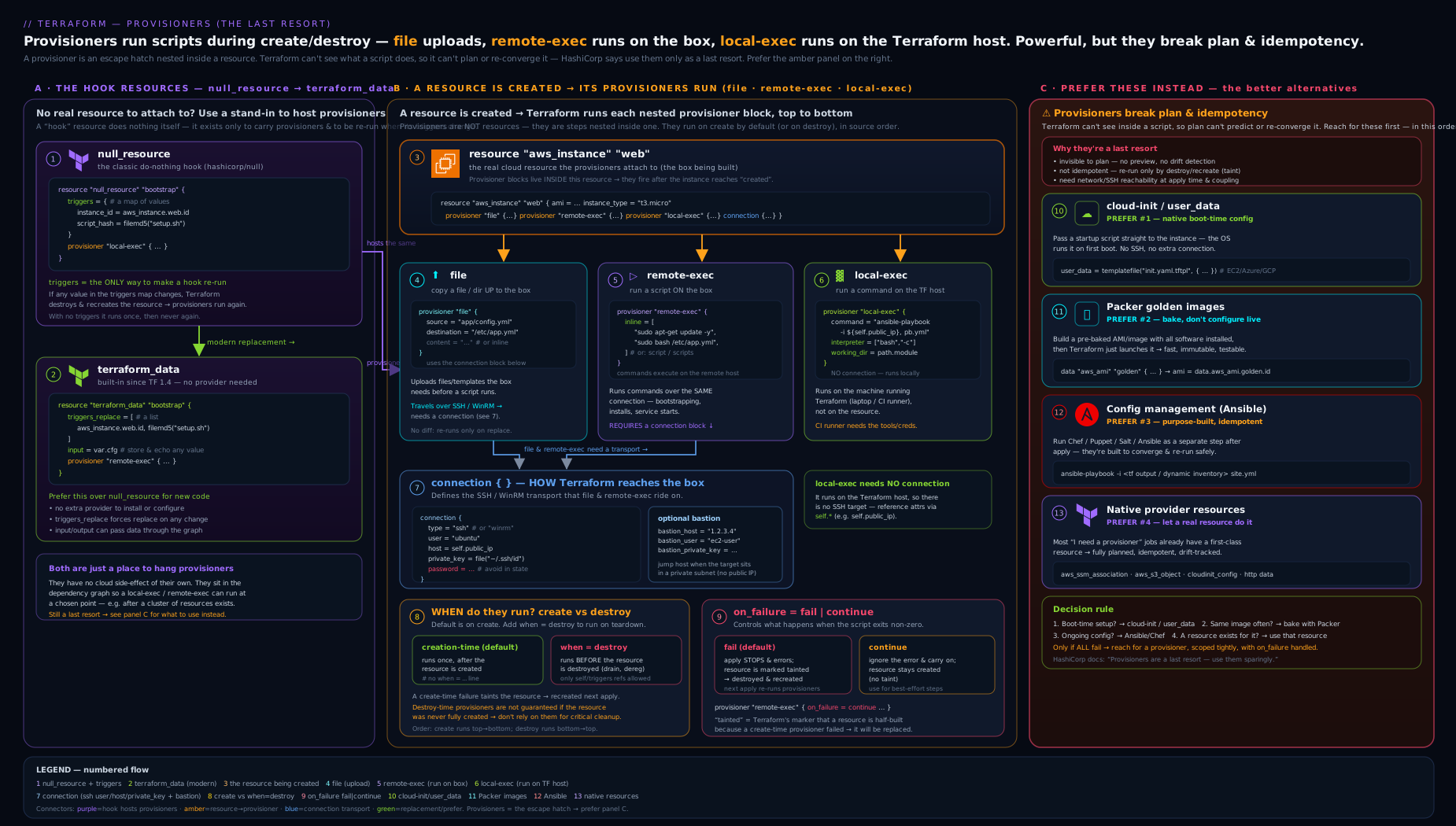
The diagram traces the decision you should actually make: start from “do I really need an imperative step?”, route the common cases to cloud-init/user_data, Packer, config management, or a native resource, and only fall through to provisioners as the last resort — then show, for the genuine cases, how local-exec (local machine) and remote-exec/file (remote host via connection) execute, how when/on_failure gate them, and where null_resource/terraform_data + triggers sit as the host.
Hands-on lab
This lab is free and entirely local — no cloud account, no SSH targets, no inbound ports. We use local-exec, null_resource, and terraform_data so you can feel the trigger/idempotency behaviour without spending a rupee or opening a firewall. (We deliberately don’t do a live remote-exec lab, because the right lesson is that you rarely should — but the syntax above is complete for when you must.)
1. Set up. Create a working directory and a main.tf:
terraform {
  required_version = ">= 1.4"
  # No providers needed at all — terraform_data is built in,
  # and local-exec doesn't need one either.
}

variable "revision" {
  type        = string
  default     = "v1"
  description = "Bump this to see triggers_replace re-run the provisioner."
}

# (a) terraform_data hosting a local-exec, gated by a trigger:
resource "terraform_data" "build" {
  triggers_replace = [var.revision]

  provisioner "local-exec" {
    command = "echo 'BUILD ran for revision ${self.triggers_replace[0]} at $(date)' >> build.log"
  }
}

# (b) The legacy equivalent, for comparison:
resource "null_resource" "build_legacy" {
  triggers = { revision = var.revision }

  provisioner "local-exec" {
    command = "echo 'LEGACY ran for revision ${self.triggers.revision}' >> build.log"
  }
}

# (c) A destroy-time provisioner (note: only self is allowed):
resource "terraform_data" "cleanup_demo" {
  input = "demo-node-42"
  provisioner "local-exec" {
    when    = destroy
    command = "echo 'DEREGISTER ${self.input}' >> build.log"
  }
}

output "build_id" {
  value = terraform_data.build.output   # demonstrates input->output pass-through is null here; see note
}
Note: because we set
triggers_replace/inputbut notinputonbuild,terraform_data.build.outputisnull— that’s expected;outputonly echoesinput. Thecleanup_demoresource setsinputso its destroy-timeself.inputworks.
2. Init and apply.
terraform init        # downloads only the null provider (for build_legacy); terraform_data needs none
terraform apply -auto-approve
cat build.log
Expected: build.log now contains a BUILD ran for revision v1 ... line and a LEGACY ran for revision v1 line. The DEREGISTER line is not there yet (it’s a destroy-time provisioner).
3. Prove idempotency is gone for provisioner effects. Run apply again with no changes:
terraform apply -auto-approve
cat build.log
Expected: no new lines. The provisioners did not re-run, because nothing in triggers_replace/triggers changed. This is the key lesson — provisioners run on create/replace, not on every apply.
4. Trigger a re-run by changing the trigger.
terraform apply -auto-approve -var 'revision=v2'
cat build.log
Expected: two new lines (BUILD ran for revision v2, LEGACY ran for revision v2) because the trigger changed, replacing both resources and re-running their create-time provisioners.
5. Watch a destroy-time provisioner fire.
terraform destroy -auto-approve
cat build.log
Expected: a new DEREGISTER demo-node-42 line appears — the when = destroy provisioner ran during teardown.
6. Validation checklist.
- After step 2:
build.loghas exactly 2 lines. - After step 3: still 2 lines (idempotency proof).
- After step 4: 4 lines.
- After step 5: 5 lines, the last being
DEREGISTER demo-node-42.
Cleanup. terraform destroy -auto-approve (already done in step 5) removes the state-tracked resources; then delete the working directory and build.log. There are no cloud resources to remove.
Cost note. ₹0 / $0. Everything is local — terraform_data and local-exec create nothing in any cloud. The null provider is a local plugin. This is the cheapest possible Terraform lab.
Common mistakes & troubleshooting
| Symptom | Likely cause | Fix |
|---|---|---|
Edited a remote-exec/local-exec block but apply does nothing |
Editing a provisioner does not re-trigger it; the resource already exists | Move the provisioner to a null_resource/terraform_data with a triggers/triggers_replace that captures what changed; or force it with terraform apply -replace=ADDRESS |
remote-exec hangs then fails with “timeout - last error: dial tcp … i/o timeout” |
Host not reachable from the Terraform runner: no public IP/bastion, security group/NSG blocks the runner’s IP, or SSH not up yet | Allow inbound from the runner, add a bastion_host, raise connection { timeout }, or — better — switch to user_data so no inbound is needed |
| A flaky post-create script destroyed my VM on the next apply | Creation-time provisioner failed with default on_failure = fail, which tainted the resource |
Set on_failure = continue for best-effort steps; move critical setup to user_data/Packer where failure doesn’t taint |
| Destroy-time provisioner never ran | The resource/module block was deleted from code before destroying, so the provisioner went with it; or it referenced var.* and errored |
Destroy while the block exists; only reference self, count.index, each.* in destroy-time provisioners (stash needed values in triggers) |
| “Invalid reference: … cannot be used in a destroy-time provisioner” | Used var.*, local.*, or another resource inside a when = destroy provisioner |
Capture those values in triggers/input and read them via self.triggers[...] / self.input |
local-exec script “works locally, fails in CI” |
Wrong working_dir, missing interpreter (/bin/sh ≠ bash), or a tool not installed on the runner |
Set working_dir with path.module, set interpreter = ["/bin/bash", "-eu", "-o", "pipefail"], install/declare the tool |
| Secrets visible in plan/apply logs or state | Provisioner command/environment/triggers carry secrets; Terraform logs the command and stores triggers in plaintext state |
Use quiet = true (local-exec), pass secrets via environment not command argv, avoid putting secrets in triggers; treat state as sensitive |
host_key/bastion_host_key warnings ignored; worried about MITM |
connection does no host-key verification when those are unset |
Set host_key/bastion_host_key to the expected keys; never disable verification in production |
Common beginner mistakes
These are not error messages to grep for (that is the troubleshooting table above) — they are beliefs that quietly produce fragile Terraform. Each pairs the misconception with the mental model that should replace it.
- “A provisioner is just the Terraform way to run a script, like a build step.” No — a build step is meant to run every time; a provisioner runs once, on create or replace, and is invisible to the plan. Right model: a provisioner is a one-shot side effect bolted onto a resource’s birth, not a task runner. If you want “run every time,” you are describing a pipeline step or a
timestamp()trigger — and both are smells worth questioning. - “If I edit the provisioner, the next
applywill pick up the change.” It will not: provisioner config is not stored in state, so there is nothing to diff and nothing to re-trigger. Right model: to re-run, you must replace the host —terraform apply -replace=ADDRESS, or change atriggers/triggers_replacevalue (for examplefilesha256()of the script) so the resource is recreated. - “
local-execruns on the server I just created.” No —local-execruns on the machine running Terraform (your laptop or the CI runner). Onlyremote-execandfiletouch the new resource, and only over aconnection. Right model: “local” means local to Terraform, not “local to the box.” - “
remote-execis the normal way to configure a new VM.” It is the fragile way: it needs inbound SSH/WinRM from a possibly-dynamic runner IP, host-key trust, and the service already listening. Right model: first-boot configuration belongs in cloud-init/user_data, which the instance runs on itself with no inbound port — reach forremote-execonly when that genuinely cannot work. - “
null_resourceandterraform_datadiffer in what they can do.” Functionally they host the same provisioners in the same way. Right model:terraform_datais the built-in replacement — nonullprovider, an any-typedtriggers_replace, andinput/outputpass-through. For new code there is no reason to picknull_resource. - “
when = destroylets me reference my variables during teardown.” No — destroy-time provisioners may reference onlyself,count.index, andeach.*;var.*,local.*, and other resources are rejected because they may not exist at destroy time. Right model: capture whatever you need intotriggers/input(which is stored in state) at create time, and read it back throughselfat destroy. - “
on_failure = continueis a safe default so my apply never breaks.” As a default it is the opposite of safe — it silently swallows real failures. Right model: keep the defaultfailfor steps that matter, and usecontinueonly for genuinely best-effort actions (a notification), while remembering thatfailtaints and can then destroy the resource.
Best practices
- Default to not using a provisioner. Walk the decision table at the top. For “configure a box,” use cloud-init/
user_data; for “ship software in the image,” use Packer; for “manage many hosts over time,” use Ansible/Chef/Puppet/Salt after Terraform; for “do a thing in a supported service,” use the native resource. Provisioners are the answer only when none of those fit. - Prefer
terraform_dataovernull_resourcein new code — same capability, no extra provider, type-flexibletriggers_replace, plusinput/outputpass-through. - Prefer
replace_triggered_byover a trigger-onlynull_resourcewhen your goal is “recreate X when Y changes” — it’s visible in the plan. - Make triggers explicit and meaningful. Use
filemd5()/filesha256()of the script so changing the script re-runs it; capture the resource ids you depend on. Avoidtimestamp()/uuid()“always run” triggers except as a conscious, documented choice. - Use
local-execoverremote-execwhen you can. A localaws/kubectl/curlagainst an API is far more robust than opening SSH to a booting box.local-execneeds no inbound network and no host-key dance. - Harden
local-execscripts: set a strictinterpreter(bash -eu -o pipefail), setworking_dir, pass data viaenvironment(not interpolated intocommand), and usequiet = trueif the command line could contain secrets. - Be deliberate about
on_failure. Usecontinuefor best-effort,fail(default) only where a failure genuinely should stop everything — and rememberfailtaints create-time resources. - Keep destroy-time provisioners minimal and
self-only. Use them for deregistration; stash any external identifiers intriggers/input; never delete the block before you’ve destroyed the resource. - Document why. A provisioner in a PR should carry a comment explaining why none of the alternatives worked. Future-you (and your reviewers) need it.
Security notes
- Provisioners run with the Terraform runner’s privileges and reach outside the graph. A
local-execcommand runs whatever shell you give it on the CI runner or your laptop — treat the command string as code, and never interpolate untrusted input into it (shell injection). - Secrets leak in three places. (1) The command line is echoed to logs unless you set
quiet = true(local-exec) — and even then argv may be visible to other processes; preferenvironment. (2)triggers/inputare written to state in plaintext — don’t put secrets there. (3) Anything you pass to a remote host viafile/remote-exectransits the connection and lands on disk there. Encrypt your state backend, restrict who can read it, and treat plan/apply logs as sensitive. connectionhost-key verification is off by default. Withhost_key/bastion_host_keyunset, Terraform will connect to any host answering at that address — a man-in-the-middle can intercept your credentials and commands. Always set the expected host keys forremote-exec/fileover SSH; usehttps = trueand acacert(neverinsecure = true) for WinRM.- Prefer keys and short-lived credentials over passwords in
connection; use the SSHagentrather than embeddingprivate_keywhere possible; scope inbound firewall rules to the runner’s IP and remove them after bootstrap (or avoid inbound entirely withuser_data). - Every inbound port you open for
remote-execis attack surface.user_data/cloud-init needs no inbound SSH/WinRM at all — that alone is a strong security reason to prefer it.
The alternatives, in full (use these instead)
This section is the positive half of “provisioners are a last resort.” For each common need, here is the tool that does it without breaking the model.
- cloud-init /
user_data/custom_data/ startup scripts. Every major cloud lets you pass a script or cloud-init config that the VM runs on first boot, executed by the instance itself — no inbound connection, no host-key dance, no tainting. In Terraform that’saws_instance.user_data(oruser_data_base64),azurerm_linux_virtual_machine.custom_data, and GCP’smetadata = { startup-script = ... }. cloud-init’s declarativewrite_files,packages, andruncmdcover the vast majority of “install X, write config Y, start service Z.” This replaces almost everyremote-exec/fileyou’ll ever be tempted to write. Pair it withtemplatefile()to render the script from Terraform values. - Packer (golden / immutable images). If the same packages and config are needed on every boot, bake them into the image once with Packer (or the cloud’s image builder) and have Terraform boot that image. Boots are then fast and identical, there’s nothing to run at create time, and you get immutable infrastructure (replace, don’t mutate). Use cloud-init only for the small last-mile, instance-specific bits.
- Configuration management (Ansible, Chef, Puppet, Salt). For ongoing convergence across a fleet — not just first boot — let Terraform create the hosts and a dedicated CM tool configure them. Ansible in particular pairs well: Terraform outputs the inventory (or you use a dynamic inventory), Ansible runs afterwards and re-converges idempotently. This keeps “what exists” (Terraform) separate from “how it’s configured” (CM), which is the clean separation provisioners blur.
- Native provider resources. Before shelling out, search the provider: there is very likely a resource for what you want (DNS record, IAM policy, LB target-group attachment, database, Kubernetes object via the
kubernetesprovider, a GitHub repo, a Datadog monitor…). A native resource is planned, idempotent, refreshable, and destroyable — everything a provisioner is not. httpdata source /restapi/httpproviders /externaldata source. For a genuine one-off API interaction with no resource, the read-onlyhttpdata source can GET data; community providers likeMastercard/restapiorapparentlymart/httpcan manage API-backed resources declaratively; and theexternaldata source can run a program that returns JSON as a value (read-only, at plan/refresh time) — often what people actually wanted fromlocal-exec.time_sleep/ native readiness. To wait for eventual consistency, prefer a provider’s native health/wait_forattributes or thetime_sleepresource over aremote-execpolling loop.
The honest summary: in modern Terraform, a well-architected configuration uses user_data/Packer for machine setup, native resources for everything the provider supports, configuration management for fleet convergence, and reaches for a provisioner — usually a small local-exec on a terraform_data — only for the rare imperative glue that has no declarative home.
Going deeper
The mechanics above are enough to read and write any provisioner. This section is for the questions that surface once you run them for real: where exactly a provisioner sits in the lifecycle, what a failure leaves behind in state, what is (and is not) persisted, and the precise contracts of the escape hatches you should reach for instead.
Where a provisioner runs, and what a failure leaves behind
A creation-time provisioner runs after the provider reports the resource created but before Terraform records that resource as fully applied. That ordering is exactly why a failed provisioner can taint: the object already exists in the real world (the create call succeeded), so Terraform cannot simply forget it — it records the object and flags it.
terraform plan            # prints: "# aws_instance.web is tainted, so must be replaced"
# In the raw state JSON the instance carries:  "status": "tainted"
A tainted resource is scheduled for destroy-and-recreate on the next plan (you will see -/+ destroy and then create replacement). There are three ways out:
- Fix the underlying cause and re-apply — Terraform recreates the resource cleanly, and the provisioner runs again on the new object.
terraform apply -replace=aws_instance.web— the modern, explicit way to force one resource’s recreation. It superseded the oldterraform taintcommand, which is deprecated;-replaceis plan-visible,taintwas not.terraform untaint aws_instance.web— if the resource is actually healthy and only the post-create step failed, clear the taint so Terraform stops trying to replace it, then move the failed step somewhere that will not taint (aterraform_datawith a trigger, oruser_data).
This is the concrete reason “a flaky script destroyed my database” is not hyperbole: the taint is written into state, and the next apply — possibly by a different engineer, days later — is what executes the destroy.
What is persisted to state, and what is not
A subtle but load-bearing distinction: the provisioner and connection blocks themselves are not stored in state. They are configuration Terraform evaluates at apply time in order to do something; only the fact that the resource exists — and, for null_resource/terraform_data, the triggers/input values — is persisted. Two consequences follow:
- A secret in
connection.password, or in a provisioner’senvironment, is not written to the state file — but it can still surface in plan/apply logs and in the child process’s argv. Redaction there relies onsensitivemarking andquiet = true; from Terraform 1.10 you can hold such secrets in ephemeral values (and, from 1.11, write-only arguments) so they are available during apply but never persisted or shown. Contrast this withtriggers/input, which are persisted in plaintext — so “never put a secret intriggers/input” is a rule about state, while “be careful withconnection/environment” is a rule about logs. - Because provisioner config is not in state, changing a provisioner never shows up as a diff. That is the mechanical root of the “I edited it and nothing happened” surprise: there is no stored prior value to compare against, so the only lever is replacing the host resource.
terraform_data as a dependency anchor and value-freezer
Beyond hosting provisioners, terraform_data’s input → output pass-through has two quietly useful, provisioner-free jobs. First, freezing a value: feed a computed value in through input and read .output downstream, and the value is pinned in state so a churny upstream expression cannot ripple through. Second, as an explicit ordering anchor: because output is an ordinary computed attribute, you can point depends_on = [terraform_data.gate] at it (or reference terraform_data.gate.output) to force one part of the graph to settle before another — cleaner than hanging a null_resource off the side. Neither use runs a script, and both are plan-visible, which is precisely what makes them preferable to the imperative alternatives.
When you truly just want a script’s output: the external data source
The single most common legitimate reason people reach for local-exec is “I want a value out of a shell command.” A provisioner cannot return data into Terraform — but the external data source can, and its contract is worth knowing exactly:
data "external" "git_sha" {
  program = ["bash", "${path.module}/scripts/git_sha.sh"]
  query   = { repo = path.root }        # handed to the program as JSON on stdin
}

output "sha" {
  value = data.external.git_sha.result["sha"]   # a first-class Terraform value
}
The program receives the query object as a JSON object on stdin, and must print a flat JSON object whose values are all strings to stdout and exit 0 (any non-zero exit, or non-object output, is an error). It runs at plan/refresh time, read-only, so — unlike a provisioner — its result is a value available before apply. Reserve it for genuinely read-only lookups (a Git SHA, a derived name); it is not a place to change the world.
Ordering and parallelism
Provisioners attached to a single resource run sequentially, in written order — a file followed by a remote-exec is the classic pair. Across different resources they obey the dependency graph and Terraform’s parallelism (default -parallelism=10), so a remote-exec fanned out over count = 20 instances runs at most ten at a time. That matters for bootstraps: twenty SSH sessions opening at once can hammer a package mirror or trip connection limits — one more reason first-boot user_data, which each instance runs on itself with no central fan-out, scales more gracefully. Everything in this lesson applies to OpenTofu unchanged — the provisioners, the connection block, null_resource, and terraform_data are identical in both.
Interview & exam questions
-
Why does HashiCorp call provisioners a “last resort”? Because they break Terraform’s core guarantees: they’re invisible to
plan, they’re not idempotent (run once on create/replace, not re-applied to converge), a failed create-time provisioner taints the resource (forcing destroy/recreate), and they cause side effects outside the dependency graph that Terraform can’t track, refresh, or clean up. -
What’s the difference between
local-execandremote-exec?local-execruns a command on the machine running Terraform (laptop/CI runner);remote-execruns commands on the resource being created, over aconnectionblock (SSH/WinRM).remote-execadditionally requires network reachability and credentials to the host. -
Name the three mutually exclusive ways
remote-execspecifies what to run.inline(a list of commands),script(one local script file, copied and run), andscripts(a list of local scripts, copied and run in order). Exactly one may be set. -
How do you make a provisioner run again after you’ve changed it? Editing a provisioner does not re-trigger it. Either
terraform apply -replace=ADDRESSto force the resource’s recreation, or host the provisioner on anull_resource/terraform_dataand change itstriggers/triggers_replace(e.g. includefilemd5()of the script so editing the script re-runs it). -
What does
on_failuredo, and what’s the danger of the default? It controls the reaction to a provisioner error:fail(default) aborts and taints a create-time resource (scheduling destroy/recreate);continuelogs and proceeds. The danger: a transient post-create script failure can taint and thereby destroy/recreate otherwise-healthy (possibly stateful) infrastructure. -
What are the rules for a
when = destroyprovisioner? It runs before the resource is destroyed; it may reference onlyself,count.index, andeach.key/each.value(notvar,local, or other resources); and it must still be present in the code at destroy time — deleting the block means it never runs. Stash external values intriggers/inputto read viaself. -
What is
selfand where is it valid? Inside a provisioner (orconnection) block,selfrefers to the resource the provisioner is attached to (self.id,self.public_ip). It exists chiefly so destroy-time provisioners, which can’t reference other objects, can still read their own resource’s attributes. -
null_resourcevsterraform_data— compare them. Both do nothing themselves and exist to host provisioners/triggers.null_resourcecomes from thehashicorp/nullprovider and itstriggersis amap(string).terraform_datais built into Terraform (1.4+) — no provider — itstriggers_replaceaccepts any type, and it addsinput/outputpass-through. Preferterraform_datain new code. -
How does the
triggersmap control behaviour? Terraform storestriggersin state; on each plan it compares the new map to the stored one, and if any value changed it replaces the resource (destroy+recreate), which re-runs its provisioners. Unchanged triggers mean the provisioners don’t re-run.{ always = timestamp() }forces every-apply runs. -
You need to run a setup script when a VM boots. What should you use, and why not
remote-exec? Use cloud-init /user_data(custom_dataon Azure,startup-scripton GCP): the instance runs it itself on first boot, needing no inbound SSH, no host-key verification, no tainting, and it’s far more robust in CI.remote-execrequires opening inbound access from the (possibly dynamic) runner IP and is fragile and insecure by comparison. -
What’s the modern, plan-visible way to recreate a resource when some value changes, without a provisioner?
lifecycle { replace_triggered_by = [terraform_data.x] }whereterraform_data.xholds the value (often viainput/triggers_replace). Unlike anull_resourceprovisioner, the resulting replacement appears interraform plan. -
How do secrets leak through provisioners, and how do you mitigate? Through the command line in logs (mitigate with
quiet = trueand by passing viaenvironment, not argv), throughtriggers/inputstored in plaintext state (don’t put secrets there; encrypt/restrict the backend), and onto remote disks viafile/remote-exec. Also enable host-key verification so credentials aren’t exposed to a MITM.
Quick check
- True or false: editing the
inlineof aremote-execprovisioner will re-run it on the nextapply. - Which provisioner needs a
connectionblock:local-execorremote-exec? - What is the default value of
on_failure, and what does it do to a create-time resource on error? - Which built-in resource replaces
null_resource, and which provider does it require? - Inside a
when = destroyprovisioner, which references are you allowed to use?
Answers
- False. Editing a provisioner does not re-trigger it; the resource already exists. Use
-replaceor atriggers/triggers_replacechange. remote-exec(and thefileprovisioner).local-execruns on the Terraform machine and needs no connection.fail(the default): it aborts the apply and marks the resource tainted (scheduled for destroy-and-recreate).terraform_data(Terraform 1.4+) — it requires no provider (it’s built in), unlikenull_resourcewhich needshashicorp/null.- Only
self,count.index, andeach.key/each.value— notvar.*,local.*, or other resources.
Exercise
Take a configuration that currently uses a null_resource with a remote-exec to install and start nginx on an EC2/VM via SSH (a very common legacy pattern). Refactor it twice and write up the trade-offs:
- Modernise the host: convert the
null_resourcetoterraform_data, changetriggerstotriggers_replace(includefilesha256()of the bootstrap script so editing it re-runs), and remove thenullprovider fromrequired_providers. Confirminit/planbehave identically. - Eliminate the provisioner entirely: move the nginx install/config into cloud-init
user_data(usetemplatefile()to render a cloud-config withpackages: [nginx], awrite_filesfor the index page, andruncmdto enable the service). Remove theconnection, the inbound SSH rule, and theremote-execaltogether. - Write three to four sentences comparing the two end states on: plan visibility, idempotency/re-run behaviour, security (inbound ports, host-key verification), and CI robustness. State which you’d ship and why. (Expected conclusion: the
user_dataversion wins on every axis — this is the lesson.)
Practice challenges
Six graded exercises, beginner to advanced. All of them are local and cost ₹0 — write the HCL in a scratch directory and reason it through before opening the solution.
Challenge 1 — Beginner. Write a terraform_data block whose local-exec re-runs only when the file bootstrap.sh changes — not on every apply.
<details><summary>Solution</summary>
resource "terraform_data" "bootstrap" {
  triggers_replace = [filesha256("${path.module}/bootstrap.sh")]

  provisioner "local-exec" {
    command = "./bootstrap.sh"
  }
}
Hashing the file means the trigger changes exactly when the script’s contents change, so the resource is replaced and the provisioner re-runs — and only then. A timestamp() trigger would re-run it on every apply; a static string would never re-run it at all.
</details>
Challenge 2 — Beginner. You inherit a legacy null_resource with triggers = { rev = var.rev }. Rewrite it as terraform_data, and say which dependency you can now drop.
<details><summary>Solution</summary>
resource "terraform_data" "build" {
  triggers_replace = [var.rev]
  # ... same provisioner as before ...
}
Drop hashicorp/null from required_providers (assuming nothing else uses it). terraform_data is built into Terraform 1.4+, so there is no provider to download or pin, and triggers_replace accepts any type — no coercion to map(string) needed.
</details>
Challenge 3 — Beginner → Intermediate. Write a local-exec that must not abort the apply if it fails, and must not echo its (secret-bearing) command line to the log.
<details><summary>Solution</summary>
provisioner "local-exec" {
  command    = "notify.sh ${self.id}"
  on_failure = continue
  quiet      = true
}
on_failure = continue logs the error and proceeds instead of tainting the resource — the right choice for a best-effort notification. quiet = true (local-exec only) suppresses the command echo. For a real secret, still prefer passing it via environment rather than the command line, since argv can be visible to other processes on the runner.
</details>
Challenge 4 — Intermediate. Write a destroy-time local-exec that deregisters a node whose id comes from var.node_id. Mind the trap: you cannot reference var at destroy time.
<details><summary>Solution</summary>
resource "terraform_data" "registration" {
  input = { node_id = var.node_id }

  provisioner "local-exec" {
    when    = destroy
    command = "deregister --node ${self.input.node_id}"
  }
}
Destroy-time provisioners may reference only self, count.index, and each.*. Stashing the id in input at create time — which is persisted in state — is precisely what lets self.input.node_id read it back during teardown.
</details>
Challenge 5 — Intermediate → Advanced. Make terraform plan show that changing var.app_version will recreate aws_instance.app — with no provisioner at all.
<details><summary>Solution</summary>
resource "terraform_data" "ver" {
  input = var.app_version
}

resource "aws_instance" "app" {
  # ... ami, instance_type, ...

  lifecycle {
    replace_triggered_by = [terraform_data.ver]
  }
}
replace_triggered_by (Terraform 1.2+) makes the replacement appear in the plan — strictly better than a trigger-only null_resource, whose script effect never shows up in plan at all. Reach for this whenever the goal is “recreate X when Y changes” rather than “run an imperative script.”
</details>
Challenge 6 — Advanced. You need a Git commit SHA as a Terraform value to tag resources with, and you are tempted by local-exec. Do it correctly instead, and state why a provisioner cannot.
<details><summary>Solution</summary>
data "external" "sha" {
  program = ["bash", "-c", "printf '{\"sha\":\"%s\"}' \"$(git rev-parse HEAD)\""]
}

# usage:  tags = { commit = data.external.sha.result["sha"] }
A provisioner cannot return data into Terraform — its output is not a value, only a side effect. The external data source runs at plan time and must emit a flat JSON object of strings on stdout, which Terraform exposes as result — a first-class value you can use in tags, names, or outputs. (For anything longer than a one-liner, put the script in a file and reference it by path.)
</details>
Certification mapping
This lesson maps to the HashiCorp Certified: Terraform Associate (003) exam. It directly serves the objective “Read, generate, and modify configuration” — specifically describe when to use provisioners and the provisioner types (local-exec, remote-exec, the file provisioner), understand that provisioners are a last resort, and the behaviour of creation-time vs when = destroy provisioners and on_failure. It also touches “Understand Terraform basics” (provider vs provisioner — a frequent exam distractor: null_resource needs the null provider, while terraform_data is built in) and the meta-argument knowledge from the resources lesson (triggers, replace_triggered_by). Expect at least one exam item that asks which alternative to provisioners is appropriate for first-boot configuration (answer: cloud-init/user_data) and one on what on_failure = continue versus the default does. The later Terraform Associate Prep Kit drills these as practice questions.
Glossary
- Provisioner — A block nested in a resource that runs an imperative action (a command or file copy) at create or destroy time. The “last resort” escape hatch out of Terraform’s declarative model.
local-exec— A provisioner that runs a command on the machine running Terraform (not on the resource).remote-exec— A provisioner that runs commands on the remote resource via aconnection(SSH/WinRM); takesinline,script, orscripts.fileprovisioner — Copies a local file/directory or inlinecontentto adestinationon the remote resource over theconnection.connectionblock — Describes how to reach the remote host (typessh/winrm,host,user,private_key/password,host_key, bastion fields,timeout). Used byremote-execandfile.self— Inside a provisioner/connection, a reference to the resource the provisioner is attached to (e.g.self.id). The only references allowed in destroy-time provisioners (withcount.index/each.*).- Creation-time provisioner — Runs after the resource is created (the default;
whenunset orcreate). - Destroy-time provisioner —
when = destroy; runs before the resource is destroyed. Strict reference rules; must still exist in code at destroy time. on_failure— Reaction to a provisioner error:fail(default; aborts and taints a create-time resource) orcontinue(logs and proceeds).- Taint — A flag marking a resource for destroy-and-recreate on the next apply; set automatically when a create-time provisioner fails with
on_failure = fail. null_resource— A do-nothing resource from thehashicorp/nullprovider used to host provisioners; replaced (re-running provisioners) when itstriggers(map(string)) change.triggers— Themap(string)onnull_resourcewhose change forces replacement and re-runs the provisioners.terraform_data— A built-in (Terraform 1.4+) provider-less resource replacingnull_resource; hasinput/outputpass-through andtriggers_replace(any type).triggers_replace— The any-typed value onterraform_datawhose change forces replacement.replace_triggered_by— Alifecyclemeta-argument that forces a resource’s replacement when a referenced object (often aterraform_data) changes — the plan-visible alternative to a trigger-onlynull_resource.- cloud-init /
user_data— A first-boot script/config the VM runs itself; the preferred alternative toremote-exec/filefor machine setup (user_data/custom_data/startup-script). - Packer — A tool to build golden/immutable machine images so configuration is baked in rather than run at create time.
- Idempotency — The property that applying the same configuration repeatedly converges to the same result and is safe to re-run. Terraform resources are idempotent; provisioners are not — they run once, not on every apply.
- Convergence — Repeatedly driving real infrastructure toward the declared desired state until the two match. The declarative half of Terraform converges; a provisioner’s one-shot side effect does not.
-replace—terraform apply -replace=ADDRESSforces one resource to be destroyed and recreated, with the replacement shown in the plan. The modern successor to the deprecatedterraform taintcommand;terraform untaintclears a taint without replacing.- Ephemeral value — A value (Terraform 1.10+) available during a single plan/apply but never written to state or shown in output — a safe home for a secret passed to
connection/environment. externaldata source — A read-only data source that runs a program at plan time and returns its stdout (a flat JSON object of strings) as a Terraform value — the supported way to get a script’s output into Terraform, which a provisioner cannot do.httpdata source — A read-only data source that performs an HTTP GET at plan time, for the rare case where you need to read from an API that has no provider resource.- Bastion / jump host — An intermediate SSH host Terraform hops through (via the
connectionblock’sbastion_*fields) to reach a target that has no public address. - Configuration management — Tools such as Ansible, Chef, Puppet, and Salt that configure and re-converge hosts after Terraform creates them — the idempotent alternative to
remote-execfor fleet setup. - Immutable infrastructure — The practice of replacing servers with freshly built images rather than mutating running ones (see Packer), which removes most reasons to provision at create time.
Next steps
You now know provisioners cold — every type, every option, when (rarely) to use them, and the better tool for each job. The natural next move is to go deep on the thing provisioners most often abuse and leak through: state. Continue with Terraform State, In Depth: the State File, the state Commands, Locking & Sensitive Data, which explains the file that records “this provisioner ran,” how triggers/input land in it as plaintext, the terraform state commands, locking, and how to keep sensitive data out of harm’s way. For the meta-arguments referenced throughout (triggers, replace_triggered_by, create_before_destroy), revisit Terraform Resources & Meta-Arguments, In Depth: count, for_each, depends_on & lifecycle.