The demo always works. You wire GPT to a handful of PDFs over a weekend, it answers beautifully, and someone important says the word “production”. Six weeks later the same system is hallucinating policy that was rescinded last year, the bill has quadrupled because nobody capped tokens, a customer has coaxed it into saying something the legal team had to apologise for, and not one person can answer the question every regulator eventually asks: how do you know this answer was grounded in an approved document? The gap between a notebook that impresses a stakeholder and a service that survives contact with real users, real load, and real auditors is exactly what the AI-102: Azure AI Engineer Associate certification is about — and, far more importantly, it is what the job is about.
This lesson is the build half of being an Azure AI engineer. The fundamentals lessons (AI-900) taught you what the services are; here we make production decisions and write code. We will stand up an Azure AI Foundry hub and project, deploy Azure OpenAI models and reason about PTU versus pay-as-you-go and content filters, build retrieval-augmented generation (RAG) end to end on Azure AI Search with integrated vectorization, evaluate and harden prompts with prompt flow, build agents that call tools, extract structured data from forms with Document Intelligence (prebuilt and custom), apply the Vision and Language SDKs where they still beat a generative model, gate everything with Azure AI Content Safety, and finish with the part most teams skip until it bites them — monitoring, observability and responsible AI for a system that is, by nature, non-deterministic.
Mental model: a production AI solution is three layers. A reasoning layer (the model) that you steer but do not fully control; a grounding layer (your data, retrieved) that bounds what the model can truthfully say; and a governance layer (safety, evaluation, observability) that lets you ship something non-deterministic and still sleep at night. AI-102 tests all three. Most failures live in the second and third.
Learning objectives
By the end of this lesson you will be able to:
- Provision and organise an Azure AI workspace using Azure AI Foundry hubs and projects, and explain how the hub centralises connections, security and quota for many projects.
- Deploy and operate Azure OpenAI models, choosing between PTU and pay-as-you-go, configuring content filters and abuse monitoring, and protecting capacity with quotas and rate limits.
- Design and build a RAG pipeline end to end with Azure AI Search integrated vectorization, hybrid + semantic ranking, and citation-grounded answers.
- Evaluate and improve prompts and flows with prompt flow, groundedness/relevance metrics, and agents that call tools and APIs safely.
- Extract structured data from documents with Document Intelligence prebuilt and custom models, and apply the Vision and Language SDKs to the analytical tasks they still win.
- Operationalise responsible AI with Content Safety, the six Responsible AI principles, monitoring, tracing and cost controls suitable for a regulated production estate.
Prerequisites
You should be comfortable with the AI fundamentals — tokens, embeddings, prompts and the RAG idea (see AI-900: Generative AI & Azure OpenAI Fundamentals) — and with core Azure concepts: resource groups, RBAC, managed identity, Key Vault, and Microsoft Entra for authentication. You will write a little Python; the same operations exist in C#, JavaScript and the REST API, and the portal mirrors them. This is the AI Engineering module of the Azure Zero-to-Hero course and maps directly to the AI-102 objective domains. Have an Azure subscription with access to Azure OpenAI (it is enabled by default for most subscriptions today; some model families and regions still gate behind a request) and permission to create resources. For the lab you will use free-tier and lowest-SKU options throughout and tear everything down at the end.
Core concepts: the AI engineer’s mental model
Before the portals and SDKs, fix the vocabulary that AI-102 leans on and that distinguishes an engineer from someone who pasted a prompt into a chat box.
| Term | What it means | Why it matters |
|---|---|---|
| Azure AI Foundry | The unified platform (portal at ai.azure.com + SDK) for building, evaluating and operating generative-AI apps. Formerly “Azure AI Studio”. |
The single front door for AI-102. Replaces juggling separate studios. |
| Hub | A top-level Foundry resource that centralises shared connections, compute, security and quota for many projects. | One hub, governed once; many project teams inherit it. |
| Project | A workspace inside a hub where you build, deploy and evaluate one solution. | The unit of work and isolation per app/team. |
| Connection | A stored, governed link to a resource — Azure OpenAI, AI Search, Storage, an API. | Secrets live once on the connection, not scattered in code. |
| Deployment | A named, callable instance of a model (e.g. gpt-4o-prod) with its own capacity and content filter. |
You call the deployment name, not the raw model — lets you swap models behind a stable name. |
| Grounding | Supplying the model with retrieved, authoritative context so it answers from facts. | The single biggest lever on truthfulness. Ungrounded models confabulate. |
| RAG | Retrieval-Augmented Generation: retrieve relevant chunks, then generate an answer grounded in them, with citations. | The dominant pattern for “chat over my data”. |
| Prompt flow | Foundry’s authoring + evaluation tool for chaining prompts, code and tools into a testable flow. | Turns prompt-tinkering into engineering with metrics. |
| Agent | A model given a goal plus tools (functions/APIs it may call) and allowed to plan and act over several steps. | Moves from “answer a question” to “complete a task”. |
| PTU | Provisioned Throughput Units — reserved, dedicated model capacity with predictable latency. | The capacity model for steady, high-volume production. |
| Content Safety | A service (and built-in filters) that detect harmful text/image content and prompt-injection. | The guardrail layer; non-negotiable in production. |
Two distinctions trip people up and recur on the exam. First, model versus deployment: gpt-4o is a model; gpt-4o-prod is your deployment of it, with its capacity, version-upgrade policy and content filter. Your application code references the deployment name, which is precisely what lets you upgrade the underlying model version without touching the app. Second, fine-tuning versus RAG: fine-tuning changes the model’s behaviour and style; RAG changes the facts it has access to at answer time. When the complaint is “it doesn’t know our data” or “our data changes”, the answer is almost always RAG, not fine-tuning — a favourite exam trap.
Azure AI Foundry: hubs, projects and connections
Azure AI Foundry is where an AI-102 solution lives. The resource hierarchy is the first thing to get right because it determines how you govern secrets, cost and access.
A hub is the shared, governed foundation. It is an Azure resource (in a resource group, in a region) that owns the things many teams should not each reinvent: connections to Azure OpenAI, Azure AI Search and Storage; an associated Key Vault (for connection secrets) and Storage account (for artefacts and flows); networking posture (public, or private with managed VNet and private endpoints); and quota. A project is created inside a hub and is where one team builds one solution — it inherits the hub’s connections and security but has its own assets (deployments, indexes, flows, evaluations).
The practical pattern for an organisation: one hub per environment or business unit, governed by a platform team (networking locked down, connections vetted, quota allocated, Entra RBAC assigned), and a project per application. This gives you central control with team autonomy — the landing-zone idea applied to AI.
| Foundry concept | Scope | You configure | Typical owner |
|---|---|---|---|
| Hub | Many projects | Connections, networking/VNet, Key Vault, Storage, quota, RBAC | Platform / CCoE team |
| Project | One solution | Deployments, indexes, flows, evaluations, agents | Application team |
| Connection | Hub (shared) or project | Target resource + auth (Entra ID or key) | Platform / app team |
| Compute | Hub | Compute instances/clusters for flow authoring & jobs | Platform team |
Authentication choices matter for the exam and for security. Connections can authenticate with Microsoft Entra ID (the resource’s managed identity is granted RBAC on the target — preferred, keyless) or with an API key (stored in the hub’s Key Vault). The Foundry hub itself has a managed identity; give that identity Cognitive Services OpenAI User on the Azure OpenAI resource and Search Index Data Reader/Contributor on AI Search, and you can run a whole RAG stack with no keys in code. RBAC roles you must recognise: Azure AI Developer (build within a project), Cognitive Services OpenAI User/Contributor (call/deploy models), and Owner/Contributor on the hub for platform setup.
Deploying Azure OpenAI models: PTU vs PAYG, versions and content filters
A model is useless until you create a deployment — a named, callable instance with its own capacity, version policy and content filter. The decisions here drive both your latency SLA and your bill.
Choosing a model
Pick the smallest model that meets the quality bar; intelligence is expensive and slow. A pragmatic ladder:
| Need | Reach for | Note |
|---|---|---|
| High-quality reasoning, multimodal | GPT-4o / GPT-4.1 family | Strong default for copilots and RAG answer generation. |
| Cheap, fast, high-volume | GPT-4o mini (or small models) | Great for classification, routing, simple extraction at scale. |
| Embeddings for RAG | text-embedding-3-large (or -small) |
-large ≈ better recall; -small ≈ cheaper/faster. Pick one and stay consistent — you cannot mix embedding models in one vector field. |
| Image generation | DALL·E / image models | Separate quota; subject to content filters. |
The exam-relevant point: embeddings and chat are different deployments with different pricing and quotas, and a RAG system needs both.
PTU vs pay-as-you-go (the capacity decision)
This is the AI-102 cost question that always appears.
| Dimension | Pay-as-you-go (Standard) | Provisioned Throughput (PTU) |
|---|---|---|
| Billing | Per 1K/1M tokens consumed | Reserved PTUs (hourly, or monthly/yearly reservation) |
| Capacity | Shared pool; subject to others’ load | Dedicated, reserved for you |
| Latency | Variable; can throttle (429) under load | Predictable, low jitter |
| Best for | Spiky, low/medium, dev/test, bursty | Steady high volume, latency-sensitive production |
| Cost shape | Cheap at low volume; scales linearly | Fixed; cheaper per token only above a break-even |
| Throttling | 429s when quota/TPM exceeded | Yours alone; queues within your PTU |
Rule of thumb: start on pay-as-you-go; move steady, high-throughput, latency-critical workloads to PTU once volume is predictable and you have hit the break-even (and consider a reservation for a further discount). Many estates run a hybrid — PTU for the baseline, PAYG spillover for peaks. Two related knobs: Standard (regional) vs Global Standard / Data Zone deployments trade strict data-residency for higher, cheaper global capacity — pick based on your residency obligations; and dynamic quota, which lets a deployment temporarily exceed its TPM when spare capacity exists.
Quota, TPM and version upgrades
Capacity is governed by Tokens-Per-Minute (TPM) quota per region per model, which you allocate across deployments; TPM implies a Requests-Per-Minute (RPM) ceiling. Exceed it and you get HTTP 429 — handle it with exponential backoff and retry, and architecturally with PTU or by spreading load. Each deployment has a version upgrade policy: upgrade when expired, upgrade automatically to default, or no auto-upgrade (pin a version). Pin versions in production and test upgrades deliberately — model updates can shift behaviour.
Content filters (the safety gate on every call)
Every Azure OpenAI deployment runs a content filter by default. It evaluates prompts (input) and completions (output) across hate, sexual, violence and self-harm, each at severity safe/low/medium/high, and you set the threshold at which content is blocked. Additional protections: prompt-shield for jailbreak/prompt-injection detection, protected-material detection (copyrighted text/code), and optional groundedness checks. You can create custom content filter configurations (e.g. stricter for a public-facing bot, looser for an internal red-teaming tool) and attach them per deployment. Filtered requests return a content_filter finish reason — your app must handle that gracefully, not crash. This is the layer the legal team cares about; treat default-on as a floor, not a ceiling.
# Create an Azure OpenAI deployment (CLI). The deployment NAME is what your app calls.
az cognitiveservices account deployment create \
  --name my-aoai --resource-group rg-ai102 \
  --deployment-name gpt-4o-prod \
  --model-name gpt-4o --model-version "2024-08-06" \
  --model-format OpenAI \
  --sku-name Standard --sku-capacity 20   # 20 = 20K TPM (PAYG). Use ProvisionedManaged for PTU.
Building RAG end to end with Azure AI Search
RAG is the workhorse of AI-102 and of real life. The architecture: ingest documents → chunk them → embed each chunk → index the vectors and text in Azure AI Search → at query time, retrieve the most relevant chunks (vector + keyword), rerank, then generate an answer grounded in those chunks with citations. Grounding quality — and therefore answer truthfulness — is bounded entirely by what retrieval surfaces. Spend your effort on the retrieval layer.
Integrated vectorization: let AI Search run the pipeline
The classic mistake is hand-rolling an embedding pipeline. Azure AI Search integrated vectorization does it for you: an indexer pulls from a data source (Blob, ADLS, SQL, Cosmos), a skillset splits documents into chunks and calls an Azure OpenAI embedding skill to vectorise them, and a vectorizer on the index lets you query with plain text (AI Search embeds the query for you). You maintain no embedding code and change-tracking keeps the index fresh as documents change.
Retrieval modes — and why hybrid + semantic wins
| Mode | How it works | Strength | Weakness |
|---|---|---|---|
| Keyword (BM25) | Lexical term matching | Exact terms, codes, IDs (“error 0x80070057”) | Misses synonyms/paraphrase |
| Vector | Cosine similarity over embeddings | Semantic meaning, paraphrase | Misses exact keywords; can return plausible-but-wrong |
| Hybrid | Run both, fuse with RRF | Best recall — covers semantics and keywords | Slightly more compute |
| + Semantic ranker | L2 re-rank of top results by a language model | Precision: pushes the right chunk to the top | Small added latency/cost |
The production default is hybrid retrieval + semantic ranking: it catches both meaning and exact terms, then reranks so the chunk that actually answers the question lands in the top few you send to the model.
Grounding the generation — and citations
Retrieve the top k chunks, place them in the system/context message, and instruct the model to answer only from the provided context and cite sources, refusing when the context is insufficient. Citations (title, url, last_modified carried in the index) are how you answer “is this from the current SOP?” — and how a user trusts the answer.
# Minimal RAG: vector+keyword retrieve, then ground the LLM. Keyless via Entra/managed identity.
from azure.identity import DefaultAzureCredential
from azure.search.documents import SearchClient
from azure.search.documents.models import VectorizableTextQuery
from openai import AzureOpenAI

cred = DefaultAzureCredential()
search = SearchClient("https://my-search.search.windows.net", "kb-chunks", cred)

def retrieve(question, k=5):
    results = search.search(
        search_text=question,                       # BM25 (keyword)
        vector_queries=[VectorizableTextQuery(      # vector; AI Search embeds the query
            text=question, k_nearest_neighbors=k, fields="content_vector")],
        query_type="semantic", semantic_configuration_name="kb-semantic",  # rerank
        select=["content", "title", "url"], top=k)
    return list(results)

def answer(question):
    chunks = retrieve(question)
    context = "\n\n".join(f"[{c['title']}]({c['url']})\n{c['content']}" for c in chunks)
    aoai = AzureOpenAI(azure_endpoint="https://my-aoai.openai.azure.com",
                       azure_ad_token_provider=lambda: cred.get_token(
                           "https://cognitiveservices.azure.com/.default").token,
                       api_version="2024-10-21")
    resp = aoai.chat.completions.create(
        model="gpt-4o-prod",
        messages=[
            {"role": "system", "content":
             "Answer ONLY from the provided context and cite the [title](url) you used. "
             "If the context is insufficient, say you don't know."},
            {"role": "user", "content": f"Context:\n{context}\n\nQuestion: {question}"}],
        temperature=0.2)
    return resp.choices[0].message.content
On Your Data is the low-code variant: Azure OpenAI’s Add your data feature wires a chat deployment to an AI Search index for you, returning grounded answers with citations and minimal code — excellent for a fast internal copilot, while the SDK path above gives you full control for anything bespoke.
Prompt flow and evaluation: making non-determinism measurable
A prompt that “seems better” is an opinion. Prompt flow (in Foundry) turns that into a measurement. A flow is a graph of nodes — prompts, Python, and tool calls — that you run against a test dataset and evaluate with metrics. You author it visually or in code, version it, and deploy it as an endpoint.
For RAG and copilots, the evaluation metrics you must know:
| Metric | Question it answers |
|---|---|
| Groundedness | Is the answer supported by the retrieved context (not hallucinated)? |
| Relevance | Does the answer actually address the question? |
| Retrieval / context recall | Did retrieval surface the chunks needed to answer? |
| Coherence / Fluency | Is the answer well-formed and readable? |
| Similarity | How close is the answer to a known-good (“ground truth”) answer? |
Foundry runs these with AI-assisted evaluation (a model grades the output) over a dataset, so you can compare prompt A vs prompt B, or model X vs Y, on numbers, and catch regressions before users do. The engineering discipline: evaluate before you ship, and re-evaluate on every change — to the prompt, the model version, the chunking, or the retrieval config. Pair it with red-teaming (adversarial prompts) and content-safety evaluation to measure your guardrails, not just your accuracy.
Agents and tool-calling
A copilot answers; an agent acts. You give a model a goal plus a set of tools — functions or APIs it may call — and it plans, calls tools, observes results, and iterates until done. The mechanism is tool/function calling: you describe each tool with a JSON schema; the model, when it decides a tool is needed, returns a structured call (name + arguments); your code executes it and feeds the result back; the model continues. Azure AI Foundry Agent Service packages this with managed tools (code interpreter, file/knowledge search over your AI Search index, OpenAPI tools, function tools), conversation threads, and built-in tracing — so you do not hand-roll the orchestration loop.
# Tool-calling: the model asks to call a tool; you run it and return the result.
tools = [{"type": "function", "function": {
    "name": "get_order_status",
    "description": "Look up an order's shipping status by id.",
    "parameters": {"type": "object",
        "properties": {"order_id": {"type": "string"}},
        "required": ["order_id"]}}}]

resp = aoai.chat.completions.create(model="gpt-4o-prod", tools=tools,
    messages=[{"role": "user", "content": "Where is order A-7741?"}])
# resp.choices[0].message.tool_calls -> {name: get_order_status, args: {order_id: "A-7741"}}
# You execute get_order_status, append the result as a tool message, and call again to get the reply.
Agent design principles for production (and the exam): give tools least privilege (an agent that can call an API can be talked into misusing it — scope its permissions and validate arguments), keep a human in the loop for consequential actions, cap iterations to bound cost and runaway loops, and trace every step for debugging and audit. The Model Context Protocol (MCP) is the emerging open standard for exposing tools to agents in a portable way; Foundry’s agent tooling interoperates with it.
Document Intelligence: prebuilt and custom models
Not every document problem is a generative one. Azure AI Document Intelligence (formerly Form Recognizer) extracts structured data — fields, tables, key-value pairs, selection marks — from documents with high precision and confidence scores, which a free-form LLM does not reliably give you. It is the right tool for invoices, receipts, IDs, contracts and forms.
| Model type | What it does | Use when |
|---|---|---|
| Read (OCR) | Text + language + handwriting extraction | You need raw text/OCR from images or PDFs |
| Layout | Text + tables + structure + selection marks | You need document structure (great as a RAG pre-processor) |
| Prebuilt (Invoice, Receipt, ID, Business card, Tax forms, Contract, Health insurance) | Domain models that return named fields out of the box | Your document is a common type — zero training |
| Custom — template | Train on as few as 5 of your consistent-layout forms | Fixed-layout proprietary forms |
| Custom — neural | Trains on varying layouts; more robust | Same logical form, varied layouts |
| Custom classification | Routes a document to the right extraction model | Mixed document streams |
| Composed | Bundles several custom models behind one endpoint | Many form types, one call |
Custom-model workflow: label sample documents in Document Intelligence Studio (which produces the .labels.json/.ocr.json artefacts), train, check per-field accuracy/confidence, then call the model by id. The Layout model deserves special mention for AI-102: it is an excellent RAG pre-processor, turning messy PDFs (with tables) into clean, structured Markdown/text chunks that embed far better than naive PDF text extraction.
from azure.ai.documentintelligence import DocumentIntelligenceClient
from azure.identity import DefaultAzureCredential

di = DocumentIntelligenceClient("https://my-di.cognitiveservices.azure.com",
                                DefaultAzureCredential())
poller = di.begin_analyze_document("prebuilt-invoice",
            AnalyzeDocumentRequest(url_source="https://.../invoice.pdf"))
result = poller.result()
for doc in result.documents:
    total = doc.fields.get("InvoiceTotal")
    print(total.content, total.confidence)   # value + a confidence score you can threshold on
Vision and Language SDKs: where analysis still beats generation
Generative models are not always the answer. The Azure AI Vision and Azure AI Language services do specific analytical jobs faster, cheaper and with measurable confidence.
Azure AI Vision — Image Analysis 4.0 (captions, dense captions, tags, objects, OCR/Read, smart crops, background removal), Face (detection, verification, liveness — gated for responsible use), and Video Indexer. Custom Vision trains your own image classification or object-detection model on a few hundred labelled images.
Azure AI Language — a suite over text: sentiment analysis & opinion mining, key phrase extraction, named-entity recognition (NER) and PII detection/redaction, entity linking, language detection, summarisation (extractive + abstractive), Conversational Language Understanding (CLU) (intent + entity for bots), Custom Question Answering (a managed knowledge base over your FAQ/docs), and custom text classification/NER.
| Task | Reach for | Not the LLM because |
|---|---|---|
| Redact PII from 10M records | Language PII | Deterministic, cheap, auditable; LLM is slow/costly/variable |
| Classify support tickets at scale | Custom text classification / small model | Fixed labels, high volume, measurable accuracy |
| Read text from scanned images | Vision Read (OCR) | Purpose-built OCR beats generic vision prompts on cost |
| Intent + slots for a bot | CLU | Structured intents/entities with confidence |
| FAQ bot over a fixed KB | Custom Question Answering | Curated answers, no hallucination risk |
The engineering judgement AI-102 rewards: use the specialised service when the task is well-defined, high-volume, or needs confidence scores; reach for the generative model when the task is open-ended, conversational, or requires synthesis. Often the best design combines them — e.g. Vision Read or Document Intelligence Layout to extract text, Language to redact PII, then an LLM to summarise.
Content safety and responsible AI
Shipping a non-deterministic system to the public is an act of risk management. Azure AI Content Safety is the guardrail layer beyond the per-deployment content filter: APIs to analyse text and images for hate/sexual/violence/self-harm with severity scores, Prompt Shields to detect jailbreak and indirect prompt-injection (e.g. malicious instructions hidden in a retrieved document), Groundedness detection to flag ungrounded (hallucinated) claims, Protected material detection, and custom blocklists. You apply it on input (before the model sees a prompt) and output (before the user sees a completion).
Wrap this in Microsoft’s six Responsible AI principles, which AI-102 expects you to apply, not just recite:
| Principle | In practice for your solution |
|---|---|
| Fairness | Evaluate across user groups; watch for biased outputs in your eval set |
| Reliability & safety | Content Safety, groundedness checks, evaluation gates, graceful failure |
| Privacy & security | Keyless auth, PII redaction, data residency, no training on your data by default |
| Inclusiveness | Accessible UX; languages and modalities your users actually use |
| Transparency | Cite sources; tell users they’re talking to AI; explain limits |
| Accountability | Human oversight for consequential actions; audit trails; an owner |
A crucial, exam-favourite fact: Azure OpenAI does not use your prompts or completions to train the foundation models, and data stays within your Azure tenant’s governance — a key reason enterprises choose it over consumer endpoints. Abuse monitoring stores prompts/completions briefly for safety review; regulated workloads can apply for modified/limited abuse monitoring to reduce even that.
Monitoring, observability and operations
A model you cannot see is a model you cannot trust. Production AI needs three views.
Platform metrics — Azure OpenAI emits, to Azure Monitor, token usage (prompt/completion), request counts, latency, and throttled (429) counts. Diagnostic logs capture requests and content-filter actions. Build a dashboard and alert on rising 429s (capacity pressure), latency spikes, and cost (token) trends.
Application tracing — capture, per request, the prompt, retrieved context, the answer, token counts, latency and evaluation scores. Foundry and the agent service provide built-in tracing; integrate Application Insights for end-to-end traces across your app, retrieval and the model. This is how you debug “why did it say that?” — you can see exactly which chunks were retrieved and what the model was given.
Quality monitoring in production — sampling live traffic and running the same evaluation metrics (groundedness, relevance) you used pre-ship, so you catch drift, a bad model upgrade, or a content change that quietly degraded retrieval. Close the loop: log thumbs-up/down, feed failures back into your eval set.
And the operational lever everyone learns the hard way — cost control: cap max_tokens, choose the smallest sufficient model, cache repeated answers, trim retrieved context to what’s needed, and move steady high volume to PTU. Tokens are the unit of spend; watch them like you’d watch egress.
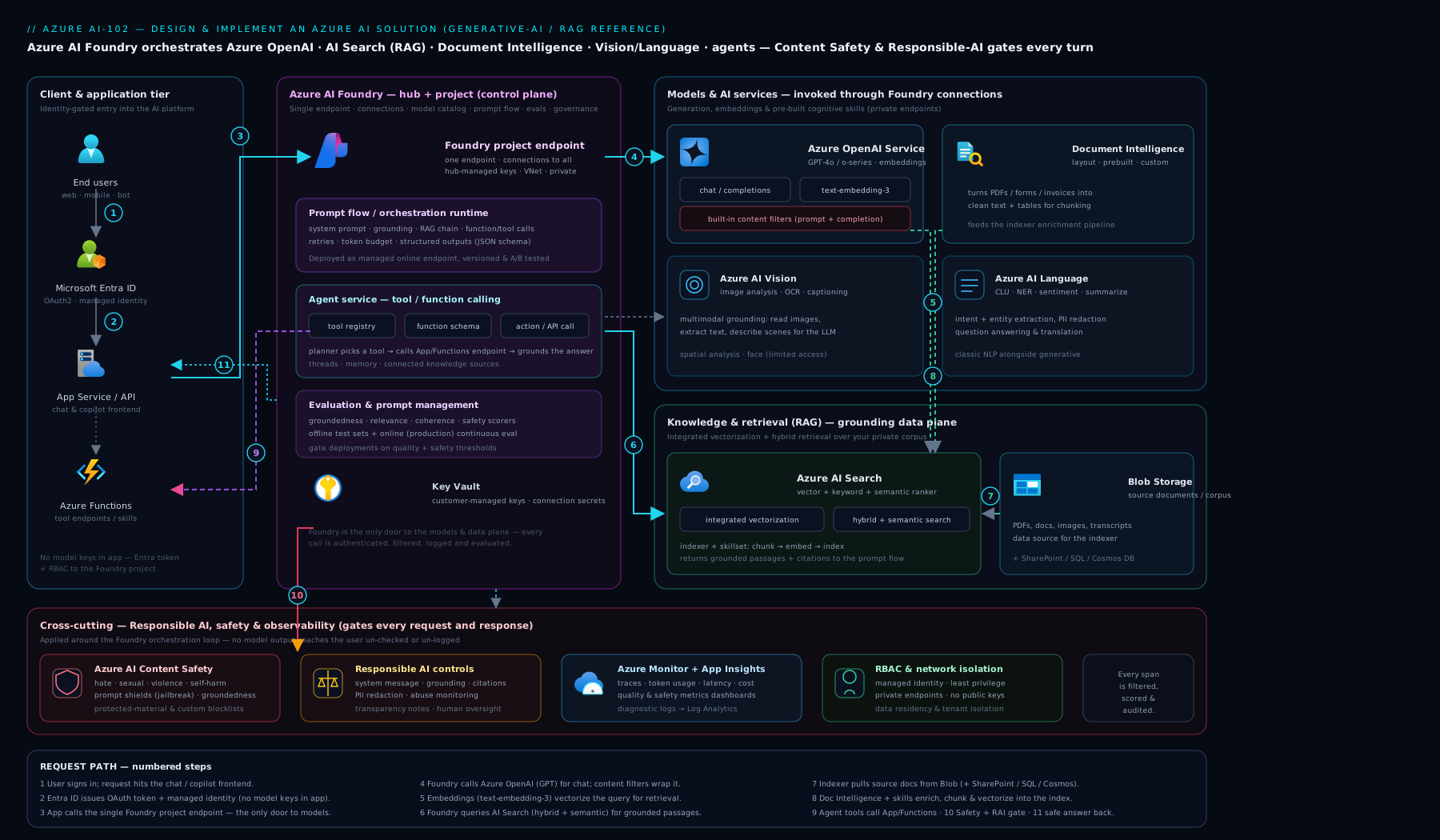
The diagram traces a request through the three layers — retrieval (AI Search) grounding the reasoning layer (Azure OpenAI), all wrapped by the governance layer (content safety, evaluation, tracing) — which is the shape of essentially every AI-102 solution you will build.
Hands-on lab
We will build the spine of a RAG system: an Azure OpenAI resource with a chat and an embedding deployment, an Azure AI Search service, and a grounded query — all on the lowest/free SKUs, keyless where possible, and torn down at the end. Allow about 30 minutes.
1. Set variables and create the resource group.
RG=rg-ai102-lab; LOC=eastus
az group create -n $RG -l $LOC -o table
2. Create an Azure OpenAI resource and two deployments.
AOAI=aoai-ai102-$RANDOM
az cognitiveservices account create -n $AOAI -g $RG -l $LOC \
  --kind OpenAI --sku S0 --custom-domain $AOAI -o table

# Chat model
az cognitiveservices account deployment create -n $AOAI -g $RG \
  --deployment-name gpt-4o-mini --model-name gpt-4o-mini \
  --model-version "2024-07-18" --model-format OpenAI \
  --sku-name Standard --sku-capacity 10
# Embedding model (RAG needs both)
az cognitiveservices account deployment create -n $AOAI -g $RG \
  --deployment-name text-embedding-3-small --model-name text-embedding-3-small \
  --model-version "1" --model-format OpenAI \
  --sku-name Standard --sku-capacity 10
3. Create an Azure AI Search service on the FREE tier.
SEARCH=srch-ai102-$RANDOM
az search service create -n $SEARCH -g $RG -l $LOC --sku free -o table
The free AI Search tier supports vector and semantic search for small datasets — ideal for this lab. (Production uses Basic/Standard for scale and SLA.)
4. Grant your own identity keyless access (RBAC), then validate.
ME=$(az ad signed-in-user show --query id -o tsv)
SUB=$(az account show --query id -o tsv)
# Let yourself call the model and read/write the index without keys:
az role assignment create --assignee $ME --role "Cognitive Services OpenAI User" \
  --scope /subscriptions/$SUB/resourceGroups/$RG/providers/Microsoft.CognitiveServices/accounts/$AOAI
az role assignment create --assignee $ME --role "Search Index Data Contributor" \
  --scope /subscriptions/$SUB/resourceGroups/$RG/providers/Microsoft.Search/searchServices/$SEARCH
5. Smoke-test the chat deployment (keyless, via Entra token).
ENDPOINT="https://$AOAI.openai.azure.com"
TOKEN=$(az account get-access-token --resource https://cognitiveservices.azure.com \
  --query accessToken -o tsv)
curl -s "$ENDPOINT/openai/deployments/gpt-4o-mini/chat/completions?api-version=2024-10-21" \
  -H "Authorization: Bearer $TOKEN" -H "Content-Type: application/json" \
  -d '{"messages":[{"role":"user","content":"Reply with exactly: AI-102 lab OK"}],"max_tokens":10}'
Expected output (validation): a JSON completion whose content is AI-102 lab OK, confirming the resource, the deployment, and keyless Entra auth all work. If you get 401, RBAC hasn’t propagated — wait a minute and retry. If 404, check the deployment name. If 429, your capacity is busy — retry.
6. (Optional) Index a document and run a grounded query using the Python snippet in the RAG section: create an index with a vector field + vectorizer pointing at your text-embedding-3-small deployment, push a few text chunks, then call answer("..."). Watch it return an answer with a citation.
7. Cleanup — delete everything (important to stop charges).
az group delete -n $RG --yes --no-wait
# Azure OpenAI/Cognitive Services soft-delete; purge to free the name + stop any residual:
az cognitiveservices account purge -n $AOAI -g $RG -l $LOC 2>/dev/null || true
Cost note (INR). On these SKUs the lab is essentially free: Azure AI Search free tier is ₹0; Azure OpenAI bills per token, and a few smoke-test calls on gpt-4o-mini/text-embedding-3-small cost a fraction of a rupee. The only way this lab costs anything noticeable is if you leave a paid Search tier or a busy deployment running — hence the cleanup. Delete the resource group the moment you’re done and the running cost returns to ₹0.
Common mistakes & troubleshooting
| Symptom | Likely cause | Fix |
|---|---|---|
| Frequent HTTP 429 under load | TPM/RPM quota exceeded; shared capacity busy | Exponential backoff + retry; raise quota; move to PTU; spread load |
| RAG answers are plausible but wrong | Pure vector search missed the right chunk | Use hybrid + semantic ranking; improve chunking; raise top-k |
| Model invents facts / no citations | Ungrounded prompt; context too thin | Instruct “answer only from context, cite, else say you don’t know”; check retrieval recall |
| 401 Unauthorized on a keyless call | Managed identity lacks RBAC, or not propagated | Grant Cognitive Services OpenAI User; wait for propagation |
| 404 on a model call | Calling the model name, not the deployment name | Reference the deployment name you created |
| Outputs occasionally blocked | Content filter triggered (content_filter finish reason) |
Handle gracefully in code; tune a custom content filter if appropriate |
| Document Intelligence misses fields | Wrong model for the doc; too few/poor training labels | Use the right prebuilt; add/clean labelled samples; try neural custom |
| Costs creep up unexpectedly | Uncapped tokens, oversized model, no caching | Cap max_tokens, right-size the model, cache, trim context |
Best practices
- Reference deployments, not models — a stable deployment name lets you upgrade the underlying model version without code changes; pin versions in production.
- Start PAYG, graduate to PTU for steady, latency-sensitive volume; consider reservations and PTU + PAYG spillover for peaks.
- Make retrieval excellent — hybrid + semantic ranking, deliberate chunking, integrated vectorization so you maintain no embedding pipeline.
- Evaluate before and after every change — groundedness, relevance, retrieval recall — and gate deployments on the numbers; re-run on model upgrades.
- Keep humans in the loop for agents that take consequential actions; cap iterations and least-privilege every tool.
- Use the specialised service (Vision/Language/Document Intelligence) when the task is well-defined, high-volume, or needs confidence scores; reserve the LLM for open-ended synthesis.
- Instrument everything — token usage, latency, 429s, and per-request traces (prompt, context, answer, scores) in Application Insights.
- Control cost as a first-class concern — smallest sufficient model,
max_tokenscaps, caching, trimmed context.
Security notes
- Prefer keyless auth everywhere: managed identity + Entra RBAC, secrets on Foundry connections in Key Vault, never API keys in code or config.
- Least privilege RBAC —
Cognitive Services OpenAI Userto call,Contributoronly where you must deploy; scope tightly. - Network isolation for sensitive workloads: a private/managed-VNet Foundry hub with private endpoints to Azure OpenAI, AI Search and Storage; public access off.
- Defend against prompt injection — treat retrieved content as untrusted, use Prompt Shields, and never let a tool execute solely on model-supplied arguments without validation.
- Protect data — Azure OpenAI does not train on your data; apply PII redaction (Language) before storage/logging; honour data residency with regional/Data-Zone deployments; consider modified abuse monitoring for regulated data.
- Filter input and output with Content Safety; maintain blocklists; handle blocked responses gracefully.
- Audit — trace every agent step and every consequential action; keep an owner and an incident path for harmful-output reports.
Interview & exam questions
1. When would you choose PTU over pay-as-you-go for Azure OpenAI? Choose PTU for steady, high-volume, latency-sensitive production where you need dedicated, predictable capacity and have passed the per-token break-even; choose PAYG for spiky, low/medium, or dev/test traffic where you pay only for what you use. Many estates run PTU baseline + PAYG spillover.
2. Your RAG chatbot hallucinates. What do you check, in order? Retrieval first: is recall good (did the right chunk get retrieved)? Switch to hybrid + semantic ranking, revisit chunking and top-k. Then grounding: does the prompt instruct answer only from context, cite, else refuse? Then measure with groundedness/relevance evaluation to confirm the fix.
3. Fine-tuning vs RAG — when each? RAG when the issue is facts/knowledge, especially data that changes — it injects current context at answer time. Fine-tuning when the issue is behaviour, format or style the model should internalise. “It doesn’t know our (changing) data” → RAG.
4. Difference between a model and a deployment? A model (e.g. gpt-4o) is the underlying intelligence; a deployment (e.g. gpt-4o-prod) is your named, callable instance with its own capacity, version policy and content filter. Apps call the deployment name, which lets you upgrade the model version behind a stable name.
5. What does a content filter evaluate, and on what? Severity (safe/low/medium/high) across hate, sexual, violence, self-harm, on both input prompts and output completions, plus prompt-injection (Prompt Shields) and protected-material detection. You set thresholds and can attach custom filters per deployment.
6. What is integrated vectorization in Azure AI Search? AI Search runs the whole RAG ingestion pipeline: an indexer pulls source docs, a skillset chunks and calls an Azure OpenAI embedding skill, and a vectorizer lets you query in plain text (it embeds the query). You write no embedding code, and change-tracking keeps the index fresh.
7. Hybrid search and semantic ranking — why both? Hybrid fuses keyword (BM25) and vector results with RRF, catching exact terms and meaning; the semantic ranker then L2 re-ranks the top results to push the most relevant chunk to the top — recall from hybrid, precision from the reranker.
8. When use Document Intelligence instead of GPT for extraction? When you need structured fields with confidence scores from forms/invoices/IDs — Document Intelligence is purpose-built and reliable, and custom models train on as few as 5 samples. GPT is for open-ended understanding; for fixed fields you want measurable accuracy. The Layout model is also a great RAG pre-processor.
9. How do you do keyless auth from your app to Azure OpenAI? Enable a managed identity, grant it Cognitive Services OpenAI User on the resource, and authenticate with an Entra token (DefaultAzureCredential) — no keys in code or config. Store any unavoidable secrets on a Foundry connection in Key Vault.
10. What does prompt flow’s evaluation measure for a RAG app? Groundedness (answer supported by context), relevance (answers the question), retrieval/context recall, coherence/fluency, and similarity to ground truth — run as AI-assisted evaluation over a test dataset so you compare changes on numbers and catch regressions.
11. What is prompt injection and how do you defend against it? An attacker hides malicious instructions in input or in retrieved content to hijack the model. Defend with Prompt Shields (jailbreak/indirect-injection detection), treating retrieved data as untrusted, scoping tools to least privilege, and validating any tool arguments before acting.
12. Does Azure OpenAI train on your prompts? No — your prompts and completions are not used to train the foundation models and stay within your tenant’s governance. Abuse monitoring briefly stores them for safety review; regulated workloads can apply for modified/limited abuse monitoring.
Quick check
- You need predictable low latency for a high-volume production chatbot. Which capacity model?
- Your RAG app returns plausible-but-wrong chunks for queries containing exact error codes. What retrieval change helps most?
- True or false: your application code should reference the model name (e.g.
gpt-4o) directly. - Which Azure service gives you structured invoice fields with confidence scores and can train on as few as five samples?
- Name two prompt-flow evaluation metrics you’d gate a RAG deployment on.
Answers
- Provisioned Throughput Units (PTU) — dedicated, predictable capacity for steady high volume; PAYG latency varies under shared load.
- Hybrid retrieval (keyword + vector) with semantic ranking — pure vector misses exact terms like error codes; BM25 catches them and the reranker promotes the right chunk.
- False. Reference the deployment name (e.g.
gpt-4o-prod); it carries capacity/version/filter and lets you upgrade the model behind a stable name. - Azure AI Document Intelligence (prebuilt Invoice model; custom template models train on ~5 samples).
- Any two of groundedness, relevance, retrieval/context recall, coherence/fluency, similarity.
Exercise
Take the lab’s RAG spine and turn it into a small grounded copilot over your own documents. (1) Create an AI Search index with a vector field and a vectorizer pointing at your text-embedding-3-small deployment. (2) Use Document Intelligence Layout to convert three of your own PDFs (pick some with tables) into clean text, chunk them, and push them to the index. (3) Implement the answer() function with hybrid + semantic retrieval and a cite-or-refuse system prompt. (4) Build a tiny evaluation set of 10 question/ground-truth pairs and run groundedness + relevance in prompt flow. (5) Add Content Safety on the input. Then write a paragraph: what did the evaluation scores reveal, and what one change (chunking, top-k, model, or prompt) moved them most? Tear everything down afterwards.
Certification mapping
This lesson covers the build-skills core of AI-102: Azure AI Engineer Associate: planning and managing an Azure AI solution (Azure AI Foundry hubs/projects, connections, responsible AI), implementing generative AI (deploying Azure OpenAI models, PTU vs PAYG, content filters, prompt engineering, RAG, agents), implementing knowledge mining and document intelligence (Azure AI Search RAG indexing, Document Intelligence prebuilt/custom), and implementing computer vision and natural language solutions (Vision and Language SDKs). The monitoring, content-safety and responsible-AI material maps to the exam’s emphasis on operating AI solutions responsibly. It also reinforces architecture-level decisions relevant to AZ-305 where AI workloads appear in a design.
Glossary
- Azure AI Foundry — the unified platform (portal + SDK) for building, evaluating and operating generative-AI apps; formerly Azure AI Studio.
- Hub / Project — a hub centralises shared connections, security, compute and quota; a project is a per-solution workspace inside it.
- Connection — a governed, stored link (with auth) from Foundry to a resource such as Azure OpenAI, AI Search or Storage.
- Deployment — a named, callable instance of a model with its own capacity, version policy and content filter.
- PTU (Provisioned Throughput Unit) — reserved, dedicated Azure OpenAI capacity giving predictable latency.
- PAYG / Standard — pay-per-token Azure OpenAI capacity drawn from a shared pool.
- RAG (Retrieval-Augmented Generation) — retrieve relevant context, then generate a grounded, cited answer.
- Integrated vectorization — Azure AI Search running chunking + embedding + indexing for you via indexer and skillset.
- Hybrid search / Semantic ranker — fusing keyword + vector retrieval (RRF), then L2 re-ranking for precision.
- Prompt flow — Foundry’s tool for authoring and evaluating prompt/code/tool flows against datasets.
- Agent / Tool-calling — a model given tools and allowed to plan and act over multiple steps via structured function calls.
- Document Intelligence — service extracting structured fields/tables from documents (prebuilt + custom); formerly Form Recognizer.
- Content Safety / Prompt Shields — guardrail service detecting harmful content, jailbreaks and prompt-injection on input and output.
- Groundedness — the degree to which an answer is supported by the retrieved context (the inverse of hallucination).
- TPM / 429 — Tokens-Per-Minute quota; exceeding it returns HTTP 429 (throttling).
Next steps
You can now build the full arc of an AI-102 solution — a governed Foundry workspace, deployed and safety-filtered Azure OpenAI models, a grounded and evaluated RAG pipeline, tool-calling agents, document and vision/language extraction, and the observability to run it all responsibly in production.
- Next lesson: DP-203: End-to-End Azure Data Engineering — Ingest, Store, Transform, Serve & Stream — every AI system runs on data, so the natural next move is building the pipelines that feed it.
Related reading to go deeper:
- Azure AI Search for RAG: Vector Indexing, Hybrid Search, Semantic Ranking, and Indexer Pipelines — the retrieval layer of this lesson, in full depth.
- AI-900: Generative AI & Azure OpenAI Fundamentals — the tokens-to-RAG foundations this build lesson assumes.
- Azure OpenAI Enterprise Landing Zone — the networking, identity and governance scaffolding for running Azure OpenAI at enterprise scale.