Every action in AWS — launching a server, reading a file from storage, deleting a database — is an API request, and Identity and Access Management (IAM) is the gatekeeper that decides whether that request is allowed. Get IAM right and the rest of AWS is just services behind a door you control. Get it wrong and you either cannot do your job (everything says Access Denied) or, far worse, you have handed an attacker the keys to the estate. IAM is the single most important service to understand because it sits in front of all the others.
The good news is that IAM is built from a small number of pieces that fit together in a predictable way: principals that make requests, credentials that prove who they are, policies that say what they may do, and an evaluation algorithm that combines all the policies and returns a single Allow or Deny. This lesson teaches each piece from the ground up, then ties them together with worked policy JSON and the exact decision logic AWS runs on every request. IAM is also a global service — it is not tied to a Region — and it is free to use; you only pay for the resources your identities go on to consume.
By the end you will be able to read and write a policy, explain why a request was denied, choose between an IAM user and a role, and apply the least-privilege and root-account practices that every exam and every interviewer expects.
Learning objectives
By the end of this lesson you will be able to:
- Identify the IAM principals — the root user, IAM users, groups, and roles — and explain when to use each.
- Manage credentials correctly: console passwords, access keys, and multi-factor authentication (MFA).
- Read and write an IAM policy document, naming every element (
Version,Statement,Sid,Effect,Action,Resource,Condition,Principal). - Distinguish identity-based from resource-based policies, and place SCPs, permission boundaries, and session policies in the right layer.
- Apply the policy evaluation logic — explicit deny beats allow beats implicit deny — to predict the outcome of any request.
- Use roles and
sts:AssumeRolefor workloads and cross-account access, and explain instance profiles and IAM Identity Center (SSO). - State the least-privilege and root-account best practices that keep an account safe.
Prerequisites & where this fits
You need an AWS account and a basic grasp of what an AWS service is (compute such as EC2, storage such as Amazon S3). No prior security knowledge is assumed — every term is defined as it appears. This is the second lesson in the AWS Zero-to-Hero course, following AWS Cloud Fundamentals; it is the foundation that every later lesson on networking, compute, storage, and architecture quietly depends on, because each of those services is reached through an IAM-gated API. After this, the course moves on to networking with AWS VPC Networking Fundamentals.
Authentication vs authorisation: the two questions
IAM answers two separate questions on every request, and confusing them is the source of most early mistakes.
| Question | Plain English | IAM mechanism |
|---|---|---|
| Authentication | “Who are you, and can you prove it?” | Credentials: password + MFA (console), or access keys / temporary tokens (API/CLI) |
| Authorisation | “Now that I know who you are, what are you allowed to do?” | Policies attached to identities and resources, run through the evaluation logic |
A request first proves identity (authentication), then IAM evaluates policies to decide permission (authorisation). A perfectly valid set of credentials with no permissions can do nothing; a powerful policy with invalid credentials never even gets evaluated. Keep these two doors separate in your mind for the rest of the lesson.
Principals: who can make a request
A principal is the entity that makes a request to AWS. There are four kinds, and choosing the right one is the first real IAM decision you make.
| Principal | What it is | Credentials | Lifespan | Use it for |
|---|---|---|---|---|
| Root user | The account owner, created with the email address; has unrestricted access to everything including billing | Email + password (+ MFA) | Permanent | Almost nothing — only a handful of tasks that require root |
| IAM user | A named identity for a specific person or legacy application | Password (console) and/or access keys (API) | Permanent until deleted | Break-glass admin, or systems that genuinely cannot use roles |
| IAM group | A container of IAM users for attaching policies once; not a principal itself | None — groups cannot log in | Permanent | Granting the same permissions to many users (e.g. “Developers”) |
| IAM role | An identity with permissions but no long-term credentials, designed to be assumed temporarily | Temporary security tokens from AWS STS | The role is permanent; each session is short-lived | Workloads (EC2, Lambda), cross-account access, federated/SSO users — the preferred principal |
Two points new users miss. First, a group is not a principal — you cannot “log in as a group” and a group cannot appear in a policy’s Principal field; it is purely an administrative convenience for attaching policies to many users at once. Second, the modern best practice is to prefer roles over users: roles hand out short-lived credentials automatically and there are no access keys lying around to leak. Human access in a well-run organisation comes through IAM Identity Center (covered below), and workload access comes through roles — leaving very few reasons to create IAM users at all.
Credentials: how a principal proves identity
Authorisation is meaningless until the caller has authenticated. IAM principals use different credential types depending on how they access AWS.
| Credential | Used for | Notes & risks |
|---|---|---|
| Console password | Signing in to the AWS Management Console (web) | Human use only; enforce a strong password policy and MFA |
| Access key (Access Key ID + Secret Access Key) | Programmatic access via the CLI, SDKs, or API | Long-lived — the biggest leak risk in AWS; avoid where a role will do |
| MFA (multi-factor authentication) | A second factor on top of password or keys | Virtual authenticator app, hardware key, or FIDO2 passkey; turn it on everywhere |
| Temporary security credentials | Issued by AWS STS when a role is assumed or a user federates | Short-lived (minutes to hours), auto-expiring — the safest option |
The mental model to internalise: long-lived access keys are a liability; temporary credentials are the goal. A leaked access key works until someone notices and revokes it; a leaked temporary token expires on its own, often within the hour. This single fact is why roles are preferred and why so much of IAM design is about replacing static keys with assumed roles.
The policy document: anatomy of a permission
A policy is a JSON document that lists permissions. AWS reads these documents to decide every request, so being fluent in their structure is non-negotiable. Here is a complete, annotated policy that allows reading objects from one specific S3 bucket — but only over HTTPS:
{
  "Version": "2012-10-17",
  "Statement": [
    {
      "Sid": "AllowReadProjectBucket",
      "Effect": "Allow",
      "Action": [
        "s3:GetObject",
        "s3:ListBucket"
      ],
      "Resource": [
        "arn:aws:s3:::kloudvin-project-data",
        "arn:aws:s3:::kloudvin-project-data/*"
      ],
      "Condition": {
        "Bool": {
          "aws:SecureTransport": "true"
        }
      }
    }
  ]
}
Every element does a specific job:
| Element | Required? | What it specifies |
|---|---|---|
Version |
Yes | The policy language version; always use "2012-10-17" (the current one — not the document’s date) |
Statement |
Yes | One or more permission blocks; this is where the work happens |
Sid (statement ID) |
Optional | A human label for the statement; useful in reviews and logs |
Effect |
Yes | Either "Allow" or "Deny" — the heart of the statement |
Action |
Yes* | The API operations, in service:Operation form (e.g. s3:GetObject); wildcards like s3:* are allowed |
Resource |
Yes* | The Amazon Resource Names (ARNs) the actions apply to; "*" means all resources |
Principal |
Resource-based only | Who the statement applies to — used in resource-based policies, not identity-based ones |
Condition |
Optional | Extra tests (encryption, source IP, tags, MFA present) that must be true for the statement to apply |
*In an identity-based policy you specify Action and Resource; in a resource-based policy you also specify Principal. A statement can use NotAction/NotResource/NotPrincipal as inverse forms, but lead with the positive forms while learning.
A few rules that prevent the classic beginner errors:
- The default is deny. If no statement explicitly allows an action, it is denied. You grant access by adding Allow statements; you never need an Allow “to start with”.
- ARNs are exact. Note that the bucket and its objects are two different resources:
arn:aws:s3:::kloudvin-project-data(the bucket, forListBucket) andarn:aws:s3:::kloudvin-project-data/*(the objects inside it, forGetObject). Forgetting the/*is one of the most common reasons an S3 policy “doesn’t work”. - Conditions narrow, never widen. The
aws:SecureTransportcondition above means the Allow only applies to HTTPS requests; it cannot grant anything extra.
Identity-based vs resource-based policies
Policies attach in two places, and knowing which is which explains a great deal of IAM behaviour.
| Identity-based policy | Resource-based policy | |
|---|---|---|
| Attached to | A user, group, or role (the principal) | A resource (an S3 bucket, SQS queue, KMS key, Lambda function) |
| Answers | “What can this identity do?” | “Who may touch this resource, and how?” |
Has a Principal element? |
No (the identity is implied) | Yes — it names who is allowed |
| Cross-account? | Grants only within the same account | Can grant access to principals in other accounts |
| Example | A policy on the Developers role allowing dynamodb:* |
An S3 bucket policy allowing account B to read the bucket |
The two work together. Within a single account, a principal is allowed if either an identity-based policy or a resource-based policy grants the action (and nothing denies it). Across accounts, you generally need both sides to agree: the resource policy in account B must allow the principal, and the identity policy in account A must allow the call. Resource-based policies are also the mechanism that makes cross-account access possible at all, because only they carry a Principal field that can name an external account.
The other policy types: SCPs, boundaries, and session policies
Beyond the two everyday types, three more policy types act as guardrails — they restrict, they never grant on their own. You will not write these on day one, but you must know where they sit, because they are why a request can be denied even when your identity policy clearly allows it.
| Policy type | Where it applies | Grants or limits? | Purpose |
|---|---|---|---|
| Service Control Policy (SCP) | An entire account or Organizational Unit, via AWS Organizations | Limits only — a ceiling on the whole account | Org-wide guardrails (e.g. “no one may disable CloudTrail”, “only these Regions”) |
| Permissions boundary | A single IAM user or role | Limits only — a ceiling on that principal | Safe delegation: let teams create roles that can never exceed the boundary |
| Session policy | A single assumed-role session | Limits only — narrows that session | Hand out a temporary identity that is smaller than the role itself |
The unifying idea: SCPs cap an account, boundaries cap a principal, session policies cap a session — none of them grant anything. Effective permissions are the intersection of what is granted (identity/resource policy) with every ceiling that applies. If your identity policy allows s3:* but an SCP only permits s3:GetObject, you get s3:GetObject. This is the number-one cause of the baffling “but my policy says Allow!” support ticket.
The policy evaluation logic
This is the section that separates people who use IAM from people who understand it. When a request arrives, AWS gathers every applicable policy — identity-based, resource-based, SCPs, boundaries, session policies — and runs one deterministic algorithm to produce a single decision. The core rule is short enough to memorise:
An explicit
Denyalways wins. Otherwise, you need an explicitAllow. With no Allow, the default is an implicit deny.
Said as a precedence ladder, highest priority first:
- Explicit deny — if any policy of any type has an
"Effect": "Deny"that matches the request, the answer is Deny. Nothing can override this. - Explicit allow — if no deny matched, AWS looks for an
"Effect": "Allow"that matches. The required Allow must come from the right place (identity policy for an IAM principal; the SCP/boundary/session ceilings must also permit it where they apply). - Implicit deny — if nothing explicitly allowed the request, it is denied by default. This is the safety net that makes “deny by default” real.
So the order of strength is explicit deny > explicit allow > implicit (default) deny. Walking it through with the worked policy above:
- A request to
s3:GetObjectonkloudvin-project-data/report.pdfover HTTPS → no deny, an Allow matches, conditions satisfied → Allowed. - The same request over plain HTTP → the Allow’s
aws:SecureTransportcondition is false, so the Allow does not apply → no other Allow exists → implicit deny. - The same request when an SCP forbids all S3 in this account → the SCP ceiling is closed, so even a matching identity Allow cannot get through → Denied.
To see explicit deny in action, here is a guardrail statement you might attach as a boundary or SCP. Even if a principal also has an s3:* Allow, this denies any S3 request that is not encrypted in transit:
{
  "Version": "2012-10-17",
  "Statement": [
    {
      "Sid": "DenyInsecureS3Transport",
      "Effect": "Deny",
      "Action": "s3:*",
      "Resource": "*",
      "Condition": {
        "Bool": {
          "aws:SecureTransport": "false"
        }
      }
    }
  ]
}
Because explicit deny sits at the top of the ladder, this single statement overrides any number of permissive Allows — which is exactly why guardrails are written as denies. The practical reading: build permissions with Allows, build guardrails with Denies, and remember that a Deny anywhere is final. The diagram below traces the full request path through these layers.
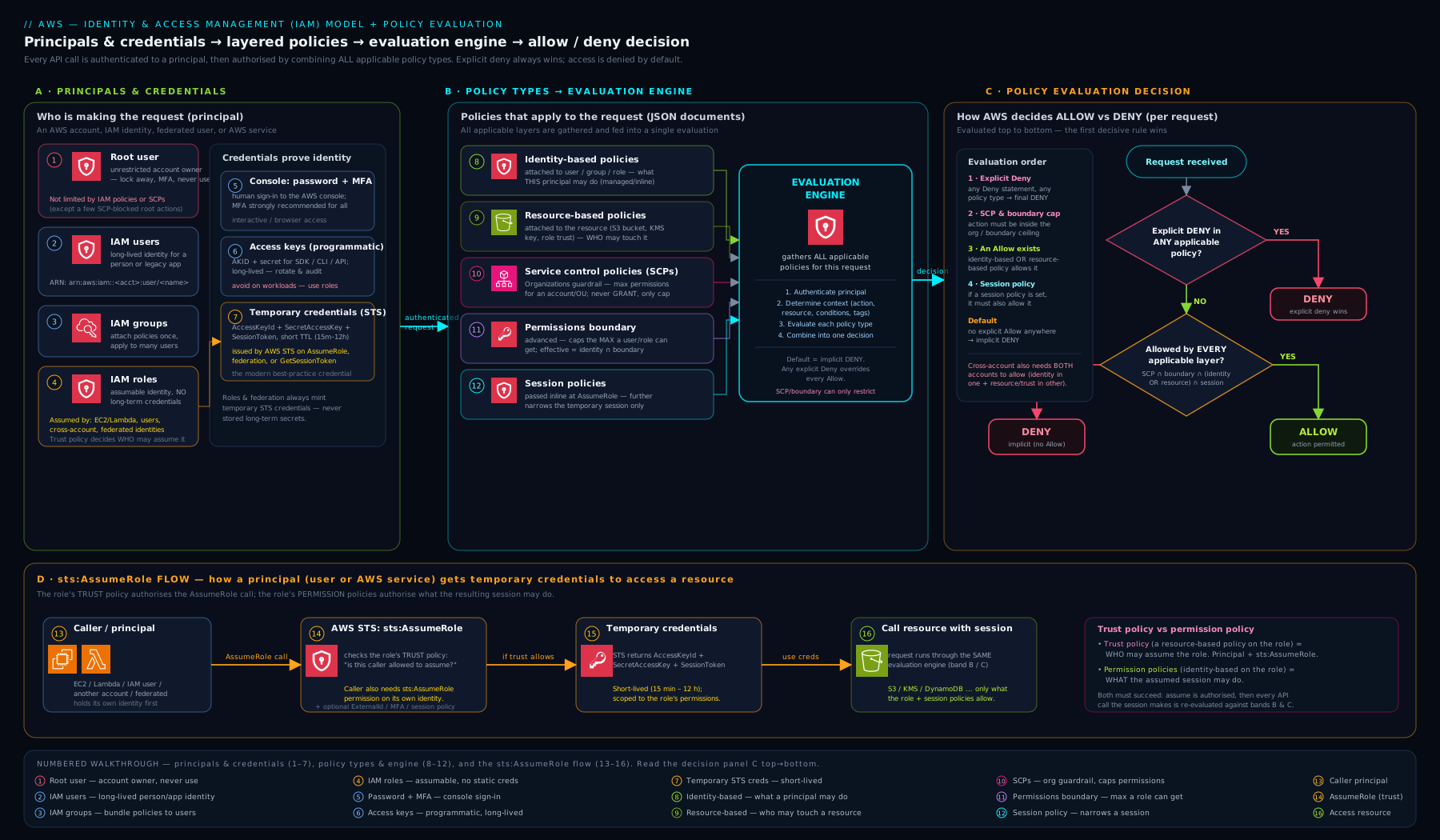
The diagram shows a request flowing from a principal, gathering all applicable policy types, and passing through the deny-check, then the allow-check, then the implicit-deny default — the same ladder described above.
Roles and sts:AssumeRole: temporary identity done right
A role is an identity you assume rather than log in as. It has permissions (via attached policies) but no password or access keys; instead, an authorised principal calls AWS Security Token Service (STS) to swap their own identity for the role’s temporary credentials. Every role has two halves:
- A permissions policy (identity-based) — what the role can do once assumed.
- A trust policy (a resource-based policy on the role) — who is allowed to assume it. This is the only place a
Principalappears on a role.
Here is a trust policy that lets a specific IAM user in the same account assume the role, but only with MFA present:
{
  "Version": "2012-10-17",
  "Statement": [
    {
      "Sid": "AllowAdminToAssumeWithMFA",
      "Effect": "Allow",
      "Principal": {
        "AWS": "arn:aws:iam::111122223333:user/alice"
      },
      "Action": "sts:AssumeRole",
      "Condition": {
        "Bool": {
          "aws:MultiFactorAuthPresent": "true"
        }
      }
    }
  ]
}
When Alice calls aws sts assume-role, STS checks this trust policy, confirms MFA, and returns temporary credentials scoped to the role’s permissions for a limited time. Three closely related uses build on exactly this mechanism:
| Use case | How the role is assumed | Why it beats access keys |
|---|---|---|
| Workloads on EC2 | An instance profile (a wrapper that attaches a role to an EC2 instance) — the instance fetches temporary credentials automatically | No keys stored on the server; credentials rotate themselves |
| Serverless / containers | Lambda execution roles, ECS task roles — the service assumes the role on the function’s behalf | Same: short-lived, no embedded secrets |
| Cross-account access | The trust policy names another account; a principal there assumes the role | One auditable doorway between accounts instead of shared keys |
For cross-account roles you typically pair sts:AssumeRole with an External ID condition when a third party is involved, to prevent the “confused deputy” problem — but the foundation is always this trust-policy-plus-AssumeRole pattern. The takeaway: roles turn every workload and every cross-account hop into short-lived, auditable credentials, which is why they are the backbone of modern AWS security.
IAM Identity Center (SSO): how humans should sign in
For human access at any real scale, you do not create IAM users in each account. Instead you use IAM Identity Center (formerly AWS SSO): people sign in once with a central identity (your corporate directory or a built-in store), and Identity Center hands them a role in whichever account they need via permission sets (reusable bundles of permissions). The result is single sign-on across many accounts, central control of who has what, and — crucially — no long-lived per-account credentials for humans at all. Think of it as the managed, organisation-wide front door that turns “an IAM user in every account” into “one login, temporary roles everywhere”.
Hands-on lab
You will create a group, attach a read-only policy, add a user to it, sign in as that user to confirm the permissions, then test that the evaluation logic denies anything outside the grant. Everything here is within the AWS Free Tier — IAM itself is free.
Run these as an administrator (not the root user). Replace the account ID
111122223333with your own where it appears.
Step 1 — Create a group and attach an AWS-managed read-only policy.
aws iam create-group --group-name ReadOnlyTeam

aws iam attach-group-policy \
  --group-name ReadOnlyTeam \
  --policy-arn arn:aws:iam::aws:policy/ReadOnlyAccess
Step 2 — Create a user, add them to the group, and give them a console password.
aws iam create-user --user-name lab-reader

aws iam add-user-to-group \
  --user-name lab-reader \
  --group-name ReadOnlyTeam

aws iam create-login-profile \
  --user-name lab-reader \
  --password 'ChangeMe-Str0ng!Pass' \
  --password-reset-required
Step 3 — Validate the permission with the IAM policy simulator (no sign-in needed). This asks IAM the authorisation question directly:
aws iam simulate-principal-policy \
  --policy-source-arn arn:aws:iam::111122223333:user/lab-reader \
  --action-names s3:ListAllMyBuckets s3:CreateBucket
Expected output (abridged): the result for s3:ListAllMyBuckets shows "EvalDecision": "allowed", while s3:CreateBucket shows "EvalDecision": "implicitDeny". That contrast is the evaluation logic: the read action is allowed by ReadOnlyAccess, and the write action — never granted — falls through to the default implicit deny.
Step 4 — (Optional) Confirm interactively. Sign in to the console as lab-reader (your account sign-in URL, IAM user, the password above). You will be able to view services but any create/delete attempt returns an explicit Access Denied — the same implicit deny, surfaced in the UI.
Step 5 — Validation checklist.
aws iam get-group --group-name ReadOnlyTeamlistslab-readeras a member.- The simulator returns
allowedfor the read action andimplicitDenyfor the write action.
Cleanup (so nothing lingers):
aws iam delete-login-profile --user-name lab-reader
aws iam remove-user-from-group --user-name lab-reader --group-name ReadOnlyTeam
aws iam delete-user --user-name lab-reader
aws iam detach-group-policy \
  --group-name ReadOnlyTeam \
  --policy-arn arn:aws:iam::aws:policy/ReadOnlyAccess
aws iam delete-group --group-name ReadOnlyTeam
Cost note: IAM users, groups, roles, and policies are free. This lab incurs no charge — the only way to spend money would be to actually launch billable resources, which we do not. There is therefore nothing cost-related to clean up beyond removing the identities above for hygiene.
Common mistakes & troubleshooting
| Symptom | Likely cause | Fix |
|---|---|---|
Access Denied despite an Allow policy |
An explicit Deny elsewhere (SCP, boundary, or a Deny statement) is overriding it | Check for Deny statements and SCPs; remember deny always wins |
| S3 policy “does nothing” | Resource missing the /* object form, or using only the bucket ARN |
Include both arn:aws:s3:::bucket and arn:aws:s3:::bucket/* |
| Action allowed but request still fails | A Condition (e.g. aws:SecureTransport, source IP, MFA) is not satisfied |
Re-read the conditions; meet them or remove them while testing |
| “Cannot assume role” | The role’s trust policy doesn’t name your principal, or MFA/External ID is required | Edit the trust policy’s Principal; supply MFA/External ID as required |
| Cross-account call denied | Only one side is configured | Allow on both the resource policy (account B) and the identity policy (account A) |
| Group has no effect | Tried to use a group as a Principal, or user not actually added |
Attach policies to the group and confirm membership; groups aren’t principals |
| Permissions wider/narrower than expected | A permissions boundary is intersecting the identity policy | Inspect the boundary — effective access is the intersection |
Best practices
- Prefer roles over IAM users, and temporary credentials over access keys, everywhere you can.
- Grant least privilege: start from nothing and add only the specific actions and resources needed; avoid
"*"inActionandResourcefor anything but throwaway tests. - Use groups for humans and managed policies for common needs, so permissions are attached once and audited easily.
- Turn on MFA for every human identity, especially anything with administrative power.
- Rotate or, better, eliminate access keys; use IAM Identity Center for people and roles for workloads.
- Use IAM Access Analyzer to find unused access and over-broad grants, and the policy simulator before you ship a policy.
- Tag identities and use conditions (e.g. attribute-based access control) so policies scale without sprawling.
Security notes
- Lock down the root user. Use it only for the few tasks that require it, give it a long unique password and hardware MFA, and never create root access keys. Day-to-day work happens through IAM/Identity Center identities.
- Explicit deny is your strongest tool — write organisation-wide guardrails (no disabling logging, region restrictions, enforced encryption in transit) as Deny statements in SCPs, because they cannot be overridden by a careless Allow.
- Treat every long-lived access key as a future leak. Detect and remove them; assume any key that appears in source control, a laptop, or a log is already compromised and rotate immediately.
- Require MFA for sensitive actions via the
aws:MultiFactorAuthPresentcondition, including onsts:AssumeRolefor privileged roles. - Log everything with CloudTrail so every IAM decision is auditable — when troubleshooting “who did what”, CloudTrail is the source of truth.
Interview & exam questions
-
What is the IAM policy evaluation order? Explicit Deny wins over everything; otherwise an explicit Allow is required; with no Allow, the default is an implicit deny. Order of strength: explicit deny > explicit allow > implicit deny.
-
Difference between an IAM user and an IAM role? A user is a permanent identity with long-lived credentials (password/access keys); a role has no long-term credentials and is assumed temporarily via STS, yielding short-lived tokens. Roles are preferred for workloads, cross-account access, and federation.
-
Identity-based vs resource-based policy? Identity-based policies attach to a principal and say what it can do (no
Principalelement). Resource-based policies attach to a resource, include aPrincipal, and can grant cross-account access. Within an account either can grant; across accounts you typically need both. -
Do permission boundaries or SCPs grant permissions? No. Both are ceilings that only restrict. Effective permissions are the intersection of the grant (identity/resource policy) and every applicable boundary/SCP. Neither grants anything by itself.
-
What are the required elements of a policy statement?
Effect(Allow/Deny),Action, andResource(plusPrincipalfor resource-based policies).Version,Sid, andConditionround it out;Versionshould be2012-10-17. -
How does an EC2 instance get permissions without stored keys? Via an instance profile wrapping an IAM role; the instance retrieves temporary credentials automatically and they rotate on their own — no access keys on disk.
-
What is a trust policy and how does it relate to
sts:AssumeRole? A trust policy is the resource-based policy on a role that names who may assume it (thePrincipal) and allowssts:AssumeRole. STS checks it before issuing temporary credentials. -
Why is an explicit Deny used for guardrails instead of simply not granting? Because explicit Deny cannot be overridden by any Allow. “Not granting” relies on implicit deny, which a later Allow can satisfy; an explicit Deny is final regardless of other policies.
-
A user has an identity policy allowing
s3:*, but an SCP only permitss3:GetObject. What can they do? Onlys3:GetObject. The SCP is a ceiling and effective permissions are the intersection of the grant and the ceiling. -
What is a group, and can it be a principal? A group is a container of IAM users for attaching policies once; it is not a principal — it cannot sign in or appear in a policy’s
Principalfield. -
What does IAM Identity Center solve? Central single sign-on for humans across many accounts, handing out roles via permission sets so there are no long-lived per-account user credentials.
-
Two key root-account practices? Use the root user only for tasks that require it, and protect it with a strong password and hardware MFA; never create root access keys.
Quick check
- In the evaluation logic, which beats which: explicit Allow, explicit Deny, implicit deny?
- Which policy element appears in a resource-based policy but not an identity-based one?
- True or false: a permissions boundary can grant a principal new permissions.
- What credential type does STS issue when a role is assumed?
- Why must an S3 read policy usually list two ARNs for one bucket?
Answers
- Explicit Deny beats explicit Allow, which beats implicit deny (the default).
Principal— it names who the resource policy applies to.- False. Boundaries only restrict; effective access is the intersection of the identity policy and the boundary.
- Temporary security credentials — a short-lived access key, secret, and session token that auto-expire.
- Because the bucket (
arn:aws:s3:::bucket, forListBucket) and the objects (arn:aws:s3:::bucket/*, forGetObject) are separate resources.
Exercise
Design and test a least-privilege policy for a “build agent” that may only read objects from one S3 bucket and send messages to one SQS queue, all over HTTPS:
- Write a single identity-based policy with two Allow statements (S3 read with both ARNs;
sqs:SendMessageon the queue ARN) and anaws:SecureTransportcondition on each. - Add one explicit Deny statement that blocks the action if the request is not encrypted in transit, and explain why the Deny is redundant-but-defensive given the conditions.
- Use
aws iam simulate-principal-policy(or attach to a throwaway role and assume it) to confirm: the two allowed actions returnallowed, and any third action (e.g.s3:DeleteObject) returnsimplicitDeny. - Bonus: write the trust policy that lets only your CI account assume the role, gated on an External ID.
Certification mapping
| Exam | Objective area this supports |
|---|---|
| CLF-C02 (Cloud Practitioner) | Security and compliance — the shared-responsibility model, IAM users/groups/roles, MFA, and the principle of least privilege. |
| SAA-C03 (Solutions Architect – Associate) | Design secure architectures — choosing roles vs users, identity vs resource policies, cross-account access patterns, and applying the evaluation logic to design access. |
Glossary
- IAM (Identity and Access Management) — the global, free AWS service that authenticates principals and authorises their requests.
- Principal — any entity that makes a request: the root user, an IAM user, or a role (groups are containers, not principals).
- Root user — the all-powerful account owner identity tied to the account’s email; to be used only when strictly required.
- IAM user — a permanent identity for a person or legacy app, with long-lived credentials.
- IAM group — a container of users for attaching policies once; cannot log in or be a
Principal. - IAM role — an identity with permissions but no long-term credentials, assumed temporarily via STS.
- Policy — a JSON document of permissions, evaluated by IAM to allow or deny requests.
- Identity-based policy — a policy attached to a user, group, or role.
- Resource-based policy — a policy attached to a resource, containing a
Principal; enables cross-account access. - SCP (Service Control Policy) — an Organizations guardrail that caps permissions for an account or OU; never grants.
- Permissions boundary — a ceiling on a single user or role; effective access is the intersection with the identity policy.
- Session policy — a policy passed at assume-role time that narrows a single session.
- Trust policy — the resource-based policy on a role that defines who may assume it.
- STS (Security Token Service) — the service that issues temporary credentials when a role is assumed or a user federates.
- Instance profile — the wrapper that attaches a role to an EC2 instance so it gets temporary credentials automatically.
- MFA (multi-factor authentication) — a second authentication factor (app, hardware key, or passkey).
- IAM Identity Center — AWS single sign-on for humans across accounts, granting roles via permission sets.
- Explicit deny / implicit deny — a Deny statement that overrides all allows / the default denial when nothing grants the action.
- Least privilege — granting only the specific actions and resources a task requires, and no more.
Next steps
Continue the course with AWS VPC Networking Fundamentals — once you control who can act, you control where traffic flows. Then go deeper on identity with:
- Engineering Least-Privilege IAM with Permission Boundaries — safe delegation and right-sizing at scale.
- Cross-Account Roles, External IDs & the Confused-Deputy Problem — production-grade cross-account access.
- IAM Identity Center: Permission Sets & ABAC across Accounts — how human access really works in a multi-account org.