Amazon Simple Storage Service (S3) is the object store that the rest of AWS is quietly built on. It holds your application uploads, your data-lake parquet files, your CloudTrail logs, your Terraform state, your static website, your backups and your machine-learning training sets — all as objects in flat containers called buckets, reachable over HTTPS from anywhere with the right permissions. It is designed for eleven nines of durability (99.999999999% — lose one object in ten million every ten thousand years), scales to effectively unlimited capacity with no provisioning, and you pay only for what you store, request and transfer. There are no disks to size, no RAID to configure and no filesystem to grow.
That simplicity hides a surprising amount of depth, and the depth is exactly what interviews and the certification exams probe. The same object can live in any of eight storage classes trading retrieval speed for price; it can be versioned so deletes and overwrites are recoverable; it can be encrypted four different ways; it can be locked so even the account root cannot delete it; it can be replicated to another Region automatically; and access to it is governed by a layered model of Block Public Access, bucket policies, IAM and access points. Getting these wrong is how buckets end up on the news.
This lesson is the exhaustive tour. We start with the object model, walk every storage class with a comparison table, then take versioning, lifecycle, encryption, access control, replication, Object Lock, static hosting and event notifications each in full — with the what · choices · default · when · trade-off · gotcha treatment and real aws s3api commands throughout. By the end you will know every option S3 offers and when to reach for each. For the governance posture that ties the security pieces into a defended estate, this lesson pairs with S3 Data Protection & Governance at Scale.
Learning objectives
By the end of this lesson you will be able to:
- Explain the S3 object model — buckets, keys, prefixes, the flat namespace, object metadata, ETags and multipart upload.
- Choose the right storage class for any access pattern, and read the cost/retrieval trade-offs from a comparison table.
- Design lifecycle rules that transition and expire objects (and noncurrent versions) automatically.
- Turn on versioning and MFA delete, and explain how delete markers and noncurrent versions behave.
- Pick and enforce the right encryption: SSE-S3, SSE-KMS (with Bucket Keys), SSE-C and DSSE-KMS, set a bucket default, and require it via policy.
- Apply the access-control model correctly: Block Public Access, bucket policies, IAM, Object Ownership (ACLs disabled), access points and presigned URLs.
- Configure replication (CRR/SRR), Object Lock retention and legal holds, static website hosting and event notifications.
Prerequisites & where this fits
You need an AWS account and a working grasp of IAM — principals, identity vs resource policies and the explicit-deny-beats-allow evaluation logic — because S3 access is decided by exactly that machinery. If IAM is hazy, read AWS IAM Fundamentals first. This is the Storage module of the AWS Zero-to-Hero course, the foundational S3 lesson that the data-protection, access-points and analytics lessons build on. After this, the course continues into block and file storage with EBS, EFS and FSx.
Core concepts: buckets, objects, keys and the flat namespace
S3 has only two kinds of thing: buckets and objects.
A bucket is a container for objects. The bucket name is globally unique across all of AWS (not just your account), DNS-compatible (3–63 lowercase characters, no underscores, no IP-address-looking names), and chosen at creation — you cannot rename a bucket. A bucket lives in exactly one Region; the data never leaves that Region unless you copy or replicate it. You can have up to 1,000,000 buckets per account by default (a soft quota raised from the old 100/1,000 limits), though best practice is fewer, larger buckets partitioned by prefix rather than thousands of tiny ones.
An object is a file plus its metadata. Every object has:
- A key — the full name, e.g.
images/2026/06/cat.png. The key is a single string up to 1,024 bytes of UTF-8; the slashes are just characters. - Value — the bytes, from 0 bytes up to 5 TB per object.
- Version ID —
nullunless versioning is on. - Metadata — system metadata (size, last-modified,
Content-Type, storage class, encryption) and optional user-defined metadata (headers prefixedx-amz-meta-, up to 2 KB total). - ETag — an entity tag; for a single-part PUT it is the MD5 of the object, but for multipart uploads it is not a simple MD5, so never rely on the ETag being an MD5 checksum.
- Tags — up to 10 key/value object tags, used by lifecycle rules, replication filters and IAM conditions.
The single most important conceptual point: S3 is a flat key/value store, not a filesystem. There are no real folders. The key images/2026/cat.png is one flat string; the console renders a folder tree by splitting on / purely for display. A prefix is just the leading portion of a key (images/2026/), and “listing a folder” is really “list keys starting with this prefix”. This matters because performance and many features (lifecycle scope, replication scope, access-point routing) are expressed in terms of prefixes, not directories.
S3 is strongly read-after-write consistent for all operations — including overwrite PUTs and DELETEs — at no extra cost. After a successful write, any subsequent read returns the latest data; after a delete, a read returns not found. The old caveat about eventual consistency for overwrites was retired in December 2020 and is a common stale exam trap.
Multipart upload splits a large object into parts (5 MB–5 GB each, up to 10,000 parts) uploaded in parallel and then assembled server-side. AWS requires multipart for objects over 5 GB and recommends it above ~100 MB for throughput and resumability. The catch — and a real bill — is that incomplete multipart uploads keep their already-uploaded parts in the bucket and you are charged for them until you abort the upload or, much better, add a lifecycle rule that aborts incomplete uploads after N days.
Storage classes: every option
A storage class is the durability/availability/retrieval/price profile of an object. Durability is eleven nines for every class (One Zone classes excepted in the sense of resilience, not the durability figure); what changes is how many Availability Zones the data spans, the availability SLA, the per-GB price, the retrieval price and latency, and minimum charges. You set a class per object at PUT time and change it later via copy or lifecycle.
| Storage class | AZs | Designed for | Retrieval latency | Min storage duration | Min billable object size | Relative storage cost | When to use it |
|---|---|---|---|---|---|---|---|
| S3 Standard | ≥3 | Frequently accessed, general purpose | Milliseconds | None | None | Baseline (highest) | Active data, websites, default for unknown patterns |
| S3 Intelligent-Tiering | ≥3 | Unknown / changing access | Milliseconds (Frequent/Infrequent tiers) | None | None | Standard-ish + small monitoring fee per object | Data lakes and any workload whose access you cannot predict |
| S3 Standard-IA | ≥3 | Long-lived, infrequently accessed | Milliseconds | 30 days | 128 KB | Lower storage, per-GB retrieval fee | Backups, older data you still read occasionally |
| S3 One Zone-IA | 1 | Infrequent, re-creatable | Milliseconds | 30 days | 128 KB | ~20% below Standard-IA | Secondary copies, thumbnails — data you can regenerate |
| S3 Glacier Instant Retrieval | ≥3 | Archive, occasional instant access | Milliseconds | 90 days | 128 KB | Much lower storage, higher retrieval | Medical images, news media — archived but needs millisecond reads |
| S3 Glacier Flexible Retrieval | ≥3 | Archive, rare access | Minutes to hours | 90 days | 40 KB | Very low storage | Backups and DR you can wait minutes/hours to restore |
| S3 Glacier Deep Archive | ≥3 | Cold archive, very rare | Hours (≈12) | 180 days | 40 KB | Lowest of all | Compliance/retention you may never read; tape replacement |
| S3 Express One Zone | 1 (single AZ, you choose) | Ultra-low-latency, high-RPS | Single-digit ms (faster than Standard) | None | None | High storage price, very low request price | Latency-sensitive, request-heavy workloads (ML, analytics) co-located with compute |
A few load-bearing details that the table compresses:
- Minimum storage duration means you are billed for the object as if it lived that long even if you delete it sooner. Put a 1 KB file in Glacier Deep Archive and delete it the next day and you still pay ~180 days of storage for it. This is why you never lifecycle tiny, short-lived objects into cold classes.
- Minimum billable object size (128 KB for the IA/Glacier-Instant family) means a 10 KB object in Standard-IA is billed as 128 KB. Small objects belong in Standard or Intelligent-Tiering.
- Glacier Flexible Retrieval offers three retrieval speeds — Expedited (1–5 min), Standard (3–5 h) and Bulk (5–12 h, cheapest); Deep Archive offers Standard (~12 h) and Bulk (~48 h). Retrievals from Glacier classes are requests you pay for and wait on, not instant reads — except Glacier Instant Retrieval, whose whole point is millisecond access.
- S3 Intelligent-Tiering moves objects automatically between a Frequent and an Infrequent tier (and optional Archive Instant, Archive and Deep Archive tiers you opt into) based on access, charging a small per-object monitoring fee but no retrieval fees. It is the safe default when you genuinely cannot predict access — but the per-object fee makes it wasteful for millions of tiny objects.
- One Zone classes (One Zone-IA and Express One Zone) store data in a single AZ, so an AZ loss can lose the data. Use them only for data you can reconstruct or that has a copy elsewhere. They are not a place for your only copy of anything important.
- S3 Express One Zone is the newest class and behaves differently: it lives in a special directory bucket (not a general-purpose bucket), uses a different naming and request model, and is optimised for requests per second and latency rather than storage price. Reach for it when request cost and single-digit-millisecond latency dominate, and your compute sits in the same AZ.
There is also the legacy S3 Glacier service (vaults), distinct from the S3 storage classes above. New designs should use the S3 Glacier storage classes inside normal buckets, not the standalone vault API.
Lifecycle: transition and expiration on autopilot
A lifecycle configuration is a set of rules on a bucket that automatically transition objects to cheaper classes and expire (delete) them on a schedule. It is how you control cost without writing cron jobs.
Each rule has a filter (apply to the whole bucket, a prefix, object tags, or an object-size range) and one or more actions:
| Action | What it does | Notes & gotchas |
|---|---|---|
| Transition (current version) | Move objects to another class after N days from creation | Cannot transition up (e.g. Glacier → Standard) via lifecycle; transitions go colder. Respect minimum-duration charges. |
| Transition (noncurrent version) | Move old versions to a cheaper class after they become noncurrent | Only meaningful with versioning on. |
| Expiration (current version) | Delete the current object after N days | On a versioned bucket this writes a delete marker rather than truly deleting. |
| Noncurrent version expiration | Permanently delete old versions N days after they become noncurrent | The real space-reclaimer on versioned buckets; can keep “newest N noncurrent versions”. |
| Expire delete markers | Remove expired object delete markers (markers with no versions beneath) | Stops orphaned delete markers accumulating. |
| Abort incomplete multipart uploads | Delete parts of uploads not completed within N days | Add this to every bucket — it stops you paying for abandoned upload parts. |
Worked example: keep logs hot for 30 days, then Standard-IA, then Glacier Flexible Retrieval at 90 days, delete at one year, and clean up failed uploads after 7 days.
cat > lifecycle.json <<'JSON'
{
  "Rules": [
    {
      "ID": "logs-tiering",
      "Filter": { "Prefix": "logs/" },
      "Status": "Enabled",
      "Transitions": [
        { "Days": 30, "StorageClass": "STANDARD_IA" },
        { "Days": 90, "StorageClass": "GLACIER" }
      ],
      "Expiration": { "Days": 365 }
    },
    {
      "ID": "abort-bad-uploads",
      "Filter": {},
      "Status": "Enabled",
      "AbortIncompleteMultipartUpload": { "DaysAfterInitiation": 7 }
    }
  ]
}
JSON

aws s3api put-bucket-lifecycle-configuration \
  --bucket my-bucket --lifecycle-configuration file://lifecycle.json
Two things people get wrong. First, lifecycle days are measured from object creation, and transitions are evaluated once per day in the background — an object does not move at the exact millisecond it ages, and a transition can lag up to ~24–48 hours. Second, transitioning small objects to IA/Glacier can cost more, not less, because of the per-object minimum-size billing and per-request transition charges — lifecycle is a tool for large, long-lived data, not a blanket “send everything to Glacier” switch.
Versioning and MFA delete
Versioning keeps every version of every object in a bucket, so overwrites and deletes are recoverable. It is off by default; you turn it on per bucket, and once enabled it can only be suspended, never fully switched back to “never versioned”.
With versioning on:
- A PUT to an existing key does not overwrite — it creates a new version with a new version ID and makes it current; the old version becomes noncurrent but still exists (and is still billed).
- A DELETE without a version ID does not erase anything — it adds a delete marker as the new current version, so a GET returns 404 but the data is still there beneath the marker. Remove the marker (delete that specific version) and the object reappears.
- A DELETE with a specific version ID permanently removes that one version. This is the only way to actually free space, and it is what noncurrent-version-expiration lifecycle rules do for you.
Because every version and every delete marker is stored and billed, versioning without lifecycle is a slow cost leak — always pair it with a noncurrent-version-expiration rule. Versioning is also a prerequisite for replication and a strong ransomware defence (an attacker who overwrites or deletes objects only adds versions/markers; the originals remain).
MFA delete is an extra layer on a versioned bucket: when enabled, permanently deleting a version or changing the versioning state requires a one-time MFA code from the bucket owner’s root account. It cannot be enabled from the console — only via the API/CLI by the root user with an MFA device:
aws s3api put-bucket-versioning \
  --bucket my-bucket \
  --versioning-configuration Status=Enabled,MFADelete=Enabled \
  --mfa "arn:aws:iam::111122223333:mfa/root-account-mfa-device 123456"
The gotcha: because MFA delete is root-only and console-incompatible, it is operationally heavy. Most production estates instead rely on Object Lock (below) plus least-privilege deny policies for the same protection without the root-MFA friction.
Encryption: SSE-S3, SSE-KMS, SSE-C and DSSE
S3 encrypts every new object at rest by default — since January 2023 the floor is SSE-S3, so “is my data encrypted at rest?” is always yes. The real decision is which mechanism and who controls the keys. There are four server-side options (and you may also encrypt client-side before upload).
| Method | Who holds/manages keys | Audit & access control | Cost | When to use |
|---|---|---|---|---|
SSE-S3 (AES256) |
AWS, fully managed | None per-object; opaque | Free | Default; fine when you don’t need per-key control or CloudTrail on key use |
SSE-KMS (aws:kms) |
AWS KMS — AWS-managed or customer-managed key (CMK) | Key policy + IAM + CloudTrail on every decrypt | KMS request + key charges | When you need access control, rotation policy and an audit trail on the key (compliance) |
DSSE-KMS (aws:kms:dsse) |
KMS, two independent layers of encryption | Same as SSE-KMS, twice | Higher (two KMS operations) | Strict regulatory regimes mandating double encryption |
| SSE-C (customer-provided) | You — supply the key on every request | You manage everything; AWS stores no key | Free (no KMS) | When you must hold the key material and accept the operational burden |
How to think about each:
- SSE-S3 is the zero-effort baseline. AWS manages a rotating key; you cannot see it, restrict it or audit its use. Perfect for data where encryption-at-rest is a checkbox, not a controlled boundary.
- SSE-KMS is the production default for anything sensitive. Every object is encrypted under a KMS key; access to decrypt requires permission on the key policy as well as on S3, giving you a true second lock and a CloudTrail record of every decrypt. The cost trap: a workload reading millions of objects makes millions of KMS
Decryptcalls. Enable an S3 Bucket Key (--bucket-key-enabled) to have S3 use a short-lived bucket-level data key, slashing KMS request volume and cost by up to 99% — turn it on for any KMS-encrypted bucket. - DSSE-KMS applies two layers of server-side KMS encryption for the rare compliance mandate (e.g. certain government workloads) that requires defence-in-depth at the cryptography level. It costs roughly twice the KMS operations; only use it when a control framework demands it.
- SSE-C means you send the encryption key with every PUT and GET over HTTPS; AWS uses it to encrypt/decrypt and then discards it — lose the key and the data is unrecoverable. It exists for organisations that cannot let AWS hold key material at all, and it shifts all key management onto you.
Set a bucket default so objects are encrypted with your chosen method even if the uploader forgets to ask:
aws s3api put-bucket-encryption \
  --bucket my-bucket \
  --server-side-encryption-configuration '{
    "Rules": [{
      "ApplyServerSideEncryptionByDefault": {
        "SSEAlgorithm": "aws:kms",
        "KMSMasterKeyID": "arn:aws:kms:eu-west-2:111122223333:key/abcd-1234"
      },
      "BucketKeyEnabled": true
    }]
  }'
A default is necessary but not sufficient if a client explicitly asks for a weaker method — to truly enforce SSE-KMS, add a bucket policy that denies any PUT whose s3:x-amz-server-side-encryption header is not aws:kms (and optionally pin a specific key with s3:x-amz-server-side-encryption-aws-kms-key-id). For the full enforce-via-policy patterns and the SSE-S3-vs-KMS decision in a governance context, see S3 Data Protection & Governance at Scale.
Finally, encryption in transit is separate from encryption at rest: S3 supports HTTPS/TLS for every request, and the standard hardening move is a bucket policy denying any request where aws:SecureTransport is false.
Access control: Block Public Access, policies, IAM, ownership and access points
Access to an S3 object is the result of every applicable policy evaluated together, with one override sitting on top of all of them. From outermost guardrail inwards:
1. Block Public Access (BPA) is the master switch and should be on at the account level and every bucket. It is four independent settings that override any policy or ACL that would otherwise grant public access:
| BPA setting | Blocks |
|---|---|
BlockPublicAcls |
New public ACLs being applied |
IgnorePublicAcls |
Existing public ACLs (ignores them entirely) |
BlockPublicPolicy |
New bucket policies that grant public access |
RestrictPublicBuckets |
Public/cross-account access via policy, restricting to AWS-service principals and the bucket owner |
With all four on, no combination of ACL or policy can make the bucket public — this is the single most effective defence against the classic “exposed S3 bucket” breach, and it is on by default for new buckets since 2023.
aws s3api put-public-access-block \
  --bucket my-bucket \
  --public-access-block-configuration \
  BlockPublicAcls=true,IgnorePublicAcls=true,BlockPublicPolicy=true,RestrictPublicBuckets=true
2. Bucket policies are resource-based JSON policies attached to the bucket. They are the primary tool for cross-account access, conditions (TLS-only, source-VPC, encryption enforcement) and grants to AWS services. Remember the IAM rule from the fundamentals lesson: you usually need both the bucket ARN (arn:aws:s3:::bucket, for s3:ListBucket) and the object ARN (arn:aws:s3:::bucket/*, for s3:GetObject) because they are different resources.
3. IAM identity policies grant your own principals access to S3. Within one account either the bucket policy or an IAM policy can grant; across accounts you typically need an allow on both sides.
4. Object Ownership / ACLs. Access Control Lists are the original, pre-IAM mechanism and are now discouraged. The modern setting is Object Ownership = “Bucket owner enforced”, which disables ACLs entirely so the bucket owner owns every object and access is governed purely by policies. This is the default for new buckets and what AWS recommends for essentially everyone — only fall back to ACL-enabled modes for legacy cross-account upload patterns you cannot yet refactor.
5. Access points are named network endpoints with their own policies attached to a bucket, each with a unique hostname and DNS name. Instead of one sprawling bucket policy serving every team, you give each application its own access point with a least-privilege policy (and optionally lock it to a VPC). They scale access management for shared buckets and data lakes. S3 Object Lambda access points go further, running a Lambda to transform data as it is read (redaction, format conversion). For the full access-point, Object Lambda and Multi-Region Access Point story, see S3 Access Points, Object Lambda & Multi-Region Access Points.
6. Presigned URLs grant temporary, time-limited access to a single object without giving the requester any AWS credentials. The holder of a presigned URL acts with the signer’s permissions for the duration (up to 7 days for SigV4), so a backend can let a browser upload or download one object directly. The gotcha: a presigned URL is a bearer token — anyone who obtains it has that access until it expires, so keep expiries short and never log them.
# Generate a 15-minute download link for one object
aws s3 presign s3://my-bucket/reports/q2.pdf --expires-in 900
The override to remember above everything else: explicit Deny always wins, and Block Public Access wins over all grants. A bucket policy that “allows public read” does nothing if BPA is on — which is exactly what you want.
Replication: CRR and SRR
Replication automatically and asynchronously copies objects from a source bucket to one or more destination buckets. Cross-Region Replication (CRR) copies to a bucket in a different Region (for DR, latency or compliance/data-residency); Same-Region Replication (SRR) copies within a Region (for log aggregation, separating prod/test accounts, or sovereignty between accounts).
Requirements and behaviour:
- Versioning must be enabled on both source and destination.
- You attach a replication configuration with rules (filter by prefix/tag) and a destination, plus an IAM role S3 assumes to do the copying.
- Replication is asynchronous — objects appear in the destination shortly after upload, not instantly. For a tight SLA, add S3 Replication Time Control (RTC), which replicates 99.99% of objects within 15 minutes with metrics, at extra cost.
- By default replication copies new objects only. To copy objects that already existed, use S3 Batch Replication.
- It can replicate to a different account (and change object ownership to the destination owner — important so the destination account fully controls the copies), to a different storage class, and delete markers can optionally be replicated (but version deletes are never replicated, by design, so a malicious permanent delete on the source cannot propagate).
- Replication chaining is not transitive: if A→B and B→C, objects from A are not automatically sent on to C unless configured.
aws s3api put-bucket-replication \
  --bucket source-bucket \
  --replication-configuration '{
    "Role": "arn:aws:iam::111122223333:role/s3-replication-role",
    "Rules": [{
      "ID": "to-dr-region",
      "Status": "Enabled",
      "Filter": { "Prefix": "" },
      "Destination": {
        "Bucket": "arn:aws:s3:::dest-bucket-eu-central",
        "StorageClass": "STANDARD_IA"
      }
    }]
  }'
Object Lock: write-once-read-many immutability
Object Lock enforces a write-once-read-many (WORM) model: an object version cannot be deleted or overwritten until a retention period elapses or a legal hold is removed. It is how you meet financial/regulatory retention rules and how you build ransomware-proof backups.
Key facts:
- Object Lock requires versioning and is typically enabled at bucket creation (
--object-lock-enabled-for-bucket); enabling it on an existing bucket requires an AWS support request. - It protects specific object versions, not the logical object — a new version can still be written; the locked version simply cannot be deleted/altered.
- Two retention modes:
- Governance mode — protected, but users with the special
s3:BypassGovernanceRetentionpermission can override (shorten/remove) the lock. Use for internal policy you may need to adjust. - Compliance mode — nobody, not even the account root, can delete or shorten the retention until it expires. This is true immutability for hard regulatory mandates — set it carefully, because it is unrecoverable.
- Governance mode — protected, but users with the special
- A legal hold is an independent, flag-style lock with no expiry — it keeps a version immutable until explicitly removed, regardless of any retention period. Useful for litigation holds.
- A default retention on the bucket applies a mode and duration to every new object automatically.
For Object Lock as part of a ransomware-resilience and governance strategy (including the vault-lock-style patterns), see S3 Data Protection & Governance at Scale.
Static website hosting
S3 can serve a static website — HTML, CSS, JS and images — directly from a bucket, with no servers. You enable website hosting, set an index document (e.g. index.html) and an error document (e.g. error.html), and S3 exposes a website endpoint (http://bucket.s3-website-<region>.amazonaws.com).
Two crucial limitations and the production pattern:
- The S3 website endpoint is HTTP only and does not support HTTPS. For TLS, a custom domain and global caching, you front the bucket with Amazon CloudFront (which adds HTTPS via ACM, edge caching and WAF) and keep the bucket private, granting CloudFront access via Origin Access Control (OAC). This is the standard, recommended way to host a static site or SPA.
- Note the difference between the REST endpoint (
bucket.s3.<region>.amazonaws.com, supports HTTPS, returns XML, used by SDKs) and the website endpoint (HTTP, returns your index/error documents, supports redirects). Website features (index/error docs, redirect rules) work only via the website endpoint.
aws s3api put-bucket-website \
  --bucket my-site-bucket \
  --website-configuration '{
    "IndexDocument": { "Suffix": "index.html" },
    "ErrorDocument": { "Key": "error.html" }
  }'
Event notifications, requester pays and other options
Event notifications fire when objects are created, removed, restored from Glacier, replicated, etc. You route events to Lambda, SQS or SNS (filtered by prefix/suffix, e.g. only .jpg under uploads/) — the backbone of serverless pipelines like “thumbnail on upload” or “ingest on PUT”. For higher-fidelity, near-real-time delivery to many targets, Amazon EventBridge can be enabled on the bucket as an alternative.
Requester Pays flips who pays for request and data-transfer costs onto the requester rather than the bucket owner (the owner still pays for storage). It is used for large shared datasets where you publish data but do not want to fund everyone’s downloads; requesters must include x-amz-request-payer to acknowledge the charge.
Other options worth knowing exist on the bucket: Transfer Acceleration (uploads routed over the CloudFront edge network for faster long-distance transfers, for a fee), S3 Storage Lens (account-wide storage analytics and recommendations), storage class analysis (recommends when to move data to IA), inventory (a scheduled CSV/Parquet report of your objects and their metadata — far cheaper than LIST for auditing billions of objects), and access logs (server access logging and/or CloudTrail data events for request-level audit).
The S3 estate at a glance
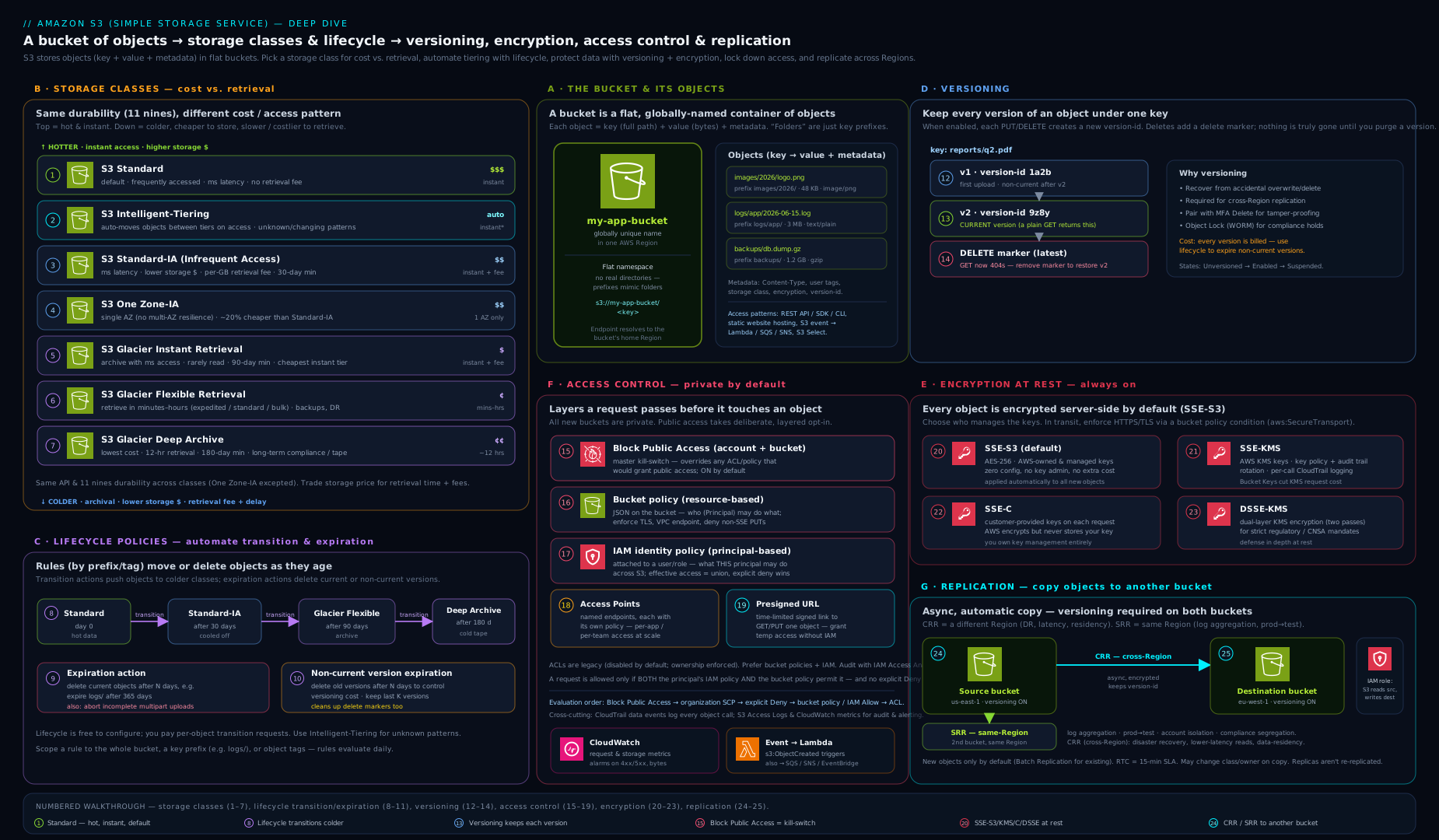
The diagram brings the pieces together: a bucket holding objects across the storage-class spectrum (Standard through Deep Archive), with lifecycle arrows transitioning data colder over time, versioning stacking versions and delete markers, encryption wrapping objects at rest, Block Public Access and the bucket policy/access-point layer guarding the front door, and replication mirroring objects to a second Region — the whole object lifecycle from hot upload to cold archive on one canvas.
Hands-on lab
You will create a bucket, confirm it is private and encrypted, turn on versioning, prove that a delete is recoverable, add a lifecycle rule, generate a presigned URL, then clean up. Everything fits within the AWS Free Tier (5 GB of Standard storage and modest request volumes for the first 12 months); this lab uses kilobytes.
The
$(date +%s)suffix is used to get a globally unique bucket name. Run as an administrator, not the root user.
Step 1 — Create a uniquely named bucket (outside us-east-1 needs a location constraint).
BUCKET="kloudvin-lab-$(date +%s)"
aws s3api create-bucket \
  --bucket "$BUCKET" \
  --region eu-west-2 \
  --create-bucket-configuration LocationConstraint=eu-west-2
echo "Created $BUCKET"
Step 2 — Confirm the secure defaults (BPA on, ownership enforced, encrypted).
aws s3api get-public-access-block --bucket "$BUCKET"        # all four = true
aws s3api get-bucket-encryption --bucket "$BUCKET"          # AES256 (SSE-S3) by default
Expected: the public-access-block shows all four settings true, and encryption shows SSEAlgorithm: AES256 — new buckets are private and encrypted out of the box.
Step 3 — Turn on versioning and upload an object twice.
aws s3api put-bucket-versioning --bucket "$BUCKET" \
  --versioning-configuration Status=Enabled

echo "v1 contents" > file.txt
aws s3 cp file.txt "s3://$BUCKET/file.txt"
echo "v2 contents" > file.txt
aws s3 cp file.txt "s3://$BUCKET/file.txt"

aws s3api list-object-versions --bucket "$BUCKET" --prefix file.txt \
  --query 'Versions[].{Key:Key,Version:VersionId,Latest:IsLatest}'
Expected: two versions, the newer one IsLatest: true. The first PUT was not overwritten — it became a noncurrent version.
Step 4 — Delete, then recover (prove delete markers work).
aws s3 rm "s3://$BUCKET/file.txt"                # adds a delete marker
aws s3 ls "s3://$BUCKET/"                          # file.txt no longer listed
# Find and delete the delete marker to restore the object:
MARKER=$(aws s3api list-object-versions --bucket "$BUCKET" --prefix file.txt \
  --query 'DeleteMarkers[?IsLatest].VersionId' --output text)
aws s3api delete-object --bucket "$BUCKET" --key file.txt --version-id "$MARKER"
aws s3 cp "s3://$BUCKET/file.txt" -               # prints "v2 contents" again
Expected: after removing the delete marker the object reappears and prints v2 contents — nothing was ever truly lost. That is versioning as a recovery and anti-ransomware control.
Step 5 — Add a lifecycle rule (abort bad uploads + expire old versions).
aws s3api put-bucket-lifecycle-configuration --bucket "$BUCKET" \
  --lifecycle-configuration '{"Rules":[
    {"ID":"tidy","Filter":{},"Status":"Enabled",
     "AbortIncompleteMultipartUpload":{"DaysAfterInitiation":7},
     "NoncurrentVersionExpiration":{"NoncurrentDays":30}}]}'
aws s3api get-bucket-lifecycle-configuration --bucket "$BUCKET"
Step 6 — Generate a 5-minute presigned download URL.
aws s3 presign "s3://$BUCKET/file.txt" --expires-in 300
# Paste the URL into a browser within 5 minutes — it downloads with no credentials.
Step 7 — Validation checklist.
get-public-access-blockshows all fourtrue.list-object-versionsshows multiple versions after the second upload.- After deleting the delete marker,
aws s3 cp s3://$BUCKET/file.txt -prints the object again. - The presigned URL downloads the file in a browser, then fails after it expires.
Cleanup — a versioned bucket must be fully emptied (all versions and delete markers) before it can be deleted:
aws s3api delete-objects --bucket "$BUCKET" --delete "$(aws s3api list-object-versions \
  --bucket "$BUCKET" \
  --query '{Objects: Versions[].{Key:Key,VersionId:VersionId}}' --output json)" 2>/dev/null
aws s3api delete-objects --bucket "$BUCKET" --delete "$(aws s3api list-object-versions \
  --bucket "$BUCKET" \
  --query '{Objects: DeleteMarkers[].{Key:Key,VersionId:VersionId}}' --output json)" 2>/dev/null
aws s3 rb "s3://$BUCKET"
rm -f file.txt
Cost note: a few kilobytes of Standard storage, a handful of requests and one tiny data transfer fall well within the Free Tier and cost effectively nothing. The only ways this lab could ever cost money are leaving large objects behind (storage), abandoning incomplete multipart uploads (the lifecycle rule above prevents that), or KMS request charges (we used free SSE-S3). The cleanup removes the bucket entirely, so nothing lingers.
Common mistakes & troubleshooting
| Symptom | Likely cause | Fix |
|---|---|---|
Access Denied on GetObject despite an Allow |
Missing the object ARN (bucket/*) or an explicit Deny/BPA override; or the object is KMS-encrypted and the caller lacks kms:Decrypt |
List both bucket and object ARNs; check for Deny/BPA; grant kms:Decrypt on the key |
Bucket creation fails with BucketAlreadyExists |
Names are globally unique across all AWS accounts | Choose a different, more specific name |
MalformedXML/IllegalLocationConstraint on create |
Used LocationConstraint for us-east-1 (which must omit it) or mismatched --region |
In us-east-1 omit the constraint; elsewhere set both region and constraint |
| Versioned bucket “won’t delete” | Bucket still contains object versions and delete markers | Delete all versions and delete markers first (see cleanup), then rb |
| Storage bill rising despite “deleting” files | Versioning on without lifecycle — old versions and markers accumulate | Add a noncurrent-version-expiration rule and abort incomplete uploads rule |
| Object in Glacier “won’t download” | Glacier Flexible/Deep classes need a restore request first | restore-object then read once the temporary copy is available, or use Glacier Instant for millisecond reads |
Website endpoint returns 403/no HTTPS |
Bucket private with no policy, or expecting HTTPS on the website endpoint | For a public site grant read (or front with CloudFront+OAC for HTTPS — the recommended path) |
| KMS throttling / surprise KMS bill | Millions of Decrypt calls on a KMS-encrypted bucket |
Enable an S3 Bucket Key to cut KMS requests dramatically |
Best practices
- Turn on Block Public Access at the account level and every bucket, and keep Object Ownership = bucket owner enforced (ACLs disabled) unless a legacy pattern truly needs ACLs.
- Encrypt with SSE-KMS for sensitive data and always enable an S3 Bucket Key; use SSE-S3 for low-sensitivity data where free, opaque encryption is enough.
- Enable versioning on important buckets and always pair it with lifecycle (noncurrent-version-expiration + abort-incomplete-uploads) so it protects you without leaking cost.
- Use Intelligent-Tiering when access is unpredictable; use explicit lifecycle transitions when you know the access pattern — and never tier tiny, short-lived objects into IA/Glacier.
- Prefer access points and presigned URLs over one giant bucket policy and over handing out long-lived credentials.
- Enforce TLS with an
aws:SecureTransport=falseDeny, and enforce encryption with ans3:x-amz-server-side-encryptionDeny. - Front static sites with CloudFront + OAC for HTTPS, caching and WAF; keep the origin bucket private.
- Use S3 Inventory and Storage Lens to audit and optimise at scale instead of expensive
LISToperations.
Security notes
- The exposed-bucket breach is almost always preventable with BPA on — make account-level Block Public Access a non-negotiable guardrail (an SCP can enforce it org-wide).
- SSE-KMS gives you a second lock and an audit trail: even a principal with
s3:GetObjectcannot read an object withoutkms:Decrypton the key, and every decrypt is logged in CloudTrail. - Object Lock in compliance mode is genuinely immutable — not even root can delete the version until retention expires; it is the strongest ransomware/regulatory control S3 offers, and equally the easiest to misconfigure into “we can never delete this”, so set durations deliberately.
- Presigned URLs are bearer tokens — short expiries, never log them, and remember they carry the signer’s permissions.
- Log request activity with CloudTrail data events (and/or server access logs) so every object access is auditable; pair with versioning so tampering is recoverable.
- Replicate to a separate account/Region for DR and blast-radius isolation, and consider replicating to an account where deletes are tightly restricted.
Interview & exam questions
-
What durability and availability does S3 Standard offer, and how does One Zone-IA differ? Standard is designed for eleven nines (99.999999999%) durability across ≥3 AZs with a 99.99% availability SLA. One Zone-IA stores data in a single AZ — same durability design figure but no resilience to an AZ loss, so it is only for re-creatable or secondary data, at ~20% lower storage cost.
-
A team needs archived medical images they must occasionally read in milliseconds. Which class? S3 Glacier Instant Retrieval — archive-level storage price with millisecond retrieval. Glacier Flexible/Deep Archive would force minute-to-hour restores, which fails the latency requirement.
-
What actually happens when you delete an object in a versioning-enabled bucket? S3 adds a delete marker as the new current version; the object’s data is retained beneath it (a GET returns 404). Deleting the marker restores the object. Only a DELETE with a specific version ID permanently removes data.
-
Difference between SSE-S3, SSE-KMS, SSE-C and DSSE-KMS? SSE-S3: AWS-managed keys, free, no per-key control. SSE-KMS: KMS keys with key-policy access control and CloudTrail auditing (use a Bucket Key to control cost). DSSE-KMS: two layers of KMS encryption for strict mandates. SSE-C: you supply the key on every request and AWS stores none.
-
What does Block Public Access do, and how does it relate to a bucket policy granting public read? BPA is four overriding settings that block public ACLs and public bucket policies. With BPA on, a policy granting public access has no effect — BPA wins. It is the primary defence against exposed-bucket breaches and is on by default for new buckets.
-
Versioning is on and the storage bill keeps climbing despite deletes. Why, and the fix? Every overwrite keeps the old noncurrent version and every delete adds a delete marker, all billed. Add a noncurrent-version-expiration lifecycle rule (and an abort-incomplete-multipart-uploads rule) to reclaim space.
-
Cross-Region vs Same-Region Replication — requirements and one use case each? Both require versioning on source and destination and an IAM role. CRR copies to another Region (DR, latency, data residency); SRR copies within a Region (log aggregation, prod/test or cross-account separation). Replication is asynchronous; add RTC for a 15-minute SLA.
-
What is an S3 Bucket Key and why does it matter? A bucket-level data key that S3 uses to reduce calls to KMS for SSE-KMS objects, cutting KMS request volume and cost by up to ~99%. Enable it on any KMS-encrypted bucket to avoid throttling and a large KMS bill.
-
Governance vs Compliance mode in Object Lock? Governance mode can be bypassed by a principal with
s3:BypassGovernanceRetention. Compliance mode cannot be overridden by anyone, including the account root, until retention expires — true WORM immutability for regulatory mandates. -
How do you serve a static website over HTTPS from S3? The S3 website endpoint is HTTP only, so you keep the bucket private and put CloudFront in front with Origin Access Control and an ACM certificate for HTTPS (plus edge caching and WAF). The website endpoint alone cannot do TLS.
-
Why might moving small objects to Standard-IA via lifecycle increase cost? IA/Glacier-Instant classes have a 128 KB minimum billable size and a 30/90-day minimum duration, plus per-request transition charges. Small or short-lived objects get billed as 128 KB for the minimum period — sometimes more than leaving them in Standard.
-
What is a presigned URL and what are its security properties? A time-limited URL that grants access to one object using the signer’s permissions, with no credentials handed to the requester. It is a bearer token valid up to 7 days (SigV4) — keep expiries short and never log it.
Quick check
- Is an S3 key a real folder path, and how does the console show “folders”?
- Which two storage classes store data in a single Availability Zone?
- What must be enabled on both buckets before you can configure replication?
- Which encryption option lets you audit every decrypt in CloudTrail, and what cuts its request cost?
- With Block Public Access fully on, what happens to a bucket policy that grants
s3:GetObjectto*?
Answers
- No — the key is one flat UTF-8 string; the console renders a tree by splitting on
/purely for display. S3 is a flat key/value store. - One Zone-IA and S3 Express One Zone (the latter in a directory bucket).
- Versioning must be enabled on both the source and the destination bucket.
- SSE-KMS logs every
Decryptin CloudTrail; enabling an S3 Bucket Key cuts the KMS request cost dramatically. - Nothing — Block Public Access overrides it, so the bucket stays private. BPA wins over any grant.
Exercise
Design and prove out a cost-and-protection configuration for an “uploads” bucket that receives user files of unknown access pattern and must be both recoverable and cheap over time:
- Create a bucket with versioning on, confirm BPA and SSE are on by default, and set the default encryption to SSE-KMS with a Bucket Key.
- Add a lifecycle configuration that: transitions current objects to Intelligent-Tiering at day 0 (or Standard-IA at 30 days), expires noncurrent versions after 60 days, and aborts incomplete multipart uploads after 7 days.
- Add a bucket policy that denies any request where
aws:SecureTransportisfalseand any PUT whose server-side encryption header is notaws:kms. - Upload an object, overwrite it, delete it, and restore it by removing the delete marker — confirming the whole protection chain works.
- Bonus: create an access point restricted to a specific VPC and a least-privilege policy, and read the object through the access-point hostname instead of the bucket.
Certification mapping
| Exam | Objective area this supports |
|---|---|
| SAA-C03 (Solutions Architect – Associate) | Design cost-optimised and resilient storage — choosing storage classes, lifecycle transitions, versioning, replication for DR, and the encryption/access-control model for secure designs. |
| DVA-C02 (Developer – Associate) | Develop with AWS services — interacting with S3 from SDKs/CLI, multipart upload, presigned URLs, event notifications, encryption headers and bucket policies. |
Glossary
- Bucket — a globally uniquely named, single-Region container for objects.
- Object — a file plus metadata, identified by a key; 0 bytes to 5 TB.
- Key — the full object name; a flat UTF-8 string (slashes are just characters).
- Prefix — the leading portion of a key, used to scope listings, lifecycle and replication.
- Storage class — the durability/availability/retrieval/price profile of an object (Standard, IA, One Zone-IA, Intelligent-Tiering, Glacier Instant/Flexible/Deep Archive, Express One Zone).
- Intelligent-Tiering — a class that auto-moves objects between access tiers for a small monitoring fee and no retrieval fees.
- Lifecycle rule — automated transition/expiration of objects (and noncurrent versions) on a schedule.
- Versioning — keeping every version of every object so overwrites and deletes are recoverable.
- Delete marker — the placeholder a delete creates on a versioned bucket; removing it restores the object.
- SSE-S3 / SSE-KMS / SSE-C / DSSE-KMS — server-side encryption with AWS-managed keys / KMS keys / customer-provided keys / two KMS layers.
- S3 Bucket Key — a bucket-level data key that slashes KMS request cost for SSE-KMS objects.
- Block Public Access (BPA) — four overriding settings that prevent public access regardless of policy/ACL.
- Bucket policy — a resource-based JSON policy on a bucket; the main tool for cross-account and conditional access.
- Object Ownership / ACL — the legacy access mechanism; modern buckets disable ACLs (“bucket owner enforced”).
- Access point — a named endpoint with its own policy (optionally VPC-locked) for scaling access to a shared bucket.
- Presigned URL — a time-limited URL granting access to one object using the signer’s permissions.
- Replication (CRR/SRR) — asynchronous copying of objects to another Region or within a Region; requires versioning.
- Object Lock — WORM immutability via retention (governance/compliance modes) and legal holds.
- Multipart upload — splitting a large object into parts uploaded in parallel; abandoned parts are billed until aborted.
Next steps
Now that you know S3 end to end, move from the building blocks to the defended estate:
- S3 Data Protection & Governance at Scale — the access-decision model, data-perimeter bucket policies, encryption strategy, Object Lock and continuous monitoring as one governance posture.
- S3 Access Points, Object Lambda & Multi-Region Access Points — scaling access management, transforming data on read, and global routing across Regions.
Then continue the Storage module with AWS Block & File Storage (EBS, EFS, FSx & Instance Store) to round out how AWS stores data beyond objects.