You open the Azure AI Foundry portal for the first time, click Create, and immediately hit a fork you did not expect: it asks whether you want a hub or a project, and a few screens later it is talking about connections, a default storage account, a Key Vault, an Azure AI Search resource, deployments, and compute. None of this is your model. None of it is your prompt. It is scaffolding — and like all scaffolding, it is invisible and free until the day you discover it was built wrong, at which point moving it is a migration. The single most expensive mistake teams make with Azure AI Foundry is treating that first wizard as a formality and clicking through it, then six months later trying to bolt enterprise networking, cost separation, or per-team isolation onto a layout that was never meant to carry it.
This article is the mental model that prevents that. Azure AI Foundry is Microsoft’s unified platform for building, evaluating, and operating generative-AI applications and agents — the rebrand and superset of what used to be Azure AI Studio and Azure Machine Learning studio. Underneath the friendly portal sits a small, rigid set of Azure resources arranged in a specific hierarchy, and almost every “how do I…” question about Foundry — how to share a model across teams, how to keep two business units’ data apart, how to put a model behind a private endpoint, how to track who spent what — is really a question about where in that hierarchy the thing lives. A hub is a shared, governed workspace that owns security and connectivity; a project is a working folder inside (or, in the newer model, alongside) a hub where a team actually builds; a connection is a named, credential-bearing pointer to a resource like Azure OpenAI, Azure AI Search, or a storage account; a deployment is a specific model made callable at an endpoint. Get those four nouns straight and the whole platform stops being mysterious.
By the end you will be able to draw your organization’s AI estate on a whiteboard before provisioning a single resource: which hubs, which projects hang off them, what each connection points to and at which scope, where identity and RBAC attach, and which of the two project types fits the workload. This is a Basic-level article, so it leads with crisp pictures and decision tables rather than deep code — but it is grounded in the real resource model, with az CLI and Bicep where they clarify, and a short troubleshooting section for the failures everyone hits in week one.
What problem this solves
Before Foundry’s resource model, every team that wanted to “do some GenAI” provisioned its own Azure OpenAI resource, storage, and search index, wired credentials by hand, and re-implemented governance from scratch. The result across a mid-sized org was predictable: a dozen disconnected deployments nobody could inventory, secrets pasted into app settings, no consistent network isolation, and a finance team that could not answer “what are we spending on AI?” because the spend was smeared across thirty resource groups owned by twenty cost centers. The platform team had no chokepoint to enforce anything; security learned of new models from Defender alerts.
The hub/project model gives you exactly one chokepoint per security boundary and one working surface per team, without those concerns fighting. The hub is where the platform/security team sets things up once — network mode, customer-managed keys, shared connections to Azure OpenAI and Azure AI Search, the storage and Key Vault that back artifacts — and projects are where teams get a self-serve sandbox that inherits all of it. A new project provisions no storage, configures no networking, handles no secrets; it comes up compliant because the hub it hangs off already is. That is the whole value proposition: shared governance, isolated work.
Who hits this: any org past the prototype stage. A solo developer building one chatbot can ignore the hierarchy. But the moment you have two teams, two environments, a security review, a need to separate one client’s data from another’s, or a CFO who wants AI spend on its own line, the layout you chose in week one becomes the constraint you live with — and getting it wrong is not a config change but recreating projects, re-pointing connections, and migrating artifacts, because a project cannot be moved to a different hub.
To frame the whole field before the deep dive, here is every layer of the model, who owns it, and the one decision it forces:
| Layer | What it is | Who owns it | The decision it forces |
|---|---|---|---|
| Hub | Shared, governed workspace (security + connectivity) | Platform / security team | One per security/network boundary — draw these first |
| Project | A team’s working folder inside/under a hub | App / data-science team | One per team-workload-environment; cannot move hubs |
| Connection | Named pointer + credential to a resource | Hub (shared) or project (scoped) | Shared at hub, or private to one project? |
| Deployment | A model made callable at an endpoint | Project / shared resource | Which model, which SKU, what quota (TPM)? |
| Compute | VMs/clusters for fine-tune, eval, notebooks | Project (hub-based) | Only where you need it; biggest cost lever |
| Identity / RBAC | Who and what can do what | Platform + security | Managed identity in, Entra roles around |
Learning objectives
By the end of this article you can:
- Define hub, project, connection, and deployment precisely, and say which Azure resources each one creates or points to.
- Choose between a hub-based project and the newer Foundry project, and explain what each unlocks and gives up.
- Decide how many hubs and projects your organization needs, using a decision table keyed to security boundaries, environments, and teams.
- Place a connection at the right scope (hub-shared vs project-scoped) and pick the right authentication mode (managed identity vs API key).
- Map the four built-in Foundry RBAC roles to real personas and grant least-privilege access.
- Read the architecture of a Foundry deployment end to end — from the portal, through the hub’s connections and managed identity, to Azure OpenAI, Azure AI Search, storage, and Key Vault behind a managed VNet.
- Diagnose the week-one failures: a connection that 401s, a model deployment that hits a quota wall, a project that cannot reach storage behind a private endpoint, and a managed identity missing an RBAC role.
- Estimate roughly what a Foundry estate costs and identify the line items (the platform surface is largely free; the consumption is the bill).
Prerequisites & where this fits
You should be comfortable with the basic Azure shape: a subscription contains resource groups, which contain resources; Microsoft Entra ID is the identity layer; Azure RBAC grants principals roles at a scope. If that hierarchy is fuzzy, read Azure Resource Hierarchy Explained: Subscriptions, Resource Groups and Resources first — Foundry sits inside it, and several Foundry confusions are really resource-scope confusions. You should know what Azure OpenAI is at a high level (a service that hosts models like GPT-4o and text-embedding-3 behind an Azure endpoint) and what a managed identity is (an Entra identity Azure manages for a resource so it can authenticate without a secret) — the Managed Identities Deep Dive goes deep if you want it.
This article is the organizing layer beneath the application architectures. Once you know how hubs and projects are laid out, the natural next reads are the patterns that run on top of them: the Azure Enterprise Architecture: Generative-AI / RAG Platform for a full grounding-and-retrieval design, the Enterprise LLM Gateway and RAG Architecture: Grounding GenAI Safely for the gateway in front, and Responsible-AI Guardrails Architecture for GenAI for the safety layer. Foundry is where those designs are built and operated; this piece is the floor plan.
By concern, Foundry leans on the rest of Azure: resource grouping comes from subscriptions and resource groups; non-secret auth from managed identity; secret storage from the hub-linked Key Vault; network isolation from the hub’s managed VNet + private endpoints; model hosting from Azure OpenAI and retrieval from Azure AI Search, both behind connections; and spend governance from per-resource cost with the project as the cost unit.
Core concepts
Five mental models make every later decision obvious. Read these once; the tables that follow are the lookup.
A hub is a security-and-sharing container; a project is a workspace. Picture the hub as the floor of an office a facilities team fits out once — power, network, locked doors — and the project as a team’s room on it. The hub owns what you set once and share: the network mode (public or managed-VNet-isolated), the customer-managed-key (CMK) choice, the linked storage account and Key Vault, and the shared connections to Azure OpenAI, Azure AI Search, and more. Every project under the hub inherits all of it — you do not configure networking per project. Under the covers both are the Azure Machine Learning workspace resource (Microsoft.MachineLearningServices/workspaces): a hub is kind: Hub, a project is kind: Project referencing its parent. That shared lineage is why Foundry feels like AML, and why AML concepts (compute, datastores) leak through.
A connection is a named, credential-bearing pointer to a resource — not the resource itself. This is the concept people get wrong most. A connection named aoai-shared does not contain Azure OpenAI; it points at one and carries how to authenticate — a stored API key (in the hub’s Key Vault) or, far better, Entra ID via the workspace’s managed identity. Connections live at two scopes: a hub connection is visible to every project under the hub (a shared model endpoint), a project connection only to that one project (one team’s private data source). The connection is the address and access grant, not the thing.
A deployment is a specific model made callable. A connection gets you to the Azure OpenAI resource; a deployment is a named instance of a specific model (e.g. gpt-4o, version 2024-08-06) on it, with a SKU (Standard, Global-Standard, Provisioned, Batch) and a quota in tokens-per-minute (TPM). Your code calls a deployment name, not a model name. This is the unit you scale, rate-limit, and bill.
Identity flows in; RBAC governs around. Foundry authenticates outward to its resources with a managed identity — system-assigned by default, user-assigned for control. So the hub’s identity needs Cognitive Services OpenAI User on Azure OpenAI, Storage Blob Data Contributor on storage, and so on — Foundry reaching its dependencies. Separately, people and pipelines reach Foundry through Entra RBAC roles (Azure AI Developer, Azure AI Project Manager) scoped to a hub or project. Keep the directions straight: managed identity is Foundry-to-resource; RBAC is human-to-Foundry.
The newer “Foundry project” collapses the stack for simpler cases. There are two project types. The original hub-based project sits under an AML-style hub with the full feature set (everything above). The newer Foundry project is built directly on an Azure AI Foundry resource (an evolution of the Azure OpenAI / Cognitive Services account), is lighter, and is the recommended start for agent- and model-centric work — but it lacks some hub features (AML compute, prompt flow, managed feature store). They coexist; you pick per workload.
A note on the ARM resource types under these nouns, since they leak through the portal: a hub and a hub-based project are both Microsoft.MachineLearningServices/workspaces (kinds Hub and Project); a Foundry project is a child of Microsoft.CognitiveServices/accounts (the AI Foundry resource); a deployment is a child of that same Cognitive Services account; the linked storage is Microsoft.Storage/storageAccounts and the linked Key Vault is Microsoft.KeyVault/vaults. Connections are metadata on the workspace with any secret held in Key Vault. The glossary at the end is your lookup for the rest.
Hub vs project — the boundary that decides everything
The first real decision is how many hubs and how many projects, and at which boundaries — get it from the picture, not the portal.
A hub should map to a security/governance boundary: a place where network mode, encryption, and shared connections are identical for everyone inside. Defensible hub boundaries are per environment (dev vs prod, because prod must be network-isolated and dev need not be), per business unit or data-classification (a hub whose connections only touch one BU’s data, so cross-BU leakage is structurally impossible), and per region (data-residency). A hub is not per-app or per-developer — that is the project’s job, and over-creating hubs duplicates the plumbing you meant to centralize.
A project should map to a team-and-workload (times environment if you did not split env at the hub). One project per team-workload is the natural unit of access control (Azure AI Developer on their project) and cost attribution. Projects are cheap and meant to be plentiful. The hard constraint that shapes everything: a project belongs to exactly one hub and cannot be re-parented — guess the hub boundary wrong and the fix is recreating the project elsewhere.
The side-by-side that settles most arguments:
| Dimension | Hub | Hub-based project | Foundry project |
|---|---|---|---|
| Role | Security + connectivity container | Team workspace under a hub | Lightweight workspace on a Foundry resource |
| Owns | Network mode, CMK, storage, Key Vault, shared connections | Its own + inherited connections, deployments, compute | Connections, deployments, agents |
| Maps to | A security/governance boundary | A team-workload (+env) | A team-workload (simpler cases) |
| Networking | Configured here (public or managed VNet) | Inherited from hub | On the Foundry resource |
| Compute (AML) | — | Yes (clusters, instances) | Limited / not the focus |
| Prompt flow, fine-tune, feature store | Enables for projects | Yes | Reduced set |
| Agents (first-class) | Via projects | Yes | Yes — the primary experience |
| Can be moved | n/a | No (fixed to its hub) | n/a (own resource) |
| Best for | Centralized governance across many teams | Full ML + GenAI lifecycle | Agent/model-first, fastest start |
The project-type rule of thumb: reach for a Foundry project for agents, chat apps, and quick prototypes (the lightest path), and a hub-based project when you need AML capabilities it lacks — prompt flow at scale, fine-tuning, a managed feature store, or AML pipelines — under centralized hub governance.
How many of each, as rules you can defend in a design review:
| Question | Heuristic | Anti-pattern to avoid |
|---|---|---|
| How many hubs? | One per security/network/CMK boundary (often: dev, prod, per-BU, per-region) | A hub per app (duplicates plumbing); one hub for everything (no isolation) |
| How many projects? | One per team-workload, plentiful and cheap | Cramming five teams into one project (no RBAC/cost split) |
| Split env at hub or project? | At the hub if prod must be network-isolated and dev not | Same hub for dev+prod when prod needs private-only |
| Where do shared models connect? | Hub connection to one Azure OpenAI / Foundry resource | A separate Azure OpenAI per project (inventory sprawl) |
| Where does one team’s private data connect? | Project connection | Hub connection to a single team’s sensitive store |
Connections — the access layer, in detail
A connection is how a project reaches anything outside itself. Master this and most “it can’t see my data / model” problems vanish.
What a connection actually stores
A connection has three parts: a target (the resource address — an Azure OpenAI endpoint, a storage account, a search service URL), an auth method, and a scope (hub-shared or project-only). With an API key the key lives in the hub’s Key Vault, not in workspace metadata — the connection is a pointer, the secret sits in a vault you govern and rotate. With Entra ID no secret is stored at all; Foundry uses its managed identity at call time, the mode you should default to.
The connection types you will actually create:
| Connection type | Points at | Typical use | Preferred auth |
|---|---|---|---|
| Azure OpenAI | An Azure OpenAI / Foundry resource | Chat, embeddings, the core models | Entra ID (managed identity) |
| Azure AI Search | A Search service | RAG retrieval / vector index | Entra ID (managed identity) |
| Azure Blob Storage / Data Lake | A storage account/container | Data, documents, eval sets | Entra ID (managed identity) |
| Azure AI Services (multi-service) | A Cognitive Services account | Vision, language, document intelligence | Entra ID (managed identity) |
| Azure AI Content Safety | A Content Safety resource | Moderation / guardrails | Entra ID (managed identity) |
| Serverless / model-as-a-service | A serverless model endpoint | Pay-per-token third-party models | API key (per endpoint) |
| Git / API / custom | External services | Source, webhooks, custom tools | API key / PAT |
Scope — hub-shared vs project-scoped
Scope is a governance decision. Put a connection at the hub when every project should use it and you want to manage it once — the shared Azure OpenAI endpoint all teams call. Put it at the project when only that team should reach the target — a search index or storage container holding that team’s sensitive data, which no sibling has any business reading.
| Aspect | Hub (shared) connection | Project (scoped) connection |
|---|---|---|
| Visible to | Every project under the hub | One project only |
| Good for | Shared model endpoint, org-wide search | One team’s private data/source |
| Managed by | Platform team, once | The project team |
| Isolation | Lower (shared by design) | Higher (not visible to siblings) |
| Rotation blast radius | All projects on the hub | Just the one project |
Auth — managed identity beats API keys
Default to Entra ID/managed identity for every connection that supports it. With a key you own rotation and hold a secret that can leak; revocation means rotating it everywhere. With managed identity there is no secret — the hub’s identity holds an RBAC role on the target (Cognitive Services OpenAI User on Azure OpenAI), and revoking access is one role removal, instant and auditable.
| Property | API key auth | Entra ID / managed identity |
|---|---|---|
| Secret to store/leak | Yes (in Key Vault) | None |
| Rotation | You schedule it | N/A (token-based) |
| Revoke access | Rotate the key everywhere | Remove one RBAC role |
| Auditability | Key usage is opaque | Entra sign-in + RBAC logs |
| Works for third-party serverless | Often the only option | Not always supported |
| Recommendation | Only when MI unsupported | Default for all Azure targets |
Creating a hub-shared Azure OpenAI connection with managed-identity auth, the two ways you will actually do it:
# az CLI (ml extension). Connection at the HUB, auth via the hub's managed identity.
az ml connection create \
  --workspace-name hub-ai-prod --resource-group rg-ai-prod \
  --type azure_open_ai \
  --name aoai-shared \
  --target https://aoai-prod-eastus.openai.azure.com/ \
  --credentials none   # 'none' => use the workspace managed identity (Entra ID), not a key
// Bicep: a hub-scoped Azure OpenAI connection that authenticates via managed identity (AAD).
resource aoaiConn 'Microsoft.MachineLearningServices/workspaces/connections@2024-10-01' = {
  name: '${hub.name}/aoai-shared'
  properties: {
    category: 'AzureOpenAI'
    target: 'https://aoai-prod-eastus.openai.azure.com/'
    authType: 'AAD'        // managed identity; no key stored
    isSharedToAll: true     // visible to every project under the hub
    metadata: {
      ApiType: 'Azure'
      ResourceId: aoaiResourceId   // the Azure OpenAI resource's ARM id
    }
  }
}
For the managed-identity path to actually work, the hub’s identity needs the matching RBAC role on the target — that grant is the step everyone forgets, and it is exactly the week-one failure in the troubleshooting section. The role-to-target map:
| Connection target | RBAC role the hub’s managed identity needs | Granted at scope |
|---|---|---|
| Azure OpenAI (inference) | Cognitive Services OpenAI User |
The Azure OpenAI / Foundry resource |
| Azure OpenAI (manage deployments) | Cognitive Services OpenAI Contributor |
The resource |
| Azure AI Search (query) | Search Index Data Reader |
The Search service |
| Azure AI Search (write index) | Search Index Data Contributor |
The Search service |
| Blob storage (read data) | Storage Blob Data Reader |
The storage account/container |
| Blob storage (write artifacts) | Storage Blob Data Contributor |
The storage account/container |
| Azure AI Content Safety | Cognitive Services User |
The Content Safety resource |
Deployments, models, and quota
A connection gets a project to the Azure OpenAI (or Foundry) resource; a deployment makes a specific model callable, carrying the model, version, SKU, and quota. Your code targets a deployment name.
Deployment SKUs — the choice that drives both latency and bill
The SKU on a deployment decides how capacity is reserved and billed — a throughput-vs-cost-vs-residency trade. Match the SKU to your usage shape:
| Deployment SKU | How capacity works | Billed by | Choose when… | Watch-out |
|---|---|---|---|---|
| Standard | Shared, regional, pay-as-you-go | Per token | Dev, spiky or low volume | Regional capacity can throttle (429) |
| Global-Standard | Shared global capacity | Per token | Most prod chat — pay per token used | Data may process anywhere in the geo |
| Data Zone-Standard | Shared within a data zone (EU/US) | Per token | Residency-bound prod | Fewer regions than Global |
| Provisioned (PTU) / Global-Provisioned | Reserved throughput (PTUs) | Per PTU/hour (commit) | High, steady, latency-sensitive volume | You pay for reserved capacity idle or not |
| Batch / Global-Batch | Async, 24-hour window | Per token (discounted) | Bulk offline jobs where async is fine | Not real-time; results come back later |
Quota (TPM) and rate limits
Every deployment has a tokens-per-minute (TPM) quota and a derived requests-per-minute (RPM) limit; exceed it and the API returns HTTP 429 with a Retry-After header. Quota is allocated per region per subscription and split across your deployments — a greedy TPM allocation on one starves another. New subscriptions start with conservative defaults, and large allocations or PTU need a quota-increase request. Numbers vary by model and change over time, so the discipline is: check your actual quota (az cognitiveservices / the portal Quotas blade), allocate deliberately, and handle 429 with backoff rather than assume infinite throughput.
Creating a deployment, both ways:
# az CLI: deploy gpt-4o on an Azure OpenAI resource as a Standard deployment with a TPM cap.
az cognitiveservices account deployment create \
  --name aoai-prod-eastus --resource-group rg-ai-prod \
  --deployment-name gpt-4o \
  --model-name gpt-4o --model-version "2024-08-06" --model-format OpenAI \
  --sku-name Standard --sku-capacity 50   # capacity here is in thousands of TPM (50 => 50K TPM)
// Bicep: a model deployment as a child of the Azure OpenAI / Foundry (Cognitive Services) account.
resource gpt4o 'Microsoft.CognitiveServices/accounts/deployments@2024-10-01' = {
  parent: aoai
  name: 'gpt-4o'
  sku: { name: 'Standard', capacity: 50 }   // 50 => 50,000 TPM
  properties: {
    model: { format: 'OpenAI', name: 'gpt-4o', version: '2024-08-06' }
    raiPolicyName: 'Microsoft.DefaultV2'      // content filter policy
    versionUpgradeOption: 'OnceNewDefaultVersionAvailable'
  }
}
Identity, RBAC, and the security plane
Two identity directions run through Foundry, and conflating them is the root of most access confusion.
Outbound (Foundry → resources): managed identity. The hub and its projects authenticate to connected resources with a managed identity — system-assigned by default, user-assigned for one identity you control and reuse — holding the RBAC roles on the targets from the role-to-target map above. That is how a project reads storage and calls Azure OpenAI without a stored key.
Inbound (people/pipelines → Foundry): Entra RBAC roles. Humans and CI/CD principals get Foundry built-in roles scoped to a hub or project. The five you will use most, mapped to persona and scope for least-privilege:
| Built-in role | Give it to | At scope | Can do | Cannot do |
|---|---|---|---|---|
Azure AI Account Owner / Owner |
Platform/security engineer | Hub | Full control: create projects, manage connections + RBAC | — (top of the tree) |
| Azure AI Project Manager | Team lead running one workload | Project | Manage a project, its members, connections, deployments | Change hub-wide security/network |
| Azure AI Developer | Data scientist / app developer | Project | Build: use connections, create deployments, run flows/agents | Manage project membership/RBAC |
| Azure AI Inference Deployment Operator | CI/CD deploying models | Project / resource | Create and manage model deployments | Broad project authoring |
| Reader | Auditor / stakeholder | Hub or project | View everything, change nothing | Any write |
(Foundry itself reaching OpenAI/Search/Storage uses its managed identity plus data-plane roles on those targets — that is the outbound direction, not a human role.)
A note on the storage and Key Vault the hub links: artifacts, uploads, flows, and evaluation outputs land in the linked storage account; connection secrets and CMK material live in the linked Key Vault. Treat both as sensitive — locked behind the hub’s network isolation, accessed by the managed identity via data-plane RBAC (not account keys), and, for regulated workloads, encrypted with a customer-managed key. If Azure Key Vault and Azure Private Link and Private DNS are not yet second nature, they are the two adjacent topics that most improve a Foundry deployment’s security posture.
Networking: public, or managed VNet isolation
By default a hub is reachable over the public internet (Entra auth still required). For anything sensitive you switch it to managed network isolation: Foundry stands up and operates a managed virtual network and reaches dependencies over private endpoints — isolation without you running the VNet. Three modes:
| Managed network mode | Outbound behavior | Use when | Trade-off |
|---|---|---|---|
| Disabled (public) | Normal public egress | Dev, demos, non-sensitive | No network isolation |
| Allow Internet Outbound | Isolated inbound; outbound to internet allowed | Need isolation but also public package/model pulls | Looser egress |
| Allow Only Approved Outbound | Isolated; egress only to approved private endpoints/FQDNs | Regulated, strict data-exfiltration control | You must approve every outbound dependency |
To reach Azure OpenAI, Search, and Storage privately, you add private-endpoint outbound rules on the managed network, and those resources get private endpoints with Private DNS so names resolve to private IPs. The mechanics are the standard ones in Azure Private Endpoint vs Service Endpoint; the Foundry twist is that the hub manages the VNet, so you declare outbound rules rather than build plumbing by hand. Note: strict approved-outbound mode breaks any connection whose target you have not added as a rule — a very common “my project can’t reach storage” after someone tightens the network.
Architecture at a glance
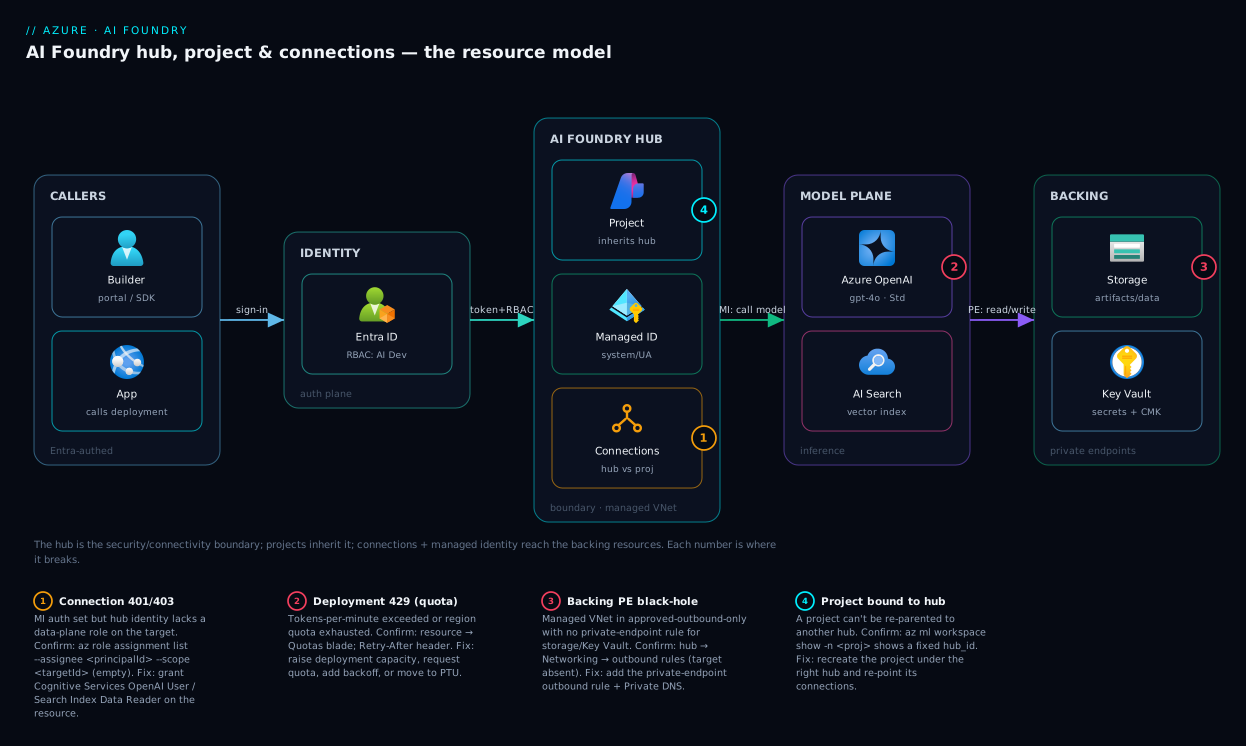
Read the diagram left to right as the path a single request takes. A builder or app authenticates with Microsoft Entra ID and lands on a project inside a hub. The hub is the governed container: it owns the managed identity all outbound calls use, the shared connections the project inherits, and the managed VNet wrapping everything. To call a model, the project hits a deployment on the connected Azure OpenAI / AI Foundry resource via the aoai-shared connection; to ground an answer, it queries the Azure AI Search index; artifacts and eval outputs read/write the linked Storage account, and any API-key secrets sit in the linked Key Vault. Crucially, in the isolated design none of those backing resources is reached with a stored credential — the hub’s managed identity presents an Entra token, the target checks a data-plane RBAC role, and the managed VNet keeps traffic on private endpoints off the public internet.
The shape to take away: the hub is the hub — every arrow of trust and connectivity passes through it, which is why it is the boundary you draw first and the thing you isolate. Projects are where work happens, connections are the labeled doors out, the managed identity is the badge those doors check, deployments are the models beyond. The numbered badges mark the four places this most often breaks — a connection that 401s on a missing role, a deployment that 429s on quota, a private-endpoint gap that black-holes storage, and a project stranded under the wrong hub — each turned into a confirm-and-fix below.
Real-world scenario
Meridian Bank stood up Azure AI Foundry for two workloads at once: a customer-facing retail-banking support assistant, and an internal compliance document-search tool indexing regulatory filings. The three-engineer platform team had a hard security requirement: retail customer data and compliance filings must never share a connection or a network, production must be private-only with customer-managed keys, and a developer sandbox could stay public for speed. The CISO also wanted AI spend on its own cost line per workload.
Their first instinct, copied from a tutorial, was one hub with two projects. The security architect killed it two screens into the design review: a single hub means a single managed VNet and a single set of hub-shared connections, so retail and compliance would share a network boundary and any hub-shared connection would be visible to both — exactly the cross-contamination forbidden. The lesson landed cheaply, on a whiteboard rather than in production.
The shipped layout used the hub as the security boundary — three hubs. hub-sandbox (public, no CMK) with a Foundry project per developer. hub-retail-prod (managed VNet, approved-outbound-only, CMK) whose only connections point at the retail Azure OpenAI and retail-data storage, holding one retail-assistant project. hub-compliance-prod (managed VNet, CMK, an entirely separate Search service and storage for the filings) with a filings-search project. Because the boundary was the hub, the two production data domains were structurally unable to see each other’s connections — by topology, not policy — and each prod hub became a clean cost line.
Two things bit them in week one, both in the playbook below. The retail-assistant connection 401’d on every call: they had created it with managed-identity auth but never granted the hub’s system identity Cognitive Services OpenAI User on the Azure OpenAI resource — one role assignment fixed it. And after security flipped hub-compliance-prod to approved-outbound-only, filings-search could no longer read its storage: the storage private endpoint had never been added as an approved outbound rule, so the managed VNet black-holed the traffic. Adding the rule (and the Private DNS entry) restored it.
Six months on: two isolated production workloads, a shared sandbox, zero stored API keys, a clean three-line AI cost report, and — the part the team valued most — when retail needed a second project for a new channel, it dropped into hub-retail-prod and inherited the network, CMK, and connections automatically, live in an afternoon. The wiki line: “The hub is the boundary you cannot move later, so spend the design hour on the hubs and let projects be cheap.”
The design, as the table that made the call:
| Requirement | Naive layout (1 hub, 2 projects) | Shipped layout (3 hubs) | Why the hub was the boundary |
|---|---|---|---|
| Retail data ≠ compliance data | Same hub VNet + shared connections — fails | Separate prod hubs — structurally isolated | Connections + VNet are hub-scoped |
| Prod private-only, dev public | One network mode for all — can’t mix | sandbox public, prod hubs managed-VNet |
Network mode is a hub property |
| CMK on prod only | All-or-nothing on one hub | CMK on prod hubs only | CMK is a hub property |
| Spend per workload | Smeared across one hub | One hub = one cost line | Hub is the natural cost unit |
| Add a project later | Easy but in the wrong boundary | Drops into the right hub, inherits all | Projects are cheap; hubs are not movable |
Advantages and disadvantages
The hub/project model both centralizes governance and imposes a boundary you must get right early. Weigh it honestly:
| Advantages (why this model helps) | Disadvantages (why it bites) |
|---|---|
| Set security, network mode, and CMK once on the hub; every project inherits — no per-project plumbing | The hub boundary is not movable; a wrong call means recreating projects elsewhere |
| Shared connections at the hub give every team one governed path to a model/search endpoint | Shared-by-design connections can over-expose if you put a sensitive target at hub scope |
| Managed identity outbound means zero stored keys for Azure targets — revoke = remove a role | You must remember to grant the identity its data-plane roles, or every call 401s |
| Managed VNet gives network isolation without you operating a VNet | Strict approved-outbound mode breaks any unapproved connection until you add a rule |
| Projects are cheap and plentiful — natural unit of RBAC and cost | Over-creating hubs (one per app) duplicates all the plumbing you meant to centralize |
| The newer Foundry project gives the fastest, lightest start for agents | Feature gaps: it lacks some hub/AML capabilities (compute, prompt flow, feature store) |
| One hub ≈ one cost line, clean spend attribution | Quota (TPM) is shared per region/subscription; one greedy deployment can starve others |
The model is right whenever you have more than one team or environment and need shared governance with isolated work — almost every org past prototype. It is overkill for a solo developer on one app, who can take a single Foundry project and ignore the hierarchy. It bites hardest on teams that click through the first wizard without drawing the boundary, and on anyone who forgets that managed-identity convenience still needs the underlying RBAC grant.
Hands-on lab
Stand up a minimal hub, a project under it, a managed-identity connection to Azure OpenAI, and a model deployment — then tear it down. Free-tier-friendly in spirit (Azure OpenAI access may require approval and incurs token cost on use; we deploy a small Standard quota and delete at the end). Run in Cloud Shell (Bash). You need the ml extension: az extension add -n ml.
Step 1 — Variables and resource group.
RG=rg-foundry-lab
LOC=eastus
HUB=hub-foundry-lab
PROJ=proj-foundry-lab
AOAI=aoai-foundry-lab-$RANDOM   # globally-unique
az group create -n $RG -l $LOC -o table
Step 2 — Create the hub (a workspace of kind Hub).
az ml workspace create --kind hub --name $HUB --resource-group $RG --location $LOC -o table
Expected: a workspace row with kind: Hub. Behind it, Azure also provisions a linked storage account and Key Vault.
Step 3 — Create a project under the hub.
HUB_ID=$(az ml workspace show --name $HUB --resource-group $RG --query id -o tsv)
az ml workspace create --kind project --hub-id "$HUB_ID" \
  --name $PROJ --resource-group $RG --location $LOC -o table
Expected: a workspace of kind: Project referencing the hub id.
Step 4 — Create the Azure OpenAI resource and a deployment.
az cognitiveservices account create -n $AOAI -g $RG -l $LOC \
  --kind OpenAI --sku S0 --yes -o table
az cognitiveservices account deployment create -n $AOAI -g $RG \
  --deployment-name gpt-4o-mini \
  --model-name gpt-4o-mini --model-version "2024-07-18" --model-format OpenAI \
  --sku-name Standard --sku-capacity 10 -o table
Step 5 — Grant the hub’s managed identity access, then create the connection.
# The hub's system-assigned identity principal id
PRINCIPAL=$(az ml workspace show -n $HUB -g $RG --query identity.principal_id -o tsv)
AOAI_ID=$(az cognitiveservices account show -n $AOAI -g $RG --query id -o tsv)
# Data-plane role so the identity can call inference
az role assignment create --assignee "$PRINCIPAL" \
  --role "Cognitive Services OpenAI User" --scope "$AOAI_ID"
# Now a hub-shared connection authenticated by that identity (no key)
AOAI_EP=$(az cognitiveservices account show -n $AOAI -g $RG --query properties.endpoint -o tsv)
az ml connection create --workspace-name $HUB --resource-group $RG \
  --type azure_open_ai --name aoai-shared --target "$AOAI_EP" --credentials none -o table
Expected: a connection listed under the hub; the project inherits it. The role assignment is what makes the managed-identity connection actually work.
Step 6 — Verify the project sees the connection.
az ml connection list --workspace-name $PROJ --resource-group $RG \
  --query "[].{name:name, type:type}" -o table
You should see aoai-shared listed for the project even though you created it on the hub — that is inheritance.
Step 7 — Teardown (avoid lingering cost).
az group delete -n $RG --yes --no-wait
Deleting the resource group removes the hub, project, Azure OpenAI resource, deployment, and the linked storage/Key Vault. (Note: the Key Vault may be soft-deleted; purge it separately if you reuse the name.)
Common mistakes & troubleshooting
The week-one failures as symptom → root cause → confirm → fix — the four diagram badges plus the most common configuration traps.
| # | Symptom | Root cause | Confirm (exact path / command) | Fix |
|---|---|---|---|---|
| 1 | Connection calls return 401/403 | Hub managed identity lacks the data-plane role on the target | az role assignment list --assignee <principalId> --scope <targetId> is empty |
Grant the role (e.g. Cognitive Services OpenAI User) on the target |
| 2 | Model calls return HTTP 429 | Deployment TPM quota exceeded or region quota exhausted | Portal → resource → Quotas; response Retry-After header |
Raise deployment capacity, request quota, add backoff, or use PTU |
| 3 | Project can’t reach storage/search after network tightening | Managed VNet in approved-outbound-only without a private-endpoint rule for the target | Hub → Networking → outbound rules; target not listed | Add a private-endpoint outbound rule + Private DNS for the target |
| 4 | Want to move a project to another hub | A project is permanently bound to its hub | az ml workspace show -n <proj> shows the fixed hub_id |
Recreate the project under the correct hub; re-point connections |
| 5 | Connection created but not visible in the project | Connection was made project-scoped on a different project, or not shared | az ml connection list --workspace-name <proj> lacks it |
Recreate at hub scope (isSharedToAll) or on the right project |
| 6 | API-key connection suddenly fails | Key rotated on the target; stored secret stale | Target’s Keys blade shows a new key; connection still holds old | Update the connection’s key, or switch the connection to managed identity |
| 7 | Deployment create fails: model not available | Model/version not offered in that region, or no quota | az cognitiveservices account list-models -n <aoai> -g <rg> |
Pick a supported region/version, or request access/quota |
| 8 | “Operation not allowed” creating a connection/deployment | Caller lacks the right Foundry RBAC role at that scope | Your role on the hub/project (IAM blade) is Reader/none |
Grant Azure AI Developer / Project Manager at the right scope |
| 9 | Files/flows not saving | Hub’s linked storage unreachable or identity lacks blob-data role | Storage networking + Storage Blob Data Contributor on the identity |
Open storage to the managed VNet; grant the blob-data role |
| 10 | Two teams see each other’s connections | Sensitive connection placed at hub scope, or both share one hub | Connection scope shows hub-shared; both projects on one hub | Move the connection to project scope, or split into separate hubs |
The two distinctions that save the most time:
| Distinction | The trap | How to tell them apart |
|---|---|---|
| Managed identity (outbound) vs RBAC role (inbound) | “I gave myself Owner but calls still 401” | 401 from a connection = the hub’s identity lacks a role on the target; your role only governs what you can do in Foundry |
| Connection (address+auth) vs deployment (the model) | “I added a connection but the model isn’t callable” | A connection reaches the resource; you still must create a deployment of the specific model to call it |
Best practices
- Draw hubs first, on a whiteboard. Map each hub to a real security/network/CMK boundary (env, BU, region). This is the one decision you cannot cheaply undo.
- Keep projects cheap and plentiful — one per team-workload. Use them as your RBAC and cost-attribution unit.
- Default every Azure connection to managed-identity (Entra ID) auth. Reserve API keys for third-party serverless targets that require them.
- Grant the hub’s managed identity its data-plane roles at creation time, in the same Bicep/Terraform that creates the connection — never as a manual afterthought.
- Put shared model/search endpoints at hub scope; put sensitive, team-specific data at project scope. Scope is a governance decision, not a convenience one.
- Isolate production with managed VNet + approved-outbound-only, and add a private-endpoint outbound rule for every connection target — then test before you tighten.
- Use customer-managed keys on the hub for regulated data, and lock the linked storage and Key Vault behind the managed network with data-plane RBAC, not account keys.
- Name deliberately and consistently —
hub-<env>-<bu>,proj-<team>-<workload>, connections by target (aoai-shared,search-filings) — because these names are how humans navigate the estate. - Right-size deployment SKU to usage: Standard/Global-Standard for spiky dev, PTU for steady high-volume prod, Batch for bulk offline. Do not over-allocate TPM and starve siblings.
- Treat connections and deployments as code (Bicep/Terraform, reviewed), so the estate is reproducible and the boundary is documented.
- Start new agent/model workloads on a Foundry project; reach for a hub-based project only when you need its extra capabilities (compute, prompt flow, feature store).
- Tag every hub and project with a cost center so the per-workload spend line falls out of cost management automatically.
Security notes
Foundry’s security posture is mostly about getting four things right, and all four attach to the hub. Identity: prefer a user-assigned managed identity you control for production hubs (so the identity outlives any single workspace and its roles are explicit), and grant it only the data-plane roles its connections actually need — Cognitive Services OpenAI User, Search Index Data Reader, Storage Blob Data Reader/Contributor — never broad control-plane roles. Network: put production hubs in managed VNet, approved-outbound-only mode and reach every dependency (Azure OpenAI, Search, Storage, Key Vault) over private endpoints with Private DNS, so model traffic and your data never traverse the public internet; this is also your data-exfiltration control. Encryption: enable customer-managed keys on the hub for regulated workloads so the linked storage and the secrets/artifacts are encrypted under a key you rotate and can revoke. Access: grant humans the least Foundry role that lets them do their job (Azure AI Developer to build, Project Manager to run a project, Reader to observe), scope it to a project not the hub wherever possible, and keep hub-level Owner to the platform team. Finally, remember that content safety is part of the security story for GenAI specifically — wire a Content Safety connection and the default RAI content-filter policy onto deployments, and pair it with the broader guardrails in Responsible-AI Guardrails Architecture for GenAI.
Cost & sizing
The reassuring part: the platform surface is largely free. A hub, a project, and a connection cost nothing by themselves — you are billed for what they use. The bill comes from four places, and knowing which lets you size deliberately:
| Cost driver | Billed by | Rough scale | How to control |
|---|---|---|---|
| Model inference (tokens) | Per 1K/1M input+output tokens | The dominant line for most apps | Smaller models where they suffice; cache; cap output tokens; PTU if steady |
| Provisioned throughput (PTU) | Per PTU per hour (committed) | Large, fixed monthly when used | Only for high steady volume; reservations cut the rate |
| Azure AI Search | Per search service tier/hour + storage | Tens of thousands of INR/month at higher tiers | Right-size tier; one shared service per hub where isolation allows |
| Compute (hub-based) | Per VM/cluster hour | Can dwarf everything if left running | Auto-shutdown idle instances; scale clusters to zero |
| Linked storage / Key Vault / egress | Standard Azure rates | Usually small | Lifecycle-tier artifacts; keep traffic private (no egress) |
Rough figures (illustrative; verify current pricing): a dev workload on Global-Standard with modest traffic might run a few thousand INR/month in tokens on effectively-free platform overhead; a production assistant at scale is dominated by inference and, if committed, PTU — tens of lakhs INR/month for heavy steady volume, which is exactly why PTU only pays off above a high, predictable throughput. The two silent budget-killers are idle AML compute (a forgotten GPU instance bills around the clock) and over-provisioned PTU you do not saturate. Treat the project as the cost unit: tag it with a cost center and per-workload spend falls out of cost management cleanly — the same separation that made the hub-per-boundary design pay off above.
Interview & exam questions
Useful for AI-102 (Azure AI Engineer) prep and architecture interviews. Question, then a model answer.
1. What is the difference between a hub and a project in Azure AI Foundry? A hub is a shared, governed workspace that owns security and connectivity — network mode, customer-managed keys, linked storage and Key Vault, and shared connections. A project is a working space under (or, for Foundry projects, on) that hub where a team actually builds. Projects inherit the hub’s governance; a project is bound to exactly one hub and cannot be moved.
2. What exactly does a connection store, and why prefer managed-identity auth? A connection stores a target address and an auth method (and a scope: hub-shared or project-scoped). With API-key auth the key sits in the hub’s Key Vault; with Entra ID auth nothing is stored and Foundry uses its managed identity at call time. Prefer managed identity because there is no secret to leak or rotate, and revoking access is a single RBAC role removal.
3. A model deployment returns HTTP 429. What is happening and how do you respond?
The deployment’s tokens-per-minute (TPM) quota — or the region/subscription quota — is exceeded. Confirm in the resource’s Quotas blade and via the Retry-After header. Respond by implementing exponential backoff, raising the deployment capacity, requesting more quota, or moving steady high-volume traffic to Provisioned (PTU) capacity.
4. When would you choose a Foundry project over a hub-based project? Choose a Foundry project for agent- and model-first workloads where you want the lightest, fastest start — it is built directly on a Foundry resource. Choose a hub-based project when you need AML capabilities the Foundry project lacks: managed compute, prompt flow at scale, fine-tuning pipelines, or a managed feature store, and centralized hub governance across many teams.
5. Two teams must never see each other’s data. Hubs or projects? Separate hubs. Connections at hub scope are shared to all projects on the hub, and the managed VNet and CMK are hub-wide, so two data domains on one hub can structurally see each other’s shared connections and share a network. Separate hubs make the isolation topological, not merely policy-based.
6. Foundry calls to Azure OpenAI fail with 401 even though the developer is an Owner. Why?
Two identity directions are being confused. The developer’s RBAC role governs what the developer can do in Foundry; the 401 on a connection means the hub’s managed identity lacks a data-plane role (e.g. Cognitive Services OpenAI User) on the Azure OpenAI resource. Grant that role to the identity, not more access to the human.
7. What does enabling managed VNet isolation on a hub do, and what is the catch? Foundry provisions and operates a managed virtual network and reaches dependencies over private endpoints, giving network isolation without you running a VNet. The catch in approved-outbound-only mode: any connection whose target you have not added as an approved private-endpoint outbound rule is black-holed — you must enumerate and approve every dependency.
8. Which built-in roles let a team build in a project without giving away the estate?
Grant Azure AI Developer at project scope to build (use connections, create deployments, run flows/agents) and Azure AI Project Manager to whoever runs the project. Keep hub-level Owner to the platform team; give stakeholders Reader.
9. What backs a hub, and where do secrets and artifacts live? A hub is an Azure Machine Learning workspace of kind Hub; it links a storage account (artifacts, uploads, flows, eval outputs) and a Key Vault (connection API-key secrets, CMK). Both should be locked behind the hub’s managed network and accessed via data-plane RBAC, not account keys.
10. What is the single most consequential early decision, and why? The hub boundary. Network mode, CMK, and shared connections are hub-wide, and a project is permanently bound to its hub, so a wrong boundary means recreating projects and re-pointing connections later. Spend the design time on hubs; let projects be cheap and plentiful.
Quick check
- True or false: a connection contains the Azure OpenAI resource it points to.
- You need a model your code can call. A connection to Azure OpenAI exists. What else must you create?
- Where should you place a connection that holds one team’s sensitive search index — hub scope or project scope?
- A connection authenticated with managed identity returns 401. Whose identity needs a role, and on what?
- Why can’t you move a project from
hub-devtohub-prod?
Answers
- False. A connection is a named pointer plus an auth method to a resource; it does not contain it. The resource lives separately, and the connection carries its address and how to authenticate.
- A deployment — a specific model (and version, SKU, quota) made callable on the Azure OpenAI resource. Your code targets the deployment name, not the model name.
- Project scope. A hub-scoped connection is visible to every project under the hub; a sensitive, team-specific target belongs at project scope so siblings cannot see it.
- The hub’s managed identity needs a data-plane role (e.g.
Cognitive Services OpenAI User) on the target Azure OpenAI resource. The 401 is an outbound-auth failure, not a human-RBAC one. - Because a project is permanently bound to exactly one hub. Re-parenting is not supported; you recreate the project under the desired hub and re-point its connections.
Glossary
- Azure AI Foundry — Microsoft’s unified platform for building, evaluating, and operating GenAI apps and agents; the rebrand/superset of Azure AI Studio and Azure ML studio.
- Hub — A shared, governed workspace owning security and connectivity (network mode, CMK, linked storage/Key Vault, shared connections); implemented as an AML workspace of
kind: Hub. - Hub-based project — A project under a hub with the full feature set (AML compute, prompt flow, fine-tuning, feature store); a workspace of
kind: Project. - Foundry project — A lighter project built directly on an Azure AI Foundry resource, optimized for agent/model-first workloads; the recommended starting point for those cases.
- Connection — A named pointer to a resource (target + auth method + scope). Hub-scoped connections are shared to all projects; project-scoped are private to one.
- Deployment — A specific model (name, version) made callable on an Azure OpenAI/Foundry resource, with a SKU and a TPM quota; the unit you call and bill.
- Managed identity — An Entra identity Azure manages for the hub (system- or user-assigned) used for outbound auth to connected resources; removes stored secrets.
- Quota (TPM) — Tokens-per-minute cap on a deployment; exceeding it returns HTTP 429 with
Retry-After. Allocated per region/subscription and shared across deployments. - Managed VNet — A Foundry-managed virtual network that isolates the hub and reaches dependencies over private endpoints, with three modes (disabled, allow-internet-outbound, approved-outbound-only).
- Customer-managed key (CMK) — Encryption of the hub’s linked storage and secrets under a key you control in Key Vault, for regulated workloads.
- Linked storage / Key Vault — The storage account (artifacts, uploads, flows, eval outputs) and Key Vault (connection secrets, CMK) a hub provisions and links.
- Azure OpenAI / AI Foundry resource — The Cognitive Services account that hosts model deployments behind an Azure endpoint; the target of an Azure OpenAI connection.
- Azure AI Developer / Project Manager — Built-in Entra roles, scoped to a project, that let people build or run a project respectively without hub-level control.
Next steps
- Build a full grounding/retrieval design on top of this layout: Azure Enterprise Architecture: Generative-AI / RAG Platform.
- Put a governed gateway in front of your models: Enterprise LLM Gateway and RAG Architecture: Grounding GenAI Safely.
- Add the safety layer every GenAI app needs: Responsible-AI Guardrails Architecture for GenAI.
- Make connections secretless and revocable: Managed Identities Deep Dive: User-Assigned Identities, Federated Credentials, and RBAC Patterns for Azure Workloads.
- Isolate production properly: Azure Private Link and Private DNS: Keeping PaaS Off the Public Internet and Azure Key Vault: Secrets, Keys and Certificates Done Right.