Quick take: a Service Endpoint teaches an Azure PaaS firewall to recognise traffic from your subnet over the Azure backbone — but the service still has a public IP and is still reachable from the internet by anyone the firewall allows. A Private Endpoint brings the PaaS service into your VNet as a private IP on a NIC you own, so traffic never touches a public IP and the public endpoint can be turned off entirely. For regulated or sensitive data the answer is almost always Private Endpoint; Service Endpoint is the cheaper, coarser control you reach for when public exposure is acceptable and you only need to pin the route.
A bank ran its payment-reconciliation jobs against Azure Storage over the public endpoint because “the connection string was encrypted and we use HTTPS.” Their security review rejected the design on two counts that TLS does nothing about: the storage account still had a routable public IP that anyone on the internet could attempt to reach (the account key or a leaked SAS would be enough), and the egress path from the subnet to Storage left the customer’s address space. Encryption protects the bytes in flight; it does not reduce the attack surface or stop data exfiltration to an attacker-controlled storage account in another tenant. Private Endpoint closed both gaps in one move — the account got a private IP inside the VNet, public network access was set to Disabled, and a Private Link policy on the subnet blocked any attempt to reach Storage accounts the team didn’t own. The route stayed on the Microsoft backbone, and the public surface dropped to zero.
This article is the full decision guide a senior network architect actually uses to choose between the two — not “Private Endpoint is better” hand-waving, but option-by-option: what each mechanism is, what it changes about routing, DNS, firewalls and identity, what it costs, where each one quietly fails, and the exact az and Bicep to stand each up for Storage, SQL Database and Key Vault. Because you will return to this mid-design and mid-incident, the comparison grids, the DNS-zone table, the NSG/UDR interaction, the cost model and a symptom-to-fix playbook are all laid out as scannable tables. Read the prose once; keep the tables open when the build pipeline says Name or service not known at 9pm.
By the end you will stop conflating the two. You will know that a Service Endpoint is a route + a firewall identity and a Private Endpoint is a private IP + a DNS problem you must solve; that the single most common Private Endpoint failure is DNS still resolving to the public IP; that Service Endpoints are free and Private Endpoints are billed per hour and per gigabyte; and that “we disabled public access” only means something with a Private Endpoint, never with a Service Endpoint.
What problem this solves
Azure PaaS services — Storage, SQL Database, Key Vault, Cosmos DB, Service Bus, App Service and dozens more — are born with a public endpoint: a fully-qualified domain name that resolves to a Microsoft-owned public IP, reachable from anywhere on the internet, gated only by the service’s own authentication and an optional service firewall. That default is wonderful for getting started and unacceptable for a great many production workloads. A storage account holding patient records, a SQL database with cardholder data, a Key Vault full of signing keys — none of these should present a routable public IP to the internet, and none of their traffic should leave your network’s address space on the way out.
What breaks without a deliberate choice here: a compliance auditor flags that mystorage.blob.core.windows.net answers from the public internet (a finding, regardless of firewall rules, because the surface exists); a misconfigured firewall rule or a leaked SAS token lets an attacker reach the account from outside; a malicious insider copies a database to a storage account in their own subscription because nothing on the network stops egress to arbitrary PaaS endpoints; or a “private” design turns out to still resolve to the public IP because nobody wired up Private DNS, so the traffic was never private at all. These are not theoretical — the last one is the single most common real-world Private Endpoint defect, and it fails silently (it works, just not privately).
Who hits this: anyone running regulated workloads (healthcare, finance, government), anyone whose security baseline mandates “no public endpoints on data services,” anyone doing data-exfiltration prevention, and — increasingly — every enterprise landing zone, because the platform team has standardised on private-only PaaS. The two tools Azure gives you are Service Endpoint (cheap, route-level, leaves the public IP) and Private Endpoint / Private Link (a private IP in your VNet, public access disablable). They are not interchangeable, they are frequently confused, and choosing wrong either over-spends or under-secures. This article is about choosing right, end to end.
To frame the whole field before the deep dive, here is what each mechanism actually changes about your network, side by side:
| Dimension | Public endpoint (default) | Service Endpoint | Private Endpoint |
|---|---|---|---|
| Service has a public IP? | Yes | Yes (unchanged) | Yes, but can be disabled |
| Where the service’s IP resolves | Public IP | Public IP | Private IP in your subnet |
| Path off the subnet | Internet (public) | Azure backbone | Azure backbone |
| How the service trusts you | Auth + optional firewall | Subnet identity in the firewall | The NIC is inside your network |
| Can you turn off public access? | n/a | No — firewall narrows, never closes | Yes (Disabled) |
| Reachable from on-prem? | Yes (over internet) | No (Service Endpoints are VNet-local) | Yes over ExpressRoute/VPN |
| Stops data exfiltration to other accounts? | No | Partially (service-side only) | Yes with Private Link policies |
| Cost | Free | Free | Hourly + per-GB |
| You must solve DNS? | No | No | Yes (the whole game) |
Learning objectives
By the end of this article you can:
- Explain precisely what a Service Endpoint changes (the route from a subnet plus a subnet identity the PaaS firewall recognises) versus what a Private Endpoint changes (a private IP on a NIC in your subnet, fronted by Private Link), and why only the latter lets you disable public access.
- Stand up a Service Endpoint on a subnet and lock a Storage account / SQL server / Key Vault to it with
azand Bicep, and explain why the service still has a public IP afterward. - Stand up a Private Endpoint for Storage, SQL and Key Vault, wire the Private DNS zone correctly, and confirm the FQDN now resolves to the private IP — the step that, omitted, silently breaks “private.”
- Diagnose the canonical failures: DNS still resolving public, missing private DNS zone group, on-prem clients not resolving, NSG blocking the wrong thing, sub-resource (
groupId) mismatch, and SQL Proxy vs Redirect connection-policy surprises. - Choose correctly per service and per requirement using a decision table, and articulate the trade-off (cost, DNS complexity, on-prem reach, exfiltration posture) for each.
- Reason about the NSG and UDR interaction with both mechanisms, including the
0.0.0.0/0-to-firewall pattern and why Private Endpoint traffic historically bypassed NSGs. - Estimate the monthly bill for a realistic private-PaaS footprint in INR/USD and right-size the number of endpoints (one per service per region, shared DNS zones).
Prerequisites & where this fits
You should already understand Azure VNet fundamentals — a virtual network is your private address space, carved into subnets, with Network Security Groups (NSGs) filtering traffic and route tables (UDRs) steering it; if those are fuzzy, read Azure Virtual Network: Subnets, NSGs, and Routing first. You should know that PaaS services have a service firewall (the “Networking” blade that lets you allow selected networks/IPs), how to run az in Cloud Shell, and that DNS resolution turns a name like mystorage.blob.core.windows.net into an IP. Basic familiarity with managed identity and PaaS authentication helps but isn’t required.
This sits in the Networking & PaaS security track. It is the practical companion to Azure Private Link & Private DNS for PaaS, which goes deeper on the DNS architecture and at-scale hub-and-spoke patterns; this article is the choice between the two endpoint types and the per-service mechanics. It pairs with Azure Key Vault: Secrets, Keys & Certificates (Key Vault is a prime Private Endpoint target) and Azure Storage Account Fundamentals (Storage has the richest sub-resource model). When a private path breaks, Troubleshooting Azure Storage: 403, Firewall, Private Endpoint, RBAC & SAS and Troubleshooting Azure VNet Connectivity are the playbooks. If you front PaaS with a gateway, Application Gateway with WAF & end-to-end TLS and Azure Load Balancer Standard: outbound rules & SNAT are adjacent.
A quick map of who owns and confirms what, so you escalate to the right person:
| Layer | What lives here | Who usually owns it | Failure it causes |
|---|---|---|---|
| VNet / subnet | Address space, delegation, policies | Network team | Subnet too small for endpoints; policy missing |
| NSG / UDR | Traffic filter + route steering | Network / SecOps | Egress blocked; 0.0.0.0/0 swallows the route |
| Private DNS zone | Name → private IP records | Platform / DNS team | FQDN still resolves public (the #1 bug) |
| Service firewall | Allow rules (Service Endpoint, IPs) | Service owner | 403 from the service; rules don’t apply |
| Private Endpoint NIC | Private IP into the subnet | App + network | Wrong groupId; approval pending |
| On-prem DNS forwarder | Conditional forward to Azure DNS | On-prem / network | Branch can’t resolve the private name |
Core concepts
Six mental models make every later decision obvious. The fastest way to never confuse these two again is to internalise what each one is: a Service Endpoint is a route plus an identity; a Private Endpoint is a private IP plus a DNS problem.
A Service Endpoint changes the route off your subnet — nothing arrives. When you enable a Service Endpoint (e.g. Microsoft.Storage) on a subnet, Azure injects optimised routes so that traffic from that subnet to that service travels over the Azure backbone instead of egressing to the internet, and — critically — the packets now carry the subnet’s identity. The PaaS firewall can then say “allow traffic from subnet X of VNet Y.” The service keeps its public IP; the FQDN still resolves to that public IP; nothing is placed in your VNet. You are narrowing who may reach the still-public service and pinning the route, not making the service private.
A Private Endpoint puts the service inside your VNet as a private IP. A Private Endpoint is a network interface (NIC) the platform creates in your subnet, assigned a private IP from your address space, that maps — via Private Link — to a specific instance of a PaaS service (this exact storage account, this SQL server). Traffic to that private IP is proxied over Private Link to the service. Now the service is reachable at an IP you own, on the backbone, and you can set the service’s public network access to Disabled so the public IP stops answering entirely. The service is, for all practical purposes, plugged into your datacenter network.
The sub-resource (groupId) is which “face” of the service you connect. A single PaaS resource often exposes several endpoints — a storage account has blob, file, queue, table, dfs, web; a SQL logical server has sqlServer. A Private Endpoint targets one sub-resource, identified by its groupId (also called the target sub-resource). One private IP per sub-resource: if your app uses both Blob and File on the same account, that’s two Private Endpoints (and two DNS zones). Getting the groupId wrong is a common setup error — the endpoint comes up but points at the wrong face.
DNS is the entire Private Endpoint game. Creating the NIC does nothing useful until the FQDN resolves to its private IP. Azure does not rewrite the public DNS record; instead the service’s hostname follows a CNAME chain to a privatelink zone (e.g. mystorage.blob.core.windows.net → mystorage.privatelink.blob.core.windows.net). You host that privatelink.* zone as an Azure Private DNS zone, link it to your VNet, and put an A record mapping the name to the private IP (the private DNS zone group on the endpoint does this automatically). Skip this and resolution falls through to the public IP — the connection still “works,” over the public path, which is the silent failure that fails audits.
Service Endpoints are VNet-local; Private Endpoints reach everywhere. A Service Endpoint only affects traffic originating in the VNet subnet where it’s enabled — on-prem machines over VPN/ExpressRoute cannot use it (their traffic isn’t from that subnet). A Private Endpoint’s private IP is reachable from anywhere that can route to your VNet, including on-premises over ExpressRoute or VPN (with DNS forwarding configured). If branch offices or a datacenter must reach the PaaS privately, Service Endpoint cannot help; Private Endpoint can.
Disabling public access only means something with a Private Endpoint. With a Service Endpoint the service firewall is set to “selected networks” — the public IP still exists and still answers anyone the firewall allows; you have narrowed, not closed, the door. Only a Private Endpoint lets you set publicNetworkAccess = Disabled, after which the public endpoint returns an error to all callers and the only way in is the private IP. “We turned off the public endpoint” is a true statement exactly once you have a Private Endpoint.
The vocabulary in one table
Pin down every moving part before the deep sections. The glossary repeats these for lookup; this is the model side by side:
| Concept | One-line definition | Applies to | Why it matters |
|---|---|---|---|
| Service Endpoint | Subnet-scoped route + identity to a PaaS service over the backbone | Subnet + service firewall | Cheap, route-level; leaves public IP |
| Private Endpoint | A NIC with a private IP in your subnet mapping to a PaaS instance | Subnet + service instance | Private IP; lets you disable public |
| Private Link | The platform service that proxies the private IP to the PaaS instance | Under a Private Endpoint | The plumbing behind the private IP |
privatelink.* DNS zone |
The Azure Private DNS zone holding the private A records | DNS | Without it, names resolve public |
| Private DNS zone group | Endpoint feature that auto-creates the A record in the zone | On the Private Endpoint | Automates the #1 manual step |
groupId / sub-resource |
Which face of the service (blob, file, sqlServer…) | Private Endpoint target | One endpoint per sub-resource |
publicNetworkAccess |
Service-level switch for the public endpoint | The PaaS resource | Disabled = private-only |
| Service Endpoint Policy | Restricts which accounts a subnet may reach via SE | Subnet (Storage) | Exfiltration control for SE |
| Private Link Policy / network policies | NSG/UDR enforcement on the PE subnet; exfiltration guard | Subnet | Controls PE traffic + reach |
| Connection approval | Owner of the PaaS resource approves the PE link | Cross-tenant/-sub PE | Pending state blocks traffic |
| NAT / SNAT | Outbound address translation to a shared IP | Egress path | PE bypasses SNAT to that target |
Service Endpoint, option by option
A Service Endpoint is the lighter tool. It is enabled per subnet, per service and is free. It does exactly two things: it makes traffic from the subnet to that service take the Azure backbone (an optimised system route), and it stamps that traffic with the subnet’s identity so the PaaS firewall can allow it specifically. It does not create any resource in your VNet, does not change DNS, and does not disable the public endpoint.
Enabling a Service Endpoint
You enable the service endpoint on the subnet and then add the subnet to the service’s firewall. Here it is for a subnet reaching Storage:
# 1) Turn on the Storage service endpoint for the subnet
az network vnet subnet update \
  --vnet-name vnet-app --name snet-workload --resource-group rg-net \
  --service-endpoints Microsoft.Storage

# 2) Lock the storage account to "selected networks" and allow that subnet
SUBNET_ID=$(az network vnet subnet show -g rg-net --vnet-name vnet-app -n snet-workload --query id -o tsv)
az storage account update -n mystorageacct -g rg-data --default-action Deny
az storage account network-rule add -n mystorageacct -g rg-data --subnet "$SUBNET_ID"
resource subnet 'Microsoft.Network/virtualNetworks/subnets@2023-11-01' = {
  parent: vnet
  name: 'snet-workload'
  properties: {
    addressPrefix: '10.10.1.0/24'
    serviceEndpoints: [
      { service: 'Microsoft.Storage' }      // backbone route + subnet identity
      { service: 'Microsoft.KeyVault' }
      { service: 'Microsoft.Sql' }
    ]
  }
}

resource sa 'Microsoft.Storage/storageAccounts@2023-05-01' = {
  name: 'mystorageacct'
  location: location
  sku: { name: 'Standard_LRS' }
  kind: 'StorageV2'
  properties: {
    networkAcls: {
      defaultAction: 'Deny'                 // deny by default
      virtualNetworkRules: [
        { id: subnet.id, action: 'Allow' }  // allow this subnet via the service endpoint
      ]
    }
  }
}
After this, mystorageacct.blob.core.windows.net still resolves to a public IP, the account is still discoverable on the internet, but only callers from the allowed subnet (or allowed IP ranges) get past the firewall. That is the whole mechanism — narrowing, on a still-public service.
The Service Endpoint option matrix
Every knob a Service Endpoint exposes, what it does, and the gotcha:
| Setting / control | What it does | Default | When to set it | Trade-off / limit |
|---|---|---|---|---|
serviceEndpoints on subnet |
Adds backbone route + subnet identity for a service | none | Whenever you’ll firewall a PaaS to this subnet | Subnet-local only; no on-prem reach |
Service value (e.g. Microsoft.Storage) |
Which PaaS family the SE covers | n/a | Per service you access | Not every service supports SE |
Service firewall defaultAction |
Allow/Deny baseline on the PaaS |
Allow (open) |
Deny to enforce the SE |
Allow makes the SE pointless |
virtualNetworkRules |
Allow specific subnets | none | Add each allowed subnet | Per-subnet; cap on rules |
| Service Endpoint Policy | Restrict which Storage accounts the subnet may reach | none | Exfiltration control | Storage only; extra object |
Microsoft.Storage.Global vs regional |
Cross-region SE for Storage | regional | Reaching Storage in another region | Newer; check service support |
| Cross-region access | SE firewall rule in another region | blocked | Same-region by default | Requires global SE variant |
What Service Endpoints cannot do
The limits are the reason Private Endpoint exists. Enumerated so you don’t discover them in production:
| Limitation | Consequence | The real fix |
|---|---|---|
| Service keeps a public IP | Attack surface and audit finding remain | Private Endpoint + disable public |
| Can’t disable public access | “Selected networks” still answers allowed callers publicly | Private Endpoint |
| VNet-local only | On-prem over VPN/ExpressRoute can’t use it | Private Endpoint |
| No DNS change | Name resolves to the public IP | Private Endpoint (with Private DNS) |
| Coarse identity (subnet) | Can’t scope to a single resource neatly | Private Endpoint targets one instance |
| Limited exfiltration control | Subnet can still reach any account of that service (unless SE Policy) | SE Policy (Storage) or Private Endpoint |
| Not every PaaS supports it | Some services are Private Endpoint-only | Use Private Endpoint there |
Service Endpoint Policies — the exfiltration guard for Storage
A plain Service Endpoint lets the subnet reach any storage account on the backbone, including one in an attacker’s subscription — so it is not an exfiltration control by itself. Service Endpoint Policies narrow this: you attach a policy to the subnet that lists exactly which storage accounts (or which resource groups/subscriptions) the subnet is permitted to reach via the Service Endpoint. Outside the list, the backbone route is refused.
# Restrict the subnet to only the listed storage accounts via the service endpoint
az network service-endpoint policy create -g rg-net -n sep-storage-allow
az network service-endpoint policy-definition create -g rg-net \
  --policy-name sep-storage-allow -n allow-prod \
  --service Microsoft.Storage \
  --service-resources /subscriptions/<sub>/resourceGroups/rg-data/providers/Microsoft.Storage/storageAccounts/mystorageacct
az network vnet subnet update -g rg-net --vnet-name vnet-app -n snet-workload \
  --service-endpoint-policy sep-storage-allow
When each Service Endpoint construct applies, in one grid:
| Construct | Scope | Controls | Use it to |
|---|---|---|---|
| Service Endpoint | Subnet → service family | Route + identity | Pin route, firewall PaaS to subnet |
| VNet firewall rule | Service ← subnet | Inbound allow | Let the subnet past the PaaS firewall |
| Service Endpoint Policy | Subnet → specific accounts | Egress allow-list | Stop exfiltration to foreign accounts |
defaultAction: Deny |
Service | Baseline | Make “selected networks” actually deny |
Which services support Service Endpoint vs Private Endpoint
Not every PaaS supports both — some are Private Endpoint-only, and that alone can force your hand. This is the support matrix for the services you’ll meet most (always confirm current support in the portal, as coverage expands):
| Service | Service Endpoint | Private Endpoint | Notes |
|---|---|---|---|
| Azure Storage (Blob/File/Queue/Table) | Yes (Microsoft.Storage) |
Yes (per sub-resource) | Richest model; both work |
| Azure SQL Database | Yes (Microsoft.Sql) |
Yes (sqlServer) |
Proxy forced over PE |
| Azure SQL Managed Instance | No (VNet-injected) | n/a (already in VNet) | Lives in your subnet natively |
| Azure Key Vault | Yes (Microsoft.KeyVault) |
Yes (vault) |
PE is the production norm |
| Azure Cosmos DB | Yes | Yes (Sql/MongoDB/…) |
Per-API sub-resource |
| Azure Service Bus / Event Hubs | Yes (Microsoft.ServiceBus) |
Yes (namespace) |
Premium tier for PE |
| Azure App Service / Functions | No | Yes (sites) |
Private Endpoint-only for inbound |
| Azure Container Registry | No | Yes (registry) |
Private Endpoint-only; Premium SKU |
| Azure Synapse Analytics | Yes (Microsoft.Sql) |
Yes (multiple) | SQL + Dev + Dedicated faces |
| Azure Cognitive / AI Services | No | Yes (account) |
Private Endpoint-only |
| Azure Monitor / Log Analytics | No | Yes (AMPLS) | Via Azure Monitor Private Link Scope |
| Azure Cache for Redis | No | Yes | PE on Premium; or VNet-injected |
| Azure Database for PostgreSQL/MySQL | Yes (flexible: VNet-injected) | Yes (single server) | Flexible server injects into VNet |
| Azure Web PubSub / SignalR | No | Yes | Private Endpoint-only |
| Azure Data Factory | No | Yes (multiple) | Managed VNet + PE for sources |
The takeaway from this table: a meaningful set of services — App Service inbound, Container Registry, Cognitive/AI Services, SignalR — are Private Endpoint-only, so if your estate includes them, you’re learning Private Endpoint regardless of cost preferences.
Private Endpoint, option by option
A Private Endpoint is the heavier, stronger tool: a NIC with a private IP in your subnet that maps to one sub-resource of one PaaS instance via Private Link. It is billed per hour and per gigabyte, it requires you to solve DNS, and it lets you disable the public endpoint. Stand it up in three logical pieces: the endpoint (NIC), the DNS zone + link, and the zone group (the A record), then disable public access on the service.
Creating a Private Endpoint for Blob storage
RG=rg-net; VNET=vnet-app; SUBNET=snet-pe; LOC=centralindia
SA_ID=$(az storage account show -n mystorageacct -g rg-data --query id -o tsv)

# 1) The Private Endpoint NIC, targeting the 'blob' sub-resource (groupId)
az network private-endpoint create \
  --name pe-mystorage-blob -g $RG -l $LOC \
  --vnet-name $VNET --subnet $SUBNET \
  --private-connection-resource-id "$SA_ID" \
  --group-id blob \
  --connection-name pe-mystorage-blob-conn

# 2) The Private DNS zone for blob, linked to the VNet
az network private-dns zone create -g $RG -n privatelink.blob.core.windows.net
az network private-dns link vnet create -g $RG \
  --zone-name privatelink.blob.core.windows.net \
  --name link-vnet-app --virtual-network $VNET --registration-enabled false

# 3) The zone group — auto-creates the A record (name → private IP)
az network private-endpoint dns-zone-group create -g $RG \
  --endpoint-name pe-mystorage-blob \
  --name default \
  --private-dns-zone privatelink.blob.core.windows.net \
  --zone-name privatelink-blob

# 4) Now turn OFF the public endpoint — only meaningful with a PE present
az storage account update -n mystorageacct -g rg-data --public-network-access Disabled
resource pe 'Microsoft.Network/privateEndpoints@2023-11-01' = {
  name: 'pe-mystorage-blob'
  location: location
  properties: {
    subnet: { id: peSubnet.id }
    privateLinkServiceConnections: [ {
      name: 'pe-mystorage-blob-conn'
      properties: {
        privateLinkServiceId: sa.id
        groupIds: [ 'blob' ]               // the sub-resource / face of the service
      }
    } ]
  }
}

resource dnsZone 'Microsoft.Network/privateDnsZones@2020-06-01' = {
  name: 'privatelink.blob.core.windows.net'
  location: 'global'
}

resource vnetLink 'Microsoft.Network/privateDnsZones/virtualNetworkLinks@2020-06-01' = {
  parent: dnsZone
  name: 'link-vnet-app'
  location: 'global'
  properties: {
    virtualNetwork: { id: vnet.id }
    registrationEnabled: false
  }
}

resource zoneGroup 'Microsoft.Network/privateEndpoints/privateDnsZoneGroups@2023-11-01' = {
  parent: pe
  name: 'default'
  properties: {
    privateDnsZoneConfigs: [ {
      name: 'privatelink-blob'
      properties: { privateDnsZoneId: dnsZone.id }   // the zone group writes the A record here
    } ]
  }
}
The Private Endpoint option matrix
Every knob, option-by-option:
| Setting / control | What it does | Default | When to set it | Trade-off / limit |
|---|---|---|---|---|
groupIds (sub-resource) |
Which face of the service the PE serves | required | One per face you use | One PE = one sub-resource |
privateLinkServiceId |
The exact PaaS instance | required | Always | Points at one resource |
subnet |
Which subnet holds the NIC | required | A subnet with room | Consumes a private IP |
| Static vs dynamic private IP | Pin the NIC’s IP or let Azure pick | dynamic | Pin for firewall/DNS rules | Manual IP management if static |
| Private DNS zone group | Auto-writes the A record | none | Almost always | Skip → you must add A records by hand |
registrationEnabled on link |
Auto-register VM names in the zone | false | Leave false for privatelink zones | true pollutes the zone |
manualPrivateLinkServiceConnections |
Cross-tenant/-sub connection needing approval | none | Connecting to a resource you don’t own | Stays Pending until approved |
publicNetworkAccess on the service |
Disable the public endpoint | Enabled |
After the PE works end-to-end | Disabling before DNS works locks you out |
privateEndpointNetworkPolicies on subnet |
Apply NSG/UDR to PE traffic | historically Disabled |
Enable to filter PE traffic | Older VNets bypassed NSGs |
| Application security group on the NIC | Group PEs for NSG rules | none | Scale NSG rules cleanly | Optional |
Limits and quotas you will actually hit
Both mechanisms have real ceilings that bite at scale — a subnet that runs out of IPs mid-deploy, or a subscription approaching the Private Endpoint cap. The numbers that matter (defaults; some are raisable via support, confirm current values):
| Limit | Service Endpoint | Private Endpoint | Why it bites |
|---|---|---|---|
| Private IPs consumed | 0 | 1 per endpoint | PE subnet must have free IPs |
| Endpoints per VNet | n/a | ~1,000 (high) | Rarely hit; plan subnets anyway |
| Endpoints per subscription per region | n/a | ~1,000 (raisable) | Large estates approach it |
| Service Endpoints per subnet | many | n/a | One per service family |
| VNet firewall rules per service | ~200 (varies) | n/a | Capping subnet allow-rules |
| Private DNS zones per subscription | n/a | thousands | Sprawl if not centralised |
| VNet links per private DNS zone | n/a | ~1,000 | Hub zone linked to many spokes |
| A records per private DNS zone | n/a | ~25,000 | One per endpoint name |
| Min subnet size for PEs (practical) | n/a | /27+ recommended |
/29 fills fast (5 usable) |
| Cross-region Service Endpoint | global variant only | each region its own PE | SE is region-local by default |
The sub-resource (groupId) reference
The groupId you pass must match the service’s sub-resource, and each maps to its own privatelink.* DNS zone. Getting either wrong is the second-most-common setup error. The ones you’ll use most:
| Service | groupId (sub-resource) |
privatelink.* DNS zone |
|---|---|---|
| Storage — Blob | blob |
privatelink.blob.core.windows.net |
| Storage — File | file |
privatelink.file.core.windows.net |
| Storage — Queue | queue |
privatelink.queue.core.windows.net |
| Storage — Table | table |
privatelink.table.core.windows.net |
| Storage — Data Lake Gen2 | dfs |
privatelink.dfs.core.windows.net |
| Storage — Static website | web |
privatelink.web.core.windows.net |
| SQL Database / Synapse | sqlServer |
privatelink.database.windows.net |
| Key Vault | vault |
privatelink.vaultcore.azure.net |
| Cosmos DB (SQL API) | Sql |
privatelink.documents.azure.com |
| Service Bus / Event Hubs | namespace |
privatelink.servicebus.windows.net |
| App Service / Functions | sites |
privatelink.azurewebsites.net |
| Azure Container Registry | registry |
privatelink.azurecr.io |
| Azure Monitor (AMPLS) | azuremonitor |
several (privatelink.monitor.azure.com, …) |
Connection approval states
When you connect to a resource in another subscription or tenant, the connection is manual and the resource owner must approve it. The state machine:
| State | Meaning | What you do |
|---|---|---|
| Pending | Awaiting the resource owner’s approval | Ask the owner to approve; no traffic flows yet |
| Approved | Owner accepted; the link is live | Wire DNS; test |
| Rejected | Owner declined | Recreate after resolving with the owner |
| Disconnected | The target resource was deleted/unlinked | Recreate the endpoint against a valid target |
# Resource owner approves a pending cross-subscription connection
az network private-endpoint-connection approve \
  --resource-group rg-data --name <connection-name> \
  --resource-name mystorageacct --type Microsoft.Storage/storageAccounts \
  --description "Approved for partner VNet"
DNS: the part everyone gets wrong
Ninety percent of “my Private Endpoint isn’t working” tickets are DNS. The NIC is fine; the name still resolves to the public IP, so traffic either takes the public path (works, but not private — the silent failure) or is blocked by publicNetworkAccess: Disabled (a hard failure that looks like the endpoint is broken). Understanding the CNAME chain makes every fix obvious.
When you create a Private Endpoint, Azure changes the public DNS for the service so its name becomes a CNAME to a privatelink name. Resolution then depends on whether your resolver can see the private zone:
| Resolver context | mystorage.blob.core.windows.net resolves to |
Private? |
|---|---|---|
Azure VM in a VNet linked to the privatelink.blob… zone |
The private IP (via the zone’s A record) | Yes |
| Azure VM in a VNet not linked to the zone | The public IP (CNAME falls through) | No |
| On-prem with a conditional forwarder to Azure DNS (168.63.129.16) via a DNS resolver/forwarder VM | The private IP | Yes |
| On-prem with no forwarder | The public IP | No |
| Anywhere, public access Disabled, resolving public IP | Public IP that now refuses the connection | Broken-looking |
The CNAME chain, made concrete:
mystorage.blob.core.windows.net
   └─ CNAME → mystorage.privatelink.blob.core.windows.net
                 └─ A (in your Private DNS zone) → 10.10.2.4   (the PE's private IP)
If the VNet is linked to the privatelink.blob.core.windows.net zone, the A record wins and you get 10.10.2.4. If not, there is no A record to find and you fall through to the public CNAME target. The private DNS zone group on the endpoint is what writes that A record for you — which is why it is essentially mandatory.
The DNS decision table — pick your pattern:
| If your clients are… | Use this DNS pattern | Why |
|---|---|---|
| Only Azure VMs in one VNet | Private DNS zone linked to that VNet, zone group on the PE | Simplest; auto A records |
| Azure VMs across many spokes | Central privatelink zones in the hub, linked to all spokes (hub-and-spoke) | One source of truth; see Private Link at scale |
| On-prem + Azure | DNS Private Resolver (or a forwarder VM) in the hub; on-prem conditional-forwards to it | On-prem can’t query Azure-internal DNS directly |
| Multi-region | Regional PEs, but the privatelink zone is global — one zone, region-specific A records |
Zones aren’t regional; IPs are |
| Using a custom/3rd-party DNS | Forward privatelink.* to Azure DNS (168.63.129.16) |
Your DNS must delegate the private zone |
Diagnosing DNS in one command, from inside the VNet:
# From an Azure VM in the VNet — must return the PRIVATE IP (e.g. 10.x), not a public one
nslookup mystorageacct.blob.core.windows.net
# Or, more telling, the full chain:
dig mystorageacct.blob.core.windows.net +noall +answer
# Expect: CNAME to ...privatelink.blob... then an A record in your 10.x space
The registration-enabled flag on the VNet link must be false for privatelink.* zones. Setting it true turns on auto-registration of VM hostnames into that zone, which both pollutes it and can collide — it’s for VM name resolution zones, never for privatelink zones.
NSG, UDR and how each endpoint interacts with routing
Both mechanisms interact with Network Security Groups and route tables (UDRs) — and the interactions are non-obvious enough to cause real outages, especially the “route everything through the firewall” pattern.
For Service Endpoints, Azure adds a system route for the service’s prefixes pointing at VirtualNetworkServiceEndpoint. If you also have a UDR sending 0.0.0.0/0 to a firewall/NVA, the more specific service-endpoint route still wins for that service’s traffic — which is usually what you want (PaaS traffic stays on the optimised backbone, not hairpinned through the firewall). NSGs apply normally; you can use the service tag (e.g. Storage, Sql, AzureKeyVault) in NSG rules instead of IP ranges.
For Private Endpoints, the NIC has a /32 route in the VNet so traffic to the private IP routes directly. Historically, traffic to a Private Endpoint bypassed NSGs and UDRs on the source subnet — a frequent surprise for teams who thought an NSG rule was filtering it. Azure now supports network policies on Private Endpoints (privateEndpointNetworkPolicies = Enabled on the subnet) so NSGs and UDRs do apply; on older VNets this defaults off and you must enable it explicitly.
The interaction grid:
| Scenario | Service Endpoint | Private Endpoint |
|---|---|---|
| System route added | Service prefixes → VirtualNetworkServiceEndpoint |
/32 to the NIC’s private IP |
0.0.0.0/0 → firewall UDR |
SE route is more specific → bypasses firewall | /32 more specific → bypasses firewall (unless policies on) |
| NSG filtering of the traffic | Applies; use service tags (Storage, Sql) |
Bypassed by default; enable PE network policies to filter |
| Force-tunnel to on-prem | SE traffic still backbone (route wins) | PE traffic to private IP stays in VNet |
| Service tag in NSG | Storage, Sql, AzureKeyVault, etc. |
Not applicable (it’s a private IP, not a tag range) |
| UDR to inspect PaaS egress | SE bypasses inspection (by design) | Enable PE network policies + UDR to inspect |
A NSG example using a service tag with a Service Endpoint (allow the subnet to reach Storage, deny the rest of the internet):
az network nsg rule create -g rg-net --nsg-name nsg-workload -n allow-storage \
  --priority 200 --direction Outbound --access Allow --protocol Tcp \
  --destination-address-prefixes Storage --destination-port-ranges 443
az network nsg rule create -g rg-net --nsg-name nsg-workload -n deny-internet \
  --priority 4000 --direction Outbound --access Deny --protocol '*' \
  --destination-address-prefixes Internet --destination-port-ranges '*'
When you actually need PE network policies on, and the trade-off:
| Network policy on PE subnet | Effect | When to enable |
|---|---|---|
Disabled (legacy default) |
NSGs/UDRs ignored for PE traffic | Simplicity; you trust the subnet |
Enabled (NSG) |
NSG rules apply to PE traffic | You must filter who reaches the PE |
Enabled (Route Table) |
UDRs apply to PE traffic | You must inspect/redirect PE egress |
| Both enabled | Full NSG + UDR enforcement | Zero-trust subnets, regulated egress |
Per-service mechanics: Storage, SQL and Key Vault
The two mechanisms behave subtly differently across services. These three cover most real designs; the patterns generalise.
Storage — the richest sub-resource model
Storage is where the groupId model bites hardest: one account, up to six faces (blob, file, queue, table, dfs, web), each a separate Private Endpoint and separate DNS zone if you use them. A common mistake is creating a blob endpoint and wondering why File shares still fail — they need their own. Storage supports both Service Endpoints (cheap, firewall-the-subnet) and Private Endpoints (private IP, disable public).
| Storage facet | Service Endpoint | Private Endpoint |
|---|---|---|
| Granularity | Whole account, via subnet firewall rule | Per sub-resource (blob/file/queue/…) |
| DNS change | None | One privatelink.<svc>.core.windows.net zone per face |
| Disable public access | No (selected networks) | Yes (--public-network-access Disabled) |
| On-prem reach | No | Yes |
| Cost | Free | Per endpoint, per face |
| Exfiltration control | Service Endpoint Policy (account allow-list) | Inherent (points at one account) + Private Link policy |
| Typical use | Dev/test, cost-sensitive, public-OK | Regulated data, private-only mandate |
SQL Database — and the Proxy vs Redirect trap
SQL Database supports both. The Private Endpoint targets the sqlServer sub-resource and uses the privatelink.database.windows.net zone. The subtle trap is the connection policy: SQL offers Proxy (all traffic via the gateway on 1433) and Redirect (the client is redirected to the database node on ports 11000–11999). Inside Azure, Redirect is faster — but when you go through a Private Endpoint, the platform forces Proxy-style behaviour over 1433, and if your NSG only opened 1433 you’re fine, whereas if you relied on Redirect’s port range from an on-prem client over a Private Endpoint, behaviour differs. Know which policy is in effect.
# Check / set the SQL server connection policy
az sql server conn-policy show -g rg-data -s mysqlserver
az sql server conn-policy update -g rg-data -s mysqlserver --connection-type Proxy
# Private Endpoint for the SQL logical server
az network private-endpoint create -n pe-sql -g rg-net -l centralindia \
  --vnet-name vnet-app --subnet snet-pe \
  --private-connection-resource-id $(az sql server show -g rg-data -n mysqlserver --query id -o tsv) \
  --group-id sqlServer --connection-name pe-sql-conn
| SQL connectivity aspect | Service Endpoint | Private Endpoint |
|---|---|---|
| Sub-resource / zone | n/a | sqlServer / privatelink.database.windows.net |
| Ports | 1433 | 1433 (Proxy is forced) |
| Connection policy interplay | Redirect (11000–11999) possible | Effectively Proxy over the PE |
| Disable public access | No | Yes (--public-network-access Disabled on server) |
| On-prem reach | No | Yes |
| Failover-group / read-replica | Works; firewall each | Each server/listener needs its own PE |
Key Vault — secrets over a private IP
Key Vault is a top Private Endpoint target because secrets and keys are the crown jewels. It targets the vault sub-resource and the privatelink.vaultcore.azure.net zone. Key Vault also has a “Allow trusted Microsoft services” toggle and a firewall; with a Private Endpoint you typically set publicNetworkAccess = Disabled and rely on the private IP plus a managed identity. A frequent failure: an App Service tries to read a Key Vault reference at boot, the vault’s public access is disabled, the app’s VNet integration routes outbound through the VNet, but the privatelink.vaultcore.azure.net zone isn’t linked to that VNet, so the name resolves public, hits the disabled endpoint, and the app crash-loops with an empty secret.
az network private-endpoint create -n pe-kv -g rg-net -l centralindia \
  --vnet-name vnet-app --subnet snet-pe \
  --private-connection-resource-id $(az keyvault show -n kv-prod --query id -o tsv) \
  --group-id vault --connection-name pe-kv-conn
az keyvault update -n kv-prod --public-network-access Disabled
| Key Vault aspect | Service Endpoint | Private Endpoint |
|---|---|---|
| Sub-resource / zone | n/a | vault / privatelink.vaultcore.azure.net |
| Disable public access | No (selected networks) | Yes |
| “Trusted Microsoft services” | Still relevant | Often combined with PE for platform access |
| App Service KV references | Need VNet route + SE firewall rule | Need VNet route + zone linked to that VNet |
| On-prem secret reads | No | Yes (with DNS forwarding) |
| Typical posture | Lower-sensitivity vaults | Production secrets/keys, compliance |
Ports, protocols and service tags per service
When you write NSG rules — service tags for the Service-Endpoint path, or /32 allows on the Private-Endpoint path — you need the exact port and the right service tag. The reference you’ll open while authoring NSG rules:
| Service | Port(s) | Protocol | NSG service tag (for SE) | Private Endpoint NIC port |
|---|---|---|---|---|
| Storage (Blob/File/Queue/Table) | 443 | HTTPS | Storage (or Storage.<region>) |
443 to the private IP |
| Azure Files (SMB) | 445 | SMB/TCP | Storage |
445 to the private IP |
| SQL Database (Proxy) | 1433 | TDS/TLS | Sql (or Sql.<region>) |
1433 |
| SQL Database (Redirect) | 11000–11999 | TDS/TLS | Sql |
n/a (PE forces Proxy) |
| Key Vault | 443 | HTTPS | AzureKeyVault |
443 |
| Cosmos DB | 443 | HTTPS | AzureCosmosDB |
443 |
| Service Bus / Event Hubs | 5671/5672, 443 | AMQP / HTTPS | ServiceBus / EventHub |
5671/443 |
| App Service (inbound) | 443/80 | HTTPS/HTTP | n/a (PE-only) | 443 |
| Container Registry | 443 | HTTPS | n/a (PE-only) | 443 |
| Azure Monitor (AMPLS) | 443 | HTTPS | AzureMonitor |
443 |
Two notes that save NSG debugging time: the regional service tag (e.g. Storage.centralindia) is tighter than the global one and is preferred when you only reach in-region PaaS; and on the Private Endpoint path you do not use service tags at all — the target is a /32 private IP, so you write a host route or an AllowVnetInBound-style rule, which is exactly why people who try to use the Storage tag to filter PE traffic find it has no effect.
Data-exfiltration prevention: the security angle that decides it
For many regulated teams the deciding factor isn’t “private routing is nice,” it’s stopping data exfiltration — a compromised workload or malicious insider copying data to storage they control. This is where the two mechanisms diverge most sharply, and where Private Endpoint plus policy is the strong answer.
A plain Service Endpoint routes the subnet to the whole Storage service on the backbone — so a process in that subnet can still write to any storage account in the world, including an attacker’s. The Service Endpoint did not reduce exfiltration risk; it only pinned the route. To close it you must add a Service Endpoint Policy restricting which accounts the subnet may reach. A Private Endpoint is inherently narrower — it maps to one specific account — and combined with publicNetworkAccess = Disabled on your accounts plus blocking the public Storage endpoint at the firewall, the subnet has no path to foreign accounts at all.
The exfiltration posture, compared:
| Control | Stops reaching foreign accounts? | How | Effort |
|---|---|---|---|
| Service Endpoint alone | No | Routes to whole service | Low |
| Service Endpoint + SE Policy | Yes (allow-list) | Subnet may reach only listed accounts | Medium |
| Private Endpoint alone | Partially | Private IP to your account; public Storage still routable unless blocked | Medium |
| Private Endpoint + disable public + firewall deny public Storage | Yes | No route to any public Storage endpoint | Higher |
| Azure Firewall + FQDN rules | Yes | Allow-list FQDNs of your accounts only | Higher |
A defence-in-depth recipe combines them: Private Endpoints for your own PaaS, publicNetworkAccess: Disabled on those resources, WEBSITE_VNET_ROUTE_ALL=1 (or equivalent) to force workload egress through the VNet, and an Azure Firewall with FQDN rules denying *.blob.core.windows.net except your own accounts. Now a compromised process can neither resolve nor route to anyone else’s storage.
Choosing between them: the decision matrix
With the mechanics covered, the choice collapses to a short set of yes/no questions. Run your requirement down the left column and the answer is in the right:
| If your requirement is… | It points to… | Because |
|---|---|---|
| “No public endpoint on this service” | Private Endpoint | Only PE allows publicNetworkAccess: Disabled |
| “Reach this PaaS from on-premises privately” | Private Endpoint | SE is VNet-local; PE’s private IP routes over ER/VPN |
| “Stop the subnet exfiltrating to foreign accounts” | PE (or SE + SE Policy) | PE targets one resource; SE alone routes to all |
| “Cheapest possible, public exposure is fine” | Service Endpoint | Free; no DNS work |
| “Pin routing to the backbone, keep it simple” | Service Endpoint | Route + identity, nothing to host |
| “Service is Private-Endpoint-only (ACR, AI, SignalR)” | Private Endpoint | No SE support exists |
| “I can’t manage Private DNS right now” | Service Endpoint | PE without DNS is the #1 failure |
| “Regulated data (PHI/PCI/gov)” | Private Endpoint | Auditors require the public surface gone |
| “Dev/test, low-sensitivity, internal-only” | Service Endpoint | Zero cost, adequate isolation |
| “Per-resource granularity, not per-subnet” | Private Endpoint | PE maps to one instance/sub-resource |
| “Many subnets, one PaaS, coarse allow is fine” | Service Endpoint | Add each subnet to the firewall |
| “Hybrid DNS already exists (resolver in hub)” | Private Endpoint | The hard part (DNS) is already solved |
And the same logic as a per-service default recommendation, so a landing-zone standard can cite a row:
| Service | Recommended default | Acceptable alternative | Rationale |
|---|---|---|---|
| Storage (prod data) | Private Endpoint per face | SE + SE Policy (low-sensitivity) | Disable public; bound exfiltration |
| SQL Database (prod) | Private Endpoint | SE (internal dev DBs) | Remove public surface for data |
| Key Vault (prod secrets) | Private Endpoint | SE (low-sensitivity vaults) | Crown jewels; private-only |
| App Service (inbound) | Private Endpoint | — | PE-only for private inbound |
| Container Registry | Private Endpoint | — | PE-only; secure supply chain |
| Cosmos DB (prod) | Private Endpoint | SE | Per-API private IP |
| Service Bus (prod) | Private Endpoint (Premium) | SE (Standard) | Messaging on backbone |
| Azure Monitor | AMPLS (Private Link Scope) | Public + firewall | Private log ingestion |
| Dev/test any PaaS | Service Endpoint | Public + IP firewall | Cost-first; public-OK |
Architecture at a glance
The diagram puts the two mechanisms on one canvas so you can see, literally, where the difference lives. Read it left to right as a request leaving a workload subnet. On the top path (Service Endpoint), traffic from the subnet picks up the injected backbone route and the subnet’s identity, crosses the Azure backbone, and arrives at the storage account’s still-public IP — admitted only because the account’s firewall has a rule allowing that subnet. The public endpoint is narrowed but very much alive: anyone the firewall allows can still reach it from the public internet, and the FQDN still resolves to that public IP. On the bottom path (Private Endpoint), the workload resolves the same FQDN, but because the VNet is linked to the privatelink DNS zone the name returns a private IP on a NIC inside the subnet; Private Link proxies that private IP to the exact storage account over the backbone, and the account’s public access is Disabled, so the public IP no longer answers anyone.
Follow the numbered badges. (1) marks the most common failure on the private path: DNS still resolving to the public IP because the privatelink zone isn’t linked or the zone group never wrote the A record — the connection silently takes the public route or, with public access disabled, fails outright. (2) is the Service Endpoint’s structural limit: the public IP persists, so an audit finding and exfiltration risk remain unless a Service Endpoint Policy is added. (3) is the sub-resource (groupId) mismatch — a blob endpoint can’t serve file traffic. (4) is the on-prem reach difference: Service Endpoints are VNet-local, so a branch over VPN/ExpressRoute must use the Private Endpoint with DNS forwarding. The legend narrates each as symptom, the one command to confirm it, and the fix.
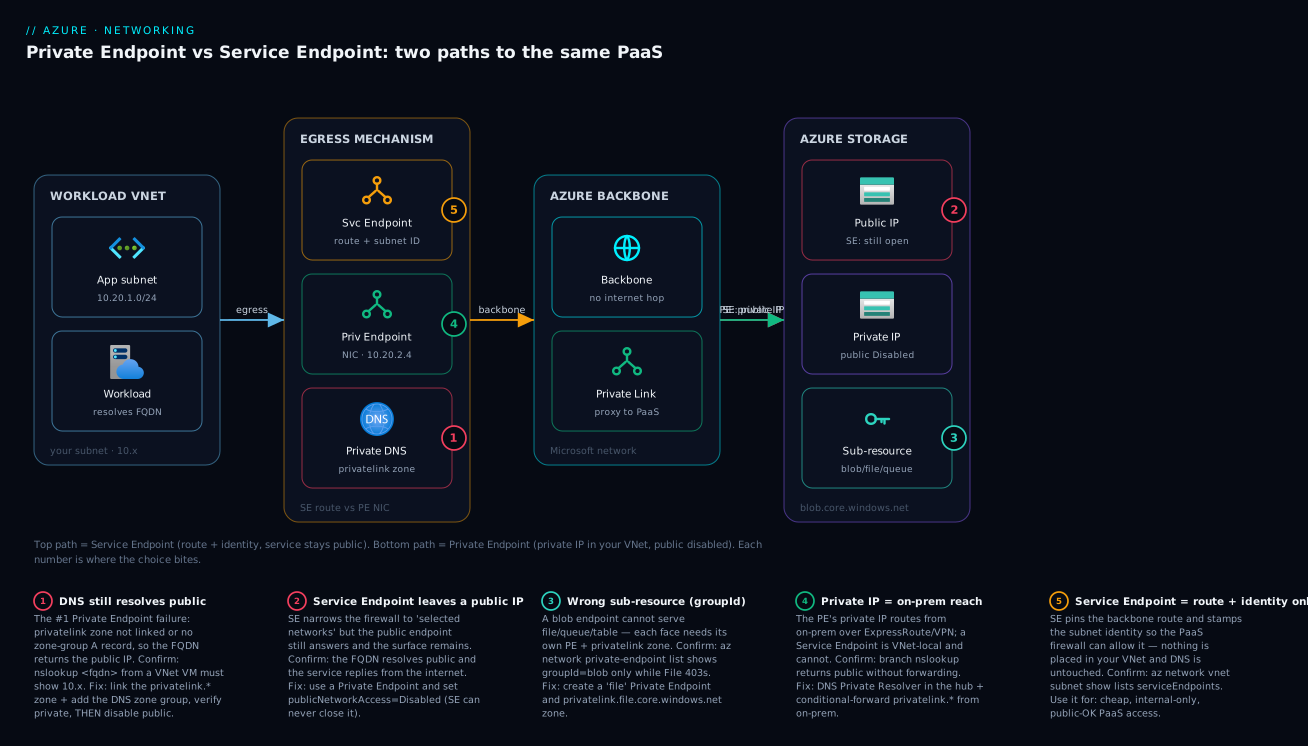
Real-world scenario
Medora Health runs a patient-portal platform on Azure in Central India: an App Service web tier, an Azure SQL Database with eight years of clinical records, Blob storage for scanned documents and DICOM images, and an Azure Key Vault holding the database connection string and a document-signing key. The platform team is six engineers; the workload spans two spoke VNets behind a hub. Their security baseline, driven by a healthcare-data regulation, mandated a single uncompromising rule: no patient-data service may present a public endpoint, and no data may be exfiltratable to storage the company does not own. The monthly Azure spend was about ₹3.1 lakh.
The original design used Service Endpoints everywhere — Microsoft.Sql, Microsoft.Storage, Microsoft.KeyVault on the workload subnets, with each service’s firewall set to “selected networks.” It passed a casual review because the firewalls denied the open internet. It failed the formal audit on three findings the team hadn’t appreciated. First, every service still answered on a public IP — the auditor demonstrated reaching the SQL gateway FQDN from a laptop on the public internet (it refused auth, but the surface was the finding). Second, a penetration tester showed that a process on the workload subnet could write to a storage account in a personal MSDN subscription — the Service Endpoint routed the subnet to all of Storage, so exfiltration was wide open. Third, the branch clinics connecting over ExpressRoute couldn’t use the Service Endpoints at all (VNet-local), so they’d been whitelisting public IP ranges on the firewalls — exactly the public exposure the baseline forbade.
The remediation was a wholesale move to Private Endpoints, and the migration is the lesson. They created a Private Endpoint per service per region: sqlServer for the database, blob and file for the storage account (two endpoints — a junior engineer initially made only blob and spent an afternoon on why File shares 403’d), and vault for Key Vault. They hosted the privatelink.database.windows.net, privatelink.blob.core.windows.net, privatelink.file.core.windows.net and privatelink.vaultcore.azure.net zones centrally in the hub, linked to both spokes — one source of truth. They stood up an Azure DNS Private Resolver in the hub and pointed on-prem conditional forwarders at it, so the ExpressRoute clinics finally resolved the private IPs instead of needing public IP whitelists. Then, only after nslookup from each spoke and from a clinic returned a 10.x address, they set publicNetworkAccess = Disabled on SQL, Storage and Key Vault.
Two things went wrong during cutover, both DNS. First, the App Service tier — which had VNet integration but its spoke was not yet linked to the privatelink.vaultcore.azure.net zone — crash-looped on boot the moment Key Vault’s public access was disabled, because the Key Vault reference resolved to the now-dead public IP. The fix was linking the zone to the integration VNet; the lesson was link DNS before disabling public, and verify resolution from the actual client. Second, a forgotten Service Endpoint Policy had still been the only exfiltration guard on a legacy subnet; once Private Endpoints replaced the Service Endpoints, the policy was moot, but they kept an Azure Firewall FQDN rule denying *.blob.core.windows.net except their own accounts as belt-and-suspenders. The re-audit passed clean: zero public endpoints on patient data, no route to foreign storage, branches private over ExpressRoute. Cost rose by the Private Endpoint hourly + data charges — about ₹6,400/month for the dozen endpoints and the resolver — which the compliance sign-off made trivially worth it.
The migration as a before/after, because the contrast is the teaching:
| Concern | Before (Service Endpoints) | After (Private Endpoints) |
|---|---|---|
| SQL public surface | Public IP, “selected networks” | Disabled; private IP only |
| Storage exfiltration | Subnet could reach any account | PE to one account + firewall FQDN deny |
| Branch (ExpressRoute) access | Public IP whitelist (forbidden) | Private IP via DNS Private Resolver |
| Key Vault | Public, firewalled | Private IP, public disabled |
| DNS | Untouched (public) | Central privatelink zones, linked to spokes |
| Audit result | 3 findings | Clean |
| Extra monthly cost | ₹0 | ~₹6,400 |
Advantages and disadvantages
Neither mechanism is “better” in the abstract — they sit at different points on a cost/security/complexity curve. Weigh them honestly:
| Service Endpoint | Private Endpoint | |
|---|---|---|
| Advantages | Free; trivial to enable (one subnet flag); no DNS work; pins route to backbone; uses service tags in NSGs; good enough when public exposure is acceptable | True private IP in your VNet; public endpoint can be disabled; reachable from on-prem; strong exfiltration posture (one resource); per-instance granularity; the only path to “no public endpoints” |
| Disadvantages | Service keeps a public IP (audit finding persists); can’t disable public access; VNet-local (no on-prem); weak exfiltration control without SE Policy; coarse (subnet-level); not supported by every service | Costs per hour + per GB; you must solve DNS (the #1 failure); one endpoint per sub-resource (Storage gets pricey); consumes private IPs; cross-tenant needs approval; historically bypasses NSGs |
When each matters: reach for a Service Endpoint when the workload is internal-only, public exposure of the PaaS is acceptable to your security baseline, you want to pin routing and firewall the service to a subnet at zero cost, and you have no on-prem clients — dev/test environments and lower-sensitivity data are the sweet spot. Reach for a Private Endpoint the moment any of these is true: the data is regulated or sensitive, your baseline says “no public endpoints,” you must reach the PaaS from on-premises, or exfiltration prevention is a hard requirement. In a modern enterprise landing zone, Private Endpoint is the default and Service Endpoint is the documented exception. The decisive practical difference is that “we disabled public access” is a sentence you can only say truthfully with a Private Endpoint.
Hands-on lab
Stand up a Private Endpoint for a real storage account, prove DNS resolves to the private IP, disable public access, and tear it all down — free-tier-friendly except the small Private Endpoint hourly charge (delete at the end; cost is a few rupees). Run in Cloud Shell (Bash).
Step 1 — Variables and resource group.
RG=rg-pe-lab; LOC=centralindia
VNET=vnet-pe-lab; SNET_VM=snet-vm; SNET_PE=snet-pe
SA=stpelab$RANDOM           # globally-unique
az group create -n $RG -l $LOC -o table
Step 2 — VNet with two subnets (one for a test VM, one for the endpoint).
az network vnet create -g $RG -n $VNET --address-prefix 10.20.0.0/16 \
  --subnet-name $SNET_VM --subnet-prefix 10.20.1.0/24 -o table
az network vnet subnet create -g $RG --vnet-name $VNET -n $SNET_PE \
  --address-prefix 10.20.2.0/24 -o table
Step 3 — A storage account (public for now) and a tiny test VM.
az storage account create -n $SA -g $RG -l $LOC --sku Standard_LRS --kind StorageV2 -o table
az vm create -g $RG -n vm-test --image Ubuntu2204 --size Standard_B1s \
  --vnet-name $VNET --subnet $SNET_VM --admin-username azureuser \
  --generate-ssh-keys --public-ip-address "" -o table
Step 4 — Confirm it currently resolves PUBLIC (the “before”).
az vm run-command invoke -g $RG -n vm-test --command-id RunShellCommand \
  --scripts "nslookup ${SA}.blob.core.windows.net"
# Expect a PUBLIC IP (not 10.x) — no Private Endpoint yet.
Step 5 — Create the Private Endpoint for the blob sub-resource.
SA_ID=$(az storage account show -n $SA -g $RG --query id -o tsv)
az network private-endpoint create -n pe-blob -g $RG -l $LOC \
  --vnet-name $VNET --subnet $SNET_PE \
  --private-connection-resource-id "$SA_ID" --group-id blob \
  --connection-name pe-blob-conn -o table
Step 6 — Private DNS zone, VNet link, and the zone group (writes the A record).
az network private-dns zone create -g $RG -n privatelink.blob.core.windows.net -o table
az network private-dns link vnet create -g $RG \
  --zone-name privatelink.blob.core.windows.net -n link-lab \
  --virtual-network $VNET --registration-enabled false -o table
az network private-endpoint dns-zone-group create -g $RG \
  --endpoint-name pe-blob -n default \
  --private-dns-zone privatelink.blob.core.windows.net --zone-name blob -o table
Step 7 — Confirm it now resolves PRIVATE (the “after”).
az vm run-command invoke -g $RG -n vm-test --command-id RunShellCommand \
  --scripts "nslookup ${SA}.blob.core.windows.net"
# Expect a 10.20.2.x address — the Private Endpoint NIC. THIS is the proof it's private.
Step 8 — Disable the public endpoint (now safe, because DNS is private).
az storage account update -n $SA -g $RG --public-network-access Disabled -o table
# From the VM (private path) it still works; from the public internet it now refuses.
Step 9 — Teardown.
az group delete -n $RG --yes --no-wait
Expected results table:
| Step | Command | Expected outcome |
|---|---|---|
| 4 | nslookup before PE |
A public IP |
| 5 | create PE | NIC created in snet-pe |
| 6 | zone + link + group | A record written in the private zone |
| 7 | nslookup after PE |
A 10.20.2.x private IP |
| 8 | disable public | Private path works; public refuses |
| 9 | group delete | All resources removed |
Common mistakes & troubleshooting
This is the differentiator. Every failure below is one we’ve actually debugged. Match the symptom, run the confirm, apply the fix. The master playbook first, then detail on the worst offenders.
| # | Symptom | Root cause | Confirm (exact command / portal path) | Fix |
|---|---|---|---|---|
| 1 | App connects but traffic isn’t private | privatelink zone not linked / no A record — DNS resolves public |
nslookup <fqdn> from a VNet VM returns a public IP |
Link the privatelink.* zone to the VNet; add zone group to the PE |
| 2 | App hard-fails after disabling public access | Public disabled before DNS was private; name → dead public IP | nslookup returns public IP; service publicNetworkAccess: Disabled |
Re-enable public, fix DNS, verify 10.x, then disable again |
| 3 | File shares 403 though Blob works | Only a blob PE exists; file needs its own |
az network private-endpoint list shows only groupId: blob |
Create a file Private Endpoint + privatelink.file… zone |
| 4 | On-prem clients still resolve public | No conditional forwarder to Azure DNS | nslookup from on-prem returns public IP |
Deploy DNS Private Resolver/forwarder; conditional-forward privatelink.* |
| 5 | 403 from the service despite a Service Endpoint | defaultAction still Allow, or wrong subnet in rule |
Service Networking blade; networkAcls.defaultAction |
Set Deny; add the correct subnet’s resource ID |
| 6 | Service Endpoint “doesn’t restrict anything” | SE pins route but doesn’t disable public; firewall left open | Service still answers on public IP from the internet | Use Private Endpoint, or tighten firewall + SE Policy |
| 7 | PE connection stuck Pending | Cross-sub/-tenant manual connection awaiting approval | PE → Connection state = Pending | Resource owner runs az network private-endpoint-connection approve |
| 8 | NSG rule “isn’t filtering” PE traffic | PE traffic bypasses NSG by default | Subnet privateEndpointNetworkPolicies = Disabled |
Set it Enabled to apply NSG/UDR to PE traffic |
| 9 | SQL connects publicly but not via PE | DNS not private, or relying on Redirect ports | nslookup mysql.database.windows.net; conn-policy |
Wire privatelink.database… zone; expect Proxy over 1433 |
| 10 | Subnet can write to a foreign storage account | Service Endpoint routes to all of Storage | Pen-test writes to an external account succeed | Add a Service Endpoint Policy, or move to Private Endpoint |
| 11 | “Subnet doesn’t support Service Endpoints” | Subnet delegated/locked, or service unsupported | Subnet shows a delegation; SE add errors | Use an undelegated subnet; confirm the service supports SE |
| 12 | Private Endpoint create fails — no IPs | The PE subnet is too small / full | Subnet free-IP count is 0 | Use a larger PE subnet (plan one IP per endpoint) |
| 13 | App Service KV reference empty at boot | Integration VNet not linked to vaultcore zone |
Environment variables blade shows resolve error | Link privatelink.vaultcore.azure.net to the integration VNet |
| 14 | Multi-region: zone “already exists” error | privatelink zones are global, not per-region | Trying to create the zone twice | Reuse one global zone; add region-specific A records |
Mistake 1 & 2 — DNS still resolves public (the silent and the loud failure)
These are the same root cause with opposite symptoms. If the FQDN resolves to the public IP and public access is enabled, the connection works but isn’t private (silent — passes functional tests, fails audits). If you then disable public access without fixing DNS, the name resolves to a now-dead public IP and the app hard-fails (loud — looks like the endpoint broke). The fix order is the lesson: wire DNS, verify 10.x from the actual client, then disable public.
# The single most useful check — run it from an actual client VM in the VNet:
az vm run-command invoke -g rg -n vm-test --command-id RunShellCommand \
  --scripts "getent hosts mystorageacct.blob.core.windows.net"
# Must show a private (10.x / your space) address. A public IP here = DNS not private.
Confirm the zone is linked and the zone group exists:
az network private-dns link vnet list -g rg --zone-name privatelink.blob.core.windows.net -o table
az network private-endpoint dns-zone-group list -g rg --endpoint-name pe-mystorage-blob -o table
Mistake 3 — one sub-resource per face
A blob endpoint serves Blob only. Queue, Table, File, DFS and Web each need their own Private Endpoint and their own privatelink.* zone. List what you actually have:
az network private-endpoint list -g rg \
  --query "[].{name:name, group:privateLinkServiceConnections[0].groupIds[0]}" -o table
The faces and their independent requirements:
| You use… | Need groupId |
Need zone |
|---|---|---|
| Blob containers | blob |
privatelink.blob.core.windows.net |
| Azure Files shares | file |
privatelink.file.core.windows.net |
| Storage queues | queue |
privatelink.queue.core.windows.net |
| Table storage | table |
privatelink.table.core.windows.net |
| Data Lake Gen2 | dfs |
privatelink.dfs.core.windows.net |
Mistake 4 — on-prem resolves public
A Private Endpoint’s private IP is reachable from on-prem over VPN/ExpressRoute, but on-prem DNS doesn’t know the private zone. You need a resolver in Azure that on-prem conditionally forwards to. Use Azure DNS Private Resolver (or a forwarder VM at 168.63.129.16).
# On-prem DNS server: conditional-forward privatelink.* to the Azure resolver inbound IP
# (Pseudo — configured on your on-prem DNS, pointing at the resolver's inbound endpoint IP)
#   forward zone "privatelink.blob.core.windows.net"  ->  <resolver-inbound-IP>
Mistake 8 — NSG not filtering Private Endpoint traffic
On older VNets, PE traffic ignores NSGs and UDRs. To filter it, enable network policies on the subnet:
az network vnet subnet update -g rg --vnet-name vnet-app -n snet-pe \
  --disable-private-endpoint-network-policies false   # i.e. ENABLE the policies
The decision table for the trickiest calls:
| If you see… | It’s probably… | Do this |
|---|---|---|
| Works but audit says “public” | DNS resolving public, or SE-only design | Add PE + Private DNS; disable public |
| Hard 403/connection-refused after a “private” change | Public disabled before DNS fixed | Re-enable, fix DNS, re-disable |
| Blob fine, File broken | Missing per-face PE | Add the file endpoint + zone |
| On-prem can’t reach private PaaS | No DNS forwarding | DNS Private Resolver + conditional forward |
| NSG rule ignored on the PE subnet | PE network policies off | Enable PE network policies |
| Subnet reaches a foreign account | Plain Service Endpoint | SE Policy or Private Endpoint |
| PE stuck not passing traffic | Connection still Pending | Owner approves the connection |
Best practices
Production-grade rules, learned the hard way:
- Default to Private Endpoint for all production data services (Storage, SQL, Key Vault, Cosmos). Treat Service Endpoint as the documented exception for low-sensitivity or cost-bound cases.
- Wire DNS before you disable public access — always. Verify
nslookupreturns a private IP from the actual client (App Service integration VNet, the spoke, the on-prem branch), then setpublicNetworkAccess = Disabled. - Centralise
privatelink.*zones in the hub and link them to every spoke, rather than per-spoke zones. One source of truth; see Azure Private Link & Private DNS for PaaS for the at-scale pattern. - Use the private DNS zone group on every endpoint so the A record is created and updated automatically — never hand-maintain A records.
- Plan the PE subnet for growth: one private IP per endpoint per face; a
/27or larger dedicated PE subnet avoids “no free IPs” mid-deploy. - Keep
registration-enabled = falseon VNet links toprivatelink.*zones; auto-registration is for VM-name zones only. - Add a Service Endpoint Policy wherever you must keep Service Endpoints on Storage, to bound exfiltration to an account allow-list.
- Layer an Azure Firewall FQDN allow-list for egress to your own PaaS FQDNs when exfiltration is a hard requirement — defence in depth over Private Endpoints.
- Enable Private Endpoint network policies on subnets where you need NSG/UDR enforcement of PE traffic (zero-trust, regulated egress).
- Standardise on one endpoint per service per region, with the global privatelink zone shared across regions (zones aren’t regional; the A records are).
- Codify it in Bicep/Terraform — endpoint, zone, link and zone group together — so a service is never private in one environment and public in another.
- Monitor connection state and DNS — alert on PE connections leaving
Approved, and synthetic-test that key FQDNs resolve private.
Security notes
The security posture is the entire reason this choice exists. Hold these as invariants:
| Control | Service Endpoint | Private Endpoint | Note |
|---|---|---|---|
| Reduce public attack surface | No (public IP remains) | Yes (Disabled) |
Only PE removes the surface |
| Encryption in transit | TLS (unchanged) | TLS (unchanged) | Neither adds encryption; both assume HTTPS |
| Network isolation | Route + firewall identity | True private IP in your VNet | PE is genuine isolation |
| Least privilege (identity) | Pair with managed identity + RBAC | Pair with managed identity + RBAC | Network ≠ auth; do both |
| Data-exfiltration prevention | Weak (needs SE Policy) | Strong (one resource + firewall) | The decisive security difference |
| On-prem private reach | No | Yes | Avoids public-IP whitelisting |
| Auditability | “Selected networks” still public | “No public endpoint” provable | Auditors want the surface gone |
Two non-negotiables. First, network controls are not authentication — a Private Endpoint does not replace RBAC, managed identities, or SAS hygiene; it complements them. An attacker inside your VNet still needs to be stopped by identity. Pair every private endpoint with least-privilege access (see Azure Key Vault: Secrets, Keys & Certificates). Second, “private” is only true once DNS is private — a Private Endpoint with the FQDN still resolving public is a false sense of security that passes functional tests; verify resolution from the real client before claiming isolation.
Cost & sizing
Service Endpoints are free — there is no charge for enabling them or for the traffic. Private Endpoints are billed two ways: an hourly charge per endpoint (roughly $0.01/hour ≈ ₹0.85/hour, about ₹600/month per endpoint) plus a per-GB data-processing charge (inbound and outbound, roughly $0.01/GB ≈ ₹0.85/GB). The cost driver is therefore the number of endpoints (one per service per face per region) and the data volume through them. Private DNS zones are essentially free (a tiny per-zone charge plus query volume).
The cost model at a glance (figures approximate, India regions, mid-2026 — always confirm current pricing):
| Item | Service Endpoint | Private Endpoint |
|---|---|---|
| Enable / hourly | Free | ~₹0.85/hr (~₹600/mo) per endpoint |
| Data processed | Free | ~₹0.85/GB (in + out) |
| Private DNS zone | n/a | ~₹40/mo per zone + tiny query cost |
| Per Storage account using blob+file+queue | Free | 3 endpoints (~₹1,800/mo) + data |
| Cross-region | Free (global SE variant) | One endpoint per region |
Right-sizing rules and what each saves:
| Sizing decision | Cheaper choice | Saves | When it’s safe |
|---|---|---|---|
| Use SE for non-sensitive PaaS | Service Endpoint | Full PE cost | Public exposure acceptable |
| One endpoint per used face only | Don’t create unused queue/table PEs |
₹600/mo each | You don’t use that face |
| Share one global privatelink zone across regions | One zone, many A records | Duplicate zone admin | Multi-region |
| Centralise zones in the hub | One linked zone set | Per-spoke zone sprawl | Hub-and-spoke |
| Keep data in-region | Avoid cross-region PE data egress | Per-GB + egress | Co-locate workload + PaaS |
A worked footprint: a workload using Blob + File + SQL + Key Vault privately needs 4 Private Endpoints (blob, file, sqlServer, vault) ≈ ₹2,400/month in hourly charges, plus DNS (~₹160/month for four zones), plus data processing scaling with traffic — call it ₹3,000–4,000/month for a moderate-traffic app. For a regulated workload that is a rounding error against the compliance value; for a dev environment with public-OK data, the same isolation costs ₹0 with Service Endpoints, which is exactly when to use them.
Interview & exam questions
Common in AZ-700 (Networking), AZ-500 (Security) and SC-100, and in senior cloud-architect interviews:
-
What is the core difference between a Service Endpoint and a Private Endpoint? A Service Endpoint adds a backbone route and the subnet’s identity so the PaaS firewall can allow that subnet, but the service keeps its public IP. A Private Endpoint creates a NIC with a private IP in your subnet mapping to the PaaS instance via Private Link, letting you disable the public endpoint entirely.
-
Can you disable a service’s public access with a Service Endpoint? No. A Service Endpoint only sets the firewall to “selected networks” — the public IP still exists and still answers allowed callers. Only a Private Endpoint lets you set
publicNetworkAccess = Disabled. -
What is the single most common Private Endpoint failure? DNS still resolving to the public IP — the
privatelinkzone isn’t linked to the VNet or the zone group never wrote the A record. The connection works over the public path (silent) or fails if public access was disabled (loud). -
Why does a Service Endpoint not stop data exfiltration by itself? It routes the subnet to the entire service over the backbone, so the subnet can still reach any account of that service, including an attacker’s. You need a Service Endpoint Policy to bound it to an allow-list, or a Private Endpoint (which targets one resource).
-
A storage account uses Blob and File; you created a Private Endpoint for
bloband File still fails. Why? Each sub-resource (groupId) needs its own Private Endpoint and its ownprivatelink.*DNS zone —blobdoes not coverfile. Create afileendpoint and zone. -
How do on-premises clients reach a Private Endpoint privately? Over VPN/ExpressRoute to the VNet, with on-prem DNS conditionally forwarding the
privatelink.*zones to an Azure DNS Private Resolver (or forwarder VM) so the FQDN resolves to the private IP. Service Endpoints cannot serve on-prem at all. -
Why might an NSG rule appear not to filter Private Endpoint traffic? On older VNets, PE traffic bypassed NSGs and UDRs by default. Enable
privateEndpointNetworkPolicieson the subnet to make NSG/UDR rules apply. -
What
groupIdand DNS zone does Azure SQL Database use, and what’s the connection-policy nuance?groupIdsqlServerwithprivatelink.database.windows.net. Over a Private Endpoint, SQL effectively uses Proxy mode on 1433 rather than Redirect’s 11000–11999 port range. -
Are
privatelinkPrivate DNS zones regional? No — they are global. You create one zone (e.g.privatelink.blob.core.windows.net) and add region-specific A records for endpoints in different regions; you do not create the zone per region. -
When is a Service Endpoint the right choice over a Private Endpoint? When the workload is VNet-internal, public exposure of the PaaS is acceptable to your baseline, you want zero cost and no DNS work, and there are no on-prem clients — typically dev/test or low-sensitivity data.
-
What does the private DNS zone group on an endpoint do, and why use it? It automatically creates and maintains the A record (name → private IP) in the linked private zone, so you never hand-maintain DNS records — the step that, omitted, breaks “private.”
-
You disabled public access and the app immediately crash-looped. What happened and how do you prevent it? DNS still resolved to the public IP, which now refuses connections, so the app couldn’t reach the service. Always verify
nslookupreturns the private IP from the actual client before disabling public access.
Quick check
- True or false: a Service Endpoint gives the PaaS service a private IP in your VNet.
- Which mechanism lets you set
publicNetworkAccess = Disabledand have it mean something? - Your Private Endpoint is created but traffic isn’t private. What’s the first thing to check?
- A storage account needs private Blob and File access. How many Private Endpoints?
- Can a branch office over ExpressRoute use a Service Endpoint on an Azure subnet?
Answers
- False. A Service Endpoint adds a backbone route and subnet identity; the service keeps its public IP. Only a Private Endpoint places a private IP in your VNet.
- Private Endpoint. With a Service Endpoint the firewall narrows to “selected networks” but the public endpoint still answers; only a Private Endpoint lets you truly disable public access.
- DNS. Run
nslookup <fqdn>from a VM in the VNet — it must return a private (10.x) IP. If it returns a public IP, theprivatelinkzone isn’t linked or the zone group is missing. - Two — one for the
blobsub-resource and one forfile, each with its ownprivatelink.*DNS zone. - No. Service Endpoints are VNet-local — they only affect traffic originating in the subnet where they’re enabled. On-prem clients must use a Private Endpoint with DNS forwarding.
Glossary
- Service Endpoint — A subnet-scoped feature that routes traffic from the subnet to a PaaS service over the Azure backbone and stamps it with the subnet’s identity so the service firewall can allow it; the service keeps its public IP.
- Private Endpoint — A network interface with a private IP placed in your subnet that maps to a specific PaaS instance via Private Link, enabling private connectivity and letting you disable the public endpoint.
- Private Link — The Azure platform service that proxies a Private Endpoint’s private IP to the target PaaS resource over the Microsoft backbone.
privatelink.*DNS zone — An Azure Private DNS zone (e.g.privatelink.blob.core.windows.net) that holds the A records mapping service FQDNs to their Private Endpoint private IPs.- Private DNS zone group — A configuration on a Private Endpoint that automatically creates and maintains the A record in the linked private zone.
groupId/ sub-resource — Identifies which “face” of a PaaS resource a Private Endpoint targets (e.g.blob,file,sqlServer,vault); one endpoint per sub-resource.publicNetworkAccess— A service-level setting (Enabled/Disabled) that controls whether the public endpoint answers; only meaningful to disable once a Private Endpoint exists.- Service Endpoint Policy — A subnet-attached allow-list that restricts which specific accounts (today, Storage) the subnet may reach via the Service Endpoint, providing an exfiltration guard.
- Private Endpoint network policies — A subnet setting that makes NSGs and UDRs apply to Private Endpoint traffic (historically bypassed).
- Connection approval — The Pending/Approved/Rejected/Disconnected state machine for a Private Endpoint connecting to a resource in another subscription or tenant.
- DNS Private Resolver — An Azure service that lets on-premises DNS conditionally forward
privatelink.*queries into Azure so on-prem clients resolve private IPs. - Connection policy (SQL) — Proxy (all traffic via the gateway on 1433) vs Redirect (client redirected to the node on 11000–11999); Private Endpoint effectively forces Proxy.
- Service tag — A named group of IP ranges (e.g.
Storage,Sql,AzureKeyVault) usable in NSG rules; relevant to Service Endpoints, not to a Private Endpoint’s private IP. - Data-exfiltration prevention — Controls that stop a workload from sending data to resources you don’t own; the decisive reason many teams choose Private Endpoint plus firewall FQDN rules.
Next steps
- Azure Private Link & Private DNS for PaaS — the deep dive on the DNS architecture and hub-and-spoke privatelink zones at enterprise scale.
- Azure Virtual Network: Subnets, NSGs, and Routing — the VNet, NSG and UDR fundamentals these endpoints build on.
- Azure Key Vault: Secrets, Keys & Certificates — pairing a Private Endpoint with least-privilege identity for your secrets.
- Troubleshooting Azure Storage: 403, Firewall, Private Endpoint, RBAC & SAS — the playbook when private Storage access still returns 403.
- Troubleshooting Azure VNet Connectivity — effective-routes and Network Watcher when the private path won’t connect.