Application Gateway v2 is the workhorse L7 reverse proxy for Azure web estates: a regional, autoscaling, zone-redundant front door with an integrated Web Application Firewall (WAF). It is easy to stand up and surprisingly easy to misconfigure — terminating TLS at the edge and forwarding plaintext to backends, running the WAF in Detection forever because Prevention “broke checkout,” pinning a Key Vault cert to a version so renewals never flow, or pasting in a custom rule that silently never matches. The product reports its failures as a flat 502 or a flat 403, and at 02:00 those two numbers hide at least a dozen distinct root causes spread across the listener, the WAF policy, the backend re-encryption leg, and the managed identity that pulls your certificate.
This is the configuration that holds up under audit, written as both a build guide and a diagnostic playbook: TLS re-encrypted all the way to the backend, mutual TLS for partner callers, and a managed rule set tuned with surgical exclusions instead of being switched off. Everything here is the v2 SKU (Standard_v2 / WAF_v2) with a separate applicationGatewayWebApplicationFirewallPolicy resource — the only WAF model Microsoft still develops. Every setting, mode, error code, limit and SKU is enumerated as a scannable table you keep open beside the az CLI, the Bicep, and the KQL; the prose explains the mechanism, the tables let you look up the exact value mid-incident.
By the end you will stop guessing. When a partner go-live throws 403s on legitimate POSTs you will know it is anomaly scoring crossing a threshold on a base64 field, not “the firewall is broken”; when backend health goes red after a cert rotation you will know whether it is SNI, a missing trusted root, or a managed identity that lost get on the vault — and you will have the one command that confirms each. Knowing which within ninety seconds is what separates a five-minute incident from a two-hour one, and a clean PCI audit from a finding.
What problem this solves
A naked web app on the public internet has three problems App Gateway v2 + WAF exists to solve at once: it speaks TLS that you do not control the policy of, it has no inspection layer in front of it, and the moment you add an inspection layer the temptation is to drop back to plaintext on the inside so the firewall can read the body. SSL offload — terminate at the gateway, forward HTTP — makes the WAF work but leaves a cleartext hop inside your VNet that is a flat finding under PCI-DSS, HIPAA, and most internal security baselines. End-to-end TLS fixes the cleartext hop but introduces a second TLS handshake (the gateway to the backend) that fails silently as a 502 when SNI, the trusted root, or the probe is wrong.
What breaks without getting this right, in production terms: an engineer terminates TLS at the edge and ships it, and six months later an auditor flags the plaintext backend leg and the project stops for a quarter. Or the team enables the WAF in Prevention without burning in on Detection, a legitimate payload trips an OWASP rule, checkout starts returning 403, and under pressure someone flips the whole policy back to Detection — disabling all protection to fix one false positive. Or the frontend certificate is bound to a pinned Key Vault version, it renews, the gateway never sees the new version, and the site serves an expired cert until someone redeploys. Each of these is a single setting away from correct, and each is invisible until it bites.
Who hits this: every team fronting a regulated or partner-facing web app on Azure — payments, healthcare, B2B APIs, anything behind a compliance boundary. It bites hardest on teams new to anomaly scoring (they disable rules wholesale instead of scoping exclusions), teams that treat the WAF as a checkbox rather than a tuned control, and anyone who has never watched show-backend-health go red after a cert change. The fix is almost never “turn the WAF off” or “use offload” — it is “find the exact rule, field, or handshake leg that is lying, and make only that one thing correct.”
To frame the whole field before the deep dive, here is every failure class this article covers, the flat code you actually see, and the one place to look first:
| Failure class | Flat code you see | First question to ask | First place to look | Most common single cause |
|---|---|---|---|---|
| Listener TLS / cert | 502 or handshake error | Can the gateway read its own cert? | Backend health + Key Vault access | Managed identity lost get on the vault secret |
| Backend re-encryption | 502 BackendConnectionFailure |
Did the gateway’s TLS handshake to the backend complete? | show-backend-health |
SNI / host-name mismatch or missing trusted root |
| WAF false positive | 403 | Did a rule fire on a legit request? | AGWFirewallLogs (Action == Blocked) |
Anomaly score crossed threshold on a base64 field |
| WAF bypass / under-block | (no error — exploit passes) | Is the policy actually associated and in Prevention? | Policy mode + association scope | Policy left in Detection, or not associated |
| mTLS rejected / accepted wrongly | TLS alert / unexpected 200 | Was a client cert required and validated? | SSL profile + listener binding | client-auth not enforced, or no authorization on the backend |
| Custom rule never matches | rule has no effect | Is the priority and match variable right? | Custom-rule order + WAF logs | Wrong priority (managed ran first) or wrong match variable |
Learning objectives
By the end of this article you can:
- Trace a request through the full Application Gateway v2 chain — frontend IP → listener → WAF policy → routing rule → backend pool → backend HTTP settings → backend — and localise any 502/403 to exactly one hop.
- Configure end-to-end TLS with backend re-encryption: upload the backend’s trusted root CA, pin SNI / host name correctly, and run an HTTPS health probe that matches the backend’s real status codes.
- Bind the frontend certificate from Key Vault via a versionless secret ID and the gateway’s managed identity so renewals flow without a redeploy — and explain why a pinned version breaks rotation.
- Enforce mutual TLS (mTLS) with an SSL profile and a trusted client CA chain, forward client-cert details to the backend, and lock the backend so the headers cannot be forged.
- Operate the WAF policy: choose DRS 2.1 vs CRS, understand anomaly scoring and the block threshold, burn in on Detection, then move to Prevention with confidence.
- Kill false positives with the narrowest-scope exclusion (per-rule → per-group → global) instead of disabling protection, and document each exclusion against the log query that justifies it.
- Author custom rules — geo-match, rate limiting, bot protection — with correct priority so they run before managed rules, and harden responses with
Set-Cookie, HSTS and server-header rewrites.
Prerequisites & where this fits
You should already understand HTTP and TLS basics (handshake, SNI, certificate chains, what a root CA is), the difference between L4 and L7 load balancing, and how to run az in Cloud Shell, read JSON output, and apply a Bicep file. You should know what a managed identity is and that Azure resources use one to authenticate to other services without secrets. Familiarity with the OWASP Top 10 (SQLi, XSS) helps you reason about which rule groups matter.
This sits in the edge security / networking track. The decision of whether App Gateway is the right L7 (versus Front Door for global, or a plain Load Balancer for L4) is upstream of it — see Azure Load Balancer vs Application Gateway. The certificate lifecycle that feeds every TLS leg here is its own deep topic in Azure Key Vault: Secrets, Keys & Certificates. When the backend is App Service and the gateway’s 502 turns out to be an upstream timeout rather than a handshake failure, the diagnosis crosses into Troubleshooting Azure App Service: 502/503, Cold Starts & Restart Loops. The subnet, NSG and routing context the gateway lives in is covered in Azure Virtual Network: Subnets, NSGs & Service Endpoints.
A quick map of who owns which layer, so you escalate to the right person during an incident:
| Layer | What lives here | Who usually owns it | Failure classes it can cause |
|---|---|---|---|
| Client / DNS | TLS version, SNI, name resolution | Frontend / SRE | Handshake failures if client lacks TLS 1.2; mostly red herrings |
| Frontend IP + listener | Public/private socket, server cert, SSL profile | Network team | 502 (cert unreadable), mTLS rejection |
| WAF policy | Mode, managed rules, custom rules, exclusions | Security team | 403 (false positive), bypass (under-block) |
| Routing rule + path map | Listener → backend binding, priority | Network team | Wrong site answers, 502 on no rule match |
| Backend HTTP settings | Re-encryption, SNI, trusted root, probe | Network + app | 502 BackendConnectionFailure |
| Backend pool | App Service / VMSS / FQDN targets, health | App / dev team | 502 (backend down or cert mismatch) |
| Key Vault + managed identity | Frontend cert source, MI access | Platform + security | 502 (MI lost vault access), expired-cert serving |
Core concepts
Five mental models make every later diagnosis obvious.
The flat code names the gateway’s complaint, not your bug. Application Gateway returns a bare 502 Bad Gateway when it could not get a usable response from a backend (handshake failed, probe unhealthy, connection refused, timeout) and a bare 403 Forbidden when the WAF blocked the request (a rule matched, or a custom Block rule fired). The status code is the gateway summarising “something went wrong upstream of the client” — which hop and why lives in backend health, the WAF firewall log, and Key Vault access, never in the status code itself. “Could not reach a healthy backend” (502) versus “the firewall said no” (403) is the first fork in every decision tree.
The request chain is explicit and unforgiving. A request traverses frontend IP/port → listener (host + cert) → WAF policy → routing rule → [URL path map] → backend pool → backend HTTP settings (probe, cert, SNI) → backend. Almost every “it returns a 502” or “the wrong site answers” ticket is a break in this chain — a listener with no matching rule, a routing rule with a duplicate priority, a backend setting pointing at the wrong host name. Rule priority matters on v2: every routing rule needs an explicit, unique priority (1–20000, lower wins), and a catch-all basic listener should sit on its own rule with a high priority number so multi-site host matches win first.
End-to-end TLS is two handshakes, not one. “SSL offload” terminates the client’s TLS at the gateway and forwards HTTP. End-to-end TLS re-encrypts: the gateway terminates the client session, decrypts so the WAF can inspect the body, then opens a fresh TLS session to the backend. That second handshake needs the backend’s trusted root CA (so the gateway validates the chain) and the right SNI / host name (so the name matches the backend’s certificate). Get either wrong and you get the classic silent 502 with BackendConnectionFailure — the client side looks fine, the backend side never completes.
The WAF scores, it does not veto rule-by-rule. DRS 2.1 and CRS 3.2 run in anomaly scoring mode: each matched rule contributes a score by severity (Critical 5, Error 4, Warning 3, Notice 2) rather than blocking outright. In Prevention, a request is blocked only when its cumulative score crosses the threshold (5 by default — a single Critical, or a few lower-severity hits). This is why disabling one noisy rule usually fixes a false positive without weakening unrelated coverage, and why a single legitimate-but-weird field (a base64 signature, a rich-text body) can stack enough partial matches to cross 5.
Exclusions remove a field from inspection; disabling removes a rule. An exclusion strips a named request attribute (a header, cookie, or arg) from inspection before rules run — the right tool when a specific field is legitimately noisy. Disabling turns a rule off entirely — the blunter tool, reserved for a rule that is pure noise for your app. Scope always goes narrowest-first: exclude a field from one rule, then from a group, then globally; disable one rule before a whole group. Every exclusion and every disable is a hole you must document and re-review on each rule-set version bump.
The vocabulary in one table
Before the deep sections, pin down every moving part. The glossary at the end repeats these for lookup; this table is the mental model side by side:
| Concept | One-line definition | Where it lives | Why it matters to 502/403 |
|---|---|---|---|
| Listener | Matches port + (multi-site) host; holds the server cert | On the gateway | Cert unreadable → 502/handshake error |
| Routing rule | Binds a listener to a backend pool + HTTP setting | On the gateway | Duplicate/missing priority → wrong site or 502 |
| Backend HTTP settings | Protocol, port, probe, cert, SNI to the backend | On the gateway | Wrong SNI/root → 502 BackendConnectionFailure |
| Trusted root cert | Backend’s root CA the gateway validates against | Referenced by the HTTP setting | Missing → re-encryption 502 |
| SSL policy | Min TLS version + cipher suites | Gateway or SSL profile | Too-low floor = audit finding; mismatch = handshake fail |
| SSL profile | Client-auth config + client CA chain + SSL policy | On the listener | Enables mTLS; misbound → no client-cert enforcement |
| WAF policy | Mode + managed rules + custom rules + exclusions | Separate resource, associated to gateway | Detection-forever = under-block; bad exclusion = bypass |
| Anomaly score | Cumulative severity total per request | Computed at request time | Crosses threshold (5) → 403 |
| Exclusion | Field removed from inspection before rules run | In the WAF policy | Too broad → bypass; too narrow → still 403 |
| Managed identity | The gateway’s identity to read Key Vault | On the gateway | Lost get → cert unreadable → 502 |
| Health probe | Per-backend health check (path + status match) | Referenced by the HTTP setting | Wrong path/status → healthy backend marked down → 502 |
The request flow: listeners, rules, and backend settings
Before touching TLS or WAF, internalize how a request traverses App Gateway. Components chain together, and almost every “it returns a 502” or “the wrong site answers” ticket is a break in this chain.
Client --> Frontend IP/Port --> Listener (host + cert) --> WAF policy
       --> Routing rule --> [URL path map] --> Backend pool
       --> Backend HTTP settings (probe, cert, SNI) --> Backend
- Frontend IP + port — the public (or private) socket traffic lands on.
- Listener — matches by port and, for multi-site, by
hostName. For HTTPS it holds the server certificate (and, for mTLS, the SSL profile). - Routing rule — binds a listener to a backend pool and a backend HTTP setting. Basic rules are 1:1; path-based rules attach a URL path map.
- Backend pool — IPs, FQDNs, NICs, App Service, or VMSS.
- Backend HTTP settings — protocol to the backend, port, probe, connection draining, cookie affinity, and (critically) the trusted root cert and host-name behavior for re-encryption.
Each component carries options that change behaviour and break in their own way. The full component reference — what it is, the choices, the default, when to change, and the gotcha:
| Component | Key setting | Values | Default | When to change | Limit / gotcha |
|---|---|---|---|---|---|
| Frontend IP | Public / Private | Public, Private, both | Public on create | Internal-only apps use Private | One public + one private IP max per gateway |
| Listener | listenerType |
Basic, Multi-site | Basic | Multiple host names on one IP | Multi-site needs hostName/hostNames |
| Listener | protocol |
Http, Https | Http | Any TLS termination | Https requires a bound cert |
| Listener | hostNames |
up to 5 wildcard/exact | none (Basic) | Host-based routing | Max 5 host names per listener |
| Routing rule | ruleType |
Basic, PathBasedRouting | Basic | Different backends per URL path | Path rule needs a URL path map |
| Routing rule | priority |
1–20000 | required on v2 | Always (it is mandatory) | Must be unique; lower wins |
| URL path map | path patterns | /api/*, /img/* … |
none | Fan one host to many pools | First match wins; order matters |
| Backend pool | target type | IP, FQDN, NIC, App Service, VMSS | none | Match your compute | FQDN target drives the SNI decision |
| Backend HTTP setting | protocol |
Http, Https | Http | End-to-end TLS | Https triggers root-cert + SNI rules |
| Backend HTTP setting | cookieBasedAffinity |
Enabled, Disabled | Disabled | Legacy sticky-session apps | Concentrates load; avoid for stateless |
| Backend HTTP setting | requestTimeout |
1–86400 s | 20 s (newer) / 30 s | Long backend operations | Too low → 502 on slow backend |
| Backend HTTP setting | connectionDraining |
on/off + timeout | off | Graceful backend removal | Drains in-flight on scale-in |
Rule priority matters on v2: every routing rule needs an explicit, unique priority (1–20000, lower wins). Listeners are evaluated multi-site first (host match) then basic, so a catch-all basic listener should sit on its own rule with a high priority number. The evaluation order, spelled out so you can predict which rule wins:
| Evaluation stage | What is compared | Tie-break | If nothing matches |
|---|---|---|---|
| 1. Listener selection | Port, then host (multi-site before basic) | Most specific host wins; wildcard last | No listener → connection refused at the socket |
| 2. Routing rule | Listener bound to the rule | Lowest priority number wins |
No rule for the listener → 502 |
| 3. Path map (path rules only) | Request path vs path patterns | First matching pattern in order | Falls to the default backend pool |
| 4. Backend selection | Healthy members of the chosen pool | Round-robin (affinity overrides) | No healthy member → 502 |
The gateway’s own state-vs-symptom map — when one of these components is misconfigured, this is what you see and where to confirm it:
| If you see… | It’s probably… | Confirm with |
|---|---|---|
| Wrong site answers on a shared IP | Multi-site host match missing / catch-all priority too low | az network application-gateway http-listener list (check hostNames) |
| 502 on every request, no backend reached | No routing rule for the listener, or duplicate priority | az network application-gateway rule list (check priority uniqueness) |
| 502 only on a specific URL path | Path map pattern wrong or default pool unhealthy | az network application-gateway url-path-map show |
| 502 intermittently under load | requestTimeout shorter than backend’s slow path |
Compare backend duration to requestTimeout |
End-to-end TLS: re-encryption, trusted roots, and SNI
“SSL offload” terminates TLS at the gateway and forwards HTTP. For anything regulated, that plaintext hop inside the VNet is a finding. End-to-end TLS re-encrypts: the gateway terminates the client’s session, inspects the request (so the WAF can read the body), then opens a fresh TLS session to the backend.
The two TLS termination models side by side — pick deliberately, because the audit and the threat model differ:
| Aspect | SSL offload (terminate, forward HTTP) | End-to-end TLS (re-encrypt) |
|---|---|---|
| Backend leg | Plaintext HTTP inside the VNet | Fresh TLS to the backend |
| WAF can inspect body | Yes | Yes (decrypts at the gateway) |
| Compliance (PCI/HIPAA) | Cleartext-in-transit finding | Compliant in-transit |
| Extra config needed | None | Trusted root + SNI + HTTPS probe |
| Failure mode | Backend exposed if NSG slips | Silent 502 if SNI/root wrong |
| Backend CPU | Lower (no TLS) | Higher (TLS per backend) |
| When to use | Never for regulated data | Default for production |
Two things make re-encryption work and trip people up constantly:
- Trusted root certificate. On v2 the gateway validates the backend’s certificate chain. You upload the backend’s root CA (
.cer, base64/PEM) as atrustedRootCertificateand reference it from the backend setting. For a public CA, this can be skipped only when the backend uses a well-known public CA and you opt into trusted-CA validation; for private PKI or self-signed backends you must upload the root. - SNI / host name to the backend. The TLS handshake and probe must present a name the backend’s cert is issued for. Use
pickHostNameFromBackendAddresswhen the pool is an FQDN whose cert matches, or pinhostNameexplicitly. Mismatch here is the classic silent 502 withBackendConnectionFailure.
# Upload the backend's root CA so the gateway trusts the re-encrypted leg
az network application-gateway root-cert create \
  --gateway-name agw-prod --resource-group rg-edge \
  --name backend-root-ca \
  --cert-file ./backend-root-ca.cer

# Backend HTTP settings: HTTPS to backend, validate chain, fix SNI
az network application-gateway http-settings create \
  --gateway-name agw-prod --resource-group rg-edge \
  --name bes-https-app \
  --protocol Https --port 443 \
  --host-name api.internal.contoso.com \
  --root-certs backend-root-ca \
  --probe probe-https-health \
  --connection-draining-timeout 30 \
  --timeout 30
The custom probe should also speak HTTPS and accept the backend’s real health status codes, otherwise the gateway marks a healthy pool unhealthy:
az network application-gateway probe create \
  --gateway-name agw-prod --resource-group rg-edge \
  --name probe-https-health \
  --protocol Https --host api.internal.contoso.com \
  --path /healthz --interval 30 --timeout 30 --threshold 3 \
  --match-status-codes 200 204
The backend HTTP settings reference
Every option on the backend HTTP setting that governs re-encryption, and how to reason about each:
| Setting | Values | Default | When to change | Trade-off / gotcha |
|---|---|---|---|---|
protocol |
Http, Https | Http | Always, for end-to-end TLS | Https triggers root-cert + SNI validation |
port |
1–65535 | 80 | Backend not on 443 | Must match the backend’s listening port |
hostName |
FQDN string | none | Pin SNI explicitly | Must match the backend cert’s SAN |
pickHostNameFromBackendAddress |
true/false | false | Pool is an FQDN whose cert matches | Ignored if hostName is set |
trustedRootCertificate |
named root cert | none | Private PKI / self-signed backend | Omit only for well-known public CA |
probe |
named probe | default probe | Always in production | Default probe uses / — often wrong |
requestTimeout |
1–86400 s | 20/30 s | Long backend ops | Too low → 502 on slow responses |
connectionDraining |
on/off + 1–3600 s | off | Graceful scale-in | Drains in-flight before removal |
cookieBasedAffinity |
Enabled/Disabled | Disabled | Legacy stateful backends | Concentrates load; off for stateless |
path |
string prefix | none | Rewrite a base path to the backend | Prepended to the request path |
The health probe reference
The probe is the most common silent-502 culprit after SNI — its defaults rarely match a real backend. Every probe option:
| Probe setting | Values | Default | When to change | Gotcha |
|---|---|---|---|---|
protocol |
Http, Https | matches HTTP setting | Re-encrypt → Https | Must match the backend leg |
host |
FQDN | from HTTP setting | Pin probe SNI | Mismatch marks healthy backend down |
path |
URL path | / |
Always — use /healthz |
/ may be slow or auth-gated → false unhealthy |
interval |
1–86400 s | 30 s | Faster detection | Too aggressive adds backend load |
timeout |
1–86400 s | 30 s | Slow health endpoint | Must be ≤ interval |
threshold |
1–20 | 3 | Ride transient blips | Unhealthy after N consecutive fails |
match-status-codes |
code ranges | 200–399 | Backend returns 204/401 on health | Default rejects a 401-returning health path |
pickHostNameFromBackendHttpSettings |
true/false | false | Reuse the setting’s host | Avoids a second host-name mismatch |
For the frontend (client-facing) certificate, reference Key Vault rather than uploading a PFX — the gateway pulls the cert via its managed identity and picks up renewals. Grant the identity get on secrets and certificates, then bind the versionless secret ID so rotation flows through without a redeploy:
az network application-gateway ssl-cert create \
  --gateway-name agw-prod --resource-group rg-edge \
  --name fe-cert-contoso \
  --key-vault-secret-id "https://kv-edge.vault.azure.net/secrets/contoso-tls"
Reference the versionless secret identifier (no GUID after
/secrets/contoso-tls). With a pinned version the gateway never sees a renewed cert and you are back to manual rotation — exactly what Key Vault integration exists to avoid.
The frontend certificate sourcing options, compared:
| Source | How rotation works | Setup | When to use | Gotcha |
|---|---|---|---|---|
| Key Vault, versionless secret ID | Automatic — gateway polls for new version | MI + get on secret/cert |
Default for production | MI must keep vault access |
| Key Vault, pinned version | Manual — re-bind on each renewal | MI + get |
Never (defeats the point) | Serves expired cert silently |
| Uploaded PFX | Manual — re-upload + redeploy | Upload .pfx + password |
Air-gapped / no Key Vault | No auto-renew; password in pipeline |
| App Gateway-managed (preview paths) | Varies | Varies | Edge cases | Check current GA status |
Pair this with an SSL policy that drops legacy protocols. Use a predefined policy or a custom one; TLSv1_2 minimum is the floor, TLSv1_3 where your clients support it:
az network application-gateway ssl-policy set \
  --gateway-name agw-prod --resource-group rg-edge \
  --policy-type Custom \
  --min-protocol-version TLSv1_2 \
  --cipher-suites \
    TLS_ECDHE_RSA_WITH_AES_256_GCM_SHA384 \
    TLS_ECDHE_RSA_WITH_AES_128_GCM_SHA256
The SSL policy options — predefined versus custom, and the floor each sets:
| Policy type | What it sets | Min TLS | When to use | Gotcha |
|---|---|---|---|---|
Predefined AppGwSslPolicy20150401 |
Legacy default | TLS 1.0 | Never — fails audit | Allows TLS 1.0/1.1 |
Predefined AppGwSslPolicy20170401 |
Stronger default | TLS 1.1 | Legacy clients only | Still below 1.2 floor |
Predefined AppGwSslPolicy20170401S |
Strong | TLS 1.2 | Quick safe default | Fixed cipher list |
Predefined AppGwSslPolicy20220101 |
Modern | TLS 1.2 | Current safe default | — |
Predefined AppGwSslPolicy20220101S |
Modern strict | TLS 1.2 | Strict modern default | Drops more ciphers |
| Custom | Your min version + cipher list | your choice | Pin exact ciphers for compliance | You own the cipher hygiene |
| CustomV2 | Adds TLS 1.3 support | TLS 1.2 or 1.3 | TLS 1.3-capable clients | Verify client support first |
Express the whole TLS posture as Bicep so it is reviewed and reproducible:
sslPolicy: {
  policyType: 'CustomV2'
  minProtocolVersion: 'TLSv1_2'
  cipherSuites: [
    'TLS_ECDHE_RSA_WITH_AES_256_GCM_SHA384'
    'TLS_ECDHE_RSA_WITH_AES_128_GCM_SHA256'
  ]
}
Enforcing mutual TLS with client-certificate profiles
mTLS on App Gateway v2 means the client presents a certificate during the handshake and the gateway validates it against an SSL profile that carries a trusted client CA chain. This is the right control for partner B2B endpoints and machine-to-machine APIs where bearer tokens alone are not enough.
The moving parts:
- A trusted client CA certificate chain (
.cer, the full chain in one file) the gateway uses to validate presented client certs. - An SSL profile that bundles that chain plus the client-auth configuration and an SSL policy.
- The HTTPS listener is associated with the SSL profile.
# Upload the CA chain that signs your clients' certificates
az network application-gateway trusted-client-cert create \
  --gateway-name agw-prod --resource-group rg-edge \
  --name partner-client-ca \
  --data ./partner-client-ca-chain.cer

# SSL profile: require client cert + enforce TLS 1.2 floor
az network application-gateway ssl-profile add \
  --gateway-name agw-prod --resource-group rg-edge \
  --name profile-mtls-partners \
  --trusted-client-certificates partner-client-ca \
  --client-auth-configuration True \
  --min-protocol-version TLSv1_2

# Attach the profile to the HTTPS listener
az network application-gateway http-listener update \
  --gateway-name agw-prod --resource-group rg-edge \
  --name listener-partners-443 \
  --ssl-profile profile-mtls-partners
Setting --client-auth-configuration True makes the client certificate mandatory for that listener; the handshake fails without one. The gateway validates the chain but does not by itself check certificate revocation, the subject, or thumbprint. Authorization is your job — forward the client cert details to the backend and decide there.
The SSL profile and client-auth options, enumerated:
| Setting | Values | Default | When to change | Gotcha |
|---|---|---|---|---|
verifyClientCertIssuerDN |
true/false | false | Restrict to a specific issuer DN | Validates issuer, not subject |
client-auth-configuration (mandatory) |
True/False | False | Require a client cert | False = mTLS not enforced |
verifyClientRevocation |
None, OCSP | None | Enforce revocation checking | OCSP responder must be reachable |
trustedClientCertificates |
named CA chain(s) | none | The CAs you accept | Must be the FULL chain in one .cer |
sslPolicy (on profile) |
predefined/custom | gateway default | Per-listener TLS floor | Profile policy overrides gateway policy |
minProtocolVersion |
TLSv1_0…TLSv1_3 | gateway default | mTLS partners on modern TLS | Set 1.2+ for partner endpoints |
What the gateway does and does not validate — the line between authentication and authorization is where mTLS deployments leak:
| Check | Does the gateway do it? | Who must do it | How |
|---|---|---|---|
| Client cert chains to a trusted CA | Yes | Gateway | trustedClientCertificates chain |
| Cert is within validity dates | Yes | Gateway | Handshake fails on expired |
| Issuer DN matches | Optional | Gateway (if enabled) | verifyClientCertIssuerDN |
| Revocation (OCSP) | Optional | Gateway (if enabled) | verifyClientRevocation: OCSP |
| Subject / CN is an allowed partner | No | Backend | Inspect forwarded X-Client-Cert-Subject |
| Thumbprint is on an allow-list | No | Backend | Inspect forwarded X-Client-Cert-Fingerprint |
| The caller is authorized for this API | No | Backend | Your authz logic on the forwarded headers |
Forward the client cert details to the backend with a rewrite rule so the backend can authorize:
{
  "ruleSequence": 100,
  "conditions": [],
  "actionSet": {
    "requestHeaderConfigurations": [
      {
        "headerName": "X-Client-Cert-Subject",
        "headerValue": "{var_client_certificate_subject}"
      },
      {
        "headerName": "X-Client-Cert-Fingerprint",
        "headerValue": "{var_client_certificate_sha1}"
      },
      {
        "headerName": "X-Client-Cert-Verify",
        "headerValue": "{var_client_certificate_verification}"
      }
    ]
  }
}
The client-certificate server variables you can forward, and what each carries:
| Server variable | Carries | Backend uses it for |
|---|---|---|
client_certificate_subject |
Cert subject DN | Identify the partner (CN/O) |
client_certificate_issuer |
Issuer DN | Confirm issuing CA |
client_certificate_sha1 |
SHA-1 fingerprint | Thumbprint allow-list |
client_certificate_serial |
Serial number | Audit / revocation cross-check |
client_certificate_verification |
SUCCESS / FAILED / NONE | Gate: reject if not SUCCESS |
client_certificate_start_date |
Not-before | Extra validity assertion |
client_certificate_end_date |
Not-after | Pre-expiry alerting |
client_certificate_fingerprint |
SHA-256 fingerprint | Stronger thumbprint pin |
The backend must trust only the gateway to set these headers — lock the backend NSG/firewall to the gateway subnet so a caller cannot reach the backend directly and forge
X-Client-Cert-*. mTLS at the edge is worthless if the backend is independently reachable. This pairs with private connectivity patterns in Azure Private Link & Private DNS for PaaS.
WAF policy: modes, rule sets, and Detection vs Prevention
On v2 the WAF lives in its own WAF_v2 policy resource, associated globally to the gateway, per-listener, or per-URI path — the most specific association wins. Two knobs define behavior:
- Mode —
Detectionlogs matches and passes traffic;Preventionblocks. Always burn in with Detection, mine the logs, tune, then flip to Prevention. - Managed rule set — the OWASP Core Rule Set (CRS) and Microsoft’s Default Rule Set (DRS). Prefer DRS 2.1, which folds in the Microsoft Threat Intelligence collection. CRS 3.2 remains available for compatibility.
# Create a WAF_v2 policy in Detection while you tune
az network application-gateway waf-policy create \
  --name wafp-prod --resource-group rg-edge

az network application-gateway waf-policy policy-setting update \
  --policy-name wafp-prod --resource-group rg-edge \
  --state Enabled --mode Detection \
  --max-request-body-size-in-kb 128 \
  --file-upload-limit-in-mb 100 \
  --request-body-check true
The two modes, made concrete:
| Mode | What happens on a match | Traffic served? | Logs written? | When to use |
|---|---|---|---|---|
| Detection | Score accrues; request logged | Yes (always) | Yes (Action: Matched) |
Burn-in, tuning, post-deploy soak |
| Prevention | Score accrues; blocked if over threshold | Only if under threshold | Yes (Action: Blocked) |
Production after tuning |
The policy-setting knobs, enumerated — these govern body inspection and request limits:
| Setting | Values | Default | When to change | Limit / gotcha |
|---|---|---|---|---|
state |
Enabled, Disabled | Enabled | Temporarily bypass (rare) | Disabled = no protection at all |
mode |
Detection, Prevention | Detection | After burn-in → Prevention | Prevention without tuning = outages |
requestBodyCheck |
true/false | true | Inspect POST bodies | False misses body-borne attacks |
maxRequestBodySizeInKb |
up to 128 (v2) | 128 | Large legit payloads | Bodies over limit are not fully inspected |
fileUploadLimitInMb |
up to ~750 (SKU-dependent) | 100 | Large file uploads | Beyond limit bypasses inspection |
requestBodyInspectLimitInKB |
tunable (newer) | engine default | Very large JSON bodies | Inspection caps at this size |
customBlockResponseStatusCode |
403, 405, … | 403 | Custom block UX | Affects what callers see |
customBlockResponseBody |
base64 string | default page | Branded block page | Don’t leak rule detail |
Set the managed rule set version explicitly so an upstream default never shifts your posture:
az network application-gateway waf-policy managed-rule rule-set add \
  --policy-name wafp-prod --resource-group rg-edge \
  --type Microsoft_DefaultRuleSet --version 2.1
The managed rule sets you can attach, and what each is for:
| Rule set | Latest version | What it covers | When to use | Mode |
|---|---|---|---|---|
Microsoft_DefaultRuleSet (DRS) |
2.1 | OWASP CRS + Microsoft Threat Intelligence | Default — best coverage | Anomaly scoring |
| OWASP CRS | 3.2 | OWASP Core Rule Set only | Compatibility / parity with other WAFs | Anomaly scoring |
Microsoft_BotManagerRuleSet |
1.1 | Bot intelligence (Bad/Good/Unknown) | Bot mitigation alongside core | Per-category action |
| Older CRS 3.1 / 3.0 | — | Legacy core rules | Only if pinned for a reason | Anomaly scoring |
DRS 2.1 runs in anomaly scoring mode: rules contribute a score by severity (Critical 5, Error 4, Warning 3, Notice 2) rather than each blocking outright. In Prevention, a request is blocked when its cumulative score crosses the threshold (5 by default — a single Critical, or a few lower-severity hits). This is why disabling one noisy rule often fixes a false positive without weakening unrelated coverage. The severity-to-score mapping, which is the whole reason a “weird but legit” request gets blocked:
| Severity | Score contribution | Blocks alone at threshold 5? | Typical rule examples |
|---|---|---|---|
| Critical | 5 | Yes (one match blocks) | Confirmed SQLi / RCE patterns |
| Error | 4 | No (needs a second hit) | Strong injection indicators |
| Warning | 3 | No (two stack to 6 → block) | Suspicious tokens |
| Notice | 2 | No (three stack to 6 → block) | Low-signal anomalies |
The OWASP rule groups you will tune most, with the IDs that show up in real false positives:
| Rule group | ID range | Guards against | Common false-positive source |
|---|---|---|---|
| SQLI | 942xxx | SQL injection | base64 payloads, JSON with '/-- |
| XSS | 941xxx | Cross-site scripting | Rich-text / HTML form fields |
| RCE | 932xxx | Remote command execution | Shell-like strings in free text |
| LFI | 930xxx | Local file inclusion | Paths in legit parameters |
| RFI | 931xxx | Remote file inclusion | URLs in request args |
| PHP | 933xxx | PHP injection | <? sequences in content |
| Protocol enforcement | 920xxx | Malformed HTTP | Unusual but valid headers/methods |
| Java | 944xxx | Java deserialization | Serialized tokens |
| Scanner detection | 913xxx | Recon tools | Legit monitoring user-agents |
| Session fixation | 943xxx | Session attacks | Custom session params |
Associate the policy and only then move to Prevention:
AGW_ID=$(az network application-gateway show -g rg-edge -n agw-prod --query id -o tsv)
WAFP_ID=$(az network application-gateway waf-policy show -g rg-edge -n wafp-prod --query id -o tsv)

az network application-gateway update --ids "$AGW_ID" \
  --set firewallPolicy.id="$WAFP_ID"
WAF policies associate at three scopes; the most specific wins, which lets you run a stricter policy on one path:
| Association scope | How to set | Wins over | Use case |
|---|---|---|---|
| Gateway-global | firewallPolicy.id on the gateway |
Nothing (lowest precedence) | Baseline policy for the whole site |
| Per-listener | Policy on the HTTP listener | Global | Different posture per host name |
| Per-URI / path | Policy on the path-map rule | Listener + global | Strict policy on /api/ only |
Taming false positives: per-rule exclusions and request-attribute scoping
The wrong move under pressure is dropping the mode back to Detection. The right move is to find which rule fired on which request attribute and exclude that attribute, not the rule globally.
Exclusions strip a named request attribute from inspection before rules run — for example, a JWT in the Authorization header that trips SQLi rules because of its base64 payload, or a rich-text field that looks like XSS. Scope by requestHeaderNames, requestCookieNames, requestArgNames, or RequestArgKeys/RequestArgValues with an operator.
# Exclude the Authorization header from a specific SQLi rule only
az network application-gateway waf-policy managed-rule exclusion rule-set add \
  --policy-name wafp-prod --resource-group rg-edge \
  --type Microsoft_DefaultRuleSet --version 2.1 \
  --group-name SQLI --rule-ids 942100 \
  --match-variable RequestHeaderNames \
  --selector-match-operator Equals \
  --selector Authorization
Three scoping levels, narrowest first:
- Per-rule (
--rule-ids 942100) — exclude the attribute from a single rule. Default to this. - Per-group (
--group-name SQLI) — exclude from a whole rule group when many rules in it misfire on the same field. - Global (omit rule/group) — exclude the attribute from the entire managed set. Reserve for fields you genuinely cannot inspect, like an opaque signed blob.
The exclusion scope ladder, with the blast radius of each:
| Scope | What it excludes | Blast radius | When to use | Risk |
|---|---|---|---|---|
| Per-rule | One field from one rule ID | Smallest | Default — start here | Minimal; one rule blind to one field |
| Per-group | One field from a whole group | Group-wide | Many rules in a group misfire on same field | Group blind to that field |
| Global (per-set) | One field from the entire rule set | Largest | Truly un-inspectable opaque blob | That field never inspected at all |
The match variables you scope an exclusion by — the selector targets a specific named field:
| Match variable | Selects | Operator support | Example selector |
|---|---|---|---|
RequestHeaderNames |
A named request header | Equals, StartsWith, Contains, EndsWith | Authorization |
RequestCookieNames |
A named cookie | Equals, StartsWith, … | session-token |
RequestArgNames |
A named query/body arg (legacy) | Equals, StartsWith, … | description |
RequestArgKeys |
The arg key (DRS 2.x) | Equals, Contains, … | signature |
RequestArgValues |
The arg value (DRS 2.x) | Equals, Contains, … | a known token shape |
(operator) EqualsAny |
All values of the variable | — | wildcard within the variable |
If a single rule is pure noise for your app and no exclusion fits, disable just that rule rather than the group:
az network application-gateway waf-policy managed-rule rule-set update \
  --policy-name wafp-prod --resource-group rg-edge \
  --type Microsoft_DefaultRuleSet --version 2.1 \
  --group-name PHP --rules 933100 --rule-state Disabled
Exclusion versus disable versus mode-change — pick the right tool, because two of these are traps under pressure:
| Action | What it does | Blast radius | When it’s right | When it’s a trap |
|---|---|---|---|---|
| Per-rule exclusion | Removes one field from one rule | Tiny | A specific field is legitimately noisy | — |
| Disable one rule | Turns off a rule everywhere | One rule, all fields | Rule is pure noise for your app | If the rule still has value elsewhere |
| Disable a group | Turns off a whole group | Large | Almost never | Usually over-broad — prefer exclusions |
| Mode → Detection | Stops all blocking | Entire policy | Emergency triage only, time-boxed | Leaving it there = no protection |
| Lower threshold | Blocks more aggressively | Whole policy | Tightening, not loosening | Raising it to “fix” FPs = under-block |
Every exclusion is a hole. Record why in IaC comments, scope to the tightest attribute, and review on each CRS/DRS version bump — an upgrade can renumber or retune the very rule you excluded.
Authoring custom rules: geo-match, rate limiting, and bot protection
Custom rules run before managed rules and short-circuit them, evaluated by ascending priority. Use them for coarse, cheap decisions: block by geography, rate-limit abusive IPs, allow-list partners.
A geo-match block keeping traffic to expected countries:
{
  "name": "BlockNonAllowedGeos",
  "priority": 10,
  "ruleType": "MatchRule",
  "action": "Block",
  "matchConditions": [
    {
      "matchVariables": [{ "variableName": "RemoteAddr" }],
      "operator": "GeoMatch",
      "negationConditon": true,
      "matchValues": ["US", "GB", "DE", "IN"]
    }
  ]
}
A rate-limit rule — v2-only RateLimitRule with a sliding window, keyed by client IP, sparing a short burst but capping sustained floods:
{
  "name": "ThrottlePerClientIp",
  "priority": 20,
  "ruleType": "RateLimitRule",
  "action": "Block",
  "rateLimitThreshold": 100,
  "rateLimitDuration": "OneMin",
  "groupByUserSession": [
    { "groupByVariables": [{ "variableName": "ClientAddr" }] }
  ],
  "matchConditions": [
    {
      "matchVariables": [{ "variableName": "RequestUri" }],
      "operator": "Contains",
      "matchValues": ["/api/"]
    }
  ]
}
The custom-rule types and what each is for:
| Rule type | Action choices | Keyed by | Use case | Gotcha |
|---|---|---|---|---|
MatchRule |
Allow, Block, Log | match conditions | Geo allow/deny, IP allow-list | Allow short-circuits managed rules — careful |
RateLimitRule |
Block, Log | groupByVariables |
Throttle floods per IP/session | Threshold too low rate-limits a NAT |
InvalidRule (validation) |
— | — | (catch-all for malformed) | Surfaced on policy validation |
The custom-rule match variables and operators you compose conditions from:
| Match variable | Selects | Operators | Example |
|---|---|---|---|
RemoteAddr |
Caller IP | IPMatch, GeoMatch | Block non-allowed countries |
RequestUri |
Full URI | Contains, BeginsWith, Regex | Scope a rule to /api/ |
RequestHeaders |
A header value | Equals, Contains, Regex | Block a bad user-agent |
RequestMethod |
HTTP method | Equals | Block TRACE/TRACK |
QueryString |
Query string | Contains, Regex | Block known abuse params |
RequestBody |
POST body | Contains, Regex | Block a payload signature |
RequestCookies |
A cookie value | Equals, Contains | Gate on a cookie |
PostArgs |
Form arg | Equals, Contains | Validate a form field |
The rate-limit knobs, which decide whether you protect the site or lock out a corporate proxy:
| Setting | Values | Effect | Tuning note |
|---|---|---|---|
rateLimitThreshold |
integer | Matched requests allowed per window | Too low → NAT lockout; too high → never engages |
rateLimitDuration |
OneMin, FiveMins | Sliding window length | Shorter = burstier enforcement |
groupByVariables |
ClientAddr, GeoLocation, None | The key the count is per | ClientAddr = per true client IP |
matchConditions |
standard conditions | Which requests count | Scope to the abused path only |
Enable the Bot Manager managed rule set alongside custom rules to act on Microsoft’s categorized bot intelligence (Bad / Good / Unknown):
az network application-gateway waf-policy managed-rule rule-set add \
  --policy-name wafp-prod --resource-group rg-edge \
  --type Microsoft_BotManagerRuleSet --version 1.1
The bot categories and what to do with each:
| Bot category | What it is | Recommended action | Risk if wrong |
|---|---|---|---|
| Bad bots | Known malicious crawlers/scanners | Block | Some false positives on shared IPs |
| Good bots | Verified search/monitoring crawlers | Allow | Blocking hurts SEO/monitoring |
| Unknown bots | Unclassified automated traffic | Log, then decide | Block too eagerly = lost legit automation |
rateLimitThresholdcounts matched requests perrateLimitDurationper group key. Set the duration and group variable deliberately:ClientAddrkeys on the true client IP, whileGeoLocationor a header lets you throttle a population. Threshold too low and you rate-limit a corporate NAT; too high and you never engage.
Header rewrites, URL rewrites, and securing Set-Cookie
App Gateway rewrites HTTP headers and URLs at the rule level. The highest-value security use is hardening cookies the backend emits without the right flags — you fix them at the edge instead of waiting on an app change.
Rewrite Set-Cookie to add Secure and HttpOnly (the gateway uses a capturing regex over the existing header value, then re-emits it):
{
  "name": "HardenCookies",
  "ruleSequence": 200,
  "conditions": [
    {
      "variable": "http_resp_Set-Cookie",
      "pattern": "(.+)",
      "ignoreCase": true,
      "negate": false
    }
  ],
  "actionSet": {
    "responseHeaderConfigurations": [
      {
        "headerName": "Set-Cookie",
        "headerValue": "{http_resp_Set-Cookie_1}; Secure; HttpOnly; SameSite=Strict"
      }
    ]
  }
}
Add standard response security headers in the same rule set, and strip ones that leak backend internals:
{
  "responseHeaderConfigurations": [
    { "headerName": "Strict-Transport-Security", "headerValue": "max-age=31536000; includeSubDomains" },
    { "headerName": "X-Content-Type-Options", "headerValue": "nosniff" },
    { "headerName": "Server", "headerValue": "" }
  ]
}
The security-relevant rewrites worth standardising, what each fixes, and how:
| Rewrite | Header / target | Fixes | How (value) |
|---|---|---|---|
| Harden cookies | Set-Cookie |
Missing Secure/HttpOnly/SameSite | Append ; Secure; HttpOnly; SameSite=Strict |
| HSTS | Strict-Transport-Security |
No transport pinning | max-age=31536000; includeSubDomains |
| MIME sniffing | X-Content-Type-Options |
Content-type confusion | nosniff |
| Clickjacking | X-Frame-Options / CSP frame-ancestors |
Framing attacks | DENY / CSP directive |
| Strip server banner | Server |
Backend fingerprinting | empty string "" (deletes it) |
| Strip tech banner | X-Powered-By |
Stack disclosure | empty string "" |
| Forward client cert | X-Client-Cert-* |
Backend authz on mTLS | {var_client_certificate_*} |
| Forward real client IP | X-Forwarded-For |
Backend logging/geo | preserved/added by the gateway |
For URL rewrite, transform the path sent to the backend without a client-visible redirect — useful when the public path differs from the backend route:
# /v1/* on the edge -> /api/* on the backend, conditioned on a URL path map match
az network application-gateway rewrite-rule create \
  --gateway-name agw-prod --resource-group rg-edge \
  --rule-set-name rwset-prod --name rw-path-v1 \
  --sequence 100 \
  --modified-path '/api/{var_uri_path_1}'
Setting a header value to an empty string ("") deletes it — that is how you drop Server and X-Powered-By. Rewrites read server variables like {var_uri_path}, {var_client_ip}, and the {http_req_*} / {http_resp_*} families; capture groups from the condition regex are referenced by index as {...; _1}. The server-variable families you compose rewrites from:
| Variable family | Example | Carries | Common use |
|---|---|---|---|
var_uri_path |
{var_uri_path} |
Request path | Path rewrites |
var_client_ip |
{var_client_ip} |
True client IP | Logging / X-Forwarded-For |
var_host |
{var_host} |
Host header | Multi-site routing logic |
http_req_* |
{http_req_Authorization} |
A request header | Conditionally rewrite |
http_resp_* |
{http_resp_Set-Cookie} |
A response header | Cookie hardening |
var_client_certificate_* |
{var_client_certificate_subject} |
mTLS cert fields | Forward to backend |
| capture group | {http_resp_Set-Cookie_1} |
Regex capture by index | Rebuild a modified value |
Architecture at a glance
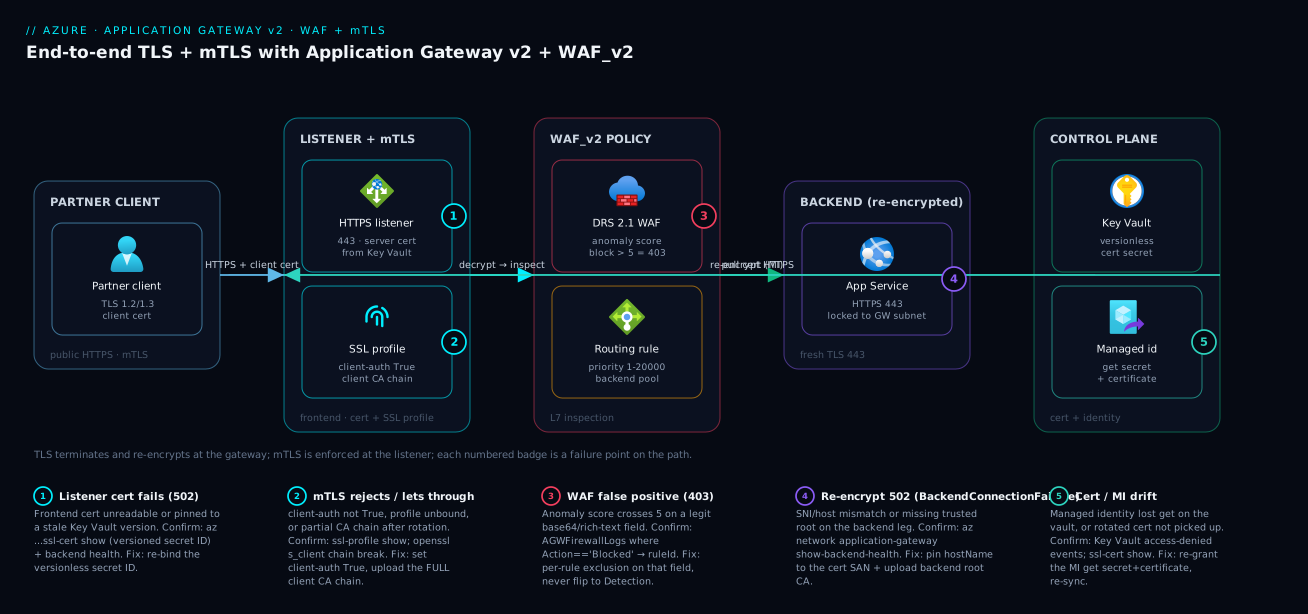
The diagram traces a partner’s HTTPS request as it actually flows, then maps each failure class onto the exact hop where it bites. Read it left to right. A partner client opens a TLS 1.2/1.3 session and presents a client certificate. That lands on the gateway’s HTTPS listener, which holds the server cert pulled from Key Vault via the gateway’s managed identity, and an SSL profile that validates the client cert against the trusted client CA chain — this is where mTLS is enforced. The request then passes through the WAF policy (DRS 2.1, anomaly scoring) which inspects headers and the decrypted body; a request that crosses the score threshold is blocked with a 403 here, and a legitimate-but-weird field is exactly where a false positive fires. Past the WAF, a routing rule selects the backend pool, and the backend HTTP settings open a fresh re-encrypted TLS session to the backend — validating the backend’s chain against the uploaded trusted root and presenting the right SNI. The backend (App Service on 443, locked to the gateway subnet) finally serves the response, having received the forwarded X-Client-Cert-* headers it uses to authorize.
Notice where the numbered failure badges sit: on the listener (cert unreadable → 502), the WAF (false positive 403), the backend HTTP settings (re-encryption 502 on SNI/root mismatch), and the Key Vault/managed-identity link (cert/MI drift after a rotation). That is the whole diagnostic map — the first question on every incident is “did the firewall say no (403) or could the gateway not reach a healthy backend (502)?”, and the badge you land on tells you whether to open the WAF log, backend health, or Key Vault access first.
Real-world scenario
Meridian Pay runs a payments API for a European retailer behind WAF_v2 with DRS 2.1, end-to-end TLS, and mTLS for the retailer’s settlement service. The estate is a Standard_v2 gateway (autoscale 2–10 instances, zone-redundant) in West Europe, fronting an App Service backend on a P1v3 plan, with the frontend cert sourced from Key Vault and the backend leg re-encrypted to satisfy PCI-DSS. The platform team is five engineers; the gateway and WAF together cost about ₹52,000/month at their steady autoscale floor.
The incident began hours after a partner go-live. Legitimate POSTs to /v1/settlements started returning 403 — not all of them, roughly one in three, and only from the new partner. The on-call engineer’s first instinct, under revenue pressure, was to flip the policy from Prevention to Detection “to unblock checkout.” A second engineer stopped them: that would have disabled SQLi protection on a payments endpoint, an unacceptable PCI exposure, and dropping inspection was exactly the move the runbook forbade. They held Prevention and went to the logs instead.
The firewall log told the truth in one query. AGWFirewallLogs filtered to Action == "Blocked" pinned it to rule 942430 (restricted SQL character anomaly) firing on the request body. The partner’s settlement payload embedded a base64-encoded signature whose runs of +, /, and = read as SQL noise; under anomaly scoring, the partial matches stacked past the threshold of 5 and the request was blocked. The constraint was sharp: they could not weaken SQLi protection on this endpoint, and because TLS terminated re-encrypted by design, the body was being inspected on purpose. There was no “turn it off” answer that survived audit.
The fix was a per-rule exclusion scoped to exactly the offending field — RequestArgKeys matching the signature argument, for rule 942430 only — leaving every other SQLi rule and every other field on the endpoint fully inspected. A path-specific WAF policy kept the exclusion off the rest of the site, so the marketing pages and the customer API never lost a single rule.
az network application-gateway waf-policy managed-rule exclusion rule-set add \
  --policy-name wafp-payments --resource-group rg-edge \
  --type Microsoft_DefaultRuleSet --version 2.1 \
  --group-name SQLI --rule-ids 942430 \
  --match-variable RequestArgKeys \
  --selector-match-operator Equals \
  --selector signature
The 403s stopped within minutes of the policy update, SQLi coverage stayed intact everywhere else, and the exclusion went into Terraform with a comment linking the partner ticket and the exact log query that justified it. A week later a second, subtler issue surfaced: after the retailer rotated their client CA, mTLS handshakes from the settlement service began failing with a TLS alert. The cause was that only the leaf-issuing CA had been uploaded, not the full chain — the new intermediate was missing from trustedClientCertificates. Uploading the complete chain restored it. The lesson the team wrote on the wall: “A WAF 403 is a question — which rule, which field — not a verdict on the firewall. The fix is a scalpel, never a switch.”
The incident as a timeline, because the order of moves is the lesson:
| Time | Symptom | Action taken | Effect | What it should have been |
|---|---|---|---|---|
| T+0 | 403 on ~33% of partner POSTs | (alert fires) | — | Ask: which rule, which field? |
| T+3m | Still 403 | Proposed: flip to Detection | (blocked by second engineer) | Never disable inspection on payments |
| T+8m | Still 403 | AGWFirewallLogs Action==Blocked |
Rule 942430 on body identified | The breakthrough — read the log first |
| T+15m | Root cause clear | Confirm base64 signature stacks anomaly score | Two facts: rule + field | — |
| T+22m | Mitigated | Per-rule exclusion on signature for 942430 |
403s clear, coverage intact | Correct, scoped fix |
| T+1d | Hardened | Exclusion into Terraform + log query comment | Auditable, re-reviewable | — |
| T+1w | mTLS handshake fails after CA rotation | Upload full client CA chain (intermediate missing) | mTLS restored | Always upload the complete chain |
Advantages and disadvantages
The “L7 reverse proxy with an integrated, scoring-based WAF and re-encryption” model both solves the edge-security problem and creates a tuning burden. Weigh it honestly:
| Advantages (why this model helps you) | Disadvantages (why it bites) |
|---|---|
| End-to-end TLS keeps the backend leg encrypted — clean PCI/HIPAA in-transit posture | The second handshake fails silently as a 502 when SNI/root/probe is wrong |
| Anomaly scoring blocks on accumulated signal, not one twitchy rule — fewer blunt false positives | A legit-but-weird field (base64, rich text) stacks partial matches past the threshold |
| Exclusions let you keep full protection while exempting one noisy field | Every exclusion is a hole that drifts out of date on each rule-set bump |
| Key Vault integration auto-rotates the frontend cert via managed identity | A pinned version or a lost MI grant serves an expired cert / 502 with no obvious cause |
| mTLS enforces caller identity at the edge before traffic touches the app | The gateway authenticates the cert but not authorization — forge-able if the backend is reachable directly |
| Custom rules give cheap, fast geo/rate/bot decisions ahead of managed rules | Wrong priority or match variable = a rule that silently never matches |
WAF + diagnostics (AGWFirewallLogs, backend health) make every block/failure explainable |
The flat 502/403 abstracts the real hop; you must dig into logs to localise it |
| Zone-redundant, autoscaling v2 SKU removes capacity as a failure mode | Higher fixed cost than a plain Load Balancer; WAF adds per-policy and capacity-unit cost |
The model is right for regulated, partner-facing, or inspection-required web estates where you need L7 routing, a real WAF, and encrypted backend legs. It is overkill for a simple internal app that needs only L4 balancing (use a Standard Load Balancer) or a purely global static front (consider Front Door). The disadvantages are all manageable — but only if you treat the WAF as a tuned control with documented exclusions, the certs as an automated lifecycle, and the backend as something only the gateway can reach.
Hands-on lab
Stand up a WAF_v2 gateway in Detection, watch a benign SQLi canary get matched but not blocked, flip to Prevention, watch it get blocked, then scope an exclusion — all in Cloud Shell (Bash). This uses real (billable) resources; the teardown at the end stops the meter.
Step 1 — Variables and resource group.
RG=rg-agw-lab
LOC=westeurope
VNET=vnet-agw-lab
AGW=agw-lab
WAFP=wafp-lab
az group create -n $RG -l $LOC -o table
Step 2 — Network: a dedicated subnet for the gateway (it needs its own).
az network vnet create -g $RG -n $VNET --address-prefix 10.40.0.0/16 \
  --subnet-name snet-agw --subnet-prefix 10.40.1.0/24 -o table
az network public-ip create -g $RG -n pip-agw --sku Standard --allocation-method Static -o table
Expected: a VNet with a /24 gateway subnet and a Standard static public IP.
Step 3 — Create a WAF_v2 policy in Detection, pinned to DRS 2.1.
az network application-gateway waf-policy create -n $WAFP -g $RG -o table
az network application-gateway waf-policy policy-setting update \
  --policy-name $WAFP -g $RG --state Enabled --mode Detection --request-body-check true
az network application-gateway waf-policy managed-rule rule-set add \
  --policy-name $WAFP -g $RG --type Microsoft_DefaultRuleSet --version 2.1
Step 4 — Create the WAF_v2 gateway pointing a default backend at a public sample. (Any always-200 origin works as a stand-in backend.)
az network application-gateway create -g $RG -n $AGW \
  --sku WAF_v2 --capacity 2 --public-ip-address pip-agw \
  --vnet-name $VNET --subnet snet-agw \
  --servers httpbin.org \
  --waf-policy $WAFP -o table
Expected: a WAF_v2 gateway, operationalState: Running, the policy associated. Provisioning takes several minutes.
Step 5 — Send a benign SQLi canary while in Detection (it should be MATCHED, not blocked).
AGW_IP=$(az network public-ip show -g $RG -n pip-agw --query ipAddress -o tsv)
curl -s -o /dev/null -w "Detection mode HTTP: %{http_code}\n" \
  "http://$AGW_IP/get?id=1%27%20OR%20%271%27=%271"
Expected: 200 (Detection logs the match but passes it). The match is recorded in AGWFirewallLogs if diagnostics are wired.
Step 6 — Flip to Prevention and re-send (now it should be BLOCKED).
az network application-gateway waf-policy policy-setting update \
  --policy-name $WAFP -g $RG --mode Prevention
sleep 20
curl -s -o /dev/null -w "Prevention mode HTTP: %{http_code}\n" \
  "http://$AGW_IP/get?id=1%27%20OR%20%271%27=%271"
Expected: 403 — the anomaly score crossed the threshold and the WAF blocked it.
Step 7 — Scope a per-rule exclusion and confirm the canary’s field is now exempt.
az network application-gateway waf-policy managed-rule exclusion rule-set add \
  --policy-name $WAFP -g $RG \
  --type Microsoft_DefaultRuleSet --version 2.1 \
  --group-name SQLI --rule-ids 942100 \
  --match-variable RequestArgNames \
  --selector-match-operator Equals --selector id
sleep 20
curl -s -o /dev/null -w "After exclusion HTTP: %{http_code}\n" \
  "http://$AGW_IP/get?id=1%27%20OR%20%271%27=%271"
Expected: 200 again — the id arg is now excluded from rule 942100 only; every other field and rule still inspects.
Validation checklist. You watched the same canary be matched-not-blocked in Detection, blocked in Prevention, and passed once its field was excluded from one rule — the entire WAF tuning loop in three requests. The lab steps mapped to what each proves:
| Step | What you did | What it proves | Real-world analogue |
|---|---|---|---|
| 3 | Policy in Detection, DRS 2.1 pinned | Burn-in is the safe default | Every new WAF deployment |
| 5 | Canary in Detection → 200 | Detection logs but never blocks | The soak period before Prevention |
| 6 | Flip to Prevention → 403 | Anomaly score crosses the threshold | The moment a false positive would appear |
| 7 | Per-rule exclusion → 200 | The scalpel fixes one field, keeps coverage | The Meridian Pay fix |
Cleanup (avoid lingering gateway charges — the v2 gateway is the expensive part).
az group delete -n $RG --yes --no-wait
Cost note. A WAF_v2 gateway bills per gateway-hour plus capacity units; an hour of this lab is a few hundred rupees. Deleting the resource group stops everything — do it as soon as you are done.
Common mistakes & troubleshooting
This is the playbook — the part you bookmark. First as a scannable table you read mid-incident, then the same entries with the full confirm-command detail underneath.
| # | Symptom | Root cause | Confirm (exact cmd / portal path) | Fix |
|---|---|---|---|---|
| 1 | 502 on every request right after binding a Key Vault cert | Gateway’s managed identity lacks get on the secret |
Portal → gateway → Backend health (unhealthy); az keyvault secret show as the MI fails |
Grant the MI get on secrets/certs; re-sync |
| 2 | 502 BackendConnectionFailure, backend is up |
SNI / host-name mismatch on the re-encrypt leg | az network application-gateway show-backend-health |
Set hostName to the backend cert’s SAN, or pickHostNameFromBackendAddress |
| 3 | 502 on re-encrypt, private/self-signed backend | Trusted root CA not uploaded/referenced | Backend health detail: “certificate not trusted” | Upload backend root CA; reference it on the HTTP setting |
| 4 | Healthy backend shows unhealthy → 502 | Probe path/status mismatch | Backend health shows probe failing | Point probe at /healthz; set --match-status-codes |
| 5 | 403 on legitimate requests | WAF rule false positive (anomaly score over threshold) | AGWFirewallLogs where Action==“Blocked” → ruleId |
Per-rule exclusion on the offending field |
| 6 | WAF doesn’t block a known-bad request | Policy in Detection, or not associated | az ... waf-policy policy-setting shows mode=Detection |
Move to Prevention; confirm association |
| 7 | mTLS lets a request through with no client cert | client-auth-configuration not True / profile unbound |
az ... ssl-profile show; listener has no profile |
Set client-auth True; bind profile to the listener |
| 8 | mTLS handshake fails after a CA rotation | Incomplete client CA chain (missing intermediate) | openssl s_client shows chain break |
Upload the FULL chain in one .cer |
| 9 | Custom rule has no effect | Wrong priority (managed ran first) or wrong match variable | Custom-rule order; AGWFirewallLogs shows no match |
Lower the priority number; fix the match variable |
| 10 | Wrong site answers on a shared public IP | Catch-all basic listener priority too low / host missing | az ... http-listener list (check hostNames) |
Give catch-all a high priority; set multi-site host |
| 11 | Site serves an expired cert despite renewal | Frontend cert bound to a pinned Key Vault version | az ... ssl-cert show shows a versioned secret ID |
Re-bind the versionless secret ID |
| 12 | Intermittent 502 under load behind the gateway | requestTimeout shorter than backend’s slow path |
App Insights duration vs requestTimeout |
Raise requestTimeout; speed up backend |
| 13 | 403 from corporate users after adding a rate limit | Threshold keys on a shared NAT IP | AGWFirewallLogs rate-limit blocks from one IP |
Raise threshold; key on session, not ClientAddr |
| 14 | TLS handshake fails for some clients | SSL policy floor too high for legacy clients | Client TLS version vs minProtocolVersion |
Negotiate a floor; upgrade clients; or CustomV2 |
The expanded form, with the full reasoning for the entries that bite hardest:
1. 502 on every request immediately after binding a Key Vault certificate.
Root cause: The gateway’s managed identity does not have get on the Key Vault secret/certificate, so it cannot read the frontend cert and the listener fails.
Confirm: Backend health shows the gateway unhealthy at the listener; try reading the secret as the MI (az keyvault secret show with the MI’s permissions) and it is denied; the gateway’s activity log shows a Key Vault access failure.
Fix: Grant the MI get on secrets and certificates (access policy or RBAC Key Vault Secrets User), then the gateway re-syncs; on a user-assigned identity confirm it is the one bound to the gateway.
# Grant the gateway's user-assigned identity read on the vault (RBAC model)
MI_PRINCIPAL=$(az identity show -n id-agw -g rg-edge --query principalId -o tsv)
az role assignment create --assignee "$MI_PRINCIPAL" \
  --role "Key Vault Secrets User" \
  --scope $(az keyvault show -n kv-edge --query id -o tsv)
2. 502 BackendConnectionFailure when the backend is demonstrably up.
Root cause: The re-encryption handshake presents an SNI / host name the backend’s certificate is not issued for, so the TLS session to the backend fails.
Confirm: az network application-gateway show-backend-health returns Unhealthy with a TLS/host detail; the backend itself answers fine on its own URL.
Fix: Set hostName on the backend HTTP setting to a SAN on the backend cert, or use pickHostNameFromBackendAddress when the pool is an FQDN whose cert matches.
az network application-gateway show-backend-health \
  --name agw-prod --resource-group rg-edge \
  --query "backendAddressPools[].backendHttpSettingsCollection[].servers[].{addr:address,health:health}" \
  -o table
3. 502 on the re-encrypt leg to a private or self-signed backend.
Root cause: The backend’s trusted root CA was never uploaded or referenced, so the gateway cannot validate the backend chain.
Confirm: Backend health detail reports the backend certificate as not trusted.
Fix: Upload the backend root CA (root-cert create) and reference it (--root-certs) on the HTTP setting.
4. A healthy backend is marked unhealthy and the gateway 502s.
Root cause: The health probe targets a path or accepts status codes that do not match the backend’s real health response (default probe hits / and accepts 200–399).
Confirm: Backend health shows the probe failing while the app’s own health URL returns 200/204/401.
Fix: Point the probe at /healthz, set --match-status-codes to the backend’s real codes, and match the probe protocol/host to the re-encrypt leg.
5. Legitimate requests return 403.
Root cause: A WAF rule false positive — anomaly score crossed the threshold on a legitimately-weird field.
Confirm: AGWFirewallLogs filtered to blocked actions names the ruleId and the matched field.
Fix: Add a per-rule exclusion on that field only; never flip to Detection or disable the group.
AGWFirewallLogs
| where TimeGenerated > ago(15m)
| where Action == "Blocked"
| summarize hits = count() by RuleId = tostring(RuleId), Message, ClientIp
| order by hits desc
6. The WAF does not block a request you know is malicious.
Root cause: The policy is in Detection, or it was never associated with the gateway/listener/path.
Confirm: az network application-gateway waf-policy policy-setting shows mode: Detection; the gateway’s firewallPolicy.id is empty or points elsewhere.
Fix: Move to Prevention after burn-in; set firewallPolicy.id; remember the most specific association wins.
7. mTLS lets a request through that presented no client certificate.
Root cause: client-auth-configuration is not True, or the SSL profile is not bound to the listener.
Confirm: az ... ssl-profile show shows client-auth disabled; the listener has no sslProfile.
Fix: Set client-auth True and bind the profile to the HTTPS listener.
# Expect a TLS handshake failure (no client cert presented)
curl -sv https://partners.contoso.com/ 2>&1 | grep -iE "alert|handshake|certificate"

# Expect 200 with a valid client cert + key
curl -s -o /dev/null -w "%{http_code}\n" \
  --cert ./partner.crt --key ./partner.key \
  https://partners.contoso.com/healthz
8. mTLS handshakes fail after the partner rotates their CA.
Root cause: Only the leaf-issuing CA was uploaded, not the full chain — the new intermediate is missing from trustedClientCertificates.
Confirm: openssl s_client -connect host:443 -cert client.crt -key client.key shows a chain verification break.
Fix: Upload the complete chain (root + all intermediates) in one .cer to trusted-client-cert.
9. A custom rule appears to do nothing.
Root cause: Its priority is higher (later) than a managed match that already decided the request, or its match variable/operator does not actually match the traffic.
Confirm: The rule’s order shows a lower-priority rule running first; AGWFirewallLogs shows no match for the rule’s name.
Fix: Lower the priority number so it runs first; verify the match variable (e.g. RemoteAddr for geo, RequestUri for path) and operator.
10. The wrong site answers on a shared public IP.
Root cause: A catch-all basic listener has a low (early) priority and wins before the multi-site host match, or the multi-site listener is missing its hostName.
Confirm: az network application-gateway http-listener list shows the basic listener with no host and an early-priority rule.
Fix: Give the catch-all a high priority number; set hostNames on the multi-site listeners so host matches win first.
11. The site serves an expired certificate even though Key Vault renewed it.
Root cause: The frontend cert was bound to a pinned Key Vault version, so the gateway never picks up the renewed version.
Confirm: az network application-gateway ssl-cert show shows a secret ID with a version GUID after /secrets/<name>.
Fix: Re-bind the versionless secret ID so the gateway polls for new versions automatically.
12. Intermittent 502 under load when the gateway fronts App Service.
Root cause: The gateway’s requestTimeout is shorter than the backend’s slow path, so it cuts the upstream and returns 502 while the backend was still working — a class shared with App Service 502 diagnosis.
Confirm: App Insights shows the backend request completing just over the requestTimeout; compare the two numbers. This crosses into Troubleshooting Azure App Service: 502/503, Cold Starts & Restart Loops.
Fix: Raise requestTimeout to cover the legitimate worst case, and fix the slow backend.
13. Corporate users get 403 after you add a rate-limit rule.
Root cause: The threshold keys on ClientAddr, and many users share one corporate NAT IP, so the population blows the per-IP threshold.
Confirm: AGWFirewallLogs shows rate-limit blocks concentrated on a single source IP that is actually a NAT.
Fix: Raise the threshold, or key on a session/cookie variable rather than the raw client address.
14. TLS handshakes fail for a subset of clients.
Root cause: The SSL policy floor (minProtocolVersion) is higher than some legacy clients support.
Confirm: Compare the failing client’s max TLS version to the gateway’s minProtocolVersion.
Fix: Negotiate a sane floor (TLS 1.2 is the right modern minimum), upgrade the clients, or use a CustomV2 policy that also offers TLS 1.3 to capable callers.
Verify
Confirm each layer end to end, not just that the page loads.
End-to-end TLS is actually re-encrypting — backend health must be green with the HTTPS probe, proving the gateway completed a TLS handshake to the backend:
az network application-gateway show-backend-health \
  --name agw-prod --resource-group rg-edge \
  --query "backendAddressPools[].backendHttpSettingsCollection[].servers[].{addr:address,health:health}" \
  -o table
mTLS rejects requests without a client cert and accepts a valid one (commands above in mistake #7). The WAF blocks a benign canary once in Prevention:
# A request that trips SQLi scoring; expect 403 in Prevention mode
curl -s -o /dev/null -w "%{http_code}\n" \
  "https://www.contoso.com/?id=1%27%20OR%20%271%27=%271"
Confirm which rule fired by reading the firewall log in KQL (query above in mistake #5). The verification matrix — what each check proves and what a failure means:
| Verify step | Command / signal | Pass looks like | Failure means |
|---|---|---|---|
| Backend re-encryption | show-backend-health |
All servers Healthy |
SNI/root/probe wrong (mistakes 2–4) |
| Frontend cert is live | ssl-cert show |
Versionless secret ID resolved | MI lost access or pinned version (1, 11) |
| WAF blocks in Prevention | canary → 403 | 403 returned | Detection mode or unassociated (6) |
| mTLS enforced | curl without cert → TLS alert | Handshake refused | client-auth off / profile unbound (7) |
| Exclusion is scoped | AGWFirewallLogs after fix |
Only the excluded field passes | Exclusion too broad/narrow (5) |
| Custom rule fires | AGWFirewallLogs shows the rule |
Rule name appears on match | Wrong priority/variable (9) |
Best practices
- Re-encrypt to the backend on anything regulated. Never offload-and-forward-HTTP for PCI/HIPAA data; upload the backend root CA and pin SNI so the second handshake actually completes.
- Bind the frontend cert via a versionless Key Vault secret ID. It is the only way renewals flow automatically; a pinned version silently serves expired certs.
- Keep the gateway’s managed identity grant healthy.
geton secrets and certificates; alert on Key Vault access failures so a lost grant surfaces before the cert it serves expires. - Enforce a TLS 1.2 floor (1.3 where clients allow) with a vetted cipher list. Use a CustomV2 SSL policy and review it against your compliance baseline.
- Always burn the WAF in on Detection, mine the logs, then move to Prevention. Pin the rule-set version (DRS 2.1) so an upstream default never shifts your posture.
- Fix false positives with the narrowest-scope exclusion. Per-rule before per-group before global; disable a single rule before a group; document every hole in IaC with the justifying log query.
- Re-review every exclusion and disabled rule on each DRS/CRS version bump. An upgrade can renumber or retune the exact rule you exempted — a deliberate review beats a surprise outage.
- Prioritise custom rules ahead of managed rules deliberately. Geo/rate/bot decisions are cheap; give them low priority numbers and verify the match variable actually matches.
- Lock the backend to the gateway subnet. mTLS and forwarded
X-Client-Cert-*headers are worthless if a caller can reach the backend directly and forge them; pair with NSGs / Private Link. - Harden responses at the edge. Rewrite
Set-CookiewithSecure; HttpOnly; SameSite, add HSTS, and stripServer/X-Powered-Byso a backend change is not required for a security baseline. - Run the gateway zone-redundant with autoscale. The v2 SKU removes capacity as a failure mode; set a sane min so a traffic spike never starves the WAF.
- Send
AGWFirewallLogsand access logs to Log Analytics from day one. Without them a 403 is a mystery; with them it is a two-minute query naming the rule and field.
The alerts worth wiring before the next incident — leading indicators, not the lagging “site down”:
| Alert on | Signal | Threshold (starting point) | Why it’s leading |
|---|---|---|---|
| Backend unhealthy | UnhealthyHostCount |
≥ 1 for 5 min | Re-encryption/probe breaking before users feel it |
| WAF block spike | AGWFirewallLogs blocked count |
sudden 5× baseline | A false positive (or an attack) just started |
| Cert nearing expiry | Key Vault cert expiry | < 30 days | Catch a rotation/MI problem before the cert dies |
| MI access failure | Key Vault access-denied events | any | The gateway just lost the ability to read its cert |
| Capacity saturation | CurrentCapacityUnits vs max |
> 80% of max | WAF inspection starving under load |
| Response latency | BackendLastByteResponseTime p95 |
> your SLO | Slow backend creeping toward requestTimeout |
Security notes
- Managed identity over secrets for cert sourcing. The gateway reads its frontend cert from Key Vault via its managed identity — never embed a PFX password in a pipeline. Grant least privilege:
Key Vault Secrets User, not a broad role. The full cert lifecycle lives in Azure Key Vault: Secrets, Keys & Certificates. - End-to-end TLS, not offload, for sensitive data. A plaintext backend leg inside the VNet is a finding; re-encrypt so the data is encrypted on every hop, even though the WAF still inspects the decrypted body at the gateway.
- mTLS authenticates, your backend authorizes. The gateway validates the client cert chains to a trusted CA and is in date; it does not check the subject, thumbprint, or revocation by default. Forward
X-Client-Cert-*and enforce authorization at the backend. - Lock the backend to the gateway only. Use NSGs and/or Private Endpoints so the backend accepts traffic exclusively from the gateway subnet — otherwise a caller bypasses both the WAF and mTLS and can forge the client-cert headers. See Azure Private Link & Private DNS for PaaS.
- Don’t leak rule detail to callers. A custom block response should be generic; never echo the
ruleIdor matched field to the client — that hands an attacker your tuning. - Treat every exclusion as an attack surface. A global exclusion on a field means that field is never inspected; keep them per-rule, documented, and reviewed.
- Enforce HTTPS-only and revocation where it matters. Redirect HTTP→HTTPS at the listener, enforce a TLS 1.2+ floor, and enable OCSP revocation on mTLS profiles for partner endpoints.
The security knobs that also prevent incidents — secure and resilient pull the same direction here:
| Control | Setting / mechanism | Secures against | Also prevents |
|---|---|---|---|
| Managed identity + KV cert | gateway identity + versionless secret ID |
PFX password leakage | Manual-rotation cert expiry (502) |
| End-to-end TLS | protocol: Https + trusted root |
Cleartext on the backend leg | Audit findings blocking the project |
| mTLS + SSL profile | client-auth-configuration: True |
Anonymous partner calls | Token-only spoofing on B2B endpoints |
| Backend subnet lockdown | NSG / Private Endpoint to gateway | WAF/mTLS bypass | Forged X-Client-Cert-* headers |
| OCSP revocation | verifyClientRevocation: OCSP |
Revoked client certs accepted | Stale-cert acceptance after compromise |
| Response hardening | Set-Cookie/HSTS/server-strip rewrites |
XSS/MITM/fingerprinting | Waiting on an app change for a baseline |
| Pinned rule-set version | DRS 2.1 explicit | Silent posture drift on upgrade | Surprise rule renumbering breaking exclusions |
Cost & sizing
The bill drivers and how they interact with the design:
- Gateway-hours dominate the fixed cost. A
WAF_v2gateway bills per gateway-hour for the resource plus capacity units (a blend of compute, connections, and throughput) that scale with load. The WAF adds cost overStandard_v2; the difference buys you the firewall, so it is rarely worth dropping for a regulated app. - Autoscale floor vs ceiling. Set the minimum instance/capacity-unit count to your steady load (you pay for it continuously) and the maximum to your spike — too low a floor starves the WAF during a burst; too high a floor wastes money at 3am.
- Re-encryption adds backend CPU, not gateway cost. The second TLS handshake runs on the backend; a heavy backend may need a bigger SKU, but the gateway’s price is unchanged.
- Log Analytics ingestion is billed per GB.
AGWFirewallLogsand access logs are worth every paisa for diagnosis, but a noisy site can generate volume — sample access logs if needed, keep firewall logs in full. - Key Vault operations are negligible. Cert reads by the managed identity are a rounding error; the value (auto-rotation, no leaked passwords) vastly outweighs the cost.
A rough monthly picture for a single production gateway in an Indian region: a WAF_v2 at a modest autoscale floor lands around ₹45,000–60,000/month before traffic-driven capacity units, plus Log Analytics ingestion (₹2,000–6,000 depending on volume) and a trivial Key Vault line. The cost drivers and what each buys:
| Cost driver | What you pay for | Rough INR / month | What it buys | Watch-out |
|---|---|---|---|---|
WAF_v2 gateway-hours |
The gateway resource (per hour) | ~₹30,000–40,000 | L7 + WAF + re-encryption | Higher than Standard_v2 |
| Capacity units | Compute/conn/throughput under load | ~₹10,000–25,000 | Scaling with traffic | Spikes during sales/attacks |
Standard_v2 (no WAF) alt |
Gateway without the firewall | ~₹20,000–28,000 | L7 only | No WAF — wrong for regulated apps |
| Log Analytics ingestion | Firewall + access logs per GB | ~₹2,000–6,000 | Diagnosis (the whole playbook) | Sample access logs if noisy |
| Key Vault operations | Cert reads by the MI | < ₹200 | Auto-rotation, no PFX passwords | Negligible |
| Backend TLS overhead | Bigger backend SKU if CPU-bound | varies | Re-encrypted backend leg | Cost is on the backend, not the gateway |
Right-size by matching the SKU to the need: regulated or partner-facing → WAF_v2; L7 routing without inspection → Standard_v2; purely L4 → a Standard Load Balancer is far cheaper (see Azure Load Balancer vs Application Gateway). The WAF is not the place to save money on a payments endpoint — the cost of a single PCI finding dwarfs the gateway’s annual bill.
Interview & exam questions
1. What is the difference between SSL offload and end-to-end TLS on Application Gateway, and when must you use end-to-end? Offload terminates the client’s TLS at the gateway and forwards plain HTTP to the backend; end-to-end TLS re-encrypts by opening a fresh TLS session to the backend after the WAF inspects the decrypted body. You must use end-to-end for regulated data (PCI/HIPAA) because the plaintext backend leg in offload is a cleartext-in-transit finding. End-to-end needs the backend’s trusted root CA and correct SNI.
2. Why does a re-encryption setup return 502 BackendConnectionFailure even though the backend is up? The gateway’s TLS handshake to the backend failed — almost always because the SNI / host name it presents does not match the backend certificate’s SAN, or the backend’s root CA was never uploaded as a trusted root. Confirm with show-backend-health; fix by setting hostName (or pickHostNameFromBackendAddress) and referencing the uploaded root cert.
3. Why bind the frontend certificate with a versionless Key Vault secret ID? With a versionless ID the gateway polls Key Vault and picks up renewed certificate versions automatically; with a pinned version it never sees the new cert and serves the old (eventually expired) one until a manual re-bind. Versionless binding is the entire point of Key Vault integration — automatic rotation via the gateway’s managed identity.
4. Explain anomaly scoring in the WAF and why disabling one rule often fixes a false positive without weakening coverage. In anomaly scoring (DRS 2.1 / CRS 3.x), each matched rule adds a severity score (Critical 5, Error 4, Warning 3, Notice 2) rather than blocking outright; a request is blocked only when the cumulative score crosses the threshold (5 by default). A false positive is usually one or two rules stacking past the threshold on a weird-but-legit field, so excluding that field from those rules — or disabling a single noisy rule — clears the block while every unrelated rule keeps inspecting.
5. A legitimate POST returns 403 from the WAF. Walk through the correct fix. Read AGWFirewallLogs filtered to Action == "Blocked" to get the ruleId and the matched field. Add a per-rule exclusion scoped to exactly that field (e.g. RequestArgKeys Equals signature for rule 942430). Never flip the policy to Detection or disable the whole group — that removes protection from every other request. Document the exclusion in IaC with the justifying query.
6. How does mTLS work on Application Gateway, and what does the gateway not validate? The client presents a certificate during the TLS handshake; the gateway validates it against an SSL profile’s trusted client CA chain and checks it is in date. The gateway does not check the subject, thumbprint, or (by default) revocation — so authorization is the backend’s job. Forward X-Client-Cert-* headers and enforce allow-lists at the backend, and lock the backend to the gateway subnet so the headers cannot be forged.
7. Why must the backend be reachable only from the gateway when using mTLS? Because the gateway forwards the client-certificate identity to the backend as headers (X-Client-Cert-Subject, etc.), and the backend authorizes on those headers. If a caller can reach the backend directly, they bypass both the WAF and the mTLS handshake and can forge those headers, defeating the entire control. Lock it down with NSGs or Private Endpoints.
8. Why might a custom rule silently never match? Either its priority number is higher (later) than a managed-rule decision that already handled the request — custom rules run by ascending priority and short-circuit managed rules, so a high number runs too late — or the match variable/operator is wrong for the traffic (e.g. matching RequestUri when you meant RemoteAddr for geo). Confirm with AGWFirewallLogs showing no match, and lower the priority / fix the variable.
9. The frontend cert renewed in Key Vault but the site serves the expired one. Cause and fix? The SSL cert was bound to a pinned Key Vault version, so the gateway never picked up the renewed version. Confirm with ssl-cert show showing a version GUID in the secret ID; fix by re-binding the versionless secret ID. (A related cause is the managed identity losing get on the vault, which produces a 502 rather than a stale cert.)
10. Where should a WAF policy be associated, and what wins when there are multiple? A policy can attach gateway-globally, per-listener, or per-URI/path; the most specific association wins (path beats listener beats global). This lets you run a strict policy on /api/ while a looser baseline covers the rest of the site — and it is why a policy that seems ignored is often overridden by a more specific one.
11. What does requestBodyCheck control and why does it matter for a payments WAF? It enables inspection of request bodies (POST payloads) against the rule set; with it off, body-borne SQLi/XSS slips through. For a payments endpoint you keep it on (and re-encrypt so the body is inspectable) — which is exactly why a base64 signature field can trip SQLi rules, requiring a scoped exclusion rather than turning body checking off.
12. When would you choose Application Gateway over Front Door or a Standard Load Balancer? Choose Application Gateway for regional L7 with a real WAF, path-based routing, and re-encrypted backend legs. Choose Front Door for global anycast edge, CDN, and global WAF. Choose a Standard Load Balancer for L4 (TCP/UDP) where you need no HTTP inspection — it is far cheaper. The decision is covered in Azure Load Balancer vs Application Gateway.
These map to AZ-700 (Network Engineer) — design and implement application delivery and the WAF — and AZ-500 (Security Engineer) — secure networking, WAF policy, and managed identities for cert sourcing. The TLS/mTLS and Key Vault angle also touches AZ-204. A compact cert-mapping for revision:
| Question theme | Primary cert | Exam objective area |
|---|---|---|
| End-to-end TLS, re-encryption, SNI | AZ-700 | Application delivery; secure connectivity |
| WAF modes, anomaly scoring, exclusions | AZ-500 | Secure networking; WAF policy |
| mTLS, client-cert profiles | AZ-500 | Secure access; identity at the edge |
| Custom rules, geo/rate/bot | AZ-700 | Traffic management; WAF tuning |
| Key Vault cert + managed identity | AZ-500 / AZ-204 | Secure secrets; managed identities |
| App Gateway vs LB vs Front Door | AZ-700 | Design load balancing & delivery |
Quick check
- A regulated app terminates TLS at the gateway and forwards HTTP to the backend. What is the compliance problem and the fix?
- Backend health is red with
BackendConnectionFailure, but the backend answers fine on its own URL. Name the two most likely causes. - A legitimate POST returns 403. What is the wrong move under pressure, and what is the correct, scoped fix?
- Your frontend cert renewed in Key Vault but the site still serves the old one. What is the single most likely binding mistake?
- With mTLS enabled, what does the gateway validate, and what must the backend do that the gateway will not?
Answers
- The plaintext backend leg inside the VNet is a cleartext-in-transit finding under PCI/HIPAA. The fix is end-to-end TLS — set the backend HTTP setting to
Https, upload the backend’s trusted root CA, and pin the correct SNI/host name so the re-encrypted handshake completes. - Either the SNI / host name presented on the re-encrypt leg does not match the backend certificate’s SAN, or the backend’s trusted root CA was never uploaded/referenced. Confirm with
show-backend-health; fix by settinghostName(orpickHostNameFromBackendAddress) and uploading the root cert. - The wrong move is flipping the policy to Detection (or disabling the whole rule group), which removes protection from every request. The correct fix is a per-rule exclusion scoped to the exact offending field (found in
AGWFirewallLogs), leaving all other rules and fields inspecting. - The cert was bound to a pinned Key Vault version (a version GUID after
/secrets/<name>), so the gateway never polls for renewals. Re-bind the versionless secret ID. (If it were a 502 instead of a stale cert, suspect the managed identity losinggeton the vault.) - The gateway validates that the client certificate chains to a trusted CA and is in date (optionally issuer DN and OCSP revocation). It does not check the subject, thumbprint, or perform authorization — the backend must authorize on the forwarded
X-Client-Cert-*headers, and must be reachable only from the gateway so those headers cannot be forged.
Glossary
- Application Gateway v2 — Azure’s regional, autoscaling, zone-redundant L7 reverse proxy; the
Standard_v2(no WAF) andWAF_v2(with WAF) SKUs. - Listener — the component that matches incoming traffic by port and (multi-site) host name and holds the server certificate and, for mTLS, the SSL profile.
- Routing rule — binds a listener to a backend pool and a backend HTTP setting; needs a unique
priority(1–20000, lower wins) on v2. - Backend HTTP settings — the per-backend configuration for protocol, port, probe, host name/SNI, trusted root cert, timeout, and connection draining.
- End-to-end TLS (re-encryption) — the gateway terminates the client TLS, inspects the body, then opens a fresh TLS session to the backend so no hop is plaintext.
- Trusted root certificate — the backend’s root CA, uploaded to the gateway so it can validate the backend’s certificate chain on the re-encrypt leg.
- SNI (Server Name Indication) — the host name presented in the TLS handshake; it must match the backend cert’s SAN or the handshake (and probe) fails.
- SSL policy — the minimum TLS version and cipher suite list the gateway accepts; predefined or custom (CustomV2 adds TLS 1.3).
- SSL profile — bundles client-auth configuration, a trusted client CA chain, and an SSL policy; bound to a listener to enable mTLS.
- mTLS (mutual TLS) — the client presents a certificate the gateway validates against the trusted client CA chain; authentication at the edge, authorization at the backend.
- WAF policy (
WAF_v2) — a separate resource holding the mode, managed rule sets, custom rules, and exclusions; associated to the gateway, a listener, or a path. - Detection vs Prevention — Detection logs matches and passes traffic; Prevention blocks requests whose anomaly score crosses the threshold.
- Anomaly scoring — each matched rule adds a severity score (Critical 5/Error 4/Warning 3/Notice 2); a request is blocked when the cumulative score crosses the threshold (default 5).
- DRS / CRS — Microsoft Default Rule Set (2.1, includes Threat Intelligence) and the OWASP Core Rule Set (3.2); the managed rule sets the WAF runs.
- Exclusion — removes a named request attribute (header/cookie/arg) from inspection before rules run; scoped per-rule, per-group, or globally.
- Custom rule — a rule that runs before managed rules by ascending priority;
MatchRule(geo/IP allow-deny) orRateLimitRule(throttle by key). - Bot Manager rule set — Microsoft’s bot intelligence (Bad/Good/Unknown) you act on alongside the core rules.
- Managed identity (for the gateway) — the identity the gateway uses to read its frontend certificate from Key Vault; needs
geton secrets and certificates. AGWFirewallLogs— the Log Analytics table where WAF matches and blocks land, naming theruleId, the matched field, and the action.
Next steps
You can now run Application Gateway v2 with end-to-end TLS, mTLS, and a tuned WAF, and localise any 502/403 to a single hop. Build outward:
- Next: Azure Key Vault: Secrets, Keys & Certificates — master the certificate lifecycle that feeds every TLS leg and rotation here.
- Related: Azure Load Balancer vs Application Gateway — decide when L7 + WAF is right versus plain L4 balancing.
- Related: Troubleshooting Azure App Service: 502/503, Cold Starts & Restart Loops — where a gateway 502 turns out to be an upstream timeout on the backend.
- Related: Azure Private Link & Private DNS for PaaS — lock the backend to the gateway so mTLS and forwarded client-cert headers can’t be bypassed.
- Related: Azure Monitor & Application Insights for Observability — wire
AGWFirewallLogs, backend health, and capacity alerts into a single pane.