At 02:14 your phone buzzes: the public site is throwing 502 Bad Gateway. You hit refresh — sometimes it loads, sometimes it doesn’t. The deployment went out six hours ago and was fine. Nothing changed. Except something always changed. This is the most common production incident on Azure App Service — the platform-as-a-service that runs your web apps, APIs and web jobs on a managed fleet of Windows or Linux workers behind a shared front end — and it is maddening because the status code you see (502, 503) is reported by the front-end load balancer, not by your app. The front end is saying “I couldn’t get a good answer from your worker.” Why it couldn’t is the entire game, and at least a dozen distinct root causes hide behind those three digits.
This is the diagnostic playbook. We treat 502, 503, cold starts and restart loops not as four bugs but as four symptom classes, each with a fan-out of root causes you confirm with specific commands. You will learn to read the request pipeline — client → Front Door/App Gateway (optional) → App Service front end → worker (process or container) → outbound SNAT — and to localise a failure to exactly one hop, using the tools that tell the truth: az webapp log tail, the Kudu/SCM console, Diagnose and solve problems, Application Insights Failures + Live Metrics, the health check blade, and container logs. Every diagnosis comes with the exact path to confirm it and the precise fix, with both az CLI and Bicep (and KQL where the answer lives in logs). Because this is a reference you will return to mid-incident, the playbook itself, the error codes, the app settings and the plan tiers are all laid out as scannable tables — read the prose once, then keep the tables open at 02:14.
By the end you will stop guessing. When the pager goes off you will know whether you face a crashed worker, a container that never bound to the assigned port, a plan that ran out of instances, a Key Vault reference that failed at boot, SNAT port exhaustion from your own outbound calls, or simply a cold start Always On would have prevented. Knowing which within ninety seconds is what separates a five-minute incident from a two-hour one.
What problem this solves
App Service hides enormous machinery so you can git push and have a running web app. That abstraction is a gift until it breaks, then it becomes an opaque wall. The bare 502/503 HTML page deliberately tells you almost nothing — exposing internals to an anonymous caller would be a security leak. So the information you need is real and captured, but it lives in five or six different places, and if you don’t know which place maps to which failure you burn an hour clicking through blades.
What breaks without this knowledge: an on-call engineer restarts the app (which sometimes “fixes” it by accident, teaching the wrong lesson), scales up the plan (masking SNAT exhaustion for a day before it returns worse), or opens a support ticket and waits. Meanwhile the actual cause — a container listening on 3000 while App Service probes 8080, a deployment slot never warmed, or a health-check path that returns 500 because a downstream is down — sits there, perfectly diagnosable, ignored.
Who hits this: most teams running PaaS web apps, APIs or containers. It bites hardest on Linux container apps (the WEBSITES_PORT problem is near-universal for first-time deployers), apps with chatty outbound HTTP (SNAT exhaustion), cost-sensitive deployments without Always On (cold starts), and anyone using Key Vault references in app settings (boot-time failures that look like random restart loops). The fix is almost never “scale up” — it’s “find the hop that’s lying and make it tell the truth.”
To frame the whole field before the deep dive, here is every symptom class this article covers, the question it forces, and the one place to look first:
| Symptom class | What the front end is saying | First question to ask | First place to look | Most common single cause |
|---|---|---|---|---|
| 502 Bad Gateway | “I reached a worker but got a bad/no answer” | Did App Service even see the request fail? | az webapp log tail + App Insights Failures |
Container not on WEBSITES_PORT, or upstream timeout |
| 503 Service Unavailable | “I had no healthy worker to ask” | Is the plan out of capacity, or are instances being evicted? | Diagnose and solve → Application Restarts | Restart in progress on a single instance |
| Cold start (slow first request) | (not an error — just latency) | Was the worker idle/just-deployed/just-swapped? | App Insights request duration after gaps | Always On off → idle unload after ~20 min |
| Restart loop (flapping 502/503) | “the worker keeps dying or never goes healthy” | Same exception every boot, or memory-pinned? | az webapp log tail (repeating trace) |
Bad app setting or failed Key Vault reference |
| SNAT exhaustion | “outbound is failing under load” (shows as 502/timeouts) | Does it pass at rest and fail under load? | Diagnose and solve → SNAT Port Exhaustion | New HttpClient/socket per request |
Learning objectives
By the end of this article you can:
- Map any App Service
502/503to a specific hop in the request pipeline and name the most likely root cause for each. - Diagnose a 502 Bad Gateway as either a worker crash, a container not listening on
WEBSITES_PORT, a startup-time-limit overrun, an upstream timeout from Front Door/App Gateway, or SNAT port exhaustion — and confirm which with exact commands. - Diagnose a 503 Service Unavailable as a platform restart, plan over-commit/scale-out limit,
app_offline.htm, Free/Shared quota exhaustion, or health-check eviction. - Eliminate cold starts with Always On, pre-warmed instances, ARR affinity tuning and deployment-slot warm-up — and explain the JIT/image-pull mechanics underneath.
- Break a restart loop by isolating the cause: failing health-check path, bad app setting, Key Vault reference failure, OOM against the plan memory limit, or a crashing container.
- Drive the core diagnostic tools fluently:
az webapp log tail, Kudu/SCM, Diagnose and solve problems, Application Insights Failures + Live Metrics, health-check config, and container logs. - Read the canonical app-settings and plan-tier reference tables and pick the right App Service plan tier for each failure class — and explain what each tier actually fixes.
Prerequisites & where this fits
You should already understand the App Service basics: an App Service plan is the set of VM workers (an SKU like B1, P1v3) you rent, and one or more web apps run on that plan, sharing its CPU, memory and instance count. You should know how to run az in Cloud Shell, read JSON output, and that App Service has deployment slots (staging/production swap targets). Familiarity with HTTP status codes and basic Linux/Windows process concepts helps.
This sits in the Observability & Troubleshooting track. It assumes the compute fundamentals (the Azure App Service vs Container Apps vs AKS decision is upstream of it) and the platform mechanics from the Azure App Service Deep Dive: Plans, Scaling, Slots, TLS. It pairs tightly with Azure Monitor & Application Insights for observability, because Application Insights is the single most useful tool in this entire playbook. If you run App Service behind a front end, Application Gateway with WAF is the layer where some of these timeouts originate.
A quick map of who confirms what during an incident, so you call the right person fast:
| Layer | What lives here | Who usually owns it | Failure classes it can cause |
|---|---|---|---|
| Client / DNS | TLS, name resolution, retries | Frontend / SRE | 502/503 only if misrouted; mostly red herrings |
| Front Door / App Gateway | WAF, backend timeout, probes | Network team | 502 (upstream timeout), 403 (WAF/IP rules) |
| App Service front end (ARR) | Worker selection, port probe | Microsoft (platform) | 502 (no good answer), 503 (no worker) |
| Worker (process / container) | Your code, runtime, port bind | App / dev team | 502 (crash, wrong port), restart loop |
| App settings / Key Vault | Config, secrets, identity | App + platform | Restart loop (bad setting / KV ref) |
| Outbound (SNAT / NAT GW) | Egress to DB / APIs | Platform + network | 502/timeouts under load (SNAT) |
Core concepts
Five mental models make every later diagnosis obvious.
The status code names the front end’s complaint, not your bug. Every request goes through a front-end role (a shared layer running ARR — Application Request Routing) that picks a worker and proxies to it. A 502 Bad Gateway means the front end reached a worker but got a broken/no response (connection refused, reset, HTTP-violating, or a timeout waiting). A 503 Service Unavailable means it could not get a healthy worker at all — none available, app recycling, platform restarting, or a quota blocked it. “Bad answer from the worker” (502) versus “no worker to ask” (503) is the first fork in every decision tree.
Your worker is a process the platform babysits. On Windows your app runs under w3wp.exe; on Linux/containers it’s a process (often a Docker container the platform pulls and starts). The platform recycles (kills and restarts) it on triggers: crash, config change, deployment, failed health check, exceeding the startup time limit, or memory pressure. A restart loop is this recycle firing repeatedly because the app dies or fails to become healthy faster than it can stay up — the platform doing exactly what you told it, against an app that can’t stay alive.
The port contract is explicit and unforgiving. App Service tells your app which TCP port to listen on. Windows uses the injected HTTP_PLATFORM_PORT/ASPNETCORE_URLS; Linux built-in stacks honour the PORT env var; Linux custom containers must declare their port via the WEBSITES_PORT app setting (default probe is port 80). If your container listens on 3000 and you never set WEBSITES_PORT=3000, the front end probes 80, gets connection-refused, and returns 502 forever — even though your container is healthy. This is the number-one container failure and has nothing to do with your code.
Allocation is finite and shared. A plan has a fixed instance count and a per-instance memory ceiling tied to the SKU, shared by every app on it. SNAT (Source Network Address Translation) ports — the pool mapping your outbound connections to a shared public IP — are also finite (roughly 128 pre-allocated per instance, expandable but bounded). Burn through any of these and you get 5xx that looks like app bugs but is resource exhaustion; the CPU/memory/SNAT metrics tell you which ceiling you hit.
Cold start is latency, not an error. A worker with no warm process — idle and unloaded (no Always On), just deployed, scaled out to a new instance, or swapped in without warm-up — makes the first request pay for process start: runtime boot, JIT compilation (.NET/JVM), DI container build, connection-pool prime, and for containers an image pull and container start. That can take 10–60+ seconds. It’s not a 502 unless it exceeds a timeout; it’s a slow request, fixed by ensuring a warm worker always exists.
The vocabulary in one table
Before the deep sections, pin down every moving part. The glossary at the end repeats these for lookup; this table is the mental model side by side:
| Concept | One-line definition | Where it lives | Why it matters to 502/503 |
|---|---|---|---|
| App Service plan | The rented VM workers (SKU + count) | Subscription / resource group | Capacity ceiling; over-commit → 503 |
| Web app (site) | One app running on a plan | On the plan | The thing that crashes / flaps |
| Front end (ARR) | Shared layer that proxies to a worker | Microsoft-managed | Emits 502/503 codes |
| Worker | The process/container serving requests | On a plan instance | Crashes, wrong port, OOM |
WEBSITES_PORT |
Port your container listens on | App setting | Wrong/unset → 502 forever |
| SNAT port | Outbound connection → shared IP mapping | Per instance (~128) | Exhaustion → outbound 502/timeouts |
| Always On | Keeps a warm worker resident | Site config (B1+) | Off → cold-start latency |
| Health check | Path probed per instance | Site config | Bad path evicts all → 503 |
| Deployment slot | A swappable copy of the app | On the plan | Cold/no-warm-up swap → 502 |
| Key Vault reference | App setting @Microsoft.KeyVault(...) |
App setting + identity | Fails to resolve → crash loop |
| Recycle | Platform kills + restarts the worker | Platform behaviour | Repeated → restart loop |
| Cold start | First-request latency on a fresh worker | Worker lifecycle | Slow first request; can trip timeouts |
The HTTP status-code reference
Before the per-symptom anatomy, here is the lookup table you scan first: every status code you realistically see from an App Service app, what it actually means on this platform, the likely cause, how to confirm it, and the fix. The non-obvious ones are the ANCM 500.3x codes (the .NET Windows in-process hosting failures) and the difference between a platform 503 and an app-emitted 503.
| Code | Meaning | Likely cause on App Service | How to confirm | First fix |
|---|---|---|---|---|
| 502.3 Bad Gateway | Front end got no/broken answer from worker | Worker crashed, wrong WEBSITES_PORT, bound 127.0.0.1, upstream timeout, SNAT exhaustion |
az webapp log tail; default_docker.log port-probe line |
Match the symptom in the playbook below |
| 503 Service Unavailable | No healthy worker available | Restart in progress, plan over-commit, quota, all instances evicted | Diagnose and solve → Application Restarts | Run ≥2 instances; check quota/health |
| 500.30 ANCM In-Process Start Failure | .NET app failed to start in-process (Windows) | Unhandled startup exception, bad config, missing dependency | eventlog.xml in Kudu; stdout log |
Fix startup code/config; enable stdout logging |
| 500.31 ANCM Failed to Find/Load Runtime | Required .NET runtime missing/mismatched | Wrong target framework vs installed runtime | dotnet --info / publish settings; eventlog.xml |
Self-contained deploy or match runtime version |
| 500.32 ANCM Failed to Load dll | Wrong-bitness or missing native dll | x86/x64 mismatch, missing native dep | eventlog.xml ANCM detail | Match platform bitness; include native deps |
| 500.37 ANCM Failed to Start Within Startup Time Limit | App didn’t start before the ANCM timeout | Slow startup (migrations, blocking init) | eventlog.xml; startup duration | Speed up startup; raise startup limit; fail soft |
| 500.0 / 500 Internal Server Error | App threw at runtime | Unhandled exception in a request | App Insights Failures (exceptions) | Fix the throwing code path |
| 504 Gateway Timeout | Upstream waited too long for the worker | Slow backend > Front Door/App GW timeout | App Insights request duration vs timeout | Speed up backend; raise upstream timeout |
| 403 Forbidden (ip-restriction) | Access restriction / private access blocked the caller | IP rules, private endpoint, SCM lockdown | Access restrictions blade; accessRestrictions |
Add the caller’s IP/range or fix routing |
| 403 SSL required / cert | HTTPS-only or client-cert rule | httpsOnly, clientCertEnabled |
Site config; request scheme | Use HTTPS; present required client cert |
| 404 on a deployed app | Wrong start path, missing default doc, run-from-package issue | Bad wwwroot, wrong virtual app path |
Kudu /home/site/wwwroot listing |
Fix path / default document / package mount |
| 409 Conflict (deploy) | Concurrent deploy/swap or locked files | Overlapping ZipDeploy, file in use |
Activity log; deployment center | Serialise deploys; use run-from-package |
Three reading notes that save the most time:
| Distinction | The trap | How to tell them apart |
|---|---|---|
| Platform 503 vs app-emitted 503 | Your app may itself return 503 (e.g. a maintenance handler) | App Insights requests shows a request that ran and returned 503 → it’s yours; a platform 503 has no matching request row |
| 502 from App Service vs from the gateway | Hours wasted in the wrong logs | If App Insights shows the request succeeding (slowly) but the client got 502, the gateway emitted it |
| 500.3x (ANCM) vs generic 500 | ANCM = startup, generic 500 = runtime | 500.30/31/32/37 mean the worker never started; fix config/runtime, not a request handler |
Anatomy of a 502 Bad Gateway
A 502 means the front end got a bad answer from a worker. Five distinct causes. Scan the matrix, then read the detail for whichever row matches:
| # | 502 cause | Tell-tale signal | Confirm with | Real fix | Band-aid that masks it |
|---|---|---|---|---|---|
| 1 | Worker crashed / threw at startup | Stack trace + recycle in logs | az webapp log tail; App Insights Failures |
Fix startup code/config; fail soft | Restart (recurs in seconds) |
| 2 | Container not on WEBSITES_PORT |
“didn’t respond to HTTP pings on port: 80” | default_docker.log |
Set WEBSITES_PORT; bind 0.0.0.0 |
None — it never works |
| 3 | Startup exceeds time limit | Gap > 230 s between “starting” and “failing” | default_docker.log timestamps |
Shrink image; same-region ACR; raise limit | Raise limit only (still slow) |
| 4 | Upstream timeout (Front Door/App GW) | App Service logs show success, client got 502 | App Insights duration vs gateway timeout | Speed up backend; raise upstream timeout | Raise timeout only |
| 5 | SNAT port exhaustion | Fails under load, fine at rest | SNAT detector; SnatConnectionCount Failed |
Reuse connections; NAT Gateway | Scale out (+128 ports/instance) |
Cause 1 — The worker process crashed or threw at startup
Your code throws an unhandled exception at startup (bad connection string, missing env var, failed boot migration) or crashes under a specific request. The worker dies, the front end has nothing to proxy, you get 502 (and 503 while it recycles).
Confirm. Stream live logs and watch for the stack trace and recycle:
# Tail live application + platform logs (Ctrl-C to stop)
az webapp log tail --name app-shop-prod --resource-group rg-shop-prod
Then pull the Application Insights Failures view — it groups exceptions by type and shows the failing operation:
// Top server exceptions in the last hour, with the operation that threw
exceptions
| where timestamp > ago(1h)
| summarize count() by problemId, outerMessage, operation_Name
| order by count_ desc
In the portal: Diagnose and solve problems → Availability and Performance → Web App Down / Application Crashes surfaces the same crash with the worker exit.
Fix. Fix the throwing code — for boot crashes, usually a misconfigured app setting (see Key Vault references below) or a dependency unreachable at startup. Make startup resilient: don’t run blocking migrations or hard-dependency checks synchronously in startup; fail soft and surface readiness via the health check instead.
Cause 2 — Container not listening on the assigned port (WEBSITES_PORT)
The classic. Your custom Linux container listens on 8000 or 3000, but App Service probes 80 by default. Connection refused → 502. The container logs show your app started fine — that’s what makes it confusing.
Confirm. Pull the container/startup logs and find the platform’s port-probe failure:
# Download the Docker/container startup log (Linux custom container)
az webapp log download --name app-api-prod --resource-group rg-shop-prod \
  --log-file logs.zip
# Inside, default_docker.log shows lines like:
#   "Container ... didn't respond to HTTP pings on port: 80, failing site start"
#   "Stopping site ... because it failed during startup."
That “didn’t respond to HTTP pings on port: 80” line is the dead giveaway.
Fix. Set WEBSITES_PORT to the port your container actually binds:
az webapp config appsettings set --name app-api-prod --resource-group rg-shop-prod \
  --settings WEBSITES_PORT=8000
resource site 'Microsoft.Web/sites@2023-12-01' = {
  name: 'app-api-prod'
  location: location
  properties: {
    serverFarmId: plan.id
    siteConfig: {
      linuxFxVersion: 'DOCKER|myregistry.azurecr.io/api:1.4.2'
      appSettings: [
        { name: 'WEBSITES_PORT', value: '8000' }
        // Make the container bind 0.0.0.0:8000, NOT 127.0.0.1 — see gotcha
      ]
    }
  }
}
The deeper gotcha: your app must bind 0.0.0.0 (all interfaces), not 127.0.0.1/localhost. A container that binds only loopback rejects the platform’s probe from outside the container even when the port is right. Here is how the port contract differs by stack — knowing your row removes the guesswork:
| Hosting stack | How the port is communicated | Default the platform probes | What you set | Bind address required |
|---|---|---|---|---|
| Windows .NET (in-process) | HTTP_PLATFORM_PORT injected → ANCM |
Injected port | Nothing (ANCM handles it) | Loopback (ANCM proxies) |
| Windows .NET (out-of-process) | ASPNETCORE_URLS / HTTP_PLATFORM_PORT |
Injected port | Honour ASPNETCORE_URLS |
localhost (ANCM proxies) |
| Linux built-in (Node/Python/Java/.NET) | PORT env var |
The PORT value (often 8080) |
Read PORT; listen on it |
0.0.0.0 |
| Linux custom container | WEBSITES_PORT app setting |
80 if unset | WEBSITES_PORT=<real port> |
0.0.0.0 (mandatory) |
| Windows custom container | WEBSITES_PORT app setting |
80 | WEBSITES_PORT=<real port> |
0.0.0.0 |
Cause 3 — Startup exceeds the container start time limit
A heavy container (large runtime, slow init, image pull on a cold instance) takes longer to become responsive than the startup ceiling. Default is 230 seconds; the platform gives up, fails the start, and you get 502/503 on a flapping site.
Confirm. default_docker.log shows the start abandoned after the limit — timestamps between “Starting container” and “failing site start” exceed it.
Fix. Raise the limit (max 1800 seconds), but treat a long start as a smell:
az webapp config appsettings set --name app-heavy-prod --resource-group rg-shop-prod \
  --settings WEBSITES_CONTAINER_START_TIME_LIMIT=600
appSettings: [
  { name: 'WEBSITES_CONTAINER_START_TIME_LIMIT', value: '600' } // seconds, max 1800
]
Better fixes: shrink the image, move heavy init out of the critical path, warm the ACR by enabling the registry in the same region, and turn on Always On so the slow start happens once at deploy, not on every idle wake. What actually eats the startup budget, and what to do about each:
| Startup cost | Typical magnitude | Reduce it by | Trade-off |
|---|---|---|---|
| Image pull (custom container) | 5–90 s for a 0.5–2 GB image | Smaller base image, same-region ACR, layer caching | Build discipline; multi-stage Dockerfiles |
| Runtime boot (.NET/JVM/Node) | 1–10 s | ReadyToRun / AOT, tiered JIT, trimming | Larger artifacts; build complexity |
| DI graph + first DB connect | 1–15 s | Lazy init, async warm-up, pooled drivers | First real request still primes pools |
| Key Vault reference resolution | 0.2–3 s per secret | Fewer references; cache; reference App Config | Slightly less granular secret rotation |
| Migrations / schema checks at boot | seconds to minutes | Move out of startup; run in pipeline | Need a migration gate in CI/CD |
Cause 4 — Upstream timeout from Front Door or Application Gateway
When App Service sits behind Front Door or Application Gateway, that layer can emit the 502. If your worker takes longer than the front end’s backend timeout, the front end times out the upstream and returns 502 to the client while App Service logs show the request succeeding (just slowly). People stare at App Service logs for an hour because the 502 isn’t there.
Confirm. App Insights shows the request completing in, say, 95 s; the front end’s timeout is shorter. For Application Gateway, check the request-timeout setting:
# Application Gateway backend HTTP settings — check the request timeout (seconds)
az network application-gateway http-settings list \
  --gateway-name agw-shop --resource-group rg-shop-prod \
  --query "[].{name:name, timeout:requestTimeout, port:port, protocol:protocol}" -o table
For Front Door, the origin response timeout (default around 60 seconds, raisable up to 240 on Standard/Premium) is the equivalent. If App Service’s response time is climbing toward that number, the front end will start cutting requests.
Fix. Make the app respond faster (the right fix), and/or raise the upstream timeout to match a legitimately long operation:
az network application-gateway http-settings update \
  --gateway-name agw-shop --resource-group rg-shop-prod \
  --name appservice-settings --timeout 120
Also verify the gateway probe targets a fast health endpoint (not /, which may itself be slow), or it marks healthy backends unhealthy and starts 502-ing. The timeouts that matter, where they live, and their defaults:
| Timeout | Layer | Default | Max | What hitting it looks like |
|---|---|---|---|---|
| Backend request timeout | Application Gateway (HTTP settings) | 20 s (newer) / 30 s | 86,400 s | 502 to client, App Service request succeeded |
| Origin response timeout | Front Door Standard/Premium | ~60 s | 240 s | 504/502 at the edge, origin still working |
| Idle connection timeout | App Service load balancer | ~230 s | configurable via setting | Long-poll/SignalR connections cut at ~4 min |
| Health-probe timeout | App Gateway / Front Door probe | seconds | configurable | Healthy backend marked unhealthy → 502 |
| Client (browser/SDK) timeout | Caller | varies | n/a | Client gives up; not an App Service issue |
Cause 5 — SNAT port exhaustion from the app’s own outbound calls
The cruel one. Your app makes outbound HTTP calls (database, third-party API, another microservice) and — through a bug like a new HttpClient per request, or no connection reuse — opens thousands of outbound TCP connections. App Service maps each to a SNAT port from a finite pool (about 128 pre-allocated per instance, with bounded on-demand expansion). Exhaust it and new outbound connections fail — surfacing as intermittent 5xx, dependency timeouts, and 502s, under load not at rest, which is why it passes in test and dies in production.
Confirm. In Diagnose and solve problems → SNAT Port Exhaustion, the tile shows allocated vs failed SNAT connections. Via metrics:
# SnatConnectionCount with the 'Failed' dimension — any non-zero Failed is the smoking gun
az monitor metrics list \
  --resource $(az webapp show -n app-shop-prod -g rg-shop-prod --query id -o tsv) \
  --metric SnatConnectionCount \
  --interval PT1M --aggregation Total
In App Insights, dependency calls to the same host spiking in failures under load corroborates it:
dependencies
| where timestamp > ago(1h) and success == false
| summarize failed=count() by target, type
| order by failed desc
Fix. The real fix is in code: reuse connections — a single shared HttpClient/IHttpClientFactory, pooled DB drivers, Keep-Alive. Architecturally, attach a NAT Gateway to a VNet-integrated subnet (a far larger SNAT pool), or use Private Endpoints for Azure PaaS targets (traffic stays on the backbone, no SNAT). Scaling out adds 128 ports per instance — a band-aid, not a fix.
# VNet-integrate the app, then the platform/NAT Gateway handles outbound at scale
az webapp vnet-integration add --name app-shop-prod --resource-group rg-shop-prod \
  --vnet vnet-shop --subnet snet-appsvc-integration
The real numbers behind the SNAT pool, and what each mitigation buys you:
| Mechanism | SNAT ports available | Setup effort | Cost impact | Notes / limit |
|---|---|---|---|---|
| Default (no VNet integration) | ~128 pre-allocated per instance, bounded on-demand expansion | None | None | Shared platform IP; the constraint you usually hit |
| Scale out instances | +~128 per added instance | Slider / autoscale | Linear per-instance cost | Band-aid; masks a connection-reuse bug |
| Connection reuse (code) | Same ports, far fewer used | Code change | None | The actual fix — cuts outbound connections ~90%+ |
| VNet integration + NAT Gateway | Up to ~64,512 ports per attached public IP (×16 IPs) | Subnet + NAT GW | Small hourly + per-GB | Massive headroom; decouples from instance count |
| Private Endpoints (PaaS targets) | N/A — traffic bypasses SNAT | Per target | Per endpoint hourly | DB/Storage/etc. stay on the backbone, no SNAT |
A worked sizing example: at 1,800 requests/second with a new HttpClient per request and a ~4-minute TCP TIME_WAIT, you can have hundreds of thousands of sockets in flight against a per-instance pool of ~128. That is why it fails instantly under flash-sale load and never in a unit test.
Anatomy of a 503 Service Unavailable
A 503 means the front end had no healthy worker to hand the request to. Five causes — scan, then read the matching detail:
| # | 503 cause | Tell-tale signal | Confirm with | Real fix |
|---|---|---|---|---|
| 1 | Platform restart / recycle in progress | Brief 503 on a single instance during patch/deploy | Diagnose and solve → Application Restarts | Run ≥2 instances; deploy via slot-swap |
| 2 | Plan over-commit / scale-out limit | Plan CPU/RAM pinned; instance count flat | Plan metrics; autoscale max | Spread apps; scale up SKU; raise max-count |
| 3 | Stray app_offline.htm |
503 for everyone after a deploy, redeploy doesn’t help | Kudu ls /home/site/wwwroot |
Delete file; run-from-package |
| 4 | Free/Shared daily quota exceeded | Dev app 503s every afternoon, recovers at midnight | sku.tier = Free/Shared; quota detector |
Move to B1+ |
| 5 | Health-check eviction of all instances | Whole app 503s when a downstream blips | Health check blade; /healthz KQL |
Shallow health path; raise max-ping-failures |
Cause 1 — Platform restart or recycle in progress
The platform is patching/migrating the worker, or your app is recycling (deployment, config change, scale op). For the seconds the worker is down with no other instance to absorb traffic, you get 503. On a single-instance plan this is unavoidable downtime on every restart.
Confirm. Diagnose and solve problems → Application Restarts shows the events and their cause (Platform Initiated, User Initiated, Configuration Change). The activity log corroborates:
az monitor activity-log list --resource-group rg-shop-prod \
  --offset 6h --query "[?contains(operationName.value,'restart') || contains(operationName.value,'sites')].{time:eventTimestamp, op:operationName.value, status:status.value}" \
  -o table
Fix. Run at least two instances so a restart of one never zeroes out capacity, and use deployment slots with swap so config changes warm a staging instance before it takes traffic — a swap should be near-zero-downtime, an in-place restart is not. The restart triggers, who initiates them, and whether you can avoid the downtime:
| Restart trigger | Cause field in detector | Avoidable? | How to make it invisible |
|---|---|---|---|
| Platform patching / migration | Platform Initiated | No (platform-driven) | ≥2 instances so one stays up |
| App setting / config change | Configuration Change | Yes | Change in a slot, then swap |
Manual az webapp restart |
User Initiated | Yes | Avoid in-place; prefer slot-swap |
| Deployment | Deployment | Partly | Run-from-package + slot-swap with warm-up |
| Failed health check | Health Check | Yes | Honest health path; tune max-ping-failures |
| Scale-in (autoscale removing an instance) | Autoscale | Yes | Graceful shutdown handling; drain |
Cause 2 — Plan over-commit and scale-out limits
Too many apps on one plan, or an app starved of CPU/memory, means the front end can’t get a responsive worker → 503 under load. Or autoscale’s maximum instance count is too low (or you hit the SKU ceiling) and demand outruns supply.
Confirm. Look at plan-level CPU and memory and the instance count:
# Plan CPU% and memory% — sustained high = over-committed
PLAN_ID=$(az appservice plan show -n plan-shop-prod -g rg-shop-prod --query id -o tsv)
az monitor metrics list --resource "$PLAN_ID" \
  --metric CpuPercentage MemoryPercentage --interval PT1M --aggregation Average -o table

# Current autoscale rules and max instances
az monitor autoscale show --name autoscale-shop --resource-group rg-shop-prod \
  --query "{min:profiles[0].capacity.minimum, max:profiles[0].capacity.maximum}" -o json
Fix. Spread apps across more plans (don’t pack 30 apps onto one P1v3), scale up the SKU for more per-instance CPU/RAM, and scale out with a sane maximum. Raise the autoscale ceiling:
az monitor autoscale update --name autoscale-shop --resource-group rg-shop-prod \
  --max-count 10 --min-count 2
resource autoscale 'Microsoft.Insights/autoscalesettings@2022-10-01' = {
  name: 'autoscale-shop'
  location: location
  properties: {
    targetResourceUri: plan.id
    enabled: true
    profiles: [ {
      name: 'default'
      capacity: { minimum: '2', maximum: '10', default: '2' }
      rules: [ {
        metricTrigger: {
          metricName: 'CpuPercentage'
          metricResourceUri: plan.id
          timeGrain: 'PT1M'
          statistic: 'Average'
          timeWindow: 'PT5M'
          timeAggregation: 'Average'
          operator: 'GreaterThan'
          threshold: 70
        }
        scaleAction: { direction: 'Increase', type: 'ChangeCount', value: '1', cooldown: 'PT5M' }
      } ]
    } ]
  }
}
Cause 3 — app_offline.htm present
.NET deployments drop an app_offline.htm file into the site root to take the app offline during a deploy. If a deploy is interrupted or the file is left behind, the app stays “offline” and serves 503 to everyone. People redeploy three times and never look at the file.
Confirm. In the Kudu/SCM console (https://<app>.scm.azurewebsites.net → Debug console), list the site root:
# Browse to /home/site/wwwroot and look for the stray file
ls -la /home/site/wwwroot/app_offline.htm
Fix. Delete the stray app_offline.htm; fix the pipeline that left it (a failed ZipDeploy/partial publish). Prefer run-from-package (WEBSITE_RUN_FROM_PACKAGE=1) for atomic, immutable deploys that can’t leave partial-state files.
Cause 4 — Quota exceeded on Free / Shared tiers
F1 (Free) and D1 (Shared) plans have hard daily quotas — chiefly CPU minutes/day (F1 ≈ 60). Blow it and App Service stops the app for the rest of the day, serving 503 (“quota exceeded”) until the midnight-UTC reset. Dev apps mysteriously die every afternoon.
Confirm. Diagnose and solve reports quota status; or check the tier:
az appservice plan show -n plan-shop-dev -g rg-shop-dev \
  --query "{sku:sku.name, tier:sku.tier}" -o table
# Free/Shared → daily CPU/memory quotas apply, reset at 00:00 UTC
Fix. No production fix exists on Free/Shared — they’re for experiments. Move to B1+ (no daily CPU quota, gains Always On):
az appservice plan update --name plan-shop-dev --resource-group rg-shop-dev --sku B1
The Free/Shared quotas that stop your app, and when they reset:
| Quota | F1 (Free) | D1 (Shared) | Reset | Symptom when exceeded |
|---|---|---|---|---|
| CPU minutes / day | ~60 min | ~240 min | 00:00 UTC | 503 “quota exceeded” until reset |
| Memory | ~1 GB shared, capped | ~1 GB shared, capped | rolling | App stopped on breach |
| Outbound data / day | ~165 MB | unlimited (fair use) | 00:00 UTC | Outbound blocked |
| Always On | Not available | Not available | n/a | Idle unload → cold starts |
| Scale-out | Not available | Not available | n/a | No HA; every restart is a 503 |
| Custom domain TLS | Not available | Not available | n/a | No production TLS |
Cause 5 — Health-check eviction of unhealthy instances
The Health check path you configure is probed on every instance; one that fails for the configured window is removed from rotation and later replaced. The feature working as intended — but if all instances fail the probe (because the health path depends on a downed database, or returns 500), every instance is evicted and the front end has nothing healthy → 503 across the board. A too-strict health check takes your whole app offline.
Confirm. The Health check blade shows per-instance status; App Insights shows the path returning non-2xx:
requests
| where timestamp > ago(30m) and url endswith "/healthz"
| summarize total=count(), failures=countif(success == false) by bin(timestamp, 1m), cloud_RoleInstance
| order by timestamp desc
Fix. Make the health path shallow and honest: return 200 if this instance can serve, and don’t hard-fail on a briefly-unavailable optional downstream (or you evict every instance at once). Separate liveness from readiness. Configure the check:
az webapp config set --name app-shop-prod --resource-group rg-shop-prod \
  --generic-configurations '{"healthCheckPath": "/healthz"}'
resource site 'Microsoft.Web/sites@2023-12-01' = {
  name: 'app-shop-prod'
  location: location
  properties: {
    serverFarmId: plan.id
    siteConfig: {
      healthCheckPath: '/healthz'
      // App setting controls how long an unhealthy instance stays before replacement
      appSettings: [
        { name: 'WEBSITE_HEALTHCHECK_MAXPINGFAILURES', value: '10' }
      ]
    }
  }
}
WEBSITE_HEALTHCHECK_MAXPINGFAILURES (valid range 2–10) controls how many consecutive failures before an instance is replaced — raise it if transient blips are causing premature eviction. Here is the complete health-check knob set and how to reason about each:
| Setting / control | What it does | Default | Valid range / values | When to change |
|---|---|---|---|---|
healthCheckPath |
Path probed per instance | unset (disabled) | any path returning 200 when healthy | Always set in prod; keep it shallow |
WEBSITE_HEALTHCHECK_MAXPINGFAILURES |
Consecutive fails before instance is replaced | 10 | 2–10 | Lower for fast eviction; higher to ride blips |
WEBSITE_HEALTHCHECK_MAXUNHEALTHYWORKERPERCENT |
Cap % of instances removed at once | 50 | 1–100 | Prevent evicting the whole fleet on a shared dependency |
| Probe interval | How often the platform pings | ~1 min | platform-managed | Not directly tunable |
| Liveness vs readiness | Whether the path checks “alive” or “can serve” | your design | your design | Separate them: never fail liveness on optional deps |
Design rule for the path itself — what to include and what to never include:
| Health path returns 200 when… | Include in the check | Never include |
|---|---|---|
| The process is up and the runtime is healthy | In-process self-checks (config loaded, threadpool ok) | A call to an external payment API |
| A required dependency is reachable (DB the app cannot serve without) | A fast, cached DB ping | A slow aggregate query or report |
| The instance can serve a real request | Cheap synthetic request path | Anything that itself can hang |
| — | — | Optional/best-effort downstreams (cache, search) |
Cold starts and the slow first request
A cold start is latency on the first request to a worker with no warm process. Not an error — but a 30-second first request feels like an outage and can trip upstream timeouts into a 502. First, the four ways a worker ends up cold and what fixes each:
| Cold-start trigger | When it happens | The fix | Tier required |
|---|---|---|---|
| Idle unload (~20 min no traffic) | Low-traffic apps overnight | Always On = true | B1+ |
| Just deployed | After every deploy/restart | Slot-swap with warm-up | S1+ (5 slots) / B1 (limited) |
| Scaled out (new instance) | Autoscale adds an instance under load | Pre-warmed instances | P1v3+ |
| Swapped in without warm-up | After a slot swap | WEBSITE_SWAP_WARMUP_PING_PATH |
B1+ (slots vary by tier) |
Always On — the single most important setting
By default App Service unloads an idle app after about 20 minutes of no requests, and the next request pays full cold start. Always On sends a periodic internal request that keeps a warm worker resident, so users never hit a cold process from idleness.
# Always On requires Basic (B1) or higher — NOT available on Free/Shared
az webapp config set --name app-shop-prod --resource-group rg-shop-prod --always-on true
siteConfig: {
  alwaysOn: true   // requires B1+ ; silently unavailable on F1/D1
}
Confirm it’s actually on (a frequent surprise — it defaults off):
az webapp config show -n app-shop-prod -g rg-shop-prod --query alwaysOn -o tsv
Pre-warmed instances on Premium (and the scale-out cold start)
Even with Always On, scaling out to a new instance exposes a cold worker to the first requests that land on it. Premium v3 (Pv3) plans support pre-warmed instances — the platform keeps a configured number of buffer instances warm and ready before they take traffic, so scale-out doesn’t expose cold workers.
# Set the number of pre-warmed instances (Premium plans)
az webapp config set --name app-shop-prod --resource-group rg-shop-prod \
  --prewarmed-instance-count 2
ARR affinity — sticky sessions that can sabotage warmth
ARR affinity (ARRAffinity cookie) pins a client to one instance. Useful for legacy stateful apps, harmful for cold starts and scaling: traffic concentrates on a few instances, others stay cold, and a client stuck to a recycled instance pays repeated cold starts. For stateless apps (which yours should be), turn it off so the load balancer spreads load and keeps all instances warm.
az webapp update --name app-shop-prod --resource-group rg-shop-prod \
  --client-affinity-enabled false
resource site 'Microsoft.Web/sites@2023-12-01' = {
  name: 'app-shop-prod'
  properties: {
    clientAffinityEnabled: false   // disable the ARRAffinity sticky cookie for stateless apps
    serverFarmId: plan.id
  }
}
Deployment-slot warm-up before swap
When you swap a staging slot into production, the slot’s workers must be warm or the first production users hit a cold start. Slot warm-up sends requests to a configured path on the slot before completing the swap, only swapping once it responds healthily:
# Warm up the staging slot before swap completes
az webapp config appsettings set --name app-shop-prod --resource-group rg-shop-prod \
  --slot staging \
  --settings WEBSITE_SWAP_WARMUP_PING_PATH=/healthz WEBSITE_SWAP_WARMUP_PING_STATUSES=200
az webapp deployment slot swap --name app-shop-prod --resource-group rg-shop-prod \
  --slot staging --target-slot production
The swap is the warm-up mechanism: instances warm in staging keep their warmth through the swap, so production never goes cold. This is the reason to deploy via slot-swap rather than in-place.
What’s actually slow: JIT, DI, and image pull
Cold-start cost is concrete: .NET/JVM JIT compilation (the runtime compiles IL/bytecode to native on first execution — reduce with .NET ReadyToRun/trimming or JVM tiered compilation); DI container build + first-use init (building the DI graph, priming the first DB connection, resolving config including Key Vault references); and for custom containers an image pull and start (a 2 GB image is a slow docker pull before the first byte). You don’t eliminate the work — you ensure a warm worker has already paid for it before a user arrives. Keep images small, use a same-region registry, and enable Always On so the pull happens at deploy, not on idle wake.
The full menu of cold-start mitigations, ranked by what they cost and how much effort they take:
| Technique | What it does | Cost | Effort | Covers which trigger |
|---|---|---|---|---|
| Always On | Keeps a warm worker resident | Free (B1+ already paid) | Trivial (one flag) | Idle unload |
| Disable ARR affinity | Spreads load so all instances stay warm | Free | Trivial | Idle/uneven warmth |
| Slot-swap with warm-up | Production never serves a cold worker post-deploy | Slot cost (S1+) | Low | Deploy |
| Pre-warmed instances | Buffer instances ready before traffic | Premium v3 SKU | Low | Scale-out |
| Smaller container image | Faster image pull on cold instances | Free (build effort) | Medium | Scale-out / deploy |
| Same-region ACR | Cuts pull latency/egress | Negligible | Low | Scale-out / deploy |
| ReadyToRun / AOT / trimming | Less JIT at startup | Free (larger artifact) | Medium | Every cold start |
| Raise upstream timeout | Stops cold start tripping a 502 | Free | Trivial | Masks, doesn’t fix |
Restart loops: when the worker can’t stay up
A restart loop is the platform recycling the worker repeatedly because it dies or never becomes healthy. The app flaps; users see alternating 502/503. Each cause has a distinct fingerprint — match yours:
| # | Restart-loop cause | Fingerprint in the logs | Confirm with | Real fix |
|---|---|---|---|---|
| 1 | Failing health-check path | Perpetual unhealthy; every instance evicted | Health check blade; /healthz KQL |
Shallow path; raise max-ping-failures |
| 2 | Bad app setting | Identical startup exception every recycle | az webapp log tail; diff app settings |
Correct setting; deploy via slot |
| 3 | Key Vault reference failure | No app exception; secret-backed value empty | Environment variables blade (red error) | Fix identity/RBAC/firewall/secret/URI |
| 4 | OOM against SKU memory ceiling | Memory ~100% right before each recycle | MemoryWorkingSet Maximum; Memory Analysis |
Fix leak or scale up RAM |
| 5 | Crashing container | “Container exited” repeating with exit code | default_docker.log |
Fix entrypoint; PID 1 binds 0.0.0.0:$PORT |
Failing health-check path
If the health check path returns non-200, the instance is marked unhealthy, evicted, and replaced — and the replacement fails the same probe, looping forever. A health path that depends on a down dependency turns a dependency outage into a total outage via eviction.
Confirm. Health check blade shows perpetual unhealthy; the /healthz KQL (above) shows steady non-2xx. Fix: make the health path shallow; raise WEBSITE_HEALTHCHECK_MAXPINGFAILURES to ride out transient blips.
A bad app setting
A single malformed app setting — a typo’d connection string, a feature flag the app refuses to start without, a wrong environment name — crashes startup on every boot. Because settings are injected as env vars, a bad one is a boot-time landmine.
Confirm. az webapp log tail shows the same startup exception on every recycle, naming the value it choked on; diff az webapp config appsettings list. Fix: correct the setting and redeploy via slot so it’s caught in staging; treat settings as code (Bicep, reviewed).
Key Vault reference failures at boot
App settings can be Key Vault references — @Microsoft.KeyVault(SecretUri=https://kv-shop.vault.azure.net/secrets/db-conn/) — resolved at startup via the app’s managed identity. If resolution fails — identity not enabled, no access policy / RBAC role, vault firewall blocking, secret deleted/disabled, or wrong URI — the reference resolves to nothing, the app gets an empty value, and it crash-loops. The app never sees “Key Vault denied me”; it sees a broken connection string.
Confirm. List references and their resolution status:
# Shows each Key Vault reference and whether it 'Resolved' or has an error
az webapp config appsettings list --name app-shop-prod --resource-group rg-shop-prod \
  --query "[?contains(value, 'KeyVault')]" -o json
In the portal, Environment variables shows each reference with a green tick (Resolved) or a red error and reason. Confirm the identity and its access:
# Is a managed identity enabled?
az webapp identity show --name app-shop-prod --resource-group rg-shop-prod -o json

# Does that identity have get/list on secrets? (RBAC model)
PRINCIPAL=$(az webapp identity show -n app-shop-prod -g rg-shop-prod --query principalId -o tsv)
az role assignment list --assignee "$PRINCIPAL" \
  --scope $(az keyvault show -n kv-shop --query id -o tsv) -o table
Fix. Enable the managed identity and grant it Key Vault Secrets User (RBAC) or a get-secret access policy; ensure the vault firewall allows trusted Azure services / the app’s outbound; verify the secret exists and is enabled; verify the URI (a trailing version or a wrong vault name breaks it).
az webapp identity assign --name app-shop-prod --resource-group rg-shop-prod
az role assignment create --assignee "$PRINCIPAL" \
  --role "Key Vault Secrets User" \
  --scope $(az keyvault show -n kv-shop --query id -o tsv)
// Grant the app's system-assigned identity read on the vault, then reference a secret
resource kvRole 'Microsoft.Authorization/roleAssignments@2022-04-01' = {
  name: guid(site.id, kv.id, 'kv-secrets-user')
  scope: kv
  properties: {
    roleDefinitionId: subscriptionResourceId('Microsoft.Authorization/roleDefinitions',
      '4633458b-17de-408a-b874-0445c86b69e6') // Key Vault Secrets User
    principalId: site.identity.principalId
    principalType: 'ServicePrincipal'
  }
}
Every distinct way a Key Vault reference fails, and the one check that proves each:
| Failure mode | What the app sees | How to confirm | Fix |
|---|---|---|---|
| No managed identity enabled | Empty value → crash | az webapp identity show returns null |
az webapp identity assign |
| Identity lacks RBAC/access policy | Empty value → crash | az role assignment list --assignee <principalId> empty |
Grant Key Vault Secrets User |
| Vault firewall blocks the app | Resolution times out → empty | Vault networking shows “selected networks” only | Allow trusted services / app subnet |
| Secret deleted or disabled | Empty value → crash | Secret missing/disabled in vault | Restore/enable the secret |
Wrong SecretUri (typo / stale version) |
Empty value → crash | Environment variables blade red error | Correct the URI (drop pinned version) |
| Soft-delete purge / wrong vault name | 404 on resolve | URI host doesn’t match the vault | Point to the right vault |
Out-of-memory against the plan’s memory limit
Each SKU has a per-instance memory ceiling (B1 ≈ 1.75 GB, P1v3 ≈ 8 GB). An app that leaks memory or needs more than the SKU offers gets OOM-killed and recycled — repeatedly under load. It looks like a random restart loop but it’s deterministic against the ceiling.
Confirm. Instance memory pinned near 100% right before each recycle:
az monitor metrics list \
  --resource $(az webapp show -n app-shop-prod -g rg-shop-prod --query id -o tsv) \
  --metric MemoryWorkingSet --interval PT1M --aggregation Maximum -o table
Diagnose and solve problems → Memory Analysis correlates recycles with pressure and can capture a dump. Fix: fix the leak (capture a dump via Kudu / the Collect a Memory Dump detector), or scale up to more RAM (P1v3 8 GB, P2v3 16 GB). Scaling out does not help a per-instance OOM — each instance hits the same ceiling.
A crashing container
A custom container that exits (bad entrypoint, missing dependency, fatal startup error, process not PID 1 / not handling signals) gets restarted on a loop — it “starts” then immediately exits.
Confirm. default_docker.log shows the container starting and exiting repeatedly, often with the exit code and entrypoint stderr:
az webapp log tail --name app-api-prod --resource-group rg-shop-prod
# Look for repeating: "Starting container" → process output → "Container exited" → restart
Fix. Reproduce locally (docker run -e WEBSITES_PORT=8000 -p 8000:8000 yourimage); fix the entrypoint; run the main process in the foreground as PID 1 binding 0.0.0.0:$PORT. A container that runs locally but loops on App Service is almost always the port/bind contract (Cause 2) or a missing app setting.
The diagnostic toolkit: exact paths
Knowing where to look is half the battle. First, the tools matrix — what each shows, how to reach it, and what it’s best for — then the detail on each:
| Tool | What it shows | How to access | Best for |
|---|---|---|---|
az webapp log tail |
Live stdout/stderr + platform messages | CLI / Cloud Shell | Crashes, container loops, port-probe lines |
| Kudu / SCM console | File system, processes, shell | https://<app>.scm.azurewebsites.net |
Stray app_offline.htm, default_docker.log, process truth |
| Diagnose and solve problems | Pre-correlated detectors | App blade → Diagnose and solve | Fast root-cause hypothesis (restarts, SNAT, CPU/mem) |
| App Insights — Failures | Exceptions/failed requests + dependencies grouped | App Insights resource → Failures | The exact failing operation and stack |
| App Insights — Live Metrics | Real-time req/failure rate, CPU, mem, live exceptions | App Insights → Live Metrics | Watching an active incident unfold |
| Health check blade | Per-instance health status | App blade → Health check | Which instances are unhealthy and why |
| Metrics Explorer | SNAT, CPU, memory, 5xx, response time | App / plan → Metrics | Trends, alerts, correlating to recycles |
default_docker.log |
Container start/port/exit story | az webapp log download / Kudu |
The authoritative container narrative |
| Activity log | Control-plane operations (restart, scale, config) | Subscription / RG → Activity log | “Who changed what and when” |
az webapp log download |
Zipped filesystem + container logs | CLI | Offline analysis; sharing with support |
az webapp log tail — live application + platform log stream. Your first move for crashes and container loops; streams stdout/stderr and platform messages in real time. Enable filesystem logging first if you see nothing:
az webapp log config --name app-shop-prod --resource-group rg-shop-prod \
  --application-logging filesystem --level information --docker-container-logging filesystem
az webapp log tail --name app-shop-prod --resource-group rg-shop-prod
Kudu / SCM console — the file system and process truth. https://<app>.scm.azurewebsites.net (portal: Advanced Tools → Go). Browse /home/site/wwwroot (find a stray app_offline.htm), read /home/LogFiles (default_docker.log, eventlog.xml), run a shell on the worker, inspect the running process. On Linux, the SSH option (/webssh/host) drops you into the container.
Diagnose and solve problems — the guided detectors. The app blade → Diagnose and solve problems runs Microsoft’s detectors over your telemetry. The category you’ll live in is Availability and Performance (Web App Down, Application Crashes, High CPU/Memory, SNAT Port Exhaustion, Application Restarts). Fastest route to a root-cause hypothesis — the detectors already correlate restarts, metrics and exceptions for you. The detectors you’ll actually use, mapped to the symptom they crack:
| Detector | Category | Cracks which symptom | What it correlates |
|---|---|---|---|
| Web App Down | Availability & Performance | Total outage / 5xx spike | Availability, restarts, exceptions |
| Application Crashes | Availability & Performance | 502 from worker crash | Crash dumps, exit codes, exceptions |
| Application Restarts | Availability & Performance | 503 from recycle/loop | Restart events + their cause |
| SNAT Port Exhaustion | Availability & Performance | 502/timeouts under load | Allocated vs failed SNAT connections |
| Memory Analysis | Availability & Performance | OOM restart loop | Memory pressure vs recycles; dump capture |
| High CPU Analysis | Availability & Performance | Slow/503 under load | CPU per instance vs throttling |
| TCP Connections | Diagnostics | Outbound dependency failures | Open/failed outbound connections |
Application Insights — Failures + Live Metrics. The richest tool. Failures groups exceptions and failed requests/dependencies by type and shows the exact failing operation and stack. Live Metrics streams request/failure rate, CPU, memory and live exceptions in real time — invaluable during an active incident. Wire it up via the connection string:
az webapp config appsettings set --name app-shop-prod --resource-group rg-shop-prod \
  --settings APPLICATIONINSIGHTS_CONNECTION_STRING="InstrumentationKey=...;IngestionEndpoint=..."
The KQL you’ll reach for most:
// All failed requests in the last 30 min with status code + the operation
requests
| where timestamp > ago(30m) and success == false
| summarize count() by resultCode, operation_Name, cloud_RoleInstance
| order by count_ desc
The KQL cheat-sheet — one query per question you’ll ask in an incident:
| Question | Table | Key columns | One-liner |
|---|---|---|---|
| Which requests are failing and where? | requests |
resultCode, operation_Name, cloud_RoleInstance |
where success == false | summarize count() by ... |
| What’s actually throwing? | exceptions |
problemId, outerMessage, operation_Name |
summarize count() by problemId |
| Which dependency is failing under load? | dependencies |
target, type, success |
where success == false | summarize count() by target |
| Is one instance worse than the rest? | requests |
cloud_RoleInstance |
summarize count() by cloud_RoleInstance |
| Are requests slow (cold start / timeout)? | requests |
duration, timestamp |
summarize percentile(duration,95) by bin(timestamp,1m) |
| Is the health path failing? | requests |
url, success |
where url endswith "/healthz" | summarize ... |
Health check configuration. The Health check blade (or healthCheckPath in config) — set a path, watch per-instance health, tune WEBSITE_HEALTHCHECK_MAXPINGFAILURES (2–10). This is both a diagnostic (which instances are unhealthy) and a control (eviction behaviour).
Container logs. For Linux/containers, default_docker.log (via az webapp log download or Kudu//home/LogFiles) is authoritative for the start/port/exit story. The platform’s pings, the “didn’t respond on port” line, and the container’s own stdout all land here. The log files you’ll open, and what each is the source of truth for:
| Log file / location | Lives in | Source of truth for |
|---|---|---|
default_docker.log |
/home/LogFiles |
Container start, port probe, exit code |
eventlog.xml |
/home/LogFiles (Windows) |
ANCM 500.3x startup failures |
<app>_docker.log / stdout logs |
/home/LogFiles |
Your app’s stdout/stderr |
LogFiles/Application |
/home/LogFiles/Application |
Filesystem application logs (when enabled) |
LogFiles/http/RawLogs |
/home/LogFiles/http |
Raw HTTP/W3C access logs |
deployments/ |
/home/site/deployments |
Last deploy status / failure |
The complete app-settings reference
Half of these incidents are one app setting away from fixed. This is the canonical reference — what each controls, its default, valid values, and when you actually change it. Keep it open while you read az webapp config appsettings list:
| Setting | What it controls | Default | Valid range / values | When to change |
|---|---|---|---|---|
WEBSITES_PORT |
Port the platform probes on a custom container | 80 | any TCP port your app binds | Always, for custom containers not on 80 |
WEBSITES_CONTAINER_START_TIME_LIMIT |
Seconds to wait for container start | 230 | 1–1800 | Heavy containers; treat long starts as a smell |
WEBSITE_HEALTHCHECK_MAXPINGFAILURES |
Consecutive fails before instance replaced | 10 | 2–10 | Lower for fast eviction; higher to ride blips |
WEBSITE_HEALTHCHECK_MAXUNHEALTHYWORKERPERCENT |
Max % of fleet removed at once | 50 | 1–100 | Stop a shared dependency evicting everything |
WEBSITE_SWAP_WARMUP_PING_PATH |
Path pinged on a slot before swap completes | unset | any path | Always set for zero-cold-start swaps |
WEBSITE_SWAP_WARMUP_PING_STATUSES |
Status codes that count as “warm” | 200 | comma list e.g. 200,202 |
When your warm path returns non-200 |
WEBSITE_RUN_FROM_PACKAGE |
Run from an immutable package mount | 0 | 1, or a package URL |
Atomic deploys; prevents partial-state files |
WEBSITE_DNS_SERVER |
Custom DNS for outbound resolution | platform | e.g. 168.63.129.16 |
Private DNS / private endpoint resolution |
WEBSITE_VNET_ROUTE_ALL |
Route all outbound through the VNet | 0 | 0 / 1 |
Force egress via NAT GW / firewall |
WEBSITES_ENABLE_APP_SERVICE_STORAGE |
Mount persistent /home for containers |
true (built-in) / false (custom) | true / false |
Containers needing shared persistent storage |
APPLICATIONINSIGHTS_CONNECTION_STRING |
App Insights ingestion target | unset | connection string | Always, in production |
WEBSITE_TIME_ZONE |
Process time zone | UTC | TZ name | App logs/schedules in local time |
SCM_DO_BUILD_DURING_DEPLOYMENT |
Build on the Kudu side during deploy | varies | true / false |
Oryx build vs pre-built artifact |
WEBSITE_LOAD_CERTIFICATES |
Load certs into the worker store | unset | thumbprint list / * |
Client-cert / mTLS to downstreams |
A short note on precedence, because it bites: an app setting overrides the same key in your app’s config file, and a slot-specific (sticky) setting stays with the slot through a swap. A value that looks wrong in code is often correct in the platform — always diff the live settings, not the repo.
App Service plan tiers and what each fixes
The plan SKU is not just “more power” — specific tiers unlock specific fixes. Match the failure to the tier.
| Tier | vCPU / RAM (approx) | What it fixes for these problems | Notable limits |
|---|---|---|---|
| F1 (Free) | Shared / 1 GB | Nothing production. Demos only. | Daily CPU quota (~60 min), no Always On, no custom-domain TLS, no slots, no scale-out → 503s by design |
| D1 (Shared) | Shared / 1 GB | Slightly more than Free | Daily quotas, no Always On, no scale-out |
| B1–B3 (Basic) | 1–4 vCPU / 1.75–7 GB | Always On, no daily CPU quota, custom domains + TLS. Kills cold-start-from-idle and Free/Shared quota 503s. | No autoscale (manual scale only), limited slots, modest RAM (OOM risk on heavy apps) |
| S1–S3 (Standard) | 1–4 vCPU / 1.75–7 GB | Autoscale, up to 5 deployment slots, daily backups. Fixes scale-out 503s and enables slot-swap warm-up. | RAM still modest; no pre-warmed instances |
| P1v3–P3v3 (Premium v3) | 2–8 vCPU / 8–32 GB | More RAM (fixes OOM loops), pre-warmed instances (fixes scale-out cold start), up to 20 slots, better price/perf, VNet integration. The production default. | Higher cost; still finite SNAT without NAT Gateway |
| I (Isolated v2 / ASE) | Dedicated, large | Network isolation in a dedicated App Service Environment, very high scale, private by default. Fixes hard isolation/compliance needs. | Highest cost; operational overhead |
The same tiers, read as a capability grid against the features that fix these incidents:
| Capability | F1 | D1 | B1–B3 | S1–S3 | P1v3–P3v3 | Isolated v2 |
|---|---|---|---|---|---|---|
| Always On | No | No | Yes | Yes | Yes | Yes |
| Daily CPU quota | Yes (~60m) | Yes | No | No | No | No |
| Manual scale-out | No | No | Yes (≤3) | Yes | Yes | Yes (high) |
| Autoscale | No | No | No | Yes | Yes | Yes |
| Deployment slots | 0 | 0 | limited | 5 | 20 | 20 |
| Pre-warmed instances | No | No | No | No | Yes | Yes |
| Max RAM per instance | ~1 GB | ~1 GB | ~7 GB | ~7 GB | ~32 GB | large |
| VNet integration | No | No | Yes (regional) | Yes | Yes | Native |
| Custom-domain TLS | No | No | Yes | Yes | Yes | Yes |
And the decision rule as a table — match the symptom to the smallest tier that fixes it:
| If you’re seeing… | It’s gated by… | Smallest tier that fixes it |
|---|---|---|
| Afternoon 503s on a dev app | Free/Shared daily quota, no Always On | B1 |
| Cold start after idle | Always On unavailable | B1 |
| 503 spikes at peak, can’t autoscale | No autoscale on Basic | S1 |
| Cold workers right after scale-out | No pre-warmed instances | P1v3 |
| OOM restart loops on a heavy app | RAM ceiling too low | P1v3 / P2v3 |
| Need private-only inbound + isolation | Shared infrastructure | Isolated v2 (ASE) |
| Outbound SNAT pain under load | Not a tier problem | Add NAT Gateway via VNet integration |
The decision rule in prose: if you’re seeing Free/Shared quota 503s or no Always On, go B1+. If you’re seeing scale-out 503s, go Standard+ for autoscale. If you’re seeing OOM restart loops or scale-out cold starts, go Premium v3 for the RAM and pre-warmed instances. If you need outbound at scale without SNAT pain, the tier matters less than adding a NAT Gateway via VNet integration. Tiers above the bug don’t fix the bug — a P3v3 still crash-loops on a bad Key Vault reference.
Architecture at a glance
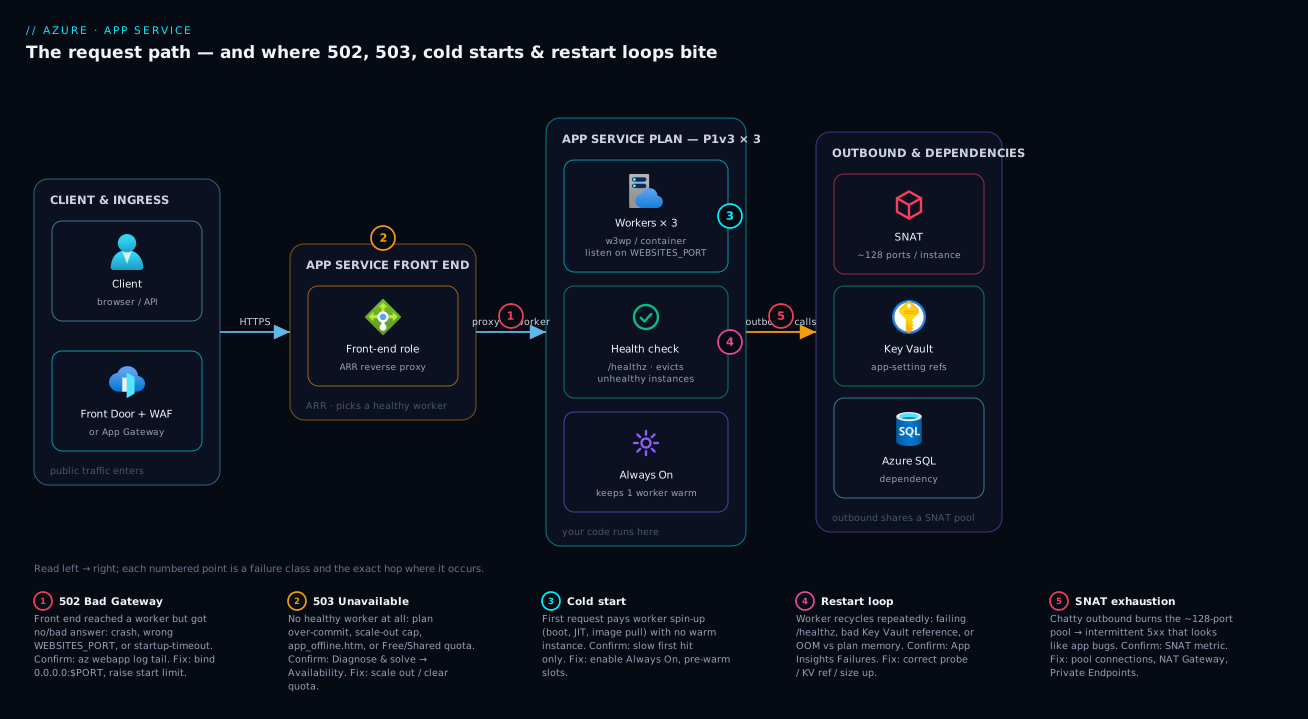
The diagram traces the request as it actually flows, then shows the cause and diagnostic move for each of the four symptom classes. Read it left to right: an HTTP request enters App Service and lands on the front end (ARR), which must pick a healthy worker and proxy to it. From there it fans into four columns. The 502 Bad Gateway column traces to a worker process crashed or timed out, pointing you at App Service logs and App Insights Failures. The 503 Unavailable column traces to a plan at its scale limit or still warming up (diagnose via plan CPU and instance count). The slow first request column is a cold start with Always On off (fix by enabling Always On and pre-warming). The restart loop column is bad config or a failing liveness probe (confirm via deployment logs and the health-check path).
Notice the shared footer: every path converges on the same three instruments — az webapp log tail, Diagnose and solve problems, and Application Insights → Failures. That’s the whole method: localise the symptom to a column, read the cause, run the named diagnostic, apply the fix. The first question on every incident is “is the front end getting a bad answer (502) or no answer (503)?” — the column you land in tells you which logs to open first.
Real-world scenario
Lumio Retail runs its e-commerce checkout API on Azure App Service: a Linux custom container (.NET 8) on a single S1 Standard plan in Central India, fronted by Application Gateway with WAF. Traffic averages 400 requests/second with a 6pm spike to ~1,800 rps during flash sales. The platform team is four engineers; the monthly App Service spend is about ₹18,000.
The incident began on a Friday flash sale. At 18:03 the WAF dashboard lit up with 502 Bad Gateway — about 12% of checkout calls failing, climbing to 30% by 18:10. The on-call engineer’s reflex: restart the app. It helped for ninety seconds, then 502s resumed. Second reflex: scale up S1 → P1v3. The error rate dropped to ~8% but didn’t clear, and the bill implication spooked the manager. Forty minutes in, revenue impact was real and the incident bridge was full.
The breakthrough came from asking the right first question. App Service’s own request logs showed checkout requests succeeding — completing in 70–110 seconds. The 502 wasn’t App Service’s; it was Application Gateway timing out the backend. az network application-gateway http-settings list showed requestTimeout: 60. Under flash-sale load the checkout call (which fanned out to a payment provider over a fresh HttpClient per request) was taking longer than 60 seconds and the gateway was cutting it. So there were two coupled bugs: a slow backend, and an upstream timeout shorter than the backend’s worst case.
The slow backend itself was SNAT port exhaustion. Diagnose and solve problems → SNAT Port Exhaustion showed SnatConnectionCount with a non-zero Failed dimension climbing from exactly 18:03. The per-request HttpClient to the payment provider had, under 1,800 rps, blown through the ~128 SNAT ports per instance; new outbound connections queued and timed out — which is why each checkout took 70–110 s, which is why the gateway 502’d. The restart “fixed” it momentarily by resetting connection state; scaling up to P1v3 helped a little via fresh SNAT pools.
The fix landed in two parts. That night: raise the App Gateway requestTimeout to 120 and scale out to 3 instances to triple the SNAT pool. The following week: replace the per-request HttpClient with a single IHttpClientFactory client (connection reuse cut outbound connections ~95%), and VNet-integrate with a NAT Gateway for a huge SNAT pool independent of instance count. The next flash sale ran at 1,900 rps with zero SNAT failures, checkout p95 fell from 90 s to 240 ms, and they moved back down to S1 + autoscale (max 4) at ₹16,500 — lower than before. The lesson on the wall: “A 502 behind a gateway is a question, not an answer. Ask whether App Service even saw the failure.”
The incident as a timeline, because the order of moves is the lesson:
| Time | Symptom | Action taken | Effect | What it should have been |
|---|---|---|---|---|
| 18:03 | 502 at 12%, climbing | (alert fires) | — | Ask: did App Service see the failure? |
| 18:05 | 502 at 18% | Restart the app | +90 s relief, then recurs | Don’t restart blind |
| 18:12 | 502 at 30% | Scale up S1 → P1v3 | 30% → 8%, cost spike | Don’t scale up to mask |
| 18:40 | Still 8% | Read App Service request logs | Requests succeeding in 70–110 s | This was the breakthrough |
| 18:48 | Root cause found | Check App GW requestTimeout (60 s) + SNAT detector |
Two coupled bugs identified | — |
| 19:05 | Mitigated | Timeout → 120, scale out to 3 | 502s clear | Correct night-of fix |
| +1 week | Fixed | IHttpClientFactory + NAT Gateway; back to S1 |
0 SNAT fails, p95 240 ms, ₹16,500 | The actual fix is code |
Advantages and disadvantages
The managed-workers-behind-a-shared-front-end model both causes this class of problem and makes it diagnosable. Weigh it honestly:
| Advantages (why this model helps you) | Disadvantages (why it bites) |
|---|---|
Platform captures crash, restart and port-probe details automatically (Kudu, default_docker.log, detectors) — you rarely lack data |
The HTTP status you see (502/503) is the front end’s complaint, abstracting away the real cause; you must dig |
| Diagnose and solve problems detectors pre-correlate restarts, metrics and exceptions — root-cause hypothesis in one click | The abstraction hides the worker; you can’t ssh to “the server” the way you would a VM — you work through Kudu/SCM |
| Always On, pre-warmed instances and slot warm-up are built-in fixes for cold starts — no custom tooling | Defaults are unsafe for prod: Always On off, ARR affinity on, health check unset — you must turn knobs |
| Scaling out/up is a slider; autoscale handles 503-from-load automatically | Scaling masks resource bugs (SNAT, OOM) — it “works” temporarily and hides the real fix, costing money |
| Shared front end + health check evict bad instances automatically, improving availability | A bad health-check path evicts all instances and turns a dependency blip into a total outage |
| SNAT, CPU and memory are first-class metrics you can alert on | Finite SNAT (~128/instance) is invisible until you hit it under load — passes in test, fails in prod |
| Key Vault references keep secrets out of config | A failed Key Vault reference crash-loops the app with no obvious “denied” error — looks like a random restart |
The model is right for standard web apps and APIs where you want to ship code, not operate servers, and built-in cold-start and scaling controls suffice. It bites hardest on chatty outbound workloads (SNAT), memory-heavy apps on small SKUs (OOM), and anyone who deploys with defaults and never tunes Always On / ARR affinity / health check. The disadvantages are all manageable — but only if you know they exist, which is the point of this article.
Hands-on lab
Reproduce a 502 from the WEBSITES_PORT bug, watch it in the logs, and fix it — all free-tier-friendly (we use B1; delete at the end). Run in Cloud Shell (Bash).
Step 1 — Variables and resource group.
RG=rg-appsvc-lab
LOC=centralindia
PLAN=plan-lab
APP=app-lab-$RANDOM   # globally-unique hostname
az group create -n $RG -l $LOC -o table
Step 2 — Create a B1 plan (Linux) so Always On is available.
az appservice plan create -n $PLAN -g $RG --is-linux --sku B1 -o table
Expected: a plan row, sku.name = B1, kind = linux.
Step 3 — Deploy a container that listens on 8080, but DON’T set WEBSITES_PORT (reproduce the bug). A public sample that binds 8080:
az webapp create -n $APP -g $RG -p $PLAN \
  --deployment-container-image-name mcr.microsoft.com/azuredocs/aci-helloworld:latest -o table
Step 4 — Hit the site and watch it fail. Browse to https://$APP.azurewebsites.net — you get a 502/“Application Error”. Confirm via the logs:
az webapp log config -n $APP -g $RG --docker-container-logging filesystem
az webapp log tail -n $APP -g $RG
# Watch for: "didn't respond to HTTP pings on port: 80, failing site start"
The platform probes port 80; the container (on 8080) never answers → the dead-giveaway line.
Step 5 — Fix it by declaring the real port.
az webapp config appsettings set -n $APP -g $RG --settings WEBSITES_PORT=8080
az webapp restart -n $APP -g $RG
Wait ~30–60 s, reload the URL. Expected: the “Welcome to Azure Container Instances!” page renders — 502 gone.
Step 6 — Turn on the production-safe defaults and a health check.
az webapp config set -n $APP -g $RG --always-on true --generic-configurations '{"healthCheckPath": "/"}'
az webapp update -n $APP -g $RG --client-affinity-enabled false
az webapp config show -n $APP -g $RG --query "{alwaysOn:alwaysOn, health:healthCheckPath}" -o table
Expected: alwaysOn: true, health: /.
Validation checklist. You reproduced a 502 purely from the port contract, identified it from default_docker.log’s port-probe line, fixed it with WEBSITES_PORT, and applied Always On + disabled ARR affinity + set a health check. No code involved — exactly the point. The lab steps mapped to what each proves:
| Step | What you did | What it proves | Real-world analogue |
|---|---|---|---|
| 3 | Deploy container, no WEBSITES_PORT |
The port contract is real and unforgiving | First container deploy of any team |
| 4 | Watch default_docker.log |
The confirming log line exists and is specific | The 90-second diagnosis |
| 5 | Set WEBSITES_PORT=8080 |
The one setting that fixes it | The actual production fix |
| 6 | Always On + no ARR + health check | Defaults are unsafe; you must tune them | Hardening every new app |
Cleanup (avoid lingering plan charges).
az group delete -n $RG --yes --no-wait
Cost note. A B1 plan is a few rupees per hour; an hour of this lab is well under ₹50, and deleting the resource group stops everything. (B1 has no free tier, but it’s the cheapest SKU with Always On.)
Common mistakes & troubleshooting
This is the playbook — the part you bookmark. First as a scannable table you can read at 02:14, then the same entries with the full confirm-command detail underneath.
| # | Symptom | Root cause | Confirm (exact cmd / portal path) | Fix |
|---|---|---|---|---|
| 1 | Intermittent 502 under load, fine at rest, dependency calls timing out | SNAT port exhaustion (no connection reuse) | Diagnose and solve → SNAT Port Exhaustion; az monitor metrics list --metric SnatConnectionCount --aggregation Total (Failed > 0) |
IHttpClientFactory + pooled DB; VNet + NAT Gateway; Private Endpoints |
| 2 | New container deploy 502s immediately; logs say app started fine | WEBSITES_PORT unset/wrong; or bound 127.0.0.1 |
az webapp log download → default_docker.log: “didn’t respond to HTTP pings on port: 80” |
--settings WEBSITES_PORT=<port>; bind 0.0.0.0:$PORT |
| 3 | Heavy container 502/503 on cold instances, fine once warm | Startup > WEBSITES_CONTAINER_START_TIME_LIMIT (230 s) |
default_docker.log gap “Starting” → “failing site start” > limit |
Raise to ≤1800; shrink image; same-region ACR; Always On |
| 4 | 502 to client, App Service logs show request succeeding (slowly) | Upstream timeout at Front Door / App Gateway | App Insights duration vs az network application-gateway http-settings list --query "[].requestTimeout" (60 s) |
Speed up backend; raise upstream timeout; fast probe path |
| 5 | Fine, then 502/503 after a deploy; redeploy doesn’t help | Stray app_offline.htm in wwwroot |
Kudu → Debug console → ls /home/site/wwwroot/app_offline.htm |
Delete file; WEBSITE_RUN_FROM_PACKAGE=1 |
| 6 | Dev/test app 503s every afternoon, recovers ~midnight | Free (F1)/Shared (D1) daily CPU quota | az appservice plan show --query "{tier:sku.tier}" = Free/Shared; quota detector |
az appservice plan update --sku B1 |
| 7 | Whole app 503s when a downstream DB blips | Health path depends on the downstream → all instances evicted | Health check blade all-unhealthy; /healthz KQL non-2xx across instances |
Shallow/honest path; raise WEBSITE_HEALTHCHECK_MAXPINGFAILURES |
| 8 | Restart loop after a config change; same exception every boot | Bad app setting injected as env var | az webapp log tail repeats the trace; diff az webapp config appsettings list |
Correct setting; deploy via slot-swap; settings as Bicep |
| 9 | Restart loop, no app exception; secret-backed settings empty | Key Vault reference failed at boot | Environment variables blade red error; az webapp config appsettings list --query "[?contains(value,'KeyVault')]"; az webapp identity show |
Enable identity; grant Key Vault Secrets User; fix firewall/secret/URI |
| 10 | Restart loop under load; instances die; memory ~100% | OOM vs SKU memory ceiling (B1 ≈ 1.75 GB) | az monitor metrics list --metric MemoryWorkingSet --aggregation Maximum; Memory Analysis |
Fix leak (dump) or scale up (P1v3 8 GB / P2v3 16 GB) |
| 11 | Custom container “starts” then exits, over and over | Container crashes on startup (entrypoint, PID 1, signals, bind) | az webapp log tail: “Starting container” → stderr → “Container exited” repeating |
docker run locally; fix entrypoint; PID 1 binds 0.0.0.0:$PORT |
| 12 | Slow first request after a quiet period or right after a swap | Cold start (Always On off, or slot not warm) | az webapp config show --query alwaysOn = false; App Insights slow first request after gaps |
--always-on true; disable ARR; pre-warmed instances; swap warm-up |
| 13 | After enabling autoscale, still 503 spikes at peak | max-count too low / cooldown slow / SKU ceiling | az monitor autoscale show; plan CPU pinned while instance count flat |
Raise --max-count; lower cooldown; scale up; pre-warm |
| 14 | 403 to some callers after locking the app down | Access restriction / private access blocking the caller | Access restrictions blade; az webapp config access-restriction show |
Add caller IP/range; fix SCM rules / private routing |
The expanded form, with the full reasoning for the entries that bite hardest:
1. Intermittent 502 under load, fine at rest, dependency calls timing out.
Root cause: SNAT port exhaustion from non-reused outbound connections (new HttpClient/socket per request).
Confirm: Diagnose and solve problems → SNAT Port Exhaustion; or az monitor metrics list --metric SnatConnectionCount --aggregation Total shows a non-zero Failed dimension under load.
Fix: Reuse connections (IHttpClientFactory, pooled DB clients); VNet-integrate with a NAT Gateway; use Private Endpoints for Azure PaaS targets. Scaling out is a temporary band-aid (+128 ports/instance).
2. Brand-new container deploy returns 502 immediately; container logs say the app started fine.
Root cause: Container listens on a port the platform isn’t probing — WEBSITES_PORT unset/wrong (default probe 80), or the app bound 127.0.0.1 instead of 0.0.0.0.
Confirm: az webapp log download → default_docker.log shows “didn’t respond to HTTP pings on port: 80, failing site start”.
Fix: az webapp config appsettings set --settings WEBSITES_PORT=<real-port>; ensure the app binds 0.0.0.0:$PORT.
3. Heavy container 502/503s on cold instances, fine once warm.
Root cause: Startup exceeds WEBSITES_CONTAINER_START_TIME_LIMIT (default 230 s) — slow image pull + init.
Confirm: default_docker.log timestamps between “Starting container” and “failing site start” exceed the limit.
Fix: Raise the limit (max 1800 s): --settings WEBSITES_CONTAINER_START_TIME_LIMIT=600; shrink the image; same-region ACR; enable Always On.
4. 502 from the client but App Service logs show the request succeeding (slowly).
Root cause: Upstream timeout at Front Door / Application Gateway — backend slower than the front end’s timeout.
Confirm: App Insights shows request duration near/over the gateway timeout; az network application-gateway http-settings list --query "[].requestTimeout" (default 60 s) or Front Door origin response timeout.
Fix: Speed up the backend (the real fix); raise the upstream timeout to match a legitimately long op; point the health probe at a fast path.
5. App was fine, then started 502/503-ing after a deploy; redeploying doesn’t help.
Root cause: A stray app_offline.htm left in wwwroot by an interrupted/partial .NET deployment.
Confirm: Kudu/SCM → Debug console → ls /home/site/wwwroot/app_offline.htm.
Fix: Delete the file; switch to run-from-package (WEBSITE_RUN_FROM_PACKAGE=1) for atomic deploys.
6. Dev/test app serves 503 every afternoon, recovers around midnight.
Root cause: Free (F1) / Shared (D1) daily CPU quota exhausted; the app is stopped until the 00:00 UTC reset.
Confirm: az appservice plan show --query "{tier:sku.tier}" returns Free/Shared; Diagnose and solve reports quota exceeded.
Fix: Move to B1+ (az appservice plan update --sku B1) — no daily CPU quota and Always On.
7. The whole app goes 503 at once whenever a downstream DB has a blip.
Root cause: Health check path depends on the downstream, so when it’s down every instance fails the probe and is evicted — total outage from a partial one.
Confirm: Health check blade shows all instances unhealthy; KQL on /healthz shows non-2xx across all cloud_RoleInstance.
Fix: Make the health path shallow/honest (liveness ≠ readiness); raise WEBSITE_HEALTHCHECK_MAXPINGFAILURES (2–10) to ride out blips; don’t hard-fail on optional dependencies.
8. App restart-loops right after a config change; the same exception every boot.
Root cause: A bad app setting (typo’d connection string, missing required value) crashing startup, injected as an env var on every recycle.
Confirm: az webapp log tail shows the identical startup stack trace each loop, naming the value; diff az webapp config appsettings list.
Fix: Correct the setting; deploy via slot-swap so bad settings are caught in staging; manage settings as Bicep.
9. Restart loop with no app exception logged; secrets-backed settings look empty.
Root cause: Key Vault reference failure at boot — managed identity missing, no RBAC/access policy on the vault, vault firewall blocking, or secret deleted/disabled — so the reference resolves to nothing.
Confirm: Portal → Environment variables shows the reference with a red error; az webapp config appsettings list --query "[?contains(value,'KeyVault')]"; check az webapp identity show and az role assignment list --assignee <principalId>.
Fix: Enable identity; grant Key Vault Secrets User; allow trusted services on the vault firewall; verify the secret exists/enabled and the SecretUri is correct.
10. Restart loop under load; instances die and come back; memory pinned near 100%.
Root cause: OOM against the SKU’s per-instance memory ceiling (B1 ≈ 1.75 GB) — a leak, or the app simply needs more RAM.
Confirm: az monitor metrics list --metric MemoryWorkingSet --aggregation Maximum; Diagnose and solve → Memory Analysis correlates recycles with pressure.
Fix: Capture and analyse a memory dump (Kudu / Collect a Memory Dump detector) to fix the leak; or scale up to P1v3 (8 GB)/P2v3 (16 GB). Scaling out doesn’t help per-instance OOM.
11. Custom container “starts” then immediately exits, over and over.
Root cause: Container crashes on startup — bad entrypoint, missing dependency, process not PID 1 / not handling signals, or it can’t bind the port.
Confirm: az webapp log tail shows “Starting container” → stderr → “Container exited” repeating with an exit code.
Fix: docker run locally with WEBSITES_PORT set to reproduce; fix the entrypoint; run the main process in the foreground as PID 1 binding 0.0.0.0:$PORT.
12. Slow first request after every quiet period (or right after a slot swap); subsequent ones fast.
Root cause: Cold start — the idle app was unloaded (Always On off), or the swapped-in slot wasn’t warm, so a worker pays runtime boot + JIT + (for containers) image pull on the next request.
Confirm: az webapp config show --query alwaysOn returns false; App Insights shows a slow first request after gaps or a spike immediately post-swap that tapers.
Fix: az webapp config set --always-on true (B1+); disable ARR affinity; for scale-out cold starts use Premium pre-warmed instances; deploy via slot-swap with WEBSITE_SWAP_WARMUP_PING_PATH/WEBSITE_SWAP_WARMUP_PING_STATUSES.
13. After enabling autoscale you still get 503 spikes at peak.
Root cause: Autoscale max-count too low, scale-out cooldown too slow to react, or you hit the SKU instance ceiling.
Confirm: az monitor autoscale show --query "{min:...,max:...}"; plan CPU pinned high while instance count is flat.
Fix: Raise --max-count; lower the rule’s cooldown; scale up the SKU; pre-warm so new instances aren’t cold when they arrive.
14. After locking the app to a front end, some callers get 403.
Root cause: An access restriction (IP rule / private access / SCM lockdown) is blocking a legitimate caller — often the SCM site or a health-probe source.
Confirm: Access restrictions blade; az webapp config access-restriction show -n app-shop-prod -g rg-shop-prod.
Fix: Add the caller’s IP/range (or the gateway/front-door service tag); ensure SCM rules don’t block your deploy pipeline; verify private-endpoint DNS resolves.
Best practices
- Always On = true on every non-Free app. It’s off by default and is the single biggest cold-start fix. Verify it after every deploy.
- Run at least two instances in production. A single instance means every restart, patch or recycle is a 503. Two instances make platform maintenance invisible.
- Disable ARR affinity for stateless apps. The sticky
ARRAffinitycookie concentrates load and breaks even warming; turnclientAffinityEnabledoff. - Set a shallow, honest health-check path. Liveness (am I up?) separate from readiness (can I serve?). Never hard-fail the health path on an optional downstream, or you evict every instance at once. Tune
WEBSITE_HEALTHCHECK_MAXPINGFAILURES. - Reuse outbound connections. One shared
HttpClient/IHttpClientFactory, pooled DB drivers. This single discipline prevents most SNAT exhaustion. - For chatty outbound, VNet-integrate + NAT Gateway (or Private Endpoints for PaaS) so SNAT scales beyond ~128/instance.
- Deploy with run-from-package and slot-swap. Atomic, immutable deploys eliminate partial-state files like
app_offline.htm; slot-swap with warm-up eliminates post-deploy cold 503s. - Wire Application Insights from day one. Failures + Live Metrics turn a two-hour mystery into a two-minute lookup. Without it you’re diagnosing blind.
- Manage app settings and Key Vault references as code (Bicep), reviewed in PRs — a bad setting or a wrong
SecretUriis a boot-time landmine. - Right-size RAM to the workload. Memory-heavy apps belong on Premium v3 (8–32 GB), not B1 — chronic OOM loops are a SKU mismatch, and scaling out won’t fix them.
- Alert on the leading indicators: SNAT failed connections, memory %, CPU %, HTTP 5xx rate, and health-check status — not just “site down.”
- Keep container images small and same-region. Image pull is part of cold start and the start-time limit; a 2 GB image is a slow, failure-prone start.
The alerts worth wiring before the next incident — the leading indicators, not the lagging “site down”:
| Alert on | Signal | Threshold (starting point) | Why it’s leading |
|---|---|---|---|
| SNAT failures | SnatConnectionCount (Failed) |
> 0 sustained 5 min | First sign of outbound exhaustion before 502s spike |
| Memory pressure | MemoryWorkingSet % |
> 85% for 10 min | Predicts OOM restart loop |
| CPU saturation | CpuPercentage (plan) |
> 80% for 10 min | Predicts 503-from-load before users feel it |
| 5xx rate | Http5xx |
> 1% of requests | The symptom — alert but treat as confirmation |
| Health status | Unhealthy instance count | ≥ 1 for 5 min | Catches eviction before the fleet drops |
| Response time | HttpResponseTime p95 |
> your SLO | Cold start / slow backend creeping toward timeout |
Security notes
- Managed identity over secrets. Use the app’s system- or user-assigned managed identity with Key Vault references so connection strings and API keys never sit in plaintext app settings. Grant the identity least privilege —
Key Vault Secrets User, not a broad role. - Lock down Kudu/SCM. The SCM site (
*.scm.azurewebsites.net) is a powerful console (file system, process, shell). Restrict it with access restrictions / IP rules and require Entra ID auth; it should not be open to the internet. - Don’t leak diagnostics to anonymous callers. The bare 502/503 page is intentionally vague — keep detailed errors (stack traces) out of public responses; send them to App Insights, not the client.
- Private inbound where it matters. Front App Service with Application Gateway/Front Door + WAF and use access restrictions or Private Endpoints so the worker isn’t directly internet-reachable; lock the app to accept traffic only from the front end.
- Secure the health endpoint.
/healthzshould not expose internal topology, versions, or dependency hostnames — it returns a status, not a system map. - Guard the run-from-package source (the storage/SAS URL) and the ACR the container is pulled from — pin image digests, scan images, and use private registry access via managed identity.
- TLS everywhere. Enforce HTTPS-only (
httpsOnly: true) and a minimum TLS version; a 502 troubleshooting session is no excuse to disable TLS “temporarily.”
The security knobs that also prevent these incidents — secure and resilient pull in the same direction here:
| Control | Setting / mechanism | Secures against | Also prevents |
|---|---|---|---|
| Managed identity + KV references | identity + @Microsoft.KeyVault(...) |
Secrets in plaintext config | Hand-rolled secret rotation breaking the app |
| SCM access restrictions | scmIpSecurityRestrictions |
Public access to the admin console | Unauthorised deploys causing restart loops |
| HTTPS-only + min TLS | httpsOnly, minTlsVersion |
Downgrade / cleartext | “Temporary” TLS-off mistakes |
| Access restrictions (inbound) | ipSecurityRestrictions / private endpoint |
Direct internet hits bypassing the WAF | Probe-source confusion causing 403s (if scoped right) |
| Vault firewall + trusted services | Key Vault networking | Secret exfiltration | KV-reference boot failures (when allow-listed correctly) |
| Image digest pinning + scanning | ACR + digest in linuxFxVersion |
Tampered/unknown images | Surprise breaking changes from a moved tag |
Cost & sizing
The bill drivers and how they interact with the fixes:
- Plan SKU and instance count dominate — you pay per instance-hour regardless of how many apps run on the plan. The cheapest path to “no cold starts + no Free quota 503s” is B1 (~₹4,000–5,000/month continuous). Standard (S1) adds autoscale and slots for a modest premium; Premium v3 (P1v3) roughly doubles again but buys the RAM and pre-warmed instances that fix OOM loops and scale-out cold starts.
- Scaling out vs up. Scaling out multiplies per-instance cost (3× instances ≈ 3× plan cost) — cheap insurance for availability and SNAT headroom, but wasteful if used to mask a connection-reuse bug. Fix the bug, then run the smallest SKU/count that meets measured load.
- Always On is free — it just keeps the worker you already pay for resident. No reason not to enable it on B1+.
- Application Insights ingestion is billed per GB — worth every paisa, but use adaptive sampling on high-traffic apps so a flash sale doesn’t spike the telemetry bill.
- NAT Gateway adds a small hourly + per-GB charge, far cheaper than revenue lost to SNAT-exhaustion 502s during a sale. F1 is the cause of the afternoon-503 quota problem — never production; the honest floor is B1.
A rough monthly picture for a small production API: 2× B1 (~₹9,000) or 2× S1 with autoscale to 4 (~₹12,000–16,000 at peak), plus App Insights (~₹1,000–3,000). Lumio landed at ₹16,500 after fixing the bug and right-sizing back down — proof the fix is usually code, not a bigger SKU. The cost drivers and what each one buys you:
| Cost driver | What you pay for | Rough INR / month | What it fixes | Watch-out |
|---|---|---|---|---|
| 1× B1 (continuous) | One Basic instance, Always On | ~₹4,000–5,000 | Cold-start-from-idle, Free-quota 503 | No autoscale, modest RAM |
| 2× B1 (HA pair) | Two instances, no single-point | ~₹9,000 | Restart 503s (one always up) | Still no autoscale |
| 2× S1 + autoscale to 4 | Standard + slots + autoscale | ~₹12,000–16,000 at peak | Scale-out 503s, slot warm-up | Pay for peak instances |
| 1× P1v3 | Premium, 8 GB, pre-warmed | ~₹14,000–18,000 | OOM loops, scale-out cold start | Higher floor cost |
| App Insights ingestion | Per-GB telemetry | ~₹1,000–3,000 | (diagnosis itself) | Sample high-traffic apps |
| NAT Gateway | Hourly + per-GB egress | ~₹1,500–3,000 | SNAT exhaustion at scale | Needs VNet integration |
Interview & exam questions
1. A user reports 502 Bad Gateway but App Service logs show the request succeeding. What’s happening and how do you confirm? The 502 is coming from an upstream (Front Door / Application Gateway) timing out the backend, not from App Service — the worker responded, just slower than the front end’s timeout. Confirm by comparing App Insights request duration against the gateway’s requestTimeout (App Gateway, default 60 s) or origin response timeout (Front Door). Fix the slow backend and/or raise the upstream timeout.
2. A freshly deployed Linux container returns 502 even though its logs show the app started. Most likely cause? The container listens on a port the platform isn’t probing — WEBSITES_PORT is unset or wrong (default probe is 80), or the app bound 127.0.0.1 instead of 0.0.0.0. Confirm via default_docker.log (“didn’t respond to HTTP pings on port: 80”). Set WEBSITES_PORT to the real port and bind all interfaces.
3. What is SNAT port exhaustion and why does it pass in test but fail in production? Each instance has a finite pool (~128 pre-allocated) of SNAT ports for outbound connections. Under low test load you never exhaust it; under production load an app that opens a new connection per request (no HttpClient reuse) burns through the pool, and new outbound calls fail — surfacing as intermittent 502s and dependency timeouts. Confirm via the SNAT Port Exhaustion detector / SnatConnectionCount Failed metric. Fix with connection reuse and a NAT Gateway.
4. Difference between a 502 and a 503 from App Service, conceptually? Both are reported by the front end. 502 Bad Gateway = the front end reached a worker but got a broken/no/timed-out response (crash, wrong port, upstream timeout, SNAT failure). 503 Service Unavailable = the front end had no healthy worker to send to (restart in progress, plan over-commit, quota exceeded, all instances evicted by health check). “Bad answer” vs “no answer.”
5. How do you eliminate cold starts on App Service? Enable Always On (keeps a warm worker resident, defeating idle-unload; requires B1+), disable ARR affinity for stateless apps so load spreads and all instances stay warm, use pre-warmed instances on Premium v3 to cover scale-out, and deploy via slot-swap with warm-up so production never serves a cold worker. The underlying cost (JIT, DI build, image pull) isn’t removed — you ensure a warm worker already paid it.
6. An app restart-loops with no application exception in the logs and its secret-backed settings appear empty. What do you check? A Key Vault reference failure at boot: the managed identity is missing or lacks RBAC/access-policy on the vault, the vault firewall is blocking, or the secret is deleted/disabled/mis-URI’d, so the reference resolves to nothing and the app crashes on the empty value. Check the Environment variables blade for a red reference error, az webapp identity show, and az role assignment list. Fix the identity/role/firewall/secret.
7. Why can a health check take your entire app offline, and how do you prevent it? App Service evicts instances that fail the health probe. If the health path depends on a downstream that goes down, every instance fails simultaneously and all are evicted → 503 everywhere (a dependency blip becomes a total outage). Prevent it by keeping the health path shallow (separate liveness from readiness), not hard-failing on optional dependencies, and tuning WEBSITE_HEALTHCHECK_MAXPINGFAILURES (2–10) to ride out transient failures.
8. A dev app serves 503 every afternoon and recovers overnight. Cause and fix? It’s on a Free (F1) or Shared (D1) plan and is exhausting the daily CPU-minute quota, after which App Service stops it until the 00:00 UTC reset. Confirm the tier with az appservice plan show. Fix by moving to B1+, which has no daily CPU quota (and gains Always On).
9. What does WEBSITES_CONTAINER_START_TIME_LIMIT do and when do you change it? It’s the number of seconds the platform waits for a container to start responding before failing the site start — default 230 s, max 1800 s. Raise it for legitimately heavy containers (large image pull + slow init), but treat a long start as a smell: shrink the image, use a same-region registry, and enable Always On so the slow start happens at deploy, not on idle wake.
10. The app OOM-restart-loops under load. Does scaling out fix it? What does? No — scaling out adds instances that each hit the same per-instance memory ceiling, so they all OOM. The fix is to scale up to a SKU with more RAM (e.g. P1v3 8 GB, P2v3 16 GB) and/or fix the leak (capture a memory dump via Kudu / the Memory Analysis detector). Memory is per-instance, so only more RAM-per-instance or less memory-use helps.
11. Which App Service tier unlocks autoscale, and which adds pre-warmed instances? Standard (S1+) unlocks autoscale and up to 5 slots. Premium v3 (P1v3+) adds pre-warmed instances (covering scale-out cold start), much more RAM, and up to 20 slots. Basic (B1) has Always On and no daily quota but only manual scale.
12. You see 502s right after every slot swap that clear within a minute. Why? The staging slot wasn’t warm at swap time, so production briefly served cold workers paying first-request cost. Fix with slot warm-up: set WEBSITE_SWAP_WARMUP_PING_PATH and WEBSITE_SWAP_WARMUP_PING_STATUSES so the swap completes only after the slot responds healthily — instances stay warm through the swap.
These map to AZ-204 (Developer Associate) — monitor, troubleshoot and optimize Azure solutions, Application Insights, App Service configuration — and AZ-104 (Administrator) — configure and manage App Service plans, scaling, deployment slots, and monitoring. The networking-cost angle (SNAT, NAT Gateway, VNet integration) touches AZ-700. A compact cert-mapping for revision:
| Question theme | Primary cert | Exam objective area |
|---|---|---|
| 502 vs 503, ANCM codes | AZ-204 | Troubleshoot solutions; App Service config |
| App Insights Failures / KQL | AZ-204 | Instrument & monitor; troubleshoot |
| Plan tiers, autoscale, slots | AZ-104 | Configure & manage App Service plans |
| Health check, restarts, HA | AZ-104 | Monitor & maintain Azure resources |
| SNAT, NAT Gateway, VNet integration | AZ-700 | Design & implement network connectivity |
| Key Vault references, managed identity | AZ-204 / AZ-500 | Secure app config; manage identities |
Quick check
- A user gets 502 but App Service’s own request log shows the request completed in 80 seconds. Where is the 502 actually coming from, and what’s the one setting you check first?
- Your custom container’s logs say it started successfully, yet the site returns 502. What is the single most likely cause and the exact log line that confirms it?
- True or false: scaling out to more instances is the correct fix for an app that keeps getting OOM-killed.
- An app restart-loops with no exception logged and its connection string (a Key Vault reference) appears empty. Name two things to check.
- Your dev app on F1 dies with 503 every afternoon and comes back by morning. Why, and what’s the fix?
Answers
- The 502 is from the upstream Front Door / Application Gateway timing out the backend — the worker responded, just slower than the front end’s timeout. First setting to check: the gateway’s
requestTimeout(App Gateway default 60 s) or Front Door origin response timeout; compare it to the request’s actual duration. WEBSITES_PORTis unset or wrong (the platform probes port 80 by default; your container listens elsewhere, or bound127.0.0.1instead of0.0.0.0). The confirming line indefault_docker.logis “didn’t respond to HTTP pings on port: 80, failing site start.” Fix by settingWEBSITES_PORTto the real port.- False. Memory is a per-instance ceiling; every scaled-out instance hits the same limit and OOMs. The fix is to scale up to a higher-RAM SKU (and/or fix the leak), not out.
- Check (a) that a managed identity is enabled on the app (
az webapp identity show) and (b) that the identity has get/list on the vault’s secrets (az role assignment listforKey Vault Secrets User, or an access policy). Also verify the vault firewall isn’t blocking and the secret/URI is valid. - F1 (Free) has a daily CPU-minute quota; once exhausted App Service stops the app until the 00:00 UTC reset. Fix by moving to B1 or higher, which has no daily CPU quota (and gains Always On).
Glossary
- App Service plan — the set of VM workers (an SKU + instance count) you rent; web apps run on it and share its CPU/RAM/instances.
- Front end (ARR) — the shared platform layer running Application Request Routing that picks a healthy worker and proxies each request to it; the origin of 502/503 codes.
- 502 Bad Gateway — the front end reached a worker but got a broken, missing, or timed-out response.
- 503 Service Unavailable — the front end had no healthy worker to route to (restart, over-commit, quota, eviction).
- ANCM (500.30/500.31/500.32/500.37) — the ASP.NET Core Module startup failures on Windows (start failure, runtime not found, dll load failure, startup-time-limit exceeded); distinct from a generic runtime 500.
WEBSITES_PORT— app setting telling the platform which TCP port your custom container listens on (default probe 80/8080).WEBSITES_CONTAINER_START_TIME_LIMIT— seconds the platform waits for a container to start (default 230, max 1800) before failing site start.- SNAT port — a port from the finite pool (~128/instance) the platform uses to map your outbound connections to a shared public IP; exhaustion causes outbound failures.
- NAT Gateway — an Azure resource attached to a VNet-integrated subnet that provides a very large SNAT pool independent of instance count.
- Always On — keeps a warm worker resident so an idle app isn’t unloaded; defeats cold-start-from-idle (requires B1+).
- ARR affinity — the
ARRAffinitycookie that pins a client to one instance (sticky sessions); harmful to warmth/scaling for stateless apps. - Pre-warmed instance — a buffer instance kept warm (Premium v3) so scale-out doesn’t expose cold workers.
- Deployment slot / slot warm-up — a swappable copy of the app (e.g. staging); warm-up sends requests to the slot before a swap completes so production never serves cold workers.
- Health check — a configured path the platform probes per instance; failing instances are evicted and replaced after
WEBSITE_HEALTHCHECK_MAXPINGFAILURES(2–10) failures. - Key Vault reference — an app setting of the form
@Microsoft.KeyVault(SecretUri=…)resolved at boot via the app’s managed identity. app_offline.htm— a file dropped inwwwrootto take a .NET app offline during deploy; if stray, it causes persistent 503.- Kudu / SCM — the
*.scm.azurewebsites.netadmin site: file system, logs (default_docker.log), process inspection, and a shell. - Cold start — first-request latency on a worker with no warm process (runtime boot, JIT, DI build, image pull).
- Run-from-package —
WEBSITE_RUN_FROM_PACKAGE=1; runs the app from an immutable mounted package so deploys are atomic and can’t leave partial-state files.
Next steps
You can now localise any App Service 5xx to a hop and fix it. Build outward:
- Next: Azure Monitor & Application Insights for Observability — go deep on the Failures/Live Metrics/KQL that power half this playbook.
- Related: Azure App Service Deep Dive: Plans, Scaling, Slots, TLS & Networking — the platform mechanics behind every knob in this article.
- Related: Azure App Service vs Container Apps vs AKS — when these problems argue for a different compute model.
- Related: Hardening Azure App Service: VNet Integration, Private Endpoints & Zero-Downtime Slots — the networking and slot patterns that prevent SNAT pain and cold-swap 502s.
- Related: Application Gateway with WAF, mTLS & End-to-End TLS — the upstream layer that emits some of these 502s.
- Related: Azure Key Vault: Secrets, Keys & Certificates — get Key Vault references right so they never crash-loop your app.
- Related: Azure App Configuration: Feature Flags, Dynamic Config & Key Vault References — manage settings safely so a bad value never reaches production.