A team running a video-ingest service put Application Gateway in front of their RTP media servers. They did not need URL routing, TLS termination, or a web application firewall — they needed high-throughput, low-latency UDP. Application Gateway does not even speak UDP; it is an HTTP(S) reverse proxy. The deploy failed, then “worked” via an awkward TCP fallback that doubled latency and tripled the bill. A Standard Load Balancer — a layer-4 pass-through that hashes a 5-tuple and forwards the packet untouched — would have been simpler, faster, and a tenth of the cost. The mirror-image mistake is just as common: a web team picks Load Balancer for an ASP.NET app, then discovers it cannot do path-based routing, cannot terminate TLS, cannot inspect a request for SQL injection, and ends up hand-rolling all of that in application code that a single Application Gateway rule would have replaced.
This is the decision article. Azure Load Balancer and Application Gateway are both “load balancers” in the loose sense, but they live on different layers of the network stack and solve different problems, and choosing wrong costs you latency, money, or a feature you cannot retrofit without a re-architecture. Load Balancer operates at OSI layer 4 (transport): it sees TCP/UDP flows, hashes the source IP, source port, destination IP, destination port and protocol (the 5-tuple), and forwards the packet to a backend without ever opening it. Application Gateway operates at layer 7 (application): it terminates the HTTP(S) connection, reads the URL, host header, and cookies, applies WAF rules, and proxies a new request to the backend it chose based on content. One is a fast, content-blind packet director; the other is a content-aware web reverse proxy. Knowing which your workload needs — and when you need both, stacked — is the whole game.
By the end you will never put the wrong one in front of a workload again. You will know that “is it HTTP?” is the first fork, that “do I need to read the URL, terminate TLS, or run a WAF?” forces L7, and that “raw TCP/UDP, any-port, or ultra-low latency” forces L4. You will know the SKU tiers, the real limits (SNAT ports, listener counts, probe intervals), the cost shape of each, and the exact az and Bicep to stand them up. Because this is a reference you will return to mid-design, the comparisons, limits, settings, and a full symptom→cause→confirm→fix playbook are all laid out as scannable tables — read the prose once, then keep the tables open while you size the thing.
What problem this solves
Incoming traffic has to be spread across backend instances for scale and availability — that part is obvious. The non-obvious, expensive part is that “spreading traffic” means radically different things depending on which layer you control, and Azure ships a different purpose-built service for each. Pick the wrong layer and you do not get a slightly-suboptimal result; you get a service that structurally cannot do what you need (UDP through Application Gateway, URL routing through Load Balancer) or one that does it at the wrong price and latency profile.
What breaks without this decision made deliberately: teams reach for the service they used last time. Web teams who only know Application Gateway tunnel raw database or SFTP traffic through an HTTP proxy that mangles it or adds latency. Infrastructure teams who only know Load Balancer push web apps onto L4 and then build URL routing, TLS offload, and request filtering in code — re-implementing, badly, a managed product. Both teams discover the gap in production, when the fix is a migration, not a setting. The cost of getting it wrong is not a config tweak; it is a re-platform.
Who hits this: anyone fronting more than one backend instance. It bites hardest on mixed estates — a single product with a public web tier (wants L7: routing, WAF, TLS) and internal TCP services like DNS, SFTP, or a database listener (wants L4: fast, any-port, protocol-agnostic), often plus a global front end for multi-region users (wants Front Door at the edge). The mature answer is rarely “one load balancer”; it is the right layer at each tier, and this article is how you decide which is which.
To frame the whole field before the deep dive, here is the headline decision — the question each service answers, and the one disqualifier that rules it out:
| Service | Layer | Answers the question | Disqualifier (rules it out) | Typical front-of |
|---|---|---|---|---|
| Standard Load Balancer | L4 (TCP/UDP) | “Spread raw flows fast, any port, protocol-blind” | You need to read the URL / terminate TLS / run a WAF | VMs, VMSS, internal TCP services, NVAs |
| Application Gateway v2 | L7 (HTTP/S) | “Route by URL/host, terminate TLS, filter requests” | Traffic is non-HTTP (UDP, raw TCP), or you need ultra-low L4 latency | Web apps, APIs, microservices behind one IP |
| Front Door (Standard/Premium) | L7 global | “One global anycast entry, edge cache + WAF, route to nearest healthy region” | Single-region app, or you need a static dedicated IP | The whole app, globally, in front of regional LB/AppGW |
| Traffic Manager | DNS | “Steer clients to an endpoint by DNS policy (geo, priority, weight)” | You need inline TLS/WAF/path routing (it is DNS only) | Active-active/standby across regions, any protocol |
Learning objectives
By the end of this article you can:
- State the L4 vs L7 distinction precisely and apply the “is it HTTP, and do I need to read it?” test to route any workload to the correct service in one decision.
- Map every major capability — URL routing, TLS termination, WAF, session affinity, HA Ports, outbound rules, UDP — to the service that actually supports it, and name the disqualifier for each.
- Pick the right SKU (Basic vs Standard Load Balancer; Application Gateway v1 vs v2/WAF_v2) and explain what each tier unlocks and what it costs.
- Configure health probes correctly on both services, and explain why an L4 TCP probe and an L7 HTTP probe catch different failures.
- Reason about SNAT port exhaustion, outbound rules, and NAT Gateway on the Load Balancer side, and backend health, listeners, and cert/Key Vault plumbing on the Application Gateway side.
- Deploy each service end-to-end with both
azCLI and Bicep, including a WAF policy and a path-based routing rule. - Stack the services correctly — Front Door → Application Gateway → backends, or Application Gateway → internal Load Balancer — and know when not to add a layer.
- Diagnose the classic failures (UDP-through-AppGW, missing
WEBSITES_PORT-style probe mismatches, WAF false positives, SNAT exhaustion, probe/cert drift) with the exact command that confirms each.
Prerequisites & where this fits
You should already understand a virtual network, subnets, and NSGs — Application Gateway needs its own dedicated subnet, and both services live inside (or in front of) a VNet. Familiarity with HTTP basics (methods, status codes, host headers, TLS handshakes) and TCP/UDP fundamentals (ports, the notion of a connection vs a datagram) is assumed. You should be able to run az in Cloud Shell, read JSON output, and deploy a small Bicep file. If subnets and NSGs are fuzzy, start with Azure Virtual Network: Subnets, NSGs & Routing.
This sits in the Networking track, specifically the “ingress and traffic distribution” layer. It is upstream of any multi-tier or multi-region design: the Azure Multi-Region Active-Active Design decisions assume you have already chosen the per-region ingress correctly, and zone placement comes from Azure Regions & Availability Zones Explained. The deep Load Balancer mechanics (outbound rules, HA Ports, cross-region) live in Azure Load Balancer: Standard, Outbound Rules, Cross-Region & HA Ports; the deep Application Gateway mechanics (WAF tuning, mTLS, end-to-end TLS) live in Application Gateway with WAF, mTLS & End-to-End TLS. This article is the fork in the road that sends you to one or the other.
A quick map of who owns and confirms what, so you pull in the right person when a decision is contested:
| Concern | Lives on | Who usually owns it | Failure it causes if wrong |
|---|---|---|---|
| Protocol choice (HTTP vs raw TCP/UDP) | Architecture decision | App architect | Whole-service mis-pick (L7 for UDP) |
| Dedicated subnet sizing for AppGW | VNet | Network team | AppGW won’t scale / deploy fails |
| TLS certs + Key Vault access | Key Vault + AppGW identity | Security + network | 502 handshake; listener fails |
| WAF rule tuning | WAF policy | Security / AppSec | Legit traffic blocked (403) |
| Outbound SNAT / NAT Gateway | Standard LB / subnet | Platform / network | Outbound failures under load |
| Health probe path/port | Both services | App + network | Healthy backend marked down |
Core concepts
Five mental models make every later decision obvious.
The layer determines what the balancer can see. A layer-4 load balancer sees a packet’s transport header — IPs, ports, protocol — and nothing inside. It cannot know the URL, the host header, the cookie, or whether the body contains an attack, because it never reads the payload; it forwards the packet. A layer-7 load balancer terminates the connection, reads the full HTTP request, makes a routing decision based on content, then opens a new connection to the backend it chose. This single difference cascades into every capability: only L7 can do path routing, TLS termination, WAF, header rewrites, or cookie affinity, because all of those require reading the request. Only L4 can carry arbitrary TCP/UDP, because it never assumes the payload is HTTP.
Load Balancer is a flow director; Application Gateway is a reverse proxy. Standard Load Balancer computes a hash over the 5-tuple (or a 2-/3-tuple if you configure it) and maps the flow to a backend; the client and backend effectively have one logical connection and the LB is a fast forwarding plane in the middle. Application Gateway holds two connections — client↔gateway and gateway↔backend — and shuttles bytes between them, which is exactly why it can offload TLS (terminate on the client side, re-encrypt to the backend) and rewrite headers. “Pass-through hash” versus “terminate-and-reproxy” is the architectural heart of the difference.
Health probes mean different things at each layer. An L4 TCP probe confirms a port is open — the backend accepted a connection. That is necessary but not sufficient: a web server can accept TCP 443 while its app returns 500 to every request. An L7 HTTP probe hits a path and checks the status code (and optionally the body), so it catches an app that is up-but-broken. Choosing the wrong probe gives you false confidence: a TCP-only probe in front of a sick web app keeps routing traffic to it.
SNAT and outbound belong to L4; certs and WAF belong to L7. On the Load Balancer side, the hard, surprising constraint is outbound — when backends initiate connections to the internet, they share a finite pool of SNAT ports, and exhausting it breaks egress under load. Standard LB lets you own this with explicit outbound rules (or you attach a NAT Gateway). On the Application Gateway side, the surprising plumbing is TLS and identity — listeners need certificates (often pulled from Key Vault via a managed identity), and WAF rules can block legitimate traffic. The two services fail in completely different places, which is why one diagnostic playbook does not cover both.
Global, regional, and DNS layers stack. None of these services is “the” answer in isolation. Front Door is a global L7 edge (anycast IP, caching, WAF at the edge, routes to the nearest healthy region). Application Gateway is a regional L7 (one region’s web ingress). Standard Load Balancer is a regional L4 (one region’s flow director, internal or public). Traffic Manager is DNS steering (returns different endpoints by policy). A mature design often runs Front Door at the edge → Application Gateway per region → an internal Load Balancer in front of a stateful tier — each layer doing exactly what it is built for.
The vocabulary in one table
Before the deep sections, pin down every moving part. The glossary at the end repeats these for lookup; this table is the mental model side by side:
| Term | One-line definition | Layer | Why it matters to the choice |
|---|---|---|---|
| 5-tuple | srcIP, srcPort, dstIP, dstPort, protocol — the LB hash input | L4 | Determines which backend a flow lands on |
| TLS termination | Decrypting HTTPS at the load balancer | L7 | Only AppGW/Front Door can offload TLS |
| Path-based routing | Route /api/* vs /img/* to different pools |
L7 | The #1 reason you need Application Gateway |
| WAF | Web Application Firewall (OWASP rule inspection) | L7 | Only on AppGW (WAF_v2) and Front Door Premium |
| Session affinity | Pinning a client to one backend (cookie) | L7 | AppGW cookie affinity; LB uses tuple hash |
| Health probe | Periodic check that a backend is alive | Both | L4 TCP = port open; L7 HTTP = app healthy |
| SNAT port | Outbound flow → shared public IP mapping | L4 | Exhaustion breaks egress under load |
| Outbound rule | Explicit egress config on Standard LB | L4 | You own SNAT instead of the platform |
| HA Ports | Load-balance all ports at once (NVA) | L4 | Standard LB only; impossible at L7 |
| Listener | The IP+port+protocol AppGW accepts on | L7 | Where TLS + host routing are configured |
| Backend pool | The set of targets traffic is sent to | Both | VMs/VMSS/IPs (LB) or IPs/FQDNs/App Service (AppGW) |
| Autoscaling units | AppGW v2 capacity units (compute + connections) | L7 | Drives AppGW cost and throughput |
And the punchline applied to real workloads — read your workload type, get the layer and the service:
| Workload type | HTTP? | Needs to read content? | Layer | Service |
|---|---|---|---|---|
| Public web app / API (single region) | Yes | Yes (routing/WAF/TLS) | L7 | Application Gateway WAF_v2 |
| Public web app / API (multi-region) | Yes | Yes + global | L7 global + regional | Front Door → Application Gateway |
| Internal microservice mesh ingress | Yes | Yes | L7 | Internal Application Gateway |
| Database / cache listener | No | No | L4 | Internal Standard LB |
| SFTP / SSH endpoint | No | No | L4 | Standard LB (public/internal) |
| DNS / NTP / other UDP | No | No | L4 | Internal Standard LB |
| Firewall / NVA (all ports) | No | No | L4 | Internal Standard LB (HA Ports) |
| Cross-region failover, any protocol | Maybe | No (DNS steer) | DNS | Traffic Manager |
L4 vs L7: the distinction that decides everything
Every other decision flows from one question: does the workload speak HTTP, and do you need to act on its content? If yes, you are at layer 7 and the answer is Application Gateway (regional) or Front Door (global). If no — raw TCP, UDP, a database listener, SFTP, DNS, game traffic, an NVA — you are at layer 4 and the answer is Standard Load Balancer. Everything below elaborates that fork.
Here is the capability matrix — the single most important table in this article. Read down the “Capability” column; the moment your workload needs a row marked L7-only, the decision is made:
| Capability | Standard Load Balancer (L4) | Application Gateway v2 (L7) | Notes / disqualifier |
|---|---|---|---|
| Protocols carried | TCP, UDP (any port) | HTTP, HTTPS, HTTP/2, WebSocket | UDP/raw-TCP → must be LB |
| Reads the URL / host header | No | Yes | Path/host routing is L7-only |
Path-based routing (/api/*) |
No | Yes | The classic reason to pick AppGW |
| Multi-site (host-based) routing | No | Yes | Many hostnames, one gateway |
| TLS termination / offload | No | Yes | Decrypt at the edge → L7 only |
| End-to-end TLS (re-encrypt to backend) | No (pass-through only) | Yes | AppGW terminates then re-encrypts |
| Web Application Firewall (WAF) | No | Yes (WAF_v2 SKU) | OWASP CRS, bot rules |
| URL / header rewrite | No | Yes | Rewrite host, path, headers |
| Cookie-based session affinity | No (5-tuple stickiness only) | Yes (ApplicationGatewayAffinity) |
App-aware sticky sessions |
| Redirect (HTTP→HTTPS, path) | No | Yes | Listener/redirect rules |
| Outbound SNAT control / rules | Yes (explicit outbound rules) | N/A (not an egress device) | Owning SNAT is LB territory |
| HA Ports (all-port LB) | Yes | No | NVA / firewall scenarios → LB |
| Cross-region (global) variant | Yes (Cross-region LB) | No (use Front Door for global) | Global L7 = Front Door |
| Ultra-low latency pass-through | Yes | No (proxy adds hops) | Latency-critical L4 → LB |
| Static dedicated frontend IP | Yes | Yes | Both support static public IP |
The reading rule: a single L7-only requirement forces Application Gateway, even if everything else looks L4-friendly. You cannot bolt path routing onto a Load Balancer. Conversely, a single non-HTTP protocol forces Load Balancer — Application Gateway will not carry it at all.
The decision table
The same logic as a lookup. Find the row that matches your dominant requirement:
| If you need… | It’s probably… | Because | Watch-out |
|---|---|---|---|
To route /api and /web to different pools |
Application Gateway | Path routing is L7-only | Costs more than L4; needs a subnet |
| To carry UDP (DNS, RTP, game traffic) | Standard Load Balancer | AppGW does not speak UDP | No TLS/WAF — do that elsewhere |
| To terminate TLS and run a WAF | Application Gateway (WAF_v2) | Needs to read decrypted requests | WAF can block legit traffic — tune it |
| To front a stateful DB/SFTP/listener | Standard Load Balancer (internal) | Protocol-agnostic, fast | TCP probe ≠ app health |
| To load-balance all ports for an NVA | Standard Load Balancer (HA Ports) | Only L4 has HA Ports | Standard SKU only |
| One global entry for a multi-region web app | Front Door (+ regional AppGW/LB) | Global anycast + edge WAF | Not for single-region apps |
| To own outbound SNAT at scale | Standard LB outbound rules / NAT GW | Explicit egress control | Default SNAT exhausts under load |
| Lowest possible latency, any TCP protocol | Standard Load Balancer | Pass-through, no proxy hops | Loses all HTTP features |
| Header/URL rewrite before the backend | Application Gateway | Rewrite is L7-only | Adds rule complexity |
| DNS-level region steering, any protocol | Traffic Manager | DNS policy, protocol-agnostic | No inline TLS/WAF |
Why you sometimes need both
The services are not mutually exclusive — they compose. The canonical stacked pattern puts a global edge in front of a regional L7 in front of an internal L4:
| Tier | Service | Role in the stack | Example specifics |
|---|---|---|---|
| Global edge | Front Door (Premium) | Anycast entry, edge cache, edge WAF, route to nearest region | app.contoso.com, 100+ PoPs |
| Regional ingress | Application Gateway WAF_v2 | Per-region L7: TLS term, path routing, regional WAF | 10.0.1.0/24 subnet, listener 443 |
| Internal distribution | Standard LB (internal) | L4 spread across a stateful/3rd-party tier | 10.0.4.10, TCP 5432 to a DB pool |
| Backend | VMSS / App Service / VMs | Runs the actual workload | Zone-redundant, health-probed |
This is not over-engineering when each layer earns its place: Front Door gives global latency and DDoS absorption, Application Gateway gives regional WAF and routing, and the internal Load Balancer gives fast L4 spread to a tier (like a database proxy fleet) that Application Gateway cannot front. The anti-pattern is adding a layer that does nothing — Front Door in front of a single-region app, or Application Gateway in front of pure TCP.
The common instincts that lead people astray, and the reality that corrects each:
| Instinct (“just put…”) | Why it’s wrong | What to do instead |
|---|---|---|
| “…everything behind Application Gateway” | It can’t carry UDP/raw TCP; oversized and costly | Use Standard LB for non-HTTP tiers |
| “…everything behind one Load Balancer” | It can’t route by URL, terminate TLS, or run a WAF | Use Application Gateway for the web tier |
| “…Front Door on every app for best practice” | Single-region apps gain nothing, pay more | Add Front Door only when multi-region/edge |
| “…a TCP probe, it’s simpler” | Misses up-but-broken web apps | HTTP/HTTPS probe with /healthz for web |
| “…Basic LB, it’s free” | Retiring; no zones/outbound/HA Ports | Standard LB for anything real |
| “…AppGW v1, we have it” | Legacy; no autoscale/static VIP/KV certs | Standard_v2 / WAF_v2 |
| “…the WAF in Detection so nothing breaks” | Detection logs but never blocks — no protection | Tune, then Prevention |
| “…SSL passthrough on Application Gateway” | AppGW can’t passthrough TLS | Use L4 LB for passthrough, or terminate at AppGW |
| “…scale up the LB to fix outbound errors” | SNAT exhaustion isn’t a size problem | Outbound rule / NAT Gateway + reuse |
| “…AppGW for the database, it’s our ingress” | DB protocols aren’t HTTP | Internal Standard LB on the DB port |
Azure Load Balancer deep dive (L4)
Standard Load Balancer is the modern, zone-aware, secure-by-default L4 service. (Basic Load Balancer still exists but is retiring — do not build new on it.) It does one job extremely well: hash a flow and forward it, fast, at any port, for TCP or UDP, with health probes and explicit outbound control.
Basic vs Standard SKU
The SKU choice is effectively made for you — Standard for anything real — but you must understand why:
| Dimension | Basic Load Balancer | Standard Load Balancer | Why it matters |
|---|---|---|---|
| Status | Retiring (no new prod) | Current, recommended | Don’t start on Basic |
| Backend pool size | Up to 300 | Up to 1,000 | Larger fleets need Standard |
| Availability Zones | No | Yes (zonal / zone-redundant) | HA across zones requires Standard |
| Health probe protocols | TCP, HTTP | TCP, HTTP, HTTPS | HTTPS probe = Standard only |
| Outbound rules (SNAT control) | No (implicit only) | Yes (explicit) | Owning SNAT requires Standard |
| HA Ports | No | Yes | NVA scenarios require Standard |
| Secure by default (NSG required) | Open | Closed until NSG allows | Standard is deny-by-default |
| SLA | None | 99.99% | Production SLA requires Standard |
| Cross-region (global) LB | No | Yes | Global L4 requires Standard |
| Pricing model | Free | Rules + data processed | Standard has a cost (small) |
Frontend, rules, pool, probe — the four moving parts
A Load Balancer is assembled from four objects. Get each right and traffic flows; get the probe wrong and healthy backends drop out:
| Object | What it is | Key settings | Common mistake |
|---|---|---|---|
| Frontend IP | The IP traffic arrives on | Public or private; static; zone | Using a zonal IP when you wanted zone-redundant |
| Backend pool | The targets (NICs/IPs/VMSS) | Membership, zones | Forgetting to add new VMSS instances |
| Load-balancing rule | Maps frontend port → backend port | Protocol, ports, distribution, floating IP | Wrong distribution mode for stateful apps |
| Health probe | Liveness check per backend | Protocol, port, interval, threshold | TCP probe on a sick HTTP app |
The load-balancing rule’s distribution mode controls stickiness at L4 — this is the closest L4 gets to “session affinity,” and it is hash-based, not cookie-based:
| Distribution mode | Hash input | Effect | When to use |
|---|---|---|---|
| 5-tuple (default) | src IP, src port, dst IP, dst port, protocol | Spreads each connection independently | Stateless; best spread |
| Source IP affinity (3-tuple) | src IP, dst IP, protocol | Same client IP → same backend | Light session stickiness |
| Source IP + protocol (2-tuple) | src IP, dst IP | Even stickier (ignores protocol/port) | Legacy stateful by client IP |
These are the workloads you genuinely front at L4 — every one of them is a reason Load Balancer exists and Application Gateway cannot help:
| Workload | Protocol / port | Public or internal LB | Probe to use | Why L4 (not L7) |
|---|---|---|---|---|
| Database listener (PostgreSQL) | TCP 5432 | Internal | TCP 5432 | Not HTTP; keep private |
| Database listener (SQL Server) | TCP 1433 | Internal | TCP 1433 | Not HTTP; keep private |
| SFTP / SSH | TCP 22 | Public or internal | TCP 22 | Framed protocol, not HTTP |
| DNS resolver | UDP 53 (+ TCP 53) | Internal | TCP 53 | AppGW has no UDP |
| HL7 / MLLP listener | TCP 2575 | Internal | TCP 2575 | Framed TCP; HTTP would corrupt it |
| SMTP relay | TCP 25 / 587 | Internal | TCP 587 | Mail, not HTTP |
| Game / media (RTP) | UDP (varies) | Public | TCP control port | Low-latency UDP; L7 can’t carry |
| NVA / firewall (all ports) | All TCP/UDP | Internal | TCP health port | Needs HA Ports — L4 only |
Deploy a public Standard LB with a rule and an HTTP probe:
# Public IP (Standard, static) + load balancer + pool + probe + rule
az network public-ip create -g rg-net -n pip-lb --sku Standard --allocation-method Static
az network lb create -g rg-net -n lb-web --sku Standard \
  --public-ip-address pip-lb --frontend-ip-name fe --backend-pool-name pool-web
az network lb probe create -g rg-net --lb-name lb-web -n probe-http \
  --protocol Http --port 80 --path /healthz --interval 5 --threshold 2
az network lb rule create -g rg-net --lb-name lb-web -n rule-http \
  --protocol Tcp --frontend-port 80 --backend-port 80 \
  --frontend-ip-name fe --backend-pool-name pool-web --probe-name probe-http \
  --idle-timeout 4 --enable-tcp-reset true
resource lb 'Microsoft.Network/loadBalancers@2023-11-01' = {
  name: 'lb-web'
  location: location
  sku: { name: 'Standard' }
  properties: {
    frontendIPConfigurations: [ {
      name: 'fe'
      properties: { publicIPAddress: { id: pip.id } }
    } ]
    backendAddressPools: [ { name: 'pool-web' } ]
    probes: [ {
      name: 'probe-http'
      properties: { protocol: 'Http', port: 80, requestPath: '/healthz', intervalInSeconds: 5, numberOfProbes: 2 }
    } ]
    loadBalancingRules: [ {
      name: 'rule-http'
      properties: {
        protocol: 'Tcp'
        frontendPort: 80
        backendPort: 80
        idleTimeoutInMinutes: 4
        enableTcpReset: true
        frontendIPConfiguration: { id: resourceId('Microsoft.Network/loadBalancers/frontendIPConfigurations', 'lb-web', 'fe') }
        backendAddressPool: { id: resourceId('Microsoft.Network/loadBalancers/backendAddressPools', 'lb-web', 'pool-web') }
        probe: { id: resourceId('Microsoft.Network/loadBalancers/probes', 'lb-web', 'probe-http') }
      }
    } ]
  }
}
Health probes at L4 — the honest-liveness gap
The probe is where L4 confidence breaks down. A TCP probe opens a connection to a port; if it completes, the backend is “healthy.” But a web app can accept TCP 443 while every request 500s — the TCP probe says healthy, traffic keeps flowing to a broken app. An HTTP/HTTPS probe (Standard SKU) hits a path and checks for a 200, catching that case. Use the richest probe your protocol allows:
| Probe protocol | What it confirms | Catches a sick-but-listening app? | Use when |
|---|---|---|---|
| TCP | Port accepts a connection | No | Pure TCP services (DB, SFTP) with no HTTP health |
| HTTP | Path returns 200 (configurable) | Yes | Plain-HTTP backends with a health endpoint |
| HTTPS | TLS path returns 200 | Yes | HTTPS backends; validates TLS too |
Probe tuning knobs and their effect — too aggressive and you flap, too lax and you route to the dead:
| Setting | What it does | Default / range | Trade-off |
|---|---|---|---|
| Interval | Seconds between probes | 5 s (min) | Lower = faster detection, more probe load |
| Threshold (unhealthy count) | Consecutive fails before out-of-rotation | 2 | Lower = fast eviction but flap-prone |
| Port | Port the probe targets | Your choice | Must match a real listener |
| Path (HTTP/S) | Health path checked | / or your /healthz |
Keep it shallow and honest |
Outbound rules and SNAT — the L4 failure nobody expects
When your backends initiate outbound connections (calling an API, a database, an update server), they share a pool of SNAT ports that map many private flows to a public IP. The pool is finite. Under load — especially with code that opens a new connection per request — you exhaust it, and new outbound connections fail intermittently. This is the L4 analogue of the App Service SNAT problem, and Standard LB gives you explicit outbound rules to control it (allocate ports per backend, choose the public IP, set idle timeout) rather than relying on implicit, unpredictable platform SNAT. The deep mechanics live in Azure Load Balancer: Standard, Outbound Rules, Cross-Region & HA Ports; here is the shape of the knobs and fixes:
| Outbound mechanism | SNAT ports available | Setup | When to use |
|---|---|---|---|
| Implicit SNAT (default LB rule) | Small, platform-allocated, unpredictable | None | Light egress only |
| Explicit outbound rule | You allocate (e.g. 1,024/instance) | One rule | Predictable egress at moderate scale |
| Multiple frontend IPs on outbound rule | ~64,000 ports per added IP | Add IPs to the rule | Heavy egress; many flows |
| NAT Gateway (attached to subnet) | Up to ~64,512 per IP × many IPs | Subnet + NAT GW | The recommended heavy-egress fix |
| Private Endpoints (PaaS targets) | N/A — bypasses SNAT | Per target | Azure PaaS egress stays on backbone |
Configure an explicit outbound rule so you own the port budget:
# Disable implicit outbound on the LB rule, then create an explicit outbound rule
az network lb outbound-rule create -g rg-net --lb-name lb-web -n out-rule \
  --frontend-ip-configs fe --protocol All --idle-timeout 4 \
  --outbound-ports 1024 --address-pool pool-web
HA Ports — load-balancing every port at once
A network virtual appliance (firewall, IDS) needs all traffic on all ports and protocols, not one rule per port. HA Ports is a single Standard-LB rule that load-balances every port (1–65535, TCP and UDP) simultaneously to a backend pool — impossible at L7, and the reason firewalls and NVAs sit behind an internal Standard LB:
az network lb rule create -g rg-net --lb-name lb-internal -n ha-ports \
  --protocol All --frontend-port 0 --backend-port 0 \
  --frontend-ip-name fe-internal --backend-pool-name pool-nva \
  --probe-name probe-tcp
The Load Balancer’s real limits — the numbers you size against:
| Limit | Standard LB value | Why it bites |
|---|---|---|
| Backend pool size | Up to 1,000 instances | Very large fleets |
| Frontend IP configurations | Up to ~600 | Many published services |
| Load-balancing + outbound rules | ~1,500 total | Many ports/services on one LB |
| Inbound NAT rules | ~1,000 | Per-VM management ports |
| SNAT ports per IP | ~64,000 | The egress ceiling per public IP |
| Probe interval (min) | 5 s | Detection latency floor |
Azure Application Gateway deep dive (L7)
Application Gateway is a managed, regional, HTTP(S) reverse proxy with optional WAF. It terminates the client connection, reads the request, applies routing and security rules, and proxies to the backend it chose. Use v2 (and WAF_v2 when you want the firewall) — v1 is legacy.
v1 vs v2 vs WAF_v2
| Dimension | AppGW v1 (legacy) | AppGW v2 (Standard_v2) | WAF_v2 |
|---|---|---|---|
| Status | Legacy (avoid new) | Current | Current + WAF |
| Autoscaling | No (manual instances) | Yes (autoscale units) | Yes |
| Zone redundancy | No | Yes | Yes |
| Static VIP | No (changes on stop/start) | Yes | Yes |
| Header/URL rewrite | Limited | Yes | Yes |
| WAF (OWASP CRS) | Separate WAF v1 | No (use WAF_v2) | Yes (CRS 3.x, bot rules) |
| Key Vault cert integration | Limited | Yes (via managed identity) | Yes |
| Pricing | Instance-hour | Fixed + Capacity Units | Fixed + CU (higher) |
Listeners, rules, pools, probes, certs — the moving parts
Application Gateway has more parts than a Load Balancer because it does more. Each is a place a misconfiguration causes a 502 or a 403:
| Component | What it is | Key settings | Failure if wrong |
|---|---|---|---|
| Listener | IP+port+protocol AppGW accepts on | Port, protocol, cert (HTTPS), hostname | Wrong cert → handshake fail |
| Routing rule | Maps a listener to a backend/path map | Basic or path-based | Wrong pool → wrong app served |
| Path map (URL path map) | /api/* → pool A, /img/* → pool B |
Path patterns, default pool | Greedy/misordered patterns |
| HTTP setting | How AppGW talks to the backend | Port, protocol, timeout, host override, probe | Timeout too low → 502 |
| Backend pool | Targets (IPs/FQDNs/App Service/VMSS) | Membership | FQDN not resolvable from subnet |
| Health probe | Per-backend HTTP(S) check | Path, host, match codes, interval | Probe host mismatch → all down |
| WAF policy (WAF_v2) | OWASP rule set | Mode, CRS version, exclusions | False positive → legit 403 |
| TLS cert | Listener (and trusted root) certs | From Key Vault or uploaded | Expired/denied → 502 |
TLS termination and end-to-end TLS
This is what L7 uniquely buys you. TLS termination decrypts HTTPS at the gateway so it can read and route the request; the backend can then be plain HTTP (offload) or AppGW can re-encrypt to an HTTPS backend (end-to-end TLS) so the traffic is never in clear text on the wire. Certs commonly come from Key Vault, fetched by the gateway’s managed identity — get that access wrong and the listener throws a handshake error. The full mTLS/end-to-end story is in Application Gateway with WAF, mTLS & End-to-End TLS; the modes:
| TLS mode | Client↔AppGW | AppGW↔backend | When to use |
|---|---|---|---|
| TLS termination (offload) | HTTPS (decrypted) | HTTP (clear) | Backend can’t/needn’t do TLS; simplest |
| End-to-end TLS (re-encrypt) | HTTPS | HTTPS (re-encrypted) | Compliance: no clear text past the edge |
| TLS passthrough | — | — | Not supported on AppGW (use L4 LB) |
| mTLS (client cert) | HTTPS + client cert | HTTP/HTTPS | Verify client identity at the gateway |
Path-based and multi-site routing
The headline L7 feature: one gateway, one public IP, many backends chosen by URL or hostname. Path-based routing sends /api/* to an API pool and /images/* to a storage/static pool; multi-site routing serves many hostnames off one gateway. Here is a path-based rule in Bicep (the part most people get wrong is the default pool and pattern order):
// URL path map: /api/* → api pool, /static/* → static pool, else → web pool
urlPathMaps: [ {
  name: 'pathmap'
  properties: {
    defaultBackendAddressPool: { id: poolWebId }
    defaultBackendHttpSettings: { id: httpWebId }
    pathRules: [
      { name: 'api',    properties: { paths: [ '/api/*' ],    backendAddressPool: { id: poolApiId },    backendHttpSettings: { id: httpApiId } } }
      { name: 'static', properties: { paths: [ '/static/*' ], backendAddressPool: { id: poolStaticId }, backendHttpSettings: { id: httpStaticId } } }
    ]
  }
} ]
# Add a path-based rule via az (after listener + pools + settings exist)
az network application-gateway url-path-map create -g rg-net --gateway-name agw-web \
  -n pathmap --paths "/api/*" --address-pool pool-api \
  --default-address-pool pool-web --http-settings http-api --default-http-settings http-web
Backend health and the probe-host trap
Application Gateway’s most common 502 is backend health: the gateway’s probe fails, the pool is marked unhealthy, and it returns 502 because it has nothing to send to. The subtle cause is the host header — by default the probe (and the request) may send AppGW’s own hostname, which a backend doing host-based routing rejects. Pick up the backend FQDN as the host, or set an explicit probe host:
# The single most useful AppGW diagnostic — per-backend health with the reason
az network application-gateway show-backend-health -g rg-net -n agw-web -o table
Probe and HTTP-setting knobs, and what each fixes:
| Setting | What it does | Default | When to change |
|---|---|---|---|
| Probe path | Health path checked | / |
Point at a real /healthz |
| Pick host from backend setting | Use backend FQDN as Host | On (v2) | Off → set explicit probe host |
| Match status codes | Codes counted as healthy | 200–399 | Backend health returns non-2xx |
| Request timeout (HTTP setting) | Seconds AppGW waits for backend | 20 s (v2) | Slow backend → 502; raise it |
| Interval / unhealthy threshold | Probe cadence + fail count | 30 s / 3 | Faster detection vs flap |
| Cookie-based affinity | Sticky session cookie | Off | Legacy stateful apps |
| Connection draining | Graceful removal of a backend | Off | Zero-drop deployments |
WAF policy — the firewall that can block you
WAF_v2 runs the OWASP Core Rule Set to block injection, XSS, and more. Its danger is false positives — a legitimate request matches a rule and gets a 403. The discipline: deploy in Detection mode first, watch the WAF logs for which rules fire on real traffic, add targeted exclusions, then flip to Prevention. The full tuning workflow is in Application Gateway with WAF, mTLS & End-to-End TLS; the modes and knobs:
| WAF control | Values | Effect | Guidance |
|---|---|---|---|
| Mode | Detection / Prevention | Log-only vs actively block | Start Detection; flip after tuning |
| Rule set | CRS 3.2 / 3.1 / bot manager | Which rules apply | Newest CRS unless a rule breaks you |
| Exclusions | By header/cookie/arg name | Skip a rule for a known-good field | Scope tightly; never blanket-disable |
| Per-rule override | Enable/disable a ruleId | Turn off one noisy rule | Prefer over disabling a whole group |
| File upload / body size limits | MB caps | Reject oversized payloads | Raise for legit large uploads |
| Custom rules | Match + allow/block/rate-limit | Geo/IP/rate logic | Layer on top of CRS |
The status codes Application Gateway returns, what each really means on this service, and how to confirm and fix it — the lookup you scan first when the gateway throws an error:
| Code | Meaning on Application Gateway | Likely cause | How to confirm | First fix |
|---|---|---|---|---|
| 502 Bad Gateway | Gateway got no/broken answer from the backend | Probe unhealthy, host mismatch, backend down, timeout, cert error | az network application-gateway show-backend-health |
Fix probe path/host; raise timeout; renew cert |
| 403 Forbidden (WAF) | A WAF rule blocked the request | OWASP false positive | WAF logs → ruleId |
Scoped exclusion / per-rule override |
| 403 Forbidden (custom rule) | A custom WAF/geo/IP rule blocked it | Geo/IP/rate custom rule matched | Custom-rule logs | Adjust the custom rule’s match |
| 404 Not Found | No path rule matched and no default pool serves it | Path map gap / wrong default pool | Review URL path map | Add a default backend / fix patterns |
| 408 / timeout | Backend exceeded the HTTP-setting timeout | Slow backend > request timeout | App Insights duration vs setting | Speed up backend; raise timeout |
| 499 / client closed | Client gave up before the backend answered | Very slow backend | Backend latency metric | Fix backend latency |
| 500 from backend | The app threw (passed through) | Application bug | Backend logs / App Insights | Fix the app; gateway is innocent |
| TLS handshake failure | Listener cert problem | Expired cert or KV access denied | Listener cert status; MI on KV | Renew cert; grant gateway MI get-secret |
The Application Gateway limits you size against:
| Limit | AppGW v2 value | Why it bites |
|---|---|---|
| Listeners | Up to 100 | Many sites on one gateway |
| Backend pools | Up to 100 | Many microservices |
| HTTP settings | Up to 100 | Per-pool tuning |
| Routing rules | Up to 400 | Complex path maps |
| Backend targets per pool | Up to ~1,200 | Large fleets |
| Min/max autoscale units | 0–125 (v2) | Throughput ceiling |
| Dedicated subnet size | /24 recommended | Scale headroom; can’t share subnet |
Front Door and Traffic Manager: where they fit
Two more services sit “above” Load Balancer and Application Gateway, and the choice article is incomplete without them — because the right answer is often “regional service plus one of these.”
Front Door is the global L7 edge: an anycast IP advertised from 100+ points of presence, TLS termination and WAF at the edge, response caching, and health-based routing to the nearest healthy origin (which is frequently your regional Application Gateway or Load Balancer). It is the global front door; Application Gateway is the regional one. Traffic Manager is DNS-based — it answers DNS queries with different endpoints by policy (priority, weighted, geographic, performance), works for any protocol because it never touches the data path, but offers no inline TLS, WAF, or path routing.
How the four ingress services compare on the axes that decide between them:
| Axis | Standard LB | Application Gateway v2 | Front Door (Std/Premium) | Traffic Manager |
|---|---|---|---|---|
| Scope | Regional | Regional | Global (edge) | Global (DNS) |
| OSI layer | L4 | L7 | L7 | DNS (L3-ish) |
| Protocols | TCP/UDP | HTTP/S | HTTP/S | Any (DNS steer) |
| TLS termination | No | Yes | Yes (at edge) | No |
| WAF | No | Yes (WAF_v2) | Yes (Premium) | No |
| Caching / CDN | No | No | Yes | No |
| Path/host routing | No | Yes | Yes | No |
| Static anycast IP | No (regional VIP) | No (regional VIP) | Yes (global anycast) | N/A (DNS) |
| Health model | Probe → in/out rotation | Probe → backend health | Origin health → route | Endpoint monitor → DNS answer |
| Best at | Fast L4 spread / egress | Regional WAF + routing | Global latency + edge security | Cross-region steering, any proto |
When to add a global layer at all — the test:
| Situation | Add Front Door? | Add Traffic Manager? | Reason |
|---|---|---|---|
| Single region, web app | No | No | Regional AppGW is enough |
| Multi-region, web, want edge cache + WAF | Yes | No | Front Door gives global L7 + caching |
| Multi-region, non-HTTP (e.g. TCP/UDP) | No | Yes | Only DNS steering works for non-HTTP |
| Active-passive failover, any protocol | Maybe | Yes (priority) | Traffic Manager priority routing |
| Need a single static global IP | Yes | No | Front Door’s anycast IP |
Architecture at a glance
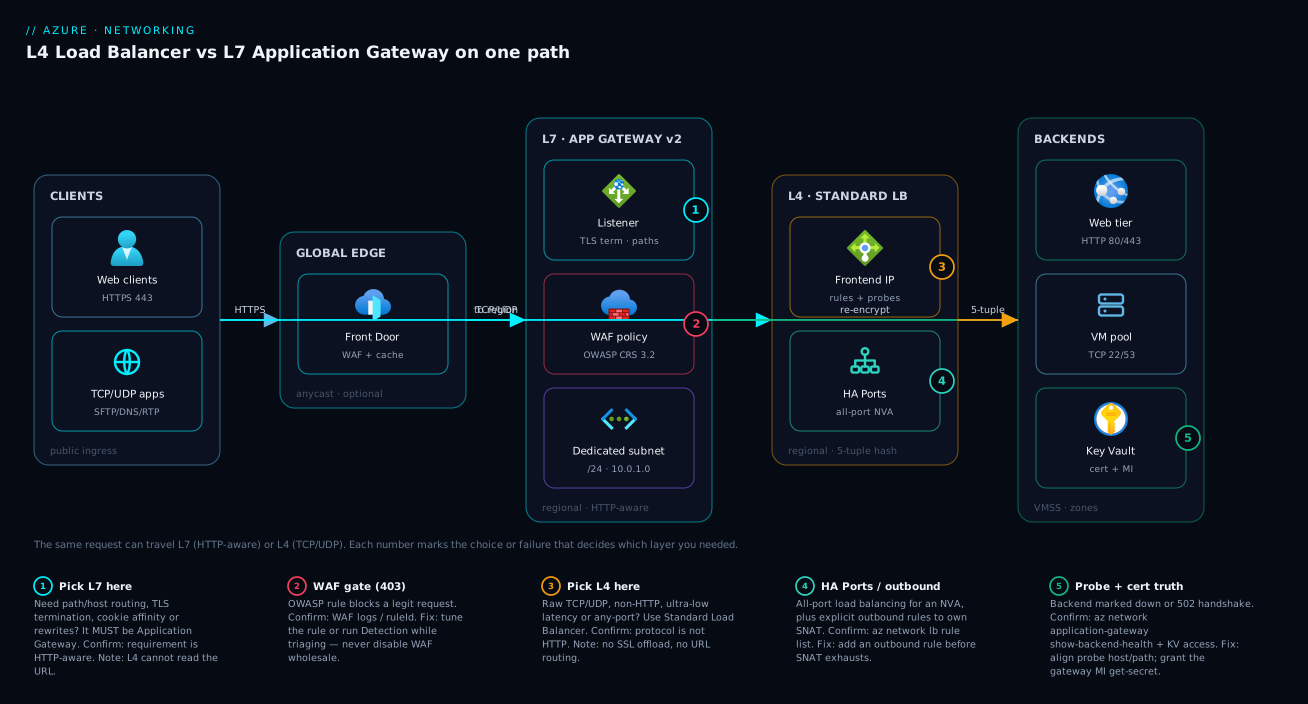
The diagram traces one request as it can travel two ways through an Azure ingress, so you can see exactly where L4 and L7 diverge. Read it left to right. Web clients arrive over HTTPS and (optionally) hit Front Door at the global edge — anycast IP, edge WAF and cache — which routes into the chosen region. Inside the region the HTTP path lands on Application Gateway v2 in its dedicated subnet: the listener terminates TLS, the WAF policy (OWASP CRS 3.2) inspects the decrypted request, and a routing rule sends it to the right backend pool, re-encrypting on the way (end-to-end TLS). Certificates are pulled from Key Vault by the gateway’s managed identity, and backend health is judged by an HTTP probe.
Now follow the other path. TCP/UDP apps — SFTP, DNS, RTP — cannot go through Application Gateway at all; they go straight to the Standard Load Balancer, which hashes the 5-tuple and forwards the packet untouched to a VM pool on TCP 22/53, never reading the payload. The HA Ports node shows the L4-only trick of load-balancing every port at once for a network virtual appliance, plus the explicit outbound rule you add to own SNAT before it exhausts. The five numbered badges mark the decisions and failure points: where you are forced to L7 (badge 1) or L4 (badge 3), where the WAF can block a legit request (badge 2), where HA Ports and outbound SNAT live (badge 4), and where probe/cert drift turns a healthy backend into a 502 (badge 5). The legend narrates each as what it is · how to confirm · the fix.
Real-world scenario
Meridian Health runs a patient portal and a clinical-integration platform on Azure in Central India, with a DR region in South India. The estate is mixed: a public ASP.NET patient portal (HTTPS, needs path routing for /portal vs /api and a WAF for compliance), an internal HL7/MLLP integration listener (raw TCP on port 2575, non-HTTP), an SFTP endpoint for lab partners (TCP 22), and a fleet of DNS resolvers (UDP 53) for internal name resolution. The platform team is six engineers; the original monthly networking spend was about ₹62,000, and they had a single architectural rule that was quietly wrong: “everything goes behind Application Gateway, it’s our standard.”
The trouble surfaced three ways at once. First, the HL7 listener behind Application Gateway simply did not work — MLLP is a framed TCP protocol, not HTTP, so the gateway either refused it or, when forced through a generic TCP workaround they’d hacked in, corrupted message framing and dropped messages intermittently. Lab results were arriving late or not at all. Second, the DNS resolvers could not be fronted by Application Gateway at all (no UDP), so someone had built a fragile custom relay that became a single point of failure — when it restarted, internal resolution stalled. Third, the patient portal itself was fine on Application Gateway, but the team had also wrapped the SFTP endpoint in an HTTP tunnel to keep “everything behind one product,” adding latency and a baffling failure mode for partners.
The breakthrough was applying the L4/L7 test honestly, protocol by protocol. The patient portal is HTTP and needs path routing plus a WAF: that is correctly Application Gateway WAF_v2 — keep it. The HL7 listener, SFTP, and DNS resolvers are all non-HTTP: they belong behind a Standard Load Balancer, internal for HL7 and DNS, public for SFTP. The custom DNS relay and the SFTP HTTP tunnel were deleted entirely — they existed only to satisfy a rule that should never have applied to non-HTTP traffic.
The re-architecture took two sprints. They stood up an internal Standard Load Balancer (10.20.4.10) with a TCP rule on 2575 to the HL7 fleet and a UDP rule on 53 to the DNS resolvers, each with appropriate probes (a TCP probe for HL7, a TCP-on-53 probe for the resolvers). They moved SFTP to a public Standard Load Balancer with a TCP rule on 22 and an explicit outbound rule so the lab-sync jobs running on those VMs would not exhaust SNAT during nightly bulk transfers. The patient portal’s Application Gateway stayed, but they tuned its WAF out of the permanent Detection mode it had been parked in (because earlier false positives had scared them) — running Detection for a week, adding three targeted exclusions for a legitimate document-upload field, then flipping to Prevention for real protection.
The results were unambiguous. HL7 message loss went to zero — MLLP framed cleanly through L4 pass-through. DNS resolution stopped stalling because the custom relay was gone, replaced by a 99.99%-SLA Standard LB across zones. SFTP latency for partners dropped by roughly half (no HTTP tunnel), and the nightly SNAT exhaustion that had been silently failing some lab uploads disappeared once the outbound rule gave the VMs a real port budget. Cost fell to about ₹44,000/month — the deleted Application Gateway capacity (it had been oversized to “handle everything”) more than paid for the new Load Balancers. The lesson on the wall: “‘One product for everything’ is not a standard; it’s a bug. The protocol picks the layer.”
The decisions as a table, because the mapping is the lesson:
| Workload | Protocol | Wrong choice (before) | Right choice (after) | Why |
|---|---|---|---|---|
| Patient portal | HTTPS + path routing + WAF | Application Gateway (correct) | Application Gateway WAF_v2 | Genuinely needs L7 |
| HL7/MLLP listener | Raw TCP 2575 | AppGW TCP hack (corrupted framing) | Internal Standard LB | Non-HTTP → L4 pass-through |
| DNS resolvers | UDP 53 | Custom relay (SPOF) | Internal Standard LB | AppGW can’t do UDP |
| SFTP endpoint | TCP 22 | HTTP tunnel (latency) | Public Standard LB + outbound rule | Non-HTTP; needs SNAT control |
| WAF posture | — | Parked in Detection (no protection) | Tuned → Prevention | Detection logs but doesn’t block |
Advantages and disadvantages
Each service is excellent at its layer and structurally incapable at the other. Weigh them honestly:
| Advantages | Disadvantages | |
|---|---|---|
| Load Balancer (L4) | Carries any TCP/UDP, any port; ultra-low latency pass-through; HA Ports for NVAs; explicit outbound/SNAT control; cheap; 99.99% SLA (Standard) | Blind to content — no URL routing, no TLS offload, no WAF; TCP probe ≠ app health; no caching |
| Application Gateway (L7) | URL/host routing, TLS termination + end-to-end TLS, WAF, header rewrite, cookie affinity, autoscaling (v2) | HTTP(S) only (no UDP/raw TCP); proxy adds latency + cost; needs a dedicated subnet; WAF false-positives; more parts to misconfigure |
| Front Door (global L7) | Global anycast, edge cache + WAF, DDoS absorption, route to nearest region | Overkill for single-region; no static regional IP; HTTP(S) only |
| Traffic Manager (DNS) | Any protocol, simple region steering, cheap | DNS-TTL failover lag; no inline TLS/WAF/routing |
When each matters: choose Load Balancer when the workload is non-HTTP or latency-critical, and accept that you give up all content awareness. Choose Application Gateway when you need to act on the request — route it, secure it, terminate its TLS — and accept the proxy cost and the dedicated subnet. Add Front Door when the app is multi-region and HTTP and global latency or edge security matters. Add Traffic Manager when you need cross-region steering for a non-HTTP protocol or a simple priority failover. The disadvantages are not bugs to fix — they are the price of the layer, and trying to dodge them (UDP through AppGW, routing through LB) is exactly the mistake this article exists to prevent.
Hands-on lab
Stand up both services side by side, see the L4 vs L7 behaviour, and tear it all down — free-tier-friendly (tiny SKUs, deleted at the end). Run in Cloud Shell (Bash).
Step 1 — Resource group, VNet, and two subnets (AppGW needs its own).
RG=rg-lb-vs-agw-lab
LOC=centralindia
az group create -n $RG -l $LOC -o table
az network vnet create -g $RG -n vnet-lab --address-prefix 10.50.0.0/16 \
  --subnet-name snet-backend --subnet-prefix 10.50.1.0/24
az network vnet subnet create -g $RG --vnet-name vnet-lab \
  -n snet-agw --address-prefix 10.50.2.0/24
Expected: a VNet with two subnets — snet-backend for VMs, snet-agw dedicated to Application Gateway.
Step 2 — Two backend VMs running a tiny web server (shared by both balancers).
for i in 1 2; do
  az vm create -g $RG -n vm-web$i --image Ubuntu2204 --vnet-name vnet-lab \
    --subnet snet-backend --public-ip-address "" --admin-username azureuser \
    --generate-ssh-keys --custom-data "#cloud-config
runcmd:
  - apt-get update && apt-get install -y nginx
  - echo \"hello from vm-web$i\" > /var/www/html/index.html
  - echo OK > /var/www/html/healthz" -o none
done
Step 3 — A Standard Load Balancer (L4) in front of the VMs.
az network public-ip create -g $RG -n pip-lb --sku Standard --allocation-method Static -o none
az network lb create -g $RG -n lb-lab --sku Standard \
  --public-ip-address pip-lb --frontend-ip-name fe --backend-pool-name pool -o none
az network lb probe create -g $RG --lb-name lb-lab -n p80 \
  --protocol Http --port 80 --path /healthz --interval 5 --threshold 2 -o none
az network lb rule create -g $RG --lb-name lb-lab -n r80 \
  --protocol Tcp --frontend-port 80 --backend-port 80 \
  --frontend-ip-name fe --backend-pool-name pool --probe-name p80 -o none
# Add both VM NICs to the LB backend pool
for i in 1 2; do
  NIC=$(az vm show -g $RG -n vm-web$i --query "networkProfile.networkInterfaces[0].id" -o tsv)
  az network nic ip-config address-pool add -g $RG --nic-name $(basename $NIC) \
    --ip-config-name ipconfig1 --lb-name lb-lab --address-pool pool -o none
done
LB_IP=$(az network public-ip show -g $RG -n pip-lb --query ipAddress -o tsv)
echo "L4 LB at http://$LB_IP  (refresh — 5-tuple hash spreads you across vm-web1/2)"
Step 4 — An Application Gateway v2 (L7) in front of the same VMs. Capture the VM private IPs for the backend pool.
IP1=$(az vm list-ip-addresses -g $RG -n vm-web1 --query "[0].virtualMachine.network.privateIpAddresses[0]" -o tsv)
IP2=$(az vm list-ip-addresses -g $RG -n vm-web2 --query "[0].virtualMachine.network.privateIpAddresses[0]" -o tsv)
az network public-ip create -g $RG -n pip-agw --sku Standard --allocation-method Static -o none
az network application-gateway create -g $RG -n agw-lab \
  --sku Standard_v2 --capacity 1 --vnet-name vnet-lab --subnet snet-agw \
  --public-ip-address pip-agw --frontend-port 80 \
  --http-settings-port 80 --http-settings-protocol Http \
  --servers $IP1 $IP2 -o none
AGW_IP=$(az network public-ip show -g $RG -n pip-agw --query ipAddress -o tsv)
echo "L7 AppGW at http://$AGW_IP"
Expected: both URLs serve “hello from vm-web1/2”. The difference is invisible at the HTTP level for this simple case — but only the AppGW can now add path routing, TLS, or a WAF.
Step 5 — Prove the L7-only capability: add a path-based rule on the gateway. (Conceptually: /healthz could route to a different pool. Here we just confirm the gateway reads the path by checking backend health, which an L4 LB cannot report at the HTTP level.)
# The L7 diagnostic an L4 LB can't give you: per-backend HTTP health with a reason
az network application-gateway show-backend-health -g $RG -n agw-lab -o table
Step 6 — Observe the L4 behaviour the gateway can’t do: hit it on a raw TCP port. (The LB would forward any TCP port; the gateway only listens on HTTP. This is the disqualifier made concrete.)
# The LB rule is TCP — you could add port 22 and it forwards SSH; AppGW cannot.
az network lb rule list -g $RG --lb-name lb-lab --query "[].{name:name, proto:protocol, fePort:frontendPort}" -o table
Validation checklist. You fronted the same two VMs with an L4 Load Balancer and an L7 Application Gateway. The LB hashed the 5-tuple and forwarded TCP blindly (and could forward any TCP port); the gateway terminated HTTP, could report per-backend HTTP health, and is the only one that could add path routing, TLS, or a WAF. The lab steps mapped to the lesson:
| Step | What you did | What it proves |
|---|---|---|
| 3 | L4 LB over the VMs | Fast, content-blind TCP forwarding |
| 4 | L7 AppGW over the same VMs | HTTP-aware reverse proxy |
| 5 | show-backend-health |
L7 sees app health, not just port-open |
| 6 | lb rule list (TCP) |
L4 carries any TCP port; L7 cannot |
Cleanup (avoid lingering charges — AppGW and Standard LB both bill hourly).
az group delete -n $RG --yes --no-wait
Cost note. A Standard_v2 Application Gateway at capacity 1 plus a Standard LB and two B-series VMs runs a few tens of rupees per hour; an hour of this lab is well under ₹150, and deleting the resource group stops everything immediately.
Common mistakes & troubleshooting
This is the playbook — the part you bookmark. First as a scannable symptom→cause→confirm→fix table, then the detail underneath. Several of these are not “bugs” but the wrong service chosen, which is the most expensive failure of all.
| # | Symptom | Root cause | Confirm (exact cmd / portal path) | Fix |
|---|---|---|---|---|
| 1 | UDP / raw-TCP app won’t work behind Application Gateway | AppGW is HTTP(S)-only — wrong layer chosen | The protocol is non-HTTP (e.g. DNS/UDP, SFTP/TCP, MLLP) | Move to Standard Load Balancer (internal or public) |
| 2 | Need /api vs /web routing but on a Load Balancer |
LB is L4 — can’t read the URL | LB rule is TCP/UDP; no path concept | Put Application Gateway in front; LB can’t route by path |
| 3 | AppGW returns 502 to every request | Backend health failing (probe/host/cert) | az network application-gateway show-backend-health shows Unhealthy + reason |
Align probe path/host; match status codes; raise HTTP-setting timeout |
| 4 | AppGW 502, backend works directly | Probe host header mismatch (host-based backend) | Backend health reason: host/HTTP error | Turn on “pick host from backend” or set explicit probe host |
| 5 | Listener fails / 502 on HTTPS only | TLS cert expired or Key Vault access denied | Listener cert status; AppGW MI lacks get-secret on KV |
Renew cert; grant the gateway’s managed identity Key Vault access |
| 6 | Legitimate request gets 403 from AppGW | WAF false positive (OWASP rule) | WAF logs show the ruleId that blocked it |
Add a scoped exclusion / per-rule override; or Detection while triaging |
| 7 | LB: healthy backend still getting no traffic | Probe failing (wrong port/path) or NSG blocks probe | az network lb probe list; check NSG allows AzureLoadBalancer |
Fix probe target; allow the LB health-probe source in NSG |
| 8 | LB: sick web app keeps getting traffic | TCP probe says “port open” but app is 500ing | Probe protocol is TCP, not HTTP | Switch to an HTTP/HTTPS probe with a /healthz path |
| 9 | Intermittent outbound failures from LB backends under load | SNAT port exhaustion | LB metrics: SNAT used vs allocated; failures under load | Add explicit outbound rule / NAT Gateway; reuse connections |
| 10 | AppGW deploy fails or won’t scale | Dedicated subnet too small / shared with other resources | Subnet has other resources or is < /24 | Give AppGW its own /24 subnet |
| 11 | Standard LB: traffic blocked despite a rule | Standard LB is deny-by-default; no NSG allow | No NSG rule permitting the frontend port | Add an NSG rule (Standard LB requires explicit allow) |
| 12 | NVA/firewall behind LB only sees some ports | Per-port rules instead of all-port | Multiple narrow rules; not HA Ports | Use a single HA Ports rule (Standard LB) |
| 13 | Built on Basic Load Balancer, now stuck | Basic SKU lacks zones/outbound rules and is retiring | sku.name == Basic |
Migrate to Standard; redesign for zones/outbound |
| 14 | Single-region app fronted by Front Door for “best practice” | Unneeded global layer adds cost/complexity | One region, no edge-cache/WAF need | Drop Front Door; regional AppGW is enough |
The expanded form for the entries that bite hardest:
1. A UDP or raw-TCP app won’t work behind Application Gateway. Root cause: the wrong layer was chosen — Application Gateway is an HTTP(S) reverse proxy and does not carry UDP or arbitrary TCP at all. Confirm: the protocol is non-HTTP (DNS/UDP 53, SFTP/TCP 22, an HL7/MLLP listener, game traffic). Fix: front it with a Standard Load Balancer — internal for private services, public for internet-facing ones. There is no Application Gateway setting that makes this work; it is an architecture correction.
3. Application Gateway returns 502 to every request. Root cause: the gateway’s backend health is failing — the probe can’t get a healthy answer, so the gateway has nothing to proxy. Confirm: az network application-gateway show-backend-health reports the pool as Unhealthy with a reason (timeout, status-code mismatch, host error, cert error). Fix: point the probe at a real health path, ensure match-codes cover what the backend returns, raise the HTTP-setting request timeout if the backend is legitimately slow, and check the host header (see #4).
4. AppGW 502s but the backend works when you hit it directly. Root cause: the probe host header — by default AppGW may send its own hostname, which a backend doing host-based virtual hosting rejects, so the probe fails even though the app is up. Confirm: backend-health reason shows a host or HTTP error. Fix: enable “pick host name from backend setting” so the probe uses the backend FQDN, or set an explicit probe host that the backend accepts.
5. The listener fails or HTTPS-only requests 502. Root cause: a TLS certificate problem — expired listener cert, or the gateway’s managed identity lost get-secret access to Key Vault, so it can’t fetch the cert. Confirm: the listener’s cert status in the portal; check the gateway MI’s Key Vault access (az role assignment list for the identity on the vault). Fix: renew/rotate the cert and re-grant the gateway identity Key Vault access (Key Vault Secrets User / a get-secret policy). The same pattern appears in Azure Key Vault: Secrets, Keys & Certificates.
6. A legitimate request gets a 403 from Application Gateway. Root cause: a WAF false positive — an OWASP rule matched benign content (often a document upload or a field with SQL-like text). Confirm: the WAF logs show the exact ruleId and the request that tripped it. Fix: add a scoped exclusion for that field/header or a per-rule override; if you’re mid-incident, switch the policy to Detection to stop blocking while you triage, then re-tune and return to Prevention — never leave it in Detection permanently (that’s no protection at all).
8. A Load Balancer keeps sending traffic to a sick web app. Root cause: a TCP health probe only confirms the port is open; a web app can accept TCP 443 while every request 500s, and the LB happily keeps routing to it. Confirm: the probe’s protocol is TCP, not HTTP. Fix: switch to an HTTP/HTTPS probe that hits /healthz and checks for a 200 — that catches the up-but-broken case a TCP probe misses.
9. Intermittent outbound failures from LB backends under load. Root cause: SNAT port exhaustion — backends open more outbound connections than the shared SNAT pool allows (often new-connection-per-request code), and new egress fails under load while passing at rest. Confirm: LB SNAT metrics show used approaching allocated, with failures correlating to load. Fix: add an explicit outbound rule with a real port budget, attach a NAT Gateway for heavy egress, and fix the code to reuse connections. Details in Azure Load Balancer: Standard, Outbound Rules, Cross-Region & HA Ports.
11. Standard Load Balancer blocks traffic despite a load-balancing rule. Root cause: Standard LB is secure-by-default (deny) — unlike Basic, it requires an NSG that explicitly allows the frontend port to the backends. Confirm: the backend subnet/NIC NSG has no rule permitting the port. Fix: add an NSG rule allowing the frontend port (and ensure the AzureLoadBalancer service tag is allowed for health probes).
Best practices
- Decide by protocol first, features second. Ask “is it HTTP, and do I need to read it?” before anything else. Non-HTTP → Standard Load Balancer; HTTP-with-routing/TLS/WAF → Application Gateway. Don’t let “what we used last time” pick the layer.
- Default to Standard Load Balancer, never Basic. Basic is retiring and lacks zones, outbound rules, and HA Ports. Every new L4 deployment is Standard.
- Default to Application Gateway v2 / WAF_v2, never v1. v2 brings autoscaling, a static VIP, zone redundancy, and Key Vault cert integration. v1 is legacy.
- Give Application Gateway its own dedicated /24 subnet. Don’t share it; size it for scale headroom. A cramped or shared subnet blocks autoscaling and deploys.
- Use HTTP/HTTPS health probes, not TCP, for web backends. A TCP probe only proves the port is open; an HTTP probe proves the app actually serves. Point it at a shallow
/healthz. - Own your outbound SNAT on Standard LB. Add explicit outbound rules (or a NAT Gateway) before load exposes implicit-SNAT exhaustion. Reuse connections in code regardless.
- Tune WAF in Detection, then enforce in Prevention. Run Detection for a representative period, add scoped exclusions for the rules that false-positive on real traffic, then flip to Prevention. Never leave it in Detection — that’s logging, not protecting.
- Terminate TLS at L7 and re-encrypt to the backend where compliance requires. Use end-to-end TLS for sensitive workloads; pull certs from Key Vault via a managed identity, not uploaded PFX files you have to rotate by hand.
- Stack layers only when each earns its place. Front Door (global edge) → Application Gateway (regional WAF/routing) → internal Standard LB (stateful tier) is right when each adds value; adding any layer that does nothing is pure cost.
- Deploy across Availability Zones. Standard LB and AppGW v2 are zone-aware; place frontends and backends zone-redundantly for the 99.99% SLA.
- Manage everything as code (Bicep). Listeners, rules, probes, WAF policies, and outbound rules are all configuration that should be reviewed and versioned — a hand-edited probe path is a 2am outage waiting to happen.
- Right-size and watch the meters. AppGW Capacity Units and LB data-processed both bill; alert on SNAT usage, backend health, and AppGW unhealthy-host count before users feel it.
Security notes
- Run a WAF on internet-facing web apps. Application Gateway WAF_v2 (or Front Door Premium WAF at the edge) gives you OWASP rule inspection; Standard Load Balancer has no application-layer protection, so a public web app behind a bare L4 LB is unprotected at the app layer.
- Managed identity for certs and secrets. Let Application Gateway fetch listener certs from Key Vault via its managed identity with least privilege (
Key Vault Secrets User), so private keys never sit in your templates or pipeline. - Standard LB is deny-by-default — keep it that way. It requires explicit NSG allows; scope them tightly to the frontend ports and the
AzureLoadBalancerprobe source, and never open broad ranges to “make it work.” - Terminate TLS with a modern policy. Enforce a minimum TLS version and a strong cipher suite on Application Gateway / Front Door listeners; re-encrypt to the backend (end-to-end TLS) when clear text on the internal hop is unacceptable.
- Keep internal traffic internal. Use an internal Standard Load Balancer (private frontend IP) for backend tiers like databases, HL7 listeners, and resolvers so they are never internet-reachable; only the web ingress (AppGW/Front Door) is public.
- mTLS where client identity matters. Application Gateway can require a client certificate (mTLS) to verify the caller at the gateway — use it for partner/B2B APIs.
- Don’t expose health or admin paths. A
/healthzshould return a status, not internal topology; restrict any management ports behind the LB with NSGs and inbound NAT rules scoped to admin sources.
The security posture of each service at a glance:
| Control | Standard Load Balancer (L4) | Application Gateway (L7) |
|---|---|---|
| WAF / OWASP inspection | No | Yes (WAF_v2) |
| TLS termination / policy | No | Yes (min TLS, ciphers) |
| mTLS (client cert) | No | Yes |
| Secrets via managed identity | N/A | Yes (Key Vault certs) |
| Default network posture | Deny (NSG required) | Subnet-isolated + NSG |
| DDoS protection | Via DDoS Protection plan | Via DDoS plan / Front Door edge |
| Keep backend private | Internal frontend IP | Backends in private subnets |
Cost & sizing
The bill drivers differ by service, and the cheap-vs-right tension is real — but “right” is usually cheaper once you stop forcing traffic through the wrong layer (the Meridian estate got both cheaper and more correct).
- Standard Load Balancer bills on rules plus data processed — it is inexpensive (low hundreds to low thousands of rupees a month for typical traffic). There is no per-instance compute because it is a platform service. Outbound rules and NAT Gateway add small hourly + per-GB charges, far cheaper than the egress failures SNAT exhaustion causes.
- Application Gateway v2 bills on a fixed hourly component plus Capacity Units (a blend of compute, connections, and throughput) — materially more than an L4 LB, and WAF_v2 costs more than Standard_v2. This is the price of being a content-aware proxy; don’t pay it for traffic that doesn’t need L7.
- Front Door bills on requests, data transfer, and (Premium) WAF/edge features — justified for global, multi-region web apps; pure waste for single-region.
- The expensive mistake is the wrong layer, not the SKU. Tunneling non-HTTP traffic through Application Gateway (oversizing it to “handle everything”) costs far more than a couple of small Standard Load Balancers — and it doesn’t even work well.
Rough monthly figures and what each buys:
| Service / config | What you pay for | Rough INR / month | What it’s right for | Watch-out |
|---|---|---|---|---|
| Standard LB (typical) | Rules + data processed | ~₹1,000–4,000 | Any L4 distribution | TCP probe ≠ app health |
| Standard LB + NAT Gateway | LB + NAT hourly/egress | ~₹3,000–7,000 | Heavy outbound at scale | Needs subnet plumbing |
| Application Gateway Standard_v2 | Fixed + Capacity Units | ~₹15,000–25,000 | L7 routing + TLS, no WAF | Don’t use for non-HTTP |
| Application Gateway WAF_v2 | Fixed + CU (higher) | ~₹20,000–35,000 | L7 + WAF (compliance) | Tune WAF or it blocks traffic |
| Front Door Standard | Requests + data + routing | ~₹3,000–12,000+ | Global L7, edge cache | Overkill single-region |
| Front Door Premium | Above + edge WAF + private | ~₹25,000+ | Global L7 + edge WAF | Justify the premium |
Sizing rules of thumb: size Standard LB by data volume and SNAT needs (it scales automatically); size Application Gateway v2 by setting a sane autoscale min/max Capacity Unit range to your peak connections/throughput (start min 2, let it scale); and never size up a balancer to mask a wrong-layer decision — fix the layer first, then size the right service to measured load.
Interview & exam questions
1. What is the fundamental difference between Azure Load Balancer and Application Gateway? Load Balancer operates at layer 4 (transport): it hashes the TCP/UDP 5-tuple and forwards packets without reading them, so it carries any protocol fast but is blind to content. Application Gateway operates at layer 7 (application): it terminates the HTTP(S) connection, reads the URL/host/cookies, and proxies based on content — enabling path routing, TLS termination, and WAF that L4 structurally cannot do.
2. You need to carry UDP traffic (e.g. DNS). Which service, and why not the other? Standard Load Balancer — it supports UDP at any port. Application Gateway is an HTTP(S)-only reverse proxy and does not carry UDP at all, so it is disqualified regardless of any other requirement.
3. You need to route /api/* and /images/* to different backend pools. Which service? Application Gateway — path-based routing requires reading the URL, which is a layer-7 capability. A Load Balancer can’t see the path; it only knows ports, so it cannot do path-based routing.
4. Difference between a TCP health probe and an HTTP health probe, and why it matters? A TCP probe only confirms a port accepts a connection — a web app can accept TCP 443 while every request returns 500, and the probe still calls it healthy. An HTTP/HTTPS probe hits a path and checks the status code, catching an up-but-broken app. For web backends, use HTTP probes so you don’t keep routing to a sick instance.
5. What is SNAT port exhaustion on a Load Balancer and how do you fix it? Backends share a finite pool of SNAT ports for outbound connections; under load (especially new-connection-per-request code) the pool exhausts and new egress fails intermittently — passing at rest, failing under load. Fix with explicit outbound rules (a real port budget), a NAT Gateway for heavy egress, and connection reuse in code. Scaling out adds ports but masks the bug.
6. What is HA Ports and when do you need it? HA Ports is a single Standard-Load-Balancer rule that load-balances all ports (1–65535, TCP and UDP) at once. You need it to front a network virtual appliance (firewall/IDS) that must receive traffic on every port. It is layer-4-only — Application Gateway cannot do it.
7. When would you put Application Gateway behind Front Door? When the app is multi-region and HTTP: Front Door gives a global anycast entry, edge caching, edge WAF, and routing to the nearest healthy region, while a regional Application Gateway does per-region WAF, TLS termination, and path routing. Front Door is the global front door; Application Gateway is the regional one — they stack.
8. Application Gateway returns 502 to every request but the backend works directly. What’s the likely cause? A backend-health failure, very often a probe host-header mismatch — AppGW sends its own hostname, which a host-based backend rejects, so the probe fails. Confirm with az network application-gateway show-backend-health; fix by picking the host from the backend setting (or an explicit probe host), and check match-codes/timeout/cert.
9. Why is Standard Load Balancer “secure by default,” and what does that require of you? Unlike Basic, Standard LB denies traffic until an NSG explicitly allows it (and the AzureLoadBalancer service tag for probes). You must add NSG rules for the frontend ports — forgetting this is a common “rule exists but no traffic flows” failure.
10. A WAF is blocking a legitimate request with a 403. How do you handle it without disabling protection? Read the WAF logs for the exact ruleId that fired, then add a scoped exclusion for that field/header or a per-rule override — not a blanket disable. If mid-incident, switch the policy to Detection to stop blocking while you triage, then re-tune and return to Prevention.
11. You see Basic Load Balancer in an estate. What’s the concern and the action? Basic is retiring and lacks Availability Zones, explicit outbound rules, HA Ports, and an SLA. The action is to migrate to Standard and redesign for zones and explicit outbound — don’t build anything new on Basic.
12. Traffic Manager vs Front Door — when each? Traffic Manager is DNS-based and protocol-agnostic — use it to steer clients across regions for any protocol (priority/weighted/geo), accepting DNS-TTL failover lag and no inline TLS/WAF. Front Door is an inline global L7 with edge TLS, WAF, and caching — use it for HTTP(S) apps that want edge security and latency, not just DNS steering.
These map to AZ-700 (Network Engineer) — design and implement load balancing and application delivery (Load Balancer, Application Gateway, Front Door, Traffic Manager) — and AZ-104 (Administrator) — configure load balancing (LB and AppGW basics, health probes, rules). The WAF/TLS depth touches AZ-500. A compact cert mapping for revision:
| Question theme | Primary cert | Exam objective area |
|---|---|---|
| L4 vs L7, when each | AZ-700 | Design & implement application delivery |
| Health probes, rules, SNAT | AZ-700 / AZ-104 | Configure load balancing |
| HA Ports, outbound rules | AZ-700 | Implement Load Balancer |
| WAF, TLS termination, mTLS | AZ-700 / AZ-500 | Secure application delivery |
| Front Door vs Traffic Manager | AZ-700 | Global load balancing & routing |
| NSG with Standard LB | AZ-104 | Network security |
Quick check
- A workload uses raw UDP on port 53. Which Azure service fronts it, and which one is disqualified outright?
- You must route
/api/*and/web/*to different pools. L4 or L7 — and why can’t the other do it? - True or false: a TCP health probe is sufficient to know your web app is healthy.
- Your Load Balancer backends start failing outbound calls under heavy load but are fine at rest. What’s the cause and the fix?
- Application Gateway returns 502 on every request, but you can curl the backend directly and it works. Name the most likely cause and the command that confirms it.
Answers
- Standard Load Balancer fronts it (it supports UDP at any port). Application Gateway is disqualified — it is an HTTP(S)-only reverse proxy and does not carry UDP at all.
- Layer 7 — Application Gateway. Path-based routing requires reading the URL, which only an L7 proxy does. A Load Balancer (L4) sees only IPs/ports and cannot route by path.
- False. A TCP probe only confirms the port is open; a web app can accept the connection while returning 500 to every request. Use an HTTP/HTTPS probe against a
/healthzpath to confirm the app actually serves. - SNAT port exhaustion — the backends share a finite outbound SNAT pool that they exhaust under load (often new-connection-per-request). Fix with an explicit outbound rule / NAT Gateway and connection reuse; scaling out only masks it.
- Most likely a backend-health failure, commonly a probe host-header mismatch (AppGW sends its own hostname; a host-based backend rejects it). Confirm with
az network application-gateway show-backend-health, then fix the probe host / match-codes / cert.
Glossary
- Layer 4 (L4) — the transport layer; load balancing here forwards TCP/UDP packets by 5-tuple hash without reading the payload.
- Layer 7 (L7) — the application layer; load balancing here terminates HTTP(S), reads the request, and proxies based on content.
- 5-tuple — source IP, source port, destination IP, destination port, and protocol; the hash input a Standard Load Balancer uses to map a flow to a backend.
- Standard Load Balancer — the current Azure L4 load balancer: zone-aware, secure-by-default, with health probes, HA Ports, and explicit outbound rules.
- Application Gateway v2 — the current Azure L7 reverse proxy: TLS termination, path/host routing, header rewrite, autoscaling, and (WAF_v2) a web application firewall.
- WAF (Web Application Firewall) — OWASP-rule inspection of HTTP requests to block injection/XSS/etc.; available on AppGW WAF_v2 and Front Door Premium.
- TLS termination / offload — decrypting HTTPS at the gateway so it can read and route the request; the backend may be plain HTTP.
- End-to-end TLS — terminating TLS at the gateway and re-encrypting to an HTTPS backend so traffic is never clear text past the edge.
- mTLS — mutual TLS; the gateway also requires and verifies a client certificate to authenticate the caller.
- Health probe — a periodic check that a backend is alive; TCP confirms the port is open, HTTP/HTTPS confirms the app returns a healthy status.
- SNAT port — a port from a finite pool used to map a backend’s outbound connection to a shared public IP; exhaustion breaks egress under load.
- Outbound rule — explicit egress configuration on a Standard Load Balancer (port allocation, public IP, idle timeout) so you own SNAT.
- HA Ports — a single Standard-LB rule that load-balances every port (1–65535, TCP/UDP) at once; used to front network virtual appliances.
- Listener — the IP, port, and protocol Application Gateway accepts traffic on; where TLS and host-based routing are configured.
- Backend pool — the set of targets traffic is sent to (VMs/VMSS/IPs for LB; IPs/FQDNs/App Service/VMSS for AppGW).
- Capacity Unit — the Application Gateway v2 autoscaling unit (a blend of compute, connections, and throughput) that drives cost and scale.
- Front Door — the global L7 edge service: anycast IP, edge caching, edge WAF, and routing to the nearest healthy region.
- Traffic Manager — DNS-based global traffic steering (priority, weighted, geographic, performance); protocol-agnostic, no inline TLS/WAF.
Next steps
You can now route any workload to the correct ingress layer in one decision. Build outward:
- Next: Azure Load Balancer: Standard, Outbound Rules, Cross-Region & HA Ports — the deep L4 mechanics: SNAT control, HA Ports, and the global cross-region LB.
- Related: Application Gateway with WAF, mTLS & End-to-End TLS — the deep L7 mechanics: WAF tuning, mTLS, and end-to-end TLS done right.
- Related: Azure Virtual Network: Subnets, NSGs & Routing — the VNet, dedicated subnet, and NSG foundations both services depend on.
- Related: Azure Multi-Region Active-Active Design — how Front Door, Traffic Manager, and regional ingress stack for global resilience.
- Related: Azure Regions & Availability Zones Explained — placing zone-redundant frontends and backends for the 99.99% SLA.