It is 02:00 and an application that has worked for eight months cannot reach its database. The app team swears nothing changed. The network team swears nothing changed. You SSH-fail, you telnet to port 1433 and it hangs, and the ticket lands on you because you are the person who is supposed to know how an Azure Virtual Network (VNet) actually moves a packet. This article is the body of knowledge you draw on in that moment: not the marketing description of NSGs and route tables, but the mechanism — the exact order in which Azure evaluates a packet, where each layer can silently drop it, and the precise command that names the guilty layer.
Azure VNet connectivity failures almost never produce a useful error. A blocked packet does not bounce a rejection back; it is dropped silently, and your client sits in a TCP connect timeout for 30, 60, 120 seconds before giving up with Connection timed out. That single fact — silent drop, not reject — is why beginners flail (they read the application log, which says nothing) and why seniors go straight to the platform: effective security rules, effective routes, and Network Watcher turn “it doesn’t work” into “subnet route table sends 10.20.0.0/16 to a next hop of None, here is the line.” Because this is a reference you reach for mid-incident, the playbook, the next-hop types, the default rules, the peering flags and the Network Watcher tools are all laid out as scannable tables — read the prose once, then keep the tables open at 02:00.
By the end you will trace a packet through the full data path — NIC NSG, subnet NSG, the route table, the next hop, the return path — and name the layer dropping it in minutes. We cover NSGs at NIC and subnet level and why deny wins, the hidden default rules, priority, service tags and Application Security Groups (ASGs); route tables and User-Defined Routes (UDRs), system routes, BGP routes from a VPN/ExpressRoute gateway, the next-hop types and longest-prefix match; the classic, expensive failures — a missing UDR to a firewall, asymmetric routing through a Network Virtual Appliance (NVA), non-transitive VNet peering, the allowForwardedTraffic/gateway-transit flags, forced-tunnelling black holes; and every Network Watcher tool with the exact az network watcher command. Diagnosis-first: lead with the symptom, find the layer, fix the line.
To frame the whole field before the deep dive, here is every connectivity symptom this article cracks, what it almost always means, and the one tool to reach for first:
| Symptom you observe | What it usually means | First tool / command | Most common single cause |
|---|---|---|---|
| TCP connect times out (no response) | A layer dropped the SYN silently | IP flow verify, then Next hop | NSG deny, or route None/wrong next hop |
| Connection refused instantly (RST) | Packet reached the VM; nothing listening | ss -tlnp in guest via run-command |
App bound 127.0.0.1, or guest firewall |
| Works one way, return drops under load | Forward and return paths differ | Next hop from both ends | Asymmetric routing through an NVA |
| All internet egress fails after a route change | A UDR 0.0.0.0/0 mis-points |
Next hop to 8.8.8.8 |
NVA down / None / no IP forwarding |
| On-prem unreachable from one subnet only | Gateway (BGP) routes suppressed | Effective routes on that NIC | disableBgpRoutePropagation: true |
| A third peered VNet unreachable | Peering is not transitive | Effective routes (no route exists) | No spoke-to-spoke route/peering |
| Private Endpoint name resolves to a public IP | Private DNS misconfigured | nslookup from the client VM |
Zone not VNet-linked / missing A record |
| Load-balancer backend “unhealthy”, VMs fine | Health probe blocked | IP flow verify from 168.63.129.16 |
Custom DenyAll ate the LB tag |
What problem this solves
In Azure the network is a distributed, software-defined fabric. There is no physical cable to unplug, no switch to console into, no tcpdump on a router you own. Every allow/deny and every routing decision is made by the host SDN (Software-Defined Networking) stack on the physical server running your VM, driven by rules you configured (NSGs, route tables) and rules Azure injected (default NSG rules, system routes, BGP-learned routes). When connectivity breaks, the failure is invisible at the app and OS layer — ip route inside the guest shows only the guest’s view, almost always a single default route to the subnet gateway; it says nothing about what the fabric does with the packet after it leaves the NIC.
The pain in production terms: an outage where every team’s logs are clean. The app gets a TCP timeout, the DB never sees a SYN, and nobody can see the drop because it happens in Azure’s fabric, not in anyone’s software. Without the discipline this article teaches, teams burn hours guessing — restarting VMs, re-deploying apps, opening support cases — when the answer is a two-minute query against effective rules and effective routes. Who hits this: anyone running hub-and-spoke with a central firewall, anyone using Private Endpoints, anyone who peered two VNets and expected a third to be reachable, and anyone whose security team pushed an NSG or route table via Azure Policy without telling the app team. Mastering effective rules, effective routes and Network Watcher collapses “where is the packet dying?” from an all-hands bridge into one engineer’s ten-minute investigation.
A quick map of who owns which layer, so you escalate to the right person fast instead of paging all three teams onto a bridge:
| Layer in the data path | What lives here | Who usually owns it | Failure classes it causes |
|---|---|---|---|
| Guest OS / app | Listener, OS firewall, TLS, DNS client | App / dev team | RST (not listening / 127.0.0.1), guest-firewall reject |
| NIC NSG | Per-VM fine-grained allow/deny | App + platform | Silent timeout (deny reached before allow) |
| Subnet NSG | Broad subnet policy | Network / security | Silent timeout (the “but my NIC allows it!” trap) |
| Route table (UDR) | Next-hop steering for the subnet | Network team | Black hole (None), mis-route, asymmetry |
| VNet peering | Cross-VNet reachability + flags | Network team | Non-transitive gaps, forwarded-traffic drops |
| NVA / Azure Firewall | Inspection + its own NSGs/routes | Security team | Forward passes, return dropped; SNAT/allow rule missing |
| Gateway (VPN/ER) | On-prem reachability via BGP | Network team | On-prem unreachable when BGP suppressed |
| Private DNS / resolver | privatelink.* name resolution |
Platform / network | PE resolves to public IP; NXDOMAIN |
Learning objectives
By the end of this article you can:
- Trace an Azure packet end to end — through NIC NSG, subnet NSG, the route table lookup, the next-hop resolution, and the symmetric return path — and explain where each can drop it.
- Read effective security rules for a NIC and explain why a deny at priority 200 beats an allow at priority 300, and why the invisible default rules matter.
- Read effective routes for a NIC, identify the winning route by longest-prefix match, and interpret next-hop types
VirtualNetwork,VnetLocal,Internet,VirtualNetworkGateway,VirtualAppliance, andNone. - Diagnose the canonical failures: an NSG silently dropping traffic, a missing UDR to the firewall, asymmetric routing through an NVA, non-transitive peering in hub-and-spoke, and forced-tunnelling black holes.
- Drive every Network Watcher tool from the CLI — IP flow verify, Next hop, Connection troubleshoot, NSG diagnostics, Packet capture, and Connection Monitor — and know which to reach for first.
- Resolve Private Endpoint and Private DNS failures where the name resolves to a public IP or the A record is missing.
- Build a repeatable triage runbook so a connectivity incident is a ten-minute investigation, not an outage bridge.
Prerequisites & where this fits
You should already understand Azure’s resource hierarchy, what a VNet, subnet, NIC and NSG are, private vs public IP, and running az in Cloud Shell. TCP basics (SYN/SYN-ACK, the handshake, stateful vs stateless filtering) and CIDR notation are assumed — “a /16 is less specific than a /24” should land. If that’s shaky, read Azure Virtual Network, Subnets and NSGs: Networking Fundamentals first; this is its advanced, diagnosis-focused sequel.
This is the Troubleshooting capstone of the Azure networking track: the fundamentals teach you to build a VNet, this teaches you to debug one at 2 AM. It maps to AZ-700 (Azure Network Engineer Associate) — which tests effective routes, NSG evaluation, Network Watcher and hub-spoke routing heavily — and the networking domains of AZ-104 and AZ-305. It pairs with the two sibling troubleshooting guides where the network is the suspected culprit: Troubleshooting Azure SQL Database: Connectivity, Timeouts, Throttling & Blocking and Fixing Azure Storage 403 Errors: Firewalls, Private Endpoints, RBAC & SAS.
Where this sits relative to the adjacent Azure networking topics — read this table as a “if your real question is X, you may want article Y instead”:
| If your real question is… | The right article | This article assumes you know it |
|---|---|---|
| How do I build a VNet/subnet/NSG? | Virtual Network, Subnets and NSGs (fundamentals) | Yes — the build-it prerequisite |
| How does Private Link / Private DNS work end to end? | Private Link and Private DNS | Partly — covered for failure modes only |
| Private Endpoint vs Service Endpoint — which? | Private Endpoint vs Service Endpoint | Partly |
| Load Balancer health probes and backend reachability | Load Balancer vs Application Gateway | Yes — the 168.63.129.16 dependency |
| TLS/WAF/mTLS at the edge | Application Gateway v2 WAF | No — out of scope here |
| Why a route table got pushed I didn’t ask for | Azure Policy and Governance at Scale | Yes — policy-driven route tables bite |
| Hub-spoke topology and centralised firewall at scale | Enterprise-Scale Landing Zone | Yes — the topology this debugs |
Core concepts
Before any command, fix the mental model. Six ideas explain every connectivity failure you will ever see.
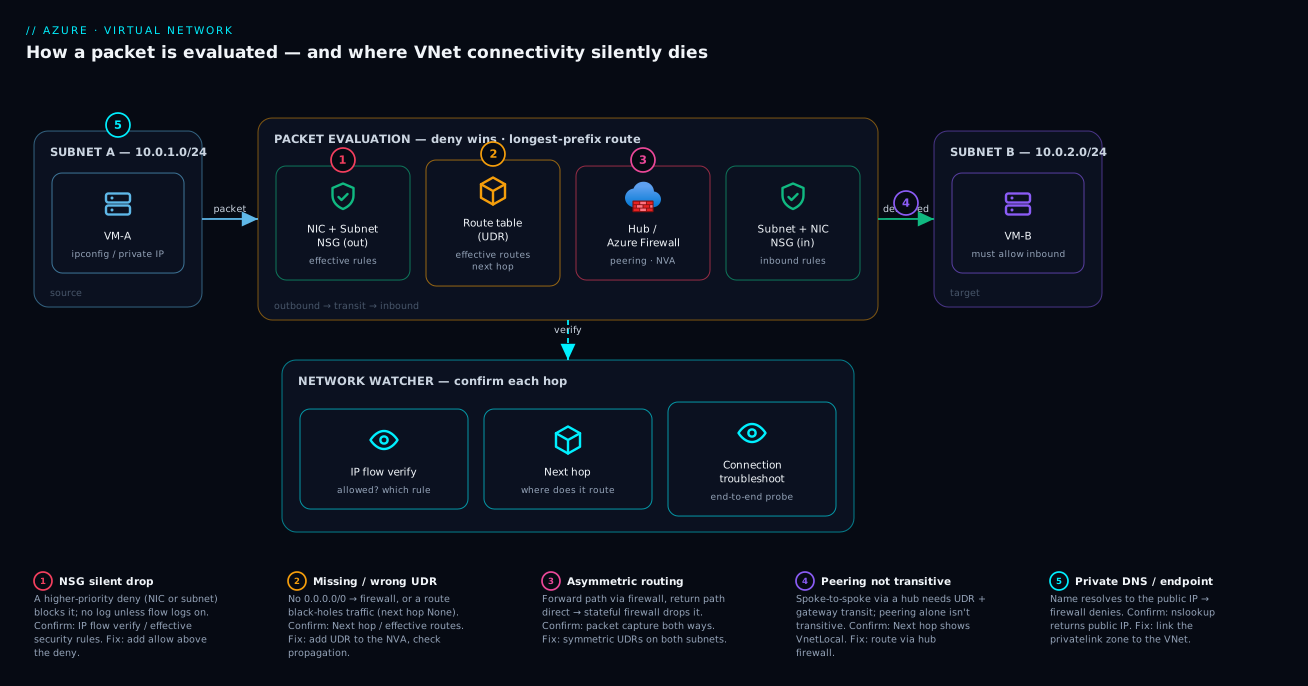
The data path is two independent decisions, made twice. For a packet to get from VM-A to VM-B and back, Azure makes a filtering decision (NSG: allow/deny) and a routing decision (route table: which next hop) — both on the way out and on the way back. Four checkpoints, not one. A senior’s first instinct is “which of the four?” not “is the firewall down?”.
NSGs are stateful; route tables are not. An NSG remembers flows: if you allow an outbound connection, the return is automatically allowed regardless of inbound rules — so you usually only write rules for the initiating direction. Routing has no memory; the return path is computed independently from the destination’s route table, which is the root of all asymmetric-routing pain. Filtering is symmetric by state; routing is not.
Filtering and routing are evaluated in a fixed order. Outbound, the host stack: (1) NIC NSG outbound, then (2) subnet NSG outbound — both must allow; (3) consults the effective route table and resolves the next hop; (4) forwards. Inbound, the two NSGs flip: subnet first, then NIC. The mnemonic: in = subnet then NIC; out = NIC then subnet — and a deny at either level kills the packet.
Deny wins, lowest priority number wins. Within one NSG, rules process by priority (an integer 100–4096, lowest first). The first rule matching the 5-tuple (source, source port, destination, destination port, protocol) decides — if it is a Deny, the packet is dropped and no lower-priority rule is read. Across NIC and subnet NSGs it is AND for allow: both must allow; if either denies, the packet dies. So “deny wins” means two things — a deny short-circuits within an NSG, and a deny in one of the two NSGs overrides an allow in the other.
There are rules and routes you did not write. Every NSG ships with hidden default rules (priorities 65000–65500) the portal buries but that govern anything you didn’t override: AllowVnetInBound, AllowAzureLoadBalancerInBound, DenyAllInBound, AllowVnetOutBound, AllowInternetOutBound, DenyAllOutBound. Every subnet has invisible system routes: the VNet space (next hop VnetLocal), a 0.0.0.0/0 default to Internet, and routes that appear when you peer, add a gateway, or enable a service endpoint. Effective rules and effective routes are the only views of the merged, real picture — yours plus the platform’s. Never debug from the rule list; debug from the effective view.
Longest-prefix match decides routing; UDR > BGP > system on ties. Azure picks the route with the longest (most specific) prefix — 10.0.1.0/24 beats 10.0.0.0/16 beats 0.0.0.0/0. On equal prefix length the source breaks the tie: UDR > BGP-learned > system. This is exactly how you force traffic through a firewall: a UDR for 0.0.0.0/0 with next hop the firewall’s IP overrides the system internet route. Grasp this and the whole hub-spoke routing model is obvious.
The vocabulary in one table
The glossary at the end repeats these for lookup; this table pins the moving parts side by side so the later sections read fast:
| Term | One-line definition | Where it lives | Why it matters to a connectivity drop |
|---|---|---|---|
| 5-tuple | Source IP, source port, dest IP, dest port, protocol | The flow’s identity | What every NSG rule and IP flow verify match on |
| NSG | Stateful allow/deny packet filter | Subnet and/or NIC | Both must allow; a deny anywhere drops |
| Default rules | Hidden NSG rules at priority 65000–65500 | Every NSG | Govern anything you didn’t override |
| Effective security rules | Merged NIC + subnet + default rules on a NIC | Computed by the platform | The only truthful view of filtering |
| Route table / UDR | Custom routes attached to a subnet | Subnet | Overrides system/BGP for its prefixes |
| System routes | Azure’s automatic routes | Every subnet | VnetLocal, Internet, RFC1918 → None |
| BGP routes | Routes learned from a VPN/ER gateway | Subnet (if gateway present) | On-prem reachability; suppressible |
| Effective routes | Merged system + BGP + UDR on a NIC | Computed by the platform | The only truthful view of routing |
| Next hop | Where a route sends a packet: a type (+IP for NVAs) | A route’s right-hand side | Names where your packet actually goes |
| Longest-prefix match | Most specific prefix wins; ties by source | Route-selection algorithm | Why /24 beats /16 beats /0 |
| Service tag | Microsoft label expanding to IP ranges | NSG rule source/dest | Storage/Sql/AzureLoadBalancer etc. |
| ASG | Logical group of NICs used in rules | NSG rule source/dest | Rules as intent; survive scaling |
| NVA | Firewall/router VM (or Azure Firewall) | Hub VNet, VirtualAppliance hop |
Forward/return asymmetry happens here |
168.63.129.16 |
Azure platform virtual IP | Per host | DHCP, DNS, LB health, VM agent — never block |
| Asymmetric routing | Forward and return paths differ | Routing | Stateful NVA drops unseen-flow replies |
How a packet is evaluated, end to end
Walk one TCP SYN from VM-A (10.10.1.4) in snet-app to VM-B (10.20.1.5) in snet-data, in a peered hub-spoke with a firewall in the hub. Every numbered step is a place the packet can die.
-
App opens a socket. Inside the VM,
ip routeshows a single default route to10.10.1.1(the subnet’s.1, Azure’s gateway); the guest hands the packet to the NIC. This is the last point your in-guest tooling sees anything — everything below is the fabric. -
NIC NSG, outbound. The host evaluates VM-A’s NIC NSG against the 5-tuple
(10.10.1.4, ephemeral, 10.20.1.5, 1433, TCP), priority ascending, first match wins. A Deny → dropped silently. No custom match →AllowVnetOutBound(65000) passes it. -
Subnet NSG, outbound. Same evaluation on
snet-app; both NSGs must allow. A Deny → dropped. (Two NSGs outbound is the classic “but my NIC NSG allows it!” surprise.) -
Route lookup on VM-A’s effective routes. Next hop for
10.20.1.5by longest-prefix match. In plain peering the winner is10.20.0.0/16 → VirtualNetwork. But a UDR for that prefix (or0.0.0.0/0) makes itVirtualAppliance @ 10.0.0.4; a UDR pointing it atNone→ black-holed here, dropped with no next hop. -
Forward to next hop.
VirtualNetwork/VnetLocal→ toward VM-B directly.VirtualAppliance→ to the firewall NIC first, which has its own NSGs/routes (a whole second evaluation).VirtualNetworkGateway→ the VPN/ER gateway.Internetfor a private destination → mis-routed. -
Arrival at VM-B: subnet NSG, inbound. First match wins; a Deny → dropped at the destination subnet.
AllowVnetInBound(65000) passes VNet traffic unless overridden — teams that add a tightDenyAllat 4000 and forget the app subnet land here constantly. -
VM-B NIC NSG, inbound. Final filter; a Deny → dropped at the destination NIC. If VM-B’s app isn’t listening on 1433, the NSG passes the packet and the guest sends a TCP RST — a different symptom (instant “connection refused”, not a timeout). Distinguishing timeout (NSG/route drop) from RST (nothing listening / OS firewall) is the single most useful triage split.
-
The return SYN-ACK — the asymmetry trap. VM-B replies; its stateful NSGs allow the return without an explicit rule, but routing is recomputed from VM-B’s table. If VM-A’s subnet routes the forward path through the firewall while VM-B’s subnet has no UDR sending the return through the same firewall, the SYN-ACK takes a different path back; the stateful firewall sees a reply for a flow it never saw initiated and drops it. Forward worked, return died — asymmetric routing, invisible unless you check both subnets’ effective routes.
When a flow fails you are hunting which of steps 2, 3, 4, 6, 7 or 8 is guilty. This table maps each step to the layer, the failure it produces, and the one tool that answers it — keep it open as your decision tree:
| Step | Checkpoint | Layer | Failure it produces | Tool that answers it |
|---|---|---|---|---|
| 2 | NIC NSG outbound | Filtering | Silent timeout | IP flow verify (Outbound) |
| 3 | Subnet NSG outbound | Filtering | Silent timeout | IP flow verify (Outbound) |
| 4 | Route lookup (forward) | Routing | None black hole / mis-route |
Next hop (A→B) |
| 5 | Forward to next hop | Routing + NVA | NVA drop, wrong appliance | Next hop + firewall logs |
| 6 | Subnet NSG inbound | Filtering | Silent timeout at dest | IP flow verify (Inbound) |
| 7 | NIC NSG inbound | Filtering / guest | Timeout (NSG) or RST (guest) | IP flow verify, then ss -tlnp |
| 8 | Route lookup (return) | Routing | Asymmetry → return drop | Next hop (B→A), compare |
The single most useful split before you touch any tool — what the symptom alone tells you:
| You observe | It is almost certainly… | Look at the fabric? | Look at the guest? |
|---|---|---|---|
| Connect timeout (hangs, then fails) | NSG drop or routing black hole | Yes (NSG + routes) | No |
| Connect refused / RST (instant) | Nothing listening / 127.0.0.1 / guest firewall |
No | Yes (ss, ufw, app bind) |
| Forward OK, return drops under load | Asymmetric routing | Yes (both ends’ routes) | No |
| Name does not resolve (NXDOMAIN / public IP) | DNS / Private DNS | No | DNS config + zone links |
NSGs: NIC vs subnet, deny wins, defaults, priority, service tags, ASGs
A Network Security Group is a stateful packet filter — an ordered list of allow/deny rules — attached to a subnet, a NIC, or both. The subnet NSG is broad policy (“nothing from the internet reaches the data tier”); the NIC NSG is fine policy (“only this jump box may RDP here”). It is a logical AND — there is no “more specific wins” — so a subnet-NSG deny cannot be rescued by a permissive NIC NSG. Attaching to both is legal, common, and exactly where people get hurt, because the packet must clear both.
The two attachment points compared, because choosing the wrong one (or forgetting one exists) is half the NSG incidents:
| Aspect | Subnet NSG | NIC NSG |
|---|---|---|
| Scope | Every NIC in the subnet | One NIC |
| Typical role | Broad tier policy | Fine per-host policy |
| Outbound evaluation order | Second (after NIC) | First |
| Inbound evaluation order | First | Second (after subnet) |
| Combine logic | AND with the NIC NSG | AND with the subnet NSG |
| Common trap | “But my NIC NSG allows it!” | Forgetting the subnet NSG also denies |
| Where you change it once for many VMs | Yes | No (per-NIC edit) |
| Counts against the per-subnet/NIC limit | Subnet has one | NIC has one |
Default rules — the ones you cannot see in the main list
Every NSG has six baseline rules at priorities 65000–65500 that you do not author and that the portal hides under “Default rules”. They are the floor of behaviour:
| Direction | Priority | Name | Source | Destination | Access | Effect |
|---|---|---|---|---|---|---|
| Inbound | 65000 | AllowVnetInBound |
VirtualNetwork |
VirtualNetwork |
Allow | East-west from VNet + peered + on-prem via gateway |
| Inbound | 65001 | AllowAzureLoadBalancerInBound |
AzureLoadBalancer |
Any | Allow | Health probes from 168.63.129.16 |
| Inbound | 65500 | DenyAllInBound |
Any | Any | Deny | Everything else inbound dropped |
| Outbound | 65000 | AllowVnetOutBound |
VirtualNetwork |
VirtualNetwork |
Allow | East-west egress within the VNet |
| Outbound | 65001 | AllowInternetOutBound |
Any | Internet |
Allow | Egress to the internet open by default |
| Outbound | 65500 | DenyAllOutBound |
Any | Any | Deny | Everything else outbound dropped |
Two consequences: east-west VNet traffic and internet egress are open by default (zero-trust means adding explicit denies, after which you own allowing every legitimate flow); and the probe IP 168.63.129.16 (Azure’s platform virtual IP — DHCP, DNS, load-balancer health, VM agent) is allowed via the load-balancer tag, so Deny it and you break health probes and the VM agent with no obvious symptom.
NSG rule fields — every column you can set
A rule is more than allow/deny. Knowing each field — and its trap — is what stops you writing a rule that never matches:
| Field | What it sets | Valid values | Default / note | Common mistake |
|---|---|---|---|---|
priority |
Evaluation order | 100–4096 (lower first) | Lower number wins | Deny floor below allows → denies everything |
direction |
Inbound or Outbound | Inbound / Outbound |
Per-direction rule sets | Writing an inbound rule for an outbound flow |
access |
Allow or deny | Allow / Deny |
First match decides | Assuming deny has magic precedence |
protocol |
L4 protocol | Tcp / Udp / Icmp / Esp / Ah / * |
* = any |
Setting Tcp when you also need UDP/ICMP |
sourceAddressPrefix |
Source IP/CIDR or tag | CIDR, IP, *, or service tag |
Single value | Using a host IP where a CIDR was meant |
sourcePortRange |
Source ports | port, range, * |
Usually * |
Pinning source port (clients use ephemeral) |
destinationAddressPrefix |
Dest IP/CIDR or tag | CIDR, IP, *, or service tag |
Single value | Too-narrow prefix misses the real dest |
destinationPortRange |
Dest ports | port, range, * |
The service port | Wrong port (1434 vs 1433) |
sourceApplicationSecurityGroups |
Source ASG(s) | ASG resource IDs | Alternative to CIDR source | Mixing ASGs across VNets (not allowed) |
destinationApplicationSecurityGroups |
Dest ASG(s) | ASG resource IDs | Alternative to CIDR dest | Same VNet constraint |
*AddressPrefixes / *PortRanges |
Multiple values | arrays | Plural variants exist | Mixing singular + plural in one rule |
description |
Free text | string | Audit/intent | Leaving intent undocumented |
Priority and “deny wins”
Rules evaluate lowest number first, first match wins, then evaluation stops — so a Deny at 200 beats an Allow at 300 because the packet matches 200 and 300 is never read. Denies have no magic precedence; a lower-numbered deny is simply reached first. The corollary: put your broad DenyAll at a high number (e.g. 4096) and specific Allow rules at low numbers so allows evaluate first — invert that and you deny everything.
The priority bands that keep a rule set sane and auditable:
| Band | Purpose | Example rule |
|---|---|---|
| 100–199 | Critical platform allows | Allow AzureLoadBalancer to probe port |
| 200–999 | Specific application allows | asg-app → asg-data:1433 |
| 1000–3999 | Broader allows / exceptions | Allow management subnet RDP/SSH |
| 4000–4096 | Explicit DenyAll floor (auditable, above the 65500 default) |
Deny * → * :* at 4096 |
| 65000–65500 | Platform defaults (do not author) | AllowVnetInBound, DenyAllInBound |
Service tags and ASGs
A service tag is a Microsoft-maintained, auto-updated label for an Azure service’s IP prefixes — Storage, Sql, AzureKeyVault, AzureCloud, Internet, VirtualNetwork, AzureLoadBalancer, and regional variants like Storage.WestEurope — used as a rule source/destination instead of hand-maintaining ranges Microsoft changes weekly. The gotcha: tags are coarse — Storage means all Azure Storage in a region, not your account; for one account you need a Private Endpoint, not a tag.
The service tags you reach for most, what each covers, and the trap:
| Service tag | Covers | Typical use | Trap |
|---|---|---|---|
VirtualNetwork |
Your VNet + peered + on-prem via gateway | Default east-west allow | “On-prem via gateway” surprises people |
Internet |
All public IP space outside Azure | Egress allow/deny | Includes Azure public endpoints too |
AzureLoadBalancer |
The 168.63.129.16 probe source |
Allow health probes | Block it → backends go unhealthy |
Storage / Storage.<region> |
All Azure Storage (region-scoped variant) | Egress to blob/file | Not your account — use a PE for that |
Sql / Sql.<region> |
Azure SQL / SQL MI ranges | Egress to SQL | Coarse; PE for a single server |
AzureKeyVault |
Key Vault ranges | Egress to KV | Coarse; PE for one vault |
AzureCloud / AzureCloud.<region> |
All Azure public IPs | Broad Azure egress | Very wide; rarely what you want |
AzureActiveDirectory |
Entra ID endpoints | Auth egress | Needed for managed identity tokens |
AzureMonitor |
Monitor/Log Analytics ingestion | Agent egress | Block it → telemetry stops silently |
An ASG (Application Security Group) is a logical group of NICs. Instead of Allow TCP 1433 from 10.10.1.0/24, you put app NICs in asg-app, DB NICs in asg-data, and write Allow TCP 1433 from asg-app to asg-data — scaling needs no rule edits and the rule reads as intent. Constraint: all NICs in a single rule’s ASGs must share a VNet. Prefer ASGs over CIDRs for intra-VNet tiering. The trade-off, head to head:
| Targeting method | Reads as | Survives scaling? | Spans VNets? | Best for |
|---|---|---|---|---|
| Hardcoded CIDR | An IP range | No (edit on growth) | Yes | Cross-VNet / on-prem sources |
| Single host IP | One machine | No | Yes | A specific jump box |
| ASG | Intent (app → data) |
Yes (add NIC to ASG) | No (one VNet) | Intra-VNet tiering |
| Service tag | An Azure service | Yes (Microsoft maintains) | Yes | Azure PaaS source/dest |
Reading effective security rules — the money command
The rule list lies (it omits defaults and doesn’t merge NIC+subnet). Effective security rules is the merged, real view applied to a NIC. Always debug from this:
# Merged NIC + subnet + default rules actually applied to a NIC (VM must be running).
az network nic list-effective-nsg --name nic-vm-app-01 -g rg-net-prod -o table

# Narrow to the rules touching port 1433, including hidden defaults:
az network nic list-effective-nsg --name nic-vm-app-01 -g rg-net-prod \
  --query "value[].effectiveSecurityRules[?destinationPortRange=='1433' || destinationPortRange=='0-65535']" \
  -o jsonc
Each rule shows direction, priority, access, protocol, source/destination prefixes and ports, and crucially name (e.g. defaultSecurityRules/DenyAllInBound). Find the lowest-priority rule matching your 5-tuple in the relevant direction — if it is a Deny, you have the culprit without touching a VM. How to read each field in the output:
| Output field | What it tells you | What to look for |
|---|---|---|
name |
Which rule (incl. defaultSecurityRules/…) |
A default DenyAll… matching = you forgot an allow |
priority |
Where in the order | The lowest-numbered match in your direction |
direction |
Inbound / Outbound | Match the direction of the failing flow |
access |
Allow / Deny | A Deny here = the culprit |
protocol |
Tcp/Udp/* | Mismatch (rule is Tcp, flow is Udp) |
sourceAddressPrefix(es) |
Who it matches as source | Does it actually include your source? |
destinationPortRange(s) |
Which ports | 0-65535 or your exact port |
In Bicep, an NSG with an ASG-based rule and an explicit deny floor looks like this:
resource asgApp 'Microsoft.Network/applicationSecurityGroups@2024-05-01' = {
  name: 'asg-app'
  location: location
}
resource asgData 'Microsoft.Network/applicationSecurityGroups@2024-05-01' = {
  name: 'asg-data'
  location: location
}

resource nsgData 'Microsoft.Network/networkSecurityGroups@2024-05-01' = {
  name: 'nsg-snet-data'
  location: location
  properties: {
    securityRules: [
      {
        name: 'Allow-App-To-Sql'
        properties: {
          priority: 200
          direction: 'Inbound'
          access: 'Allow'
          protocol: 'Tcp'
          sourceApplicationSecurityGroups: [ { id: asgApp.id } ]
          destinationApplicationSecurityGroups: [ { id: asgData.id } ]
          sourcePortRange: '*'
          destinationPortRange: '1433'
        }
      }
      {
        name: 'Deny-All-Inbound'   // explicit floor ABOVE the 65500 default, so intent is auditable
        properties: {
          priority: 4096
          direction: 'Inbound'
          access: 'Deny'
          protocol: '*'
          sourceAddressPrefix: '*'
          destinationAddressPrefix: '*'
          sourcePortRange: '*'
          destinationPortRange: '*'
        }
      }
    ]
  }
}
Route tables and UDRs: system routes, BGP, next-hop types, longest-prefix match
Routing decides where the packet goes next. Every subnet has an effective route table merging three sources: system routes (Azure’s defaults), BGP routes (learned from a VPN/ExpressRoute gateway, or another VNet’s gateway via peering), and User-Defined Routes (your route table, attached to the subnet). As with NSGs, debug from the effective view, not your UDR list.
The three route sources, their precedence on a prefix tie, and how each appears:
| Route source | Source in effective routes |
Precedence on equal prefix | How it appears |
|---|---|---|---|
| UDR (route table) | User |
Highest | You author it on a route table → subnet |
| BGP-learned | VirtualNetworkGateway |
Middle | Appears when a VPN/ER gateway advertises |
| System | Default |
Lowest | Always present; never authored |
System routes — what Azure gives you free
Without any route table at all, a subnet still routes correctly because Azure injects system routes:
| Destination | Next hop type | Meaning |
|---|---|---|
VNet address space (e.g. 10.0.0.0/16) |
VnetLocal |
Stay inside the VNet, deliver directly |
0.0.0.0/0 |
Internet |
Anything not matched elsewhere goes to the internet (via Azure’s NAT/SNAT) |
10.0.0.0/8, 172.16.0.0/12, 192.168.0.0/16, 100.64.0.0/10 |
None |
RFC1918 + CGNAT ranges are dropped unless a more specific route exists |
| Peered VNet space (after peering) | VirtualNetwork |
Reachable across the peering |
| On-prem CIDRs (after a gateway) | VirtualNetworkGateway |
Hand to the VPN/ER gateway |
| Service-tag prefix (after a service endpoint) | VirtualNetworkServiceEndpoint |
Optimised route to that Azure service over the backbone |
Add a peering and a system route for the peer’s space appears (next hop VirtualNetwork); add a gateway and on-prem routes appear (next hop VirtualNetworkGateway); enable a service endpoint and a more-specific route to that service’s tag appears (next hop VirtualNetworkServiceEndpoint). You rarely see these as “yours” — only effective routes reveals them.
Next-hop types — learn all six
| Next hop type | Carries an IP? | What it does | When you see it |
|---|---|---|---|
VnetLocal |
No | Deliver within the VNet | The VNet’s own address space (system route) |
VirtualNetwork |
No | Deliver to a peered VNet / VNet range | Peering, or a UDR pointing at VNet space |
Internet |
No | Egress to the public internet | The default 0.0.0.0/0 route |
VirtualNetworkGateway |
No | Hand to the VPN/ExpressRoute gateway | On-prem routes, or a forced-tunnel 0.0.0.0/0 UDR |
VirtualNetworkServiceEndpoint |
No | Optimised path to an Azure service over the backbone | A service endpoint enabled on the subnet |
VirtualAppliance |
Yes | Forward to a specific IP (a firewall/NVA) | A UDR with --next-hop-ip-address set — the hub-spoke firewall pattern |
None |
No | Drop the packet (black hole) | A UDR deliberately or accidentally null-routing a prefix |
VirtualAppliance is the only type that carries an IP address; the rest are abstract. None is the silent killer — a UDR for 0.0.0.0/0 → None turns a subnet into a network sink that drops everything not local, and the symptom is, of course, a timeout. The two failure-prone types and what each means when you see it unexpectedly:
| If next hop shows… | And you didn’t expect it | It usually means | Do this |
|---|---|---|---|
None (for a real prefix) |
You expected VirtualNetwork/Internet |
A UDR is black-holing it | Find and remove/fix the None UDR |
Internet (for a private dest) |
You expected the firewall | No UDR steers it; system route won | Add a UDR to the NVA / VNet route |
VirtualAppliance (return side) |
Forward only should hit the firewall | Over-broad UDR on the dest subnet | More-specific VirtualNetwork UDR for east-west |
VirtualNetworkGateway missing |
On-prem prefix gone | BGP suppressed on this subnet | Set disableBgpRoutePropagation: false |
UDR fields and the route-table flag
A UDR is a small object but each field matters. The complete field set:
| Field | What it sets | Valid values | Note |
|---|---|---|---|
addressPrefix |
The destination CIDR the route matches | any CIDR | Longest-prefix match against the dest IP |
nextHopType |
Where to send matching packets | the six types above | Only VirtualAppliance takes an IP |
nextHopIpAddress |
The NVA’s private IP | an in-VNet IP | Required iff VirtualAppliance; must be reachable |
(route-table) disableBgpRoutePropagation |
Suppress gateway BGP routes on the subnet | true / false |
true = on-prem routes vanish (footgun) |
(route-table) routes[] |
The list of UDRs | array | Attached to one or more subnets |
UDRs and longest-prefix match
A User-Defined Route overrides system and BGP routes for its prefixes (longest-prefix match, then source priority UDR > BGP > system). That is why the hub-spoke firewall pattern works: a UDR on each spoke subnet 0.0.0.0/0 → VirtualAppliance @ <firewall IP> has the same /0 as the system internet route, but UDR beats system, forcing all egress through the firewall. To force east-west through it too, add UDRs for the other spokes’ spaces (10.30.0.0/16 → firewall) — without them the more-specific peering route (VirtualNetwork) carries spoke-to-spoke traffic around the firewall.
A worked precedence example — destination 10.20.1.5, four candidate routes in the table — read top to bottom to see why one wins:
| Candidate route | Prefix length | Source | Wins? | Why |
|---|---|---|---|---|
10.20.1.0/24 → VirtualAppliance |
/24 | User | Yes | Longest prefix that contains the IP |
10.20.0.0/16 → VirtualNetwork |
/16 | Default (peering) | No | Less specific than the /24 |
10.0.0.0/8 → None |
/8 | Default (system) | No | Less specific still |
0.0.0.0/0 → Internet |
/0 | Default | No | Least specific of all |
And the tie case — when prefixes are equal, source breaks it:
Two routes, same /0 |
Source | Wins? | Why |
|---|---|---|---|
0.0.0.0/0 → VirtualAppliance @ 10.0.0.4 |
User (UDR) | Yes | UDR beats system on a tie |
0.0.0.0/0 → Internet |
Default (system) | No | System loses to UDR |
Create and attach a UDR:
# Route table forcing all egress through the hub firewall, plus an east-west route.
az network route-table create -g rg-net-prod -n rt-spoke-app -l westeurope

# 0.0.0.0/0 -> firewall (10.0.0.4 = the firewall's private IP in the hub)
az network route-table route create -g rg-net-prod --route-table-name rt-spoke-app \
  -n default-to-firewall --address-prefix 0.0.0.0/0 \
  --next-hop-type VirtualAppliance --next-hop-ip-address 10.0.0.4

# East-west: force the data spoke's range through the firewall too
az network route-table route create -g rg-net-prod --route-table-name rt-spoke-app \
  -n to-data-spoke --address-prefix 10.20.0.0/16 \
  --next-hop-type VirtualAppliance --next-hop-ip-address 10.0.0.4

# Attach the route table to the spoke subnet
az network vnet subnet update -g rg-net-prod \
  --vnet-name vnet-spoke-app --name snet-app --route-table rt-spoke-app
resource rt 'Microsoft.Network/routeTables@2024-05-01' = {
  name: 'rt-spoke-app'
  location: location
  properties: {
    // Keep gateway-learned (BGP) routes from on-prem usable; set true only for a true forced tunnel design.
    disableBgpRoutePropagation: false
    routes: [
      {
        name: 'default-to-firewall'
        properties: {
          addressPrefix: '0.0.0.0/0'
          nextHopType: 'VirtualAppliance'
          nextHopIpAddress: '10.0.0.4'
        }
      }
      {
        name: 'to-data-spoke'
        properties: {
          addressPrefix: '10.20.0.0/16'
          nextHopType: 'VirtualAppliance'
          nextHopIpAddress: '10.0.0.4'
        }
      }
    ]
  }
}
disableBgpRoutePropagation — the forced-tunnel footgun
A route table has a flag, disableBgpRoutePropagation (shown in the portal as “Propagate gateway routes” inverted). When true, BGP routes learned from your VPN/ExpressRoute gateway are suppressed on that subnet. Teams flip it on to “clean up routing” and then on-prem becomes unreachable from that subnet, because the gateway-learned routes to on-prem CIDRs vanish. Leave it false unless you genuinely want to ignore on-prem advertisements (rare, and usually a design smell).
Reading effective routes — the other money command
# The merged system + BGP + UDR routes actually applied to a NIC (VM must be running).
az network nic show-effective-route-table --name nic-vm-app-01 -g rg-net-prod -o table
Each row shows Source (Default / VirtualNetworkGateway / User), State (Active / Invalid), Address Prefix, Next Hop Type, and Next Hop IP. Reading it: find the most specific prefix that contains your destination IP; that row’s next hop is where your packet goes. If two rows tie on prefix, the User source beats VirtualNetworkGateway beats Default. An Invalid state usually means a UDR points at a VirtualAppliance IP that is not in the VNet or whose NIC lacks IP forwarding — a route that exists on paper but Azure refuses to use. What each output column means and the red flag in it:
| Column | Meaning | Red flag |
|---|---|---|
Source |
Default / VirtualNetworkGateway / User | Surprise User route you didn’t author (policy?) |
State |
Active or Invalid |
Invalid = NVA IP not in VNet / no IP forwarding |
Address Prefix |
The CIDR this route matches | A /0 or wide prefix overriding what you expect |
Next Hop Type |
One of the six types | None (black hole) or unexpected Internet |
Next Hop IP |
NVA IP (blank for abstract hops) | Wrong/stale firewall IP |
VNet peering, gateway transit and the non-transitive trap
Peering connects two VNets so their address spaces are mutually routable — but four flags decide what actually flows, and peering is not transitive, which is the single most common hub-spoke surprise. The four flags, what each does on which side, and what breaks if it is wrong:
| Flag | Set on | What it allows | Default | Breaks when wrong |
|---|---|---|---|---|
allowVirtualNetworkAccess |
Both sides | Traffic originating in the peer VNet | true |
false → the peer’s own traffic is blocked |
allowForwardedTraffic |
Receiving side | Traffic the peer forwarded (e.g. via an NVA), not originated | false |
NVA-forwarded packets rejected at the boundary even with correct routes |
allowGatewayTransit |
Hub side | Lets spokes use the hub’s VPN/ER gateway | false |
Spokes can’t reach on-prem via the hub gateway |
useRemoteGateways |
Spoke side | Use the hub’s gateway for this spoke | false |
Spoke ignores the shared gateway; needs allowGatewayTransit on hub and no local gateway |
Why peering is non-transitive and the three ways to connect two spokes through (or around) a hub:
| Option | How it works | Pros | Cons |
|---|---|---|---|
| UDR each spoke → hub NVA/firewall | 10.x.0.0/16 → VirtualAppliance @ fw on both spokes |
Centralised inspection of east-west | Needs symmetric UDRs + allowForwardedTraffic |
| Direct spoke-to-spoke peering | Peer the two spokes directly | Lowest latency, no NVA hop | No central inspection; N² peerings at scale |
| Azure Virtual WAN / Route Server | Managed transitive routing | Scales, managed | More cost/complexity; another control plane |
There is no “make peering transitive” checkbox — that is the fact that sinks most engineers the first time. Inspect the flags on a peering:
az network vnet peering show -g rg-net-prod --vnet-name vnet-spoke-app -n app-to-hub \
  --query "{access:allowVirtualNetworkAccess, fwd:allowForwardedTraffic, gwt:allowGatewayTransit, useRemote:useRemoteGateways, state:peeringState}" -o jsonc
Reserved and platform IPs you must never break
Several IPs are special. Block or mis-route them and you get symptoms that look like anything but the network:
| IP / range | What it is | If you block / mis-route it |
|---|---|---|
168.63.129.16 |
Azure platform virtual IP — DHCP, DNS, LB health probes, VM agent heartbeat | Backends go unhealthy, DNS/DHCP break, extensions fail |
x.x.x.1 (subnet) |
Default gateway for the subnet | Nothing routes out of the subnet |
x.x.x.2, x.x.x.3 (subnet) |
Reserved by Azure (DNS mapping) | Cannot assign to a VM; collisions if you try |
x.x.x.0 (subnet) |
Network address (reserved) | Not assignable |
| Last IP in subnet (broadcast) | Reserved | Not assignable |
169.254.169.254 |
Instance Metadata Service (IMDS) | Managed identity / metadata calls fail |
224.0.0.0/4, multicast/broadcast |
Not supported in Azure VNets | Multicast apps simply won’t work |
The “five reserved per subnet” rule is why a /29 gives you only 3 usable addresses, not 8 — Azure takes the network address, the broadcast address, the .1 gateway, and .2/.3. Size subnets with that in mind.
Network Watcher: every tool, exact usage
Network Watcher is Azure’s network diagnostics suite — a regional service (one per region, auto-created in NetworkWatcherRG). It does not move packets; it inspects the fabric’s decisions. First the tools matrix — what each does, the command, what it needs, and when to reach for it — then the detail on each:
| Tool | Tests | az command |
Needs the agent? | Reach for it when |
|---|---|---|---|---|
| IP flow verify | NSGs only (filtering) | az network watcher test-ip-flow |
No | “Is it the NSG?” — the first question |
| Next hop | Routing only | az network watcher show-next-hop |
No | “Where does the packet actually go?” |
| Connection troubleshoot | Live end-to-end connection | az network watcher test-connectivity |
Yes | You don’t yet know filtering vs routing |
| NSG diagnostics | Full ordered NSG evaluation | az network watcher nsg-diagnostics |
No | Layered/overlapping rules need the full trace |
| Packet capture | Actual packets (.cap) |
az network watcher packet-capture create |
Yes | The fabric is fine; suspect the guest |
| Connection Monitor | Continuous synthetic tests | az network watcher connection-monitor create |
Yes | Catch an intermittent break next time |
| NSG flow logs / Traffic Analytics | Forensic record of every flow | az network watcher flow-log create |
No | “Was this flow ever allowed, and when did it stop?” |
The tools below are ordered by how often a senior reaches for each.
IP flow verify — “would this NSG let this exact packet through?”
The fastest “is it the NSG?” answer: give it a VM, direction, protocol, local port, remote IP and port, and it returns Allow/Deny plus, if denied, the exact NSG rule name. It evaluates NIC + subnet NSGs together; it does not test routing.
# Does anything block VM-A initiating TCP to 10.20.1.5:1433 ?
az network watcher test-ip-flow -g rg-net-prod --vm vm-app-01 \
  --direction Outbound --protocol TCP \
  --local 10.10.1.4:0 --remote 10.20.1.5:1433
# -> "access": "Allow" | "Deny", "ruleName": "<the offending NSG rule>"
If it returns Allow but traffic still fails, the NSG is not the problem — move to Next hop. If Deny, the ruleName is your fix target. This one command resolves the most common class of incident in seconds. How to read the result:
| Result | Means | Next move |
|---|---|---|
Allow + traffic works |
Done | — |
Allow + traffic still fails |
NSG is innocent | Run Next hop (routing) |
Deny + a default rule name |
You forgot an allow | Add an allow below that priority |
Deny + a custom rule name |
Your rule blocks it | Fix that rule’s scope/priority |
Next hop — “where does Azure actually send this packet?”
The routing counterpart: give it a source VM and a destination IP, and it returns the next-hop type and IP plus the route table and route that decided it — catching a missing UDR, a None black hole, or a packet going to Internet when it should hit the firewall.
az network watcher show-next-hop -g rg-net-prod --vm vm-app-01 \
  --source-ip 10.10.1.4 --dest-ip 10.20.1.5
# -> "nextHopType": "VirtualAppliance", "nextHopIpAddress": "10.0.0.4",
#    "routeTableId": ".../routeTables/rt-spoke-app"
Run it from both ends (swap source/dest VMs) to catch asymmetric routing: if VM-A’s next hop to VM-B is the firewall but VM-B’s next hop back to VM-A is VirtualNetwork (bypassing the firewall), you have found the asymmetry that a stateful firewall will punish.
Connection troubleshoot — “test an actual connection end to end”
Connection troubleshoot (test-connectivity) actually attempts a connection and reports reachability, latency, hop-by-hop topology, and — critically — which hop dropped it and why (NSG rule, UDR, or destination not listening). It needs the Network Watcher agent on the source VM; it is your one-shot when you don’t yet know whether to suspect filtering or routing.
az network watcher test-connectivity -g rg-net-prod \
  --source-resource vm-app-01 --dest-address 10.20.1.5 --dest-port 1433 --protocol Tcp
# -> "connectionStatus": "Reachable" | "Unreachable",
#    per-hop "issues": [{ "type": "NetworkSecurityRule" | "UserDefinedRoute" | ... }]
The issues[].type values it returns and what each points at:
issue.type |
Points at | Fix lives in |
|---|---|---|
NetworkSecurityRule |
An NSG deny on the path | The named NSG rule |
UserDefinedRoute |
A UDR mis-steering / black-holing | The route table |
CPU / Memory |
Source VM resource pressure | The source VM |
DnsResolution |
Name didn’t resolve | DNS / Private DNS |
Port / not listening |
Nothing on the dest port | The destination guest |
NSG diagnostics — “evaluate a flow against the full rule set”
Takes a target and a 5-tuple and returns the complete ordered evaluation across NIC and subnet NSGs — every matching rule and the verdict — richer than IP flow verify’s single-rule answer when you have layered, overlapping rules.
az network watcher nsg-diagnostics -g rg-net-prod --vm vm-app-01 \
  --direction Outbound --protocol Tcp \
  --source 10.10.1.4 --destination 10.20.1.5 --destination-port 1433
Packet capture — “show me the actual packets”
When you suspect the problem is inside the guest (app not binding, TLS failing, OS firewall rejecting) rather than in the fabric, Packet capture records a real .cap/.pcap to a storage account or local file with filters, size and time limits. It needs the agent. Reach for it when timeout-vs-RST analysis says “the fabric is fine, the guest is misbehaving.”
az network watcher packet-capture create \
  --resource-group rg-net-prod \
  --vm vm-app-01 \
  --name pcap-1433-issue \
  --storage-account stnetdiagprod \
  --filters '[{"protocol":"TCP","remoteIPAddress":"10.20.1.5","remotePort":"1433"}]' \
  --time-limit 120
# later: az network watcher packet-capture stop / show-status / delete
Connection Monitor — “catch it next time, continuously”
The previous tools are point-in-time; Connection Monitor runs continuous synthetic tests between endpoints (VM-to-VM, VM-to-URL, VM-to-on-prem), alerting on reachability/latency/packet-loss regressions and visualising the path. Stand it up after an incident so the next intermittent break is caught with timestamps and a topology snapshot instead of a 2 AM page.
az network watcher connection-monitor create -g rg-net-prod \
  --name cm-app-to-data --location westeurope \
  --endpoint-source-name app01 \
  --endpoint-source-resource-id $(az vm show -g rg-net-prod -n vm-app-01 --query id -o tsv) \
  --endpoint-dest-name data --endpoint-dest-address 10.20.1.5 \
  --test-config-name tcp1433 --protocol Tcp --tcp-port 1433 --frequency 30
NSG flow logs / Traffic Analytics — the forensic record
Not interactive but essential: NSG flow logs (evolving into VNet flow logs) write every allowed/denied flow to storage, and Traffic Analytics aggregates them in Log Analytics so you can prove “was this flow ever allowed, and when did it stop?”. A representative KQL:
// Denied flows to port 1433 in the last hour, by source IP
AzureNetworkAnalytics_CL
| where TimeGenerated > ago(1h)
| where FlowType_s == "MaliciousFlow" or AllowedOutFlows_d == 0
| where DestPort_d == 1433
| project TimeGenerated, SrcIP_s, DestIP_s, DestPort_d, NSGRule_s, FlowStatus_s
| order by TimeGenerated desc
A quick az network watcher command reference you can keep beside the terminal:
| Goal | Command |
|---|---|
| Is the NSG blocking it? | az network watcher test-ip-flow -g <rg> --vm <vm> --direction <dir> --protocol <proto> --local <ip>:<port> --remote <ip>:<port> |
| Where does the packet go? | az network watcher show-next-hop -g <rg> --vm <vm> --source-ip <src> --dest-ip <dst> |
| Live end-to-end test | az network watcher test-connectivity -g <rg> --source-resource <vm> --dest-address <ip> --dest-port <port> --protocol Tcp |
| Full NSG evaluation | az network watcher nsg-diagnostics -g <rg> --vm <vm> --direction <dir> --protocol Tcp --source <src> --destination <dst> --destination-port <port> |
| Capture packets | az network watcher packet-capture create -g <rg> --vm <vm> --name <n> --storage-account <sa> --filters '[…]' --time-limit <s> |
| Continuous monitor | az network watcher connection-monitor create -g <rg> --name <n> … |
| Turn on flow logs | az network watcher flow-log create -g <rg> --name <n> --nsg <nsg> --storage-account <sa> --enabled true |
| Install the agent (Linux) | az vm extension set --publisher Microsoft.Azure.NetworkWatcher --name NetworkWatcherAgentLinux --vm-name <vm> -g <rg> |
| Effective security rules | az network nic list-effective-nsg --name <nic> -g <rg> -o table |
| Effective routes | az network nic show-effective-route-table --name <nic> -g <rg> -o table |
Architecture at a glance
The diagram below is the map you hold in your head during an incident, tracing one flow left to right through every decision point that can drop it. On the left, VM-A emits a packet that passes its NIC NSG then subnet NSG (outbound order: NIC then subnet), then hits the spoke route table, where a UDR for 0.0.0.0/0 with next hop VirtualAppliance overrides the system internet route and steers it to the Azure Firewall / NVA in the hub VNet — reached across a VNet peering with allowForwardedTraffic enabled. The firewall applies its own rules and routing, forwards toward the destination spoke, and the packet clears the destination subnet NSG then NIC NSG (inbound order: subnet then NIC) to reach VM-B.
The return path is drawn deliberately because it is where asymmetric routing hides: VM-B’s subnet must carry a UDR sending the return back through the same firewall, or the stateful firewall drops a reply it has no record of. Down the right side sit the three diagnostic lenses — effective security rules (the NSG checkpoints), effective routes (the next-hop and return-path decisions), and Network Watcher IP flow verify / Next hop. Trace your failing flow onto this picture, mark the four NSG checkpoints and two routing decisions, and “where is the packet dying?” becomes a checklist.
Private Endpoints and Private DNS
A Private Endpoint (PE) gives a PaaS service (SQL, Storage, Key Vault) a private IP inside your VNet; the hard part is almost never the NSG or route — it is DNS. The client must resolve myserver.database.windows.net to the PE’s private 10.x IP via the privatelink.* zone, not the service’s public IP. The resolution chain, link by link, and the symptom when each link is missing:
| Link in the chain | What it does | Symptom if missing/wrong |
|---|---|---|
| Private Endpoint NIC | Holds the private 10.x IP |
No private IP to resolve to |
privatelink.<service> zone |
Holds the A record | Name resolves to public IP |
| A record in the zone | Maps host → PE private IP | NXDOMAIN or public IP |
| Zone VNet link (client VNet) | Lets that VNet use the zone | Resolves to public IP from that VNet |
| VNet DNS = Azure DNS / resolver that knows the zone | Forwards queries to the zone | Public IP / wrong resolver answers |
| On-prem conditional forwarder → Azure resolver | Lets on-prem resolve privatelink.* |
On-prem gets public IP / NXDOMAIN |
The canonical privatelink zone names you’ll link (a frequent “which zone?” lookup):
| PaaS service | Private DNS zone |
|---|---|
| Azure SQL Database / SQL MI | privatelink.database.windows.net |
| Blob storage | privatelink.blob.core.windows.net |
| File storage | privatelink.file.core.windows.net |
| Key Vault | privatelink.vaultcore.azure.net |
| Cosmos DB (SQL API) | privatelink.documents.azure.com |
| Azure Web Apps | privatelink.azurewebsites.net |
| Service Bus / Event Hubs | privatelink.servicebus.windows.net |
The one-line tell that it is DNS and not the network: from the client VM, nslookup returns a public IP. If it returns 10.x, DNS is fine and you should be looking at NSGs/routes instead. For the full design, see Azure Private Link and Private DNS: Keeping PaaS Off the Public Internet and the Azure Private Endpoint vs Service Endpoint comparison.
Real-world scenario
Helvetica Retail Group (fictional) runs an e-commerce platform in West Europe: an app tier of 12 Standard_D4s_v5 VMs in vnet-spoke-web (10.10.0.0/16), an order-processing tier in vnet-spoke-app (10.20.0.0/16), and an Azure SQL Managed Instance reached via Private Endpoint in vnet-spoke-data (10.30.0.0/16). All three spokes peer to vnet-hub (10.0.0.0/16), where an Azure Firewall at 10.0.1.4 inspects all egress. Steady traffic is ~4,000 orders/hour; a failed checkout costs roughly €85 in lost margin.
On a Tuesday at 14:10 the security team deployed an Azure Policy that attached a hardened route table to all spoke subnets — 0.0.0.0/0 → VirtualAppliance @ 10.0.1.4 — to force every flow through the firewall for a new compliance requirement. Within four minutes, checkout success dropped from 99.4% to 61%. The app tier still served cached product pages, but order commits writing to the SQL MI Private Endpoint timed out at ~30 seconds. The on-call SRE saw clean app logs (just SqlException: timeout), a healthy firewall (its logs showed the forward SYN to the PE passing), and a healthy SQL MI. Three teams on a bridge, ~€7,000/hour bleeding.
The architect ran the discipline. IP flow verify outbound from an app VM to the PE on 1433: Allow — not an NSG. Next hop from the app VM to the PE: VirtualAppliance, 10.0.1.4 — correct, matching the firewall seeing the forward SYN. Then Next hop from the Private Endpoint’s subnet back to the app tier — and there it was: the blanket route table had been attached to the PE subnet too, so the PE’s return to 10.10.0.0/16 also matched 0.0.0.0/0 → firewall. PE NICs have special routing constraints; forcing their return traffic through an NVA created an asymmetric, unsupported path, and the firewall dropped most of those return packets under load. Forward fine, return dropped — textbook asymmetry, induced by over-broad policy.
The fix took 90 seconds: a more-specific UDR on the PE subnet — 10.10.0.0/16 → VirtualNetwork and 10.20.0.0/16 → VirtualNetwork, not the firewall — so return traffic used the direct peering path by longest-prefix match, bypassing the firewall for east-west replies while keeping 0.0.0.0/0 egress forced. Checkout recovered to 99.4% within three minutes. Post-incident they (1) scoped the policy to exclude Private Endpoint and gateway subnets, (2) stood up a Connection Monitor TCP:1433 test from app tier to PE so a recurrence pages in seconds with a path snapshot, and (3) wrote “always run Next hop from both ends” into the runbook. Total loss: ~€10,500 — almost all of it the time before someone ran Next hop from the return side.
The incident as a timeline, because the order of moves is the lesson:
| Time | State | Action taken | Effect | What it should have been |
|---|---|---|---|---|
| 14:10 | Healthy | Policy attaches blanket route table to all spoke subnets | — | Exclude PE/gateway subnets from the policy |
| 14:14 | Checkout 99.4% → 61% | (alerts fire, bridge opens) | — | — |
| 14:25 | Three teams guessing | Restart app VMs | No change | Don’t restart blind |
| 14:40 | Still failing | IP flow verify app→PE:1433 | Allow — not the NSG |
Correct first check |
| 14:48 | Narrowing | Next hop app→PE | VirtualAppliance — looks right |
— |
| 14:55 | Root cause | Next hop PE→app (return side) | Return also → firewall = asymmetry |
This was the breakthrough |
| 14:58 | Fixed | More-specific VirtualNetwork UDRs on PE subnet |
Checkout → 99.4% in 3 min | The correct fix |
| +1 day | Hardened | Scope policy, add Connection Monitor, update runbook | Recurrence pages in seconds | — |
Advantages and disadvantages
Weighed here: Azure’s native diagnostic model — effective rules, effective routes, Network Watcher — versus debugging connectivity by trial and error or escalating to support.
| Advantages | Disadvantages |
|---|---|
| Deterministic answers. Effective rules/routes show the merged, real decision — no guessing. | Requires a running VM. Effective views and most Watcher tools need the target VM allocated and the agent healthy; you cannot diagnose a fully-down VM this way. |
| Pinpoints the exact rule/route. IP flow verify returns the offending NSG rule name; Next hop returns the deciding route table. | Per-NIC, point-in-time. A snapshot of one NIC; intermittent and fleet-wide issues need flow logs or Connection Monitor layered on. |
| No packet interception needed for filtering/routing. IP flow verify and Next hop are pure policy evaluations — instant, safe in production. | Asymmetry is not obvious. You must remember to check both directions; a single-ended check hides the most painful class of bug. |
| CLI/automatable. Every tool scripts cleanly into runbooks and CI smoke tests. | Some tools need the agent extension. Connection troubleshoot, packet capture and Connection Monitor require the Network Watcher agent on the VM. |
| Covers the whole stack. Filtering, routing, live connection, and packet level are all addressable without owning hardware. | Cost and quota at scale. Flow logs, Traffic Analytics ingestion and Connection Monitor tests bill (storage + Log Analytics GB), and packet captures consume storage. |
| Private/locked-down friendly. Control-plane tools work even when SSH/RDP is blocked. | Private Endpoint routing has special rules. PE NICs do not behave like normal NICs; over-applying UDRs to PE subnets causes the very failures you are trying to prevent. |
When each matters: effective rules + IP flow verify matter most for “is the firewall (NSG) blocking it?” — the daily bread. Effective routes + Next hop matter most in any hub-spoke or NVA topology, where routing is the usual suspect. Connection Monitor + flow logs matter when failures are intermittent and you need a timestamped record rather than a live snapshot — the difference between catching the problem and chasing it.
Hands-on lab
Build a two-VNet peered topology, break connectivity three ways (an NSG deny, a None black hole, an asymmetric route), and diagnose each with the tools above. Run in Azure Cloud Shell (Bash). Use Standard_B2s VMs (B2s, not B1s, for agent-based-tool headroom); everything here is a few rupees and is deleted at the end.
Step 1 — Resource group, two VNets, peering, two VMs.
RG=rg-netlab; LOC=westeurope
az group create -n $RG -l $LOC -o table

az network vnet create -g $RG -n vnet-a -l $LOC --address-prefix 10.10.0.0/16 \
  --subnet-name snet-a --subnet-prefix 10.10.1.0/24 -o none
az network vnet create -g $RG -n vnet-b -l $LOC --address-prefix 10.20.0.0/16 \
  --subnet-name snet-b --subnet-prefix 10.20.1.0/24 -o none

# Bidirectional peering
az network vnet peering create -g $RG -n a-to-b --vnet-name vnet-a \
  --remote-vnet vnet-b --allow-vnet-access -o none
az network vnet peering create -g $RG -n b-to-a --vnet-name vnet-b \
  --remote-vnet vnet-a --allow-vnet-access -o none

az vm create -g $RG -n vm-a --image Ubuntu2204 --size Standard_B2s \
  --vnet-name vnet-a --subnet snet-a --public-ip-address "" \
  --admin-username azu --generate-ssh-keys -o none
az vm create -g $RG -n vm-b --image Ubuntu2204 --size Standard_B2s \
  --vnet-name vnet-b --subnet snet-b --public-ip-address "" \
  --admin-username azu --generate-ssh-keys -o none
Expected: two VMs, no public IPs, peered VNets. Note their private IPs:
az vm list-ip-addresses -g $RG -o table # record vm-a and vm-b private IPs
Step 2 — Baseline: prove they can reach each other (control plane, no SSH needed).
VMA_IP=$(az vm show -g $RG -n vm-a -d --query privateIps -o tsv)
VMB_IP=$(az vm show -g $RG -n vm-b -d --query privateIps -o tsv)

# Start an HTTP listener on vm-b via run-command (port 8080)
az vm run-command invoke -g $RG -n vm-b --command-id RunShellScript \
  --scripts "nohup python3 -m http.server 8080 >/tmp/s.log 2>&1 &" -o none

# From vm-a, curl vm-b:8080 via run-command
az vm run-command invoke -g $RG -n vm-a --command-id RunShellScript \
  --scripts "curl -s -m 5 http://$VMB_IP:8080 >/dev/null && echo REACHABLE || echo FAILED"
Expected: REACHABLE. Default rules allow VNet/peered east-west.
Step 3 — Break #1: an NSG deny. Diagnose with IP flow verify.
# Attach an NSG to snet-b that denies inbound 8080 at a low priority
az network nsg create -g $RG -n nsg-b -o none
az network nsg rule create -g $RG --nsg-name nsg-b -n deny-8080 \
  --priority 200 --direction Inbound --access Deny --protocol Tcp \
  --destination-port-ranges 8080 --source-address-prefixes '*' -o none
az network vnet subnet update -g $RG --vnet-name vnet-b -n snet-b --nsg nsg-b -o none

# Confirm the break, then diagnose:
az network watcher test-ip-flow -g $RG --vm vm-b --direction Inbound \
  --protocol TCP --local $VMB_IP:8080 --remote $VMA_IP:0 \
  --query "{access:access, rule:ruleName}" -o jsonc
Expected: "access": "Deny", "rule": "deny-8080" — the tool names your culprit. Confirm by checking effective rules: az network nic list-effective-nsg --name $(az vm show -g $RG -n vm-b --query 'networkProfile.networkInterfaces[0].id' -o tsv | xargs -I{} basename {}) -g $RG -o table. Fix by raising the deny priority above a new allow, or delete the rule:
az network nsg rule delete -g $RG --nsg-name nsg-b -n deny-8080 -o none
Step 4 — Break #2: a None black hole. Diagnose with Next hop.
# Route table on snet-a null-routing vm-b's range
az network route-table create -g $RG -n rt-a -o none
az network route-table route create -g $RG --route-table-name rt-a \
  -n blackhole-b --address-prefix 10.20.0.0/16 --next-hop-type None -o none
az network vnet subnet update -g $RG --vnet-name vnet-a -n snet-a --route-table rt-a -o none

# Diagnose: where does vm-a send a packet to vm-b now?
az network watcher show-next-hop -g $RG --vm vm-a \
  --source-ip $VMA_IP --dest-ip $VMB_IP \
  --query "{type:nextHopType, ip:nextHopIpAddress}" -o jsonc
Expected: "type": "None" — the packet is being dropped by your UDR, by longest-prefix match (/16 beats the system VNet route). Confirm in effective routes: az network nic show-effective-route-table --name <nic-of-vm-a> -g $RG -o table shows the User route winning. Fix:
az network route-table route delete -g $RG --route-table-name rt-a -n blackhole-b -o none
Step 5 — See asymmetry with both-ends Next hop. Add a UDR on snet-a only that sends 10.20.0.0/16 to a (fake) appliance IP, leaving snet-b’s return direct, then compare both directions:
az network route-table route create -g $RG --route-table-name rt-a \
  -n asym --address-prefix 10.20.0.0/16 \
  --next-hop-type VirtualAppliance --next-hop-ip-address 10.10.1.250 -o none
az network watcher show-next-hop -g $RG --vm vm-a --source-ip $VMA_IP --dest-ip $VMB_IP --query nextHopType -o tsv
az network watcher show-next-hop -g $RG --vm vm-b --source-ip $VMB_IP --dest-ip $VMA_IP --query nextHopType -o tsv
Expected: VirtualAppliance then VirtualNetwork — mismatched. That disagreement is the asymmetry signature; in production you fix it by making routing symmetric or exempting east-west from the firewall.
Validation checklist. You broke connectivity three ways and used IP flow verify to name an NSG rule, Next hop to expose a black hole, and both-ends Next hop to reveal asymmetry — without SSHing in. What you proved, tool by tool:
| Break | Tool used | What it returned | The lesson |
|---|---|---|---|
| NSG deny inbound | IP flow verify | Deny + rule name |
Filtering is one command away |
None black hole |
Next hop | nextHopType: None |
Longest-prefix /16 beat the system route |
| Asymmetric UDR | Next hop ×2 | VirtualAppliance vs VirtualNetwork |
Always check both directions |
Teardown.
az group delete -n $RG --yes --no-wait
Deleting the resource group removes both VNets, peerings, VMs, disks, NSGs and route tables in one shot. Net cost: a few rupees for the minutes the B2s VMs ran.
Common mistakes & troubleshooting
This is the playbook. Scan the table first to find your row, then read the matching numbered detail below for the exact commands. Work top to bottom; the early rows are the most common.
| # | Symptom | Tell-tale signal | Confirm (exact cmd / portal path) | Fix |
|---|---|---|---|---|
| 1 | TCP times out to a same/peered-VNet VM | Hangs then Connection timed out |
az network watcher test-ip-flow … --direction Inbound → Deny |
Add/raise an allow below the deny; both NSGs must allow |
| 2 | Forward OK, return drops under load | Intermittent fails through an NVA | show-next-hop from both ends → mismatch |
Symmetric UDR on dest subnet, or exempt east-west |
| 3 | All internet egress fails after a route change | Everything outbound dies | show-next-hop … --dest-ip 8.8.8.8 → VirtualAppliance/None |
Point /0 at a healthy NVA + IP forwarding, or remove |
| 4 | On-prem unreachable from one subnet | Other subnets reach on-prem fine | Effective routes: VirtualNetworkGateway prefixes missing |
disableBgpRoutePropagation: false |
| 5 | A third peered VNet unreachable | Two spokes work, third doesn’t | Effective routes: no route to spoke-C | UDR via hub NVA, direct peering, or vWAN |
| 6 | Hub-firewall traffic dropped despite good routes | Routes look right, still drops | Peering: allowForwardedTraffic == false |
--set allowForwardedTraffic=true (+ gateway flags) |
| 7 | Connection refused (RST), not timeout | Instant “connection refused” | IP flow verify Allow + Next hop right, still fails |
Bind 0.0.0.0, start service, open guest firewall |
| 8 | PE name resolves but fails / resolves to public IP | nslookup returns a 20.x |
nslookup <host> from client → public IP |
Link privatelink.* zone to VNet; create A record |
| 9 | PE reachable in its VNet, not from peered/on-prem | Works locally, NXDOMAIN remotely | nslookup remote → public/NXDOMAIN |
Link zone to every VNet; on-prem conditional forwarder |
| 10 | Egress to a specific Azure service denied | Internet works, Storage/Sql doesn’t |
IP flow verify to service IP; check service firewall | Allow the service tag, or add a PE + service-side rule |
| 11 | LB backend unhealthy, VMs fine | All members down at once | IP flow verify from 168.63.129.16 → Deny |
Allow AzureLoadBalancer tag to the probe port |
| 12 | Effective rules/routes return empty/error | Command fails or blank | az vm get-instance-view → not VM running |
Start the VM; right NIC; install the agent |
| 13 | A flow you “allowed” is still denied | Rule looks correct, no match | Re-read effective rule sourcePortRange |
Set sourcePortRange: '*' (clients use ephemeral) |
| 14 | UDR exists but route is Invalid |
NVA route never used | Effective routes State: Invalid |
NVA IP in-VNet + enableIpForwarding=true |
1. TCP connection times out (not “refused”) to a VM in the same/peered VNet.
Root cause: an NSG (NIC or subnet) is silently dropping the SYN — a Deny rule reached before any Allow, or a DenyAll floor with no matching allow. Timeout = drop; “refused” (RST) = NSG passed it but nothing is listening or an OS firewall rejected.
Confirm: az network watcher test-ip-flow -g <rg> --vm <dest-vm> --direction Inbound --protocol TCP --local <destIP>:<port> --remote <srcIP>:0. If Deny, read ruleName. Cross-check with az network nic list-effective-nsg --name <nic> -g <rg> -o table and find the lowest-priority matching rule.
Fix: add/raise an Allow rule at a priority below the offending Deny, or correct the Deny’s scope. Remember both NIC and subnet NSGs must allow.
2. Forward traffic works, return traffic drops (intermittent under load) through a firewall/NVA.
Root cause: asymmetric routing. The source subnet routes through the NVA but the destination subnet has no symmetric UDR, so the reply bypasses it; the stateful firewall drops replies for flows it never saw initiated.
Confirm: run Next hop from both directions — az network watcher show-next-hop --vm <src> --source-ip <src> --dest-ip <dst> and the reverse. If one side says VirtualAppliance and the other VirtualNetwork/VnetLocal, that is the asymmetry; firewall logs show SYN-ACK/return drops.
Fix: make routing symmetric — a UDR on the destination subnet sending the return prefix through the same NVA — or exempt east-west with more-specific VirtualNetwork routes if the firewall should only inspect egress.
3. All egress to the internet suddenly fails after attaching a route table.
Root cause: a UDR for 0.0.0.0/0 points at a VirtualAppliance that is down/misconfigured or at None, or the firewall lacks an SNAT/allow rule. UDR /0 overrides the system Internet route.
Confirm: az network watcher show-next-hop --vm <vm> --source-ip <vmIP> --dest-ip 8.8.8.8. If VirtualAppliance, verify the IP is right, the appliance VM is running, and its NIC has IP forwarding enabled (az network nic show -g <rg> -n <nva-nic> --query enableIpForwarding). If None, that is your black hole.
Fix: point /0 at a healthy appliance, enable IP forwarding on the NVA NIC, ensure it allows/SNATs the flow, or remove the route if forced tunneling was unintended.
4. On-premises (via VPN/ExpressRoute) became unreachable from one subnet only.
Root cause: that subnet’s route table has disableBgpRoutePropagation: true, so gateway-learned routes to on-prem CIDRs are suppressed; the packet falls through to 0.0.0.0/0 → Internet or None.
Confirm: az network nic show-effective-route-table --name <nic> -g <rg> -o table — the on-prem prefixes with source VirtualNetworkGateway are missing on the broken subnet but present elsewhere. Check the flag: az network route-table show -g <rg> -n <rt> --query disableBgpRoutePropagation.
Fix: set disableBgpRoutePropagation: false on the route table (portal: route table → Configuration → “Propagate gateway routes: Yes”), or add explicit UDRs for the on-prem ranges via the gateway.
5. Two VNets are peered but a third peered VNet cannot be reached (hub-spoke).
Root cause: VNet peering is not transitive. Spoke-A peers hub, Spoke-B peers hub, but Spoke-A cannot reach Spoke-B through the hub by default — no automatic A↔B route, and the hub won’t forward without help.
Confirm: az network nic show-effective-route-table --name <nic-in-spoke-A> -g <rg> -o table — there is no route to Spoke-B’s prefix (only the hub and Spoke-A’s own space).
Fix: (a) add UDRs in each spoke sending the other’s prefix to the hub NVA/firewall (the standard pattern), (b) create direct Spoke-A↔Spoke-B peerings, or © use Azure Virtual WAN / a route server. There is no “make peering transitive” checkbox.
6. Traffic through the hub firewall is dropped even though routes look right — peering won’t forward.
Root cause: the hub→spoke (or spoke→hub) peering lacks allowForwardedTraffic, so traffic not originating in the peer VNet (i.e. forwarded by the firewall) is rejected at the peering boundary. For gateway/NVA scenarios you may also need allowGatewayTransit (on the hub side) and useRemoteGateways (on the spoke side).
Confirm: az network vnet peering show -g <rg> --vnet-name <vnet> -n <peering> --query "{fwd:allowForwardedTraffic, gwt:allowGatewayTransit, useRemote:useRemoteGateways}".
Fix: az network vnet peering update -g <rg> --vnet-name <vnet> -n <peering> --set allowForwardedTraffic=true. For shared-gateway designs, set allowGatewayTransit=true on the hub peering and useRemoteGateways=true on the spoke peering (and the spoke must have no gateway of its own).
7. Connection “refused” instantly (RST), not a timeout.
Root cause: the NSGs and routing are fine — the packet reached the VM — but nothing is listening on that port, the app bound to 127.0.0.1 instead of 0.0.0.0, or the guest OS firewall (ufw/iptables/Windows Defender Firewall) rejected it. This is a guest problem, not a fabric problem.
Confirm: IP flow verify returns Allow and Next hop is correct, yet it fails. Then run inside the guest via run-command: az vm run-command invoke -g <rg> -n <vm> --command-id RunShellScript --scripts "ss -tlnp | grep <port>; sudo ufw status". If the port isn’t listed or is bound to 127.0.0.1, that’s it.
Fix: bind the app to 0.0.0.0/the VM IP, start the service, and open the guest firewall for the port. The Azure NSG is not your problem here.
8. A Private Endpoint name resolves but connections fail / it resolves to a public IP.
Root cause: Private DNS is misconfigured. The Private Endpoint created a private IP, but the client still resolves the service’s public IP because the Private DNS zone (e.g. privatelink.database.windows.net) isn’t linked to the client’s VNet, no A record was created, or the VNet’s DNS doesn’t point at the resolver that knows the zone.
Confirm: from a client VM, az vm run-command invoke -g <rg> -n <vm> --command-id RunShellScript --scripts "nslookup <resource>.database.windows.net" — a public IP (not 10.x) means DNS is wrong. Then confirm the zone exists and is VNet-linked, and the A record is present: az network private-dns link vnet list -g <rg> -z privatelink.database.windows.net -o table and az network private-dns record-set a list -g <rg> -z privatelink.database.windows.net -o table.
Fix: link the zone to the client VNet (az network private-dns link vnet create), ensure the PE’s DNS zone group created the A record, and make sure the VNet uses Azure DNS or a resolver that forwards to it.
9. Private Endpoint reachable from its own VNet but not from a peered/on-prem network.
Root cause: Private DNS resolution does not automatically span peered VNets/on-prem. The A record is only useful where the zone is linked; on-prem clients especially need conditional forwarding to an Azure DNS resolver, and peered VNets need their own link to the zone (or a central DNS design).
Confirm: nslookup from the remote network returns the public IP (or NXDOMAIN), while it returns the private IP from the PE’s own VNet. Check zone VNet links cover the remote VNet.
Fix: link the Private DNS zone to every VNet that must resolve it (hub-and-spoke central DNS pattern), and configure on-prem conditional forwarders to Azure DNS Private Resolver (or the 168.63.129.16 resolver via a forwarder VM in Azure).
10. Outbound to a specific Azure service (Storage, SQL, Key Vault) is denied though the internet works.
Root cause: a DenyAll outbound override is in place and you allowed Internet but not the service tag, or the service’s firewall (Storage/SQL networking) blocks your VNet because you haven’t added a service endpoint/Private Endpoint, or a UDR forces the service-tag traffic through an NVA that blocks it.
Confirm: IP flow verify outbound to the service IP/port; check effective rules for a Storage/Sql tag allow; check the service’s own firewall (az storage account show -g <rg> -n <acct> --query networkRuleSet). Next hop to the service IP to ensure it isn’t mis-routed.
Fix: add an outbound Allow for the correct service tag (e.g. Sql.WestEurope), or add a Private Endpoint/service endpoint and the matching service-side network rule, and ensure routing to it is direct or through an allowing appliance. The Storage 403 path is its own deep dive — see Fixing Azure Storage 403 Errors: Firewalls, Private Endpoints, RBAC & SAS.
11. Load Balancer backend is “unhealthy”; VMs are fine individually.
Root cause: an NSG is blocking the health probe from 168.63.129.16 (the AzureLoadBalancer service tag) — usually a custom DenyAll inbound that didn’t preserve AllowAzureLoadBalancerInBound. The probe can’t reach the backend port, so the LB marks it down.
Confirm: az network watcher test-ip-flow -g <rg> --vm <backend-vm> --direction Inbound --protocol TCP --local <vmIP>:<probePort> --remote 168.63.129.16:0 → Deny means you blocked the probe. Effective rules will show your deny beating the default allow.
Fix: add an inbound Allow for source service tag AzureLoadBalancer to the probe port at a priority below your deny. Never block 168.63.129.16 — it also serves DHCP, DNS and the VM agent. The probe mechanics are covered in Azure Load Balancer vs Application Gateway.
12. Effective rules / effective routes return empty or an error.
Root cause: the VM is deallocated (the platform can only compute effective views for a running VM with an allocated NIC), or you queried the wrong NIC, or the Network Watcher agent is missing for the agent-based tools.
Confirm: az vm get-instance-view -g <rg> -n <vm> --query "instanceView.statuses[?starts_with(code,'PowerState')].displayStatus" -o tsv → must be VM running. Verify the NIC name with az vm show -g <rg> -n <vm> --query "networkProfile.networkInterfaces[0].id" -o tsv.
Fix: start the VM (az vm start), re-run against the correct NIC, and for Connection troubleshoot/packet capture install the agent: az vm extension set --publisher Microsoft.Azure.NetworkWatcher --name NetworkWatcherAgentLinux --vm-name <vm> -g <rg>.
13. “Source port” confusion: a flow you think you allowed is still denied.
Root cause: you constrained source port in the rule (e.g. set sourcePortRange to a single port) when clients use ephemeral source ports. The 5-tuple never matches your overly-specific rule, so it falls through to a deny.
Confirm: re-read the effective rule’s sourcePortRange; for client-initiated TCP it should almost always be *. IP flow verify with the real ephemeral behaviour (--remote <ip>:<destport>, local :0) will show the deny.
Fix: set sourcePortRange to * (you almost never filter on source port); filter on source address/ASG and destination port instead.
14. A UDR exists but the effective route shows State: Invalid and traffic ignores it.
Root cause: the UDR points at a VirtualAppliance IP that is not inside the VNet, or the NVA’s NIC does not have IP forwarding enabled, so Azure marks the route Invalid and falls through to the next route.
Confirm: az network nic show-effective-route-table --name <nic> -g <rg> -o table shows the row with State: Invalid. Check the NVA NIC: az network nic show -g <rg> -n <nva-nic> --query enableIpForwarding.
Fix: point the UDR at an in-VNet NVA private IP and set enableIpForwarding=true on the NVA NIC (az network nic update -g <rg> -n <nva-nic> --ip-forwarding true).
Best practices
- Always debug from the effective view, never the rule list.
list-effective-nsgandshow-effective-route-tableare the only sources of truth; configured rules/routes hide defaults, system routes and the NIC+subnet merge. - Check both directions for routing, every time. Run Next hop from both endpoints — single-ended checks are how asymmetric-routing outages survive for hours.
- Distinguish timeout from RST first. Timeout points at the fabric (NSG drop or routing); RST points at the guest (not listening / OS firewall). The split picks your tool immediately.
- Use ASGs and service tags, not hand-maintained CIDRs. Rules become intent (
asg-app → asg-data:1433), survive scaling, and stop drifting as service IP ranges change. - Keep your
DenyAllfloor near 4096 and specific allows in the 100–999 band so allows evaluate first. - Never block
168.63.129.16or theAzureLoadBalancertag — it serves health probes, DHCP, DNS and the VM agent; blocking it breaks load balancers and extensions with mystifying symptoms. - In hub-spoke, route east-west explicitly and symmetrically. Per-spoke UDRs to the firewall on both sides,
allowForwardedTrafficon peerings, and remember peering is not transitive. - Exempt Private Endpoint, gateway and Bastion subnets from blanket
0.0.0.0/0-to-firewall UDRs — they break PE return paths and gateway routing. - Enable IP forwarding on every NVA NIC and use an in-VNet IP for
VirtualApplianceroutes, or the route showsInvalidand is silently ignored. - Treat any route-table or NSG change as connectivity-affecting: peer review, a
test-connectivitysmoke test post-deploy, and a rollback plan. Stand up flow logs + a Connection Monitor for critical paths so the next intermittent break is caught with timestamps. - Get Private DNS right before blaming the network. Most “Private Endpoint doesn’t work” tickets are an unlinked zone or missing A record —
nslookupreturning a public IP is the tell.
Security notes
- Default-deny is opt-in, and it is your job. Default rules leave east-west and internet egress open; zero-trust means explicit
DenyAllfloors plus least-privilege allows — and the moment you add them you own enumerating every legitimate flow, which is why effective-rules discipline matters. - Prefer ASGs to IPs for least privilege, scoping rules to roles (app, data, jump) rather than fragile CIDRs that can quietly grant too much.
- Lock down management planes. No public IP, no
0.0.0.0/0RDP/SSH; reach VMs via Azure Bastion and use run-command/serial console for break-glass — both work through a hardened NSG via the control plane. - Force egress through inspection where compliance requires it — but symmetrically. Pair the
0.0.0.0/0 → firewallUDR with firewall logging, and never let the return path bypass inspection in a way that hides exfiltration. - Guard who can change NSGs and route tables. A single over-broad route table pushed by policy caused the Helvetica outage; treat
routeTables/*andnetworkSecurityGroups/*write as privileged, and audit via Activity Log and Policy — see Azure Policy and Governance at Scale. - Flow logs are a security control, not just a debugging aid — NSG/VNet flow logs + Traffic Analytics detect denied-then-allowed anomalies, unexpected egress and lateral movement. Keep them on for production subnets.
Cost & sizing
Diagnosis itself is mostly free; the continuous observability around it is what bills. The breakdown:
| Capability | What you pay for | Rough cost | Use freely? |
|---|---|---|---|
| Effective rules / effective routes | Nothing (control-plane eval) | Free | Yes |
| IP flow verify / Next hop / NSG diagnostics | Nothing (control-plane eval) | Free | Yes |
| Connection troubleshoot | No per-use fee; needs the agent | Free (agent VM cost only) | Yes |
| Packet capture | Storage for the .cap |
Pennies per capture; clean up | Yes, with cleanup |
| NSG / VNet flow logs | Storage account | A few hundred INR/month per chatty subnet | Scope to subnets that matter |
| Traffic Analytics | Log Analytics ingestion + retention (per GB) | Several GB/day on busy subnets adds up | Tune retention (30–90 days) |
| Connection Monitor | Per test | Tens to low hundreds INR/month per path | Yes, for revenue-critical paths |
| Azure Firewall / NVA | Hourly + per-GB (firewall) or VM cost (NVA) | Significant; every /0 → fw UDR adds traffic |
Size deliberately |
In prose: effective rules, effective routes, IP flow verify, Next hop, NSG diagnostics have no direct charge — use them freely. Connection troubleshoot and Packet capture have no per-use fee but captures consume storage; cap size/time and clean up. NSG / VNet flow logs cost the storage account plus, with Traffic Analytics, Log Analytics ingestion + retention (per GB ingested and per GB-month retained) — a chatty production subnet can ingest several GB/day, so scope flow logs to the subnets that matter and tune retention to your forensic/compliance window. Connection Monitor is billed per test — worth it for a revenue-critical path, but don’t blanket every VM pair. Azure Firewall / NVAs are a separate, significant cost, and every 0.0.0.0/0 → firewall UDR sends more traffic through a metered appliance. Free-tier reality: this article’s lab is effectively free (two B2s VMs for minutes, no flow logs/Connection Monitor) — the commands cost nothing; you pay only when you turn on continuous logging/monitoring.
Limits & quotas
The numbers that bite when you scale a hub-spoke topology — know them before a deployment fails or a route is silently ignored:
| Resource | Default / limit | Notes |
|---|---|---|
| NSGs per subscription per region | 5,000 | Raisable via support |
| Rules per NSG | 1,000 | Hard ceiling; collapse with ASGs/service tags/ranges |
| NSGs per NIC / per subnet | 1 each | One NIC NSG + one subnet NSG max |
| Rule priority range | 100–4096 | 65000–65500 reserved for defaults |
| IP addresses, ports, etc. per NSG rule | 4,000 across source+dest+ports | Service tags/ASGs don’t count toward this |
| ASGs per subscription per region | ~3,000 | All NICs in a rule’s ASGs share one VNet |
| Routes per route table (UDR) | 400 | Per route table |
| Route tables per subscription per region | 200 | Raisable |
| Route tables per subnet | 1 | One UDR table per subnet |
| Peerings per VNet | 500 | The hub fan-out ceiling |
| Subnets per VNet | 3,000 | Plenty for most designs |
| Reserved IPs per subnet | 5 | .0, .1, .2, .3, last (broadcast) |
| Smallest usable subnet | /29 (3 usable) |
/28 recommended floor for most workloads |
| Private Endpoints per VNet | 1,000 | Subject to subscription/region caps |
| Network Watcher per region | 1 | Auto-created in NetworkWatcherRG |
The two that catch people: 500 peerings per VNet caps a single-hub fan-out (use Virtual WAN beyond it), and 400 routes per route table can be hit by an over-enumerated forced-tunnel design — prefer summarised prefixes.
Interview & exam questions
1. Walk me through how Azure evaluates a packet from VM-A to VM-B, including the return. Outbound, the host evaluates VM-A’s NIC NSG then subnet NSG (both must allow), then the route table for the destination’s next hop. Inbound at VM-B it’s subnet NSG then NIC NSG. The return is allowed by NSG statefulness but its route is recomputed from VM-B’s table — if that path differs from the forward path through a stateful firewall, you get asymmetric-routing drops. Four NSG checkpoints and two independent routing decisions.
2. What does “deny wins” actually mean for NSGs? Rules are processed by priority, lowest number first, and the first match decides — so a Deny at a lower priority number is reached before (and overrides) an Allow at a higher number. Across NIC and subnet NSGs it’s a logical AND: if either denies, the packet drops. “Deny wins” is shorthand for both: a lower-numbered deny short-circuits, and a deny in one of the two NSGs beats an allow in the other.
3. You added a route table and on-prem went unreachable from that subnet only. First check? disableBgpRoutePropagation. If it’s true, gateway-learned BGP routes to on-prem are suppressed on that subnet. Confirm by reading the NIC’s effective routes (the VirtualNetworkGateway-source on-prem prefixes are missing) and checking the flag; fix by setting it false or adding explicit UDRs via the gateway.
4. Explain longest-prefix match and the source tie-breaker. Azure picks the route with the most specific (longest) prefix that contains the destination — /24 beats /16 beats /0 — regardless of source. When prefixes tie, source priority decides: UDR > BGP > system. This is why a UDR 0.0.0.0/0 beats the system internet route and forces traffic through a firewall.
5. Why is VNet peering said to be “non-transitive,” and how do you connect two spokes? A↔hub and B↔hub peerings do not create A↔B reachability; there’s no automatic route and the hub won’t forward by default. To connect spokes you either add UDRs in each spoke pointing the other spoke’s prefix at the hub NVA/firewall (with allowForwardedTraffic on peerings), create a direct spoke-to-spoke peering, or use Virtual WAN. There is no transitivity toggle.
6. A flow works one way but the reply is dropped intermittently through a firewall. Diagnose. Asymmetric routing. Run Next hop from both endpoints; if the forward goes to VirtualAppliance and the return goes VirtualNetwork, the reply bypasses the stateful firewall, which drops replies for unseen flows. Fix by making routing symmetric or exempting east-west from inspection.
7. What’s the difference between IP flow verify, Next hop, and Connection troubleshoot? IP flow verify evaluates NSGs only and returns Allow/Deny plus the rule name (filtering). Next hop evaluates routing only and returns the next-hop type/IP and the deciding route table (routing). Connection troubleshoot (test-connectivity) actually attempts a connection and reports per-hop reachability, latency and the hop/issue that dropped it — it spans both and needs the agent.
8. A TCP connection times out vs gets refused — what does each tell you? A timeout means the SYN was silently dropped — an NSG deny or a routing black hole/None/wrong next hop (a fabric problem). A refused/RST means the packet reached the VM but nothing is listening, the app bound to localhost, or the guest OS firewall rejected it (a guest problem). The split tells you whether to investigate the fabric or the OS.
9. What is 168.63.129.16 and why must you never block it? It’s Azure’s special virtual public IP that delivers platform services to your VM: DHCP, DNS, load-balancer health probes, and the VM agent heartbeat. It’s permitted via the AzureLoadBalancer default rule. Blocking it makes load-balancer backends go unhealthy, breaks DNS/DHCP and can break extensions — with symptoms that look like everything-but-the-network.
10. A Private Endpoint resolves to a public IP from a client VM. What’s wrong? Private DNS is misconfigured — the privatelink.* zone isn’t linked to the client’s VNet, the A record is missing, or the VNet’s DNS doesn’t point at a resolver that knows the zone. Confirm with nslookup from the client (10.x is correct; a public IP is the bug) and check the zone link and A record; fix those, not the NSG.
11. Which peering flags matter for a hub firewall, and what do they do? allowForwardedTraffic (let the peer accept traffic the firewall forwarded, not originated), allowGatewayTransit (hub side: share its gateway with spokes), and useRemoteGateways (spoke side: use the hub’s gateway; the spoke must have no gateway of its own). Without allowForwardedTraffic, NVA-forwarded packets are rejected at the peering boundary even when routes are correct.
12. The effective-routes call returns nothing. Why? Effective views are computed only for a running VM with an allocated NIC; a deallocated VM returns empty/error. Confirm power state with az vm get-instance-view, verify you targeted the right NIC, start the VM, and for agent-based tools (Connection troubleshoot, packet capture) ensure the Network Watcher agent extension is installed.
13. An effective route shows State: Invalid. What causes that and how do you fix it? A UDR with next hop VirtualAppliance whose IP is not inside the VNet, or whose NVA NIC lacks IP forwarding, is marked Invalid and ignored. Fix by pointing the route at an in-VNet NVA private IP and setting enableIpForwarding=true on the NVA’s NIC.
These map directly to AZ-700 (Azure Network Engineer Associate) — effective routes, NSG evaluation, hub-spoke routing, Network Watcher and Private Link/DNS are core domains — and to the networking objectives of AZ-104 and AZ-305.
Quick check
- A packet leaves a VM heading outbound. Which NSG is evaluated first — the NIC’s or the subnet’s — and what happens if just one of them denies?
- You have a UDR for
10.0.0.0/16 → firewalland a system route for10.0.1.0/24 → VnetLocal. Which carries a packet to10.0.1.5, and why? - Forward traffic to a VM behind a firewall works; the reply drops under load. Name the failure and the one command (and how you’d run it) that proves it.
- A client
nslookupfor a Private Endpoint returns20.x.x.x. Is the network broken? What’s actually wrong? - Your load-balancer backend pool shows all members unhealthy though each VM serves fine directly. What’s the most likely NSG mistake and the IP involved?
Answers
- NIC NSG first outbound (subnet first inbound). It’s a logical AND — if either denies, the packet is dropped; a permissive rule in one cannot rescue a deny in the other.
- The
/24system route toVnetLocal, by longest-prefix match —/24is more specific than the UDR’s/16, and prefix is checked before the source tie-breaker. (If both were/16, the UDR wins as UDR > system.) - Asymmetric routing. Prove it with Next hop from both endpoints (
az network watcher show-next-hop --vm <src> --source-ip <src> --dest-ip <dst>and the reverse): different next-hop types means the reply bypasses the stateful firewall and is dropped. - No, the network is fine — it’s Private DNS. The PE has a private IP, but the client resolves the public IP because the
privatelink.*zone isn’t VNet-linked, the A record is missing, or DNS points at the wrong resolver. Fix the zone link/record/DNS, not the NSG or routes. - A
DenyAllinbound is blocking the health probe from168.63.129.16(theAzureLoadBalancertag), so the LB marks members down. Add an inbound Allow for source tagAzureLoadBalancerto the probe port below the deny.
Glossary
- NSG (Network Security Group) — a stateful allow/deny packet filter attached to a subnet and/or NIC; both must allow, evaluated by priority (100–4096, lowest first, first match wins), outbound order NIC→subnet and inbound subnet→NIC.
- Default rules — the hidden NSG rules at priority 65000–65500 (
AllowVnetInBound,AllowAzureLoadBalancerInBound,DenyAllInBound, and the outbound trio) that govern anything you didn’t override. - Effective security rules — the merged, platform-computed view of NIC + subnet + default rules actually applied to a NIC; the source of truth for filtering.
- Service tag — a Microsoft-maintained label (e.g.
Storage,Sql,AzureLoadBalancer,VirtualNetwork,Internet) expanding to a set of IP ranges, used in place of hand-maintained CIDRs. - ASG (Application Security Group) — a logical group of NICs used as a rule source/destination so policy reads as intent and survives scaling; all NICs in a rule’s ASGs must share a VNet.
- UDR (User-Defined Route) — a custom route that overrides system/BGP routes for its prefix; the mechanism for forcing traffic through a firewall.
- System / BGP routes — Azure’s automatic routes (VNet →
VnetLocal,0.0.0.0/0→Internet, RFC1918 →None) and routes learned dynamically from a VPN/ExpressRoute gateway; route priority is UDR > BGP > system. - Effective routes — the merged system + BGP + UDR view actually applied to a NIC; the source of truth for routing.
- Next hop — the destination of a route: a type (
VnetLocal,VirtualNetwork,Internet,VirtualNetworkGateway,VirtualNetworkServiceEndpoint,VirtualAppliance,None) plus, for appliances, an IP. - Longest-prefix match — picks the most specific matching prefix; ties broken by source priority UDR > BGP > system.
- Asymmetric routing — when forward and return paths differ, causing a stateful firewall/NVA to drop replies for flows it never saw initiated.
- NVA (Network Virtual Appliance) — a firewall/router VM (or Azure Firewall) reached via a
VirtualAppliancenext hop; its NIC needs IP forwarding enabled. disableBgpRoutePropagation— a route-table flag that, when true, suppresses gateway-learned BGP routes on a subnet (a common cause of on-prem unreachability).- Peering flags —
allowVirtualNetworkAccess,allowForwardedTraffic,allowGatewayTransit,useRemoteGateways: permit the peer’s own traffic, NVA-forwarded traffic, and shared-gateway designs across a peering. 168.63.129.16— Azure’s platform virtual IP delivering DHCP, DNS, load-balancer health probes and the VM agent; must never be blocked.- Private Endpoint / Private DNS — a private IP for a PaaS service inside your VNet, plus the
privatelink.*DNS zone that must be VNet-linked with an A record for clients to resolve it privately.
Next steps
You can now trace a packet through every NSG and routing decision in an Azure VNet and name the layer that’s dropping it. The adjacent topics that complete the picture:
- Foundation: Azure Virtual Network, Subnets and NSGs: Networking Fundamentals — the build-it companion to this debug-it guide.
- Private connectivity: Azure Private Link and Private DNS: Keeping PaaS Off the Public Internet — go deeper on the DNS pitfalls behind failure modes 8 and 9.
- Private Endpoint design: Azure Private Endpoint vs Service Endpoint — when to use which, and how each routes.
- Load balancing: Azure Load Balancer vs Application Gateway — health probes, the
168.63.129.16dependency, and backend reachability. - Topology at scale: Azure Enterprise-Scale Landing Zone — hub-and-spoke, centralised firewall and DNS, and how policy-driven route tables are governed so the Helvetica outage never happens to you.