A global logistics company migrated to Azure region by region, team by team. Each squad invented its own naming, its own networking, its own idea of “secure.” Three years later they had forty-one subscriptions with overlapping 10.0.0.0/16 ranges that could never be peered, four different log destinations (and three teams with none), no central way to forbid public SQL, and a security team that found out about new internet-facing workloads from the threat-intel feed rather than from a change record. Re-IP-ing production to undo the address collisions took two quarters. None of this was a tooling failure — every team used Azure correctly in isolation. It was the absence of a foundation: a shared, opinionated scaffolding that every workload lands on so the basics are decided once, centrally, and inherited automatically.
That foundation is the Azure enterprise-scale landing zone (ESLZ) — Microsoft’s prescriptive architecture, part of the Cloud Adoption Framework (CAF), for running Azure at organizational scale. It is emphatically not “a hub VNet and some policies.” It is a complete operating model expressed as Azure resources: a management-group hierarchy that scopes policy and access top-down; a split between platform subscriptions (identity, management, connectivity) that the central team owns and application landing-zone subscriptions that workload teams own; a hub-and-spoke or Virtual WAN network topology with centralized egress and DNS; Azure Policy assignments that enforce the guardrails (allowed regions, required tags, deny public endpoints, force diagnostic settings) so compliance is automatic rather than audited-after-the-fact; centralized logging into a single Log Analytics workspace; and a subscription-vending process that hands a new team a fully-governed subscription in hours, not weeks. The point of all of it is subsidiarity: the platform team decides the things that must be consistent (security, connectivity, identity), and application teams move fast inside guardrails on everything else.
This article walks the architecture the way you would actually build and operate it. You will learn what each management-group tier is for and why aligning it to org charts is the classic mistake; the exact role of each platform subscription; how the connectivity hub centralizes the firewall, gateways, and private DNS; the difference between policy effects (Deny, Audit, DeployIfNotExists, Modify) and which guardrail uses which; how subscription vending works and what it provisions; and where landing zones go wrong (mis-scoped policy that blocks every deployment, a platform team that becomes a ticket queue, a hierarchy so deep nobody can reason about effective access). Every concept comes with the az and Bicep to implement it, the real limits that constrain the design, and — because this is a reference you will keep open during a platform build — the decisions, options, effects, and failure modes are laid out as scannable tables. AZ-305 and AZ-104 both test this material heavily; so does every architecture-review board you will ever sit in front of.
What problem this solves
Resource groups and a subscription get one team to production. They do not get fifty teams to production without the environment collapsing into entropy. The pains a landing zone exists to kill are specific and they all stem from decentralized defaults:
Networking that can never be joined. Independent teams pick 10.0.0.0/16 because the portal suggests it. Two such VNets can never peer (overlapping address space), so the moment two workloads must talk you are re-IP-ing production or bolting on NAT. A landing zone hands every spoke a non-overlapping CIDR from a planned IP plan and peers it to a hub on day one.
Governance you can only audit, never enforce. Without central policy, “no public storage accounts” is a wiki page that someone violates on a Friday. The breach is found in a quarterly review, weeks late. With policy assigned at a management group, a Deny effect makes the non-compliant PUT fail at the control plane — the bad config never exists.
Logs scattered or absent. Each team wires (or forgets) diagnostic settings to a workspace of its choosing. The SOC has no single place to hunt, and an incident spanning three teams means three queries against three schemas. A landing zone forces diagnostic settings to a central workspace via DeployIfNotExists policy, so coverage is automatic and complete.
Identity sprawl and over-privilege. Without a model, every team grants Owner at subscription scope “to be safe,” and nobody can answer “who can delete production?” A landing zone defines RBAC at management-group scope with least privilege, uses managed identities over secrets, and gates standing privilege behind PIM.
Onboarding measured in weeks. A new business unit asking for Azure waits while someone hand-builds a subscription, wires networking, sets up logging, and applies security. Multiply by every new team and the central team is the bottleneck. Subscription vending turns that into a templated, hours-long, fully-governed hand-off.
Who hits this: any organization past roughly five to ten subscriptions, anyone with regulated workloads (a Deny-non-compliant-regions guardrail is the cheapest path to data-residency compliance), and anyone on a multi-year cloud journey where the foundation must outlive the first three projects. Who does not: a startup with one subscription and one team — for them the ESLZ overhead is pure cost with no payoff, and “minimum viable landing zone” or nothing is the right call.
To frame the whole design before the deep dive, here is the foundation as five pillars, the pain each removes, and the Azure construct that delivers it:
| Pillar | Pain without it | Delivered by | Enforcement mechanism |
|---|---|---|---|
| Resource organization | 40 ungoverned subscriptions, no hierarchy | Management-group tree | Inheritance of policy + RBAC top-down |
| Governance | “No public SQL” is a wiki page | Azure Policy assigned at MG scope | Deny / Audit / DeployIfNotExists effects |
| Network topology | Overlapping CIDRs, can’t peer | Hub-and-spoke or Virtual WAN | Connectivity subscription + IP plan + peering |
| Identity & access | Everyone is Owner; no audit trail | Entra ID + RBAC at MG scope + PIM | Least-privilege role assignments, JIT elevation |
| Operations | Logs scattered or missing | Central Log Analytics + Defender | DeployIfNotExists diagnostic-setting policy |
Learning objectives
By the end of this article you can:
- Design a management-group hierarchy aligned to governance (not the org chart), placing platform and landing-zone management groups correctly and predicting how policy and RBAC inherit down the tree.
- Explain the role of each platform subscription — Identity, Management, Connectivity — and why workloads never run in them.
- Stand up hub-and-spoke connectivity with a central firewall, gateways, and private DNS, and decide between traditional hub-and-spoke and Virtual WAN.
- Choose the right Azure Policy effect (
Deny,Audit,AuditIfNotExists,DeployIfNotExists,Modify,Append,Disabled) for each guardrail and assign initiatives at the correct management-group scope. - Operate subscription vending: what it provisions, how it places a subscription under the right management group, and how it bootstraps networking, policy, and logging.
- Read the management-group, subscription, and policy limits that constrain the design (6 levels deep, ~10k MGs per directory, policy-assignment caps) and avoid the architectures that hit them.
- Diagnose the canonical landing-zone failures — a mis-scoped
Denythat blocks every deployment,DeployIfNotExiststhat silently never remediates (missing managed-identity role), inherited-policy surprises, and a platform team that has become a ticket queue. - Map the whole design to AZ-305 (design governance and identity) and AZ-104 (implement management groups, policy, RBAC).
Prerequisites & where this fits
You should already understand the Azure resource hierarchy — that resources live in resource groups, resource groups live in subscriptions, and subscriptions can be grouped under management groups — and that RBAC and Azure Policy both inherit downward through that hierarchy. If that hierarchy is fuzzy, read Azure Resource Hierarchy Explained first; it is the literal substrate this article builds on. You should be able to run az in Cloud Shell, read JSON output, and know what a managed identity and a service principal are. Familiarity with VNets, subnets, peering, and NSGs helps for the connectivity sections — Azure Virtual Network: Subnets & NSGs covers the fundamentals.
This sits at the very top of the Governance & Platform track. Everything else assembles inside it: Azure Policy: Governance at Scale is the enforcement engine the landing zone wires up; Hub-and-Spoke vs Virtual WAN is the connectivity decision the platform team makes once; Azure Monitor & Application Insights is the observability the central workspace feeds; and Azure FinOps & Cost Management at Scale is how you keep the whole estate’s bill sane once dozens of teams are vending subscriptions. A landing zone is the frame; those are the pictures you hang in it.
A quick map of who owns what in the operating model, so the responsibility boundaries are explicit before the design:
| Layer | What lives here | Who owns it | What application teams may NOT change |
|---|---|---|---|
| Tenant root / intermediate MG | Org-wide policy, RBAC baseline | Platform / cloud CoE | The guardrail policies, the MG tree |
| Platform subscriptions | Identity, mgmt, connectivity | Platform team | Everything — they have no access here |
| Connectivity hub | Firewall, gateways, private DNS | Network team | Hub routing, firewall rules, DNS zones |
| Landing-zone MGs (Corp/Online) | Workload guardrails | Platform sets, teams inherit | Inherited deny/audit policies |
| Application subscription | The workload itself | Application team | Region allow-list, required tags, deny-public |
You do not build all of this on day one. The sane build order — what to stand up first and what to defer until real demand appears — keeps a small org from drowning in the full reference architecture:
| Build phase | What you stand up | When it’s enough | What it defers |
|---|---|---|---|
| MVLZ (minimum viable) | MG tree + core Deny guardrails + central Log Analytics |
≤ ~10 subs, no hybrid, cloud-only | The whole connectivity hub (firewall, gateways) |
| + Connectivity | Hub VNet, firewall, private DNS, spoke peering | First workloads need central egress / private PaaS | ExpressRoute, Virtual WAN, NVA chains |
| + Hybrid | VPN / ExpressRoute gateway, on-prem routes | On-prem integration required | Global any-to-any transit |
| + Vending | Templated subscription-vending module | Onboarding cadence outpaces the platform team | Per-team self-service portal |
| + Scale-out | Virtual WAN / secured hubs, more MGs, FinOps | Many regions/branches, dozens of teams | (this is the mature steady state) |
Core concepts
Six mental models make every later decision obvious.
Inheritance is the whole point — and the whole danger. Both Azure Policy and RBAC flow downward from the management group to every child MG, subscription, resource group, and resource beneath it. Assign “deny public IP on NICs” at an intermediate MG and every subscription under it inherits the deny — that is the power. But the same mechanism means a too-strict policy at a high scope silently breaks deployments three levels down in subscriptions you have never looked at. You cannot un-inherit a policy at a child scope (you can only add an exemption for a specific resource/scope). The hierarchy is a contract: what you put high is law everywhere below.
Management groups scope governance, not organization. A management group is a container for subscriptions (and other MGs) whose only job is to be a scope for policy and RBAC inheritance. The classic, expensive mistake is to model your org chart (Marketing MG, Finance MG, EMEA MG). Org charts re-org; governance needs are stable. The enterprise-scale design instead models by governance requirement: a Platform branch (consistent platform services), and Landing Zones branches like Corp (private, on-prem-connected workloads) and Online (internet-facing workloads), because those two classes need genuinely different policy (Online forbids private-only routing; Corp forbids public exposure). Align to what must be governed differently, not who reports to whom.
Platform subscriptions are workload-free, by design. The central team runs three (or so) platform subscriptions that hold only shared services: Identity (domain controllers / Entra Domain Services, identity infra), Management (the central Log Analytics workspace, automation, monitoring), and Connectivity (the hub VNet, Azure Firewall, VPN/ExpressRoute gateways, private DNS zones). No business workload ever runs here. Keeping them workload-free means the blast radius of a workload incident never touches identity or connectivity, and the platform team can lock these subscriptions down hard.
The hub centralizes the things that must be shared. In hub-and-spoke, one hub VNet (in the Connectivity subscription) holds the resources every workload needs but nobody should duplicate: the firewall for centralized egress inspection, the gateways for hybrid connectivity, Azure Bastion for jump-box access, and private DNS zones for private-endpoint resolution. Each workload’s spoke VNet peers to the hub and routes egress through the firewall via user-defined routes (UDRs). The alternative, Virtual WAN, is a Microsoft-managed hub that does the same job with less plumbing at the cost of less control — the choice gets its own section.
Policy effects are a spectrum from “watch” to “block” to “fix.” An Azure Policy doesn’t just flag — its effect decides what happens to a non-compliant request or resource. Audit records non-compliance (no block). Deny rejects the create/update at the control plane. DeployIfNotExists remediates by deploying a missing resource (e.g. a diagnostic setting) using a managed identity. Modify mutates the request (e.g. adds a required tag). Picking the wrong effect is the difference between a guardrail that prevents incidents and one that merely logs them after the fact.
Subscription vending turns onboarding into a template. Rather than hand-build each subscription, the landing zone uses subscription vending — a templated process (Bicep/Terraform module, or the Azure Landing Zone accelerator) that creates a subscription, places it under the correct management group (so it inherits the right guardrails instantly), peers its spoke to the hub, assigns budgets and tags, and wires diagnostic settings. A new team goes from request to a fully-governed, network-connected, policy-compliant subscription in hours.
The vocabulary in one table
Before the deep sections, pin every moving part. The glossary repeats these for lookup; this is the model side by side:
| Term | One-line definition | Where it lives | Why it matters |
|---|---|---|---|
| Management group (MG) | Container scoping policy + RBAC inheritance | Above subscriptions | The unit of governance; mis-modeling it is the core mistake |
| Tenant root group | The single MG at the top of every directory | Top of the tree | Assign org-wide guardrails here (sparingly) |
| Platform subscription | Workload-free sub for shared services | Under the Platform MG | Isolates identity/connectivity/mgmt from workloads |
| Landing-zone subscription | A workload’s home subscription | Under Corp/Online MG | Where application teams actually build |
| Hub VNet | Shared network with firewall/gateways/DNS | Connectivity subscription | Centralizes egress, hybrid, DNS |
| Spoke VNet | A workload’s VNet, peered to the hub | Application subscription | Where the workload’s compute/data lives |
| Azure Policy | Rule evaluated on resources/requests | Assigned at MG/sub/RG scope | The guardrail enforcement engine |
| Policy initiative (set) | A bundle of policies assigned together | Assigned at a scope | How you apply dozens of guardrails as one unit |
| Policy effect | What happens on non-compliance | Inside a policy definition | Deny/Audit/DeployIfNotExists/Modify… |
| Subscription vending | Templated subscription provisioning | Bicep/Terraform/accelerator | Turns onboarding from weeks to hours |
| CAF / ESLZ | Microsoft’s adoption framework + reference arch | Guidance + accelerator | The blueprint this whole article implements |
| Management group level | Depth in the MG tree (max 6 below root) | The hierarchy | A hard limit that disciplines tree depth |
The management-group hierarchy
The hierarchy is the spine of the landing zone. Get it right and governance is effortless; get it wrong and you are re-parenting subscriptions and re-scoping policy for years. The enterprise-scale reference tree is deliberate, and every node earns its place.
The reference tree, tier by tier
Under the Tenant Root Group (which always exists, one per Entra tenant), the ESLZ creates a single intermediate root (often named for the company, e.g. contoso) so that org-wide policy lives one level below the true root — keeping the tenant root itself clean and letting you test changes without touching the absolute top. Beneath the intermediate root sit the major branches. Here is each node, what it is for, and what you assign there:
| MG tier | Example name | Purpose | Typical policy assigned here |
|---|---|---|---|
| Tenant Root Group | (tenant root) | The directory’s absolute top | Almost nothing — keep it clean |
| Intermediate root | contoso |
Org-wide guardrails, one level down | Allowed regions, required tags, deny classic, audit baseline |
| Platform | contoso-platform |
Shared-service subscriptions | Stricter network + diagnostic policy for platform |
| Platform → Identity | contoso-identity |
Identity infra subscription | Lock-down, no public exposure |
| Platform → Management | contoso-management |
Central logging/monitoring | Force diagnostics to central workspace |
| Platform → Connectivity | contoso-connectivity |
Hub, firewall, gateways, DNS | Network guardrails, deny untrusted peering |
| Landing Zones | contoso-landingzones |
Parent of all workload MGs | Workload baseline guardrails |
| Landing Zones → Corp | contoso-corp |
Private, on-prem-connected workloads | Deny public inbound, require private endpoints |
| Landing Zones → Online | contoso-online |
Internet-facing workloads | Allow public, require WAF/Front Door, DDoS |
| Sandbox | contoso-sandbox |
Experimentation, relaxed | Loose policy, hard cost caps, no prod connectivity |
| Decommissioned | contoso-decommissioned |
Subs being retired | Deny new resources, prep for deletion |
The split that confuses people most is Corp vs Online, so make it concrete: Corp workloads are reached only via private connectivity (the corporate network, ExpressRoute/VPN, private endpoints) and must never expose a public endpoint — so Corp carries a Deny on public IPs. Online workloads are meant to face the internet (a public website, a customer API) — so Online allows public exposure but Denys anything internet-facing that isn’t behind WAF/Front Door, and requires DDoS protection. Same parent, opposite guardrails. That is exactly why governance, not org chart, defines the tree.
What inherits, and the order it merges
Two subscriptions in different branches get genuinely different rule sets even though both descend from the intermediate root. The inheritance math:
| Scope | What it contributes | Override behavior |
|---|---|---|
| Intermediate root | Org-wide baseline (regions, tags) | Most restrictive wins; Deny cannot be loosened below |
| Branch MG (Platform / Landing Zones) | Branch-specific guardrails | Adds to parent; cannot remove parent’s Deny |
| Leaf MG (Corp / Online) | Class-specific rules | Adds to parent; exemptions are the only escape |
| Subscription | Sub-scoped assignments | Adds further; still cannot un-inherit |
| Resource group / resource | Finest scope | The accumulation of everything above applies |
The rule to memorize: policy is additive and Deny is sticky. A child scope can make things stricter but never looser — the only way to relax a specific resource is a policy exemption (scoped, time-boxed, audited), not a contrary assignment. RBAC inherits the same way (an assignment high up grants access everywhere below), which is why you grant narrow roles at the lowest scope that works.
Creating the tree with az and Bicep
Build the skeleton with the CLI:
# Intermediate root under the tenant root, then the major branches
az account management-group create --name contoso --display-name "Contoso"
az account management-group create --name contoso-platform \
  --display-name "Platform" --parent contoso
az account management-group create --name contoso-landingzones \
  --display-name "Landing Zones" --parent contoso
az account management-group create --name contoso-corp \
  --display-name "Corp" --parent contoso-landingzones
az account management-group create --name contoso-online \
  --display-name "Online" --parent contoso-landingzones
az account management-group create --name contoso-sandbox \
  --display-name "Sandbox" --parent contoso
Move an existing subscription under the right MG (this is also what vending automates):
az account management-group subscription add \
  --name contoso-corp \
  --subscription "00000000-0000-0000-0000-000000000000"
Declaratively, the accelerator models the whole tree as code so it is reviewable and reproducible:
// Management groups are tenant-scoped; deploy at 'tenant' scope.
targetScope = 'tenant'

resource intermediate 'Microsoft.Management/managementGroups@2023-04-01' = {
  name: 'contoso'
  properties: { displayName: 'Contoso' }
}

resource platform 'Microsoft.Management/managementGroups@2023-04-01' = {
  name: 'contoso-platform'
  properties: {
    displayName: 'Platform'
    details: { parent: { id: intermediate.id } }
  }
}

resource landingZones 'Microsoft.Management/managementGroups@2023-04-01' = {
  name: 'contoso-landingzones'
  properties: {
    displayName: 'Landing Zones'
    details: { parent: { id: intermediate.id } }
  }
}
The limits that discipline the tree
The hierarchy has hard ceilings, and they are features — they stop you building a tree nobody can reason about. Know them before you design:
| Limit | Value | Why it exists / what it forces |
|---|---|---|
| Management groups per Entra directory | ~10,000 | Plenty; you will use dozens, not thousands |
| MG hierarchy depth (below root) | 6 levels | Forces a flat, comprehensible tree |
| Subscriptions per management group | No hard cap (practical limits apply) | Group freely; governance, not count, drives structure |
| Direct children (MGs + subs) per MG | ~10,000 | Effectively unlimited for real designs |
| MG a subscription can belong to at once | Exactly 1 | A sub has exactly one governance parent |
| Levels of policy/RBAC inheritance | Every level down to the resource | The deeper the tree, the more accumulates |
| Time for a new MG assignment to propagate | Minutes (eventual) | Don’t expect instant enforcement on create |
The depth limit of six is the design constraint that matters most: a tree deeper than three or four working levels (intermediate root → branch → class → maybe one more) is almost always modeling the org chart and should be flattened.
Platform subscriptions: the shared core
The Platform branch holds the subscriptions the central team owns and workloads never touch. Three is the canonical set; very large estates split further. Each exists to isolate a concern so its blast radius is contained.
Identity subscription
Holds identity infrastructure that workloads depend on but must never co-locate with: domain controllers or Entra Domain Services, identity-sync servers, and any PKI/certificate infrastructure. Locked down hard — no public inbound, strict RBAC, full diagnostic coverage. The reason it is separate: an identity outage or compromise is catastrophic, so it gets the tightest controls and the smallest set of admins.
Management subscription
The observability and automation core: the central Log Analytics workspace every subscription’s diagnostic settings point at, Azure Automation, Azure Monitor alerting, Microsoft Sentinel if you run a SIEM, and the Defender for Cloud configuration. Centralizing the workspace here is what makes “one place to hunt across the whole estate” true. The DeployIfNotExists diagnostic-setting policies (below) all target this workspace.
Connectivity subscription
The network heart: the hub VNet, Azure Firewall, VPN/ExpressRoute gateways, Azure Bastion, DDoS protection plan, and the private DNS zones for private-endpoint resolution. Every spoke peers here; all egress routes through the firewall here. It is the single most operationally sensitive platform subscription because a misconfiguration takes down connectivity for every workload at once.
The three platform subscriptions side by side — what each holds, what it protects against, and the dominant guardrail:
| Platform subscription | Key resources | Isolates / protects | Dominant guardrail |
|---|---|---|---|
| Identity | DC / Entra DS, identity sync, PKI | Identity blast radius | No public inbound; tight RBAC |
| Management | Central Log Analytics, Automation, Sentinel, Defender | Observability continuity | Force diagnostics here; restrict workspace access |
| Connectivity | Hub VNet, Firewall, gateways, Bastion, DDoS, private DNS | Network blast radius | Deny untrusted peering; central egress |
Why workloads never run in platform subscriptions — the rule and its three reasons, as a table you can quote in a design review:
| Reason | What goes wrong if you ignore it |
|---|---|
| Blast radius | A workload bug/incident can now take down identity or connectivity for everyone |
| Cost attribution | Platform spend mixes with workload spend; nobody can chargeback cleanly |
| Access scoping | Workload teams need access to “their” sub — granting it here exposes the shared core |
Hub-and-spoke connectivity
The network is where overlapping-CIDR pain originated and where the landing zone earns its keep. The Connectivity subscription holds the hub; every workload gets a spoke that peers to it.
Anatomy of the hub
The hub VNet (sized generously — a /22 or larger to fit the gateway, firewall, and Bastion subnets) carries the resources every workload shares:
| Hub component | Subnet | Purpose | Note / limit |
|---|---|---|---|
| Azure Firewall | AzureFirewallSubnet (≥ /26) |
Centralized egress inspection + FQDN filtering | Subnet name is fixed; needs a /26 minimum |
| VPN / ExpressRoute gateway | GatewaySubnet (≥ /27, /26 if both) |
Hybrid connectivity to on-prem | Subnet name fixed; one gateway of each type |
| Azure Bastion | AzureBastionSubnet (≥ /26) |
Browser-based RDP/SSH to spokes | Subnet name fixed; no public IP on VMs needed |
| DDoS protection plan | (VNet-level) | L3/L4 volumetric protection | One plan, shared by all protected VNets |
| Private DNS zones | (no subnet; zone resources) | Resolve private-endpoint FQDNs | Linked to spokes for resolution |
| Azure Route Server (optional) | RouteServerSubnet (≥ /27) |
BGP route exchange with NVAs | Only if you run third-party NVAs |
Spoke peering and forced tunneling
Each spoke VNet peers to the hub with allowForwardedTraffic and (for the spoke→hub link) useRemoteGateways so the spoke uses the hub’s gateway rather than its own. Egress is forced through the firewall with a user-defined route (UDR) sending 0.0.0.0/0 to the firewall’s private IP. The mechanics, peering option by option:
| Peering setting | On which link | Set to | Why |
|---|---|---|---|
allowVirtualNetworkAccess |
Both | true | Lets the peered VNets reach each other |
allowForwardedTraffic |
Hub→spoke (and spoke→hub) | true | Allows traffic that transited the firewall/NVA |
allowGatewayTransit |
Hub→spoke | true | Hub shares its gateway with spokes |
useRemoteGateways |
Spoke→hub | true | Spoke uses the hub’s gateway, not its own |
UDR 0.0.0.0/0 → firewall |
Spoke route table | firewall private IP | Forces all egress through central inspection |
Wire a spoke to the hub and force egress through the firewall:
# Peer spoke -> hub (use the hub's gateway), then hub -> spoke (share the gateway)
az network vnet peering create -g rg-spoke -n spoke-to-hub \
  --vnet-name vnet-spoke-app --remote-vnet vnet-hub \
  --allow-vnet-access --allow-forwarded-traffic --use-remote-gateways
az network vnet peering create -g rg-connectivity -n hub-to-spoke \
  --vnet-name vnet-hub --remote-vnet vnet-spoke-app \
  --allow-vnet-access --allow-forwarded-traffic --allow-gateway-transit

# Force all spoke egress through the firewall
az network route-table route create -g rg-spoke --route-table-name rt-spoke \
  -n default-to-fw --address-prefix 0.0.0.0/0 \
  --next-hop-type VirtualAppliance --next-hop-ip-address 10.0.1.4
resource peeringToHub 'Microsoft.Network/virtualNetworks/virtualNetworkPeerings@2023-09-01' = {
  parent: spokeVnet
  name: 'spoke-to-hub'
  properties: {
    remoteVirtualNetwork: { id: hubVnet.id }
    allowVirtualNetworkAccess: true
    allowForwardedTraffic: true
    useRemoteGateways: true     // consume the hub's gateway
  }
}
Private DNS in the hub
Private endpoints only work if their FQDNs resolve to private IPs, and that resolution must be centralized in the hub or every spoke re-invents it (and drifts). The hub holds the private DNS zones, linked to each spoke VNet, and a DeployIfNotExists policy auto-creates the zone group on new private endpoints. The zones you’ll actually host — each PaaS service has a fixed zone name you cannot rename:
| PaaS target | Private DNS zone name | Resolves |
|---|---|---|
| Blob storage | privatelink.blob.core.windows.net |
Storage account blob endpoint |
| Key Vault | privatelink.vaultcore.azure.net |
Vault secret/key/cert endpoint |
| Azure SQL Database | privatelink.database.windows.net |
SQL server private endpoint |
| App Service / Functions | privatelink.azurewebsites.net |
Web app private endpoint |
| Cosmos DB (SQL API) | privatelink.documents.azure.com |
Cosmos account endpoint |
| Container Registry | privatelink.azurecr.io |
ACR private endpoint |
| Service Bus / Event Hubs | privatelink.servicebus.windows.net |
Messaging private endpoint |
The discipline: host these zones once in the connectivity hub, link them to every spoke, and let policy attach them to new private endpoints automatically — so resolution is consistent estate-wide and no spoke runs its own conflicting copy. The deep treatment of private DNS at scale (private resolver vs zones) is in Azure Private Link & Private DNS for PaaS.
Hub-and-spoke vs Virtual WAN
The platform team makes this call once. Traditional hub-and-spoke is a VNet you manage (full control, you own peering and routing). Virtual WAN is a Microsoft-managed hub that handles peering, routing, and branch connectivity for you. The trade-off:
| Dimension | Hub-and-spoke (self-managed) | Virtual WAN (Microsoft-managed) |
|---|---|---|
| Hub management | You build/operate the hub VNet | Microsoft manages the hub |
| Routing | You write UDRs and manage transit | Managed routing, automatic transit |
| Branch/site-to-site at scale | Manual per-connection | Built for many branches/VPN at scale |
| Control / customizability | Maximum (your VNet, your rules) | Less — you work within the managed model |
| Global transit (region-to-region) | You build it (peering + routing) | Built-in any-to-any across regions |
| Best for | A handful of regions, high control needs | Many branches, global mesh, less plumbing |
| Cost model | VNet + firewall + gateway you run | Per-hub + per-connection + data |
The decision rule as a table — match your situation to the topology:
| If you have… | Lean toward |
|---|---|
| 1–3 regions, strong networking team, need full control | Hub-and-spoke |
| Many global branches / lots of site-to-site VPN | Virtual WAN |
| Region-to-region any-to-any transit as a baseline need | Virtual WAN |
| Heavy custom routing / third-party NVA chains | Hub-and-spoke (more control) |
| Want least operational plumbing, accept the managed model | Virtual WAN |
The deeper treatment of this exact decision — including Virtual WAN routing intent and secured hubs — is in Hub-and-Spoke vs Virtual WAN: Enterprise Topology; the landing zone simply requires that you make it deliberately and centralize egress either way.
Governance guardrails with Azure Policy
Policy is what turns “we have standards” into “the platform enforces standards.” The landing zone assigns initiatives (bundles of policies) at management-group scopes so every subscription beneath inherits them.
Policy effects — the full spectrum
The effect is the most important field in a policy: it decides what actually happens. Choosing it wrong is the difference between prevention and a useless log entry. Every effect, what it does, and the guardrail it suits:
| Effect | What it does | Blocks the request? | Remediates? | Typical guardrail use |
|---|---|---|---|---|
Deny |
Rejects a non-compliant create/update | Yes | No | Forbid public IPs in Corp; forbid disallowed regions |
Audit |
Records non-compliance, allows it | No | No | Visibility-only baseline before you enforce |
AuditIfNotExists |
Audits when a related resource is missing | No | No | “VM has no monitoring agent” — audit gap |
DeployIfNotExists (DINE) |
Deploys the missing related resource | No | Yes (via managed identity) | Auto-create diagnostic settings → central workspace |
Modify |
Mutates the request (add/replace properties) | No (alters) | At-create + remediate | Add a required tag; set httpsOnly: true |
Append |
Adds fields to a resource at create | No (alters) | No | Append an IP rule, a setting |
Manual |
Marks compliance set by an attestation | No | No | Controls you verify out-of-band |
Disabled |
Turns the policy off | No | No | Temporarily silence without unassigning |
Two of these have a subtlety that bites in production: DeployIfNotExists and Modify both require a managed identity on the assignment, and that identity must hold the right RBAC role (e.g. Contributor on the target) or the remediation silently does nothing — the policy shows non-compliant forever and nobody knows why. This is the single most common landing-zone policy failure; the troubleshooting section walks the fix.
The guardrails every landing zone ships
The accelerator assigns a set of initiatives. The canonical ones, what they enforce, and the effect they use:
| Guardrail | Enforces | Effect | Assigned at |
|---|---|---|---|
| Allowed locations | Resources only in approved regions (data residency) | Deny |
Intermediate root |
| Allowed locations for RGs | Resource groups only in approved regions | Deny |
Intermediate root |
Require a tag (e.g. CostCenter) |
Mandatory tags for chargeback | Modify / Deny |
Intermediate root |
| Deny classic resources | No legacy ASM resources | Deny |
Intermediate root |
| Deploy diagnostic settings | Stream logs to the central workspace | DeployIfNotExists |
Management / all |
| Deny public IP on NICs (Corp) | No internet-facing workloads in Corp | Deny |
Corp MG |
| Require private endpoints (Corp) | PaaS reached privately only | Deny / Audit |
Corp MG |
| Require WAF / DDoS (Online) | Internet-facing apps protected | Audit → Deny |
Online MG |
| Allowed VM SKUs | Cost/standardization control | Deny |
Landing Zones / sandbox |
| Enforce HTTPS-only on App Service/Storage | No cleartext endpoints | Modify / Deny |
Intermediate root |
| Deploy Defender for Cloud | Threat protection everywhere | DeployIfNotExists |
Intermediate root |
Assigning an initiative at a management group
Assign the built-in “Allowed locations” guardrail at the intermediate root so the whole org inherits it:
# Find the policy, then assign it at the management-group scope with allowed regions
MG_ID=$(az account management-group show -n contoso --query id -o tsv)
az policy assignment create \
  --name "allowed-locations" \
  --display-name "Allowed locations (India only)" \
  --scope "$MG_ID" \
  --policy "e56962a6-4747-49cd-b67b-bf8b01975c4c" \
  --params '{ "listOfAllowedLocations": { "value": ["centralindia","southindia"] } }'
A DeployIfNotExists assignment needs an identity and a role — this is the part people forget:
# DINE/Modify assignments need a managed identity AND a role, or remediation no-ops
az policy assignment create \
  --name "deploy-diag-to-central-law" \
  --scope "$MG_ID" \
  --policy "<dine-policy-definition-id>" \
  --params '{ "logAnalytics": { "value": "<central-workspace-resource-id>" } }' \
  --mi-system-assigned --location centralindia \
  --role "Contributor" --identity-scope "$MG_ID"

# Then trigger remediation for existing non-compliant resources
az policy remediation create --name "remediate-diag" \
  --policy-assignment "deploy-diag-to-central-law" --management-group contoso
// Initiative (policy set) assigned at a management group, with a remediation identity
resource assignment 'Microsoft.Authorization/policyAssignments@2024-04-01' = {
  name: 'lz-guardrails'
  location: 'centralindia'
  identity: { type: 'SystemAssigned' }   // required for DINE/Modify remediation
  properties: {
    policyDefinitionId: tenantResourceId('Microsoft.Authorization/policySetDefinitions', initiativeName)
    scope: managementGroup().id
    parameters: {
      listOfAllowedLocations: { value: [ 'centralindia', 'southindia' ] }
    }
  }
}
Policy limits that shape your design
Policy has caps; large initiatives bump into them. Know them before you assemble a 200-policy mega-initiative:
| Policy limit | Value | Design consequence |
|---|---|---|
| Policy definitions per location (tenant/MG/sub) | 500 per scope | Reuse built-ins; don’t author needlessly |
| Policy set (initiative) definitions per scope | 200 | Split mega-initiatives into themed sets |
| Policy assignments per scope | 200 | Bundle into initiatives rather than many assignments |
| Policies in a single initiative | ~1,000 | Big initiatives are fine; assignments are the tighter cap |
| Exemptions per scope | 1,000 | Exemptions are cheap; mis-scoped policy is not |
| Parameters per policy definition | 100 | Parameterize, but keep definitions focused |
| Compliance evaluation cadence | ~24h (or on-demand scan) | Don’t expect instant compliance state after a change |
The deeper, effect-by-effect treatment — including how auditIfNotExists and remediation tasks actually evaluate — lives in Azure Policy: Governance at Scale; here, policy is the enforcement layer the landing zone wires into the hierarchy.
Identity and access at scale
A landing zone defines who can do what, where using RBAC at management-group scope with least privilege, and gates standing privilege behind just-in-time elevation. The model:
| Principle | Implementation | Why |
|---|---|---|
| RBAC at MG scope | Assign roles at the lowest MG that works, not per-subscription | One assignment governs a whole branch; less sprawl |
| Least privilege | Specific built-in roles (e.g. Reader, Network Contributor), not Owner |
Limits blast radius of a compromised identity |
| Managed identities over secrets | Workloads use system/user-assigned MIs | No secrets to leak or rotate |
| Just-in-time admin | PIM for privileged roles — activate, don’t hold | No standing global admin; every elevation is logged |
| Custom roles where built-ins don’t fit | Define narrow custom roles | Avoid granting broad roles to cover one gap |
| Break-glass accounts | 2+ excluded emergency accounts | Recover if Conditional Access / PIM locks everyone out |
The role-scope decision as a table — pick the lowest scope that satisfies the need:
| The principal needs to… | Assign role at | Example role |
|---|---|---|
| Read everything for audit/cost across the org | Intermediate root MG | Reader |
| Manage networking across all workloads | Connectivity sub / Landing Zones MG | Network Contributor |
| Build inside their own workload | Their application subscription | Contributor (sub-scoped) |
| Manage policy guardrails | Intermediate root MG | Resource Policy Contributor |
| Operate the central workspace | Management subscription | Log Analytics Contributor |
| Emergency full control | Excluded from CA; PIM-eligible | Owner (break-glass only) |
The identity deep-dives — Conditional Access personas, PIM/PAM architecture, managed-identity federation — are their own track; for the landing zone, the rule is narrow roles at the right scope, no standing privilege, identity in its own platform subscription.
Subscription vending
This is where the landing zone pays off operationally: turning “give my team Azure” from a multi-week project into a templated hand-off. Subscription vending is a module (Bicep/Terraform, or the accelerator’s pipeline) that, given a few inputs (workload name, environment, network size, cost center, target landing zone), provisions a fully-governed subscription.
What a vend actually does, step by step:
| Step | What it provisions | Result |
|---|---|---|
| 1. Create subscription | New subscription under the billing account | A billable, empty subscription exists |
| 2. Place under the correct MG | Move it under Corp / Online / Sandbox | Inherits the right guardrails instantly |
| 3. Apply tags + budget | CostCenter, Environment, an Azure budget |
Chargeback + spend alerts wired |
| 4. Create the spoke VNet | A /24 (or sized) from the IP plan |
Non-overlapping address space, by design |
| 5. Peer to the hub | Spoke↔hub peering + UDR to firewall | Connected + egress inspected on day one |
| 6. Wire diagnostics | Diagnostic settings → central workspace (often via DINE) | Logging coverage automatic |
| 7. Assign RBAC | The team gets Contributor at their sub scope |
They can build; can’t touch the platform |
| 8. Hand off | Output the subscription ID + connection details | Team is productive in hours |
The inputs a vending module typically takes, and the governance each guarantees:
| Input | Example | Governance it enforces |
|---|---|---|
workloadName |
payments |
Naming consistency, tagging |
environment |
prod / nonprod |
Right MG, right budget, right policy |
landingZoneType |
corp / online |
Correct guardrail set inherited |
networkAddressSpace |
10.42.0.0/24 |
Non-overlapping CIDR from the IP plan |
costCenter |
CC-1180 |
Chargeback tag, budget owner |
budgetAmount |
₹150,000/mo |
Spend alert + cap |
Vending also enforces a naming convention so the estate stays legible — a resource named vnet-payments-prod-cin tells you the type, workload, environment, and region at a glance. A consistent scheme (component abbreviation, workload, environment, region) is part of what makes governance auditable; bake it into the vend so no team can deviate:
| Resource type | Abbrev | Example name | Pattern |
|---|---|---|---|
| Subscription | sub |
sub-payments-prod |
sub-<workload>-<env> |
| Resource group | rg |
rg-payments-prod-cin |
rg-<workload>-<env>-<region> |
| Virtual network | vnet |
vnet-payments-prod-cin |
vnet-<workload>-<env>-<region> |
| Subnet | snet |
snet-app-payments-prod |
snet-<tier>-<workload>-<env> |
| Network security group | nsg |
nsg-app-payments-prod |
nsg-<tier>-<workload>-<env> |
| Key Vault | kv |
kv-payments-prod-cin |
kv-<workload>-<env>-<region> (≤24 chars) |
| Log Analytics workspace | law |
law-platform-mgmt-cin |
law-<scope>-<purpose>-<region> |
A minimal vend in az (the accelerator does far more, but this is the shape):
# 1) Create the subscription under a billing account (alias API)
az account alias create --name "sub-payments-prod" \
  --billing-scope "/providers/Microsoft.Billing/billingAccounts/<acct>/billingProfiles/<profile>/invoiceSections/<section>" \
  --display-name "Payments Prod" --workload Production

# 2) Place it under the Corp landing-zone MG so it inherits the guardrails
SUB_ID=$(az account alias show --name "sub-payments-prod" --query properties.subscriptionId -o tsv)
az account management-group subscription add --name contoso-corp --subscription "$SUB_ID"

# 3) Tag + budget
az consumption budget create --budget-name "payments-prod" --amount 150000 \
  --time-grain Monthly --category Cost --subscription "$SUB_ID"
The mature path is the Azure Landing Zone accelerator (ALZ Bicep / Terraform modules), which encodes the entire tree, the policy initiatives, the connectivity hub, and the vending module as reviewable infrastructure-as-code — see Infrastructure as Code 101: Your First Terraform on Azure for the IaC fundamentals that make this maintainable.
Architecture at a glance
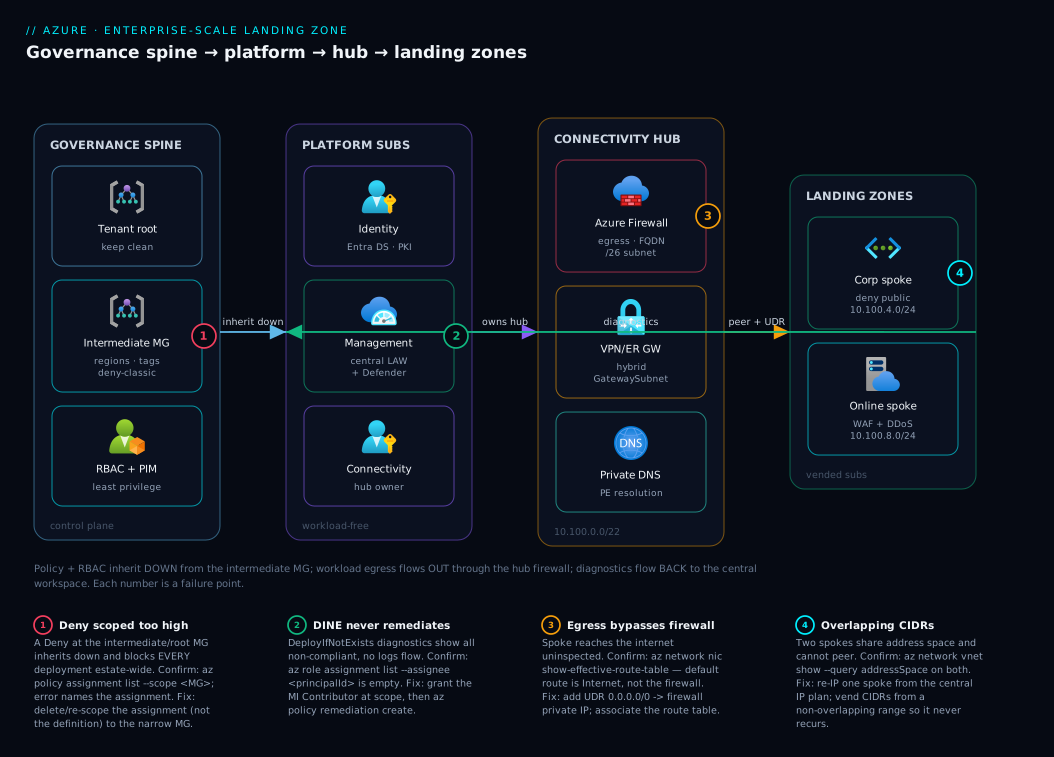
The diagram traces the landing zone the way governance and traffic actually flow through it — top-down for control, left-to-right for the request path. Read it as four zones. On the left, the governance spine: the Tenant Root and the intermediate management group where org-wide guardrails (allowed regions, required tags, deny-classic) are assigned and from which Azure Policy and RBAC inherit downward into everything else — this is the control plane, and the numbered badge there marks the failure that bites hardest, a mis-scoped Deny that blocks deployments estate-wide. Next, the Platform zone holds the three workload-free subscriptions — Identity (Entra/DC infra), Management (the central Log Analytics workspace every diagnostic setting targets), and Connectivity (the hub) — owned by the central team. The third zone is the Connectivity hub itself: Azure Firewall for centralized egress inspection, the VPN/ExpressRoute gateway for hybrid, and private DNS for private-endpoint resolution; a badge here marks the DeployIfNotExists remediation-identity failure (logs silently never flow) and another marks forced-tunneling/peering mistakes.
On the right sit the Landing Zones — the Corp spoke (private, Deny public, peered to the hub and routing egress through the firewall) and the Online spoke (internet-facing, behind WAF/DDoS) — each a vended application subscription with its own non-overlapping spoke VNet. Follow the arrows: governance inherits down from the intermediate MG into Platform and Landing Zones; workload egress flows out from each spoke through the hub firewall; diagnostics flow back from every subscription into the central workspace in Management. The whole method is in that picture — decide the guardrails once at the top, vend governed subscriptions into Corp or Online, peer them to the hub, and let policy and logging apply themselves. The badges and the legend beneath the diagram narrate the four failures that turn a clean landing zone into an incident, with the confirm-and-fix for each.
Real-world scenario
Meridian Freight is the global logistics company from the opening — 2,400 employees, operations across India, the EU, and North America, and the forty-one-subscription sprawl that took two quarters to partially untangle. Their Azure spend was about ₹2.1 crore/month across those subscriptions, with no central cost view. The brief from the new Head of Cloud was blunt: “Stop the bleeding, then build a foundation we can grow on for five years.” Here is how the landing zone went in, what nearly went wrong, and how it was resolved.
The starting mess. Three of the forty-one subscriptions had production VNets on 10.0.0.0/16; two of those needed to talk to each other for a new track-and-trace integration, and could not peer. Logs landed in four different Log Analytics workspaces and three teams had none at all, so a credential-stuffing incident the prior year had taken eleven days to scope. Seven subscriptions had public-facing SQL databases that nobody had sanctioned. The security team learned of new internet-facing apps from external scans.
The design. The platform team (deliberately kept small — five engineers — but empowered) adopted the Azure Landing Zone accelerator on Terraform. They built the management-group tree: an intermediate root meridian, a Platform branch with Identity, Management, and Connectivity subscriptions, and a Landing Zones branch split into Corp (their warehouse, ERP, and on-prem-connected workloads) and Online (the customer tracking portal and partner APIs). They stood up a hub-and-spoke in Connectivity — they chose hub-and-spoke over Virtual WAN because they had a strong networking team and only three regions, and wanted full control over the firewall rule base. A planned IP plan carved 10.100.0.0/14 into per-spoke /24s so no future workload could collide again.
The guardrails. At the intermediate root: Allowed locations (Deny, India/EU/US regions only — a data-residency requirement for EU freight data), required CostCenter tag (Modify), deny classic resources, and deploy diagnostic settings to the central workspace (DeployIfNotExists). On Corp: deny public IP on NICs — which would have made all seven rogue public SQL databases impossible. On Online: require WAF and DDoS for anything internet-facing.
What nearly went wrong. Two weeks in, the platform team rolled the Deny public-IP policy to Corp and also, by mistake, scoped a draft “deny all public IPs” assignment at the intermediate root instead of Corp. Within an hour, three application teams reported that every deployment was failing — including legitimate Online workloads that needed public IPs, and even the Connectivity team’s own gateway deployment. The blast radius was the whole estate, exactly because policy inherits down from the root. The on-call platform engineer’s first instinct was to delete the policy definition; the right move was faster and surgical: identify the over-scoped assignment (not the definition), and remove it at the root, leaving the correctly-scoped Corp assignment intact.
The diagnosis. They confirmed it in two commands. az policy assignment list --scope <intermediate-root-MG> -o table showed the rogue deny-all-public-ip assignment at the root. az policy state list --filter "complianceState eq 'NonCompliant'" showed a flood of denied deployments tied to that assignment’s definition. The fix was to delete the assignment at the root (az policy assignment delete --name deny-all-public-ip --scope <root-MG>) — keeping the intended Corp-scoped one — and, for the two legitimate Online deployments that had been blocked mid-flight, nothing more was needed once the root assignment was gone. Deployments recovered within the policy-propagation window (a few minutes).
The second near-miss. The DeployIfNotExists diagnostic-settings policy showed every resource as non-compliant a day after assignment, and no logs were flowing to the central workspace. The cause was the classic one: the assignment’s managed identity had no role on the target scope, so remediation silently no-oped. az role assignment list --assignee <assignment-principal-id> returned empty. They granted the identity Contributor at the intermediate root and ran az policy remediation create; within the hour the central workspace was ingesting from all subscriptions.
The outcome. Within ten weeks, all forty-one legacy subscriptions were either re-parented under the new tree or scheduled into Decommissioned. New workloads were vended — the partner-API team went from request to a governed, hub-connected, logging-wired subscription in under four hours, versus the three weeks the last team had waited. Central cost visibility (one view across the estate) surfaced ₹34 lakh/month of idle and orphaned resources, which FinOps then reclaimed. The credential-stuffing-class incident that took eleven days to scope would now be a single KQL query against one workspace. The lesson the Head of Cloud put on the wall: “A landing zone is not a network diagram. It is the decision about what gets decided once.”
The incident-and-build as a timeline, because the order of moves is the lesson:
| Week / moment | Action | Effect | What it should have been |
|---|---|---|---|
| W0 | Adopt ALZ accelerator (Terraform) | Tree + policy as reviewable code | — |
| W1 | Build MG tree, platform subs, hub | Foundation exists | — |
| W2 | Roll deny-public-IP… scoped at root by mistake | Every deployment estate-wide fails | Scope it at Corp, not root |
| W2 +1h | First instinct: delete the policy definition | Would orphan the correct Corp assignment too | Delete the over-scoped assignment |
| W2 +90m | az policy assignment list finds rogue root assignment |
Root cause localized | The right diagnostic |
| W2 +2h | Delete root assignment; keep Corp one | Deployments recover in minutes | Correct fix |
| W3 | DINE diagnostics shows all non-compliant, no logs | Remediation silently no-oped | Identity needs a role |
| W3 +1h | Grant MI Contributor, run remediation |
Central workspace ingests all subs | The fix nobody documents |
| W4–W10 | Re-parent/decommission 41 legacy subs; vend new | 4-hour onboarding; ₹34L/mo reclaimed | The payoff |
Advantages and disadvantages
The landing-zone model both enables scale and imposes discipline. Weigh it honestly before committing an organization to it:
| Advantages (why it pays off) | Disadvantages (why it bites) |
|---|---|
| Every workload starts from the same secure, connected, logged baseline — no team rebuilds the basics | Heavy up-front design; getting the MG tree or IP plan wrong is expensive to undo (re-parenting, re-IP-ing) |
| Governance applies automatically to hundreds of subscriptions via policy inheritance — enforce, don’t audit | Policy inherits down: a mis-scoped Deny at a high MG can break deployments across the entire estate |
| Onboarding drops from weeks to hours via subscription vending | A too-small platform team becomes a ticket queue, and the foundation that was meant to unblock teams now blocks them |
| Central logging + Defender give one place to hunt across the whole estate | Centralization concentrates blast radius — a Connectivity or policy mistake hits everyone at once |
| Non-overlapping IP plan + hub peering means workloads can always interconnect | Rigid guardrails can block legitimate innovation if exemptions aren’t easy and fast |
| Cost is attributable and capped (tags, budgets per vended sub) | The reference architecture is a blueprint, not the answer — copying it without adapting causes mismatch |
| Identity isolated in its own platform subscription limits identity blast radius | Operational maturity (IaC, PIM, change control) is a prerequisite — bolt it onto an immature org and it stalls |
The model is right for organizations past the five-to-ten-subscription mark, regulated estates, and multi-year journeys where the foundation must outlive the first projects. It is wrong for a single-team startup on one subscription — there the overhead is pure cost. The disadvantages are all manageable: scope Deny policies at the narrowest MG that works, staff the platform team to demand, make exemptions a fast self-service path, and treat the reference architecture as a starting point you adapt. The failure mode is always the same — applying the full enterprise pattern to an organization that needed a “minimum viable landing zone,” or under-staffing the team that operates it.
Hands-on lab
Build a minimal but real landing-zone skeleton — a management-group tree, an inherited Deny guardrail, and a proof that inheritance works — all free (management groups and policy cost nothing). Run in Cloud Shell (Bash). You need permission to manage management groups at the tenant root (the Management Group Contributor role or higher); if you lack it, do this in a test tenant.
Step 1 — Create a small management-group tree.
az account management-group create --name lab-root --display-name "Lab Root"
az account management-group create --name lab-platform \
  --display-name "Lab Platform" --parent lab-root
az account management-group create --name lab-corp \
  --display-name "Lab Corp" --parent lab-root
az account management-group show --name lab-root --expand --query \
  "{name:displayName, children:children[].displayName}" -o json
Expected: lab-root with children Lab Platform and Lab Corp.
Step 2 — Assign an “Allowed locations” Deny guardrail at the root. Everything beneath inherits it.
ROOT_ID=$(az account management-group show -n lab-root --query id -o tsv)
az policy assignment create \
  --name "lab-allowed-locations" \
  --display-name "Lab: allowed locations (India only)" \
  --scope "$ROOT_ID" \
  --policy "e56962a6-4747-49cd-b67b-bf8b01975c4c" \
  --params '{ "listOfAllowedLocations": { "value": ["centralindia","southindia"] } }'
Expected: an assignment object returns with scope set to the lab-root MG.
Step 3 — Prove inheritance blocks a non-compliant deployment. Move a test subscription under lab-corp, then try to create a resource group in a disallowed region — the inherited root policy should deny it.
# Place a test/sandbox subscription under lab-corp (inherits the root deny)
az account management-group subscription add --name lab-corp \
  --subscription "<your-test-subscription-id>"
az account set --subscription "<your-test-subscription-id>"

# This SHOULD FAIL — westeurope is not in the allowed list inherited from the root
az group create -n rg-policy-test -l westeurope
Expected: a RequestDisallowedByPolicy error naming lab-allowed-locations. That error is the landing zone working — a guardrail assigned two levels up blocked a non-compliant deployment.
Step 4 — Confirm a compliant deployment succeeds.
az group create -n rg-policy-test -l centralindia # allowed → succeeds
Expected: the resource group is created — same policy, compliant region, no block.
Validation checklist. You created a governance hierarchy, assigned a Deny guardrail at the top, and proved it inherits down to a subscription two levels below — blocking a disallowed region while permitting an allowed one. That is the entire landing-zone mechanism in four steps, no networking required. What each step proves:
| Step | What you did | What it proves | Real-world analogue |
|---|---|---|---|
| 1 | Built an MG tree | The governance spine exists | The intermediate-root + branches design |
| 2 | Assigned Deny at the root |
Guardrails live at the top scope | Org-wide allowed-regions policy |
| 3 | Disallowed-region create failed | Policy inherits down and blocks | A real data-residency guardrail |
| 4 | Allowed-region create succeeded | Guardrails permit compliant work | Teams move fast inside the rails |
Cleanup. Remove the assignment, move the subscription back, and delete the MGs (an MG must be empty of children/subscriptions to delete).
az policy assignment delete --name "lab-allowed-locations" --scope "$ROOT_ID"
az group delete -n rg-policy-test --yes --no-wait
# Move the sub back under the tenant root, then delete the lab MGs (leaf-first)
TENANT_ROOT=$(az account management-group list --query "[?properties.details.parent==null].name | [0]" -o tsv)
az account management-group subscription add --name "$TENANT_ROOT" --subscription "<your-test-subscription-id>"
az account management-group delete --name lab-corp
az account management-group delete --name lab-platform
az account management-group delete --name lab-root
Cost note. Management groups, policy assignments, and RBAC are free — this lab costs nothing. (The resource group you created is empty and also free; deleting it is just tidiness.)
Common mistakes & troubleshooting
The landing zone fails in a small number of well-known ways, almost all rooted in inheritance and remediation identities. First the playbook as a scannable table you can read mid-incident, then the detail for the ones that bite hardest.
| # | Symptom | Root cause | Confirm (exact cmd / portal path) | Fix |
|---|---|---|---|---|
| 1 | Every deployment estate-wide suddenly fails with RequestDisallowedByPolicy |
A Deny policy assigned too high (root/intermediate MG) |
az policy assignment list --scope <root-MG> -o table; the error names the assignment |
Delete/re-scope the assignment (not the definition) to the narrow MG |
| 2 | DeployIfNotExists/Modify policy shows everything non-compliant; nothing remediates |
Assignment’s managed identity has no role on the target | az role assignment list --assignee <assignment-principalId> is empty |
Grant the MI the required role (e.g. Contributor) at the scope; run az policy remediation create |
| 3 | Logs not flowing to the central workspace despite a diagnostics policy | DINE never remediated existing resources (only new ones at create) | az policy state list --filter "complianceState eq 'NonCompliant'" |
Trigger a remediation task for existing resources |
| 4 | Two workloads can’t peer / VPN routes clash | Overlapping spoke CIDRs (no IP plan) | az network vnet show --query addressSpace on both |
Re-IP one spoke from the planned non-overlapping range |
| 5 | A subscription doesn’t get the expected guardrails | It’s parented under the wrong MG (or still at tenant root) | az account management-group subscription show-sub-under-mg? → check az account show MG |
Move it under the correct MG (vending does this) |
| 6 | A legitimate resource is blocked by a guardrail and the team is stuck | No fast exemption path; policy too rigid | The deny error names the policy | Create a scoped, time-boxed policy exemption |
| 7 | Spoke egress bypasses the firewall (uninspected internet) | Missing/incorrect UDR 0.0.0.0/0 → firewall |
az network route-table route list; effective routes on the NIC |
Add the UDR to the firewall private IP; check effective routes |
| 8 | RBAC grants far more than intended | Role assigned at a high MG scope, inherited everywhere | az role assignment list --scope <MG> --include-inherited |
Re-assign at the lowest scope that works; remove the broad one |
| 9 | Platform team is a bottleneck; teams wait weeks | Manual onboarding; no vending | (process observation) | Implement subscription vending (accelerator module) |
| 10 | Policy change “didn’t take” / old state lingers | Compliance evaluation is eventual (~24h) | az policy state list shows stale; trigger on-demand scan |
Wait for propagation or trigger az policy state trigger-scan |
| 11 | Can’t delete an MG | It still has child MGs or subscriptions | az account management-group show --expand lists children |
Move children/subs out first, then delete leaf-first |
| 12 | Exemption isn’t relaxing the policy | Exemption scoped wrong, or it’s a Modify/DINE (exemptions don’t “undo” deployed state) |
az policy exemption list --scope <scope> |
Scope the exemption to the exact resource/MG; for DINE, fix the resource directly |
The expanded form for the failures that cause the most damage:
1. Every deployment estate-wide suddenly fails with RequestDisallowedByPolicy.
Root cause: A Deny policy (often “deny public IP” or “allowed locations” with too narrow a list) was assigned at the intermediate root or tenant root instead of the specific landing-zone MG — and since policy inherits down, it now blocks legitimate deployments across every subscription beneath, including platform subscriptions.
Confirm: The deployment error names the assignment. List assignments at the high scope: az policy assignment list --scope $(az account management-group show -n contoso --query id -o tsv) -o table. A flood of denials in az policy state list --filter "complianceState eq 'NonCompliant'" corroborates.
Fix: Delete or re-scope the assignment (not the policy definition — deleting the definition is slower and can orphan correct assignments elsewhere): az policy assignment delete --name <assignment> --scope <high-MG>, then re-create it at the narrow MG (e.g. Corp). Deployments recover within the propagation window (minutes). This is the single most common and most alarming landing-zone incident.
2. A DeployIfNotExists or Modify policy reports everything non-compliant and never remediates.
Root cause: DINE/Modify assignments run remediation as a managed identity, and that identity needs an RBAC role on the target scope (e.g. Contributor to deploy a diagnostic setting). If the assignment was created without --mi-system-assigned/a role, or the role grant was missed, remediation silently no-ops — compliance shows red forever with no error anywhere obvious.
Confirm: az role assignment list --assignee <assignment-principalId> -o table returns empty (find the principal via az policy assignment show --name <a> --query identity.principalId).
Fix: Ensure the assignment has an identity and grant it the role at the scope, then trigger remediation:
az role assignment create --assignee <principalId> --role "Contributor" \
  --scope $(az account management-group show -n contoso --query id -o tsv)
az policy remediation create --name fix --policy-assignment <assignment> --management-group contoso
4. Two workloads can’t peer or their VPN routes clash.
Root cause: Spokes were given overlapping CIDRs because there was no central IP plan — the original sprawl problem, recreated. Overlapping VNets cannot peer, and overlapping on-prem routes break hybrid routing.
Confirm: az network vnet show -g <rg> -n <vnet> --query addressSpace.addressPrefixes on both shows colliding ranges.
Fix: Re-IP one spoke from the planned non-overlapping range (the painful, production-affecting fix that the IP plan exists to prevent). Vending must allocate CIDRs from a central plan so this can never recur.
7. Spoke egress bypasses the firewall.
Root cause: The spoke is missing the UDR that forces 0.0.0.0/0 to the firewall’s private IP (or the route table isn’t associated with the subnet), so traffic egresses directly to the internet, uninspected — a security and compliance gap that audits flag.
Confirm: Check effective routes on a NIC in the spoke: az network nic show-effective-route-table -g <rg> -n <nic> -o table — the default route should point at the firewall (VirtualAppliance), not Internet.
Fix: Create the UDR to the firewall private IP and associate the route table with the spoke’s subnets; re-check effective routes.
Best practices
- Align management groups to governance, not the org chart. Org charts re-org; governance needs (Corp vs Online, regulated vs not) are stable. Model the tree by what must be governed differently.
- Keep the hierarchy shallow. You have six levels below the root — use three or four. A deep tree is almost always an org chart in disguise and makes effective-access reasoning impossible.
- Scope
Denypolicies at the narrowest MG that works. A deny at the root blocks the whole estate; a deny at Corp blocks only Corp. The blast radius of a policy equals the scope it’s assigned at. - Always give DINE/Modify assignments an identity and a role. Without the role, remediation silently fails. Verify with
az role assignment list --assignee <principalId>after every such assignment. - Keep platform subscriptions workload-free. Identity, Management, and Connectivity hold shared services only — never a business workload — to contain blast radius and keep cost attribution clean.
- Plan the IP space centrally before the first spoke. A documented, non-overlapping IP plan (e.g. a
/14carved into per-spoke/24s) is the cheapest insurance against the overlapping-CIDR catastrophe. - Vend subscriptions; never hand-build them. A templated vend (accelerator module) guarantees the MG placement, networking, tags, budget, and logging are right every time and turns weeks into hours.
- Use infrastructure-as-code for the entire landing zone. The tree, policies, hub, and vending module belong in Bicep/Terraform, reviewed in PRs — a landing zone clicked together by hand is unauditable and undriftable.
- Make exemptions fast and time-boxed. Rigid guardrails block innovation only when exemptions are slow. A self-service, scoped, expiring exemption path keeps teams unblocked without weakening the baseline.
- Stream all logs to one central workspace and enable Defender everywhere. One place to hunt, complete coverage enforced by DINE — this is what turns an eleven-day incident scope into one query.
- Right-size the platform team to demand. The foundation that was meant to unblock teams becomes the bottleneck if the team operating it is starved. Staff it, or automate it (vending) so it scales.
- Start with a minimum viable landing zone and grow. Don’t deploy the full reference on day one for a five-subscription org. Build the tree, the core guardrails, and central logging first; add connectivity complexity and more MGs as real need appears.
Security notes
- Least privilege via RBAC at the right scope. Grant narrow built-in roles (
Reader,Network Contributor) at the lowest MG/subscription that works, neverOwner“to be safe.” A role at a high MG inherits to everything below — assume the broadest reach when you assign high. - No standing privileged access. Gate
Owner/Contributorat high scopes behind PIM (just-in-time, time-boxed, approved, logged). Standing global admin is the credential most worth stealing; eliminate it. - Maintain break-glass accounts. Keep two or more emergency accounts excluded from Conditional Access and monitored, so a CA/PIM misconfiguration can’t lock the whole org out of its own foundation.
- Isolate identity in its own platform subscription. Domain controllers, identity sync, and PKI live in the Identity subscription with the tightest controls and the smallest admin set — an identity compromise must not start from a workload.
- Force private and inspected networking by guardrail.
Denypublic IPs in Corp, require private endpoints for PaaS, and force0.0.0.0/0egress through the central firewall via UDR — so “secure by default” is enforced, not requested. - Enforce diagnostic logging everywhere with policy. A
DeployIfNotExistsdiagnostic-settings policy to the central workspace guarantees the SOC has complete, central telemetry — gaps in logging are gaps in detection. - Enable Defender for Cloud across the estate. A DINE policy turning on Defender for every subscription gives threat protection and a secure-score baseline org-wide, not per-team.
- Manage secrets with managed identities, not keys. Workloads authenticate with system/user-assigned managed identities to Key Vault and PaaS — no secrets in config to leak; see Azure Key Vault: Secrets, Keys & Certificates.
- Treat policy and RBAC as code. Guardrails and role assignments in IaC, reviewed in PRs, are auditable and revertible — a
Denyremoved by a click in the portal at 2am leaves no trail.
The security guardrails that also enforce the architecture — where secure and well-governed pull in the same direction:
| Control | Mechanism | Secures against | Also enforces |
|---|---|---|---|
| Deny public IP (Corp) | Deny policy at Corp MG |
Unsanctioned internet exposure | The private-workload class boundary |
| Require private endpoints | Deny/Audit policy |
PaaS reached over the public internet | Hub private-DNS resolution discipline |
| Force egress via firewall | UDR 0.0.0.0/0 → firewall |
Uninspected/exfiltration egress | Centralized inspection model |
| Central diagnostics | DeployIfNotExists to one workspace |
Blind spots in detection | Complete observability coverage |
| PIM for privileged roles | JIT elevation | Standing admin compromise | No-standing-privilege principle |
| Defender everywhere | DINE enabling Defender | Untriaged threats per-team | Org-wide secure-score baseline |
Cost & sizing
A landing zone’s governance layer is nearly free; the cost is in the shared infrastructure it stands up and the discipline it brings to workload spend. The drivers:
- Governance is free. Management groups, Azure Policy, RBAC, and subscription placement cost nothing. The entire control plane — the tree, the guardrails, the vending logic — adds no Azure bill.
- The connectivity hub is the real platform cost. Azure Firewall is the big one (a Standard firewall runs roughly ₹65,000–95,000/month plus per-GB processing; the cheaper Firewall Basic suits small estates). VPN/ExpressRoute gateways add hourly + (for ExpressRoute) circuit cost. Azure Bastion is a few thousand rupees/month. DDoS Network Protection is a flat ~₹2.4 lakh/month for the plan (shared across all protected VNets, so it amortizes).
- Central logging scales with ingestion. The central Log Analytics workspace bills per GB ingested and per retention beyond the free period. Across a large estate this is material — use table-level retention, Basic Logs for high-volume/low-query data, and a daily cap to keep it sane.
- The payoff is on the workload side. Central cost visibility (one view across the estate) plus per-vend budgets and
CostCentertags is what lets FinOps find and reclaim idle spend — Meridian’s ₹34 lakh/month of orphaned resources. The governance layer costs little and saves far more than it costs by making waste visible and capping it. See Azure FinOps & Cost Management at Scale.
A rough monthly picture for the shared platform of a mid-size estate, and what each line buys:
| Cost line | What you pay for | Rough INR / month | What it delivers | How to right-size |
|---|---|---|---|---|
| Management groups / Policy / RBAC | The entire governance layer | ₹0 | The whole control plane | Nothing to size — it’s free |
| Azure Firewall (Standard) | Centralized egress inspection | ~₹65,000–95,000 + per-GB | Inspected, FQDN-filtered egress | Firewall Basic for small estates |
| VPN gateway | Hybrid connectivity | ~₹15,000–40,000 | On-prem reachability | Right SKU to throughput; skip if cloud-only |
| ExpressRoute gateway + circuit | Private hybrid at scale | Circuit-dependent | High-bandwidth private hybrid | Only if you need private/high-bandwidth |
| Azure Bastion | Jump-box-free admin access | ~₹13,000–20,000 | Secure RDP/SSH, no public VM IPs | Basic SKU for low concurrency |
| DDoS Network Protection (plan) | L3/L4 volumetric defense | ~₹2.4 lakh (flat) | Protects all VNets in the plan | Amortize across many VNets; or per-IP SKU |
| Central Log Analytics | Estate-wide telemetry | Ingestion-dependent | One place to hunt + Defender data | Basic Logs, table retention, daily cap |
The honest floor: governance itself is free, so a minimum viable landing zone (the MG tree + core policy + central logging, without a firewall/DDoS hub) costs almost nothing and is the right starting point for a small org — add the connectivity hub’s cost only when real workloads need centralized egress and hybrid.
Interview & exam questions
1. What is an enterprise-scale landing zone, and how is it more than a network topology? It is Microsoft’s prescriptive Cloud Adoption Framework architecture for running Azure at scale — a complete operating model expressed as Azure resources: a management-group hierarchy for governance inheritance, platform vs application subscriptions, hub-and-spoke (or Virtual WAN) connectivity, Azure Policy guardrails, centralized identity and logging, and subscription vending. It is not just a hub VNet; the network is one of five pillars (resource organization, governance, network, identity, operations).
2. Why align management groups to governance rather than the org chart? Org charts re-organize frequently; governance requirements (Corp vs Online, regulated vs not) are stable. Modeling the org chart (Marketing MG, EMEA MG) means constant re-parenting and policy that doesn’t match real control needs. Modeling by governance — what must be governed differently — means the tree and its inherited guardrails stay correct through re-orgs.
3. Explain how Azure Policy and RBAC inheritance works in the hierarchy, and the risk it creates. Both inherit downward: an assignment at a management group applies to every child MG, subscription, resource group, and resource beneath it. The power is that one assignment governs a whole branch; the risk is that a too-strict Deny at a high scope silently blocks deployments across the entire estate. Policy is additive and Deny is sticky — a child can be stricter but never looser; the only relaxation is a scoped exemption.
4. What are the platform subscriptions and why don’t workloads run in them? Identity (domain/Entra DS, PKI), Management (central Log Analytics, automation, Sentinel/Defender), and Connectivity (hub VNet, firewall, gateways, DNS). Workloads are excluded to contain blast radius (a workload incident can’t take down identity/connectivity), keep cost attribution clean, and avoid granting workload teams access to the shared core.
5. When would you choose Virtual WAN over traditional hub-and-spoke? Choose Virtual WAN when you have many global branches / heavy site-to-site VPN, need region-to-region any-to-any transit as a baseline, and want minimal routing plumbing (Microsoft manages the hub). Choose hub-and-spoke when you have a few regions, a strong networking team, need maximum control over routing and the firewall rule base, or run complex third-party NVA chains.
6. What’s the difference between Deny, Audit, and DeployIfNotExists policy effects? Audit records non-compliance but allows the action (visibility only). Deny rejects the non-compliant create/update at the control plane (prevention). DeployIfNotExists remediates by deploying a missing related resource (e.g. a diagnostic setting) using a managed identity — it doesn’t block, it fixes. The classic pitfall: DINE (and Modify) need the assignment’s managed identity to hold an RBAC role on the target, or remediation silently no-ops.
7. A DeployIfNotExists policy shows everything non-compliant and nothing is remediating. What’s wrong and how do you confirm? The assignment’s managed identity lacks the required RBAC role on the target scope, so remediation can’t deploy anything. Confirm with az role assignment list --assignee <assignment-principalId> returning empty. Fix by granting the identity the role (e.g. Contributor) at the scope and running az policy remediation create to remediate existing resources (DINE only auto-deploys for new resources at create).
8. Every deployment across the estate suddenly fails with RequestDisallowedByPolicy. What happened and what’s the fix? A Deny policy (e.g. deny-public-IP or a too-narrow allowed-locations list) was assigned at too high a scope (intermediate/tenant root) and, because policy inherits down, now blocks legitimate deployments everywhere. The error names the assignment. Fix by deleting/re-scoping the assignment (not the definition) to the narrow MG (e.g. Corp); deployments recover within the propagation window.
9. What is subscription vending and what does it provision? A templated process (Bicep/Terraform/accelerator) that creates a subscription and, critically, places it under the correct management group so it inherits the right guardrails instantly, then peers its spoke to the hub, allocates a non-overlapping CIDR from the IP plan, applies tags and a budget, wires diagnostic settings to the central workspace, and grants the team Contributor at their subscription scope. It turns onboarding from weeks to hours.
10. How does a landing zone prevent the overlapping-CIDR problem? With a central IP plan: a documented, non-overlapping address space (e.g. a /14 carved into per-spoke /24s) from which vending allocates every spoke. Because no two spokes ever share address space, they can always peer to the hub and to each other, and hybrid routes never clash — eliminating the re-IP-ing catastrophe that ungoverned, team-chosen 10.0.0.0/16 ranges cause.
11. What are the key limits on the management-group hierarchy? Up to ~10,000 MGs per directory, a maximum depth of 6 levels below the tenant root, a subscription belongs to exactly one MG at a time, and policy/RBAC inherit at every level down to the resource. The six-level depth cap is the design discipline: a deeper tree is almost always an org chart in disguise and should be flattened.
12. How do you keep guardrails from blocking legitimate innovation? Scope Deny policies at the narrowest MG that works (not the root), and make policy exemptions a fast, self-service, scoped, time-boxed path so a team blocked by a guardrail on a legitimate resource is unblocked in minutes — without weakening the baseline for everyone. Rigid guardrails only harm when exemptions are slow.
These map to AZ-305 (Designing Microsoft Azure Infrastructure Solutions) — design governance, design identity and access, design network solutions — and AZ-104 (Administrator) — manage Azure identities and governance (management groups, Azure Policy, RBAC). The connectivity content touches AZ-700. A compact cert mapping for revision:
| Question theme | Primary cert | Exam objective area |
|---|---|---|
| MG hierarchy, governance design | AZ-305 | Design governance |
| Policy effects, initiatives, exemptions | AZ-104 / AZ-305 | Manage governance; design governance |
| Platform vs landing-zone subscriptions | AZ-305 | Design infrastructure / governance |
| Hub-and-spoke vs Virtual WAN | AZ-305 / AZ-700 | Design network solutions |
| RBAC scope, PIM, least privilege | AZ-305 / AZ-500 | Design identity and access |
| Subscription vending, IP planning | AZ-305 | Design infrastructure |
Quick check
- Your organization has a Marketing MG, a Finance MG, and an EMEA MG. What is the design smell, and what should the tree model instead?
- A
DeployIfNotExistsdiagnostics policy reports every resource non-compliant and no logs are flowing. What is the single most likely cause, and how do you confirm it? - True or false: assigning a
Denypolicy at a child MG can loosen aDenyinherited from a parent MG. - Two new workloads can’t peer their VNets. What governance failure most likely caused this, and what does a landing zone do to prevent it?
- Name the three platform subscriptions and the one rule about what runs in them.
Answers
- The smell is modeling the org chart. Org charts re-organize, forcing constant subscription re-parenting and producing policy that doesn’t match real control needs. The tree should model governance requirements instead — e.g. a Platform branch and Landing-Zones branches split into Corp (private) and Online (internet-facing), because those classes need genuinely different guardrails.
- The assignment’s managed identity lacks an RBAC role on the target scope, so remediation silently no-ops. Confirm with
az role assignment list --assignee <assignment-principalId>(find the principal viaaz policy assignment show --query identity.principalId) returning empty. Fix: grant the identity the role (e.g.Contributor) at the scope and runaz policy remediation create. - False. Policy is additive and
Denyis sticky — a child scope can only make things stricter, never looser. The only way to relax an inherited policy for a specific resource is a scoped policy exemption, not a contrary assignment. - Overlapping CIDRs because the spokes were given team-chosen, colliding address space (overlapping VNets can’t peer). A landing zone prevents this with a central IP plan from which subscription vending allocates every spoke a non-overlapping range.
- Identity (domain/Entra DS, PKI), Management (central Log Analytics, automation, Defender/Sentinel), and Connectivity (hub VNet, firewall, gateways, DNS). The rule: no business workload ever runs in them — they hold shared platform services only, to contain blast radius and keep cost attribution clean.
Glossary
- Enterprise-scale landing zone (ESLZ) — Microsoft’s prescriptive Cloud Adoption Framework architecture for running Azure at organizational scale: hierarchy, platform/application subscriptions, connectivity, policy, identity, and vending.
- Cloud Adoption Framework (CAF) — Microsoft’s overarching guidance for cloud adoption; the ESLZ is its reference landing-zone design.
- Management group (MG) — a container for subscriptions (and other MGs) that scopes Azure Policy and RBAC inheritance; the unit of governance.
- Tenant root group — the single management group at the top of every Entra directory; org-wide assignments are usually placed one level below it on an intermediate root.
- Inheritance — the downward flow of policy and RBAC from a management group to every child MG, subscription, resource group, and resource beneath it.
- Platform subscription — a workload-free subscription holding shared services: Identity, Management, or Connectivity.
- Landing-zone (application) subscription — a workload’s home subscription, placed under a Corp/Online MG so it inherits the right guardrails.
- Corp vs Online — the two landing-zone classes: Corp for private, on-prem-connected workloads (deny public exposure) and Online for internet-facing workloads (allow public, require WAF/DDoS).
- Hub-and-spoke — a network topology where a central hub VNet (firewall, gateways, DNS) is peered to per-workload spoke VNets that route egress through the hub.
- Virtual WAN — a Microsoft-managed networking hub providing automated routing and global transit as an alternative to self-managed hub-and-spoke.
- Azure Policy — the service that evaluates rules against resources/requests and applies an effect (
Deny,Audit,DeployIfNotExists,Modify, …). - Policy effect — what a policy does on non-compliance: block (
Deny), record (Audit), remediate (DeployIfNotExists), or mutate (Modify/Append). - Policy initiative (set) — a bundle of policy definitions assigned together as one unit at a scope.
- Policy exemption — a scoped, time-boxed relaxation of a policy for a specific resource/scope; the only way to “un-apply” an inherited policy.
- DeployIfNotExists (DINE) — a policy effect that deploys a missing related resource via a managed identity; requires that identity to hold an RBAC role on the target.
- Subscription vending — the templated provisioning of a fully-governed subscription (MG placement, networking, tags, budget, logging) in hours instead of weeks.
- IP plan — a central, documented, non-overlapping address allocation from which every spoke VNet’s CIDR is drawn, preventing peering collisions.
- UDR (user-defined route) — a route that overrides system routing; used to force spoke egress (
0.0.0.0/0) through the central firewall. - PIM (Privileged Identity Management) — just-in-time, time-boxed, approved elevation for privileged roles, eliminating standing admin.
- Break-glass account — an emergency account excluded from Conditional Access and monitored, used to recover if identity controls lock everyone out.
Next steps
You can now design the governance spine, stand up the platform and connectivity, and vend governed subscriptions. Build outward:
- Next: Azure Policy: Governance at Scale — go deep on the effects, initiatives, remediation tasks, and exemptions that power every guardrail in this article.
- Related: Azure Resource Hierarchy Explained — the management-group / subscription / resource-group substrate the whole landing zone is built on.
- Related: Hub-and-Spoke vs Virtual WAN: Enterprise Topology — the connectivity decision the platform team makes once, with routing intent and secured hubs.
- Related: Azure FinOps & Cost Management at Scale — turn the central cost visibility a landing zone gives you into reclaimed spend and per-team budgets.
- Related: Infrastructure as Code 101: Your First Terraform on Azure — the IaC discipline that makes the tree, policies, and vending maintainable and auditable.
- Related: Azure Monitor & Application Insights for Observability — what the central Log Analytics workspace the landing zone wires up actually does for you.