A fast-growing SaaS company opens its Azure invoice and finds ₹2.4 crore — roughly triple the forecast — and nobody can say whose spend it is. The bill is real, the resources are real, and yet half of it lands in an “unallocated” bucket because the resources shipped without tags, the cost data was read in ActualCost (so a one-off Reservation purchase made one team look like it 10×'d for a month), idle non-production environments ran 24×7 over a weekend with a budget alert nobody wired to an action, and production VMs were sized for a peak that lasts ninety minutes a day. None of that is a finance problem you discover when the bill arrives. Every rupee of it was an engineering design decision made — or skipped — at provision time. This is the gap FinOps closes: a cultural and operational practice that brings engineering, finance and product into one feedback loop so the people who spend the money also see and own it, in near-real time, while the workload is still running.
This article is the operating model, not a feature tour. Azure Cost Management — the native, free billing-analytics service built into every subscription — is the data plane; the discipline around it is what makes spend predictable at scale. You will learn to run the loop the diagram below traces: govern and tag at the management-group root so every resource is attributable; ingest usage as amortized daily exports in the FOCUS schema; allocate 100% of the invoice (including shared hub costs) back to teams as showback or chargeback; optimize the rate (Reservations, Savings Plans, Azure Hybrid Benefit) and the usage (right-sizing, auto-stop); and act through budgets that alert on forecast and trigger automation, not just email. Because cost work at scale is a reference discipline — you return to it every month-end and every anomaly — the tag schema, the export options, the commitment matrix, the budget knobs and the failure modes are all laid out as scannable tables. Read the prose once; keep the tables open at month-end.
By the end you will stop being surprised by the invoice. You will know why a chart says a team’s spend tripled and went to zero (ActualCost vs Amortized), why showback never reconciles to the bill (unsplit shared cost), why a Reservation discount landed on a team that never paid for it (Shared scope), and why a budget “fired” but the spend kept climbing (no action group). Knowing which leak you are looking at — and the one az command or Cost Analysis view that confirms it — is what turns a quarterly bill-shock into a Tuesday adjustment.
What problem this solves
Cloud’s pay-as-you-go model inverts the old capex control. There is no purchase order, no procurement gate, no “the server is full” ceiling. An engineer types az vm create and the meter starts; a misconfigured autoscale rule or a forgotten P3v3 in a dev resource group bleeds money silently until the invoice lands a month later. The spend is decentralized (hundreds of engineers can provision), continuous (per-second metering), and opaque after the fact (the invoice is a single number unless you built the attribution beforehand). Without FinOps, finance sees a number it can’t question and engineering sees uptime it’s proud of, and the two never reconcile.
What breaks without this: the unallocated bucket grows until “who owns this?” is unanswerable; reserved-capacity decisions get made on gut feel (or not at all), leaving 30–50% pay-as-you-go premium on steady-state compute; idle resources — dev environments, orphaned disks, unattached public IPs, over-provisioned databases — accrete because nobody is accountable for switching them off; and anomalies (a runaway query, a leaked credential spinning up crypto-mining VMs, a log-ingestion explosion) are discovered weeks late, on the invoice, instead of within hours by an alert. The damage is both money and trust: when finance can’t predict the bill, they cap cloud spend bluntly, and engineering velocity dies under approval gates.
Who hits this: every organization past a single team on Azure. It bites hardest on multi-subscription enterprises (where the Azure resource hierarchy of management groups, subscriptions and resource groups is the cost-allocation boundary), on platform teams running shared services (hub firewall, Log Analytics, gateways) that no single product wants to pay for, and on anyone who bought commitments before understanding their baseline. The fix is never “spend less” as a blanket order — it’s making spend visible, attributable, and optimizable so each team trims its own waste while shipping faster.
To frame the whole field before the deep dive, here is every cost-leak class this article covers, the question it forces, and the one place to look first:
| Leak class | What you observe | First question to ask | First place to look | Most common single cause |
|---|---|---|---|---|
| Unallocated spend | A large “untagged/no CostCenter” bucket | Are resources born tagged, or tagged later (never)? | Cost Analysis grouped by CostCenter tag | No tag-inheritance policy at MG scope |
| Skewed cost trends | A team “tripled then went to zero” | Am I reading ActualCost or AmortizedCost? | Cost Analysis metric selector | Reporting in ActualCost; an RI/SP landed |
| Showback ≠ invoice | Per-team sum < total bill | Is shared/hub cost being split to teams? | Cost allocation rules; amortized totals | Shared services have no allocation rule |
| Commitment waste | Low RI/SP utilization, or discount on wrong team | Is the commitment scoped and sized to a real baseline? | Reservations → Utilization; appliedScopeType | Over-bought, or Shared scope on a single workload |
| Idle / over-provisioned | Advisor flags right-sizing; non-prod runs 24×7 | Does this resource’s size/uptime match real load? | Advisor Cost recommendations | No auto-stop; SKU sized for rare peak |
| Silent overrun | Bill spikes, found weeks late | Did anything alert before the invoice? | Budgets + anomaly alerts | Budget with email but no action/forecast |
Learning objectives
By the end of this article you can:
- Stand up a tag-governance baseline with Azure Policy (
require-tagdeny + tag-inheritance modify) at management-group scope, and remediate existing untagged resources — so every cost is attributable. - Read Azure Cost Management correctly: choose AmortizedCost vs ActualCost for the question you’re asking, group by tag/RG/service, and pull data via the Query API instead of clicking.
- Configure daily cost exports in the FOCUS schema to ADLS Gen2 for analysis in a lakehouse, and explain when an export beats the portal.
- Build showback and chargeback that reconciles to 100% of the invoice, including cost allocation rules that split shared hub services back to teams.
- Choose between Reservations, Savings Plans, Azure Hybrid Benefit and Spot, size them to a measured baseline, scope them correctly (single vs shared), and monitor utilization so you never strand a commitment.
- Right-size with Azure Advisor and automate non-production shutdown so idle capacity stops costing money.
- Create budgets that alert on forecast and drive action groups / automation runbooks, plus anomaly alerts, so an overrun is caught in hours, not on the invoice.
- Map the whole practice to the FinOps Framework phases (Inform → Optimize → Operate) and to AZ-104 / AZ-305 cost objectives.
Prerequisites & where this fits
You should already understand the Azure control-plane shape: a tenant contains management groups (an inheritance tree), under which sit subscriptions (the billing and policy boundary), each holding resource groups and resources — the model covered in Azure Resource Hierarchy Explained. You should know that Azure Policy evaluates and can deny or modify resources (see Azure Policy and Governance at Scale), and be comfortable running az in Cloud Shell, reading JSON, and basic KQL. Familiarity with reservations and savings plans mechanics from Azure Cost: Reservations, Savings Plans & Hybrid Benefit Strategy lets you go deeper on the commitment math; this article uses them as one lever in the larger loop.
This sits in the Governance & FinOps track and is the cost counterpart to the security/identity governance you apply in an Enterprise-Scale Landing Zone. It depends on the resource hierarchy (your allocation boundary) and on policy (your enforcement engine), and it feeds observability — the same Azure Monitor and Application Insights telemetry that tells you a workload is slow also tells you it’s expensive (log-ingestion cost is a real line item). For the deep commitment-engineering mechanics, The Azure FinOps Engineering Guide is the companion to this operating-model view.
A quick map of who owns what in the cost loop, so you route a question to the right team fast:
| Layer | What lives here | Who usually owns it | Cost-leak classes it can cause |
|---|---|---|---|
| Management group / policy | Tag inheritance, deny rules, initiative | Platform / governance | Unallocated spend (no tag policy) |
| Subscription | Billing boundary, budgets, RBAC | Platform + finance | Showback gaps; over-broad budgets |
| Resource group | Workload grouping, tags, lifecycle | App / product team | Idle resources; untagged RGs |
| Cost Management data | Usage records, amortization, exports | FinOps / data | Skewed trends (Actual vs Amortized) |
| Commitment layer | RI / SP / AHB scope and utilization | FinOps + finance | Commitment waste; wrong-scope discount |
| Automation / alerting | Budgets, anomaly, action groups, runbooks | Platform + SRE | Silent overruns (no action wired) |
Core concepts
Six mental models make every later decision obvious.
Cost is created at provision time, not billed time. The invoice is a lagging report of decisions already made. Every control that matters — tagging, sizing, commitment, auto-stop — is applied before or during provisioning, in the same IaC and policy plane you use for everything else. FinOps is “shift-left” for money: the cheapest place to fix a cost is in the pull request that created the resource, not in the meeting that reviews the bill.
The resource hierarchy is the cost-allocation hierarchy. Spend rolls up exactly the way the management group → subscription → resource group → resource tree does. Tags add an orthogonal dimension (CostCenter, Owner, Environment, Product) so you can slice cost by team across subscriptions, or by environment within one. If a resource is untagged and lives in a shared subscription, it is effectively un-ownable — which is why tag governance is the foundation, not a nicety.
Amortized cost is the truth for trends; actual cost is the truth for cash. ActualCost records the charge on the day it hits the account — so a 1-year Reservation paid upfront shows the entire year’s cost on the purchase day, then ₹0 for that resource for 12 months. AmortizedCost spreads that commitment evenly across its term, so a team’s monthly trend reflects consumption, not payment timing. Use Amortized for showback, budgets and trend analysis; use Actual only when reconciling to the cash invoice. Reading the wrong one is the single most common analysis mistake.
Cost optimization has two independent axes: rate and usage. You reduce the rate (price per unit) with commitments — Reservations, Savings Plans, Hybrid Benefit, Spot — without changing what you run. You reduce the usage (units consumed) with right-sizing, auto-stop, deleting orphans, and architectural changes (serverless, autoscale-to-zero). They compose: right-size first (so you don’t commit to oversized capacity), then commit to the smaller, stable baseline.
Showback informs; chargeback enforces. Showback shows each team its cost without moving money (visibility, low friction, the usual starting point). Chargeback actually bills the cost back to the team’s budget (real accountability, real friction, needs trust and clean allocation first). Both require that you can attribute ~100% of the invoice — including shared services — or teams reject the numbers as unfair.
Budgets are alerts, not limits — until you wire them to action. An Azure budget does not stop spending when breached; by default it sends an email. It becomes a control only when its alert triggers an action group that runs automation (a Function or Automation runbook that deallocates non-prod). Alerting on forecast (predicted month-end) rather than actual buys you the days needed to act before the overage.
The vocabulary in one table
Before the deep sections, pin down every moving part. The glossary at the end repeats these for lookup; this table is the mental model side by side:
| Concept | One-line definition | Where it lives | Why it matters to cost at scale |
|---|---|---|---|
| Cost Management | Native, free cost-analysis/budgets/exports service | Every subscription / billing account | The data plane for the whole loop |
| ActualCost | Charge on the day it hits the account | Cost Analysis metric | Skews trends when a commitment lands |
| AmortizedCost | Commitment spread across its term | Cost Analysis metric | The truth for showback and trends |
| Tag | Key/value metadata on a resource/RG/sub | Resource Manager | The cost-attribution dimension |
| CostCenter / Owner tag | Who pays / who is responsible | Tag schema | Turns spend into team-level cost |
| Budget | A spend threshold with alert rules | Cost Management | Catches overrun (only if wired to action) |
| Anomaly alert | ML-detected spend deviation | Cost Management | Catches unexpected spend early |
| Reservation (RI) | 1/3-yr capacity pre-commit (~up to 72% off) | Reservations | Rate cut on steady-state compute |
| Savings Plan (SP) | $/hr compute commitment (flexible) | Savings Plans | Rate cut with SKU/region flexibility |
| Azure Hybrid Benefit | Use owned Windows/SQL licenses | Resource config | Removes license cost on eligible SKUs |
| Spot | Evictable surplus capacity (deep discount) | VM/VMSS/AKS config | Cheap for interruptible workloads |
| Cost allocation rule | Splits shared cost to teams | Cost Management | Makes showback reconcile to 100% |
| Export | Scheduled cost data to storage | Cost Management | Lakehouse-scale analysis (FOCUS) |
| Advisor (Cost) | Right-sizing/idle recommendations | Azure Advisor | The usage-reduction worklist |
Tag governance: making every cost attributable
If you fix nothing else, fix tagging — it is the foundation every other control stands on. The goal: every resource is born with the tags that let you attribute its cost, enforced by policy, with existing resources remediated. Manual tagging always decays; the only durable approach is deny what’s untagged and inherit tags down from the resource group/subscription.
The tag schema
Decide the schema once and enforce it everywhere. A pragmatic, cost-focused minimum:
| Tag key | Purpose | Example values | Enforcement | Allocation use |
|---|---|---|---|---|
CostCenter |
Finance code that pays | CC-4412, CC-7781 |
Deny if missing | Chargeback line |
Owner |
Accountable person/DL | team-payments@, vinod.h@ |
Deny if missing | Who to ping on overrun |
Environment |
Lifecycle stage | prod, staging, dev, sandbox |
Allowed-values + deny | Non-prod auto-stop targeting |
Product / Service |
App/workload name | checkout, search, billing |
Deny if missing | Per-product unit economics |
BusinessUnit |
Org rollup | retail, platform |
Inherit from MG | Executive showback |
Project |
Initiative / funding line | migration-2026, bau |
Optional, allowed-values | Project-based budgets |
DataClass |
Sensitivity (governance) | public, confidential |
Audit (not cost, but ride-along) | Compliance filtering |
ExpiryDate |
Auto-cleanup date | 2026-12-31 |
Audit + automation reads it | Drives orphan/sandbox sweep |
ManagedBy |
IaC vs manual | terraform, bicep, portal |
Audit | Flags click-ops drift |
Two rules keep the schema usable: keep it small (5–7 cost tags; every extra mandatory tag is friction at create time and a source of deny-failures) and lowercase, fixed-vocabulary values (use Azure Policy allowedValues for Environment, or prod and Prod and PROD fracture your reports).
Enforce with Azure Policy: deny + inherit + remediate
Three policy patterns work together. Deny blocks creation of a resource missing a required tag. Modify (inherit) copies a tag from the resource group (or subscription) onto the resource if absent — invaluable because many resource types are created by services that don’t set tags. Audit reports non-compliance without blocking (use while you roll out, before flipping to deny).
# Assign the built-in "Require a tag on resources" (deny) at a management group
az policy assignment create \
  --name "require-costcenter" \
  --display-name "Require CostCenter tag (deny)" \
  --scope "/providers/Microsoft.Management/managementGroups/mg-landingzones" \
  --policy "871b6d14-10aa-478d-b590-94f262ecfa99" \
  --params '{ "tagName": { "value": "CostCenter" } }'

# Assign "Inherit a tag from the resource group if missing" (modify) — needs an identity for remediation
az policy assignment create \
  --name "inherit-costcenter" \
  --display-name "Inherit CostCenter from RG" \
  --scope "/providers/Microsoft.Management/managementGroups/mg-landingzones" \
  --policy "cd3aa116-8754-49c9-a813-ad46512ece54" \
  --params '{ "tagName": { "value": "CostCenter" } }' \
  --mi-system-assigned --location centralindia
In Bicep, ship the assignment as code so it lives in the landing-zone repo, reviewed in PRs:
// Inherit-tag (modify) assignment at a management group, with a managed identity for remediation
resource inheritCostCenter 'Microsoft.Authorization/policyAssignments@2024-04-01' = {
  name: 'inherit-costcenter'
  location: 'centralindia'
  identity: { type: 'SystemAssigned' }
  properties: {
    displayName: 'Inherit CostCenter from RG'
    policyDefinitionId: tenantResourceId('Microsoft.Authorization/policyDefinitions', 'cd3aa116-8754-49c9-a813-ad46512ece54')
    parameters: { tagName: { value: 'CostCenter' } }
    enforcementMode: 'Default' // 'DoNotEnforce' = audit-only while rolling out
  }
}
Existing resources stay non-compliant until you run a remediation task (the modify effect only fires on create/update otherwise):
# Find the assignment's policy definition reference, then remediate existing resources
az policy remediation create \
  --name "remediate-inherit-costcenter" \
  --policy-assignment "inherit-costcenter" \
  --resource-discovery-mode ReEvaluateCompliance
Confirm coverage — the number that proves tagging is working is the compliance percentage and the size of the unallocated bucket:
# Summarize compliance for the require-tag policy across the MG
az policy state summarize \
  --management-group mg-landingzones \
  --filter "PolicyAssignmentName eq 'require-costcenter'" \
  --query "policyAssignments[].results.{nonCompliant:nonCompliantResources, total:resourceDetails[0].count}"
The policy effects, what each does, and when to use which:
| Policy effect | What it does at evaluation | Blocks creation? | Fixes existing? | Use it when |
|---|---|---|---|---|
| Audit | Logs non-compliance, no change | No | No | Rolling out; measuring before enforcing |
| Deny | Rejects the create/update request | Yes | No | The tag is mandatory going forward |
| Modify (add/inherit) | Adds/replaces the tag | No (allows + fixes) | Yes (via remediation) | Backfilling + auto-tagging from RG/sub |
| Append | Adds a property if missing (legacy) | No | No (create-time) | Older tag-add scenarios; prefer Modify |
| DeployIfNotExists | Deploys a related resource | No | Yes (remediation) | Tagging via a deployed config, advanced |
| Disabled | Turns the rule off | No | No | Temporarily suspend without deleting |
The classic tag-governance failure modes and how each shows up:
| Symptom | Root cause | Confirm | Fix |
|---|---|---|---|
| Big “no CostCenter” bucket in Cost Analysis | No require-tag policy, or only at sub scope | az policy state summarize shows low compliance |
Assign deny + inherit at MG; remediate |
| Some resource types still untagged | Created by a service that ignores tags | Resource Graph: where isnull(tags.CostCenter) |
Add Modify-inherit; remediation task |
Reports fracture across prod/Prod |
No fixed vocabulary on values | Group by Environment shows duplicates | allowedValues policy; normalize existing |
| Deny breaks pipelines | A required tag isn’t set by IaC | Deployment error names the tag | Set the tag in the module’s tags block |
| Tags exist but cost still unattributed | Tag added after billing period | Cost predates the tag | Remediate early; tags apply forward only |
A subtlety that bites: tags are not retroactive in cost data. Tagging a resource today does not re-attribute last month’s spend for it. This is why you enforce tagging before a workload accrues cost, and why the remediation task should run as soon as the policy is assigned — every untagged day is a day of unallocated spend you can’t fix later.
Reading Cost Management correctly: analysis, amortization, and the Query API
Cost Management is free and built in, but it answers different questions depending on the scope, the metric, and the grouping you choose. Getting these three right is most of the skill.
Scopes: where you point the analysis
Cost data exists at several scopes; you analyze and budget at the one that matches your accountability boundary:
| Scope | What it aggregates | Who uses it | Note |
|---|---|---|---|
| Billing account (EA/MCA) | Everything under the agreement | Finance, central FinOps | Highest level; invoice reconciliation |
| Billing profile / invoice section (MCA) | A billing slice | Finance | MCA-specific grouping |
| Management group | All subs beneath it | Platform / BU leads | Org/BU rollups |
| Subscription | One sub’s resources | App + finance | Most common budget scope |
| Resource group | One workload | Product team | Fine-grained showback |
| Tag filter (cross-scope) | All resources with a tag value | Per-team across subs | The team view |
Metric: AmortizedCost vs ActualCost (the most important toggle)
The metric selector in Cost Analysis silently changes the answer. Internalize this table:
| Question you’re asking | Use this metric | Why |
|---|---|---|
| What did this team consume this month? | AmortizedCost | Spreads commitments; reflects usage |
| What is the monthly trend per product? | AmortizedCost | Trend isn’t distorted by purchase dates |
| What will I be billed in cash this period? | ActualCost | Matches the invoice cash-flow |
| Did a Reservation purchase hit this month? | ActualCost | The upfront charge shows on its day |
| Showback / chargeback numbers | AmortizedCost | Fair per-team consumption |
| Reconciling my export to the PDF invoice | ActualCost | The invoice is actual charges |
The trap, concretely: a team buys a ₹12,00,000 1-year upfront VM Reservation on the 5th. In ActualCost, June shows ₹12,00,000+ for that team and July–next-May show ~₹0 for those VMs — a chart that looks like a 10× spike then a collapse. In AmortizedCost, every month shows ~₹1,00,000 — the real consumption. Every showback report, budget, and trend should be Amortized; reserve Actual for cash reconciliation.
Grouping and filtering
Group by the dimension that answers your question; the common ones:
| Group by | Answers | Typical use |
|---|---|---|
| Service name | Where is the money going by service? | “Storage is 40% — why?” |
| Resource type | Which resource kind dominates? | VMs vs disks vs DBs split |
| Resource group | Which workload costs most? | Per-team RG showback |
| Resource | Which exact resource? | Hunting the expensive single thing |
| Tag (CostCenter/Owner/Environment) | Which team/env? | Showback; non-prod ratio |
| Location | Which region? | Egress and region-price analysis |
| Meter | Which billed unit? | RU/s, GB-month, vCPU-hours detail |
| Reservation | Commitment utilization | Are we using what we bought? |
| Subscription | Which sub drives cost? | Per-sub budget vs actual |
| Charge type | Usage / purchase / refund | Separate commitments from usage |
Pull data with the Query API, not clicks
At scale you do not click through Cost Analysis monthly — you query. The Cost Management Query API returns aggregated, server-side-grouped cost so you build dashboards and month-end packs programmatically:
# Amortized cost this month, grouped by the CostCenter tag, at a subscription scope
SUB=$(az account show --query id -o tsv)
az rest --method post \
  --uri "https://management.azure.com/subscriptions/$SUB/providers/Microsoft.CostManagement/query?api-version=2024-08-01" \
  --body '{
    "type": "AmortizedCost",
    "timeframe": "MonthToDate",
    "dataset": {
      "granularity": "None",
      "aggregation": { "totalCost": { "name": "Cost", "function": "Sum" } },
      "grouping": [ { "type": "TagKey", "name": "CostCenter" } ]
    }
  }'
For ad-hoc CLI summaries, az consumption usage list reads metered records, and Azure Resource Graph finds the resources behind the cost (e.g. every untagged or orphaned thing):
// Resource Graph: resources missing a CostCenter tag (the unallocated bucket's membership)
Resources
| where isnull(tags['CostCenter']) or tags['CostCenter'] == ''
| project name, type, resourceGroup, subscriptionId, location
| order by type asc
// Resource Graph: orphaned managed disks (Unattached) — pure waste, delete or snapshot
Resources
| where type == 'microsoft.compute/disks' and properties.diskState == 'Unattached'
| project name, resourceGroup, sizeGB = properties.diskSizeGB, sku = sku.name
| order by sizeGB desc
The data sources and what each is best for:
| Source | Granularity | Best for | Note |
|---|---|---|---|
| Cost Analysis (portal) | Aggregated, interactive | Ad-hoc exploration | Click; not for automation |
| Query API | Aggregated, scriptable | Dashboards, month-end packs | Server-side grouping; respects Amortized |
az consumption usage list |
Per usage record | Quick CLI checks | Metered detail; rate-limited |
| Exports (FOCUS) | Full per-record dataset | Lakehouse analysis at scale | Daily/monthly to storage |
| Azure Resource Graph | Resource inventory | Finding the resources (orphans, untagged) | Not cost numbers, but the targets |
| Advisor (Cost) | Recommendations | The right-size/idle worklist | Actionable, prioritized |
Cost exports and the FOCUS schema
When cost analysis outgrows the portal — you want to join cost to your own data (deployments, business KPIs), retain history beyond the portal’s window, or run it through a lakehouse — you configure a scheduled export. An export writes the full, per-record cost dataset to an ADLS Gen2 / Storage container on a daily or monthly cadence.
The current best practice is to export in the FOCUS schema (FinOps Open Cost and Usage Specification) — a vendor-neutral column set so the same Spark/SQL works across clouds and the same dashboards survive a billing change. Configure it:
# Create a daily FOCUS-format export of amortized cost to a storage container
az costmanagement export create \
  --name "daily-focus-export" \
  --scope "/subscriptions/$SUB" \
  --storage-account-id "/subscriptions/$SUB/resourceGroups/rg-finops/providers/Microsoft.Storage/storageAccounts/stfinopsexports" \
  --storage-container "cost-focus" \
  --timeframe MonthToDate \
  --recurrence Daily \
  --recurrence-period from="2026-06-01T00:00:00Z" to="2027-06-01T00:00:00Z" \
  --schema-version "1.0" --format Csv
The export options and when each matters:
| Option | Values | When to change | Note |
|---|---|---|---|
| Schema | FOCUS / legacy Actual / Amortized | FOCUS for new pipelines | FOCUS is cross-cloud, future-proof |
| Timeframe | MonthToDate / previous month / custom | MTD for a rolling daily push | Daily MTD overwrites the month file |
| Recurrence | Daily / Weekly / Monthly | Daily for fresh dashboards | Monthly for invoice-close snapshots |
| Format | CSV / Parquet | Parquet for lakehouse | Smaller, typed; better for Spark |
| Partitioning | On / off (file partitioning) | On for very large accounts | Splits big months into chunks |
| Destination | Storage account + container | — | Use a locked-down FinOps storage acct |
| Scope | Sub / MG / billing account | Billing account for org-wide | Higher scope = full picture in one file |
| Overwrite vs append | Replace or add daily file | Overwrite for MTD; append for history | Decide retention strategy upfront |
| Compression | None / gzip (with CSV) | gzip for large CSV | Smaller egress/storage footprint |
When to use an export instead of the portal or Query API:
| Need | Portal | Query API | Export |
|---|---|---|---|
| Quick “where’s the money” look | Best | OK | No |
| Automated daily dashboard refresh | No | Good | Good |
| Join cost to deployments / KPIs | No | Hard | Best |
| Retain >13 months history | No | No | Best |
| Run through Spark / SQL warehouse | No | No | Best |
| Cross-cloud unified schema | No | No | Best (FOCUS) |
A practical note on the destination: put exports in a dedicated FinOps storage account with restricted RBAC, lifecycle rules to tier old months to cool/archive, and (ideally) a private endpoint — cost data is sensitive (it reveals architecture and scale). The same storage fundamentals you’d apply to any data apply here.
Allocation: showback, chargeback, and splitting shared cost
Attribution is only useful if it reconciles to the invoice. The hardest part at scale is shared cost — the hub firewall, Bastion, Log Analytics workspace, DDoS plan, and gateways that serve everyone and are owned by the platform team’s subscription. If you ignore them, the sum of per-team showback is always less than the bill, and teams (rightly) distrust numbers that don’t add up.
Showback vs chargeback
| Dimension | Showback | Chargeback |
|---|---|---|
| What it does | Shows each team its cost | Bills cost to the team’s budget |
| Money moves? | No | Yes (internal cross-charge) |
| Friction | Low | High |
| Accountability | Awareness | Real ownership |
| Prerequisite | Tagging | Tagging + clean shared-cost split + trust |
| Good starting point | Yes (start here) | After showback is trusted |
| Risk if done early | Low | Teams reject “unfair” numbers |
Cost allocation rules: split the shared cost
Cost Management supports cost allocation rules that take a source (a shared resource group or subscription) and distribute its cost to target teams by a chosen basis — proportional to compute spend, proportional to total cost, or a fixed percentage. This is how showback reaches 100%.
| Allocation basis | How it splits shared cost | Best when | Watch-out |
|---|---|---|---|
| Proportional to total cost | By each team’s share of total spend | Default, “fair” general split | Big teams subsidize small ones evenly |
| Proportional to compute | By compute (vCPU) spend | Shared cost tracks compute (e.g. logs) | Storage-heavy teams under-charged |
| Proportional to a specific tag/metric | By a chosen dimension | A clear cost driver exists | Needs a clean driver metric |
| Fixed percentage | Hard-coded splits per team | Stable, negotiated agreements | Drifts from reality; revisit quarterly |
| Even split | Equal shares | Few teams, similar size | Penalizes small teams |
The reconciliation check that proves allocation works — the per-team amortized total must equal the invoice amortized total:
# Per-CostCenter amortized totals (sum these; it must equal the account amortized invoice total)
az rest --method post \
  --uri "https://management.azure.com/subscriptions/$SUB/providers/Microsoft.CostManagement/query?api-version=2024-08-01" \
  --body '{
    "type": "AmortizedCost", "timeframe": "TheLastMonth",
    "dataset": { "granularity": "None",
      "aggregation": { "total": { "name": "Cost", "function": "Sum" } },
      "grouping": [ { "type": "TagKey", "name": "CostCenter" } ] }
  }' --query "properties.rows"
The allocation failure modes:
| Symptom | Root cause | Confirm | Fix |
|---|---|---|---|
| Per-team sum < invoice | Shared cost not allocated | Compare grouped total vs account total | Add a cost allocation rule for shared RGs |
| One team’s cost jumped, no usage change | A new shared service got split to them | Diff the allocation rule’s basis/period | Re-examine the basis; pin a fairer metric |
| “Unallocated” still large after rules | Untagged resources upstream | Resource Graph untagged query | Fix tagging first; allocation can’t fix tags |
| Teams dispute the split | Basis doesn’t match their driver | Review which basis is configured | Switch to a driver-aligned basis; socialize it |
| Chargeback rejected by finance | Numbers don’t tie to GL | Reconcile amortized export to invoice | Use Actual for cash tie-out; Amortized for show |
Rate optimization: reservations, savings plans, Hybrid Benefit and Spot
The rate axis cuts price-per-unit without changing what you run. Azure offers four overlapping levers; choosing among them is the core commitment decision. (For the full commitment-engineering math, see Azure Cost: Reservations, Savings Plans & Hybrid Benefit Strategy; here is the operating-model view.)
The four levers compared
| Lever | What you commit to | Discount (rough) | Flexibility | Best for |
|---|---|---|---|---|
| Reservation (RI) | A specific SKU family + region, 1 or 3 yr | Up to ~72% vs PAYG | Low (instance-size flex within family) | Stable, known SKU baseline (VMs, SQL, Cosmos RU, Storage) |
| Savings Plan (SP) | A fixed $/hour of compute, 1 or 3 yr | Up to ~65% vs PAYG | High (any region/SKU compute) | Steady compute spend, changing shapes |
| Azure Hybrid Benefit (AHB) | Nothing — use owned licenses | Windows ~40%+, SQL large | N/A (eligibility-based) | You own Windows Server / SQL Server licenses |
| Spot | Nothing — take evictable capacity | Up to ~90% vs PAYG | N/A (can be evicted with 30s notice) | Interruptible: batch, CI, dev, stateless scale |
| Dev/Test pricing | A Dev/Test subscription offer | Reduced Windows/some rates | N/A (subscription-type gated) | Non-prod environments under EA/Dev-Test |
| Pay-as-you-go (no commit) | Nothing | 0% (list price) | Maximum | Spiky/unknown/short-lived workloads |
These stack: apply AHB to remove license cost, cover the steady compute baseline with a Savings Plan or RIs, and burst on Spot for interruptible work. Right-size before committing, or you lock in oversized capacity.
Term, payment and break-even
| Choice | Options | Trade-off |
|---|---|---|
| Term | 1-year vs 3-year | 3-yr deeper discount, less flexibility/longer lock-in |
| Payment | Upfront vs monthly | Upfront slightly cheaper; monthly preserves cash & avoids ActualCost spike |
| RI vs SP | Specific SKU vs flexible $/hr | RI deeper for a known shape; SP forgiving as shapes change |
| Coverage target | % of baseline committed | Commit the floor (e.g. P50 of steady usage), leave headroom on PAYG/Spot |
| Scope | Single vs Shared vs MG | Single = predictable ownership; Shared = max utilization but messy attribution |
The break-even rule of thumb: a 3-year RI/SP typically pays back versus pay-as-you-go in roughly 8–14 months depending on SKU and discount, so it only makes sense for capacity you are confident will run past that window. Commit the stable floor of usage, not the peak.
Scope: the leak that lands a discount on the wrong team
A commitment’s scope decides which resources receive its discount. Shared scope auto-applies the discount to any matching resource across the billing account — maximizing utilization but meaning the discount can land on a team that never paid for the commitment. Single scope ties it to one subscription. For clean chargeback, default to single scope unless you deliberately want pooled utilization.
# Inspect a reservation order's scope and utilization
az reservations reservation-order list --query "[].{name:displayName, term:term, billingPlan:billingPlan}" -o table

# Change a reservation's applied scope to a single subscription (clean attribution)
az reservations reservation update \
  --reservation-order-id <orderId> --reservation-id <reservationId> \
  --applied-scope-type Single --applied-scopes "/subscriptions/$SUB"
Monitor utilization — an under-used commitment is wasted money, the inverse of the problem you bought it to solve:
| Commitment metric | What it tells you | Healthy | Action if unhealthy |
|---|---|---|---|
| Utilization % | How much of the commit is used | >90% sustained | Re-scope (Single→Shared) or resize down at renewal |
| Coverage % | How much eligible usage is committed | 60–80% of baseline | Buy more if PAYG hours are high and stable |
| Applied scope | Single / Shared / MG | Matches chargeback model | Re-scope to Single for clean attribution |
| Expiry date | When the term ends | Tracked + alerted | Renew or let lapse deliberately, never by surprise |
| PAYG hours above commit | Uncommitted steady usage | Low | Candidate for an additional commitment |
The commitment failure modes:
| Symptom | Root cause | Confirm | Fix |
|---|---|---|---|
| A team’s spend “tripled then zeroed” | Upfront commitment read in ActualCost | Spike aligns with purchase date | Report in AmortizedCost everywhere |
| Discount on a team that didn’t buy | Shared scope auto-applying org-wide | appliedScopeType == Shared |
Re-scope to Single; default new buys Single |
| Low RI/SP utilization | Over-bought, or baseline shrank | Reservations → Utilization < 90% | Re-scope Shared for pooling; resize at renewal |
| Committed but still high PAYG bill | Coverage too low vs stable usage | PAYG hours high and flat | Increase coverage on the stable floor |
| Bought RI then re-architected to serverless | Committed to capacity you no longer run | Utilization drops post-migration | Prefer SP (flexible) when shapes may change |
| Windows VMs at full price | AHB not enabled despite owned licenses | VM shows PAYG Windows rate | Enable Hybrid Benefit on eligible SKUs |
Usage optimization: right-sizing, auto-stop, and killing orphans
The usage axis reduces units consumed. It is where the fastest wins live, because most fleets carry obvious waste: over-sized SKUs, non-production running 24×7, and orphaned resources nobody deletes.
Right-sizing with Advisor
Azure Advisor continuously analyzes utilization and recommends downsizing or shutting down underused resources, with the estimated saving attached. It is your prioritized worklist.
# List Advisor Cost recommendations with estimated annual savings
az advisor recommendation list --category Cost \
  --query "[].{resource:impactedValue, problem:shortDescription.problem, savings:extendedProperties.annualSavingsAmount}" -o table
The usage-reduction worklist, by lever and typical payoff:
| Usage lever | What it targets | Typical saving | Effort | Risk |
|---|---|---|---|---|
| Right-size VMs/DBs | Over-provisioned SKUs | 20–50% on those resources | Low | Validate headroom for peaks |
| Auto-stop non-prod | Dev/test running 24×7 | ~65% on non-prod compute | Low | Schedule must respect work hours |
| Delete orphans | Unattached disks, unused IPs, stale snapshots | Pure waste removed | Low | Confirm truly unused first |
| Autoscale / scale-to-zero | Fixed capacity for variable load | Tracks demand | Medium | Tune min/max; cold-start cost |
| Serverless / consumption | Idle always-on services | Pay-per-use | Medium | Re-architecture; cold starts |
| Storage tiering | Hot data that’s actually cold | 50%+ on cold blobs | Low | Retrieval cost/latency on archive |
| Log-ingestion control | Verbose/duplicated logs | Often large | Low | Don’t drop signal you need |
| Disk SKU downgrade | Premium SSD on low-IOPS disks | 30–60% on those disks | Low | Validate IOPS/throughput need |
| Egress reduction | Cross-region/internet traffic | Varies | Medium | Private Link, same-region, CDN |
| Snapshot lifecycle | Snapshots never pruned | Pure waste removed | Low | Keep a retention policy |
Auto-stop non-production
Non-production compute that runs nights and weekends is the most common easy win. Target it by the Environment tag and deallocate on a schedule (deallocated VMs stop compute charges; you still pay for disks). Azure Automation, a Logic App, or a scheduled Function all work:
# Deallocate every VM tagged Environment=dev (run on a schedule via Automation/Functions)
az vm deallocate --ids $(az vm list --query "[?tags.Environment=='dev'].id" -o tsv)
The key distinction that catches people: Stop (deallocate) releases the compute and stops billing for it; Stop (from inside the OS) leaves the VM allocated and still billing. Always deallocate.
| VM power state | Compute billed? | Disk billed? | Public IP (static) billed? |
|---|---|---|---|
| Running | Yes | Yes | Yes |
| Stopped (OS shutdown, still allocated) | Yes | Yes | Yes |
| Stopped (deallocated) | No | Yes | Yes |
| Deleted | No | No (if disk deleted) | No (if IP deleted) |
Hunt the orphans
Orphaned resources are silent, pure waste. The usual suspects and how to find them:
| Orphan type | Why it lingers | Find it | Action |
|---|---|---|---|
| Unattached managed disks | VM deleted, disk kept | Resource Graph diskState == 'Unattached' |
Snapshot then delete |
| Unassociated public IPs (static) | NIC/LB deleted | Graph ipConfiguration == null |
Delete |
| Stale snapshots | Backups never pruned | Graph by age on snapshots | Lifecycle-prune |
| Idle/empty App Service plans | App removed, plan kept | Plans with 0 sites | Delete the plan |
| Old disks of deallocated VMs | “We might need it” | Deallocated VM age | Review + delete |
| Unused NAT Gateways / gateways | Workload retired | Graph by association | Delete |
| Over-provisioned DB tiers | Sized for launch peak | Advisor + DTU/RU metrics | Scale down |
| Idle load balancers (no backends) | Backend pool emptied | Graph: empty backend pool | Delete |
| Orphaned NICs (no VM) | VM deleted, NIC kept | Graph virtualMachine == null |
Delete |
| Premium disks on stopped VMs | Dev disks left Premium SSD | Disk SKU on deallocated VMs | Downgrade to Standard |
Budgets, anomaly detection, and closing the loop with automation
Visibility and optimization are nothing without a control loop that catches overruns before the invoice. Azure gives you budgets, anomaly alerts, and action groups; the discipline is wiring them to forecast and action, not just email.
Budgets that actually control spend
A budget is a threshold at a scope with notification rules. By itself it only emails — it does not cap spending. Two design choices make it useful: alert on forecasted spend (predicted month-end, so you act early) and attach an action group that runs automation.
# Create a subscription budget that alerts at 80% actual and 100% forecast, to an action group
az consumption budget create \
  --budget-name "sub-monthly-cap" \
  --amount 500000 --time-grain Monthly \
  --start-date 2026-06-01 --end-date 2027-06-01 \
  --category Cost \
  --notifications '{
    "actual80": { "enabled": true, "operator": "GreaterThan", "threshold": 80,
                  "contactGroups": ["/subscriptions/'$SUB'/resourceGroups/rg-finops/providers/microsoft.insights/actionGroups/ag-finops"] },
    "forecast100": { "enabled": true, "operator": "GreaterThan", "threshold": 100, "thresholdType": "Forecasted",
                  "contactGroups": ["/subscriptions/'$SUB'/resourceGroups/rg-finops/providers/microsoft.insights/actionGroups/ag-finops"] }
  }'
In Bicep, ship budgets as code per landing zone so every new subscription is born with a guardrail:
resource budget 'Microsoft.Consumption/budgets@2023-11-01' = {
  name: 'sub-monthly-cap'
  properties: {
    category: 'Cost'
    amount: 500000
    timeGrain: 'Monthly'
    timePeriod: { startDate: '2026-06-01', endDate: '2027-06-01' }
    notifications: {
      actual80: { enabled: true, operator: 'GreaterThan', threshold: 80, contactGroups: [ actionGroupId ], thresholdType: 'Actual' }
      forecast100: { enabled: true, operator: 'GreaterThan', threshold: 100, contactGroups: [ actionGroupId ], thresholdType: 'Forecasted' }
    }
  }
}
The budget knobs and how to reason about each:
| Setting | What it does | Default / typical | When to change |
|---|---|---|---|
| Amount | The threshold value | Your monthly cap | Set per scope from baseline + growth |
| Time grain | Reset cadence | Monthly | Quarterly/Annual for capex-style caps |
| Scope | Where it measures | Subscription | RG for team-level; MG for BU |
| Threshold % | Alert trip points | 50/80/100 | Add an early 50% for fast-growing subs |
| Threshold type | Actual vs Forecasted | Actual | Forecasted to act before overage |
| Action group | What fires on breach | Email only | Attach automation to control, not just notify |
| Filters | Restrict to a tag/RG/service | None | Budget a single team/product via tag filter |
| Reset / recurrence period | Start & end of the budget window | 1 year | Re-baseline annually as the estate grows |
| Notification recipients | Emails / contact roles / groups | Owner email | Route to the team that can act, not a shared inbox |
Anomaly detection: catch the unexpected
Budgets catch known limits; anomaly alerts catch unexpected deviations (a leaked key spinning up VMs, a log explosion, a runaway query) using Cost Management’s built-in ML. Subscribe to anomaly alerts so a 3× day-over-day jump pages you in hours, not on the invoice.
| Detection mechanism | Catches | Latency | Best for |
|---|---|---|---|
| Budget (actual) | Crossing a known threshold | Hours–day | Hard caps you set |
| Budget (forecast) | Predicted to cross threshold | Days early | Acting before the overage |
| Anomaly alert | Statistically unusual spend | ~Daily | Unknown unknowns (leaks, runaways) |
| Scheduled export + query | Anything you script a check for | Daily | Custom rules (per-team caps, ratios) |
| Advisor (cost) | Right-size/idle opportunities | Continuous | Proactive savings, not overruns |
Close the loop: action groups → automation
The control becomes real when the alert does something. Wire the budget/anomaly action group to an Automation runbook or Function that takes a safe action — deallocate non-prod, or post to the team channel with the offending resource and a one-click stop.
# Action group that triggers an Automation webhook on budget/anomaly breach
az monitor action-group create \
  --name ag-finops --resource-group rg-finops \
  --action webhook stopNonProd "https://<automation-webhook-url>" \
  --action email finops finops@example.com
The escalation ladder — match the action to the severity and the environment:
| Trigger | Severity | Safe automated action | Human action |
|---|---|---|---|
| Non-prod budget 80% (actual) | Low | Post to channel | Review what’s running |
| Non-prod budget 100% (forecast) | Medium | Deallocate Environment=dev VMs |
Confirm nothing legit broke |
| Prod budget 100% (forecast) | High | Notify only (never auto-kill prod) | Investigate; scale/optimize |
| Anomaly: 3× day-over-day | High | Snapshot context, page on-call | Identify the runaway/leak |
| Anomaly in a sandbox sub | Medium | Throttle / deallocate sandbox | Find who/what spun up |
The cardinal rule: automate destructive actions only in non-production. A budget breach in prod is a notify-and-investigate event — never let automation deallocate production because a forecast crossed a line.
Architecture at a glance
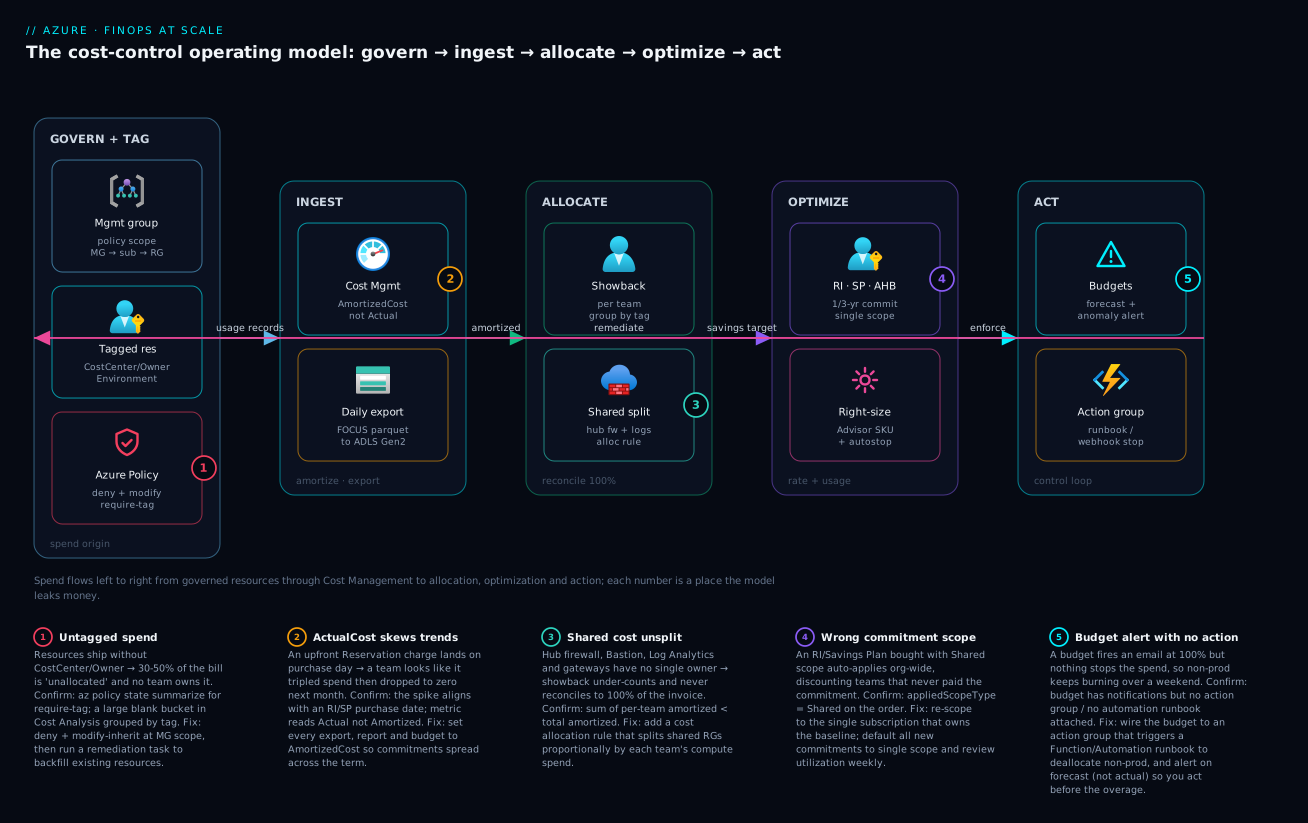
The diagram traces spend the way it actually moves through a mature cost program — left to right as a closed loop — and marks the five places it leaks. Read it as a pipeline. In GOVERN + TAG, the management group anchors policy that flows down to subscriptions and resource groups; Azure Policy denies untagged resources and inherits CostCenter/Owner/Environment so every resource is born attributable (badge 1 marks the leak: weak enforcement → an unallocated bucket). Those tagged resources emit usage records into INGEST, where Cost Management amortizes commitments and a daily FOCUS export lands in ADLS Gen2 (badge 2: reading ActualCost instead of Amortized skews every trend). The amortized data feeds ALLOCATE, where showback slices cost per team by tag and a shared-split allocation rule distributes the hub firewall, Bastion and Log Analytics back to teams so the numbers reconcile to 100% (badge 3: unsplit shared cost makes showback under-count).
From allocation you derive a savings target that drives OPTIMIZE — Reservations / Savings Plans / Hybrid Benefit cut the rate on the stable baseline (badge 4: a Shared-scope commitment discounts a team that never paid), while right-sizing + auto-stop cut the usage. Finally ACT closes the loop: budgets alert on forecast and anomaly, and an action group triggers a Function/runbook that remediates — deallocating non-prod, or remediating tags back at the GOVERN stage (badge 5: a budget that emails but triggers no action lets non-prod burn over a weekend). Notice the loop closes — the remediate flow runs from ACT back to GOVERN, because the output of every overrun is a tightened policy or a stopped resource at the origin. The whole method is: govern so it’s attributable, ingest amortized, allocate to 100%, optimize rate and usage, and act on forecast with automation — and every numbered badge is a specific, confirmable leak with a one-command check.
Real-world scenario
Northwind Commerce runs a multi-tenant retail platform on Azure across 38 subscriptions organized under an mg-landingzones management group: a shared platform subscription (hub VNet, Azure Firewall, Bastion, a central Log Analytics workspace, an Application Gateway), and per-product subscriptions for checkout, search, catalog, billing and a dozen others, plus sandbox subs per team. The FinOps function is two people inside the platform team. Monthly Azure spend had grown to about ₹1.9 crore and the forecast was wrong by 30–40% every month — finance had started talking about a hard spend freeze.
The first audit was brutal. Cost Analysis grouped by CostCenter showed 41% “unallocated” — nearly half the bill belonged to no team. A chart of the billing product showed a 9× spike in March then near-zero in April, which finance had flagged as “a billing bug”; it was actually a ₹14,00,000 1-year SQL Reservation bought upfront and read in ActualCost. The platform subscription — firewall, Bastion, Log Analytics, gateway — was ₹38,00,000/month and charged to nobody, so every product’s showback was wildly understated and no team believed the numbers. Sandbox subscriptions ran 24×7; one had spun up eight Standard_NC GPU VMs for “a quick experiment” six weeks earlier and left them running — about ₹6,00,000 of pure waste discovered only because someone finally grouped by resource.
The remediation ran in three waves over a quarter. Wave 1 — make it attributable. They assigned require-tag (deny) for CostCenter, Owner, Product, Environment and inherit-tag (modify) for the same at mg-landingzones, then ran a remediation task that backfilled tags from resource groups; the unallocated bucket fell from 41% to under 4% in two weeks. They switched every report, budget and export to AmortizedCost, and the “billing bug” vanished — the SQL Reservation now showed as a flat ~₹1,16,000/month. Wave 2 — allocate to 100%. A cost allocation rule split the platform subscription proportionally to each product’s compute spend; for the first time per-team showback summed to the invoice, and the product teams accepted the numbers because they could see why they owed a slice of the firewall.
Wave 3 — optimize and close the loop. With clean tags and trusted allocation, they right-sized 60+ over-provisioned VMs and databases off Advisor (~₹11,00,000/month), put a scheduled Function on Environment=sandbox/dev to deallocate nightly and weekends (~₹9,00,000/month), and — only after right-sizing — bought a 3-year Savings Plan sized to the P50 of steady compute at Single scope per product (so each team’s discount stayed with that team), layering Azure Hybrid Benefit on their owned Windows/SQL licenses. Finally they shipped budgets-as-Bicep into every landing zone: a per-sub budget alerting at 80% actual and 100% forecast, anomaly alerts, and an action group that posts to the team channel and (for non-prod only) triggers the deallocate runbook. The next quarter’s spend landed at ₹1.34 crore — a ~30% reduction while compute capacity grew 18% — and, more importantly, the forecast came within 6% every month, so finance dropped the freeze. The lesson on the wall: “You can’t optimize what you can’t attribute — fix tags and amortization first, or every later number is a fight.”
The program as a before/after, because the order of the fixes is the lesson:
| Stage | Before | Action | After |
|---|---|---|---|
| Attribution | 41% unallocated | Deny + inherit tags at MG; remediate | <4% unallocated |
| Trend accuracy | “9× then zero” billing chart | Switch all reports to AmortizedCost | Flat, real consumption trend |
| Allocation | Platform sub charged to nobody | Allocation rule splits shared cost | Showback sums to 100% of invoice |
| Usage | 60+ oversized; sandbox 24×7; GPU orphans | Advisor right-size + auto-stop + delete | ~₹20,00,000/mo removed |
| Rate | All PAYG | Right-size then 3-yr SP (Single) + AHB | Deep discount on stable floor |
| Control | Surprise on the invoice | Budgets (forecast) + anomaly + runbook | Overruns caught in hours |
Advantages and disadvantages
The FinOps operating model both prevents a class of expensive surprises and imposes real discipline. Weigh it honestly:
| Advantages (why this model helps you) | Disadvantages (why it bites) |
|---|---|
| Cost Management is native and free — no third-party tool needed to start | Doing it well (allocation, automation, FOCUS lakehouse) is real engineering effort |
| Tag governance via policy makes every cost attributable and reconcilable to the invoice | Tag discipline is unforgiving — one missing policy and the unallocated bucket grows; tags aren’t retroactive |
| Amortized reporting gives finance a stable, trustworthy trend to forecast against | The Actual-vs-Amortized distinction is subtle and silently breaks analysis if misread |
| Reservations/SP/AHB/Spot cut steady-state cost 30–70% without changing the workload | Commitments lock you in (term, region, SKU/scope); over-buying or wrong scope wastes money |
| Budgets + anomaly + automation catch overruns in hours, not on the invoice | Budgets don’t cap spend by default; automation on prod is dangerous — careful scoping required |
| Showback creates accountability so each team trims its own waste, preserving velocity | Chargeback adds cross-charging friction and needs trust + clean allocation first |
| Right-sizing and auto-stop are fast, low-risk wins off Advisor’s prioritized list | Aggressive right-sizing without headroom causes performance incidents under peak |
The model is right for any organization past a single team — the cost of not doing it is paid in bill-shock, blunt spend freezes, and unattributable waste. It bites hardest when treated as a finance afterthought rather than an engineering practice: tags applied late (so cost is already unallocated), commitments bought before a baseline exists, and automation bolted onto production where it can do damage. Every disadvantage is manageable — and the whole point is to make cost a continuous, low-friction part of how you build, not a quarterly fire-drill.
Hands-on lab
Stand up the core controls on one subscription — tag enforcement, a budget with forecast alerting, an amortized query, and an orphan hunt — all using free Cost Management and a near-zero-cost test resource. Run in Cloud Shell (Bash).
Step 1 — Variables and a resource group.
RG=rg-finops-lab
LOC=centralindia
SUB=$(az account show --query id -o tsv)
az group create -n $RG -l $LOC -o table
Step 2 — Assign a require-tag (deny) policy at the resource-group scope (we scope to the RG for a safe, reversible lab; in production you’d scope to a management group).
az policy assignment create \
  --name "lab-require-costcenter" \
  --display-name "Lab: require CostCenter (deny)" \
  --scope "/subscriptions/$SUB/resourceGroups/$RG" \
  --policy "871b6d14-10aa-478d-b590-94f262ecfa99" \
  --params '{ "tagName": { "value": "CostCenter" } }'
Step 3 — Prove the deny works. Try to create a public IP without the tag (expect a policy denial), then with it (expect success):
# Expect: RequestDisallowedByPolicy — the deny fired
az network public-ip create -g $RG -n pip-untagged -o table

# Expect: success — the required tag is present
az network public-ip create -g $RG -n pip-tagged --tags CostCenter=CC-LAB Owner=you Environment=dev -o table
The first command failing with RequestDisallowedByPolicy is the lab’s core lesson: untagged spend can’t be created, so it can’t become unallocated.
Step 4 — Create a budget with a forecast alert. A ₹1,000 monthly budget alerting at 80% actual and 100% forecast (swap in an action group ID if you have one):
az consumption budget create \
  --budget-name "lab-budget" \
  --amount 1000 --time-grain Monthly \
  --start-date 2026-06-01 --end-date 2026-12-01 \
  --category Cost \
  --notifications '{
    "actual80": { "enabled": true, "operator": "GreaterThan", "threshold": 80, "contactEmails": ["you@example.com"] },
    "forecast100": { "enabled": true, "operator": "GreaterThan", "threshold": 100, "thresholdType": "Forecasted", "contactEmails": ["you@example.com"] }
  }'
Step 5 — Query amortized cost for the subscription, grouped by CostCenter. This is the month-end pack in one call:
az rest --method post \
  --uri "https://management.azure.com/subscriptions/$SUB/providers/Microsoft.CostManagement/query?api-version=2024-08-01" \
  --body '{ "type": "AmortizedCost", "timeframe": "MonthToDate",
    "dataset": { "granularity": "None",
      "aggregation": { "total": { "name": "Cost", "function": "Sum" } },
      "grouping": [ { "type": "TagKey", "name": "CostCenter" } ] } }' \
  --query "properties.rows"
Expected: rows of [cost, CostCenter, currency] — your CC-LAB resources appear under their tag; anything untagged appears as a blank bucket (which, after Step 2, should be shrinking).
Step 6 — Hunt orphans with Resource Graph. Find unattached disks and unassociated static IPs across the subscription:
az graph query -q "Resources
| where (type == 'microsoft.compute/disks' and properties.diskState == 'Unattached')
   or (type == 'microsoft.network/publicipaddresses' and isnull(properties.ipConfiguration))
| project name, type, resourceGroup, location" -o table
Validation checklist. You enforced tagging (deny blocked an untagged create), created a budget that alerts on forecast before the overage, pulled amortized cost grouped by team in one API call, and inventoried orphaned waste — the four pillars of the loop, on one subscription.
| Step | What you did | What it proves | Real-world analogue |
|---|---|---|---|
| 2–3 | Deny untagged create | Untagged spend can’t be born | MG-scope tag governance |
| 4 | Budget with forecast alert | You act before the overage | Per-sub budgets-as-code |
| 5 | Amortized query by tag | The correct metric, scripted | Month-end showback pack |
| 6 | Resource Graph orphan hunt | Waste is findable and deletable | Monthly orphan sweep |
Cleanup (avoid lingering charges).
az policy assignment delete --name "lab-require-costcenter" --scope "/subscriptions/$SUB/resourceGroups/$RG"
az consumption budget delete --budget-name "lab-budget"
az group delete -n $RG --yes --no-wait
Cost note. A static public IP is a few paise per hour; the whole lab runs well under ₹20, and deleting the resource group plus the budget/policy stops everything. Cost Management, budgets, and the Query API are free.
Common mistakes & troubleshooting
This is the playbook — the part you bookmark and reopen at month-end. First as a scannable table, then the entries that bite hardest with full confirm-detail.
| # | Symptom | Root cause | Confirm (exact cmd / portal path) | Fix |
|---|---|---|---|---|
| 1 | Large “unallocated / no CostCenter” bucket | No tag-governance policy, or only at sub scope | Cost Analysis → group by CostCenter; az policy state summarize low compliance |
Deny + inherit tags at MG scope; remediation task |
| 2 | A team “tripled then dropped to zero” | Reading ActualCost; a commitment landed | Cost Analysis metric = Actual; spike aligns with RI/SP buy date | Switch all reports/budgets/exports to AmortizedCost |
| 3 | Per-team showback < invoice total | Shared/hub cost not allocated to teams | Sum grouped amortized < account amortized | Add a cost allocation rule for shared RGs |
| 4 | Reservation discount on a team that didn’t buy | Shared scope auto-applies org-wide | az reservations reservation list → appliedScopeType == Shared |
Re-scope to Single; default new buys Single |
| 5 | Low RI/SP utilization, money wasted | Over-bought, or baseline shrank/re-architected | Reservations → Utilization < 90% | Re-scope Shared to pool; resize/let lapse at renewal |
| 6 | Budget “fired” but spend kept climbing | Budget emails only; no action group / no forecast | Budget has notifications, no action group | Wire to action group → runbook; alert on forecast |
| 7 | Tagged today but last month still unallocated | Tags aren’t retroactive in cost data | Cost predates the tag application | Enforce + remediate early; can’t backfill old cost |
| 8 | Non-prod bill high despite “stopped” VMs | VMs stopped from OS, still allocated | az vm get-instance-view → PowerState/stopped (not deallocated) |
Deallocate (az vm deallocate), not OS shutdown |
| 9 | Storage cost creeping with little new data | Hot tier for cold data; orphaned snapshots/disks | Cost by meter; Resource Graph orphan query | Lifecycle-tier to cool/archive; delete orphans |
| 10 | Log Analytics / App Insights bill exploded | Verbose or duplicated ingestion | Cost by service = Monitor; ingestion volume spike | Sampling, table-level retention, drop noisy logs |
| 11 | Export job produces no/partial files | Wrong scope, storage RBAC, or schema mismatch | az costmanagement export show; storage container empty |
Fix scope/RBAC; re-run; verify FOCUS schema |
| 12 | Anomaly/overrun found weeks late on invoice | No anomaly alert; no forecast budget | No anomaly subscription; budgets actual-only | Enable anomaly alerts + forecast budgets |
| 13 | Chargeback numbers rejected by finance | Amortized used for cash tie-out (or vice-versa) | Numbers don’t tie to GL/invoice | Actual for cash tie-out, Amortized for showback |
| 14 | Right-sized then performance incidents | Downsized without peak headroom | Advisor applied blindly; p95 CPU/RU pinned post-change | Re-size up; validate against real peak before cutting |
The expanded form, for the entries that cost the most time and money:
1. A large “unallocated / no CostCenter” bucket in Cost Analysis.
Root cause: No require-tag (deny) and no inherit-tag (modify) policy, or they’re only at subscription scope so new subs and service-created resources slip through.
Confirm: Cost Analysis → group by CostCenter shows a big blank bucket; az policy state summarize --management-group <mg> --filter "PolicyAssignmentName eq 'require-costcenter'" shows low compliance; Resource Graph Resources | where isnull(tags['CostCenter']) lists the offenders.
Fix: Assign deny + inherit at the management-group root; run a remediation task to backfill existing resources; add allowedValues on Environment to stop value fragmentation.
2. A team “tripled then went to zero.”
Root cause: Reporting in ActualCost, so an upfront Reservation/Savings Plan purchase posts its whole charge on the buy date, then ₹0 for that resource over the term.
Confirm: The Cost Analysis metric selector reads Actual; the spike date matches a reservation order’s purchase date (az reservations reservation-order list).
Fix: Switch every report, budget, and export to AmortizedCost; reserve Actual only for cash-invoice reconciliation.
3. Per-team showback sums to less than the invoice.
Root cause: Shared services (hub firewall, Bastion, Log Analytics, gateways) in the platform subscription aren’t allocated to teams.
Confirm: Sum the per-CostCenter amortized totals from the Query API; it’s less than the account amortized total.
Fix: Add a cost allocation rule that splits the shared RGs/subscription to teams by a basis (proportional to compute is usually fairest); re-check that the per-team sum now equals the invoice.
4. A reservation discount landed on a team that never bought it.
Root cause: The commitment was purchased with Shared applied-scope, so its discount auto-applies to any matching resource across the billing account.
Confirm: az reservations reservation list shows appliedScopeType == Shared.
Fix: az reservations reservation update --applied-scope-type Single --applied-scopes /subscriptions/<id>; make Single the default for new commitments unless you deliberately want pooled utilization.
6. A budget “fired” but spend kept climbing.
Root cause: Budgets don’t cap spend — by default they email. The alert wasn’t wired to an action group that runs automation, and it alerted on actual (too late) rather than forecast.
Confirm: The budget shows notifications but no contactGroups/action group; threshold type is Actual.
Fix: Attach an action group → Automation runbook/Function that deallocates non-prod; add a Forecasted threshold so you act days before the overage. Never auto-deallocate production.
8. Non-prod bill stays high even though VMs are “stopped.”
Root cause: The VMs were stopped from inside the OS (or “Stop” that leaves them allocated) — compute is still billed. Only deallocated VMs stop compute charges.
Confirm: az vm get-instance-view --ids <id> --query "instanceView.statuses[?starts_with(code,'PowerState')].code" shows PowerState/stopped rather than PowerState/deallocated.
Fix: Use az vm deallocate (or the auto-stop runbook) — and remember disks and static IPs still bill even when deallocated.
10. Log Analytics / Application Insights bill exploded. Root cause: Verbose, duplicated, or unsampled ingestion — a chatty app, debug logging left on, or multiple agents shipping the same data. Confirm: Cost by service shows Monitor climbing; the workspace’s ingestion volume spikes; the same telemetry observability story from Azure Monitor and Application Insights. Fix: Turn on adaptive sampling, set table-level retention (keep verbose tables short), drop noisy logs at the data collection rule, and consolidate duplicate agents — without dropping signal you need for incidents.
Best practices
- Enforce tagging at the management-group root, with deny + inherit + remediation. Tags applied by hand decay; the only durable attribution is “untagged can’t be created” plus “inherit from the RG” plus a remediation task for what already exists. Do this first — every later number depends on it.
- Report everything in AmortizedCost. Showback, budgets, trends, exports — all Amortized. Reserve ActualCost strictly for tying out to the cash invoice. Reading the wrong metric is the most common analysis error.
- Allocate to 100%, including shared cost. Use cost allocation rules to split the hub firewall, Bastion, Log Analytics and gateways back to teams, or showback never reconciles and teams reject it.
- Right-size before you commit. Cut over-provisioned SKUs off Advisor first, then buy Reservations/Savings Plans against the smaller, stable floor — never commit to oversized capacity.
- Default commitments to Single scope. Single keeps each team’s discount with the team that paid for it (clean chargeback). Use Shared deliberately, only when you want pooled utilization and accept messier attribution.
- Layer the rate levers. Apply Hybrid Benefit to owned licenses, cover the steady baseline with a Savings Plan (flexible) or Reservations (deeper for a known shape), and burst interruptible work on Spot.
- Auto-stop non-production by the
Environmenttag. Deallocate (not OS-stop) dev/test/sandbox nights and weekends — ~65% off non-prod compute for a few lines of automation. - Budgets-as-code in every landing zone. Ship a per-subscription budget in Bicep so every new sub is born with a guardrail; alert on forecast at 100% and actual at 80%.
- Wire alerts to action, and automate destructively only in non-prod. A budget that emails is a smoke detector with no sprinkler; attach a runbook. Never let automation deallocate production.
- Enable anomaly alerts. Budgets catch known limits; anomaly detection catches the unknowns — leaked keys, runaway queries, log explosions — in hours rather than on the invoice.
- Run a regular cadence. Weekly anomaly/utilization review, monthly showback pack and orphan sweep, quarterly commitment and right-sizing review. Cost is a habit, not a project.
- Hunt orphans on a schedule. Unattached disks, unassociated static IPs, stale snapshots, empty App Service plans — a monthly Resource Graph sweep removes pure waste.
Security notes
- Cost data is sensitive — treat it like architecture documentation. A cost export reveals your SKUs, scale, regions and service mix. Store exports in a dedicated FinOps storage account with restricted RBAC (and ideally a private endpoint), not a shared bucket.
- Least-privilege Cost Management roles. Grant Cost Management Reader for analysts who only view, Cost Management Contributor for those who manage budgets/exports, and reserve Owner/Billing roles for the few who purchase commitments. Don’t hand out billing-account access to read a chart.
- Separate “see cost” from “spend money.” Viewing cost (Reader) is very different from buying a 3-year Reservation (a real financial commitment). Gate purchases behind a named approver and an audit trail, not a broad role.
- Automation runbooks act with power — scope their identity tightly. The Function/Automation managed identity that deallocates non-prod must be limited to non-production scopes with only the deallocate/stop actions it needs — never Owner, never production. A compromised over-privileged cost runbook could take down prod.
- Cost anomalies are a security signal. A sudden spend spike is often the first visible sign of a compromise — leaked credentials spinning up crypto-mining VMs, or data exfiltration egress. Route anomaly alerts to security, not just finance.
- Don’t leak tags that are secrets.
Owneremails andCostCentercodes are fine; never put credentials, tokens, or sensitive identifiers in tags — tags are broadly readable and surface in exports and Resource Graph. - Audit who changes budgets and commitments. Budget thresholds and reservation scopes are control-plane changes; review them in the Activity log so a silently-raised budget or a re-scoped reservation doesn’t hide an overrun.
Cost & sizing
FinOps tooling is itself nearly free; the spend is in the workload, and the practice is what right-sizes it. What drives the (small) tooling cost and the (large) savings:
- Cost Management, budgets, anomaly alerts and the Query API are free. There is no excuse not to run the loop. The only direct costs are exports (you pay for the storage they write to — pennies, tiered with lifecycle rules) and any automation (a Consumption Function/Automation runbook for auto-stop costs a few rupees a month).
- The savings dwarf the tooling. Right-sizing typically reclaims 20–50% on the affected resources; auto-stop reclaims ~65% of non-production compute; Reservations/Savings Plans cut steady-state compute 30–72%; Hybrid Benefit removes license cost on eligible Windows/SQL. A program that touches all four routinely lands 25–40% off a previously un-optimized bill.
- Right-size before committing, so you don’t pay a 3-year discount on capacity you didn’t need. Commit the floor (P50 of steady usage), not the peak — leave headroom on pay-as-you-go and Spot.
- The two FinOps engineers pay for themselves many times over at this scale: on a ₹1.9 crore/month bill, a 30% reduction is ~₹57,00,000/month — the headcount is a rounding error against it.
A rough monthly picture of the tooling cost for a large multi-subscription estate (the workload is separate and is what you’re optimizing):
| Tooling cost driver | What you pay for | Rough INR / month | What it enables | Watch-out |
|---|---|---|---|---|
| Cost Management + budgets + anomaly | Native service | ₹0 | The entire analysis + alert loop | None — it’s free |
| Query API | Native API | ₹0 | Scripted month-end packs, dashboards | Throttled at high call rates |
| Daily FOCUS export storage | ADLS Gen2 GB-month | ~₹100–1,000 | Lakehouse-scale analysis, history | Lifecycle-tier old months |
| Auto-stop automation | Function/Automation runs | ~₹50–500 | ~65% off non-prod compute | Schedule must respect work hours |
| Lakehouse compute (optional) | Spark/SQL for exports | Varies | Cost joined to KPIs / unit economics | Only if you outgrow the portal |
| Net effect | — | Tooling ≈ ₹1k–2k | Savings ≈ 25–40% of the bill | Effort is the real cost, not money |
Interview & exam questions
1. What is the difference between AmortizedCost and ActualCost, and which do you use for showback? ActualCost records a charge on the day it hits the account, so an upfront Reservation shows its whole cost on the purchase day then ₹0 over the term. AmortizedCost spreads commitments evenly across their term, reflecting consumption. Use Amortized for showback, budgets and trends; use Actual only to reconcile to the cash invoice.
2. You see a large “unallocated” bucket in Cost Analysis. What’s the cause and the durable fix? Resources shipped untagged because there’s no tag-governance policy (or only at subscription scope). The durable fix is deny (require-tag) plus modify (inherit-tag) at the management-group root, then a remediation task to backfill existing resources — and accept that tags aren’t retroactive, so cost before tagging stays unallocated.
3. A reservation’s discount is landing on a team that never paid for it. Why, and how do you fix it? The reservation was bought with Shared applied-scope, which auto-applies its discount to any matching resource across the billing account. Re-scope it to Single (the subscription that owns the baseline) with az reservations reservation update --applied-scope-type Single, and default new commitments to Single for clean chargeback.
4. How do you make a budget actually control spend rather than just notify? A budget only emails by default. Attach an action group that triggers an Automation runbook/Function to take a safe action (deallocate non-prod), and alert on Forecasted spend so you act before the overage. Critically, never auto-deallocate production — that’s a notify-and-investigate event.
5. Reservations vs Savings Plans — when do you pick which? Reservations commit to a specific SKU family + region and give the deepest discount (up to ~72%) for a known, stable shape. Savings Plans commit to a fixed $/hour of compute with full region/SKU flexibility (up to ~65%) and are forgiving when your shapes change. Pick RIs for a fixed baseline you’re confident in; SPs when the workload mix evolves.
6. Why must you right-size before buying commitments? Commitments lock in a rate for whatever capacity you run; if you commit to oversized resources you pay a multi-year discount on waste. Right-size off Advisor first, then commit to the smaller, stable floor of usage — never the pre-optimization or peak number.
7. How do you allocate shared services (hub firewall, Log Analytics) so showback reconciles to the invoice? Use a cost allocation rule that splits the shared resource group/subscription to teams by a basis — proportional to compute spend is usually fairest. Without it, the sum of per-team showback is always less than the bill and teams reject the numbers. Validate by checking the per-team amortized total equals the account amortized total.
8. A dev VM was “stopped” but still costs money. Why? It was stopped from inside the OS (or otherwise left allocated) — Azure still bills compute for allocated VMs. Only deallocated VMs stop compute charges (az vm deallocate); even then, disks and static public IPs continue to bill.
9. What does the FOCUS schema give you over the legacy export formats? FOCUS (FinOps Open Cost and Usage Specification) is a vendor-neutral, standardized column set, so the same queries and dashboards work across clouds and survive a billing-format change. It future-proofs a lakehouse cost pipeline and eases multi-cloud unit-economics.
10. How do you catch a runaway cost (a leaked key spinning up VMs) before the invoice? Budgets catch known thresholds; anomaly alerts (Cost Management’s built-in ML) catch statistically unusual spend day-over-day and page you in hours. Wire both to an action group, and route anomaly alerts to security too — a spend spike is often the first visible sign of a compromise.
11. What’s the difference between showback and chargeback, and which do you start with? Showback shows each team its cost without moving money (low friction — start here). Chargeback actually bills the cost to the team’s budget (real accountability, more friction). Move to chargeback only after showback is trusted and you can attribute ~100% of the invoice, including shared cost.
12. Which Azure roles separate “viewing cost” from “spending money,” and why does it matter? Cost Management Reader views cost; Cost Management Contributor manages budgets/exports; purchasing Reservations/Savings Plans needs billing/owner-level rights. Separating them enforces least privilege — viewing a chart shouldn’t grant the ability to make a 3-year financial commitment.
These map to AZ-104 (Administrator) — monitor and manage Azure resources, cost management, budgets, tags — and AZ-305 (Solutions Architect) — design a cost-optimized architecture, governance, and the resource-organization/allocation model. The commitment and billing depth touches the Microsoft FinOps guidance and the FinOps Framework certification. A compact mapping for revision:
| Question theme | Primary cert | Objective area |
|---|---|---|
| Tags, policy governance, allocation | AZ-104 / AZ-305 | Governance; resource organization |
| Cost Management, budgets, alerts | AZ-104 | Monitor & manage resources |
| Amortized vs Actual, exports/FOCUS | FinOps Framework | Inform / data |
| Reservations, Savings Plans, AHB, Spot | AZ-305 / FinOps | Cost-optimized design; Optimize |
| Right-sizing, auto-stop, anomalies | AZ-305 / FinOps | Optimize / Operate |
| Showback vs chargeback, scope/roles | FinOps Framework | Operate; allocation |
Quick check
- A chart shows one team’s spend at 9× in March and near-zero in April. Which cost metric are you almost certainly reading, and what should you switch to?
- Your per-team showback sums to ₹1.2 crore but the invoice says ₹1.6 crore. What’s the most likely cause and the fix?
- True or false: an Azure budget will stop spending once it’s breached.
- A 3-year Reservation’s discount is applying to teams that didn’t buy it. What setting caused this and what do you change it to?
- You “stopped” all dev VMs from inside the OS but the non-prod bill barely moved. Why, and what’s the correct action?
Answers
- You’re reading ActualCost, which posts an upfront Reservation/Savings Plan charge entirely on its purchase day and ₹0 over the rest of the term. Switch every report, budget and export to AmortizedCost, which spreads the commitment across its term and reflects real consumption.
- Shared cost isn’t being allocated — the hub firewall, Log Analytics, Bastion and gateways in the platform subscription aren’t split back to teams, so the per-team sum is short of the invoice. Add a cost allocation rule to distribute the shared RGs/subscription to teams (proportional to compute is usually fairest), then re-check that the per-team amortized total equals the account amortized total.
- False. A budget only alerts (emails by default); it does not cap spend. It becomes a control only when its alert triggers an action group → automation that takes action, and you alert on forecast to act before the overage. Never auto-deallocate production.
- The reservation was bought with Shared applied-scope, which auto-applies the discount org-wide. Change it to Single scope (
az reservations reservation update --applied-scope-type Single --applied-scopes /subscriptions/<id>) tied to the subscription that owns the baseline, and default new commitments to Single. - VMs stopped from inside the OS stay allocated, and Azure still bills compute for allocated VMs. Use
az vm deallocate(or an auto-stop runbook) to release the compute — though disks and static public IPs continue to bill even when deallocated.
Glossary
- FinOps — a cultural and operational practice bringing engineering, finance and product into one loop so cloud spend is visible, attributable and continuously optimized; phased as Inform → Optimize → Operate.
- Azure Cost Management — the native, free service for cost analysis, budgets, alerts and exports, built into every subscription and billing account.
- ActualCost — the cost metric recording a charge on the day it posts to the account; an upfront commitment shows its full cost on the purchase day.
- AmortizedCost — the cost metric spreading a commitment evenly across its term, reflecting consumption; the correct metric for showback, budgets and trends.
- Tag — key/value metadata on a resource, resource group or subscription; the orthogonal dimension that lets you slice cost by team, environment or product.
- CostCenter / Owner / Environment tags — the minimal cost-attribution schema: who pays, who’s responsible, and which lifecycle stage (drives non-prod auto-stop).
- Azure Policy (deny / modify / audit) — the enforcement engine: deny blocks untagged creation, modify (inherit) copies tags down and backfills via remediation, audit reports without blocking.
- Showback — showing each team its cost without moving money (visibility, low friction).
- Chargeback — actually billing cost back to a team’s budget (accountability, higher friction; needs clean allocation and trust first).
- Cost allocation rule — a Cost Management rule that splits shared cost (hub firewall, Log Analytics, gateways) to teams by a basis, so showback reconciles to 100% of the invoice.
- Export / FOCUS — a scheduled write of the full cost dataset to storage; FOCUS is the vendor-neutral FinOps Open Cost and Usage Specification schema for cross-cloud analysis.
- Reservation (RI) — a 1- or 3-year commitment to a specific SKU family + region for a deep discount (up to ~72%) on a known, stable baseline.
- Savings Plan (SP) — a 1- or 3-year commitment to a fixed $/hour of compute with region/SKU flexibility (up to ~65%); forgiving as workload shapes change.
- Azure Hybrid Benefit (AHB) — using owned Windows Server / SQL Server licenses to remove license cost on eligible Azure SKUs.
- Spot — evictable surplus capacity at a deep discount (up to ~90%) for interruptible workloads; can be reclaimed with ~30 seconds’ notice.
- Applied scope (Single / Shared) — which resources a commitment discounts; Single ties it to one subscription (clean attribution), Shared auto-applies org-wide (max utilization, messy attribution).
- Budget — a spend threshold at a scope with alert rules; alerts (doesn’t cap) on actual or forecasted spend, and becomes a control when wired to an action group.
- Anomaly alert — Cost Management’s ML-based detection of statistically unusual spend, catching unknown-unknowns (leaks, runaways) day-over-day.
- Right-sizing — matching a resource’s SKU to its real utilization (off Azure Advisor) to cut the usage axis of cost.
- Deallocate — fully releasing a VM’s compute so it stops billing (distinct from an OS-level stop, which leaves the VM allocated and still billing).
- Azure Advisor (Cost) — the service that continuously recommends right-sizing and idle-resource cleanup with estimated savings — the prioritized usage-reduction worklist.
Next steps
You can now stand up the full cost-control loop — attribute, amortize, allocate, optimize and act. Build outward:
- Next: Azure Cost: Reservations, Savings Plans & Hybrid Benefit Strategy — go deep on the commitment math, break-even and scope decisions behind the rate axis.
- Related: The Azure FinOps Engineering Guide — the engineering-grade companion: amortization internals, allocation queries and the commitment loop in code.
- Foundation: Azure Policy and Governance at Scale — the enforcement engine behind tag governance, deny rules and remediation.
- Foundation: Azure Resource Hierarchy Explained — the management-group/subscription/RG tree that is your cost-allocation boundary.
- Related: Azure Enterprise-Scale Landing Zone — where budgets-as-code, tag policy and shared-service allocation live in a real platform.
- Related: Azure Monitor & Application Insights for Observability — control the log-ingestion line item that quietly inflates many bills.